

Qu'est-ce qu'un contrôleur WiFi et en avez-vous besoin ?
This authoritative guide provides IT leaders and network architects with a practical overview of WiFi controllers, detailing their function, comparing on-premises and cloud-based models, and explaining how they integrate with WiFi intelligence platforms like Purple. It offers actionable insights for deploying scalable, secure, and high-performance wireless networks in enterprise environments such as hospitality, retail, and large venues. By the end, readers will have a clear framework for choosing the right controller architecture and understanding where a platform like Purple adds transformative business value.
🎧 Écouter ce guide
Voir la transcription
Synthèse
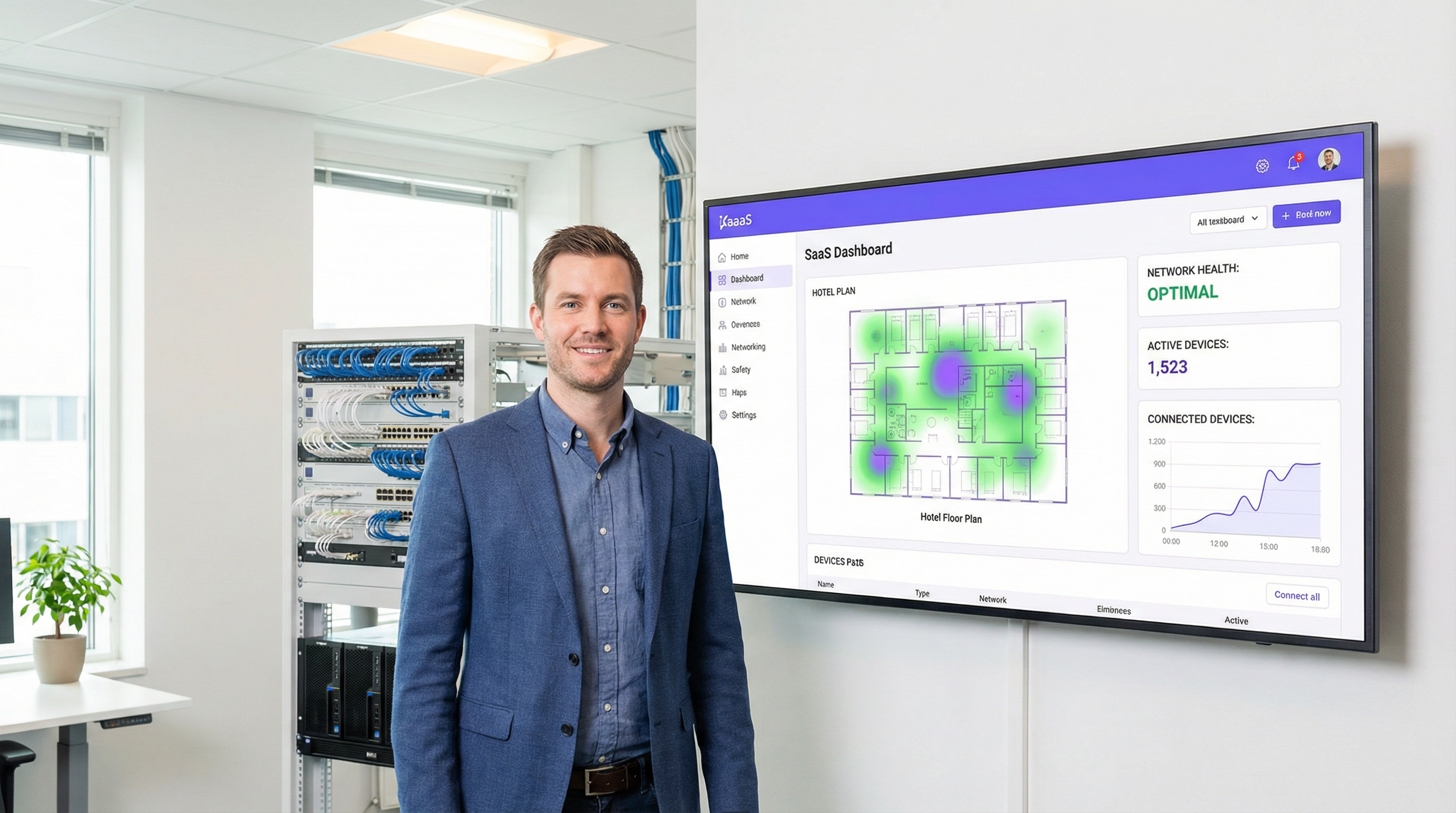
Un contrôleur de réseau local sans fil (WLC), ou contrôleur WiFi, est un composant réseau centralisé qui gère plusieurs points d'accès (PA) depuis une interface unique, garantissant l'application cohérente des politiques, une administration simplifiée et une sécurité renforcée sur l'ensemble du réseau sans fil de l'entreprise. Pour les responsables informatiques, les architectes réseau et les directeurs techniques (CTO) qui supervisent la connectivité dans des lieux tels que les hôtels, les chaînes de magasins ou les stades, le contrôleur est le cerveau des opérations. Il automatise des fonctions critiques telles que la gestion des radiofréquences (RF), l'itinérance des clients (roaming), l'authentification et l'équilibrage de charge — des fonctions qu'il est tout simplement impossible de gérer à grande échelle avec des points d'accès autonomes.
La principale décision à laquelle les dirigeants sont confrontés aujourd'hui n'est pas de savoir s'il faut utiliser un contrôleur, mais quel modèle de déploiement adopter : un contrôleur matériel traditionnel sur site (on-premises) ou une solution cloud moderne. Les contrôleurs sur site offrent un contrôle granulaire et maintiennent tout le traitement des données en local, une exigence clé pour certains cadres de conformité, mais ils nécessitent des dépenses d'investissement (CapEx) importantes et une expertise spécialisée sur place. À l'inverse, le WiFi géré dans le cloud transforme la gestion en un service par abonnement, offrant une évolutivité supérieure, un provisionnement sans intervention (zero-touch) pour les déploiements multisites et une réduction des frais d'exploitation.
Purple agit comme une puissante couche d'intelligence (overlay), s'intégrant à l'infrastructure de contrôleurs existante de fournisseurs tels que Cisco, Aruba et Ruckus pour fournir des services WiFi invités avancés, des analyses et des capacités marketing sans altérer la structure principale du réseau. Ce guide propose une analyse technique approfondie de ces architectures pour vous aider à déterminer la stratégie la plus adaptée à votre organisation.
Analyse technique approfondie
Fondamentalement, un contrôleur WiFi résout le problème de l'échelle. Un seul point d'accès est simple à configurer, mais gérer individuellement dix, cent ou mille points d'accès est intenable. L'architecture WLC centralise cette gestion, créant un système unifié et intelligent. Cela est généralement réalisé à l'aide du protocole Control and Provisioning of Wireless Access Points (CAPWAP), une norme IETF définie dans la RFC 5415. CAPWAP crée un tunnel sécurisé entre chaque point d'accès et le contrôleur, séparant les fonctions de gestion et de contrôle (le « plan de contrôle ») du trafic de données des utilisateurs finaux (le « plan de données »).
Les fonctions clés du contrôleur englobent l'ensemble du cycle de vie de la gestion du réseau sans fil. La gestion centralisée des points d'accès est le rôle le plus fondamental : depuis le contrôleur, les administrateurs peuvent déployer des mises à jour de firmware, configurer les SSID, définir des politiques de sécurité telles que WPA3-Enterprise et configurer des VLAN pour tous les points d'accès connectés simultanément. La gestion dynamique des RF permet au contrôleur de surveiller en permanence le spectre des radiofréquences, en ajustant automatiquement les attributions de canaux et les niveaux de puissance des points d'accès pour atténuer les interférences et optimiser la couverture. L'itinérance fluide des clients est facilitée par le contrôleur qui gère les clés de sécurité et l'état des sessions lorsque les utilisateurs se déplacent entre les points d'accès, en s'appuyant sur les normes 802.11k/v/r pour des transitions rapides. L'authentification et l'application des politiques permettent au WLC d'agir comme un point de contrôle central, s'intégrant à un serveur RADIUS et à la norme IEEE 802.1X pour accorder l'accès au réseau en fonction de l'identité de l'utilisateur et de l'état de l'appareil, permettant ainsi un contrôle d'accès robuste basé sur les rôles.
Sur site vs Géré dans le cloud : le compromis architectural
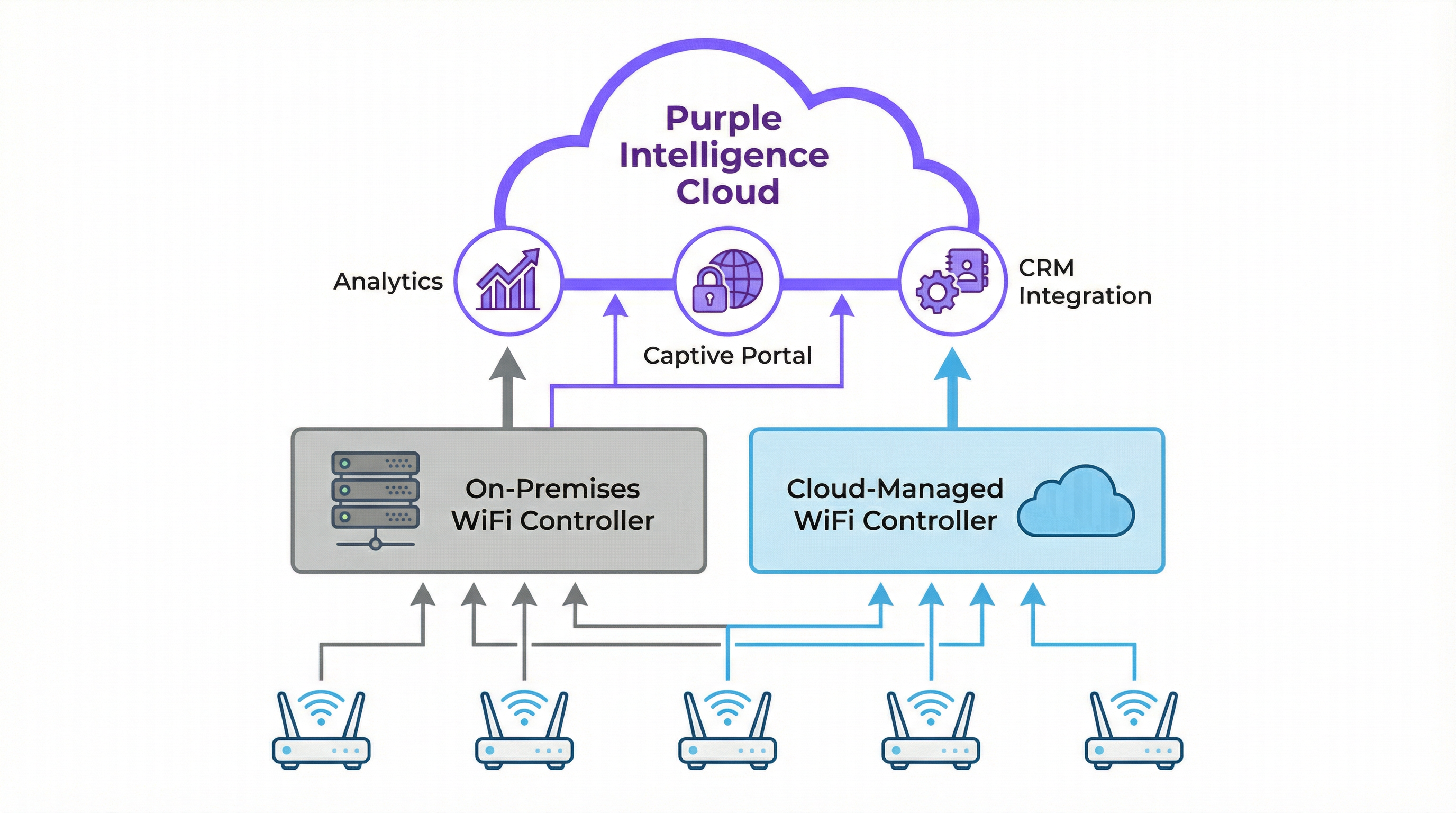
Le choix stratégique entre un WLC sur site et un WLC géré dans le cloud a des implications significatives en termes de coûts, d'évolutivité et d'opérations. Le tableau ci-dessous résume les principaux compromis.
| Fonctionnalité | Contrôleur sur site | WiFi géré dans le cloud |
|---|---|---|
| Modèle de déploiement | Appliance physique ou virtuelle dans un centre de données local | Plan de gestion hébergé par un fournisseur tiers |
| Coût initial (CapEx) | Élevé — appliances matérielles avec des limites de capacité spécifiques | Faible — aucun matériel de contrôleur sur site requis |
| Coût d'exploitation (OpEx) | Coûts récurrents plus faibles, mais inclut l'alimentation et la maintenance | Coûts récurrents plus élevés via une licence d'abonnement annuel |
| Évolutivité | Limitée par la capacité matérielle ; les mises à niveau nécessitent un nouveau matériel | Hautement élastique ; ajout de nouveaux points d'accès et sites avec un simple ajustement de licence |
| Gestion multisite | Complexe ; nécessite souvent des VPN ou des contrôleurs dédiés par site | Simple ; un tableau de bord web unique offre une vue globale unifiée |
| Dépendance à Internet | Faible ; le WiFi principal continue de fonctionner en cas de panne d'Internet | Élevée ; Internet requis pour la gestion et la configuration |
| Conformité et données | Idéal pour les exigences strictes en matière de souveraineté des données | Nécessite une vérification préalable du fournisseur pour la conformité GDPR et PCI DSS |
Comment Purple s'intègre à votre contrôleur
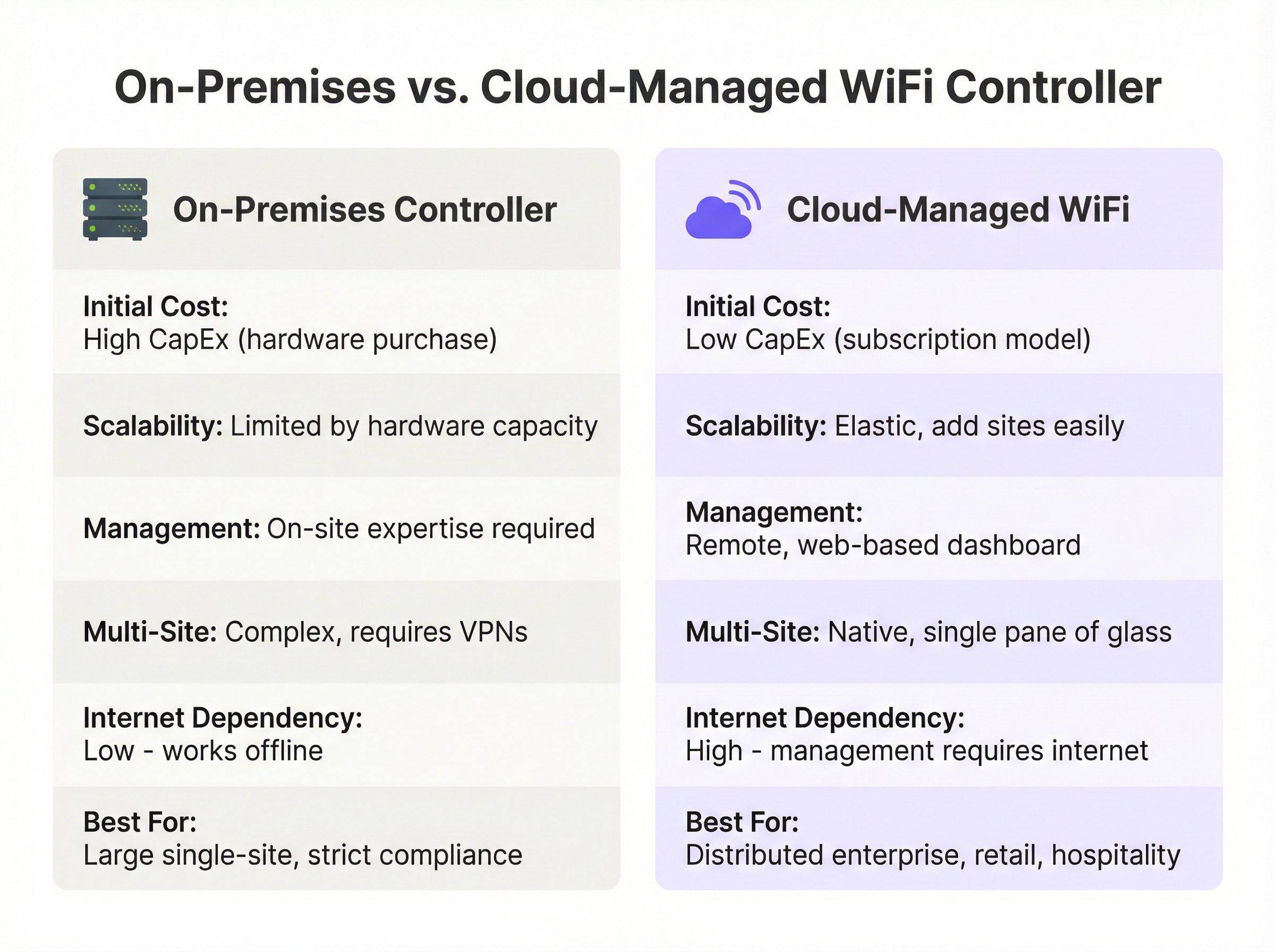
Purple est une plateforme d'intelligence WiFi basée sur le cloud qui fonctionne comme une couche superposée (overlay) sophistiquée, améliorant les capacités de votre infrastructure réseau existante plutôt que de la remplacer. Elle s'intègre de manière transparente aux architectures de contrôleurs sur site et gérées dans le cloud de plus de 200 fournisseurs de matériel.
L'intégration suit une séquence claire. Tout d'abord, le contrôleur WiFi est configuré pour rediriger tous les nouveaux appareils invités non authentifiés vers le Captive Portal de Purple. L'utilisateur s'authentifie ensuite via une page d'accueil personnalisée, en utilisant des identifiants de réseaux sociaux, la soumission d'un formulaire ou des profils Passpoint/OpenRoaming fluides — un processus entièrement conforme au GDPR et au CCPA. Une fois l'authentification réussie, Purple capture de précieuses données démographiques et comportementales (avec consentement), qui alimentent le moteur d'analyse et peuvent être intégrées à votre CRM. Enfin, Purple signale au contrôleur d'accorder l'accès à Internet à l'appareil, en appliquant toutes les politiques prédéfinies telles que les limites de bande passante, la durée de la session ou le filtrage de contenu via Purple Shield.
Ce modèle permet aux organisations de conserver leur investissement dans un matériel d'entreprise robuste tout en y ajoutant de puissants outils d'analyse et d'engagement des invités qui génèrent de la valeur commerciale.
Guide de mise en œuvre
Le déploiement ou la mise à niveau de l'architecture de votre contrôleur WiFi nécessite une approche structurée. Ce guide, indépendant de tout fournisseur, décrit les phases clés d'une mise en œuvre réussie.
Phase 1 : Découverte et recueil des besoins. Réalisez une étude RF physique ou prédictive pour déterminer le nombre et l'emplacement optimaux des points d'accès, en tenant compte des matériaux de construction, de la densité des utilisateurs et des exigences de débit des applications. Documentez les principaux cas d'usage — accès invités, personnel interne, systèmes de point de vente, appareils IoT — car ceux-ci dicteront la segmentation et les politiques de sécurité. Cataloguez votre infrastructure réseau actuelle et identifiez toutes les exigences réglementaires, y compris la norme PCI DSS pour le commerce de détail et le GDPR pour le traitement des données des citoyens de l'UE.
Phase 2 : Sélection de l'architecture. Utilisez le tableau comparatif et le diagramme de flux de décision de ce guide pour choisir entre les solutions sur site et celles gérées dans le cloud. Pour la plupart des entreprises multisites dans le commerce de détail, l'hôtellerie et les secteurs similaires, l'efficacité opérationnelle et l'évolutivité d'une architecture gérée dans le cloud constituent un argument commercial convaincant.
Phase 3 : Déploiement et configuration. Configurez des VLAN séparés pour chaque groupe d'utilisateurs (Invités, Personnel, Entreprise, IoT) — il s'agit d'une mesure de sécurité critique. Pour les systèmes gérés dans le cloud, pré-enregistrez les points d'accès dans le tableau de bord pour activer le provisionnement sans intervention (zero-touch). Implémentez WPA3-Enterprise avec IEEE 802.1X pour tous les réseaux sécurisés. Pour le réseau invité, configurez un SSID ouvert avec l'isolation des clients activée, forçant tout le trafic à passer par le Captive Portal de Purple. Configurez l'URL du Captive Portal de Purple comme source d'authentification externe dans les paramètres de votre contrôleur, et ajoutez les adresses IP requises à vos listes de contrôle d'accès de pré-authentification.
Phase 4 : Tests et validation. Effectuez une étude RF post-déploiement pour vérifier la couverture. Testez le processus d'intégration (onboarding) pour chaque groupe d'utilisateurs. Réalisez des tests de débit à l'aide d'outils comme iPerf pour vous assurer que le réseau répond aux critères de performance.
Bonnes pratiques
Prioriser la sécurité via la segmentation du réseau est non négociable. Le trafic invité ne doit jamais partager un VLAN avec le trafic d'entreprise ou conforme à la norme PCI. L'activation de l'isolation des clients sur les réseaux invités est une fonctionnalité critique du WLC qui empêche les clients sans fil de communiquer entre eux, atténuant ainsi les risques d'attaques peer-to-peer. La centralisation de l'authentification avec un serveur RADIUS conjointement avec le WLC fournit une base de données unique et auditable des utilisateurs et des politiques. Les mises à jour régulières du firmware pour le contrôleur et les points d'accès sont essentielles, car il s'agit d'actifs de sécurité critiques. Les solutions gérées dans le cloud automatisent généralement ce processus, ce qui représente un avantage opérationnel significatif. Enfin, la surveillance continue via le tableau de bord du contrôleur et les analyses de Purple permet aux équipes informatiques d'identifier de manière proactive les problèmes de performance, les points d'accès malveillants (rogue APs) et les anomalies de sécurité avant qu'ils n'impactent les utilisateurs.
Dépannage et atténuation des risques
Lorsque les clients ne parviennent pas à se connecter, la première étape de diagnostic consiste à vérifier les erreurs d'authentification sur le contrôleur : assurez-vous que le serveur RADIUS est joignable, que les identifiants des clients sont corrects et que les adresses IP du portail Purple sont correctement ajoutées à la liste blanche dans les ACL de pré-authentification du contrôleur. De mauvaises performances sans fil indiquent généralement des interférences RF ou des canaux surchargés, qui peuvent être diagnostiqués via le tableau de bord de gestion RF du contrôleur. Les zones à haute densité peuvent nécessiter des points d'accès supplémentaires ou une réévaluation des attributions de canaux.
Pour les déploiements sur site, le risque principal est la défaillance matérielle du contrôleur. Ce risque est atténué en déployant les contrôleurs en paire de haute disponibilité (HA) — une configuration actif/passif — et en maintenant des sauvegardes régulières de la configuration du contrôleur. Pour les réseaux gérés dans le cloud, le risque est la perte de connectivité Internet. Les points d'accès doivent être configurés pour continuer à fournir un accès au réseau local pendant les pannes, et les services opérationnels critiques ne doivent pas dépendre du lien de gestion cloud.
ROI et impact commercial
Un réseau sans fil correctement architecturé n'est pas un centre de coûts ; c'est un moteur de croissance pour l'entreprise. Le ROI va bien au-delà de la simple fourniture d'une connexion Internet. La gestion centralisée réduit considérablement les frais informatiques, comme l'a démontré McDonald's, où les analyses et les capacités de gestion à distance de Purple ont conduit à une réduction de 90 % des visites d'ingénieurs informatiques sur site, avec 4 millions de connexions WiFi par restaurant et par an, et 2,5 millions d'utilisateurs uniques capturés dans le CRM.
Un WiFi rapide, fiable et facile d'accès est désormais une attente de base dans l'hôtellerie et le commerce de détail. Une expérience fluide, facilitée par l'itinérance gérée par le contrôleur et une intégration simple via le portail Purple, a un impact direct sur la satisfaction et la fidélité des clients. En intégrant Purple, le réseau WiFi se transforme en une riche source de données de première partie (first-party data), permettant aux exploitants de sites de mesurer la fréquentation, les temps de séjour et la fréquence des visiteurs. Ces données offrent un ROI tangible, les clients de Purple constatant un ROI moyen de 873 %. Pour des lieux tels que les centres de conférence ou les hôtels, l'accès WiFi premium à plusieurs niveaux peut également devenir une source de revenus directs, facilement gérée et automatisée via le contrôleur et la plateforme Purple.
Termes clés et définitions
Wireless LAN Controller (WLC)
A centralized network appliance or cloud service that configures, manages, and monitors wireless access points at scale, handling functions such as RF management, roaming, authentication, and security policy enforcement.
This is the core component for any enterprise-grade WiFi deployment. IT teams use the WLC to avoid having to configure hundreds of APs individually and to ensure a consistent, secure experience across the entire network.
Access Point (AP)
A hardware device that creates a wireless local area network (WLAN) by transmitting and receiving radio signals. In a controller-based architecture, APs are 'lightweight' devices whose intelligence is provided by the central WLC.
These are the physical devices installed in ceilings and walls throughout a venue. In enterprise settings, they are often referred to as 'thin' or 'lightweight' APs because the controller provides their configuration and management logic.
Cloud-Managed WiFi
An architecture where the WLC functionality is hosted in the cloud as a subscription service, allowing for centralized management of geographically distributed APs via a web-based dashboard without any on-site controller hardware.
This is the dominant model for retail, hospitality, and distributed enterprises due to its scalability and operational simplicity. Purple is a cloud-native platform that integrates perfectly with this model.
CAPWAP (Control and Provisioning of Wireless Access Points)
An IETF standard protocol (RFC 5415) that enables a WLC to manage a collection of access points by establishing a secure, encrypted tunnel for control traffic and, optionally, data traffic.
This is the technical underpinning of how controllers and APs communicate. Understanding CAPWAP is essential for troubleshooting connectivity issues between the controller and its managed APs, particularly in complex network topologies.
IEEE 802.1X
An IEEE standard for port-based Network Access Control (PNAC) that provides an authentication framework requiring devices to present valid credentials before being granted access to a LAN or WLAN.
This is the gold standard for securing corporate wireless networks. It requires users to authenticate with unique credentials before being granted access, managed by the WLC in conjunction with a RADIUS server. It is a key requirement for PCI DSS and ISO 27001 compliance.
Captive Portal
A web page displayed to newly connected users of a WiFi network before they are granted broader internet access, typically used for authentication, terms-of-service acceptance, or data capture.
This is Purple's core entry point for guest users. The WLC is configured to redirect all unauthenticated guest devices to the Purple captive portal, which then handles the entire user onboarding journey, from authentication to data capture.
Network Segmentation
The practice of dividing a computer network into distinct subnetworks (VLANs) to improve security, performance, and compliance by preventing unauthorized traffic between segments.
This is a non-negotiable best practice enforced via the WLC. Separating guest traffic from corporate and POS systems is a fundamental security requirement and a compliance obligation under PCI DSS for any organization processing card payments.
PCI DSS (Payment Card Industry Data Security Standard)
A set of security standards mandating that all companies that accept, process, store, or transmit credit card information maintain a secure environment, including strict network segmentation requirements.
For any retail or hospitality client, the WLC and network architecture must be configured to meet PCI DSS requirements. Failure to comply can result in significant fines and the revocation of the ability to process card payments.
Études de cas
A 250-room luxury hotel needs to upgrade its legacy WiFi network to provide seamless, high-performance coverage for guests and staff while enabling marketing to capture guest data for loyalty programs. The hotel has a central server room and a dedicated IT team.
1. Architecture Choice: A hybrid approach is recommended. Deploy on-premises controllers in a high-availability (HA) pair to manage all on-site access points. This ensures maximum performance and resilience for in-room streaming and staff operational systems. 2. Network Segmentation: Create distinct VLANs and SSIDs: 'HotelGuest' (open, with captive portal), 'Staff_Secure' (WPA3-Enterprise with 802.1X), and 'POS_Systems' (WPA3-Enterprise, highly restricted, firewalled from guest VLAN). 3. Purple Integration: Configure the controllers to redirect the 'HotelGuest' SSID to the Purple cloud-based captive portal. The portal handles guest authentication via room number and last name, or social login, and captures opt-in marketing consent. 4. Policy Enforcement: The controller enforces a bandwidth limit of 25 Mbps per guest device, while the Purple platform manages session duration and feeds data directly into the hotel's Salesforce CRM, enabling targeted loyalty campaigns.
A retail chain with 80 stores across the country wants to standardize its in-store guest WiFi experience, centrally manage all networks, and use WiFi analytics to understand customer footfall patterns. Each store has limited on-site technical staff.
1. Architecture Choice: A fully cloud-managed WiFi solution is the clear choice. Equip each store with cloud-managed access points from a single vendor. There is no need for an on-premises controller in any store. 2. Zero-Touch Provisioning: APs are pre-configured in the central cloud dashboard and shipped to each store. The local store manager simply plugs them in — the AP automatically downloads its configuration. 3. Centralized Management: From corporate headquarters, the IT team uses a single web dashboard to monitor all 80 stores, push configuration updates, and manage security policies simultaneously. 4. Purple Integration: The cloud controller is configured globally to use Purple for guest authentication across all stores, ensuring a consistent branded experience. Purple's analytics dashboard provides footfall, dwell time, and loyalty metrics for every store, enabling direct comparison of performance across the estate.
Analyse de scénario
Q1. A large conference center is preparing for a major tech summit expecting 10,000 concurrent users, all requiring high-throughput video streaming. They have a large, expert IT team on-site and a dedicated server room. Which controller architecture should they primarily rely on and why?
💡 Astuce :Consider the requirements for latency, throughput, and the value of on-site expertise in a single-location, high-density scenario.
Afficher l'approche recommandée
They should deploy a high-capacity, on-premises controller cluster in a high-availability (active/standby) configuration. For a high-density, single-site event, minimizing latency and maximizing throughput is critical. Routing all traffic through a powerful on-site controller avoids the latency of cloud-based data paths and provides the advanced RF management needed to handle 10,000 concurrent users. The presence of an expert on-site IT team mitigates the management overhead of an on-premises solution. Purple would be integrated as an overlay for guest authentication and analytics.
Q2. A fast-growing coffee shop chain plans to expand from 10 to 50 locations in the next year. They want to offer a consistent, branded guest WiFi experience at all stores and use the data for marketing campaigns. Their corporate IT team consists of just two people. What is the single most critical feature they should look for in a WiFi solution?
💡 Astuce :Think about the operational challenge of deploying and managing 50 separate locations with a two-person IT team.
Afficher l'approche recommandée
The most critical feature is zero-touch provisioning via a cloud-based management dashboard. This will allow their small IT team to pre-configure access points in the cloud dashboard and ship them to new stores. The local store manager simply plugs in the AP, and it automatically downloads its configuration — no specialist IT visit required. A cloud architecture is essential for them to scale rapidly and manage all 50 locations from a single interface, ensuring a consistent guest experience and centralized data collection via Purple.
Q3. A hospital needs to provide guest WiFi for patients and visitors while ensuring that patient health records, stored on a separate internal clinical network, remain completely isolated and secure. How should the IT team use a WLC to achieve this, and what specific configuration steps are required?
💡 Astuce :Focus on the security and traffic separation capabilities of the WLC, and consider both the technical and compliance dimensions.
Afficher l'approche recommandée
The IT team must use the WLC to implement strict network segmentation. The specific steps are: (1) Create a dedicated 'Guest' SSID on a separate VLAN (e.g., VLAN 100) that is completely firewalled from all internal clinical VLANs. (2) Configure an Access Control List (ACL) on the controller that explicitly denies any traffic originating from VLAN 100 from reaching the internal network segments. (3) Enable 'client isolation' on the guest SSID to prevent guest devices from communicating with each other. (4) Configure the guest SSID to redirect unauthenticated clients to the Purple captive portal for terms-of-service acceptance. This architecture ensures compliance with healthcare data regulations and protects patient data from both external and internal threats.
Points clés à retenir
- ✓A WiFi Controller (WLC) centralizes the management of multiple access points, providing the consistency, security, and scalability that enterprise wireless networks demand.
- ✓The primary architectural choice is between on-premises controllers (high control, high CapEx, ideal for single-site or strict compliance environments) and cloud-managed controllers (high scalability, subscription-based, ideal for distributed enterprises).
- ✓Cloud-managed WiFi is the dominant choice for distributed enterprises in retail and hospitality due to zero-touch provisioning, single-pane-of-glass management, and elastic scalability.
- ✓Purple is a cloud-based intelligence platform that acts as an overlay on existing WiFi infrastructure — it does not replace the controller, but enhances it with guest authentication, analytics, and CRM integration.
- ✓Security is non-negotiable: use the WLC to enforce network segmentation (separate VLANs for guests, staff, and POS), enable client isolation on guest networks, and implement WPA3-Enterprise with IEEE 802.1X for secure access.
- ✓The ROI of a modern WiFi architecture is driven by operational efficiency, enhanced customer experience, and the business intelligence derived from WiFi analytics — Purple customers see an average ROI of 873%.
- ✓The core framework: your controller manages the APs; a platform like Purple manages the users — turning connectivity from a cost centre into a source of measurable business value.




