

Captive Portals WiFi : Le guide ultime de configuration, de sécurité et de personnalisation
This authoritative technical reference guide covers the full lifecycle of enterprise WiFi captive portal deployment, from network architecture and security hardening to GDPR and CCPA compliance and measurable business ROI. It is designed for IT managers, network architects, and CTOs at hotels, retail chains, stadiums, and public-sector organisations who need actionable, vendor-neutral guidance to implement, secure, and optimise guest WiFi infrastructure. The guide includes step-by-step configuration instructions, real-world case studies, security checklists, compliance frameworks, and a discussion of how captive portals drive first-party data acquisition and customer analytics at scale.
🎧 Écouter ce guide
Voir la transcription
Synthèse
Pour les responsables informatiques des entreprises multi-sites, le WiFi invité n'est plus un simple service ; c'est un composant essentiel de l'expérience client et une source riche de données first-party. Un Captive Portal WiFi bien conçu est la clé pour libérer cette valeur, servant de passerelle stratégique pour un accès sécurisé, la conformité légale et le marketing personnalisé. Ce guide fournit une référence technique complète pour le déploiement de Captive Portals de niveau entreprise, couvrant l'architecture essentielle, les contrôles de sécurité et les exigences de conformité nécessaires pour atténuer les risques et maximiser le ROI. Nous allons au-delà de la configuration de base pour aborder les défis spécifiques liés à l'échelle, de la gestion centralisée et la segmentation VLAN à la journalisation des consentements GDPR et la mesure de l'impact commercial. Pour le CTO, ce guide offre un cadre permettant d'évaluer la posture de sécurité et le rendement commercial de votre parc WiFi invité. Pour le responsable informatique et l'architecte réseau, il fournit des conseils pratiques et neutres quant aux fournisseurs pour une mise en œuvre immédiate, garantissant que votre déploiement est sécurisé, conforme et capable de générer des résultats commerciaux mesurables.
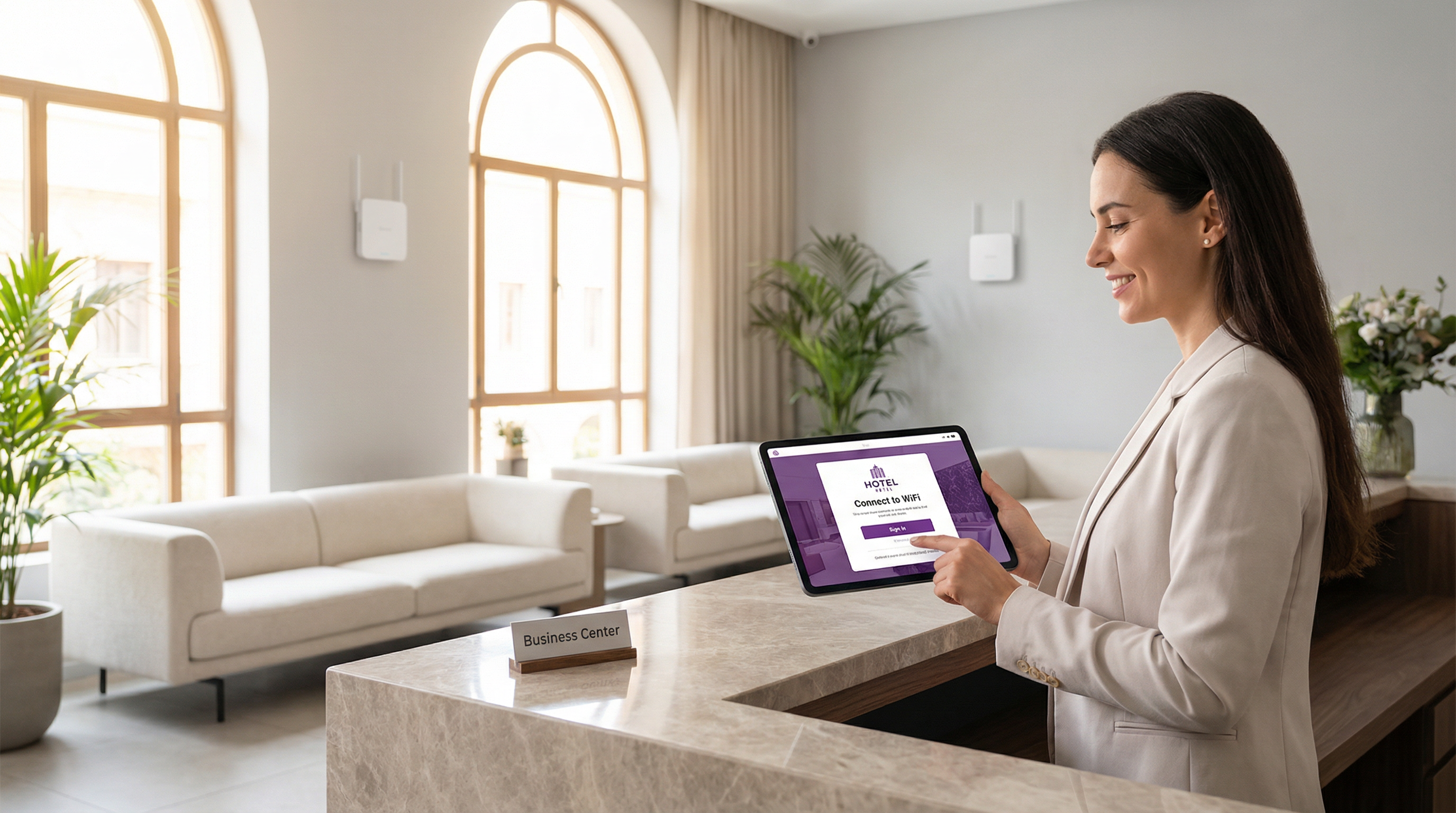
Analyse technique approfondie
Le Captive Portal moderne est un système sophistiqué qui équilibre l'expérience utilisateur, la sécurité et les objectifs commerciaux. À la base, le portail intercepte la requête web initiale d'un utilisateur et le redirige vers une page d'accueil personnalisée pour authentification ou consentement. Le mécanisme le plus répandu est une redirection HTTP 302. Lorsqu'un nouvel appareil se connecte au SSID invité, son système d'exploitation tente de contacter une URL de détection connue — Apple utilise captive.apple.com, Google utilise connectivitycheck.gstatic.com et Microsoft utilise www.msftconnecttest.com. Le contrôleur sans fil du réseau intercepte cette requête et renvoie un code d'état HTTP 302 (Found), dirigeant le navigateur du client vers l'URL du Captive Portal. Ce processus est transparent sur tous les principaux systèmes d'exploitation et constitue l'approche recommandée pour les déploiements d'entreprise.
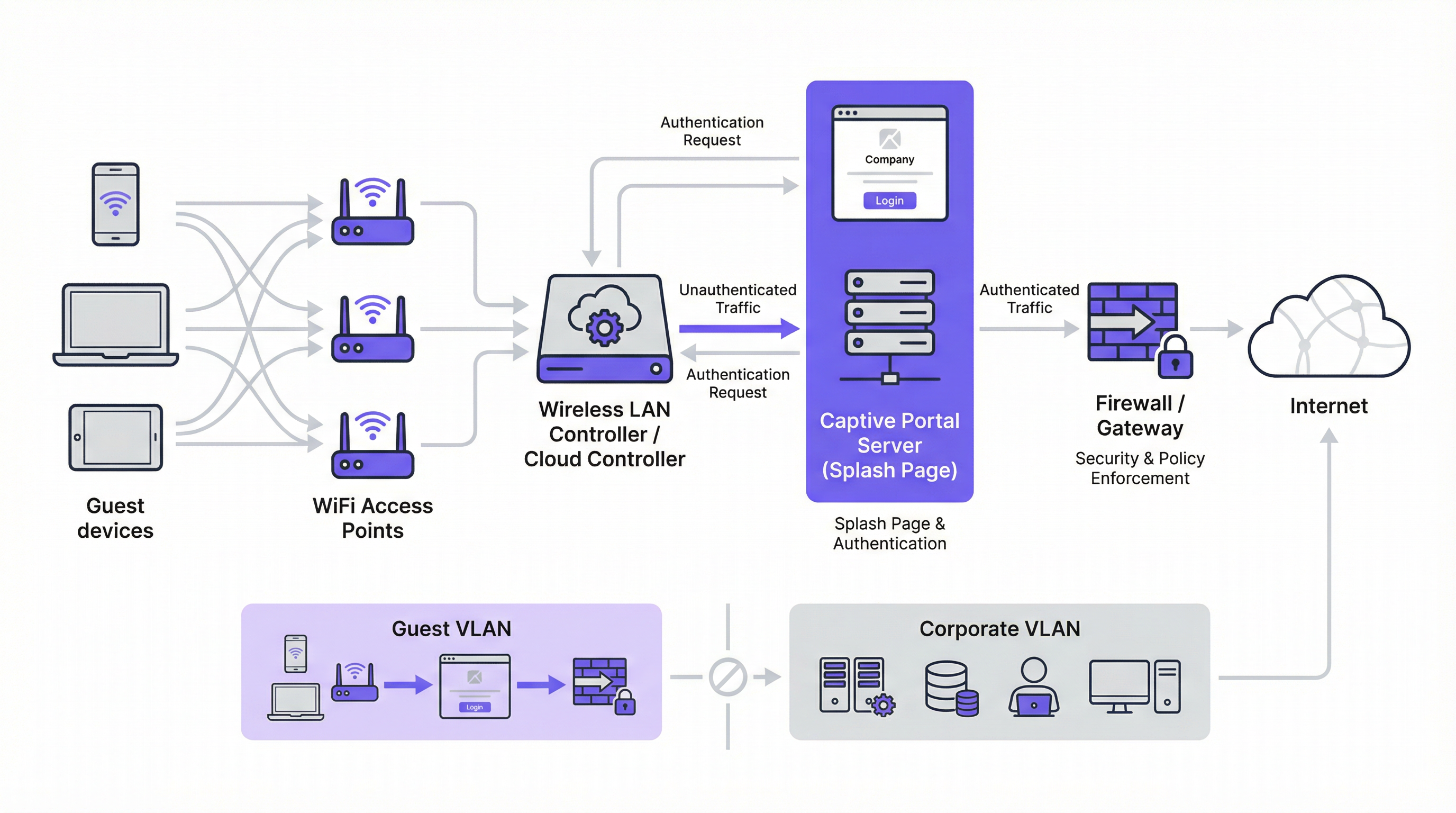
Deux mécanismes de redirection alternatifs existent. La redirection DNS fonctionne en configurant le pare-feu pour s'assurer que les clients non authentifiés ne peuvent accéder qu'au résolveur DNS désigné du réseau, qui à son tour résout tous les noms d'hôtes vers l'adresse IP du portail. Bien qu'efficace, cette approche est architecturalement équivalente à un détournement DNS (DNS hijacking) et doit être mise en œuvre avec prudence. La redirection ICMP opère au niveau de la couche 3 pour ordonner des changements de routage au niveau des paquets ; elle est moins courante dans les déploiements modernes et comporte des risques de sécurité inhérents qui la rendent inadaptée à la plupart des environnements d'entreprise.
Sur le plan architectural, la pierre angulaire de tout déploiement d'entreprise sécurisé est la segmentation VLAN. Le trafic invité doit être logiquement isolé du réseau d'entreprise sur son propre réseau local virtuel (VLAN). Cela empêche toute possibilité de mouvement latéral depuis un appareil invité potentiellement compromis vers des systèmes internes sensibles tels que les terminaux de point de vente, les bases de données RH ou les serveurs de fichiers d'entreprise. Le VLAN invité doit avoir sa propre étendue DHCP et une politique de pare-feu restrictive qui bloque explicitement tout accès aux plages d'adresses IP privées RFC 1918, n'autorisant que le trafic nécessaire à l'authentification sur le portail et à l'accès ultérieur à Internet.
Avant l'authentification, un walled garden (jardin clos) doit être configuré pour autoriser l'accès à des ressources externes spécifiques. Cela inclut le domaine d'hébergement du portail, les points de terminaison CDN servant les ressources du portail et les points de terminaison OAuth pour les fournisseurs de connexion sociale. Un walled garden minimalement permissif — mettant sur liste blanche des points de terminaison spécifiques plutôt que des domaines entiers — est un contrôle de sécurité critique qui limite la surface d'attaque pré-authentification.
Les méthodes d'authentification couvrent un large spectre, allant du simple clic sans friction à l'intégration RADIUS haute sécurité :
| Méthode d'authentification | Cas d'usage principal | Considération clé |
|---|---|---|
| Clic de validation (CGU) | Espaces publics, accès sans friction | Aucune capture de données ; friction utilisateur minimale. |
| Connexion sociale (OAuth) | Retail, Hôtellerie | Capture de données riche ; nécessite un walled garden pour les points de terminaison OAuth. |
| E-mail / Formulaire | Génération de leads, fidélisation | Données first-party directes ; nécessite la conformité GDPR/CCPA. |
| SMS OTP | Accès à forte valeur, programmes de fidélité | Vérifie le numéro de téléphone ; ajoute une couche d'assurance d'identité. |
| Code d'accès (Voucher) | Conférences, accès payant | Accès limité dans le temps et contrôlé par utilisateur. |
| RADIUS / IEEE 802.1X | Réseaux invités d'entreprise | Intégration de l'identité d'entreprise ; piste d'audit complète. |
Du point de vue des normes, l'industrie s'oriente vers le WPA3-Enterprise, qui combine le robuste framework d'authentification IEEE 802.1X avec une suite de sécurité 192 bits. Pour les réseaux invités ouverts, l'Opportunistic Wireless Encryption (OWE) du WPA3 offre une amélioration significative de la sécurité en chiffrant le trafic entre chaque client et le point d'accès sans nécessiter de clé pré-partagée, atténuant directement les attaques d'écoute passive qui sont endémiques aux réseaux WiFi ouverts traditionnels.
Guide de mise en œuvre
Le déploiement d'un Captive Portal à l'échelle de l'entreprise nécessite une approche méthodique. Les étapes suivantes fournissent une feuille de route neutre quant aux fournisseurs pour une mise en œuvre sécurisée et efficace.
Étape 1 — Fondation réseau : Créez un SSID invité dédié et associez-le à un nouveau VLAN isolé (par ex., VLAN 100). Définissez une étendue DHCP suffisamment grande pour accueillir votre pic d'utilisateurs simultanés. Pour un hôtel de 200 chambres, un sous-réseau /22 (1 022 adresses utilisables) est un point de départ sûr ; pour un stade de 20 000 places, un /19 ou plus est approprié.
Étape 2 — Pare-feu et politique de sécurité : Sur votre pare-feu principal, créez une politique pour le VLAN invité avec une position par défaut deny all (tout refuser). Ajoutez des règles allow (autoriser) explicites pour le DNS (port UDP/TCP 53) et le DHCP (ports UDP 67–68). Créez une règle de pré-authentification autorisant l'accès HTTP et HTTPS uniquement aux adresses IP listées dans votre walled garden. Bloquez tout le trafic destiné à l'espace d'adressage RFC 1918 (10.0.0.0/8, 172.16.0.0/12, 192.168.0.0/16).
Étape 3 — Configuration du contrôleur : Dans votre contrôleur LAN sans fil — qu'il s'agisse de Cisco Meraki, Aruba ClearPass, Ruckus SmartZone ou d'une plateforme gérée dans le cloud — configurez le SSID invité pour utiliser l'authentification externe du Captive Portal, en pointant vers l'URL de votre serveur de portail. Définissez le délai d'expiration de la session (8 heures pour l'hôtellerie, 2 à 4 heures pour le retail, 1 heure pour les événements). Définissez des limites de bande passante par client (par ex., 5 Mbps en téléchargement, 2 Mbps en envoi) pour garantir une utilisation équitable et prévenir les abus du réseau.
Étape 4 — Conception du portail et conformité : Concevez votre page d'accueil pour la vitesse et la clarté. La page doit être servie via HTTPS avec un certificat TLS valide émanant d'une autorité de certification de confiance. Pour la conformité GDPR, incluez un lien vers votre politique de confidentialité et une case à cocher non cochée par défaut pour le consentement marketing, présentée séparément de l'accord principal des conditions de service. Pour le CCPA, incluez un lien clairement étiqueté "Ne pas vendre mes informations personnelles". Toutes les actions de consentement doivent être journalisées avec un horodatage et l'adresse IP de l'utilisateur à des fins d'audit réglementaire.
Étape 5 — Authentification et Walled Garden : Configurez la ou les méthodes d'authentification choisies et les règles du walled garden correspondantes. Si vous utilisez la connexion sociale, mettez sur liste blanche les points de terminaison OAuth spécifiques pour chaque fournisseur. Testez le flux d'authentification complet depuis les appareils iOS, Android, Windows et macOS avant la mise en production.
Étape 6 — Journalisation et surveillance : Activez la comptabilité RADIUS sur votre contrôleur pour envoyer des données de session détaillées — adresse MAC, adresse IP, heures de début et de fin de session, volume de données transféré — vers un serveur de journalisation centralisé ou un SIEM. Conservez les métadonnées de connexion conformément aux exigences de votre juridiction (généralement 12 mois au Royaume-Uni et dans de nombreux États membres de l'UE). Mettez en œuvre une surveillance du taux de requêtes DNS pour détecter les tentatives potentielles de contournement par tunneling.
Bonnes pratiques
Le respect des bonnes pratiques de l'industrie est essentiel pour atténuer les risques et garantir une expérience utilisateur de haute qualité. Ces recommandations s'appuient sur des cadres de sécurité établis, notamment PCI DSS, GDPR et des directives de sécurité sans fil neutres quant aux fournisseurs.
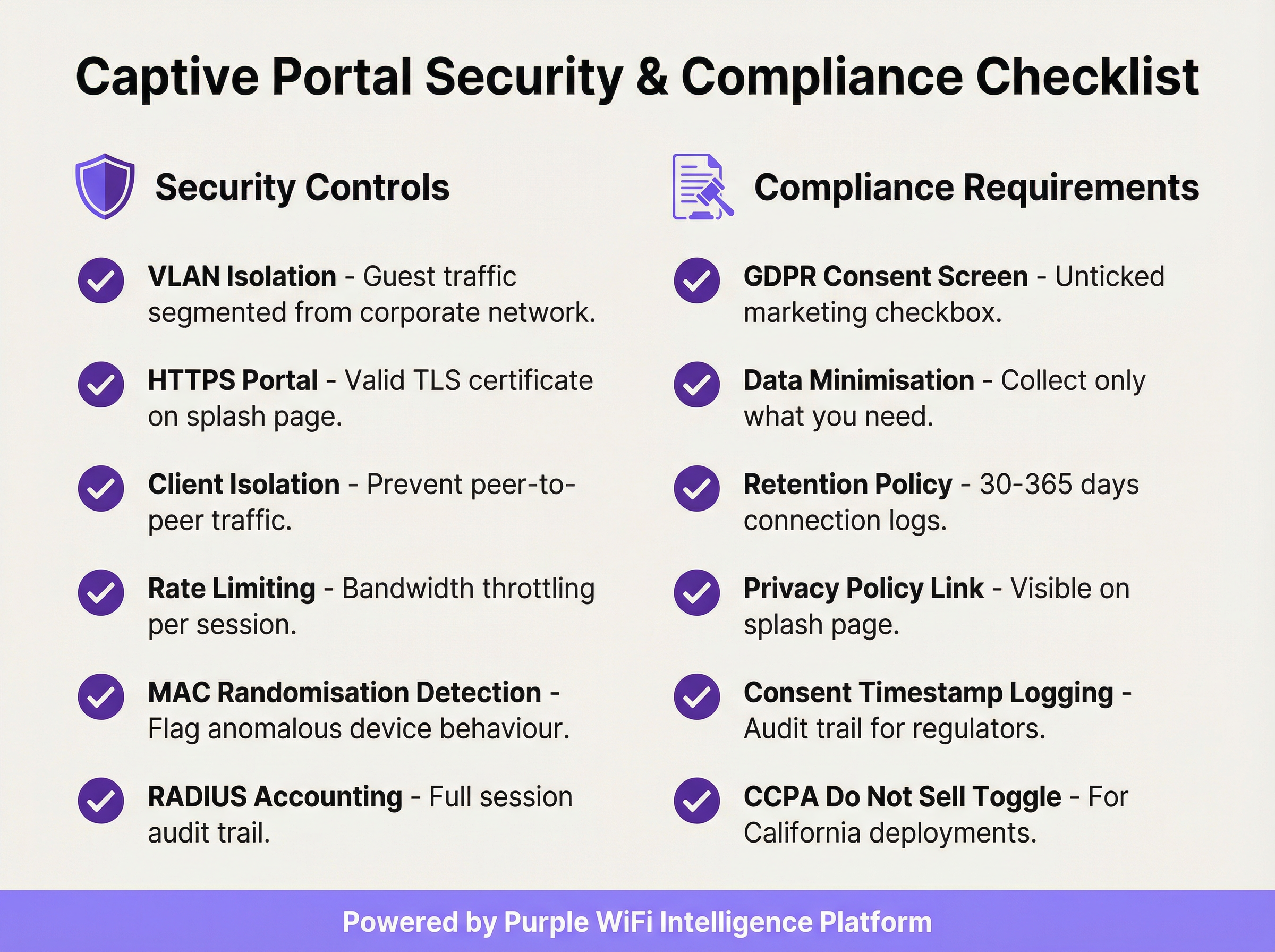
Appliquer l'isolation des clients : Ce paramètre du contrôleur sans fil empêche les appareils invités sur le même segment réseau de communiquer directement entre eux, réduisant considérablement le risque d'attaques peer-to-peer et de mouvement latéral entre les appareils invités.
Valider votre certificat TLS : Toute communication avec le Captive Portal doit être chiffrée avec un certificat TLS valide et de confiance. Un certificat expiré ou auto-signé déclenchera des avertissements de sécurité du navigateur, dégradant l'expérience utilisateur et sapant la confiance envers votre marque.
Mettre en œuvre la minimisation des données : Ne collectez que les données dont vous avez besoin pour le service spécifique que vous fournissez. Si votre cas d'usage ne nécessite qu'une adresse e-mail pour le marketing, ne demandez pas de numéro de téléphone ou de date de naissance. Il s'agit d'un principe fondamental de l'article 5(1)(c) du GDPR et cela réduit votre exposition réglementaire.
Maintenir une politique de conservation des données documentée : Établissez et documentez des calendriers de conservation distincts pour les journaux de connexion (généralement de 30 à 365 jours selon la juridiction) et les données marketing (purgez les contacts inactifs et conservez les preuves de consentement tout au long de la période de conservation). Les sanctions pour non-conformité au GDPR peuvent atteindre 20 millions d'euros ou 4 % du chiffre d'affaires annuel mondial.
Auditer votre Walled Garden tous les trimestres : Au fil du temps, les walled gardens accumulent des entrées inutiles. Un audit trimestriel garantit que chaque domaine sur liste blanche est toujours requis et que les entrées sont aussi spécifiques que possible, minimisant ainsi la surface d'attaque pré-authentification.
Planifier le périmètre PCI DSS : Si votre établissement traite des paiements par carte, assurez-vous que votre réseau WiFi invité est complètement isolé de toute infrastructure de carte de paiement. Un évaluateur de sécurité qualifié (QSA) doit examiner la segmentation du réseau en cas d'ambiguïté sur le périmètre.
Dépannage et atténuation des risques
Les modes de défaillance les plus courants dans les déploiements de Captive Portal sont généralement liés à la compatibilité des appareils, aux problèmes de certificats ou à une mauvaise configuration du réseau.
La page du portail ne se charge pas automatiquement : La cause la plus fréquente est l'échec du déclenchement du Captive Network Assistant (CNA) de l'appareil. Cela peut se produire si le pare-feu bloque l'accès aux URL de détection spécifiques à l'OS, ou si le portail possède un certificat TLS invalide. Vérifiez que vos règles de pré-authentification autorisent l'accès à captive.apple.com, connectivitycheck.gstatic.com et www.msftconnecttest.com. Assurez-vous que le certificat du portail est valide et de confiance.
Les utilisateurs reçoivent un avertissement de sécurité du navigateur : Cela indique presque toujours un problème de certificat TLS — expiré, auto-signé ou domaine non correspondant. Utilisez un certificat provenant d'une autorité de certification de confiance et assurez-vous que l'URL du portail correspond exactement au Subject Alternative Name (SAN) du certificat. Automatisez le renouvellement des certificats à l'aide de Let's Encrypt ou d'un service similaire pour éviter les pannes liées à l'expiration.
Contournement par tunneling DNS : Certains utilisateurs techniquement sophistiqués peuvent tenter de contourner le portail en encodant le trafic dans des requêtes DNS. Atténuez ce risque en bloquant tout le trafic DNS sortant des clients non authentifiés, à l'exception de votre résolveur interne désigné, et en mettant en œuvre une limitation du taux de requêtes DNS — signalant tout client qui génère plus d'un seuil défini de requêtes par seconde avant l'authentification.
Usurpation d'adresse MAC (Spoofing) : Un attaquant peut cloner l'adresse MAC d'un appareil authentifié pour contourner le portail. Atténuez ce risque grâce à la comptabilité RADIUS avec liaison de session à la fois à l'adresse MAC et à l'adresse IP, et en surveillant les entrées d'adresses MAC en double dans votre table de baux DHCP. L'isolation des clients réduit également le risque en empêchant l'attaquant d'observer les adresses MAC des autres clients.
Temps de chargement élevés du portail dégradant les taux d'opt-in : Chaque seconde supplémentaire de temps de chargement du portail réduit les taux d'achèvement de l'authentification. Hébergez les ressources du portail sur un CDN, optimisez les images et minimisez les dépendances aux scripts tiers. Visez un délai d'interactivité (Time to Interactive - TTI) inférieur à 2 secondes sur une connexion mobile 4G.
ROI et impact commercial
Le déploiement d'un Captive Portal d'entreprise doit être considéré comme un investissement stratégique. Le rendement se concrétise par trois canaux principaux : l'acquisition de données first-party, les analyses clients et de localisation, et la génération directe de revenus ou de valeur de marque.
Acquisition de données first-party : Dans un paysage marqué par la disparition des cookies tiers et la perte croissante de signaux due aux mises à jour des navigateurs axées sur la confidentialité, un Captive Portal est l'un des outils les plus efficaces pour constituer une base de données marketing riche et basée sur le consentement. Un portail bien conçu dans un lieu de vente au détail ou d'hôtellerie à fort trafic peut capturer des centaines voire des milliers de nouvelles adresses e-mail opt-in par mois, offrant un canal direct pour le marketing personnalisé, l'inscription aux programmes de fidélité et l'engagement post-visite.
Analyses clients et de localisation : En analysant les données de connexion — visiteurs uniques, temps de séjour, fréquence des visites, périodes de pointe de trafic — les établissements obtiennent des informations exploitables pour l'optimisation opérationnelle. Les détaillants peuvent mesurer l'impact en magasin des campagnes marketing, identifier leurs clients fidèles les plus réguliers et optimiser les niveaux de personnel en fonction des données de fréquentation en temps réel. Les opérateurs hôteliers peuvent corréler les modèles de connexion WiFi avec les dépenses de restauration ou les réservations de spa pour identifier des opportunités de vente incitative.

Revenus directs et renforcement de la marque : Dans les aéroports, les centres de conférence et les pôles de transport, le WiFi peut être monétisé directement via des plans d'accès à plusieurs niveaux. Dans le retail et l'hôtellerie, le portail sert de point de contact de marque puissant au moment de la connexion, permettant la promotion d'offres spéciales, de programmes de fidélité et de marques partenaires. Une expérience d'accueil cohérente et aux couleurs de la marque sur des centaines de sites renforce l'identité de la marque et démontre un professionnalisme opérationnel.
Un calcul de ROI typique met en balance les coûts de la plateforme et les coûts opérationnels avec la valeur à vie (LTV) des contacts marketing acquis, les gains d'efficacité opérationnelle issus de l'analyse de la fréquentation et tout revenu direct généré par l'accès payant ou les partenariats marketing. Pour la plupart des déploiements d'entreprise, la valeur de l'actif de données first-party à elle seule — en particulier dans le contexte d'un marketing basé sur le consentement et conforme au GDPR — fournit une analyse de rentabilisation convaincante et défendable.
Termes clés et définitions
Captive Portal
A network gateway mechanism that intercepts a connecting device's initial HTTP request and redirects it to a web page requiring user interaction — such as authentication, terms of service acceptance, or payment — before granting full internet access. Technically implemented via HTTP 302 redirect, DNS redirect, or ICMP redirect.
IT teams encounter this as the core technology underpinning guest WiFi access control in any public or semi-public venue. The design and configuration of the captive portal directly determines the security posture, compliance status, and commercial value of the guest WiFi deployment.
VLAN (Virtual Local Area Network)
A logical network segment created within a physical network infrastructure that isolates traffic between different groups of devices. In captive portal deployments, a dedicated guest VLAN ensures that guest device traffic is completely separated from corporate network infrastructure, preventing lateral movement and limiting the blast radius of any security incident on the guest network.
Network architects must configure a dedicated guest VLAN as the foundational security control for any captive portal deployment. Without VLAN isolation, a compromised guest device could potentially access corporate systems, creating significant security and compliance risk.
Walled Garden
A pre-authentication whitelist of network resources (IP addresses, hostnames, or domains) that an unauthenticated guest device is permitted to access before completing the captive portal process. Typically includes the portal server itself, CDN endpoints, and OAuth endpoints for social login providers.
IT teams must configure and maintain the walled garden carefully. An overly permissive walled garden expands the pre-authentication attack surface; an overly restrictive one breaks social login functionality or prevents the portal page from loading correctly.
IEEE 802.1X
An IEEE standard for port-based Network Access Control (PNAC) that provides an authentication framework for devices wishing to connect to a LAN or WLAN. It defines the Extensible Authentication Protocol (EAP) transport mechanism and requires a supplicant (client), authenticator (switch or AP), and authentication server (typically RADIUS) to complete the authentication exchange.
Network architects deploying captive portals for corporate guest environments should consider 802.1X integration for the highest level of identity assurance. It provides mutual authentication and a full audit trail, and is the authentication framework underpinning WPA2-Enterprise and WPA3-Enterprise.
WPA3-OWE (Opportunistic Wireless Encryption)
A WPA3 security mode defined in IEEE 802.11i that provides over-the-air encryption on open (no-password) WiFi networks without requiring user authentication. Each client-to-AP connection is encrypted with a unique key, preventing passive eavesdropping by other devices on the same network, even though no password is required to connect.
IT architects planning new captive portal deployments should evaluate OWE as a security enhancement for open guest SSIDs. It addresses the fundamental vulnerability of traditional open WiFi — unencrypted over-the-air traffic — while maintaining the zero-friction connection experience that guests expect.
RADIUS (Remote Authentication Dial-In User Service)
A networking protocol that provides centralised Authentication, Authorisation, and Accounting (AAA) management for users who connect to a network service. In captive portal deployments, RADIUS accounting records detailed session information — including MAC address, IP address, session duration, and data volume — to a central server.
RADIUS accounting is the mechanism by which IT teams maintain a comprehensive audit trail of guest WiFi sessions. This audit trail is essential for regulatory compliance (data retention laws), security investigations, and the analytics that underpin ROI measurement.
DNS Tunnelling
A network bypass technique in which a client encodes arbitrary internet traffic (e.g., HTTP requests) within DNS query packets, which are typically permitted through firewalls even for unauthenticated clients. An attacker or technically sophisticated user can use a DNS tunnelling tool to bypass a captive portal and access the internet without authenticating.
Network security teams should implement DNS query rate monitoring and anomaly detection to identify potential tunnelling activity. Blocking outbound DNS traffic from unauthenticated clients to all servers except the designated internal resolver is the primary mitigation.
MAC Address Spoofing
A technique in which a device's network interface is configured to broadcast a different MAC (Media Access Control) address than the one burned into the hardware. In captive portal environments, an attacker can clone the MAC address of an already-authenticated device to bypass the portal's access control, as many portals use MAC address as the primary session identifier.
IT security teams should be aware that MAC-based authentication alone is not sufficient for high-security environments. RADIUS accounting with session binding to both MAC address and IP address, combined with client isolation to prevent MAC address observation, provides a more robust defence.
Splash Page
The branded web page presented to a user by a captive portal before internet access is granted. The splash page typically contains the venue's branding, a login or consent form, a link to the privacy policy, and terms of service. It is the primary user-facing element of the captive portal system and the key touchpoint for data capture and brand communication.
Marketing and IT teams must collaborate on splash page design. From an IT perspective, the page must be served over HTTPS, load in under 2 seconds, and contain all legally required consent elements. From a marketing perspective, it must be on-brand, clear, and designed to maximise opt-in rates.
GDPR (General Data Protection Regulation)
The European Union's primary data protection regulation (Regulation 2016/679), which governs the collection, processing, storage, and transfer of personal data relating to EU residents. For captive portal deployments, GDPR mandates freely given, specific, and unambiguous consent for data collection; data minimisation; documented retention policies; and the ability to demonstrate compliance through audit trails.
Any captive portal that collects personal data (email addresses, names, phone numbers) from EU or UK residents must comply with GDPR. Non-compliance penalties can reach €20 million or 4% of global annual turnover. IT and legal teams must collaborate to ensure the portal's consent mechanism, data storage, and retention policies meet the regulation's requirements.
Études de cas
A 250-room luxury hotel group with 12 properties needs to deploy a unified captive portal solution that captures guest email addresses for their loyalty programme, complies with GDPR across all EU properties, and provides the IT team with centralised management. The properties use a mix of Cisco Meraki and Aruba access points. What architecture and implementation approach should they adopt?
The recommended approach is a cloud-managed, hardware-agnostic captive portal platform (such as Purple) that integrates with both Meraki and Aruba controllers via external portal redirect. The implementation proceeds as follows:
VLAN Architecture: Configure a dedicated guest VLAN (e.g., VLAN 200) on all properties, with a consistent IP addressing scheme (e.g., 10.200.x.0/22 per property) to simplify firewall policy management across the estate.
Controller Configuration: On Meraki, navigate to Wireless > SSIDs > [Guest SSID] > Splash page and select 'Click-through' or 'Sign-on splash page', entering the external portal URL. On Aruba, configure a Captive Portal profile in ClearPass Policy Manager pointing to the same external portal URL. Set session timeout to 8 hours and per-client bandwidth to 10 Mbps down / 5 Mbps up.
Portal Design: Build a single portal template with the group's master brand. Use location-specific branding overrides (logo, colour scheme) for each property. The form captures first name, last name, and email. The GDPR consent screen presents two separate, unticked checkboxes: one for the terms of service (required for access) and one for marketing communications (optional). The privacy policy link is prominently displayed.
Compliance Configuration: Enable consent timestamp logging for every session. Configure a data retention policy: connection logs retained for 12 months (UK GDPR requirement), marketing contacts purged after 24 months of inactivity. Export audit logs monthly to the group's central compliance repository.
Loyalty Integration: Connect the portal's API to the hotel group's CRM/loyalty platform. On successful email capture with marketing consent, automatically enrol the guest in the loyalty programme and trigger a welcome email within 15 minutes.
Testing and Rollout: Pilot at one property for 30 days, measuring email capture rate (target: >60% of connecting guests), portal load time (target: <2 seconds), and authentication error rate (target: <1%). Roll out to remaining properties in batches of three.
A national retail chain with 80 stores wants to use their guest WiFi captive portal to measure the effectiveness of their in-store marketing campaigns, specifically whether customers who receive a promotional email visit the store within 14 days. The IT team is concerned about PCI DSS compliance, as the stores also process card payments. How should this be architected?
This deployment requires careful attention to both the analytics use case and PCI DSS network segmentation requirements.
PCI DSS Segmentation: The guest WiFi network must be completely isolated from the payment card environment (PCE). Implement a three-VLAN architecture: VLAN 10 for POS/payment systems, VLAN 20 for corporate/staff systems, VLAN 30 for guest WiFi. The firewall must have explicit
denyrules preventing any traffic between VLAN 30 and VLANs 10 and 20. Engage a QSA to validate the segmentation before go-live.Guest SSID and Portal: Deploy the guest SSID on VLAN 30 with an email-capture portal. The form collects email address and optionally a loyalty card number. GDPR-compliant marketing consent checkbox is included.
Campaign Attribution Architecture: The portal platform assigns each authenticated session a unique session ID linked to the guest's email address and the store location (identified by the access point's location tag). When a promotional email is sent, it contains a unique tracking pixel and a store-specific UTM parameter on the call-to-action link.
Visit Attribution: When a customer who received the promotional email returns to a store and connects to WiFi within 14 days, the portal platform matches their email address to the campaign cohort and records the return visit. This creates a closed-loop attribution model: email sent → store visit detected via WiFi connection → conversion recorded.
Analytics Dashboard: The central analytics platform aggregates data across all 80 stores, providing campaign attribution reports showing email-to-visit conversion rates by store, region, and campaign. Typical metrics: unique visitors per store per day, email capture rate, 14-day return visit rate for campaign cohort vs. control group.
Data Governance: All guest data is stored in a GDPR-compliant data warehouse with role-based access control. Marketing data is retained for 24 months from last interaction. Connection logs are retained for 12 months.
Analyse de scénario
Q1. A conference centre hosts 50 events per year, ranging from 200-person seminars to 5,000-person trade shows. They want to deploy a captive portal that provides event-specific branding for each event, captures attendee email addresses for post-event marketing, and can scale from 200 to 5,000 concurrent connections. The venue's IT team has limited capacity for per-event configuration. What platform architecture and configuration approach would you recommend?
💡 Astuce :Consider the operational overhead of per-event portal customisation, the DHCP scope sizing requirements for peak concurrent users, and the GDPR implications of sharing attendee data with event organisers.
Afficher l'approche recommandée
The recommended architecture uses a cloud-managed captive portal platform with a self-service portal builder. The venue's IT team creates a master portal template with the venue's base branding and GDPR consent framework. For each event, the organiser is given access to a restricted portal customisation interface where they can upload their logo, set brand colours, and add event-specific messaging — without touching any network configuration. The DHCP scope for the guest VLAN should be sized for the maximum expected concurrent connections (5,000), using a /19 subnet (8,190 usable addresses) to provide headroom. The wireless controller should be configured with dynamic bandwidth management to automatically adjust per-client limits based on current network load. For GDPR, the data controller relationship must be clearly defined: if attendee data is shared with event organisers, a Data Processing Agreement (DPA) is required, and the privacy policy must disclose this sharing. Attendees should be able to opt out of data sharing with the event organiser while still accepting the venue's terms of service for WiFi access.
Q2. A hospital trust wants to deploy guest WiFi with a captive portal across 5 sites. Clinical staff have raised concerns that the guest WiFi could be used to access patient records if the network segmentation is not correctly implemented. The IT security team also needs to ensure the deployment does not bring any clinical systems into scope for additional regulatory review. How do you address these concerns?
💡 Astuce :Consider the network segmentation requirements, the specific clinical systems that must be protected, and the regulatory frameworks (NHS Data Security and Protection Toolkit, Cyber Essentials) that apply in addition to GDPR.
Afficher l'approche recommandée
The deployment requires a minimum three-tier network architecture: a clinical VLAN for patient records systems (EPR, PACS, clinical workstations), a staff VLAN for administrative systems, and a guest VLAN for patient and visitor WiFi. The firewall policy must include explicit deny rules preventing any traffic from the guest VLAN to the clinical and staff VLANs, with the default stance being deny-all for inter-VLAN traffic. The guest SSID should be on a completely separate DHCP scope with no route to RFC 1918 clinical address space. The captive portal itself should be hosted externally (cloud-based) or on a dedicated DMZ server, not on any system within the clinical network. For regulatory compliance, the IT security team should document the network segmentation design and have it reviewed by an independent assessor as part of the NHS Data Security and Protection Toolkit submission. The guest WiFi network should be explicitly scoped out of any clinical system security assessments. GDPR compliance for the portal requires a healthcare-specific privacy notice that discloses the limited data collected (connection metadata, optional email) and the retention period.
Q3. Your organisation's captive portal has been in production for 18 months. A security audit has identified three issues: (1) the portal TLS certificate expired 3 weeks ago and users are receiving browser warnings, (2) the walled garden contains 47 entries, many of which appear to be from a social login provider that was removed 12 months ago, and (3) RADIUS accounting logs show that 15% of guest sessions have a duration of over 30 days, suggesting that session timeouts are not being enforced. Prioritise and address these issues.
💡 Astuce :Consider the security and user experience impact of each issue, the speed of remediation required, and the root cause of the session timeout failure.
Afficher l'approche recommandée
Prioritise in order of security and user experience impact. Issue 1 (expired TLS certificate) is the most urgent: it is actively degrading the user experience (browser security warnings) and represents a security risk (users may be trained to click through certificate warnings, making them vulnerable to genuine MITM attacks). Immediate action: renew the certificate from a trusted CA and deploy it to the portal server. Implement automated certificate renewal (e.g., using Let's Encrypt with auto-renewal) to prevent recurrence. Issue 3 (30-day sessions) is the second priority: sessions lasting 30 days represent a significant security risk, as a device that was authenticated 30 days ago may no longer be in the possession of the original user. Investigate the root cause — likely a misconfigured session timeout value on the wireless controller or a controller firmware bug. Set the session timeout to 8 hours (or appropriate for the venue type) and force-terminate all existing sessions over 24 hours old. Issue 2 (walled garden hygiene) is the third priority: while a security concern, stale walled garden entries from a removed provider are lower risk than the first two issues. Audit all 47 entries, remove those associated with the deprecated social login provider, and document the purpose of each remaining entry. Implement a quarterly walled garden review process to prevent recurrence.
Points clés à retenir
- ✓VLAN segmentation is the non-negotiable foundation of any enterprise captive portal deployment — guest traffic must be completely isolated from corporate infrastructure before any portal configuration begins.
- ✓The captive portal must be served over HTTPS with a valid TLS certificate from a trusted Certificate Authority; HTTP-only portals are a security liability and will be deprecated by modern browsers.
- ✓GDPR compliance requires a separate, unticked marketing consent checkbox distinct from the terms of service acceptance, with all consent states and timestamps logged for regulatory audit purposes.
- ✓The walled garden should whitelist specific endpoints rather than entire domains, and should be audited quarterly to remove unnecessary entries that expand the pre-authentication attack surface.
- ✓WPA3's Opportunistic Wireless Encryption (OWE) mode should be evaluated for all new deployments, as it provides over-the-air encryption on open networks without requiring a password, directly mitigating passive eavesdropping.
- ✓Portal load time directly impacts opt-in rates — target a Time to Interactive of under 2 seconds by hosting assets on a CDN and minimising third-party script dependencies.
- ✓The commercial ROI of a captive portal is realised through three channels: first-party data acquisition for marketing, customer and location analytics for operational intelligence, and direct revenue or brand value from the connection experience — all of which should be quantified in the business case.




