

WiFi Hotspot 2.0 (Passpoint) : Le guide ultime pour une itinérance WiFi fluide et sécurisée
This guide provides a comprehensive technical overview of WiFi Hotspot 2.0 (Passpoint) for IT leaders. It details the technology, security benefits, and a step-by-step implementation framework for deploying seamless, secure WiFi roaming in enterprise environments like hotels, retail, and large venues, ultimately improving user experience and reducing operational overhead.
🎧 Écouter ce guide
Voir la transcription
 \n\n## Résumé exécutif\n\nPour l'entreprise moderne, offrir une expérience WiFi fluide et sécurisée n'est plus un luxe, c'est une exigence opérationnelle fondamentale. Le WiFi Hotspot 2.0, également connu sous le nom de Passpoint, est un framework standard de l'industrie conçu pour éliminer les frictions et les risques de sécurité associés au WiFi public et invité traditionnel. Il permet aux appareils mobiles de découvrir et de s'authentifier automatiquement aux réseaux WiFi avec une sécurité WPA3 de niveau entreprise, reproduisant l'expérience d'itinérance fluide des réseaux cellulaires. Pour un CTO ou un directeur informatique, cela se traduit par une réduction significative des problèmes de connexion pour les utilisateurs, une posture de sécurité renforcée contre les attaques WiFi courantes et un processus d'authentification simplifié, à la fois conforme au GDPR et immunisé contre les défis de la randomisation des adresses MAC. En remplaçant les Captive Portal non sécurisés et à forte friction par une authentification basée sur les identifiants et sans intervention (zero-touch), Passpoint améliore la satisfaction des invités, réduit la charge d'assistance informatique et fournit une base évolutive pour l'itinérance inter-sites et les stratégies de déchargement de données. Ce guide fournit les détails techniques et le cadre de déploiement nécessaires pour intégrer Passpoint à votre infrastructure réseau, générant des améliorations tangibles en matière de sécurité et d'expérience utilisateur.\n\n\n\n## Analyse technique approfondie\n\nHotspot 2.0 et sa certification sous-jacente, Passpoint, représentent un changement architectural fondamental dans la façon dont les réseaux WiFi sont découverts et accédés. La technologie repose sur l'amendement IEEE 802.11u, qui permet une communication de pré-association entre un appareil client et un point d'accès. Cela permet à un appareil de recueillir des informations critiques sur un réseau avant de s'engager dans une connexion, passant d'un modèle hérité de reconnaissance du SSID à un modèle plus intelligent de reconnaissance des identifiants.\n\n### Protocoles de base : ANQP, GAS et 802.11u\n\nLe mécanisme principal permettant ce dialogue de pré-association est une combinaison du Generic Advertisement Service (GAS) et de l'Access Network Query Protocol (ANQP). Voici comment ils interagissent :\n\n1. Balises IEEE 802.11u (Beaconing) : Un point d'accès (AP) compatible Passpoint inclut un Interworking Element (IE) dans ses trames de balise. Cela agit comme un indicateur, signalant aux appareils à proximité qu'il prend en charge la découverte de réseau avancée.\n2. Échange GAS et ANQP : Un appareil client détectant cet IE peut initier une requête GAS vers l'AP. Dans cette requête, il utilise ANQP pour poser des questions spécifiques sur l'identité et les capacités du réseau. La requête la plus critique concerne les Roaming Consortium Organizational Identifiers (RCOIs) pris en charge par le réseau.\n3. Correspondance des identifiants : L'AP répond avec sa liste de RCOI pris en charge. Si l'un d'entre eux correspond à un profil d'identifiant stocké sur l'appareil client (par exemple, un profil pour un opérateur mobile, une marque d'hôtel ou un réseau d'entreprise), l'appareil sait qu'il peut s'authentifier et passe à l'étape suivante. Si aucune correspondance n'est trouvée, l'appareil ignore simplement le réseau, le tout sans aucune interaction de l'utilisateur.\n\n
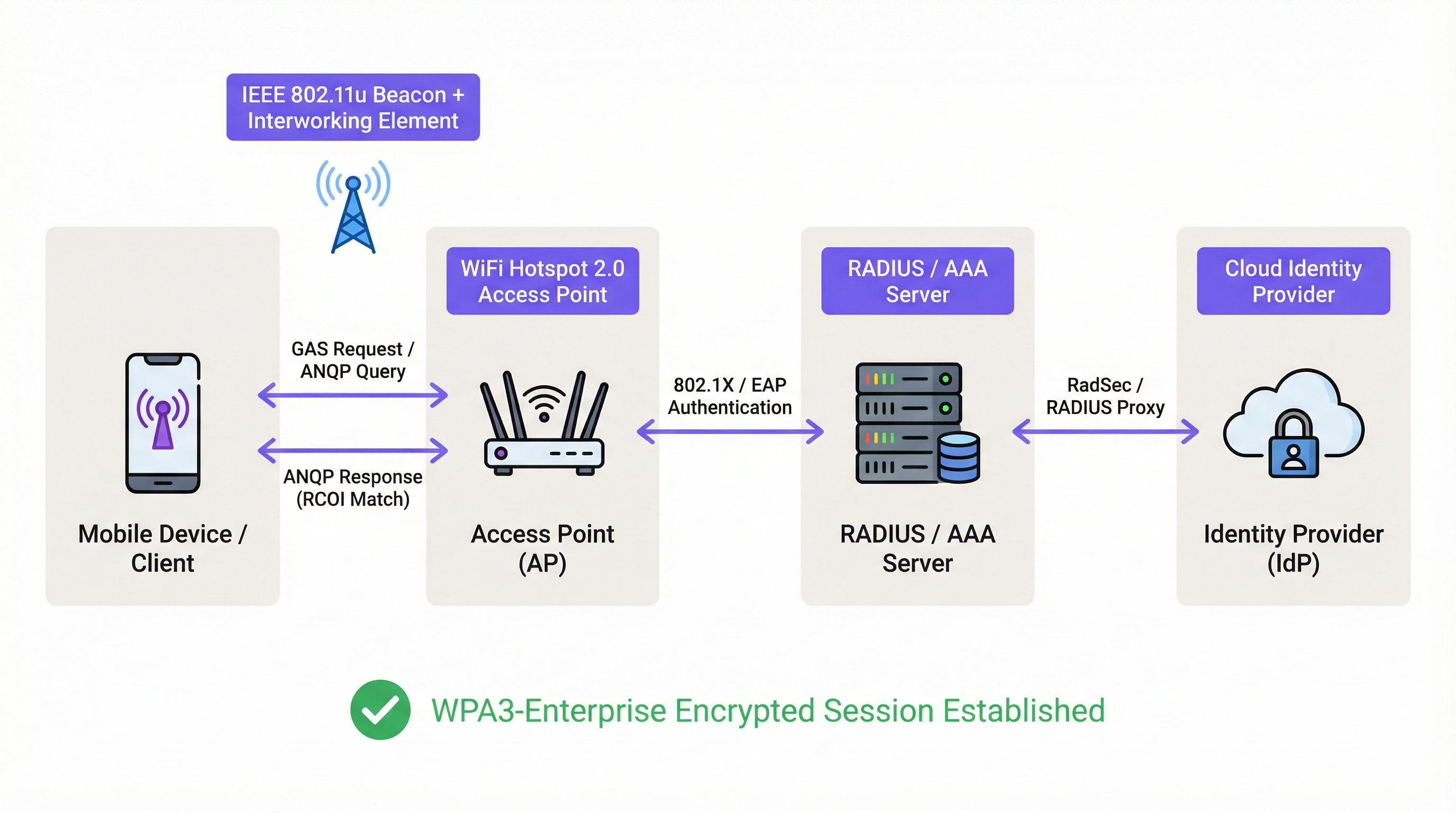 \n\n### Cadre d'authentification et de sécurité\n\nUne fois la correspondance des identifiants confirmée, Passpoint exploite la sécurité robuste de la norme IEEE 802.1X pour l'authentification, généralement avec le chiffrement WPA2-Enterprise ou le plus sécurisé WPA3-Enterprise. Il s'agit de la même norme de contrôle d'accès réseau basée sur les ports, reconnue dans les réseaux d'entreprise filaires sécurisés. L'authentification est gérée via une méthode Extensible Authentication Protocol (EAP), telle que :\n\n* EAP-TLS : Authentification basée sur des certificats, considérée comme la référence en matière de sécurité. Le client et le serveur présentent tous deux des certificats pour prouver leur identité.\n* EAP-TTLS/PEAP : Encapsule une méthode d'authentification héritée (comme un nom d'utilisateur/mot de passe) dans un tunnel TLS sécurisé.\n* EAP-SIM/AKA/AKA' : Authentification basée sur la carte SIM, permettant aux opérateurs de réseaux mobiles de faire basculer de manière transparente leurs abonnés vers des réseaux WiFi de confiance.\n\nCe processus garantit une authentification mutuelle : le client valide que le réseau est légitime (empêchant les attaques de type « Evil Twin » sur les AP), et le réseau valide que le client est autorisé. Tout le trafic ultérieur est chiffré, atténuant le risque d'attaques de l'homme du milieu (MITM) courantes sur les réseaux ouverts ou basés sur PSK.\n\n### Passpoint vs OpenRoaming\n\nIl est crucial de faire la distinction entre Passpoint et OpenRoaming :\n\n> Passpoint est le véhicule ; OpenRoaming est le réseau autoroutier.\n
- Passpoint est la norme technique (802.11u, ANQP/GAS, 802.1X) qui permet à un appareil de découvrir et de s'authentifier automatiquement sur un réseau unique ou un groupe de réseaux sous le même contrôle administratif.\n* WBA OpenRoaming est un cadre de fédération mondial géré par la Wireless Broadband Alliance. Il crée un écosystème de confiance entre des milliers de fournisseurs d'identité (IdP) tels que les opérateurs mobiles et de fournisseurs de réseaux d'accès (ANP) tels que les hôtels, les aéroports et les chaînes de vente au détail. Cela permet à un utilisateur disposant d'un identifiant de n'importe quel IdP membre de se connecter automatiquement dans n'importe quel site ANP membre, sans nécessiter d'accords d'itinérance bilatéraux complexes.\n
Pour une compatibilité maximale dans un environnement OpenRoaming, les architectes réseau doivent diffuser à la fois le RCOI standard gratuit (
5A-03-BA) et le RCOI Cisco hérité (00-40-96).\n\n## Guide d'implémentation\n\nLe déploiement de Passpoint est un processus structuré qui va de l'audit de votre infrastructure existante à un déploiement progressif et à son optimisation. Suivre cette feuille de route garantira une transition en douceur et atténuera les pièges de déploiement courants.\n\n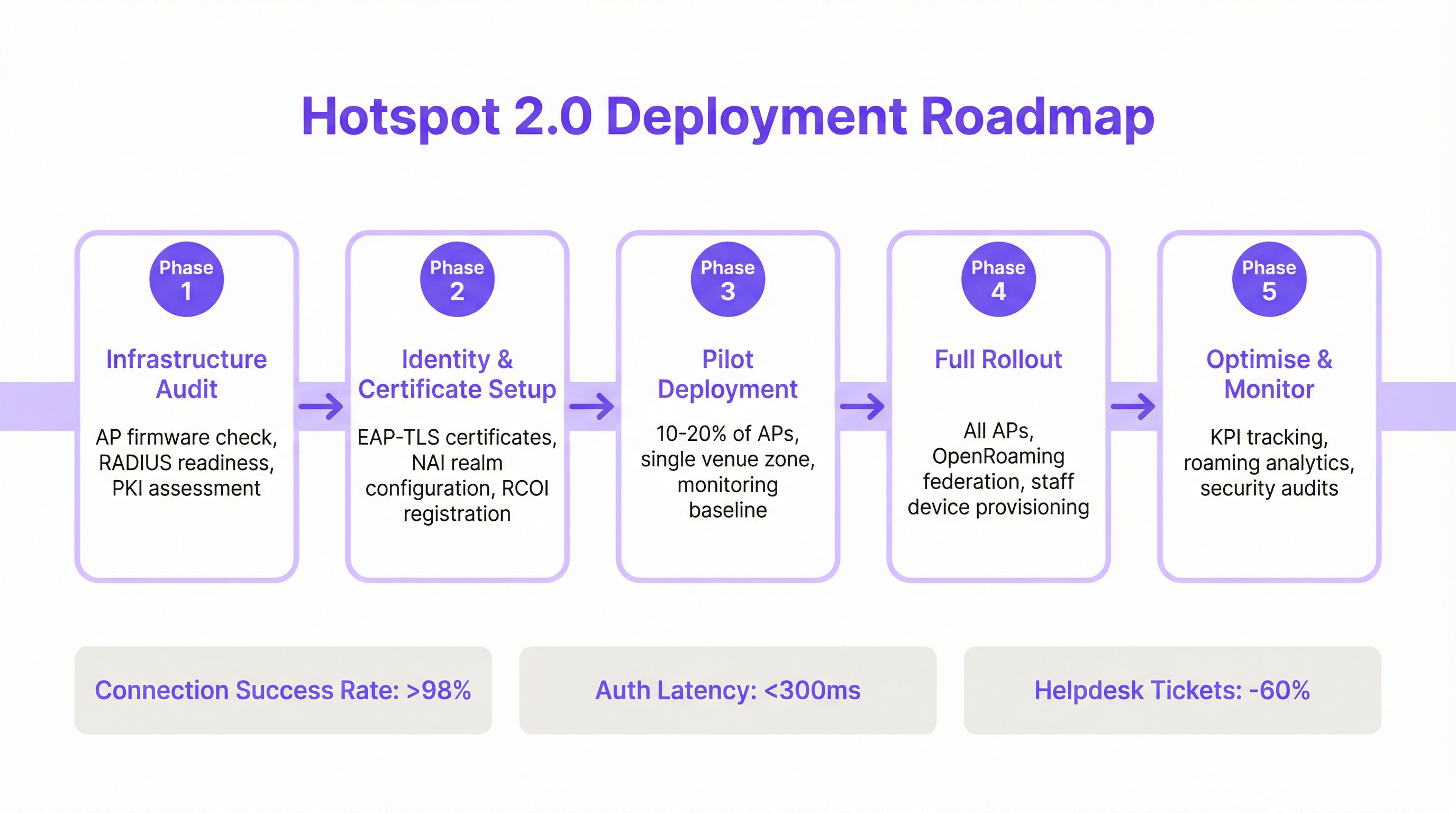 \n\n### Phase 1 : Audit de l'infrastructure\n\nAvant de commencer, évaluez votre matériel et vos logiciels réseau actuels. Les points d'audit clés incluent :\n* Compatibilité des points d'accès : Vérifiez que vos AP prennent en charge la norme IEEE 802.11u. La plupart des AP de niveau entreprise fabriqués après 2015 (par des fournisseurs comme Cisco, HPE Aruba, Juniper Mist, Ruckus) disposent du matériel nécessaire, mais peuvent nécessiter une mise à jour du firmware.\n* Préparation du serveur RADIUS : Vous aurez besoin d'un serveur RADIUS (ou AAA) capable de gérer l'authentification 802.1X EAP. Il peut s'agir d'une solution sur site comme Cisco ISE ou d'un service cloud comme SecureW2, Foxpass ou Google Cloud Identity.\n* Évaluation de la PKI : Pour les déploiements EAP-TLS, une infrastructure à clé publique (PKI) est requise pour émettre et gérer les certificats numériques des appareils clients et des serveurs.\n
Phase 2 : Configuration de l'identité et des certificats\n\nCette phase implique la configuration des composants d'authentification de base :\n* Configuration du domaine NAI : Définissez vos domaines Network Access Identifier (NAI), qui identifient votre domaine d'authentification (par exemple, @votreentreprise.com).\n* Enregistrement des RCOI : Si vous participez à un consortium d'itinérance comme OpenRoaming, enregistrez vos RCOI auprès de la WBA.\n* Génération de certificats : Pour EAP-TLS, générez et déployez des certificats clients sur vos appareils gérés via une solution de Mobile Device Management (MDM). Pour l'accès invité, vous aurez besoin d'un mécanisme pour provisionner un profil avec la chaîne de confiance de certificats nécessaire.\n
Phase 3 : Déploiement pilote\n\nCommencez par un pilote contrôlé dans une zone limitée, comme un seul étage ou une zone spécifique du site, couvrant 10 à 20 % de vos AP. Les objectifs du pilote sont de :\n* Établir une base de référence : Mesurez les taux de réussite de connexion actuels, la latence d'authentification et le volume de tickets d'assistance liés au WiFi.\n* Tester la matrice d'appareils : Testez l'expérience d'intégration et de connexion sur une large gamme d'appareils (iOS, divers fabricants Android comme Samsung et Google Pixel, Windows, macOS).\n* Affiner l'intégration : Ajustez le processus d'installation du profil Passpoint sur les appareils invités non gérés.\n
Phase 4 : Déploiement complet\n\nUne fois que le pilote a atteint ses critères de réussite (par ex., > 98 % de réussite de connexion, latence d'authentification < 300 ms), procédez à un déploiement complet sur tous les AP et sites. Cette phase comprend :\n* Configuration complète des AP : Poussez la configuration WLAN Passpoint standardisée vers tous les points d'accès.\n* Provisionnement des appareils du personnel et de l'entreprise : Assurez-vous que tous les appareils appartenant à l'entreprise sont provisionnés avec le profil Passpoint via le MDM.\n* Activer la fédération OpenRoaming : Le cas échéant, activez les règles de proxy RADIUS pour participer à la fédération OpenRoaming.\n
Phase 5 : Optimisation et surveillance\n\nAprès le déploiement, surveillez en permanence les performances et la sécurité du réseau :\n* Suivi des KPI : Suivez les indicateurs clés de performance en les comparant à la base de référence du pilote. Les métriques clés incluent le taux de réussite de connexion, la latence d'authentification, le succès de l'itinérance et le débit de données.\n* Analyses d'itinérance : Utilisez les analyses pour comprendre les modèles d'itinérance entre vos sites et avec les partenaires d'itinérance.\n* Audits de sécurité : Effectuez des audits de sécurité réguliers pour garantir l'intégrité de votre infrastructure RADIUS et PKI.\n\n## Bonnes pratiques\n\nPour maximiser le succès et la sécurité de votre déploiement Passpoint, respectez les bonnes pratiques standard de l'industrie suivantes.\n
| Catégorie | Bonne pratique | Justification |\n| :--- | :--- | :--- |\n| Sécurité | Exiger WPA3-Enterprise | WPA3 offre le niveau de sécurité le plus élevé, avec une force cryptographique de 192 bits et des Protected Management Frames (PMF) pour empêcher les attaques de désauthentification. |\n| Sécurité | Utiliser EAP-TLS pour les appareils d'entreprise | L'authentification basée sur des certificats est plus sécurisée que les méthodes basées sur des mots de passe et est immunisée contre le phishing et le vol d'identifiants. |\n| Compatibilité | Diffuser plusieurs RCOI | Pour garantir une large prise en charge des appareils, diffusez à la fois le RCOI OpenRoaming moderne (5A-03-BA) et le RCOI Cisco hérité (00-40-96). |\n| Expérience utilisateur | Simplifier l'intégration des profils | L'intégration initiale est le seul point de friction. Utilisez un Captive Portal simple à usage unique ou une application légère pour rendre l'installation du profil aussi simple que possible. |\n| Conception réseau | Segmenter les appareils IoT | La plupart des appareils IoT ne prennent pas en charge 802.1X. Ils doivent être segmentés sur un SSID distinct et correctement sécurisé (par exemple, en utilisant MPSK ou l'authentification MAC) et ne pas être mélangés avec le trafic Passpoint. |\n| Opérations | Intégrer aux analyses | Pour conserver une visibilité sur le comportement des invités en l'absence d'un Captive Portal, intégrez vos journaux d'authentification Passpoint à une plateforme d'analyse WiFi comme Purple. |\n\n## Dépannage et atténuation des risques\n\nMême les déploiements bien planifiés peuvent rencontrer des problèmes. Voici les modes de défaillance courants et comment les atténuer.\n
| Symptôme | Cause potentielle | Stratégie d'atténuation |\n| :--- | :--- | :--- |\n| Les appareils n'essaient pas de se connecter | Incohérence ou absence de RCOI | Vérifiez que vos AP diffusent les bons RCOI, y compris l'OI hérité 00-40-96. Utilisez un outil d'analyse WiFi pour inspecter les trames de balise. |\n| Échecs d'authentification (EAP) | Mauvaise configuration du serveur RADIUS / Problèmes de certificat | Consultez les journaux RADIUS pour obtenir des codes d'erreur détaillés. Assurez-vous que les certificats clients sont valides et que le serveur fait confiance à l'autorité de certification émettrice du client. Vérifiez que le certificat du serveur est valide et approuvé par les clients. |\n| Latence d'authentification élevée | Réponse RADIUS lente / Problèmes de chemin réseau | Assurez une faible latence entre les AP et le serveur RADIUS. Si vous utilisez un RADIUS cloud, vérifiez l'absence de congestion du réseau ou de problèmes de routage. Visez un temps de réponse inférieur à 300 ms. |\n| Comportement Android incohérent | Implémentation ANQP/GAS spécifique à l'OEM | Testez de manière approfondie sur une gamme d'appareils Android pendant la phase pilote. Certaines versions Android plus anciennes ou moins courantes peuvent avoir des implémentations 802.11u boguées. |\n| Échecs d'itinérance entre les sites | Configuration WLAN incohérente | Assurez-vous que le profil WLAN Passpoint (SSID, paramètres de sécurité, RCOI) est absolument identique sur tous les sites prévus pour une itinérance fluide. |\n\n## ROI et impact commercial\n\nBien que Passpoint soit une solution technique, son impact se mesure en résultats commerciaux. Le retour sur investissement est stimulé par des améliorations de l'efficacité opérationnelle, de l'expérience utilisateur et de la posture de sécurité.\n
Analyse coûts-avantages\n
Coûts d'investissement :\n* Matériel : Mises à niveau potentielles des AP si le matériel existant n'est pas compatible 802.11u.\n* Logiciel/Licences : Coûts des licences de serveur RADIUS (par ex., Cisco ISE) ou des services AAA cloud.\n* Frais de fédération : Frais d'adhésion annuels pour participer à WBA OpenRoaming.\n* Implémentation : Services professionnels ou temps du personnel interne pour la configuration, les tests et le déploiement.\n
Retours et avantages attendus :\n* Réduction des frais informatiques : Une réduction significative des tickets d'assistance liés au WiFi. Un résultat courant est une baisse de 40 à 60 % des tickets liés aux problèmes de connectivité WiFi.\n* Augmentation de la satisfaction des invités : La suppression des frictions de connexion entraîne des Net Promoter Scores (NPS) plus élevés et de meilleurs avis, en particulier dans l'hôtellerie.\n* Sécurité et conformité renforcées : Atténue le risque de violation de données lié aux attaques WiFi, soutenant la conformité PCI DSS et GDPR et réduisant les pénalités financières potentielles.\n* Amélioration du déchargement des données : Pour les opérateurs mobiles et leurs sites partenaires, Passpoint permet un déchargement automatique et sécurisé des données cellulaires vers le WiFi, réduisant ainsi la pression sur le réseau cellulaire.\n* Engagement accru : Une connexion fluide encourage les utilisateurs à rester sur place plus longtemps et à interagir davantage avec les services numériques, générant des revenus dans les environnements de vente au détail et d'hôtellerie.\n
En mesurant des KPI tels que le volume de tickets d'assistance, les scores de satisfaction des invités et les taux de réussite de connexion avant et après le déploiement, les équipes informatiques peuvent élaborer une analyse de rentabilisation convaincante démontrant un ROI clair et mesurable.\n\n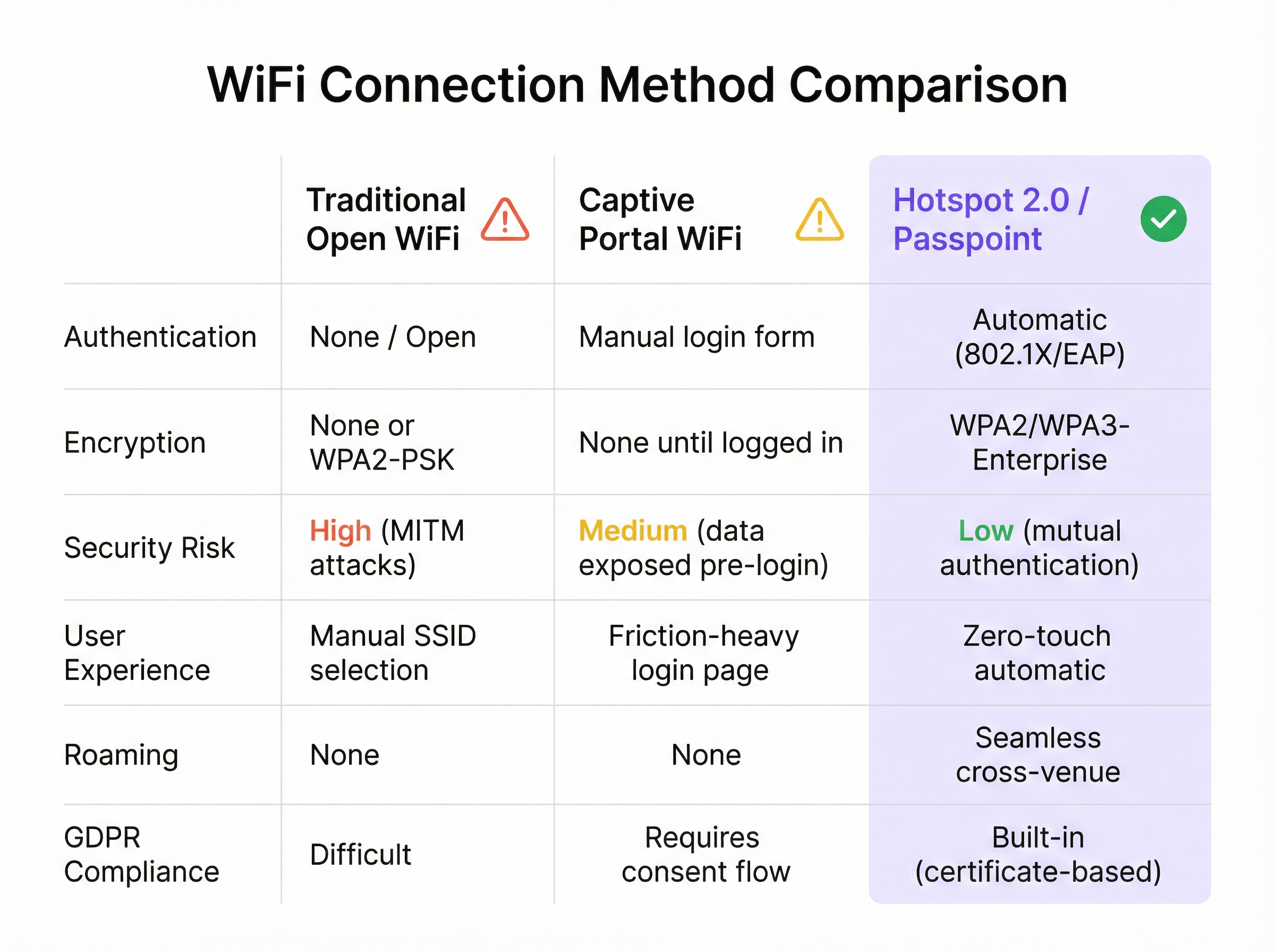
Termes clés et définitions
IEEE 802.11u
An amendment to the IEEE 802.11 standard that enables 'interworking with external networks'. It allows client devices to exchange information with an access point before establishing a connection.
This is the foundational protocol that makes Hotspot 2.0 possible. When an IT team sees that an AP is '802.11u capable', it means it can support the discovery mechanisms required for Passpoint.
ANQP (Access Network Query Protocol)
The specific protocol used by a client device to query an access point about its capabilities, such as roaming partners, venue type, and authentication methods.
Network architects will configure ANQP elements on their wireless controllers to advertise network services. Troubleshooting often involves analyzing ANQP frames to see what information the AP is providing to clients.
GAS (Generic Advertisement Service)
The transport mechanism defined in 802.11u that carries ANQP frames between the client and the access point before an association is formed.
GAS and ANQP work together. GAS is the 'envelope' and ANQP is the 'letter' inside. When troubleshooting, packet captures will show GAS frames containing the ANQP queries and responses.
RCOI (Roaming Consortium Organizational Identifier)
A unique identifier that represents a group of network providers who have a roaming agreement. It's the primary piece of information a device looks for to decide if it can automatically connect.
This is a critical configuration item. An IT manager must ensure their APs are broadcasting the correct RCOIs for their own organization and any roaming partners like OpenRoaming. A missing or incorrect RCOI is a common cause of connection failures.
WPA3-Enterprise
The highest level of WiFi security, which uses 192-bit encryption and requires 802.1X authentication. It provides robust protection against eavesdropping and other sophisticated attacks.
For any organization concerned with security and compliance (PCI DSS, GDPR), deploying WPA3-Enterprise is a non-negotiable best practice. Passpoint is the most user-friendly way to implement it at scale.
EAP-TLS (Extensible Authentication Protocol-Transport Layer Security)
An EAP method that uses client-side and server-side digital certificates for mutual authentication. It is considered the most secure EAP method.
This is the recommended method for securing corporate-owned devices. IT teams will use an MDM to push certificates to devices, enabling zero-touch, highly secure network access.
RadSec (RADIUS over TLS)
A protocol that secures RADIUS authentication traffic by tunneling it through a TLS-encrypted connection (typically over TCP port 2083).
When setting up roaming with OpenRoaming or other external partners, network architects will use RadSec to ensure that authentication requests traversing the public internet are fully encrypted and secure.
NAI (Network Access Identifier)
A standardized way of identifying a user in an 802.1X authentication request, typically formatted like an email address (e.g., 'user@realm'). The realm portion is used to route the request to the correct home RADIUS server.
IT teams configure NAI realms to define their authentication domains. In a roaming scenario, the realm of the user's NAI determines which Identity Provider's RADIUS server needs to process the authentication request.
Études de cas
A 500-room luxury hotel with multiple conference wings wants to eliminate its cumbersome captive portal. Corporate guests frequently complain about having to re-authenticate multiple times per day as they move between their room, the conference centre, and the restaurant. The hotel needs to maintain PCI DSS compliance for its payment systems.
The recommended solution is a phased Passpoint deployment integrated with WBA OpenRoaming. Phase 1 (Pilot): Deploy Passpoint in the main conference wing and on one floor of guest rooms. Configure the WLAN to broadcast the hotel's own RCOI and the OpenRoaming RCOI. Use EAP-TLS for corporate-managed devices (provisioned via MDM by their employers) and provide a simple, one-time onboarding portal for guests to install a Passpoint profile with an EAP-TTLS credential. Phase 2 (Rollout): After a successful pilot, extend the Passpoint WLAN to all guest rooms, public areas, and restaurants. Decommission the legacy captive portal SSID, but keep a single, hidden SSID for specific back-of-house devices that do not support 802.1X. Security: The use of WPA3-Enterprise and 802.1X provides traffic encryption and mutual authentication, satisfying key PCI DSS requirements for securing wireless environments.
A large retail chain with 200 stores across the country wants to offer seamless WiFi to its loyalty program members. They also want to offload traffic from their in-store staff's cellular devices to the corporate WiFi to ensure reliable access to inventory and POS applications. The existing infrastructure is a mix of Cisco Meraki and Aruba hardware.
The solution is to create a unified Passpoint strategy across the mixed-vendor environment. Step 1 (Onboarding): Integrate Passpoint profile generation into the loyalty program's mobile app. When a user signs into the app, it automatically installs the Passpoint profile with a unique EAP-TTLS credential. Step 2 (Staff Provisioning): Use the company's MDM to push a separate Passpoint profile to all corporate-owned staff devices, configured for EAP-TLS using device certificates for zero-touch authentication. Step 3 (Network Configuration): In both Cisco Meraki and Aruba Central dashboards, create a new WLAN profile for Passpoint. Enable Hotspot 2.0, set security to WPA3-Enterprise, and add the company's RCOI and the OpenRoaming RCOI. Point authentication to a central cloud RADIUS server to ensure consistent policy enforcement across all stores. Step 4 (Analytics): Ingest RADIUS authentication logs into the Purple analytics platform to correlate WiFi connections with loyalty member IDs, tracking visit frequency and dwell time without a captive portal.
Analyse de scénario
Q1. You are the network architect for a large international airport. You want to implement Passpoint to provide seamless roaming for travelers from major cellular carriers. During your pilot, you notice that a large number of Android devices are not automatically connecting, while iOS devices are connecting successfully. What is the most likely cause and your first troubleshooting step?
💡 Astuce :Consider the differences in how various device manufacturers implement the 802.11u standard and what specific information they look for during discovery.
Afficher l'approche recommandée
The most likely cause is a misconfiguration of the Roaming Consortium Organizational Identifiers (RCOIs). Many Android devices, particularly older models or those with manufacturer-customized operating systems, rely on the legacy Cisco RCOI (00-40-96) to initiate an ANQP query. If only the modern OpenRoaming RCOI (5A-03-BA) is being broadcast, these devices will not attempt to connect. The first troubleshooting step is to use a WiFi analysis tool to inspect the beacon frames from the pilot APs and verify that both the OpenRoaming and the legacy Cisco RCOIs are being broadcast.
Q2. A retail chain has successfully deployed Passpoint with OpenRoaming in all its stores. The marketing team now wants to know if they can still gather customer analytics, such as visit frequency and dwell time, which they previously collected via the captive portal. What is your recommendation?
💡 Astuce :Where in the new authentication flow can user identity be correlated with a connection event? Can this be done while respecting privacy and the principles of the OpenRoaming federation?
Afficher l'approche recommandée
While Passpoint eliminates the captive portal, it is still possible to gather valuable analytics. The recommended approach is to leverage the RADIUS authentication logs. Each time a user connects, an authentication request is sent to the RADIUS server, which contains the user's Network Access Identifier (NAI). By integrating the RADIUS server with an analytics platform like Purple, the NAI can be used as a persistent anonymous identifier to track visit frequency and dwell time. This provides the marketing team with the data they need without reintroducing login friction for the user. It's important to ensure this process is compliant with privacy policies and the terms of the roaming federation.
Q3. A conference centre is setting up a Passpoint network. They plan to use EAP-TLS for staff and event organizers, but need a solution for thousands of temporary attendees. They are considering using EAP-TTLS with usernames and passwords distributed at registration. What is a significant security risk of this approach and what is a better alternative?
💡 Astuce :Think about the lifecycle of shared credentials and the security of the 'inner' authentication method in EAP-TTLS.
Afficher l'approche recommandée
The significant risk of using shared EAP-TTLS credentials (username/password) is the lack of revocation and accountability. If a credential pair is compromised, it can be used by an unauthorized party until it expires, and it's difficult to trace activity back to a specific individual. A better and more secure alternative is to use an onboarding portal that generates a unique Passpoint profile for each attendee. This can be done by having the attendee scan a QR code or visit a one-time URL. The portal generates a profile containing a unique, short-lived digital certificate (for EAP-TLS) or a unique EAP-TTLS credential. This ensures that each user has a distinct identity, and access can be revoked on a per-user basis if necessary, providing much stronger security and accountability.
Points clés à retenir
- ✓WiFi Hotspot 2.0 (Passpoint) enables seamless, zero-touch roaming for users by automatically authenticating devices to trusted WiFi networks.
- ✓It replaces insecure, high-friction captive portals with credential-based authentication using the enterprise-grade WPA3-Enterprise security standard.
- ✓The core technology relies on the IEEE 802.11u standard, which allows devices to query network information (via ANQP/GAS) before connecting.
- ✓Mutual authentication (802.1X) is a key security benefit, protecting against 'Evil Twin' and Man-in-the-Middle (MITM) attacks.
- ✓OpenRoaming is a global federation that works with Passpoint to allow seamless roaming across thousands of different network providers.
- ✓A successful deployment requires a phased approach: audit your infrastructure, run a pilot to test across all device types, and then perform a full rollout.
- ✓Key business benefits include reduced IT helpdesk costs, improved guest satisfaction, enhanced security compliance (PCI DSS, GDPR), and new opportunities for data offload and analytics.




