

Itinérance et transfert WiFi : 802.11r et 802.11k expliqués
This guide provides a senior-level technical deep-dive into WiFi roaming protocols — specifically 802.11r (Fast BSS Transition), 802.11k (Neighbor Reports), and 802.11v (BSS Transition Management) — and their combined role in delivering seamless connectivity across enterprise venues. It equips IT managers, network architects, and venue operations directors with the architectural understanding, implementation steps, and business-impact metrics needed to deploy and validate fast roaming in hospitality, retail, events, and public-sector environments. The guide also addresses the critical interaction between roaming and captive portals, a common deployment failure point in guest WiFi networks.
🎧 Écouter ce guide
Voir la transcription

Synthèse
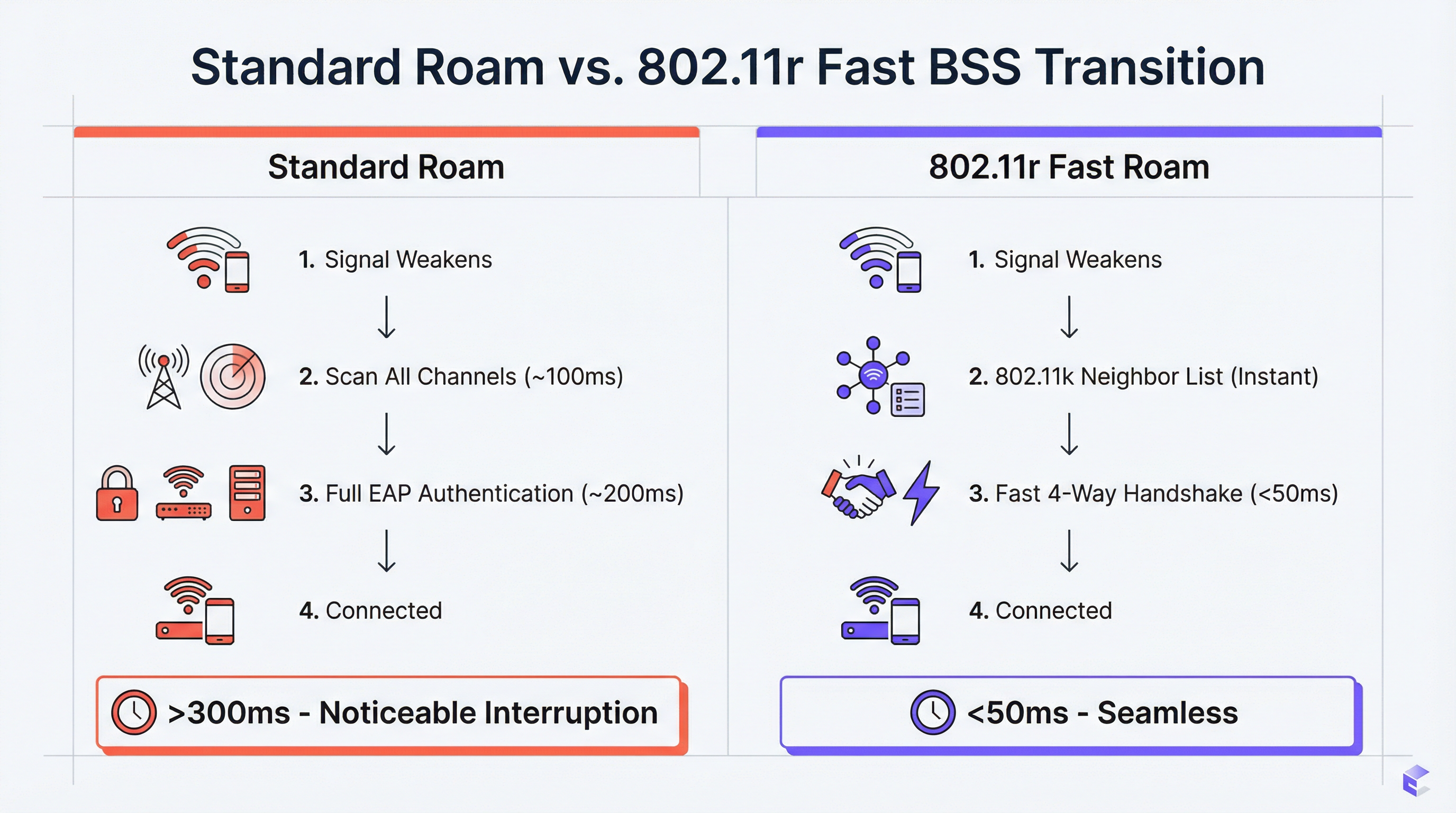
Pour les sites d'entreprise — hôtels, chaînes de magasins, stades, centres de conférence — un WiFi sans coupure est une exigence opérationnelle fondamentale. À mesure que les utilisateurs se déplacent dans un espace physique, leurs appareils doivent basculer entre les points d'accès (AP) sans perdre la connexion. De mauvaises performances d'itinérance entraînent des interruptions d'appels VoIP, des flux vidéo bloqués et la frustration des utilisateurs, ce qui a un impact direct sur les scores de satisfaction des clients et les indicateurs de productivité du personnel. La solution réside dans trois amendements IEEE 802.11 complémentaires : 802.11k, 802.11v et 802.11r. Ensemble, ils forment un cadre d'assistance à l'itinérance qui donne aux appareils clients l'intelligence nécessaire pour prendre des décisions de transfert plus rapides et plus intelligentes, et fournit au réseau les outils pour guider activement ces décisions. La norme 802.11k fournit une liste optimisée d'AP candidats, éliminant ainsi les analyses de canaux chronophages. La norme 802.11r (Fast BSS Transition) réduit le délai de la poignée de main de réauthentification de 200–300 ms à moins de 50 ms. La norme 802.11v permet au réseau d'orienter de manière proactive les clients à des fins d'équilibrage de charge. La mise en œuvre correcte de ces normes — associée à une plateforme WiFi invité bien conçue — est la voie incontournable vers l'expérience sans fil mobile et ultra-performante qu'exigent les environnements d'entreprise modernes.
Analyse technique approfondie
Le défi : l'itinérance lente et le problème du client collant (Sticky Client)
Dans un déploiement WiFi standard sans assistance à l'itinérance, l'appareil client est le seul responsable de la décision de changer de point d'accès. Le résultat typique est que les appareils restent connectés à leur AP actuel bien plus longtemps que ce qui est optimal, même lorsqu'un signal nettement plus fort est disponible sur un AP à proximité. C'est le problème du client collant (sticky client), endémique dans les environnements d'entreprise où une multitude de types d'appareils — smartphones, ordinateurs portables, capteurs IoT, scanners portables — appliquent chacun leurs propres algorithmes d'itinérance avec des niveaux de sophistication variables.
Lorsque le client décide enfin de changer de point d'accès, il doit effectuer un cycle complet de réauthentification avec le nouvel AP. Dans un réseau WPA2-Enterprise ou WPA3-Enterprise, cela implique de multiples allers-retours EAP (Extensible Authentication Protocol) entre le client, l'AP et un serveur RADIUS en arrière-plan. Ce processus peut prendre de 200 à 400 millisecondes. Pour les applications en temps réel — VoIP, visioconférence, points de vente mobiles — cette latence est inacceptable. Il en résulte des appels interrompus, des images vidéo figées et des transactions échouées.
802.11k : Gestion des ressources radio et rapports de voisinage
L'amendement 802.11k introduit la gestion des ressources radio (RRM), un cadre permettant aux AP et aux clients d'échanger des informations sur l'environnement RF. La fonctionnalité la plus importante sur le plan opérationnel est le rapport de voisinage (Neighbor Report). Un AP compatible 802.11k peut répondre à la requête d'un client avec une liste structurée des AP voisins, incluant leurs BSSID, canaux de fonctionnement et caractéristiques de signal. Cela évite au client de devoir effectuer une analyse passive ou active sur tous les canaux disponibles — un processus qui peut lui-même prendre 100 ms ou plus sur un réseau multibande.
L'effet pratique est qu'un client s'approchant de la limite de la zone de couverture d'un AP dispose déjà d'une liste classée de candidats au transfert avant même d'avoir besoin de changer de point d'accès. La décision est prise en toute connaissance de cause, et non par le biais d'une recherche lente et à l'aveugle.
802.11r : Transition BSS rapide (FT)
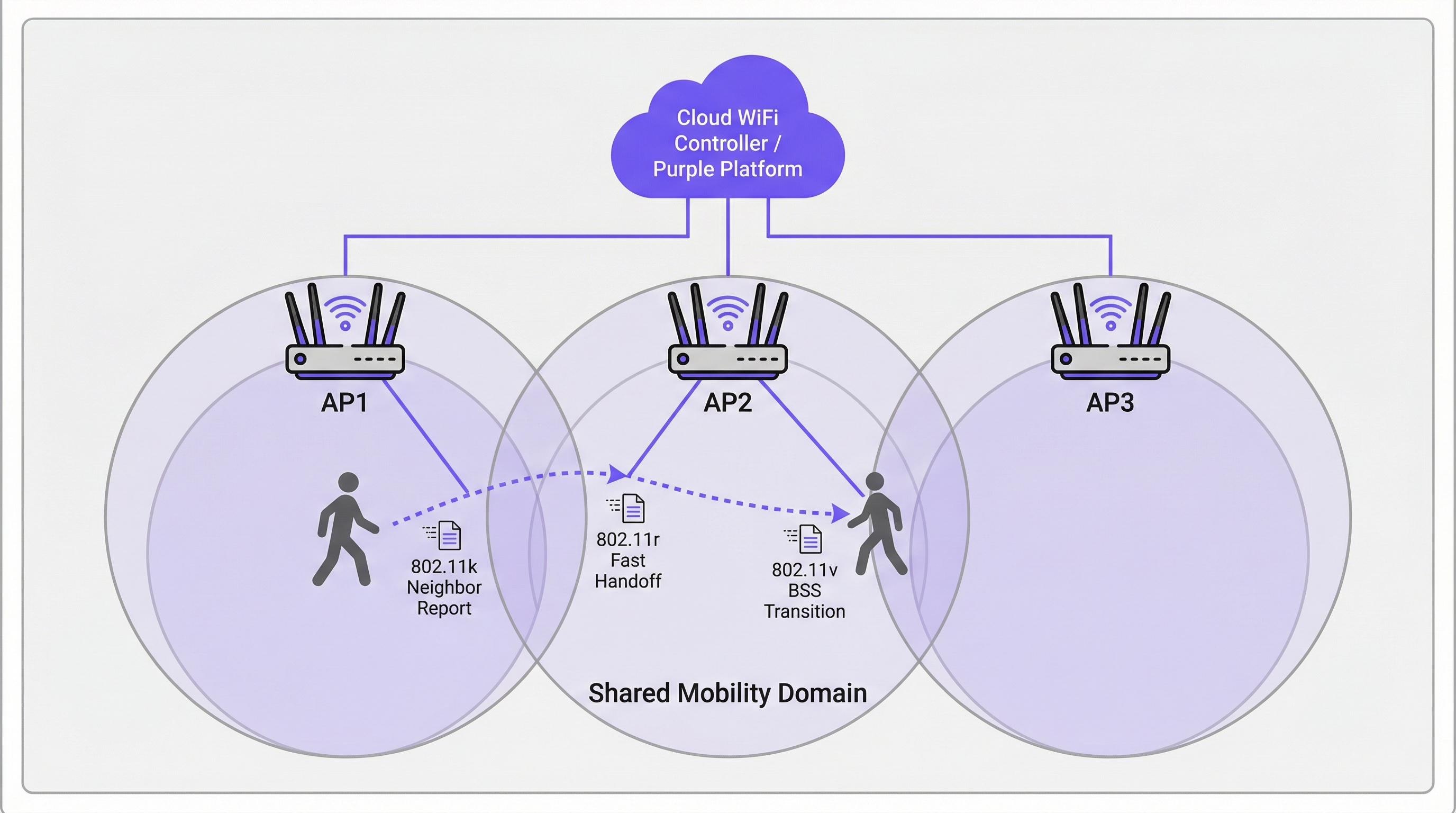
La norme 802.11r est la pierre angulaire de l'itinérance rapide. Sa principale innovation est la pré-distribution du matériel de chiffrement sur les AP au sein d'un domaine de mobilité (Mobility Domain) défini. Lorsqu'un client s'authentifie pour la première fois sur un réseau compatible 802.11r, il établit une clé maîtresse par paire (PMK) via le processus EAP standard. Avec le FT activé, un dérivé de cette clé — la PMK-R1 — est pré-distribué à tous les AP du domaine de mobilité via le contrôleur ou le système de distribution.
Lorsque le client passe à un nouvel AP, au lieu de lancer un échange EAP complet, il effectue une poignée de main à 4 voies (4-way handshake) compressée en utilisant la PMK-R1 pré-partagée. Cela réduit le temps d'authentification du transfert à moins de 50 millisecondes — le seuil critique en dessous duquel une itinérance est imperceptible pour l'utilisateur final lors d'une session vocale ou vidéo.
La norme 802.11r prend en charge deux modes de fonctionnement. Le FT over-the-Air permet au client de communiquer directement avec l'AP cible pendant le transfert, ce qui est plus simple et constitue l'approche recommandée pour la plupart des déploiements. Le FT over-the-DS (Distribution System) achemine les trames FT à travers le réseau filaire via l'AP actuel, ce qui peut être utile dans des architectures de contrôleurs spécifiques, mais ajoute de la complexité.
802.11v : Gestion de la transition BSS
Là où le 802.11k est réactif (fournissant des informations à la demande du client) et le 802.11r est transactionnel (accélérant le transfert), le 802.11v est proactif. Il permet au réseau d'envoyer des requêtes de gestion de transition BSS aux appareils clients, leur suggérant ou leur ordonnant de basculer vers un AP spécifique. C'est le principal outil du réseau pour l'équilibrage de charge. Si un AP approche de sa capacité maximale, le contrôleur peut identifier les clients connectés ayant un signal fort vers un AP voisin moins chargé et leur envoyer une requête de transition. Le client n'est pas obligé de s'y conformer, mais les clients bien conçus (appareils iOS, Android et Windows modernes) honoreront généralement la requête.
Cette capacité d'orientation proactive transforme le réseau d'une infrastructure passive en un acteur actif de l'optimisation de l'expérience utilisateur sur l'ensemble du site.
Comment les Captive Portals interagissent avec l'itinérance
Un point de défaillance critique et souvent négligé dans les déploiements de WiFi invité est l'interaction entre l'itinérance et l'authentification via le Captive Portal. Si un invité s'authentifie via un Captive Portal sur l'AP1 puis passe à l'AP2, une implémentation basique présentera à nouveau le Captive Portal, forçant une réauthentification. Il s'agit d'un échec fondamental de l'expérience utilisateur (UX).
L'approche architecturale correcte consiste à centraliser la gestion de l'état des sessions sur la plateforme WiFi invité (telle que Purple). Une fois qu'un utilisateur s'authentifie, son adresse MAC et son jeton de session sont stockés de manière centralisée. Lorsqu'il change de point d'accès, le nouvel AP interroge la plateforme centrale, qui confirme la session active et contourne automatiquement le Captive Portal. Cela nécessite que la plateforme WiFi invité soit étroitement intégrée à l'infrastructure sans fil — un critère clé lors de l'évaluation des solutions fournisseurs.
Guide de mise en œuvre
Les étapes suivantes représentent un cadre de déploiement indépendant des fournisseurs, applicable à toute infrastructure sans fil d'entreprise.
Étape 1 — Audit matériel et logiciel. Vérifiez que vos AP, votre contrôleur de réseau local sans fil (WLC) ou votre plateforme de gestion cloud, ainsi que les appareils clients cibles prennent tous en charge les normes 802.11k, 802.11v et 802.11r. La prise en charge par les AP et les contrôleurs est quasi universelle sur le matériel d'entreprise moderne (Cisco Catalyst, Aruba, Juniper Mist, Ruckus). La prise en charge par les clients varie — vérifiez les fiches techniques des appareils, en particulier pour le matériel spécialisé comme les lecteurs de codes-barres, les dispositifs médicaux ou les capteurs IoT.
Étape 2 — Activer les normes sur le SSID cible. Dans votre WLC ou tableau de bord cloud, accédez à la configuration du SSID et activez le 802.11k (Neighbor Reports), le 802.11v (BSS Transition Management) et le 802.11r (Fast BSS Transition). Pour le 802.11r, sélectionnez FT over-the-Air comme mode par défaut, à moins que votre architecture ne nécessite spécifiquement le mode over-the-DS.
Étape 3 — Configurer le domaine de mobilité. Assurez-vous que tous les AP situés dans la même zone d'itinérance physique sont assignés au même domaine de mobilité. C'est la condition préalable au partage des clés FT. Vérifiez que le réseau de gestion dispose d'une connectivité totale entre tous les AP du domaine.
Étape 4 — Configuration de la sécurité. La norme 802.11r offre le plus grand avantage avec l'authentification WPA2/WPA3-Enterprise, car c'est le processus EAP complexe que le FT est conçu pour accélérer. Pour les réseaux du personnel et de l'entreprise, cela est non négociable tant du point de vue des performances que de la conformité PCI DSS. Pour les réseaux invités utilisant un Captive Portal avec une clé pré-partagée (PSK), le 802.11r offre toujours des avantages, mais les gains sont moins spectaculaires.
Étape 5 — Valider avec une capture de paquets. Utilisez un outil d'analyse WiFi (Wireshark avec un adaptateur 802.11 compatible, ou un outil commercial comme Ekahau ou AirMagnet) pour capturer les événements d'itinérance. Confirmez la présence des échanges de rapports de voisinage 802.11k, des trames de gestion de transition BSS 802.11v et de la séquence d'authentification FT 802.11r abrégée. Mesurez le temps écoulé entre la dernière trame de données sur l'ancien AP et la première trame de données sur le nouvel AP. Votre objectif est de rester systématiquement en dessous de 50 ms.
Étape 6 — Déploiement progressif en production. Une fois validée sur un SSID de test, déployez la configuration sur les SSID de production par phases, en commençant par un seul étage ou une seule zone. Surveillez les problèmes de compatibilité des clients et remontez toute anomalie avant de l'étendre à l'ensemble du site.
Bonnes pratiques
Les recommandations suivantes reflètent les directives standard de l'industrie et s'appliquent à toutes les plateformes fournisseurs.
Concevoir pour le domaine de mobilité, pas pour le VLAN. Une erreur de configuration courante consiste à définir le domaine de mobilité selon les limites du VLAN plutôt que selon les limites physiques d'itinérance. Un utilisateur se déplaçant entre deux étages doit rester dans le même domaine de mobilité, même s'il franchit la limite d'un VLAN. Assurez-vous que l'architecture de votre contrôleur le permet.
Maintenir un SSID hérité pour les appareils non conformes. Certains appareils ont des implémentations 802.11r défectueuses ou inexistantes. Plutôt que de désactiver le FT sur l'ensemble du réseau pour s'y adapter, maintenez un SSID secondaire sans FT pour les anciens appareils. Cela évite un nivellement par le bas où les capacités de l'ensemble du réseau sont limitées par l'appareil le plus ancien.
S'aligner sur les normes de sécurité. Pour les environnements de vente au détail, assurez-vous que la configuration de sécurité de votre réseau sans fil est conforme aux exigences PCI DSS 4.0, en particulier concernant la segmentation du réseau et le chiffrement. Pour les déploiements dans le secteur public et l'hôtellerie traitant des données personnelles, assurez-vous que vos pratiques en matière de données WiFi invité sont conformes au GDPR et à la législation nationale pertinente sur la protection des données. Le WPA3-Enterprise, lorsqu'il est pris en charge, offre la posture de sécurité la plus robuste.
Documenter la topologie de votre domaine de mobilité. Tenez à jour un registre indiquant quels AP appartiennent à quel domaine de mobilité. Ceci est essentiel pour le dépannage et pour l'intégration de nouveaux AP lors de l'expansion de l'infrastructure.
Dépannage et atténuation des risques
| Symptôme | Cause probable | Action recommandée |
|---|---|---|
| L'appareil ne peut pas se connecter après l'activation du 802.11r | Le client a une implémentation FT défectueuse | Désactiver le FT sur le SSID ou créer un SSID hérité sans FT pour l'appareil concerné |
| Les temps d'itinérance sont toujours >100 ms malgré le 802.11r | Les AP ne sont pas dans le même domaine de mobilité | Vérifier la configuration du domaine de mobilité sur le contrôleur ; vérifier la connectivité du réseau de gestion entre les AP |
| L'invité tombe sur le Captive Portal après chaque transfert | L'état de la session n'est pas centralisé | S'assurer que la plateforme WiFi invité suit les adresses MAC et les jetons de session de manière centralisée sur tous les AP |
| Les clients collants ne répondent pas à l'orientation 802.11v | Le client ne prend pas en charge ou ignore le 802.11v | Ajuster la puissance de transmission de l'AP pour réduire le chevauchement de couverture, forçant le client à basculer à un seuil RSSI plus fort |
| Déconnexions intermittentes dans les zones à haute densité | Boucle d'itinérance entre deux AP | Ajuster les seuils de transition 802.11v ; s'assurer que le placement des AP minimise les chevauchements de couverture excessifs |
ROI et impact commercial
L'analyse de rentabilisation pour investir dans un réseau d'itinérance correctement configuré est évidente. Dans l'hôtellerie, un WiFi sans coupure est directement corrélé aux scores de satisfaction des clients. Un client dont l'appel Teams est interrompu dans le couloir évaluera mal le WiFi de l'hôtel, quelles que soient les vitesses annoncées pour la connexion dans la chambre. Pour le commerce de détail, la fiabilité de la connectivité des scanners portables se traduit directement par la précision des stocks et l'efficacité du personnel — une chaîne de 200 magasins qui élimine les déconnexions de scanners peut récupérer un nombre important d'heures de travail chaque année. Pour les conférences et événements, le coût en termes de réputation d'une mauvaise expérience de connectivité lors d'un événement phare peut largement dépasser le coût de l'investissement dans l'infrastructure.
Les KPI mesurables pour un déploiement d'itinérance réussi sont : la durée moyenne de l'événement d'itinérance (objectif : <50 ms), le nombre d'appels VoIP interrompus par heure (objectif : zéro) et les scores de satisfaction du WiFi invité (suivis via des enquêtes post-visite). Un réseau bien configuré avec 802.11k, 802.11v et 802.11r devrait apporter des améliorations mesurables sur ces trois indicateurs dès le premier mois de déploiement.
Termes clés et définitions
BSS (Basic Service Set)
A fundamental building block of a WiFi network, consisting of one Access Point and all the client devices associated with it. Each BSS is identified by a unique BSSID (the AP's MAC address).
When discussing roaming, a client transitions from the BSS of its current AP to the BSS of a new AP. 'Fast BSS Transition' (802.11r) is literally a faster mechanism for executing this switch.
SSID (Service Set Identifier)
The human-readable name of a WiFi network — the name users see and select on their devices. An SSID can be broadcast by multiple APs simultaneously to create a single logical network across a large area.
For roaming to function, all APs in the roaming area must broadcast the same SSID. Users should experience a single, continuous network, not a series of separate networks named 'Hotel_WiFi_Floor1', 'Hotel_WiFi_Floor2', etc.
WPA2/WPA3-Enterprise
A WiFi security standard that authenticates each user or device individually using a RADIUS server and the EAP protocol, rather than a shared password. It is the required security method for corporate and PCI DSS-compliant networks.
802.11r provides the greatest performance benefit in Enterprise networks, as it is the complex, multi-step EAP authentication process that FT is specifically designed to accelerate.
RADIUS (Remote Authentication Dial-In User Service)
A networking protocol that provides centralised Authentication, Authorisation, and Accounting (AAA) for network access. In a WiFi context, the AP acts as a RADIUS client, forwarding user credentials to the RADIUS server for validation.
In a standard WPA2-Enterprise roam, the client must complete a full EAP exchange with the RADIUS server for every new AP. 802.11r eliminates this requirement by pre-distributing key material, so the RADIUS server is only consulted during the initial authentication.
Pairwise Master Key (PMK)
The top-level cryptographic key in the WPA2/WPA3 security hierarchy, derived during the initial EAP authentication process between the client and the RADIUS server.
802.11r works by deriving a hierarchy of keys from the PMK. A derivative key (PMK-R1) is pre-distributed to APs in the Mobility Domain, allowing a roaming client to perform a fast handshake without re-deriving the PMK from scratch.
Mobility Domain
A set of APs, managed by the same controller or cloud platform, that are configured to share Fast Transition key material and allow seamless 802.11r roaming between them.
This is the foundational configuration element for 802.11r. If two APs are not in the same Mobility Domain, a client roaming between them will fall back to a full, slow re-authentication. Correctly defining Mobility Domain boundaries is the most critical implementation step.
Sticky Client
A wireless client device that fails to roam to a nearby AP with a significantly stronger signal, instead maintaining its association with a distant AP with a weak signal, resulting in degraded throughput and increased latency.
This is the primary user-experience problem that 802.11k and 802.11v are designed to address. 802.11k gives the client better information; 802.11v gives the network the ability to actively encourage the client to move.
Captive Portal
A web page that intercepts a user's initial HTTP request and redirects them to an authentication or registration page before granting full network access. Widely used in hospitality, retail, and public WiFi deployments.
A poorly architected captive portal will re-present itself every time a user roams to a new AP, breaking the seamless experience. The solution is centralised session management on the guest WiFi platform, which recognises authenticated users by their MAC address across all APs.
EAP (Extensible Authentication Protocol)
An authentication framework used in WPA2/WPA3-Enterprise networks. It supports multiple authentication methods (EAP-TLS, PEAP, EAP-TTLS) and involves a multi-step exchange between the client, the AP, and a RADIUS server.
The EAP exchange is the primary source of latency in a standard WiFi roam. 802.11r is specifically designed to bypass the need to repeat this exchange on every roam, replacing it with a much faster 4-way handshake.
Études de cas
A 500-room luxury hotel is experiencing guest complaints of dropped WiFi calls and poor connectivity in hallways and common areas. Their infrastructure consists of enterprise-grade APs from a major vendor, but roaming assistance is not configured. How would you design and implement a solution?
Phase 1 — Baseline Assessment. Conduct a site survey to confirm RF coverage and identify roaming boundaries. Use a WiFi analyser to benchmark current roaming performance. Capture packet traces in the problem corridors to measure actual handoff times. Expect to find values of 200–400 ms, confirming the slow re-authentication hypothesis.
Phase 2 — Pilot Configuration. On the hotel's Wireless LAN Controller, create a test SSID (e.g., 'HotelGuest_FT_Test'). Enable 802.11k (Neighbor Reports), 802.11v (BSS Transition Management), and 802.11r (Fast BSS Transition, over-the-Air mode) on this SSID. Set security to WPA2-Enterprise, integrating with the hotel's existing RADIUS infrastructure. Assign all APs in the pilot zone to the same Mobility Domain.
Phase 3 — Validation. Using a modern smartphone (iOS 14+ or Android 10+), connect to the test SSID and initiate a VoIP call. Walk through the previously identified problem areas. The call should remain clear and uninterrupted. Capture packets to confirm handoff times are now consistently below 50 ms.
Phase 4 — Production Rollout. Apply the configuration to the primary guest and staff SSIDs in a phased rollout, floor by floor. Monitor for client compatibility issues. Communicate the changes to the IT team and set up alerting on the management platform for any roaming anomalies.
A large retail chain wants to deploy handheld inventory scanners across its 200 stores. The scanners must maintain a persistent, low-latency connection to the central inventory management system as employees move throughout stockrooms and sales floors. What are the critical WiFi configuration requirements, and what are the key risks?
Step 1 — Device Procurement Requirement. The absolute first step is to mandate 802.11r, 802.11k, and 802.11v support as a non-negotiable requirement in the scanner procurement specification. This must be confirmed against the manufacturer's data sheet, not assumed. Failure to do this at the procurement stage is the single most common cause of project failure in IoT and specialist device deployments.
Step 2 — Dedicated SSID Architecture. Create a dedicated, hidden SSID for the scanners. This network should be configured for WPA2/WPA3-Enterprise with certificate-based authentication (EAP-TLS) using device certificates provisioned during the scanner build process. This eliminates password management overhead and provides a strong, auditable security posture aligned with PCI DSS requirements for retail networks.
Step 3 — Enable Fast Roaming. On the dedicated SSID, enable 802.11k, 802.11v, and 802.11r. Define a Mobility Domain that encompasses all APs in each store.
Step 4 — QoS Configuration. Implement Quality of Service (QoS) policies to prioritise scanner traffic (DSCP marking) over less critical traffic such as the guest WiFi network. This ensures inventory data is always given network precedence during periods of congestion.
Step 5 — Centralised Management and Monitoring. Deploy a cloud management platform that provides a single-pane-of-glass view across all 200 stores. Configure alerting for roaming failures and AP health events. This allows the central IT team to identify and remediate issues without dispatching on-site engineers.
Analyse de scénario
Q1. You are designing the WiFi for a new conference centre. The main auditorium will host 2,000 concurrent users during keynote sessions, while 20 breakout rooms need reliable connectivity for video conferencing. The AV team will be using wireless microphone systems and tablet-based presentation controllers. Which roaming standard is the single most critical to enable on the AV and staff SSID, and why?
💡 Astuce :Consider the latency tolerance of the applications being used by the AV team and presenters.
Afficher l'approche recommandée
802.11r (Fast BSS Transition) is the most critical standard for the AV and staff SSID. The AV team and presenters are running latency-sensitive, real-time applications — wireless microphone control, tablet presentation software, and video feeds — where any interruption is immediately visible to the audience. 802.11k and 802.11v are important supporting standards that help the client make better roaming decisions, but the raw speed of the handoff (the domain of 802.11r) is the primary determinant of whether a roam is noticeable. The target is consistently under 50 ms. For the general attendee SSID, all three standards should be enabled, but 802.11v's load-balancing capability becomes particularly valuable for managing 2,000 concurrent users across the auditorium's AP array.
Q2. A hotel guest complains that their WiFi is slow in their room, despite showing full signal bars on their device. A quick check on the controller shows the guest is connected to an AP two floors below them at a high RSSI, rather than the AP directly above their room. What is the technical term for this condition, and which standard is designed to address it?
💡 Astuce :The problem is not signal strength — the device has a strong signal. The problem is which AP it has chosen to associate with.
Afficher l'approche recommandée
This is the classic sticky client problem. The guest's device has associated with a distant AP that happens to have a strong signal (perhaps due to building geometry or AP placement) and is refusing to roam to the closer, more appropriate AP. The standard designed to address this is 802.11v (BSS Transition Management). With 802.11v enabled, the network controller can detect this suboptimal association — the guest is connected to an AP two floors away when a perfectly capable AP is directly above them — and send a BSS Transition Management Request to the client, suggesting it roam to the more appropriate AP. A well-implemented client (modern iOS, Android, Windows) will honour this request.
Q3. An IT administrator enables 802.11r on a hospital's staff WiFi network. Within hours, the helpdesk receives calls from nurses whose older mobile clinical workstations can no longer connect to the network at all. The workstations are running a legacy operating system and were purchased five years ago. What is the most likely cause, and what is the safest remediation strategy that does not require disabling 802.11r for all users?
💡 Astuce :The problem is specific to the older devices. The solution should be targeted at those devices, not the entire network.
Afficher l'approche recommandée
The most likely cause is that the legacy clinical workstations have a buggy or absent implementation of 802.11r. Some older devices fail to correctly negotiate the FT capability during the association process, resulting in a connection failure rather than a graceful fallback to standard authentication. The safest remediation strategy is SSID segmentation. Create a secondary staff SSID (e.g., 'ClinicalStaff_Legacy') with 802.11r disabled but 802.11k and 802.11v still enabled. Configure the legacy workstations to connect to this SSID. The primary staff SSID retains 802.11r for all modern devices. This approach avoids a 'race to the bottom' where the entire network's capabilities are constrained by the oldest device, while ensuring the legacy workstations remain operational. The long-term recommendation is to include 802.11r support as a mandatory requirement in the next device refresh cycle.
Points clés à retenir
- ✓Seamless WiFi roaming is a critical operational requirement for enterprise venues — poor handoff performance directly impacts guest satisfaction and staff productivity.
- ✓802.11k eliminates slow channel scanning by providing client devices with a curated Neighbor Report of candidate APs before they need to roam.
- ✓802.11r (Fast BSS Transition) is the most impactful standard, reducing AP handoff authentication time from 200–400 ms to under 50 ms by pre-distributing cryptographic key material across the Mobility Domain.
- ✓802.11v enables the network to proactively steer sticky clients to better APs for load balancing, transforming the network from a passive infrastructure into an active participant in optimising user experience.
- ✓Client device compatibility is the most common deployment risk — always verify 802.11r/k/v support against device specification sheets at the procurement stage, not after purchase.
- ✓Captive portals must be backed by centralised session management to prevent re-authentication on every roam — this is a platform architecture requirement, not just a configuration setting.
- ✓Validate every deployment with packet captures measuring actual handoff duration; the target benchmark is consistently under 50 milliseconds.




