

WPA2 vs WPA3 : Quelle est la différence et devriez-vous effectuer une mise à niveau ?
This guide provides IT managers, network architects, and venue operations directors with a definitive, actionable comparison of WPA2 and WPA3 WiFi security protocols. It explains the critical technical differences — including SAE authentication, Perfect Forward Secrecy, and Enhanced Open — and outlines a practical, phased migration strategy using WPA3 Transition Mode. The guide is essential for any organisation operating guest or staff WiFi in hospitality, retail, events, or public-sector environments who needs to understand the upgrade case, manage device compatibility, and align their wireless security posture with modern compliance requirements.
🎧 Écouter ce guide
Voir la transcription

Résumé analytique
Depuis plus d'une décennie, le WPA2 constitue la norme de base en matière de sécurité WiFi d'entreprise. Cependant, ses vulnérabilités inhérentes — la sensibilité aux attaques par dictionnaire hors ligne et l'exploit KRACK (Key Reinstallation Attack) — présentent désormais un risque tangible et activement exploité pour les organisations. Le WPA3, le protocole de sécurité de nouvelle génération certifié par la Wi-Fi Alliance en 2018, corrige directement ces failles en introduisant une authentification robuste avec le protocole SAE (Simultaneous Authentication of Equals), un chiffrement plus fort via GCMP-256 et l'obligation d'utiliser les Protected Management Frames (PMF). Ce guide fournit une comparaison pratique et exploitable du WPA2 et du WPA3 pour les responsables informatiques et les architectes réseau dans les secteurs de l'hôtellerie, de la vente au détail et des grands espaces. Il expose les arguments commerciaux en faveur d'une mise à niveau, détaille une voie de transition stratégique utilisant le mode de transition WPA3 et propose des bonnes pratiques indépendantes des fournisseurs pour garantir un réseau sans fil sécurisé et performant, répondant aux exigences modernes de conformité et d'expérience client. Ce qu'il faut retenir, c'est que la migration vers le WPA3 n'est plus une question de si, mais de comment — et qu'une approche stratégique et progressive est la voie la plus efficace pour atténuer les risques et pérenniser votre infrastructure.
Analyse technique approfondie
La transition du WPA2 au WPA3 représente un changement architectural majeur dans la sécurité sans fil. Comprendre les différences techniques sous-jacentes est crucial pour que les architectes réseau et les responsables informatiques puissent prendre des décisions de déploiement éclairées. Bien que le WPA2 ait été une norme résiliente, le WPA3 a été conçu pour neutraliser des vecteurs d'attaque spécifiques et bien documentés, et pour fournir une base plus sécurisée pour la prochaine décennie de connectivité sans fil.
Authentification : du PSK au SAE
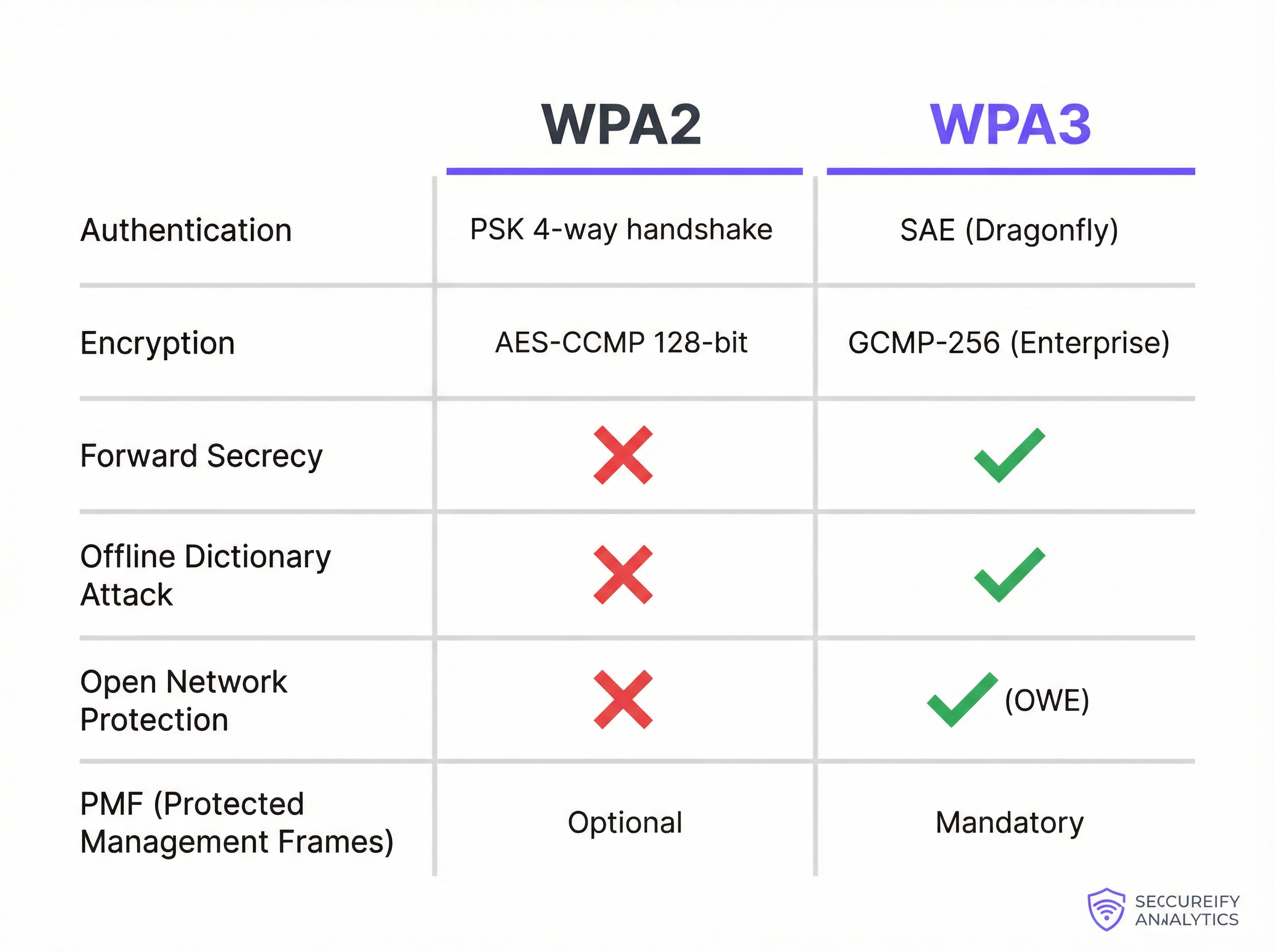
Le changement le plus fondamental entre WPA2-Personal et WPA3-Personal réside dans le mécanisme d'authentification. Le WPA2 utilise une clé pré-partagée (PSK) combinée à un handshake (négociation) à 4 voies. Bien qu'efficace au moment de sa conception, cette méthode est vulnérable aux attaques par dictionnaire hors ligne. Un attaquant peut capturer passivement le handshake, puis utiliser sa puissance de calcul pour deviner le mot de passe hors ligne, sans aucune autre interaction avec le réseau. Cela rend les réseaux sécurisés par des mots de passe faibles ou moyennement complexes très vulnérables aux compromissions.
Le WPA3 remplace le PSK par le protocole SAE (Simultaneous Authentication of Equals), également connu sous le nom d'échange de clés Dragonfly. Le SAE est un protocole d'accord de clé authentifié par mot de passe qui résiste aux attaques par dictionnaire hors ligne. Pendant le processus d'authentification, le mot de passe n'est jamais échangé directement. Au lieu de cela, le client et le point d'accès utilisent tous deux le mot de passe pour générer des hachages cryptographiques, qui sont ensuite échangés pour prouver la connaissance mutuelle de la clé. Un attaquant qui capture cet échange ne peut pas l'utiliser pour forcer le mot de passe hors ligne. Toute tentative de deviner le mot de passe doit être une attaque active en ligne — beaucoup plus lente et beaucoup plus facile à détecter et à bloquer.
Chiffrement, gestion des clés et confidentialité persistante (Forward Secrecy)
WPA2-Enterprise utilise AES-CCMP avec un chiffrement 128 bits, considéré comme sécurisé depuis de nombreuses années. WPA3-Enterprise place la barre beaucoup plus haut en proposant un mode de sécurité 192 bits optionnel, aligné sur la suite CNSA (Commercial National Security Algorithm). Cela offre une posture cryptographique requise pour les environnements gouvernementaux, de défense et autres environnements de haute sécurité.
Plus largement, le WPA3 introduit la confidentialité persistante parfaite (PFS - Perfect Forward Secrecy). Avec le WPA2, si un attaquant compromet le mot de passe du réseau, il pourrait potentiellement déchiffrer le trafic passé qu'il aurait préalablement capturé et stocké. Le WPA3 avec SAE garantit que chaque session dispose d'une clé de chiffrement unique et éphémère. Même si la clé d'une seule session est compromise, elle ne peut pas être utilisée pour déchiffrer les sessions précédentes ou futures — réduisant ainsi considérablement le rayon d'action d'une éventuelle faille.
Protection des réseaux ouverts : Enhanced Open (OWE)
Dans les lieux accueillant du public tels que les hôtels, les aéroports et les magasins de vente au détail, les réseaux WiFi ouverts (sans mot de passe) sont courants pour l'accès des invités. Sur un réseau ouvert traditionnel, tout le trafic est transmis en clair, ce qui rend chaque utilisateur vulnérable aux écoutes passives de la part de toute autre personne sur le même réseau. Le WPA3 résout ce problème avec Enhanced Open, qui met en œuvre le chiffrement OWE (Opportunistic Wireless Encryption). L'OWE crée automatiquement un tunnel individuel et chiffré entre chaque utilisateur et le point d'accès, même sur un réseau sans mot de passe. Cela offre une confidentialité significative sans ajouter de friction au processus de connexion — une amélioration essentielle pour les déploiements de WiFi invité à grande échelle.
Protected Management Frames (PMF)
Les trames de gestion régissent la façon dont les appareils WiFi gèrent leurs connexions, y compris l'association et la dissociation. Dans le WPA2, ces trames ne sont pas protégées, ce qui permet à un attaquant de les usurper pour désauthentifier de force un utilisateur légitime, rendant possibles les attaques par déni de service ou de l'homme du milieu (man-in-the-middle). Alors que les PMF (définies dans la norme IEEE 802.11w) étaient facultatives sous WPA2, le WPA3 rend obligatoire l'utilisation des Protected Management Frames, garantissant l'intégrité et l'authenticité de ces messages de contrôle critiques et protégeant la stabilité globale de la connexion sans fil.
Guide de mise en œuvre
La migration d'un réseau d'entreprise du WPA2 vers le WPA3 n'est pas un simple basculement, mais un projet stratégique qui nécessite une planification et une exécution minutieuses. L'objectif est de renforcer la sécurité tout en minimisant les perturbations des opérations commerciales et de l'expérience utilisateur. Une approche progressive est presque toujours la voie recommandée.
Phase 1 — Audit de l'infrastructure et des appareils. La première étape consiste en un audit complet de l'ensemble de votre écosystème sans fil. Pour les points d'accès, identifiez la marque, le modèle et la version du firmware de toutes les unités et vérifiez la documentation du fabricant concernant la prise en charge du WPA3. La plupart des points d'accès d'entreprise vendus depuis 2019 prennent en charge le WPA3, mais une mise à jour du firmware est généralement requise. Si vous utilisez une architecture basée sur un contrôleur, assurez-vous que le logiciel du contrôleur est mis à jour vers une version qui prend en charge la configuration et la gestion du WPA3. La partie la plus critique et la plus complexe de l'audit est l'inventaire des appareils clients. Vous devez cataloguer chaque appareil se connectant à votre réseau WiFi — ordinateurs portables d'entreprise, smartphones, appareils BYOD et matériel spécifique comme les terminaux de point de vente (POS), les lecteurs de codes-barres, les capteurs IoT et les composants de bâtiments intelligents.
Phase 2 — Activer le mode de transition WPA3/WPA2. Un basculement complet et immédiat vers le WPA3 n'est pas pratique pour la plupart des organisations en raison de la diversité des appareils clients. La solution standard de l'industrie consiste à utiliser le mode mixte WPA3/WPA2, également appelé mode de transition. Dans cette configuration, le même SSID est diffusé avec la prise en charge des authentifications WPA3 et WPA2. Les clients compatibles WPA3 négocient et se connectent automatiquement en utilisant le protocole le plus sécurisé ; les clients existants se connectent en utilisant le WPA2. Cela permet une expérience utilisateur fluide pendant la période de migration. Dans votre contrôleur LAN sans fil ou votre interface de gestion des points d'accès, vous trouverez généralement un paramètre de sécurité pour votre SSID qui vous permet de sélectionner « WPA3+WPA2-Enterprise » ou une option de mode mixte similaire.
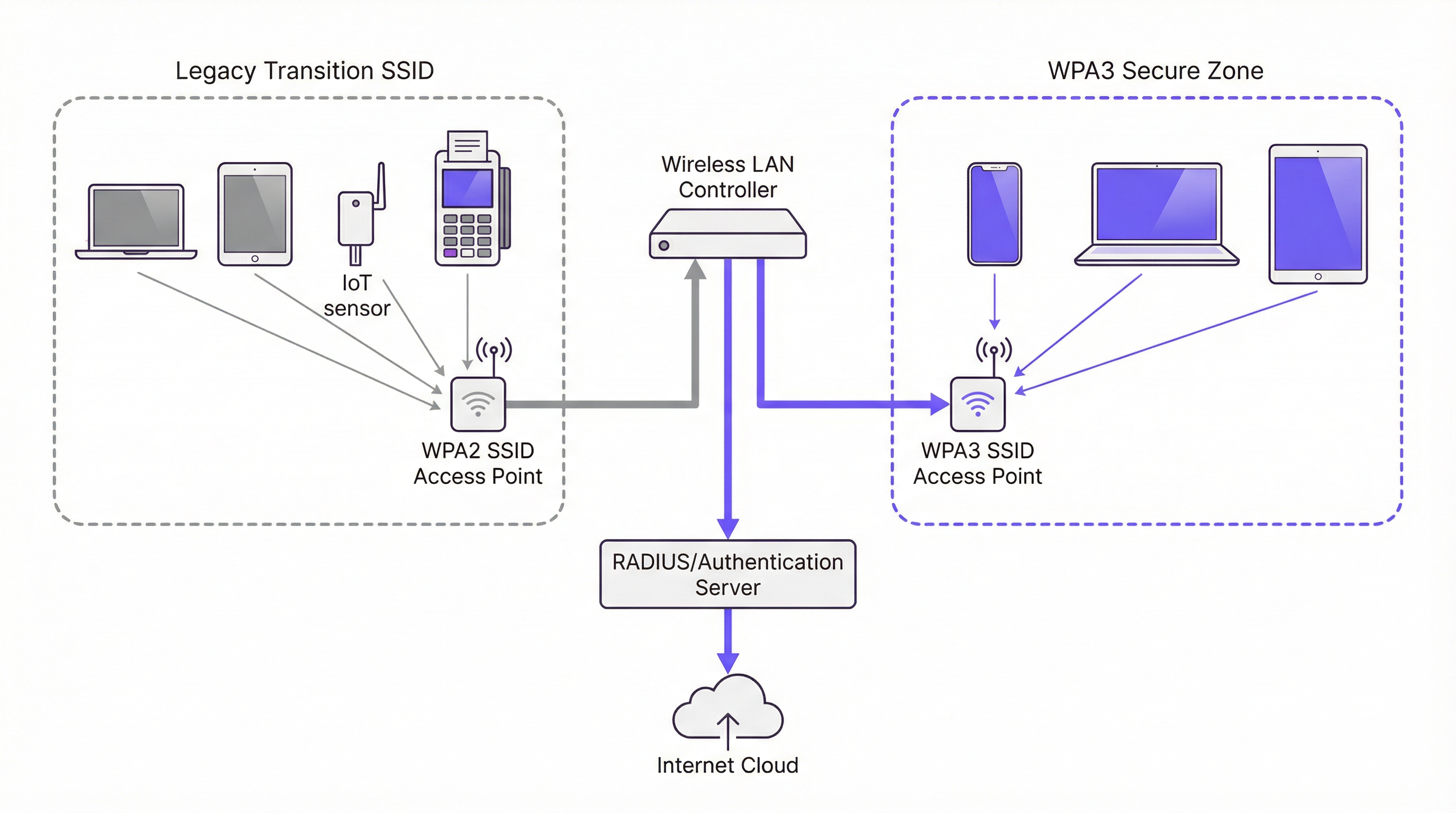
Phase 3 — Créer des zones sécurisées exclusivement WPA3. À mesure que votre parc d'appareils clients devient de plus en plus compatible WPA3, commencez à créer des SSID exclusivement WPA3 pour des groupes d'utilisateurs ou des types d'appareils spécifiques. Donnez la priorité aux appareils et aux utilisateurs qui manipulent les données les plus sensibles. Par exemple, créez un SSID exclusivement WPA3 pour le service financier ou pour les appareils des cadres de l'entreprise, puis utilisez votre plateforme de gestion des appareils pour déployer de nouveaux profils réseau sur les appareils compatibles, réduisant ainsi progressivement votre dépendance au SSID en mode mixte.
Phase 4 — Isoler et gérer les appareils existants (Legacy). Inévitablement, vous aurez une longue liste d'appareils plus anciens qui ne prennent pas en charge le WPA3. Créez un SSID séparé et dédié, configuré uniquement pour le WPA2, isolé du reste du réseau d'entreprise par un pare-feu avec des règles d'accès strictes. Simultanément, élaborez un plan de cycle de vie de renouvellement du matériel pour éliminer progressivement les appareils non conformes. Pour tout nouvel achat d'appareil, exigez la prise en charge du WPA3 comme critère d'approvisionnement.
Bonnes pratiques
Le tableau suivant résume les principales recommandations standard de l'industrie pour un déploiement WPA3 sécurisé, en s'appuyant sur les directives de la norme IEEE 802.1X, les spécifications de la Wi-Fi Alliance et les exigences de la norme PCI DSS v4.0.
| Bonne pratique | Justification | Priorité |
|---|---|---|
| Exiger le 802.1X pour tous les SSID d'entreprise | Élimine les mots de passe partagés ; offre une responsabilité par utilisateur et un contrôle centralisé des politiques via RADIUS. | Critique |
| Mettre en œuvre EAP-TLS (authentification par certificat) | Supprime entièrement la surface d'attaque basée sur les mots de passe ; les certificats ne peuvent pas être hameçonnés. | Élevée |
| Activer les PMF sur tous les réseaux WPA2 | Protège contre les attaques par désauthentification et dissociation, même avant la migration complète vers le WPA3. | Élevée |
| Désactiver les débits de données obsolètes (< 6 Mbps) | Supprime la compatibilité avec les clients les plus anciens et les moins sécurisés, et améliore l'efficacité globale du temps d'antenne. | Moyenne |
| Segmenter le trafic IoT et invité sur des VLAN dédiés | Limite le rayon d'action de toute compromission sur un appareil existant ou un réseau ouvert. | Critique |
| Établir une cadence de mise à jour des firmwares | Garantit que les vulnérabilités connues sont rapidement corrigées sur les points d'accès et les contrôleurs. | Élevée |
| Exiger le WPA3 pour tout nouvel achat de matériel | Empêche l'accumulation de dette technique et accélère le calendrier de migration. | Élevée |
Dépannage et atténuation des risques
Le déploiement du WPA3 peut introduire de nouveaux défis. Le mode de défaillance le plus courant concerne la connectivité des clients, où les appareils dotés de pilotes sans fil ou de systèmes d'exploitation obsolètes ne parviennent pas à négocier une connexion WPA3. La solution consiste presque toujours à s'assurer que les derniers pilotes et mises à jour du système d'exploitation sont appliqués avant d'activer le WPA3. Effectuer des tests avec un échantillon représentatif de types d'appareils avant un déploiement à grande échelle est une étape non négociable dans tout plan de déploiement responsable.
La dégradation des performances est une autre préoccupation, bien qu'en pratique, elle soit rarement causée par le WPA3 lui-même. Le plus souvent, elle résulte de points d'accès mal configurés ou de versions de firmware boguées. Valider les nouveaux firmwares dans un environnement de test avant le déploiement en production, et surveiller de près les indicateurs clés tels que la latence, les taux de perte de paquets et le nombre de retransmissions après toute modification de configuration, vous permettra d'identifier et de résoudre rapidement les problèmes.
Le défi le plus persistant est la gestion de l'IoT et des appareils sans interface (headless) qui manquent des supplicants sophistiqués des systèmes d'exploitation modernes. Ces appareils doivent être isolés sur un SSID dédié, renforcé et exclusivement WPA2, avec des règles de pare-feu strictes. Il ne s'agit pas d'une solution permanente, mais d'une mesure de confinement des risques en attendant l'élaboration et l'exécution d'un plan de remplacement.
ROI et impact commercial
Le retour sur investissement (ROI) d'une mise à niveau vers le WPA3 est principalement motivé par l'atténuation des risques. Les vulnérabilités du WPA2 sont activement exploitées, et une attaque réussie sur un réseau sans fil peut entraîner une exfiltration de données, des dommages à la réputation et d'importantes pénalités de conformité en vertu de cadres tels que la norme PCI DSS v4.0 et le GDPR. Le coût d'une seule faille — englobant l'investigation numérique, les frais juridiques, la notification aux clients et les amendes réglementaires — peut facilement atteindre des centaines de milliers d'euros. L'investissement dans une infrastructure compatible WPA3 ne représente qu'une fraction de ce coût potentiel.
Au-delà du risque, il y a un impact direct sur l'expérience client et la confiance envers la marque. Dans les lieux accueillant du public, la sécurité du WiFi invité fait partie de la promesse de la marque. Le WPA3 Enhanced Open permet aux établissements d'offrir un accès fluide et sans mot de passe, tout en garantissant que le trafic de chaque utilisateur est chiffré et isolé des autres utilisateurs sur le même réseau. Cela renforce la confiance et améliore l'expérience globale des clients sans ajouter de complexité opérationnelle.
Enfin, le WPA3 est un investissement d'avenir. Il constitue la base de sécurité du WiFi 6, 6E et du WiFi 7. Retarder la transition ne fait qu'accumuler de la dette technique, rendant la migration finale plus complexe et plus coûteuse. Une mise à niveau stratégique et progressive vers le WPA3 est une approche financièrement responsable de la planification de l'architecture réseau à long terme, qui offre des rendements composés sur l'ensemble du cycle de vie de l'investissement dans l'infrastructure.
Termes clés et définitions
SAE (Simultaneous Authentication of Equals)
A password-authenticated key agreement protocol, also known as the Dragonfly handshake, that replaces WPA2's Pre-Shared Key (PSK) mechanism. SAE prevents offline dictionary attacks by ensuring the password is never transmitted or exposed during the authentication process. Both parties prove knowledge of the password through cryptographic exchange, making passive capture of the handshake useless to an attacker.
IT teams encounter SAE when configuring WPA3-Personal SSIDs. It is the primary reason WPA3-Personal is significantly more secure than WPA2-PSK and is the first capability to verify when assessing WPA3 readiness.
GCMP-256 (Galois/Counter Mode Protocol, 256-bit)
The encryption cipher used in WPA3-Enterprise's 192-bit security mode. GCMP-256 provides both data confidentiality and data integrity (authentication) in a single, highly efficient operation. It is aligned with the Commercial National Security Algorithm (CNSA) suite and represents a significant improvement over WPA2's AES-CCMP-128.
Relevant for network architects designing networks for government, defence, financial services, or healthcare environments where regulatory requirements mandate the highest available encryption standards.
Perfect Forward Secrecy (PFS)
A cryptographic property that ensures each communication session uses a unique, ephemeral encryption key. If a session key is compromised, it cannot be used to decrypt any past or future sessions. WPA3 achieves PFS through the SAE handshake, which generates a unique Pairwise Master Key (PMK) for each session.
Critical for environments where sensitive data is transmitted over WiFi and where the threat of 'capture now, decrypt later' attacks is a concern. PFS is a key differentiator between WPA2 and WPA3 from a data protection standpoint.
OWE (Opportunistic Wireless Encryption)
A WiFi security mechanism defined in RFC 8110 and implemented in WPA3 as 'Enhanced Open'. OWE automatically establishes an encrypted connection between each client and the access point on an open (password-free) network, providing individualised data encryption without any user interaction or credential exchange.
The standard configuration for guest and public WiFi in hospitality, retail, and venue environments. OWE allows operators to provide seamless connectivity while protecting users from passive eavesdropping, directly addressing a long-standing privacy concern with traditional open networks.
PMF (Protected Management Frames)
A security mechanism defined in IEEE 802.11w that encrypts and authenticates WiFi management frames, such as de-authentication and disassociation frames. Without PMF, an attacker can spoof these frames to forcibly disconnect legitimate users from the network. PMF is optional in WPA2 but mandatory in WPA3.
IT teams should enable PMF on all WPA2 networks as a hardening measure, even before migrating to WPA3. It is a simple configuration change that provides meaningful protection against denial-of-service attacks.
WPA3 Transition Mode
A mixed-mode SSID configuration that simultaneously supports both WPA3 and WPA2 authentication on the same network name (SSID). WPA3-capable clients automatically negotiate and use the more secure WPA3 protocol; legacy WPA2-only clients connect using the older protocol. This is the primary mechanism for managing the migration from WPA2 to WPA3 in environments with mixed device populations.
The recommended starting point for any WPA3 migration. IT teams should enable transition mode on existing SSIDs as the first step, then monitor which devices are connecting via WPA2 to identify the remaining legacy device population.
802.1X / RADIUS Authentication
An IEEE standard for port-based network access control. In the context of enterprise WiFi, 802.1X uses a RADIUS (Remote Authentication Dial-In User Service) server to authenticate individual users or devices before granting network access. This provides per-user accountability and centralised access control, replacing the single shared password of PSK-based networks.
The mandatory authentication framework for any corporate WiFi network carrying sensitive data. Both WPA2-Enterprise and WPA3-Enterprise use 802.1X as their authentication layer. IT teams should use this in conjunction with EAP-TLS (certificate-based authentication) for the highest security posture.
EAP-TLS (Extensible Authentication Protocol - Transport Layer Security)
A certificate-based WiFi authentication method that uses digital certificates on both the client and the authentication server to establish mutual trust, without requiring a password. EAP-TLS is considered the gold standard for enterprise WiFi authentication as it eliminates the risk of password phishing, credential theft, and brute-force attacks.
IT teams should prioritise EAP-TLS over password-based EAP methods (like PEAP-MSCHAPv2) for all corporate devices. It requires a Public Key Infrastructure (PKI) to manage and distribute certificates, but this investment is justified by the significant security improvement.
KRACK (Key Reinstallation Attack)
A vulnerability discovered in 2017 that exploits a flaw in the WPA2 four-way handshake. By manipulating and replaying cryptographic handshake messages, an attacker can force a victim's device to reinstall an already-in-use encryption key, causing nonce reuse and potentially allowing the attacker to decrypt, replay, or forge network packets. WPA3's SAE handshake is not susceptible to KRACK.
KRACK is a key reason for migrating to WPA3. While patches were released for many devices, not all devices received updates, and the underlying vulnerability is a structural weakness of the WPA2 handshake design. IT teams should treat unpatched devices as a significant risk.
Études de cas
A 450-room luxury hotel group with 12 properties needs to upgrade its guest and staff WiFi. The network currently runs WPA2-PSK for guests and WPA2-Enterprise for staff. The IT director is concerned about PCI DSS compliance for the payment systems on the staff network, and wants to improve guest privacy without adding a password requirement to the guest network. The estate includes a mix of Cisco Catalyst 9130 APs (WPA3-capable) and older Cisco 2800 series APs (WPA2-only). What is the recommended migration strategy?
The recommended approach is a phased, property-by-property migration that prioritises the highest-risk network segments first. For properties with Cisco 9130 APs, the immediate action is to update the controller software (Cisco IOS-XE) to a version that supports WPA3, then enable WPA3-Enterprise Transition Mode on the staff SSID. This allows WPA3-capable corporate devices to automatically use the more secure protocol while legacy devices continue to connect via WPA2-Enterprise. For the guest network, enable WPA3 Enhanced Open (OWE) on a new SSID. This provides automatic, per-user encryption for all guests without requiring a password, directly addressing the privacy concern. For properties with legacy Cisco 2800 APs, these units should be placed on a hardware refresh roadmap. In the interim, harden the existing WPA2-Enterprise configuration by ensuring 802.1X with EAP-TLS (certificate-based authentication) is in use for all staff devices. For PCI DSS compliance, ensure the payment systems are on a dedicated, isolated SSID or VLAN with the strictest possible access controls, and document the compensating controls in place while the hardware refresh is underway. The migration should be completed property by property, starting with the highest-revenue or highest-risk locations, to manage change and validate the configuration before a full estate rollout.
A national retail chain with 250 stores is preparing for a PCI DSS v4.0 audit. Each store has a mix of corporate WiFi (for staff devices and POS terminals) and guest WiFi (for customer-facing promotions and loyalty app connectivity). The IT security team has been told by the auditors that their current WPA2-PSK configuration for the staff network is a finding. The POS terminals are a mix of modern Android-based units (WPA3-capable) and older Windows CE-based units (WPA2-only). How should the IT team respond to the audit finding and plan the remediation?
The audit finding is valid. WPA2-PSK for a network carrying payment card data is a significant risk, as a single compromised password exposes the entire network. The immediate remediation for the staff network is to migrate from WPA2-PSK to WPA2-Enterprise with 802.1X authentication, using a RADIUS server (e.g., Cisco ISE, Aruba ClearPass, or a cloud-based RADIUS service). This provides per-device authentication and eliminates the shared password vulnerability. This action alone resolves the audit finding and is achievable without any hardware changes. In parallel, the team should audit all POS terminals and other staff devices for WPA3 capability. For the modern Android POS terminals, enable WPA3-Enterprise Transition Mode on the staff SSID. For the legacy Windows CE units, these must be placed on a dedicated, isolated SSID with WPA2-Enterprise and strict VLAN-based network segmentation, ensuring they can only communicate with the payment processing server and nothing else. For the guest network, implement WPA3 Enhanced Open to provide customer privacy. This also demonstrates a proactive security posture to the auditors, which is beneficial for the overall compliance assessment.
Analyse de scénario
Q1. A 20,000-seat stadium is deploying a new WiFi network for a major multi-day event. The network must support 15,000 concurrent guest connections and a separate staff network for 500 employees handling ticketing and point-of-sale. The IT team has a budget for new WiFi 6E access points. The event organiser wants to offer free, seamless WiFi to all attendees without a password. What security protocol configuration would you recommend for the guest and staff networks, and why?
💡 Astuce :Consider the specific use case for each network segment. The guest network requires seamless access with privacy; the staff network requires strong authentication for PCI DSS compliance. WPA3 has specific features designed for each of these scenarios.
Afficher l'approche recommandée
For the guest network, the correct configuration is WPA3 Enhanced Open (OWE). This provides automatic, per-user encrypted tunnels without requiring a password, delivering the seamless experience the organiser wants while protecting each attendee's traffic from eavesdropping by other users. A traditional open network would leave all guest traffic in plaintext. For the staff network, the configuration should be WPA3-Enterprise with 802.1X authentication using a RADIUS server. Since the staff are handling payment card data via POS terminals, this is a PCI DSS requirement. If the POS terminals support it, EAP-TLS (certificate-based authentication) is the preferred EAP method. The two networks should be on completely separate VLANs with strict firewall rules between them. Since the new APs are WiFi 6E, they will natively support WPA3, so no transition mode is required for a greenfield deployment.
Q2. An IT manager at a 50-store retail chain has just received a penetration test report showing that the WPA2-PSK password for the staff network was cracked using an offline dictionary attack. The password was 12 characters long and considered 'strong'. The manager needs to remediate the finding immediately. What is the most effective immediate action, and what is the longer-term strategic recommendation?
💡 Astuce :The root cause is not the password strength — it is the use of PSK. Consider what authentication mechanism would eliminate this entire class of vulnerability, regardless of password complexity.
Afficher l'approche recommandée
The immediate action is to change the PSK to a highly complex, randomly generated passphrase (at least 20 characters) to reduce the risk while the longer-term fix is implemented. However, the strategic recommendation is to migrate from WPA2-PSK to WPA2-Enterprise with 802.1X authentication. This eliminates the shared password entirely. Each device or user authenticates individually against a RADIUS server, and there is no single password to crack. The preferred EAP method is EAP-TLS, which uses digital certificates instead of passwords, making offline dictionary attacks impossible. In parallel, the team should assess the WPA3 readiness of their access points and begin planning a migration to WPA3-Enterprise, which provides the additional protection of SAE and Perfect Forward Secrecy. The key insight is that the problem is not the password strength but the use of a shared secret — 802.1X eliminates this vulnerability class entirely.
Q3. A large conference centre is planning to upgrade its WiFi infrastructure. The venue hosts events ranging from small corporate meetings to large trade shows with 5,000+ attendees. The IT team is evaluating whether to deploy WPA3-only, WPA2-only, or a mixed WPA3/WPA2 configuration. The venue's device inventory shows that 85% of client devices are modern smartphones and laptops that support WPA3, but 15% are older event management tablets and barcode scanners that only support WPA2. What is the recommended SSID architecture?
💡 Astuce :Consider the different user groups and device types. A single SSID for all devices may not be the optimal solution. Think about how to provide the highest security for the majority while managing the risk of the legacy minority.
Afficher l'approche recommandée
The recommended architecture is a three-SSID model. First, a WPA3-Enterprise SSID for staff corporate devices (the modern laptops and smartphones), providing the highest security with 802.1X authentication. Second, a WPA3 Enhanced Open SSID for event attendees and guests, providing seamless, encrypted public access. Third, a dedicated WPA2-Enterprise (or WPA2-PSK) SSID, isolated on its own VLAN with strict firewall rules, for the legacy event management tablets and barcode scanners. This architecture ensures that the 85% of capable devices get the full benefit of WPA3, while the legacy 15% are contained and managed without compromising the security of the rest of the network. The legacy SSID should be treated as a temporary measure, with a hardware refresh plan to replace the non-compliant devices within a defined timeframe. Using WPA3 Transition Mode on a single SSID is an alternative but less preferable option, as it means the entire SSID operates at WPA2 security levels for any client that connects via WPA2.
Points clés à retenir
- ✓WPA3 replaces WPA2's vulnerable PSK 4-way handshake with SAE (Simultaneous Authentication of Equals), which completely eliminates offline dictionary attacks — the most common method used to crack WiFi passwords.
- ✓WPA3 introduces Perfect Forward Secrecy, ensuring that a compromised session key cannot be used to decrypt previously captured traffic, defeating 'steal now, decrypt later' attack strategies.
- ✓WPA3 Enhanced Open (OWE) provides automatic, per-user encrypted tunnels on open, password-free networks — the optimal configuration for guest WiFi in hotels, retail stores, and stadiums.
- ✓WPA3 Transition Mode is the recommended migration path: it allows a single SSID to support both WPA2 and WPA3 clients simultaneously, enabling a phased migration without disrupting legacy devices.
- ✓The most critical immediate action for any organisation still using WPA2-PSK on a corporate network is to migrate to 802.1X authentication — this eliminates the shared password vulnerability regardless of WPA version.
- ✓A comprehensive device audit is the non-negotiable first step in any WPA3 migration. Legacy IoT and headless devices that cannot support WPA3 must be isolated on dedicated, firewalled network segments.
- ✓WPA3 is the security foundation for WiFi 6, 6E, and WiFi 7. Mandating WPA3 support in all new hardware procurement is the most effective long-term strategy for managing the transition and preventing the accumulation of technical debt.




