

WPA3-Enterprise : Guide complet de déploiement
This guide provides enterprise IT teams, network architects, and CTOs with a definitive, vendor-neutral reference for deploying WPA3-Enterprise across hospitality, retail, events, and public-sector environments. It covers the full deployment lifecycle — from hardware and RADIUS infrastructure requirements through phased migration strategy and client device configuration — while addressing the specific security improvements WPA3-Enterprise delivers over WPA2-Enterprise, including mandatory Protected Management Frames, enforced server certificate validation, and forward secrecy. Teams will find actionable configuration guidance, real-world case studies, and a structured troubleshooting framework to de-risk their migration and demonstrate compliance with PCI DSS v4.0 and GDPR Article 32.
🎧 Écouter ce guide
Voir la transcription
Synthèse

WPA3-Enterprise représente la mise à niveau la plus importante en matière de sécurité sans fil d'entreprise depuis l'introduction de l'authentification 802.1X. Pour les organisations opérant dans les secteurs de l'hôtellerie, de la vente au détail, de l'événementiel ou du secteur public, la migration depuis WPA2-Enterprise n'est pas de savoir si elle aura lieu, mais quand — et comment l'exécuter sans interruption opérationnelle.
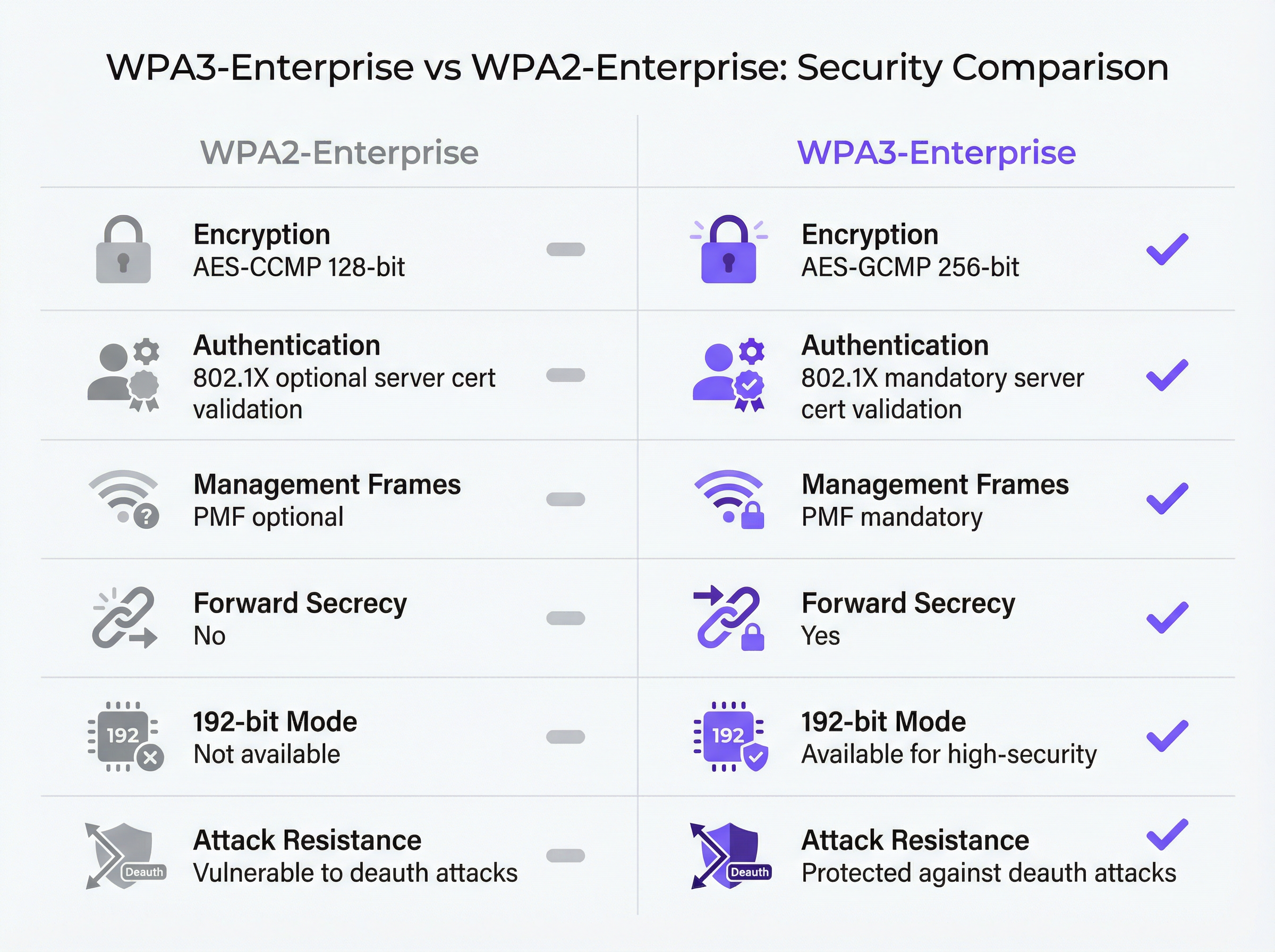
Les améliorations fondamentales de la sécurité sont concrètes et mesurables. Les trames de gestion protégées (PMF - Protected Management Frames) deviennent obligatoires, éliminant le vecteur d'attaque par désauthentification longtemps exploité dans les lieux à haute densité. La validation du certificat serveur lors du handshake 802.1X est imposée, comblant ainsi la faille de collecte d'identifiants par des points d'accès malveillants que la validation facultative de WPA2 laissait ouverte. La dérivation de clé par session introduit la confidentialité persistante (forward secrecy), garantissant que le trafic historique ne peut pas être déchiffré rétroactivement, même si les clés de session sont compromises ultérieurement.
Pour les organisations soumises à des exigences de conformité, WPA3-Enterprise satisfait à l'exigence 4.2.1 de la norme PCI DSS v4.0 concernant la cryptographie forte en transit et s'aligne sur le mandat de l'article 32 du GDPR relatif aux mesures de sécurité techniques appropriées. Le mode de sécurité 192 bits répond aux exigences du NIST SP 800-187 et de la suite NSA CNSA pour les environnements gouvernementaux et financiers sensibles.
Ce guide propose un parcours de déploiement structuré : audit de l'infrastructure, configuration RADIUS, déploiement progressif du SSID en mode transition, configuration des appareils clients via MDM, et une procédure d'escalade claire pour les cinq modes de défaillance les plus courants.
Analyse technique approfondie
L'architecture de sécurité WPA3-Enterprise
WPA3-Enterprise est défini par la spécification WPA3 de la Wi-Fi Alliance (version actuelle 3.3) et s'appuie directement sur le framework de sécurité IEEE 802.11i. La couche d'authentification reste IEEE 802.1X — la même norme de contrôle d'accès réseau basée sur les ports qui sous-tend WPA2-Enterprise — mais avec trois améliorations obligatoires critiques que WPA2 considérait comme facultatives.
Les trames de gestion protégées (IEEE 802.11w) sont requises pour toutes les connexions WPA3. Dans WPA2, les trames de gestion — les messages de contrôle 802.11 régissant l'association, la dissociation et la désauthentification — sont transmises en clair. Un attaquant équipé d'un adaptateur sans fil standard peut falsifier des trames de désauthentification et forcer les clients à se déconnecter du réseau à volonté. Cette attaque ne nécessite ni identifiants ni outils sophistiqués. Dans les environnements à haute densité tels que les centres de conférence, les stades et les halls d'hôtel, cela représente un véritable risque opérationnel. Le PMF obligatoire de WPA3 authentifie cryptographiquement les trames de gestion, rendant cette classe d'attaques inefficace.
La validation obligatoire du certificat serveur ferme le vecteur d'attaque des points d'accès malveillants. Dans WPA2-Enterprise, le supplicant 802.1X sur un appareil client n'est pas tenu de valider le certificat du serveur RADIUS avant de soumettre ses identifiants d'authentification. En pratique, de nombreux déploiements d'entreprise ignorent cette configuration ou l'implémentent de manière incorrecte, laissant les utilisateurs vulnérables à la collecte d'identifiants via des points d'accès jumeaux maléfiques (evil twins). WPA3-Enterprise exige que les clients vérifient le certificat du serveur RADIUS auprès d'une autorité de certification (CA) de confiance avant de procéder à l'authentification. Ce seul changement élimine toute une catégorie d'attaques de type man-in-the-middle.
La confidentialité persistante (forward secrecy) grâce à la dérivation de clé par session garantit que la compromission des clés d'une session n'expose pas les sessions historiques ou futures. Dans WPA2, l'absence de confidentialité persistante signifie qu'un attaquant qui capture du trafic chiffré et obtient ultérieurement les clés de session — via une compromission distincte — peut déchiffrer tout le trafic précédemment capturé. Pour les organisations traitant des données de cartes de paiement, des informations de santé personnelles ou des communications commercialement sensibles, il s'agit d'un risque matériel.
Modes de fonctionnement de WPA3-Enterprise
Il existe trois modes de fonctionnement distincts, et le choix du mode approprié constitue la première décision architecturale de tout déploiement.
| Mode | Chiffrement | Méthodes EAP | PMF | Cas d'usage |
|---|---|---|---|---|
| WPA3-Enterprise (Standard) | AES-CCMP-128 | PEAP, EAP-TLS, EAP-TTLS | Obligatoire | Entreprise générale, hôtellerie, vente au détail |
| WPA3-Enterprise 192 bits | AES-GCMP-256 + HMAC-SHA-384 | EAP-TLS uniquement | Obligatoire | Gouvernement, finance, défense, infrastructures critiques |
| Transition WPA2/WPA3-Enterprise | AES-CCMP-128 / GCMP-256 | PEAP, EAP-TLS, EAP-TTLS | Facultatif | Phase de migration, flottes d'appareils mixtes |
WPA3-Enterprise Standard est le choix approprié pour la majorité des déploiements d'entreprise. Il offre les trois principales améliorations de sécurité — PMF obligatoire, validation obligatoire du certificat serveur et confidentialité persistante — tout en prenant en charge la gamme complète des méthodes EAP, y compris PEAP-MSCHAPv2, qui permet l'authentification par nom d'utilisateur et mot de passe via Active Directory ou LDAP. La compatibilité des appareils clients est large : Windows 10 version 1903 et ultérieures, macOS 10.15 (Catalina) et ultérieures, iOS 13 et ultérieures, ainsi qu'Android 10 et ultérieures prennent tous en charge WPA3-Enterprise standard.
Le mode de sécurité WPA3-Enterprise 192 bits est conçu pour les environnements ayant des exigences réglementaires ou de sécurité élevées. La suite de chiffrement — AES-GCMP-256 pour la confidentialité des données, HMAC-SHA-384 pour l'intégrité des messages et ECDH/ECDSA-384 pour l'échange de clés et l'authentification — s'aligne sur la suite Commercial National Security Algorithm (CNSA) de la NSA et le NIST SP 800-187. La contrainte majeure est que EAP-TLS avec authentification mutuelle par certificat est la seule méthode EAP autorisée. L'authentification par nom d'utilisateur et mot de passe n'est pas prise en charge. Ce mode nécessite une infrastructure PKI mature et n'est pas adapté aux environnements avec des appareils non gérés ou BYOD.
Le mode Transition permet aux clients WPA2 et WPA3 de se connecter simultanément au même SSID. Les clients négocient la version de sécurité la plus élevée qu'ils prennent en charge. Il s'agit du point de départ recommandé pour toute migration, car il élimine le risque de perturber les anciens appareils tout en activant WPA3 pour les clients compatibles dès le premier jour.
Le flux d'authentification 802.1X
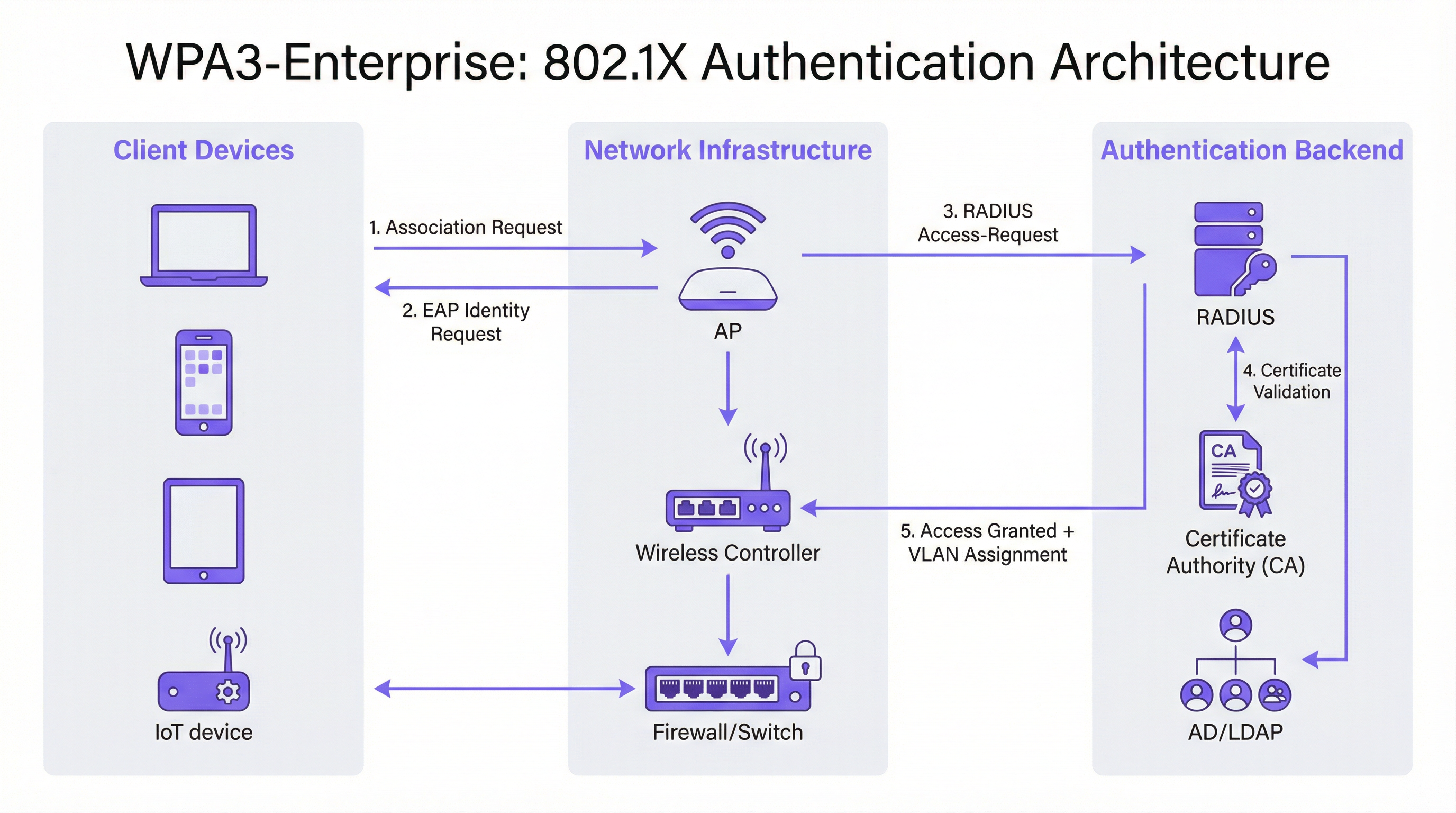
L'échange d'authentification 802.1X dans WPA3-Enterprise implique trois rôles : le supplicant (appareil client), l'authentificateur (point d'accès ou contrôleur sans fil) et le serveur d'authentification (serveur RADIUS). Le flux se déroule comme suit.
L'appareil client s'associe au point d'accès et initie un échange EAP. Le point d'accès agit comme un proxy transparent, transférant les messages EAP entre le client et le serveur RADIUS via des paquets RADIUS Access-Request et Access-Challenge. Le serveur RADIUS présente son certificat au client, que ce dernier doit désormais valider par rapport à son magasin d'autorités de certification (CA) de confiance — c'est l'étape de validation obligatoire introduite par WPA3. Une fois que le client a vérifié l'identité du serveur, il procède à la soumission des identifiants (PEAP) ou à l'échange mutuel de certificats (EAP-TLS). En cas d'authentification réussie, le serveur RADIUS renvoie un message Access-Accept, incluant éventuellement des attributs d'attribution de VLAN (Tunnel-Type, Tunnel-Medium-Type, Tunnel-Private-Group-ID) que le point d'accès utilise pour placer le client sur le segment réseau approprié.
Guide d'implémentation
Phase 1 : Audit de l'infrastructure et évaluation de l'état de préparation
Avant toute modification de configuration, un inventaire approfondi de l'environnement existant est essentiel. L'audit doit couvrir quatre domaines.
Firmware des points d'accès et du contrôleur : Vérifiez que tous les points d'accès (AP) et le contrôleur sans fil prennent en charge WPA3. La plupart des équipements d'entreprise expédiés après 2019 prennent en charge WPA3 via une mise à jour du firmware, mais la version spécifique requise varie selon le fournisseur. Consultez les notes de mise à jour du fournisseur et assurez-vous que tous les AP exécutent une version de firmware compatible WPA3 avant de continuer.
Inventaire des appareils clients : Catégorisez les appareils selon leur statut de prise en charge de WPA3. Les terminaux gérés (ordinateurs portables d'entreprise, tablettes, smartphones inscrits dans un MDM) devraient être simples à évaluer. Les appareils non gérés et IoT — imprimantes, serrures intelligentes, contrôleurs CVC, terminaux de point de vente — nécessitent une évaluation individuelle. Les appareils qui ne peuvent pas prendre en charge WPA3 doivent être identifiés tôt, car ils nécessiteront soit un SSID WPA2 distinct, soit un placement en mode transition.
Infrastructure RADIUS : Évaluez le serveur RADIUS existant concernant la prise en charge des méthodes EAP, la capacité et la redondance. Si vous passez à EAP-TLS, déterminez s'il existe une PKI interne ou si une autorité de certification hébergée dans le cloud est requise. Évaluez si l'infrastructure RADIUS actuelle dispose d'une configuration à haute disponibilité — un seul serveur RADIUS sans basculement est un point de défaillance unique inacceptable dans un déploiement en production.
Segmentation du réseau : Passez en revue l'architecture VLAN existante. Les déploiements WPA3-Enterprise bénéficient généralement de l'attribution dynamique de VLAN via des attributs RADIUS, ce qui permet à un seul SSID de desservir plusieurs populations d'utilisateurs avec une isolation réseau appropriée. Confirmez que l'infrastructure de commutation prend en charge le marquage VLAN 802.1Q et que le serveur RADIUS est configuré pour renvoyer les attributs VLAN corrects.
Phase 2 : Configuration du serveur RADIUS
Le serveur RADIUS est l'épine dorsale de l'authentification de tout déploiement 802.1X. Les exigences de configuration varient selon la plateforme, mais les étapes suivantes s'appliquent quel que soit le fournisseur.
Définir les entrées du serveur d'accès réseau (NAS) : Pour chaque point d'accès ou contrôleur sans fil qui enverra des requêtes d'authentification au serveur RADIUS, créez une entrée NAS spécifiant l'adresse IP source et un secret partagé. Ce secret partagé doit être complexe (minimum 24 caractères, majuscules et minuscules, chiffres et symboles) et unique pour chaque entrée NAS.
Configurer la méthode EAP et le certificat : Pour les déploiements PEAP-MSCHAPv2, installez un certificat serveur sur le serveur RADIUS émis par une CA en laquelle les clients auront confiance. Pour les déploiements EAP-TLS, configurez la validation des certificats côté serveur et côté client. Le nom commun (Common Name) ou le nom alternatif du sujet (Subject Alternative Name) du certificat du serveur RADIUS doit correspondre à la valeur configurée dans les profils clients, sinon la validation du certificat échouera.
Intégrer à l'annuaire des utilisateurs : Connectez le serveur RADIUS à Active Directory, LDAP ou à un fournisseur d'identité cloud pour la validation des identifiants. Pour les déploiements EAP-TLS, configurez l'authentification basée sur les certificats avec le modèle de certificat approprié et la vérification de révocation (OCSP ou CRL).
Configurer la comptabilité RADIUS (accounting) : Activez la comptabilité sur le serveur RADIUS et configurez le contrôleur sans fil pour envoyer les enregistrements de début, intermédiaires et de fin de comptabilité. Cela fournit la piste d'audit requise pour l'exigence 8 de la norme PCI DSS (responsabilité individuelle des utilisateurs) et facilite l'investigation des incidents.
Configurer l'attribution dynamique de VLAN : Définissez les attributs RADIUS pour chaque groupe d'utilisateurs ou profil de certificat : Tunnel-Type (valeur 13, VLAN), Tunnel-Medium-Type (valeur 6, 802) et Tunnel-Private-Group-ID (l'ID du VLAN sous forme de chaîne). Cela permet au serveur RADIUS de placer les clients authentifiés sur le segment réseau approprié en fonction de leur identité ou de leur certificat.
Phase 3 : Configuration du SSID
Configurez le SSID WPA3-Enterprise sur le contrôleur sans fil avec les paramètres suivants.
- Mode de sécurité : WPA2/WPA3-Enterprise (mode transition) pour le déploiement initial
- PMF : Facultatif (mode transition) ou Requis (mode WPA3 uniquement)
- Méthode EAP : PEAP ou EAP-TLS selon le cas
- Serveur RADIUS : Adresses IP des serveurs RADIUS primaire et secondaire, ports (1812 pour l'authentification, 1813 pour la comptabilité) et secrets partagés
- Comptabilité RADIUS : Activée, avec le serveur de comptabilité configuré
- VLAN dynamique : Activé si vous utilisez l'attribution de VLAN basée sur RADIUS
Phase 4 : Configuration des appareils clients
La configuration des clients est la phase du déploiement la plus lourde sur le plan opérationnel. Pour les appareils gérés, utilisez un MDM ou une stratégie de groupe (Group Policy) pour déployer les éléments de configuration suivants.
Certificat CA RADIUS : Le certificat de la CA qui a émis le certificat d'authentification du serveur RADIUS doit être déployé dans le magasin de certificats racines de confiance du client. Sans cela, la validation du certificat échouera ou — si les clients sont mal configurés pour ignorer la validation — l'avantage de sécurité de WPA3-Enterprise sera annulé.
Profil SSID : Configurez le nom du SSID, le type de sécurité (WPA3-Enterprise ou WPA2/WPA3-Enterprise), la méthode EAP et les paramètres de validation du certificat serveur, y compris le nom du serveur attendu ou le sujet du certificat.
Pour les déploiements EAP-TLS : Déployez les certificats clients sur chaque appareil via SCEP (Simple Certificate Enrolment Protocol) ou par installation manuelle. Automatisez le renouvellement des certificats pour éviter les échecs d'authentification à l'expiration des certificats.
Phase 5 : Surveillance et achèvement de la migration
Une fois le mode transition activé, surveillez le contrôleur sans fil ou la plateforme de gestion cloud pour obtenir des métriques d'adoption de WPA3. Suivez le pourcentage d'associations de clients utilisant WPA3 par rapport à WPA2. Lorsque l'adoption de WPA3 dépasse 95 % et que tous les clients WPA2 restants ont été identifiés et soit migrés, soit segmentés vers un SSID hérité dédié, passez le SSID principal en mode WPA3 uniquement.
Bonnes pratiques
Déployez des serveurs RADIUS redondants dès le premier jour. La défaillance d'un seul serveur RADIUS paralyse l'ensemble du réseau authentifié. Configurez des serveurs RADIUS primaire et secondaire sur chaque AP et contrôleur, avec un basculement automatique. Pour les déploiements multisites, envisagez un service RADIUS hébergé dans le cloud avec une redondance géographique intégrée.
Imposez la validation du certificat serveur sur chaque client. Il s'agit de l'élément de configuration le plus important dans un déploiement WPA3-Enterprise. Déployer WPA3-Enterprise sans validation obligatoire du certificat serveur sur les clients n'offre aucune protection contre les attaques de points d'accès malveillants. Validez cette configuration explicitement lors des tests — ne supposez pas que les profils MDM ont été appliqués correctement.
Utilisez l'attribution dynamique de VLAN pour la segmentation du réseau. Plutôt que de déployer plusieurs SSID pour différentes populations d'utilisateurs, utilisez l'attribution dynamique de VLAN basée sur RADIUS pour placer les utilisateurs sur le segment réseau approprié en fonction de leur identité. Cela réduit la congestion RF (moins de SSID), simplifie l'architecture sans fil et maintient l'isolation du réseau par utilisateur.
Maintenez un SSID hérité dédié pour les appareils IoT non gérés. Les appareils qui ne peuvent pas prendre en charge WPA3 — anciens terminaux de point de vente, anciennes imprimantes, capteurs IoT — doivent être placés sur un SSID WPA2-Enterprise distinct avec une isolation VLAN stricte et des règles de pare-feu. Ne laissez pas ces appareils bloquer la migration du réseau principal du personnel vers WPA3.
Faites référence à IEEE 802.1X et à la spécification WPA3 v3.3 de la Wi-Fi Alliance comme normes de référence pour votre documentation de déploiement. À des fins de conformité, documentez les suites de chiffrement spécifiques, les méthodes EAP et la configuration PMF dans votre politique de sécurité réseau, en faisant explicitement référence à ces normes.
Alignez-vous sur l'exigence 4.2.1 de la norme PCI DSS v4.0 en documentant que WPA3-Enterprise avec chiffrement AES-GCMP satisfait à l'exigence de cryptographie forte pour les données en transit. Conservez les journaux de comptabilité RADIUS pendant la période requise par votre cadre de conformité (généralement 12 mois en ligne, 12 mois archivés).
Dépannage et atténuation des risques

Le tableau suivant résume les cinq modes de défaillance les plus courants dans les déploiements WPA3-Enterprise, leurs causes profondes et les mesures correctives recommandées.
| Mode de défaillance | Cause profonde | Mesure corrective |
|---|---|---|
| Échec de connexion du client, erreur PMF | Appareil hérité avec une implémentation PMF défectueuse | Passer en mode transition (PMF facultatif) ou déplacer l'appareil vers un SSID WPA2 |
| Échec de l'authentification, erreur de certificat | Le certificat CA RADIUS n'est pas dans le magasin de confiance du client | Déployer le certificat CA via MDM avant de déployer le profil SSID |
| Échecs d'authentification intermittents | Capacité du serveur RADIUS ou délai d'attente EAP dépassé | Mettre à l'échelle l'infrastructure RADIUS ; augmenter le délai d'attente EAP à plus de 30s pour le RADIUS cloud |
| Attribution de VLAN non appliquée | Attributs RADIUS incorrects | Vérifier Tunnel-Type (13), Tunnel-Medium-Type (6), Tunnel-Private-Group-ID (ID du VLAN sous forme de chaîne) |
| Échec de connexion des appareils Windows 10 | Pilote ou version du système d'exploitation obsolète | S'assurer que Windows Update est à jour ; mettre à jour le pilote de l'adaptateur sans fil ; tester avec Windows 11 |
Problèmes de compatibilité PMF : Les trames de gestion protégées (PMF) sont obligatoires dans WPA3-Enterprise, mais certains appareils hérités — en particulier les anciens téléphones Android, les anciennes imprimantes et certains appareils IoT — ont des implémentations PMF non conformes qui provoquent des échecs de connexion. La mesure corrective immédiate consiste à activer le mode transition, qui rend le PMF facultatif plutôt qu'obligatoire. À plus long terme, ces appareils devraient être migrés vers un SSID WPA2 dédié avec une isolation VLAN appropriée.
Échecs de la chaîne de confiance des certificats : La cause la plus fréquente des échecs d'authentification EAP dans les nouveaux déploiements WPA3-Enterprise est l'absence du certificat CA du serveur RADIUS dans le magasin de racines de confiance du client. Cela se manifeste par un échec d'authentification avec une erreur de validation de certificat dans le journal d'événements du client. La solution est simple — déployer le certificat CA via MDM — mais cela doit être fait avant que le profil SSID ne soit poussé vers les clients. Il est fortement recommandé de tester le déploiement du certificat sur un groupe pilote d'appareils avant un déploiement à grande échelle.
Capacité du serveur RADIUS : Dans les grands déploiements, en particulier lors des pics de connexion matinaux, le serveur RADIUS peut devenir un goulot d'étranglement. Surveillez l'utilisation du processeur et de la mémoire du serveur RADIUS pendant les périodes de pointe. Pour les déploiements dépassant 500 utilisateurs simultanés, envisagez de déployer plusieurs serveurs RADIUS derrière un équilibreur de charge (load balancer), ou d'utiliser un service RADIUS hébergé dans le cloud avec mise à l'échelle automatique.
Fragmentation des appareils Android : L'implémentation de WPA3-Enterprise sur Android varie considérablement selon les fabricants et les versions d'Android. Android 10 a introduit la prise en charge de WPA3, mais la qualité de l'implémentation varie. Testez avec un échantillon représentatif de la flotte d'appareils Android — y compris des modèles de fabricants spécifiques — avant un déploiement à grande échelle. Certains appareils nécessitent des paramètres de configuration EAP spécifiques qui diffèrent du profil standard.
ROI et impact commercial
L'analyse de rentabilisation de la migration vers WPA3-Enterprise repose sur trois piliers : la réduction des risques, l'efficacité de la conformité et la résilience opérationnelle.
Réduction des risques : L'élimination des attaques par désauthentification est particulièrement précieuse dans les environnements critiques pour les revenus. Un centre de conférence ou un hôtel subissant une attaque par déni de service sans fil lors d'un événement majeur s'expose à une perte de revenus directe et à une atteinte à sa réputation. Le PMF obligatoire supprime entièrement ce vecteur d'attaque. La fermeture de la faille de collecte d'identifiants par des points d'accès malveillants réduit le risque de vol d'identifiants conduisant à une compromission plus large du réseau — un incident qui, en vertu du GDPR, est passible d'amendes pouvant atteindre 4 % du chiffre d'affaires annuel mondial.
Efficacité de la conformité : Les organisations soumises à la norme PCI DSS v4.0 bénéficient d'une posture de conformité plus saine. WPA3-Enterprise avec chiffrement AES-GCMP satisfait à l'exigence 4.2.1 concernant la cryptographie forte, et les journaux de comptabilité RADIUS satisfont à l'exigence 8 concernant la responsabilité individuelle des utilisateurs. Documenter un déploiement WPA3-Enterprise est matériellement plus simple que de justifier un déploiement WPA2 par rapport aux exigences actuelles de la norme PCI DSS, qui examinent de plus en plus l'utilisation des protocoles hérités.
Résilience opérationnelle : L'approche de migration progressive — en commençant par le mode transition et en surveillant l'adoption de WPA3 — permet aux organisations d'améliorer leur posture de sécurité sans basculement perturbateur. L'investissement dans la redondance de l'infrastructure RADIUS, l'automatisation de la gestion des certificats et la configuration des clients basée sur le MDM porte ses fruits au-delà de WPA3 : ces capacités sous-tendent toute future initiative de contrôle d'accès au réseau.
Résultats mesurables : Les organisations qui ont achevé des déploiements WPA3-Enterprise signalent l'élimination des incidents liés à la désauthentification, la réduction des événements de sécurité liés aux identifiants et la rationalisation des processus d'audit PCI DSS. Pour un groupe hôtelier de 400 chambres traitant des données de cartes de paiement, les seuls gains d'efficacité en matière de conformité — réduction de la portée de l'audit, dossiers de preuves plus propres — justifient généralement l'investissement de déploiement dès le premier cycle de conformité.
Termes clés et définitions
WPA3-Enterprise
The enterprise mode of Wi-Fi Protected Access 3, defined by the Wi-Fi Alliance WPA3 Specification. It uses IEEE 802.1X for authentication, mandatory Protected Management Frames (IEEE 802.11w), mandatory server certificate validation, and AES-GCMP encryption. It is available in standard (128-bit) and 192-bit security modes.
IT teams encounter this when planning a wireless security upgrade from WPA2-Enterprise. It is the current best-practice standard for enterprise wireless security and is referenced in PCI DSS v4.0, NIST SP 800-187, and GDPR Article 32 compliance discussions.
IEEE 802.1X
An IEEE standard for port-based network access control. It defines an authentication framework involving three roles: the supplicant (client device), the authenticator (access point or switch), and the authentication server (RADIUS). 802.1X is the authentication backbone of both WPA2-Enterprise and WPA3-Enterprise.
Network architects encounter 802.1X when designing enterprise wireless or wired network access control. Understanding the three-party authentication model is essential for troubleshooting authentication failures and configuring RADIUS servers correctly.
RADIUS (Remote Authentication Dial-In User Service)
A networking protocol (RFC 2865) that provides centralised authentication, authorisation, and accounting (AAA) for network access. In WPA3-Enterprise deployments, the RADIUS server validates client credentials or certificates and returns access decisions, optionally including VLAN assignment attributes.
IT teams encounter RADIUS as the authentication server in any 802.1X deployment. Common implementations include Microsoft NPS (Windows Server), FreeRADIUS (open source), Cisco ISE, and Aruba ClearPass. Cloud-hosted RADIUS services are increasingly common for distributed enterprise estates.
Protected Management Frames (PMF / IEEE 802.11w)
A Wi-Fi security mechanism that cryptographically authenticates 802.11 management frames — the control messages governing device association, disassociation, and deauthentication. PMF prevents attackers from forging deauthentication frames to force clients off the network. Mandatory in WPA3; optional in WPA2.
Network architects encounter PMF when configuring WPA3-Enterprise SSIDs and when troubleshooting legacy device connectivity issues. Devices with non-compliant PMF implementations will fail to connect when PMF is set to 'required', necessitating transition mode or a separate WPA2 SSID.
EAP-TLS (Extensible Authentication Protocol - Transport Layer Security)
An EAP method that uses X.509 digital certificates for mutual authentication between the client and the RADIUS server. Both the client and the server present certificates, providing the strongest authentication assurance of any EAP method. Required for WPA3-Enterprise 192-bit mode.
IT teams encounter EAP-TLS when deploying certificate-based wireless authentication. It requires a PKI infrastructure (internal CA or cloud-hosted) and MDM-based certificate deployment to client devices. It eliminates the credential theft risk entirely, as there are no passwords to steal.
PEAP-MSCHAPv2 (Protected EAP with Microsoft Challenge Handshake Authentication Protocol v2)
An EAP method that tunnels MSCHAPv2 username and password authentication inside a TLS session established with the RADIUS server's certificate. It is the most widely deployed EAP method in enterprise wireless networks, supporting authentication against Active Directory and LDAP directories.
IT teams encounter PEAP-MSCHAPv2 as the default EAP method for WPA2-Enterprise and standard WPA3-Enterprise deployments. It is appropriate for environments with managed devices and an existing Active Directory infrastructure. Server certificate validation must be configured on clients to prevent credential interception.
Dynamic VLAN Assignment
A RADIUS feature that allows the authentication server to assign a client to a specific VLAN at authentication time, based on the user's identity, group membership, or certificate attributes. The RADIUS server returns three attributes in the Access-Accept message: Tunnel-Type (13/VLAN), Tunnel-Medium-Type (6/802), and Tunnel-Private-Group-ID (VLAN ID).
Network architects use dynamic VLAN assignment to implement per-user or per-role network segmentation without deploying multiple SSIDs. It is particularly valuable in hospitality and retail environments where different user populations (staff, management, contractors) require different network access levels.
Forward Secrecy
A cryptographic property that ensures that the compromise of a session key does not expose past or future session traffic. WPA3-Enterprise achieves forward secrecy through per-session key derivation, meaning each authentication session generates a unique key that is discarded after the session ends.
CTOs and security architects encounter forward secrecy in discussions about data protection risk. In WPA2, the absence of forward secrecy means that an attacker who captures encrypted wireless traffic today and later obtains session keys through a separate compromise can decrypt all historical traffic. Forward secrecy eliminates this retroactive decryption risk.
Transition Mode (WPA2/WPA3-Enterprise Mixed Mode)
A WPA3 operating mode that allows both WPA2-Enterprise and WPA3-Enterprise clients to connect to the same SSID simultaneously. Clients negotiate the highest security version they support. PMF is set to optional rather than required in this mode, ensuring compatibility with legacy devices.
IT teams use transition mode as the standard starting point for WPA3-Enterprise migrations. It eliminates the risk of disrupting legacy devices while enabling WPA3 for capable clients immediately. Most organisations maintain transition mode for 12-24 months before switching to WPA3-only.
WPA3-Enterprise 192-bit Security Mode
An optional high-security mode of WPA3-Enterprise using AES-GCMP-256 encryption, HMAC-SHA-384 for message integrity, and ECDH/ECDSA-384 for key exchange. Only EAP-TLS is permitted. Aligns with NIST SP 800-187 and the NSA's Commercial National Security Algorithm (CNSA) suite.
Network architects in government, financial services, and defence sectors encounter this mode when deploying wireless networks for sensitive or classified environments. It requires a mature PKI infrastructure and is not appropriate for environments with unmanaged or BYOD devices.
Études de cas
A 400-room hotel group with 12 UK properties needs to migrate their staff wireless network from WPA2-Enterprise to WPA3-Enterprise. The estate includes managed Windows laptops, iOS devices enrolled in MDM, legacy CCTV cameras running embedded firmware, and smart door lock controllers that are WPA2-only. They process payment card data through a cloud-based PMS and must maintain PCI DSS v4.0 compliance throughout the migration.
The deployment follows a five-phase approach. Phase 1 (Weeks 1-2): Conduct a full device inventory across all 12 properties. Categorise devices into three groups: WPA3-capable managed endpoints (Windows 10 1903+, iOS 13+), WPA3-incapable IoT devices (CCTV, door locks), and unknown/unmanaged devices. Audit AP firmware versions across the estate — most enterprise APs from 2019 onwards support WPA3 via firmware update. Phase 2 (Weeks 3-4): Configure the cloud-hosted RADIUS server (or Windows Server NPS at each property) with PEAP-MSCHAPv2 against Active Directory. Install a valid server certificate from a trusted CA. Configure NAS entries for each AP/controller. Enable RADIUS accounting. Phase 3 (Week 5): Deploy the RADIUS CA certificate to all managed devices via Intune MDM. Push a WPA2/WPA3-Enterprise transition mode SSID profile to managed devices, including the server certificate validation configuration pointing to the deployed CA cert. Phase 4 (Weeks 6-8): Enable the transition mode SSID on all APs. Monitor WPA3 vs WPA2 association statistics on the wireless controller. Simultaneously, create a dedicated WPA2-Enterprise SSID on a separate VLAN for CCTV cameras and door lock controllers, with strict firewall rules permitting only the specific traffic these devices require. Phase 5 (Month 3+): When WPA3 adoption on the staff SSID exceeds 95%, schedule a maintenance window to switch the staff SSID from transition mode to WPA3-only. Retain the WPA2 IoT SSID indefinitely for legacy devices. Document the configuration for PCI DSS evidence: cipher suites (AES-CCMP-128 minimum), PMF status (required), RADIUS accounting enabled, per-device authentication logs retained for 12 months.
A European retail chain with 250 stores needs to secure their staff mobile device network (tablets used for inventory management and customer service) with WPA3-Enterprise, while maintaining PCI DSS compliance for their existing WPA2-Enterprise POS terminal network. The IT team has limited on-site technical resource and needs a solution that can be managed centrally.
The architecture separates the POS and staff mobile networks at the SSID level. The POS network remains on WPA2-Enterprise with 802.1X, isolated on a dedicated VLAN with ACLs permitting only traffic to the payment processor's IP range and the PMS. This network is not migrated to WPA3 until POS terminal firmware supports it. The staff mobile network is deployed as a new WPA3-Enterprise SSID using EAP-TLS with client certificates. A cloud-hosted RADIUS service (such as Cisco ISE, Aruba ClearPass, or a cloud-native option) is selected to eliminate the need for on-site RADIUS infrastructure at each store. Certificates are deployed to staff tablets via MDM (Microsoft Intune or Jamf) using SCEP, with automatic renewal 30 days before expiry. The RADIUS server is configured for dynamic VLAN assignment: store manager tablets receive a management VLAN with broader access; standard staff tablets receive a restricted VLAN permitting only inventory system and customer service application traffic. RADIUS accounting logs are centralised and retained for 12 months to satisfy PCI DSS Requirement 8. The cloud RADIUS service provides geographic redundancy across two AWS regions, eliminating the single-point-of-failure risk. Rollout proceeds store-by-store over an 8-week period, with the IT team using the cloud management console to monitor authentication success rates and WPA3 adoption per store.
Analyse de scénario
Q1. Your organisation operates a 50,000-seat stadium with a mixed device fleet: 800 managed Windows staff laptops, 200 Android tablets used by event staff (enrolled in MDM), 150 legacy POS terminals running Windows Embedded (WPA2-only), and approximately 400 IoT devices including turnstile controllers and digital signage. You have been asked to deploy WPA3-Enterprise for the staff network within 90 days while maintaining PCI DSS compliance for the POS network. Outline your deployment architecture and phased rollout plan.
💡 Astuce :Consider the POS terminals and IoT devices separately from the managed staff endpoints. The 90-day timeline requires a phased approach — identify which network segments can be migrated first and which require longer-term planning. Think about RADIUS redundancy given the high-density, event-driven nature of the environment.
Afficher l'approche recommandée
The deployment requires a three-SSID architecture. First, a WPA3-Enterprise SSID in transition mode for managed staff devices (Windows laptops and Android tablets), using PEAP-MSCHAPv2 against Active Directory, with dynamic VLAN assignment separating operational staff from management. Second, a WPA2-Enterprise SSID for POS terminals, isolated on a dedicated VLAN with ACLs permitting only payment processor traffic — this network is not migrated to WPA3 until POS firmware supports it. Third, a WPA2 SSID for IoT devices (turnstile controllers, digital signage) on a separate VLAN with strict firewall rules. The RADIUS infrastructure must be sized for event-day peaks — a stadium environment may see 1,000+ simultaneous authentications during staff check-in. Deploy primary and secondary RADIUS servers (or a cloud-hosted service with redundancy) and test failover before the first major event. The 90-day timeline is achievable: weeks 1-2 for infrastructure audit and RADIUS configuration, weeks 3-4 for CA certificate deployment via MDM and pilot SSID testing, weeks 5-8 for phased rollout across the venue, weeks 9-12 for monitoring and documentation. The POS and IoT networks remain on WPA2 indefinitely until those device populations can be refreshed.
Q2. A government department is deploying a new wireless network for a sensitive operational environment. The security team has specified WPA3-Enterprise 192-bit security mode. The device fleet consists entirely of managed Windows 11 laptops and iOS 16 iPads, all enrolled in MDM. The IT team has no existing PKI infrastructure. What are the key prerequisites for this deployment, and what is the recommended approach to certificate management?
💡 Astuce :WPA3-Enterprise 192-bit mode has specific EAP method restrictions. Consider what certificate infrastructure is required and whether an internal PKI or cloud-hosted CA is more appropriate for a government environment. Also consider the certificate lifecycle management requirements.
Afficher l'approche recommandée
WPA3-Enterprise 192-bit mode requires EAP-TLS with mutual certificate authentication — there is no alternative EAP method. The prerequisites are: (1) a Certificate Authority infrastructure capable of issuing certificates meeting the 192-bit mode requirements (ECDSA-384 or RSA-3072 minimum); (2) a RADIUS server that supports EAP-TLS with the required cipher suites (AES-GCMP-256, HMAC-SHA-384); (3) MDM infrastructure capable of deploying client certificates via SCEP. For a government environment without existing PKI, the recommended approach is to deploy an internal CA using Windows Server Certificate Services (ADCS) with an offline root CA and an online issuing CA — this provides the audit control and air-gap security appropriate for a sensitive environment. The RADIUS server certificate should be issued by the issuing CA. Client certificates should be deployed to devices via SCEP through the MDM platform, with automatic renewal triggered 30 days before expiry. The CA root certificate must be deployed to all client devices' trusted root stores before the SSID profile is pushed. Certificate revocation should be implemented via OCSP for real-time revocation checking, with CRL as a fallback. The RADIUS server must be configured to check revocation status on every authentication. Document the PKI architecture, certificate policies, and revocation procedures for the security accreditation package.
Q3. Six weeks after deploying WPA3-Enterprise in transition mode at a 300-room hotel, your wireless controller dashboard shows that only 60% of client associations are using WPA3, with 40% still using WPA2. The IT team wants to understand why adoption is lower than expected and whether it is safe to switch to WPA3-only mode. What diagnostic steps would you take, and what criteria must be met before switching to WPA3-only?
💡 Astuce :The 40% WPA2 figure could represent legacy devices that cannot support WPA3, managed devices with misconfigured profiles, or devices where the MDM profile has not yet been applied. Distinguish between devices that cannot support WPA3 and devices that have not yet been configured for it. The criteria for WPA3-only should address both categories.
Afficher l'approche recommandée
The diagnostic process starts with identifying the WPA2 clients by MAC address and device type using the wireless controller's client association logs. Export the list of WPA2-connected clients and cross-reference against the device inventory. This will typically reveal three categories: (1) devices that are WPA3-capable but have not received the updated MDM profile (configuration issue); (2) devices that are WPA3-capable but have a driver or OS version issue preventing WPA3 association (remediation required); (3) devices that are genuinely WPA2-only — legacy IoT, older guest devices, or unmanaged personal devices (architecture decision required). For category 1, verify MDM profile deployment status and force a profile sync on affected devices. For category 2, check Windows Update and wireless adapter driver versions — many WPA3 compatibility issues are resolved by driver updates. For category 3, these devices must be accommodated: either maintain transition mode permanently, or move them to a dedicated WPA2 SSID before switching the main SSID to WPA3-only. The criteria for switching to WPA3-only are: (a) all remaining WPA2 clients have been identified by device type and owner; (b) WPA3-capable devices with configuration issues have been remediated; (c) WPA2-only devices have been moved to a dedicated SSID or the decision has been made to maintain transition mode; (d) the WPA3 adoption rate among the target device population (managed staff devices) is 100%, even if overall adoption including guest devices is lower. Do not switch to WPA3-only based solely on the overall percentage — ensure the managed device fleet is fully migrated first.
Points clés à retenir
- ✓WPA3-Enterprise delivers three concrete security improvements over WPA2-Enterprise: mandatory Protected Management Frames (eliminating deauthentication attacks), mandatory server certificate validation (closing the rogue access point credential-harvesting gap), and forward secrecy through per-session key derivation.
- ✓Always begin migration in WPA2/WPA3 transition mode — never switch directly to WPA3-only. Transition mode allows both protocol versions on the same SSID and gives you a safe migration runway while you identify and accommodate legacy devices.
- ✓The RADIUS server's CA certificate must be deployed to all client devices via MDM before the SSID profile is pushed. This single sequencing rule prevents the most common cause of first-day deployment failures.
- ✓WPA3-Enterprise 192-bit security mode is for genuinely high-security environments (government, finance, defence) and requires EAP-TLS with mutual certificate authentication. For most enterprise deployments, standard WPA3-Enterprise with PEAP-MSCHAPv2 is the correct choice.
- ✓RADIUS redundancy is a hard requirement, not an optional enhancement. A single RADIUS server failure takes down the entire authenticated network. Deploy primary and secondary RADIUS servers with tested failover before go-live.
- ✓Legacy IoT devices, POS terminals, and older embedded-OS equipment are the long tail of every WPA3 migration. Identify them early, segment them on a dedicated WPA2 SSID with VLAN isolation, and do not allow them to block the migration of the primary staff network.
- ✓WPA3-Enterprise satisfies PCI DSS v4.0 Requirement 4.2.1 for strong cryptography in transit and supports GDPR Article 32 compliance. RADIUS accounting logs provide the per-device authentication audit trail required for PCI DSS Requirement 8.




