

802.1X vs PSK vs Open WiFi: Which Authentication Method Is Right for You?
This guide provides a definitive, vendor-neutral comparison of the three primary WiFi authentication methods—802.1X (WPA2/3-Enterprise), Pre-Shared Key (PSK), and Open WiFi—tailored for IT managers, network architects, and CTOs in hospitality, retail, events, and the public sector. It cuts through technical complexity to deliver actionable deployment guidance, real-world case studies, and a clear decision framework for securing both staff and guest networks. Understanding which authentication model to deploy is not merely a technical choice; it is a strategic business decision with direct implications for security posture, regulatory compliance, operational efficiency, and the ability to extract commercial value from your WiFi infrastructure.

Executive Summary
For any modern enterprise, venue, or public-sector organisation, the choice of WiFi authentication method is a foundational decision with far-reaching consequences for security, user experience, and operational overhead. This guide provides a direct, practical comparison of the three primary authentication models: 802.1X (WPA2/3-Enterprise), Pre-Shared Key (PSK), and Open WiFi. We cut through the technical jargon to offer actionable guidance for IT managers, network architects, and CTOs. The central thesis is this: there is no single "best" method, only the "right" method for a specific use case. 802.1X offers the gold standard in security for corporate staff by integrating with existing identity infrastructure, but at the cost of complexity. PSK and Open networks, when layered with a captive portal, provide the flexible, scalable access required for guests, turning a basic amenity into a powerful tool for data analytics and user engagement. This reference will equip you to make an informed, strategic decision that aligns with your organisation's risk profile, compliance requirements (such as PCI DSS and GDPR), and business objectives, ensuring your WiFi network is a secure, reliable, and valuable asset.
{{asset:802_1x_vs_psk_vs_open_wifi_which_authentication_method_is_right_for_you__podcast.mp3}}
Technical Deep-Dive
Understanding the architectural differences between 802.1X, PSK, and Open WiFi is crucial for making an informed decision. Each method operates differently at a fundamental level, offering distinct trade-offs between security, complexity, and user experience.
802.1X: The Enterprise Standard
The IEEE 802.1X standard is a port-based network access control (PNAC) framework. It is not a method of encryption itself, but rather a framework for authentication that then enables robust encryption protocols like WPA2 and WPA3-Enterprise. Its architecture rests on three core components: the Supplicant (the client device requesting access), the Authenticator (the WiFi access point acting as a gatekeeper), and the Authentication Server (a centralised RADIUS server that validates credentials).
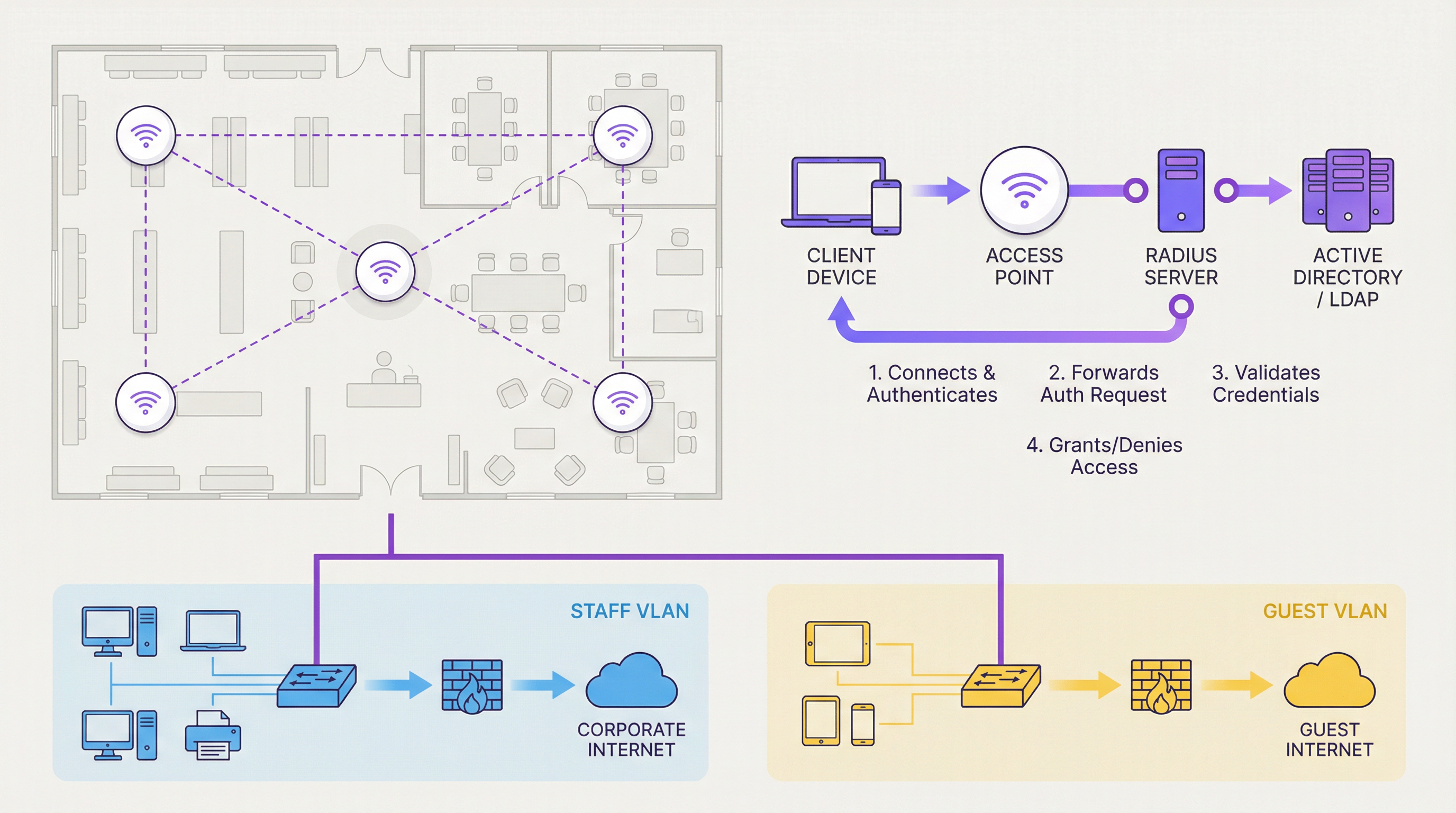
When a user attempts to connect, the supplicant presents credentials to the authenticator. The AP does not validate these credentials itself; instead, it encapsulates the request within the Extensible Authentication Protocol (EAP) and forwards it to the RADIUS server. That server checks the credentials against a central identity database—typically Microsoft Active Directory, LDAP, or a cloud-based identity provider. If valid, the RADIUS server issues an "Access-Accept" message, the port is opened, and a unique, per-session encryption key is dynamically generated for that specific user. This per-user key generation is what makes 802.1X fundamentally more secure than any shared-key model: even if one user's session is compromised, no other user's traffic is at risk.
The practical implication for IT managers is significant. When an employee leaves the organisation, disabling their Active Directory account instantly and automatically revokes their network access across every site and every access point. No manual key rotation, no chasing down devices. This level of individual accountability is what makes 802.1X the only defensible choice for corporate staff networks in any organisation with meaningful security or compliance obligations.
PSK: The Shared Secret
Pre-Shared Key authentication is a considerably simpler model. A single alphanumeric passphrase is configured on both the access point and all client devices. When a device connects, it performs a cryptographic 4-Way Handshake with the AP to prove knowledge of the shared key. If successful, access is granted.
The simplicity is appealing, but the security limitations are substantial in an enterprise context. The primary weakness is the static, shared nature of the key. There is no individual accountability; anyone who knows the password has access. Revoking access for a single user requires changing the key on the AP and re-configuring every authorised device—a logistical nightmare at scale. Furthermore, a compromised key allows an attacker who has captured the initial handshake to decrypt traffic from other users on the same network. The WPA3 standard's Simultaneous Authentication of Equals (SAE) protocol significantly hardens PSK against offline dictionary attacks, but the fundamental risk of a shared, static secret remains.
Open WiFi: The Frictionless Gateway
An Open network carries no authentication and no link-layer encryption. All traffic between the client and the access point is transmitted in cleartext, making it trivially easy for any attacker within radio range to intercept and read data—a classic man-in-the-middle attack. Open WiFi should never be used for any network where user privacy is expected. Its only valid professional use case is as a launchpad for a Captive Portal, which provides authentication and policy enforcement at a higher layer of the network stack, transforming a security liability into a managed, commercially valuable asset.
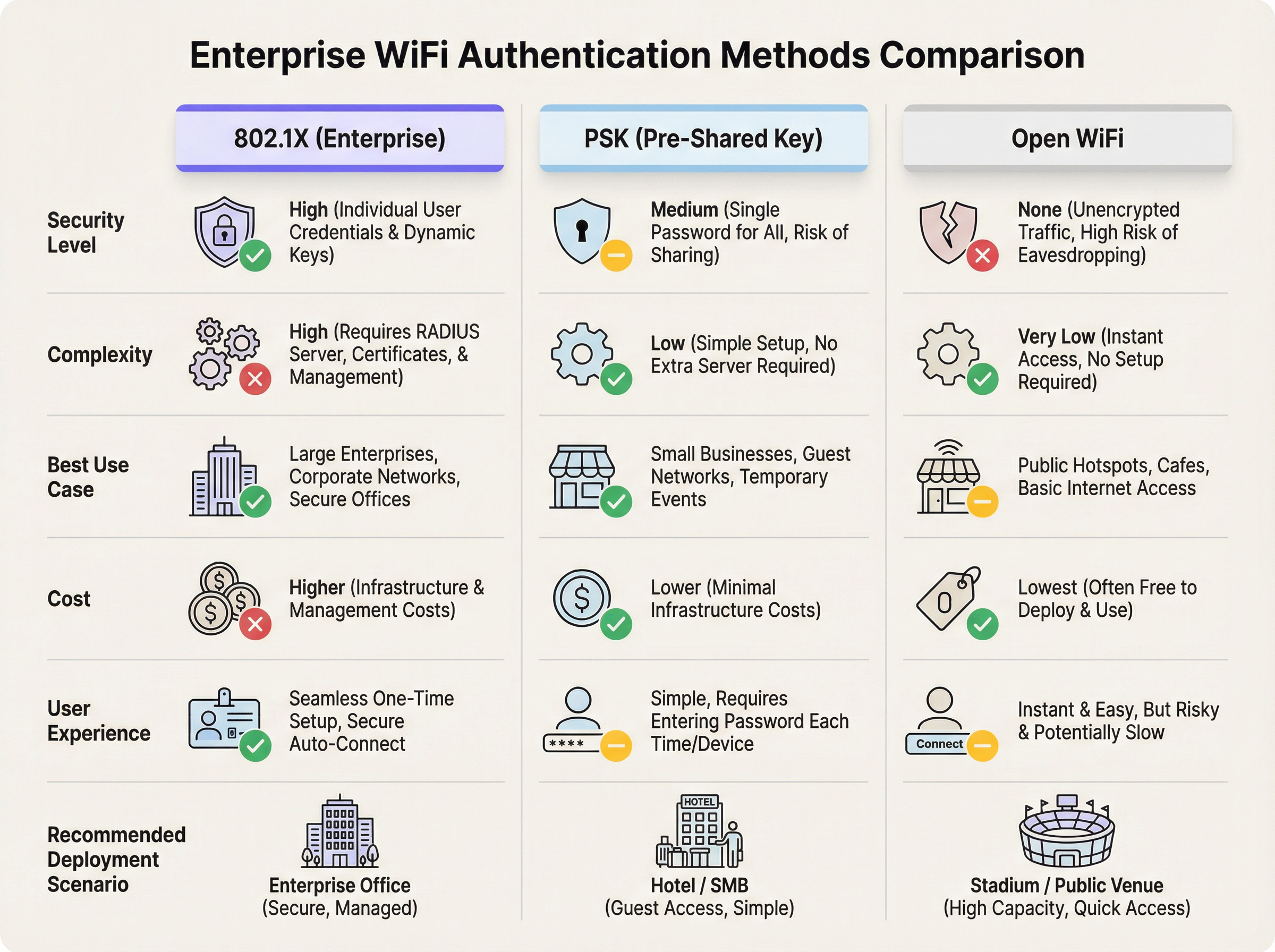
The table below summarises the key trade-offs across all three models:
| Dimension | 802.1X (WPA2/3-Enterprise) | PSK (WPA2/3-Personal) | Open WiFi |
|---|---|---|---|
| Security Level | High — individual, dynamic keys | Medium — shared, static key | None — unencrypted traffic |
| Deployment Complexity | High — RADIUS, certificates, AD | Low — single passphrase | Very Low — no configuration |
| User Experience | Seamless after onboarding | Simple password entry | Instant, zero-friction |
| Individual Accountability | Yes — per-user credentials | No — shared key | No — no credentials |
| Access Revocation | Instant via AD account disable | Requires full key rotation | N/A |
| Compliance Suitability | PCI DSS, GDPR, HIPAA | Limited | Not suitable without portal |
| Ideal Use Case | Corporate staff, managed devices | Small guest networks, SMEs | Large-scale public access |
| Purple Integration | Analytics overlay, RADIUS support | Captive portal, data capture | Captive portal, full analytics |
Implementation Guide
Translating theory into practice requires a clear understanding of the deployment steps and architectural decisions for each model.
Deploying 802.1X for Staff WiFi
The first prerequisite is a RADIUS server. This can be a dedicated server running FreeRADIUS, the Network Policy Server (NPS) role in Windows Server, or—increasingly common—a cloud-hosted RADIUS service that eliminates the need for on-premises infrastructure. You also need an identity store (Active Directory, Azure AD, or Google Workspace) that the RADIUS server can query.
The choice of EAP type is the next critical decision. EAP-TLS, which uses digital certificates on both the server and every client device, provides the strongest security but requires a Public Key Infrastructure (PKI) and adds administrative overhead. PEAP-MSCHAPv2, which only requires a server-side certificate and uses standard usernames and passwords for clients, is the more common choice for organisations without a mature PKI. For corporate-managed devices, a Mobile Device Management (MDM) platform or Group Policy (GPO) can automatically push the WiFi profile and certificates, making the end-user experience completely seamless. For BYOD scenarios, a self-service onboarding portal is essential.
Deploying PSK or Open WiFi with a Captive Portal for Guests
The single most important step is network segmentation. Guest traffic must be isolated from the corporate network using VLANs and firewall rules, with guest traffic routed directly to the internet and blocked from reaching any internal resources. This is non-negotiable and is a prerequisite for PCI DSS compliance.
The choice between an Open or PSK base layer depends on the venue context. For a hotel, a dynamic PSK generated per-guest at check-in provides a useful first layer of access control. For a stadium or retail environment, an Open network maximises accessibility. In both cases, the captive portal—where Purple's platform delivers its core value—is where authentication, data capture, policy enforcement, and user engagement take place. Within Purple, you can configure authentication via email, social login, or sponsored access codes, set bandwidth limits and session durations, and enforce GDPR-compliant terms and conditions.
Best Practices
Network segmentation is the single most important security practice for any multi-user WiFi environment. Guest and staff traffic must never share a VLAN. Beyond segmentation, organisations should adopt WPA3 on all new hardware deployments, as it provides meaningful security improvements over WPA2 for both Enterprise and Personal modes. For PSK deployments that cannot yet be migrated to 802.1X, key rotation should be enforced on a regular schedule—at minimum quarterly, and immediately upon any suspected compromise or staff departure.
For guest networks, the captive portal should be treated as a strategic asset, not merely a legal formality. The data gathered through a well-designed portal—visitor demographics, return visit frequency, dwell time, device type—provides actionable intelligence for marketing, operations, and venue management teams. Transparency with users about data collection is both a legal obligation under GDPR and a trust-building best practice; your portal should clearly link to a privacy policy and, for Open networks, advise users to employ a VPN for sensitive transactions.
Troubleshooting & Risk Mitigation
The most common failure mode in 802.1X deployments is a misconfiguration between the access point and the RADIUS server—typically an incorrect IP address, wrong UDP port (1812 for authentication, 1813 for accounting), or mismatched shared secret. RADIUS server logs are the first diagnostic tool; they provide detailed rejection reasons that pinpoint the issue. Certificate-related failures—expired certificates, untrusted Certificate Authorities, or incorrect Subject Alternative Names—are the second most frequent cause of 802.1X outages and require a disciplined certificate lifecycle management process.
For PSK environments, the primary risk is credential leakage. The mitigation strategy is to treat the PSK as a time-limited access code rather than a permanent password. Platforms like Purple can automate this by generating unique, time-bound codes for each guest or session, dramatically reducing the risk surface. For Open networks, the risk of eavesdropping is inherent and cannot be eliminated at the network layer; the captive portal should explicitly communicate this to users, and the organisation should ensure its own internal systems are not accessible from the guest VLAN under any circumstances.
RADIUS server high availability is a critical operational concern. In an 802.1X environment, if the RADIUS server is unreachable, no new authentications can succeed. Redundant RADIUS servers with automatic failover, or a cloud-hosted RADIUS service with a strong SLA, are essential for any production deployment.
ROI & Business Impact
The return on investment from choosing the right authentication model manifests across multiple dimensions. For 802.1X on staff networks, the primary ROI driver is risk mitigation. The average cost of a data breach in the UK exceeds £3 million when accounting for regulatory fines, remediation costs, and reputational damage. By eliminating shared credentials and enabling instant access revocation, 802.1X dramatically reduces the attack surface. The secondary driver is operational efficiency: automated provisioning and de-provisioning via Active Directory integration saves IT teams significant administrative time compared to manually managing PSK rotations or MAC address allowlists.
For guest networks with captive portals, the ROI is commercial. A well-configured Purple captive portal transforms WiFi from a cost centre into a revenue-generating asset. A hotel chain that captures email addresses from 60% of its guests can build a direct marketing channel worth tens of thousands of pounds annually in repeat bookings. A retail chain that understands which store departments attract the longest dwell times can optimise product placement and staffing. A conference centre that can demonstrate verified footfall data to sponsors and exhibitors can command premium rates for floor space. The WiFi network, in this context, is not infrastructure—it is a data collection and engagement platform.
References
- IEEE Standard 802.1X-2020, "Port-Based Network Access Control" — https://standards.ieee.org/ieee/802.1X/7345/
- Wi-Fi Alliance, "WPA3 Specification" — https://www.wi-fi.org/discover-wi-fi/security
- PCI Security Standards Council, "PCI DSS v4.0" — https://www.pcisecuritystandards.org/document_library/
- UK Information Commissioner's Office, "Guide to the UK GDPR" — https://ico.org.uk/for-organisations/guide-to-data-protection/guide-to-the-general-data-protection-regulation-gdpr/
- IETF RFC 2865, "Remote Authentication Dial In User Service (RADIUS)" — https://www.rfc-editor.org/rfc/rfc2865
Key Terms & Definitions
RADIUS (Remote Authentication Dial-In User Service)
A networking protocol that provides centralised Authentication, Authorization, and Accounting (AAA) management for users connecting to a network service. In an 802.1X WiFi deployment, the RADIUS server is the central validation engine that checks user credentials against a directory service and instructs the access point to grant or deny access.
IT teams encounter RADIUS whenever troubleshooting 802.1X authentication failures. It is the component most likely to be the source of connectivity issues, and its logs are the primary diagnostic tool. Network architects must plan for RADIUS server redundancy, as its unavailability prevents all new 802.1X authentications.
EAP (Extensible Authentication Protocol)
An authentication framework used within 802.1X that supports multiple authentication methods. Common types include EAP-TLS (certificate-based, highest security), PEAP-MSCHAPv2 (username/password with server-side certificate), and EAP-TTLS. The choice of EAP type determines the client authentication experience and the infrastructure required.
Network architects must select an EAP type during the design phase of an 802.1X deployment. EAP-TLS is the gold standard but requires a PKI; PEAP-MSCHAPv2 is the pragmatic choice for most enterprise deployments. The wrong choice can result in poor user experience or inadequate security.
VLAN (Virtual Local Area Network)
A logical segmentation of a physical network that creates isolated broadcast domains. Devices on different VLANs cannot communicate without traversing a router or Layer 3 switch, which can apply firewall rules to control and restrict that traffic.
VLANs are the foundational security tool for any multi-use WiFi environment. Separating guest, staff, and POS traffic onto distinct VLANs is the first and most critical step in protecting the corporate network and achieving PCI DSS compliance. IT managers should treat any flat network—where all WiFi traffic shares the same VLAN—as a critical security vulnerability.
Captive Portal
A web page that intercepts a user's first HTTP/HTTPS request upon connecting to a WiFi network and redirects them to a login or terms-acceptance page before granting broader internet access. It operates at Layer 7 of the OSI model, above the WiFi link layer.
For venue operators, the captive portal is the commercial interface of their guest WiFi. It is where legal terms are enforced, marketing consent is captured, user data is collected, and branding is displayed. Platforms like Purple provide sophisticated captive portal capabilities including social login, analytics, and CRM integration. Critically, a captive portal does not encrypt the underlying WiFi traffic.
PCI DSS (Payment Card Industry Data Security Standard)
A set of security standards mandated by the major card schemes (Visa, Mastercard, Amex) for any organisation that stores, processes, or transmits cardholder data. It includes specific requirements for network segmentation, access control, and monitoring that directly govern WiFi architecture in retail and hospitality environments.
PCI DSS is the most common compliance driver for WiFi architecture decisions in retail and hospitality. Requirement 1 (network segmentation) and Requirement 7 (access control) are directly relevant to WiFi design. A QSA (Qualified Security Assessor) audit that finds guest or staff WiFi on the same network segment as POS systems will result in a critical finding.
WPA3 (Wi-Fi Protected Access 3)
The third generation of the Wi-Fi Alliance's security certification programme, ratified in 2018. WPA3-Enterprise mandates 192-bit minimum strength security for sensitive environments. WPA3-Personal introduces Simultaneous Authentication of Equals (SAE), which replaces the 4-Way Handshake and provides forward secrecy, making offline dictionary attacks against captured handshakes infeasible.
CTOs and network architects should specify WPA3 support as a mandatory requirement in all new access point procurement. While WPA2 remains widely deployed and acceptable, WPA3 provides meaningful security improvements, particularly for PSK networks where the SAE protocol eliminates the risk of offline password cracking from captured handshakes.
Man-in-the-Middle (MitM) Attack
A cyberattack in which a malicious actor positions themselves between two communicating parties, intercepting and potentially altering the traffic without either party's knowledge. On an Open WiFi network, this attack is trivially easy to execute using widely available tools.
This is the primary threat model for Open WiFi networks and the reason they should never be used for sensitive communications. IT managers must assume that any traffic on an Open network is visible to other users on that network. The practical mitigation is user education and the promotion of VPN usage, combined with ensuring that all sensitive internal systems are inaccessible from the guest VLAN.
Active Directory (AD) / Azure AD
Microsoft's directory service for managing users, computers, and other resources within an organisation. It serves as the central identity store that RADIUS servers query to validate credentials in an 802.1X deployment. Azure AD is the cloud-hosted equivalent, used by organisations running Microsoft 365.
For the majority of enterprise organisations, Active Directory or Azure AD is the identity backbone that makes 802.1X practical. The integration between the RADIUS server and AD means that WiFi access management is fully automated: new employees get access when their AD account is created; departing employees lose access when their account is disabled. Network architects should confirm AD/Azure AD integration compatibility before selecting a RADIUS solution.
Case Studies
A 200-room boutique hotel wants to provide secure WiFi for staff and seamless, high-quality internet for guests. They need to comply with GDPR and want to encourage guests to follow their social media channels. How should they architect their WiFi deployment?
The solution requires a hybrid architecture serving two distinct user populations. First, implement two primary VLANs: VLAN 10 for staff and VLAN 20 for guests, with strict firewall rules preventing any cross-VLAN traffic. For the staff network, deploy an SSID named 'Staff_Secure' using WPA2/3-Enterprise (802.1X). Integrate a cloud-hosted RADIUS server with the hotel's Microsoft 365 or Azure AD tenant. Staff authenticate with their existing work email and password, gaining access to the hotel's property management system (PMS) and back-office applications. For the guest network, deploy an SSID named 'Hotel_Guest_WiFi' using a dynamic PSK model. At check-in, the PMS automatically generates a unique PSK for each guest, valid only for the duration of their stay, and prints it on the keycard holder. When the guest connects and enters this PSK, they are redirected to a Purple captive portal. The portal presents options to authenticate via Facebook, Instagram, or email form, captures marketing consent in compliance with GDPR, and displays the hotel's branding. Post-stay, the captured email list is used for targeted re-engagement campaigns.
A national retail chain with 150 stores needs to provide in-store WiFi for customers and for staff using handheld inventory scanners. Their PCI DSS QSA has flagged the current flat network as a compliance risk. How should they redesign their network architecture?
PCI DSS compliance demands strict network segmentation as its foundational requirement. The redesign implements three VLANs across all 150 sites: VLAN 10 (Corporate/POS) for point-of-sale terminals and back-office computers, VLAN 20 (Staff_Tools) for handheld inventory scanners and tablets, and VLAN 30 (Public_Guest) for customer WiFi. The POS network (VLAN 10) is wired-only with no WiFi access permitted, satisfying the PCI DSS requirement to isolate cardholder data environments. The Staff_Tools network uses WPA2/3-Enterprise (802.1X) with EAP-TLS certificate-based authentication. Each handheld scanner is issued a unique device certificate from an internal PKI, managed via MDM. This ensures that only authorised, managed devices can access the inventory system, and any lost or stolen device can have its certificate instantly revoked. The Public_Guest network uses an Open SSID with a Purple captive portal. Customers authenticate via email or social login, and the Purple platform provides location analytics, measuring dwell time by department, visit frequency, and campaign attribution. This data is fed into the marketing team's CRM for targeted promotions.
Scenario Analysis
Q1. A large conference centre is hosting a 3-day technology event with 5,000 attendees. The event organisers want to provide free WiFi to all attendees and also want to be able to send a post-event survey to everyone who connected. What authentication model would you recommend, and what specific configuration would you implement?
💡 Hint:Consider the scale, the temporary nature of the users, the operational capacity of the venue team, and the specific business objective of capturing contact data for post-event communication.
Show Recommended Approach
The correct recommendation is an Open WiFi network with a Captive Portal. At 5,000 users, any form of password management—whether distributing a PSK or creating individual accounts—is operationally unmanageable. An Open network provides the required frictionless access. The captive portal is the critical component for meeting the business objective: configure it to require a valid email address for access, with a clearly worded GDPR-compliant consent checkbox for post-event communications. This provides the contact list for the survey. The portal should also display the event branding and terms of use. The network should be on a completely isolated VLAN with bandwidth management policies to ensure fair usage across 5,000 concurrent users. Purple's platform would handle the captive portal, data capture, and analytics, providing the event organisers with real-time attendance data as a bonus.
Q2. Your organisation is implementing a BYOD (Bring Your Own Device) policy, allowing employees to access corporate email and internal applications from personal smartphones. Your CTO is concerned about unmanaged personal devices on the corporate network. How can 802.1X be configured to address this risk without blocking BYOD entirely?
💡 Hint:Consider that 802.1X can do more than just validate a username and password—it can also assess the state of the connecting device before granting access.
Show Recommended Approach
The solution is to implement 802.1X with Network Access Control (NAC) or device posture checking capabilities. When an employee's personal device attempts to authenticate, the RADIUS server can be configured to perform a health check on the device before granting full access. This check can verify that the device has an up-to-date operating system, a screen lock enabled, and no signs of being jailbroken or rooted. Devices that pass the posture check are placed on the corporate VLAN with full access. Devices that fail are shunted to a quarantine VLAN with access only to a remediation portal that guides the user through the required security settings. This allows the organisation to embrace BYOD while enforcing a minimum security baseline. For the initial BYOD onboarding, a self-service portal that guides users through installing the required WiFi profile and accepting the MDM policy is essential for a smooth user experience.
Q3. A small accounting firm with 18 employees currently uses a single WPA2-PSK for their office WiFi. A recent security audit has flagged this as a risk, noting that three former employees still know the password. The firm uses Microsoft 365 but has no on-premise servers and no dedicated IT staff. What is the most pragmatic and cost-effective upgrade path?
💡 Hint:The firm's existing Microsoft 365 subscription is a significant asset. Consider cloud-native solutions that eliminate the need for on-premise infrastructure.
Show Recommended Approach
The most pragmatic path is to implement 802.1X using a cloud-hosted RADIUS service integrated with the firm's existing Azure AD (Microsoft Entra ID) tenant, which is included in their Microsoft 365 subscription. Several vendors offer cloud RADIUS services (including those built into modern access point management platforms) that can authenticate against Azure AD without any on-premise server. The firm should replace or reconfigure their access points to use WPA2/3-Enterprise with PEAP-MSCHAPv2, pointing to the cloud RADIUS service. Employees then log in with their existing Microsoft 365 email and password. Immediately, the three former employees' access is revoked by disabling their Azure AD accounts—no password rotation required. The total additional cost is typically the cloud RADIUS service subscription, which for a firm of this size is modest. This provides a massive security upgrade with minimal capital expenditure and no requirement for on-site IT expertise.
Key Takeaways
- ✓802.1X (WPA2/3-Enterprise) is the only defensible authentication model for corporate staff networks, providing individual accountability, dynamic per-session encryption keys, and instant access revocation via Active Directory integration.
- ✓PSK (Pre-Shared Key) is a pragmatic choice for small, controlled guest environments, but its shared, static nature makes it unsuitable for large-scale or high-security deployments without regular key rotation and supplementary controls.
- ✓Open WiFi provides zero link-layer encryption and should only be deployed as a launchpad for a captive portal; it must never be used for any network where user privacy or corporate data security is a concern.
- ✓Network segmentation via VLANs is the non-negotiable foundation of any multi-use WiFi architecture—guest, staff, and POS traffic must be isolated from each other, and this is a hard requirement for PCI DSS compliance.
- ✓A captive portal is a business control, not a security control—it creates legal agreements, captures marketing data, enforces acceptable use policies, and provides analytics, but it does not encrypt WiFi traffic.
- ✓The right authentication model is determined by user type (staff vs. guests), compliance obligations (PCI DSS, GDPR), existing identity infrastructure (Active Directory/Azure AD), and expected scale of concurrent users.
- ✓Purple's platform is authentication-agnostic, integrating with all three models to provide a best-in-class captive portal, visitor analytics, and engagement capabilities that transform guest WiFi from a cost centre into a strategic business asset.




