

Build Your Own Captive Portal App: A Developer's Guide (with Code Examples)
This technical guide provides developers and IT leaders with a comprehensive framework for building custom captive portal applications. It covers architectural design, platform selection (iOS, Android, Web), security best practices (802.1X, GDPR), and API integration strategies to transform guest WiFi into a powerful tool for customer engagement and data analytics.
🎧 Listen to this Guide
View Transcript
Executive Summary
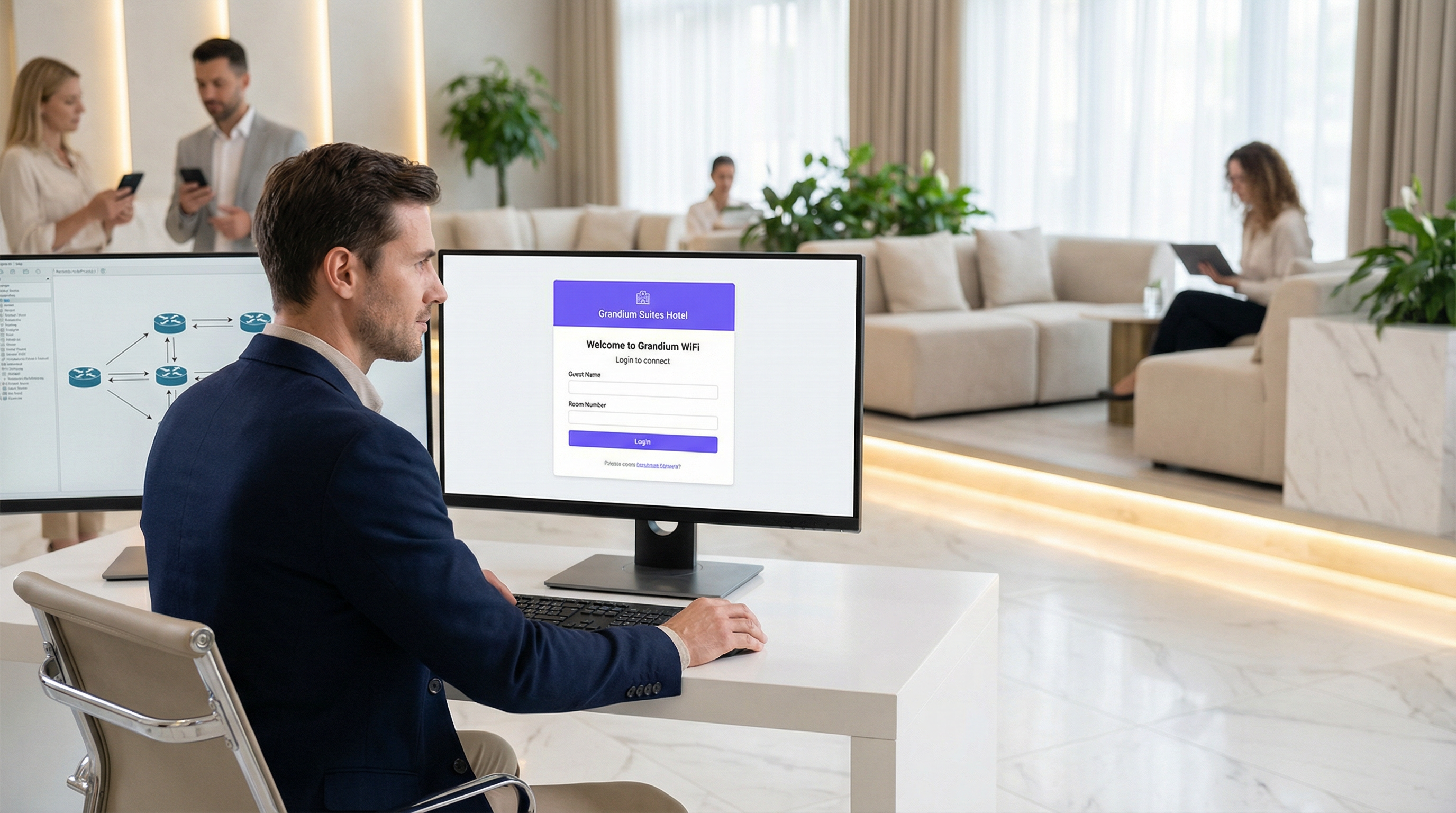
This guide provides a comprehensive technical reference for IT managers, network architects, and developers on building custom captive portal applications. It addresses the critical need for venues to control network access while creating valuable opportunities for guest engagement and data analytics. We delve into the architectural decisions, platform choices (iOS, Android, Web), and security protocols essential for a successful deployment. For the CTO, this guide offers a strategic overview of the ROI, compliance risks, and business impact of a well-executed captive portal strategy, moving beyond a simple connectivity gateway to a powerful tool for enhancing customer experience and driving revenue.
Technical Deep-Dive
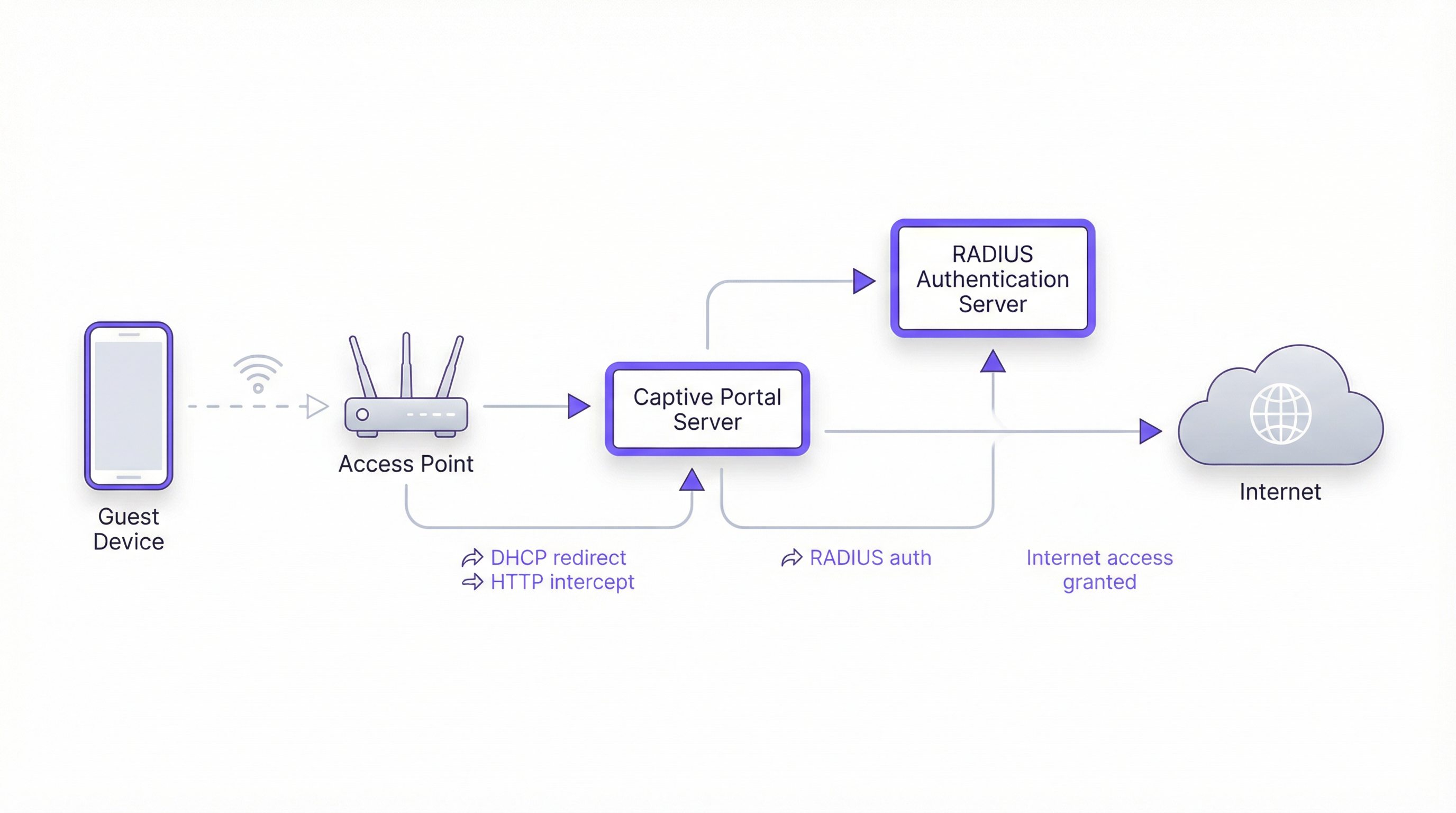
Building a captive portal involves a sophisticated interplay between network protocols, web technologies, and backend authentication systems. The fundamental goal is to intercept a user's web traffic and redirect them to a dedicated portal for authentication before granting broader network access. This process hinges on a few core components.
Core Architecture
- Access Point (AP): The wireless hardware that broadcasts the WiFi signal. Modern enterprise-grade APs have built-in capabilities to support captive portals.
- DHCP Server: Assigns an IP address to the connecting device. In a captive portal setup, the DHCP server can also provide the URL to the captive portal API endpoint (via DHCP Option 114), a method standardized in RFC7710bis that improves detection reliability on modern clients like Android 11+.
- DNS Interception/Redirect: When the user's device attempts to resolve a domain name (e.g.,
google.com), the network's DNS server initially returns the IP address of the captive portal server. This is the classic "walled garden" approach. - Captive Portal Server: A web server that hosts the login/splash page. This is the application that the end-user interacts with. It's responsible for presenting the login form, validating credentials, and communicating with the authentication backend.
- Authentication Server (RADIUS): The Remote Authentication Dial-In User Service (RADIUS) is the industry-standard backend for network authentication. When a user submits their credentials on the portal, the portal server forwards them to the RADIUS server, which checks them against a database of authorized users. It's central to enforcing policies based on IEEE 802.1X standards.
Platform & Framework Choices
Developers have three primary avenues for building the user-facing captive portal application. The choice has significant implications for deployment, user experience, and maintenance overhead.
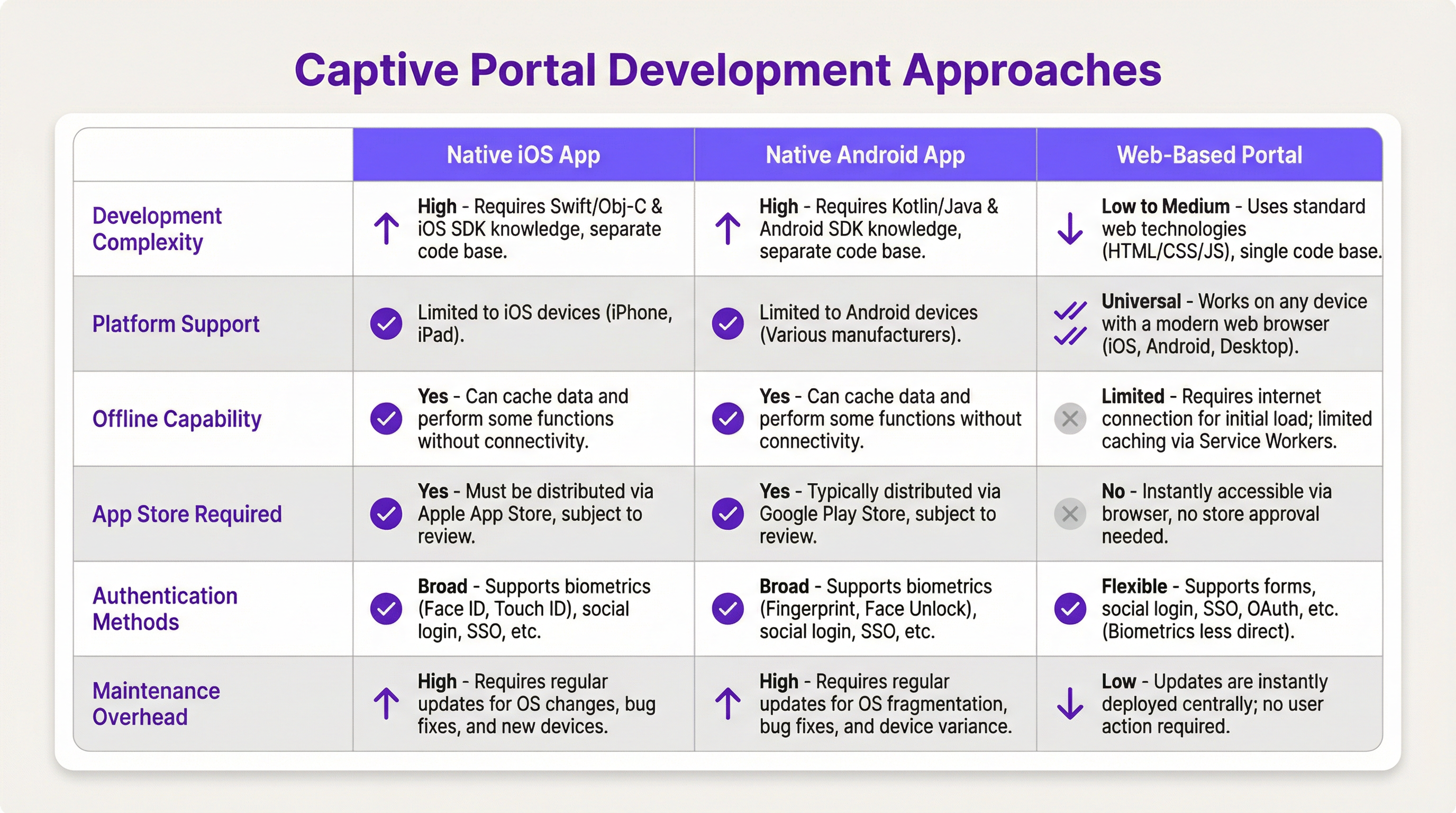
- Native iOS/Android App: Offers the richest user experience, including seamless integration with device features like biometrics (Face ID, fingerprint) and offline capabilities. However, this path requires separate codebases (Swift/Objective-C for iOS, Kotlin/Java for Android), App Store review processes, and forces users to download an application, which can be a significant barrier to entry.
- Web-Based Portal: The most common and flexible approach. A responsive web application (HTML, CSS, JavaScript) is served to the user's browser. It's platform-agnostic, requires no installation, and updates are deployed instantly. Modern web technologies like Service Workers can provide some offline functionality, but it's generally more limited than native apps.
Implementation Guide
This section provides a high-level, vendor-neutral walkthrough for deploying a web-based captive portal.
Step 1: Network & Hardware Setup
- Select Enterprise-Grade APs: Choose access points from vendors like Cisco Meraki, Ruckus, or Aruba that explicitly support external captive portals and RADIUS authentication.
- Configure VLANs: Isolate guest traffic from your internal corporate network using a dedicated VLAN. This is a critical security measure.
- Set up DHCP & DNS: Configure your DHCP server to assign IPs on the guest VLAN and your DNS server to perform the initial redirect to your portal server.
Step 2: Develop the Web Portal Application
- Frontend: Use a modern JavaScript framework like React, Vue, or Svelte for a dynamic user experience. Ensure the design is responsive and mobile-first.
- Backend: A lightweight backend (e.g., Node.js with Express, Python with Flask) is needed to serve the frontend and handle communication with the RADIUS server.
- Authentication Logic: The core workflow is as follows:
- User connects to WiFi.
- Device is redirected to the portal URL.
- User submits credentials (e.g., room number and last name, email, social login).
- Portal backend sends an
Access-Requestto the RADIUS server with the user's credentials. - RADIUS server validates the credentials and, if successful, returns an
Access-Acceptmessage. - The portal backend signals to the network controller/gateway to open access for the user's device MAC address.
Step 3: API Integrations
- Property Management System (PMS): For hotels, integrating with the PMS (e.g., Oracle Opera) allows for authentication against guest reservations (room number + surname).
- CRM: Syncing collected data (e.g., email addresses) with a CRM like Salesforce enables powerful marketing automation.
- Social Login: Use OAuth2 to allow users to log in with their social media accounts (Facebook, Google, LinkedIn). This provides richer demographic data but requires careful handling of privacy and consent under GDPR.
Best Practices
- Security First: Always use HTTPS for your captive portal to encrypt user credentials in transit. Implement rate limiting to prevent brute-force attacks. Comply with PCI DSS if you are processing payments.
- Compliance: Be transparent about data collection. Your portal's splash page must include a clear link to your privacy policy and obtain explicit consent as required by GDPR and other data protection regulations.
- User Experience: Keep the login process as frictionless as possible. For multi-site venues, implement seamless roaming where a user authenticated at one location is automatically connected at another.
- Bandwidth Management: Implement Quality of Service (QoS) policies to ensure fair bandwidth allocation and prevent a few users from degrading the experience for everyone.
Troubleshooting & Risk Mitigation
- Device Detection Issues: Not all devices play nicely with captive portals. The move towards randomized MAC addresses in iOS and Android can complicate device tracking. The Captive Portal API (RFC7710bis) is the most reliable detection method.
- Login Failures: Implement robust logging on your portal and RADIUS server to diagnose authentication issues. Common problems include incorrect credentials, expired accounts, or network connectivity issues between the portal and RADIUS server.
- Security Risks: An improperly secured captive portal can be a vector for man-in-the-middle attacks. Ensure all communication is encrypted and that your portal server is hardened against common web vulnerabilities.
ROI & Business Impact
A captive portal is not just an IT expense; it's a strategic asset. The ROI is measured through:
- Increased Customer Engagement: Use the portal to promote on-site services, display event schedules, or offer exclusive discounts.
- Enhanced Data Analytics: By analyzing login data, venues can understand foot traffic patterns, dwell times, and customer demographics, leading to better operational decisions.
- New Revenue Streams: For conference centers or airports, tiered access (e.g., free basic WiFi, paid premium WiFi) can generate direct revenue. The portal can also be used for third-party advertising.
- Improved Brand Perception: A seamless, reliable WiFi experience is now a baseline expectation. A professional captive portal enhances the perception of your brand as modern and customer-focused.
Key Terms & Definitions
Captive Portal
A web page that the user of a public-access network is obliged to view and interact with before access is granted. It intercepts traffic until the user completes a required action, such as authentication or accepting terms of service.
This is the core component IT teams build to manage guest WiFi. It's the gateway that controls access and provides a branding and data collection opportunity.
RADIUS (Remote Authentication Dial-In User Service)
A client/server protocol (IETF standard) that provides centralized Authentication, Authorization, and Accounting (AAA) management for users who connect and use a network service.
For developers, this is the definitive backend protocol for network authentication. Your captive portal app will act as a RADIUS client to validate users against a central directory.
IEEE 802.1X
An IEEE standard for port-based Network Access Control (PNAC). It provides an authentication mechanism to devices wishing to attach to a LAN or WLAN.
This is the enterprise-grade security standard that underpins secure WiFi. While a captive portal is a web-layer solution, 802.1X provides a deeper, more secure authentication framework that can work in conjunction with it.
VLAN (Virtual Local Area Network)
A logical grouping of devices in the same broadcast domain. A VLAN partitions a single physical network into multiple, isolated logical networks.
This is a critical security tool for network architects. Guest WiFi traffic must always be segregated onto its own VLAN to prevent any possibility of access to the internal corporate network.
DHCP (Dynamic Host Configuration Protocol)
A network management protocol used on IP networks for automatically assigning IP addresses and other communication parameters to devices.
In a captive portal context, DHCP is not just for IP assignment. Using DHCP Option 114, it can also inform client devices of the captive portal API location, improving detection reliability.
GDPR (General Data Protection Regulation)
A regulation in EU law on data protection and privacy for all individuals within the European Union and the European Economic Area. It also addresses the transfer of personal data outside the EU and EEA areas.
If your venue serves European citizens (regardless of where the venue is located), your captive portal's data collection and handling practices must be GDPR compliant. This has major implications for consent and data transparency.
PCI DSS (Payment Card Industry Data Security Standard)
An information security standard for organizations that handle branded credit cards from the major card schemes.
If your captive portal involves any form of payment (e.g., for premium access), the entire application and infrastructure falls within the scope of PCI DSS, requiring stringent security controls and regular audits.
OAuth 2.0
An open standard for access delegation, commonly used as a way for Internet users to grant websites or applications access to their information on other websites but without giving them the passwords.
This is the framework developers use to implement 'Login with Google/Facebook' functionality. It provides a secure way to authenticate users and retrieve profile data without handling their actual social media passwords.
Case Studies
A 500-room luxury hotel wants to replace its generic WiFi login with a branded captive portal. The goal is to authenticate guests using their room number and last name, offer tiered bandwidth options (free standard, paid premium), and promote spa services. The existing network uses Cisco Meraki hardware.
- Architecture: Deploy a web-based captive portal hosted on a cloud server (AWS/Azure). 2. Network Configuration: Configure the Meraki dashboard to use an external captive portal, pointing to the URL of your new web app. Create two SSIDs on a guest VLAN: 'HotelGuest_Free' and 'HotelGuest_Premium'. 3. Application Development: Build a responsive web app. The landing page will have fields for 'Room Number' and 'Last Name'. 4. API Integration: Use the hotel's PMS API (e.g., Oracle Hospitality) to validate the guest credentials in real-time. On successful validation, the app makes a RADIUS request. 5. RADIUS Configuration: Set up a RADIUS server (e.g., FreeRADIUS) with policies. If the user is on the 'Premium' SSID, the RADIUS server returns attributes to the Meraki controller to unlock higher bandwidth for that user's MAC address. 6. Post-Login Experience: After authentication, redirect the user to a page featuring a prominent advertisement for the hotel spa with a 'Book Now' button.
A national retail chain with 200 stores wants to offer free guest WiFi to gather customer email addresses for its loyalty program. The solution must be centrally managed, GDPR compliant, and provide basic analytics on visitor counts and dwell times.
- Architecture: A centralized, cloud-hosted, multi-tenant web portal is the only viable option for this scale. 2. Authentication: The portal will feature a simple form asking for an email address. A checkbox for 'I agree to the terms and consent to receive marketing communications' is mandatory and must not be pre-checked. 3. Backend: The portal backend validates the email format and sends it via API to the central CRM/loyalty database. It then sends a RADIUS Access-Request. 4. RADIUS & Analytics: The RADIUS server logs the authentication event (with a timestamp and the store ID, passed as a RADIUS attribute from the local AP). This data is used for analytics. The RADIUS accounting records (Start and Stop messages) provide the data needed to calculate session duration (dwell time). 5. Deployment: The same portal URL is configured across all 200 stores. The local network at each store is configured to pass a unique 'NAS-Identifier' attribute to the RADIUS server so that analytics can be segmented by location.
Scenario Analysis
Q1. A stadium with a capacity of 50,000 needs to provide guest WiFi. The primary goal is to manage congestion and ensure fair bandwidth usage. A secondary goal is to display advertisements for upcoming events. What is the most critical technical feature to implement?
💡 Hint:Think about network performance at scale, not just authentication.
Show Recommended Approach
The most critical feature is Quality of Service (QoS) and bandwidth throttling. With 50,000 potential users, the network would be unusable without strict policies to limit each user's bandwidth and prevent a small number of users from consuming all available throughput. While authentication and advertising are important, ensuring the core service is stable is the top priority.
Q2. A hospital wants to provide WiFi for patients and visitors. They need to comply with HIPAA regulations regarding data privacy. They also want to allow users to access the hospital's patient portal. How should they design their captive portal authentication?
💡 Hint:Consider the sensitivity of healthcare data and the need for secure, but simple, access.
Show Recommended Approach
The solution requires a two-tiered approach. 1. A simple, click-through captive portal for general internet access that collects no personal data, thus minimizing HIPAA scope. This portal should clearly state the terms of use. 2. For access to the patient portal, the user should be redirected to the portal's separate, secure login page, which uses multi-factor authentication. The captive portal itself should not handle patient portal credentials. The guest network must be strictly isolated from the hospital's internal clinical network via VLANs and firewalls.
Q3. You are deploying a captive portal for a coffee shop chain. The marketing team wants to allow login via Facebook to gather customer demographic data. What are the key technical and compliance steps you must take?
💡 Hint:Focus on the intersection of OAuth, data collection, and privacy regulations like GDPR.
Show Recommended Approach
- Technical: Implement the OAuth 2.0 protocol to securely connect with Facebook's API. Ensure you only request the minimum necessary data permissions (e.g., public profile and email). 2. Compliance (GDPR): On the login page, before the user clicks 'Login with Facebook', you must display a clear statement explaining what data will be collected and for what purpose. You must include a link to your privacy policy. The user must actively consent (e.g., by clicking the login button after reading the notice); you cannot assume consent. 3. Backend: Your backend must securely store the access tokens and handle the collected data in accordance with your privacy policy.
Key Takeaways
- ✓A captive portal is a strategic asset for controlling network access and driving guest engagement.
- ✓The industry-standard architecture uses a web-based portal with a RADIUS server for authentication.
- ✓Always segregate guest traffic onto a dedicated VLAN and enforce HTTPS for security.
- ✓Compliance with GDPR and other privacy laws requires explicit, informed user consent before data collection.
- ✓Leverage API integrations with PMS and CRM systems to automate authentication and marketing.
- ✓Focus on a frictionless user experience to enhance brand perception and guest satisfaction.
- ✓Measure ROI through increased engagement, data analytics, and new revenue opportunities.




