

Cloud RADIUS vs On-Premise RADIUS: Decision Guide for IT Teams
This guide provides IT directors, network architects, and venue operations teams with a definitive framework for choosing between cloud-hosted RADIUS services and traditional on-premise RADIUS servers. It covers the technical architecture, latency and reliability trade-offs, total cost of ownership, and compliance considerations for multi-site hospitality, retail, and public-sector deployments. By the end, readers will have a clear decision model aligned to their specific infrastructure constraints and organisational risk appetite.
🎧 Listen to this Guide
View Transcript
Executive Summary
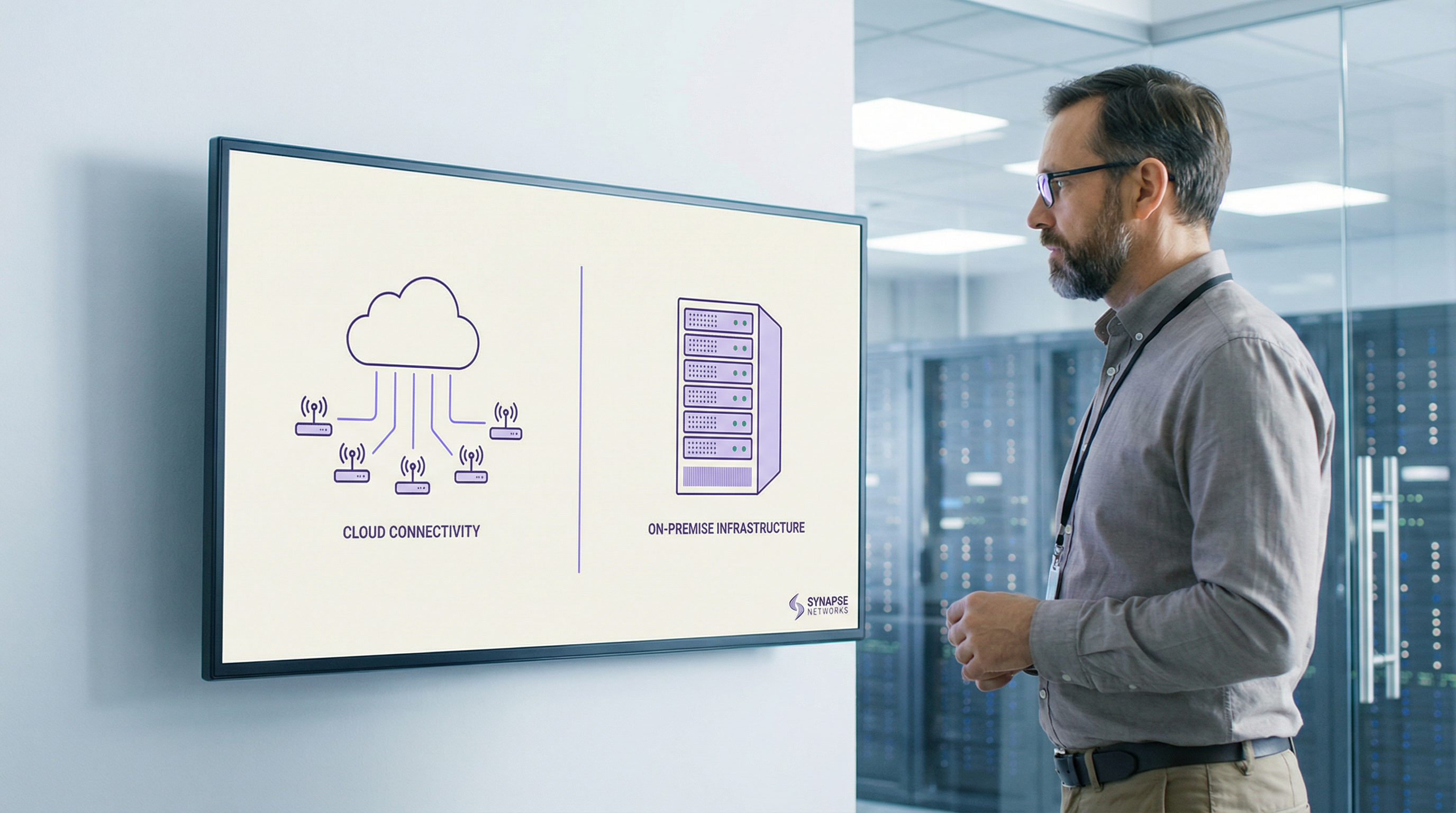
RADIUS authentication sits at the heart of every enterprise WiFi deployment. Whether you are securing employee access via IEEE 802.1X or managing guest onboarding across a multi-site venue estate, the decision of where to host your RADIUS infrastructure has direct consequences for uptime, operational overhead, and total cost of ownership.
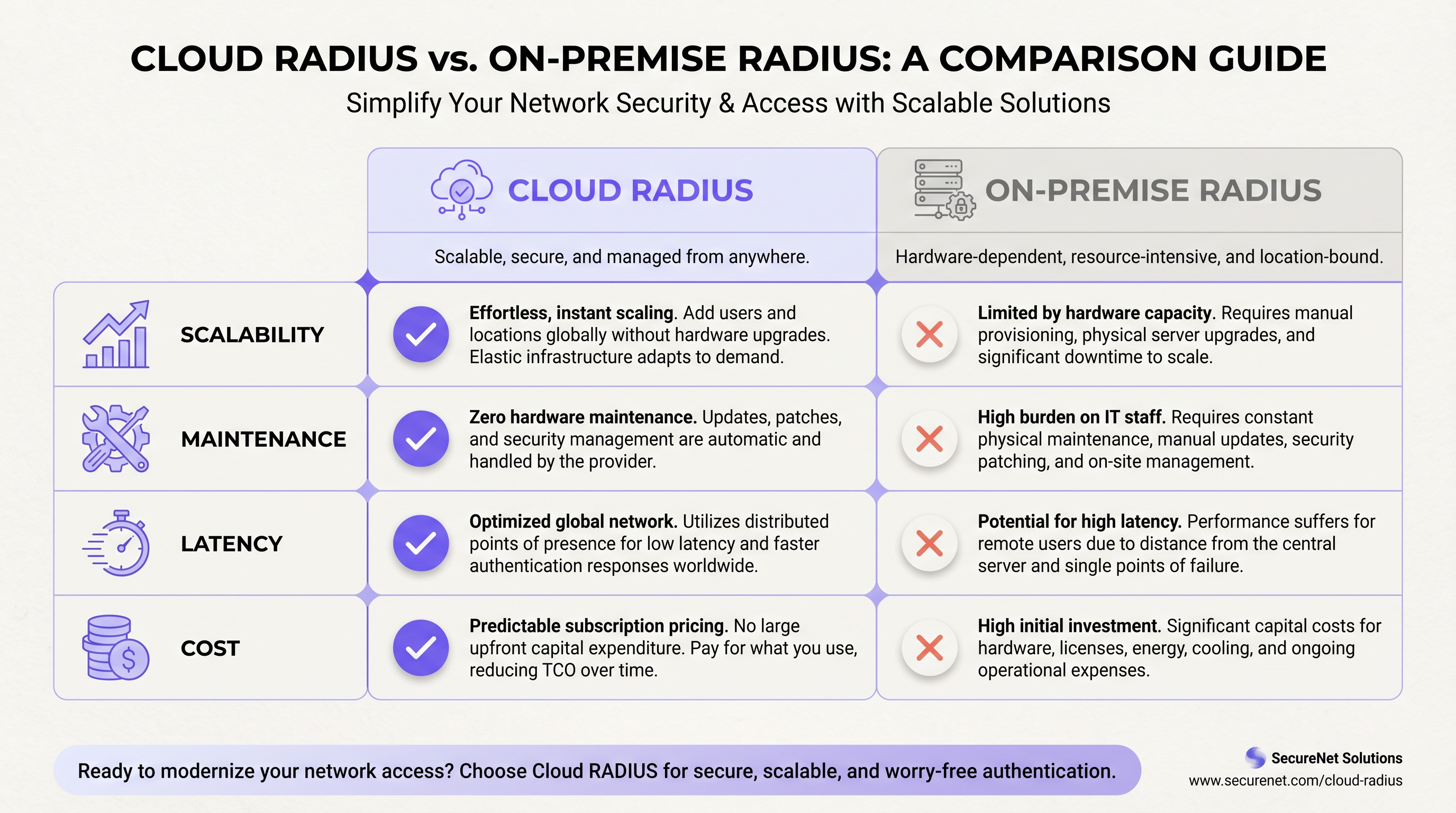
Cloud RADIUS services deliver managed, globally distributed authentication infrastructure with built-in high availability, automatic certificate rotation, and elastic scalability — eliminating the per-site maintenance burden that plagues distributed on-premise deployments. On-premise RADIUS, whether running FreeRADIUS or Microsoft NPS, offers sub-millisecond local authentication, full data sovereignty, and independence from WAN connectivity — advantages that remain decisive in specific high-density or regulated environments.
For most multi-site operators — hotel groups, retail chains, conference centres — Cloud RADIUS delivers a superior operational outcome at a lower five-year total cost of ownership. The exceptions are well-defined: air-gapped environments, strict data residency mandates, and very large single-site deployments where local LAN performance is paramount. This guide gives you the framework to determine which category your deployment falls into, and how to act on that decision.
Technical Deep-Dive
The RADIUS Protocol and Its Role in 802.1X Infrastructure
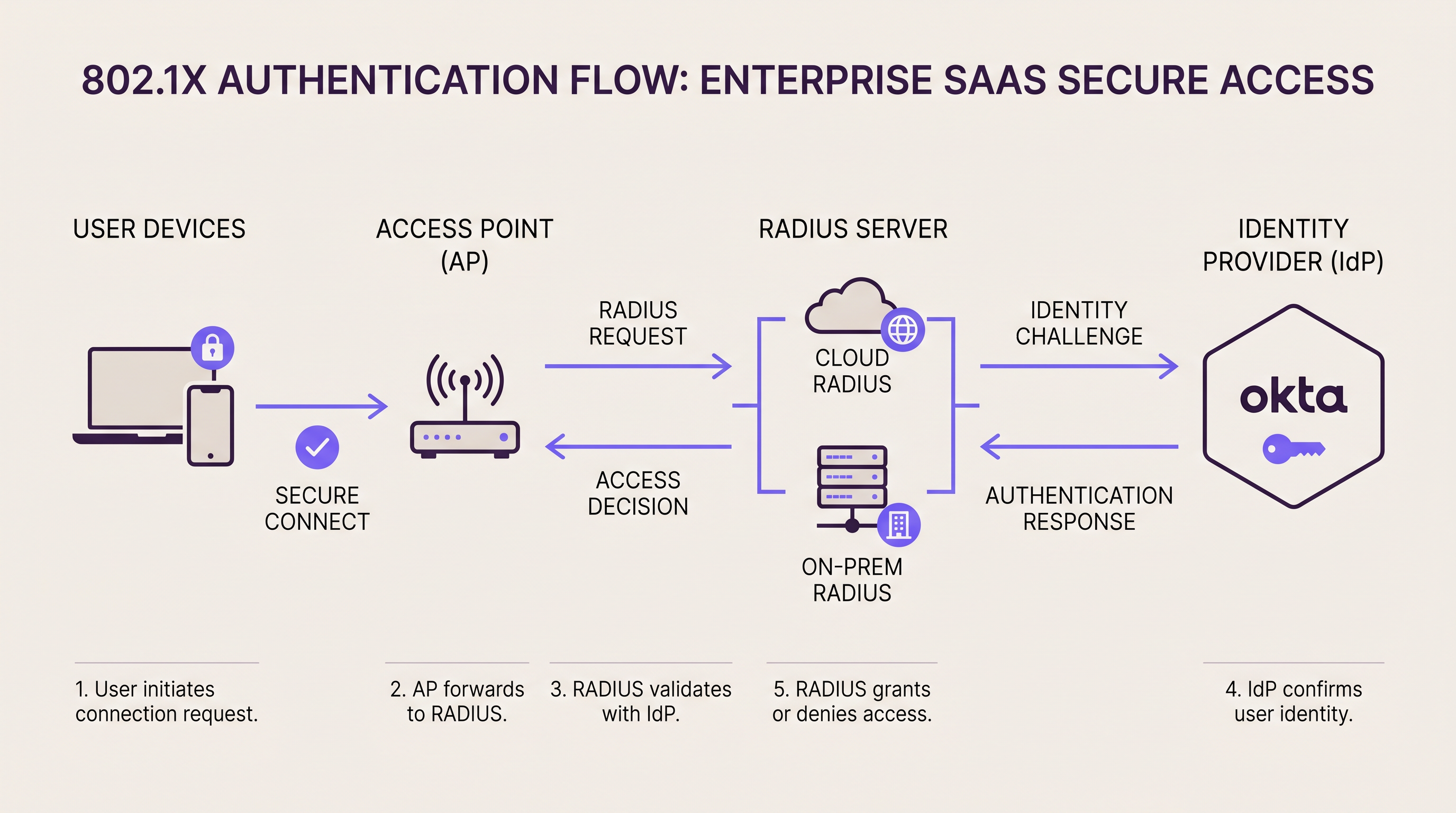
RADIUS (Remote Authentication Dial-In User Service, RFC 2865) operates as the authentication broker between your network access layer and your identity directory. In an 802.1X deployment, the access point or switch acts as the Network Access Server (NAS), forwarding EAP authentication frames to the RADIUS server over UDP (port 1812 for authentication, port 1813 for accounting). The RADIUS server validates the supplicant's credentials against a backend directory — Active Directory, LDAP, or a cloud Identity Provider — and returns an Access-Accept or Access-Reject response, optionally including VLAN assignment attributes.
This architecture is fundamentally the same whether your RADIUS server is a rack-mounted appliance in your server room or a globally distributed cloud service. The difference lies in where that server lives, who maintains it, and how it scales.
On-Premise RADIUS: Architecture and Trade-Offs
The two dominant on-premise RADIUS platforms are FreeRADIUS and Microsoft Network Policy Server (NPS). FreeRADIUS is the world's most widely deployed RADIUS server, supporting an extensive range of EAP methods including EAP-TLS, PEAP-MSCHAPv2, EAP-TTLS, and EAP-PWD. It integrates with virtually any backend directory via LDAP, SQL, or REST, and is available at no licensing cost. However, it demands skilled administration: configuration is file-based, debugging requires log analysis expertise, and scaling across dozens of sites requires careful replication and failover planning.
Microsoft NPS integrates natively with Active Directory and is the default choice for Windows-centric environments. It supports PEAP-MSCHAPv2 and EAP-TLS out of the box and is managed through the familiar Windows Server interface. The trade-off is tight coupling to Windows Server licensing and a more limited EAP method set compared to FreeRADIUS.
For high-availability on-premise deployments, organisations typically deploy active-active or active-passive RADIUS clusters. Access points are configured with a primary and secondary RADIUS server address; if the primary fails to respond within the configured timeout (typically 3–5 seconds), the NAS fails over to the secondary. This architecture requires either geographically dispersed servers — which introduces its own complexity — or a pair of servers in the same facility, which does not protect against a site-level outage.
Latency profile: On-premise RADIUS delivers authentication round-trips of under 1 millisecond over a local LAN. For high-density environments processing thousands of simultaneous authentications — a 68,000-seat stadium during a sold-out event, for example — this local processing capability is a genuine operational advantage.
Cloud RADIUS: Architecture and Trade-Offs
Cloud RADIUS platforms host the RADIUS infrastructure across multiple geographically distributed availability zones. When an access point sends an authentication request, it is routed to the nearest cloud edge node, typically adding 5–50 milliseconds of round-trip latency depending on the provider's point-of-presence proximity to the site. For the vast majority of authentication use cases, this latency is imperceptible to end users.
The high-availability model is fundamentally different from on-premise. Rather than configuring a primary/secondary pair, the cloud platform's load balancer automatically routes requests away from failed nodes. Enterprise Cloud RADIUS providers typically publish SLAs of 99.99% uptime, backed by multi-region redundancy. Achieving equivalent redundancy on-premise requires deploying active-active clusters across multiple geographically dispersed data centres — a significant engineering and capital investment.
Cloud RADIUS platforms integrate natively with cloud Identity Providers. If your organisation uses Okta, Azure Active Directory, or Google Workspace, a Cloud RADIUS service connects via SAML, LDAP-over-TLS, or proprietary API connectors. For a detailed walkthrough of Okta integration specifically, see our guide: Okta and RADIUS: Extending Your Identity Provider to WiFi Authentication.
Certificate management is one of the most compelling operational arguments for Cloud RADIUS. EAP-TLS and PEAP both rely on server-side digital certificates. On-premise, certificate expiry is a leading cause of authentication outages — a certificate expiring on a FreeRADIUS server causes every connected client to reject the server's identity, resulting in a complete WiFi outage until the certificate is renewed and deployed. Cloud RADIUS providers automate certificate rotation entirely, eliminating this failure mode.
WPA3-Enterprise and Protocol Considerations
The WiFi Alliance's WPA3-Enterprise specification introduces a 192-bit security mode mandating EAP-TLS with Suite B cryptography (ECDHE, ECDSA, AES-256-GCM). This is increasingly relevant for healthcare, finance, and government deployments. Most modern Cloud RADIUS platforms support WPA3-Enterprise natively. On-premise deployments running older FreeRADIUS versions (pre-3.0.x) or legacy NPS configurations may require upgrades before WPA3-Enterprise can be deployed. If WPA3-Enterprise is on your roadmap, validate your RADIUS platform's support before committing to an infrastructure path.
For organisations considering the SD-WAN layer that underpins multi-site cloud RADIUS deployments, our guide on The Core SD-WAN Benefits for Modern Businesses provides complementary context on WAN resilience architecture.
Implementation Guide
Step 1: Audit Your Current Authentication Dependencies
Before selecting a deployment model, document every SSID, VLAN, EAP method, and backend directory that your current authentication infrastructure touches. Include MAC Authentication Bypass (MAB) policies for headless devices — printers, IoT sensors, point-of-sale terminals — as these are frequently overlooked during migrations and can cause significant post-cutover incidents.
Step 2: Evaluate Identity Provider Readiness
If your user directory is on-premise Active Directory and cannot be synchronised to a cloud IdP, your Cloud RADIUS options are constrained to platforms that support LDAP proxying to on-premise directories. If you can deploy Azure AD Connect or a similar synchronisation tool, the full range of Cloud RADIUS platforms becomes available. This single decision — cloud IdP versus on-premise directory — is often the determining factor in the cloud versus on-premise RADIUS choice.
Step 3: Assess WAN Resilience at Each Site
Cloud RADIUS is only as reliable as the internet connection at each site. Before migrating, audit the WAN connectivity at every location. Sites with a single ISP connection and no failover are a significant risk. Implement dual-ISP connectivity or SD-WAN failover before deploying Cloud RADIUS as your primary authentication infrastructure. For retail environments where point-of-sale systems depend on network authentication, WAN resilience is non-negotiable.
Step 4: Plan Certificate Migration (On-Premise Deployments)
If deploying or maintaining on-premise RADIUS with EAP-TLS, establish a certificate lifecycle management process. Implement monitoring alerts at 90, 60, and 30 days before certificate expiry. Consider deploying an internal PKI (such as Microsoft ADCS or HashiCorp Vault) to automate certificate issuance and renewal. Never rely on calendar reminders alone for certificate management in production environments.
Step 5: Configure Survivability Policies
For Cloud RADIUS deployments, configure a local survivability policy on your wireless controllers or access points. Options include: caching the last-known authentication state for a configurable period, falling back to MAC Authentication Bypass for pre-approved device lists, or routing critical staff SSIDs through a secondary authentication path. For hospitality operators, ensure that guest WiFi onboarding through platforms like Purple's Guest WiFi has a defined fallback behaviour during RADIUS unavailability.
Step 6: Run a Parallel Deployment
Deploy the new RADIUS platform in parallel with the existing infrastructure. Create a dedicated test SSID mapped to the new RADIUS server and validate all EAP methods, VLAN assignments, and policy enforcement before migrating production SSIDs. This parallel-run period should be a minimum of two weeks for a single-site deployment and four to six weeks for a multi-site migration.
Step 7: Execute a Phased Site-by-Site Migration
For multi-site deployments, migrate sites sequentially rather than simultaneously. Begin with lower-risk sites — smaller locations with less traffic and more tolerant users — before migrating high-priority sites such as flagship stores or conference-heavy hotel properties. Document the rollback procedure for each site before beginning the cutover.
Best Practices
Shared secret hygiene: RADIUS shared secrets between access points and the RADIUS server must be a minimum of 32 characters, randomly generated, and unique per NAS device. Reusing shared secrets across all access points means that compromising one device exposes the entire authentication infrastructure. Rotate shared secrets annually or following any suspected compromise.
VLAN segmentation: Use RADIUS-assigned VLANs (via the Tunnel-Type, Tunnel-Medium-Type, and Tunnel-Private-Group-ID attributes) to dynamically segment traffic by user role. Guest devices should land on an isolated VLAN with internet-only access; corporate devices on the production VLAN; IoT devices on a dedicated restricted VLAN. This segmentation is a PCI DSS requirement for any network handling cardholder data.
Accounting and audit logging: Enable RADIUS accounting (port 1813) and retain accounting logs for a minimum of 12 months. These logs record session start/stop times, data volumes, and assigned IP addresses — essential for security incident investigation and GDPR compliance. Cloud RADIUS platforms typically export accounting data to SIEM systems via syslog or API; on-premise deployments should route accounting data to a centralised log management platform.
EAP method selection: For corporate employee networks, EAP-TLS (certificate-based) provides the strongest security posture and is recommended for PCI DSS and healthcare environments. PEAP-MSCHAPv2 is acceptable for lower-risk environments but is vulnerable to credential harvesting attacks if the server certificate is not properly validated by supplicants. Avoid EAP-MD5 entirely — it is deprecated and provides no mutual authentication.
RadSec (RADIUS over TLS): The traditional RADIUS protocol transmits data over UDP with only the User-Password attribute encrypted. RadSec (RFC 6614) wraps RADIUS in TLS, providing full transport encryption and mutual authentication between NAS and RADIUS server. Most modern Cloud RADIUS platforms support RadSec. For new deployments, RadSec should be the default transport choice.
For healthcare and transport sector deployments, where data handling obligations under GDPR and sector-specific regulations are particularly stringent, ensure your RADIUS platform provides a Data Processing Agreement and supports regional data residency.
Troubleshooting & Risk Mitigation
Common Failure Mode 1: Certificate Expiry (On-Premise)
Symptom: All clients suddenly fail to authenticate; RADIUS logs show TLS handshake failures.
Root cause: The server-side certificate on the RADIUS server has expired. Client supplicants reject the server's identity.
Mitigation: Implement automated certificate monitoring with alerts at 90/60/30 days. Use an internal CA with automated renewal. Cloud RADIUS eliminates this failure mode entirely through automated certificate rotation.
Common Failure Mode 2: WAN Outage Blocking Cloud RADIUS
Symptom: Authentication fails at a specific site; other sites are unaffected. Local network is operational.
Root cause: The site's internet connection has failed, preventing access points from reaching the Cloud RADIUS service.
Mitigation: Deploy dual-ISP connectivity or SD-WAN with automatic failover. Configure access point survivability policies to cache credentials or fall back to MAB for critical devices.
Common Failure Mode 3: Shared Secret Mismatch
Symptom: Authentication requests are silently dropped; RADIUS logs show "invalid authenticator" or "message authenticator" errors.
Root cause: The shared secret configured on the access point does not match the secret configured on the RADIUS server.
Mitigation: Use a centralised secret management system (HashiCorp Vault, AWS Secrets Manager) to ensure consistency. Validate shared secrets after any NAS or RADIUS server configuration change.
Common Failure Mode 4: Supplicant Misconfiguration
Symptom: Individual devices fail to authenticate while others on the same SSID succeed.
Root cause: The 802.1X supplicant on the failing device is not configured to trust the RADIUS server's certificate, or is configured for an incompatible EAP method.
Mitigation: Deploy supplicant configuration via MDM or Group Policy to ensure consistency. For BYOD environments, provide a clear onboarding guide. Purple's WiFi Analytics platform can help identify authentication failure patterns across your device estate.
Common Failure Mode 5: RADIUS Timeout Under Load
Symptom: Authentication delays or failures during peak periods (event start, shift change).
Root cause: RADIUS server is overwhelmed by concurrent authentication requests; NAS timeout is exceeded before a response is received.
Mitigation: On-premise: scale RADIUS server capacity ahead of known peak events; implement connection rate limiting on access points. Cloud RADIUS: verify that your subscription tier supports your peak authentication throughput; most enterprise cloud platforms scale automatically.
ROI & Business Impact
Total Cost of Ownership: Five-Year Comparison
The following analysis is based on a representative 20-site retail chain with approximately 50 access points per site and 200 concurrent authenticated devices per site at peak.
| Cost Component | On-Premise RADIUS (20 sites) | Cloud RADIUS (20 sites) |
|---|---|---|
| Hardware (servers, HA pairs) | £80,000–£120,000 | £0 |
| OS & Software Licensing | £10,000–£30,000 | £0 |
| Annual Subscription | £0 | £18,000–£40,000/yr |
| Power & Cooling (5 yr) | £15,000–£25,000 | £0 |
| Engineering Time (5 yr) | £60,000–£100,000 | £10,000–£20,000 |
| 5-Year Total | £165,000–£275,000 | £100,000–£220,000 |
The engineering time differential is the most significant factor. On-premise RADIUS at 20 sites requires ongoing patching, certificate management, monitoring, and incident response. Cloud RADIUS reduces this to policy management and integration maintenance — a fraction of the effort.
Measuring Success
Key performance indicators for your RADIUS deployment should include: authentication success rate (target: >99.5% for production environments), average authentication latency (target: <100ms for cloud, <5ms for on-premise LAN), mean time to recovery from authentication outages (target: <15 minutes), and certificate expiry incidents (target: zero, achievable with proper automation).
For hospitality operators using Purple's Guest WiFi platform, authentication infrastructure reliability directly impacts guest satisfaction scores. A 2-second authentication delay during peak check-in periods is measurable in guest feedback. Cloud RADIUS with properly configured survivability policies consistently outperforms ad-hoc on-premise deployments on this metric.
Organisations that have migrated from distributed on-premise FreeRADIUS deployments to Cloud RADIUS consistently report a 30–50% reduction in authentication-related IT incidents and a significant reduction in the engineering hours allocated to RADIUS maintenance — hours that are reallocated to strategic network improvement projects. Purple's platform, which integrates with both deployment models, provides the WiFi Analytics and Sensors data to quantify these improvements against baseline metrics captured pre-migration.
For venue operators considering the broader network modernisation context, Purple's Wayfinding capabilities and the integration of authentication data with footfall analytics represent the next layer of value that a well-architected RADIUS infrastructure enables. Authentication events are, at their core, presence data — and when surfaced through Purple's analytics layer, they become a powerful tool for understanding visitor behaviour, dwell time, and return visit rates across your estate.
Key Terms & Definitions
RADIUS (Remote Authentication Dial-In User Service)
A networking protocol (RFC 2865) that provides centralised authentication, authorisation, and accounting (AAA) for users connecting to a network. RADIUS operates over UDP and acts as the broker between network access equipment (access points, switches) and the identity directory (Active Directory, LDAP, cloud IdP).
IT teams encounter RADIUS whenever deploying 802.1X authentication for WiFi or wired networks. It is the foundational protocol for enterprise network access control and is required for WPA2-Enterprise and WPA3-Enterprise deployments.
802.1X
An IEEE standard for port-based network access control that defines the framework for EAP-based authentication. In a WiFi context, 802.1X requires three components: the supplicant (client device), the authenticator (access point), and the authentication server (RADIUS). The access point blocks all traffic from the client until RADIUS returns an Access-Accept.
802.1X is the authentication mechanism for WPA2-Enterprise and WPA3-Enterprise networks. IT teams use it to ensure that only authorised devices and users can connect to the corporate WiFi, with dynamic VLAN assignment based on user identity.
EAP (Extensible Authentication Protocol)
A flexible authentication framework used within 802.1X that supports multiple authentication methods. Common EAP methods include EAP-TLS (certificate-based, strongest security), PEAP-MSCHAPv2 (password-based with server certificate validation), and EAP-TTLS (tunnelled password authentication).
The choice of EAP method directly impacts security posture and deployment complexity. EAP-TLS requires client certificates on every device, making it more complex to deploy but significantly more resistant to credential theft attacks. IT teams in regulated industries (healthcare, finance) should default to EAP-TLS.
FreeRADIUS
The world's most widely deployed open-source RADIUS server, powering authentication for hundreds of millions of users globally. FreeRADIUS supports an extensive range of EAP methods and backend integrations, is available at no licensing cost, and runs on Linux. It requires skilled administration and file-based configuration.
FreeRADIUS is the default choice for on-premise RADIUS deployments in non-Microsoft environments. IT teams evaluating the cloud versus on-premise decision should assess whether they have the in-house expertise to operate FreeRADIUS effectively, as misconfiguration is a leading cause of authentication incidents.
NPS (Network Policy Server)
Microsoft's built-in RADIUS server, included with Windows Server. NPS integrates natively with Active Directory and supports PEAP-MSCHAPv2 and EAP-TLS. It is managed through the Windows Server GUI and is the default RADIUS choice for Microsoft-centric environments.
IT teams running Windows Server infrastructure typically deploy NPS as their on-premise RADIUS server. NPS is tightly coupled to Windows Server licensing and Active Directory, which simplifies deployment in Microsoft environments but limits flexibility in heterogeneous or cloud-native environments.
MAC Authentication Bypass (MAB)
An authentication method that uses a device's MAC address as its credential, allowing headless devices (printers, IoT sensors, point-of-sale terminals) that cannot run an 802.1X supplicant to authenticate to the network. The MAC address is checked against an allow-list on the RADIUS server.
MAB is essential for any network with IoT devices or legacy equipment. IT teams must maintain accurate MAC address inventories and implement processes for adding new devices. Cloud RADIUS platforms typically provide a centralised dashboard for MAB list management across all sites, which is significantly more efficient than per-site configuration file management on FreeRADIUS.
RadSec (RADIUS over TLS)
An extension of the RADIUS protocol (RFC 6614) that transports RADIUS packets over TLS rather than UDP. RadSec provides full transport encryption and mutual authentication between the NAS and RADIUS server, addressing several well-documented security vulnerabilities in the traditional UDP-based RADIUS protocol.
Traditional RADIUS encrypts only the User-Password attribute; all other attributes, including usernames and session data, are transmitted in plaintext. RadSec is the modern, secure transport mechanism for RADIUS and is supported by most enterprise Cloud RADIUS platforms and modern access point vendors. IT teams deploying new RADIUS infrastructure should evaluate RadSec as the default transport.
VLAN Assignment (RADIUS-assigned VLAN)
A RADIUS capability that dynamically assigns a connecting device to a specific VLAN based on authentication outcome. The RADIUS server returns Tunnel-Type (13=VLAN), Tunnel-Medium-Type (6=802), and Tunnel-Private-Group-ID (VLAN ID) attributes in the Access-Accept response, and the access point places the device in the specified VLAN.
Dynamic VLAN assignment is the mechanism by which IT teams implement network segmentation based on user identity. A single SSID can serve multiple user types — guests, employees, contractors, IoT devices — with each type automatically placed in the appropriate VLAN based on their RADIUS authentication result. This is a PCI DSS requirement for networks that handle cardholder data.
High Availability (HA) RADIUS
A RADIUS deployment architecture that ensures authentication services remain available despite individual server failures. Common HA patterns include active-active clustering (both servers handle traffic simultaneously, with load balancing), active-passive failover (secondary server takes over when primary fails), and geographically distributed redundancy (servers in separate physical locations).
HA is a critical design consideration for any production RADIUS deployment. IT teams must define their Recovery Time Objective (RTO) — how quickly authentication must be restored after a failure — and design their HA architecture accordingly. Cloud RADIUS providers deliver HA as a built-in service; on-premise HA requires explicit architectural design and ongoing maintenance.
Case Studies
A European hotel group operates 45 properties across six countries. Each property has 150–400 guest rooms plus conference facilities. The central IT team consists of three network engineers. They currently run FreeRADIUS on virtual machines at each property — 45 separate instances. A certificate expiry at one property caused a complete guest WiFi outage during a major conference. The CTO wants to eliminate this class of incident and reduce maintenance overhead. What is the recommended architecture?
Recommended Architecture: Cloud RADIUS with Purple Guest WiFi Integration
Select a Cloud RADIUS provider with European data residency (to satisfy GDPR obligations) and native integration with your existing IdP. If the hotel group uses Azure AD for staff identity, select a platform with Azure AD LDAP connector support.
Migrate guest WiFi SSIDs first. Guest authentication is the highest-volume, lowest-risk migration target. Configure Purple's captive portal to handle guest onboarding (data capture, consent, branded splash page) and pass authenticated sessions to the Cloud RADIUS backend. This immediately eliminates per-property FreeRADIUS maintenance for the guest network.
Migrate staff SSIDs property by property, beginning with smaller properties. For each property, run a two-week parallel deployment with a test SSID before cutting over production traffic.
Configure WAN survivability at each property. Implement SD-WAN or dual-ISP connectivity. Configure the wireless controller to cache staff credentials locally for up to 8 hours, ensuring hotel operations staff can authenticate even during brief internet outages.
Decommission FreeRADIUS VMs at each property post-migration. Retain VM snapshots for 30 days as a rollback safety net.
Centralise policy management through the Cloud RADIUS dashboard. Define VLAN assignment policies once and apply them across all 45 properties — a task that previously required per-property configuration file edits.
Expected outcomes: Elimination of certificate expiry incidents (automated rotation), reduction of RADIUS-related engineering time by approximately 40%, and improved authentication latency at properties in countries where the cloud provider has local edge nodes.
A national sports stadium with 68,000 seats hosts 30 major events per year. Peak concurrent WiFi users exceed 25,000 during sold-out matches. The stadium has a dedicated 10Gbps internet connection, but the IT security team has a hard requirement: all authentication logs must remain on UK soil and must not traverse the public internet. The stadium also operates a PCI DSS-compliant point-of-sale network for concessions. What RADIUS architecture is appropriate?
Recommended Architecture: On-Premise RADIUS with Active-Active Cluster and Co-Location DR
Deploy a primary active-active RADIUS cluster within the stadium's on-site data room. Use two physical servers running FreeRADIUS in active-active configuration, load-balanced via the wireless controller's RADIUS server list. Each server should be capable of handling the full authentication load independently — size for 3,000+ authentications per minute at peak event ingress.
Deploy a secondary cluster at a UK co-location facility within 30 miles of the stadium, connected via a dedicated private WAN link (not the public internet). This provides site-level disaster recovery without violating the data sovereignty requirement.
Segment the PCI DSS environment with a dedicated RADIUS policy for the point-of-sale SSID. Assign POS devices to a dedicated VLAN via RADIUS attributes. Ensure RADIUS accounting logs for POS authentication are retained for 12 months minimum, stored on-premise in compliance with PCI DSS Requirement 10.
Implement EAP-TLS for all staff and POS device authentication. Deploy an internal Certificate Authority (Microsoft ADCS or equivalent) to issue and manage client certificates. Configure automated certificate renewal with 90-day advance alerts.
Deploy RadSec (RADIUS over TLS) between access points and the on-premise RADIUS cluster to encrypt authentication traffic on the internal network — particularly important given the high-density public environment.
Pre-provision capacity before major events. Work with the stadium's event operations team to receive confirmed attendance figures 72 hours in advance, and validate RADIUS server capacity against expected peak authentication rates.
Expected outcomes: Sub-millisecond authentication latency during peak event ingress, full data sovereignty compliance, PCI DSS-compliant authentication logging, and 99.99%+ availability via the active-active cluster architecture.
Scenario Analysis
Q1. A national pharmacy chain operates 320 stores across the UK. Each store has a single internet connection from a major ISP with no failover. The chain uses Microsoft 365 and Azure Active Directory for all staff identity. The IT team of 8 engineers currently manages FreeRADIUS instances on a virtual machine at each store. The CISO has flagged that 23% of stores have RADIUS certificates that will expire within 90 days. The CTO wants to resolve this and reduce ongoing maintenance overhead. What RADIUS architecture do you recommend, and what is the single most critical infrastructure change required before migration?
💡 Hint:Consider the WAN resilience requirement carefully — what happens to in-store operations if the internet connection fails after Cloud RADIUS is deployed?
Show Recommended Approach
Recommended architecture: Cloud RADIUS integrated with Azure Active Directory, replacing the 320 FreeRADIUS instances. The Azure AD integration is straightforward given the existing Microsoft 365 deployment, and Cloud RADIUS eliminates the certificate management crisis immediately through automated rotation.
Critical infrastructure change before migration: WAN resilience. Each store currently has a single ISP connection with no failover. Cloud RADIUS is entirely dependent on internet connectivity. Before migrating any store, implement SD-WAN with dual-ISP failover, or at minimum configure the wireless controller to cache staff credentials locally for 8–12 hours. Without this, a store that loses internet connectivity cannot authenticate staff to the corporate network — potentially blocking access to point-of-sale systems, inventory management, and other network-dependent operations.
Migration sequence: (1) Deploy SD-WAN or credential caching at all 320 stores. (2) Migrate the 23% of stores with imminent certificate expiry first — this addresses the immediate risk. (3) Migrate remaining stores in batches of 20–30 per week. (4) Decommission FreeRADIUS VMs post-migration. Expected outcome: zero certificate expiry incidents, 60–70% reduction in RADIUS-related engineering time, centralised policy management across all 320 stores.
Q2. A conference centre operator runs a single flagship venue with a capacity of 5,000 delegates. The venue hosts 200 events per year, ranging from small board meetings to large international conferences. Peak concurrent WiFi users reach 4,500 during major events. The venue has a 1Gbps dedicated internet connection with 99.9% SLA. The IT team consists of two network engineers. There are no specific data sovereignty requirements. The current on-premise FreeRADIUS server is approaching end-of-life. Should they replace it with a new on-premise deployment or migrate to Cloud RADIUS?
💡 Hint:Consider both the peak load profile and the team size. Is 4,500 concurrent users at a single site a strong argument for on-premise, or does the team size and management overhead tip the balance?
Show Recommended Approach
Recommended architecture: Cloud RADIUS. Despite the single-site, high-density profile, the combination of a small IT team (2 engineers), no data sovereignty requirements, and a reliable dedicated internet connection makes Cloud RADIUS the stronger choice.
Reasoning: The peak load of 4,500 concurrent users is well within the throughput capacity of enterprise Cloud RADIUS platforms, which are designed for far higher volumes. The 5–20ms additional latency from cloud routing is imperceptible in a conference environment. The 1Gbps dedicated internet connection with a 99.9% SLA provides sufficient WAN reliability for Cloud RADIUS dependence.
The decisive factor is team size. Two engineers managing an on-premise FreeRADIUS replacement — including hardware procurement, OS hardening, certificate management, EAP configuration, and ongoing maintenance — represents a significant ongoing overhead for a small team. Cloud RADIUS reduces this to policy management, freeing both engineers for the venue's broader network infrastructure needs.
Implementation note: Configure credential caching on the wireless controller for the venue operations staff SSID, providing survivability during any brief internet disruption. Ensure the Cloud RADIUS provider has a UK or European edge node to minimise authentication latency for the high-density event scenario.
Q3. A regional NHS trust operates 12 hospital sites across a county. Authentication requirements include: (1) staff access to the clinical network via 802.1X with EAP-TLS, (2) guest/patient WiFi via captive portal, and (3) medical device authentication via MAC Authentication Bypass. The trust's information governance team has mandated that all patient-related data, including authentication logs, must remain within NHS-approved data centres in England. The trust uses on-premise Active Directory with no current plans to migrate to Azure AD. What architecture do you recommend?
💡 Hint:This scenario has multiple hard constraints. Identify each one and determine whether it eliminates cloud RADIUS entirely or only partially.
Show Recommended Approach
Recommended architecture: Hybrid — On-Premise RADIUS for clinical staff and medical device authentication; Cloud RADIUS (NHS-compliant) or on-premise for guest/patient WiFi.
Analysis of constraints:
- Data sovereignty (NHS-approved English data centres): This eliminates most commercial Cloud RADIUS providers unless they offer NHS-compliant data residency. Some providers offer NHS-specific deployments; these should be evaluated. If no compliant cloud option exists, on-premise is required for all authentication.
- On-premise Active Directory with no cloud sync: This is a hard constraint for Cloud RADIUS integration. Without Azure AD Connect or equivalent, Cloud RADIUS cannot query the trust's staff directory. On-premise RADIUS is required for staff authentication.
- EAP-TLS for clinical staff: Supported by both on-premise FreeRADIUS and NPS. Requires an internal PKI (Microsoft ADCS recommended for an AD-integrated environment).
Recommended deployment: Deploy on-premise RADIUS (NPS or FreeRADIUS) at each of the 12 hospital sites in active-passive pairs, integrated with the trust's on-premise Active Directory. Use RADIUS-assigned VLANs to segment clinical, administrative, and medical device traffic. For guest/patient WiFi, deploy Purple's captive portal for GDPR-compliant data capture and consent management — this does not require RADIUS for guest authentication and sidesteps the data sovereignty constraint for the guest network entirely. Medical device MAB policies are managed on the on-premise RADIUS server with MAC address lists maintained centrally via a configuration management tool.
Key risk to mitigate: Certificate management for EAP-TLS across 12 sites. Deploy Microsoft ADCS with automated certificate enrolment via Group Policy to ensure all clinical devices receive and renew certificates automatically.
Key Takeaways
- ✓Cloud RADIUS delivers built-in high availability, automatic certificate rotation, and elastic scalability — making it operationally superior for multi-site deployments with distributed footprints and small central IT teams.
- ✓On-premise RADIUS remains the correct choice for air-gapped environments, deployments with hard data sovereignty requirements that no cloud provider can satisfy, and very large single-site venues where sub-millisecond local LAN authentication is operationally critical.
- ✓The 10-Site Rule: organisations with more than 10 sites and fewer than 5 network engineers almost always achieve a positive ROI from Cloud RADIUS within 18 months, driven primarily by the elimination of per-site maintenance overhead.
- ✓WAN resilience is the non-negotiable prerequisite for Cloud RADIUS deployment. Implement dual-ISP connectivity or SD-WAN failover, and configure credential caching on wireless controllers before migrating any production authentication traffic to the cloud.
- ✓Certificate expiry is the leading cause of on-premise RADIUS outages and is entirely preventable — either through Cloud RADIUS (automated rotation) or through a properly implemented certificate lifecycle management process with proactive monitoring at 90/60/30-day intervals.
- ✓The hybrid model — Cloud RADIUS for guest and IoT networks, on-premise RADIUS for corporate employee networks — is a common and pragmatic architecture that applies the right tool to each use case without forcing a binary choice.
- ✓Purple's platform integrates with both cloud and on-premise RADIUS backends, and authentication event data surfaced through Purple's analytics layer transforms RADIUS accounting records into actionable footfall intelligence for venue operators.




