

Guest WiFi vs Staff WiFi: Network Segmentation Best Practices
This guide provides an authoritative technical reference for IT managers and network architects on the critical practice of separating guest and staff WiFi through network segmentation. It covers the security risks of running a flat, unsegmented network, the technical architecture of VLAN-based isolation, and vendor-neutral implementation guidance for hospitality, retail, and public-sector venues. The guide demonstrates how proper segmentation simultaneously mitigates data breach risk, satisfies compliance mandates such as PCI DSS and GDPR, and enables guest WiFi to become a revenue-generating business asset.
🎧 Listen to this Guide
View Transcript

Executive Summary
For any enterprise operating a public-facing venue — be it a hotel, retail chain, stadium, or conference centre — providing both guest and staff WiFi is a baseline operational requirement. However, deploying these services on a single, shared network architecture introduces significant and often underestimated risks. A compromised guest device can become a pivot point for an attacker to access sensitive corporate resources, including Point-of-Sale (POS) systems, internal servers, and customer data. This not only jeopardises data integrity but also places the organisation in direct violation of compliance mandates like PCI DSS and GDPR, leading to severe financial penalties and reputational damage.
Proper network segmentation is not an IT luxury; it is a fundamental security control. By logically isolating guest traffic from internal staff traffic using technologies like VLANs and separate SSIDs, organisations can create a robust security posture. This guide serves as a practical, vendor-neutral reference for IT managers and network architects, detailing the business case, technical architecture, and implementation best practices for deploying a segmented WiFi strategy that protects corporate assets while delivering a seamless experience for both guests and employees.
Technical Deep-Dive
The core principle of separating guest and staff WiFi is network segmentation, a design approach that divides a computer network into smaller, isolated subnetworks. Each subnetwork, or segment, acts as its own logical network, allowing administrators to control the flow of traffic between them with precision. In the context of WiFi, this is most commonly achieved through a combination of Service Set Identifiers (SSIDs) and Virtual LANs (VLANs).
SSID and VLAN: The Core Components
A Service Set Identifier (SSID) is the public name of a Wireless Local Area Network (WLAN). A single access point (AP) can broadcast multiple SSIDs simultaneously, allowing it to serve different user groups from the same physical hardware. For example, an AP in a hotel lobby could broadcast both "HotelGuestWiFi" and "HotelStaffServices". While this provides a surface-level separation visible to end users, it is insufficient on its own. Without further network-layer isolation, devices connected to different SSIDs on the same AP could still potentially communicate with each other at Layer 2 of the OSI model.
This is where Virtual LAN (VLAN) technology provides the critical enforcement layer. A VLAN allows a network administrator to create logical groupings of devices, regardless of their physical location. Traffic from each VLAN is tagged with a unique identifier as it traverses the network backbone — a process defined by the IEEE 802.1Q standard. Network switches and routers use these tags to enforce access control rules, ensuring that traffic from the guest VLAN cannot reach the staff VLAN or any other critical internal network segment.
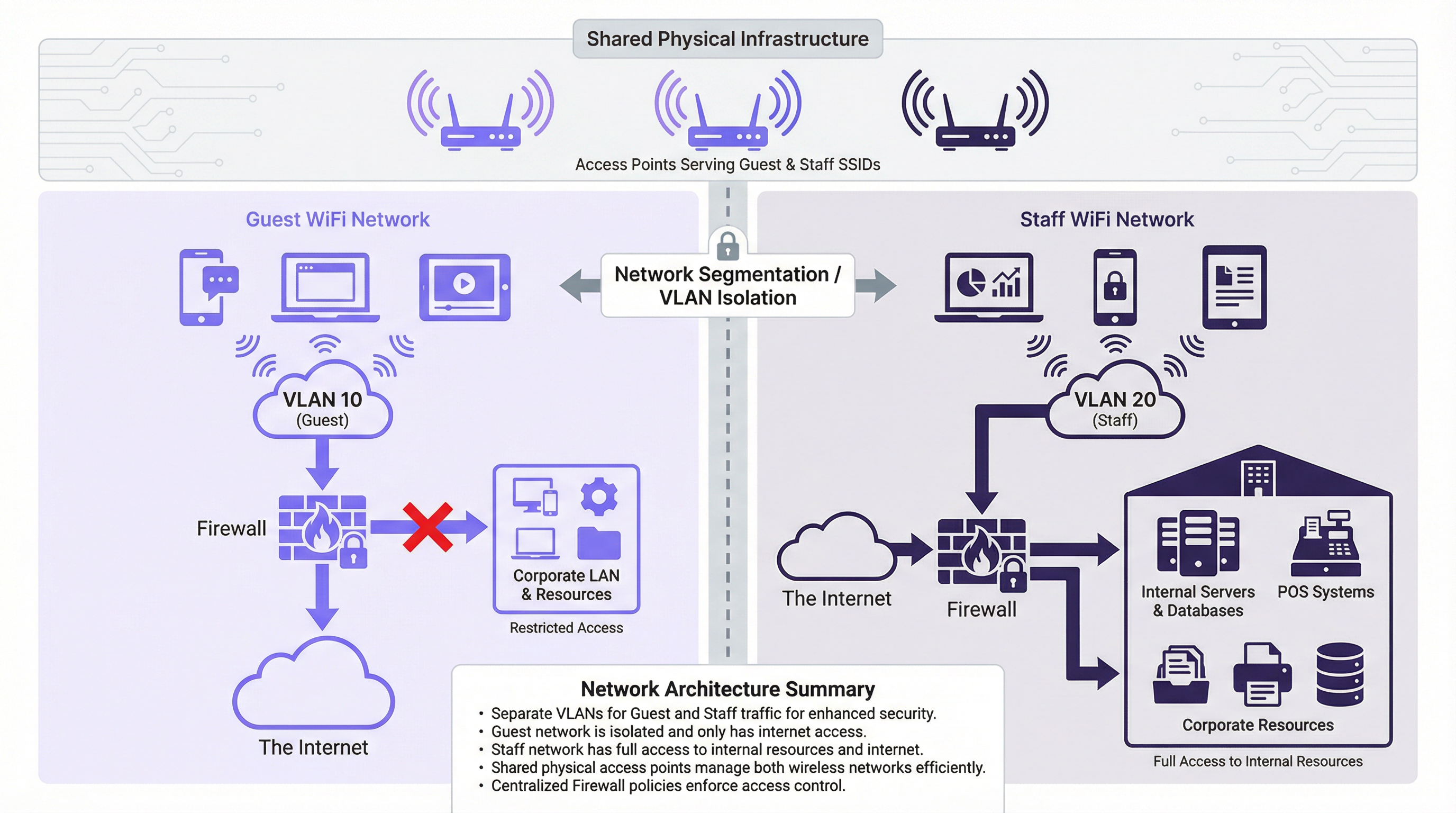
As illustrated in the architecture diagram above, guest devices connect to the "Guest" SSID, which is mapped to VLAN 10. This VLAN is configured at the firewall to permit direct internet access only. All traffic destined for the internal corporate LAN — including servers, databases, and POS systems — is explicitly denied. Conversely, staff devices connect to the "Staff" SSID, mapped to VLAN 20. This VLAN is granted firewalled, policy-controlled access to both the internet and the specific internal resources required for each staff role. This containment strategy is the cornerstone of a secure multi-network environment.
Security Standards and Protocols
Effective segmentation relies on robust security protocols to protect data in transit and to authenticate users appropriately for their network segment.
WPA3 (Wi-Fi Protected Access 3) is the current security standard for wireless networks, superseding WPA2. For the staff network, deploying WPA3-Enterprise is best practice. It uses IEEE 802.1X authentication, which requires each user to present unique credentials — typically managed via a RADIUS (Remote Authentication Dial-In User Service) server integrated with a directory service such as Microsoft Active Directory. This enables role-based access control and provides a clear, auditable trail of who connected to the network and when. For the guest network, WPA3-Personal provides strong encryption for the over-the-air transmission, but a Captive Portal is the standard mechanism for user onboarding, terms acceptance, and GDPR-compliant data capture.
Client Isolation is a critical feature that must be enabled on all guest-facing access points. It prevents wireless devices connected to the same SSID from communicating directly with each other at Layer 2. Without this control, a malicious actor sitting in a hotel lobby could trivially attack other guests' devices on the same network segment.
Implementation Guide
Deploying a segmented WiFi network follows a structured process from planning through to validation.
Step 1: Network Planning and Design. Begin by mapping all internal resources — file servers, payment gateways, IoT devices, staff management systems — and classifying them by sensitivity. Define user roles (Guest, Front Desk, Back Office, IT Admin) and the specific network resources each role requires. Establish a VLAN numbering strategy. A common and scalable approach is: VLAN 10 (Guests), VLAN 20 (Corporate Staff), VLAN 30 (POS/Payment Devices), VLAN 40 (IoT Devices), VLAN 99 (Network Management).
Step 2: Hardware Configuration. Ensure all access points support multiple SSIDs and IEEE 802.1Q VLAN tagging. Configure switch ports connecting to APs as trunk ports, which carry traffic for multiple VLANs simultaneously. Ports connecting to single-purpose end devices should be configured as access ports assigned to a single VLAN. The router or firewall is the central enforcement point. Create explicit Access Control Lists (ACLs) for each VLAN: deny all traffic from VLAN 10 to the corporate LAN by default; permit only necessary traffic from VLAN 20 to specific internal resources on specific ports.

Step 3: SSID Configuration. For the Guest SSID, configure WPA3-Personal and enable Client Isolation. Deploy a Captive Portal to present terms of service and capture user consent in a GDPR-compliant manner. For the Staff SSID, configure WPA3-Enterprise and point authentication to your RADIUS server. Consider not broadcasting the staff SSID to reduce its visibility to unauthorised users.
Step 4: Testing and Validation. Connect a test device to the guest network and confirm it can reach the internet but cannot ping or access any internal IP address range. Connect a test device to the staff network and verify it can access its designated resources but is blocked from resources outside its defined policy. Conduct throughput testing on both networks to confirm bandwidth allocation is appropriate.
Best Practices
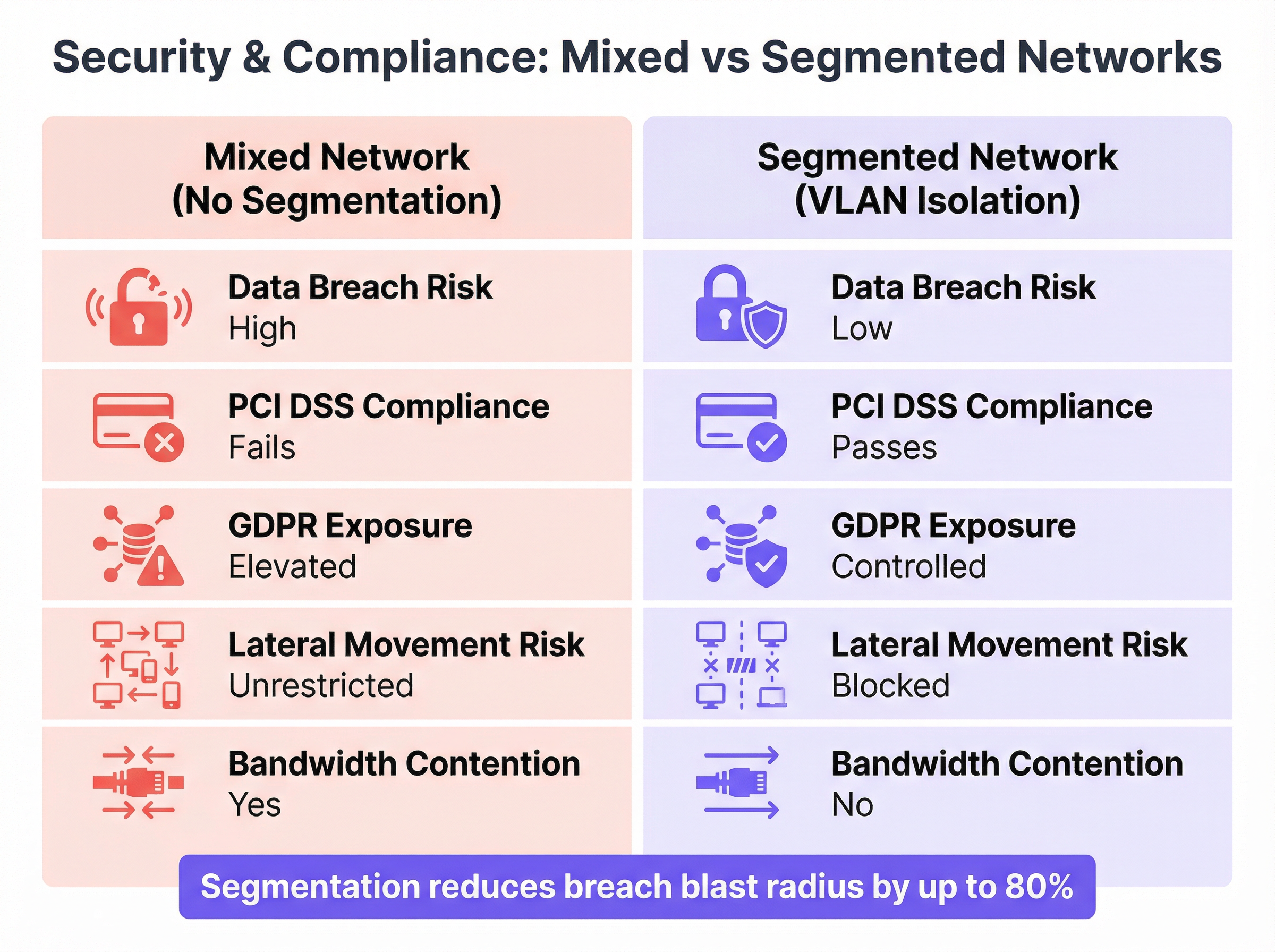
The comparison above illustrates the stark difference in security and compliance posture between a mixed and a properly segmented network. The following principles should guide every deployment decision.
Principle of Least Privilege is the foundational rule: always start with the most restrictive access policy and only open what is absolutely necessary for a given role to function. Every permission granted is a potential attack surface.
Physical and Logical Separation should be considered for highly sensitive environments. While VLANs provide robust logical separation, organisations processing payment card data may choose to use physically separate hardware (dedicated APs and switches) for the Cardholder Data Environment (CDE) to simplify PCI DSS audit scope under Requirement 1.2.
Bandwidth Throttling on the guest network protects business-critical staff operations. Applying per-user download and upload limits prevents a small number of guests from saturating the shared internet connection, which could delay POS transactions or VoIP calls.
Regular Audits are a non-negotiable operational control. Firewall rules, VLAN configurations, and user access logs must be reviewed periodically to ensure segmentation remains effective as the business evolves and new threats emerge.
Centralised Management significantly reduces the operational overhead of a multi-site segmented deployment. Platforms like Purple provide a unified dashboard to manage guest access, view real-time analytics, and enforce consistent policies across a distributed estate.
Troubleshooting & Risk Mitigation
VLAN Misconfiguration is the most common failure mode in segmented deployments. A single switch port incorrectly configured — for example, an access port set as a trunk, or assigned to the wrong VLAN — can lead to VLAN hopping, where traffic leaks between segments, completely negating the security architecture. The mitigation is rigorous: use a consistent, documented configuration template for all switch ports, implement VLAN pruning on trunk links to restrict which VLANs are propagated, and use network monitoring tools to detect unexpected inter-VLAN traffic.
Firewall Rule Errors are equally dangerous. An overly permissive rule — such as ALLOW ANY ANY — can silently undermine the entire segmentation strategy. Implement a strict change control process for all firewall rule modifications. Every rule must have a documented business justification, a named owner, and a review date. Use firewall policy analysis tools to identify shadowed, redundant, or overly broad rules.
SSID Bleed can occur in dense deployments where APs are not correctly configured for RF power levels, causing devices to associate with a distant AP on an unintended network. Proper RF planning — including adjusting AP transmit power to create well-defined coverage cells — and the use of IEEE 802.11k/v/r roaming assistance features will ensure devices connect to and roam between the correct APs.
ROI & Business Impact
Implementing a properly segmented WiFi network is not a cost centre; it is a measurable investment in risk mitigation and operational efficiency.
Reduced Cost of a Breach is the most significant financial justification. The average cost of a data breach runs into millions of pounds when factoring in regulatory fines, legal costs, customer notification, and reputational damage. The total cost of implementing segmentation — hardware, licensing, and engineering time — is a fraction of this potential liability. By containing a breach to the low-impact guest network, the blast radius is dramatically reduced.
Compliance Achievement directly impacts the bottom line for any venue processing payments. PCI DSS compliance is a prerequisite for accepting card payments, and network segmentation is a core technical control. Non-compliance results in fines and elevated transaction processing fees from card schemes. GDPR compliance, enabled by a properly managed guest Captive Portal, avoids regulatory penalties that can reach four percent of global annual turnover.
Improved Operational Performance translates directly to revenue protection. By guaranteeing Quality of Service for critical staff applications — POS terminals, inventory management, VoIP, and property management systems — the business avoids costly transaction failures and operational slowdowns during peak trading periods.
Guest Experience and Data Monetisation represent the strategic upside. A secure, reliable, and fast guest WiFi network is a measurable driver of customer satisfaction scores. Platforms like Purple build on this foundation, enabling venues to leverage the guest WiFi onboarding journey for marketing automation, loyalty programme integration, and footfall analytics — turning a security necessity into a direct revenue-generating asset.
Key Terms & Definitions
Network Segmentation
The practice of dividing a computer network into smaller, logically isolated subnetworks to control the flow of traffic between them, thereby limiting the potential impact of a security breach.
IT teams implement segmentation as a primary security control to prevent a compromised device on a low-trust network (such as Guest WiFi) from accessing high-trust resources (such as payment systems or corporate file servers). It is a core requirement of PCI DSS and a recommended control under GDPR.
VLAN (Virtual LAN)
A logical grouping of network devices that communicate as if they are on the same physical network segment, regardless of their actual physical location. VLANs are defined by the IEEE 802.1Q standard, which specifies how VLAN tags are added to Ethernet frames.
VLANs are the primary technical mechanism for network segmentation. A network architect assigns separate VLAN IDs to guest and staff traffic, and the network infrastructure (switches and firewalls) uses these IDs to enforce traffic isolation and access control policies.
SSID (Service Set Identifier)
The human-readable name of a wireless network, broadcast by an access point to allow devices to discover and connect to it. A single access point can broadcast multiple SSIDs simultaneously.
The SSID is the user-facing entry point to the network. While broadcasting separate SSIDs for guests and staff creates a logical separation visible to users, the SSID alone provides no security isolation. True security requires each SSID to be mapped to a separate, firewalled VLAN.
Client Isolation
A wireless access point feature that prevents devices connected to the same SSID from communicating directly with each other at Layer 2 of the OSI model.
This is a mandatory configuration for any guest-facing SSID. Without client isolation, a malicious actor connected to the guest network can conduct peer-to-peer attacks against other guests' devices — a common threat in public hotspot environments such as hotels, cafes, and conference centres.
IEEE 802.1X
An IEEE standard for port-based Network Access Control (PNAC) that provides an authentication framework for devices connecting to a LAN or WLAN. It requires each user or device to present valid credentials before network access is granted.
802.1X is the enterprise standard for securing staff WiFi networks. It eliminates the security risk of shared network passwords by requiring individual, revocable credentials for each user. When an employee leaves the organisation, their access is revoked in the directory service (e.g., Active Directory) and immediately takes effect on the network.
RADIUS Server
A centralised server that provides Authentication, Authorisation, and Accounting (AAA) services for network access. In a WiFi context, it validates user credentials presented during 802.1X authentication.
When a staff member connects to the enterprise WiFi using 802.1X, the access point forwards the credentials to the RADIUS server, which checks them against the user directory and returns an access-granted or access-denied response. This centralised model provides a complete audit trail of all network authentication events.
PCI DSS (Payment Card Industry Data Security Standard)
A set of security standards mandated by the major card schemes (Visa, Mastercard, Amex) for all organisations that store, process, or transmit payment card data. Requirement 1.2 specifically mandates network segmentation to isolate the Cardholder Data Environment (CDE).
For any venue that accepts card payments — which includes virtually all hotels, retailers, and stadiums — PCI DSS compliance is a contractual obligation. Failure to properly segment the network that handles card data from other networks (including guest WiFi) results in automatic audit failure, financial penalties, and potential loss of the ability to accept card payments.
Captive Portal
A web page that users of a public-access network are required to interact with before being granted internet access. It is typically used to display terms and conditions, collect user information, and authenticate users.
The captive portal is the primary onboarding mechanism for guest WiFi. Beyond its security function, it is a significant business tool: platforms like Purple use the captive portal to capture GDPR-compliant marketing consent, integrate with loyalty programmes, and generate rich visitor analytics that inform venue operations and marketing strategy.
Case Studies
A 200-room luxury hotel needs to upgrade its WiFi to provide secure access for guests, corporate staff (front desk, housekeeping, management), and a new fleet of IoT-enabled minibars that report stock levels. The hotel must comply with PCI DSS as its booking system handles credit card data.
The recommended architecture uses four VLANs to achieve strict isolation across all user groups. VLAN 10 is assigned to guests, VLAN 20 to corporate staff, VLAN 30 to the PCI Cardholder Data Environment (CDE) for booking terminals, and VLAN 40 to IoT devices. Three SSIDs are broadcast: 'HotelGuest' mapped to VLAN 10, 'HotelServices' mapped to VLAN 20 using WPA3-Enterprise with 802.1X, and a hidden SSID for IoT devices mapped to VLAN 40 using MAC-based authentication. The PCI VLAN (30) is served via wired connections where possible, with port-level MAC address locking. Firewall policy enforces strict isolation: VLAN 10 receives internet access only; VLAN 20 is permitted access to the Property Management System and internal email server; VLAN 30 is restricted to outbound HTTPS traffic to the payment gateway provider's specific IP addresses on port 443; VLAN 40 is permitted only to communicate with the cloud-based minibar inventory API. All inter-VLAN traffic is denied by default. Guests are onboarded via a Purple-powered captive portal on VLAN 10, providing GDPR-compliant data capture and marketing consent.
A retail chain with 500 stores wants to deploy guest WiFi across its entire estate while ensuring POS systems and inventory scanners remain secure. The deployment must be centrally manageable, scalable, and consistent across all locations.
The solution is built on a template-based deployment model using Zero-Touch Provisioning (ZTP). A single, standardised network configuration template is designed for a reference store: two VLANs (VLAN 100 for Guests, VLAN 200 for Store Operations), two SSIDs ('BrandGuestWiFi' on VLAN 100 with client isolation and 5 Mbps per-user throttling, and a hidden 'StoreOps' SSID on VLAN 200 with WPA3-Enterprise), and a standardised firewall policy (VLAN 100 internet-only; VLAN 200 permitted access to the central POS and inventory servers at the corporate data centre via an IPsec VPN tunnel). This template is uploaded to a cloud-based network management platform supporting ZTP. When new APs and switches are shipped to a store, they are plugged in and automatically download the correct configuration, requiring no on-site engineering expertise. The guest captive portal is managed centrally by Purple, providing the marketing team with unified footfall analytics, campaign management, and customer engagement tools across all 500 locations from a single dashboard.
Scenario Analysis
Q1. A stadium hosting a major concert expects 50,000 concurrent guest WiFi users. The operations team requires guaranteed, low-latency connectivity for ticketing scanners, security radio over IP, and access control systems — all running on a separate staff network. How would you architect the bandwidth management and QoS strategy to protect operational systems during peak load?
💡 Hint:Consider the interaction between per-user bandwidth throttling on the guest network and QoS traffic prioritisation for staff traffic. Think about what happens at the internet gateway when both networks are competing for the same upstream bandwidth.
Show Recommended Approach
The solution requires a two-layer approach. First, apply strict per-user bandwidth throttling on the Guest SSID — a limit of 3-5 Mbps per user is typical for a high-density event environment. This prevents any single user from consuming a disproportionate share of the available bandwidth and limits the aggregate impact of 50,000 concurrent users. Second, implement QoS policies at the switch and firewall level. Tag all traffic originating from the Staff VLAN (VLAN 20) with a high-priority DSCP marking (e.g., DSCP EF — Expedited Forwarding for VoIP, or DSCP AF41 for critical data). Tag guest traffic as Best Effort (DSCP BE). Configure the firewall and upstream router to honour these DSCP markings and service high-priority queues first. This ensures that even when the internet link is heavily loaded by guest traffic, the ticketing and security systems receive preferential treatment. Additionally, consider provisioning a dedicated, physically separate internet circuit for the Staff VLAN to provide complete bandwidth isolation for mission-critical operations.
Q2. A small independent cafe has a single business-grade router/AP combination. The owner uses the same network for customer WiFi and their single POS terminal. They have a very limited budget and no dedicated IT support. What is the minimum viable segmentation you would recommend, and what are its limitations?
💡 Hint:Most modern business-grade all-in-one routers include a built-in 'Guest Network' feature. Evaluate what this provides and where it falls short of a full enterprise segmentation deployment.
Show Recommended Approach
The recommended minimum viable solution is to enable the built-in 'Guest Network' feature on the existing router. When properly activated, this feature creates a second SSID, enables client isolation, and implements basic firewall rules that prevent guest devices from accessing the primary LAN (where the POS terminal resides). This provides a critical layer of separation at zero additional hardware cost. However, the limitations must be clearly understood: the implementation quality varies significantly by vendor and firmware version; it does not provide the granular ACL control of a dedicated firewall; it does not support 802.1X authentication for the staff network; and it may not satisfy a formal PCI DSS audit, which may require the POS to be on a wired, physically isolated connection. For a growing business, this is a temporary measure. The medium-term recommendation is to upgrade to a dedicated business-grade AP and a separate router/firewall appliance that supports full VLAN configuration.
Q3. Your organisation is acquiring a new office building. You discover the previous tenant operated a completely flat network — a single SSID and a single shared password used by all employees, visitors, contractors, and IoT building management devices. What are your first three priority actions regarding the wireless network, and what is your rationale for their ordering?
💡 Hint:Think about the sequence of discover, contain, and redesign. Consider the risk of leaving the existing network operational while you plan the replacement.
Show Recommended Approach
Priority 1 — Disable the existing SSID immediately. The shared password is a known credential that may have been distributed to an unknown number of former employees, contractors, and visitors. Every minute the network remains operational with this credential is a window of unauthorised access. This is a containment action that accepts a temporary loss of connectivity in exchange for eliminating an unquantifiable security risk. Priority 2 — Conduct a full wireless and network survey. Use a wireless analysis tool to identify all active access points (including any rogue APs installed by the previous tenant), map the physical hardware, and identify all devices that were connected to the flat network — particularly IoT and building management devices, which may have been configured with hardcoded credentials. This discovery phase defines the scope of the redesign. Priority 3 — Design and deploy a new, properly segmented network architecture from scratch. Based on the hardware inventory from Priority 2, design a multi-VLAN architecture (Corporate, Guest, IoT/BMS as a minimum) with appropriate SSIDs, authentication methods, and firewall policies. Do not attempt to patch or 'fix' the existing flat network; a complete redesign is the only way to establish a secure, auditable foundation.
Key Takeaways
- ✓Running guest and staff WiFi on a single, flat network is a critical security risk that enables lateral movement from a compromised guest device to corporate systems.
- ✓True network segmentation is achieved by mapping separate SSIDs to isolated VLANs, with the firewall as the central enforcement point for inter-VLAN traffic policies.
- ✓Staff networks must use WPA3-Enterprise with IEEE 802.1X authentication for individual, revocable credentials; guest networks require a captive portal with client isolation enabled.
- ✓Network segmentation is a core technical requirement for PCI DSS compliance (Requirement 1.2) and a key control for managing GDPR data exposure risk.
- ✓Bandwidth throttling on the guest network and QoS prioritisation for staff traffic are essential to protect business-critical applications during peak load.
- ✓The most common failure mode is VLAN misconfiguration — a single incorrectly configured switch port can silently bridge network segments and negate the entire security architecture.
- ✓Properly segmented guest WiFi is not merely a cost centre: it is the foundation for a guest analytics and marketing platform that generates measurable business value.




