

How Passpoint (Hotspot 2.0) Transforms the Guest Wi-Fi Experience
A comprehensive technical reference guide detailing how Passpoint (Hotspot 2.0) and 802.11u protocols replace traditional captive portals with seamless, secure, cellular-like Wi-Fi roaming. It provides IT leaders with architectural overviews, implementation frameworks, and the business case for adopting credential-based authentication to solve MAC randomisation challenges and improve guest experience.
🎧 Listen to this Guide
View Transcript
Executive Summary
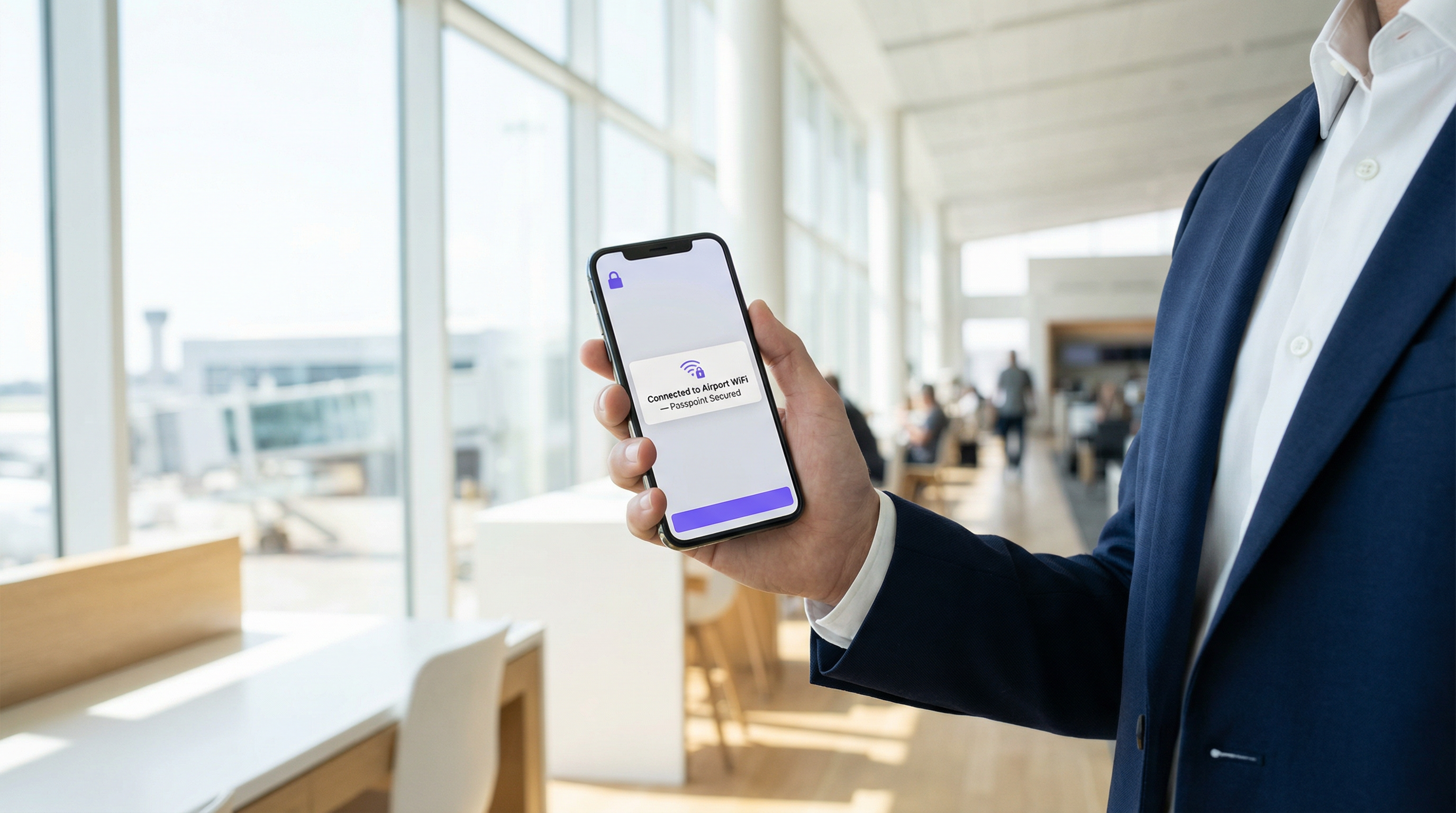
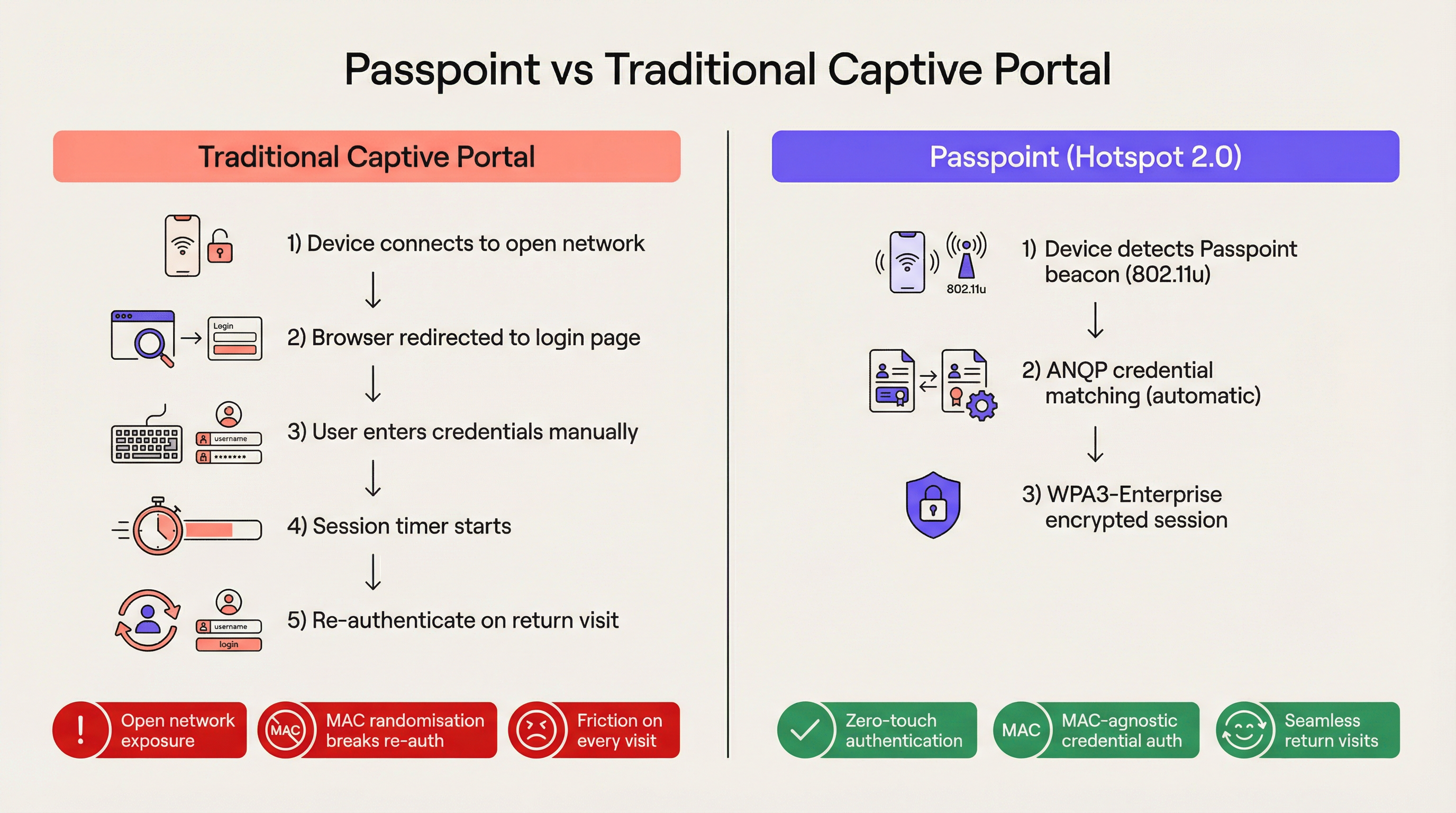
For the modern enterprise venue, friction is a competitive disadvantage. Traditional captive portals, while once the standard for guest network access, now represent a significant operational bottleneck and a source of persistent user frustration. Passpoint, also known as Hotspot 2.0, fundamentally transforms this paradigm by replacing manual web-based authentication with seamless, cellular-like roaming. By leveraging the IEEE 802.11u standard and WPA3-Enterprise encryption, Passpoint allows guest devices to discover, authenticate, and connect to enterprise Wi-Fi networks automatically and securely.
For IT leaders across Hospitality, Retail, and large public venues, the transition to Passpoint is no longer optional. The default MAC address randomisation implemented in modern iOS and Android devices has effectively broken the re-authentication logic of legacy captive portals, meaning returning guests appear as new devices on every visit. Passpoint solves this by authenticating the user's credential profile rather than their hardware address. This guide details the technical architecture of Passpoint, the business impact of deployment, and a vendor-neutral implementation framework designed to improve the Guest WiFi experience while reducing helpdesk overhead.
Technical Deep-Dive
The Network Selection Problem and 802.11u
In legacy Wi-Fi deployments, devices rely on a fundamentally brittle mechanism for network selection: scanning for known Service Set Identifiers (SSIDs). This approach requires the user to have previously connected to the network or to manually select the network from a list. It provides no pre-association visibility into the network's security posture, authentication requirements, or upstream internet availability. Passpoint addresses this limitation through the IEEE 802.11u amendment, which introduces Interworking with External Networks.
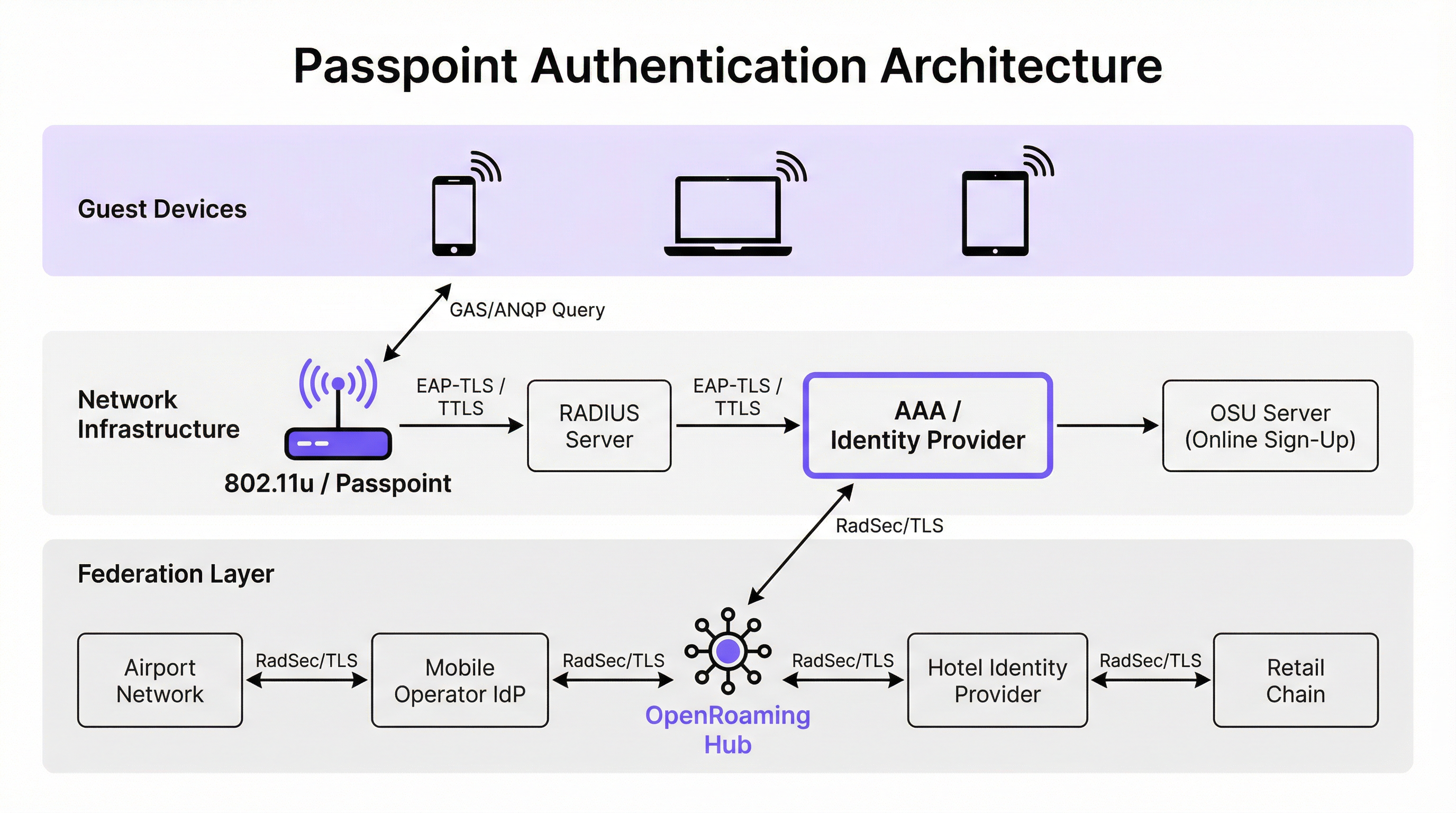
Instead of passively scanning for SSIDs, a Passpoint-enabled device actively queries the network infrastructure before attempting association. When an access point broadcasts its beacon, it includes an Interworking Element — a flag indicating support for 802.11u. The client device detects this flag and initiates a Generic Advertisement Service (GAS) request. Encapsulated within this request is an Access Network Query Protocol (ANQP) query. The device asks the infrastructure, "What Roaming Consortium Organisational Identifiers (OIs) do you support?" If the access point's response matches a credential profile stored on the device, automatic authentication proceeds.
Authentication and Security Architecture
Passpoint mandates enterprise-grade security, completely eliminating the "open network" phase inherent to captive portal deployments. Authentication is handled via IEEE 802.1X port-based network access control, coupled with an Extensible Authentication Protocol (EAP) method. The most prevalent methods in enterprise deployments are EAP-TLS (relying on client and server certificates), EAP-TTLS (tunnelled credentials), and EAP-SIM/AKA (for cellular offload scenarios).
This architecture provides mutual authentication. The device cryptographically proves its identity to the network, and crucially, the network proves its identity to the device. This mutual verification is the primary defence against evil twin access points and man-in-the-middle interception attempts. Furthermore, Passpoint mandates WPA2-Enterprise or WPA3-Enterprise encryption. WPA3-Enterprise introduces 192-bit security mode and mandates forward secrecy, ensuring that even if session keys are compromised in the future, historical traffic remains encrypted.
The OpenRoaming Federation
While Passpoint defines the technical mechanism for discovery and authentication, OpenRoaming provides the trust framework. Developed by the Wireless Broadband Alliance (WBA), OpenRoaming is a global federation that allows Identity Providers (such as mobile network operators, Google, or Apple) and Access Providers (such as hotels, stadiums, and retail chains) to trust each other's credentials without requiring bilateral agreements between every entity.
OpenRoaming operates on a hub-and-spoke Public Key Infrastructure (PKI) model. Authentication requests are proxied across the federation using RadSec (RADIUS over TLS) tunnels. By broadcasting the settlement-free OpenRoaming OI (5A-03-BA), an enterprise venue can instantly provide seamless, secure Wi-Fi access to millions of users globally who already possess a compatible identity profile on their devices.
Implementation Guide
Deploying Passpoint requires a more sophisticated infrastructure baseline than a traditional open network, but the components are standard within modern enterprise environments.
Infrastructure Prerequisites
- Passpoint-Certified Access Points: The wireless infrastructure must support 802.11u and Hotspot 2.0 specifications. The vast majority of enterprise access points manufactured in the last five years from vendors like Cisco, Aruba, and Ruckus meet this requirement.
- RADIUS/AAA Infrastructure: A robust RADIUS server capable of handling EAP authentication and routing requests to the appropriate identity stores. If participating in OpenRoaming, the RADIUS server must support RadSec for secure proxying.
- Online Sign-Up (OSU) Server: For environments issuing their own credentials (rather than relying solely on federated identities), an OSU server provides the mechanism for securely provisioning Passpoint profiles to guest devices.
The Dual-SSID Strategy
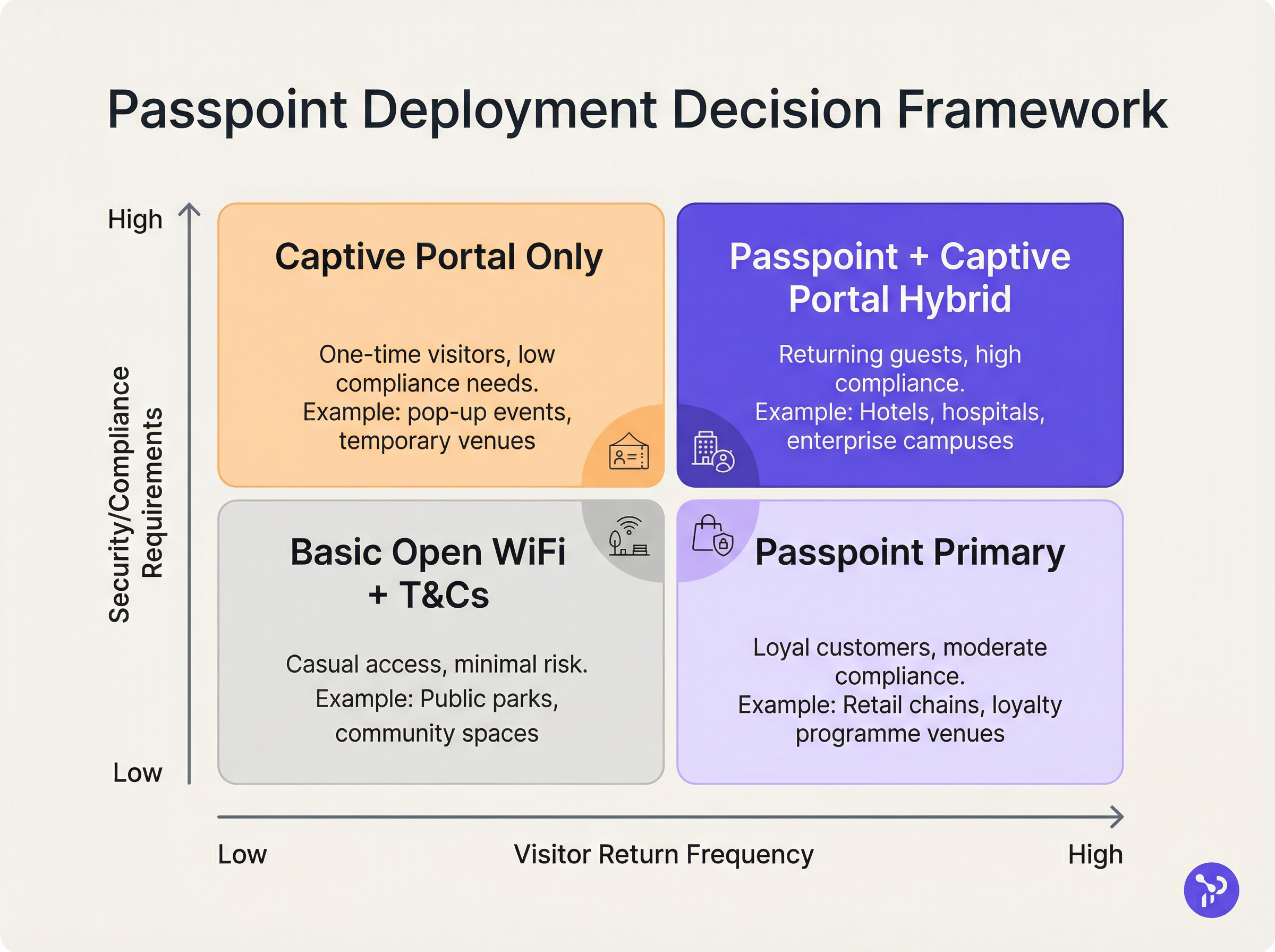
The most effective deployment model for venues transitioning to Passpoint is the dual-SSID strategy. This approach maintains a traditional captive portal SSID for initial onboarding while providing a Passpoint SSID for seamless subsequent connections.
When a guest connects to the captive portal SSID for the first time, they complete the standard authentication flow (e.g., accepting terms and conditions, providing an email address). Upon successful authentication, the portal presents an option to download a Passpoint profile. Once installed, the device will automatically prefer the secure Passpoint SSID on all future visits. This progressive onboarding model ensures accessibility for legacy devices while migrating the majority of users to the secure, frictionless Passpoint network.
Best Practices
When designing a Passpoint architecture, IT leaders must adhere to several critical best practices to ensure operational stability and security.
Firstly, certificate lifecycle management is paramount. If utilizing EAP-TLS, the expiration of client or server certificates will result in silent authentication failures that are difficult for front-line helpdesks to diagnose. Implement automated certificate renewal protocols and proactive monitoring. As highlighted in our guide on Device Posture Assessment for Network Access Control, robust endpoint visibility is essential when managing certificate-based access.
Secondly, ensure legacy device compatibility. While iOS 7+, Android 6+, and Windows 10+ natively support Passpoint, certain IoT devices, legacy hardware, and strict corporate-managed devices may lack support. The dual-SSID strategy mitigates this risk by providing a fallback access method.
Thirdly, when configuring ANQP elements, ensure the Venue Information is accurate and descriptive. This metadata is often displayed by the client device's operating system to provide context about the network the user is joining.
Troubleshooting & Risk Mitigation
The complexity of Passpoint introduces specific failure domains that differ from captive portal deployments.
Failure Mode 1: RADIUS Timeout or Unreachability If the local RADIUS server cannot reach the upstream Identity Provider (especially in federated OpenRoaming scenarios), the EAP handshake will time out. Mitigation: Implement redundant RADIUS infrastructure and ensure robust monitoring of RadSec tunnels. Review our technical documentation on RadSec : Sécurisation du trafic d'authentification RADIUS avec TLS for configuration guidance.
Failure Mode 2: Profile Provisioning Failures Users may encounter errors when attempting to download the Passpoint profile from the OSU server, often due to captive portal browser limitations on mobile devices. Mitigation: Design the captive portal flow to break out of the captive network assistant (CNA) mini-browser into the device's native system browser before initiating the profile download.
Failure Mode 3: MAC Randomisation Analytics Impact While Passpoint solves the authentication breakage caused by MAC randomisation, legacy analytics platforms relying solely on MAC addresses will still report inaccurate visitor counts. Mitigation: Integrate the RADIUS authentication logs with your WiFi Analytics platform. By tracking unique credential identifiers (such as the Chargeable User Identity or anonymised NAI) rather than MAC addresses, venues can restore accurate footfall and loyalty metrics.
ROI & Business Impact
The business case for Passpoint deployment rests on three measurable pillars: operational efficiency, risk reduction, and user experience.
From an operational standpoint, the elimination of captive portal friction directly correlates to a reduction in IT helpdesk tickets related to Wi-Fi connectivity. In large Healthcare or Transport environments, this represents significant cost savings.
Regarding risk mitigation, the shift from open networks to WPA3-Enterprise encryption substantially reduces the venue's liability footprint. For retail environments subject to PCI DSS, the reduction in data handling surface area (by eliminating web-based credential collection) simplifies compliance audits.
Finally, the user experience improvement is profound. In hospitality, studies consistently show that seamless, reliable Wi-Fi is a primary driver of guest satisfaction and repeat bookings. By implementing Passpoint, venues deliver a connectivity experience that mirrors the reliability of cellular networks, transforming Wi-Fi from a frustrating utility into a transparent, premium amenity.
Key Terms & Definitions
IEEE 802.11u
The wireless networking standard amendment that enables Interworking with External Networks, allowing devices to query APs before associating.
When configuring wireless controllers, engineers must enable 802.11u to allow devices to discover Passpoint capabilities.
ANQP (Access Network Query Protocol)
A query and response protocol used by devices to discover network services, roaming agreements, and venue information before connecting.
IT teams configure ANQP profiles on the wireless controller to broadcast their supported Roaming Consortium OIs and NAI Realms.
Roaming Consortium OI
An Organisational Identifier broadcast by the access point that indicates which identity providers or federations the network supports.
If an enterprise joins OpenRoaming, they must ensure their APs broadcast the specific OpenRoaming OI (5A-03-BA).
OSU (Online Sign-Up)
A standardized process and server infrastructure for securely provisioning Passpoint credentials and certificates to a user's device.
When building a self-service onboarding flow for a loyalty programme, developers will integrate with an OSU server to push the profile to the device.
RadSec
A protocol that encapsulates RADIUS authentication traffic within a TLS tunnel to ensure secure transmission over untrusted networks.
Required when proxying authentication requests from a local venue to a cloud-based OpenRoaming hub.
NAI Realm
Network Access Identifier Realm; indicates the domain of the user and the specific EAP authentication methods supported by the network.
Configured alongside ANQP to tell client devices whether the network requires EAP-TLS, EAP-TTLS, or EAP-SIM.
EAP-TLS
Extensible Authentication Protocol - Transport Layer Security; a highly secure authentication method requiring both client and server certificates.
Often used in enterprise employee Wi-Fi deployments where IT can push certificates to managed devices via MDM.
MAC Address Randomisation
A privacy feature in modern mobile operating systems that generates a fake, temporary hardware address for each Wi-Fi network connection.
The primary catalyst driving venues away from captive portals, as it breaks the ability to recognize returning visitors based on their hardware.
Case Studies
A 400-room enterprise hotel chain is experiencing a high volume of helpdesk tickets from returning guests who complain they must manually reconnect to the Wi-Fi in the lobby, restaurant, and their rooms, despite having connected previously. The hotel currently uses a traditional open SSID with a captive portal. How should the network architect resolve this?
The architect should implement a Dual-SSID strategy. First, deploy a secure Passpoint SSID broadcasting the hotel's specific Roaming Consortium OI. Second, modify the existing captive portal on the open SSID to serve as an onboarding funnel. When a guest logs in via the portal, they are prompted to download a Passpoint configuration profile to their device. Once installed, the device will automatically and securely authenticate via 802.1X/EAP to the Passpoint SSID as they move between the lobby, restaurant, and room, eliminating manual re-authentication.
A national retail chain wants to offer secure, seamless Wi-Fi across its 500 locations to drive loyalty app engagement. However, managing custom certificates or individual credentials for millions of potential customers is deemed operationally unfeasible. What is the recommended deployment architecture?
The retailer should deploy Passpoint and federate with OpenRoaming. By configuring their access points to broadcast the settlement-free OpenRoaming OI (5A-03-BA) and establishing RadSec tunnels from their RADIUS infrastructure to an OpenRoaming hub, the retailer allows any customer with a compatible identity provider profile (such as a modern Samsung device or a mobile carrier profile) to connect automatically. The retailer can then integrate this with their loyalty app to trigger push notifications upon successful network association.
Scenario Analysis
Q1. A hospital IT director wants to deploy Passpoint to ensure doctors' mobile devices connect securely to the clinical network, while patients connect to a separate guest network. The doctors use unmanaged personal devices (BYOD). Which EAP method and provisioning strategy should the architect recommend?
💡 Hint:Consider the balance between security and the operational overhead of managing certificates on unmanaged personal devices.
Show Recommended Approach
The architect should recommend EAP-TTLS with an Online Sign-Up (OSU) server provisioning flow. EAP-TLS requires client certificates, which are operationally difficult to deploy and manage on unmanaged BYOD devices. EAP-TTLS allows the doctors to authenticate securely using their existing Active Directory/LDAP credentials (username and password) tunneled inside a secure TLS session. The OSU server can provide a self-service portal where doctors log in once to download the profile, enabling automatic connection thereafter.
Q2. During a Passpoint deployment pilot, Android devices are successfully authenticating and connecting, but iOS devices are failing during the EAP handshake. The RADIUS logs show 'Unknown CA' errors. What is the most likely cause and solution?
💡 Hint:Apple's iOS has strict requirements regarding the trust chain for RADIUS server certificates.
Show Recommended Approach
The most likely cause is that the RADIUS server is using a self-signed certificate or a certificate issued by a private internal Certificate Authority (CA) that the iOS devices do not inherently trust. Android devices sometimes allow users to bypass or ignore certificate validation (though this is poor security practice), whereas iOS strictly enforces it for Passpoint profiles. The solution is to replace the RADIUS server certificate with one issued by a publicly trusted commercial CA (e.g., DigiCert, Let's Encrypt), or ensure the private CA root certificate is explicitly bundled within the Passpoint configuration profile pushed to the iOS devices.
Q3. A stadium venue has implemented OpenRoaming. A user with a valid Google OpenRoaming profile walks into the venue, but their device does not attempt to connect automatically. What specific configuration on the stadium's wireless LAN controller should the network engineer verify first?
💡 Hint:How does the device know that the access point supports the OpenRoaming federation before it attempts to connect?
Show Recommended Approach
The engineer should verify the ANQP configuration, specifically checking that the Access Points are broadcasting the correct Roaming Consortium Organisational Identifier (OI) for OpenRoaming, which is 5A-03-BA. If this OI is not included in the AP's beacon or GAS response, the device will not recognize the network as an OpenRoaming participant and will not attempt to authenticate.
Key Takeaways
- ✓Passpoint (Hotspot 2.0) replaces manual captive portal logins with automatic, cellular-like Wi-Fi roaming.
- ✓It uses IEEE 802.11u for pre-association network discovery and WPA3-Enterprise for encrypted, mutually authenticated connections.
- ✓Passpoint solves the MAC address randomisation issue by authenticating the user's credential profile rather than their hardware address.
- ✓OpenRoaming is the global federation framework that allows Passpoint devices to connect across different venues seamlessly.
- ✓A dual-SSID strategy (Captive Portal for onboarding, Passpoint for returning users) is the recommended deployment model for enterprise venues.




