

Implementing iPSK (Identity Pre-Shared Key) for Secure IoT Networks
This authoritative guide details how to implement Identity Pre-Shared Key (iPSK) architecture to secure enterprise IoT environments. It provides actionable deployment steps, VLAN segmentation strategies, and compliance frameworks for hospitality, retail, and public-sector network operators.
🎧 Listen to this Guide
View Transcript
Executive Summary
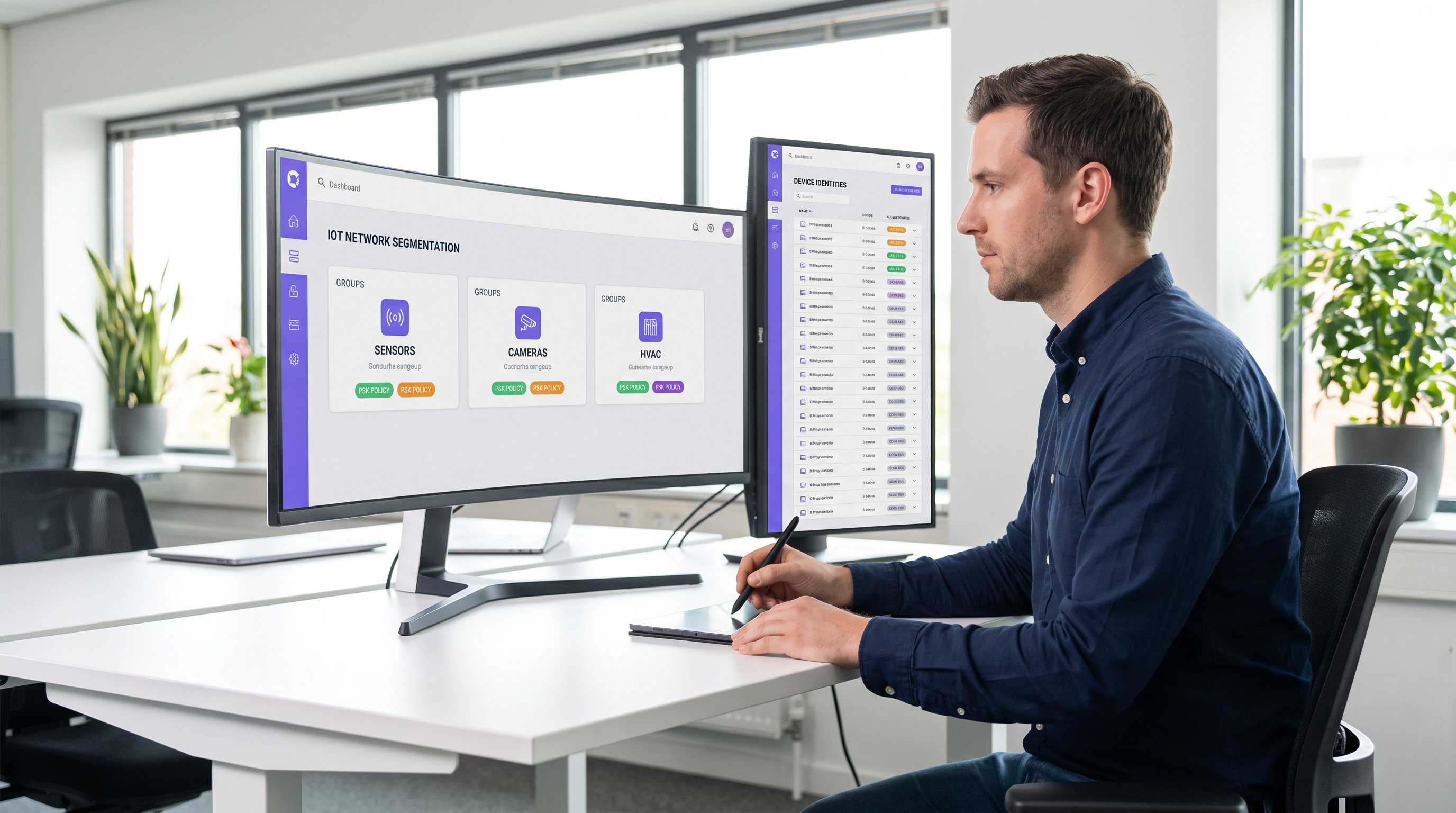
Securing the enterprise wireless edge has evolved from managing employee laptops to governing thousands of headless IoT devices. Traditional WPA2-Personal networks, which rely on a single, universally shared passphrase, create unacceptable risk profiles for modern venues. A single compromised device or shared password exposes the entire network segment, violating compliance frameworks and complicating incident response.
Identity Pre-Shared Key (iPSK) resolves this by assigning unique credentials to individual devices or functional groups while maintaining a single Service Set Identifier (SSID). By integrating with a RADIUS server, iPSK dynamically assigns Virtual Local Area Networks (VLANs) and enforces granular access policies at the access point level. This architecture eliminates the need for complex 802.1X supplicants on IoT hardware, providing enterprise-grade segmentation without operational friction.
For IT directors and network architects in Hospitality, Retail, and public venues, iPSK is the definitive bridge between robust security and seamless IoT deployment. This guide details the architecture, implementation phases, and operational best practices required to deploy iPSK at scale.
Technical Deep-Dive
The Limitations of Legacy Authentication
In conventional enterprise deployments, IT teams face a dichotomy: use 802.1X for robust identity-based access, or use WPA2/WPA3-Personal (Pre-Shared Key) for simplicity. While 802.1X is the gold standard for corporate endpoints—detailed in our guide on 802.1X Authentication: Securing Network Access on Modern Devices—it requires a supplicant, which most IoT devices (smart thermostats, digital signage, Sensors) fundamentally lack.
Falling back to a standard PSK network creates a flat, unsegmented environment. If a vulnerability is discovered in a specific brand of smart TV, the entire network is at risk. Rotating the key requires touching every device on that SSID, an operationally prohibitive task in a 500-room hotel or a sprawling retail estate.
The iPSK Architecture
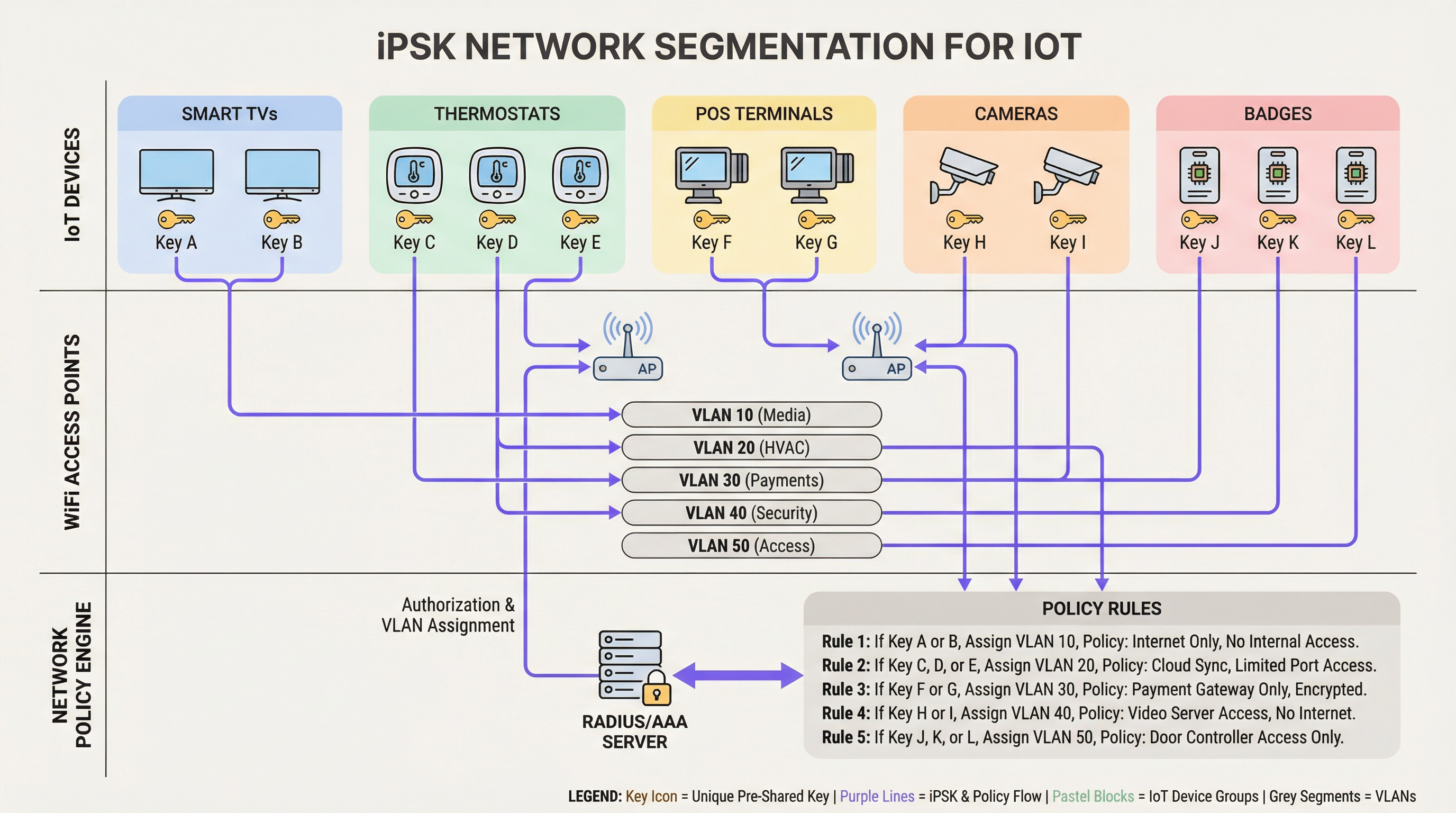
iPSK (also known as Multiple PSK or Dynamic PSK, depending on the vendor) introduces identity to the PSK model. The architecture relies on four core components:
- Wireless Access Points (APs) / Controllers: The edge infrastructure must support iPSK, intercepting the client's association request and passing the MAC address and PSK to the authentication server.
- RADIUS Server (Policy Engine): The authentication server (e.g., Cisco ISE, Aruba ClearPass, FreeRADIUS) acts as the source of truth. It validates the PSK against the device's MAC address or group profile.
- Dynamic VLAN Assignment: Upon successful authentication, the RADIUS server returns an
Access-Acceptmessage containing standard RADIUS attributes (such asTunnel-Type=VLANandTunnel-Private-Group-Id). The AP dynamically places the client on the designated VLAN. - Policy Enforcement Point: Firewalls or Layer 3 switches apply Access Control Lists (ACLs) to the assigned VLAN, restricting lateral movement and internet egress.
WPA3 and iPSK
Modern iPSK deployments should leverage WPA3-Personal where client support permits. WPA3 introduces Simultaneous Authentication of Equals (SAE), replacing the vulnerable four-way handshake of WPA2. SAE protects against offline dictionary attacks, ensuring that even if an attacker captures the handshake, they cannot brute-force the PSK. Leading enterprise APs support WPA3 transition mode, allowing WPA2 and WPA3 clients to coexist on the same iPSK-enabled SSID.
Implementation Guide
Deploying iPSK requires methodical planning to avoid service disruption. The following phased approach is recommended for enterprise environments.
Phase 1: Device Discovery and Classification
Before altering network configurations, establish a comprehensive inventory of all wireless IoT devices. Categorise devices based on function, vendor, and required network access. Common classifications in venue environments include:
- Payment & POS: Card terminals, mobile POS tablets (High Security, PCI-scoped).
- Building Management (BMS): HVAC controllers, smart lighting, environmental sensors (Internal only, no internet access).
- Guest Services: Smart TVs, casting devices, voice assistants (Internet access, isolated from internal networks).
- Security: Wireless IP cameras, door access controllers (High bandwidth, internal recording servers only).
Phase 2: Infrastructure Preparation
Configure the underlying wired network to support the new segmentation strategy. Provision the required VLANs across your switching fabric and define strict inter-VLAN routing rules. A default-deny posture should be applied to all IoT VLANs, explicitly allowing only necessary traffic (e.g., allowing POS terminals to reach specific payment gateways over port 443).
Ensure your RADIUS server is highly available. iPSK introduces a hard dependency on RADIUS for every client association. Deploy redundant RADIUS nodes, ideally distributed geographically if managing a multi-site WAN architecture. For more on wide-area network design, review The Core SD WAN Benefits for Modern Businesses.
Phase 3: RADIUS and WLAN Configuration
Within your RADIUS policy engine, create device groups corresponding to your classifications. Generate high-entropy (minimum 20 characters), random PSKs for each group or individual device. Map these PSKs to their respective VLAN IDs via RADIUS authorisation profiles.
On the wireless controller, configure a single SSID (e.g., Venue_IoT) and enable MAC filtering with RADIUS authentication. Configure the SSID to accept RADIUS-assigned VLANs (often termed 'AAA Override').
Phase 4: Pilot and Migration
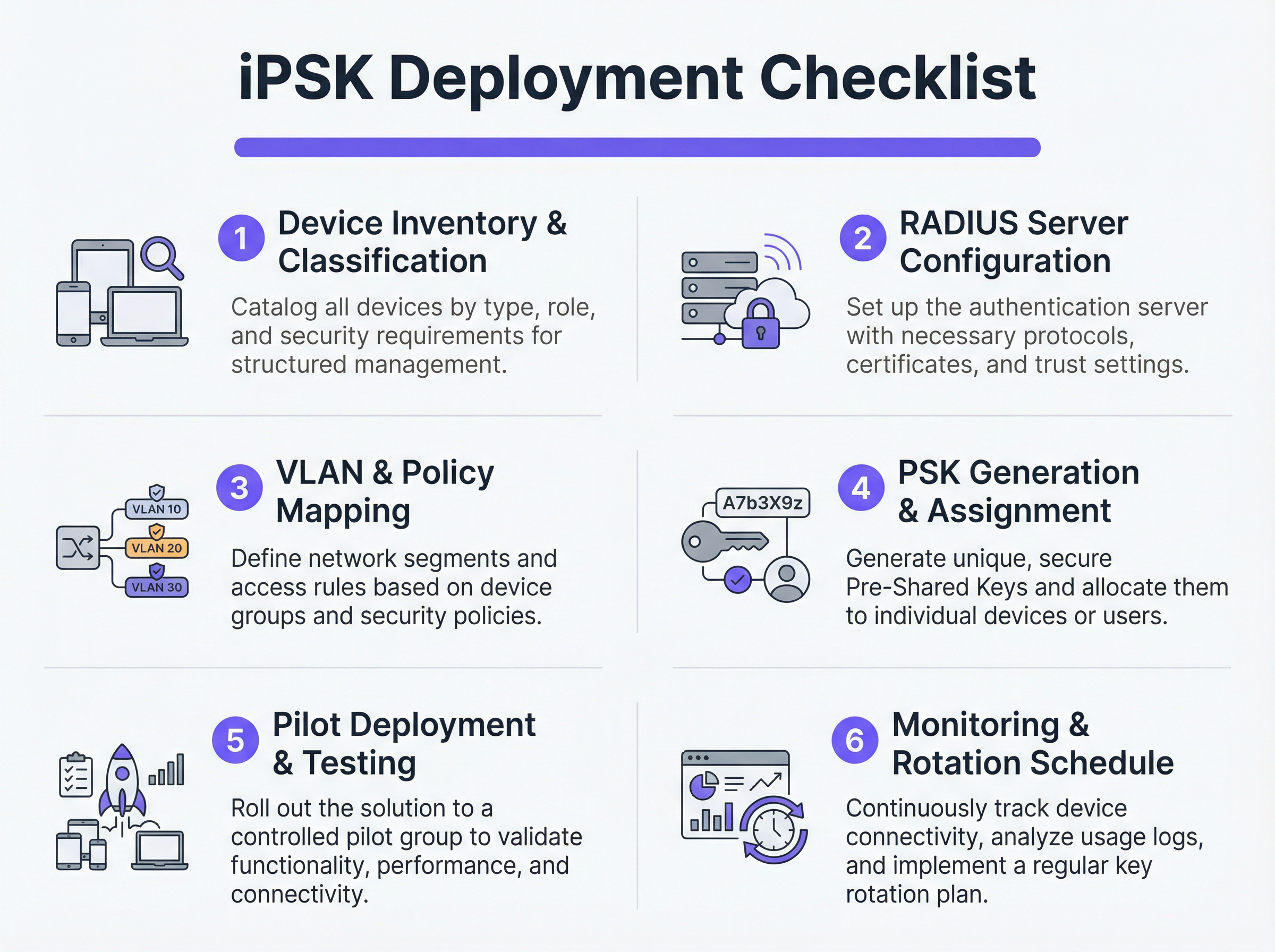
Do not attempt a flash-cut migration. Select a representative pilot site or a specific device group. Provision the new PSKs to the pilot devices and monitor the RADIUS logs. Verify that devices are successfully authenticating, receiving the correct VLAN assignment, and functioning as expected within their restricted network segment.
Once validated, proceed with a phased rollout. Leverage Mobile Device Management (MDM) platforms to push new network profiles to capable devices, and coordinate with facilities teams to manually update headless IoT hardware.
Best Practices
- Implement a Default-Deny Fallback: If a device connects with a valid PSK but its MAC address is not recognised by the RADIUS server, assign it to a 'quarantine' VLAN with zero network access. This prevents unauthorised devices from piggybacking on known keys.
- Automate Key Lifecycle Management: Relying on spreadsheets to manage hundreds of PSKs is a critical vulnerability. Utilise API-driven RADIUS platforms or dedicated iPSK management portals to automate key generation, rotation, and revocation.
- Limit MAC Spoofing Risks: While iPSK is significantly more secure than standard PSK, it often relies on MAC addresses as part of the identity binding. Because MAC addresses can be spoofed, combine iPSK with continuous profiling and anomaly detection. If a device authenticating as a smart thermostat suddenly exhibits traffic patterns resembling a Windows laptop, the system should automatically revoke access.
- Integrate with Analytics: Feed authentication logs and network telemetry into your WiFi Analytics platform. This provides venue operators with actionable intelligence regarding device health, density, and utilisation.
Troubleshooting & Risk Mitigation
Common Failure Modes
- RADIUS Timeout/Unreachability: If the AP cannot reach the RADIUS server, clients will fail to authenticate. Mitigation: Implement RADIUS server load balancing and ensure local survivability features (such as caching credentials on the AP or local controller) are enabled for critical infrastructure.
- VLAN Pooling Exhaustion: In dense environments, assigning too many devices to a single /24 subnet can exhaust DHCP scopes. Mitigation: Use VLAN pooling within the RADIUS authorisation profile to distribute clients across multiple subnets while maintaining the same logical policy.
- Client Roaming Issues: Some legacy IoT devices struggle with fast roaming (802.11r) when dynamic VLAN assignment is in play. Mitigation: If roaming is not required (e.g., for a fixed smart TV), disable 802.11r on the IoT SSID to maximise compatibility. For a deeper understanding of AP capabilities, see Wireless Access Points Definition Your Ultimate 2026 Guide.
ROI & Business Impact
Implementing iPSK delivers measurable returns across security, operations, and compliance domains.
- Reduced Audit Scope: By definitively segmenting PCI and PII-handling devices onto isolated VLANs, organisations drastically reduce the scope and cost of compliance audits (e.g., PCI DSS, HIPAA).
- Operational Efficiency: Consolidating multiple purpose-built SSIDs (one for POS, one for AV, one for facilities) into a single iPSK-enabled SSID reduces co-channel interference, improves overall RF performance, and simplifies the guest experience. This is crucial for delivering Modern Hospitality WiFi Solutions Your Guests Deserve.
- Incident Containment: In the event of a device compromise, security teams can instantly revoke the specific PSK or quarantine the associated VLAN without impacting the rest of the venue's operations.
Key Terms & Definitions
iPSK (Identity Pre-Shared Key)
A wireless authentication method that allows multiple unique passwords to be used on a single SSID, with each password tying the device to a specific identity, VLAN, and policy.
Used by IT teams to secure headless IoT devices that cannot support enterprise 802.1X authentication.
RADIUS (Remote Authentication Dial-In User Service)
A networking protocol that provides centralized Authentication, Authorization, and Accounting (AAA) management for users or devices connecting to a network service.
Acts as the policy engine in an iPSK deployment, verifying the password and telling the access point which VLAN to assign.
Dynamic VLAN Assignment
The process where a network switch or access point places a connecting device into a specific Virtual LAN based on credentials provided during authentication, rather than the physical port or SSID.
Essential for network segmentation, allowing payment terminals and smart TVs to share an SSID but remain on completely separate networks.
Headless Device
A piece of hardware (like a sensor, thermostat, or camera) that lacks a traditional user interface, screen, or keyboard.
These devices cannot easily run the complex software (supplicants) required for standard enterprise security, making iPSK the ideal solution.
MAC Spoofing
A technique where a malicious actor changes the factory-assigned Media Access Control (MAC) address of their network interface to impersonate a legitimate device.
A key risk in IoT networks; IT teams must use behavioral profiling alongside iPSK to detect when a laptop is pretending to be a printer.
SAE (Simultaneous Authentication of Equals)
The secure key establishment protocol used in WPA3, which replaces the WPA2 four-way handshake and protects against offline dictionary attacks.
When deploying modern iPSK, utilizing WPA3/SAE ensures that even if an attacker captures the connection traffic, they cannot crack the password.
Endpoint Profiling
The continuous analysis of a device's network behavior, HTTP user agents, and traffic patterns to accurately determine its manufacturer, model, and operating system.
Used to validate that a device connecting to the network is actually what it claims to be, adding a layer of security beyond just the password.
PCI DSS Scope
The subset of an organization's network, systems, and personnel that store, process, or transmit cardholder data, and are therefore subject to strict security audits.
By using iPSK to force all payment terminals onto an isolated VLAN, organizations drastically shrink their PCI scope, saving time and money on compliance.
Case Studies
A 400-room luxury hotel is deploying new smart TVs, wireless VoIP phones for housekeeping, and a fleet of mobile POS terminals for the pool bar. They currently use three separate SSIDs with standard WPA2 passwords. The IT Director wants to consolidate to a single SSID while ensuring the POS terminals meet PCI compliance. How should they architect the iPSK solution?
- Create three distinct device groups in the RADIUS server: 'Guest_Media', 'Staff_VoIP', and 'Retail_POS'.
- Generate a unique PSK for each group (or ideally, unique PSKs per device if the management platform supports it).
- Map 'Guest_Media' to VLAN 100 (Internet only, client isolation enabled).
- Map 'Staff_VoIP' to VLAN 200 (Access to internal PBX server, QoS tags applied).
- Map 'Retail_POS' to VLAN 300 (Strict ACLs allowing only outbound traffic to the payment gateway over port 443; no lateral movement).
- Broadcast a single SSID ('Hotel_IoT') with iPSK enabled. When a POS terminal connects using its specific PSK, the RADIUS server dynamically assigns it to VLAN 300, instantly satisfying PCI segmentation requirements.
A large retail chain uses iPSK for their digital signage and inventory scanners. During a routine audit, the security team discovers that an employee brought a personal gaming console from home, entered the PSK intended for the digital signage, and successfully connected to the network. How can this be prevented in the future?
The network team must implement MAC-to-PSK binding within the RADIUS policy.
- Update the RADIUS configuration so that authentication requires both the correct PSK AND a MAC address that exists in the authorized 'Digital_Signage' endpoint database.
- Implement a 'Default-Deny' or 'Quarantine' authorization profile. If a device presents the correct PSK but an unknown MAC address, the RADIUS server should return an Access-Accept but assign the device to a dead-end VLAN (e.g., VLAN 999) with no DHCP or routing.
- Enable endpoint profiling to detect MAC spoofing (e.g., identifying if a device claiming to be a Samsung display is exhibiting the network behavior of an Xbox).
Scenario Analysis
Q1. You are deploying iPSK across a stadium environment for 500 digital signage displays. You have the option to generate one unique PSK for all 500 displays (Group PSK) or 500 individual PSKs (Unique PSK per device). Which approach should you choose, and what is the primary operational trade-off?
💡 Hint:Consider what happens if a single display is stolen or compromised, versus the administrative overhead of managing the initial deployment.
Show Recommended Approach
You should aim for Unique PSK per device if your RADIUS and MDM tooling supports automated provisioning. This provides the highest security: if one display is compromised, you revoke a single key without affecting the other 499. However, the operational trade-off is significant administrative overhead during deployment. If automated provisioning is not available, a Group PSK (one key for all 500 displays) is acceptable, provided it is combined with strict MAC address authorization and endpoint profiling to prevent credential sharing.
Q2. During an iPSK pilot deployment, smart thermostats are successfully authenticating and receiving their correct VLAN assignment from the RADIUS server. However, they are failing to obtain an IP address. Laptops placed on the same SSID (for testing) connect and get an IP without issue. What is the most likely cause?
💡 Hint:Think about how access points handle broadcast traffic and client roaming features that legacy IoT devices might not understand.
Show Recommended Approach
The most likely cause is an incompatibility with 802.11r (Fast BSS Transition). Many legacy IoT devices, including smart thermostats, do not understand the 802.11r Information Elements in the AP's beacon frames and will fail to complete the DHCP process or associate properly, even if the RADIUS authentication succeeds. The solution is to disable 802.11r on the specific SSID used for IoT devices, as stationary sensors do not require fast roaming capabilities.
Q3. A retail client wants to use iPSK to secure their mobile POS tablets. They insist on using a cloud-based RADIUS provider. What architectural risk does this introduce, and how must the network engineer mitigate it?
💡 Hint:Consider the path the authentication request must take and what happens if the WAN link goes down.
Show Recommended Approach
Using a cloud RADIUS provider introduces a hard dependency on the WAN connection for local authentication. If the retail store's internet connection drops, the APs cannot reach the RADIUS server, meaning mobile POS tablets cannot authenticate or roam, halting sales. The engineer must mitigate this by enabling local survivability features on the branch APs or controllers (such as caching recent successful authentications) or deploying a local, lightweight RADIUS proxy/replica at the branch site.
Key Takeaways
- ✓iPSK eliminates the shared-password vulnerability of standard WPA2/WPA3-Personal networks by assigning unique keys to devices or groups.
- ✓It enables dynamic VLAN assignment and policy enforcement for headless IoT devices that cannot support 802.1X supplicants.
- ✓A comprehensive device inventory is the mandatory first step before configuring RADIUS policies or network segments.
- ✓Deployments must include a default-deny or quarantine VLAN for devices that present valid keys but fail MAC authorization.
- ✓iPSK significantly reduces compliance audit scope (e.g., PCI DSS) by physically and logically isolating sensitive devices on the network.




