

Jamf and RADIUS: Certificate-Based WiFi Authentication for Apple Device Fleets
This technical reference guide provides IT managers, network architects, and CTOs with actionable steps to deploy certificate-based 802.1X WiFi authentication for Apple device fleets using Jamf Pro and RADIUS. It covers the full SCEP certificate provisioning workflow, WiFi configuration profile structure, RADIUS integration requirements, and real-world implementation scenarios from healthcare and enterprise environments. The guide is essential for any organisation seeking to eliminate password-based WiFi vulnerabilities, reduce helpdesk overhead, and achieve compliance with PCI DSS and GDPR network access standards.
🎧 Listen to this Guide
View Transcript

Executive Summary
Managing secure WiFi access for a fleet of Apple devices in an enterprise environment presents a significant operational and security challenge when relying on traditional password-based authentication. Users change their Active Directory credentials, and immediately their iPhones, iPads, and MacBooks drop off the network — generating helpdesk tickets, disrupting workflows, and exposing the organisation to credential-based attacks.
For IT managers, network architects, and CTOs at hotels, retail chains, stadiums, and public-sector organisations, the solution is certificate-based 802.1X authentication using EAP-TLS. By leveraging Jamf Pro to distribute unique cryptographic certificates via SCEP (Simple Certificate Enrollment Protocol) and integrating with a RADIUS server, organisations can achieve seamless, passwordless WiFi access for every managed Apple device. This guide provides a practical, vendor-neutral approach to deploying Jamf RADIUS WiFi certificate authentication, ensuring robust security, compliance with standards like PCI DSS and GDPR, and a measurable reduction in support overhead.
Technical Deep-Dive
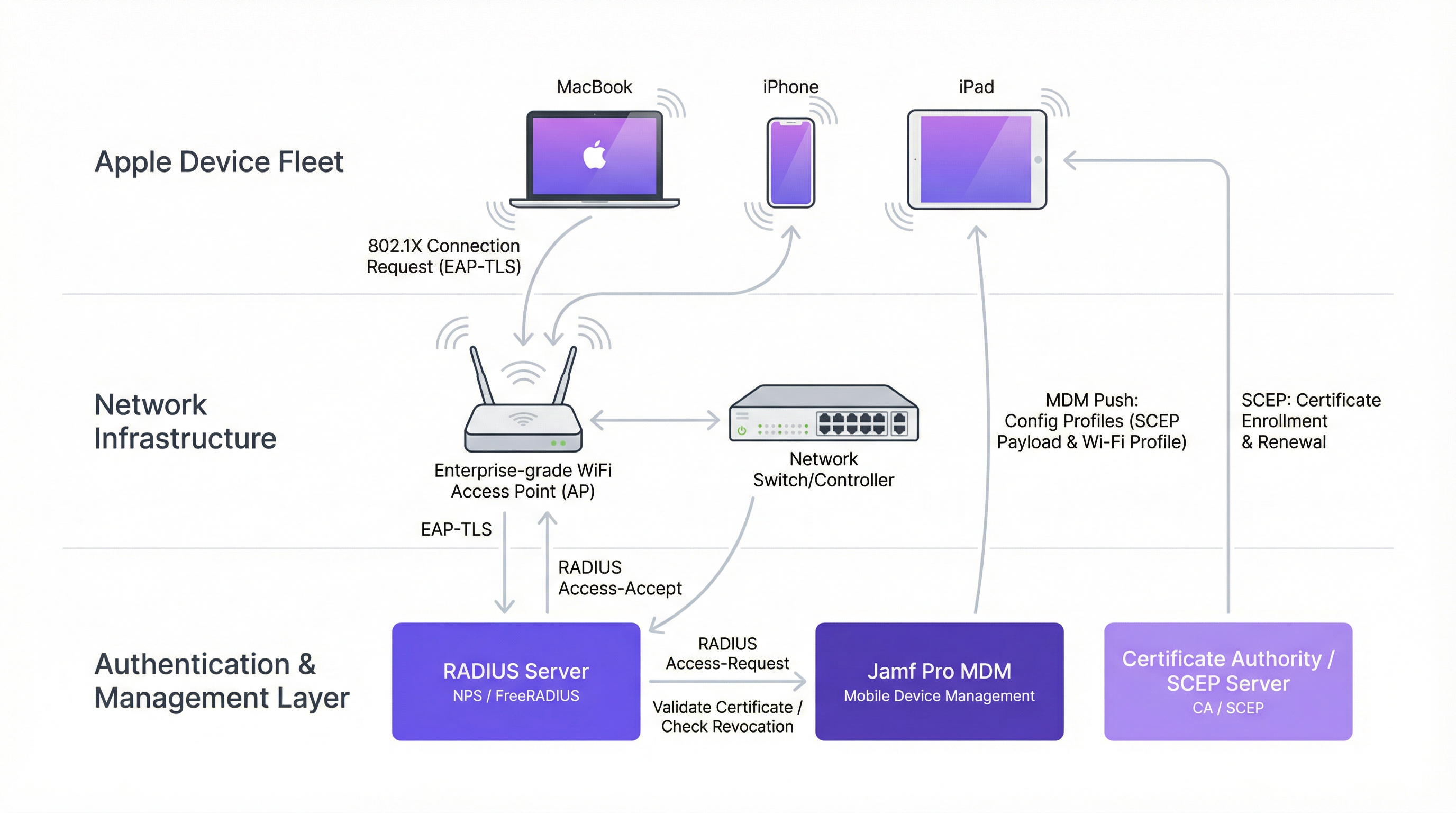
The 802.1X EAP-TLS Architecture
The foundation of certificate-based WiFi authentication is the IEEE 802.1X standard combined with the EAP-TLS (Extensible Authentication Protocol-Transport Layer Security) protocol. For a detailed primer on the 802.1X standard itself, refer to our guide on 802.1X Authentication: Securing Network Access on Modern Devices.
Unlike PEAP (Protected EAP), which relies on a username and password, EAP-TLS requires both the client device and the authentication server to prove their identities using digital certificates. This mutual authentication is what makes EAP-TLS the gold standard for enterprise deployments. The three-party model consists of the following components.
| Component | Role | Examples |
|---|---|---|
| Supplicant | The Apple device requesting network access | MacBook, iPhone, iPad |
| Authenticator | The network edge device that enforces access control | WiFi Access Point, WLC |
| Authentication Server | Validates certificates and authorises access | FreeRADIUS, Cisco ISE, Microsoft NPS |
The Access Point acts as a gatekeeper, blocking all traffic until the RADIUS server sends an Access-Accept message. This is the core of the IEEE 802.1X port-based Network Access Control (PNAC) model.
SCEP and Jamf Pro: Scalable Certificate Distribution
The challenge with EAP-TLS at scale is certificate distribution. Manually installing a unique certificate on 500 iPads is not a viable operation. This is where the Jamf Pro and SCEP Jamf integration becomes the critical enabler.
SCEP (Simple Certificate Enrollment Protocol) is a lightweight protocol that allows a device to automatically request and receive a signed certificate from a Certificate Authority (CA). Jamf Pro acts as the orchestrator, pushing a Configuration Profile to each Apple device. This profile contains a SCEP payload that instructs the device to contact the SCEP server, provides a dynamic challenge password, and specifies the required certificate attributes — such as the Subject Alternative Name (SAN), which is typically mapped to the device's MAC address or serial number.
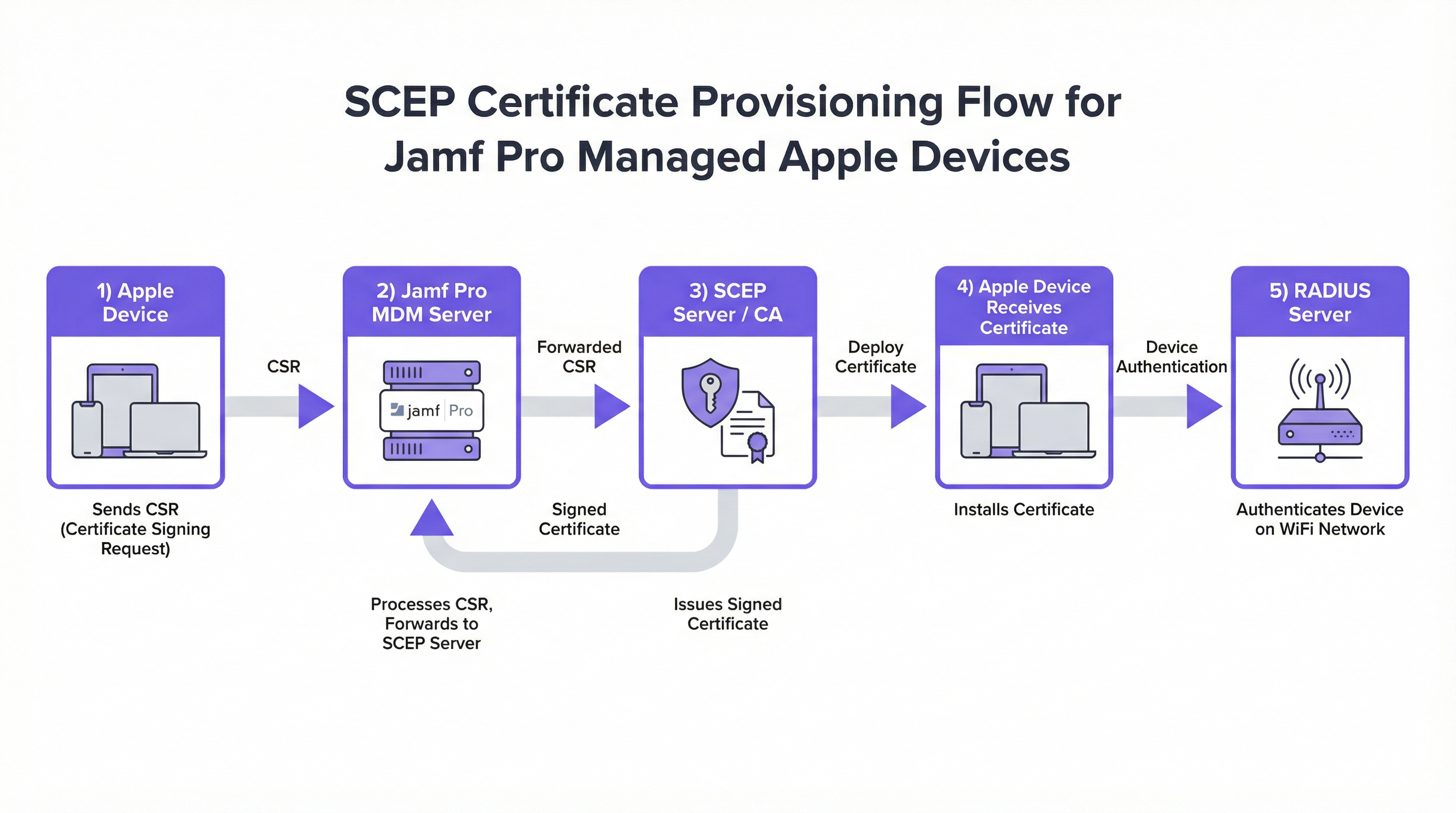
The dynamic challenge password mechanism is particularly important. In a Jamf-integrated SCEP deployment, Jamf generates a unique, single-use challenge password for each device. This ensures that only devices enrolled in Jamf Pro — and therefore corporately managed — can successfully obtain a certificate from the CA. This is a critical security control that prevents rogue devices from enrolling.
RADIUS Attributes for Apple Device Authentication
When the RADIUS server receives an Access-Request from the Access Point, it evaluates several attributes to make its authorisation decision. For Apple 802.1X deployments, the most relevant RADIUS attributes are as follows.
| RADIUS Attribute | Description | Apple Relevance |
|---|---|---|
User-Name (Attr 1) |
The identity presented by the supplicant | Typically the certificate's Subject CN or SAN |
NAS-IP-Address (Attr 4) |
The IP of the Access Point | Used for AP-specific policies |
Called-Station-Id (Attr 30) |
The BSSID and SSID of the AP | Enables SSID-based policy enforcement |
EAP-Message (Attr 79) |
The encapsulated EAP packet | Contains the TLS handshake data |
Tunnel-Type (Attr 64) |
Specifies VLAN assignment type | Used for dynamic VLAN assignment post-auth |
Tunnel-Medium-Type (Attr 65) |
Specifies the medium for the tunnel | Required for 802.1Q VLAN tagging |
Tunnel-Private-Group-Id (Attr 81) |
The VLAN ID to assign | Enables role-based network segmentation |
The Tunnel-Private-Group-Id attribute is particularly powerful in enterprise deployments. By returning different VLAN IDs based on the certificate's attributes (e.g., department, device type), the RADIUS server can dynamically segment the network without requiring separate SSIDs.
Implementation Guide
Deploying certificate WiFi Apple authentication via Jamf Pro follows a structured sequence. Deviating from this order is the primary cause of failed deployments.
Step 1: Establish Your Certificate Authority Infrastructure
Before touching Jamf, your CA infrastructure must be in place. For Microsoft environments, this is typically Active Directory Certificate Services (AD CS) with the Network Device Enrollment Service (NDES) role, which acts as the SCEP server. For non-Microsoft environments, options include EJBCA, HashiCorp Vault PKI, or cloud-based CAs such as AWS Private CA.
Ensure your CA hierarchy is clear: a Root CA that is kept offline, and one or more Issuing CAs that sign device certificates. The RADIUS server will need its own certificate signed by this same CA hierarchy.
Step 2: Configure the SCEP Payload in Jamf Pro
Navigate to Computers (or Mobile Devices) > Configuration Profiles > New. Add a Certificate payload and select SCEP as the certificate source. The critical fields are as follows.
- URL: The SCEP endpoint (e.g.,
http://ndes.yourdomain.com/certsrv/mscep/mscep.dll). - Name: A descriptive name that will appear in the device's Keychain.
- Subject: The certificate's Distinguished Name. Use Jamf variables such as
CN=$COMPUTERNAMEfor computers orCN=$JSSIDfor mobile devices. - Subject Alternative Name (SAN): Set the SAN Type to
RFC 822 Namewith the value$MACADDRESS@yourdomain.com, orDNS Namewith$COMPUTERNAME.yourdomain.com. This is what the RADIUS server will read to identify the device. - Challenge Type: Select Dynamic to use Jamf's built-in SCEP proxy, which generates per-device challenge passwords.
- Key Size: 2048-bit RSA minimum. 4096-bit is recommended for new deployments.
- Key Usage: Enable both Signing and Encryption.
Step 3: Configure the WiFi Payload
In the same Configuration Profile, add a Wi-Fi payload. The key settings for Apple 802.1X are as follows.
- SSID: The exact name of your corporate secure SSID.
- Security Type: WPA2 Enterprise or WPA3 Enterprise (recommended where hardware supports it).
- Protocols — Accepted EAP Types: Select TLS only. Deselect PEAP, TTLS, and all other types to enforce EAP-TLS exclusively.
- Authentication — Identity Certificate: Select the SCEP payload you created in Step 2. This is the critical link between the certificate and the WiFi connection.
- Trust — Trusted Server Certificate Names: Enter the exact Common Name (CN) of your RADIUS server's certificate (e.g.,
radius.yourdomain.com). This is the most commonly missed configuration item. - Trust — Trusted Certificates: Upload the Root CA and any Intermediate CA certificates that signed the RADIUS server's certificate.
Step 4: Configure the RADIUS Server
On your RADIUS server, create a network policy that matches the certificate attributes you defined in Jamf. For Microsoft NPS, this means creating a Connection Request Policy that matches the SSID via the Called-Station-Id attribute, and a Network Policy that validates the certificate against your CA and optionally assigns a VLAN via the Tunnel attributes.
For FreeRADIUS, configure the eap module to use tls and point to your CA certificate, server certificate, and private key. The users file or SQL backend should be configured to match the certificate's SAN against your device inventory.
Step 5: Scope and Deploy the Profile
In Jamf Pro, scope the Configuration Profile to the appropriate device groups — for example, all devices in the "Corporate Fleet" Smart Group. The profile will be pushed automatically via MDM. Devices that are online will receive it within minutes; devices that are offline will receive it the next time they check in.
Best Practices
Implement WPA3 Enterprise where possible. WPA3 Enterprise with 192-bit mode provides enhanced cryptographic strength using GCMP-256 and HMAC-SHA-384, offering significantly stronger protection than WPA2 Enterprise. For Hospitality environments and Healthcare organisations handling sensitive data, this upgrade is increasingly a compliance requirement rather than merely a best practice.
Leverage device-based certificates for shared hardware. For shared devices — such as retail point-of-sale iPads, hotel concierge tablets, or clinical devices — use device-bound certificates rather than user-bound certificates. This ensures the device connects to the network at boot, before any user logs in, allowing MDM check-ins, app updates, and push notifications to function correctly. This is a critical consideration for Retail deployments where devices may be shared across shifts.
Integrate network access with your broader security posture. While staff use 802.1X for secure internal access, ensure your public-facing networks are managed through a robust Guest WiFi solution to maintain clear traffic separation. Combining certificate-based staff authentication with WiFi Analytics provides full visibility into both authenticated device behaviour and guest network activity.
Automate certificate renewal. Configure the SCEP payload in Jamf to trigger automatic renewal when a certificate is within 14 to 30 days of expiration. This prevents the scenario where a device silently loses network access because its certificate expired overnight. In Jamf Pro, this is controlled via the Renewal Threshold setting in the SCEP payload.
Maintain a Certificate Revocation List (CRL) or OCSP responder. When a device is decommissioned, stolen, or unenrolled from Jamf, its certificate must be revoked at the CA level. Configure your RADIUS server to check the CRL or OCSP endpoint on every authentication attempt. Without this, a stolen device with a valid certificate can still authenticate to the network.
For further context on modern network infrastructure decisions, the The Core SD WAN Benefits for Modern Businesses guide provides useful context on how certificate-based authentication integrates with SD-WAN overlay architectures.
Troubleshooting & Risk Mitigation
The Chicken-and-Egg Provisioning Problem. Devices need a network connection to reach the SCEP server and download their certificate, but they need the certificate to join the secure WiFi. This is the most common deployment blocker. The recommended mitigation strategies are: provisioning via Ethernet using USB-C or Lightning to Ethernet adapters; using cellular data on iPhones and cellular-capable iPads; or creating a temporary, restricted onboarding SSID with firewall rules that permit only SCEP and MDM traffic.
Silent EAP-TLS Failures on macOS. If the trust chain is incomplete, macOS may silently fail to connect without displaying a meaningful error in the UI. The only indication is in the system log. Use log stream --predicate 'subsystem == "com.apple.network"' to capture real-time authentication events. Always verify that the Trusted Server Certificate Names array in the Jamf profile exactly matches the CN in the RADIUS server's certificate.
RADIUS Timeout During High-Load Events. In environments such as stadiums or conference centres, simultaneous authentication requests from hundreds of devices can overwhelm the RADIUS server. Mitigate this by deploying RADIUS in a high-availability pair, tuning the max_requests parameter in FreeRADIUS, and ensuring the RADIUS server has sufficient CPU and memory for the expected concurrent authentication load. For large-scale venue deployments, review our guidance on Wireless Access Points Definition Your Ultimate 2026 Guide for capacity planning considerations.
Certificate Attribute Mismatch. If the SAN in the device certificate does not match what the RADIUS Network Policy expects, authentication will fail. This is particularly common when migrating from one CA to another, or when Jamf variables resolve differently than expected. Always test with a single device and inspect the RADIUS server logs to confirm the exact identity string being presented before rolling out to the full fleet.
ROI and Business Impact
Transitioning to Jamf RADIUS WiFi certificate authentication delivers measurable business value across several dimensions.
| Metric | Typical Outcome |
|---|---|
| Helpdesk ticket reduction | 60–85% reduction in WiFi-related support requests |
| Onboarding time per device | Reduced from 15–30 minutes to under 2 minutes (zero-touch) |
| Security incident risk | Near-elimination of credential-based WiFi attacks |
| Compliance posture | Meets PCI DSS Requirement 1.3 and GDPR Article 32 network controls |
| Certificate lifecycle | Automated renewal eliminates manual certificate management |
The most significant ROI driver is the elimination of password rotation disruptions. In a 500-device fleet where 10% of devices drop off the network each quarter due to password changes, and each incident requires 20 minutes of IT time to resolve, the annual support cost savings alone can justify the implementation investment within the first year.
For Transport operators and large venue environments, the business case is further strengthened by the ability to enforce dynamic VLAN assignment — ensuring that operational devices, staff devices, and management systems are automatically segmented without manual network reconfiguration.
Key Terms & Definitions
EAP-TLS (Extensible Authentication Protocol-Transport Layer Security)
The most secure 802.1X authentication method, requiring both the client device and the RADIUS server to authenticate each other using digital certificates. No password is exchanged or transmitted.
When IT teams need to eliminate password-based WiFi and enforce strict device compliance, EAP-TLS is the mandatory standard. It is the only EAP type that provides mutual authentication.
SCEP (Simple Certificate Enrollment Protocol)
A protocol that allows devices to securely and automatically request digital certificates from a Certificate Authority using a challenge-response mechanism.
Essential for scaling certificate deployments via Jamf Pro without requiring IT staff to manually install certificates on thousands of devices. Jamf's dynamic SCEP proxy generates per-device challenge passwords.
RADIUS (Remote Authentication Dial-In User Service)
A networking protocol providing centralised Authentication, Authorisation, and Accounting (AAA) management for devices connecting to a network service.
The central decision engine that tells the WiFi Access Point whether a Jamf-managed device is allowed on the network, and optionally which VLAN to assign.
Configuration Profile
An XML file (.mobileconfig) deployed by Jamf Pro that contains one or more payloads to manage settings on Apple devices, including certificates, WiFi, VPN, and restrictions.
This is the vehicle used to push the SCEP settings, WiFi SSID configuration, and certificate trust chain to the iPhone, iPad, or Mac.
CSR (Certificate Signing Request)
A block of encoded text generated by the Apple device containing the public key and identity information, sent to the Certificate Authority to apply for a signed digital certificate.
The first step in the SCEP process. The device generates the CSR locally, ensuring the private key never leaves the device — a fundamental principle of PKI security.
Subject Alternative Name (SAN)
An extension to an X.509 certificate that allows multiple identity values to be associated with the certificate, such as email addresses, DNS names, IP addresses, or MAC addresses.
Crucial for RADIUS authentication. The RADIUS server reads the SAN to identify the device or user. In Jamf deployments, the SAN is typically set to the device's MAC address or the user's UPN.
Root CA (Certificate Authority)
The top-most certificate in a PKI hierarchy, the private key of which is used to sign subordinate CA certificates. The Root CA certificate must be trusted by all parties in the authentication chain.
Must be deployed to Apple devices via Jamf so they trust the certificates presented by the RADIUS server during the EAP-TLS handshake. Without it, the handshake fails.
IEEE 802.1X
An IEEE standard for port-based Network Access Control (PNAC), providing an authentication mechanism to devices wishing to attach to a LAN or WLAN before network access is granted.
The overarching framework that blocks network traffic at the Access Point until the RADIUS server validates the Jamf-provisioned certificate. All enterprise WiFi security is built on this standard.
Dynamic VLAN Assignment
A RADIUS feature that assigns a connecting device to a specific VLAN based on policy attributes returned in the Access-Accept message, using RADIUS Tunnel attributes 64, 65, and 81.
Enables network segmentation without multiple SSIDs. A single corporate SSID can automatically place clinical iPads on VLAN 20, executive MacBooks on VLAN 30, and guest devices on VLAN 100.
Case Studies
A 500-bed hospital needs to deploy 1,200 shared iPads for clinical staff. They currently use PEAP with Active Directory credentials, resulting in hundreds of disconnected devices every 90 days when passwords expire. How should they redesign their authentication architecture?
The hospital should migrate to EAP-TLS using device-based certificates managed through Jamf Pro. The implementation involves four key steps. First, deploy AD CS with the NDES role to act as the SCEP server, issuing certificates from a dedicated 'Clinical Device' certificate template. Second, configure a Jamf Configuration Profile with a SCEP payload using $MACADDRESS as the SAN, and a WiFi payload targeting the clinical SSID with EAP-TLS only, explicitly trusting the RADIUS server certificate. Third, configure Microsoft NPS with a Network Policy that matches the 'Clinical Device' certificate template and assigns devices to the Clinical VLAN (Tunnel-Private-Group-Id = 20). Fourth, set the SCEP renewal threshold to 30 days to ensure automatic certificate renewal without IT intervention. Devices should be provisioned via Ethernet during the initial rollout to resolve the onboarding network challenge.
A creative agency with 300 MacBooks is moving to a new office. They want zero-touch WiFi provisioning — new MacBooks should automatically connect to the secure corporate SSID when unboxed by end-users at their desks, with no IT intervention. How do they achieve this?
The agency must combine Apple Automated Device Enrollment (ADE) with Jamf Pro and a carefully sequenced Configuration Profile. During the macOS Setup Assistant, the MacBook connects to the internet via a temporary open onboarding SSID (restricted by firewall to permit only Apple activation, Jamf MDM, and SCEP traffic). It contacts Apple, recognises it belongs to the agency via ADE, and automatically enrolls in Jamf Pro. Jamf Pro immediately pushes a pre-staged Configuration Profile containing the SCEP payload and the corporate WiFi payload. The SCEP enrollment completes over the onboarding SSID, the certificate is installed in the Keychain, and the WiFi payload activates. The MacBook then automatically transitions to the secure 802.1X corporate SSID. From the user's perspective, they simply complete the Setup Assistant and the laptop is on the corporate network.
Scenario Analysis
Q1. You have deployed a Jamf Configuration Profile with a SCEP payload and a WiFi payload to 50 MacBooks. The SCEP certificates are successfully installed in the Keychain, but the MacBooks are prompting users with a 'Verify Certificate' dialogue when attempting to connect to the corporate SSID. What configuration element is missing or incorrect?
💡 Hint:Think about what information the Apple device needs to automatically trust the RADIUS server's identity without user interaction.
Show Recommended Approach
The WiFi payload in the Jamf Configuration Profile is missing either the 'Trusted Server Certificate Names' entry (which must exactly match the CN in the RADIUS server's certificate), or the Root CA and Intermediate CA certificates that signed the RADIUS server's certificate are not included in the profile's Trust payload. Without explicit trust defined by the MDM, macOS and iOS require the user to manually verify and accept the RADIUS server's certificate during the EAP-TLS handshake. Both fields must be populated: the Trusted Certificates array (containing the CA chain) and the Trusted Server Certificate Names array (containing the RADIUS server's CN).
Q2. A retail chain wants their point-of-sale iPads to connect to the secure corporate WiFi immediately upon boot, before any staff member logs into the POS application. The current deployment uses user certificates tied to individual employee UPNs. Devices frequently fail to connect at the start of a shift. What is the root cause and what is the correct architectural change?
💡 Hint:Consider when different types of certificates become available to the iOS network stack relative to the user authentication lifecycle.
Show Recommended Approach
The root cause is that user certificates (tied to a UPN) are stored in the user's keychain and are only accessible after the user has authenticated to the device. At boot or at the iOS lock screen, the user keychain is locked, so the WiFi stack cannot access the certificate to perform EAP-TLS. The correct architectural change is to switch to device certificates, where the SAN is set to the device's MAC address or serial number. Device certificates are stored in the system keychain, which is accessible at boot time before any user logs in. The RADIUS Network Policy must be updated to match device certificates rather than user certificates, and the Jamf SCEP payload must be updated to use device-level variables such as $MACADDRESS or $SERIALNUMBER as the SAN.
Q3. Your organisation uses Microsoft NPS as the RADIUS server. You are configuring a new Jamf SCEP payload for 200 MacBooks. The NPS Network Policy is configured to require that the certificate's Subject Alternative Name matches a computer account in Active Directory. What SAN value should you configure in the Jamf SCEP payload, and what format does NPS expect?
💡 Hint:NPS computer certificate authentication requires the SAN to match the computer's identity in Active Directory in a specific format.
Show Recommended Approach
For NPS computer certificate authentication, the SAN must be set to the DNS Name type with the value $COMPUTERNAME.yourdomain.com (using the Jamf variable for the computer's hostname). NPS expects the SAN DNS Name to match the computer's fully qualified domain name (FQDN) as it appears in Active Directory. Alternatively, if using the User Principal Name SAN type, the format should be host/$COMPUTERNAME@YOURDOMAIN.COM. The NPS Network Policy's condition should be set to match the 'Client Certificate SAN' attribute. Ensure the MacBooks are bound to Active Directory, or that the computer names in Jamf match the computer objects in AD, otherwise the NPS lookup will fail even if the certificate is valid.
Key Takeaways
- ✓EAP-TLS is the gold standard for enterprise WiFi authentication — it eliminates passwords entirely and requires both the device and the RADIUS server to prove their identity using digital certificates.
- ✓Jamf Pro automates certificate distribution to Apple fleets at scale using the SCEP protocol, with dynamic per-device challenge passwords ensuring only managed devices can enrol.
- ✓A successful Jamf WiFi deployment requires two linked payloads in a single Configuration Profile: a SCEP payload to obtain the certificate, and a WiFi payload that references that certificate as the identity.
- ✓The most common deployment failure is an incomplete certificate trust chain — the Jamf WiFi profile must explicitly include the Root CA and specify the RADIUS server's CN in the Trusted Server Certificate Names field.
- ✓Device-based certificates (SAN = MAC address) are essential for shared hardware, ensuring network connectivity at boot before any user logs in.
- ✓Plan the onboarding network carefully — devices need a network path to the SCEP server before they can receive their certificate and join the secure 802.1X SSID.
- ✓Automated certificate renewal (configured at 30 days before expiration) and immediate revocation upon device decommissioning are non-negotiable operational requirements for a secure, resilient deployment.




