

MAC Address Randomisation: What It Is and How to Handle It
This guide provides IT leaders and network architects with a comprehensive technical overview of MAC address randomisation. It details the impact on enterprise and guest WiFi networks and presents actionable strategies, including Purple's SecurePass technology, to mitigate risks and maintain robust analytics and security.
🎧 Listen to this Guide
View Transcript

Executive Summary
MAC address randomisation, a privacy feature now standard in iOS, Android, and other operating systems, presents a critical challenge to enterprise WiFi management. By periodically changing a device's hardware identifier, it disrupts core network operations that rely on a static MAC address for authentication, security, and analytics. For IT managers and venue operators in hospitality, retail, and large public venues, this translates to unreliable visitor metrics, frustrating user experiences, and a weakened security posture. Traditional methods like MAC-based access control (MAC-ACL) and whitelisting are rendered ineffective, while analytics platforms struggle to distinguish new from returning visitors, severely impacting the measurement of footfall, dwell time, and loyalty. This guide provides a technical deep-dive into how randomisation works, outlines the specific operational and business impacts, and offers a clear, actionable framework for mitigation. It details how to evolve from legacy MAC-based controls to a modern, identity-centric authentication strategy using standards like IEEE 802.1X and innovative solutions like Purple's SecurePass, which is engineered to provide seamless, secure access in the age of MAC randomisation.
Technical Deep-Dive
MAC address randomisation is the process by which a device spoofs its real, hardware-embedded MAC address (the Universally Administered Address or UAA) and uses a temporary, randomly generated one (a Locally Administered Address or LAA) when connecting to WiFi networks. This privacy-enhancing feature, first introduced by Apple in 2014, is now a default behaviour in all major mobile operating systems.
Technically, an LAA is identified by setting the second-least-significant bit of the first octet of the MAC address to '1'. While this makes randomised addresses programmatically identifiable, the core challenge lies in their transient nature. The randomisation behaviour varies by operating system and version:
- Per-Network Randomisation: The most common implementation, where a device generates and uses a persistent, randomised MAC for each specific WiFi network (SSID) it connects to. This was the standard for iOS 14 and Android 10 onwards.
- Time-Based Rotation: A more recent and disruptive evolution, seen in iOS 18 and later, where the device will periodically change the randomised MAC address for the same network. This rotation can occur every two weeks or even more frequently if a user manually 'forgets' the network or the device clears its cache.
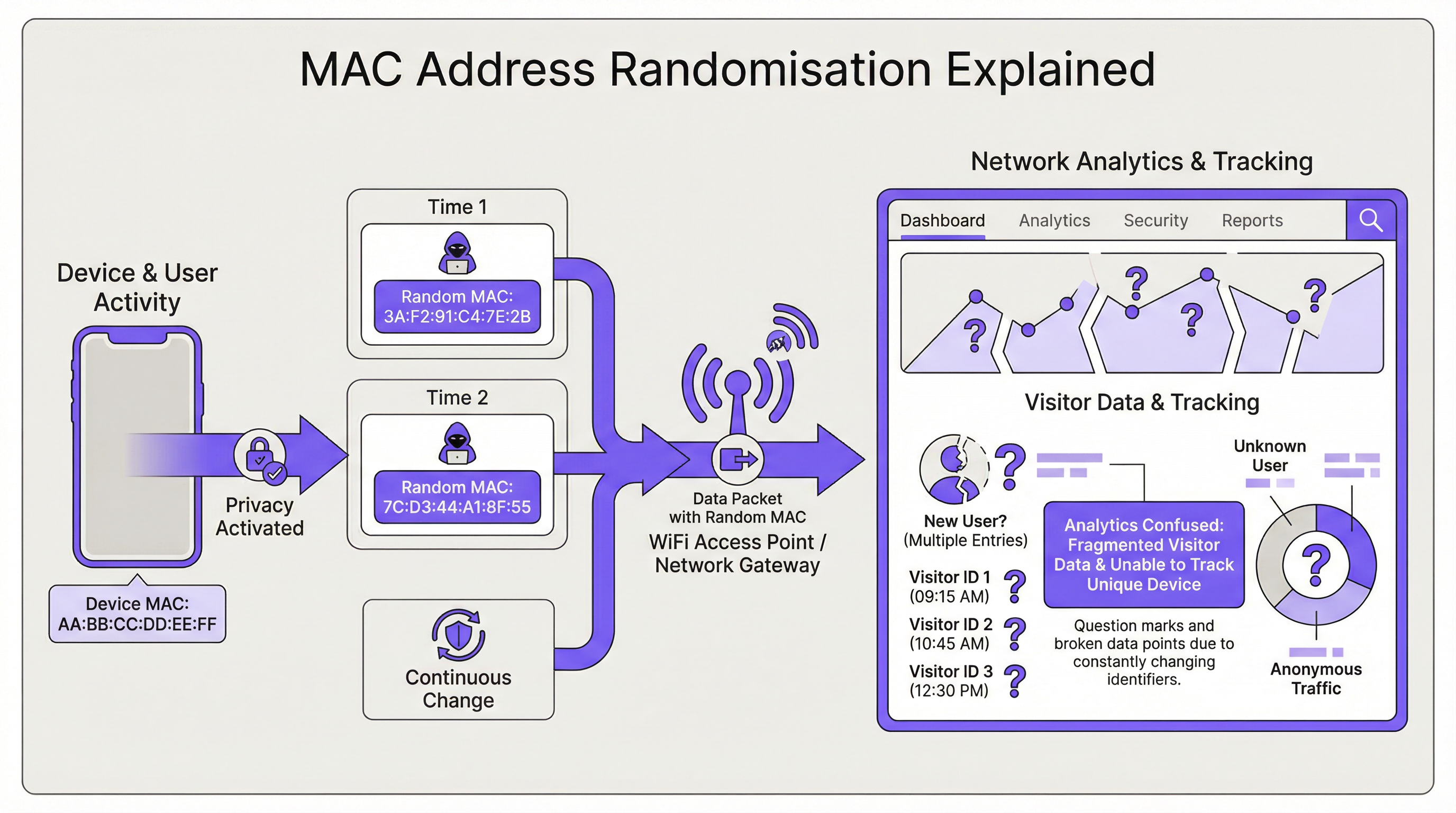
The direct consequence for network infrastructure is the loss of a stable device identifier. This impacts several key areas:
| Network Function | Impact of MAC Randomisation |
|---|---|
| Authentication | MAC Authentication Bypass (MAB) and whitelisting fails. Devices require re-authentication upon MAC rotation, disrupting seamless access. |
| Analytics & BI | Visitor analytics are severely skewed. A single returning device appears as multiple 'new' visitors, inflating presence counts and making repeat visit metrics meaningless. |
| Security | MAC-based blacklisting is easily circumvented. Tracing a malicious device's activity across sessions becomes difficult, complicating forensic analysis. |
| Compliance | Systems relying on MAC addresses for network segmentation or logging (e.g., for PCI DSS) may fall out of compliance due to the inability to consistently identify devices. |
Implementation Guide
The fundamental solution is to shift from device-based identity (the MAC address) to user-based identity. This requires a new authentication architecture.
Step 1: Assess Your Environment First, segment your user base. Are you managing corporate-owned devices, guest devices, or a mix? The strategy will differ for each.
- Corporate/Managed Devices: These offer more control. The goal is a zero-touch, highly secure connection.
- Guest/BYOD Devices: The priority is a low-friction, secure onboarding process that establishes a persistent identity without requiring device management.
Step 2: Deploy IEEE 802.1X for Managed Devices For corporate environments, the industry-standard solution is IEEE 802.1X Port-Based Network Access Control. Instead of checking the MAC address, the network authenticates the device or user via a credential, typically a digital certificate. The flow is as follows:
- A device attempts to connect to an 802.1X-enabled SSID.
- The access point (the Authenticator) challenges the device (the Supplicant) for credentials.
- The device presents its certificate, which is forwarded to a RADIUS server (the Authentication Server).
- The RADIUS server validates the certificate against a trusted Certificate Authority (CA). If valid, it grants access. This method is immune to MAC randomisation as the certificate provides a stable, long-term identifier. It is the recommended best practice for securing internal networks.
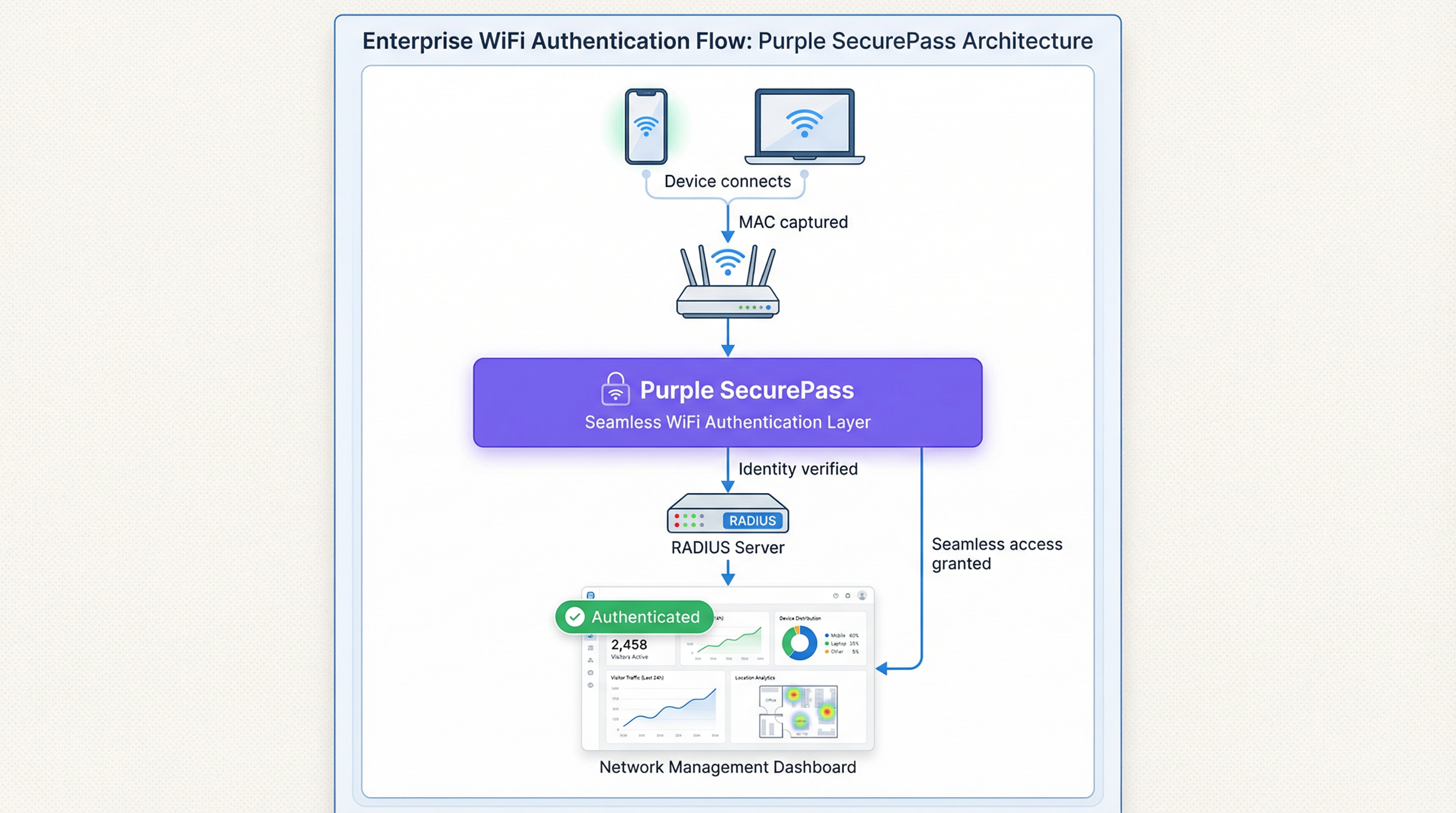
Step 3: Implement an Advanced Captive Portal for Guest Access For guest networks, deploying certificates is not feasible. Here, the solution is an intelligent authentication layer like Purple's SecurePass. This technology moves beyond simple MAC authentication to create a persistent user profile.
- First-Time Authentication: A user connects to the guest WiFi and is directed to a captive portal. They authenticate using a social media account, a form fill, or a pre-provisioned access code.
- Identity Creation: Purple creates a unique profile for this user, linking their authentication method to their initial session.
- Seamless Re-authentication: On subsequent visits, even if the device presents a new, randomised MAC address, SecurePass can recognise the user through other persistent identifiers (like a cookie in the browser or a profile installed via our app). It then seamlessly re-authenticates them without requiring another login. This approach restores the ability to recognise returning visitors and provides a frictionless user experience, effectively solving the randomisation problem for guest networks.
Best Practices
- Do Not Block Randomised MACs: While it's possible to configure some network hardware to deny access to devices using LAAs, this is a counter-productive strategy. It will block the majority of modern devices, leading to a poor user experience and a support nightmare.
- Prioritise User Experience: The goal is security and convenience. Solutions should minimise login friction for returning users. A seamless connection is a key driver of WiFi adoption and satisfaction.
- Integrate with Your Tech Stack: Your authentication solution should feed data into your CRM and Business Intelligence platforms. Purple provides rich APIs to ensure that the valuable visitor data you capture is actionable across your business.
- Stay Informed: The behaviour of MAC randomisation continues to evolve with each new OS release. Partner with a vendor like Purple that is committed to staying ahead of these changes and updating its platform accordingly.
Troubleshooting & Risk Mitigation
Common Failure Mode: The Endless Login Loop
- Symptom: A user complains they have to log into the WiFi every single time they visit, even on the same day.
- Cause: The network is likely using a simple MAC-based authentication or captive portal that treats every new randomised MAC as a new device, forcing re-authentication.
- Mitigation: Implement a solution like SecurePass that establishes a persistent identity beyond the MAC address. This ensures returning users are recognised and granted access automatically.
Risk: Blacklist Evasion
- Symptom: A device that was blocked from the network for malicious activity is able to reconnect.
- Cause: The device simply generated a new randomised MAC address, bypassing the MAC-based blacklist.
- Mitigation: Your security policy must pivot from blocking MAC addresses to blocking user accounts or device fingerprints. An advanced platform can identify devices based on a composite of attributes, making it harder to evade a block.
ROI & Business Impact
Solving the MAC randomisation challenge is not just an IT issue; it's a business imperative. The ROI is measured in several key areas:
- Improved Data Accuracy: By accurately distinguishing new vs. returning visitors, businesses can make smarter decisions about marketing spend, staffing levels, and store layouts. For a retail chain, understanding true customer loyalty can directly influence promotional strategy and drive revenue.
- Enhanced Customer Experience: A seamless, automatic connection for returning visitors is a powerful loyalty driver. In a hotel, this means a guest is instantly connected from the moment they walk in, improving satisfaction and encouraging use of hotel digital services.
- Increased Security & Reduced Risk: A robust authentication framework reduces the risk of unauthorised access and provides more reliable data for forensic analysis, lowering the potential cost of a security breach.
- Operational Efficiency: Automating the authentication process for both managed and guest devices reduces the number of helpdesk tickets related to WiFi connectivity, freeing up IT resources for more strategic initiatives.
Key Terms & Definitions
MAC Address Randomisation
A privacy feature where a device temporarily replaces its permanent, factory-assigned MAC address with a randomly generated one when connecting to WiFi networks.
IT teams encounter this as the root cause of failing MAC-based access controls and skewed visitor analytics. It matters because it breaks legacy network management paradigms.
Private WiFi Address
Apple's specific terminology for its implementation of MAC address randomisation in iOS, iPadOS, and watchOS.
When users or junior IT staff report issues with an 'Apple Private Address', this is the feature they are referring to. It's crucial for support teams to recognise this term.
Locally Administered Address (LAA)
A MAC address where the second-least-significant bit of the first octet is set to 1, indicating it is not the globally unique, factory-assigned address. Randomised MACs are a type of LAA.
Network architects can use this technical property to create policies or filters that specifically identify randomised traffic, although blocking it is generally not recommended.
Universally Administered Address (UAA)
The permanent, globally unique MAC address assigned to a network interface by its manufacturer.
This is the 'real' MAC address that randomisation is designed to hide. In high-security contexts, solutions may aim to verify the UAA after an initial secure handshake.
MAC Authentication Bypass (MAB)
A method where a network switch or access point uses a device's MAC address as its authentication credential, checking it against a list of approved addresses on a RADIUS server.
This is a common legacy authentication method for devices that don't support 802.1X (like printers or IoT devices). It is highly vulnerable to MAC randomisation and spoofing.
IEEE 802.1X
An IEEE standard for port-based Network Access Control (PNAC) that provides a robust and secure method for authenticating devices or users, typically using certificates or credentials.
This is the industry-standard solution for securing corporate networks and is the primary alternative to MAC-based authentication for managed devices.
Purple SecurePass
Purple's proprietary technology that provides seamless and secure WiFi authentication for guest networks, designed to overcome the challenges of MAC address randomisation.
For venue operators, SecurePass is the key to maintaining a high-quality user experience and reliable analytics by creating a persistent user identity that is independent of the device's MAC address.
Captive Portal
A web page that a user is required to view and interact with before being granted access to a public WiFi network.
Modern captive portals, like those powered by Purple, are no longer just a simple login page. They are sophisticated tools for creating user identity, driving marketing engagement, and enforcing terms of service.
Case Studies
A 500-room luxury hotel wants to provide seamless WiFi for returning guests to enhance their loyalty program. However, their existing system relies on MAC whitelisting for repeat visitors, which has stopped working due to MAC randomisation. How can they restore this functionality?
The hotel should deploy Purple's Guest WiFi with SecurePass. On their first visit, guests will authenticate via a branded captive portal, perhaps with an option to log in using their loyalty program credentials. Purple creates a persistent profile for the guest. On subsequent visits, SecurePass recognises the guest's device and automatically connects them to the WiFi, bypassing the need for a static MAC address. The login event is then pushed via API to the hotel's CRM, updating the guest's loyalty profile and providing valuable data on their visit patterns.
A large retail chain with 200 stores uses WiFi analytics to measure footfall and customer dwell time. Since the widespread adoption of MAC randomisation, their 'new vs. repeat' customer reports are wildly inaccurate, showing almost 90% new visitors, which they know is incorrect. How can they regain accurate visitor metrics?
The retail chain should implement Purple's analytics platform across their estate. While Purple cannot definitively reverse all randomisation, its sophisticated engine is designed to handle it. It filters out probe requests from non-connecting devices and uses advanced algorithms to correlate sessions, providing a much more accurate picture of visitor behaviour. By using a persistent login via a captive portal, the system can tie sessions from the same user together, even if their MAC changes between visits. This allows for the reconstruction of the customer journey and provides far more reliable metrics for new vs. repeat visits and true dwell time.
Scenario Analysis
Q1. You are the Network Architect for a chain of conference centres. A major event is approaching, and you need to provide WiFi for 5,000 attendees. Your sponsor requires analytics on how many attendees visit their booth. How does MAC randomisation affect this, and what is your primary mitigation strategy?
💡 Hint:Consider the transient nature of the attendees and the need for reliable analytics.
Show Recommended Approach
MAC randomisation will make it impossible to use device MACs to track unique visitors to the sponsor's booth. A single attendee's phone could generate multiple MACs throughout the day, appearing as multiple visitors. The primary mitigation strategy is to implement a guest WiFi solution with a captive portal for the event. By requiring a simple, one-time registration (e.g., email address), I can establish a session-based identity for each attendee. Using Purple's location analytics, I can then track the movement of these authenticated sessions to the sponsor's booth zone, providing accurate data on unique visitor counts to the sponsor.
Q2. Your CFO has questioned the investment in a new guest WiFi platform, asking why the existing, cheaper solution that uses MAC whitelisting for repeat customers is no longer sufficient. How do you explain the business case in terms of ROI?
💡 Hint:Focus on the financial and business impact, not just the technical details.
Show Recommended Approach
The existing MAC whitelisting system is now obsolete due to MAC randomisation, a standard feature in all modern smartphones. This means we can no longer recognise our repeat customers, which has two major financial impacts. First, our customer loyalty data is now inaccurate, so we are making poor marketing decisions based on bad data. Second, the frustrating re-login experience for our best customers is damaging our brand and reducing engagement. Investing in a new platform like Purple with SecurePass will provide a direct ROI by: 1) Restoring accurate customer analytics, allowing us to optimise marketing spend. 2) Increasing customer satisfaction and loyalty through a seamless experience, which drives repeat business. 3) Reducing IT support overhead from WiFi-related complaints.
Q3. An IT administrator at one of your venues suggests a 'quick fix' by creating a script to block all devices that use a Locally Administered Address (LAA). Why is this a bad idea, and what is the more strategic alternative?
💡 Hint:Think about the prevalence of LAAs and the user impact.
Show Recommended Approach
Blocking all LAAs is a terrible idea because the vast majority of modern smartphones and laptops use them by default for privacy. This 'quick fix' would effectively ban almost all of our visitors from using the WiFi, leading to a massive drop in service availability and a surge in customer complaints. It's a classic case of treating the symptom, not the disease. The strategic alternative is to embrace the reality that the MAC address is no longer a reliable identifier. We must upgrade our architecture to be identity-centric. For our corporate network, this means accelerating our planned rollout of 802.1X with certificates. For our guest network, it means implementing an intelligent authentication layer like Purple's SecurePass that can create a persistent user identity through a captive portal, making the MAC address irrelevant.
Key Takeaways
- ✓MAC address randomisation is a default privacy feature in modern devices that breaks traditional WiFi management.
- ✓It severely impacts visitor analytics, making metrics like 'new vs. repeat' unreliable.
- ✓MAC-based authentication and security controls (whitelists, blacklists) are no longer effective.
- ✓The solution is to shift from device-based identity to user-based identity.
- ✓For corporate networks, use IEEE 802.1X with digital certificates.
- ✓For guest networks, use an advanced platform like Purple SecurePass to create persistent user profiles.
- ✓Do not simply block randomised MACs; this will deny service to most of your users.




