

MDU Login: Simplifying WiFi Access in Multi-Dwelling Units
This technical reference guide provides IT managers, network architects, and CTOs with a definitive framework for deploying and managing WiFi access in Multi-Dwelling Units (MDUs), covering the trade-offs between shared PSK, WPA3-Enterprise 802.1X, and Identity PSK (iPSK) authentication models. It addresses the core operational challenges of RF interference, security segmentation, and resident lifecycle management, and demonstrates how a managed WiFi platform such as Purple transforms connectivity from a cost centre into a measurable revenue asset. Drawing on real-world deployment scenarios and referencing standards including IEEE 802.1X, WPA3, GDPR, and PCI DSS, the guide equips venue operators with the architecture, implementation steps, and ROI metrics needed to make an informed investment decision this quarter.
🎧 Listen to this Guide
View Transcript
Executive Summary
WiFi in Multi-Dwelling Units is no longer a differentiator — it is the primary utility. Residents in build-to-rent apartments, student accommodation, and co-living spaces now rank reliable internet connectivity above parking, gym access, and in-unit laundry when evaluating a property. For the IT and operations teams responsible for delivering that connectivity, the challenge is threefold: providing a seamless MDU login experience that works for every device, maintaining enterprise-grade security across hundreds of concurrent users, and managing the network without an army of on-site technicians.
The traditional approaches — a shared building password or a bank of consumer routers in every flat — are architecturally broken. The former creates a flat, insecure network where residents can see each other's devices and a single leaked password compromises the entire building. The latter creates a radio frequency (RF) interference nightmare and an unmanageable hardware estate. The modern answer is a managed WiFi platform built on Identity PSK (iPSK), which delivers a private, unique network credential per apartment, enforces Layer 2 device isolation via Personal Area Networks (PANs), and automates the entire resident lifecycle through integration with your Property Management System (PMS). This guide explains how to architect, deploy, and measure that solution.
Technical Deep-Dive
The Three MDU Login Models: A Comparative Analysis
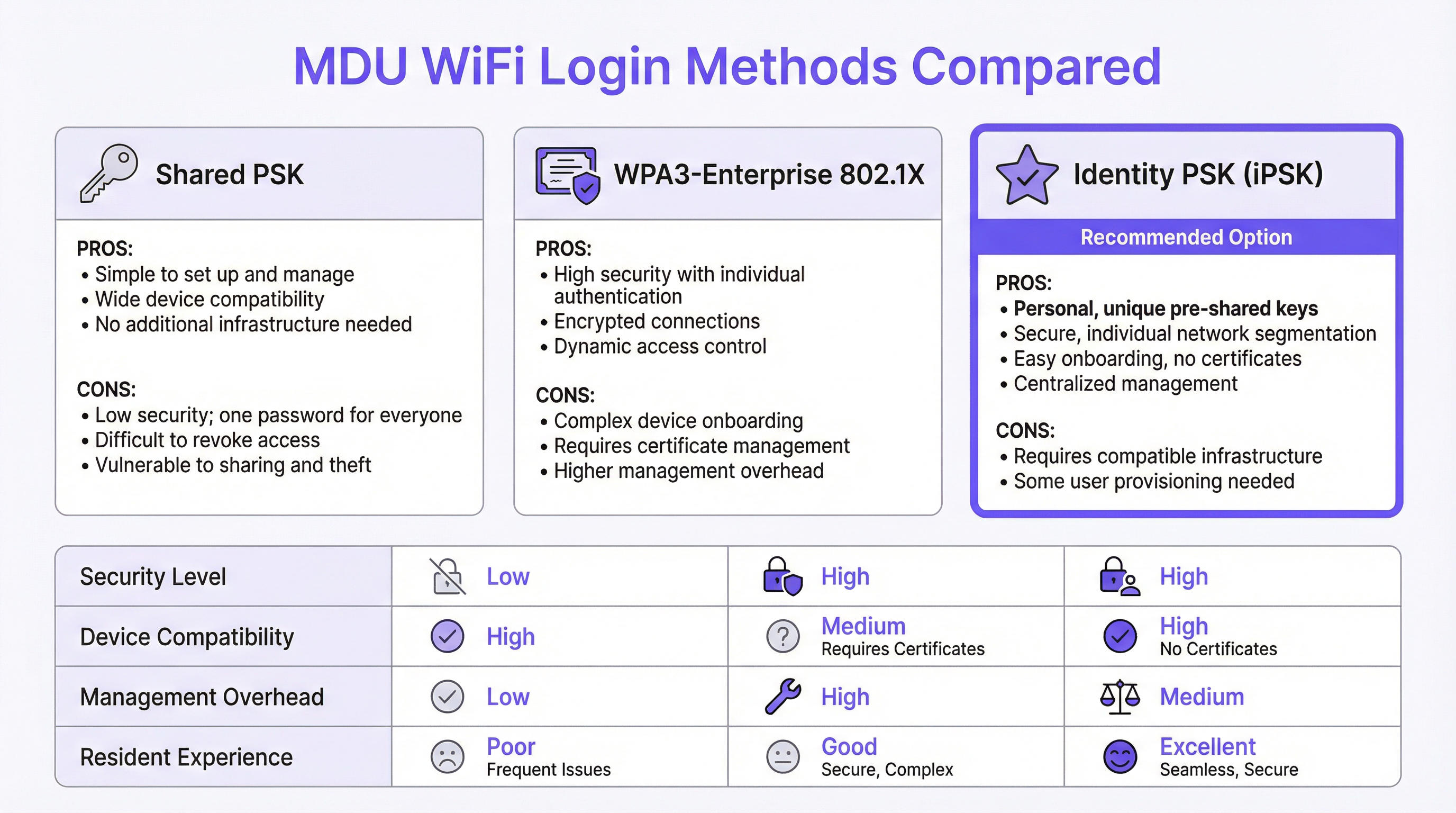
Every MDU WiFi deployment is built on one of three authentication paradigms, each with distinct security, usability, and operational implications.
Shared Pre-Shared Key (PSK) is the default for most legacy deployments. A single SSID and password are distributed to all residents, typically posted in a welcome pack or communicated verbally by building staff. The operational simplicity is its only virtue. From a security standpoint, it is fundamentally incompatible with multi-tenant environments: there is no mechanism for per-user segmentation, meaning all resident devices share a single broadcast domain. A resident with a misconfigured device or malicious intent can trivially enumerate their neighbours' network-attached assets. Revoking access for a departing tenant requires changing the password for the entire building, creating an operational disruption that most operators simply avoid — leaving former residents with indefinite network access.
WPA3-Enterprise with IEEE 802.1X represents the security-first approach, standard in corporate environments. Each user authenticates with individual credentials or a digital certificate, validated against a RADIUS server. The protocol provides per-session encryption keys, strong mutual authentication, and granular access control policies. However, it is poorly suited to the residential context for one critical reason: a significant proportion of consumer and IoT devices — including smart TVs, gaming consoles, voice assistants, and smart-home hubs — do not support 802.1X supplicants. Forcing residents to navigate certificate provisioning for a PlayStation or a Nest thermostat generates a disproportionate volume of support tickets and creates a perception of poor service, regardless of the underlying network quality.
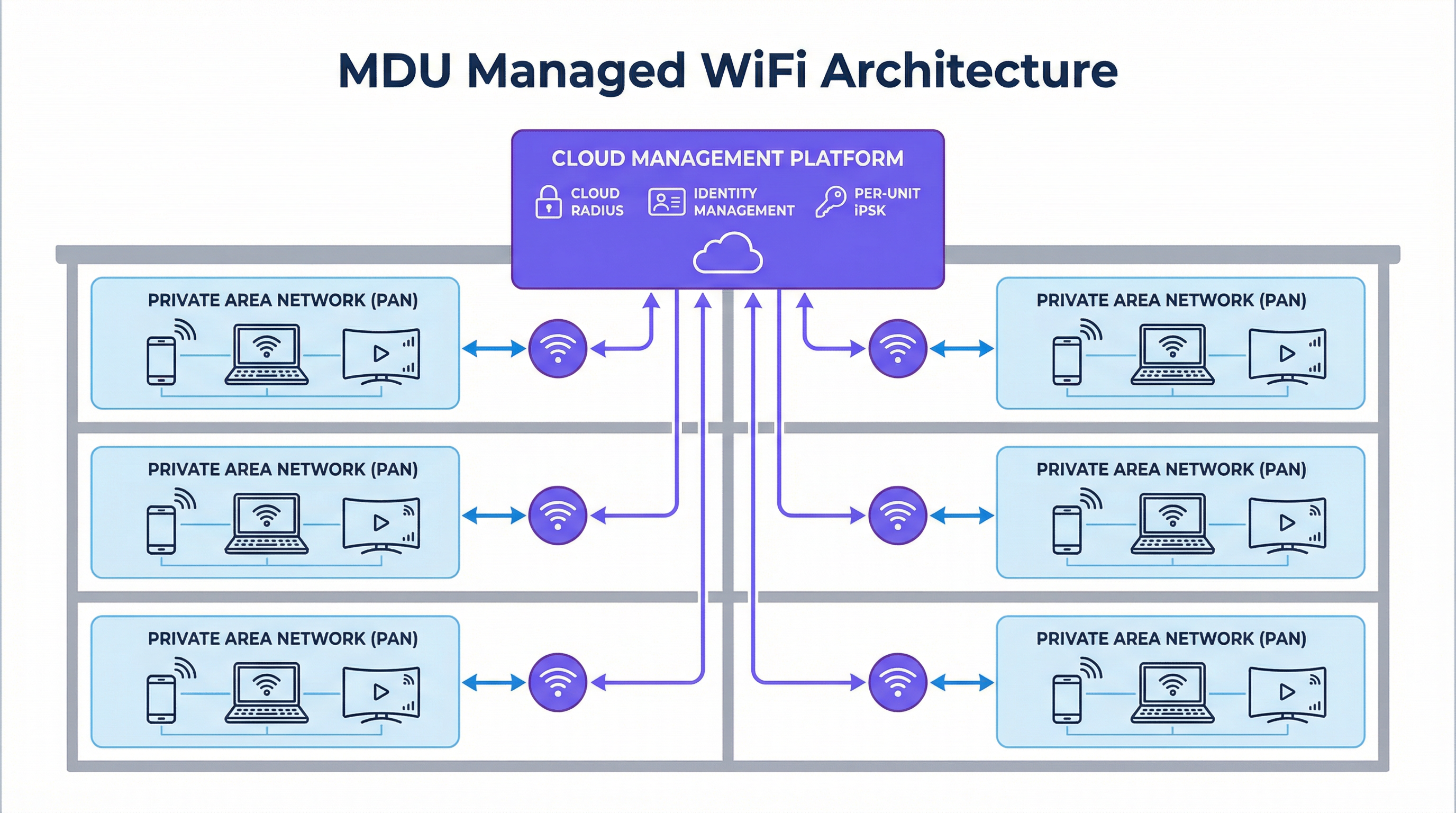
Identity PSK (iPSK) resolves this tension. Each apartment or resident is assigned a unique pre-shared key, generated and managed centrally by the platform. To the resident, the experience is indistinguishable from connecting to a private home router: they enter a password, and they are online. On the infrastructure side, the RADIUS server maps each unique key to a specific policy profile, placing the resident's devices into a dedicated Private Area Network (PAN) — a Layer 2-isolated micro-segment that is logically invisible to all other residents on the same physical infrastructure. The platform supports mDNS reflection within the PAN, enabling residents to cast to their own Chromecast or print to their own printer without any cross-tenant visibility. This model supports 100% of consumer devices, requires no certificate infrastructure, and is managed entirely through a cloud dashboard.
| Attribute | Shared PSK | WPA3-Enterprise (802.1X) | Identity PSK (iPSK) |
|---|---|---|---|
| Security Segmentation | None | Per-user | Per-user |
| IoT / Headless Device Support | Full | Limited | Full |
| Management Overhead | Low (static) | High | Medium (automated) |
| Resident Onboarding Friction | Low | High | Low |
| Tenant Offboarding | Disruptive | Granular | Granular (automated) |
| GDPR Alignment | Poor | Strong | Strong |
| Recommended for MDU | No | No | Yes |
RF Architecture: Eliminating the Interference Problem
The RF environment in a dense MDU is one of the most challenging in enterprise networking. A conventional deployment — one consumer router per unit — results in dozens or hundreds of independent 2.4 GHz and 5 GHz radios competing for the same spectrum. Co-channel interference degrades throughput for all users simultaneously, and the problem compounds as occupancy increases. A 200-unit building with one router per flat generates a minimum of 200 competing 2.4 GHz radios, often operating on overlapping channels.
A managed iPSK deployment replaces this with a planned, centralised radio architecture. Enterprise-grade access points are positioned based on a professional RF site survey, using non-overlapping channels, controlled transmit power, and band steering to distribute clients optimally across 2.4 GHz, 5 GHz, and — in WiFi 6E and WiFi 7 deployments — the 6 GHz band. The result is a dramatic reduction in co-channel interference and a measurable improvement in per-user throughput. Critically, because the network is managed centrally, the operator can adjust radio parameters, apply firmware updates, and diagnose issues remotely, without dispatching an engineer to individual units.
Security, Compliance, and the Regulatory Landscape
For operators managing MDU properties that include ground-floor retail, food and beverage, or co-working spaces, the compliance requirements extend beyond basic privacy. PCI DSS mandates strict network segmentation between cardholder data environments and any shared network infrastructure. A flat MDU network that co-mingles residential and retail traffic creates a direct compliance exposure. iPSK with VLAN tagging per policy profile provides the segmentation boundary required to satisfy PCI DSS Requirement 1.3, isolating payment systems from residential traffic at the network layer.
GDPR introduces a different set of obligations. Any network that captures user data — including MAC addresses, connection timestamps, and browsing metadata — must do so with a lawful basis and must implement appropriate technical safeguards. A managed WiFi platform with a compliant captive portal or app-based onboarding flow provides the consent mechanism and data minimisation controls required under Articles 5 and 6 of the GDPR. Operators should ensure their chosen platform provides a Data Processing Agreement (DPA) and operates within the appropriate jurisdictional boundaries for data storage.
Implementation Guide
Phase 1: Discovery and Design (Weeks 1–2)
Begin with a comprehensive site survey. This is not optional. A predictive RF model, validated with a physical walkthrough using a spectrum analyser, will identify dead zones, interference sources, and optimal access point locations. Document the building's construction materials — concrete and steel attenuate signals significantly more than timber-frame construction — and map the locations of all electrical interference sources, including microwave ovens, DECT phones, and neighbouring networks.
During discovery, audit your existing infrastructure. Identify whether your switching estate supports 802.1Q VLAN tagging (required for traffic segmentation), whether your uplink provides sufficient bandwidth headroom (plan for a minimum of 25 Mbps per unit for a standard residential deployment, with 50–100 Mbps for premium tiers), and whether your Property Management System exposes an API for automated user provisioning.
Phase 2: Infrastructure Deployment (Weeks 3–6)
Deploy enterprise-grade access points according to the site survey plan. For a standard residential MDU, one access point per two to four units is a reasonable starting point, adjusted for building construction and unit density. Ensure all access points are powered via PoE+ (IEEE 802.3at) or PoE++ (IEEE 802.3bt) to eliminate the need for local power outlets in ceiling or corridor locations.
Configure your switching infrastructure with the required VLANs: a minimum of one management VLAN, one per-resident data VLAN (or a shared VLAN with PAN enforcement at the controller layer), and one guest/visitor VLAN. Establish your cloud RADIUS connection and validate authentication flows before onboarding any residents.
Phase 3: Identity Integration and Onboarding (Weeks 5–8)
Integrate the managed WiFi platform with your Property Management System via API. Configure the automated provisioning workflow: when a new tenancy is created in the PMS, the platform should automatically generate a unique iPSK, associate it with the correct policy profile (VLAN, bandwidth tier, PAN group), and deliver the credentials to the resident via email or the resident app. Test the full workflow end-to-end before go-live, including the offboarding path — credential revocation must be immediate and complete upon tenancy termination.
For residents with headless IoT devices, provide a self-service portal or app-based flow that generates a secondary device-specific key within the same PAN. This allows a smart TV or gaming console to join the network without compromising the security architecture.
Phase 4: Go-Live and Optimisation (Week 8 onwards)
Conduct a staged rollout, beginning with a pilot floor or building before full deployment. Monitor connection success rates, authentication failures, and per-AP client counts in the management dashboard. Adjust transmit power and channel assignments based on live RF data. Establish a baseline for support ticket volume in the first 30 days; a well-deployed managed WiFi solution should reduce connectivity-related support requests by 70–80% compared to a legacy shared-PSK deployment.
Best Practices
The following vendor-neutral recommendations reflect current industry consensus for MDU WiFi deployments at scale.
Enforce WPA3 where possible. WPA3-SAE (Simultaneous Authentication of Equals) eliminates the offline dictionary attack vulnerability present in WPA2-PSK. For iPSK deployments, enable WPA3 Transition Mode to maintain backward compatibility with older devices while progressively migrating the estate to WPA3 as devices are replaced.
Implement 802.11r (Fast BSS Transition) and 802.11k/v (Radio Resource Management). In large MDU deployments, residents move between common areas, corridors, and their own units. Without fast roaming, a device may hold onto a distant access point long after a closer one is available, degrading throughput. 802.11r enables sub-100ms roaming handoffs, while 802.11k and 802.11v provide the client with neighbour reports and BSS transition management requests to facilitate intelligent roaming decisions.
Separate IoT traffic at the network layer. Even within a PAN, consider placing IoT devices on a dedicated SSID with restricted internet access and no intra-PAN routing. This limits the blast radius of a compromised IoT device and aligns with zero-trust network principles.
Maintain a documented change management process. MDU networks are live environments with continuous resident turnover. Every configuration change — VLAN modification, firmware update, policy change — should be tested in a staging environment and rolled out during a defined maintenance window with a validated rollback procedure.
Troubleshooting and Risk Mitigation
Common Failure Modes
Authentication Failures at Scale. If a significant proportion of residents cannot connect after a platform update or infrastructure change, the most likely cause is a RADIUS server misconfiguration or a certificate expiry on the cloud RADIUS endpoint. Validate the RADIUS shared secret, check certificate validity dates, and confirm that the access points can reach the RADIUS server on UDP ports 1812 and 1813. A cloud-hosted RADIUS architecture eliminates the single-point-of-failure risk of an on-premises server.
Intermittent Connectivity in Specific Units. Persistent connectivity issues in isolated units are almost always an RF coverage problem, not an authentication problem. Use the management platform's per-AP client association data to identify whether affected residents are connecting to a distant access point. Adjust transmit power or deploy an additional access point to eliminate the coverage gap.
IoT Device Onboarding Failures. Devices that fail to connect despite a correct password are typically attempting to negotiate a protocol (such as 802.1X) that the SSID does not support, or they are being rejected by a MAC address filter. Confirm that the SSID is configured for WPA2/WPA3-Personal (not Enterprise), disable MAC filtering on the resident SSID, and verify that the device's network settings are not hardcoded to a specific frequency band that is unavailable.
Resident-to-Resident Traffic Leakage. If residents report being able to see neighbours' devices, the PAN enforcement policy has not been applied correctly. Verify that the RADIUS attribute returning the correct VLAN or group policy is present in the Access-Accept response, and that the access point firmware supports the specific PAN enforcement mechanism used by the platform (typically a Vendor-Specific Attribute or a dynamic VLAN assignment).
Purple Technical Briefing Podcast — Listen to the full 10-minute consultant briefing on MDU WiFi login strategies, implementation recommendations, and ROI analysis.
ROI and Business Impact
Quantifying the Investment Case
The financial case for a managed MDU WiFi deployment operates across three distinct value streams.
Operational Cost Reduction. A legacy deployment of consumer routers — one per unit in a 200-unit building — carries a hardware replacement cycle of three to five years, plus ongoing support costs for resident-reported issues. Managed WiFi consolidates this into a smaller number of enterprise-grade access points with a seven-to-ten-year lifecycle, a single cloud management subscription, and dramatically reduced support ticket volume. Operators consistently report a 70–80% reduction in WiFi-related support requests following a managed deployment, translating directly to reduced staff time and third-party support costs.
Revenue Generation. iPSK's identity-based architecture enables tiered service offerings. A standard residential tier can be included in the service charge, while premium tiers — higher bandwidth, dedicated QoS for gaming or video conferencing — can be offered as optional upgrades at a monthly fee. In a 200-unit building, even a 30% uptake of a £10/month premium tier generates £7,200 in annual incremental revenue. For operators with mixed-use properties, the same infrastructure can serve retail and co-working tenants on separate policy profiles, each with appropriate SLAs and billing.
Asset Value and Tenant Retention. In the build-to-rent sector, WiFi quality is consistently cited as a top-three factor in tenant satisfaction surveys. Properties with demonstrably superior connectivity command a rental premium and experience lower void rates. The capitalised value of reduced void periods — even a one-percentage-point improvement in occupancy across a 200-unit building at £1,500/month average rent — represents £36,000 in annual revenue, a figure that dwarfs the annual cost of a managed WiFi subscription.
| Value Stream | 200-Unit Building (Annual) | Basis |
|---|---|---|
| Support Cost Reduction | £15,000–£25,000 | 75% reduction in WiFi support tickets |
| Premium Tier Revenue | £7,200+ | 30% uptake at £10/month |
| Reduced Void Rate (1% improvement) | £36,000 | £1,500/month average rent |
| Total Indicative Annual Benefit | £58,200–£68,200 |
These figures are indicative and will vary by market, property type, and existing infrastructure baseline. A formal ROI analysis should be conducted using the operator's actual cost and revenue data.
Key Terms & Definitions
MDU Login
The authentication mechanism by which residents, guests, or devices in a Multi-Dwelling Unit gain access to the shared WiFi network. MDU login methods range from simple shared passwords to identity-based systems that assign unique credentials per unit or per user.
IT teams encounter this term when scoping a WiFi deployment for apartment buildings, student accommodation, co-living spaces, or extended-stay hotels. The choice of MDU login method determines the security architecture, management overhead, and resident experience of the entire deployment.
Identity PSK (iPSK)
A WiFi authentication method in which each user, device, or unit is assigned a unique pre-shared key. The RADIUS server maps each key to a specific policy profile — including VLAN assignment, bandwidth limits, and PAN group membership — enabling per-user segmentation without requiring 802.1X certificate infrastructure.
iPSK is the recommended authentication model for MDU deployments because it combines the simplicity of a password-based connection (compatible with all consumer devices) with the granular access control and segmentation of an enterprise network. IT architects encounter iPSK as the primary differentiator between basic managed WiFi platforms and enterprise-grade MDU solutions.
Private Area Network (PAN)
A logical network segment that isolates a specific group of devices — typically those belonging to a single resident or apartment — from all other devices on the same physical infrastructure. PANs enforce Layer 2 isolation while enabling intra-group device discovery via mDNS reflection.
PANs are the technical mechanism that delivers the 'private home network' experience in a shared MDU infrastructure. Network architects specify PAN support as a mandatory requirement when evaluating managed WiFi platforms for residential deployments, particularly where IoT device interoperability (Chromecast, AirPlay, smart-home hubs) is a resident expectation.
IEEE 802.1X
An IEEE standard for port-based network access control that provides an authentication framework for devices connecting to a LAN or WLAN. It requires a supplicant (client), an authenticator (access point), and an authentication server (RADIUS), and supports multiple EAP methods including EAP-TLS (certificate-based) and PEAP (username/password).
802.1X is the authentication standard underpinning WPA3-Enterprise deployments. IT teams encounter it when evaluating whether their existing infrastructure can support enterprise WiFi, and when assessing the device compatibility implications of an enterprise-only SSID in a mixed residential/commercial environment.
RADIUS (Remote Authentication Dial-In User Service)
A networking protocol that provides centralised authentication, authorisation, and accounting (AAA) for users connecting to a network. In WiFi deployments, the RADIUS server validates credentials and returns policy attributes (VLAN, bandwidth tier, PAN group) to the access point in the Access-Accept response.
RADIUS is the back-end infrastructure component that makes iPSK and 802.1X authentication possible. IT teams must decide between on-premises RADIUS (higher control, single point of failure) and cloud RADIUS (lower maintenance overhead, high availability). For MDU deployments, cloud RADIUS is strongly preferred to eliminate the operational burden of server maintenance.
WPA3-SAE (Simultaneous Authentication of Equals)
The authentication handshake introduced in WPA3 that replaces the WPA2 4-way handshake for personal (PSK) networks. SAE is resistant to offline dictionary attacks because it does not expose the password hash in the handshake, even if an attacker captures the full exchange.
WPA3-SAE is the current best practice for PSK-based WiFi security. IT teams should specify WPA3 Transition Mode (supporting both WPA2 and WPA3 clients) for new MDU deployments to progressively improve security as older devices are replaced, without creating compatibility issues for existing residents.
RF Site Survey
A systematic assessment of the radio frequency environment in a physical space, used to determine optimal access point placement, channel assignments, and transmit power settings. A site survey includes both a predictive model (using building plans and construction materials) and a physical validation walk using a spectrum analyser.
An RF site survey is the mandatory first step in any MDU WiFi deployment. IT teams and network architects commission site surveys to avoid the most common deployment failure: coverage gaps and co-channel interference caused by suboptimal AP placement. The survey output directly informs the bill of materials and the installation plan.
Co-Channel Interference (CCI)
Signal degradation caused by multiple access points or devices transmitting on the same WiFi channel simultaneously. In dense MDU environments, CCI is the primary cause of throughput degradation and is significantly worsened by the deployment of multiple consumer routers operating on default channel settings.
CCI is the technical explanation for why adding more consumer routers to an MDU makes the network worse, not better. Network architects use CCI analysis — typically visualised as a channel utilisation heatmap — to justify the transition from distributed consumer hardware to a centrally managed enterprise AP deployment with coordinated channel planning.
Property Management System (PMS) Integration
The API-level connection between a managed WiFi platform and the property management software used to administer tenancies, leases, and resident records. PMS integration enables automated WiFi credential provisioning at lease signing and immediate credential revocation at tenancy termination.
PMS integration is the operational feature that separates a scalable MDU WiFi deployment from one that creates ongoing manual management overhead. IT teams should treat PMS integration as a mandatory requirement — not a nice-to-have — when evaluating managed WiFi platforms for deployments of more than 50 units.
mDNS Reflection
A network function that forwards multicast DNS (mDNS) packets between devices within a defined group (such as a PAN), enabling device discovery protocols like Apple Bonjour, Google Cast, and AirPlay to function across VLAN boundaries within the same logical segment.
mDNS reflection is the specific technical capability that enables IoT and smart-home devices to function correctly within a PAN. Without it, a resident's Chromecast or AirPlay-enabled speaker will be invisible to their phone, even if both devices are on the same iPSK. IT architects must verify mDNS reflection support when evaluating managed WiFi platforms for residential deployments.
Case Studies
A 350-unit build-to-rent development in Manchester is preparing to launch. The developer currently plans to install a consumer router in each apartment and provide residents with a building-wide shared WiFi password for common areas. The IT director has been asked to evaluate whether this approach is fit for purpose and, if not, to propose an alternative architecture for the board.
The proposed architecture has three critical failure modes that will manifest within the first quarter of operation. First, the shared password for common areas provides no tenant isolation: residents will be able to enumerate each other's devices in the lobby, gym, and co-working space, creating both a privacy risk and a GDPR exposure. Second, 350 consumer routers operating simultaneously will create severe RF interference across the 2.4 GHz and 5 GHz bands, degrading throughput for all residents and generating a disproportionate volume of support requests. Third, the absence of centralised management means that every connectivity issue requires a physical visit to the affected unit.
The recommended architecture is a managed iPSK deployment using enterprise-grade access points positioned based on a professional RF site survey — approximately 120–140 APs for a building of this density, depending on construction materials. Each apartment is assigned a unique iPSK, delivered automatically via integration with the developer's property management system at the point of lease signing. Common areas are served by the same infrastructure, with residents' PANs extending seamlessly as they move through the building. A dedicated guest SSID with a captive portal provides visitor access without exposing the resident network.
Configuration steps: (1) Commission RF site survey and produce AP placement plan. (2) Deploy structured cabling to all AP locations with PoE+ switching. (3) Configure cloud management platform with per-unit iPSK policy profiles and VLAN assignments. (4) Integrate platform API with the PMS for automated provisioning and offboarding. (5) Configure 802.11r/k/v for seamless roaming across common areas. (6) Deploy resident app for self-service device management and speed tier upgrades. (7) Conduct staged go-live by floor, monitoring authentication success rates and AP client counts.
A 120-room extended-stay hotel in London is experiencing a high volume of WiFi complaints from long-term guests (stays of 30+ days). Investigation reveals that guests are using the same shared hotel WiFi password as transient guests, and several long-term guests have reported that their smart-home devices (Alexa, Chromecast, smart plugs) do not work reliably. The hotel's IT manager needs to design a solution that provides long-term guests with a private, home-like WiFi experience without replacing the existing Cisco Meraki access point infrastructure.
The existing Cisco Meraki infrastructure is fully compatible with an iPSK deployment when combined with a managed WiFi platform such as Purple. The solution does not require hardware replacement; it requires a configuration change at the platform layer and the addition of a cloud RADIUS service.
The architecture separates guests into two distinct profiles. Transient guests (stays under 7 days) continue to use the existing captive portal SSID with a shared PSK, which is appropriate for their use case. Long-term guests (stays of 7+ days) are migrated to a dedicated SSID configured for iPSK authentication. At check-in, the property management system triggers the automatic generation of a unique iPSK for the guest's room, delivered via the hotel's pre-arrival email sequence. The guest enters this key once on their primary device; all subsequent devices in the room connect using the same key and are automatically placed in the same PAN.
For smart-home devices that cannot display a password entry screen, the hotel app generates a QR code that the guest scans with their phone to provision the device directly. The PAN ensures that the guest's Alexa, Chromecast, and smart plugs can communicate with each other but remain completely invisible to other guests on the network. Upon checkout, the iPSK is automatically revoked, and the room's PAN is dissolved.
Configuration steps: (1) Enable RADIUS authentication on the long-stay SSID in Cisco Meraki dashboard. (2) Configure Purple as the cloud RADIUS provider with the Meraki shared secret. (3) Map long-stay guest profiles in the PMS to iPSK policy profiles in Purple. (4) Configure PAN enforcement via dynamic VLAN assignment per iPSK. (5) Enable mDNS reflection within PANs for IoT device discovery. (6) Test full lifecycle: provisioning, device onboarding, mDNS functionality, and revocation.
Scenario Analysis
Q1. A 500-unit mixed-use development includes 450 residential apartments, 30 retail units, and a ground-floor food hall. The developer wants a single managed WiFi platform to serve all tenants. The retail units include a café that processes card payments via a cloud-based POS system. What are the critical network segmentation requirements, and how should the WiFi architecture be structured to meet them?
💡 Hint:Consider the PCI DSS requirement for cardholder data environment isolation and how VLAN tagging per policy profile can satisfy this alongside the residential PAN requirement.
Show Recommended Approach
The critical requirement is strict Layer 3 segmentation between the retail cardholder data environment (CDE) and all other network traffic, as mandated by PCI DSS Requirement 1.3. The architecture should implement at minimum four distinct network segments: (1) a residential iPSK segment with per-unit PANs for the 450 apartments; (2) a retail general-purpose segment for non-payment retail devices; (3) a dedicated CDE segment for POS terminals and payment infrastructure, with no routing to any other segment; and (4) a visitor/guest segment with captive portal access for food hall customers. Each segment is implemented as a separate VLAN, with inter-VLAN routing disabled by default and explicit firewall rules permitting only the specific flows required (e.g., POS terminals to payment gateway over HTTPS). The managed WiFi platform must support dynamic VLAN assignment per iPSK policy profile to enable this segmentation without deploying separate physical SSIDs for each segment. A quarterly PCI DSS scope review should verify that no new devices have been inadvertently placed in the CDE VLAN.
Q2. An IT manager at a 200-unit student accommodation block reports that WiFi performance degrades significantly between 7pm and 11pm each evening, with residents in upper floors experiencing the worst throughput. The current deployment uses a shared PSK and a mix of consumer routers provided by residents and a small number of building-managed access points in corridors. What is the most likely cause, and what is the remediation path?
💡 Hint:Consider the RF environment in a dense residential building during peak usage hours and the impact of uncoordinated consumer router deployments on co-channel interference.
Show Recommended Approach
The most likely cause is severe co-channel interference during peak usage hours. With 200 units, each potentially containing one or more consumer routers operating on default channel settings (typically channel 6 on 2.4 GHz and channel 36 or 40 on 5 GHz), the RF environment becomes saturated as usage peaks in the evening. Upper floors typically experience worse performance because the signal from lower-floor routers propagates upward, increasing the number of competing radios visible to upper-floor devices. The remediation path has two phases: immediate and structural. The immediate mitigation is to conduct an RF spectrum scan to identify the most congested channels and manually configure the building-managed APs to use the least-congested non-overlapping channels (1, 6, 11 on 2.4 GHz; 36, 40, 44, 48 on 5 GHz). The structural remediation is to migrate to a managed iPSK deployment that eliminates resident-owned routers entirely, replacing them with a planned enterprise AP deployment with coordinated channel assignment and transmit power control. This removes the root cause of the interference rather than managing around it.
Q3. A property management company is evaluating two managed WiFi platforms for a 300-unit build-to-rent portfolio. Platform A offers a lower per-unit monthly cost but does not provide a PMS integration API, requiring manual credential management. Platform B costs 40% more per unit but provides full bidirectional API integration with the operator's existing PMS. The finance director is pushing for Platform A on cost grounds. How do you construct the business case for Platform B?
💡 Hint:Quantify the operational cost of manual credential management at scale, including the security risk of delayed offboarding, and compare against the incremental cost of Platform B.
Show Recommended Approach
The business case for Platform B rests on three quantified arguments. First, operational cost: manual credential management for a 300-unit portfolio with typical BTR churn of 30–40% annually means 90–120 manual provisioning and revocation events per year. At a conservative 30 minutes of staff time per event (including error correction and resident communication), this represents 45–60 hours of management time annually, or approximately £1,350–£1,800 at a £30/hour blended rate. The incremental cost of Platform B at 40% more — assuming a base cost of £5/unit/month, the premium is £2/unit/month, or £7,200/year for 300 units — is not offset by staff savings alone. Second, security risk: delayed offboarding creates a quantifiable compliance exposure. Under GDPR, continued network access by a former tenant whose data should have been deleted constitutes a data breach risk. A single ICO investigation or data breach notification event carries costs — legal, reputational, and potential fines — that dwarf the annual platform cost differential. Third, revenue enablement: Platform B's API integration enables automated tiered service upgrades, allowing the operator to offer premium bandwidth tiers as a self-service upsell. Even a 20% uptake of a £5/month premium tier across 300 units generates £3,600/year in incremental revenue. The combined case — staff savings, risk mitigation, and revenue enablement — comfortably justifies the Platform B premium.
Key Takeaways
- ✓Shared PSK is architecturally incompatible with MDU environments of any meaningful scale: it provides no security segmentation, no device isolation, and no granular offboarding capability. It should be treated as a legacy configuration, not a deployment option.
- ✓Identity PSK (iPSK) is the current best-practice authentication model for MDUs, delivering per-unit credential uniqueness, Layer 2 device isolation via Private Area Networks, and full compatibility with IoT and consumer devices — without the certificate complexity of WPA3-Enterprise 802.1X.
- ✓RF interference from uncoordinated consumer router deployments is the primary cause of poor WiFi performance in dense MDUs. Replacing distributed consumer hardware with a planned enterprise AP deployment, guided by a professional site survey, resolves the root cause rather than managing around it.
- ✓PMS integration is not optional at scale. Automated credential provisioning and revocation — triggered directly by tenancy events in the property management system — is the operational mechanism that makes a managed WiFi deployment sustainable for portfolios of 50 units or more.
- ✓Compliance requirements (GDPR, PCI DSS) are best addressed at the network architecture layer, not through policy alone. Per-user segmentation via PANs and VLAN isolation of cardholder data environments are the technical controls that demonstrate compliance to auditors.
- ✓The ROI case for managed MDU WiFi operates across three value streams: operational cost reduction (fewer support tickets, no per-unit hardware), revenue generation (tiered service offerings), and asset value improvement (higher tenant satisfaction, lower void rates). The combined annual benefit for a 200-unit building typically ranges from £58,000 to £68,000.
- ✓WPA3 Transition Mode is the recommended security configuration for new MDU deployments: it enforces WPA3-SAE for capable clients while maintaining backward compatibility for legacy devices, progressively improving the security posture of the estate without creating connectivity disruptions.




