

Multi-Tenant WiFi: Architecture and Management
This authoritative technical reference guide provides IT managers, network architects, and venue operators with a comprehensive framework for designing, deploying, and managing multi-tenant WiFi networks across complex environments such as hotels, retail centres, stadiums, and multi-dwelling units (MDUs). It covers the critical architectural differences between single-venue and multi-tenant deployments, with a focus on tenant isolation, bandwidth management, and compliance. By leveraging Purple's enterprise WiFi intelligence platform, organisations can transform shared network infrastructure into a secure, scalable, and commercially valuable service.
🎧 Listen to this Guide
View Transcript
Executive Summary
This guide provides a technical deep dive into the architecture, management, and business impact of multi-tenant WiFi networks. It is designed for IT managers, network architects, and venue operators who are responsible for delivering secure, high-performance wireless connectivity across complex, multi-occupant environments such as hotels, retail centres, stadia, and managed residential properties (MDUs). We will explore the critical differences between single-venue and multi-tenant deployments, focusing on the architectural imperatives of tenant isolation, granular bandwidth management, and centralised control. The content moves beyond academic theory to offer practical, actionable guidance for designing, deploying, and monetising a shared WiFi infrastructure while mitigating security risks and ensuring compliance with standards like PCI DSS and GDPR. By leveraging a sophisticated management platform like Purple, property owners can transform a shared utility into a significant value-add, enhancing tenant satisfaction, creating new revenue streams, and gaining deep operational insights through detailed analytics.
Technical Deep Dive
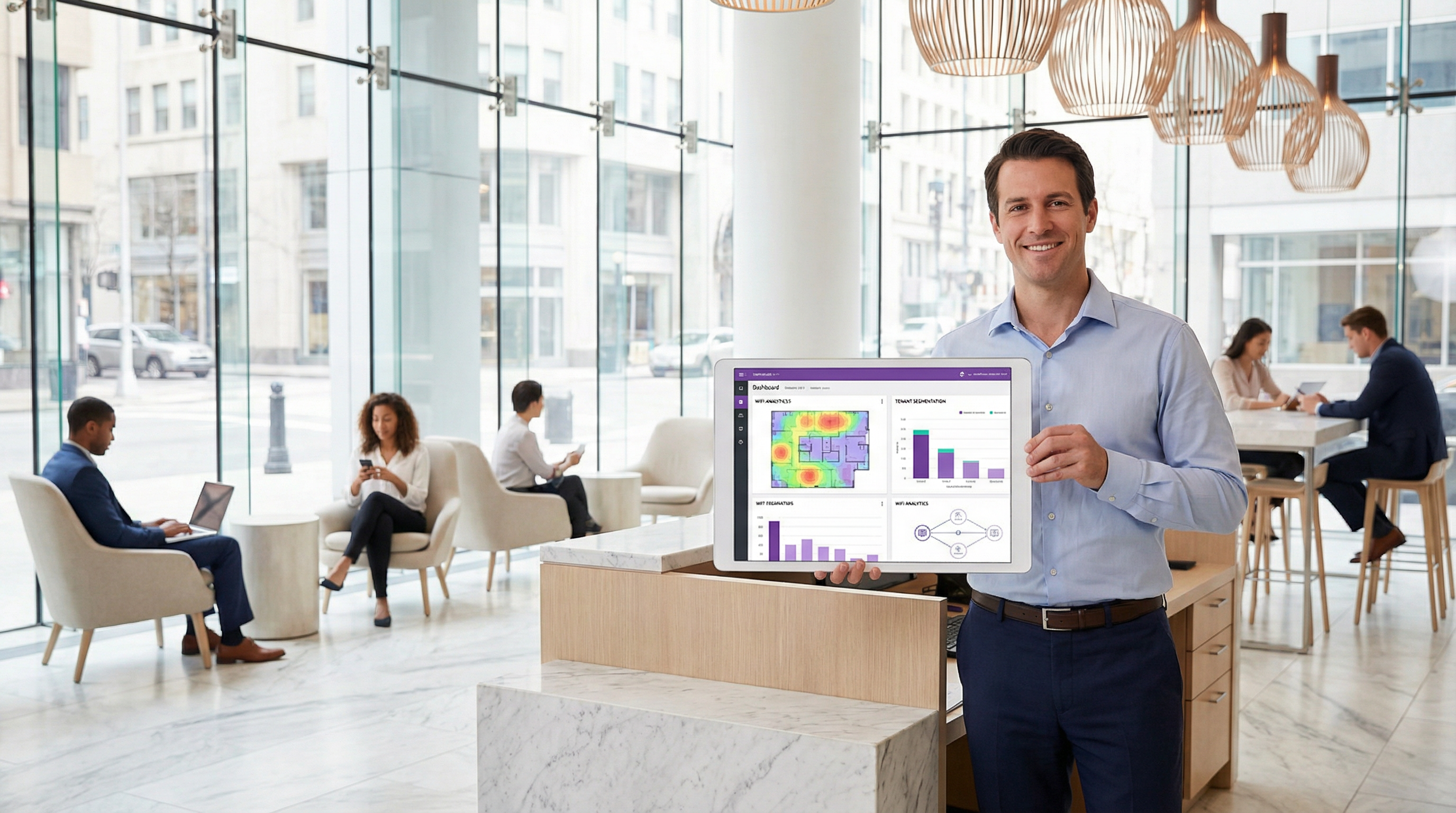
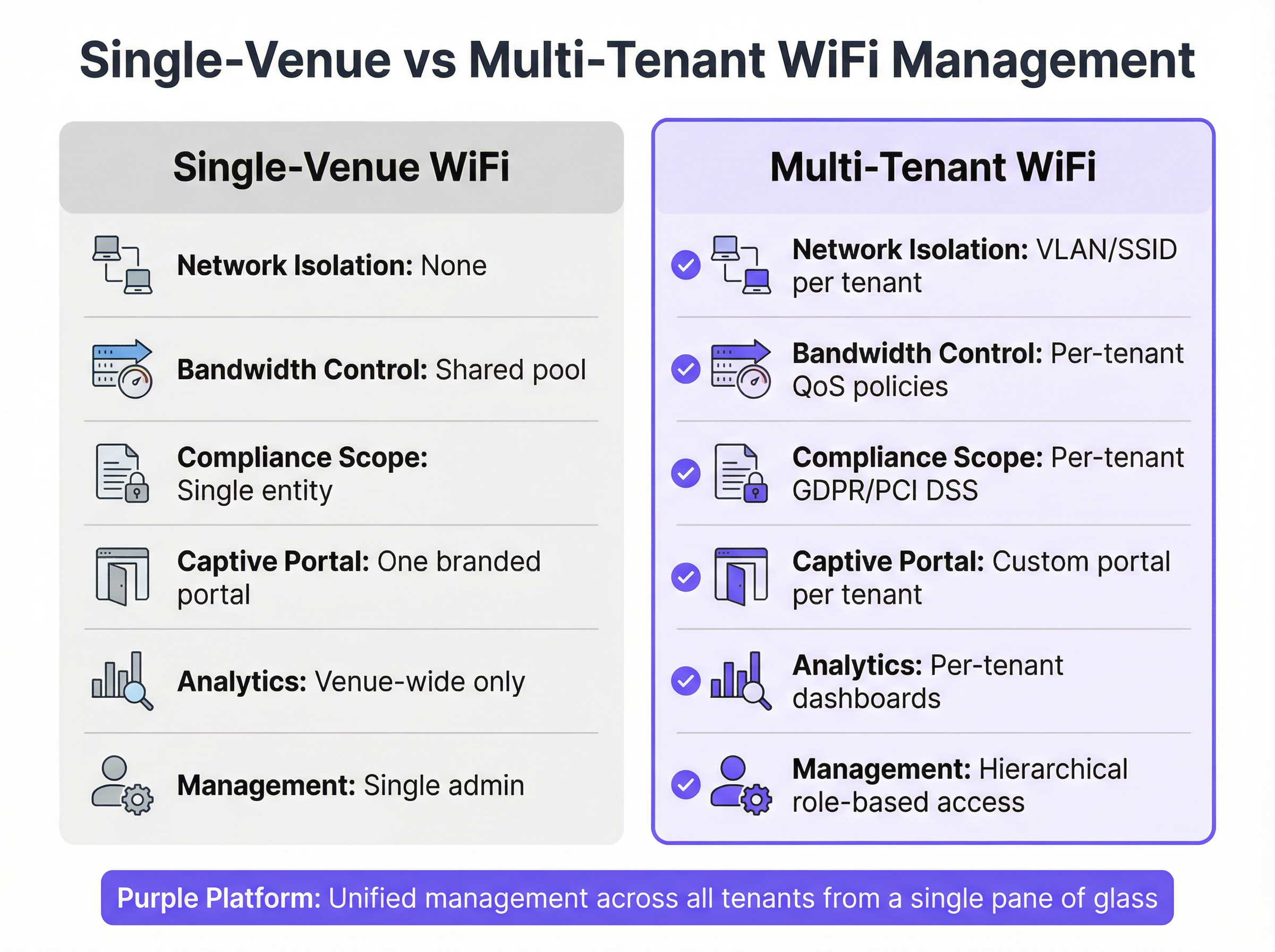
Transitioning from a single-occupant to a multi-tenant WiFi architecture requires a fundamental shift in network design philosophy — from a flat, trusted environment to a segmented, zero-trust framework. The primary objective is to ensure that multiple independent tenants coexist on a single physical infrastructure without compromising security, performance, or privacy. This is achieved through a layered approach to isolation and control.
The Foundational Role of VLANs and Segmentation
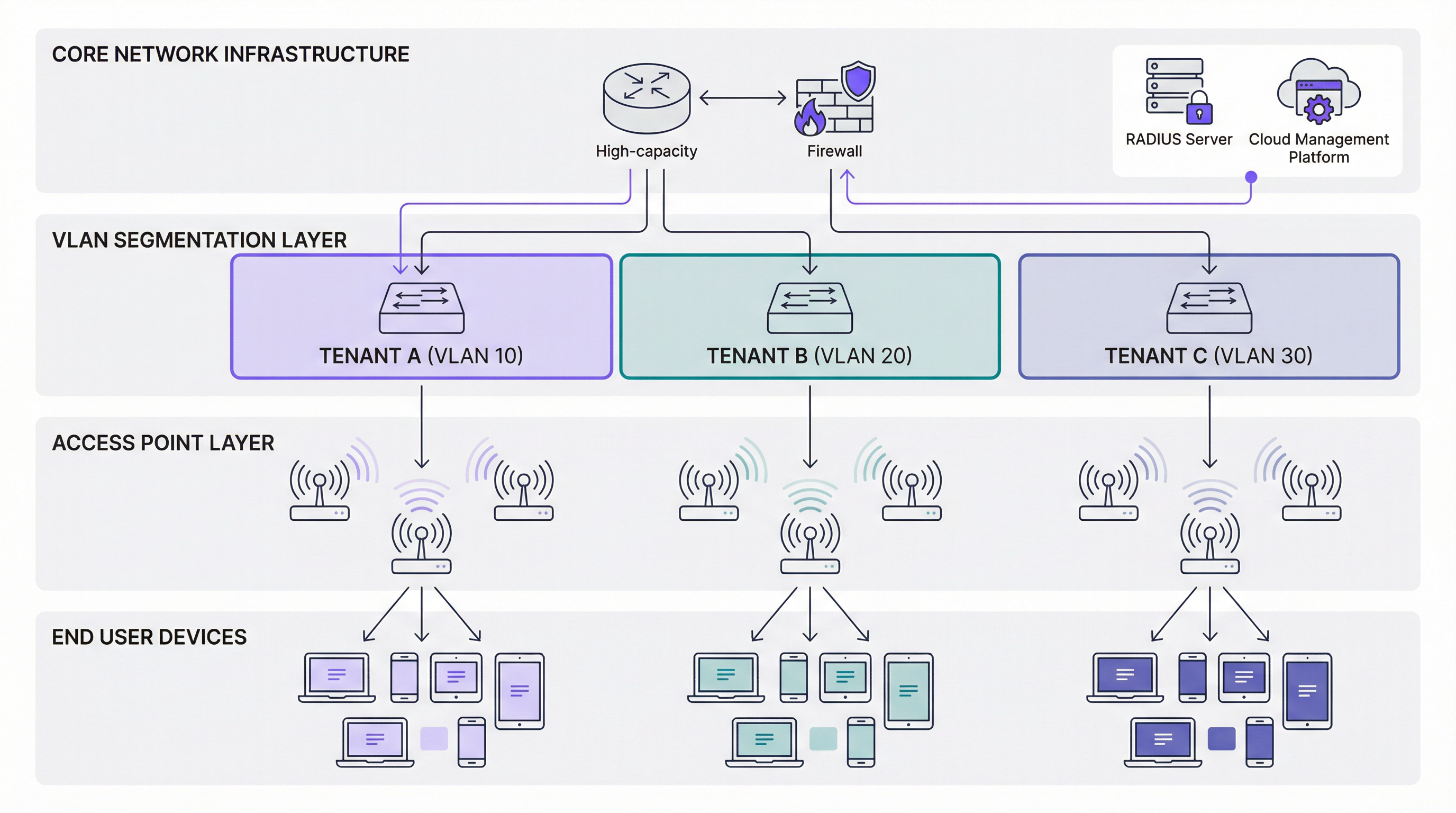
The cornerstone of any multi-tenant network is the Virtual Local Area Network (VLAN). As defined by the IEEE 802.1Q standard, VLANs allow a single physical network switch to be partitioned into multiple, logically separate broadcast domains. In practice, this means that traffic from one tenant — for example, a retail outlet on VLAN 10 — is completely invisible and inaccessible to traffic from another tenant, such as a corporate office on VLAN 20, even when their devices are connected to the same physical access point.
Key Principle: Without proper VLAN implementation, tenant separation is merely cosmetic. Multiple SSIDs on a single, flat LAN offer no meaningful security, as all devices remain in the same broadcast domain, enabling potential lateral movement by malicious actors.
Authentication and Access Control: Beyond a Single Password
In a multi-tenant environment, a one-size-fits-all approach to authentication is wholly inadequate. Different tenants have vastly different security requirements, and a robust architecture must support multiple authentication methods concurrently. For corporate or high-security tenants, WPA3-Enterprise with IEEE 802.1X authentication is the gold standard. It requires each user to authenticate with unique credentials — a username and password, or a digital certificate — against a RADIUS (Remote Authentication Dial-In User Service) server. This enables per-user accountability, detailed audit logging, and dynamic policy assignment based on user identity or group membership.
For guest networks, public spaces, or retail tenants, a captive portal is the primary mechanism for user onboarding. Modern portals, integrated with platforms like Purple, go far beyond simple splash pages. They can be fully customised per-tenant with distinct branding, enforce terms and conditions, capture user data for marketing in a GDPR-compliant manner, and integrate with social logins or payment gateways. For headless devices such as IoT sensors, unique or dynamic Pre-Shared Keys (PSKs) can be assigned to provide access within a tenant's isolated network segment without requiring a full 802.1X infrastructure.
| Authentication Method | Best For | Standard | Key Benefit |
|---|---|---|---|
| WPA3-Enterprise + 802.1X | Corporate tenants, financial services | IEEE 802.1X, RFC 2865 | Per-user identity, dynamic policy |
| Captive Portal (Enhanced Open) | Guest WiFi, retail, public access | WPA3-OWE | Branded onboarding, data capture |
| Dynamic PSK | IoT devices, temporary access | WPA3-Personal | Simple deployment, per-device key |
Ensuring Performance with Granular QoS
Performance isolation is as critical as security isolation. A single tenant running a high-bandwidth application — video streaming, large file transfers, or a software update push — cannot be permitted to degrade the service for all other tenants. This is managed through Quality of Service (QoS) policies applied at the network layer. A sophisticated multi-tenant platform enables administrators to define precise bandwidth controls on a per-tenant, per-user, or even per-application basis. Rate limiting caps the maximum upstream and downstream bandwidth available to each tenant's SSID, while bandwidth guarantees reserve a minimum allocation for mission-critical tenants, such as a corporate client hosting a live-streamed event. Traffic shaping further refines this by prioritising time-sensitive protocols — VoIP, video conferencing — over less urgent data transfers. These policies ensure a predictable and equitable distribution of network resources, which is essential for meeting Service Level Agreements (SLAs) with tenants.
Implementation Guide
Deploying a multi-tenant WiFi network is a structured process that moves through five distinct phases, from initial planning to post-deployment validation.
The first phase is Requirement Analysis and Tenant Profiling. Before any hardware is procured or configured, conduct a thorough discovery process with each prospective tenant. The objective is to understand their security posture (do they require 802.1X? are they subject to PCI DSS or HIPAA?), their performance requirements (what are their peak bandwidth demands? do they run latency-sensitive applications?), and their onboarding preferences (do they need a custom-branded captive portal? how many concurrent users do they anticipate?). This information directly informs every subsequent design decision.
The second phase is Hardware Selection and Network Design. Enterprise-grade access points and managed switches are non-negotiable. Access points must support multiple SSIDs with 802.1Q VLAN tagging and advanced QoS capabilities. Switches must be fully managed with sufficient port density and support for 802.1Q trunk and access ports. A high-throughput gateway or firewall sits at the network edge, managing inter-VLAN routing policies and enforcing security rules. Alongside hardware selection, design a logical and scalable IP addressing scheme, assigning a unique VLAN ID and corresponding IP subnet to each tenant, and document this scheme meticulously.
The third phase is Centralised Management Platform Configuration. Using Purple's platform, administrators define tenant profiles, create SSIDs mapped to their corresponding VLANs, configure authentication methods, establish QoS and rate-limiting policies, and design branded captive portals. This is the operational core of the deployment — the single pane of glass from which the entire multi-tenant environment is governed.
The fourth phase is Physical Deployment and Staged Rollout. Install access points and switches according to the RF plan, ensuring adequate coverage and capacity for each tenant zone. Apply configurations from the management platform and conduct a staged rollout, activating one tenant at a time to isolate any configuration issues before they affect the broader environment.
The fifth and final phase is Validation and Ongoing Monitoring. Conduct a rigorous testing process for each tenant, verifying that isolation, performance, and authentication are all functioning as designed. Use packet capture tools to confirm that a device on one tenant's VLAN cannot reach a device on another's. Establish ongoing monitoring dashboards and alert thresholds within the management platform to detect anomalies in real time.

Best Practices
The most effective multi-tenant deployments share a common set of operational principles. Adopting a zero-trust model from day one is paramount — assume no user or device is trustworthy by default, and enforce strict authentication and authorisation for every connection, regardless of where it originates on the network.
Role-Based Access Control (RBAC) is equally critical. A management platform that supports hierarchical administration allows the property owner's IT team to retain global administrative rights while granting individual tenants limited, scoped access to view their own analytics or manage their own captive portal. This model respects tenant autonomy without compromising the integrity of the shared infrastructure.
Regular auditing and compliance verification must be scheduled, not reactive. For tenants subject to PCI DSS, maintain detailed access logs and be prepared to demonstrate that cardholder data environments are properly isolated. For any tenant capturing user data through a captive portal, ensure that data collection, storage, and processing practices are fully compliant with GDPR, including a clear and accessible privacy notice presented at the point of authentication.
Finally, automating tenant onboarding and offboarding via the management platform's APIs dramatically reduces operational overhead, minimises the risk of human configuration error, and ensures that access is revoked promptly and completely when a tenant vacates.
Troubleshooting & Risk Mitigation
Even well-designed multi-tenant networks encounter operational challenges. The following table maps the most common failure modes to their root causes and recommended mitigations.
| Symptom | Probable Root Cause | Recommended Mitigation |
|---|---|---|
| Degraded performance across all tenants | Saturation of the primary internet uplink or firewall bottleneck | Monitor aggregate bandwidth utilisation; implement top-level QoS at the gateway; consider uplink upgrade |
| Users cannot authenticate to a specific SSID | Incorrect PSK, invalid 802.1X credentials, or misconfigured RADIUS server | Inspect client authentication logs in the management platform; review RADIUS server event logs for failed attempts |
| Inter-VLAN traffic detected in security audit | Misconfigured switch trunk port or overly permissive firewall ACL | Review all switch port configurations; enforce default-deny inter-VLAN firewall rules; audit ACLs |
| Captive portal not rendering correctly for a tenant | DNS resolution failure or incorrect portal URL configuration | Verify DNS settings for the tenant VLAN; test portal URL resolution from within the tenant's subnet |
| Tenant reports intermittent connectivity | RF interference, co-channel congestion, or AP overload | Review RF heatmaps in the management platform; adjust channel assignments and transmit power; consider additional AP coverage |
The single greatest risk in a multi-tenant environment is lateral movement — the ability of a compromised device on one tenant's network to pivot and attack devices on another. Proper VLAN segmentation, combined with strict inter-VLAN firewall rules, is the primary control against this threat. Regular penetration testing of the segmentation boundaries is strongly recommended for any environment hosting tenants with elevated security requirements.
ROI & Business Impact
A properly architected multi-tenant WiFi network is not a cost centre; it is a strategic asset with multiple, quantifiable returns. The most direct revenue opportunity is network monetisation — offering tenants tiered bandwidth packages, charging for premium event connectivity, or billing for access to custom-branded portals and analytics dashboards. For a managed property operator, this can convert a capital expenditure into a recurring revenue stream.
Beyond direct monetisation, high-quality managed WiFi is a powerful differentiator in competitive markets. In the multi-dwelling unit (MDU WiFi) sector, reliable and professionally managed shared WiFi infrastructure is increasingly a decisive factor in tenant acquisition and retention. In the commercial property sector, tenants expect enterprise-grade connectivity as a baseline amenity; failing to deliver it creates churn risk.
The operational efficiency gains from centralised management are also significant. A single IT team can manage a portfolio of properties — each with multiple tenants — from a single dashboard, eliminating the need for on-site visits for routine configuration changes. This reduces operational expenditure and accelerates response times.
Perhaps the most strategically valuable benefit is data-driven insight. By aggregating anonymised, consent-based data across all tenants, property owners gain invaluable intelligence on footfall patterns, visitor dwell times, peak usage periods, and space utilisation. This data informs decisions on property investment, tenant mix, and operational scheduling, delivering a return that extends far beyond the network itself.
Key Terms & Definitions
Multi-Tenant WiFi
A wireless network architecture in which a single physical infrastructure — access points, switches, and uplinks — is logically partitioned to serve multiple independent organisations or user groups, each with their own isolated network segment, authentication method, and management controls.
IT teams encounter this term when managing properties with multiple occupants, such as shopping centres, hotels, office parks, or multi-dwelling units. It is the foundational concept that distinguishes enterprise venue networking from a simple shared hotspot.
VLAN (Virtual Local Area Network)
A logical network segment created within a physical switched network, as defined by the IEEE 802.1Q standard. VLANs create separate broadcast domains, ensuring that traffic on one VLAN cannot be seen or accessed by devices on another VLAN without explicit routing and firewall permission.
VLANs are the primary mechanism for tenant isolation in a multi-tenant WiFi deployment. Network architects must assign a unique VLAN ID to each tenant and ensure that all switches and access points are correctly configured to tag and carry traffic for each VLAN.
IEEE 802.1X
An IEEE standard for port-based network access control that provides an authentication framework for devices attempting to connect to a LAN or WLAN. It uses the Extensible Authentication Protocol (EAP) and requires a supplicant (the client device), an authenticator (the access point or switch), and an authentication server (typically a RADIUS server).
802.1X is the recommended authentication standard for corporate tenants and any environment requiring individual user accountability. It eliminates the security risks of shared passwords and enables dynamic policy assignment based on user identity.
RADIUS (Remote Authentication Dial-In User Service)
A networking protocol and server infrastructure that provides centralised Authentication, Authorisation, and Accounting (AAA) management for users connecting to a network. In a multi-tenant WiFi context, the RADIUS server validates user credentials for 802.1X-authenticated SSIDs and can dynamically assign users to specific VLANs based on their identity or group membership.
Network architects must plan for RADIUS server redundancy (at least two servers in an active-passive configuration) to prevent authentication failures from causing a network outage. Cloud-hosted RADIUS services are increasingly common in multi-tenant deployments.
Captive Portal
A web page that intercepts a user's initial HTTP/HTTPS request when they connect to a WiFi network, requiring them to complete an action — such as accepting terms of service, entering credentials, or providing contact information — before granting full internet access. In a multi-tenant context, each tenant can have a fully customised captive portal with their own branding and data capture requirements.
Captive portals are the primary onboarding mechanism for guest and public WiFi networks. When deploying portals that capture personal data (email addresses, social login profiles), operators must ensure compliance with GDPR, including providing a clear privacy notice and obtaining explicit consent for marketing communications.
QoS (Quality of Service)
A set of network management techniques that prioritise certain types of traffic or allocate specific bandwidth resources to defined users, applications, or network segments. In a multi-tenant WiFi deployment, QoS policies are used to enforce per-tenant bandwidth limits (rate limiting), guarantee minimum throughput for premium tenants, and prioritise latency-sensitive applications such as VoIP.
QoS configuration is essential for preventing the 'noisy neighbour' problem, where a single tenant's high-bandwidth usage degrades the experience for all other tenants on the shared infrastructure. Network architects should define QoS policies as part of the tenant onboarding process, not as a reactive measure after complaints arise.
MDU WiFi (Multi-Dwelling Unit WiFi)
A specific application of multi-tenant WiFi architecture in residential properties such as apartment blocks, student accommodation, and managed housing developments. In an MDU context, each residential unit or floor is treated as a tenant, with isolated network segments providing privacy between residents and a centralised management platform enabling the property operator to deliver a managed connectivity service.
MDU WiFi deployments have specific regulatory considerations, particularly around data privacy for residential users. Property operators must be especially careful to ensure that residents cannot see each other's network traffic, and that any data captured through the network is handled in strict compliance with GDPR.
WPA3-Enterprise
The latest generation of the Wi-Fi Protected Access enterprise security protocol, introduced by the Wi-Fi Alliance. WPA3-Enterprise mandates the use of 192-bit cryptographic strength (in its highest security mode) and eliminates the vulnerabilities present in WPA2-Enterprise, including susceptibility to PMKID attacks and dictionary attacks against captured handshakes. It is used in conjunction with IEEE 802.1X for user authentication.
Network architects should specify WPA3-Enterprise as the minimum security standard for any SSID serving corporate tenants, financial services, healthcare, or any environment with elevated data sensitivity. Legacy devices that do not support WPA3 may require a separate, isolated SSID with WPA2-Enterprise as a transitional measure.
RBAC (Role-Based Access Control)
An access control model in which permissions are assigned to roles rather than to individual users, and users are assigned to roles based on their responsibilities. In a multi-tenant WiFi management platform, RBAC enables a hierarchical administration model where property owners have global access, while individual tenants have scoped access only to their own network segment and analytics data.
RBAC is a critical governance control in any multi-tenant management platform. Without it, a tenant administrator could potentially view or modify the configurations of neighbouring tenants, creating both a security risk and a significant liability for the property operator.
Lateral Movement
A cyberattack technique in which an attacker who has compromised one device on a network uses that foothold to move horizontally across the network, accessing other devices and systems. In a multi-tenant WiFi context, inadequate VLAN segmentation or overly permissive inter-VLAN firewall rules can enable lateral movement from a compromised device in one tenant's network to devices in another tenant's network.
Preventing lateral movement is the primary security objective of tenant isolation in a multi-tenant WiFi architecture. Network architects must validate that VLAN boundaries are impermeable through regular penetration testing and that firewall rules enforce a default-deny policy for all inter-VLAN traffic.
Case Studies
A 350-room full-service hotel needs to provide WiFi to four distinct groups simultaneously: hotel guests in rooms and public areas, a 1,200-capacity conference centre that hosts multiple concurrent events from different corporate clients, a ground-floor retail tenant (a coffee shop) that processes card payments, and the hotel's own back-of-house operational network used for PMS, CCTV, and POS systems. How should the network be architected to meet the security, performance, and compliance requirements of each group?
This deployment requires a minimum of four isolated network segments, each with distinct security and performance profiles. The hotel guest network (VLAN 10) should use a captive portal with WPA3-Enhanced Open, with a rate limit of 20 Mbps per device and a Purple-managed splash page for branded onboarding and GDPR-compliant data capture. The conference centre (VLAN 20) requires a more sophisticated approach: it should be sub-segmented using dynamic VLANs assigned at authentication time via 802.1X, so that delegates from Event A (VLAN 21) are isolated from delegates from Event B (VLAN 22). Each event organiser can be given a temporary admin credential in Purple to manage their own captive portal and view their own analytics. Bandwidth guarantees of 50 Mbps per event should be configured, with burst allowances up to 100 Mbps if capacity is available. The retail coffee shop (VLAN 30) processes card payments, placing it within PCI DSS scope. This segment must be strictly isolated with no inter-VLAN routing permitted under any circumstances. The POS terminals should be on a dedicated sub-VLAN (VLAN 31) with a whitelist-only firewall policy permitting traffic only to the payment processor's IP range. The back-of-house operational network (VLAN 40) should have no internet access whatsoever, operating as a fully air-gapped private LAN for internal systems. All four VLANs are configured and monitored from a single Purple dashboard, with RBAC ensuring that the conference manager can only see their own event data, the retail tenant can only see their own network, and the hotel IT team has full visibility across all segments.
A large urban shopping centre with 120 retail units across three floors wants to deploy a shared WiFi infrastructure managed centrally by the property management company. Each retail tenant should have their own branded guest WiFi for customers, their own analytics dashboard showing visitor dwell times and return visit rates, and their own bandwidth allocation. The property management company also wants to offer a premium 'anchor tenant' tier with guaranteed throughput and priority support. How should this be structured using Purple's multi-tenant platform?
The deployment begins with a hierarchical management structure in Purple. The property management company holds the top-level 'Organisation' account, with each retail tenant provisioned as a sub-account with scoped permissions. Each tenant receives a dedicated SSID mapped to a unique VLAN, with a Purple-managed captive portal fully branded with their own logo, colour scheme, and promotional messaging. The portal is configured to capture email addresses and opt-in marketing consent in compliance with GDPR, with the data flowing into the tenant's own Purple analytics dashboard. Standard tenants are allocated a 10 Mbps per-device rate limit with a 50 Mbps SSID cap, sufficient for typical retail customer browsing. Anchor tenants — large department stores or flagship brands — are provisioned on a premium tier with a 100 Mbps guaranteed bandwidth allocation, a dedicated SSID with WPA3-Enterprise for their own staff devices, and a separate guest SSID for customers. The property management company's IT team monitors the entire estate from the top-level Purple dashboard, with alerts configured for any tenant whose network utilisation exceeds 80% of their allocation (a signal to upsell to a higher tier) or drops below 10% (a signal of a potential configuration issue). Monthly analytics reports are automatically generated per tenant, showing visitor counts, dwell times, and return visit rates, which the property management company packages as a value-added service in the tenant's lease agreement.
Scenario Analysis
Q1. A university campus wants to deploy a shared WiFi infrastructure serving four groups: undergraduate students, postgraduate researchers, visiting conference delegates, and the university's own administrative staff. The research network handles sensitive grant data and must meet Cyber Essentials Plus requirements. The conference delegate network needs to be provisioned and decommissioned on a per-event basis. How would you architect the VLAN structure and authentication model to meet these requirements?
💡 Hint:Consider the compliance requirements of the research network carefully — Cyber Essentials Plus mandates specific access control and patch management requirements. Also consider how the conference network's temporary nature should influence your provisioning approach: can you use a template-based deployment model?
Show Recommended Approach
The architecture requires a minimum of four VLANs: VLAN 10 for undergraduate students (captive portal with social login, 10 Mbps rate limit), VLAN 20 for postgraduate researchers (WPA3-Enterprise with 802.1X, integrated with the university's Active Directory, access restricted to authorised devices via certificate-based authentication to meet Cyber Essentials Plus), VLAN 30 for conference delegates (captive portal, provisioned from a pre-built template in Purple that can be activated and deactivated on demand with a custom event SSID and branded portal), and VLAN 40 for administrative staff (WPA3-Enterprise with 802.1X, integrated with AD, with access to internal university systems via a site-to-site VPN or private routing). The research VLAN must have a default-deny firewall policy with explicit whitelist rules for required services, and all access must be logged for audit purposes. The conference VLAN template approach in Purple allows the IT team to onboard a new event in under 30 minutes without touching switch or firewall configurations.
Q2. You are the network architect for a managed office provider with 50 buildings across the UK, each hosting between 10 and 40 small business tenants. You need to design a scalable multi-tenant WiFi service that can be managed by a central IT team of five people. What management architecture and automation strategy would you recommend to make this operationally viable?
💡 Hint:With 50 buildings and up to 2,000 tenants, manual configuration is not viable. Consider how Purple's API and hierarchical management model can be used to automate tenant provisioning, and how you would structure the management hierarchy to delegate appropriate access to building managers without compromising central governance.
Show Recommended Approach
The solution requires a three-tier management hierarchy in Purple: the managed office provider at the top level with full administrative access, building managers at the second level with access scoped to their specific building, and individual tenants at the third level with access only to their own captive portal design and analytics dashboard. Tenant provisioning must be fully automated via Purple's API, integrated with the company's CRM or property management system. When a new tenant signs a lease, the CRM triggers an API call to Purple that creates the tenant profile, provisions the SSID, assigns the VLAN (from a pre-allocated pool per building), sets the bandwidth tier based on the contracted service level, and generates a branded captive portal from a template. When a tenant vacates, the offboarding workflow automatically deactivates the SSID and releases the VLAN back to the pool. This automation reduces the per-tenant provisioning time from hours to minutes and eliminates the risk of orphaned configurations. The central IT team's role shifts from manual configuration to policy governance, exception handling, and performance monitoring across the estate.
Q3. A stadium operator hosts 40 events per year, ranging from 20,000-capacity football matches to 5,000-capacity corporate conferences. During a football match, the primary use case is fan engagement (social media, team apps, live stats). During corporate conferences, the primary use case is business productivity (video conferencing, cloud applications). How would you configure the QoS and bandwidth management policies to optimise the network for each event type, and how would you switch between configurations efficiently?
💡 Hint:Consider that the two event types have fundamentally different traffic profiles: football matches generate massive concurrent bursts of social media uploads and streaming, while conferences require consistent, low-latency throughput for video calls. A single QoS policy cannot optimise for both. Think about how event-type templates in the management platform could solve this.
Show Recommended Approach
The solution is to create two distinct QoS policy templates in Purple: a 'Fan Engagement' template and a 'Corporate Conference' template. The Fan Engagement template prioritises high-throughput, burst-tolerant traffic by setting a relatively high per-device rate limit (e.g., 5 Mbps) to accommodate simultaneous social media uploads, while deprioritising or throttling streaming video to prevent any single user from consuming disproportionate bandwidth during peak moments (e.g., a goal). The Corporate Conference template inverts these priorities: it sets a lower per-device rate limit for general browsing (e.g., 2 Mbps) but implements strict QoS prioritisation for DSCP-marked video conferencing traffic (e.g., Zoom, Teams), ensuring that video calls receive consistent, low-latency throughput even under load. Switching between templates is handled through Purple's event management workflow: the operations team selects the event type when creating the event in the platform, and the appropriate QoS template is automatically applied to all relevant SSIDs. This eliminates the risk of a corporate conference running on a fan engagement QoS profile, which would result in degraded video call quality.
Key Takeaways
- ✓Multi-tenant WiFi requires VLAN-based network segmentation as its foundational security control — multiple SSIDs without proper VLAN tagging provide no meaningful tenant isolation and create a significant security liability.
- ✓Authentication must be matched to tenant type: WPA3-Enterprise with IEEE 802.1X for corporate and regulated tenants; GDPR-compliant captive portals for guest and public access; dynamic PSKs for IoT and headless devices.
- ✓QoS and rate-limiting policies are not optional — they are essential for preventing the 'noisy neighbour' problem and for meeting SLA commitments with tenants who have contracted for specific bandwidth tiers.
- ✓Compliance requirements must be assessed per-tenant at onboarding: PCI DSS mandates strict isolation and default-deny firewall policies for any tenant processing card payments; GDPR governs all captive portal data capture.
- ✓Centralised, cloud-based management platforms like Purple are the operational enabler for multi-tenant WiFi at scale — they provide the single pane of glass for configuration, monitoring, RBAC, and analytics across an entire property portfolio.
- ✓Lateral movement prevention is the primary security benefit of proper tenant isolation — VLAN boundaries and default-deny inter-VLAN firewall rules contain the blast radius of any compromised device to a single tenant segment.
- ✓A well-architected multi-tenant WiFi network is a revenue-generating asset, not a cost centre — it enables tiered service monetisation, provides tenants with valuable visitor analytics, and is a demonstrable differentiator in competitive property markets.




