

Network Onboarding UX: Designing a Frictionless WiFi Setup Experience
This guide provides a comprehensive technical framework for designing a frictionless WiFi network onboarding UX, covering captive portal detection mechanics across iOS, Android, Windows, and macOS, and detailing self-service certificate enrolment for 802.1X staff networks. It equips IT managers, network architects, and venue operations directors with actionable strategies to reduce helpdesk overhead, improve first-connection success rates, and maintain GDPR and PCI DSS compliance across hospitality, retail, and campus environments.
🎧 Listen to this Guide
View Transcript
Executive Summary
The onboarding experience is the critical first touchpoint between a user and your network infrastructure. For venue operators and enterprise IT teams, a frictionless WiFi network onboarding UX is not merely a convenience — it is a fundamental operational requirement that directly impacts support overhead and user satisfaction. When guests or staff struggle to connect, the immediate consequence is an influx of helpdesk tickets, abandoned connections, and a degraded perception of the venue or organisation.
This guide provides a comprehensive technical framework for designing a seamless WiFi setup experience, addressing the complexities of captive portal detection across iOS, Android, Windows, and macOS, while detailing the implementation of self-service certificate enrolment for 802.1X networks. By adopting the strategies outlined here, IT leaders can significantly reduce support overhead, enhance security compliance, and ensure a robust first-connection success rate across all device types. Whether you are managing Hospitality properties, Retail environments, or public-sector campuses, the principles remain consistent: design for the device, design for compliance, and design for the user.
Technical Deep-Dive: The Mechanics of Captive Portal Detection
Understanding how different operating systems handle captive portal detection is essential for designing a reliable onboarding flow. The underlying mechanisms vary significantly across platforms, often leading to inconsistent user experiences when not properly managed.
Windows: Network Connectivity Status Indicator (NCSI)
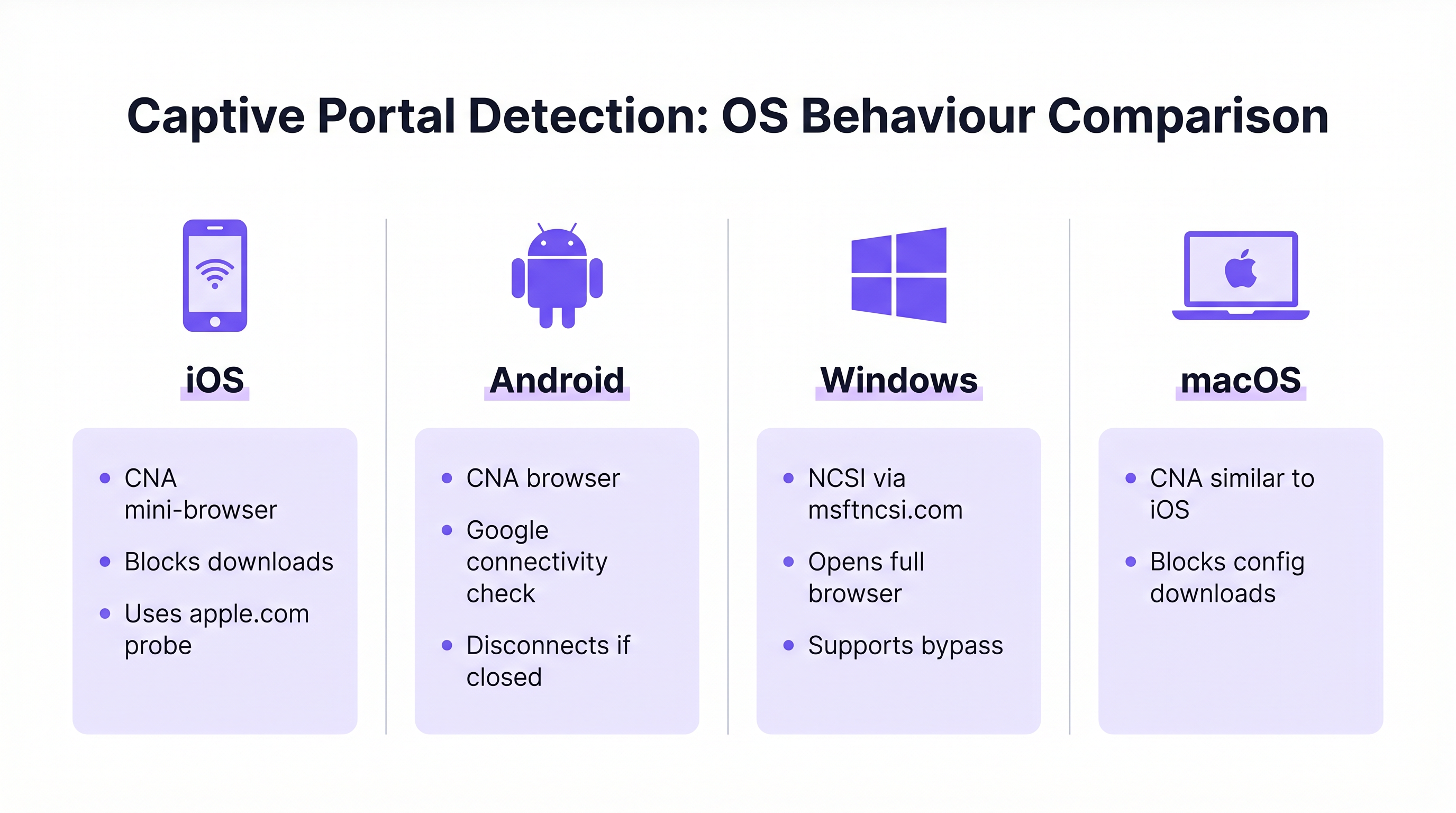
Windows employs the Network Connectivity Status Indicator (NCSI) to evaluate internet access. Upon connecting to a network, Windows attempts to resolve and access a specific Microsoft domain, typically www.msftncsi.com. If this request is intercepted and redirected by the network, Windows identifies the presence of a captive portal and immediately launches the default web browser to display the portal page. [^1]
A critical best practice is to ensure that the captive portal consistently redirects all traffic until authentication is complete. Allowing premature access to the NCSI domain results in a false positive connectivity check, preventing the portal from appearing and leaving the user in a "Connected, no internet" state with no visible path to resolution. Furthermore, Windows supports provisioning files that enable automatic reconnection to future networks, enhancing the experience for returning users. [^1]
iOS and macOS: Captive Network Assistant (CNA)
Apple devices utilise the Captive Network Assistant (CNA), a specialised, limited-functionality mini-browser designed specifically for handling captive portals. When an iOS or macOS device connects to an open network, it probes specific Apple URLs (e.g., captive.apple.com). If the expected response is not received, the CNA automatically presents the portal interface.
While effective for basic splash pages, the CNA poses a significant challenge for enterprise onboarding: it strictly prohibits file downloads and profile installations. This security measure prevents the direct downloading of configuration payloads required for 802.1X certificate onboarding. To overcome this limitation, enterprise deployments must implement CNA Breakout technology, which detects the CNA environment and prompts the user to transition to a full browser (such as Safari) to complete the certificate enrolment process. [^2]
Android: Google Connectivity Checks
Android devices perform similar connectivity checks using Google-hosted URLs. Like iOS, Android often utilises a limited browser environment for captive portals. A notable behaviour in modern Android versions is that the captive portal browser will automatically dismiss itself once it detects full internet access. However, if a user manually closes the portal window before completing authentication, Android will typically disconnect from the network entirely, requiring the user to restart the connection process. Portal designs must account for this by making the completion action clear and prominent.
| OS | Detection Mechanism | Portal Browser | File Downloads | Key Risk |
|---|---|---|---|---|
| Windows | NCSI via msftncsi.com | Full browser | Allowed | False positive if NCSI domain unblocked |
| iOS | Apple probe (captive.apple.com) | CNA mini-browser | Blocked | Profile download fails without CNA Breakout |
| macOS | Apple probe (captive.apple.com) | CNA mini-browser | Blocked | Profile download fails without CNA Breakout |
| Android | Google connectivity check | Limited browser | Restricted | Disconnects if portal window closed early |
Implementation Guide: Designing the Onboarding Flow
Designing an effective onboarding flow requires a strategic balance between security, compliance, and user convenience. The approach differs significantly depending on whether the target audience consists of transient guests or permanent staff.
Guest WiFi: The Captive Portal Experience
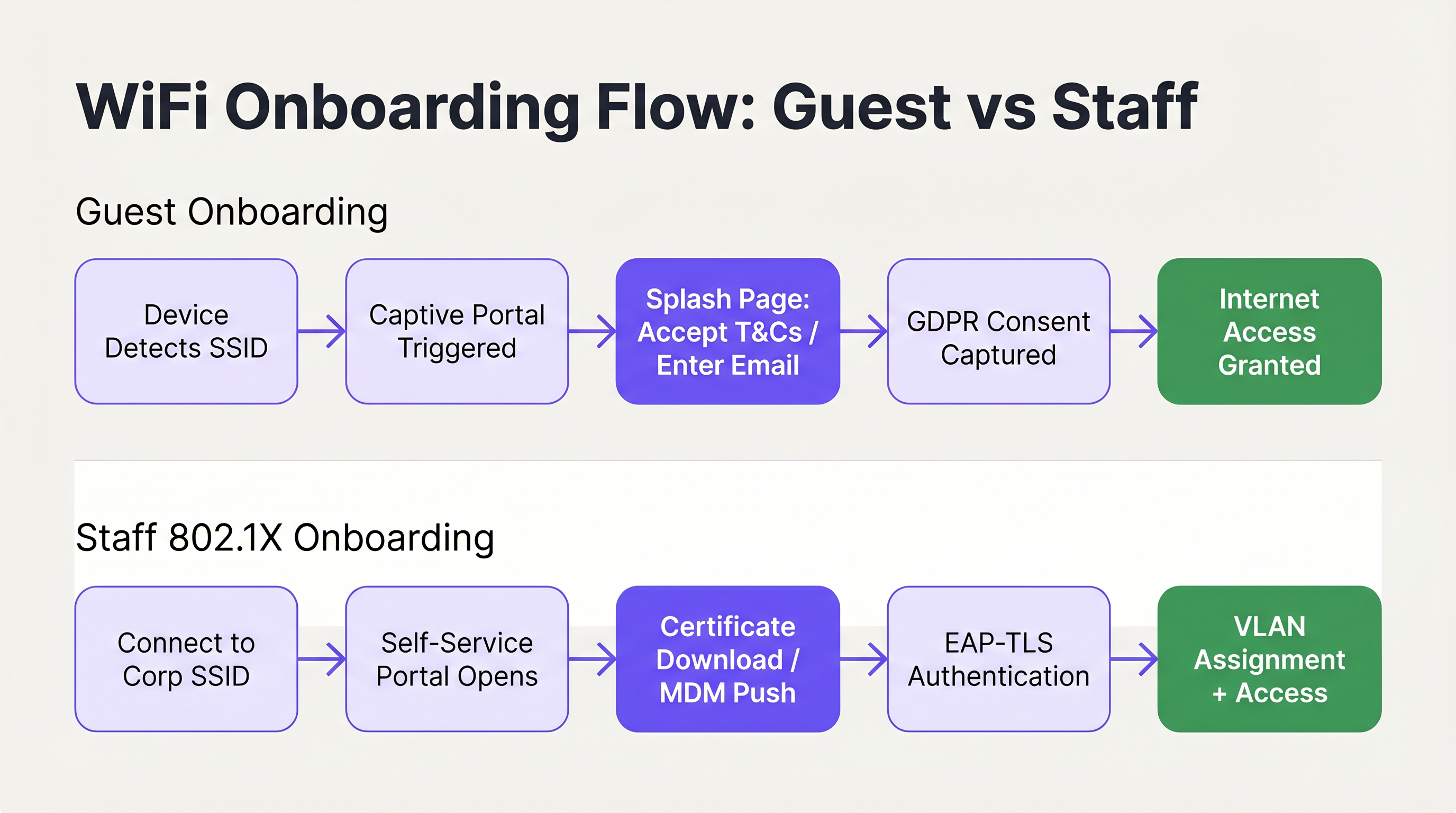
For guest access, the primary objective is to facilitate a rapid, intuitive connection while capturing necessary data and ensuring compliance. The deployment of a branded captive portal is the standard approach. The user interface must be clean, touch-friendly, and clearly communicate the required actions. Utilising solutions like Guest WiFi allows venues to present a professional splash page that seamlessly guides users through the acceptance of terms and conditions or the provision of an email address.
Crucially, the onboarding flow must align with data privacy regulations such as GDPR. The portal should explicitly capture user consent for data processing and marketing communications, ensuring that data collection is transparent and minimal. Marketing consent must be opt-in rather than pre-ticked, and the privacy policy must be clearly accessible. Furthermore, network segmentation is a mandatory requirement, particularly for PCI DSS compliance in retail and hospitality environments. Guest traffic must be strictly isolated from internal corporate networks and point-of-sale systems to mitigate security risks. [^3]
The authentication method chosen for the portal directly impacts both the user experience and the quality of data captured. The most common approaches are email registration (low friction, moderate data quality), social login via OAuth (moderate friction, high data quality), and SMS verification (higher friction, highest data quality). For most hospitality and retail deployments, email registration with an optional social login fallback represents the optimal balance. SMS verification is best reserved for environments where data accuracy is a primary commercial objective, such as loyalty programme integrations.
For Hospitality deployments specifically, the post-authentication redirect is a significant revenue opportunity. Rather than simply granting access and leaving the user on a blank page, redirect to a branded welcome page, a promotional offer, or a loyalty programme enrolment prompt. This is where the guest WiFi investment begins generating direct business value beyond connectivity. For further guidance on this topic, see Modern Hospitality WiFi Solutions Your Guests Deserve.
Session management is another frequently overlooked aspect of guest onboarding UX. Configure your portal to recognise returning devices by MAC address and grant access automatically without requiring re-entry of credentials. This dramatically improves the experience for repeat visitors and is particularly valuable in retail environments where customers visit frequently. The session duration and re-authentication interval should be calibrated to the venue type: a hotel might set a 24-hour session aligned with the check-in cycle, while a coffee shop might use a 4-hour session to manage network congestion during peak periods.
Staff WiFi: Self-Service Certificate Enrolment
Onboarding staff devices, particularly in Bring Your Own Device (BYOD) scenarios, requires a more robust security posture, typically leveraging IEEE 802.1X and EAP-TLS for certificate-based authentication. The challenge lies in deploying these certificates to unmanaged devices without overwhelming the IT helpdesk.
The recommended architecture is a self-service onboarding portal. Users initially connect to an open, restricted onboarding SSID. This network is isolated using VLAN segmentation and Access Control Lists (ACLs), permitting access only to the enrolment portal and necessary identity providers. The portal guides the user through authenticating with their corporate credentials, after which a unique client certificate and network configuration profile are generated and downloaded to the device. Once the profile is installed, the device automatically transitions to the secure corporate SSID (using WPA3-Enterprise) and authenticates transparently using the certificate.
For a detailed technical walkthrough on integrating these flows with Microsoft identity services, refer to the Azure AD and Entra ID WiFi Authentication: Integration and Configuration Guide. Understanding how SD-WAN and modern network architecture interact with these onboarding flows is also relevant; see The Core SD WAN Benefits for Modern Businesses for context on the broader network infrastructure picture.
Best Practices for Frictionless UX
To ensure a high first-connection success rate, IT architects should adhere to the following vendor-neutral best practices, drawn from deployments across enterprise, hospitality, and public-sector environments.
Prioritise clear and concise communication. Visual elements within the portal should guide the user intuitively, minimising cognitive load. Ensure that help and support contact information is prominently displayed, allowing users to quickly resolve issues without frustration. [^2] Progress indicators are particularly valuable in multi-step flows such as certificate enrolment.
Implement CNA Breakout for all 802.1X self-service portals. Attempting to force profile downloads through the iOS or macOS Captive Network Assistant will invariably fail, leading to immediate support calls. The portal must intelligently detect the CNA environment and provide clear instructions for opening a full browser. This is not an optional enhancement; it is a prerequisite for a functional iOS onboarding experience. [^2]
Utilise hidden SSIDs to reduce confusion. By broadcasting only the primary guest and secure corporate networks, and hiding the temporary onboarding SSID, you reduce the risk of users attempting to connect to the wrong network. The onboarding SSID can be communicated via QR code or welcome documentation.
Design for touch-first interaction. With the majority of guest connections originating from smartphones, portal layouts must use large, easily tappable controls, avoid excessive scrolling, and break complex flows into multiple short pages. [^1]
Leverage WiFi Analytics for continuous optimisation. Tracking portal abandonment rates, device type distributions, and connection success rates provides the data required to identify and resolve friction points in the onboarding journey. For environments that also require physical wayfinding integration, Wayfinding and Sensors can complement the WiFi analytics layer to deliver a comprehensive venue intelligence picture.
Troubleshooting & Risk Mitigation
Even with a well-designed onboarding flow, issues can arise. Understanding common failure modes is essential for rapid troubleshooting and proactive risk mitigation.
Captive portal fails to appear. This is almost always caused by an overly permissive pre-authentication ACL. If a device can successfully reach its OS-specific connectivity check URLs before authenticating, the OS will assume it has full internet access and will not trigger the portal. Audit the walled garden configuration and ensure that NCSI and Apple probe domains are intercepted and redirected until the user has fully authenticated.
Certificate trust failures in 802.1X deployments. If the device does not trust the RADIUS server's certificate, EAP-TLS authentication will fail silently. The user will see a generic "unable to connect" message with no actionable guidance. The self-service onboarding profile must explicitly include the complete Root CA certificate chain to establish trust. This is the single most common cause of silent 802.1X failures in BYOD deployments.
iOS users unable to download configuration profiles. This is the CNA problem described above. If the portal has not implemented CNA Breakout, iOS users will be unable to proceed. Verify that the breakout mechanism is functioning correctly by testing on a physical iOS device, not just a simulator.
Inconsistent portal behaviour across SSID roaming. In multi-site or multi-controller deployments, ensure that the captive portal redirect logic is consistent across all access points. Inconsistent behaviour — where some APs redirect and others do not — creates a confusing and unpredictable user experience. This is particularly relevant for Retail chains and Transport hubs where users roam across multiple sites and expect a consistent experience.
ROI & Business Impact
The business impact of optimising the WiFi onboarding UX extends far beyond user convenience. For enterprise IT departments, the primary return on investment is realised through a significant reduction in support overhead. WiFi-related helpdesk tickets are among the most expensive to resolve, requiring technical staff time for issues that are, in most cases, preventable through better portal design and configuration.

For venues utilising WiFi Analytics, a seamless onboarding process directly increases the volume of connected users, thereby enriching the data available for footfall analysis, dwell time measurement, and customer engagement strategies. In Retail environments, this translates directly to more accurate customer journey data and more effective targeted marketing. In Hospitality settings, a smooth connection experience contributes measurably to guest satisfaction scores. Healthcare environments also benefit significantly; for context on WiFi deployment in regulated settings, see the Healthcare industry resources.
The following metrics provide the framework for quantifying onboarding performance and demonstrating ROI:
| Metric | Definition | Target Benchmark |
|---|---|---|
| First-Connection Success Rate | % of users who connect successfully on first attempt | > 95% |
| Portal Abandonment Rate | % of users who start but do not complete the portal flow | < 10% |
| Time to Connect | Average time from SSID selection to internet access | < 45 seconds |
| WiFi Support Ticket Volume | Monthly helpdesk tickets attributable to WiFi onboarding | Declining month-on-month |
| Return Visitor Auto-Connect Rate | % of returning devices that reconnect without portal re-entry | > 80% |
By treating network onboarding as a critical user experience journey rather than a mere technical necessity, organisations can deliver secure, compliant, and frictionless connectivity that supports both operational goals and measurable business outcomes. For further context on how access point infrastructure underpins these experiences, see Wireless Access Points Definition Your Ultimate 2026 Guide.
[^1]: Microsoft Learn. "Captive Portal Detection and User Experience in Windows." https://learn.microsoft.com/en-us/windows-hardware/drivers/mobilebroadband/captive-portals [^2]: SecureW2. "Wi-Fi Onboarding and Captive Portal Best Practices." https://securew2.com/blog/wi-fi-onboarding-captive-portal [^3]: Purple. "Guest WiFi vs Staff WiFi: Network Segmentation Best Practices." https://www.purple.ai/en-GB/guides/guest-wifi-vs-staff-wifi-segmentation
Key Terms & Definitions
Captive Portal
A web page that a user of a public-access network is obliged to view and interact with before internet access is granted. It is used to enforce acceptable use policies, capture consent, authenticate users, or present branded content.
IT teams deploy captive portals as the primary gateway for guest network access to ensure compliance, gather analytics, and deliver branded experiences.
NCSI (Network Connectivity Status Indicator)
A Windows feature that performs active and passive tests to determine internet connectivity, primarily by attempting to reach specific Microsoft domains such as msftncsi.com.
Understanding NCSI is crucial for ensuring that Windows devices correctly detect and display the captive portal rather than reporting a false positive 'connected' status.
CNA (Captive Network Assistant)
A limited-functionality mini-browser utilised by iOS and macOS to display captive portals. It intentionally restricts features including file downloads, cookie persistence, and JavaScript execution for security reasons.
The CNA is the primary technical hurdle when deploying 802.1X configuration profiles to Apple devices, necessitating specific CNA Breakout strategies.
CNA Breakout
A technical mechanism used within a captive portal to detect the presence of a limited CNA browser and prompt the user to open the portal page in a fully featured browser such as Safari or Chrome.
This is a mandatory requirement for any self-service onboarding flow that requires the user to download and install a network configuration profile on an iOS or macOS device.
IEEE 802.1X
An IEEE Standard for port-based Network Access Control (PNAC) that provides an authentication mechanism to devices wishing to attach to a LAN or WLAN, requiring successful authentication before network access is granted.
This is the enterprise standard for securing staff and corporate networks, moving beyond shared passwords to individual identity verification via RADIUS.
EAP-TLS (Extensible Authentication Protocol - Transport Layer Security)
A highly secure authentication protocol used within 802.1X that requires both the client device and the authentication server to verify each other using digital certificates, providing mutual authentication.
Considered the gold standard for enterprise WiFi security, it eliminates credential theft risks by relying on cryptographic certificates rather than passwords.
VLAN (Virtual Local Area Network)
A logical subnetwork that groups a collection of devices from different physical LANs, allowing network administrators to partition a single switched network to match functional and security requirements.
VLANs are essential for segmenting guest traffic from corporate traffic, ensuring PCI DSS compliance and overall network security in multi-tenant environments.
Walled Garden
A restricted pre-authentication network environment that controls which IP addresses or domains a user can reach before they have fully authenticated through the captive portal.
Configuring the walled garden correctly is vital: it must allow access to the portal server and identity providers while blocking general internet access to ensure OS portal detection triggers correctly.
WPA3-Enterprise
The latest generation of the Wi-Fi Protected Access security protocol for enterprise networks, offering enhanced protection through 192-bit security mode and improved key establishment mechanisms.
WPA3-Enterprise is the recommended security protocol for corporate SSIDs, particularly when combined with 802.1X and EAP-TLS for certificate-based authentication.
RADIUS (Remote Authentication Dial-In User Service)
A networking protocol that provides centralised authentication, authorisation, and accounting (AAA) management for users who connect to a network service.
The RADIUS server is the backbone of 802.1X deployments, validating client certificates and determining which VLAN to assign to each authenticated device.
Case Studies
A 400-room luxury hotel is deploying a new guest WiFi network and a secure staff network. They currently experience high volumes of support calls from guests unable to see the login page, and staff struggle to configure their personal phones for the secure network. How should the IT architect design the onboarding flow to resolve both issues?
For the guest network, the architect must audit the Walled Garden settings on the wireless controller. Pre-authentication ACLs must strictly block access to OS connectivity check URLs — specifically msftncsi.com for Windows devices and captive.apple.com for Apple devices — and redirect all HTTP and HTTPS traffic to the Purple captive portal. This guarantees the portal triggers reliably across all device types. The portal itself should be branded to the hotel, require only an email address and terms acceptance, and redirect post-authentication to a welcome page with the hotel's amenity information.
For the staff network, the architect should implement a self-service onboarding portal on an isolated VLAN. Staff connect to a hidden onboarding SSID, authenticate via the portal using their Active Directory or Entra ID credentials, and download a configuration profile. The portal must implement CNA Breakout to ensure iOS users are prompted to open Safari to download the profile, bypassing the restrictive Apple mini-browser. The profile must include the Root CA certificate for the RADIUS server. Once installed, the device auto-connects to the WPA3-Enterprise staff SSID using EAP-TLS and is assigned to the appropriate VLAN based on their identity group.
A national retail chain with 200 stores is updating its in-store WiFi to provide seamless guest access that encourages loyalty app downloads, while ensuring strict compliance with PCI DSS for their point-of-sale systems. What architectural decisions must be made regarding the onboarding UX?
The architecture must enforce strict network segmentation as its foundation. The guest WiFi must operate on a dedicated VLAN, completely isolated from the corporate and POS VLANs through both VLAN tagging and ACL enforcement at the distribution layer. No routing path should exist between the guest VLAN and the PCI-regulated environment.
The guest onboarding flow will utilise a captive portal that captures GDPR-compliant consent before granting access. The form should be minimal — email address, opt-in marketing consent checkbox, and terms acceptance. The post-authentication redirect should send users directly to the relevant app store page for the loyalty application, with a clear call to action. The captive portal traffic itself must be served over HTTPS to protect any user data entered during the onboarding process. Returning customers should be recognised by MAC address and granted access without re-entering details, improving the repeat-visit experience.
Scenario Analysis
Q1. Your helpdesk is receiving reports that users on Windows laptops are connecting to the guest network, but the splash page never appears. They see a 'Connected, no internet' status in the system tray. What is the most likely configuration error, and how do you resolve it?
💡 Hint:Consider how Windows determines whether it is behind a captive portal or simply offline — and what specific domain it uses to make that determination.
Show Recommended Approach
The most likely cause is an overly permissive Walled Garden configuration. If the pre-authentication ACLs allow traffic to Microsoft's NCSI domain (msftncsi.com), Windows successfully resolves the connectivity check and assumes it has full internet access, so the captive portal browser is never launched. The resolution is to tighten the Walled Garden ACLs to intercept and redirect requests to msftncsi.com until the user has completed portal authentication. Only the portal server, identity provider, and essential CDN resources should be whitelisted in the pre-auth policy.
Q2. You are designing a self-service onboarding flow for university students to connect their personal iPhones to the secure eduroam (802.1X) network. What specific technical mechanism must you include in the portal design, and why is it necessary?
💡 Hint:Think about the limitations of the default browser that automatically appears on iOS when connecting to an open network.
Show Recommended Approach
You must implement CNA Breakout technology. When an iPhone connects to an open network, iOS automatically opens the Captive Network Assistant (CNA), a restricted mini-browser that intentionally blocks file downloads and profile installations as a security measure. Without CNA Breakout, the student will be unable to download the 802.1X configuration profile, and the onboarding will fail silently. The portal must detect the CNA environment and present a clear prompt instructing the user to open the portal URL in Safari, where the full browser allows the profile to be downloaded and installed.
Q3. A retail client wants to use their guest WiFi to collect customer emails for marketing, but they are concerned about PCI DSS compliance regarding their in-store payment terminals on the same physical network infrastructure. What architectural requirement is mandatory, and what specific control enforces it?
💡 Hint:How do you ensure that a compromised guest device cannot reach the payment systems, even if they share the same physical access points?
Show Recommended Approach
Strict network segmentation is mandatory. The guest WiFi network must be placed on a completely separate VLAN from the corporate and point-of-sale (POS) networks. Access Control Lists (ACLs) must be applied at the distribution or core layer to ensure that no traffic can route between the guest VLAN and the PCI-regulated environment. This isolation must be enforced at the network layer, not merely at the SSID level, since SSID-only separation is insufficient for PCI DSS compliance. The guest VLAN should only have outbound internet access, with no routing paths to any internal subnets.
Q4. After deploying a self-service 802.1X onboarding portal, staff members report that their personal Android phones successfully downloaded and installed the configuration profile, but their iPhones show 'Unable to join the network' when attempting to connect to the corporate SSID. What is the most likely cause?
💡 Hint:The profile installed successfully, so the issue is not with the download. Think about what happens during the EAP-TLS handshake when the device attempts to authenticate.
Show Recommended Approach
The most likely cause is a missing Root CA certificate in the configuration profile. During EAP-TLS authentication, the device must trust the certificate presented by the RADIUS server. If the Root CA that signed the RADIUS server certificate is not included in the onboarding profile, iOS will reject the RADIUS certificate and fail the authentication silently. Android may have the Root CA in its system trust store by default, which is why Android devices succeed while iOS devices fail. The resolution is to update the configuration profile to include the complete certificate trust chain, including the Root CA, before redistributing it to iOS users.
Key Takeaways
- ✓A frictionless WiFi network onboarding UX is a measurable operational requirement: poor onboarding directly increases helpdesk ticket volume and reduces guest engagement.
- ✓Windows, iOS, Android, and macOS use fundamentally different mechanisms to detect captive portals — designing and testing for each OS is non-negotiable.
- ✓The iOS Captive Network Assistant (CNA) blocks file downloads, making CNA Breakout technology a prerequisite for any 802.1X certificate-based onboarding flow on Apple devices.
- ✓Guest onboarding must balance rapid access with GDPR-compliant consent capture and PCI DSS-mandated network segmentation.
- ✓Staff BYOD onboarding should leverage self-service portals with EAP-TLS certificate deployment to eliminate helpdesk calls and achieve zero-touch provisioning.
- ✓The three most common onboarding failures are: misconfigured walled gardens, missing CNA Breakout, and incomplete certificate trust chains — all preventable through proper design and pre-launch testing.
- ✓Track first-connection success rate, portal abandonment rate, and WiFi support ticket volume as the core KPIs for onboarding performance and ROI justification.




