
PEAP-MSCHAPv2: Why It Is Still Common, Why It Is Risky, and How to Move On
A comprehensive technical reference guide detailing the critical security vulnerabilities of PEAP-MSCHAPv2, including evil twin attacks and credential capture. It provides a practical, vendor-neutral roadmap for IT teams to migrate enterprise WiFi networks to secure, certificate-based EAP-TLS authentication.
Listen to this guide
View podcast transcript
Executive Summary
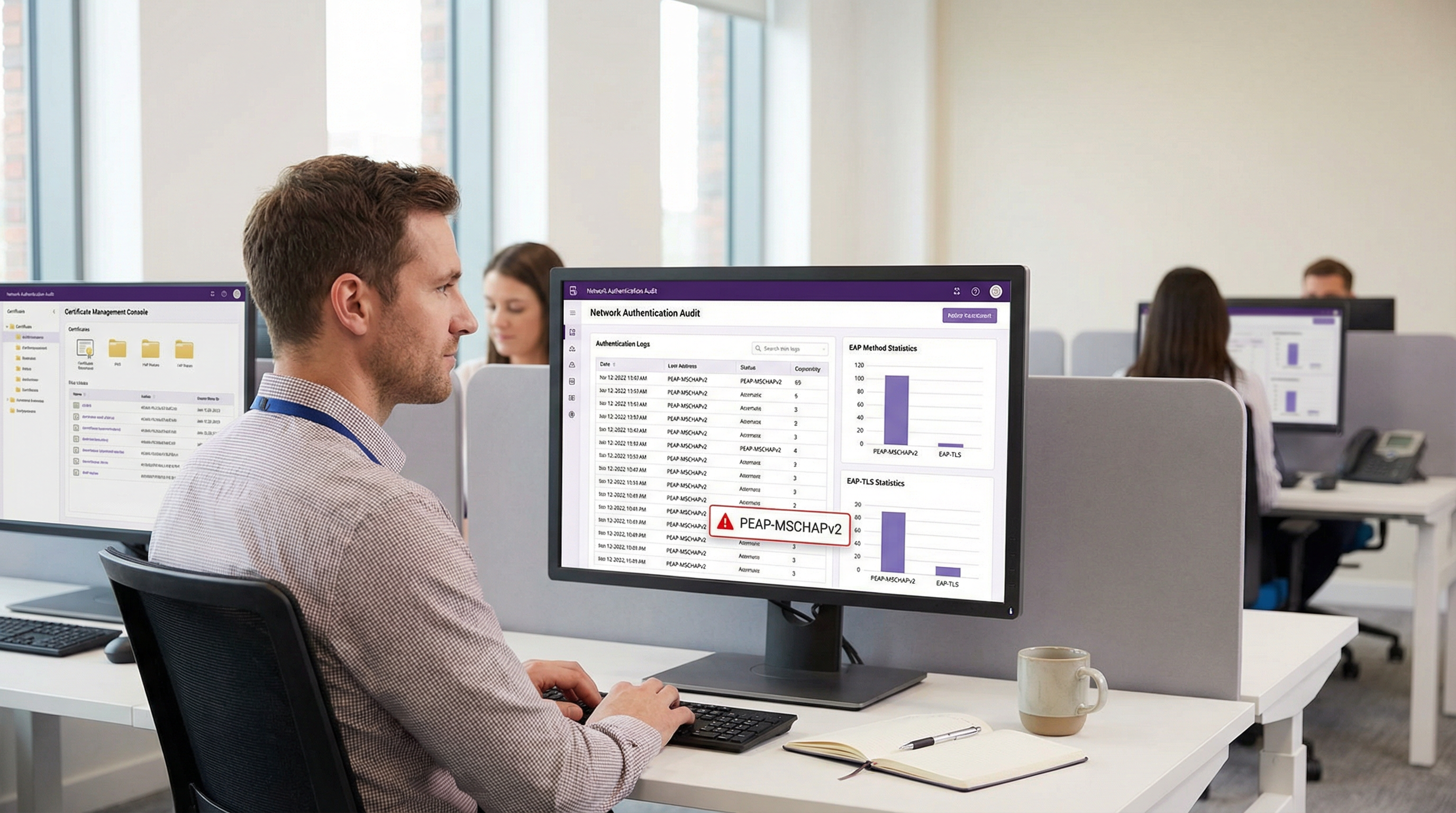
Despite well-documented cryptographic vulnerabilities, PEAP-MSCHAPv2 remains the most widely deployed EAP method for enterprise WiFi authentication across the hospitality, retail, and public sectors. Its continued prevalence is driven by ease of deployment—specifically its native integration with Active Directory—rather than security efficacy. However, the risk profile has shifted dramatically. Automated exploitation tools have commoditised the "evil twin" attack, allowing threat actors to capture and crack MSCHAPv2 challenge-response hashes with trivial effort, leading directly to compromised Active Directory credentials.
For IT directors and network architects, the mandate is clear: PEAP-MSCHAPv2 is no longer fit for purpose in any environment subject to compliance frameworks like PCI DSS or GDPR. This guide provides a critical analysis of the specific attack vectors targeting PEAP-MSCHAPv2 and outlines a pragmatic, phased migration path to EAP-TLS. By leveraging modern Mobile Device Management (MDM) and cloud Public Key Infrastructure (PKI) solutions, organisations can transition to robust, certificate-based authentication without disrupting business operations or alienating legacy devices.
Technical Deep-Dive: The Anatomy of the Vulnerability
To understand why PEAP-MSCHAPv2 must be deprecated, one must examine its underlying cryptographic architecture. MSCHAPv2 (Microsoft Challenge Handshake Authentication Protocol version 2) was designed in the late 1990s and relies on the MD4 hashing algorithm and Data Encryption Standard (DES) [1]. Both are considered obsolete by modern cryptographic standards.
The Cryptographic Flaw
The fundamental weakness lies in how MSCHAPv2 handles the NT hash of the user's password. The protocol splits a 21-byte key derived from the NT hash into three 7-byte DES keys. Crucially, the third key only utilises two significant bytes of the hash, padding the rest with null bytes. This structural flaw reduces the cryptographic complexity exponentially.
In 2012, security researcher Moxie Marlinspike demonstrated that the MSCHAPv2 handshake could be cracked deterministically by reducing the problem to a single DES key crack [2]. Using cloud-based cracking services or modern GPU rigs running tools like hashcat, an attacker can recover the plaintext Active Directory password from a captured handshake in a matter of hours, regardless of password complexity.
The Evil Twin Attack Vector
The cryptographic weakness is exploited in the wild via the "evil twin" attack. In a typical scenario at a corporate office or Hospitality venue:
- Rogue AP Deployment: The attacker deploys a rogue access point broadcasting the target corporate SSID (e.g., "Staff-WiFi").
- Signal Dominance: The rogue AP operates at a higher transmit power, coercing nearby client devices to associate with it rather than the legitimate infrastructure.
- Fake RADIUS Authentication: When the client initiates the PEAP tunnel, the rogue AP proxies the request to an attacker-controlled RADIUS server (such as hostapd-wpe).
- Certificate Validation Failure: The rogue RADIUS server presents a self-signed or unverified digital certificate. If the client device is misconfigured to bypass strict server certificate validation—or if the user simply clicks "Accept" on a trust prompt—the tunnel is established.
- Credential Capture: The client transmits the MSCHAPv2 challenge-response through the compromised tunnel. The attacker captures the hash and terminates the connection.
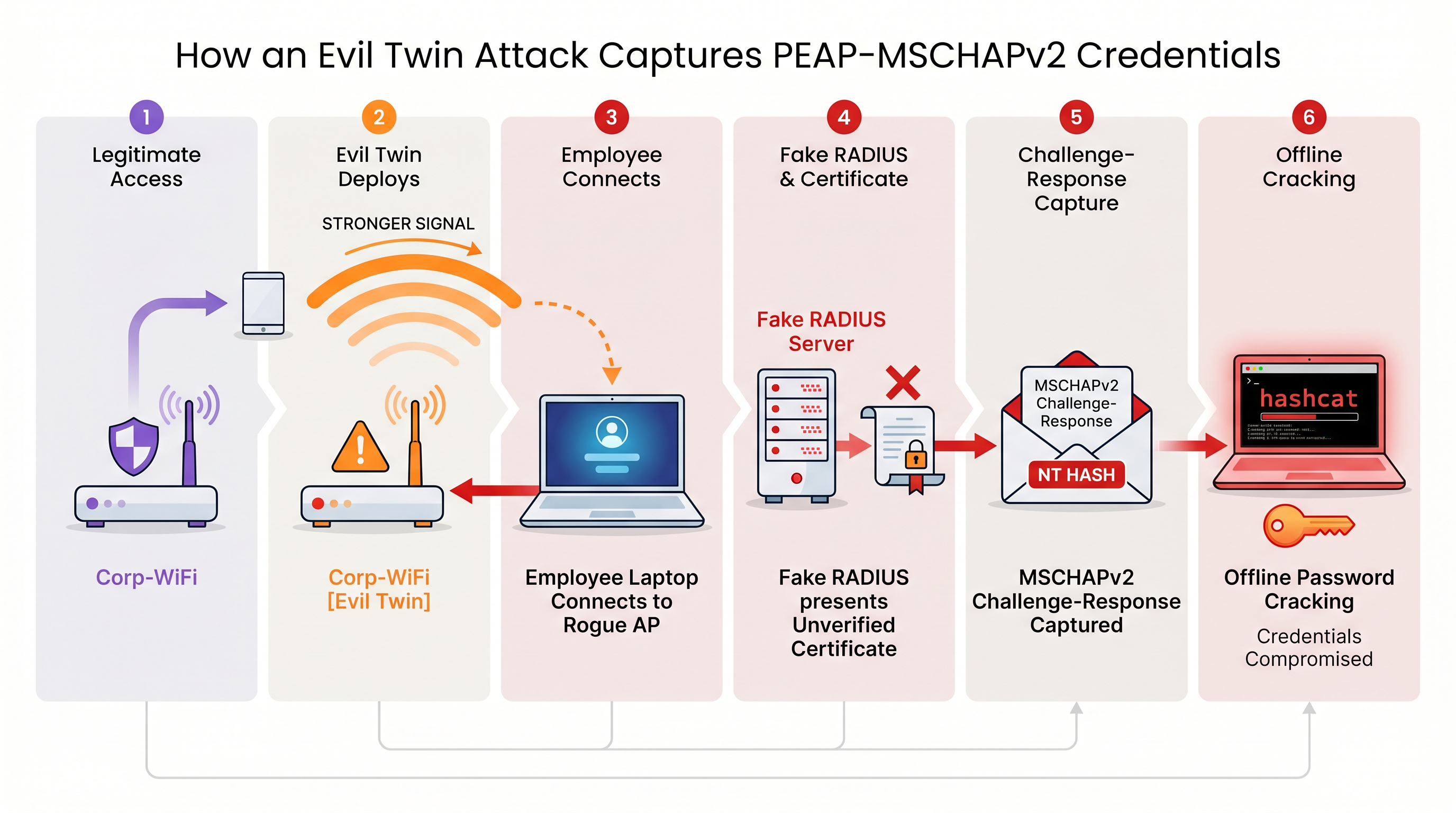
Without strict server certificate validation enforced at the endpoint level, every device using PEAP-MSCHAPv2 is vulnerable to this credential capture technique. This is particularly concerning for Retail environments where back-of-house networks often share physical proximity with public spaces.
Implementation Guide: Migrating to EAP-TLS
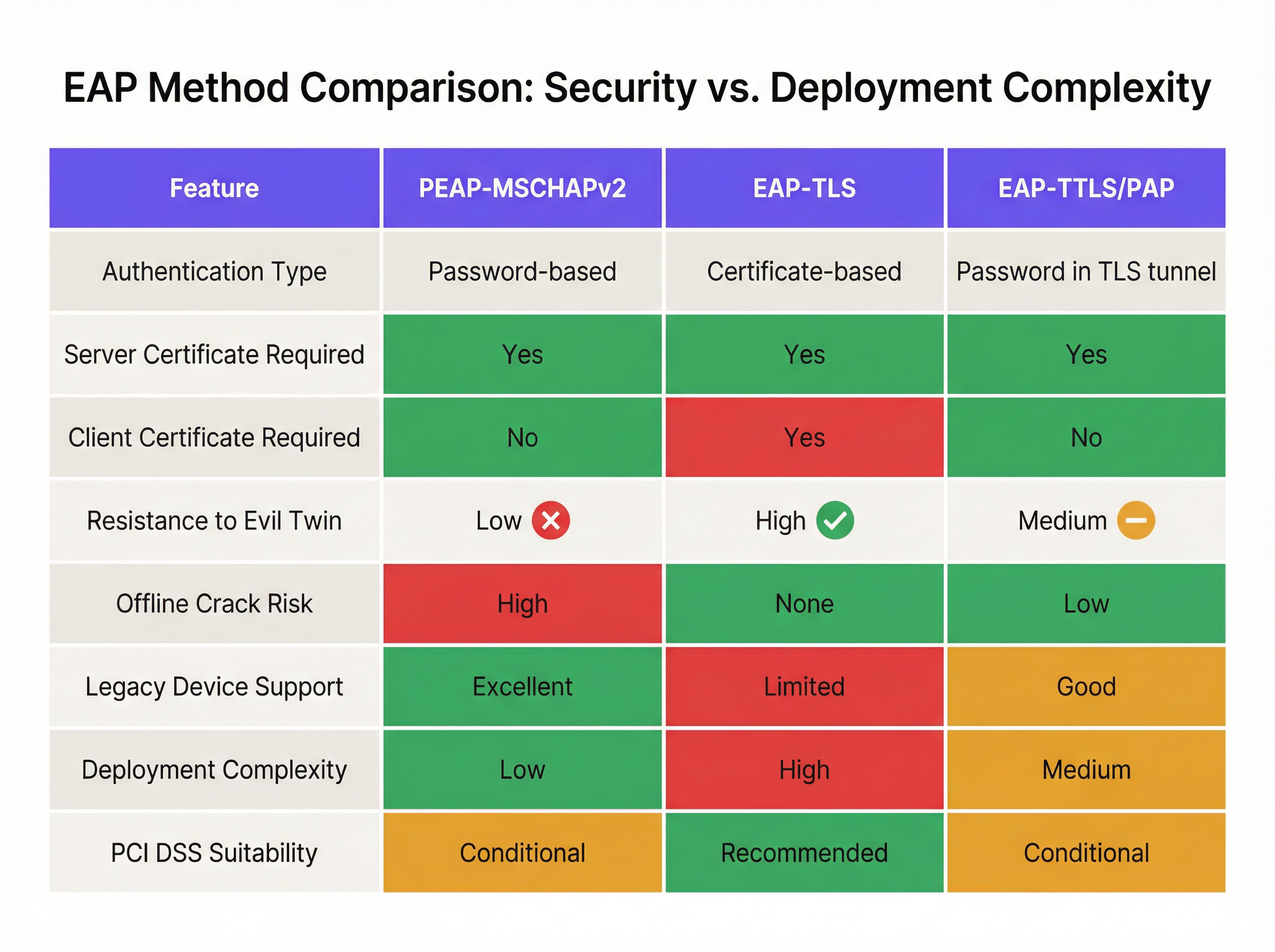
The definitive mitigation for MSCHAPv2 vulnerabilities is migrating to EAP-TLS (Extensible Authentication Protocol-Transport Layer Security). EAP-TLS mandates mutual authentication: both the RADIUS server and the client device must present valid digital certificates. Because no passwords are transmitted or hashed during the handshake, EAP-TLS is entirely immune to offline dictionary attacks and highly resistant to evil twin spoofing.
Historically, the barrier to EAP-TLS adoption was the complexity of deploying an on-premises Public Key Infrastructure (PKI). Today, cloud PKI and modern MDM integrations have streamlined the process.
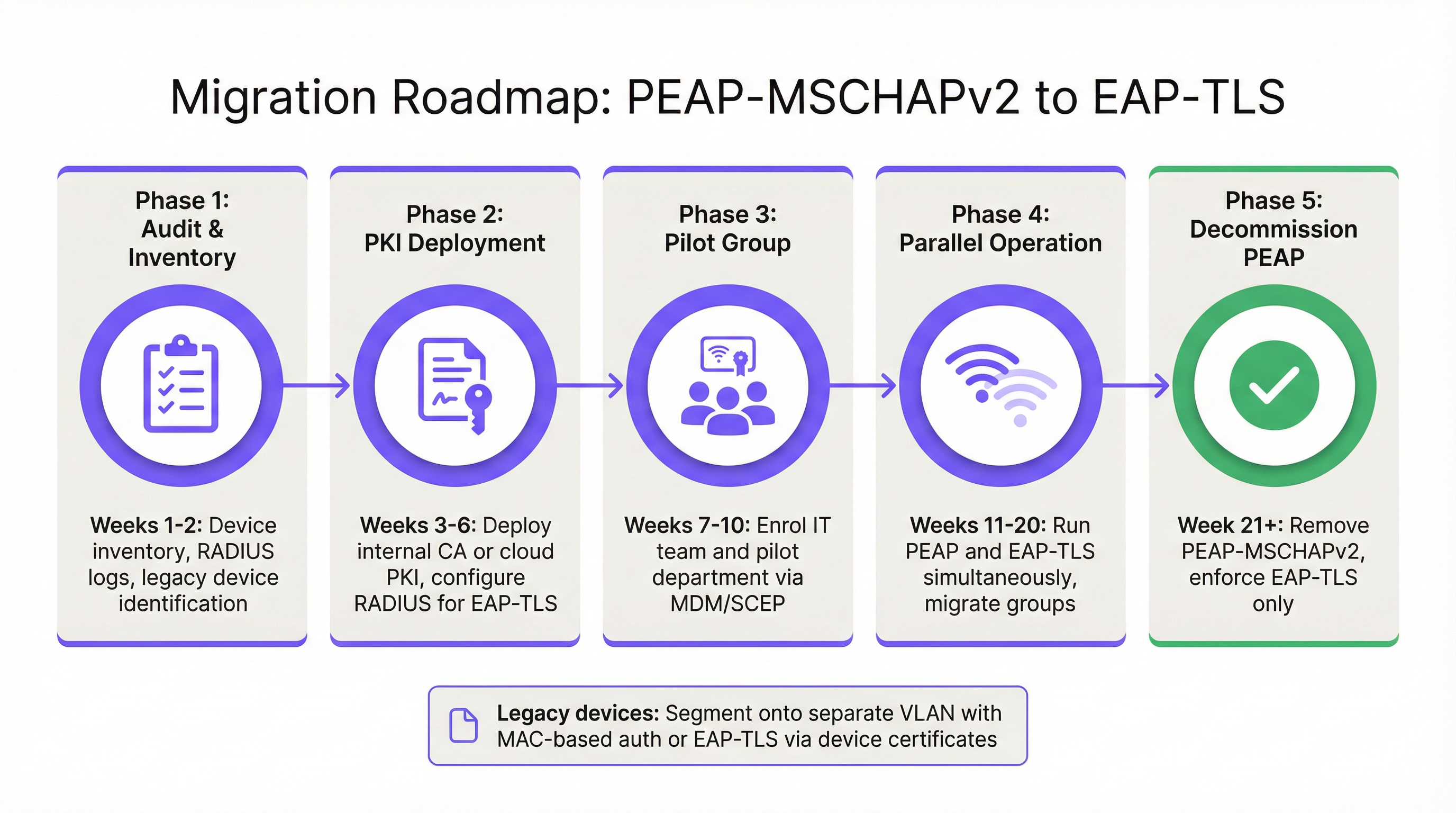
Phase 1: Audit and Inventory
Before altering authentication policies, conduct a comprehensive audit of your current RADIUS logs (e.g., Cisco ISE, Aruba ClearPass, or Windows NPS). Identify all devices currently authenticating via PEAP. Categorise these devices into two groups:
- Managed Devices: Corporate laptops, tablets, and smartphones enrolled in an MDM platform (e.g., Intune, Jamf).
- Unmanaged/Legacy Devices: IoT sensors, older point-of-sale terminals, barcode scanners, or BYOD devices that cannot support certificate enrolment.
Phase 2: PKI Deployment and RADIUS Configuration
Deploy a PKI solution to issue client and server certificates. Cloud-native PKI platforms can integrate directly with Entra ID or Google Workspace, eliminating the need for a heavy on-premises Microsoft AD CS footprint. Configure your RADIUS server to accept EAP-TLS authentication. Crucially, configure the network policy to support both PEAP and EAP-TLS concurrently on the same SSID during the transition period.
Phase 3: Certificate Distribution via MDM
Leverage your MDM platform to silently distribute client certificates to managed devices using protocols like SCEP (Simple Certificate Enrollment Protocol). Concurrently, push an updated WiFi profile payload via MDM that instructs the devices to prioritise EAP-TLS for the corporate SSID. This ensures a zero-touch transition for end-users.
Phase 4: Handling Legacy Devices
Legacy devices that cannot support EAP-TLS should never dictate the security posture of the primary corporate network. Instead, segment these devices onto a dedicated VLAN. Implement MAC-based Authentication Bypass (MAB) combined with strict Access Control Lists (ACLs) to ensure these devices can only communicate with the specific internal servers required for their function.
Best Practices and Compliance
Maintaining a secure enterprise wireless environment requires continuous adherence to industry standards.
- Enforce Server Certificate Validation: If you must temporarily maintain PEAP-MSCHAPv2, use MDM to enforce strict server certificate pinning on all endpoints. Prevent users from manually trusting unknown certificates.
- Deprecate WPA2-Personal: Ensure that all corporate access relies on 802.1X (WPA2/WPA3-Enterprise). Pre-Shared Keys (PSK) should be strictly limited to isolated IoT networks.
- Align with PCI DSS: For venues processing payments, PCI DSS Requirement 4 mandates strong cryptography for transmitting cardholder data over wireless networks. The PCI Security Standards Council explicitly recommends EAP-TLS for robust authentication [3].
- Monitor Analytics: Utilise platforms like Purple's WiFi Analytics to monitor network health, identify anomalous connection patterns, and ensure that legacy devices are not attempting to access restricted subnets.
ROI & Business Impact
The return on investment for migrating to EAP-TLS is measured primarily in risk mitigation. A successful evil twin attack against PEAP-MSCHAPv2 yields valid Active Directory credentials, providing threat actors with initial access to the corporate network. The financial impact of a resulting data breach, ransomware deployment, or regulatory fine (such as under GDPR) vastly outweighs the operational cost of deploying a cloud PKI and updating MDM profiles.
Furthermore, certificate-based authentication significantly reduces helpdesk ticket volume related to password expirations and lockouts. By moving to EAP-TLS, IT teams eliminate the friction of password-based WiFi access, delivering a seamless, secure connectivity experience that supports modern zero-trust network architectures.
References
[1] Microsoft Security Response Center. "Weaknesses in MS-CHAPv2 authentication." August 2012. [2] Marlinspike, Moxie. "Defeating PPTP VPNs and WPA2 Enterprise with MS-CHAPv2." DEF CON 20, 2012. [3] PCI Security Standards Council. "Information Supplement: PCI DSS Wireless Guidelines."
Key Definitions
PEAP (Protected Extensible Authentication Protocol)
An EAP method that encapsulates the authentication process within a secure TLS tunnel to protect the inner authentication credentials from being intercepted over the air.
Widely used because it only requires a server-side certificate, making it easier to deploy than mutually authenticated methods.
MSCHAPv2
The inner authentication protocol commonly used inside a PEAP tunnel, which relies on a challenge-response mechanism using the NT hash of the user's password.
The primary source of vulnerability in PEAP deployments due to its reliance on outdated MD4 hashing and DES encryption.
EAP-TLS
An EAP method requiring mutual authentication, where both the RADIUS server and the client device present digital certificates to prove their identity.
The industry gold standard for enterprise WiFi security, immune to offline dictionary and evil twin attacks.
Evil Twin Attack
A wireless attack where a rogue access point mimics a legitimate corporate SSID to trick client devices into connecting, allowing the attacker to intercept traffic or capture authentication credentials.
The primary vector used by attackers to capture MSCHAPv2 handshakes from vulnerable PEAP deployments.
RADIUS (Remote Authentication Dial-In User Service)
A networking protocol that provides centralised Authentication, Authorization, and Accounting (AAA) management for users who connect and use a network service.
The core server infrastructure (like Cisco ISE or NPS) that processes 802.1X authentication requests from access points.
PKI (Public Key Infrastructure)
A set of roles, policies, hardware, software, and procedures needed to create, manage, distribute, use, store, and revoke digital certificates.
The foundational infrastructure required to deploy EAP-TLS, increasingly delivered via cloud-native SaaS platforms.
MDM (Mobile Device Management)
Software that allows IT administrators to control, secure, and enforce policies on smartphones, tablets, and endpoints.
Essential for EAP-TLS migrations, as it is used to silently push client certificates and strict WiFi profiles to corporate devices.
MAB (MAC Authentication Bypass)
A port-based access control method that authenticates devices based on their MAC address rather than requiring a username/password or certificate.
Used as a fallback mechanism to authenticate legacy 'headless' devices (like printers) that cannot support 802.1X protocols.
Worked Examples
A 400-room hotel chain is currently using PEAP-MSCHAPv2 for its back-of-house staff network. The IT director wants to migrate to EAP-TLS but is concerned about 50 legacy handheld inventory scanners that run an outdated OS and do not support certificate enrolment. How should the network architect handle this migration without breaking inventory operations?
The network architect should implement a segmented approach. First, deploy a cloud PKI and configure the central RADIUS server to accept both EAP-TLS and PEAP-MSCHAPv2. Use the hotel's MDM platform to push client certificates and an updated EAP-TLS WiFi profile to all modern staff laptops and tablets. For the 50 legacy scanners, create a dedicated, hidden SSID mapped to an isolated VLAN. Configure MAC-based Authentication Bypass (MAB) for these specific scanner MAC addresses on the RADIUS server. Apply strict network ACLs to this VLAN so the scanners can only reach the inventory database server and nothing else. Once all modern devices are using EAP-TLS, disable PEAP-MSCHAPv2 on the primary staff network.
A retail organisation has rolled out Windows 11 22H2 to its corporate fleet. The IT helpdesk is suddenly receiving tickets that users cannot connect to the corporate WPA2-Enterprise WiFi network, which uses PEAP-MSCHAPv2. What is the likely cause, and what is the immediate remediation?
The likely cause is the introduction of Windows Defender Credential Guard, which is enabled by default in Windows 11 22H2 and newer. Credential Guard isolates and protects NTLM password hashes and Kerberos Ticket Granting Tickets. Because PEAP-MSCHAPv2 requires access to the NT hash to generate the challenge-response, Credential Guard intentionally breaks this authentication method to prevent credential theft. The immediate remediation is to accelerate the migration to EAP-TLS, which uses certificate-based authentication and is fully compatible with Credential Guard. A temporary, less secure workaround would be disabling Credential Guard via Group Policy, but this is strongly discouraged as it weakens the overall OS security posture.
Practice Questions
Q1. You are auditing a newly acquired subsidiary's wireless network. They use PEAP-MSCHAPv2. The IT manager claims they are secure from evil twin attacks because they have hidden the SSID and disabled SSID broadcasting. Is their network secure from credential capture?
Hint: Consider how client devices behave when configured to connect to hidden networks, and whether hiding an SSID prevents a rogue AP from spoofing it.
View model answer
No, the network is not secure. Hiding the SSID (disabling beacon frames) provides zero cryptographic security. In fact, devices configured to connect to hidden networks actively broadcast probe requests containing the SSID name, effectively announcing the hidden network to any attacker listening. An attacker can easily capture the SSID name, spin up an evil twin AP broadcasting that exact SSID, and execute the standard MSCHAPv2 credential capture attack. The only defence is strict server certificate validation or migrating to EAP-TLS.
Q2. During an EAP-TLS migration pilot, you push client certificates to 20 Windows laptops via Intune. However, authentication fails for all 20 devices. The RADIUS server logs show 'Client Certificate Not Trusted'. The client certificates were issued by your new Cloud PKI. What critical configuration step was missed?
Hint: For mutual authentication to work, both sides must trust the entity that issued the other side's certificate.
View model answer
The RADIUS server has not been configured to trust the Root CA of the new Cloud PKI. While the laptops have the correct client certificates, when they present them to the RADIUS server, the server rejects them because it does not have the Cloud PKI's Root/Intermediate certificates in its local trust store. You must import the public Root CA certificate of the Cloud PKI into the RADIUS server's trusted certificate authorities store.
Q3. Your organisation mandates EAP-TLS for the corporate WiFi. A senior executive insists on connecting their personal, unmanaged iPad to the corporate network to access internal financial dashboards. How do you accommodate this request while maintaining the EAP-TLS security posture?
Hint: Consider the prerequisites for EAP-TLS and the definition of a 'managed' device.
View model answer
You cannot securely accommodate this request on the primary corporate network without compromising the EAP-TLS architecture. EAP-TLS requires a client certificate. Because the iPad is unmanaged (BYOD), the IT department cannot securely push a certificate via MDM. Allowing the executive to manually install a certificate introduces significant risk and administrative overhead. The correct approach is to deny access to the corporate SSID. Instead, the executive should connect to the Guest WiFi and use a secure corporate VPN (which supports modern MFA/SAML authentication) to access internal resources, or the device must be enrolled in the corporate MDM to receive a certificate.
Continue reading in this series
How to Safely Segregate Staff and Guest WiFi Networks
This authoritative technical guide provides IT leaders with actionable strategies for safely segregating staff, guest, and IoT WiFi networks using VLANs and 802.1X. It details how to secure enterprise infrastructure, maintain PCI DSS compliance, and leverage captive portals to capture first-party data.
How to Safely Segregate Staff and Guest WiFi Networks
This authoritative technical guide provides IT leaders with actionable strategies for safely segregating staff, guest, and IoT WiFi networks using VLANs and 802.1X. It details how to secure enterprise infrastructure, maintain PCI DSS compliance, and leverage captive portals to capture first-party data.
Best DNS filtering: a comprehensive guide for businesses
This technical reference guide explains how enterprise DNS filtering secures public networks by blocking malicious domains at the resolution layer - before a connection is ever established. It gives IT directors, network architects, and venue operations teams the deployment architecture, firewall configuration, and compliance context they need to protect Guest WiFi across hospitality, retail, and public-sector environments. Purple Shield blocks malware, botnets, and inappropriate content at the DNS level across 80,000+ live venues.