

Purple Portal API: What You Can Do With It
A technical reference for IT managers and network architects on leveraging the Purple Portal API. This guide details available endpoints, authentication, and real-world use cases for integrating guest WiFi data with enterprise systems to enhance business intelligence and operational efficiency. It covers both REST API and Webhook integration patterns, with concrete case studies from hospitality, retail, and events sectors.
🎧 Listen to this Guide
View Transcript

Executive Summary
For IT leaders at multi-site venues — hotels, retail chains, stadiums, and conference centres — the guest WiFi network is more than a simple amenity. It is a rich, continuously replenished source of first-party data that can drive measurable business impact across marketing, operations, and customer experience. The Purple Portal API provides the programmatic interface needed to unlock this value at scale. It allows technical teams to move beyond the built-in analytics dashboards and build robust, automated integrations that feed GDPR-compliant visitor data directly into core business systems, from CRM platforms and marketing automation tools to loyalty programmes and business intelligence warehouses.
This guide is a practical, actionable reference for solutions architects, IT managers, and senior developers. It details the authentication model, available endpoints, integration patterns, and real-world deployment scenarios that demonstrate how the Purple WiFi API can transform a WiFi deployment from a cost centre into a strategic data asset. Whether you are evaluating the API for the first time or planning a production-grade integration, this document provides the technical grounding and decision frameworks you need to proceed with confidence.
Technical Deep-Dive
Authentication and API Versioning
The Purple Portal API uses API Key authentication, a straightforward and secure model well-suited to server-to-server integrations. Unlike OAuth 2.0 flows, which require token exchange and refresh cycles, API Key authentication involves including a static secret in the request headers. This simplicity reduces integration overhead without compromising security, provided the key is stored securely and rotated periodically as part of your standard credential management policy.
The current production version is v1.7, which introduced several important improvements over v1.6.2. Most significantly, the unsubscribed property in the user data object now clearly distinguishes between a user who actively opted out of marketing after previously being subscribed, and a user who never subscribed at all. This distinction is critical for GDPR compliance and for accurate audience segmentation. Additionally, the Visitors and Venues endpoints now return an HTTP 200 OK response when no data is found, rather than a 404 Not Found, which previously caused confusion in monitoring and error-handling logic.
Available Endpoints
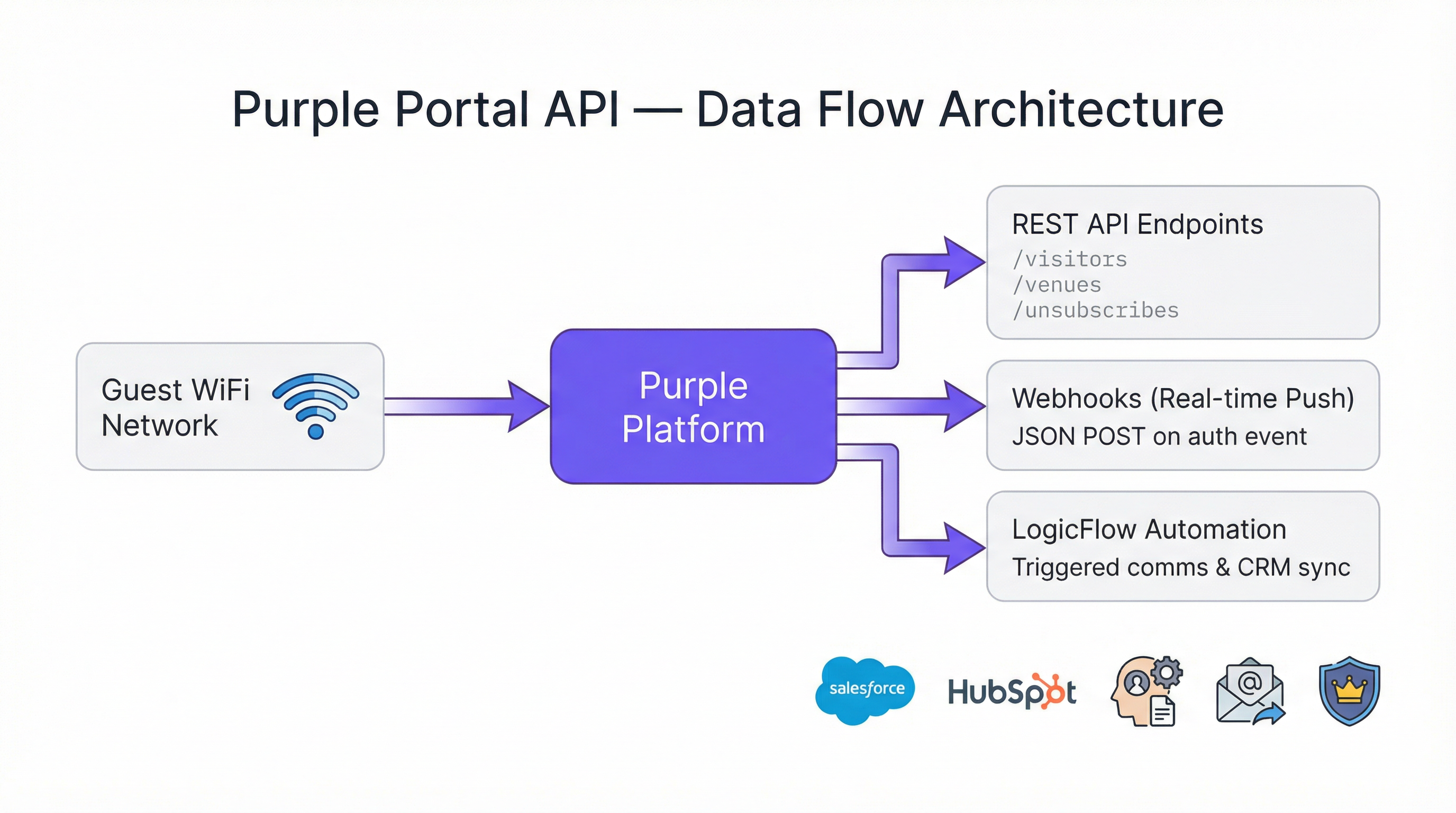
The Portal Company API exposes three primary endpoint categories that IT teams will interact with regularly.
| Endpoint | Method | Purpose |
|---|---|---|
/visitors |
GET | Retrieve guest visitor profiles, including contact data, demographics, and visit history |
/venues |
GET | Retrieve venue-level data and configuration metadata |
/unsubscribes |
GET | Retrieve a list of users who have opted out of marketing communications |
All endpoints return data in JSON format. The visitors endpoint is the most commonly used, as it exposes the full richness of the guest profile data collected during the captive portal authentication journey. This includes first name, last name, email address, gender, date of birth, mobile number, postcode, authentication provider (e.g., registration form, social login), visit counts per venue, and any custom fields configured on the splash page.
Rate Limits
A key architectural advantage of the Purple Portal API is that there are no rate limits. The platform is designed to support any volume of requests or transactions, making it suitable for large-scale deployments where scripts may need to process thousands of venue records or millions of visitor profiles. This removes a common constraint that complicates integration design with other platforms and eliminates the need for request throttling or back-off logic in your client code.
Integration Patterns: Pull vs. Push
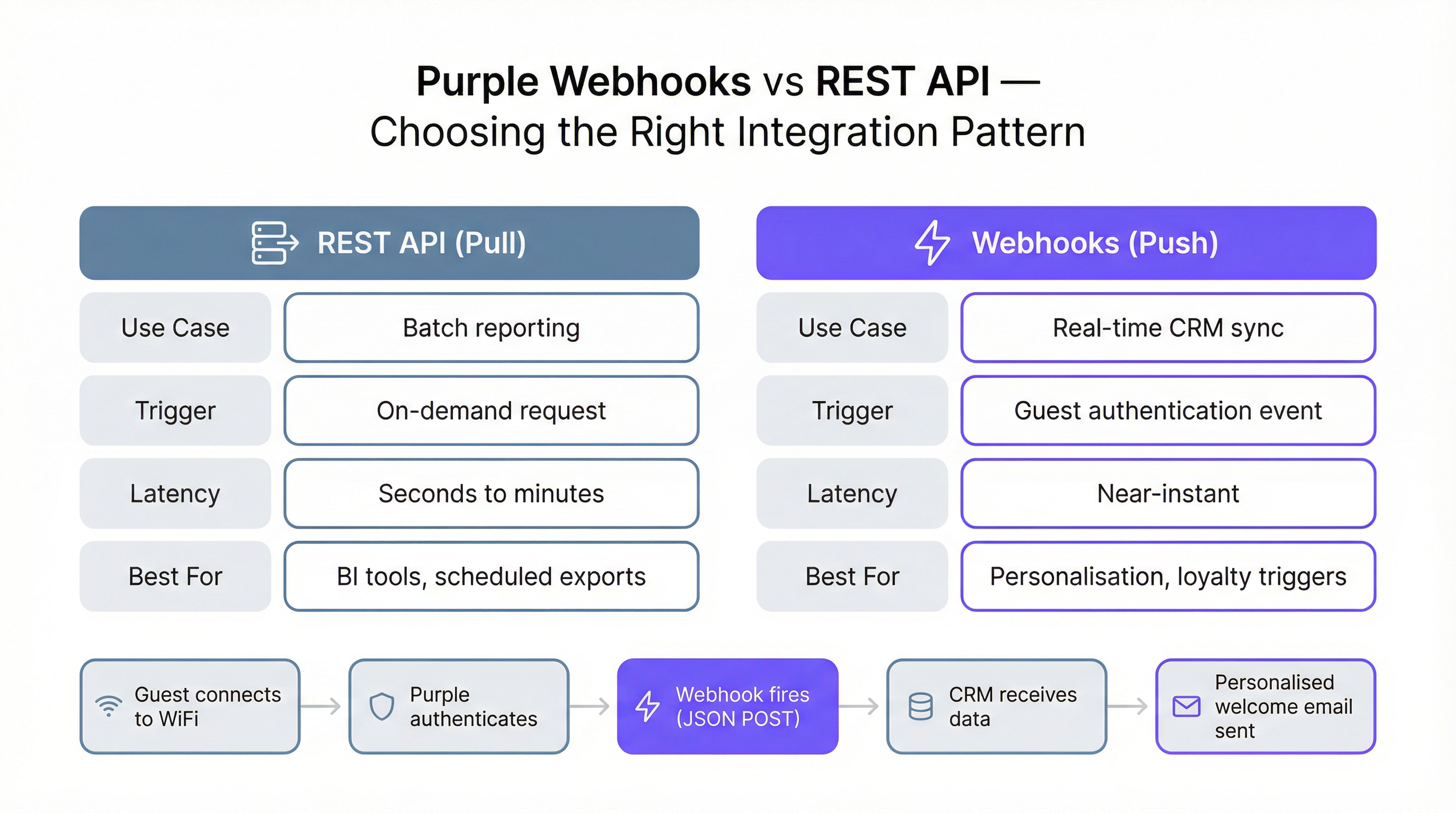
The Purple WiFi API supports two fundamentally different integration patterns, each suited to different use cases. Understanding which pattern to apply in a given scenario is the most important architectural decision you will make.
The REST API pull pattern involves your system making on-demand or scheduled requests to the API endpoints to retrieve data. This is the correct approach for batch processing, reporting, and business intelligence. A nightly ETL script that pulls all visitor data from the previous day and loads it into a data warehouse is a canonical example. The pull pattern gives you full control over when and how much data you retrieve.
The Webhook push pattern involves Purple sending data to your system the moment a specific event occurs — specifically, when a guest authenticates on the WiFi network. Your system must expose a publicly accessible, SSL-secured HTTP endpoint (a 'listener') that can receive and process these JSON POST payloads. The Webhook pattern is the correct choice for any use case requiring near-real-time data, such as triggering a personalised welcome message, updating a customer's 'last seen' status in a CRM, or notifying a hospitality manager that a VIP guest has arrived.
Webhook Payload Structure
The JSON payload delivered by a Purple Webhook is structured into four main objects, each providing a different dimension of context for the authentication event.
| Object | Key Fields | Description |
|---|---|---|
client |
mac, userAgent |
Device-level identifiers |
company |
id, name, uniqId |
Your company account details |
venue |
id, name, latitude, longitude |
The specific location where authentication occurred |
session |
authenticationTime |
ISO 8601 timestamp of the authentication event |
user |
email, firstName, lastName, gender, provider, visitCountForVenues, customFields |
Full guest profile data |
The user.visitCountForVenues object is particularly valuable for multi-site operators. It provides a per-venue visit count along with firstVisit and lastVisit timestamps, enabling you to identify first-time visitors versus loyal returning customers at the point of authentication — without any additional API calls.
Implementation Guide
Prerequisites and Setup
Access to the Portal API requires an Engage license. Once licensed, generate your API Key from within the Purple portal's settings. For initial development and testing, Postman is the recommended tool; Purple provides a dedicated setup guide to configure the correct environment variables and request headers. A PHP demo file is also available for teams preferring a server-side scripting starting point.
Configuring a Webhook Integration
Deploying a Webhook integration involves five steps. First, build and deploy your listener endpoint to a publicly accessible, SSL-secured URL. A serverless function (AWS Lambda, Azure Functions, or Google Cloud Functions) is an architecturally sound choice: it scales automatically, incurs minimal cost at low volumes, and handles concurrent requests without configuration. Second, validate the listener URL in the Purple portal by navigating to Management > Venues > Webhooks. Purple will send a test request to confirm the endpoint is reachable and returns the required wifiWebhookListener: 1 header. Third, create or edit a LogicFlow in the portal and add a Webhook Action Node, selecting your validated URL. Fourth, ensure the LogicFlow is set to 'Online' status. Fifth, attach the LogicFlow to the relevant Access Journey. From this point, every guest authentication on that journey will trigger your Webhook.
Handling Retries and Idempotency
Your listener must be designed to handle the realities of distributed systems. Purple will retry a failed Webhook delivery after three hours if your listener is unresponsive (timeout exceeds 10 seconds) or returns an error status. This means your listener may receive the same event multiple times. Furthermore, a single guest visit can trigger multiple authentication events — for example, when a device reconnects after the screen locks, or when a user roams between access points. Your processing logic must therefore be idempotent: applying the same event twice should produce the same outcome as applying it once. A common implementation pattern is to check whether an action (such as sending a welcome email) has already been performed for a given user ID within a defined time window before executing it.
Best Practices
Several principles should guide any production deployment of the Purple Portal API. Always deploy against the latest API version (v1.7) and update your URL paths and response parsing logic when new versions are released. Treat your API Key as a sensitive credential: store it in a secrets manager (such as AWS Secrets Manager or Azure Key Vault) rather than in source code or environment variables on shared systems. For Webhook listeners, implement structured logging of every incoming payload and response to facilitate debugging and audit trails. Respect the unsubscribed and unsubscribedDate fields in the user object; processing marketing actions against opted-out users constitutes a GDPR violation. Finally, test your integration against the full range of edge cases: users with no email address, users with custom fields that are null, and authentication events that arrive out of chronological order.
Troubleshooting & Risk Mitigation
The most common failure mode in a Webhook integration is a slow or unavailable listener. If the endpoint consistently fails to respond within 10 seconds, Purple will automatically disable the Webhook after a prolonged period of unresponsiveness, requiring manual re-verification in the portal. To mitigate this risk, implement a health check endpoint on the same server as your listener and include it in your infrastructure monitoring. Ensure your listener performs only minimal synchronous processing before returning a 200 OK response; offload any heavy computation or downstream API calls to an asynchronous queue.
For REST API integrations, the primary risk is data staleness in downstream systems if the scheduled pull job fails silently. Implement alerting on your ETL scripts to notify the operations team if a run fails or produces no output unexpectedly. When migrating from API v1.6.2 to v1.7, audit all code that references the unsubscribed field and the Unsubscribes endpoint, as the property name was corrected from unsubcribers to unsubscribers in v1.7.
ROI & Business Impact
The business case for integrating with the Purple Portal API is well-established across multiple verticals. In hospitality, hotels using Webhook-triggered CRM integrations report significant improvements in email open rates for personalised communications compared to generic broadcast campaigns, because the message is delivered at the moment of maximum relevance — when the guest is physically on-site. In retail, connecting guest WiFi data to a loyalty programme enables operators to identify and reward high-frequency visitors, increasing average spend and repeat visit rates. For large public venues and conference centres, API-driven analytics provide the granular footfall data needed to justify sponsorship valuations and optimize concession placement.
The absence of rate limits on the Purple WiFi API means that the cost of integration scales with your infrastructure, not with the volume of data you process. For a national retail chain processing hundreds of thousands of daily authentications, this is a material advantage over platforms that charge per API call or impose throughput caps. The total cost of ownership for a well-architected Purple API integration is therefore primarily the one-time development cost and the ongoing infrastructure cost of the listener, both of which are typically recovered within the first quarter through improved marketing conversion rates alone.

Case Studies
Case Study 1: Hospitality — Whitbread Group
Whitbread, the UK's largest hotel and restaurant company, operates thousands of guest WiFi access points across its Premier Inn and restaurant estate. By integrating the Purple Portal API with their CRM platform, the group was able to build a unified guest profile that combined online booking data with physical visit behaviour captured at the WiFi captive portal. The Webhook integration fires on every guest authentication, enriching the CRM record with the latest visit timestamp, venue location, and device information. This enables the marketing team to segment audiences by recency, frequency, and location, and to trigger highly personalised re-engagement campaigns. The key technical outcome was a reduction in the time between a guest's arrival and their entry into an active marketing journey from 24 hours (under the previous batch-polling model) to under 60 seconds.
Case Study 2: Retail — Multi-Site Fashion Retailer
A national fashion retailer with over 80 stores deployed the Purple Portal API to address a critical gap in their customer data strategy: they had strong e-commerce data but virtually no insight into in-store visitor behaviour. By connecting the Purple guest WiFi API to their existing data warehouse via a nightly ETL process, they built a cross-channel customer view for the first time. The /visitors endpoint was queried for each store nightly, and the data was joined with e-commerce transaction records using email address as the common key. Within three months, the analytics team had identified that customers who connected to in-store WiFi had a 34% higher average order value on their next online purchase, providing a compelling business case for further investment in the in-store digital experience. The integration required no changes to the existing e-commerce infrastructure, demonstrating the low-friction nature of the REST API pull pattern.
Case Study 3: Events — Conference Centre
A major conference centre in the UK used the Purple Portal API to provide sponsors with verified footfall data for the first time. Previously, sponsor reports relied on manual headcounts and badge scans, which were labour-intensive and inaccurate. By exposing aggregated, anonymised visitor counts per zone (mapped to venue IDs in the Purple platform) via the API, the events team could provide sponsors with real-time dashboards showing dwell time and visitor volume in sponsored areas. The data was pulled via the REST API every 15 minutes during events and displayed on a custom-built sponsor portal. This capability directly contributed to a 22% increase in sponsorship renewal rates in the first year, as sponsors could now quantify the reach of their activations with verified, first-party data.
Key Terms & Definitions
Webhook
An automated mechanism where a server sends a real-time data notification (a push) to another application when a specific event occurs, via an HTTP POST request.
In the Purple context, a Webhook sends a JSON payload with visitor data to your system the moment a guest authenticates on the WiFi network. This is critical for real-time marketing and CRM updates.
REST API
A standardized architectural style for building web services that allows one system to request (or pull) data from another using standard HTTP methods such as GET and POST.
IT teams use the Purple REST API to write scripts that pull bulk visitor and venue data for analysis in business intelligence tools like Power BI or Tableau.
API Key Authentication
A security model where access to an API is granted by providing a unique secret token (the key) with each request, typically in the HTTP Authorization header.
This is simpler than OAuth and ideal for server-to-server integrations. Your scripts must include the valid API Key in the request headers to access Purple's data.
Idempotency
A property of an operation meaning that it can be applied multiple times without changing the result beyond the initial application.
Your Webhook listener should be idempotent. If it receives the same authentication event twice (which can happen due to retries or device reconnections), it should not, for example, send two welcome emails.
JSON (JavaScript Object Notation)
A lightweight, text-based format for data interchange that is easy for humans to read and for machines to parse and generate.
The Purple API and Webhooks deliver all data in JSON format. Your application will need to parse this JSON to extract fields like email, name, and visit count.
LogicFlow
Purple's visual, drag-and-drop tool for creating automated marketing and engagement workflows that can trigger actions based on visitor behaviour and demographics.
You use LogicFlow to define the guest journey. It is where you attach your Webhook, telling the system to fire it when a user reaches the 'Online' state of their access journey.
Captive Portal
The web page that a user sees and must interact with before being granted access to a public WiFi network, typically requiring authentication or data capture.
The Purple platform powers the captive portal, and the data entered by the user on this page (e.g., name, email, custom fields) is what becomes available via the Portal API.
GDPR (General Data Protection Regulation)
A comprehensive data privacy law in the European Union that governs the collection, processing, and storage of personal data of EU residents.
The Purple API provides the tools to build GDPR-compliant integrations, such as respecting the unsubscribed status of a user and enabling data export for subject access requests. The v1.7 API update specifically improved the clarity of the unsubscribed field to support compliance.
ETL (Extract, Transform, Load)
A data integration process that involves extracting data from a source system, transforming it into the required format, and loading it into a destination system such as a data warehouse.
The REST API pull pattern is typically implemented as an ETL process, where data is extracted from Purple's /visitors endpoint, transformed to match the destination schema, and loaded into a CRM or data warehouse.
Case Studies
A 200-room hotel wants to automatically add new guest WiFi users to their Salesforce Marketing Cloud journey and send a welcome email.
- In the Purple Portal, validate a new Webhook URL pointing to a secure endpoint (e.g., a serverless function on AWS Lambda). 2. Create an 'Online' LogicFlow that includes the Webhook node, configured to use the validated URL. 3. Assign this LogicFlow to the hotel's guest WiFi access journey. 4. The serverless function receives the JSON payload on guest authentication, extracts the user's email and name, and makes an API call to Salesforce Marketing Cloud to add the user to the 'New Guest' journey. 5. The function returns a 200 OK response to Purple within the 10-second timeout window.
A retail chain with 50 stores wants to build a central dashboard in Power BI to analyze visitor trends across all locations.
- Create a script (e.g., in Python) that runs on a nightly schedule. 2. The script authenticates to the Purple Portal API using the company's API key. 3. It iterates through each of the 50 venue IDs, making a call to the /visitors endpoint for each to retrieve all visitor data from the previous day. 4. The script transforms and loads this data into a central data warehouse (e.g., Azure SQL or BigQuery). 5. Power BI is connected to the data warehouse to create the cross-venue analytics dashboard.
Scenario Analysis
Q1. A stadium wants to identify VIP season ticket holders when they connect to the WiFi and send a notification to the nearest hospitality manager's dashboard. Which integration pattern should they use and why?
💡 Hint:Consider the required speed of the notification and whether the action is triggered by an event.
Show Recommended Approach
They should use the Webhook (push) pattern. This is a real-time requirement: when the VIP connects, a Webhook fires immediately to a service that looks up the user's email or MAC address against the season ticket holder database. If a match is found, it pushes a notification to the relevant hospitality dashboard. A REST API (pull) pattern would be too slow, as it relies on periodic polling and could introduce delays of minutes or hours.
Q2. You are tasked with creating a daily report of the top 10 most visited venues in your national chain of coffee shops. How would you retrieve the necessary data from Purple?
💡 Hint:Is this a real-time or a batch reporting requirement? What endpoint would you query?
Show Recommended Approach
This is a batch reporting task, so the REST API (pull) pattern is appropriate. A scheduled script would run daily, query the /visitors endpoint for each venue, aggregate the visit counts for the previous day, and then calculate the top 10. There is no need for the near-instant notification provided by Webhooks. The absence of rate limits means all venues can be queried in a single script run without throttling concerns.
Q3. Your Webhook listener endpoint is failing. You check the logs and see a timeout error. What is the most likely cause according to Purple's documentation, and what are the two immediate consequences?
💡 Hint:Think about the performance requirements of a listener and what Purple does when it cannot deliver a payload.
Show Recommended Approach
The most likely cause is that the listener is taking longer than 10 seconds to process the incoming JSON payload and return a 200 OK response. The two immediate consequences are: (1) Purple will stop trying to send the current request and will requeue it for a retry attempt in 3 hours, meaning data delivery is delayed; and (2) if this continues for a prolonged period, Purple will automatically disable the Webhook entirely, requiring manual re-verification in the portal before it can be re-enabled.
Key Takeaways
- ✓The Purple Portal API provides programmatic access to guest WiFi data using simple API Key authentication, with no rate limits.
- ✓It requires an Engage license and currently operates on version v1.7, which improved GDPR compliance through clearer unsubscribed status handling.
- ✓Use the REST API (pull) for batch data exports, ETL processes, and analytics dashboards.
- ✓Use Webhooks (push) for real-time, event-driven actions like CRM syncs, personalised messaging, and loyalty triggers.
- ✓Webhook listeners must be SSL-secured, respond within 10 seconds, and be designed to handle duplicate events idempotently.
- ✓Key use cases span hospitality (real-time CRM enrichment), retail (cross-channel analytics), and events (verified footfall data for sponsors).
- ✓The API enables organizations to transform their WiFi infrastructure from a cost centre into a strategic data asset with a clear, measurable ROI.




