

Securing Networks with Wi-Fi 7: A Technical Deep Dive
This guide provides a comprehensive technical reference on Wi-Fi 7 security features for enterprise IT teams, covering the mandatory enforcement of WPA3 encryption, the security implications of Multi-Link Operation (MLO), and the practical challenges of supporting legacy devices during migration. It equips network architects, IT managers, and CTOs at hotels, retail chains, stadiums, and public-sector organisations with actionable deployment strategies, compliance guidance aligned to PCI DSS and GDPR, and real-world case studies with measurable outcomes. Understanding these changes is critical for any organisation planning a wireless infrastructure upgrade this year, as Wi-Fi 7 represents a fundamental shift in the security baseline for enterprise wireless networks.
🎧 Listen to this Guide
View Transcript

Executive Summary
Wi-Fi 7 (IEEE 802.11be) is not a routine hardware refresh. It is the most significant security upgrade in enterprise wireless networking since WPA2 superseded WEP, and it carries mandatory compliance implications that every CTO and IT director needs to understand before approving a capital expenditure plan.
The headline change is unambiguous: WPA3 encryption is mandatory for all Wi-Fi 7 devices operating Multi-Link Operation (MLO) and full 802.11be data rates. This mandate extends across all radio bands simultaneously, closing the downgrade attack vectors that have persisted in enterprise wireless for years. Alongside WPA3, Wi-Fi 7 introduces GCMP-256 encryption (replacing AES-128 CCMP), mandatory Protected Management Frames (802.11w), and Opportunistic Wireless Encryption (OWE) for open captive portal networks.
For venue operators — hotels, retail chains, stadiums, conference centres, and public-sector organisations — the practical implications are threefold. First, your legacy IoT device estate (POS terminals, room controllers, IPTV systems) will require network segmentation, not replacement on day one. Second, your compliance posture under PCI DSS v4.0 and GDPR materially improves with a properly deployed Wi-Fi 7 architecture. Third, the performance gains from MLO — simultaneous multi-band operation delivering up to 46 Gbps theoretical throughput — are only accessible to devices that meet the WPA3 security requirement.
The organisations that treat this as a strategic security upgrade, rather than a like-for-like hardware swap, will emerge with a materially stronger risk posture and a network infrastructure fit for the next decade.
Technical Deep-Dive
The WPA3 Mandate and What It Actually Changes
The IEEE 802.11be standard mandates WPA3 support for all devices seeking to operate Wi-Fi 7 features. This is a departure from previous generations: Wi-Fi 6 and Wi-Fi 6E access points could run WPA2 without restriction. Under Wi-Fi 7, WPA3 is a prerequisite for Multi-Link Operation and full EHT (Extremely High Throughput) data rates. The Wi-Fi Alliance's certification programme enforces this requirement, meaning any device bearing the Wi-Fi 7 certification badge must support WPA3.
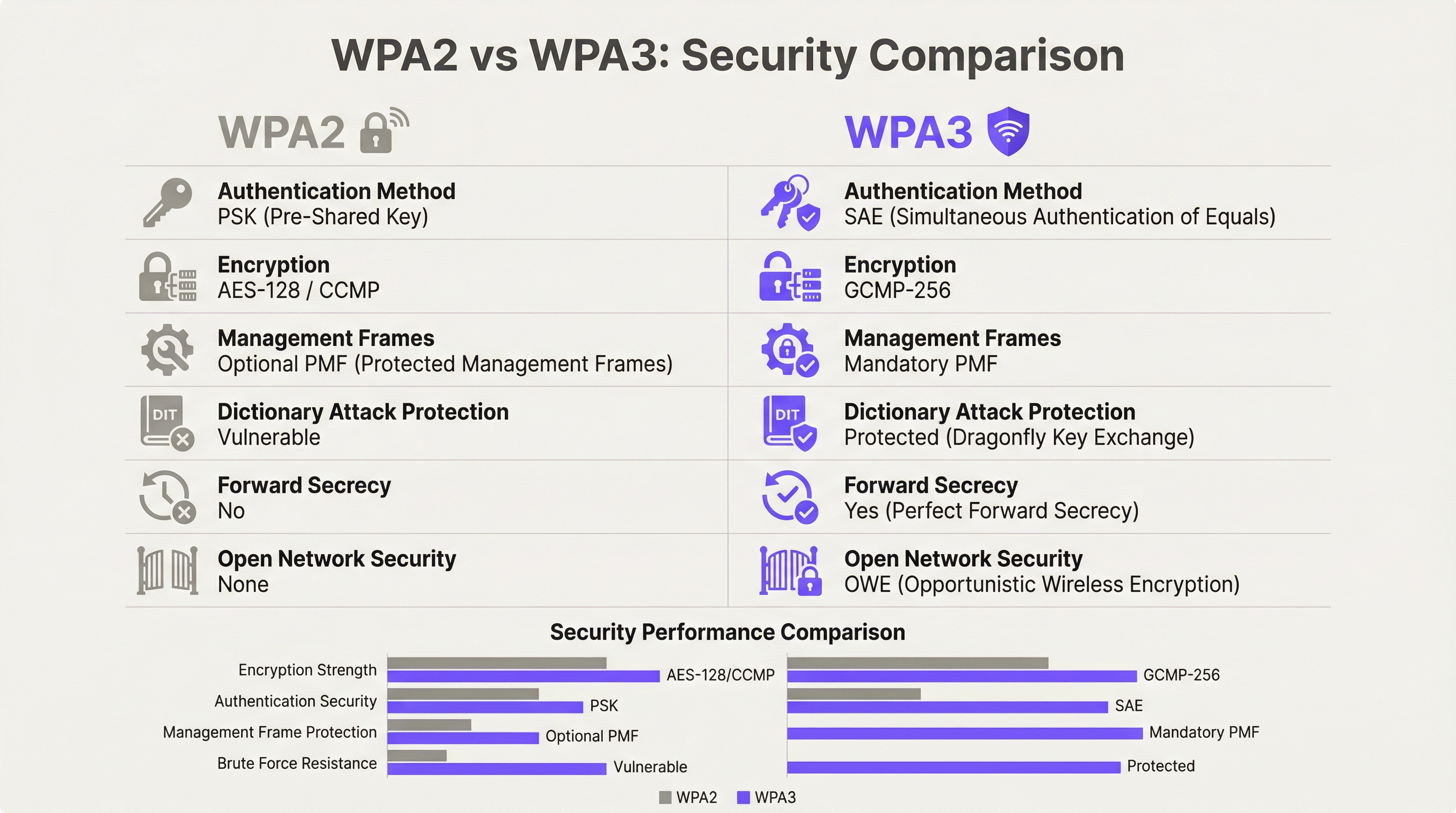
WPA3 delivers four substantive security improvements over its predecessor.
Authentication: SAE Replaces PSK. WPA3-Personal replaces the Pre-Shared Key (PSK) model with Simultaneous Authentication of Equals (SAE), which uses the Dragonfly key exchange protocol. SAE is resistant to offline dictionary attacks — a critical vulnerability in WPA2-PSK where a captured four-way handshake could be subjected to unlimited offline brute-force attempts. SAE's zero-knowledge proof mechanism ensures that even a captured handshake yields no exploitable information without access to the original passphrase.
Encryption: GCMP-256 Replaces AES-128 CCMP. Wi-Fi 7 introduces the Galois/Counter Mode Protocol with 256-bit keys (GCMP-256) as the primary cipher suite. GCMP-256 encrypts the Frame Body field of each MPDU, providing data confidentiality, authentication, integrity, and replay protection simultaneously. Wi-Fi 7 access points advertise both GCMP-256 and the legacy AES-128 CCMP in their RSN Information Elements, allowing older clients to connect at reduced cipher strength while newer clients negotiate the stronger protocol.
Management Frame Protection: Mandatory 802.11w. Under WPA2, management frames — the 802.11 control signals governing association, disassociation, and roaming — were transmitted in plaintext. This enabled deauthentication attacks and evil twin access point impersonation. WPA3 mandates 802.11w (Protected Management Frames, or PMF), which authenticates and encrypts unicast and broadcast management frames. This is mandatory for both single-link and multi-link operation in Wi-Fi 7.
Open Network Security: OWE. Opportunistic Wireless Encryption provides per-session encryption on open networks without requiring a password. Each connecting device negotiates an individualised encrypted session using Diffie-Hellman key exchange, meaning that traffic on a shared open network is encrypted and cannot be intercepted by other users on the same SSID. For hospitality and public-sector operators running captive portal guest WiFi, OWE is the mechanism that brings GDPR-aligned data protection to open wireless access.
Multi-Link Operation: Performance and Security Architecture
MLO is Wi-Fi 7's defining performance feature, enabling a single device to simultaneously maintain active connections across the 2.4 GHz, 5 GHz, and 6 GHz bands. The security architecture of MLO is more demanding than single-link operation, and understanding it is essential for enterprise deployment planning.
The IEEE 802.11be standard introduces two new Authentication and Key Management (AKM) suites specifically for MLO: AKM 24 (00-0F-AC:24) and AKM 25 (00-0F-AC:25). These provide per-MLD (Multi-Link Device) authentication, establishing a single Pairwise Master Key (PMK) that is synchronised across all active links. This design ensures that the key hierarchy is consistent across bands, preventing a scenario where a compromised lower-security link could be used to attack the session on a higher-security band.
Critically, the standard explicitly prohibits WPA3 transition mode on any MLO-capable connection. Transition mode — the mixed WPA2/WPA3 configuration that allows both protocol versions on a single SSID — is forbidden for MLO. This is a deliberate anti-downgrade measure. In a transition mode environment, an adversary can force a client to negotiate WPA2 even when WPA3 is available; MLO's security architecture eliminates this attack vector entirely by requiring WPA3 on every link.
For enterprise architects, this has a direct implication: any device that cannot support WPA3 cannot participate in MLO. Such devices will fall back to single-band, single-link operation on whichever band they support, at the security level they support. This is not a failure of the network; it is the correct behaviour of a properly configured Wi-Fi 7 deployment.
WPA3-Enterprise 192-Bit Mode
For organisations operating in regulated industries — government, defence, healthcare, and financial services — WPA3-Enterprise 192-bit mode (Suite B) provides the highest available wireless security profile. This mode uses GCMP-256 for data encryption, SHA-384 for hashing, and ECDH/ECDSA with 384-bit elliptic curves for key exchange and authentication. It aligns with CNSA (Commercial National Security Algorithm) Suite requirements and is appropriate for networks handling classified or highly sensitive data.
Implementation Guide
Phase 1: Device Audit and Segmentation Design
Before a single access point is installed, conduct a comprehensive device audit. Every device on your network must be categorised by its maximum supported security protocol: WPA3-Enterprise, WPA3-Personal, WPA2-Enterprise, WPA2-Personal, or legacy (WPA/TKIP). This audit drives every subsequent architectural decision.
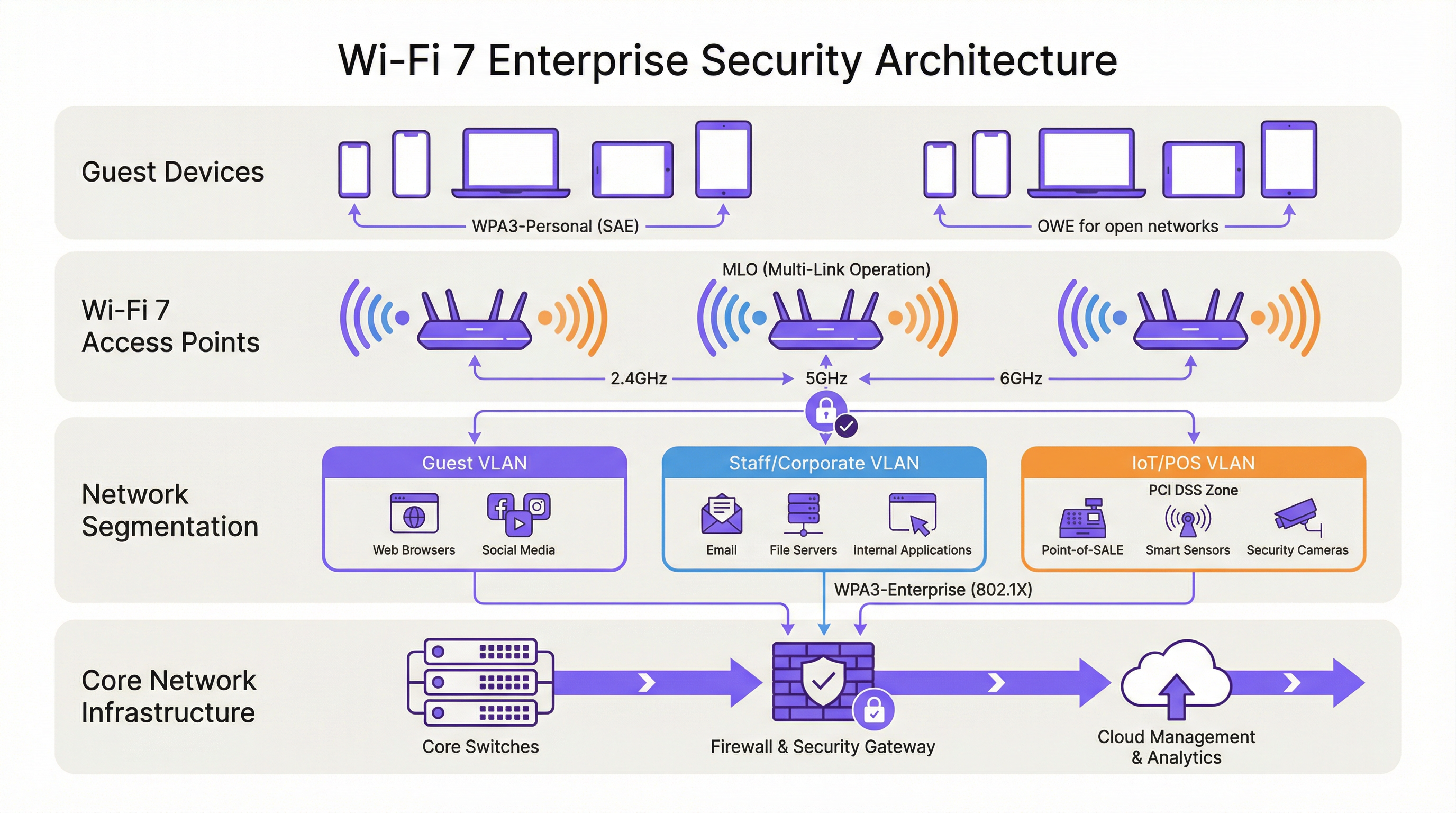
The output of this audit should define three network tiers:
| Tier | Band | Security Protocol | Target Devices |
|---|---|---|---|
| Tier 1 — Corporate/Staff | 6 GHz | WPA3-Enterprise (802.1X) | Staff laptops, corporate mobile devices, Wi-Fi 7 endpoints |
| Tier 2 — Guest/BYOD | 5 GHz | WPA3-Personal (SAE) or WPA3-Enterprise | Guest devices, BYOD, modern smartphones |
| Tier 3 — Legacy/IoT | 2.4 GHz | WPA2-Personal (isolated VLAN) | POS terminals, room controllers, IPTV, legacy scanners |
Each tier must be isolated by VLAN with inter-VLAN firewall policies that explicitly deny lateral movement. Tier 3 devices should have no access to Tier 1 or Tier 2 network segments, and internet access should be restricted to the specific destinations required for device operation.
Phase 2: RADIUS and PKI Infrastructure Readiness
WPA3-Enterprise deployments require a RADIUS server (typically FreeRADIUS, Cisco ISE, or Aruba ClearPass) configured to support EAP-TLS with modern cipher suites. Verify that your RADIUS implementation supports TLS 1.2 or 1.3, and that your certificate authority infrastructure is capable of issuing client certificates at the required scale. For WPA3-Enterprise 192-bit mode, confirm that your RADIUS server supports EAP-TLS with Suite B cipher suites.
If your existing RADIUS infrastructure was deployed more than five years ago, a readiness assessment is advisable before committing to a Wi-Fi 7 rollout timeline.
Phase 3: SSID Architecture and Transition Mode Avoidance
Configure your SSIDs according to the three-tier model above. Resist the temptation to deploy WPA3 transition mode as a permanent configuration. Transition mode is an appropriate short-term measure during a controlled migration, but it should not be the end state. Transition mode advertises both WPA2 and WPA3 simultaneously on the same SSID; any device that negotiates WPA2 on that SSID reduces the effective security of the entire network segment to WPA2 levels.
The correct long-term architecture is strict WPA3 on Tier 1 and Tier 2 SSIDs, with legacy devices explicitly assigned to the isolated Tier 3 SSID. This approach provides the strongest security posture for modern devices while maintaining operational continuity for legacy hardware.
Phase 4: OWE Deployment for Guest Networks
For captive portal guest networks, deploy OWE as the security mechanism. OWE operates transparently to end users — no password is required, and the captive portal authentication flow is unchanged. The difference is that each device's traffic is encrypted with an individualised session key, providing GDPR-aligned data protection without adding friction to the guest onboarding experience.
Note that OWE transition mode (analogous to WPA3 transition mode) allows non-OWE devices to connect to the same SSID. As with WPA3 transition mode, this should be treated as a temporary measure during migration, not a permanent configuration.
Phase 5: Monitoring, Policy, and Ongoing Governance
Deploy a Wireless Intrusion Prevention System (WIPS) to monitor for rogue access points, deauthentication attacks, and unauthorised devices. While WPA3's mandatory PMF significantly reduces the effectiveness of deauthentication attacks, a WIPS provides the visibility layer necessary for incident response and compliance reporting.
Update your information security policy to mandate WPA3 support as a minimum requirement for all new wireless device procurement. This policy change is the single most effective long-term measure for reducing legacy device accumulation.
Best Practices
The following vendor-neutral best practices reflect current industry standards and are applicable across all major enterprise wireless platforms.
Network segmentation is non-negotiable. IEEE 802.1X-based network access control, combined with VLAN segmentation, is the foundation of a defensible enterprise wireless architecture. No device category — guest, staff, IoT, or POS — should share a network segment with devices of a different trust level.
Avoid WPA3 transition mode as a permanent configuration. As documented by security researchers, transition mode is exploitable for downgrade attacks. Use it only as a time-limited migration aid, with a defined sunset date for WPA2 support on each SSID.
Enforce certificate-based authentication for staff networks. WPA3-Enterprise with EAP-TLS and client certificates provides the strongest authentication posture for corporate endpoints. Password-based EAP methods (PEAP-MSCHAPv2) remain vulnerable to credential theft; certificate-based authentication eliminates this risk.
Treat the 6 GHz band as WPA3-only by design. The 6 GHz band has been WPA3-exclusive since Wi-Fi 6E. Use this band exclusively for your highest-security, highest-performance tier. Do not attempt to extend legacy device support to 6 GHz.
Implement Network Access Control (NAC) for device profiling. A NAC solution that profiles connecting devices and enforces security policy based on device type and compliance status is essential in mixed-device environments. Devices that fail to meet the minimum security policy should be quarantined or redirected to a remediation VLAN.
Align procurement policy with Wi-Fi 7 security requirements. Any new device procured for use on your network should be required to support WPA3 as a minimum. This policy, applied consistently, will naturally reduce your legacy device estate over a three-to-five year hardware refresh cycle.
Troubleshooting and Risk Mitigation
Legacy device connectivity failures. The most common deployment issue is legacy devices failing to connect after a Wi-Fi 7 rollout. The root cause is almost always that the device does not support WPA3 and the SSID has been configured in strict WPA3 mode. Resolution: confirm the device's maximum supported security protocol, assign it to the appropriate Tier 3 SSID, and ensure the SSID is broadcasting on a band the device supports (2.4 GHz for most legacy IoT).
WPA3 transition mode downgrade attacks. If you are running transition mode during migration, monitor your WIPS for clients connecting via WPA2 on WPA3-capable SSIDs. This may indicate a downgrade attack in progress or a misconfigured client. Investigate and remediate promptly.
RADIUS authentication failures with WPA3-Enterprise. If clients are failing 802.1X authentication after a WPA3-Enterprise migration, verify that the RADIUS server's TLS certificate is trusted by client devices, that the EAP method is correctly configured on both the RADIUS server and the client supplicant, and that the RADIUS server supports the cipher suites required by WPA3-Enterprise.
MLO connectivity issues. Devices that support Wi-Fi 7 but are failing to establish MLO connections are typically encountering a WPA3 negotiation failure on one or more bands. Verify that all bands on the access point are configured for WPA3 and that the client's Wi-Fi 7 driver is current. Driver updates for Wi-Fi 7 MLO support have been actively released throughout 2024 and 2025.
Rogue access point detection. Mandatory PMF in WPA3 significantly reduces the effectiveness of evil twin attacks, but does not eliminate the risk of rogue access points on your network. Maintain a WIPS with active scanning and alert on any access point broadcasting your SSIDs that is not in your authorised AP inventory.
ROI and Business Impact

Compliance Risk Reduction
The most quantifiable ROI from a Wi-Fi 7 security deployment is compliance risk reduction. Under PCI DSS v4.0, Requirement 4 mandates strong cryptography for cardholder data in transit. WPA3's GCMP-256 encryption satisfies this requirement; WPA2's AES-128 CCMP is increasingly scrutinised by QSAs as insufficient for new deployments. A properly segmented Wi-Fi 7 architecture with WPA3-Enterprise on POS network segments reduces your PCI DSS audit scope and the associated remediation costs.
Under GDPR, Article 25 (Data Protection by Design and Default) and Article 32 (Security of Processing) require appropriate technical measures to protect personal data. OWE on guest networks, combined with WPA3 on authenticated networks, provides a demonstrable technical control that supports GDPR compliance documentation.
Operational Efficiency Gains
Wi-Fi 7's MLO capability delivers measurable throughput improvements in high-density environments. In stadium and conference centre deployments, where hundreds or thousands of concurrent users compete for bandwidth, MLO's ability to aggregate capacity across multiple bands simultaneously reduces congestion and improves the user experience. For hotel operators, this translates directly to guest satisfaction scores and reduced support calls related to WiFi performance.
Security Incident Cost Avoidance
The average cost of a data breach in the UK exceeds £3.4 million according to industry benchmarks. Wireless network compromise — through credential theft enabled by WPA2-PSK vulnerabilities, deauthentication attacks, or rogue access point interception — is a documented attack vector in hospitality and retail environments. WPA3's SAE authentication, mandatory PMF, and per-session OWE encryption collectively eliminate the most common wireless attack vectors, reducing the probability of a breach originating from the wireless layer.
Capital Expenditure Planning
A phased Wi-Fi 7 deployment — beginning with high-traffic, high-value areas and progressively extending coverage — allows organisations to spread capital expenditure while delivering immediate security benefits in the areas of greatest risk. The 6 GHz band, available only to Wi-Fi 7 and Wi-Fi 6E devices, provides a clean-slate WPA3-only environment that can be deployed immediately without legacy compatibility concerns, while the 2.4 and 5 GHz bands continue to serve the existing device estate during the transition period.
Key Terms & Definitions
WPA3 (Wi-Fi Protected Access 3)
The third generation of the Wi-Fi Protected Access security certification, introduced by the Wi-Fi Alliance in 2018 and mandated for all Wi-Fi 7 devices. WPA3 replaces PSK authentication with SAE, upgrades encryption to GCMP-256, mandates Protected Management Frames (802.11w), and introduces OWE for open networks. WPA3 comes in two variants: WPA3-Personal (using SAE) and WPA3-Enterprise (using 802.1X/EAP authentication).
IT teams encounter WPA3 as the mandatory security baseline for Wi-Fi 7 deployments. Understanding the distinction between WPA3-Personal and WPA3-Enterprise is essential for designing the correct authentication architecture for each network segment.
SAE (Simultaneous Authentication of Equals)
The authentication protocol used in WPA3-Personal, replacing the Pre-Shared Key (PSK) model of WPA2. SAE uses the Dragonfly key exchange mechanism, a zero-knowledge proof protocol that is resistant to offline dictionary attacks. Even if an attacker captures the SAE handshake, they cannot perform offline brute-force attacks against the passphrase.
SAE is the reason WPA3-Personal is materially more secure than WPA2-PSK for environments where a shared passphrase is used, such as hotel guest WiFi with a posted password or retail customer WiFi.
MLO (Multi-Link Operation)
Wi-Fi 7's headline performance feature, enabling a single device (a Multi-Link Device, or MLD) to simultaneously maintain active connections across multiple radio bands — 2.4 GHz, 5 GHz, and 6 GHz — at the same time. MLO aggregates bandwidth across bands, reduces latency through load balancing, and improves resilience by maintaining connectivity if one band becomes congested. WPA3 is mandatory on all links in an MLO connection.
Network architects need to understand MLO's WPA3 requirement when planning device compatibility. Devices that cannot support WPA3 will not benefit from MLO and will connect as single-link clients.
OWE (Opportunistic Wireless Encryption)
A Wi-Fi security mechanism that provides per-session encryption on open networks without requiring a password. OWE uses Diffie-Hellman key exchange to establish an individualised encrypted session for each connecting device, preventing other users on the same open network from intercepting traffic. OWE is transparent to end users.
OWE is the recommended security mechanism for captive portal guest networks in hospitality, retail, and public-sector environments. It provides GDPR-aligned data protection without adding friction to the guest onboarding experience.
PMF (Protected Management Frames) / 802.11w
An IEEE 802.11 amendment that authenticates and encrypts wireless management frames, including deauthentication and disassociation frames. Without PMF, these frames are transmitted in plaintext and can be spoofed by an attacker to forcibly disconnect devices from the network. PMF is mandatory in WPA3 and is a prerequisite for all Wi-Fi 7 connections.
PMF is the technical control that prevents deauthentication attacks and significantly reduces the effectiveness of evil twin access point attacks. IT security teams should verify that PMF is enabled on all WPA3-capable SSIDs.
GCMP-256 (Galois/Counter Mode Protocol, 256-bit)
The primary cipher suite for Wi-Fi 7, replacing AES-128 CCMP used in WPA2. GCMP-256 uses 256-bit keys and provides authenticated encryption with associated data (AEAD), simultaneously providing confidentiality, integrity, and authentication for each transmitted frame. GCMP-256 is computationally more efficient than CCMP at high data rates.
GCMP-256 is the encryption standard that satisfies PCI DSS v4.0 Requirement 4's mandate for strong cryptography in cardholder data environments. IT teams should verify that their wireless infrastructure supports GCMP-256 and that it is correctly negotiated by WPA3-capable clients.
WPA3-Enterprise 192-Bit Mode (Suite B)
The highest-security WPA3 profile, using GCMP-256 for data encryption, SHA-384 for hashing, and ECDH/ECDSA with 384-bit elliptic curves for key exchange and authentication. Suite B aligns with the US NSA's Commercial National Security Algorithm (CNSA) Suite and is designed for government, defence, healthcare, and financial services environments.
Public-sector and regulated-industry organisations should evaluate WPA3-Enterprise 192-bit mode for their highest-security network segments. Deployment requires a RADIUS server and PKI infrastructure capable of supporting Suite B cipher suites.
802.1X (Port-Based Network Access Control)
An IEEE standard for port-based network access control, providing an authentication framework for devices attempting to connect to a network. In wireless deployments, 802.1X is used with WPA3-Enterprise to authenticate users or devices against a RADIUS server using EAP methods such as EAP-TLS (certificate-based) or PEAP-MSCHAPv2 (password-based).
802.1X is the authentication backbone of WPA3-Enterprise deployments. IT teams planning a Wi-Fi 7 rollout must ensure their RADIUS infrastructure is correctly configured and that client supplicants are configured to use the correct EAP method.
MLD (Multi-Link Device)
A Wi-Fi 7 device capable of Multi-Link Operation, maintaining simultaneous connections across multiple radio bands. An MLD has a single MAC address at the logical layer (the MLD MAC address) but may have multiple physical radio interfaces. Authentication in Wi-Fi 7 is performed at the MLD level, with a single Pairwise Master Key shared across all links.
Network architects should be aware that MLDs present differently in network management tools than single-link devices. DHCP leases, RADIUS accounting records, and network monitoring data will reference the MLD MAC address, not the individual link MAC addresses.
WPA3 Transition Mode
A configuration mode in which a single SSID advertises support for both WPA2 and WPA3 simultaneously, allowing devices that support only WPA2 to connect alongside WPA3-capable devices. Transition mode is intended as a temporary migration aid. It is explicitly prohibited for Multi-Link Operation in Wi-Fi 7 and is vulnerable to downgrade attacks.
IT teams should use WPA3 transition mode only as a time-limited migration measure, with a defined sunset date. Transition mode should never be the permanent configuration for any SSID that carries sensitive data or is within PCI DSS scope.
Case Studies
A 350-room hotel is upgrading from Wi-Fi 5 to Wi-Fi 7. The property runs a captive portal guest WiFi network, a staff network used by front-of-house and back-office employees, and a building management network serving IPTV systems, door lock controllers, and HVAC sensors. The IPTV system vendor has confirmed that their devices only support WPA2-Personal. The hotel's IT director wants to achieve WPA3 across the entire property and meet PCI DSS requirements for the payment terminals at the front desk. How should the network be architected?
The deployment should be structured across four distinct network segments, each mapped to a dedicated SSID and VLAN. Segment 1 (Staff/Corporate): WPA3-Enterprise with 802.1X authentication on the 6 GHz band. All staff laptops, tablets, and corporate mobile devices connect here. The RADIUS server authenticates users against Active Directory using EAP-TLS with client certificates. This segment has full access to the hotel's PMS, back-office applications, and internet. Segment 2 (PCI DSS Zone): A separate WPA3-Enterprise SSID, also 802.1X authenticated, dedicated exclusively to payment terminals at the front desk and any other card-present transaction points. This segment is isolated by firewall from all other VLANs, with outbound traffic restricted to the payment processor's IP ranges. This satisfies PCI DSS v4.0 Requirement 4 and reduces the audit scope to this segment alone. Segment 3 (Guest WiFi): An OWE-enabled SSID on the 5 GHz band, fronted by the captive portal. OWE provides per-session encryption without requiring a password, satisfying GDPR Article 32's requirement for appropriate technical measures. The captive portal collects only the minimum data required for network access. This segment has internet access only, with no access to hotel internal resources. Segment 4 (Legacy IoT/Building Management): A WPA2-Personal SSID on the 2.4 GHz band, isolated in its own VLAN. The IPTV systems, door lock controllers, and HVAC sensors connect here. Strict firewall rules permit only the specific traffic flows required for device operation. No internet access. No access to any other VLAN. A Network Access Control policy enforces a device allowlist, preventing unauthorised devices from joining this segment. The migration timeline should prioritise Segments 1 and 2 (staff and PCI) in the first phase, followed by guest WiFi (Segment 3), with the legacy IoT segment (Segment 4) maintained on the existing Wi-Fi 5 infrastructure until a planned replacement cycle for the IPTV system.
A national retail chain with 120 stores is planning a Wi-Fi 7 rollout. Each store has a mix of devices: modern Android and iOS point-of-sale tablets (WPA3 capable), legacy barcode scanners running embedded Linux firmware that only supports WPA2-Personal, customer-facing WiFi for in-store browsing, and a back-office network for inventory management systems. The IT security team has flagged that the current WPA2-PSK network for barcode scanners uses a single shared passphrase that has not been rotated in three years. How should the security architecture be designed, and what is the recommended approach for the legacy scanner estate?
The retail architecture should deploy four SSIDs per store, managed centrally via a cloud-based wireless management platform. SSID 1 (POS Tablets — WPA3-Enterprise): The modern POS tablets connect to a WPA3-Enterprise SSID using 802.1X with certificate-based EAP-TLS. Certificates are issued and managed via the chain's PKI, with automatic renewal. This SSID operates on the 5 GHz and 6 GHz bands. The POS VLAN is isolated and has outbound access only to the payment processor and the chain's retail management platform. SSID 2 (Customer WiFi — OWE + Captive Portal): An OWE-enabled SSID on the 5 GHz band provides encrypted guest access. The captive portal is configured to collect only the data required for GDPR-compliant marketing consent. Customer traffic is internet-only with no access to store internal systems. SSID 3 (Back Office — WPA3-Personal or WPA3-Enterprise): Inventory management systems and back-office PCs connect to a WPA3 SSID. If device management allows, WPA3-Enterprise with 802.1X is preferred. SSID 4 (Legacy Scanners — WPA2-Personal, Isolated VLAN): The legacy barcode scanners are assigned to a dedicated WPA2-Personal SSID on the 2.4 GHz band. The immediate priority is passphrase rotation — the three-year-old shared passphrase represents a critical risk. The central management platform should enforce a passphrase rotation policy (minimum 90-day rotation) and generate unique passphrases per store to limit blast radius in the event of a compromise. The VLAN for this segment should have access only to the inventory management system's specific API endpoints, with all other traffic blocked. A device allowlist should be implemented to prevent unauthorised devices joining this segment. The medium-term roadmap should include a business case for replacing the legacy scanners with WPA3-capable hardware at the next refresh cycle, targeting complete elimination of WPA2 from the estate within 24 months.
Scenario Analysis
Q1. A conference centre hosts 50 events per year, ranging from small boardroom meetings to 5,000-delegate conferences. The venue's IT team is planning a Wi-Fi 7 upgrade. During a site survey, they discover that the venue's digital signage system — 120 screens throughout the building — uses embedded WiFi adapters that only support WPA2-Personal with a shared passphrase. The signage vendor has stated that a firmware update to support WPA3 is 'on the roadmap' but has no committed delivery date. The IT director wants to deploy WPA3-only across the entire venue. What is the recommended approach, and what risks must be documented?
💡 Hint:Consider the operational impact of the signage system going offline, the security risk of maintaining WPA2 for the signage VLAN, and the contractual leverage available with the signage vendor.
Show Recommended Approach
The recommended approach is to deploy a dedicated WPA2-Personal SSID on the 2.4 GHz band exclusively for the digital signage system, isolated in its own VLAN with firewall rules permitting only the specific traffic required for signage operation. All other SSIDs should be configured for WPA3. The risks to document are: (1) the signage VLAN represents a persistent WPA2 segment — implement MAC address allowlisting and monitor for unauthorised associations; (2) the shared passphrase for the signage system should be rotated immediately and managed centrally with a rotation schedule; (3) the vendor's firmware roadmap commitment should be formalised in writing with a contractual deadline for WPA3 support delivery; (4) if the signage system handles any data within GDPR or PCI DSS scope, this must be assessed and documented. The IT director's goal of WPA3-only is achievable for all other network segments; the signage system represents a time-limited exception that should be governed by a formal risk acceptance process and a documented remediation timeline.
Q2. A regional hospital trust is deploying Wi-Fi 7 across three hospital sites. The trust's CISO has mandated WPA3-Enterprise 192-bit mode for all clinical networks carrying patient data. The network architect has identified that the trust's existing RADIUS infrastructure (FreeRADIUS 3.0, deployed six years ago) may not support Suite B cipher suites. The project timeline requires the first site to go live in eight weeks. How should the architect proceed?
💡 Hint:Consider the RADIUS infrastructure upgrade path, the risk of delaying the go-live, and whether a phased approach to 192-bit mode is feasible.
Show Recommended Approach
The architect should immediately conduct a RADIUS capability assessment to confirm whether the existing FreeRADIUS 3.0 deployment supports EAP-TLS with Suite B cipher suites. FreeRADIUS 3.0 has limited Suite B support; FreeRADIUS 3.2 and later versions provide full Suite B capability. If the existing deployment cannot support 192-bit mode, the architect has two options: (1) upgrade FreeRADIUS to version 3.2 or later before the go-live date — this is the preferred path if the eight-week timeline permits; (2) deploy WPA3-Enterprise standard mode (128-bit) for the initial go-live, with a documented plan to migrate to 192-bit mode following the RADIUS upgrade. Option 2 is acceptable as an interim measure because WPA3-Enterprise standard mode still provides materially stronger security than WPA2-Enterprise. The risk acceptance for Option 2 must be documented and approved by the CISO, with a committed timeline for the 192-bit mode migration. The PKI infrastructure must also be assessed: 192-bit mode requires ECDSA certificates with P-384 curves, which may require new certificate templates and CA configuration.
Q3. A large retail bank is conducting a PCI DSS v4.0 compliance assessment. The QSA has flagged that the bank's branch WiFi networks — used by customer-facing staff for tablet-based banking applications — are running WPA3 transition mode, with WPA2 clients still connecting. The QSA has indicated that the transition mode configuration may not satisfy Requirement 4.2.1's mandate for strong cryptography. The bank's IT team argues that WPA3 is available on the SSID and that the WPA2 clients are legacy devices being phased out. How should the bank respond to the QSA's finding, and what remediation steps are required?
💡 Hint:Focus on the QSA's specific concern about Requirement 4.2.1, the definition of 'strong cryptography' in PCI DSS v4.0, and the practical steps to demonstrate compliance.
Show Recommended Approach
The QSA's finding is technically valid. WPA3 transition mode allows WPA2 clients to connect to the same SSID, and any WPA2 connection on that SSID is subject to WPA2's AES-128 CCMP encryption, not WPA3's GCMP-256. PCI DSS v4.0 Requirement 4.2.1 requires that strong cryptography is used to safeguard PAN during transmission over open, public networks. The bank's response should acknowledge the finding and present a remediation plan with three components: (1) Immediate: identify all WPA2 clients connecting to the branch WiFi SSIDs within PCI DSS scope. Provide the QSA with a documented inventory and a committed timeline for their replacement or removal. (2) Short-term (within 90 days): migrate all WPA2 clients to WPA3-capable hardware or remove them from PCI DSS scope by assigning them to a separate, isolated SSID that does not carry cardholder data. (3) Medium-term: convert all PCI DSS scope SSIDs to strict WPA3-Enterprise mode, eliminating transition mode. The bank should also present evidence that the WPA2 clients are not handling cardholder data directly — if the tablet-based banking applications are the primary PCI DSS scope devices and they are all WPA3-capable, the QSA may accept a compensating control while the legacy device remediation is completed.
Key Takeaways
- ✓Wi-Fi 7 (IEEE 802.11be) mandates WPA3 encryption for all devices using Multi-Link Operation and full 802.11be data rates — this is not optional, and it is the most significant security baseline change in enterprise wireless since WPA2.
- ✓WPA3 delivers four critical improvements over WPA2: SAE authentication (resistant to offline dictionary attacks), GCMP-256 encryption (256-bit vs AES-128), mandatory Protected Management Frames (802.11w), and OWE for encrypted open networks.
- ✓MLO requires WPA3 on every simultaneous band connection — WPA3 transition mode is explicitly prohibited for MLO connections, eliminating the downgrade attack vector that has persisted in enterprise wireless.
- ✓Legacy device compatibility requires a three-tier SSID architecture: WPA3-Enterprise on 6 GHz for modern corporate devices, WPA3-Personal/OWE on 5 GHz for guests and BYOD, and WPA2-Personal on 2.4 GHz in an isolated VLAN for legacy IoT — never mix security tiers on the same SSID.
- ✓WPA3 transition mode is a migration tool, not a destination — every SSID running transition mode must have a documented sunset date, as it is vulnerable to downgrade attacks and does not provide WPA3-level security for WPA2 clients.
- ✓PCI DSS v4.0 Requirement 4 and GDPR Article 32 are both materially satisfied by a properly deployed Wi-Fi 7 architecture: GCMP-256 for cardholder data networks, OWE for guest networks, and 802.1X for staff authentication.
- ✓Conduct a device audit before designing your architecture — the audit output determines your SSID design, VLAN structure, migration timeline, and hardware replacement roadmap, and skipping it is the primary cause of deployment failures.




