

SSID Management Best Practices for Multi-Venue Deployments
This guide provides a technical reference for IT leaders on managing SSIDs in multi-venue deployments. It debunks common myths about SSID count impacting performance and offers actionable best practices for balancing security, user experience, and network manageability across hospitality, retail, and large public venues.
🎧 Listen to this Guide
View Transcript

Executive Summary
For CTOs, IT directors, and network architects overseeing multi-venue enterprises, SSID management presents a persistent challenge: balancing the need for segmented access with the imperative to maintain high-performance, reliable WiFi. A common industry myth suggests that deploying multiple Service Set Identifiers (SSIDs) inherently degrades network performance due to management overhead. This guide provides an authoritative, technical deep-dive that debunks this myth and establishes a clear framework for best-practice SSID architecture. We will demonstrate that when a network is built on a solid foundation of professional RF design and modern configuration standards, the performance impact of additional SSIDs is negligible. The real culprits of network slowdown are almost always co-channel interference, the support for slow legacy data rates, and poor RF planning. By implementing a strategic ‘Rule of Three’—segmenting traffic into Guest, Staff, and IoT/Operations networks—and leveraging technologies like WPA3-Enterprise and dynamic VLANs, organizations can achieve robust security and compliance without sacrificing throughput. This guide offers actionable, vendor-neutral recommendations and real-world case studies to empower IT leaders to design and manage scalable, high-performance wireless networks that support business objectives and deliver a superior user experience across their entire portfolio.
Technical Deep-Dive
The fear of SSID proliferation is rooted in the concept of beacon frame overhead. Every SSID broadcast by an access point (AP) must periodically send out these management frames to announce its presence. According to the IEEE 802.11 standard, beacons are transmitted roughly every 100 milliseconds at the lowest mandatory data rate to ensure even the oldest devices can receive them. While this sounds like a lot of chatter, the actual airtime consumed is minimal. As shown in the infographic below, the overhead is far from the catastrophic figures often quoted. Even with five distinct SSIDs, the total beacon overhead is just over half of one percent of the total channel airtime—a value most network professionals would consider negligible.
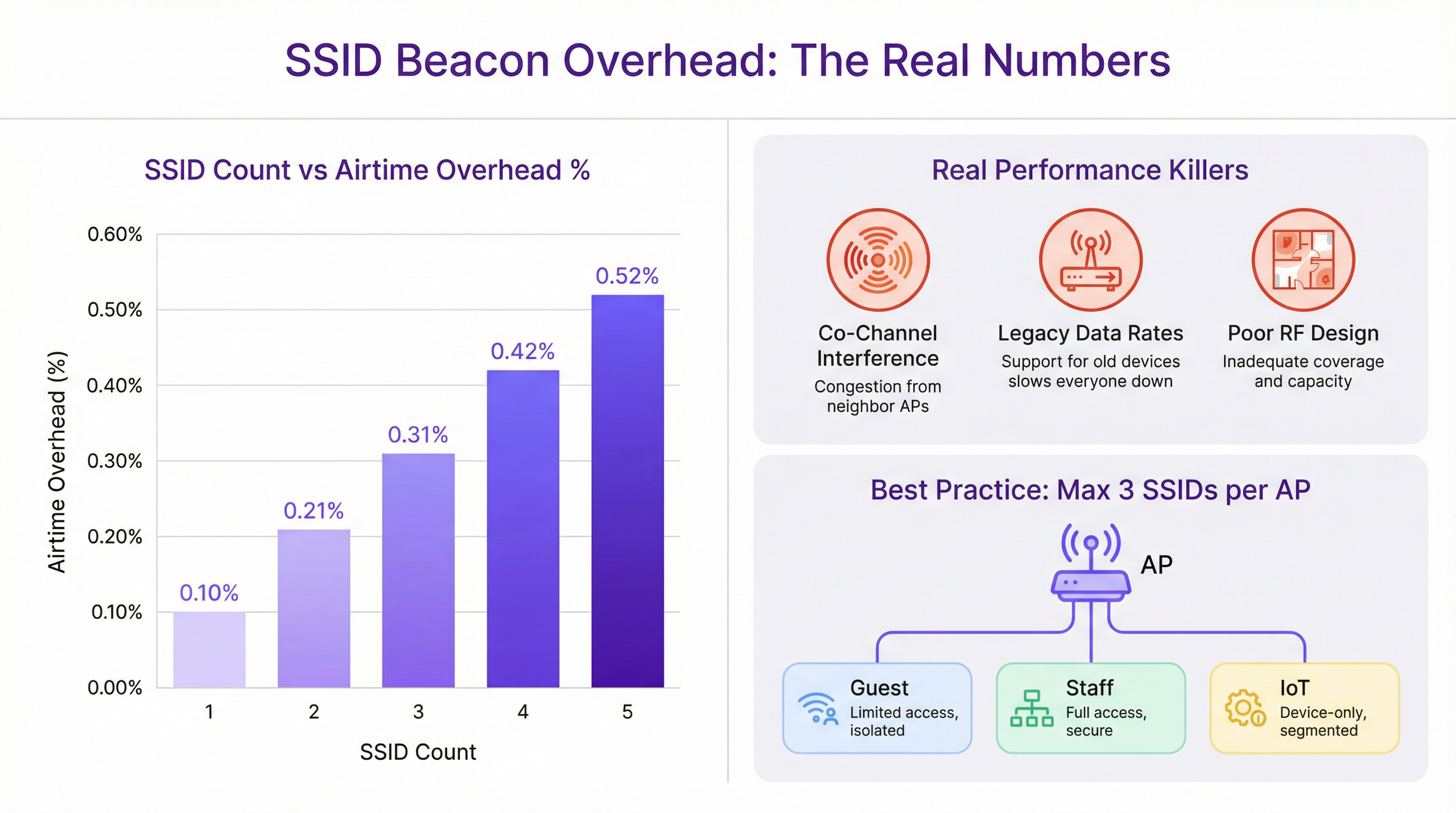
The performance degradation often blamed on multiple SSIDs is almost always misattributed. The true culprits are more fundamental network design flaws:
Co-Channel Interference (CCI): When multiple APs in close proximity operate on the same WiFi channel, they must all contend for the same airtime. This ‘noisy neighbor’ effect is the single most significant cause of performance degradation in high-density deployments. Proper channel planning, ensuring adjacent APs are on non-overlapping channels (e.g., 1, 6, 11 in the 2.4 GHz band), is critical.
Legacy Data Rates: Supporting outdated 802.11b data rates (1, 2, 5.5, and 11 Mbps) forces all management traffic, including beacons, to be transmitted at an extremely slow pace. This consumes a disproportionate amount of airtime. Disabling these legacy rates and setting a minimum mandatory rate of 12 Mbps or higher is a crucial optimization step.
Poor RF Design: Without a professional Radio Frequency (RF) site survey, AP placement is guesswork. This leads to coverage gaps, excessive CCI, and poor roaming performance. A solid RF foundation is the prerequisite for any high-performing wireless network, regardless of SSID count.
Modern network architecture provides tools to achieve segmentation without excessive SSIDs. IEEE 802.1X is a port-based network access control standard that provides a robust authentication mechanism. When a user connects to an 802.1X-secured SSID, a RADIUS server can authenticate their credentials and dynamically assign them to a specific VLAN with a corresponding security policy. This allows a single, secure SSID (e.g., "Brand-Staff") to serve multiple user roles with different access rights, dramatically reducing the need for separate SSIDs for each department or user group.
Implementation Guide
Deploying a scalable and manageable SSID architecture across multiple venues requires a standardized, repeatable process. The following steps provide a vendor-neutral framework.
Step 1: Define Your Access Tiers Before configuring any hardware, classify all network access requirements into distinct tiers. For most multi-venue organizations, this will result in three primary tiers:
- Guest/Public: For visitors, customers, and the general public. Access is typically time-limited, bandwidth-restricted, and isolated from all internal networks.
- Staff/Operations: For employees and trusted contractors. This tier provides secure access to internal resources, corporate applications, and communication platforms.
- IoT/Infrastructure: For ‘headless’ devices such as POS terminals, digital signage, HVAC systems, and security cameras. This network should be highly restricted, with traffic limited to essential operational functions.
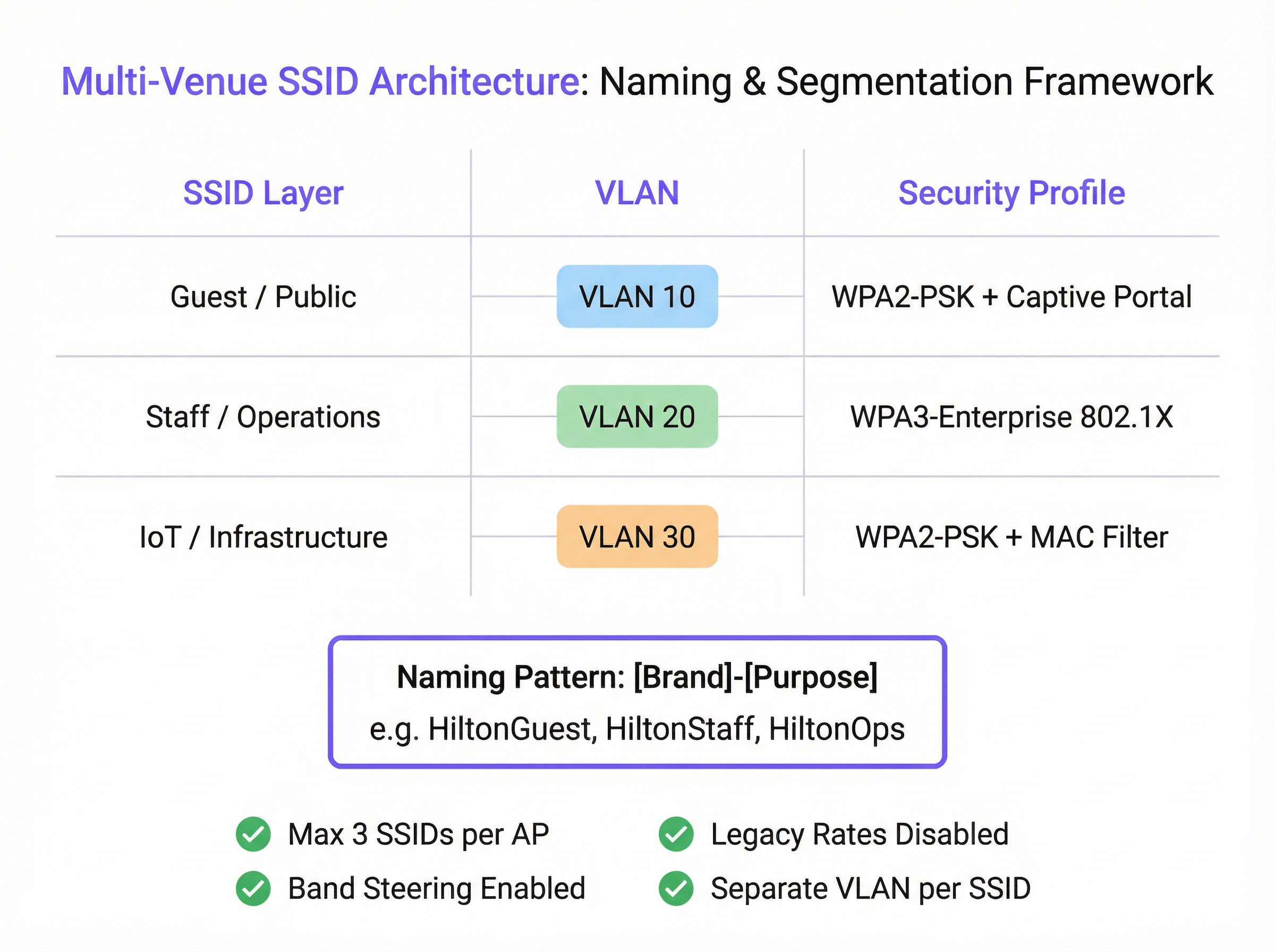
Step 2: Design the VLAN and IP Schema Each access tier must be mapped to a dedicated VLAN to ensure complete network segmentation. Assign a unique VLAN ID and a corresponding IP subnet for each SSID across your entire estate. For example:
- Guest SSID -> VLAN 10 -> 10.10.0.0/16
- Staff SSID -> VLAN 20 -> 10.20.0.0/16
- IoT SSID -> VLAN 30 -> 10.30.0.0/16 This logical separation is fundamental for security and compliance with standards like PCI DSS.
Step 3: Configure Security Profiles
- Guest SSID: Use WPA2-PSK with a captive portal. The portal is essential for user authentication, presenting terms and conditions (for GDPR compliance), and creating marketing engagement opportunities. Purple’s platform excels at providing this functionality.
- Staff SSID: Implement WPA3-Enterprise with 802.1X authentication. This is the gold standard for corporate wireless security. It requires each user to have unique credentials, eliminating the risks of shared passwords and enabling per-user accountability.
- IoT SSID: Use WPA2-PSK with a strong, complex password. Where possible, add an extra layer of security by implementing a MAC address whitelist, ensuring only pre-approved devices can connect.
Step 4: Standardize SSID Naming
Adopt a consistent, logical naming convention across all venues to facilitate seamless roaming and simplify management. A recommended pattern is [BrandName]-[Purpose]. For example: Arena-Guest, Arena-Staff, Arena-POS. This avoids user confusion and ensures devices can automatically connect to the correct network regardless of location.
Best Practices
- The Rule of Three: As a guiding principle, aim to broadcast a maximum of three SSIDs per access point. This provides the necessary segmentation for most use cases while keeping management traffic to a minimum.
- Disable Legacy Rates: In your wireless controller, disable all 802.11b data rates. Set the lowest mandatory data rate to 12 Mbps or higher to ensure management frames are transmitted efficiently.
- Enable Band Steering: Configure your APs to actively encourage dual-band clients to connect to the less congested 5 GHz and 6 GHz bands, preserving the 2.4 GHz band for legacy devices that require it.
- Per-AP SSID Availability: Do not broadcast every SSID from every AP. A guest network may only be needed in public areas, while an IoT network for warehouse scanners is only needed in the stockroom. Use per-AP or group-based SSID settings to limit broadcasts to only where they are necessary.
Troubleshooting & Risk Mitigation
- Symptom: Slow performance on the Staff network after deploying a new Guest SSID.
- Likely Cause: Not the Guest SSID itself, but underlying co-channel interference or support for legacy data rates. The additional client load from the guest network has simply exposed a pre-existing weakness.
- Mitigation: Perform an RF audit to validate your channel plan. Use a WiFi analyzer to check for legacy data rates and disable them in the network controller.
- Symptom: Devices frequently disconnect or fail to roam between APs.
- Likely Cause: Inconsistent SSID names or security settings between APs. Mismatched power levels between adjacent APs can also cause ‘sticky client’ issues.
- Mitigation: Ensure the SSID name, security type, and VLAN tagging are identical across all APs broadcasting that network. Use your wireless controller’s RF management features to balance AP power levels.
ROI & Business Impact
A well-architected SSID strategy delivers significant ROI beyond basic connectivity. By segmenting guest traffic through a platform like Purple, venues can capture valuable footfall data, understand visitor behavior, and create targeted marketing campaigns, turning a cost center into a revenue driver. For a 200-room hotel, the ability to engage with guests via a branded captive portal can lead to a measurable increase in loyalty program sign-ups and direct bookings. For a retail chain, understanding dwell times and visit frequency across multiple stores provides powerful business intelligence. Secure, role-based access for staff improves operational efficiency, while a properly isolated network for payment systems is a non-negotiable component of PCI DSS compliance, mitigating significant financial and reputational risk.
Key Terms & Definitions
SSID (Service Set Identifier)
The public name of a WiFi network. It is a human-readable string of up to 32 characters that differentiates one wireless network from another.
IT teams configure SSIDs to provide tailored network access for different user groups, such as 'Guest' or 'Staff'. Consistent naming is crucial for roaming in multi-venue deployments.
Beacon Frame
A management frame sent periodically by an access point to announce its presence and provide network information. Each SSID has its own stream of beacons.
The fear of 'beacon overhead' is often cited as a reason to limit SSID count, but in a well-configured network, their performance impact is negligible.
VLAN (Virtual Local Area Network)
A method of creating logically separate networks on the same physical infrastructure. Traffic on one VLAN is isolated from traffic on another.
VLANs are the primary tool for segmenting different user groups (e.g., Guest vs. Staff) to enhance security and ensure compliance with standards like PCI DSS.
IEEE 802.1X
An IEEE standard for port-based Network Access Control (PNAC). It provides an authentication mechanism for devices wishing to attach to a LAN or WLAN.
This is the foundation of enterprise-grade WiFi security. IT teams use 802.1X with a RADIUS server to grant network access based on individual user credentials, rather than a shared password.
RADIUS (Remote Authentication Dial-In User Service)
A networking protocol that provides centralized Authentication, Authorization, and Accounting (AAA) management for users who connect and use a network service.
In an 802.1X deployment, the RADIUS server is what checks the user's credentials and tells the access point which VLAN and security policy to assign to that user.
Band Steering
A technique used by dual-band access points to encourage capable client devices to connect to the less-congested 5 GHz or 6 GHz frequency bands.
Network architects enable band steering to improve overall network performance by balancing the client load across available frequency bands, freeing up the crowded 2.4 GHz band.
WPA3-Enterprise
The latest generation of WiFi security for enterprise networks, combining the robust authentication of 802.1X with stronger cryptographic protocols.
For any new deployment, CTOs should mandate WPA3-Enterprise for all internal and staff networks to ensure the highest level of security and future-proof the infrastructure.
Captive Portal
A web page that is displayed to newly connected users of a WiFi network before they are granted broader access to network resources.
Venue operators use captive portals on guest networks to present terms of service, capture user data for marketing (with consent), and display branding, often managed through a platform like Purple.
Case Studies
A 200-room hotel needs to provide WiFi for guests, staff, and a new deployment of in-room smart TVs (IoT). They are concerned about performance and PCI DSS compliance for their front-desk payment terminals.
Implement a three-SSID strategy. 1. Guest SSID (HotelGuest): WPA2-PSK with a captive portal on VLAN 10. Apply bandwidth limits per user. 2. Staff SSID (HotelStaff): WPA3-Enterprise with 802.1X on VLAN 20, authenticating against the hotel's directory service. 3. IoT SSID (HotelIoT): WPA2-PSK with a complex key and MAC filtering on VLAN 30 for the smart TVs. The front-desk terminals should be on a separate, wired VLAN and completely isolated from all wireless networks to ensure PCI DSS compliance.
A retail chain with 50 stores wants to standardize its WiFi. They need to support corporate users, store associates with handheld scanners, and a public guest network. Centralized management is key.
Deploy a cloud-managed wireless solution. Use a standardized three-SSID template pushed to all stores. 1. Guest SSID (ShopFreeWiFi): Captive portal on VLAN 100. 2. Staff SSID (ShopStaff): 802.1X on VLAN 110, allowing corporate users and store associates to authenticate with their network credentials. Use RADIUS to assign store associates to a more restrictive security policy. 3. POS SSID (ShopPOS): WPA2-PSK on VLAN 120, with MAC filtering for the handheld scanners and POS devices. Use per-AP SSID availability to ensure the POS SSID is only broadcast in secure staff areas.
Scenario Analysis
Q1. You are taking over a network for a conference center that has 12 different SSIDs, one for each meeting room. Users complain of frequent disconnects when moving between rooms. What is the most likely cause and your first corrective action?
💡 Hint:Consider how client devices handle roaming between access points.
Show Recommended Approach
The most likely cause is the use of unique SSIDs for each room, which breaks client roaming. The first action is to consolidate these into a single 'Conference-Guest' SSID broadcast from all APs. This allows devices to roam seamlessly. Further segmentation for different events can be handled with different pre-shared keys or by using a captive portal with event-specific access codes.
Q2. A stadium is deploying a new high-density WiFi 6E network. They want to provide access for fans, press, and operational staff. How would you structure the SSIDs, and what key feature of the APs would you leverage heavily?
💡 Hint:Think about the different frequency bands available and how to manage congestion.
Show Recommended Approach
I would use a three-SSID model: 'Stadium-Fan', 'Stadium-Press', and 'Stadium-Ops'. I would heavily leverage band steering to push as many capable fan and press devices as possible onto the 6 GHz and 5 GHz bands, leaving the 2.4 GHz band for legacy devices and reducing overall network congestion. The 'Stadium-Press' SSID could have a higher QoS priority and a larger per-client bandwidth limit.
Q3. Your CFO is questioning the expense of a professional RF site survey for a new 5-story office building, suggesting you can 'just add more APs if the signal is weak'. How do you justify the investment in a site survey?
💡 Hint:Focus on the risks and hidden costs of not performing a survey.
Show Recommended Approach
I would explain that 'just adding more APs' without a survey is the primary cause of co-channel interference, which cripples network performance. A professional site survey is not about signal strength alone; it's about creating a precise channel and power plan to ensure APs work together, not against each other. The cost of the survey is a fraction of the productivity lost from a poorly performing network and the expense of troubleshooting and remediating it later. It's a foundational investment in network reliability and performance.
Key Takeaways
- ✓The performance impact of multiple SSIDs is negligible; the real culprits are co-channel interference and legacy data rates.
- ✓Adopt the 'Rule of Three': aim for a maximum of three SSIDs per AP (e.g., Guest, Staff, IoT).
- ✓Use VLANs to segment each SSID, creating logically separate and secure networks on the same hardware.
- ✓Secure staff networks with WPA3-Enterprise and 802.1X for robust, per-user authentication.
- ✓Always disable slow, legacy data rates (below 12 Mbps) to improve management traffic efficiency.
- ✓A professional RF site survey is a non-negotiable prerequisite for any high-performing multi-venue WiFi deployment.
- ✓Standardize SSID naming across all venues to ensure seamless client roaming and simplify management.




