

Ubiquiti UniFi and Purple WiFi: Integration Guide
This guide provides a definitive technical reference for integrating the Purple WiFi intelligence platform with Ubiquiti UniFi network deployments, covering architecture, step-by-step controller configuration, and GDPR-compliant data capture. It is designed for IT managers, network architects, and operations directors who need to deploy a secure, feature-rich guest WiFi experience across hospitality, retail, events, and public-sector environments. By correctly configuring the UniFi Network Controller to leverage Purple's external captive portal, organisations can transform a standard cost centre into a valuable source of visitor analytics and marketing intelligence.
🎧 Listen to this Guide
View Transcript

Executive Summary
Ubiquiti UniFi is one of the most widely deployed enterprise WiFi platforms in the world, trusted by hotels, retail chains, stadiums, and public-sector organisations for its performance, scalability, and cost-effectiveness. However, its native guest portal capabilities are limited. Purple's WiFi intelligence platform resolves this gap by integrating directly with the UniFi Network Controller via its External Portal Server feature, delivering a fully branded, analytics-rich captive portal experience without requiring any additional hardware.
This guide provides a complete technical reference for that integration. It covers the underlying architecture, a step-by-step configuration process for both current (v7.4+) and legacy (v7.3 and below) UniFi versions, best practices for security and compliance, and a structured troubleshooting framework. Organisations that complete this integration gain access to real-time visitor analytics, GDPR-compliant data capture, CRM integration, and the ability to deliver targeted marketing communications — transforming guest WiFi from a cost centre into a measurable business asset.
Technical Deep-Dive
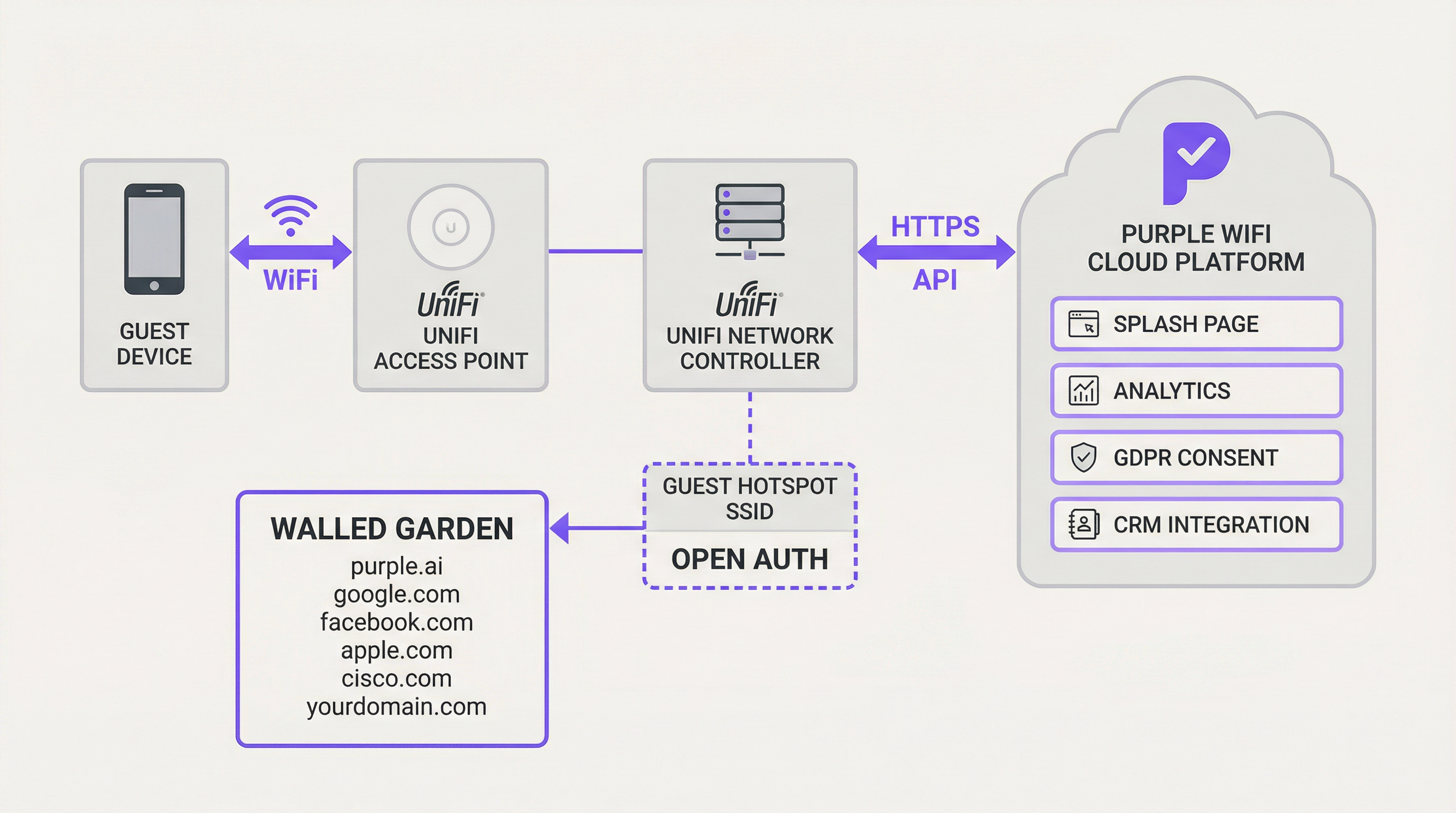
The integration between Ubiquiti UniFi and Purple hinges on UniFi's External Portal Server functionality. This feature redirects guest users from the local UniFi controller to a designated third-party captive portal — in this case, the Purple platform. The underlying mechanism relies on a series of HTTP redirects and API calls that manage the guest authorisation lifecycle.
When a guest connects to the designated open-authentication SSID, the UniFi controller places their device in a 'pending' state. In this state, all HTTP traffic is intercepted and redirected to the Purple splash page URL, with key parameters appended to the URL query string: the guest's MAC address, the AP MAC address, and the site identifier. The Purple platform captures these parameters, presents the appropriate login experience, and upon successful user authentication — whether via social login, email form, or voucher — makes a secure HTTPS API call back to the UniFi Network Controller to authorise the guest's MAC address for a specified session duration. This authorisation moves the device from the 'pending' to the 'authorised' state, granting it internet access.
A critical component of this architecture is the Walled Garden — a whitelist of IP addresses and domains that guest devices are permitted to access before authentication. This is essential for allowing access to Purple's own domains, social login providers (Facebook, Google), Apple's CNA detection endpoints, and any other required external services. Without a correctly configured Walled Garden, the captive portal will fail to load entirely.
For more advanced deployments, Purple's PurpleConnex feature introduces Passpoint (IEEE 802.11u) support, using a RADIUS server for seamless, credential-free reconnection for returning users. This requires configuring a RADIUS profile within UniFi pointing to Purple's authentication server at IP 34.150.158.147, on ports 1812 (authentication) and 1813 (accounting).
Implementation Guide
This section provides a step-by-step guide for configuring your UniFi Network Controller to integrate with Purple. The following instructions apply to UniFi Network Application version 7.4 or newer. For legacy versions (v7.3 and below), the configuration principles are identical but the navigation path differs slightly, using Profiles > Guest Hotspot rather than the Hotspot Manager.
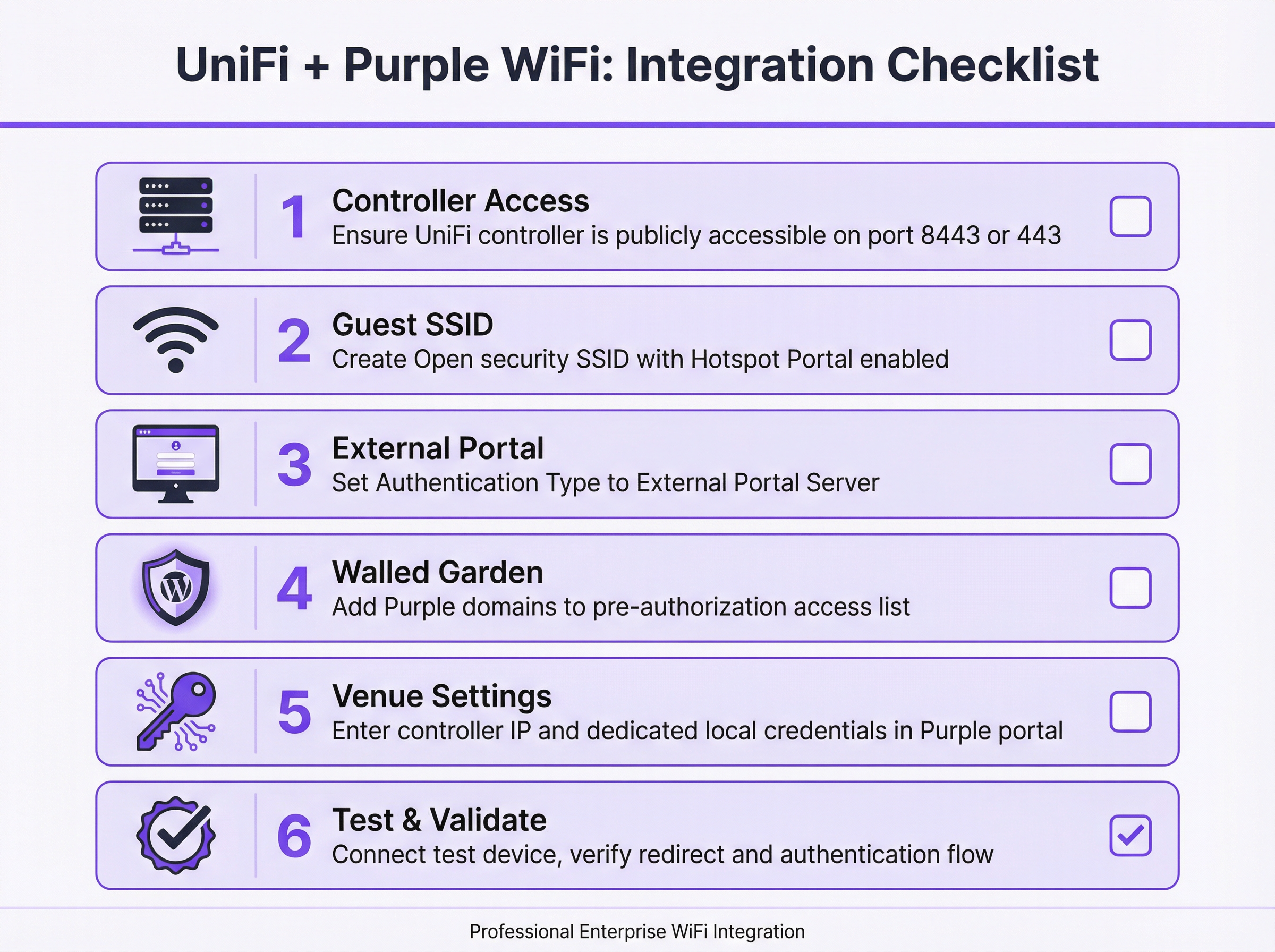
Step 1: Verify and Establish Controller Accessibility. Before beginning any configuration, confirm that your UniFi Network Controller is accessible from the public internet. Purple's cloud platform must be able to communicate with your controller's API to authorise guest sessions. For software-based UniFi Controllers, this requires a port forward rule on your firewall mapping TCP port 8443 to the controller's internal LAN IP address. For hardware-based deployments — including the UniFi Dream Machine Pro (UDM Pro), UDM Special Edition, UDR, and CloudKey Gen2+ — the relevant port is TCP 443.
Step 2: Create a Dedicated Local Administrator Account. For security hygiene, never use your primary Ubiquiti super-admin or cloud account credentials for the Purple API integration. Create a new, dedicated local administrator account on your UniFi controller specifically for this purpose. This account should have full administrative privileges for the relevant site. Using a dedicated account limits the blast radius of any potential credential compromise and ensures the integration is not disrupted by changes to your primary account.
Step 3: Create the Guest WiFi SSID. In the UniFi Network Application, navigate to Settings > WiFi and click Create New. Assign a public-facing name (e.g., 'Hotel Guest WiFi'). Set the Security Protocol to Open — this is mandatory for the captive portal redirect mechanism to function. Assign the SSID to your designated Guest VLAN. Enable the Hotspot Portal toggle.
Step 4: Configure the Hotspot Portal and External Server. Navigate to Hotspot Manager > Landing Page. Under Authentication, select External Portal Server and enter the External Portal IP address provided by Purple. Under Settings, configure as follows: enable Secure Portal, enable Redirect using Hostname and enter the Access Domain provided by Purple, and ensure HTTPS Redirection is set to Disabled. The session Default Expiration should be set to 8 hours.
Step 5: Configure the Walled Garden. In the Hotspot Manager settings, locate the Pre-Authorisation Access section. Add all domains from the list provided by Purple. This list typically includes Purple's own platform domains, social login provider domains (facebook.com, google.com, accounts.google.com), Apple's Captive Network Assistant (CNA) detection endpoints, and any other third-party services used on your splash page. This step is the most common source of deployment failures and must be completed with precision.
Step 6: Enter Controller Details in the Purple Portal. Log in to your Purple account and navigate to the relevant Venue's settings. Enter the public IP address or hostname of your UniFi Controller and the credentials for the dedicated local administrator account created in Step 2. Save the configuration. Purple will attempt to validate the connection.
Step 7: Test and Validate. Using a mobile device not previously connected to the network, connect to the new guest SSID. You should be automatically redirected to the Purple captive portal. Authenticate using one of the configured methods. Upon success, you should be granted internet access. If the redirect fails or internet access is not granted after authentication, refer to the Troubleshooting section below.
Best Practices
Network segmentation is the foundational security requirement for any guest WiFi deployment. The guest SSID must be assigned to a dedicated VLAN that is firewalled from all corporate and administrative networks. This prevents guest devices from accessing internal resources, satisfies PCI DSS network isolation requirements, and limits the impact of any security incident on the guest network.
Bandwidth management is equally important in high-density environments. UniFi's per-user rate limiting feature should be configured to set reasonable upload and download caps for guest users. This prevents a small number of high-bandwidth users from degrading the experience for all guests, which is particularly relevant in hotel and conference centre deployments.
The Walled Garden requires ongoing maintenance. Social login providers and other third-party services periodically update their domain structures. A quarterly review of the Walled Garden configuration, cross-referenced against Purple's latest recommended domain list, is a sound operational practice. Failure to maintain this list is the leading cause of post-deployment portal failures.
For the API integration, always use a dedicated local administrator account rather than a cloud-linked account. This is both a security best practice and a reliability measure — cloud account credentials are subject to multi-factor authentication flows that can interrupt the automated API calls Purple makes to authorise guests.
Troubleshooting & Risk Mitigation
The most common failure mode is a captive portal that fails to load. When a guest connects to the SSID but sees no redirect, or the portal page fails to render, the root cause is almost invariably an incomplete Walled Garden. Begin troubleshooting by connecting a test device and attempting to navigate to a known HTTP URL. If the redirect occurs but the page fails to load, add the missing domains to the Walled Garden. Also verify that the guest network's DNS is correctly configured to resolve external hostnames.
The second most common failure is a scenario where the guest successfully authenticates on the Purple portal but is not granted internet access. This indicates a failure in the API communication between Purple and the UniFi controller. The diagnostic steps are: first, confirm the controller is publicly accessible on the correct port by attempting to reach it from an external network; second, verify the local admin credentials entered in the Purple portal are correct and the account has not been locked; third, review the UniFi controller's event logs for any API authentication errors.
For production deployments, controller availability is a critical risk factor. If the UniFi controller goes offline, new guest authorisations will fail. Mitigation strategies include deploying a cloud-hosted UniFi controller (which provides inherent redundancy), implementing a high-availability controller pair, or configuring monitoring and alerting on the controller's availability. Purple's platform will queue authorisation attempts and retry, but extended controller downtime will result in a degraded guest experience.
From a compliance perspective, the data collected through the captive portal is subject to GDPR and equivalent data protection regulations. Purple's platform is architected for compliance, providing consent management, data subject access request (DSAR) tooling, and configurable data retention policies. However, the legal responsibility for lawful data processing remains with the venue operator. Ensure your privacy policy is clearly linked on the splash page, that you have a documented legal basis for data collection, and that your data retention settings align with your organisational policy.
ROI & Business Impact
Integrating Purple with UniFi is not merely a technical upgrade; it is a strategic business decision that transforms guest WiFi from a cost centre into a powerful asset. The return on investment is measurable across several key dimensions.
Business intelligence is the primary value driver. Purple captures rich, anonymised data on visitor behaviour — including footfall, dwell times, visit frequency, and movement patterns. For a retail chain, this data can directly inform store layout decisions, staffing levels, and promotional timing. For a hotel, it can reveal which amenities are most used and at what times, enabling more targeted upselling and operational efficiency.
Marketing and engagement capabilities represent a significant secondary benefit. By capturing guest contact details with consent, organisations can build a first-party marketing database that is not subject to the limitations of third-party cookie deprecation. Post-visit email campaigns, satisfaction surveys, and loyalty programme invitations can be automated directly from the Purple platform, driving measurable improvements in repeat visit rates and customer lifetime value.
For large venues such as stadiums, conference centres, and shopping centres, the operational intelligence derived from real-time footfall analytics and heatmaps can drive meaningful efficiency gains — optimising cleaning schedules, security deployment, and retail concession placement based on actual visitor movement data rather than assumptions.
In certain contexts, the guest WiFi infrastructure itself can be monetised through tiered access models, sponsored splash pages, or targeted advertising, creating a direct revenue stream that offsets the cost of the infrastructure investment.
Key Terms & Definitions
Captive Portal
A web page displayed to newly connected users of a WiFi network before they are granted broader internet access. It controls access, authenticates users, and/or presents terms of service and marketing content.
In a UniFi/Purple integration, the UniFi controller redirects the guest to the Purple-hosted captive portal, which manages the entire guest experience including authentication, consent capture, and branding.
External Portal Server
A UniFi configuration option that delegates the captive portal experience to a third-party web application, rather than using UniFi's built-in portal. The UniFi controller redirects guests to the specified external URL and relies on that system to handle authentication and to call back to the controller's API to authorise the guest.
This is the core UniFi setting that enables the Purple integration. It is found under Hotspot Manager > Landing Page > Authentication in UniFi Network v7.4+.
Walled Garden
A whitelist of IP addresses, hostnames, and domains that a guest device is permitted to access before it has been authenticated by the captive portal. Traffic to non-whitelisted destinations is blocked until the guest completes the authentication flow.
This is critical for allowing the device to load the Purple splash page itself, as well as any third-party resources it relies on, such as social login providers or payment gateways. An incomplete Walled Garden is the leading cause of captive portal failures.
RADIUS (Remote Authentication Dial-In User Service)
A networking protocol (RFC 2865) that provides centralised Authentication, Authorisation, and Accounting (AAA) management for users connecting to a network service.
While the standard Purple integration uses the UniFi API for guest authorisation, the PurpleConnex (Passpoint) feature uses RADIUS to provide a more secure and seamless connection experience for returning users, eliminating the need to re-authenticate via the captive portal.
Passpoint (IEEE 802.11u / Hotspot 2.0)
A WiFi Alliance certification programme that enables automatic, secure authentication to WiFi networks without requiring the user to manually select a network or enter credentials. Devices with a Passpoint profile connect automatically and securely using EAP-based authentication.
Purple's PurpleConnex feature leverages Passpoint to provide a seamless reconnection experience for returning guests. Once a user has authenticated once via the captive portal, subsequent visits can connect automatically without seeing the splash page again.
SSID (Service Set Identifier)
The public name of a wireless local area network (WLAN) — the network name that appears when a user searches for available WiFi connections on their device.
For a guest network integration, a dedicated SSID is created with Open security and linked to the captive portal. This is kept separate from the corporate SSID, which uses WPA2/WPA3-Enterprise authentication.
VLAN (Virtual Local Area Network)
A method of creating logically separate networks on the same physical network infrastructure. Devices on different VLANs cannot communicate with each other without a router, providing network segmentation and security isolation.
Security best practice and PCI DSS compliance require that the guest SSID be placed on its own VLAN, completely isolated from the corporate, management, and POS networks. This prevents guest devices from accessing internal resources.
WISPr (Wireless Internet Service Provider Roaming)
An industry-standard protocol that defines how a client device discovers and authenticates to a WiFi hotspot captive portal. It uses HTTP redirects and XML-based authentication messages to manage the portal interaction.
UniFi's external portal functionality is based on WISPr principles. Understanding this protocol helps network engineers troubleshoot redirect failures and understand why certain client devices (particularly iOS and Android) behave differently when connecting to captive portal networks.
Port Forwarding
A network address translation (NAT) technique that maps an external port on a router or firewall to a specific internal IP address and port, allowing external services to initiate connections to devices on a private network.
If your UniFi controller is hosted on a local network, a port forward rule must be configured to allow the Purple cloud platform to reach the controller's API. The required port is 8443 for software controllers or 443 for hardware-based controllers.
PurpleConnex
Purple's implementation of the Passpoint (IEEE 802.11u) standard, which provides a secure, seamless WiFi connection for returning users using EAP-TTLS authentication via a dedicated RADIUS server. It eliminates the need for repeat visitors to re-authenticate via the captive portal.
PurpleConnex requires additional configuration in UniFi: a RADIUS profile pointing to Purple's authentication server and a separate Passpoint-enabled SSID. It is particularly valuable in hospitality and retail environments where repeat visitors are common.
Case Studies
A 250-room boutique hotel wants to replace its basic, unreliable guest WiFi with a premium, branded experience. Their goals are to capture guest email addresses for post-stay marketing, promote their spa and restaurant on the login page, and ensure seamless connectivity for guests with multiple devices. Their infrastructure consists of a UniFi Dream Machine Pro and 40 UniFi U6 Pro access points.
The recommended deployment integrates the UDM Pro with Purple via the External Portal Server method. A new 'Hotel Guest WiFi' SSID is created with Open security and assigned to a dedicated Guest VLAN (e.g., VLAN 20), which is firewalled from the hotel's management and POS networks. The Hotspot Portal is enabled and configured to use Purple as the external portal server. Since the UDM Pro uses port 443, a port forward rule is created on the UDM Pro's WAN interface mapping TCP 443 to the UDM Pro's LAN IP. A dedicated local administrator account ('purple-api') is created on the UDM Pro with full site privileges. In the Purple portal, a custom-branded splash page is designed featuring the hotel's logo, a simple email capture form with GDPR consent checkbox, and a prominent banner advertising the spa with a direct booking link. The Walled Garden is configured to include all Purple domains, Facebook, Google, and Apple CNA endpoints. The hotel's marketing team is given access to the Purple analytics dashboard, enabling them to track daily guest counts, peak connection times, and email capture rates. Within the first quarter, the hotel captures an average of 180 new email addresses per week, which are automatically synced to their CRM for post-stay campaign automation.
A retail chain with 20 stores across the UK, each equipped with UniFi APs managed by a single cloud-hosted UniFi controller, wants to use guest WiFi data to understand customer behaviour. The operations director needs to measure footfall, dwell time, and repeat visitor rates across all stores to inform a store layout redesign programme and evaluate the performance of in-store promotional campaigns.
The cloud-hosted UniFi controller already has a public hostname, so no port forwarding is required — this is a significant simplification of the deployment. A single guest SSID ('Brand WiFi') is configured and applied to all 20 sites via the UniFi controller's site management capabilities. The Hotspot Portal is configured to use Purple's external portal server. In the Purple portal, each of the 20 stores is configured as a separate venue, allowing for granular, store-level analytics. The splash page is designed for maximum adoption: a single 'Connect' button with a brief privacy notice, minimising friction. Within the Purple analytics platform, the operations director can view a comparative dashboard showing footfall, dwell time, and new vs. returning visitor ratios for each store. After 90 days of data collection, the analytics reveal that three stores have significantly higher dwell times than the others, correlating with a specific store layout. This insight directly informs the layout redesign programme, with the high-performing layout rolled out to all 20 stores. A promotional campaign is run across all stores simultaneously, and the Purple dashboard provides a clear before-and-after comparison of footfall and dwell time, demonstrating measurable campaign uplift.
Scenario Analysis
Q1. A hotel IT manager has completed the UniFi/Purple integration configuration and tested it successfully in the office. However, after deploying to the live hotel environment, guests report that the captive portal page loads but the 'Login with Facebook' button does not work. What is the most likely cause and how should it be resolved?
💡 Hint:Consider what resources the Facebook login button needs to load and function, and whether those resources are accessible to a guest device before authentication.
Show Recommended Approach
The most likely cause is that the Facebook login domains are not included in the Walled Garden (pre-authorisation access list). When a guest device is in the 'pending' state, it can only access domains explicitly whitelisted in the Walled Garden. The Facebook login flow requires access to facebook.com, fbcdn.net, and related domains. The resolution is to add all required Facebook domains to the Walled Garden in the UniFi Hotspot Manager settings. Purple provides a maintained list of required domains for each social login provider. After updating the Walled Garden, test the Facebook login flow again with a fresh device connection.
Q2. A network architect is planning a guest WiFi deployment for a 5,000-seat conference centre that will host events with up to 3,000 simultaneous WiFi users. The venue uses a software-based UniFi controller hosted on a server in the venue's server room. What are the three most critical infrastructure considerations for ensuring the Purple integration remains reliable during peak events?
💡 Hint:Think about the single points of failure in the integration architecture — what happens if the controller goes offline, if the internet connection is saturated, or if the controller's hardware is underpowered?
Show Recommended Approach
The three most critical considerations are: First, controller availability and performance — the UniFi controller is a critical component in every guest authorisation. At 3,000 simultaneous users, the controller must have sufficient CPU and RAM to handle the load. Consider upgrading to a high-specification server or migrating to a cloud-hosted controller for inherent redundancy. Second, internet connectivity and port forwarding reliability — Purple's API calls to the controller must traverse the venue's internet connection. Ensure the port forward rule is on a resilient firewall and that the internet connection has sufficient capacity. A secondary internet connection with automatic failover is advisable for mission-critical events. Third, bandwidth management — with 3,000 users, implement strict per-user rate limits in UniFi to prevent bandwidth exhaustion. Without rate limiting, a small number of high-bandwidth users can degrade the experience for all guests.
Q3. An IT manager at a retail chain is asked by the legal team to ensure the guest WiFi data collection is fully GDPR-compliant. The current splash page has a simple 'Connect' button with no explicit consent mechanism. What changes need to be made to the Purple configuration, and what ongoing operational processes should be implemented?
💡 Hint:GDPR requires a lawful basis for processing personal data, transparency about how data will be used, and mechanisms for data subjects to exercise their rights.
Show Recommended Approach
The following changes and processes are required: On the splash page, the 'Connect' button must be replaced with an explicit opt-in mechanism. This means adding a clearly worded consent checkbox (unchecked by default) that states what data is being collected, how it will be used, and who it will be shared with. A link to the full privacy policy must be prominently displayed. The legal basis for processing should be explicit consent for marketing communications and legitimate interest for anonymised analytics. Within the Purple portal, configure data retention settings to align with the organisation's data retention policy — typically no longer than 24 months for marketing data. Enable Purple's GDPR tooling to handle data subject access requests (DSARs) and right-to-erasure requests. Operationally, implement a quarterly review process to ensure the privacy policy remains accurate, the consent wording is up to date, and data retention settings are enforced. Maintain a record of processing activities (ROPA) entry for the guest WiFi data collection.
Q4. A network engineer has configured the UniFi/Purple integration following all documented steps. When testing, the guest device connects to the SSID and is redirected to the Purple portal. The guest successfully authenticates, but is not granted internet access. The Purple portal shows the authentication as successful. What is the diagnostic process?
💡 Hint:If Purple shows a successful authentication but the guest has no internet access, the issue lies in the communication path between Purple and the UniFi controller.
Show Recommended Approach
This symptom indicates that Purple's API call to the UniFi controller — the call that moves the guest device from 'pending' to 'authorised' — is failing. The diagnostic process is as follows: First, verify that the UniFi controller is publicly accessible on the correct port (8443 for software, 443 for hardware) by attempting to reach the controller's management interface from an external network or using an online port checker tool. Second, log in to the Purple portal and verify that the controller IP/hostname and local admin credentials are correct. A common error is entering the controller's internal LAN IP rather than its public IP, or using cloud account credentials instead of local admin credentials. Third, check the UniFi controller's event log for any API authentication errors or failed login attempts from Purple's IP addresses. Fourth, verify that the firewall rule or port forward is correctly configured and that Purple's source IP addresses are not being blocked by any upstream security appliance.
Key Takeaways
- ✓The UniFi/Purple integration uses UniFi's External Portal Server feature to redirect guests to the Purple captive portal, which handles authentication and calls back to the UniFi API to authorise guest access — no additional hardware is required.
- ✓The Walled Garden (pre-authorisation access list) is the most critical and most frequently misconfigured element of the deployment. It must include all Purple domains, social login provider domains, and Apple CNA endpoints before the portal will function correctly.
- ✓Always use a dedicated local administrator account on the UniFi controller for the Purple API integration — never use your primary Ubiquiti cloud account credentials. This is both a security best practice and a reliability requirement.
- ✓The correct API port depends on the controller type: TCP 8443 for software-based controllers, TCP 443 for hardware-based controllers (UDM Pro, UDM SE, UDR, CloudKey Gen2+). Configuring the wrong port is a common cause of API communication failures.
- ✓Network segmentation is non-negotiable: the guest SSID must be on a dedicated VLAN, firewalled from all corporate and management networks. This is required for both security and PCI DSS compliance.
- ✓The ROI of the Purple integration extends well beyond connectivity: visitor analytics, GDPR-compliant data capture, CRM integration, and targeted marketing communications transform guest WiFi into a measurable business asset.
- ✓For returning users, Purple's PurpleConnex (Passpoint/IEEE 802.11u) feature provides a seamless, credential-free reconnection experience using RADIUS-based EAP-TTLS authentication, eliminating the need to re-authenticate via the captive portal on subsequent visits.




