

Webhooks vs API Polling for WiFi Data: Which to Use?
This guide provides a definitive technical comparison between webhooks and API polling for retrieving WiFi intelligence data. It offers actionable guidance for IT managers, architects, and developers to help them select the optimal data integration pattern for real-time responsiveness, operational efficiency, and scalable deployments in enterprise environments.
🎧 Listen to this Guide
View Transcript

Executive Summary
For IT leaders and venue operators, the method chosen to retrieve data from a WiFi intelligence platform like Purple is a foundational architectural decision with significant operational consequences. The two primary patterns, API polling and webhooks, offer a stark trade-off between implementation simplicity and real-time performance. API polling, a client-initiated pull model, repeatedly queries an API for new data at fixed intervals. While straightforward to deploy, it is resource-intensive, introduces inherent data latency, and scales poorly. In contrast, webhooks employ a server-initiated, event-driven push model. They deliver data payloads to a pre-defined endpoint the instant a specific event occurs—such as a guest connecting to the network. This approach provides true real-time data, ensures high resource efficiency, and offers superior scalability. For any application requiring immediate, contextual engagement—from triggering marketing automation to dispatching operational alerts—webhooks are the architecturally superior choice. This guide provides a technical deep-dive into both patterns, offers vendor-neutral implementation guidance, and presents real-world case studies to help architects and developers make an informed decision that aligns with their business objectives for ROI, throughput, and risk mitigation.
Technical Deep-Dive
Understanding the fundamental differences between API polling and webhooks is critical for designing robust and efficient systems that leverage WiFi data. This section explores the architecture, performance characteristics, and security implications of each pattern.
What is API Polling?
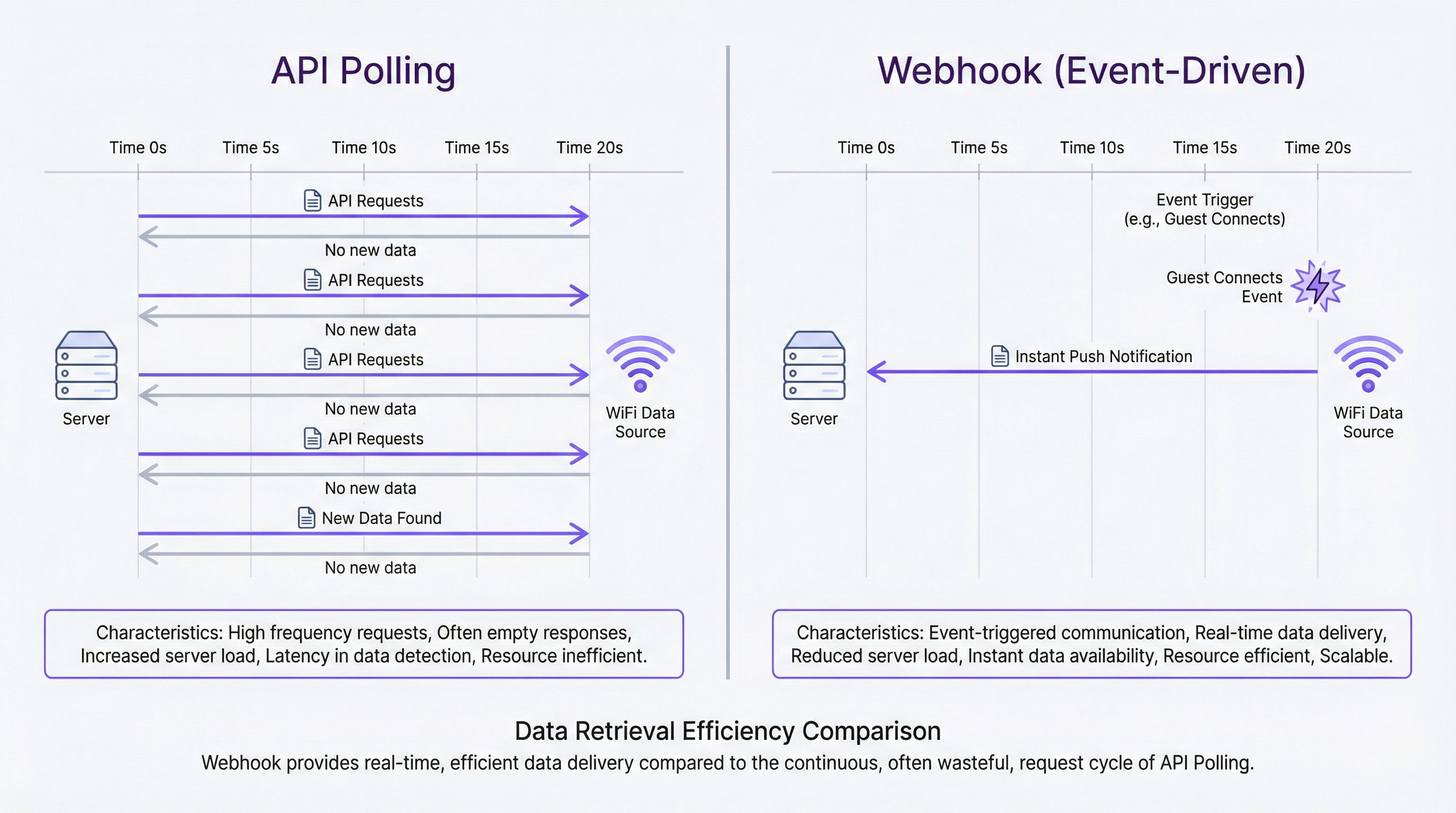
API polling is a synchronous, pull-based mechanism where a client application makes repeated HTTP requests to a server API at a predetermined frequency to check for new data. It operates on a simple request-response cycle: the client asks, "Is there any new information?" and the server responds.
Characteristics:
- Client-Initiated: The client is responsible for initiating all communication.
- Fixed Interval: Requests are made at regular intervals (e.g., every 60 seconds).
- Synchronous: The client waits for a response before proceeding or making the next request.
Advantages:
- Simplicity: Implementation is often straightforward, requiring only a simple script or scheduled task to make HTTP GET requests.
- Predictable Load: The load on the client system is consistent and easy to forecast.
Disadvantages:
- Inefficiency: The vast majority of polls return no new data, consuming unnecessary bandwidth and processing cycles on both the client and server side. This is a significant source of waste in large-scale deployments.
- Latency: Data is never truly real-time. The "freshness" of the data is, at best, limited by the polling interval. For an interval of 5 minutes, data can be up to 4 minutes and 59 seconds old, which is unacceptable for time-sensitive applications.
- Scalability Issues: As the number of clients or the frequency of polling increases, the load on the server API grows linearly, potentially leading to performance degradation or rate-limiting.
What are Webhooks?
Webhooks are an asynchronous, push-based mechanism for server-to-server communication. Instead of the client repeatedly asking for data, the server automatically sends—or pushes—a data payload to a designated client URL (the "webhook endpoint") as soon as a specific event occurs. This is often referred to as a "reverse API" or an event-driven architecture.
Characteristics:
- Server-Initiated (Event-Driven): Communication is triggered by an event on the server (e.g.,
guest_connects,user_leaves_venue). - Real-Time: Data is delivered almost instantaneously upon the event's occurrence.
- Asynchronous: The client receives data passively without needing to initiate a request.
Advantages:
- Efficiency: Communication only happens when there is new data to share, eliminating wasted requests and dramatically reducing server and network load.
- Real-Time Data: Webhooks are the industry standard for achieving real-time data delivery, enabling immediate action and contextual workflows.
- Scalability: The architecture is highly scalable, as the server only expends resources when an event is triggered, rather than continuously handling polls from thousands of clients.
Disadvantages:
- Implementation Complexity: The initial setup is more involved. It requires creating a stable, publicly accessible HTTP endpoint on the client-side to receive the incoming POST requests from the server.
- Reliability Management: The client application must be designed to handle incoming data reliably, including managing potential downtime and processing spikes.
Architectural Comparison
| Feature | API Polling | Webhooks (Event-Driven) |
|---|---|---|
| Data Flow | Pull (Client-initiated) | Push (Server-initiated) |
| Data Freshness | Delayed (by polling interval) | Real-Time |
| Efficiency | Low (many empty requests) | High (communication on event only) |
| Server Load | High and constant | Low and sporadic (on event) |
| Client Load | High (constant requests) | Low (passively listens) |
| Scalability | Poor | Excellent |
| Implementation | Simple initial setup | Requires a public endpoint |
Security Considerations
Both patterns require robust security measures, particularly when handling personally identifiable information (PII) subject to regulations like GDPR. [1]
For Webhooks: Security is paramount. The receiving endpoint MUST be secured using HTTPS (TLS encryption) to protect data in transit. Furthermore, to prevent spoofing attacks where a malicious actor sends fake data to your endpoint, payloads must be verified. Purple's platform, in line with industry best practices, includes a unique signature in the
X-Purple-SignatureHTTP header of each webhook request. This signature is a hash (HMAC-SHA256) of the payload body, created using a secret key shared between your application and Purple. Your endpoint must compute the same hash and verify that it matches the signature in the header before processing the data. This ensures the data is both authentic (from Purple) and has not been tampered with.For API Polling: The primary security concern is the management of the API key. This key must be stored securely and never exposed in client-side code. All API communication must also occur over HTTPS. Access should be logged and monitored for anomalous activity that could indicate a compromised key.
Implementation Guide
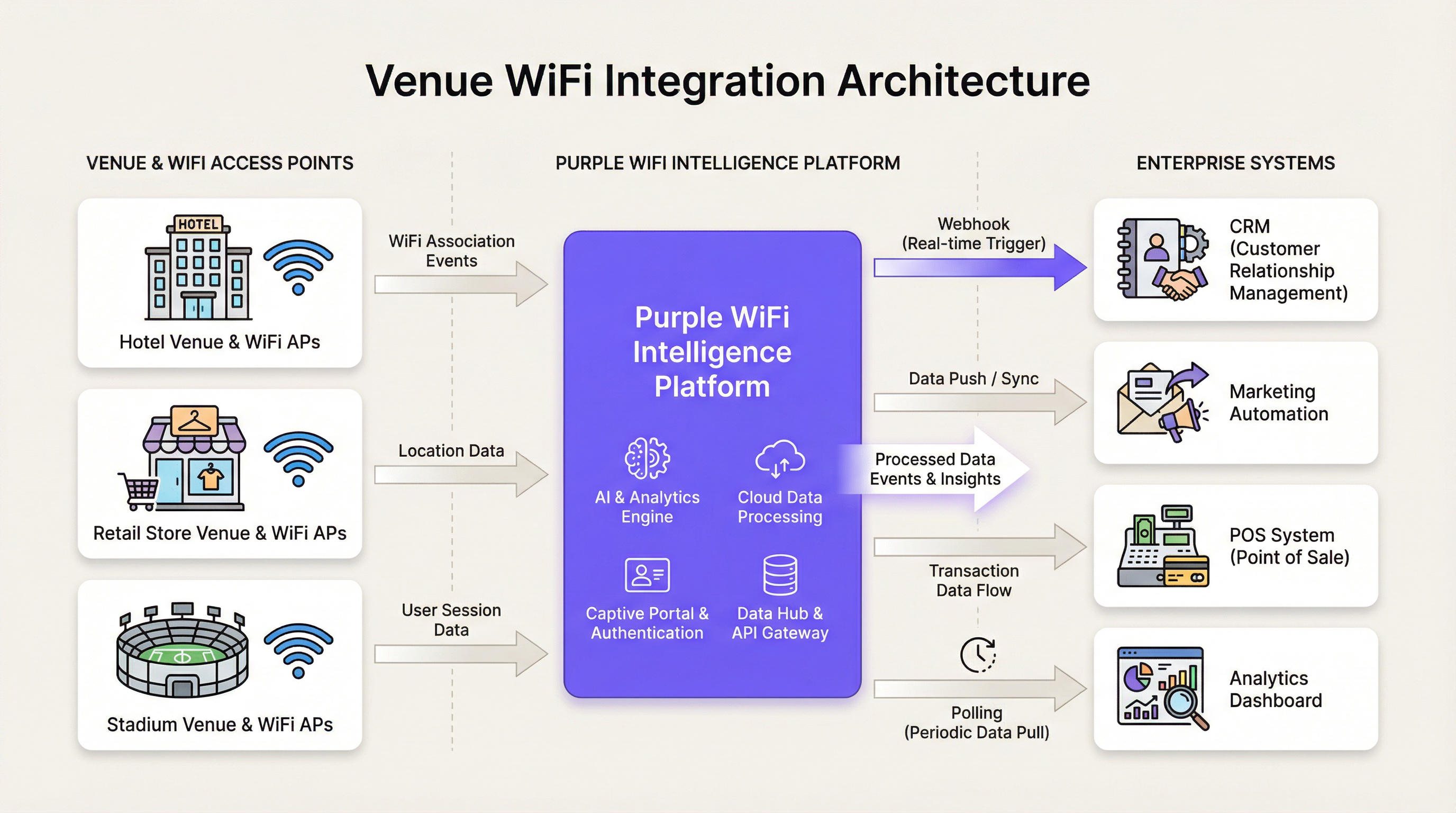
Choosing the right pattern depends entirely on the business requirements of the integration. A blended approach is common in complex enterprise architectures.
When to Use API Polling
Despite its inefficiencies, API polling is a viable choice for specific, non-critical use cases:
- Batch Reporting: Generating nightly or weekly reports on aggregate WiFi usage, where a data delay of several hours is acceptable.
- Internal Dashboards: Populating a non-critical internal dashboard with trend data that does not require second-by-second accuracy.
- Legacy Systems: Integrating with older systems that cannot expose a public endpoint to receive webhooks.
- Infrastructure Constraints: In high-security environments where inbound traffic from external services is heavily restricted by policy.
When to Use Webhooks
Webhooks are the definitive choice for any modern, real-time application. Use them whenever an immediate, automated response to a WiFi event can create business value.
- Real-Time Marketing: Triggering a welcome email, SMS with a voucher, or a push notification to a loyalty app the moment a guest connects to the WiFi in a hotel or retail store.
- Operational Alerts: Sending an instant alert to staff via Slack or a dedicated app when a specific event occurs, such as a VIP guest arriving, a dwell time threshold being exceeded in a specific zone, or network hardware going offline.
- CRM Integration: Instantly creating or updating a customer record in a CRM like Salesforce or HubSpot when a new guest registers on the captive portal.
- Venue Operations: Using real-time device density data to manage crowd flow in a stadium, adjust HVAC in a conference centre, or dispatch cleaning staff to high-traffic areas.
Implementing Purple's Webhooks: A Conceptual Guide
- Create Your Endpoint: Develop a stable, public URL on your server that can accept HTTP POST requests. This can be a serverless function (e.g., AWS Lambda, Google Cloud Function) or a dedicated route in your web application.
- Register the Endpoint in Purple: In the Purple portal, navigate to the webhooks section and add your endpoint URL. You will be provided with a secret key for signature verification.
- Process Incoming Data: When an event occurs, Purple will send a JSON payload to your endpoint. Your endpoint should be programmed to:
a. Immediately Acknowledge Receipt: Respond with a
200 OKstatus code as quickly as possible to let Purple know the data was received. This prevents timeouts and retries. b. Verify the Signature: Before processing, compute the HMAC-SHA256 signature of the raw request body using your secret key and compare it to the value in theX-Purple-Signatureheader. If they do not match, discard the request. c. Process Asynchronously: Offload the actual business logic (e.g., sending an email, updating a database) to a background job queue (e.g., RabbitMQ, Redis Queue). This ensures your endpoint remains responsive and can handle high volumes of events without getting blocked.
Best Practices
Adhering to industry-standard best practices is essential for building reliable and secure integrations.
Webhook Best Practices
- Idempotency: Design your processing logic to handle duplicate events gracefully. Network issues can sometimes lead to a webhook being delivered more than once. An idempotent system ensures that processing the same event multiple times does not result in duplicate data or actions.
- Asynchronous Processing: Never perform complex or time-consuming logic directly within the request handler. Acknowledge and queue.
- Payload Validation: Always verify the webhook signature. This is a critical security step.
- Monitoring and Logging: Implement comprehensive logging to track incoming webhooks and the outcome of their processing. Set up monitoring to alert you if your endpoint fails or response times degrade.
- Graceful Failure & Retries: While Purple's system includes a retry mechanism, your own system should be resilient to failures in downstream services (e.g., a database or third-party API being temporarily unavailable).
API Polling Best Practices
- Choose an Appropriate Frequency: Do not poll more frequently than necessary. Over-polling provides diminishing returns and increases the risk of being rate-limited. Respect the
Retry-Afterheader if you receive a429 Too Many Requestsresponse. - Use Conditional Requests: Where supported, use headers like
If-Modified-SinceorETagto avoid re-downloading data that has not changed. - Implement a Backoff Strategy: If an API call fails, implement an exponential backoff strategy for retries to avoid overwhelming the server.
- Secure API Keys: Store API keys securely using a secrets management service. Never hard-code them in your application or commit them to version control.
Troubleshooting & Risk Mitigation
- Common Failure Mode (Webhooks): Endpoint Downtime. If your endpoint goes down, you will miss events. Mitigation: Use a highly available architecture for your endpoint (e.g., serverless functions, load-balanced servers). Rely on Purple's built-in retry mechanism for short outages and implement robust monitoring to be alerted to downtime immediately.
- Common Failure Mode (Webhooks): Processing Spikes. A sudden burst of events (e.g., a large crowd connecting at the start of an event) can overwhelm your processing queue. Mitigation: Ensure your background processing infrastructure can autoscale to handle spikes in demand.
- Common Failure Mode (API Polling): Rate Limiting. Aggressive polling will lead to your application being rate-limited, effectively cutting off your data flow. Mitigation: Poll at a reasonable, respectful interval and implement an exponential backoff strategy.
- Common Failure Mode (Both): Invalid Data. A change in data format or an unexpected value can break your processing logic. Mitigation: Implement defensive programming practices. Validate incoming data against a schema and handle validation errors gracefully, logging them for investigation without crashing the entire process.
ROI & Business Impact
The choice between webhooks and polling has a direct impact on Total Cost of Ownership (TCO) and Return on Investment (ROI).
- Cost-Benefit Analysis: While polling may have a slightly lower initial development cost, its operational costs are significantly higher due to wasted server resources and bandwidth. Webhooks, with their event-driven efficiency, lead to a much lower TCO at scale. The infrastructure cost of handling millions of empty polls per day far outweighs the cost of developing a reliable webhook endpoint.
- Measuring Success: The success of a real-time data integration is measured by its business impact. For a hotel, this could be a 15% increase in room service orders driven by webhook-triggered welcome offers. For a retailer, it could be a measurable lift in customer lifetime value for VIPs who receive personalized in-store service. For a venue, it could be a reduction in operational incidents due to proactive crowd management.
- Expected Outcomes: Deploying a webhook-based architecture positions your organization to be more agile and responsive. It moves your operations from a reactive posture (analyzing what happened yesterday) to a proactive, real-time posture (acting on what is happening right now). This capability is a key differentiator in delivering superior customer experiences and achieving operational excellence.
References
[1] General Data Protection Regulation (GDPR). (2016). Official Journal of the European Union. https://eur-lex.europa.eu/eli/reg/2016/679/oj
Key Terms & Definitions
Webhook
A mechanism for enabling server-to-server communication in real-time. It allows a server to automatically push data to a client as soon as an event occurs, rather than the client repeatedly polling for it.
IT teams use webhooks to receive instant notifications from platforms like Purple, enabling event-driven workflows such as sending a welcome email the moment a guest connects to WiFi.
API Polling
A data retrieval method where a client application makes requests to a server at a fixed interval to check for new data. It is a client-initiated "pull" model.
A developer might use API polling to update an internal dashboard with new WiFi analytics every 15 minutes, where real-time data is not a critical business requirement.
Endpoint
A publicly accessible URL on a client's server that is designed to receive and process incoming data from a webhook.
When configuring a webhook in Purple, the network architect must provide a stable and secure endpoint URL where the platform should send event data.
Payload
The actual data, typically formatted as JSON, that is sent from the server to the webhook endpoint when an event is triggered.
For a `guest_connects` event, the payload would contain information about the guest, their device, and the location, which a marketing automation tool can then use for personalization.
Idempotency
A principle in computing where an operation, if performed multiple times, has the same effect as if it were performed only once. In the context of webhooks, it means processing a duplicate event will not result in duplicate outcomes.
To achieve idempotency, a developer ensures their endpoint checks if an event ID has already been processed before taking action, preventing a single WiFi connection from triggering two welcome emails.
Asynchronous Processing
A processing model where a task is executed in the background, separate from the main application thread. For webhooks, it means acknowledging the request instantly and then handling the payload in a separate queue.
An IT team implements asynchronous processing to ensure their webhook endpoint can handle thousands of simultaneous WiFi connection events during a stadium concert without timing out.
HMAC (Hash-based Message Authentication Code)
A cryptographic hash that uses a secret key to verify both the data integrity and the authenticity of a message.
For compliance with data security standards like PCI DSS, a network architect must ensure their webhook endpoint validates the HMAC signature on all incoming payloads to prevent fraudulent data injection.
Rate Limiting
An API management technique used to control the amount of incoming traffic to a server. If a client exceeds a certain number of requests in a given time frame, the server will temporarily block them.
An operations director finds their hourly analytics report is failing because their aggressive API polling strategy caused the Purple platform to enforce rate limiting. They must adjust their polling interval to be less frequent.
Case Studies
A 500-room airport hotel wants to automatically send a welcome email with a restaurant voucher to guests the moment they first connect to the hotel WiFi. The goal is to drive dinner reservations on the day of arrival. The hotel uses Salesforce Marketing Cloud.
This is a classic real-time engagement scenario, making webhooks the only viable solution.
- Create a Journey API Endpoint in Salesforce: Within Salesforce Marketing Cloud, create a new Journey with an API Event as the entry source. This will provide a unique URL and API key that can accept incoming events.
- Configure the Webhook in Purple: In the Purple portal, create a new webhook for the
guest_connectsevent. Paste the Salesforce Journey URL as the destination. - Set the Payload Format: Configure the webhook payload to send the necessary guest data (e.g.,
first_name,email,location) in the JSON format expected by the Salesforce Journey API. - Secure the Webhook: Ensure the endpoint URL uses HTTPS. While Salesforce's endpoint is inherently secure, it's crucial to add the Purple webhook secret to your Salesforce configuration for signature validation if possible, or build a lightweight middleware (like an AWS Lambda function) to perform validation before forwarding the request to Salesforce.
- Activate the Journey: Once a test event is successfully received, activate the Journey in Salesforce. Now, when a guest connects to the WiFi, Purple will instantly fire the webhook, injecting the guest into the Salesforce Journey, which then immediately dispatches the personalized welcome email.
A national retail chain with 200 stores needs to populate a central analytics dashboard with hourly footfall data for each store. The dashboard is used by the corporate strategy team to analyze trends over weeks and months. Real-time data is not a requirement.
In this scenario, the requirement is for periodic, aggregate data, not real-time events. Therefore, API polling is a suitable and pragmatic choice.
- Identify the Correct API Endpoint: Use the Purple API documentation to find the endpoint that provides historical location analytics data, filterable by venue and time period.
- Develop a Polling Script: Create a server-side script (e.g., a Python script running on a cron job) that will execute once per hour.
- Implement the Polling Logic: The script will iterate through the list of 200 store IDs. For each store, it will make an HTTP GET request to the analytics API endpoint, requesting the visitor count for the previous 60-minute window.
- Store the Data: The script will then parse the JSON responses and write the aggregated data (timestamp, store_id, visitor_count) into the central analytics database that powers the dashboard.
- Handle Errors and Retries: The script must include error handling for API failures or network issues, implementing an exponential backoff strategy to retry failed requests without overwhelming the API.
Scenario Analysis
Q1. A large shopping mall wants to display a live counter of the number of connected devices on a public dashboard in the main atrium. The display needs to be updated as accurately as possible. Which integration pattern should the development team use and why?
💡 Hint:Consider the requirement for "live" and "accurate" data. What is the tolerance for delay?
Show Recommended Approach
The team must use webhooks. The requirement for a "live" counter means that data latency is a critical factor. Webhooks for device_connected and device_disconnected events would allow the dashboard to increment and decrement the counter in true real-time. Using API polling would result in a counter that only updates periodically (e.g., every minute), which would not feel "live" and could be visibly out of sync with the actual crowd flow.
Q2. An IT compliance officer needs to generate a quarterly report detailing all WiFi authentication methods used across the organization's 50 sites to ensure compliance with IEEE 802.1X standards. The report is generated manually by an analyst. Which pattern should be used to gather this data?
💡 Hint:Focus on the time-sensitivity of the task. Is this an operational task or an analytical one?
Show Recommended Approach
API polling is the most appropriate pattern. The task is analytical, not operational, and has a very low time-sensitivity (quarterly). A script can be run once per quarter to poll the Purple API for all authentication events over the last 90 days. This is a simple, efficient way to gather a large historical dataset for a one-off analysis. Using webhooks would be inappropriate as it would involve storing millions of real-time events for months, which is unnecessarily complex for this requirement.
Q3. A stadium's mobile app has a feature that allows fans to order food directly to their seats. The operations team wants to use WiFi location data to disable this feature for fans seated in sections where the food service is at capacity. The decision to disable a section must be made instantly. When designing the integration, what is the most critical security practice the developers must implement?
💡 Hint:The system involves real-time operational control based on incoming data. What is the primary threat to such a system?
Show Recommended Approach
The most critical security practice is mandatory signature validation on the webhook endpoint. Because the webhook triggers a direct operational action (disabling a service), the system is a prime target for a spoofing attack. A malicious actor could send a fraudulent webhook payload to the endpoint, pretending to be from Purple, and shut down the ordering service for the entire stadium. By validating the X-Purple-Signature using the shared secret, the endpoint can guarantee that the request is authentic and its data can be trusted before taking action. While HTTPS and asynchronous processing are also crucial, signature validation is the key defense against data-driven attacks in this real-time operational context.
Key Takeaways
- ✓Webhooks provide real-time, event-driven data, while API polling is delayed by the polling interval.
- ✓Use webhooks for time-sensitive actions like marketing automation, operational alerts, and instant CRM updates.
- ✓Use API polling for non-critical, batch-oriented tasks like nightly reports or trend analysis dashboards.
- ✓Webhooks are significantly more efficient and scalable, leading to a lower Total Cost of Ownership (TCO).
- ✓Securing your webhook endpoint with HTTPS and signature validation is a non-negotiable best practice.
- ✓Always process webhook payloads asynchronously to ensure your endpoint is resilient and responsive.
- ✓The choice is a strategic architectural decision: choose webhooks for real-time responsiveness and operational agility.




