

कैंपस एरिया नेटवर्क (CANs): डिज़ाइन, कार्यान्वयन और प्रबंधन के लिए एक व्यापक मार्गदर्शिका
This comprehensive technical reference guide covers the full lifecycle of Campus Area Networks (CANs) — from architectural design and technology selection to implementation, security hardening, and ongoing management. It is written for IT managers, network architects, and CTOs at hotels, retail chains, stadiums, and corporate campuses who need to build or modernise a high-performance, resilient connectivity backbone. By combining vendor-neutral best practices, real-world case studies, and actionable frameworks, this guide equips senior technical professionals to make informed decisions that deliver measurable ROI and support long-term strategic objectives.
🎧 Listen to this Guide
View Transcript
कार्यकारी सारांश
एक कैंपस एरिया नेटवर्क (CAN) कॉर्पोरेट और शैक्षणिक परिसरों से लेकर होटल रिसॉर्ट्स, रिटेल पार्क और स्टेडियमों तक, किसी भी बड़े पैमाने के स्थान के लिए एक महत्वपूर्ण बुनियादी ढांचा घटक है। यह आधुनिक डिजिटल संचालन, अतिथि सेवाओं और IoT परिनियोजन का समर्थन करने के लिए आवश्यक उच्च गति, विश्वसनीय और सुरक्षित कनेक्टिविटी बैकबोन प्रदान करता है। आईटी प्रबंधकों, नेटवर्क आर्किटेक्ट्स और CTO के लिए, एक अच्छी तरह से डिज़ाइन किया गया CAN केवल एक लागत केंद्र नहीं है, बल्कि एक रणनीतिक संपत्ति है जो परिचालन दक्षता को बढ़ाता है, उपयोगकर्ता अनुभव में सुधार करता है और राजस्व के नए अवसर खोलता है।
यह मार्गदर्शिका उच्च-प्रदर्शन वाले CAN को डिज़ाइन करने, लागू करने और प्रबंधित करने के लिए एक व्यावहारिक, वेंडर-न्यूट्रल ढांचा प्रदान करती है। इसमें आवश्यक तीन-स्तरीय पदानुक्रमित वास्तुकला (three-tier hierarchical architecture), फाइबर ऑप्टिक्स और आधुनिक Wi-Fi मानकों सहित प्रमुख प्रौद्योगिकी विकल्प, और सुरक्षा, स्केलेबिलिटी और अतिरेक (redundancy) सुनिश्चित करने के लिए सर्वोत्तम प्रथाएं शामिल हैं। यहां बताए गए सिद्धांतों का पालन करके, संगठन एक भविष्य के लिए तैयार नेटवर्क बना सकते हैं जो मापने योग्य ROI प्रदान करता है और आने वाले वर्षों के लिए उनके रणनीतिक उद्देश्यों का समर्थन करता है।
तकनीकी डीप-डाइव
तीन-स्तरीय पदानुक्रमित मॉडल (The Three-Tier Hierarchical Model)
एक स्केलेबल और लचीले कैंपस एरिया नेटवर्क के लिए सबसे व्यापक रूप से अपनाया गया और सिद्ध आर्किटेक्चर तीन-स्तरीय पदानुक्रमित मॉडल है। यह डिज़ाइन नेटवर्क को तीन अलग-अलग परतों में विभाजित करता है: कोर (Core), वितरण (Distribution), और एक्सेस (Access) परतें। यह मॉड्यूलरिटी डिज़ाइन को सरल बनाती है, फॉल्ट आइसोलेशन को बढ़ाती है, और अनुमानित स्केलेबिलिटी की अनुमति देती है।
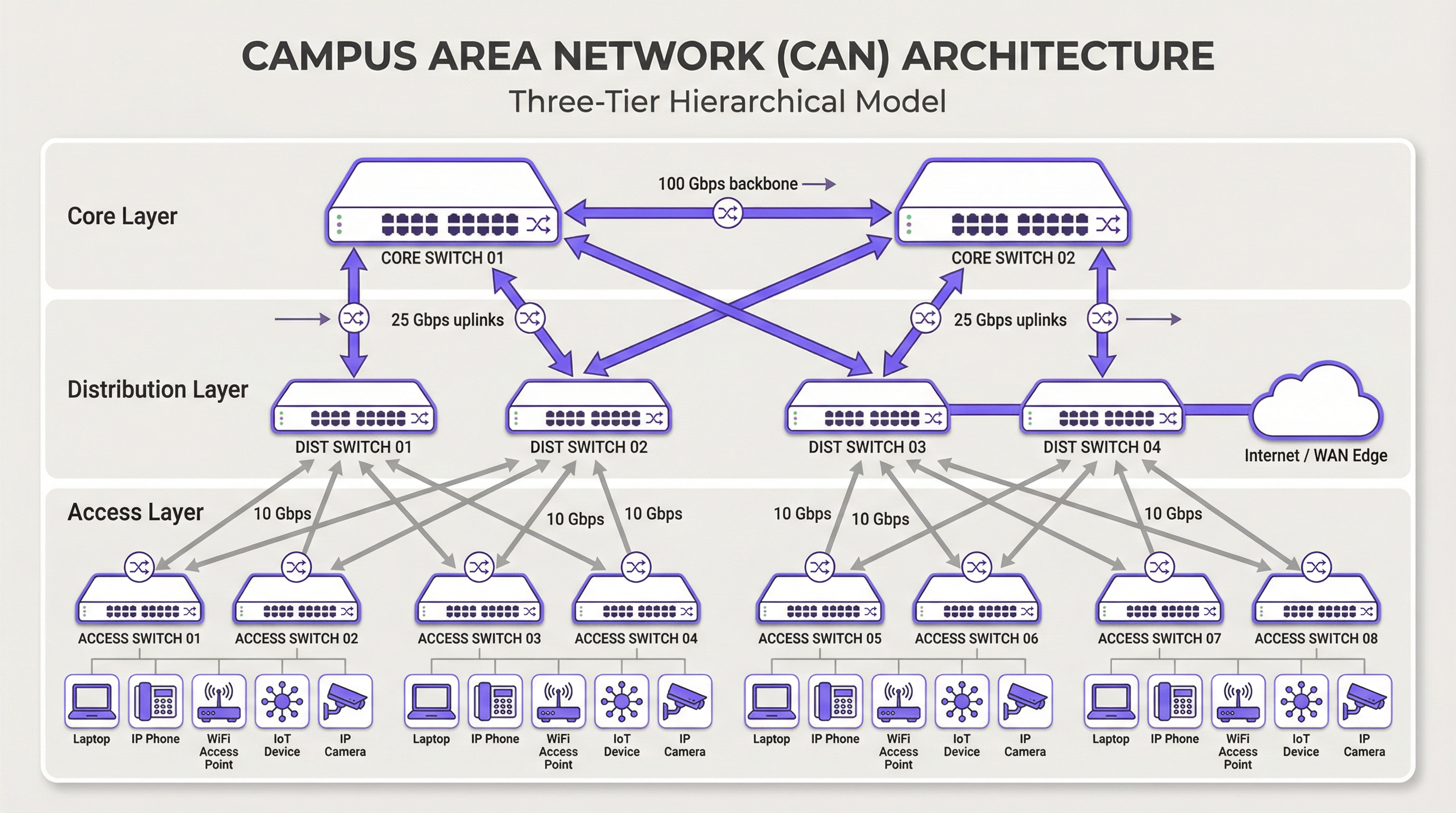
कोर लेयर (Core Layer): कोर नेटवर्क का हाई-स्पीड बैकबोन है। इसका एकमात्र उद्देश्य वितरण परत (distribution layer) उपकरणों के बीच जितनी जल्दी हो सके ट्रैफ़िक को स्विच करना है। जटिल नीति कार्यान्वयन या पैकेट हेरफेर से बचते हुए, कोर को हल्का और सरल रखा जाना चाहिए। प्रमुख विशेषताओं में उच्च अतिरेक (high redundancy - आमतौर पर अनावश्यक स्विच और लिंक के साथ), उच्च थ्रूपुट (अक्सर 100 Gbps या अधिक), और विफलता के मामले में तेजी से अभिसरण (rapid convergence) शामिल हैं। कोर लेयर यह सुनिश्चित करती है कि परिसर के विभिन्न हिस्सों के बीच ट्रैफ़िक कोई बाधा (bottleneck) पैदा न करे।
वितरण लेयर (Distribution Layer): यह परत एक्सेस और कोर परतों के बीच संचार केंद्र के रूप में कार्य करती है। यह रूटिंग, एक्सेस कंट्रोल लिस्ट (ACLs), क्वालिटी ऑफ़ सर्विस (QoS) और सुरक्षा फ़िल्टरिंग सहित नेटवर्क नीति को लागू करने के लिए एक महत्वपूर्ण बिंदु है। वितरण परत कोर को अग्रेषित करने से पहले कई एक्सेस लेयर स्विच से ट्रैफ़िक एकत्र करती है। यह ब्रॉडकास्ट डोमेन को परिभाषित करती है और एक्सेस और कोर दोनों परतों को अनावश्यक कनेक्शन प्रदान करती है, अक्सर लिंक एग्रीगेशन और अतिरेक के लिए ईथरचैनल (EtherChannel) जैसी तकनीकों का उपयोग करती है।
एक्सेस लेयर (Access Layer): यह वह जगह है जहां एंड-यूज़र डिवाइस नेटवर्क से जुड़ते हैं — वर्कस्टेशन, लैपटॉप, आईपी फोन, प्रिंटर, IoT डिवाइस, और महत्वपूर्ण रूप से, वायरलेस एक्सेस पॉइंट (APs)। एक्सेस लेयर पोर्ट-स्तरीय सुरक्षा, APs और कैमरों जैसे उपकरणों के लिए पावर ओवर ईथरनेट (PoE), और विभिन्न प्रकार के ट्रैफ़िक (जैसे, कॉर्पोरेट, अतिथि, IoT) को अलग करने के लिए VLAN सेगमेंटेशन प्रदान करती है। इस स्तर पर स्विच को Wi-Fi 6/6E और उससे आगे की बैंडविड्थ मांगों को संभालने के लिए उच्च पोर्ट घनत्व और मल्टी-गीगाबिट ईथरनेट (IEEE 802.3bz) जैसे आधुनिक मानकों के लिए समर्थन प्रदान करना चाहिए।
मुख्य प्रौद्योगिकियां (Core Technologies)
फाइबर ऑप्टिक केबलिंग (Fiber Optic Cabling) CAN के भीतर बैकबोन कनेक्टिविटी के लिए मानक है, जो इमारतों को जोड़ता है और कोर और वितरण परतों को लिंक करता है। इसकी उच्च बैंडविड्थ, कम विलंबता (low latency), और विद्युत चुम्बकीय हस्तक्षेप से प्रतिरक्षा इसे परिसर में पाई जाने वाली दूरियों पर हाई-स्पीड लिंक के लिए आदर्श बनाती है। सिंगल-मोड फाइबर का उपयोग आमतौर पर इमारतों के बीच लंबी दूरी के लिए किया जाता है, जबकि मल्टी-मोड फाइबर का उपयोग भवन के डेटा केंद्र के भीतर छोटे, उच्च-बैंडविड्थ लिंक के लिए किया जा सकता है।
वायरलेस लैन (WLAN) अब केवल एक ओवरले नहीं है बल्कि एक्सेस लेयर का एक अभिन्न अंग है। आधुनिक CANs को "Wi-Fi फर्स्ट" मानसिकता के साथ डिज़ाइन किया जाना चाहिए। इसके लिए RF साइट सर्वेक्षण, चैनल आवंटन और क्षमता नियोजन के माध्यम से AP प्लेसमेंट के लिए सावधानीपूर्वक योजना बनाने की आवश्यकता है। नवीनतम मानक, Wi-Fi 6E (802.11ax), जो 6 GHz बैंड में संचालित होता है, काफी अधिक क्षमता और कम हस्तक्षेप प्रदान करता है, जिससे यह सम्मेलन केंद्रों और स्टेडियमों जैसे उच्च-घनत्व वाले वातावरण के लिए एक महत्वपूर्ण तकनीक बन जाता है।
पावर ओवर ईथरनेट (PoE) एक्सेस लेयर उपकरणों की तैनाती को सरल बनाने के लिए आवश्यक है। IEEE 802.3bt (PoE++) जैसे मानक 90W तक की शक्ति प्रदान कर सकते हैं, जो न केवल Wi-Fi APs बल्कि हाई-डेफिनिशन सुरक्षा कैमरे, डिजिटल साइनेज और यहां तक कि कुछ छोटे स्विच का भी समर्थन करते हैं। यह प्रत्येक डिवाइस के लिए अलग पावर आउटलेट की आवश्यकता को समाप्त करता है, जिससे स्थापना लागत और जटिलता कम हो जाती है।
कार्यान्वयन मार्गदर्शिका (Implementation Guide)
जोखिम के प्रबंधन और गुणवत्तापूर्ण परिणाम सुनिश्चित करने के लिए CAN परिनियोजन के लिए एक संरचित, चरणबद्ध दृष्टिकोण आवश्यक है।
चरण 1 — आवश्यकताएं एकत्र करना और साइट सर्वेक्षण: व्यावसायिक आवश्यकताओं को परिभाषित करके प्रारंभ करें। नेटवर्क पर कौन से एप्लिकेशन चलेंगे? उपयोगकर्ता घनत्व और डिवाइस प्रकार की अपेक्षाएं क्या हैं? भवन के लेआउट, RF हस्तक्षेप के संभावित स्रोतों, और वायरिंग क्लोजेट (IDFs) तथा मुख्य डेटा केंद्र (MDF) के स्थानों की पहचान करने के लिए एक संपूर्ण भौतिक साइट सर्वेक्षण करें। इस चरण में मौजूदा बुनियादी ढांचे की समीक्षा भी शामिल होनी चाहिए ताकि यह पहचाना जा सके कि किसे बनाए रखा जा सकता है या अपग्रेड किया जा सकता है।
चरण 2 — आर्किटेक्चरल डिज़ाइन: आवश्यकताओं के आधार पर, तीन-स्तरीय आर्किटेक्चर डिज़ाइन करें। प्रति मंजिल और भवन के लिए आवश्यक एक्सेस स्विच की संख्या, वितरण परत पर आवश्यक क्षमता, और कोर बैकबोन के लिए आवश्यक थ्रूपुट निर्धारित करें। ट्रैफ़िक प्रकारों को तार्किक रूप से अलग करने के लिए अपनी VLAN सेगमेंटेशन रणनीति की योजना बनाएं। डिज़ाइन का पूरी तरह से दस्तावेजीकरण करें — यह आपका बिल्ड विनिर्देश और परिवर्तन प्रबंधन आधार रेखा (baseline) बन जाता है।
चरण 3 — प्रौद्योगिकी और वेंडर चयन: ऐसे हार्डवेयर का चयन करें जो आपके डिज़ाइन विनिर्देशों को पूरा करता हो। खुले मानकों के लिए समर्थन, प्रबंधन इंटरफ़ेस विकल्प (CLI बनाम क्लाउड-प्रबंधित), PoE बजट और वारंटी शर्तों जैसे कारकों पर विचार करें। बड़े पैमाने के CAN के लिए, कुशल संचालन के लिए एक केंद्रीकृत प्रबंधन मंच महत्वपूर्ण है और इसे हार्डवेयर के साथ ही चुना जाना चाहिए।
चरण 4 — भौतिक स्थापना (Physical Installation): इमारतों के बीच और प्रत्येक IDF तक फाइबर ऑप्टिक केबल बिछाएं। उचित शक्ति और शीतलन सुनिश्चित करते हुए, रैक में स्विच स्थापित करें। RF सर्वेक्षण योजना के अनुसार वायरलेस एक्सेस पॉइंट माउंट करें। इस स्तर पर सावधानीपूर्वक केबल प्रबंधन और लेबलिंग से समस्या निवारण और भविष्य के अपग्रेड के दौरान काफी समय बचेगा।
चरण 5 — कॉन्फ़िगरेशन और कमीशनिंग: कोर से शुरू करके एक्सेस लेयर तक स्विच कॉन्फ़िगर करें। VLANs, रूटिंग प्रोटोकॉल (जैसे, OSPF), सुरक्षा नीतियां (802.1X), और QoS लागू करें। प्रत्येक चरण में कनेक्टिविटी का परीक्षण करते हुए, चरणबद्ध दृष्टिकोण में नेटवर्क को ऑनलाइन लाएं। नेटवर्क को उत्पादन के लिए तैयार घोषित करने से पहले प्रारंभिक डिज़ाइन लक्ष्यों के विरुद्ध वायरलेस कवरेज और प्रदर्शन को मान्य करें।
सर्वोत्तम प्रथाएं (Best Practices)
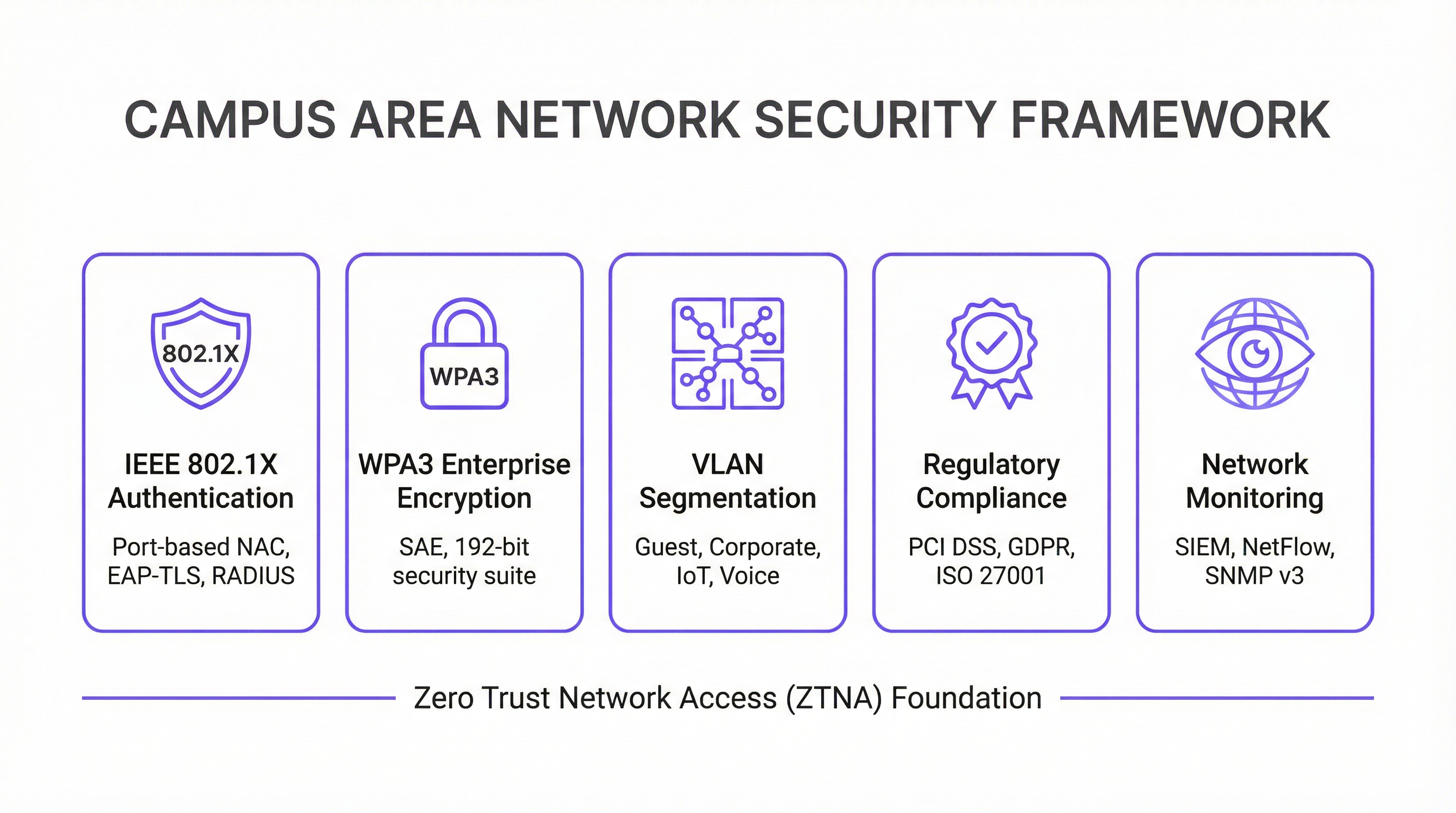
सुरक्षा पहले — ज़ीरो ट्रस्ट आर्किटेक्चर: पहले दिन से ही ज़ीरो ट्रस्ट सुरक्षा मॉडल लागू करें। वायर्ड या वायरलेस नेटवर्क से जुड़ने वाले प्रत्येक डिवाइस को प्रमाणित करने के लिए पोर्ट-आधारित नेटवर्क एक्सेस कंट्रोल (NAC) के लिए IEEE 802.1X का उपयोग करें। अपने WLAN पर WPA3-Enterprise के साथ मजबूत एन्क्रिप्शन लागू करें। खतरों को रोकने और पार्श्व गति (lateral movement) को प्रतिबंधित करने के लिए VLANs के साथ नेटवर्क को खंडित करें। सभी नेटवर्क प्रबंधन ट्रैफ़िक को SSH और SNMPv3 जैसे सुरक्षित प्रोटोकॉल का उपयोग करना चाहिए। भुगतान कार्ड डेटा को संभालने वाले संगठनों के लिए, PCI DSS अनुपालन के लिए सख्त नेटवर्क सेगमेंटेशन और एक्सेस कंट्रोल की आवश्यकता होती है, जिसे एक अच्छी तरह से डिज़ाइन किया गया CAN लागू करने और ऑडिट करने के लिए सीधा बनाता है।
अतिरेक (Redundancy) के लिए डिज़ाइन: हर स्तर पर विफलता के एकल बिंदुओं (single points of failure) को हटा दें। कोर और वितरण परतों पर अनावश्यक (redundant) स्विच का उपयोग करें। बढ़ी हुई बैंडविड्थ और लिंक अतिरेक दोनों प्रदान करने के लिए लिंक एग्रीगेशन (EtherChannel/LACP) को नियोजित करें। महत्वपूर्ण स्विचों में अनावश्यक बिजली आपूर्ति और जहां संभव हो इमारतों के बीच विविध फाइबर पथ सुनिश्चित करें। मिशन-क्रिटिकल वातावरण के लिए, सभी नेटवर्क उपकरणों के लिए निर्बाध बिजली आपूर्ति (UPS) पर विचार करें।
स्केलेबिलिटी के लिए योजना: केवल आज के लिए नहीं, बल्कि अब से पांच साल के लिए डिज़ाइन करें। सुनिश्चित करें कि आपके कोर और वितरण परतों में ट्रैफ़िक और कनेक्टेड डिवाइसों में भविष्य के विकास को संभालने के लिए पर्याप्त क्षमता है। आसान विस्तार की अनुमति देने के लिए वितरण या कोर परत पर मॉड्यूलर चेसिस का उपयोग करें। महंगे री-केबलिंग के बिना भविष्य की आवश्यकताओं को समायोजित करने के लिए तत्काल आवश्यकता से अधिक स्ट्रैंड काउंट वाले फाइबर चुनें।
केंद्रीकृत प्रबंधन और निगरानी: एक बड़े CAN को डिवाइस-दर-डिवाइस के आधार पर प्रबंधित करना बहुत जटिल है। कॉन्फ़िगरेशन को स्वचालित करने, प्रदर्शन की निगरानी करने और अलर्ट प्राप्त करने के लिए एक केंद्रीकृत नेटवर्क प्रबंधन प्रणाली (NMS) का उपयोग करें। Purple के WiFi इंटेलिजेंस समाधान जैसे प्लेटफ़ॉर्म उपयोगकर्ता के व्यवहार और नेटवर्क स्वास्थ्य में गहरी अंतर्दृष्टि प्रदान करते हैं, जिससे सक्रिय प्रबंधन और अनुकूलन सक्षम होता है। GDPR अनुपालन के लिए डेटा प्रवाह और उपयोगकर्ता पहुंच में दृश्यता की भी आवश्यकता होती है, जिसे एक केंद्रीकृत प्रबंधन मंच सुविधाजनक बनाता है।
समस्या निवारण और जोखिम न्यूनीकरण (Troubleshooting and Risk Mitigation)
भौतिक परत की समस्याएं (Physical Layer Problems) नेटवर्क समस्याओं का सबसे आम कारण हैं। खराब केबल, विफल ट्रांसीवर और ढीले कनेक्शन नेटवर्क आउटेज के एक महत्वपूर्ण हिस्से के लिए जिम्मेदार हैं। OSI मॉडल का पालन करने वाली एक संरचित समस्या निवारण पद्धति — लेयर 1 (भौतिक) से शुरू होकर ऊपर की ओर काम करना — सबसे कुशल दृष्टिकोण है। गुणवत्तापूर्ण केबल परीक्षण उपकरणों में निवेश करें और महत्वपूर्ण घटकों के लिए स्पेयर पार्ट्स की इन्वेंट्री बनाए रखें।
RF हस्तक्षेप (RF Interference) एक घने वायरलेस वातावरण में प्रदर्शन को गंभीर रूप से कम कर सकता है। को-चैनल और आसन्न-चैनल हस्तक्षेप प्राथमिक अपराधी हैं। हस्तक्षेप के स्रोतों की पहचान करने के लिए एक RF मॉनिटरिंग टूल का उपयोग करें, जिसमें पड़ोसी नेटवर्क, माइक्रोवेव ओवन और ब्लूटूथ डिवाइस शामिल हो सकते हैं। आधुनिक वायरलेस नियंत्रकों में डायनेमिक चैनल असाइनमेंट (DCA) एल्गोरिदम मदद कर सकते हैं, लेकिन चुनौतीपूर्ण वातावरण में कभी-कभी मैन्युअल ट्यूनिंग की आवश्यकता होती है।
कॉन्फ़िगरेशन ड्रिफ्ट (Configuration Drift) तब होता है जब व्यक्तिगत उपकरणों में मैन्युअल परिवर्तन समय के साथ पूरे नेटवर्क में विसंगतियां पैदा करते हैं। इससे अप्रत्याशित व्यवहार होता है और समस्या निवारण जटिल हो जाता है। परिवर्तनों को ट्रैक करने, मानक टेम्प्लेट लागू करने और गलत संशोधनों को वापस लेने के लिए कॉन्फ़िगरेशन प्रबंधन टूल का उपयोग करें। सभी परिवर्तन एक औपचारिक परिवर्तन प्रबंधन प्रक्रिया के माध्यम से किए जाने चाहिए।
सुरक्षा कमजोरियां (Security Vulnerabilities): अनपैच्ड फर्मवेयर एक निरंतर जोखिम है। सभी नेटवर्क उपकरणों के लिए एक नियमित पैचिंग शेड्यूल स्थापित करें। SIEM (सुरक्षा सूचना और घटना प्रबंधन) प्रणाली का उपयोग करके विषम ट्रैफ़िक पैटर्न की निगरानी करें। हमलावरों के करने से पहले कमजोरियों की पहचान करने के लिए आवधिक प्रवेश परीक्षण (penetration tests) आयोजित करें।
ROI और व्यावसायिक प्रभाव
एक अच्छी तरह से निष्पादित कैंपस एरिया नेटवर्क कई आयामों में महत्वपूर्ण और मापने योग्य व्यावसायिक मूल्य प्रदान करता है।
| व्यावसायिक परिणाम | प्रमुख मीट्रिक | विशिष्ट सुधार |
|---|---|---|
| अतिथि संतुष्टि | NPS / समीक्षा स्कोर | कनेक्टिविटी से संबंधित स्कोर के लिए +25-40% |
| आईटी परिचालन दक्षता | सपोर्ट टिकट | नेटवर्क से संबंधित टिकटों में -40-60% की कमी |
| अनुपालन ऑडिट समय | PCI DSS ऑडिट पूरा करने के दिन | -50-70% की कमी |
| नेटवर्क अपटाइम | उपलब्धता % | रिडंडेंट डिज़ाइन के साथ 99.9%+ |
| नई सेवा राजस्व | IoT / एनालिटिक्स सेवाएं सक्षम | लोकेशन एनालिटिक्स, एसेट ट्रैकिंग को अनलॉक करता है |
बढ़ी हुई उत्पादकता: विश्वसनीय, हाई-स्पीड कनेक्टिविटी कर्मचारियों और मेहमानों को बिना किसी रुकावट के कुशलतापूर्वक काम करने में सक्षम बनाती है। आतिथ्य (hospitality) के संदर्भ में, यह सीधे अतिथि संतुष्टि स्कोर और बार-बार बुकिंग में तब्दील हो जाता है।
बेहतर अतिथि और ग्राहक अनुभव: आतिथ्य और खुदरा क्षेत्र में, तेज़ और निर्बाध Wi-Fi ग्राहकों की संतुष्टि और वफादारी का एक प्रमुख चालक है। Wi-Fi नेटवर्क से प्राप्त एनालिटिक्स — जैसे ड्वेल टाइम, फुटफॉल पैटर्न और डिवाइस काउंट — का उपयोग अतिथि अनुभवों को वैयक्तिकृत करने और स्थल संचालन को अनुकूलित करने के लिए किया जा सकता है।
परिचालन दक्षता: एक केंद्रीय रूप से प्रबंधित CAN आईटी टीम के लिए परिचालन ओवरहेड को कम करता है। PoE नए उपकरणों की तैनाती को सरल बनाता है, और एक लचीला आर्किटेक्चर महंगे डाउनटाइम को कम करता है। एक ही कंसोल से पूरी संपत्ति का प्रबंधन करने की क्षमता मल्टी-साइट संगठनों के लिए विशेष रूप से मूल्यवान है।
नई सेवा सक्षमता: CAN IoT-आधारित बिल्डिंग ऑटोमेशन, स्थान-आधारित सेवाओं, एसेट ट्रैकिंग और उन्नत सुरक्षा प्रणालियों सहित कई स्मार्ट वेन्यू सेवाओं की नींव है। ये सेवाएं नए राजस्व प्रवाह और प्रतिस्पर्धी विभेदकों का प्रतिनिधित्व करती हैं जो एक मजबूत अंतर्निहित नेटवर्क के बिना संभव नहीं हैं।
नेटवर्क अपटाइम, औसत थ्रूपुट, सपोर्ट टिकटों की संख्या और अतिथि संतुष्टि स्कोर जैसे मेट्रिक्स को मापकर, संगठन एक आधुनिक कैंपस एरिया नेटवर्क में अपने निवेश के सकारात्मक ROI की मात्रा निर्धारित कर सकते हैं। अधिकांश एंटरप्राइज़ परिनियोजन के लिए, एक अच्छी तरह से डिज़ाइन किया गया CAN कम परिचालन लागत और नए सेवा राजस्व के संयोजन के माध्यम से 18 से 36 महीनों के भीतर पेबैक प्राप्त करता है।
Key Terms & Definitions
Campus Area Network (CAN)
A computer network that interconnects multiple local area networks (LANs) within a geographically bounded area, such as a corporate campus, hotel resort, university, or large retail estate. A CAN is typically owned and operated by a single organisation and provides high-speed, low-latency connectivity between buildings.
IT teams encounter this term when planning network infrastructure for any multi-building facility. It is the correct technical term for what is often colloquially called 'the campus network' or 'the site network'. Understanding the distinction between a CAN, a LAN, and a WAN is essential for scoping infrastructure projects and vendor conversations.
Three-Tier Hierarchical Model
The industry-standard architectural framework for enterprise campus networks, comprising three distinct layers: the Access Layer (where end devices connect), the Distribution Layer (where policy is enforced and traffic is aggregated), and the Core Layer (the high-speed backbone). Each layer has a specific, well-defined role.
This model is the starting point for virtually every enterprise CAN design. IT teams use it to structure their design conversations, allocate budget, and plan for scalability. Deviating from this model (e.g., using a flat, single-tier design) is a common cause of scalability and performance problems in growing organisations.
IEEE 802.1X
An IEEE standard for port-based Network Access Control (NAC) that provides an authentication mechanism for devices wishing to connect to a LAN or WLAN. It uses the Extensible Authentication Protocol (EAP) and requires a RADIUS server to authenticate users and devices before granting network access.
IT teams implement 802.1X to ensure that only authorised devices can connect to the network. It is a foundational security control for PCI DSS compliance (Requirement 1.3) and is a key component of a Zero Trust network architecture. Without 802.1X, any device that can physically connect to a network port or associate with a Wi-Fi SSID can gain network access.
WPA3-Enterprise
The latest generation of Wi-Fi security protocol for enterprise environments, ratified by the Wi-Fi Alliance. WPA3-Enterprise mandates the use of 192-bit minimum-strength security protocols and uses Simultaneous Authentication of Equals (SAE) to replace the older Pre-Shared Key (PSK) mechanism, providing stronger protection against offline dictionary attacks.
IT teams should be migrating to WPA3-Enterprise as the standard for all corporate and sensitive Wi-Fi SSIDs. WPA2 remains acceptable for guest networks in many contexts, but WPA3 is the requirement for networks handling sensitive data. It is increasingly referenced in security frameworks and is expected to become mandatory in future PCI DSS and ISO 27001 guidance.
VLAN (Virtual Local Area Network)
A logical subdivision of a physical network that groups devices into separate broadcast domains, regardless of their physical location. VLANs are defined by IEEE 802.1Q and are implemented on managed switches. Traffic between VLANs requires routing (a Layer 3 function), which provides a natural security boundary.
VLAN segmentation is the primary tool for isolating different types of traffic on a shared physical network. IT teams use VLANs to separate guest traffic from corporate traffic, isolate IoT devices, and create a dedicated PCI DSS cardholder data environment. Incorrect VLAN configuration is a common cause of both security incidents and network performance problems.
Power over Ethernet (PoE)
A technology that allows network cables to carry electrical power, enabling devices like Wi-Fi access points, IP cameras, and VoIP phones to receive power through the same Ethernet cable used for data. Key standards include IEEE 802.3af (15.4W), IEEE 802.3at (30W), and IEEE 802.3bt (90W, also known as PoE++).
PoE is a critical consideration when specifying access layer switches for a CAN. IT teams must calculate the total PoE budget required for all connected devices and ensure the switch's power supply can meet that demand. Underestimating PoE requirements is a common and costly mistake, as it can require switch replacements or additional power injectors.
Wi-Fi 6E (IEEE 802.11ax)
The latest generation of the Wi-Fi standard, extending Wi-Fi 6 into the 6 GHz frequency band. Wi-Fi 6E provides access to up to 1,200 MHz of additional spectrum, significantly increasing capacity and reducing congestion compared to the 2.4 GHz and 5 GHz bands. It supports theoretical throughput of up to 9.6 Gbps.
IT teams planning new CAN deployments should specify Wi-Fi 6E-capable access points as the standard. The 6 GHz band is particularly valuable in high-density environments (conference centres, stadiums, hotel lobbies) where the 2.4 GHz and 5 GHz bands are congested. Note that client devices must also support Wi-Fi 6E to benefit from the 6 GHz band.
EtherChannel / LACP
EtherChannel is a port link aggregation technology that bundles multiple physical Ethernet links into a single logical link, providing both increased bandwidth and link redundancy. LACP (Link Aggregation Control Protocol), defined in IEEE 802.3ad, is the open-standard protocol used to negotiate and manage EtherChannel bundles.
IT teams use EtherChannel/LACP on uplinks between the access, distribution, and core layers to eliminate single points of failure and increase available bandwidth. It is a standard component of any redundant CAN design. When a single link in the bundle fails, traffic is automatically redistributed across the remaining links without interruption.
Zero Trust Network Access (ZTNA)
A security framework based on the principle of 'never trust, always verify'. In a ZTNA model, no user or device is trusted by default, regardless of whether they are inside or outside the network perimeter. Access is granted on a least-privilege basis, based on continuous verification of identity, device health, and context.
ZTNA is increasingly the recommended security architecture for enterprise CANs, replacing the older 'castle and moat' perimeter security model. IT teams implement ZTNA through a combination of 802.1X, micro-segmentation, multi-factor authentication, and continuous monitoring. It is particularly relevant for organisations with IoT devices, guest access, and remote workers connecting to campus resources.
Case Studies
A 450-room international hotel group is experiencing persistent guest complaints about Wi-Fi quality. Their current network is a flat, single-VLAN design with consumer-grade access points installed five years ago. The hotel has a main building, a conference centre, and a spa/leisure wing. The IT Director has a budget for a full network refresh and needs to deliver a measurable improvement in guest satisfaction within six months. How should the network be redesigned?
The solution requires a full three-tier CAN deployment across the property. Step 1: Conduct a detailed RF site survey across all three buildings to determine optimal AP placement, identify sources of interference, and plan for high-density areas (conference rooms, restaurant, lobby). Step 2: Design a redundant core in the main data centre, with dual core switches connected via 100 Gbps links. Step 3: Deploy distribution switches on each floor of each building, connected to the core via dual 25 Gbps fiber uplinks. Step 4: Install Wi-Fi 6E access points — one per room corridor (covering 4-6 rooms each), plus dedicated high-density APs in the conference centre and lobby. Step 5: Implement strict VLAN segmentation: VLAN 10 for guest Wi-Fi (internet access only, isolated from corporate network), VLAN 20 for staff devices (access to PMS and operational systems), VLAN 30 for building management systems (HVAC, door locks, CCTV), VLAN 40 for voice (IP phones). Step 6: Deploy IEEE 802.1X for staff devices and WPA3-Personal with a captive portal for guest access. Step 7: Integrate with Purple's WiFi intelligence platform for real-time monitoring, guest analytics, and automated alerting.
A regional retail chain operates 12 stores across a large shopping centre campus. Each store currently has its own isolated network, managed independently. The IT team is struggling with PCI DSS compliance audits (which take two weeks each time), inconsistent security policies, and an inability to deploy new services like in-store analytics and digital signage centrally. The CTO wants a unified campus network that addresses all three problems. What architecture should be recommended?
The solution is a campus-wide CAN with a shared core infrastructure and per-store logical isolation via VLANs. Step 1: Deploy a redundant core in the shopping centre's main data centre (or a dedicated co-location space), with dual core switches and diverse fiber paths to each store. Step 2: Each store gets a distribution switch connected to the core via dedicated fiber, with a separate VLAN per store for corporate traffic and a shared VLAN for guest Wi-Fi. Step 3: Implement IEEE 802.1X for all point-of-sale (POS) devices, with a dedicated PCI DSS-compliant VLAN that is strictly isolated from all other traffic. Step 4: Deploy WPA3-Enterprise for staff devices and a captive portal for customer Wi-Fi. Step 5: Centralise all management through a single NMS, giving the IT team a unified view of all 12 locations. Step 6: Integrate Purple's analytics platform to capture footfall data, dwell time, and customer device counts across the estate. Step 7: Use the centralised management platform to push consistent security policies, firmware updates, and new service configurations to all stores simultaneously.
Scenario Analysis
Q1. You are the IT Director of a 600-room conference hotel. Your network currently has 98% uptime but guests in the conference centre consistently report poor Wi-Fi during large events (500+ attendees). Your access points are Wi-Fi 5 (802.11ac) and were installed four years ago. You have budget for either (a) replacing all APs with Wi-Fi 6E models, or (b) a full network refresh including new distribution switches, fiber uplinks, and Wi-Fi 6E APs. Which option do you choose, and why?
💡 Hint:Consider where the bottleneck actually is. Is the problem at the wireless layer, the wired layer, or both? What happens to the traffic once it leaves the access point?
Show Recommended Approach
Option (b) — the full network refresh — is the correct choice, though it requires justification. The symptoms (poor performance in high-density areas during peak load) could be caused by wireless congestion (too many clients per AP, insufficient spectrum), wired bottlenecks (insufficient uplink capacity from APs to distribution switches), or both. Simply replacing the APs with Wi-Fi 6E models (Option a) addresses the wireless layer but leaves the wired infrastructure unchanged. If the distribution switches or uplinks are already at capacity, the new APs will still be bottlenecked. Furthermore, Wi-Fi 6E APs with 2.5 Gbps or 5 Gbps ports require multi-gigabit Ethernet (IEEE 802.3bz) uplinks to realise their full throughput — which older distribution switches may not support. The full refresh ensures the entire path from client to core is capable of handling the load. The additional cost of the wired infrastructure upgrade is typically 30-40% of the total project cost but eliminates the risk of a second, more disruptive upgrade within 12-18 months. Present this to the CTO as a five-year investment, not a one-time fix.
Q2. Your organisation is a retail chain preparing for its annual PCI DSS audit. The auditor has flagged that your point-of-sale (POS) terminals share a VLAN with your staff Wi-Fi network, creating an overly broad cardholder data environment (CDE) scope. You have 30 days before the audit. What immediate and medium-term actions do you take?
💡 Hint:PCI DSS Requirement 1.3 mandates that the CDE is isolated from all other networks. Focus on network segmentation as the primary control. Consider what is achievable in 30 days versus what requires a longer project.
Show Recommended Approach
Immediate actions (within 30 days): Create a dedicated VLAN (e.g., VLAN 50) for all POS terminals and configure ACLs on the distribution switches to restrict traffic from this VLAN to only the payment gateway and necessary management systems. Remove all POS terminals from the shared staff VLAN. Implement IEEE 802.1X on POS switch ports to ensure only authorised POS devices can connect to VLAN 50. Document the new network topology and VLAN map for the auditor. This reduces the CDE scope to only the POS VLAN and its connections, significantly simplifying the audit. Medium-term actions (within 90 days): Conduct a full network segmentation review to ensure all VLANs are correctly configured and that no unintended paths exist between the CDE and other network segments. Deploy a SIEM to monitor traffic to and from the CDE VLAN. Consider a penetration test specifically targeting the CDE segmentation to validate the controls. The key principle is that network segmentation is the most effective way to reduce PCI DSS audit scope and cost. Every device that is not in the CDE is outside the scope of the audit.
Q3. You are designing a CAN for a 15,000-seat stadium that hosts 80 events per year, ranging from football matches to concerts. The venue has 12 buildings (including the main bowl, corporate hospitality suites, media centre, and operations centre) connected by an existing but aging fiber ring. Peak concurrent users are estimated at 18,000 (including staff). What are the three most critical design decisions you need to make, and what is your recommendation for each?
💡 Hint:Think about the unique characteristics of a stadium environment: extreme density, highly variable load (near-zero between events, maximum during events), diverse user types (fans, corporate guests, media, staff, operations), and the need for the network to support both public-facing and operational systems.
Show Recommended Approach
Decision 1 — Wireless Density and AP Placement: In a stadium, the density challenge is extreme. The recommendation is to deploy under-seat APs in the bowl (one AP per 4-6 rows of seats), supplemented by overhead APs for concourse areas. Wi-Fi 6E is mandatory — the 6 GHz band provides the additional spectrum needed to handle 18,000 concurrent users. Each AP should be configured with a narrow beam pattern directed at the seating rows, not broadcasting broadly. Decision 2 — Network Segmentation: Implement strict VLAN segmentation for at least five zones: Fan Wi-Fi (internet access only), Corporate Hospitality (higher bandwidth, access to streaming services), Media (dedicated high-bandwidth VLAN for broadcast and press), Operations (CCTV, access control, building management), and Staff (operational systems). Each zone has different performance and security requirements. Decision 3 — Scalability of the Core and Fiber Infrastructure: The existing fiber ring must be assessed. If it is a single ring with no redundancy, it is a critical risk. The recommendation is to upgrade to a dual-ring or mesh fiber topology between buildings, with the core switches in a geographically separate location from the main distribution point. The core must be sized for 100 Gbps+ throughput to handle peak event load. Critically, the network must be designed for peak load (event day), not average load — this is the opposite of most enterprise network designs.
Key Takeaways
- ✓The three-tier hierarchical model (Core, Distribution, Access) is the proven architectural foundation for any enterprise Campus Area Network — it provides modularity, scalability, and fault isolation that flat or two-tier designs cannot match.
- ✓Security must be designed in from the start, not bolted on afterwards. IEEE 802.1X for port-based authentication, WPA3-Enterprise for wireless encryption, and strict VLAN segmentation are the non-negotiable baseline controls for any professional CAN.
- ✓Design for redundancy at every layer: dual core switches, dual distribution uplinks, redundant power supplies, and diverse fiber paths between buildings. The cost of redundancy is always less than the cost of an unplanned outage.
- ✓Wi-Fi 6E (802.11ax) in the 6 GHz band is the current standard for new deployments in high-density environments. Specifying Wi-Fi 5 or earlier for a new build is a false economy that will require premature replacement.
- ✓Centralised management is not optional for a multi-building CAN. A Network Management System (NMS) and a WiFi intelligence platform like Purple are essential for maintaining consistent security policies, monitoring performance, and demonstrating compliance during audits.
- ✓The Fiber Surplus Principle: always install at least twice as many fiber strands as you need today. Re-cabling a campus is far more expensive and disruptive than the marginal cost of additional strands during initial installation.
- ✓A well-executed CAN delivers measurable ROI through improved guest satisfaction, reduced IT support overhead, faster compliance audits, and the ability to deploy new revenue-generating services like location analytics and IoT-based building automation.




