

Captive Portal लॉगिन: सामान्य समस्याओं का निवारण और उपयोगकर्ता अनुभव का अनुकूलन
This authoritative technical reference guide equips IT managers, network architects, and CTOs with a comprehensive framework for diagnosing and resolving captive portal login failures, selecting the optimal authentication strategy for their venue type, and measuring portal performance against business KPIs. Drawing on real-world deployment scenarios across hospitality, retail, and public-sector environments, it covers the full lifecycle from architecture and compliance to step-by-step troubleshooting for platforms including Purple AI, UniFi, Meraki, and MikroTik. For any organisation operating guest or public WiFi, a poorly performing captive portal is a direct revenue and reputation risk — this guide provides the decision frameworks and operational playbooks to eliminate that risk.
🎧 Listen to this Guide
View Transcript

कार्यकारी सारांश
हॉस्पिटैलिटी, रिटेल, इवेंट्स और सार्वजनिक क्षेत्र के डिप्लॉयमेंट में गेस्ट और पब्लिक WiFi के लिए Captive Portal लॉगिन प्राथमिक एक्सेस-कंट्रोल तंत्र बना हुआ है। फिर भी यह एंटरप्राइज़ नेटवर्क स्टैक में सबसे अधिक बार गलत तरीके से कॉन्फ़िगर किए गए घटकों में से एक है — जो छोड़े गए कनेक्शन, अनुपालन जोखिम और खोए हुए फर्स्ट-पार्टी डेटा के लिए ज़िम्मेदार है। यह गाइड उन चार मूल-कारण विफलता श्रेणियों को संबोधित करती है जो अधिकांश Captive Portal घटनाओं के लिए ज़िम्मेदार हैं: DNS और फ़ायरवॉल मिसकॉन्फ़िगरेशन, RADIUS ऑथराइज़ेशन विफलताएं, कैप्टिव नेटवर्क असिस्टेंट (CNA) संगतता समस्याएं, और सेशन परसिस्टेंस ब्रेकडाउन। यह Purple AI, Cisco Meraki, Ubiquiti UniFi और MikroTik RouterOS के लिए प्लेटफ़ॉर्म-विशिष्ट सुधार चरण प्रदान करता है, साथ ही वेन्यू प्रकार और डेटा उद्देश्यों के अनुरूप एक संरचित प्रमाणीकरण विधि चयन ढांचा भी प्रदान करता है। GDPR, UK GDPR और PCI DSS v4.0 के तहत अनुपालन संबंधी विचारों को पूरी तरह से एकीकृत किया गया है। जो नेटवर्क टीमें इस गाइड में दी गई सिफारिशों को लागू करती हैं, वे 92% से अधिक प्रमाणीकरण सफलता दर, हेल्पडेस्क एस्केलेशन में मापने योग्य कमी, और WiFi लॉगिन के बिंदु पर एकत्र किए गए व्यक्तिगत डेटा के लिए एक बचाव योग्य अनुपालन स्थिति की उम्मीद कर सकती हैं。
तकनीकी डीप-डाइव
Captive Portal लॉगिन कैसे काम करता है: आर्किटेक्चर
एक Captive Portal लॉगिन किसी डिवाइस के प्रारंभिक कनेक्टिविटी प्रोब के जानबूझकर किए गए इंटरसेप्शन के माध्यम से काम करता है। जब कोई भी आधुनिक ऑपरेटिंग सिस्टम किसी नए WiFi नेटवर्क से जुड़ता है, तो वह इंटरनेट पहुंच को सत्यापित करने के लिए तुरंत एक ज्ञात एंडपॉइंट पर HTTP अनुरोध भेजता है। Apple डिवाइस captive.apple.com को क्वेरी करते हैं; Android डिवाइस connectivitycheck.gstatic.com को क्वेरी करते हैं; Windows www.msftconnecttest.com को क्वेरी करता है; Firefox detectportal.firefox.com को क्वेरी करता है। Captive Portal गेटवे — जिसे आमतौर पर एक्सेस कंट्रोलर लेयर पर लागू किया जाता है — इस प्रोब को इंटरसेप्ट करता है और अपेक्षित प्रतिक्रिया के बजाय स्प्लैश पेज URL पर HTTP 302 रीडायरेक्ट लौटाता है।
ऑपरेटिंग सिस्टम इस रीडायरेक्ट का पता लगाता है, नेटवर्क को "कैप्टिव" के रूप में पहचानता है, और प्रमाणीकरण इंटरफ़ेस प्रदर्शित करने के लिए एक सैंडबॉक्स्ड मिनी-ब्राउज़र — Apple का कैप्टिव नेटवर्क असिस्टेंट (CNA), Android का प्रोविज़निंग विज़ार्ड, या Windows का नेटवर्क साइन-इन ब्राउज़र — लॉन्च करता है। एक बार जब उपयोगकर्ता आवश्यक कार्रवाई (फ़ॉर्म सबमिशन, सोशल लॉगिन, क्लिक-थ्रू) पूरी कर लेता है, तो पोर्टल सर्वर ब्लॉक की गई सूची से डिवाइस का MAC पता हटाने के लिए API कॉलबैक या RADIUS ऑथराइज़ेशन के माध्यम से नेटवर्क कंट्रोलर के साथ संचार करता है, जिससे पूर्ण नेटवर्क एक्सेस मिल जाता है।
इस आर्किटेक्चर की तीन महत्वपूर्ण निर्भरताएं हैं, जिनमें से किसी एक के विफल होने पर लॉगिन अनुभव टूट जाता है: DNS/फ़ायरवॉल लेयर को प्रोब ट्रैफ़िक को सही ढंग से रीडायरेक्ट करना चाहिए; स्प्लैश पेज को CNA सैंडबॉक्स के भीतर सही ढंग से रेंडर होना चाहिए; और ऑथराइज़ेशन कॉलबैक को नेटवर्क कंट्रोलर तक सफलतापूर्वक पहुंचना चाहिए।
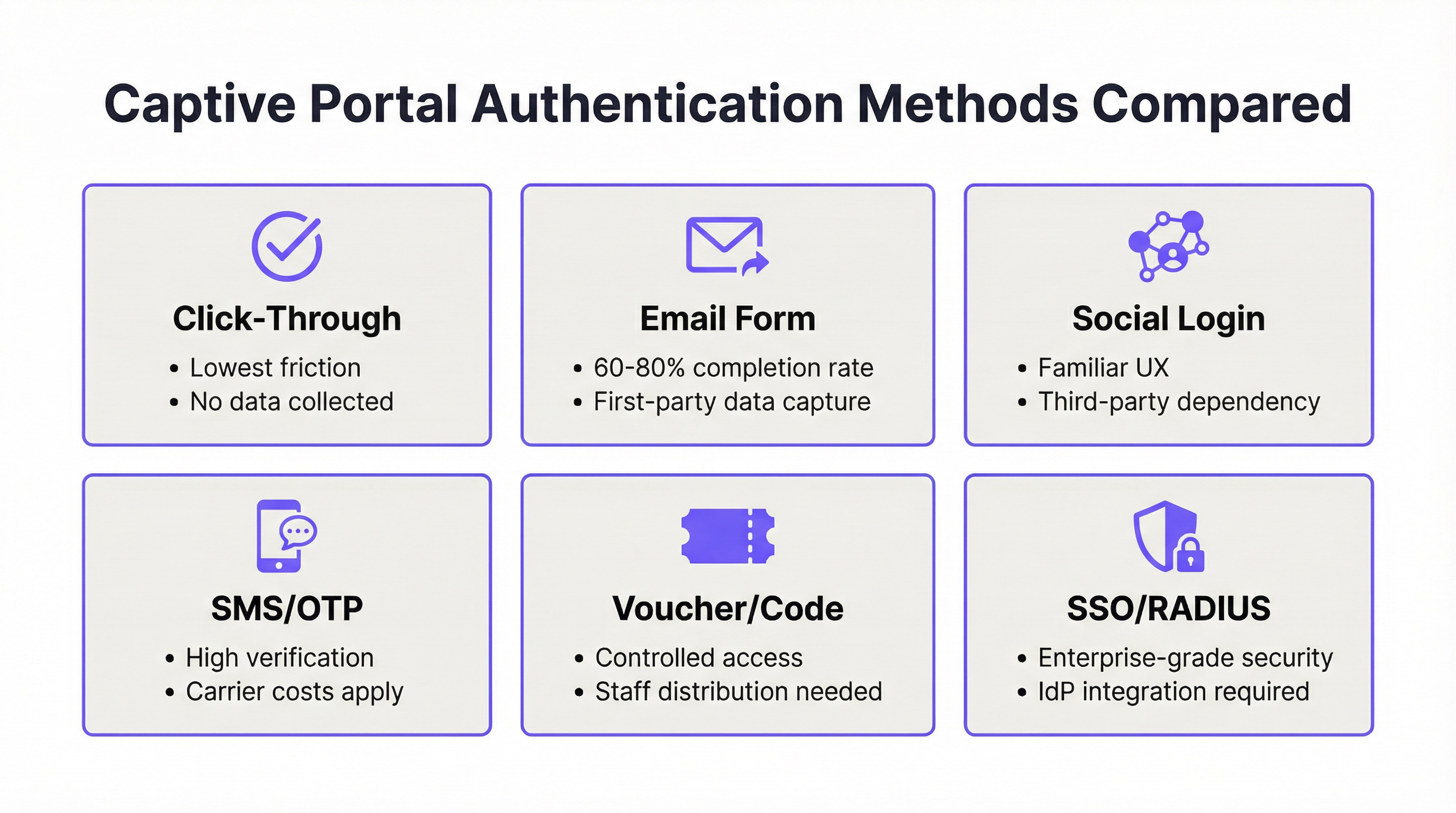
प्रमाणीकरण विधियां: तकनीकी तुलना
प्रमाणीकरण विधि का चुनाव एक साथ तकनीकी और रणनीतिक निर्णय है। निम्नलिखित तालिका एंटरप्राइज़ डिप्लॉयमेंट निर्णयों के लिए सबसे प्रासंगिक आयामों में एक संरचित तुलना प्रदान करती है।
| विधि | पूर्णता दर | डेटा प्राप्ति | GDPR जटिलता | इन्फ्रास्ट्रक्चर निर्भरता | सर्वश्रेष्ठ वेन्यू प्रकार |
|---|---|---|---|---|---|
| क्लिक-थ्रू | 95%+ | कोई नहीं | न्यूनतम (केवल ToS) | कोई नहीं | क्विक-सर्विस रिटेल, ट्रांसपोर्ट |
| ईमेल फ़ॉर्म | 60–80% | उच्च (फर्स्ट-पार्टी) | मध्यम | कोई नहीं | हॉस्पिटैलिटी, रिटेल, इवेंट्स |
| सोशल लॉगिन | 55–70% | मध्यम (थर्ड-पार्टी) | उच्च | थर्ड-पार्टी API | हॉस्पिटैलिटी, मनोरंजन |
| SMS OTP | 50–65% | उच्च (सत्यापित) | मध्यम | SMS गेटवे | पब्लिक WiFi, ट्रांसपोर्ट हब |
| वाउचर/कोड | 85%+ (वितरित) | निम्न | निम्न | वितरण प्रणाली | होटल, सम्मेलन केंद्र |
| SSO/RADIUS | 90%+ (नामांकित उपयोगकर्ता) | पूर्ण पहचान | निम्न (आंतरिक) | IdP / RADIUS सर्वर | कॉर्पोरेट, शिक्षा |
सोशल लॉगिन संबंधी विचार: Facebook या Google सोशल लॉगिन को डिप्लॉय करने के लिए GDPR अनुच्छेद 28 के तहत संबंधित प्लेटफ़ॉर्म के साथ डेटा प्रोसेसिंग एग्रीमेंट (DPA) की आवश्यकता होती है। प्लेटफ़ॉर्म डेटा प्रोसेसर के रूप में कार्य करता है, और आपका संगठन डेटा कंट्रोलर बना रहता है। सोशल प्लेटफ़ॉर्म की API शर्तों में कोई भी बदलाव — जैसा कि Facebook ने 2018 से बार-बार किया है — बिना किसी सूचना के आपके प्रमाणीकरण प्रवाह को तोड़ सकता है। एंटरप्राइज़ डिप्लॉयमेंट के लिए, सोशल लॉगिन को एक पूरक विकल्प के रूप में माना जाना चाहिए, न कि प्राथमिक प्रमाणीकरण पथ के रूप में।
RADIUS और IEEE 802.1X: कॉर्पोरेट और शिक्षा वातावरण के लिए, IEEE 802.1X के अनुरूप RADIUS-आधारित प्रमाणीकरण सबसे मजबूत सुरक्षा स्थिति प्रदान करता है। 802.1X ढांचा प्रति-उपयोगकर्ता, प्रति-सेशन एन्क्रिप्शन कुंजियों को सक्षम करता है और प्रमाणपत्र-आधारित प्रमाणीकरण (EAP-TLS) के साथ एकीकृत होता है, जिससे साझा प्री-शेयर्ड कुंजियां पूरी तरह से समाप्त हो जाती हैं। WPA3-Enterprise, जो 802.1X को अनिवार्य करता है, संवेदनशील वातावरण के लिए 192-बिट न्यूनतम क्रिप्टोग्राफ़िक शक्ति के साथ इसे और मजबूत करता है। Purple का प्लेटफ़ॉर्म मूल रूप से RADIUS एकीकरण का समर्थन करता है, जो 802.1X-सुरक्षित वातावरण में भी एक एकीकृत पोर्टल अनुभव को सक्षम करता है।
सुरक्षा आर्किटेक्चर और अनुपालन
एक Captive Portal जो व्यक्तिगत डेटा एकत्र करता है, परिभाषा के अनुसार, लागू गोपनीयता विनियमन के अधीन एक डेटा प्रोसेसिंग सिस्टम है। UK और EU डिप्लॉयमेंट के लिए, इसका मतलब है कि जिस क्षण से आप नाम, ईमेल पता या फ़ोन नंबर एकत्र करते हैं, उसी क्षण से GDPR और UK GDPR अनुपालन अनिवार्य है। न्यूनतम अनुपालन आवश्यकताएं हैं: अनुच्छेद 6 के तहत एक वैध आधार (डेटा का उपयोग कैसे किया जाता है, इसके आधार पर वैध हित या सहमति); संग्रह के बिंदु पर प्रदर्शित एक गोपनीयता नोटिस; एक प्रलेखित डेटा प्रतिधारण नीति; और डेटा विषय एक्सेस अनुरोधों के लिए एक तंत्र।
उन वातावरणों में डिप्लॉयमेंट के लिए जहां भुगतान कार्ड डेटा नेटवर्क से होकर गुजरता है — होटल लॉबी, रिटेल वातावरण, सम्मेलन केंद्र — PCI DSS v4.0 आवश्यकता 1.3 कार्डधारक डेटा वातावरण और गेस्ट WiFi नेटवर्क के बीच नेटवर्क विभाजन को अनिवार्य करती है। एक VLAN-पृथक आर्किटेक्चर, जिसमें Captive Portal एक समर्पित गेस्ट VLAN पर काम करता है और POS सिस्टम तक कोई रूटिंग एक्सेस नहीं होता है, मानक कार्यान्वयन है।

कार्यान्वयन गाइड
चरण 1: डिप्लॉयमेंट-पूर्व आर्किटेक्चर समीक्षा
किसी भी Captive Portal प्लेटफ़ॉर्म को कॉन्फ़िगर करने से पहले, निम्नलिखित नेटवर्क पूर्वापेक्षाओं को मान्य करें। गेटवे या एक्सेस कंट्रोलर को बाहरी पोर्टल रीडायरेक्शन का समर्थन करना चाहिए — अपने हार्डवेयर वेंडर के दस्तावेज़ों से इसे सत्यापित करें। आपका DNS इन्फ्रास्ट्रक्चर प्रमाणीकरण-पूर्व क्वेरी को इंटरसेप्ट करने और प्रमाणीकरण पूरा होने तक केवल स्प्लैश पेज डोमेन को रिज़ॉल्व करने में सक्षम होना चाहिए। आपके फ़ायरवॉल को कंट्रोलर से पोर्टल प्रदाता के सर्वर तक आउटबाउंड HTTPS ट्रैफ़िक, और पोर्टल प्रदाता से उचित पोर्ट (आमतौर पर UniFi के लिए 8443, क्लाउड-प्रबंधित प्लेटफ़ॉर्म के लिए 443) पर कंट्रोलर के प्रबंधन इंटरफ़ेस तक इनबाउंड HTTPS की अनुमति देनी चाहिए।
चरण 2: वॉल्ड गार्डन कॉन्फ़िगरेशन
वॉल्ड गार्डन उन डोमेन और IP रेंजों के सेट को परिभाषित करता है जो अप्रमाणित उपकरणों के लिए सुलभ हैं। एक अधूरा वॉल्ड गार्डन रुक-रुक कर होने वाली पोर्टल विफलताओं का सबसे आम कारण है। उत्पादन डिप्लॉयमेंट के लिए न्यूनतम वॉल्ड गार्डन में निम्नलिखित प्रविष्टियां शामिल होनी चाहिए।
| श्रेणी | डोमेन / रेंज | उद्देश्य |
|---|---|---|
| OS प्रोब एंडपॉइंट्स | captive.apple.com, connectivitycheck.gstatic.com, www.msftconnecttest.com, detectportal.firefox.com |
OS Captive Portal पहचान को सक्षम करता है |
| पोर्टल प्रदाता | आपके पोर्टल का डोमेन और CDN रेंज | स्प्लैश पेज लोड करता है |
| सोशल लॉगिन (यदि उपयोग किया जाता है) | *.facebook.com, *.google.com, *.linkedin.com |
OAuth प्रवाह को सक्षम करता है |
| भुगतान (यदि उपयोग किया जाता है) | *.stripe.com, js.stripe.com |
भुगतान फ़ॉर्म लोड करता है |
| एनालिटिक्स (यदि उपयोग किया जाता है) | आपके एनालिटिक्स प्रदाता के डोमेन | ट्रैकिंग स्क्रिप्ट को सक्षम करता है |
चरण 3: स्प्लैश पेज अनुकूलन
स्प्लैश पेज को CNA वातावरण के लिए डिज़ाइन किया जाना चाहिए, न कि पूर्ण ब्राउज़र के लिए। इसका मतलब है: कुल पेज का वजन 500 KB से कम; बाहरी JavaScript CDN पर कोई निर्भरता नहीं जब तक कि व्हाइटलिस्ट न किया गया हो; विश्वसनीय CA से प्रमाणपत्र के साथ वैध HTTPS; 320px चौड़ाई (iPhone SE) से 1024px तक परीक्षण किया गया उत्तरदायी (रिस्पॉन्सिव) डिज़ाइन; और अधिकतम पूर्णता दर के लिए तीन से अधिक फ़ील्ड (नाम, ईमेल और सहमति चेकबॉक्स) वाला फ़ॉर्म नहीं।
चरण 4: सेशन और नीति कॉन्फ़िगरेशन
अपने वेन्यू के उपयोग पैटर्न से मेल खाने के लिए सेशन पैरामीटर कॉन्फ़िगर करें। निम्नलिखित संदर्भ मान हजारों वेन्यू में Purple के डिप्लॉयमेंट डेटा पर आधारित हैं।
| वेन्यू प्रकार | सेशन अवधि | आइडल टाइमआउट | बैंडविड्थ नीति |
|---|---|---|---|
| होटल | 24 घंटे | 60 मिनट | 10 Mbps प्रति डिवाइस |
| कॉफ़ी शॉप / कैफ़े | 4–8 घंटे | 30 मिनट | 5 Mbps प्रति डिवाइस |
| सम्मेलन केंद्र | इवेंट की अवधि | 120 मिनट | 20 Mbps प्रति डिवाइस |
| स्टेडियम / एरिना | इवेंट की अवधि | 45 मिनट | 5 Mbps प्रति डिवाइस |
| रिटेल | 2–4 घंटे | 20 मिनट | 3 Mbps प्रति डिवाइस |
| सार्वजनिक क्षेत्र / पुस्तकालय | 2 घंटे | 30 मिनट | 5 Mbps प्रति डिवाइस |
चरण 5: प्लेटफ़ॉर्म-विशिष्ट कॉन्फ़िगरेशन — Purple AI
Purple AI का Captive Portal Purple डैशबोर्ड के माध्यम से कॉन्फ़िगर किया गया है। अपना पोर्टल बनाने या संपादित करने के लिए WiFi > Splash Pages पर नेविगेट करें। Login Options के अंतर्गत अपनी प्रमाणीकरण विधि चुनें — Purple क्लिक-थ्रू, ईमेल फ़ॉर्म, सोशल लॉगिन (Facebook, Google, LinkedIn, X), SMS OTP, वाउचर, और Microsoft Entra ID, Google Workspace और Okta के माध्यम से SSO का समर्थन करता है। Compliance के अंतर्गत, GDPR-अनुपालक सहमति कैप्चर सक्षम करें और अपना गोपनीयता नीति URL कॉन्फ़िगर करें। Session Settings के अंतर्गत, ऊपर दी गई तालिका से मान लागू करें। स्प्लैश पेज प्रकाशित करें और इसे Networks अनुभाग में अपने SSID के साथ संबद्ध करें। Purple का प्लेटफ़ॉर्म अपने स्वयं के डोमेन के लिए वॉल्ड गार्डन कॉन्फ़िगरेशन को स्वचालित रूप से संभालता है; आपको अपने स्प्लैश पेज द्वारा संदर्भित किसी भी थर्ड-पार्टी डोमेन को मैन्युअल रूप से जोड़ना होगा।
चरण 6: परीक्षण प्रोटोकॉल
डिप्लॉयमेंट के बाद, लाइव होने से पहले निम्नलिखित परीक्षण मैट्रिक्स निष्पादित करें। एक परीक्षण डिवाइस को गेस्ट SSID से कनेक्ट करें और सत्यापित करें: पोर्टल 3 सेकंड के भीतर दिखाई देता है; स्प्लैश पेज सही ढंग से रेंडर होता है और पूरी तरह कार्यात्मक है; प्रमाणीकरण सफलतापूर्वक पूरा होता है; प्रमाणीकरण के तुरंत बाद इंटरनेट एक्सेस प्रदान किया जाता है; और डिवाइस को कॉन्फ़िगर की गई सेशन अवधि के भीतर पुनः प्रमाणीकरण की आवश्यकता नहीं होती है। इस परीक्षण को iOS (नवीनतम), iOS (पिछला प्रमुख संस्करण), Android (नवीनतम), Android (पिछला प्रमुख संस्करण), Windows 11 और macOS पर दोहराएं। परिणामों का दस्तावेजीकरण करें और नेटवर्क को मेहमानों के लिए खोलने से पहले किसी भी विफलता को सुधारें।
सर्वोत्तम प्रथाएं
प्रदर्शन निगरानी: प्रमाणीकरण सफलता दर को प्राथमिक नेटवर्क KPI के रूप में मानें, जिसका लक्ष्य 92% या उससे अधिक हो। Purple का एनालिटिक्स डैशबोर्ड इस मीट्रिक को रीयल-टाइम में दिखाता है। 85% से नीचे की गिरावट तत्काल जांच की मांग करती है — सामान्य कारणों में प्रमाणपत्र की समाप्ति, OS अपडेट जो प्रोब व्यवहार को बदलते हैं, और फ़ायरवॉल नियम परिवर्तन शामिल हैं।
प्रमाणपत्र प्रबंधन: स्प्लैश पेज डोमेन के लिए SSL प्रमाणपत्र समाप्ति से पहले नवीनीकृत किए जाने चाहिए। Let's Encrypt या अपने प्रमाणपत्र प्रबंधन प्लेटफ़ॉर्म के माध्यम से स्वचालित नवीनीकरण लागू करें, और समाप्ति से 30 दिन पहले कैलेंडर अलर्ट सेट करें। एक समाप्त हो चुका प्रमाणपत्र iOS और Android को सुरक्षा चेतावनियां प्रदर्शित करने का कारण बनेगा जो प्रभावी रूप से उपयोगकर्ताओं को कनेक्ट करने से रोकता है।
GDPR सहमति रिकॉर्ड: Captive Portal पर कैप्चर की गई प्रत्येक सहमति को टाइमस्टैम्प, प्रदर्शित गोपनीयता नोटिस के संस्करण और दी गई विशिष्ट सहमतियों के साथ लॉग किया जाना चाहिए। Purple का प्लेटफ़ॉर्म इस ऑडिट ट्रेल को स्वचालित रूप से बनाए रखता है। मैन्युअल कार्यान्वयन के लिए, सुनिश्चित करें कि आपका डेटाबेस स्कीमा इस डेटा को कैप्चर करता है और आपकी डेटा प्रतिधारण नीति द्वारा आवश्यक अवधि के लिए रिकॉर्ड बनाए रखे जाते हैं।
नेटवर्क विभाजन: गेस्ट WiFi एक अलग VLAN पर होना चाहिए जिसमें आंतरिक नेटवर्क या POS सिस्टम तक कोई लेयर-3 रूटिंग एक्सेस न हो। यह एक PCI DSS आवश्यकता और एक मौलिक सुरक्षा नियंत्रण है। कम से कम सालाना पेनेट्रेशन टेस्ट के साथ विभाजन को सत्यापित करें।
फ़र्मवेयर और प्लेटफ़ॉर्म अपडेट: अपने एक्सेस कंट्रोलर फ़र्मवेयर और पोर्टल प्लेटफ़ॉर्म को अद्यतित रखें। कई CNA संगतता समस्याएं फ़र्मवेयर अपडेट में हल हो जाती हैं — Cisco Meraki, Ubiquiti और Aruba सभी नियमित अपडेट जारी करते हैं जो OS-विशिष्ट पोर्टल पहचान परिवर्तनों को संबोधित करते हैं। वेंडर सुरक्षा सलाह की सदस्यता लें और अपनी परिवर्तन प्रबंधन विंडो के भीतर अपडेट लागू करें।
समस्या निवारण और जोखिम न्यूनीकरण
डायग्नोस्टिक फ्रेमवर्क: चार-स्तरीय जांच
जब Captive Portal लॉगिन विफलता की सूचना दी जाती है, तो एस्केलेट करने या कॉन्फ़िगरेशन परिवर्तन करने से पहले निम्नलिखित चार-स्तरीय डायग्नोस्टिक अनुक्रम के माध्यम से काम करें।
लेयर 1 — DNS और रीडायरेक्ट: सत्यापित करें कि गेटवे प्रोब ट्रैफ़िक को इंटरसेप्ट कर रहा है और सही रीडायरेक्ट लौटा रहा है। यह पुष्टि करने के लिए कि 302 रीडायरेक्ट जारी किया जा रहा है, एक परीक्षण डिवाइस और पैकेट कैप्चर टूल का उपयोग करें। यदि कोई रीडायरेक्ट नहीं देखा जाता है, तो समस्या गेटवे कॉन्फ़िगरेशन स्तर पर है।
लेयर 2 — स्प्लैश पेज डिलीवरी: सत्यापित करें कि स्प्लैश पेज CNA में सही ढंग से लोड होता है। यदि पेज पूर्ण ब्राउज़र में लोड होता है लेकिन CNA में नहीं, तो समस्या संभवतः JavaScript निर्भरता या गायब वॉल्ड गार्डन प्रविष्टि है। ब्लॉक किए गए संसाधनों की पहचान करने के लिए ब्राउज़र डेवलपर टूल का उपयोग करें।
लेयर 3 — प्रमाणीकरण प्रसंस्करण: सत्यापित करें कि प्रमाणीकरण अनुरोध पोर्टल सर्वर तक पहुंचता है और सफलता की प्रतिक्रिया लौटाता है। विफल प्रमाणीकरण प्रयासों के लिए पोर्टल प्रदाता लॉग की जांच करें। यदि प्रमाणीकरण चुपचाप विफल हो जाता है, तो समस्या आमतौर पर एक फ़ॉर्म सत्यापन त्रुटि या एक गायब आवश्यक फ़ील्ड है।
लेयर 4 — ऑथराइज़ेशन कॉलबैक: सत्यापित करें कि पोर्टल सर्वर डिवाइस के MAC पते को अधिकृत करने के लिए नेटवर्क कंट्रोलर तक पहुंच सकता है। पोर्टल सर्वर IP रेंज और कंट्रोलर प्रबंधन इंटरफ़ेस के बीच ब्लॉक किए गए कनेक्शन के लिए फ़ायरवॉल लॉग की जांच करें। यदि कॉलबैक विफल हो रहा है, तो पोर्टल प्रदाता की IP रेंज को व्हाइटलिस्ट करें और कंट्रोलर की पहुंच को सत्यापित करें।
सामान्य विफलता मोड और सुधार
| लक्षण | सबसे संभावित कारण | सुधार |
|---|---|---|
| कनेक्शन पर पोर्टल दिखाई नहीं देता है | वॉल्ड गार्डन में OS प्रोब डोमेन गायब हैं; कॉन्फ़िगरेशन परिवर्तन के बाद AP को पुनरारंभ नहीं किया गया | वॉल्ड गार्डन में प्रोब डोमेन जोड़ें; AP को पुनरारंभ करें |
| पोर्टल दिखाई देता है लेकिन पेज लोड नहीं होता है | JavaScript निर्भरता ब्लॉक है; CDN वॉल्ड गार्डन में नहीं है | पेज निर्भरता का ऑडिट करें; वॉल्ड गार्डन में CDN डोमेन जोड़ें |
| प्रमाणीकरण सफल होता है, कोई इंटरनेट नहीं | RADIUS कॉलबैक ब्लॉक है; कंट्रोलर पहुंच से बाहर है | पोर्टल प्रदाता IP को व्हाइटलिस्ट करें; कंट्रोलर की पहुंच को सत्यापित करें |
| पोर्टल iOS पर काम करता है, Android पर विफल रहता है | Android प्रोब डोमेन ब्लॉक है; HTTPS प्रमाणपत्र समस्या | वॉल्ड गार्डन में connectivitycheck.gstatic.com जोड़ें; प्रमाणपत्र सत्यापित करें |
| मेहमानों को बार-बार पुनः लॉगिन करना पड़ता है | सेशन अवधि बहुत कम है; MAC परसिस्टेंस कॉन्फ़िगर नहीं किया गया है | सेशन अवधि बढ़ाएं; कंट्रोलर में MAC ट्रैकिंग सत्यापित करें |
| धीमा पोर्टल लोड (>5 सेकंड) | पेज बहुत भारी है; DNS रिज़ॉल्यूशन धीमा है; कंजस्टेड अपलिंक | पेज का वजन अनुकूलित करें; विश्वसनीय DNS (8.8.8.8) का उपयोग करें; अपलिंक क्षमता की जांच करें |
| सोशल लॉगिन विफल रहता है | OAuth डोमेन वॉल्ड गार्डन में नहीं है; थर्ड-पार्टी API परिवर्तन | वॉल्ड गार्डन में सोशल प्लेटफ़ॉर्म डोमेन जोड़ें; API स्थिति की जांच करें |
| भुगतान फ़ॉर्म लोड नहीं होता है | Stripe डोमेन वॉल्ड गार्डन में नहीं हैं | वॉल्ड गार्डन में *.stripe.com और js.stripe.com जोड़ें |
अक्सर पूछे जाने वाले प्रश्न
प्रश्न: मेरा पोर्टल परीक्षण में पूरी तरह से काम क्यों करता है लेकिन उत्पादन में रुक-रुक कर विफल क्यों हो जाता है? उत्पादन में रुक-रुक कर होने वाली विफलताएं लगभग हमेशा तीन स्थितियों में से एक के कारण होती हैं: उच्च समवर्ती कनेक्शन लोड जो गेटवे की रीडायरेक्ट क्षमता को अभिभूत कर देता है; लोड के तहत DNS रिज़ॉल्यूशन टाइमआउट; या AP के कॉन्फ़िगरेशन कैश और हाल के परिवर्तन के बीच रेस कंडीशन। अपने गेटवे के कनेक्शन ट्रैकिंग टेबल का आकार बढ़ाएं, एक समर्पित DNS रिज़ॉल्वर का उपयोग करें (ISP डिफ़ॉल्ट नहीं), और कॉन्फ़िगरेशन परिवर्तनों के बाद हमेशा AP को पुनरारंभ करें।
प्रश्न: क्या मैं अपने Purple स्प्लैश पेज के लिए कस्टम डोमेन का उपयोग कर सकता हूं? हां। Purple स्प्लैश पेजों के लिए कस्टम डोमेन का समर्थन करता है। अपने चुने हुए सबडोमेन को Purple के पोर्टल इन्फ्रास्ट्रक्चर की ओर इंगित करते हुए एक CNAME रिकॉर्ड कॉन्फ़िगर करें, और सुनिश्चित करें कि आपका SSL प्रमाणपत्र कस्टम डोमेन को कवर करता है। एक ब्रांडेड डोमेन उपयोगकर्ता के विश्वास में काफी सुधार करता है और परित्याग को कम करता है।
प्रश्न: मैं अपने स्प्लैश पेज के लिए HTTP से HTTPS में संक्रमण को कैसे संभालूं? सभी उत्पादन स्प्लैश पेज HTTPS पर सर्व किए जाने चाहिए। यदि आप HTTP पोर्टल से माइग्रेट कर रहे हैं, तो HTTPS URL को इंगित करने के लिए अपने गेटवे रीडायरेक्ट कॉन्फ़िगरेशन को अपडेट करें, एक विश्वसनीय CA से एक वैध प्रमाणपत्र प्राप्त करें, और स्विच करने से पहले सभी प्रमुख OS और ब्राउज़र संयोजनों पर परीक्षण करें।
प्रश्न: Captive Portal व्यवहार पर iOS 17 और बाद के संस्करणों का क्या प्रभाव है? Apple ने iOS 17 में CNA प्रतिबंधों को कड़ा कर दिया है, थर्ड-पार्टी कुकीज़ को ब्लॉक कर दिया है और कुछ मूलों से JavaScript निष्पादन को प्रतिबंधित कर दिया है। यदि आप विशेष रूप से iOS 17+ उपकरणों पर विफलताएं देख रहे हैं, तो थर्ड-पार्टी कुकी निर्भरता और गैर-व्हाइटलिस्ट किए गए मूलों से JavaScript के लिए अपने स्प्लैश पेज का ऑडिट करें। अपने स्प्लैश पेज को न्यूनतम आवश्यक कार्यक्षमता तक सरल बनाएं।
प्रश्न: क्या Purple AI रिटेल चेन के लिए मल्टी-साइट प्रबंधन का समर्थन करता है? हां। Purple का एंटरप्राइज़ प्लेटफ़ॉर्म असीमित स्थानों पर Captive Portal कॉन्फ़िगरेशन के केंद्रीकृत प्रबंधन का समर्थन करता है, जिसमें स्प्लैश पेज, प्रमाणीकरण विधियों और सेशन नीतियों का प्रति-साइट अनुकूलन शामिल है। परिवर्तनों को एक साथ सभी साइटों पर पुश किया जा सकता है या क्षेत्र के अनुसार चरणबद्ध किया जा सकता है।
प्रश्न: सोशल लॉगिन का उपयोग करते समय मैं GDPR अनुपालन कैसे सुनिश्चित करूं? सोशल लॉगिन का उपयोग करते समय, आपको यह करना होगा: अपने गोपनीयता नोटिस में खुलासा करें कि डेटा सोशल प्लेटफ़ॉर्म से प्राप्त किया गया है; सोशल प्लेटफ़ॉर्म प्रदाता के साथ एक DPA स्थापित करें; सुनिश्चित करें कि आपके पास प्राप्त डेटा को संसाधित करने के लिए एक वैध आधार है; और उपयोगकर्ताओं को अपना डेटा हटाने का अनुरोध करने के लिए एक तंत्र प्रदान करें। Purple के अनुपालन उपकरण सहमति कैप्चर और ऑडिट ट्रेल में सहायता करते हैं, लेकिन कानूनी ढांचा आपके संगठन के डेटा सुरक्षा अधिकारी द्वारा स्थापित किया जाना चाहिए।
प्रश्न: उत्पादन Captive Portal के लिए मेरे पास क्या निगरानी होनी चाहिए? कम से कम: रीयल-टाइम प्रमाणीकरण सफलता दर अलर्टिंग (थ्रेशोल्ड: 85% से नीचे); प्रमाणपत्र समाप्ति निगरानी (30 दिनों पर अलर्ट); पोर्टल अपटाइम निगरानी (5-मिनट चेक अंतराल); और प्रमाणीकरण विफलता लॉग की साप्ताहिक समीक्षा। Purple का एनालिटिक्स डैशबोर्ड इन सभी मेट्रिक्स को मूल रूप से प्रदान करता है。
ROI और व्यावसायिक प्रभाव
एक अच्छी तरह से कॉन्फ़िगर किए गए Captive Portal के लिए व्यावसायिक मामला नेटवर्क एक्सेस कंट्रोल से कहीं आगे तक फैला हुआ है। हॉस्पिटैलिटी ऑपरेटरों के लिए, प्रत्येक प्रमाणित गेस्ट WiFi लॉगिन एक फर्स्ट-पार्टी डेटा पॉइंट — नाम, ईमेल, विज़िट टाइमस्टैम्प, डिवाइस प्रकार — का प्रतिनिधित्व करता है जो सीधे CRM सिस्टम, लॉयल्टी प्रोग्राम और मार्केटिंग ऑटोमेशन में फ़ीड होता है। अपने ग्राहक आधार पर Purple का डिप्लॉयमेंट डेटा गेस्ट WiFi प्रोग्राम से औसतन 842% ROI प्रदर्शित करता है जब Captive Portal को CRM और मार्केटिंग प्लेटफ़ॉर्म के साथ एकीकृत किया जाता है।
रिटेल ऑपरेटरों के लिए, WiFi एनालिटिक्स से प्राप्त फुटफॉल इंटेलिजेंस — ड्वेल टाइम, बार-बार विज़िट की आवृत्ति, ज़ोन ऑक्यूपेंसी — भौतिक लोगों की गिनती प्रणाली के समान ही अंतर्दृष्टि प्रदान करता है, वह भी लागत के एक अंश पर, और मेहमानों के प्रमाणित होने पर व्यक्तिगत-स्तर के डेटा लिंकेज के अतिरिक्त लाभ के साथ। प्रति स्टोर औसतन 500 दैनिक WiFi लॉगिन वाली 200-स्टोर की रिटेल चेन प्रति दिन 100,000 फर्स्ट-पार्टी डेटा पॉइंट उत्पन्न कर रही है — एक ऐसा डेटासेट जो, यदि ठीक से सक्रिय किया जाए, तो प्रमोशनल टारगेटिंग, स्टाफ़िंग और स्टोर लेआउट में मापने योग्य सुधार ला सकता है।
वेन्यू ऑपरेटरों — स्टेडियम, सम्मेलन केंद्र, हवाई अड्डे — के लिए Captive Portal स्प्लैश पेज के प्रायोजन, प्रमाणित उपयोगकर्ताओं को लक्षित विज्ञापन और प्रीमियम WiFi टियर अपसेल के माध्यम से एक सीधा राजस्व चैनल है। Purple के एक ग्राहक, ब्रुसेल्स साउथ चार्लेरोई एयरपोर्ट ने डिप्लॉयमेंट के पहले 24 महीनों के दौरान गेस्ट WiFi के माध्यम से ट्रैक किए गए 9.2 मिलियन ग्राहक विज़िट हासिल किए, जिससे रिटेल प्लेसमेंट और यात्री प्रवाह प्रबंधन पर डेटा-संचालित निर्णय सक्षम हुए।
खराब प्रदर्शन करने वाले Captive Portal की लागत भी समान रूप से मात्रात्मक है। यदि 22% उपयोगकर्ता लॉगिन प्रक्रिया को छोड़ देते हैं — जो खराब डिज़ाइन किए गए पोर्टल्स के लिए उद्योग का औसत है — और आपका वेन्यू प्रति दिन 1,000 WiFi कनेक्शन प्रयासों को संसाधित करता है, तो आप प्रतिदिन 220 डेटा पॉइंट, या प्रति वर्ष लगभग 80,000 खो रहे हैं। प्रति सत्यापित ईमेल पते के £2 के रूढ़िवादी CRM मूल्य पर, यह सालाना £160,000 के खोए हुए डेटा एसेट मूल्य का प्रतिनिधित्व करता है, इससे पहले कि उन संपर्कों द्वारा उत्पन्न मार्केटिंग राजस्व का हिसाब लगाया जाए।
उस अंतर को पाटने के लिए आवश्यक निवेश — अनुकूलित स्प्लैश पेज डिज़ाइन, सही वॉल्ड गार्डन कॉन्फ़िगरेशन, उपयुक्त सेशन सेटिंग्स, और एक निगरानी ढांचा — इंजीनियरिंग समय के घंटों में मापा जाता है, पूंजीगत व्यय में नहीं। ROI का मामला स्पष्ट है।
Key Terms & Definitions
Captive Portal
A network access control mechanism that intercepts all HTTP/HTTPS traffic from unauthenticated devices and redirects it to a designated authentication page (the splash page). The device remains in a 'captive' state — with access restricted to the splash page and any whitelisted domains — until authentication is completed and the network controller authorises the device's MAC address.
IT teams encounter captive portals as the primary guest WiFi access control mechanism in hospitality, retail, events, and public-sector environments. The term is often used interchangeably with 'splash page' or 'guest portal', though strictly the captive portal refers to the entire system (gateway + splash page + authentication backend), not just the login page.
Captive Network Assistant (CNA)
A sandboxed mini-browser built into iOS, macOS, and other Apple operating systems that automatically opens when the OS detects a captive portal redirect. The CNA has significantly more restrictive behaviour than a full browser: it blocks third-party cookies, restricts JavaScript execution from certain origins, and does not persist sessions across launches. Android has an equivalent mechanism called the Provisioning Wizard.
The CNA is the source of the majority of device-specific captive portal failures. Engineers who test only in a full browser will miss CNA-specific issues. All splash page testing must include CNA testing on the latest and previous major iOS and Android versions.
Walled Garden
The set of domains, IP ranges, and URLs that unauthenticated devices are permitted to access before completing the captive portal login. The walled garden is configured at the network gateway or access controller and must include, at minimum, the OS probe endpoints, the portal provider's domains, and any third-party services referenced by the splash page.
An incomplete walled garden is the most common cause of intermittent captive portal failures. IT teams should audit the walled garden whenever a new third-party service is added to the splash page, and after any OS update that may have changed probe endpoint behaviour.
RADIUS (Remote Authentication Dial-In User Service)
A networking protocol that provides centralised authentication, authorisation, and accounting (AAA) for network access. In captive portal deployments, RADIUS is used to verify user credentials against a central directory (Active Directory, LDAP, or a cloud IdP) and to communicate authorisation decisions back to the network access server. RADIUS operates on UDP ports 1812 (authentication) and 1813 (accounting).
RADIUS is the standard authentication backend for enterprise and education WiFi deployments. IT teams encounter RADIUS configuration issues most frequently when the shared secret between the portal server and the RADIUS client does not match, or when the RADIUS server's IP is not reachable from the access controller. Purple supports RADIUS integration natively.
IEEE 802.1X
An IEEE standard for port-based network access control that provides an authentication framework for devices attempting to connect to a LAN or WLAN. 802.1X uses the Extensible Authentication Protocol (EAP) to exchange authentication credentials between the supplicant (device), the authenticator (access point), and the authentication server (RADIUS). It is the foundation of WPA2-Enterprise and WPA3-Enterprise security.
802.1X is relevant to captive portal deployments in enterprise environments where the guest WiFi must coexist with a corporate 802.1X-secured network. IT teams must ensure that the guest SSID is not inadvertently configured to require 802.1X, which would prevent the captive portal from functioning correctly.
MAC Address Authorisation
The mechanism by which a captive portal grants network access after successful authentication. When a user completes the login process, the portal server sends the device's MAC address to the network controller, which removes it from the blocked list and allows full internet access. Session persistence is maintained by tracking the MAC address — the controller does not redirect a previously authorised MAC address until the session expires.
MAC address authorisation is the reason captive portals can be bypassed by MAC spoofing. For environments requiring strong identity assurance, MAC-based authorisation should be supplemented with certificate-based authentication (802.1X/EAP-TLS) or SMS OTP verification.
Splash Page
The web page displayed to unauthenticated users when they connect to a captive portal network. The splash page hosts the authentication interface — login form, social login buttons, click-through agreement, or voucher entry — and is the primary touchpoint for brand presentation and data collection. The splash page is served from the portal provider's infrastructure (or a self-hosted server) and is the only page accessible to unauthenticated devices before the walled garden is opened.
IT teams are responsible for ensuring the splash page renders correctly in the CNA environment, loads within acceptable time limits, and complies with GDPR requirements for data collection. Marketing teams are responsible for the brand design and messaging. The two teams must collaborate on splash page design to avoid compliance gaps and technical failures.
GDPR Article 6 Lawful Basis
Under the General Data Protection Regulation (GDPR) and UK GDPR, any processing of personal data must have a documented lawful basis. For captive portal deployments, the two most commonly applicable bases are: Article 6(1)(a) — consent, where the user explicitly agrees to data processing; and Article 6(1)(f) — legitimate interests, where the organisation has a legitimate business reason for processing that is not overridden by the individual's rights. The chosen basis determines the design of the consent capture mechanism and the data subject rights obligations.
IT teams deploying captive portals that collect personal data must ensure the lawful basis is documented before deployment. Failure to establish a lawful basis is a GDPR violation that can result in regulatory fines of up to €20 million or 4% of global annual turnover. Purple's compliance tooling supports both consent and legitimate interest frameworks.
PCI DSS Network Segmentation
A requirement under PCI DSS v4.0 (Requirement 1.3) that the cardholder data environment (CDE) must be isolated from other network segments, including guest WiFi. In practice, this means the guest WiFi network must be on a separate VLAN with no layer-3 routing access to POS systems, payment terminals, or any system that stores, processes, or transmits cardholder data. The segmentation must be verified through penetration testing at least annually.
IT teams in retail, hospitality, and events environments must ensure that the captive portal guest network is correctly segmented from the payment infrastructure. A misconfigured VLAN that allows guest devices to reach POS systems is a critical PCI DSS violation and a significant security risk.
SSO (Single Sign-On)
An authentication mechanism that allows users to authenticate once with a central identity provider (IdP) and gain access to multiple services without re-entering credentials. In captive portal deployments, SSO enables employees or students to log in to the guest WiFi using their existing corporate or institutional credentials (e.g., Microsoft Entra ID, Okta, Google Workspace), eliminating the need for separate WiFi passwords or vouchers.
SSO integration is the preferred authentication method for corporate campus and education deployments. Purple supports SSO via SAML 2.0 and OAuth 2.0, enabling integration with all major enterprise IdPs. IT teams should verify that the IdP's OAuth endpoints are included in the walled garden to prevent SSO flow failures.
Case Studies
A 350-room luxury hotel group is deploying Purple AI across 12 properties. Guests are reporting that the captive portal login works on their laptops but fails on iOS devices. The IT team has confirmed the portal renders correctly in Safari on a desktop Mac. What is the most likely cause, and how should the team diagnose and resolve it?
The symptom — portal works in a full browser but fails on iOS devices — is a classic Captive Network Assistant (CNA) compatibility issue. The CNA on iOS is a sandboxed mini-browser with significantly more restrictive behaviour than Safari. The diagnostic process should proceed as follows.
Step 1: Connect an iOS test device to the guest SSID and observe the CNA behaviour. Note whether the page fails to load entirely, loads partially, or loads but fails during authentication.
Step 2: If the page loads partially, open Safari on the iOS device and navigate to the splash page URL directly. Use Safari's developer tools (enabled via Settings > Safari > Advanced > Web Inspector) to identify any blocked resources or JavaScript errors.
Step 3: Check the walled garden configuration in Purple's dashboard. Verify that all domains referenced by the splash page — including any CDN domains for fonts, scripts, or images — are included. A common culprit is Google Fonts (fonts.googleapis.com, fonts.gstatic.com) or a social login SDK.
Step 4: If the splash page uses social login (Facebook, Google), verify that the OAuth domains are in the walled garden: accounts.google.com, graph.facebook.com, and their associated CDN domains.
Step 5: Audit the splash page for third-party cookie dependencies. iOS 17+ blocks third-party cookies in the CNA. If the authentication flow relies on a third-party session cookie, it will fail silently on iOS 17+.
Resolution: Add all missing domains to the walled garden in Purple's dashboard. Simplify the splash page to remove any third-party cookie dependencies. Test on iOS 17 (latest), iOS 16 (previous major), and iOS 15 (two versions back) before deploying to production. For the hotel group's 12 properties, push the updated walled garden configuration centrally through Purple's multi-site management interface, then restart APs at each property during a low-traffic window.
A national retail chain with 85 stores is experiencing a compliance audit finding: their captive portal collects customer email addresses but has no documented lawful basis for processing, no privacy notice at the point of collection, and no data retention policy. The CTO has been given 30 days to remediate. What is the remediation plan?
This is a GDPR compliance remediation scenario with a hard deadline. The remediation plan must address three distinct requirements: lawful basis documentation, privacy notice implementation, and data retention policy.
Week 1 — Legal and Policy Framework: Engage the organisation's Data Protection Officer (DPO) or external legal counsel to determine the appropriate lawful basis under GDPR Article 6. For marketing use of guest WiFi data, legitimate interest (Article 6(1)(f)) is typically the strongest basis, supported by a Legitimate Interest Assessment (LIA). If the data will be used for direct marketing, explicit consent (Article 6(1)(a)) may be required. Document the chosen basis and the LIA.
Week 2 — Splash Page Remediation: Update the captive portal splash page in Purple's dashboard to include: a link to the organisation's privacy notice (which must be updated to describe WiFi data collection); a clear statement of how the data will be used; and, if consent is the chosen basis, an explicit opt-in checkbox that is unchecked by default. Purple's compliance tooling supports GDPR-compliant consent capture natively — enable the consent capture module and configure the privacy policy URL.
Week 3 — Data Retention and Subject Rights: Define a data retention period (typically 12–24 months for marketing data) and configure Purple's data retention settings accordingly. Implement a data subject access request (DSAR) process — Purple provides a self-service data deletion mechanism accessible via the guest portal. Document the process in the organisation's data protection register.
Week 4 — Audit and Evidence: Conduct a full audit of the updated configuration across all 85 stores using Purple's multi-site management console. Export consent records to demonstrate that post-remediation logins are capturing compliant consent. Prepare a remediation report for the auditor, including the LIA, updated privacy notice, configuration screenshots, and sample consent records.
Scenario Analysis
Q1. Your organisation operates a 600-seat conference centre that hosts 3–5 events per week, ranging from half-day seminars to 3-day international conferences. The current captive portal uses a single click-through authentication method and a 4-hour session duration. The events team has requested that the WiFi system begin capturing delegate contact details for post-event marketing. The IT team has 6 weeks to implement the change. What authentication method should you deploy, what session configuration changes are required, and what compliance steps must be completed before go-live?
💡 Hint:Consider the operational model of a conference centre: delegates arrive at registration, receive credentials, and expect seamless connectivity throughout a multi-day event. The authentication method must balance data collection objectives with the operational reality of managing hundreds of simultaneous connections at event start.
Show Recommended Approach
The recommended authentication method is a voucher or code system combined with an email form capture at the point of voucher redemption. This approach allows the events team to distribute unique codes at registration (printed on delegate badges or sent via email confirmation), ensuring controlled access while capturing verified contact details. The session duration should be set to the maximum event duration — 72 hours for a 3-day conference — with an idle timeout of 120 minutes to accommodate breaks and overnight periods without requiring re-authentication. For compliance, the following steps must be completed before go-live: (1) determine the lawful basis for processing delegate contact data (consent is recommended for conference environments, as delegates have a clear expectation of data use); (2) update the splash page to include a GDPR-compliant privacy notice and an explicit consent checkbox; (3) configure Purple's consent capture module to log consent records with timestamps; (4) establish a data retention policy (12 months is standard for event marketing data); and (5) brief the events team on the data subject rights process. The 6-week timeline is achievable: weeks 1–2 for legal and policy framework; weeks 3–4 for platform configuration and testing; weeks 5–6 for staff training and a pilot event.
Q2. A 50-store fashion retail chain is reporting that their captive portal authentication success rate has dropped from 94% to 71% over the past two weeks, with failures concentrated on Android devices. No configuration changes have been made to the portal or network infrastructure during this period. What is your diagnostic approach, and what are the three most likely causes?
💡 Hint:A sudden drop in success rate on a specific OS platform, with no configuration changes, points to an external change — either an OS update that altered probe behaviour, or a change to a third-party service the splash page depends on.
Show Recommended Approach
The diagnostic approach follows the Four-Layer framework, but given the OS-specific nature of the failure, begin at Layer 2 (splash page delivery in the CNA). The three most likely causes are: (1) A recent Android OS update has altered the probe endpoint or the Provisioning Wizard's behaviour — check the Android security bulletin for the relevant period and verify that connectivitycheck.gstatic.com is accessible in the walled garden; (2) A third-party service used by the splash page — most likely a social login SDK or analytics script — has changed its domain or CDN configuration, and the new domain is not in the walled garden; (3) The SSL certificate for the splash page domain has expired or is being served from a different certificate chain that Android's trust store does not recognise. To diagnose: connect an Android test device to the guest SSID and capture the CNA behaviour; use Android's developer options to inspect network traffic; check the portal provider's error logs for the period in question. For Purple deployments, the analytics dashboard will show the authentication failure rate by device type and OS version, which will confirm whether the failure is concentrated on a specific Android version — pointing to an OS update as the cause.
Q3. A regional airport authority is planning to deploy guest WiFi across its terminal, with a requirement to collect passenger contact details for emergency communications and optional marketing. The deployment must comply with UK GDPR, and the IT security team has mandated that the guest network must be fully segregated from the airport's operational technology (OT) network, which includes baggage handling systems and gate management. The airport processes approximately 8,000 passenger WiFi connections per day. What architecture and authentication strategy would you recommend, and what are the key compliance and security controls required?
💡 Hint:Airport environments have dual compliance requirements: data protection (UK GDPR for passenger data) and operational security (OT network segregation). The authentication method must handle high concurrent connection volumes at peak times (flight arrivals) without degrading performance.
Show Recommended Approach
The recommended architecture uses a two-SSID model: a guest SSID for passenger WiFi, and a staff SSID secured with WPA3-Enterprise and 802.1X for airport employees. The guest SSID operates on a dedicated VLAN with no layer-3 routing to the OT network or any internal airport systems. Firewall rules must explicitly deny all traffic from the guest VLAN to OT network ranges, with the segmentation verified through quarterly penetration testing. For authentication, deploy an email form with a two-purpose consent model: mandatory consent for emergency communications (lawful basis: vital interests under GDPR Article 6(1)(d), or legitimate interests); and optional consent for marketing communications (lawful basis: consent under Article 6(1)(a)). The form should present these as two separate checkboxes, with the emergency communications checkbox pre-checked and non-removable (with clear explanation), and the marketing checkbox unchecked by default. Session duration should be set to 8 hours (covering a typical airport dwell time) with a 60-minute idle timeout. For peak load management — 8,000 daily connections with significant concurrency during flight arrivals — the gateway must be sized for at least 500 simultaneous authentication requests. Purple's platform is horizontally scalable and handles this load natively. Key compliance controls: UK GDPR privacy notice at point of collection; consent audit trail in Purple's compliance module; data retention policy (12 months for emergency contact data, 24 months for marketing data); and a DSAR process accessible via the splash page.
Key Takeaways
- ✓The four root causes of captive portal login failures are DNS and firewall misconfiguration, RADIUS authorisation callback failures, Captive Network Assistant (CNA) compatibility issues, and session persistence misconfiguration — diagnose in this sequence before making any changes.
- ✓An incomplete walled garden is the single most common cause of intermittent portal failures: always include OS probe endpoints (Apple, Google, Microsoft, Firefox), portal provider domains, and all third-party service domains referenced by the splash page.
- ✓Keep splash pages under 500KB and test specifically in the CNA environment on iOS and Android — a page that renders perfectly in a desktop browser may fail entirely in the CNA due to JavaScript restrictions and third-party cookie blocking.
- ✓Authentication method selection is a strategic decision: use the Data-Friction Matrix to identify the method that maximises data value while minimising user friction — for most hospitality and retail environments, a well-designed email form (name + email only) sits in the optimal quadrant.
- ✓GDPR compliance is non-negotiable for any captive portal that collects personal data: document your lawful basis under Article 6, display a privacy notice at the point of collection, capture and log consent records, and establish a data retention policy before deployment — not after.
- ✓Monitor authentication success rate as a primary KPI with an alert threshold at 85%: a drop below this level indicates a change in the environment — certificate expiry, OS update, or firewall modification — that requires immediate investigation.
- ✓Purple AI's enterprise platform delivers measurable ROI: 842% average return on investment when guest WiFi data is integrated with CRM and marketing automation, with built-in GDPR compliance tooling, multi-site management, and support for all major authentication methods including SSO via Microsoft Entra ID, Google Workspace, and Okta.




