

Captive Portal सॉल्यूशंस: सभी आकार के व्यवसायों के लिए एक संपूर्ण गाइड
This guide provides a comprehensive technical reference for IT managers, network architects, and CTOs on deploying effective captive portal solutions. It offers actionable guidance on architecture, vendor selection, and implementation to transform a network access point into a strategic asset for data collection, customer engagement, and ROI generation.
🎧 Listen to this Guide
View Transcript
Captive Portal सॉल्यूशंस: सभी आकार के व्यवसायों के लिए एक संपूर्ण गाइड

कार्यकारी सारांश
गेस्ट WiFi प्रदान करने वाले किसी भी संगठन के लिए, Captive Portal एक साधारण लॉगिन पेज से विकसित होकर सुरक्षा, अनुपालन और मार्केटिंग के लिए एक रणनीतिक संपत्ति बन गया है। यह गाइड IT प्रबंधकों, नेटवर्क आर्किटेक्ट्स और CTOs के लिए प्रभावी Captive Portal सॉल्यूशंस तैनात करने पर एक व्यापक तकनीकी संदर्भ प्रदान करती है। यह सिद्धांत से आगे बढ़कर आर्किटेक्चर, वेंडर चयन और कार्यान्वयन पर कार्रवाई योग्य मार्गदर्शन प्रदान करती है, यह प्रदर्शित करती है कि नेटवर्क एक्सेस पॉइंट को डेटा संग्रह, ग्राहक जुड़ाव और ROI जनरेशन के लिए एक शक्तिशाली टूल में कैसे बदला जाए। हम यह पता लगाएंगे कि हॉस्पिटैलिटी में गेस्ट अनुभव को बढ़ाने, रिटेल में बिक्री बढ़ाने और किसी भी सार्वजनिक वातावरण में मजबूत सुरक्षा सुनिश्चित करने के लिए Captive Portal का लाभ कैसे उठाया जाए, वह भी GDPR जैसे डेटा गोपनीयता नियमों के जटिल परिदृश्य को नेविगेट करते हुए। यह कोई अकादमिक अवलोकन नहीं है; यह एक ऐसा सॉल्यूशन तैनात करने के लिए एक व्यावहारिक प्लेबुक है जो इस तिमाही में मापने योग्य व्यावसायिक प्रभाव प्रदान करता है।
तकनीकी डीप-डाइव
एक Captive Portal गेटवे के रूप में कार्य करता है, जो उपयोगकर्ता के प्रारंभिक वेब अनुरोध को इंटरसेप्ट करता है और उन्हें व्यापक नेटवर्क एक्सेस देने से पहले एक समर्पित प्रमाणीकरण पेज पर रीडायरेक्ट करता है। यह नियंत्रित इंटरैक्शन इसके कार्य के लिए मौलिक है, जो प्रमाणीकरण, नीति प्रवर्तन और मार्केटिंग एंगेजमेंट को सक्षम बनाता है। यह प्रक्रिया नेटवर्क इवेंट्स के एक समन्वित क्रम पर निर्भर करती है, जिसमें आमतौर पर एक वायरलेस LAN कंट्रोलर (WLC), एक गेटवे या फ़ायरवॉल, और एक बाहरी या आंतरिक पोर्टल सर्वर शामिल होता है।
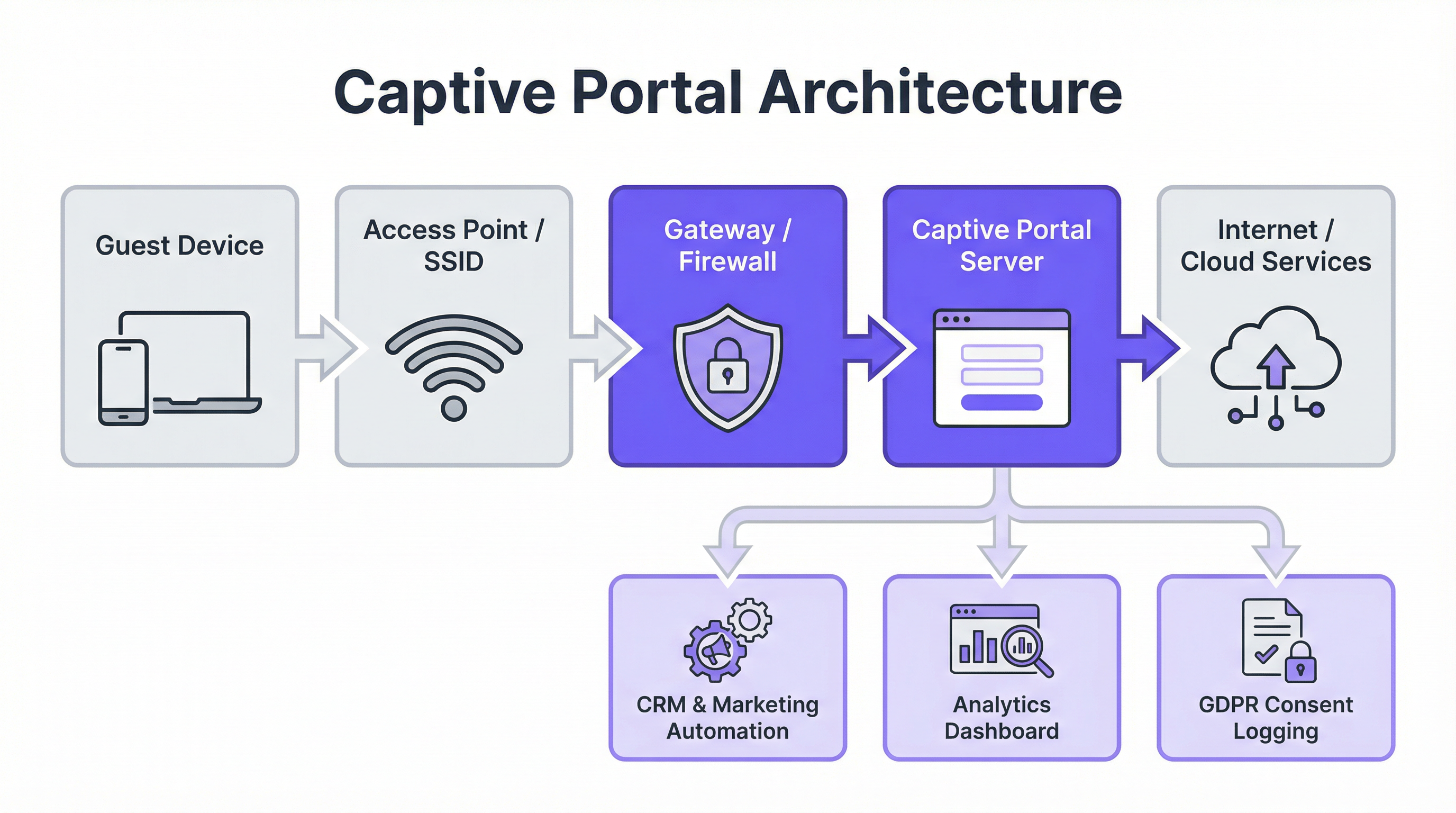
मुख्य आर्किटेक्चरल घटक:
- गेस्ट डिवाइस कनेक्शन: प्रक्रिया तब शुरू होती है जब कोई उपयोगकर्ता अपने डिवाइस को गेस्ट SSID से कनेक्ट करता है। डिवाइस का ऑपरेटिंग सिस्टम अक्सर एक पूर्वनिर्धारित URL (उदा., iOS के लिए
http://captive.apple.com/hotspot-detect.html) से संपर्क करने का प्रयास करके 'लाइवनेस' चेक करता है। - DNS और HTTP इंटरसेप्शन: नेटवर्क का गेटवे या फ़ायरवॉल इस प्रारंभिक HTTP अनुरोध को इंटरसेप्ट करता है। इसे रिज़ॉल्व होने देने के बजाय, यह एक DNS रिस्पॉन्स देता है जो उपयोगकर्ता के ब्राउज़र को Captive Portal सर्वर के IP पते पर पॉइंट करता है। यह अक्सर DNS रीडायरेक्ट के माध्यम से या HTTP 302/307 रीडायरेक्ट के साथ रिस्पॉन्स देकर प्राप्त किया जाता है।
- पोर्टल प्रमाणीकरण: उपयोगकर्ता के सामने Captive Portal का स्प्लैश पेज प्रस्तुत किया जाता है। यहां, उन्हें एक आवश्यक कार्रवाई पूरी करनी होती है, जैसे ईमेल दर्ज करना, सोशल मीडिया प्रदाता (OAuth 2.0) के माध्यम से लॉग इन करना, वाउचर कोड दर्ज करना, या केवल सेवा की शर्तों को स्वीकार करना। उपयोगकर्ता क्रेडेंशियल्स की सुरक्षा के लिए इस स्तर पर सभी संचार HTTPS के माध्यम से सुरक्षित होने चाहिए।
- प्रमाणीकरण और प्राधिकरण: पोर्टल सर्वर उपयोगकर्ता के क्रेडेंशियल्स या कार्रवाई को मान्य करता है। सफल प्रमाणीकरण पर, यह नेटवर्क कंट्रोलर या गेटवे के साथ संचार करता है, यह संकेत देता है कि डिवाइस (इसके MAC पते द्वारा पहचाना गया) अब एक्सेस के लिए अधिकृत है। इसके बाद कंट्रोलर उस डिवाइस से इंटरनेट तक ट्रैफ़िक की अनुमति देने के लिए अपनी एक्सेस कंट्रोल लिस्ट (ACL) को अपडेट करता है।
प्रमुख मानक और प्रोटोकॉल:
- IEEE 802.1X: हालांकि अक्सर कॉर्पोरेट नेटवर्क एक्सेस के लिए उपयोग किया जाता है, 802.1X पोर्ट-आधारित नेटवर्क एक्सेस कंट्रोल के लिए एक फ्रेमवर्क प्रदान करता है जिसे अधिक मजबूत, प्रमाणपत्र-आधारित प्रमाणीकरण के लिए Captive Portals के साथ एकीकृत किया जा सकता है।
- WPA3-Enterprise: नवीनतम सुरक्षा मानक, जो ऑफ़लाइन डिक्शनरी हमलों के खिलाफ बेहतर सुरक्षा प्रदान करता है और संवेदनशील डेटा के लिए मजबूत एन्क्रिप्शन सुनिश्चित करता है।
- RADIUS (Remote Authentication Dial-In User Service): एक नेटवर्किंग प्रोटोकॉल जो नेटवर्क सेवा से जुड़ने और उसका उपयोग करने वाले उपयोगकर्ताओं के लिए केंद्रीकृत प्रमाणीकरण, प्राधिकरण और अकाउंटिंग (AAA) प्रबंधन प्रदान करता है। Captive Portals अक्सर उपयोगकर्ता सत्रों को प्रबंधित करने के लिए बैकएंड पर RADIUS सर्वर का उपयोग करते हैं।
- GDPR और डेटा गोपनीयता: जनरल डेटा प्रोटेक्शन रेगुलेशन (GDPR) डेटा संग्रह के लिए स्पष्ट, सूचित सहमति को अनिवार्य करता है। एक अनुपालक Captive Portal को स्पष्ट रूप से बताना चाहिए कि कौन सा डेटा एकत्र किया जा रहा है, किस उद्देश्य के लिए, और मार्केटिंग संचार के लिए एक अलग, अन-चेक किया हुआ ऑप्ट-इन प्रदान करना चाहिए।
कार्यान्वयन गाइड
एक Captive Portal सॉल्यूशन को तैनात करने के लिए सावधानीपूर्वक योजना बनाने की आवश्यकता होती है जो आपके मौजूदा बुनियादी ढांचे और व्यावसायिक उद्देश्यों के साथ संरेखित हो। कंट्रोलर-आधारित (आंतरिक) पोर्टल और बाहरी, क्लाउड-आधारित सॉल्यूशन के बीच चुनाव एक प्राथमिक निर्णय बिंदु है।
चरण-दर-चरण परिनियोजन प्रक्रिया:
- आवश्यकताओं को परिभाषित करें: प्राथमिक लक्ष्य निर्धारित करें। क्या यह सरल, सुरक्षित एक्सेस है? मार्केटिंग के लिए डेटा कैप्चर? राजस्व सृजन के लिए टियर बैंडविड्थ? आपके उद्देश्य आवश्यक सुविधाओं को तय करेंगे।
- बुनियादी ढांचे का आकलन करें: अपने वर्तमान वायरलेस हार्डवेयर (एक्सेस पॉइंट्स, कंट्रोलर्स) और नेटवर्क गेटवे प्रदाता (उदा., Cisco, Aruba, Meraki, Ruckus) की पहचान करें। आपके पोर्टल सॉल्यूशन का चुनाव आपके स्टैक के अनुकूल होना चाहिए।
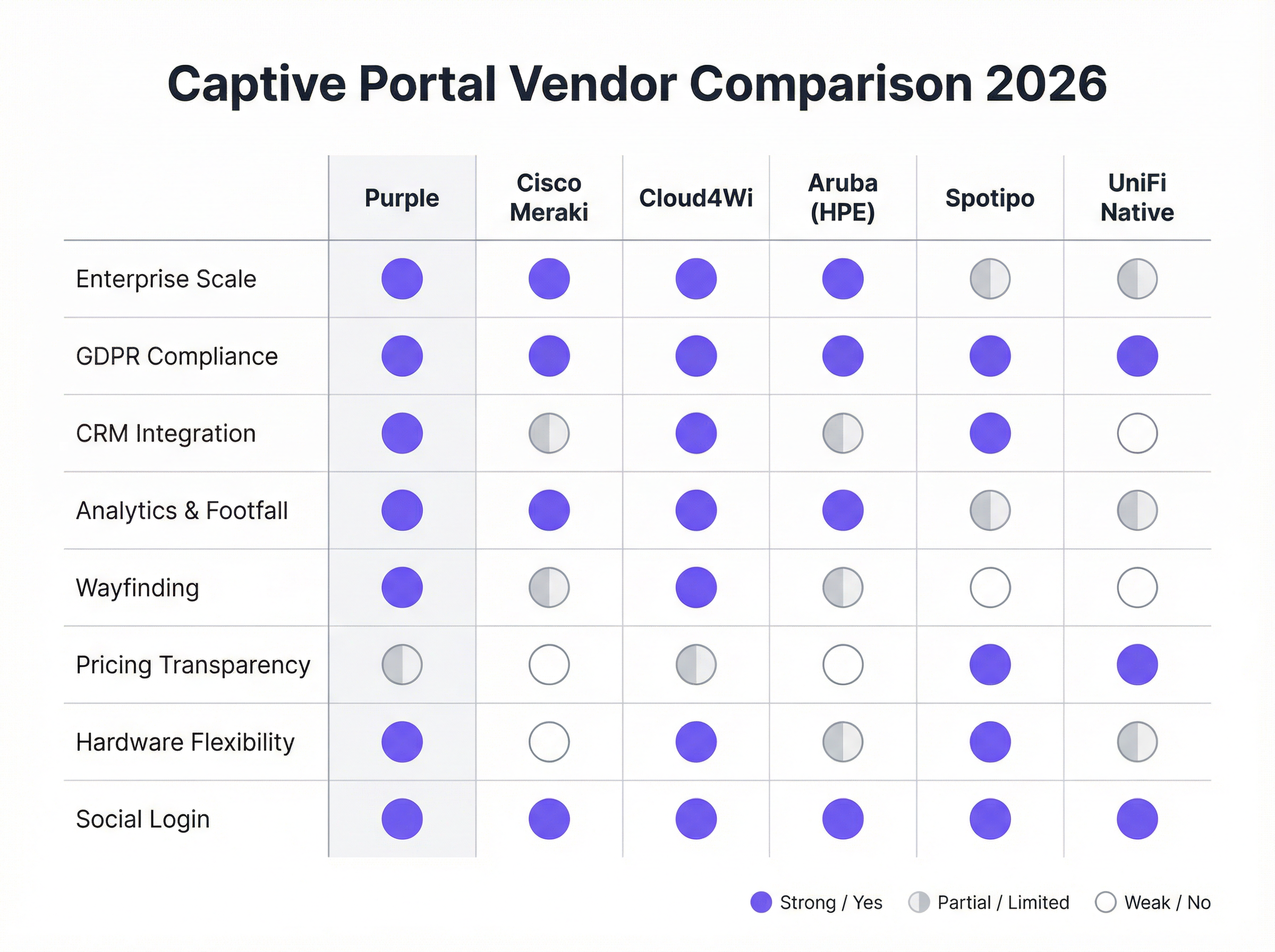
- वेंडर/सॉल्यूशन चुनें:
- हार्डवेयर-नेटिव पोर्टल्स (उदा., UniFi Native Portal): हार्डवेयर के साथ मुफ्त शामिल। बुनियादी एक्सेस कंट्रोल के लिए अच्छे हैं लेकिन उन्नत मार्केटिंग और CRM एकीकरण सुविधाओं का अभाव है।
- स्पेशलिस्ट क्लाउड प्लेटफ़ॉर्म (उदा., Purple, Cloud4Wi, Spotipo): समृद्ध फीचर सेट, व्यापक हार्डवेयर संगतता और गहरे एकीकरण प्रदान करते हैं। ये मार्केटिंग और एनालिटिक्स पर केंद्रित व्यवसायों के लिए आदर्श हैं।
- फुल-स्टैक सॉल्यूशंस (उदा., Cisco Meraki): कसकर एकीकृत हार्डवेयर और सॉफ़्टवेयर प्रदान करते हैं, जो परिनियोजन को सरल बनाते हैं लेकिन वेंडर लॉक-इन बनाते हैं।
- स्प्लैश पेज कॉन्फ़िगर करें: उपयोगकर्ता के सामने आने वाले लॉगिन पेज को डिज़ाइन करें। सुनिश्चित करें कि यह मोबाइल-रिस्पॉन्सिव है, आपकी ब्रांड पहचान को दर्शाता है, और आवश्यक लॉगिन विधियों और अनुपालन चेकबॉक्स को स्पष्ट रूप से प्रस्तुत करता है।
- बैकएंड सिस्टम के साथ एकीकृत करें: पोर्टल को अपने CRM (उदा., Salesforce, HubSpot), मार्केटिंग ऑटोमेशन प्लेटफ़ॉर्म (उदा., Klaviyo), और हॉस्पिटैलिटी के लिए किसी भी प्रॉपर्टी मैनेजमेंट सिस्टम (PMS) से कनेक्ट करें।
- उपयोगकर्ता यात्रा का परीक्षण करें: एक निर्बाध अनुभव सुनिश्चित करने के लिए विभिन्न उपकरणों (iOS, Android, लैपटॉप) पर कनेक्शन और प्रमाणीकरण प्रक्रिया का पूरी तरह से परीक्षण करें। सत्यापित करें कि डेटा आपके एकीकृत सिस्टम में सही ढंग से प्रवाहित हो रहा है।
- निगरानी और अनुकूलन करें: उपयोग की निगरानी करने, लॉगिन सफलता दर को ट्रैक करने और मार्केटिंग ROI को मापने के लिए प्लेटफ़ॉर्म के एनालिटिक्स का उपयोग करें। प्रदर्शन डेटा के आधार पर अपने स्प्लैश पेज और ऑफ़र को परिष्कृत करें।
सर्वोत्तम कार्यप्रणालियाँ
- उपयोगकर्ता अनुभव को प्राथमिकता दें: एक धीमी, भ्रमित करने वाली, या बहु-चरणीय लॉगिन प्रक्रिया उच्च परित्याग दर का कारण बनेगी। जहां उपयुक्त हो, सोशल मीडिया या एक साधारण 'क्लिक-टू-कनेक्ट' जैसे घर्षण रहित लॉगिन विकल्प प्रदान करें।
- GDPR/CCPA अनुपालन सुनिश्चित करें: मार्केटिंग ऑप्ट-इन बॉक्स को कभी भी पहले से चेक न करें। अपनी गोपनीयता नीति और सेवा की शर्तों के स्पष्ट लिंक प्रदान करें। ऑडिट उद्देश्यों के लिए टाइमस्टैम्प के साथ उपयोगकर्ता की सहमति लॉग करें।
- अपने नेटवर्क को सेगमेंट करें: सुरक्षा जोखिमों को कम करने के लिए, हमेशा अपने गेस्ट WiFi को एक अलग VLAN पर चलाएं, जो आपके कॉर्पोरेट नेटवर्क से पूरी तरह से अलग हो।
- हर जगह HTTPS का उपयोग करें: ट्रांज़िट में उपयोगकर्ता डेटा की सुरक्षा के लिए Captive Portal पेज स्वयं, और बाद के सभी इंटरैक्शन, SSL/TLS के साथ एन्क्रिप्ट किए जाने चाहिए।
- वैयक्तिकरण के लिए डेटा का लाभ उठाएं: पोस्ट-लॉगिन अनुभव को वैयक्तिकृत करने के लिए एकत्र किए गए डेटा का उपयोग करें। उदाहरण के लिए, लौटने वाले होटल के मेहमान का नाम लेकर अभिवादन किया जा सकता है और लॉयल्टी छूट की पेशकश की जा सकती है।
समस्या निवारण और जोखिम शमन
- समस्या: रीडायरेक्शन विफल ('कनेक्टिंग' पर अटका हुआ): अक्सर DNS समस्याओं या रीडायरेक्ट को ब्लॉक करने वाले फ़ायरवॉल नियमों के कारण होता है। सुनिश्चित करें कि गेटवे सही ढंग से रिज़ॉल्व कर सकता है और पोर्टल सर्वर पर रीडायरेक्ट कर सकता है। VPN या कस्टम DNS सेटिंग्स वाले कुछ डिवाइस भी रीडायरेक्ट करने में विफल हो सकते हैं।
- समस्या: सोशल लॉगिन विफल: ऐसा तब हो सकता है जब पोर्टल सर्वर का IP पता सोशल मीडिया प्रदाता के डेवलपर कंसोल (उदा., Facebook Login for Business) में व्हाइटलिस्ट नहीं किया गया हो। API कुंजियों और अनुमत रीडायरेक्ट URIs को सही ढंग से कॉन्फ़िगर किया जाना चाहिए।
- जोखिम: 'ईविल ट्विन' हमले: एक हमलावर आपके वैध नेटवर्क के समान SSID के साथ एक दुष्ट एक्सेस पॉइंट स्थापित करता है। उपयोगकर्ता अनजाने में हमलावर के नेटवर्क से जुड़ जाते हैं, जो क्रेडेंशियल्स चुराने के लिए एक नकली Captive Portal प्रस्तुत करता है। शमन में वायरलेस इंट्रूज़न प्रिवेंशन सिस्टम (WIPS) तैनात करना और WPA3-Enterprise सुरक्षा का उपयोग करना शामिल है।
- जोखिम: डेटा ब्रीच: यदि Captive Portal सर्वर या उससे जुड़ा डेटाबेस हैक हो जाता है, तो एकत्र किया गया सभी उपयोगकर्ता डेटा जोखिम में है। शमन के लिए मजबूत सर्वर सुरक्षा, रेस्ट पर डेटा एन्क्रिप्शन, और यदि भुगतान संसाधित किए जाते हैं तो PCI DSS मानकों के पालन की आवश्यकता होती है।
ROI और व्यावसायिक प्रभाव
एक रणनीतिक Captive Portal सॉल्यूशन के लिए व्यावसायिक मामला इंटरनेट एक्सेस प्रदान करने से कहीं आगे तक फैला हुआ है। ROI को प्रत्यक्ष और अप्रत्यक्ष राजस्व सृजन, उन्नत मार्केटिंग क्षमताओं और बेहतर परिचालन दक्षता के माध्यम से मापा जाता है।
- प्रत्यक्ष राजस्व: होटल और सम्मेलन केंद्र टियर बैंडविड्थ की पेशकश कर सकते हैं, जो वीडियो स्ट्रीमिंग या कॉन्फ्रेंसिंग के लिए उपयुक्त हाई-स्पीड एक्सेस के लिए प्रीमियम चार्ज कर सकते हैं।
- मार्केटिंग डेटाबेस वृद्धि: एक रिटेल चेन के लिए, इन-स्टोर आगंतुकों से प्रति माह 5,000 नए, उच्च-इरादे वाले ईमेल पते कैप्चर करना लक्षित प्रचारों के लिए एक सीधा चैनल प्रदान करता है, जिससे बार-बार विज़िट और बिक्री बढ़ती है।
- बढ़ी हुई कस्टमर लाइफटाइम वैल्यू (CLV): CRM के साथ एकीकृत करके, व्यवसाय बार-बार आने वाले आगंतुकों की पहचान कर सकते हैं और उन्हें लॉयल्टी कार्यक्रमों में नामांकित कर सकते हैं, जिससे विज़िट की आवृत्ति और औसत खर्च में वृद्धि होती है।
- परिचालन अंतर्दृष्टि: फुटफॉल एनालिटिक्स, ड्वेल टाइम डेटा और विज़िटर फ्लो मैप्स स्थानों को शॉपिंग मॉल में विशिष्ट क्षेत्रों के लिए स्टाफिंग, स्टोर लेआउट और यहां तक कि किराये की दरों को अनुकूलित करने की अनुमति देते हैं।
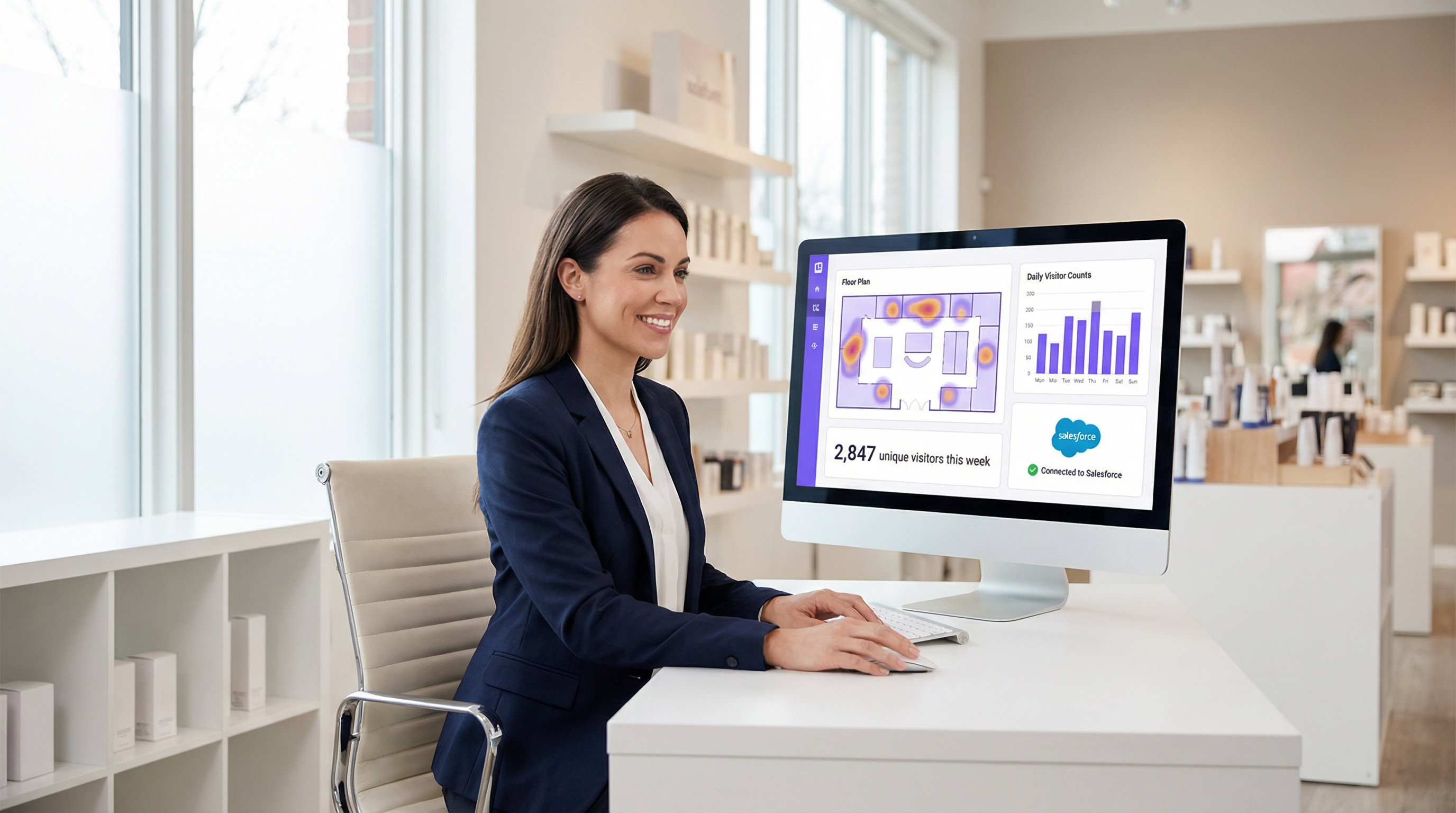
गेस्ट WiFi को IT लागत केंद्र के बजाय ग्राहक बुद्धिमत्ता चैनल के रूप में देखकर, संगठन महत्वपूर्ण, मापने योग्य मूल्य को अनलॉक कर सकते हैं जो सीधे बॉटम लाइन को प्रभावित करता है।
Key Terms & Definitions
Captive Portal
A web page that the user of a public-access network is obliged to view and interact with before access is granted. It acts as a customizable gateway for authentication, policy acceptance, and marketing.
This is the core technology being discussed. IT teams deploy it to control and monetize guest WiFi access in venues like hotels, retail stores, and stadiums.
SSID (Service Set Identifier)
The name of a wireless network that is broadcasted by an access point. It's the name you see when you search for WiFi networks on your device.
IT teams configure a specific SSID for guest access (e.g., \'Hotel Guest WiFi\') which is then associated with the captive portal policy. Clear and distinct SSIDs are crucial for user experience and security.
VLAN (Virtual Local Area Network)
A method of creating logically separate networks on the same physical network infrastructure. Traffic from one VLAN is isolated from another.
This is a critical security best practice. IT architects MUST place the guest WiFi network on a separate VLAN from the corporate network to prevent guests from accessing sensitive internal resources.
MAC Address (Media Access Control Address)
A unique identifier assigned to a network interface controller (NIC) for use as a network address in communications within a network segment.
The captive portal system uses the device's MAC address to identify it and track its authentication status. Once a device is authenticated, its MAC address is added to an allow list on the gateway.
GDPR (General Data Protection Regulation)
A regulation in EU law on data protection and privacy for all individuals within the European Union and the European Economic Area. It governs how personal data is collected, processed, and stored.
For any business operating in or serving customers from the EU, the captive portal must be GDPR-compliant. This means obtaining explicit, un-coerced consent for data collection and marketing, which has major implications for portal design and data handling.
CRM (Customer Relationship Management)
Software that helps companies manage and analyze customer interactions and data throughout the customer lifecycle, with the goal of improving business relationships.
Integrating the captive portal with a CRM like Salesforce or HubSpot is how you turn WiFi access into a marketing asset. It allows guest data (email, name) to be automatically synced for targeted campaigns.
WPA3 (Wi-Fi Protected Access 3)
The latest generation of WiFi security standard, offering enhanced security features over its predecessor, WPA2, including protection against brute-force attacks.
Network architects should specify WPA3-Enterprise for the highest level of security on their guest networks. It ensures that the connection between the user's device and the access point is strongly encrypted.
Footfall Analytics
The process of analyzing data about customer traffic and behavior in a physical location, such as a retail store or a shopping mall.
Advanced captive portal solutions like Purple provide footfall analytics by analyzing WiFi connection data. This gives venue operators valuable insights into visitor numbers, dwell times, and movement patterns, which can be used to optimize operations and marketing.
Case Studies
A 250-room upscale hotel wants to replace its outdated, unreliable guest WiFi system. The goals are to provide a seamless, premium connectivity experience, gather guest data to personalize marketing, and create a new revenue stream from high-speed internet access. The existing hardware is a mix of older Cisco and Ruckus access points.
- Infrastructure Upgrade & Vendor Selection: The mixed hardware is inefficient. Standardize on a single vendor for new WiFi 6/6E access points. Select a cloud-based captive portal provider like Purple that offers broad hardware compatibility and robust PMS integration. 2. Portal Configuration: Design a branded splash page that authenticates users via Room Number + Surname. This validates their guest status via a real-time PMS lookup. 3. Tiered Access Model: Configure two tiers: a) Standard Access (Free): 5 Mbps, suitable for email and web browsing, offered complimentary. b) Premium Access ($15/day): 100 Mbps, for streaming 4K video and video conferencing. The PMS integration allows the charge to be automatically added to the guest's room bill. 4. Marketing Integration: On successful login, redirect guests to a welcome page promoting hotel amenities (spa, restaurant). Use the collected email addresses (with GDPR-compliant consent) for post-stay feedback surveys and targeted offers for future bookings. 5. Security: Deploy the guest network on a separate VLAN, isolated from the hotel's corporate and operational networks. Enforce WPA3 security on the new access points.
A national retail chain with 200 stores wants to leverage in-store guest WiFi to increase its loyalty program membership and measure the impact of digital advertising on physical foot traffic. They currently use Cisco Meraki across all locations.
- Vendor Selection: Since the hardware is standardized on Cisco Meraki, a solution with deep Meraki integration is ideal. Adentro (formerly Zenreach) is a strong candidate due to its focus on the 'Walk-Through Rate' metric, but Purple also offers robust Meraki integration with more flexible pricing. Let's proceed with Purple for its balance of features and cost-effectiveness. 2. Portal Configuration: Configure the captive portal to offer two login methods: a) Social Login (Facebook/Google) for quick access, and b) 'Join Our Loyalty Program' form that captures name, email, and mobile number in exchange for a 10% off digital coupon. 3. CRM & Ad Platform Integration: Connect the portal directly to the company's Salesforce CRM and Facebook Ads account. New loyalty sign-ups are automatically added to Salesforce. The platform will capture the MAC addresses of devices that connect to WiFi. 4. Attribution Measurement: When a customer who has previously logged into the WiFi sees a Facebook ad for the brand and subsequently enters a store (their device is detected by the WiFi network), this is recorded as a 'Walk-Through'. This allows the marketing team to directly measure the ROI of their ad spend on driving in-store traffic. 5. Analytics: Use the platform's analytics dashboard to monitor new loyalty sign-ups per store, identify peak traffic hours, and analyze customer dwell times to optimize store layouts and staffing.
Scenario Analysis
Q1. Your organization is a fast-growing chain of 50 coffee shops using a mix of different consumer-grade routers. The marketing team wants to build a customer email list. What is your primary recommendation for a captive portal strategy?
💡 Hint:Consider the challenges of managing a diverse and non-enterprise hardware environment and the primary goal of marketing data collection.
Show Recommended Approach
The primary recommendation is to deploy a hardware-agnostic, cloud-based captive portal solution like Spotipo or Purple. This approach avoids a costly and immediate hardware replacement across all 50 stores. These platforms are designed to work with a wide range of hardware and provide the centralized management and CRM integration needed to meet the marketing team's goal of building an email list. A simple, email-based login should be implemented to maximize sign-ups.
Q2. A large conference center is hosting a cybersecurity summit and needs to provide WiFi for 5,000 attendees. The summit organizers are concerned about security. How would you configure the captive portal and network?
💡 Hint:Focus on security and scalability. How do you authenticate a large number of users securely while protecting them and your network?
Show Recommended Approach
- Network Segmentation: Create a dedicated VLAN for attendee WiFi, completely isolated from the center's operational network. 2. Security Protocol: Enforce WPA3-Enterprise for robust encryption. 3. Authentication: Use a voucher-based system. Each attendee receives a unique, single-use code upon registration. This prevents unauthorized access and provides a clear audit trail. 4. Portal Configuration: The portal should be minimal, requiring only the voucher code. Disable social logins or open forms to reduce the attack surface. 5. Bandwidth Management: Implement per-user bandwidth limits to ensure fair usage and prevent network saturation. 6. Monitoring: Actively monitor the network for rogue access points or suspicious activity using a WIPS.
Q3. A hospital wants to provide guest WiFi in its waiting rooms but is extremely concerned about HIPAA compliance and protecting patient data. What is the most critical architectural decision to ensure security?
💡 Hint:What is the single most important measure to prevent any possibility of guest traffic interfering with sensitive internal systems?
Show Recommended Approach
The most critical architectural decision is the strict implementation of network segmentation using a VLAN. The guest WiFi network must be on its own VLAN, completely firewalled off from the hospital's internal clinical network where Electronic Health Records (EHR) and other sensitive patient data reside. There should be no routes and no trust between the guest VLAN and the internal VLAN. This ensures that even if a guest device is compromised, it has no network path to access sensitive internal systems, forming the foundation of a HIPAA-compliant guest WiFi strategy.
Key Takeaways
- ✓A captive portal is a strategic asset for security, compliance, and marketing, not just a login page.
- ✓The core architecture involves DNS/HTTP interception to redirect users to a portal for authentication before granting internet access.
- ✓Choosing between hardware-native portals and specialist cloud platforms depends on your business goals, particularly regarding marketing and data analytics.
- ✓GDPR and CCPA compliance are non-negotiable; portals must be designed for explicit, logged user consent.
- ✓Security best practices, like network segmentation (VLANs) and WPA3 encryption, are critical to mitigate risks like 'Evil Twin' attacks.
- ✓The ROI of a captive portal is measured in direct revenue (tiered access), marketing database growth, and operational insights from footfall analytics.
- ✓A seamless user experience is paramount; a complex login process will lead to high abandonment and low data capture.




