

WiFi नेटवर्क एडमिनिस्ट्रेटर्स के लिए DHCP और DNS के मूल सिद्धांत
An authoritative technical reference for IT leaders and network administrators on the critical roles of DHCP and DNS in enterprise WiFi deployments. This guide provides practical, vendor-neutral guidance for designing, implementing, and troubleshooting robust network services in hospitality, retail, and large-venue environments.
🎧 Listen to this Guide
View Transcript
कार्यकारी सारांश
आधुनिक एंटरप्राइज़ के लिए, गेस्ट और स्टाफ WiFi अब केवल एक सुविधा नहीं है; यह एक मुख्य उपयोगिता है जो संचालन, ग्राहक जुड़ाव और बिज़नेस इंटेलिजेंस को आधार प्रदान करती है। हालाँकि, इन नेटवर्क की स्थिरता और सुरक्षा पूरी तरह से उन मूलभूत सेवाओं पर निर्भर करती है जिन्हें अक्सर हल्के में लिया जाता है: डायनामिक होस्ट कॉन्फ़िगरेशन प्रोटोकॉल (DHCP) और डोमेन नेम सिस्टम (DNS)। CTO, IT प्रबंधकों और वेन्यू निदेशकों के लिए, इन प्रोटोकॉल की सूक्ष्म समझ केवल एक तकनीकी अभ्यास नहीं है—यह जोखिम कम करने, संसाधन अनुकूलन और एक बेहतर उपयोगकर्ता अनुभव सक्षम करने का विषय है। गलत कॉन्फ़िगरेशन के कारण महत्वपूर्ण सर्विस आउटेज, सुरक्षा कमजोरियां और खराब अनुभव हो सकता है जो सीधे ग्राहकों की संतुष्टि और राजस्व को प्रभावित करता है। यह गाइड बड़े पैमाने के WiFi नेटवर्क के लिए DHCP और DNS सेवाओं को आर्किटेक्ट करने के लिए एक व्यावहारिक, कार्रवाई योग्य ढांचा प्रदान करती है। यह अकादमिक सिद्धांत से आगे बढ़कर वास्तविक दुनिया की चुनौतियों का समाधान करती है, जिसमें उच्च-घनत्व वाले स्थानों में IP एड्रेस प्रबंधन से लेकर Captive Portal कार्यक्षमता को नियंत्रित करने वाले जटिल DNS तंत्र शामिल हैं। उल्लिखित सर्वोत्तम प्रथाओं को अपनाकर, संगठन यह सुनिश्चित कर सकते हैं कि उनका WiFi बुनियादी ढांचा न केवल विश्वसनीय और सुरक्षित है, बल्कि डेटा संग्रह और व्यवसाय वृद्धि के लिए एक शक्तिशाली संपत्ति भी है。
तकनीकी डीप-डाइव
WiFi नेटवर्क में DHCP की भूमिका
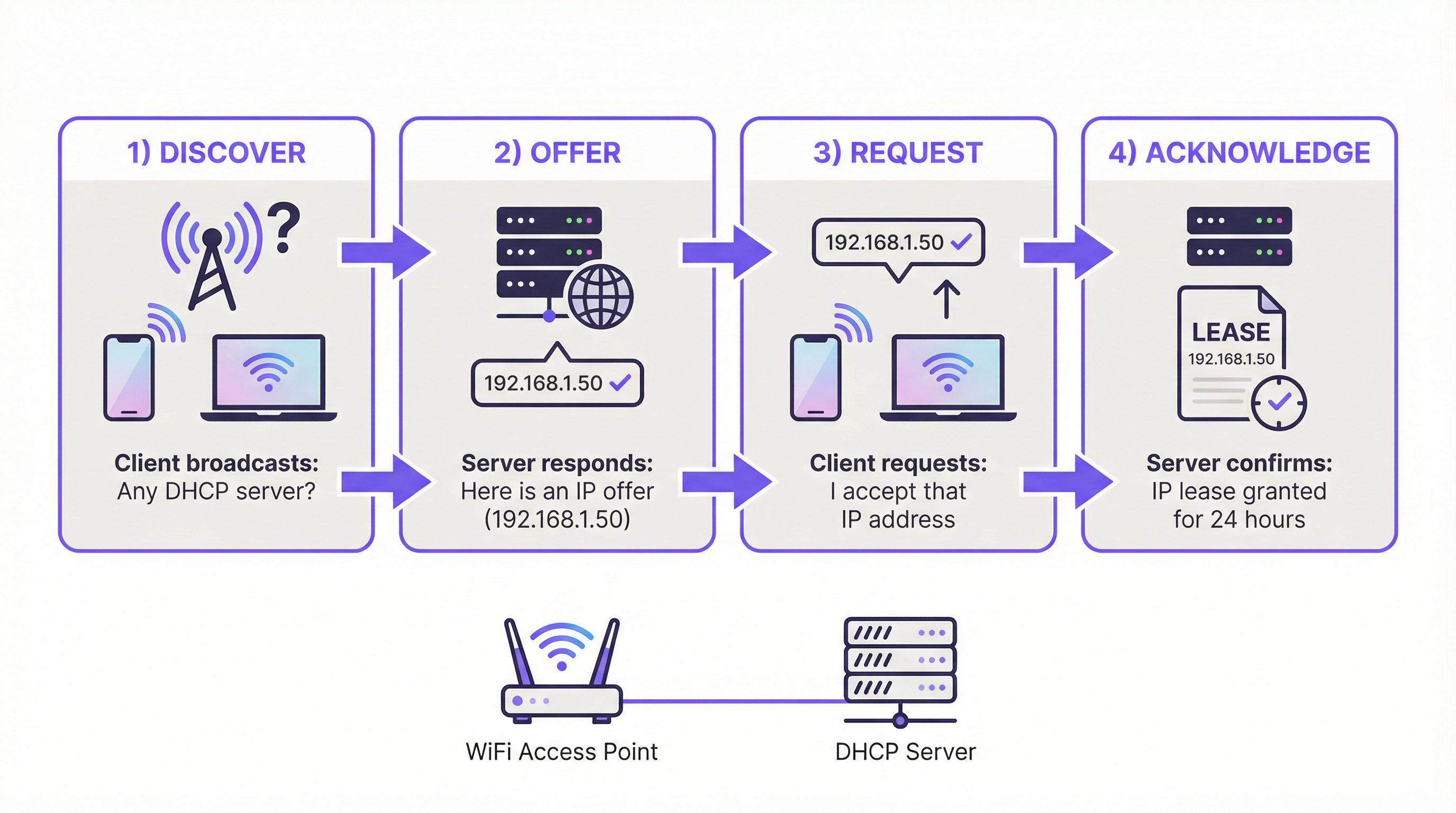
DHCP, IP एड्रेस ऑटोमेशन का इंजन है। WiFi के संदर्भ में, जहाँ सैकड़ों या हज़ारों डिवाइस आसानी से कनेक्ट और डिस्कनेक्ट हो सकते हैं, मैन्युअल IP असाइनमेंट एक परिचालन असंभवता है। DHCP इसे चार-चरणीय DORA (डिस्कवर, ऑफर, रिक्वेस्ट, एकनॉलेज) प्रक्रिया के माध्यम से स्वचालित करता है, यह सुनिश्चित करते हुए कि प्रत्येक क्लाइंट को नेटवर्क पर संचार करने के लिए एक अद्वितीय IP एड्रेस और आवश्यक कॉन्फ़िगरेशन प्राप्त हो।
WiFi के लिए प्रमुख DHCP पैरामीटर्स:
- लीज़ टाइम (Lease Time): यह निर्धारित करता है कि कोई डिवाइस कितने समय तक IP एड्रेस रख सकता है। कॉफी शॉप या सम्मेलन जैसे उच्च-टर्नओवर वाले वातावरण में, IP को कुशलतापूर्वक रीसायकल करने के लिए कम लीज़ टाइम (उदा., 1-4 घंटे) महत्वपूर्ण हैं। होटल या कॉर्पोरेट कार्यालय में, निवासी उपकरणों के लिए लंबी लीज़ (उदा., 24 घंटे) अधिक उपयुक्त होती है।
- स्कोप साइज़ (Scope Size): एक सामान्य विफलता बिंदु IP एड्रेस पूल की कम-प्रोविज़निंग है। एंटरप्राइज़ गेस्ट नेटवर्क के लिए /24 सबनेट (254 उपयोग योग्य IP) अक्सर अपर्याप्त होता है। एक सामान्य नियम के अनुसार प्रति उपयोगकर्ता या कमरे में कम से कम 2-3 उपकरणों के लिए प्रोविज़न करना चाहिए। 200 कमरों वाले होटल के लिए, इसका मतलब 400-600 समवर्ती उपकरणों की योजना बनाना है, जिसके लिए पीक समय के दौरान IP एड्रेस की कमी को रोकने के लिए एक बड़े सबनेट (उदा., /22) की आवश्यकता होती है。
- DHCP विकल्प: IP एड्रेस के अलावा, DHCP क्लाइंट्स को महत्वपूर्ण जानकारी प्रदान करता है, विशेष रूप से डिफ़ॉल्ट गेटवे (राउटर का IP) और DNS सर्वर एड्रेस। विकल्प 43 (Option 43) का उपयोग कंट्रोलर डिस्कवरी के लिए एक्सेस पॉइंट्स को वेंडर-विशिष्ट जानकारी प्रदान करने के लिए भी किया जा सकता है।
DNS और WiFi उपयोगकर्ता अनुभव पर इसका प्रभाव
DNS मानव-पठनीय डोमेन नामों (उदा., purple.ai) को मशीन-पठनीय IP एड्रेस में अनुवादित करता है। गेस्ट WiFi के संदर्भ में, इसकी भूमिका महत्वपूर्ण है, विशेष रूप से Captive Portal के लिए।
Captive Portal इंटरसेप्ट:
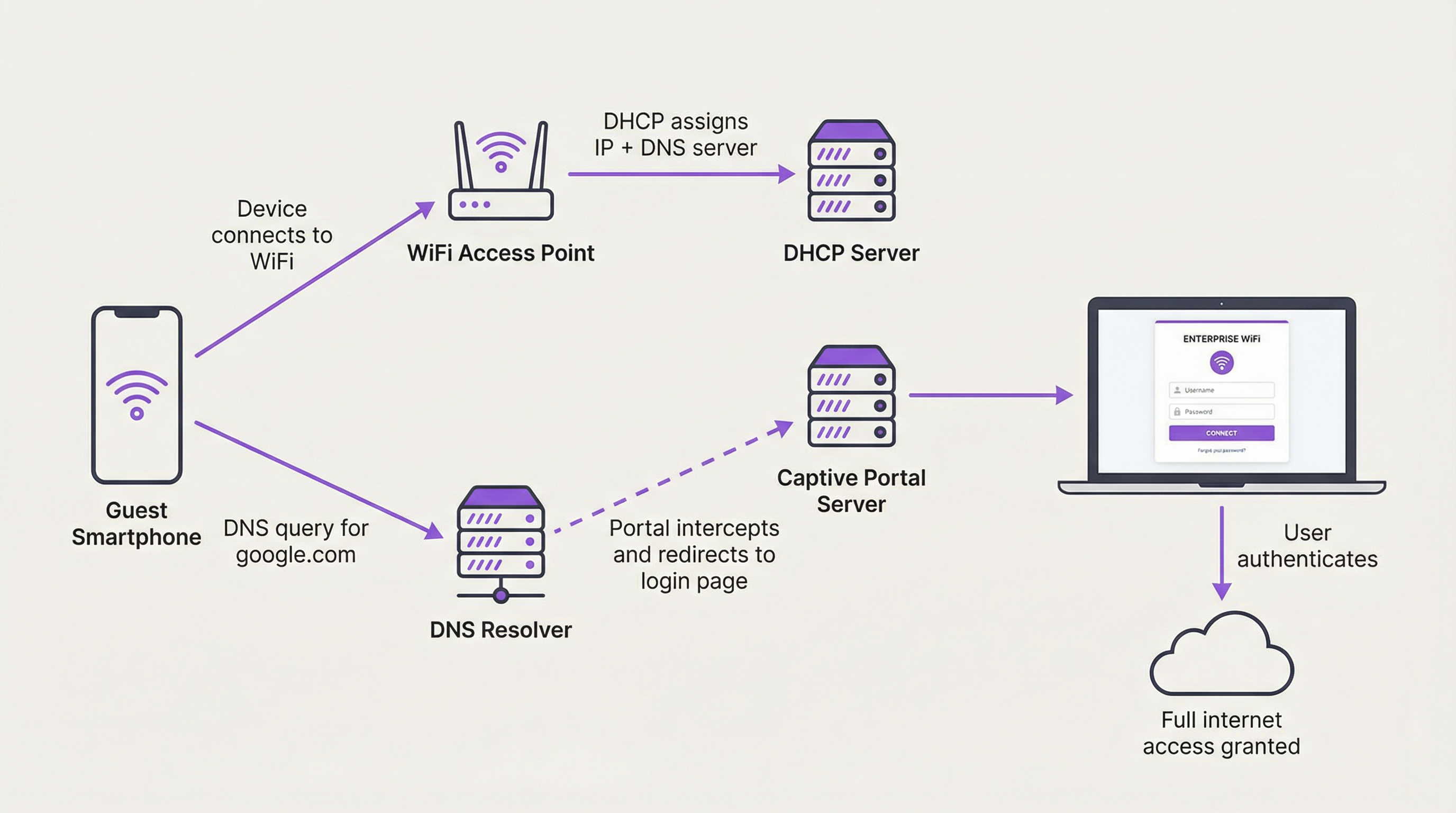
जब कोई नया गेस्ट डिवाइस कनेक्ट होता है, तो उसे सार्वजनिक इंटरनेट से फ़ायरवॉल कर दिया जाता है। जब उपयोगकर्ता ब्राउज़र खोलता है और किसी भी वेबसाइट पर जाने का प्रयास करता है, तो नेटवर्क का DNS सर्वर इस अनुरोध को इंटरसेप्ट करता है। अनुरोधित डोमेन को उसके सार्वजनिक IP पर रिज़ॉल्व करने के बजाय, DNS सर्वर स्वयं Captive Portal सर्वर के IP एड्रेस के साथ प्रतिक्रिया देता है। यह उपयोगकर्ता के ब्राउज़र को प्रमाणीकरण पृष्ठ लोड करने के लिए बाध्य करता है। यह नियंत्रित DNS हाईजैकिंग का एक रूप है और Captive Portal वर्कफ़्लो के लिए मौलिक है।
सामान्य DNS मिसकॉन्फ़िगरेशन:
- बाहरी DNS की अनुमति देना: यदि फ़ायरवॉल नियम गेस्ट क्लाइंट्स को प्रमाणीकरण से पहले बाहरी रिज़ॉल्वर (जैसे Google का 8.8.8.8 या Cloudflare का 1.1.1.1) पर DNS क्वेरी भेजने की अनुमति देते हैं, तो Captive Portal को बायपास किया जा सकता है। अप्रमाणित क्लाइंट्स के सभी DNS ट्रैफ़िक को आंतरिक रिज़ॉल्वर पर बाध्य किया जाना चाहिए।
- स्प्लिट-होराइज़न DNS (Split-Horizon DNS): गेस्ट और आंतरिक नेटवर्क दोनों वाले वातावरण में, एक स्प्लिट-होराइज़न (या स्प्लिट-ब्रेन) DNS आर्किटेक्चर आवश्यक है। इसका मतलब है कि आपका DNS सर्वर पूछने वाले के आधार पर अलग-अलग प्रतिक्रियाएँ प्रदान करता है। स्टाफ WiFi पर एक कर्मचारी जो आंतरिक सर्वर नाम की क्वेरी कर रहा है, उसे एक निजी IP एड्रेस मिलना चाहिए, जबकि एक गेस्ट उस नाम को बिल्कुल भी रिज़ॉल्व करने में सक्षम नहीं होना चाहिए। यह एक महत्वपूर्ण सुरक्षा सीमा है।
कार्यान्वयन गाइड
एंटरप्राइज़ WiFi के लिए DHCP और DNS को आर्किटेक्ट करने के लिए एक संरचित दृष्टिकोण की आवश्यकता होती है। निम्नलिखित एक वेंडर-न्यूट्रल डिप्लॉयमेंट मॉडल प्रदान करता है।
चरण 1: नेटवर्क सेगमेंटेशन
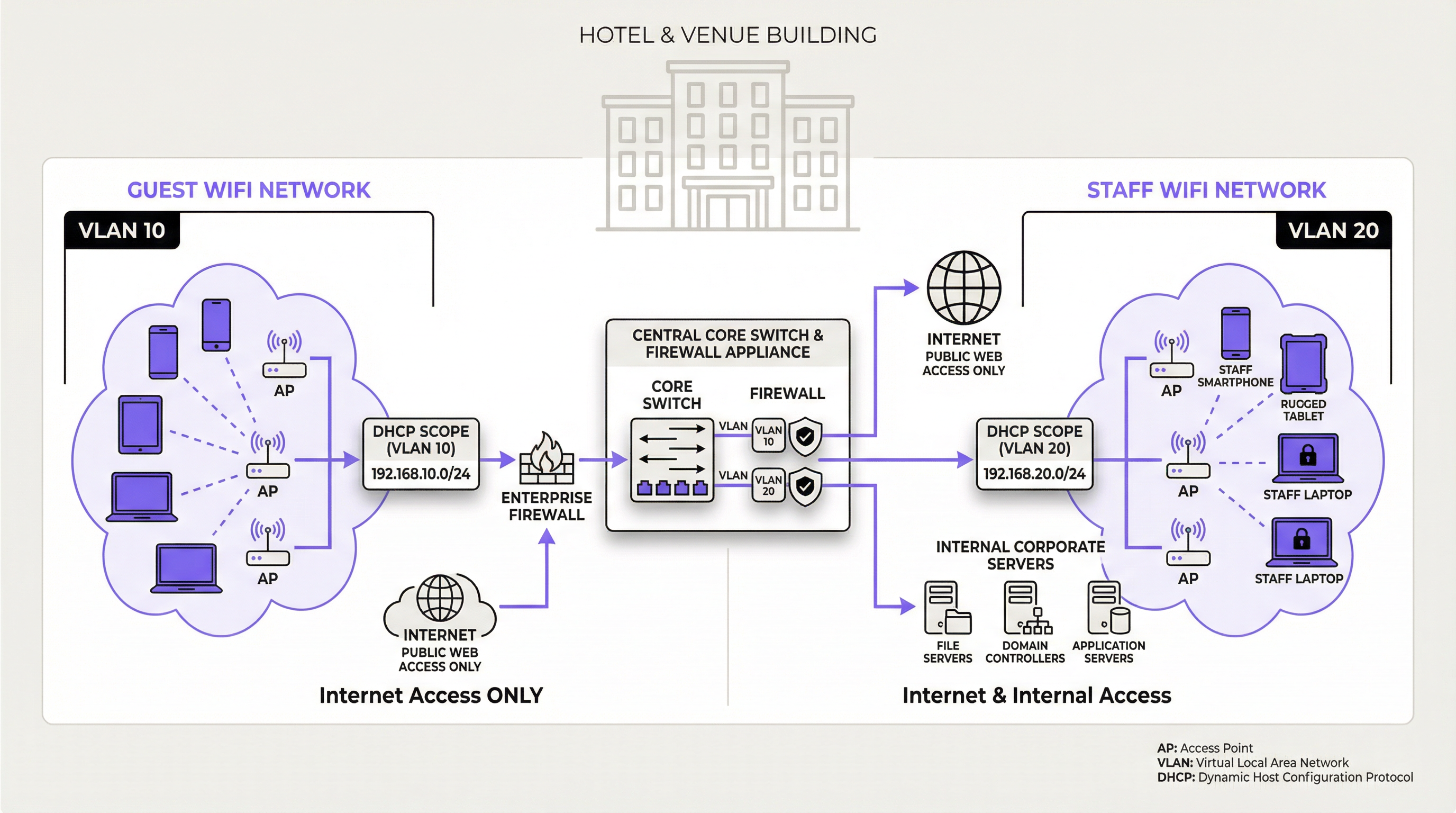
यह पूर्ण आधार है। VLAN का उपयोग करके गेस्ट और स्टाफ/कॉर्पोरेट ट्रैफ़िक को तार्किक रूप से अलग किया जाना चाहिए। यह PCI DSS और GDPR जैसे सुरक्षा मानकों के लिए एक मूलभूत आवश्यकता है।
- गेस्ट VLAN: इंटरनेट तक अप्रतिबंधित पहुंच (प्रमाणीकरण के बाद), लेकिन सभी आंतरिक कॉर्पोरेट संसाधनों से पूरी तरह से फ़ायरवॉल किया गया।
- स्टाफ VLAN: इंटरनेट तक पहुंच और आंतरिक संसाधनों (फ़ाइल सर्वर, डेटाबेस, आदि) तक विशिष्ट, भूमिका-आधारित पहुंच।
- मैनेजमेंट VLAN: एक्सेस पॉइंट, स्विच और कंट्रोलर जैसे नेटवर्क इंफ्रास्ट्रक्चर उपकरणों के लिए।
चरण 2: DHCP और DNS सर्वर आर्किटेक्चर
- केंद्रीकृत मॉडल (Centralized Model): मल्टी-साइट संगठनों (उदा., रिटेल चेन) के लिए, प्रधान कार्यालय या डेटा सेंटर में एक केंद्रीकृत DHCP/DNS सर्वर सुसंगत प्रबंधन प्रदान करता है। प्रत्येक रिमोट साइट केंद्रीय सर्वर को DHCP अनुरोध अग्रेषित करने के लिए अपने स्थानीय राउटर/स्विच पर DHCP रिले एजेंट (IP हेल्पर्स) का उपयोग करती है। जोखिम: WAN लिंक पर उच्च निर्भरता।
- विकेंद्रीकृत/वितरित मॉडल (Decentralized/Distributed Model): बड़े सिंगल-साइट स्थानों (स्टेडियम, हवाई अड्डे) के लिए या जहाँ साइट की स्वायत्तता महत्वपूर्ण है, स्थानीय स्तर पर रिडंडेंट DHCP/DNS सर्वर तैनात करना सबसे अच्छा अभ्यास है। यह अधिकतम लचीलापन और प्रदर्शन प्रदान करता है, क्योंकि WAN विफलता स्थानीय नेटवर्क सेवाओं को प्रभावित नहीं करेगी।
- क्लाउड-आधारित मॉडल (Cloud-based Model): कुछ क्लाउड-प्रबंधित नेटवर्किंग समाधान एकीकृत DHCP और DNS सेवाएं प्रदान करते हैं। यह प्रबंधन को सरल बनाता है लेकिन सुरक्षा और फीचर सेट के सावधानीपूर्वक मूल्यांकन की आवश्यकता होती है।
चरण 3: DHCP स्कोप और लीज़ कॉन्फ़िगरेशन
प्रत्येक VLAN के लिए, एक समर्पित DHCP स्कोप बनाएँ।
| नेटवर्क | VLAN ID | उदाहरण सबनेट | अनुशंसित लीज़ टाइम | मुख्य विचार |
|---|---|---|---|---|
| गेस्ट WiFi | 10 | 10.10.0.0/21 |
1-8 घंटे | पीक क्षमता के लिए आकार (3x उपयोगकर्ता)। छोटी लीज़। |
| स्टाफ WiFi | 20 | 192.168.20.0/24 |
24 घंटे | स्थायी उपकरणों के लिए लंबी लीज़। |
| IoT / स्कैनर्स | 30 | 192.168.30.0/24 |
7 दिन / स्टेटिक | महत्वपूर्ण बुनियादी ढांचे के लिए स्टेटिक रिज़र्वेशन का उपयोग करें। |
सर्वोत्तम प्रथाएँ
- DHCP स्नूपिंग सक्षम करें: यह स्विच पर एक लेयर 2 सुरक्षा सुविधा है जो DHCP संदेशों को मान्य करती है। यह दुष्ट (rogue) DHCP सर्वरों को नेटवर्क में पेश किए जाने से रोकता है, जो एक सामान्य हमले का वेक्टर है।
- DHCP स्कोप उपयोग की निगरानी करें: अपने DHCP पूल में उपलब्ध IP की संख्या की सक्रिय रूप से निगरानी करें। जब उपयोग एक सीमा (उदा., 85%) से अधिक हो जाए, तो आपको सूचित करने के लिए अलर्ट सेट करें ताकि एड्रेस की कमी को सक्रिय रूप से रोका जा सके।
- रिडंडेंट सर्वर का उपयोग करें: किसी भी एंटरप्राइज़-ग्रेड डिप्लॉयमेंट के लिए, विफलता के एकल बिंदुओं (single points of failure) को खत्म करने के लिए DHCP और DNS सेवाओं को एक रिडंडेंट पेयर (उदा., एक फ़ेलओवर क्लस्टर) में तैनात किया जाना चाहिए।
- DHCP रिज़र्वेशन का दस्तावेज़ीकरण करें: महत्वपूर्ण बुनियादी ढांचा उपकरणों के लिए जिन्हें एक सुसंगत IP एड्रेस की आवश्यकता होती है (उदा., प्रिंटर, सर्वर, एक्सेस पॉइंट), डिवाइस के MAC एड्रेस से जुड़े DHCP रिज़र्वेशन का उपयोग करें। यह उपकरणों पर ही कॉन्फ़िगर किए गए स्टेटिक IP का उपयोग करने के बजाय IP प्रबंधन को केंद्रीकृत करता है।
समस्या निवारण और जोखिम न्यूनीकरण
| लक्षण | संभावित कारण | न्यूनीकरण / समाधान |
|---|---|---|
| उपयोगकर्ता IP एड्रेस प्राप्त नहीं कर सकते। | DHCP स्कोप की समाप्ति: उपलब्ध IP एड्रेस का पूल खाली है। | सबनेट का आकार बढ़ाएँ। एड्रेस को तेज़ी से रीसायकल करने के लिए DHCP लीज़ टाइम कम करें। |
| उपयोगकर्ताओं को 'स्व-असाइन किया गया' (self-assigned) IP मिलता है। | कोई DHCP सर्वर पहुँच योग्य नहीं: क्लाइंट का DHCP डिस्कवर पैकेट सर्वर तक नहीं पहुँच रहा है। | VLAN मिसकॉन्फ़िगरेशन की जाँच करें। सुनिश्चित करें कि राउटर/L3 स्विच पर DHCP रिले/IP हेल्पर एड्रेस सही ढंग से कॉन्फ़िगर किए गए हैं। |
| उपयोगकर्ताओं को गलत वेबसाइटों पर निर्देशित किया जाता है। | दुष्ट (Rogue) DHCP सर्वर या DNS हाईजैकिंग: एक अनधिकृत डिवाइस दुर्भावनापूर्ण नेटवर्क सेटिंग्स जारी कर रहा है। | सभी एक्सेस स्विच पर DHCP स्नूपिंग सक्षम करें। यदि समर्थित हो तो DNS सुरक्षा एक्सटेंशन (DNSSEC) का उपयोग करें। |
| Captive Portal पृष्ठ लोड नहीं होता है। | DNS बायपास: क्लाइंट बाहरी DNS सर्वर का उपयोग कर रहा है। फ़ायरवॉल समस्या: पोर्टल सर्वर पर ट्रैफ़िक अवरुद्ध है। | अप्रमाणित क्लाइंट्स से सभी आउटबाउंड DNS (पोर्ट 53) को ब्लॉक करने के लिए फ़ायरवॉल नियम बनाएँ, सिवाय आंतरिक रिज़ॉल्वर के। |
ROI और व्यावसायिक प्रभाव
एक अच्छी तरह से आर्किटेक्ट किया गया DHCP और DNS बुनियादी ढांचा केवल इंटरनेट एक्सेस प्रदान करने से परे ठोस व्यावसायिक मूल्य प्रदान करता है। प्राथमिक ROI जोखिम में कमी और परिचालन दक्षता से प्राप्त होता है। एक स्थिर नेटवर्क महंगे डाउनटाइम को कम करता है और कनेक्टिविटी समस्याओं से संबंधित सपोर्ट टिकटों की संख्या को घटाता है। एक बड़े होटल के लिए, किसी प्रमुख सम्मेलन के दौरान गेस्ट WiFi आउटेज के एक घंटे से बचना महत्वपूर्ण प्रतिष्ठा की क्षति और सर्विस क्रेडिट की मांगों को रोक सकता है। इसके अलावा, Captive Portal का विश्वसनीय संचालन, जो DNS पर निर्भर करता है, मार्केटिंग और एनालिटिक्स के लिए मूल्यवान ग्राहक डेटा एकत्र करने का प्रवेश द्वार है, जैसा कि Purple जैसे प्लेटफ़ॉर्म द्वारा सुगम बनाया गया है। यह डेटा व्यक्तिगत जुड़ाव को सक्षम बनाता है, वफादारी बढ़ाता है, और फ़ुटफ़ॉल एनालिटिक्स प्रदान करता है जो वेन्यू लेआउट और संचालन को अनुकूलित कर सकता है, जिससे राजस्व पर सीधा और मापने योग्य प्रभाव पड़ता है।
Key Terms & Definitions
DHCP Lease Time
The duration for which a DHCP server grants a client the right to use an assigned IP address.
IT teams must balance lease time against device turnover. Short leases in high-traffic venues prevent IP exhaustion, while long leases in corporate environments reduce unnecessary network chatter.
DHCP Scope
A defined range of IP addresses that a DHCP server is authorized to distribute to clients on a specific subnet.
This is the pool of available addresses. If the scope is too small for the number of connecting devices, new users will be denied access, leading to service outages.
DHCP Relay Agent (IP Helper)
A router or switch configuration that forwards DHCP broadcast packets from one subnet to a DHCP server on another subnet.
This is essential for centralized DHCP management. It allows a single DHCP server in a data center to serve multiple VLANs and remote sites without needing a server in every location.
DHCP Snooping
A Layer 2 security feature that filters DHCP messages, blocking responses from untrusted ports to prevent rogue DHCP servers.
This is a critical security control to prevent man-in-the-middle attacks where an attacker's device could start issuing malicious IP configurations to clients.
Captive Portal
A web page that a user of a public-access network is obliged to view and interact with before access is granted.
For venue operators, this is the primary mechanism for user authentication, presenting terms of service, and capturing marketing data. Its functionality is entirely dependent on correct DNS and firewall configuration.
Split-Horizon DNS (Split-Brain DNS)
A DNS configuration where the server provides different responses (different IP addresses) for the same domain name depending on the source of the query.
This is used to securely separate internal and external users. It ensures an employee can resolve `intranet.company.com` to a private IP while a guest on the public WiFi cannot resolve it at all.
VLAN (Virtual Local Area Network)
A method of creating logically separate networks on the same physical network infrastructure.
This is the fundamental tool for network segmentation. IT teams must use VLANs to isolate guest traffic from secure corporate and payment-card (PCI) traffic as a baseline security measure.
IP Address Exhaustion
A state where all available IP addresses in a DHCP scope have been leased, preventing new devices from connecting to the network.
This is the most common failure mode for poorly planned guest WiFi networks. It is a direct result of underestimating device density and setting lease times that are too long for the environment.
Case Studies
A 500-room luxury hotel is experiencing frequent complaints about WiFi connectivity, especially during large conferences. Guests report being unable to connect, and the IT team is constantly "rebooting the router". They are using a single /24 subnet for their guest network, provided by their ISP's basic firewall.
The core issue is DHCP scope exhaustion and a lack of enterprise-grade architecture.
- Immediate Triage: Lower the DHCP lease time on the existing firewall from the default (often 24 hours) to 1 hour. This will more rapidly recycle the limited IP addresses as conference attendees come and go.
- Strategic Redesign: Procure and deploy two dedicated servers to run as a DHCP failover cluster. This provides redundancy.
- Implement VLANs: Create a new, dedicated Guest WiFi VLAN (e.g., VLAN 100).
- Expand IP Scope: Assign a significantly larger subnet to the new guest VLAN, such as a /21 (which provides 2046 usable IPs). This accommodates the 500 rooms plus multiple devices per guest and conference attendees (500 rooms * 3 devices/room = 1500 IPs needed at a minimum).
- Configure DHCP Relay: On the hotel's core switch/router, configure an IP Helper address on the Guest VLAN interface, pointing to the new DHCP servers. This directs all guest DHCP requests to the dedicated servers.
- Monitoring: Implement monitoring on the new DHCP servers to track scope utilization in real-time.
A retail chain with 100 stores wants to implement a branded guest WiFi captive portal to gather marketing data. They notice that some tech-savvy customers are able to get online without ever seeing the login page. Their current setup has a simple guest network at each store using the local ISP router.
The problem is DNS leakage, allowing clients to bypass the captive portal redirect.
- Firewall Policy Implementation: At each store, the firewall controlling the guest network must be configured with a new outbound rule. This rule should DENY all traffic from the Guest WiFi subnet with a destination port of 53 (DNS), for all destination IPs EXCEPT for the IP address of the store's own internal DNS resolver (which may be the router itself or a designated server).
- DNS Interception: Ensure the internal DNS resolver is configured to intercept all DNS queries from unauthenticated clients and redirect them to the captive portal's IP address.
- Centralized Management (Optional but Recommended): For better consistency, deploy a standardized firewall configuration to all 100 stores using a central management platform (e.g., Meraki, FortiManager). This ensures the anti-bypass rule is applied uniformly and cannot be accidentally misconfigured by local staff.
Scenario Analysis
Q1. You are designing the network for a new 10,000-seat sports stadium. The client wants seamless WiFi for all attendees. What DHCP lease time would you recommend for the public guest network and why?
💡 Hint:Consider the duration of an average event and the sheer volume of unique devices over a short period.
Show Recommended Approach
A very short lease time, such as 30-60 minutes, is recommended. During a 3-4 hour event, thousands of devices will connect and disconnect. A short lease ensures that IP addresses from departed fans are rapidly recycled and made available to new or reconnecting devices, preventing IP address exhaustion in such a high-density, high-turnover environment.
Q2. A hospital wants to provide guest WiFi but is concerned about security and compliance with health data regulations (e.g., HIPAA). What is the single most important architectural principle you must enforce regarding their guest and internal networks?
💡 Hint:How do you ensure guest devices can never, under any circumstances, communicate with internal clinical systems?
Show Recommended Approach
The single most important principle is strict network segmentation using VLANs and restrictive firewall rules. The guest WiFi network must be on its own isolated VLAN and all traffic from this VLAN must be explicitly denied from reaching any internal network segment, especially those containing clinical systems or patient data. There should be zero trust and zero connectivity between the two environments.
Q3. Your company's CFO is questioning the expense of dedicated DHCP/DNS servers, arguing that the firewall provided by the ISP should be sufficient. How do you justify the investment in terms of business risk?
💡 Hint:Translate technical benefits (redundancy, scalability) into business outcomes (risk mitigation, uptime, user experience).
Show Recommended Approach
The justification is a risk-mitigation and business continuity argument. While the ISP firewall provides basic functionality, it represents a single point of failure with limited scalability and management features. For an enterprise, a DHCP or DNS failure is not an IT issue; it's a business outage. For a hotel, it means unhappy guests and refunds. For a retail store, it means point-of-sale systems or customer analytics could fail. Investing in redundant, dedicated servers is like buying insurance; it protects against costly downtime and ensures the network can scale with business demand, directly protecting revenue and customer satisfaction.
Key Takeaways
- ✓DHCP and DNS are foundational services that determine the stability and security of any enterprise WiFi network.
- ✓Always right-size your DHCP scope for peak device density (The 3:1 Rule) and use short lease times in high-turnover venues.
- ✓Strict network segmentation using VLANs to separate guest and staff traffic is a non-negotiable security requirement.
- ✓Captive portal functionality relies on intercepting and redirecting DNS queries; block external DNS for unauthenticated users to prevent bypass.
- ✓Use DHCP Snooping to prevent rogue DHCP servers and other man-in-the-middle attacks.
- ✓For enterprise scale, use redundant, dedicated DHCP/DNS servers to eliminate single points of failure and ensure business continuity.
- ✓Monitor DHCP scope utilization proactively to prevent IP address exhaustion before it impacts users.




