

गेस्ट WiFi: व्यवसायों के लिए ग्राहक अनुभव को बेहतर बनाने और मूल्यवान डेटा एकत्र करने की अंतिम मार्गदर्शिका
This guide is the definitive technical reference for IT leaders and venue operators on deploying enterprise-grade guest WiFi. It provides actionable guidance on network architecture, security, and data analytics to transform guest WiFi from a cost centre into a powerful tool for enhancing customer experience and driving business intelligence.
🎧 Listen to this Guide
View Transcript

कार्यकारी सारांश
वरिष्ठ IT पेशेवरों और संचालन निदेशकों के लिए, गेस्ट WiFi एक साधारण सुविधा से कहीं आगे विकसित हो चुका है। कभी एक आवश्यक लेकिन परिधीय सेवा माने जाने वाला यह अब एक रणनीतिक संपत्ति का प्रतिनिधित्व करता है जो महत्वपूर्ण ROI प्रदान करने में सक्षम है। एक पेशेवर रूप से डिज़ाइन किया गया गेस्ट WiFi नेटवर्क अब केवल इंटरनेट एक्सेस प्रदान करने तक सीमित नहीं है; यह ग्राहक अनुभव को बेहतर बनाने, इन-वेन्यू व्यवहार पर अद्वितीय डेटा एकत्र करने और नए मार्केटिंग अवसर पैदा करने का एक प्राथमिक माध्यम है। यह मार्गदर्शिका एक सुरक्षित, उच्च-प्रदर्शन वाले गेस्ट WiFi समाधान को डिज़ाइन करने, लागू करने और प्रबंधित करने के लिए एक व्यावहारिक, तकनीकी संदर्भ के रूप में कार्य करती है। हम अकादमिक सिद्धांत से आगे बढ़कर हॉस्पिटैलिटी, रिटेल और बड़े सार्वजनिक स्थानों में वास्तविक दुनिया की तैनाती पर आधारित कार्रवाई योग्य अंतर्दृष्टि प्रदान करेंगे। ध्यान तीन-आयामी दृष्टिकोण पर है: 1) सुरक्षा और आर्किटेक्चर: जोखिम को कम करने के लिए मजबूत नेटवर्क सेगमेंटेशन और एक्सेस कंट्रोल लागू करना। 2) डेटा और एनालिटिक्स: आपके ग्राहक कौन हैं और वे आपके स्थान पर कैसा व्यवहार करते हैं, यह समझने के लिए Captive Portal और WiFi इंटेलिजेंस प्लेटफ़ॉर्म का लाभ उठाना। 3) व्यावसायिक प्रभाव: उस डेटा को बेहतर परिचालन दक्षता से लेकर ग्राहकों की वफादारी और राजस्व में वृद्धि जैसे मापने योग्य परिणामों में बदलना। CTO के लिए, यह मार्गदर्शिका Purple AI जैसे आधुनिक WiFi इंटेलिजेंस प्लेटफ़ॉर्म में निवेश को उचित ठहराने के लिए रूपरेखा प्रदान करती है, जो बातचीत को लागत से हटाकर रणनीतिक मूल्य की ओर ले जाती है。
तकनीकी डीप-डाइव
एक सफल गेस्ट WiFi परिनियोजन मजबूत तकनीकी आर्किटेक्चर की नींव पर टिका होता है। प्राथमिक लक्ष्य आंतरिक कॉर्पोरेट नेटवर्क की सुरक्षा या प्रदर्शन से समझौता किए बिना मेहमानों को निर्बाध, उच्च-प्रदर्शन वाला इंटरनेट एक्सेस प्रदान करना है। इसके लिए एक बहु-स्तरीय दृष्टिकोण की आवश्यकता होती है जो हार्डवेयर, नेटवर्क डिज़ाइन और सुरक्षा प्रोटोकॉल को संबोधित करता है।
कोर आर्किटेक्चर: सेगमेंटेशन अनिवार्य है
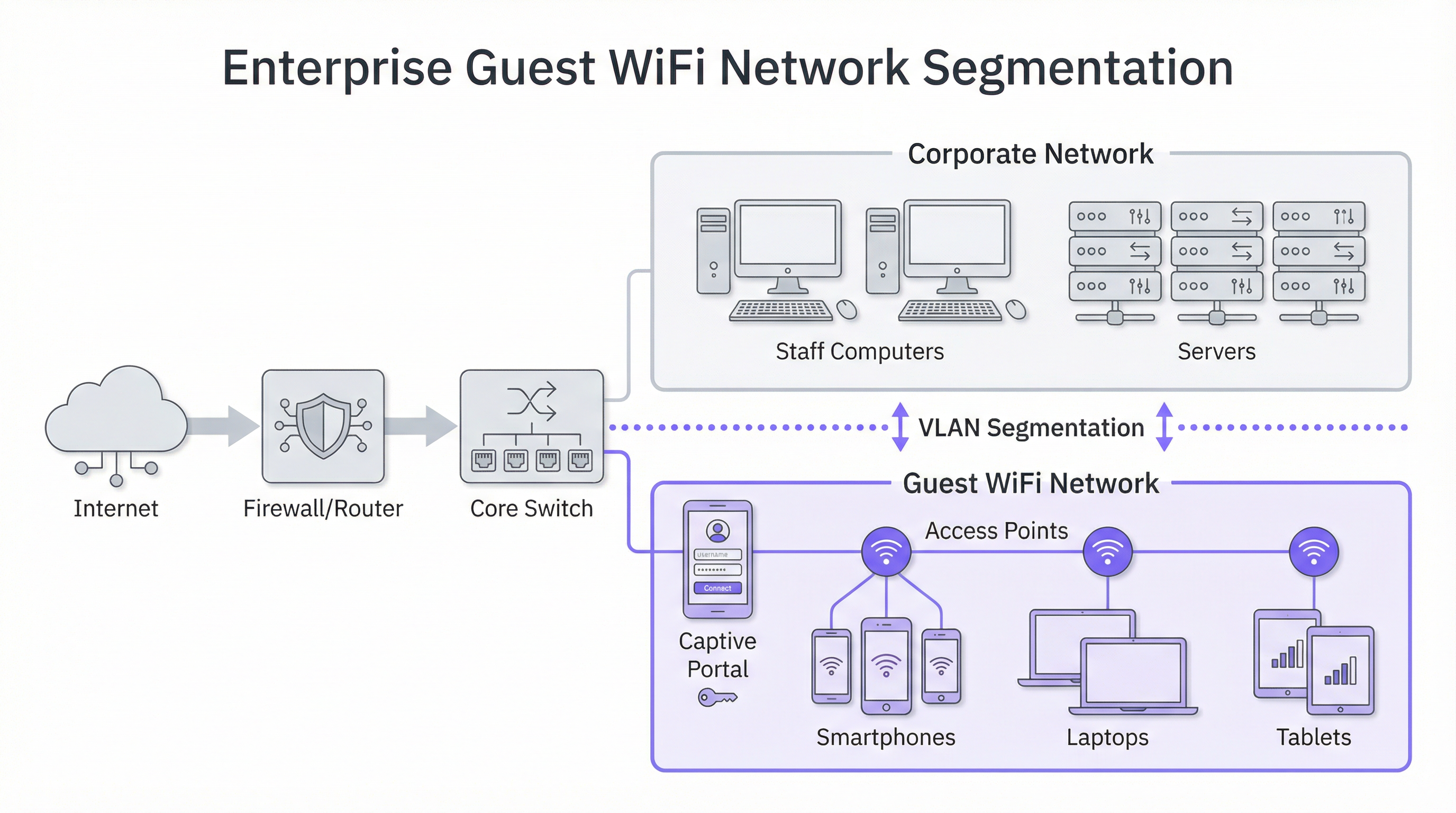
गेस्ट WiFi सुरक्षा में सबसे महत्वपूर्ण सिद्धांत नेटवर्क सेगमेंटेशन है। एक 'फ्लैट' नेटवर्क, जहां गेस्ट डिवाइस और आंतरिक कॉर्पोरेट सिस्टम (जैसे, पॉइंट ऑफ़ सेल टर्मिनल, स्टाफ कंप्यूटर, फ़ाइल सर्वर) एक ही लॉजिकल नेटवर्क साझा करते हैं, एक अस्वीकार्य सुरक्षा जोखिम का प्रतिनिधित्व करता है। एक भी गेस्ट डिवाइस पर सेंधमारी आपके पूरे कॉर्पोरेट इंफ्रास्ट्रक्चर को खतरे में डाल सकती है। उद्योग-मानक समाधान VLANs (Virtual Local Area Networks) का कार्यान्वयन है। एक VLAN तार्किक रूप से एक एकल भौतिक नेटवर्क को कई, पृथक ब्रॉडकास्ट डोमेन में विभाजित करता है। इस मॉडल में, सभी गेस्ट ट्रैफ़िक अपने स्वयं के समर्पित VLAN तक सीमित रहता है, जिसे सीधे इंटरनेट पर रूट किया जाता है और किसी भी आंतरिक कॉर्पोरेट VLAN से फ़ायरवॉल द्वारा अलग रखा जाता है। यह सुनिश्चित करता है कि यदि कोई गेस्ट डिवाइस हैक भी हो जाता है, तो हमले का दायरा सख्ती से केवल गेस्ट नेटवर्क तक ही सीमित रहता है।
हार्डवेयर संबंधी विचार: एक्सेस पॉइंट और कंट्रोलर
उपयोगकर्ता अनुभव की गुणवत्ता सीधे आपके वायरलेस एक्सेस पॉइंट (APs) की गुणवत्ता और प्लेसमेंट से जुड़ी होती है। हार्डवेयर का चयन आपके वातावरण की विशिष्ट मांगों द्वारा निर्देशित होना चाहिए:
- उच्च-घनत्व वाले स्थान (स्टेडियम, सम्मेलन केंद्र): उच्च-क्षमता वाले, 4x4 MU-MIMO (मल्टी-यूज़र, मल्टीपल इनपुट, मल्टीपल आउटपुट) APs की आवश्यकता होती है, जो अक्सर नवीनतम WiFi 6 (802.11ax) या WiFi 6E मानकों का समर्थन करते हैं। इन्हें एक केंद्रित क्षेत्र में बड़ी संख्या में समवर्ती कनेक्शनों को संभालने, हस्तक्षेप को कम करने और उचित एयरटाइम आवंटन सुनिश्चित करने के लिए डिज़ाइन किया गया है।
- हॉस्पिटैलिटी और रिटेल (होटल, स्टोर): कवरेज और सौंदर्यशास्त्र अक्सर महत्वपूर्ण होते हैं। इन-रूम या वॉल-प्लेट APs होटल के कमरों में उत्कृष्ट, लक्षित कवरेज प्रदान कर सकते हैं, जबकि एक विवेकपूर्ण डिज़ाइन वाले सीलिंग-माउंटेड APs रिटेल फ़्लोर और सार्वजनिक क्षेत्रों के लिए उपयुक्त हैं। इष्टतम AP स्थानों की पहचान करने, चैनल हस्तक्षेप को कम करने और कवरेज अंतराल को खत्म करने के लिए परिनियोजन से पहले एक पेशेवर RF (रेडियो फ़्रीक्वेंसी) साइट सर्वेक्षण आवश्यक है।
सुरक्षा प्रोटोकॉल और एक्सेस कंट्रोल
सेगमेंटेशन के अलावा, कई सुरक्षा परतें लागू की जानी चाहिए:
- WPA3 एन्क्रिप्शन: WiFi नेटवर्क के लिए वर्तमान सुरक्षा मानक। WPA3-Enterprise प्रत्येक उपयोगकर्ता को एक व्यक्तिगत एन्क्रिप्शन कुंजी प्रदान करके उच्चतम स्तर की सुरक्षा प्रदान करता है, लेकिन सार्वजनिक गेस्ट नेटवर्क के लिए, WPA3-Personal अधिक आम है। मुख्य बात यह है कि जहां भी संभव हो WEP और WPA/WPA2 जैसे पुराने प्रोटोकॉल से दूर जाया जाए।
- क्लाइंट आइसोलेशन: यह आपके वायरलेस कंट्रोलर या APs पर एक महत्वपूर्ण विशेषता है जो एक ही WiFi नेटवर्क पर गेस्ट डिवाइसों को एक-दूसरे के साथ संचार करने से रोकती है। यह प्रभावी रूप से प्रत्येक अतिथि को उनके स्वयं के डिजिटल बुलबुले में रखता है, जिससे पीयर-टू-पीयर हमलों और गेस्ट नेटवर्क के भीतर मैलवेयर के प्रसार को रोका जा सकता है।
- Captive Portal: Captive Portal वह वेब पेज है जिस पर उपयोगकर्ता को पूर्ण नेटवर्क एक्सेस दिए जाने से पहले रीडायरेक्ट किया जाता है। तकनीकी दृष्टिकोण से, यह एक प्रमाणीकरण और प्राधिकरण गेटवे के रूप में कार्य करता है। यह उपयोगकर्ता के प्रारंभिक HTTP अनुरोध को रोकता है और इसे लॉगिन सर्वर पर रीडायरेक्ट करता है। एक बार जब उपयोगकर्ता निर्धारित मानदंडों को पूरा कर लेता है (जैसे, शर्तें स्वीकार करता है, ईमेल दर्ज करता है, सोशल मीडिया के माध्यम से लॉग इन करता है), तो पोर्टल नेटवर्क कंट्रोलर के साथ उनके डिवाइस के MAC पते को अधिकृत करता है, जो फिर ट्रैफ़िक को इंटरनेट पर जाने की अनुमति देता है।
कार्यान्वयन मार्गदर्शिका
गेस्ट WiFi नेटवर्क को तैनात करने को एक चरणबद्ध परियोजना में तोड़ा जा सकता है, जो योजना और डिज़ाइन से लेकर कॉन्फ़िगरेशन और परीक्षण तक जाती है।
चरण 1: डिस्कवरी और योजना
- व्यावसायिक उद्देश्यों को परिभाषित करें: प्राथमिक लक्ष्य क्या है? क्या यह मार्केटिंग के लिए डेटा संग्रह है, ऑन-साइट अनुभव में सुधार करना है, या केवल बुनियादी एक्सेस प्रदान करना है? इसका उत्तर आवश्यक सुविधाओं और बजट को निर्धारित करता है।
- मौजूदा इंफ्रास्ट्रक्चर का आकलन करें: क्या आपका वर्तमान स्विचिंग और रूटिंग हार्डवेयर VLANs का समर्थन कर सकता है? क्या आपका इंटरनेट बैकहॉल समवर्ती उपयोगकर्ताओं की अपेक्षित संख्या के लिए पर्याप्त है? एक अच्छे अनुभव के लिए प्रति अपेक्षित समवर्ती उपयोगकर्ता 5-10 Mbps का बजट रखना एक सामान्य नियम है।
- साइट सर्वेक्षण करें: भौतिक और RF साइट सर्वेक्षण करने के लिए एक नेटवर्क इंजीनियर को नियुक्त करें। यह पर्याप्त कवरेज और क्षमता प्रदान करने के लिए आवश्यक APs की संख्या और प्लेसमेंट निर्धारित करेगा।
चरण 2: डिज़ाइन और कॉन्फ़िगरेशन
- VLAN और IP स्कीमा: अपनी नेटवर्क टोपोलॉजी डिज़ाइन करें। गेस्ट नेटवर्क के लिए एक अलग VLAN और IP सबनेट परिभाषित करें (जैसे, VLAN 100, 10.100.0.0/16)। इस VLAN को अपने वायरलेस कंट्रोलर और फ़ायरवॉल पर ट्रंक करने के लिए अपने कोर स्विच को कॉन्फ़िगर करें।
- फ़ायरवॉल नीति: गेस्ट VLAN के लिए एक सख्त फ़ायरवॉल नीति बनाएं। इस नीति को आंतरिक कॉर्पोरेट सबनेट के लिए नियत सभी ट्रैफ़िक को ब्लॉक करना चाहिए और केवल मानक वेब पोर्ट (80, 443) और अन्य आवश्यक सेवाओं (जैसे, DNS, DHCP) पर आउटबाउंड ट्रैफ़िक की अनुमति देनी चाहिए।
- वायरलेस कंट्रोलर/AP कॉन्फ़िगरेशन:
- एक नया WLAN/SSID बनाएं (जैसे, "BrandName Free WiFi")।
- इस SSID को गेस्ट VLAN को असाइन करें।
- क्लाइंट आइसोलेशन सक्षम करें।
- सुरक्षा सेटिंग्स कॉन्फ़िगर करें (प्री-शेयर्ड की के साथ WPA2/WPA3)।
- अपने WiFi इंटेलिजेंस प्लेटफ़ॉर्म (जैसे Purple) को इंगित करते हुए, Captive Portal सेटिंग्स कॉन्फ़िगर करें।
चरण 3: एकीकरण और परीक्षण
- Captive Portal एकीकरण: अपना WiFi एनालिटिक्स प्लेटफ़ॉर्म कॉन्फ़िगर करें। इसमें आपकी साइट जोड़ना, लॉगिन यात्रा (जैसे, सोशल लॉगिन, फॉर्म भरना) को परिभाषित करना और पोर्टल पेजों की ब्रांडिंग को कस्टमाइज़ करना शामिल है।
- परीक्षण: कई डिवाइस प्रकारों (iOS, Android, लैपटॉप) से संपूर्ण उपयोगकर्ता यात्रा का पूरी तरह से परीक्षण करें। गेस्ट नेटवर्क से आंतरिक संसाधनों तक पहुंचने का प्रयास करके सत्यापित करें कि VLAN सेगमेंटेशन सही ढंग से काम कर रहा है (ये प्रयास विफल होने चाहिए)।
- गो-लाइव: एक बार परीक्षण पूरा हो जाने पर, SSID प्रसारित करें और अपने एनालिटिक्स डैशबोर्ड के माध्यम से प्रारंभिक कनेक्शन की निगरानी करें。
सर्वोत्तम प्रथाएं
- उपयोगकर्ता अनुभव को प्राथमिकता दें: लॉगिन प्रक्रिया यथासंभव घर्षण रहित होनी चाहिए। एक जटिल, बहु-चरणीय प्रक्रिया से परित्याग दर अधिक होगी। प्रक्रिया को तेज करने के लिए सोशल मीडिया खातों जैसे कई लॉगिन विकल्प प्रदान करें।
- डेटा संग्रह के बारे में पारदर्शी रहें: आपके Captive Portal के नियम और शर्तों में स्पष्ट रूप से बताया जाना चाहिए कि आप कौन सा डेटा एकत्र कर रहे हैं और GDPR जैसे नियमों के अनुपालन में आप इसका उपयोग कैसे करने का इरादा रखते हैं। अपनी संपूर्ण गोपनीयता नीति का लिंक प्रदान करें।
- प्रबंधन को केंद्रीकृत करें: मल्टी-साइट संगठनों के लिए, क्लाउड-आधारित प्रबंधन प्लेटफ़ॉर्म आवश्यक है। यह एक छोटी IT टीम को एक ही डैशबोर्ड से सैकड़ों स्थानों पर हजारों APs की निगरानी, प्रबंधन और अपडेट करने की अनुमति देता है।
- अन्य प्रणालियों के साथ एकीकृत करें: अन्य व्यावसायिक प्रणालियों के साथ एकीकृत होने पर गेस्ट WiFi डेटा का मूल्य बढ़ जाता है। उदाहरण के लिए, CRM के साथ एकीकरण ग्राहक प्रोफाइल को समृद्ध कर सकता है, जबकि मार्केटिंग ऑटोमेशन प्लेटफ़ॉर्म के साथ एकीकरण विज़िटर के व्यवहार के आधार पर लक्षित ईमेल अभियान ट्रिगर कर सकता है।
समस्या निवारण और जोखिम न्यूनीकरण
सामान्य विफलता मोड:
- खराब प्रदर्शन: अक्सर अपर्याप्त इंटरनेट बैंडविड्थ, खराब AP प्लेसमेंट (कवरेज अंतराल), या घने वातावरण में चैनल हस्तक्षेप के कारण होता है। नेटवर्क स्वास्थ्य और उपयोग की नियमित निगरानी महत्वपूर्ण है।
- Captive Portal समस्याएं: उपयोगकर्ताओं को लॉगिन पृष्ठ पर रीडायरेक्ट नहीं किया जा सकता है। यह DNS समस्याओं या डिवाइस-विशिष्ट सेटिंग्स (जैसे, प्राइवेट रिले) के कारण हो सकता है। सुनिश्चित करें कि आपका DHCP स्कोप एक विश्वसनीय सार्वजनिक DNS सर्वर प्रदान करता है。
- प्रमाणीकरण विफलताएं: RADIUS (WPA-Enterprise के लिए) का गलत कॉन्फ़िगरेशन या Captive Portal के साथ API एकीकरण उपयोगकर्ताओं को ऑनलाइन होने से रोक सकता है। नेटवर्क कंट्रोलर और पोर्टल प्लेटफ़ॉर्म दोनों पर लॉग जांचें।
जोखिम न्यूनीकरण रणनीतियां:
- नियमित सुरक्षा ऑडिट: कमजोरियों की पहचान करने और उन्हें दूर करने के लिए समय-समय पर अपने गेस्ट नेटवर्क के विरुद्ध पेनेट्रेशन टेस्टिंग करें।
- कंटेंट फ़िल्टरिंग: दुर्भावनापूर्ण या अनुचित वेबसाइटों तक पहुंच को ब्लॉक करने के लिए गेस्ट नेटवर्क पर DNS-आधारित कंटेंट फ़िल्टरिंग सेवा लागू करें।
- सत्र टाइमआउट: निष्क्रिय उपकरणों को स्वचालित रूप से डिस्कनेक्ट करने और नेटवर्क संसाधनों को मुक्त करने के लिए सत्र अवधि सीमा (जैसे, 8 घंटे) लागू करें।
ROI और व्यावसायिक प्रभाव
एंटरप्राइज़ गेस्ट WiFi प्लेटफ़ॉर्म में निवेश कई डोमेन में रिटर्न देता है:
- ग्राहकों की वफादारी में वृद्धि: एक विश्वसनीय, उच्च-प्रदर्शन वाला WiFi अनुभव अब एक अपेक्षा है। इस अपेक्षा को पूरा करने से ग्राहकों की संतुष्टि में सुधार होता है और बार-बार आने को प्रोत्साहन मिलता है।
- डेटा-संचालित संचालन: फुटफॉल और ड्वेल टाइम एनालिटिक्स स्टोर लेआउट, स्टाफिंग शेड्यूल और यहां तक कि वाणिज्यिक संपत्तियों में किराये की बातचीत को अनुकूलित करने के लिए ठोस डेटा प्रदान करते हैं। उदाहरण के लिए, एक रिटेल स्टोर सबसे अधिक ट्रैफ़िक वाले क्षेत्रों में उच्च-मार्जिन वाले उत्पादों को रखने के लिए हीटमैप डेटा का उपयोग कर सकता है।
- उन्नत मार्केटिंग क्षमताएं: Captive Portal के माध्यम से गुमनाम विज़िटर्स को ज्ञात ग्राहकों में बदलकर, आप एक मूल्यवान मार्केटिंग डेटाबेस बनाते हैं। यह विज़िट के बाद व्यक्तिगत संचार, लक्षित प्रचार और लॉयल्टी प्रोग्राम नामांकन की अनुमति देता है।
- प्रत्यक्ष राजस्व सृजन: हवाई अड्डों या सम्मेलन केंद्रों जैसे कुछ स्थानों में, एक टियर बैंडविड्थ मॉडल (जैसे, मुफ्त बुनियादी एक्सेस, सशुल्क प्रीमियम एक्सेस) एक प्रत्यक्ष राजस्व स्ट्रीम बना सकता है।
अंततः, व्यावसायिक प्रभाव एक भौतिक स्थान का स्मार्ट वेन्यू में परिवर्तन है। WiFi नेटवर्क से एकत्र किया गया डेटा उसी स्तर की ग्राहक अंतर्दृष्टि प्रदान करता है जिसका ई-कॉमर्स वेबसाइटों ने वर्षों से आनंद लिया है, जो अंततः भौतिक और डिजिटल ग्राहक यात्रा के बीच की खाई को पाटता है।

संदर्भ
[1]: IEEE 802.1X Standard "पोर्ट-बेस्ड नेटवर्क एक्सेस कंट्रोल" [2]: PCI Security Standards Council "पेमेंट कार्ड इंडस्ट्री डेटा सिक्योरिटी स्टैंडर्ड" [3]: Official GDPR Information "जनरल डेटा प्रोटेक्शन रेगुलेशन (GDPR)"
Key Terms & Definitions
Captive Portal
The web page a user is required to view and interact with before being granted access to a public network. It 'captures' them to force an action, such as accepting terms, providing an email, or completing a social login.
This is the primary tool for IT teams to enforce acceptable use policies and for marketing teams to convert anonymous visitors into known customers. It is the gateway between providing a utility and gathering intelligence.
VLAN (Virtual LAN)
A technology that allows network administrators to logically segment a single physical network into multiple, isolated networks. Devices in one VLAN cannot communicate with devices in another unless explicitly allowed by a router or firewall.
For IT architects, this is the most fundamental tool for securing a guest WiFi network. It ensures that any security event on the guest network is contained and cannot impact the sensitive corporate network.
Client Isolation
A security feature on a wireless access point or controller that prevents devices connected to the same WiFi network from communicating with each other. It creates a private virtual network for each user.
In a public venue, you have no control over the security posture of guest devices. Client Isolation is a critical risk mitigation tool that prevents malware from spreading between laptops in a hotel lobby or conference hall.
SSID (Service Set Identifier)
The public name of a Wireless Local Area Network (WLAN). It is the name you see and select from the list of available WiFi networks on your device.
While a simple concept, the SSID is part of the brand experience. It should be clear, professional, and consistent across all locations (e.g., 'BrandName_Free_WiFi').
802.1X
An IEEE standard for Port-Based Network Access Control (PNAC). It provides an authentication mechanism to devices wishing to attach to a LAN or WLAN. It is often used in corporate environments to grant access based on user or machine credentials.
While typically used for corporate networks, network architects may encounter 802.1X in more advanced guest scenarios, such as providing secure, seamless access for conference attendees who are part of an educational roaming federation (eduroam).
GDPR (General Data Protection Regulation)
A regulation in EU law on data protection and privacy for all individuals within the European Union and the European Economic Area. It governs how personal data is collected, processed, and stored.
For any business with a European presence, GDPR compliance is mandatory. A guest WiFi platform must provide tools for obtaining explicit consent for data collection via the captive portal and for managing user data access requests.
Heatmap
A graphical representation of data where values are depicted by colour. In the context of WiFi analytics, it shows the physical areas of a venue with the highest and lowest concentrations of visitor devices.
For venue operations directors, heatmaps provide immediate, visual insight into how their space is being used. It helps answer questions like 'What are the most popular paths through my store?' or 'Which seating area in my lobby is underutilised?'
Dwell Time
A metric that measures the amount of time a visitor spends in a specific area or in the venue as a whole. It is calculated by tracking the duration a device is associated with the WiFi network.
This is a critical KPI for retail and hospitality. It helps managers understand engagement. Longer dwell times in a retail store often correlate with higher sales, while tracking dwell time in a restaurant can help optimise table turnover.
Case Studies
A 250-room luxury hotel wants to replace its outdated and slow guest WiFi. The goals are to provide seamless, high-performance coverage in all rooms and public areas, eliminate negative reviews about connectivity, and gather data to better understand guest behaviour in the lobby, bar, and restaurant.
- Infrastructure Upgrade: Deploy a new network core with a 10Gbps-capable firewall and core switch. 2. Site Survey & APs: Conduct a full RF site survey. Deploy one WiFi 6 wall-plate AP in each guest room for perfect coverage. Deploy ceiling-mounted WiFi 6E APs in public areas like the lobby, bar, and conference rooms to handle high device density. 3. Network Design: Create three separate VLANs: Corporate (for hotel staff and systems), Guest (for hotel visitors), and IoT (for smart room devices like thermostats and TVs). Implement strict firewall rules to prevent inter-VLAN routing. 4. Platform Integration: Integrate the network controller with the Purple AI platform. Configure the captive portal with a simple, branded login page offering two options: 'Connect with Room Number & Last Name' (integrating with the hotel's Property Management System) or a quick social media login. 5. Data Analytics: Use the Purple dashboard to create reports on dwell time in the bar, footfall patterns in the lobby throughout the day, and the percentage of guests who are repeat visitors.
A retail chain with 50 stores across the country wants to understand in-store customer behaviour. They currently offer no guest WiFi. The primary goal is to measure footfall, identify popular zones within stores, and build a marketing list, all while minimising the management burden on a small central IT team.
- Hardware Selection: Choose a template of 3-5 cost-effective, cloud-managed WiFi 6 APs per store, depending on the average store size. 2. Centralised Management: Select a cloud-native network vendor and the Purple AI platform. This allows the central IT team to configure, monitor, and manage all 50 stores from a single web-based dashboard without needing to travel to each site. 3. Deployment: Use a third-party contractor for the physical installation of APs at each store, following the template design. The central IT team can then remotely provision the devices once they are online. 4. Captive Portal: Design a simple, mobile-first captive portal that offers a 10% discount voucher in exchange for an email address. This provides a clear value exchange for the customer. 5. ROI Measurement: Use the Purple analytics dashboard to track the growth of the marketing database, view aggregated footfall across all stores, and compare dwell-time heatmaps between high-performing and low-performing locations to identify layout optimisation opportunities.
Scenario Analysis
Q1. A large conference centre is hosting a 3-day tech event with 5,000 attendees, each carrying at least two devices (laptop and smartphone). The event organiser wants to provide free, high-performance WiFi. What are the three most critical technical considerations for the network architect to ensure a successful deployment?
💡 Hint:Think about capacity, interference, and traffic management in a high-density environment.
Show Recommended Approach
- Capacity & Density Planning: The primary concern is the sheer number of concurrent connections. The architect must use high-density WiFi 6 or 6E APs and perform a detailed RF site survey to ensure sufficient APs are deployed in session halls and common areas. 2. Backhaul & Throughput: The internet connection must be able to handle the aggregated load. A 10Gbps (or higher) redundant internet connection is likely required. QoS (Quality of Service) policies should be implemented to prioritise interactive traffic (like web browsing) over bulk traffic. 3. Efficient Onboarding: With thousands of users connecting at once, the authentication process must be extremely efficient. An open network (no encryption) with a simple, click-through captive portal is the most practical approach to avoid configuration issues for non-technical users and minimise support requests.
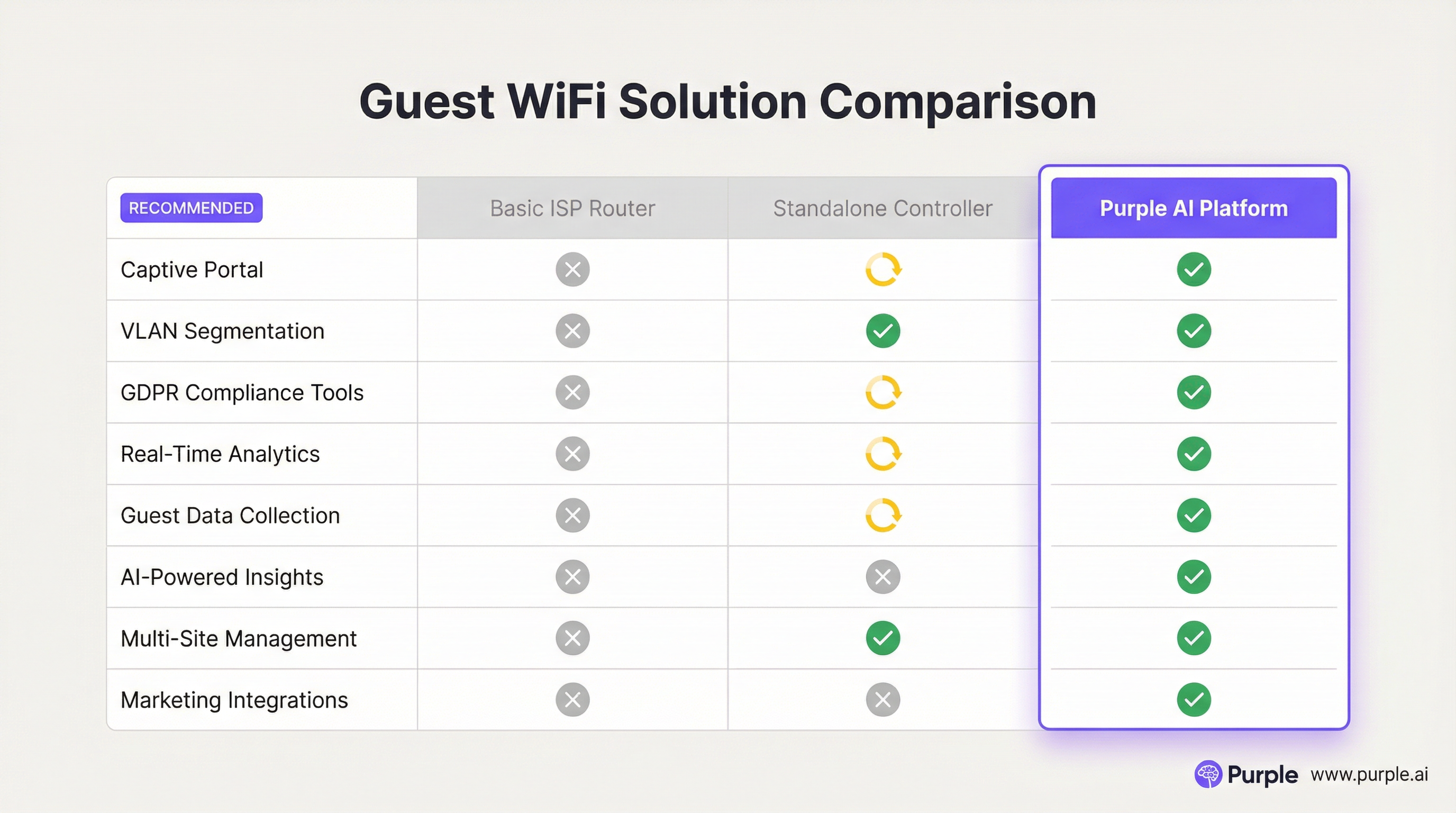
Q2. A restaurant chain is using a basic guest WiFi solution from their ISP. They have noticed that the WiFi performance is slow during peak hours, and they have no visibility into who is using the network. What is the most compelling argument for the IT manager to make to the CTO to justify an upgrade to a platform like Purple AI?
💡 Hint:Focus on the transition from a cost/utility to a business intelligence tool.
Show Recommended Approach
The most compelling argument is the shift from viewing WiFi as a cost centre to an ROI-generating asset. The IT manager should frame the investment not as an IT upgrade, but as a business intelligence project. The key points would be: 1) Problem/Opportunity: We are currently blind to our customer behaviour. We don't know our ratio of new vs. repeat diners, our busiest times by actual customer count (not just sales), or how long customers stay. 2) Solution: A platform like Purple AI will not only solve the performance issues with better hardware management but will give us a dashboard to visualise this critical data. 3. ROI: By collecting emails via a captive portal, we can build a marketing database to drive repeat business. By analysing dwell times, we can optimise seating and staffing for peak periods, improving table turnover and revenue. The cost of the platform is offset by the value of this new data and the marketing capabilities it unlocks.
Q3. A hospital wants to provide guest WiFi to patients and visitors. The hospital's CIO is extremely concerned about the security of patient data and compliance with healthcare regulations (like HIPAA). How would you design the guest network to address these specific concerns?
💡 Hint:Security and isolation are paramount. How do you create a 'hermetically sealed' guest network?
Show Recommended Approach
The design must prioritise security above all else. 1. Extreme Segmentation: Implement a guest VLAN that is completely firewalled from all other hospital networks, especially those containing Electronic Health Records (EHR). The firewall rules should be 'deny-all' by default, with an explicit rule to only allow guest VLAN traffic out to the internet. There should be absolutely no route from the guest network to any internal network. 2. Physical & Logical Separation: Where possible, use a physically separate internet line for guest traffic. If not feasible, use a high-end firewall capable of deep packet inspection and intrusion prevention on the guest traffic. 3. Strict Access Control: Enable Client Isolation on all APs to prevent any patient or visitor devices from communicating with each other. Implement a captive portal that requires acceptance of a stringent acceptable use policy and displays clear warnings against attempting to access clinical systems. 4. No Data Collection: For maximum privacy and minimum risk, the captive portal should be a simple 'click-to-accept' with no personal data collection (no email, no social login). The focus is purely on providing access, not marketing.
Key Takeaways
- ✓Guest WiFi is no longer a simple amenity; it is a strategic tool for data collection and customer engagement.
- ✓Network segmentation (using VLANs) is the most critical security measure to protect your corporate network.
- ✓A captive portal is the gateway to converting anonymous visitors into known customers and enforcing legal terms.
- ✓High-quality Access Points and a professional RF site survey are essential for a positive user experience.
- ✓WiFi analytics platforms like Purple AI provide actionable insights into footfall, dwell time, and visitor behaviour.
- ✓Compliance with data privacy regulations like GDPR is mandatory and must be designed into your solution.
- ✓The ROI of a professional guest WiFi solution is realised through improved operations, enhanced marketing, and increased customer loyalty.




