

WiFi कंट्रोलर्स के लिए पोर्ट फॉरवर्डिंग: एक कॉन्फ़िगरेशन गाइड
This guide provides a technical reference for network architects and IT managers on configuring port forwarding for on-premise WiFi controllers. It covers when port forwarding is necessary, which ports are required for major vendors, and how to mitigate the associated security risks to ensure a secure and scalable deployment.
🎧 Listen to this Guide
View Transcript

कार्यकारी सारांश (Executive Summary)
ऑन-प्रिमाइसेस वायरलेस लैन कंट्रोलर (WLC) के साथ कई साइटों पर WiFi प्रबंधित करने वाले एंटरप्राइज़ संगठनों के लिए, सुरक्षित और विश्वसनीय कनेक्टिविटी एक प्राथमिक परिचालन चिंता है। जब एक्सेस पॉइंट (AP) दूरस्थ शाखाओं में स्थित होते हैं, और इंटरनेट द्वारा केंद्रीय कंट्रोलर से अलग होते हैं, तो उनके संचार को सक्षम करने के लिए एक विधि की आवश्यकता होती है। यह गाइड उस विधि के रूप में पोर्ट फॉरवर्डिंग (इनबाउंड NAT) के उपयोग को संबोधित करती है। हम इस महत्वपूर्ण निर्णय ढांचे का पता लगाएंगे कि पोर्ट फॉरवर्डिंग का उपयोग कब करना है और VPN या क्लाउड-प्रबंधित आर्किटेक्चर जैसे अधिक सुरक्षित विकल्पों का उपयोग कब करना है। यह दस्तावेज़ CAPWAP टनल, प्रबंधन एक्सेस और प्रमाणीकरण सेवाओं के लिए आवश्यक पोर्ट्स का वेंडर-न्यूट्रल अवलोकन प्रदान करता है, जिसमें Cisco, Ruckus और Ubiquiti कंट्रोलर्स के लिए विशिष्ट पोर्ट सूचियां शामिल हैं। महत्वपूर्ण रूप से, हम महत्वपूर्ण सुरक्षा जोखिमों का विवरण देते हैं—विस्तारित हमले की सतहों (attack surfaces) से लेकर PCI DSS और GDPR के तहत अनुपालन उल्लंघन तक—और जोखिम कम करने के लिए कार्रवाई योग्य सर्वोत्तम प्रथाएं प्रदान करते हैं। इसमें फ़ायरवॉल नियम कॉन्फ़िगरेशन, DMZ में नेटवर्क सेगमेंटेशन और न्यूनतम विशेषाधिकार (least privilege) का सिद्धांत शामिल है। इसका उद्देश्य नेटवर्क आर्किटेक्ट्स और IT निदेशकों को एक मजबूत, सुरक्षित और उच्च-प्रदर्शन वाले मल्टी-साइट WiFi आर्किटेक्चर को लागू करने के ज्ञान से लैस करना है जो नेटवर्क अखंडता से समझौता किए बिना व्यावसायिक उद्देश्यों का समर्थन करता है。
तकनीकी डीप-डाइव
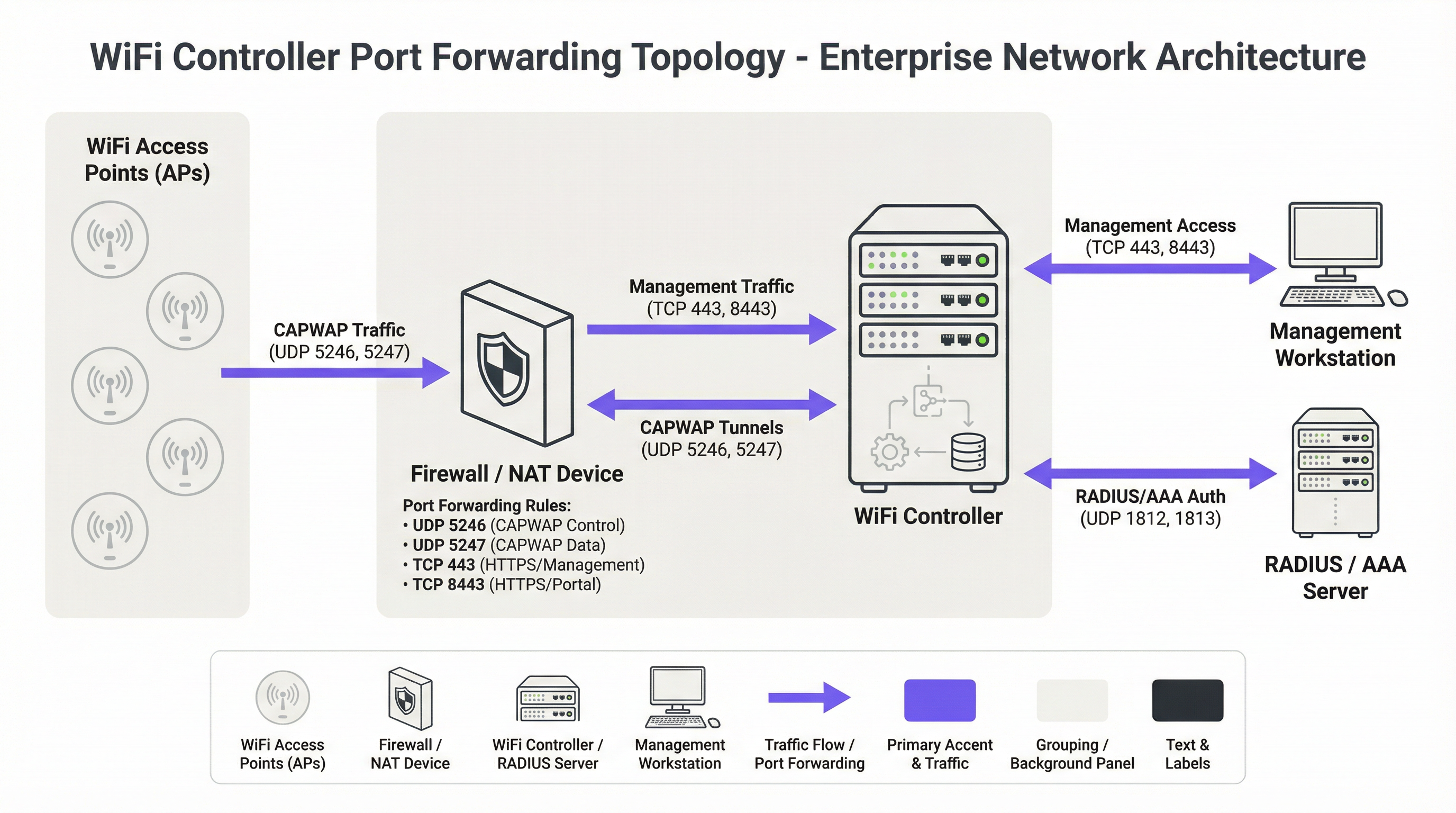
आधुनिक केंद्रीकृत WiFi आर्किटेक्चर के लिए मूलभूत प्रोटोकॉल कंट्रोल एंड प्रोविज़निंग ऑफ़ वायरलेस एक्सेस पॉइंट्स (CAPWAP) प्रोटोकॉल है, जिसे RFC 5415 [1] में मानकीकृत किया गया है। CAPWAP एक WLC को AP के बेड़े को प्रबंधित और नियंत्रित करने में सक्षम बनाता है, जिससे एक एकीकृत नेटवर्क फैब्रिक बनता है। प्रोटोकॉल को राउटर और फ़ायरवॉल को पार करने के लिए डिज़ाइन किया गया है, जो इसे मल्टी-साइट परिनियोजन (deployments) के लिए उपयुक्त बनाता है। संचार दो प्राथमिक UDP चैनलों पर होता है:
- CAPWAP कंट्रोल (UDP 5246): इस चैनल का उपयोग AP और WLC के बीच सभी प्रबंधन और नियंत्रण कार्यों के लिए किया जाता है। इसमें कॉन्फ़िगरेशन पुश, फ़र्मवेयर अपडेट और स्थिति की निगरानी शामिल है। मानक के अनुसार, यह नियंत्रण चैनल डेटाग्राम ट्रांसपोर्ट लेयर सिक्योरिटी (DTLS) एन्क्रिप्शन का उपयोग करके अनिवार्य रूप से सुरक्षित है, जो प्रबंधन कमांड के लिए एक सुरक्षित टनल प्रदान करता है।
- CAPWAP डेटा (UDP 5247): उन डिप्लॉयमेंट में जहां क्लाइंट ट्रैफ़िक को वापस कंट्रोलर पर टनल किया जाता है (AP पर स्थानीय रूप से ब्रिज किए जाने के विपरीत), यह चैनल एनकैप्सुलेटेड उपयोगकर्ता डेटा ले जाता है। हालांकि मानक में इस चैनल के लिए एन्क्रिप्शन वैकल्पिक है, सर्वोत्तम अभ्यास यह निर्देश देता है कि ट्रांज़िट में क्लाइंट डेटा की सुरक्षा के लिए इसे DTLS के साथ भी सुरक्षित किया जाना चाहिए।
जब कोई AP किसी NAT डिवाइस के पीछे होता है, तो यह WLC के सार्वजनिक IP पते (अक्सर DNS या DHCP विकल्प के माध्यम से) का पता लगाता है और CAPWAP कनेक्शन शुरू करता है। WLC के सामने वाले फ़ायरवॉल को इन आने वाले UDP पैकेटों को कंट्रोलर के निजी IP पते पर निर्देशित करने के लिए पोर्ट फॉरवर्डिंग नियमों के साथ कॉन्फ़िगर किया जाना चाहिए।
मूल CAPWAP प्रोटोकॉल के अलावा, पूरी तरह से कार्यात्मक डिप्लॉयमेंट के लिए कई अन्य पोर्ट आवश्यक हैं:
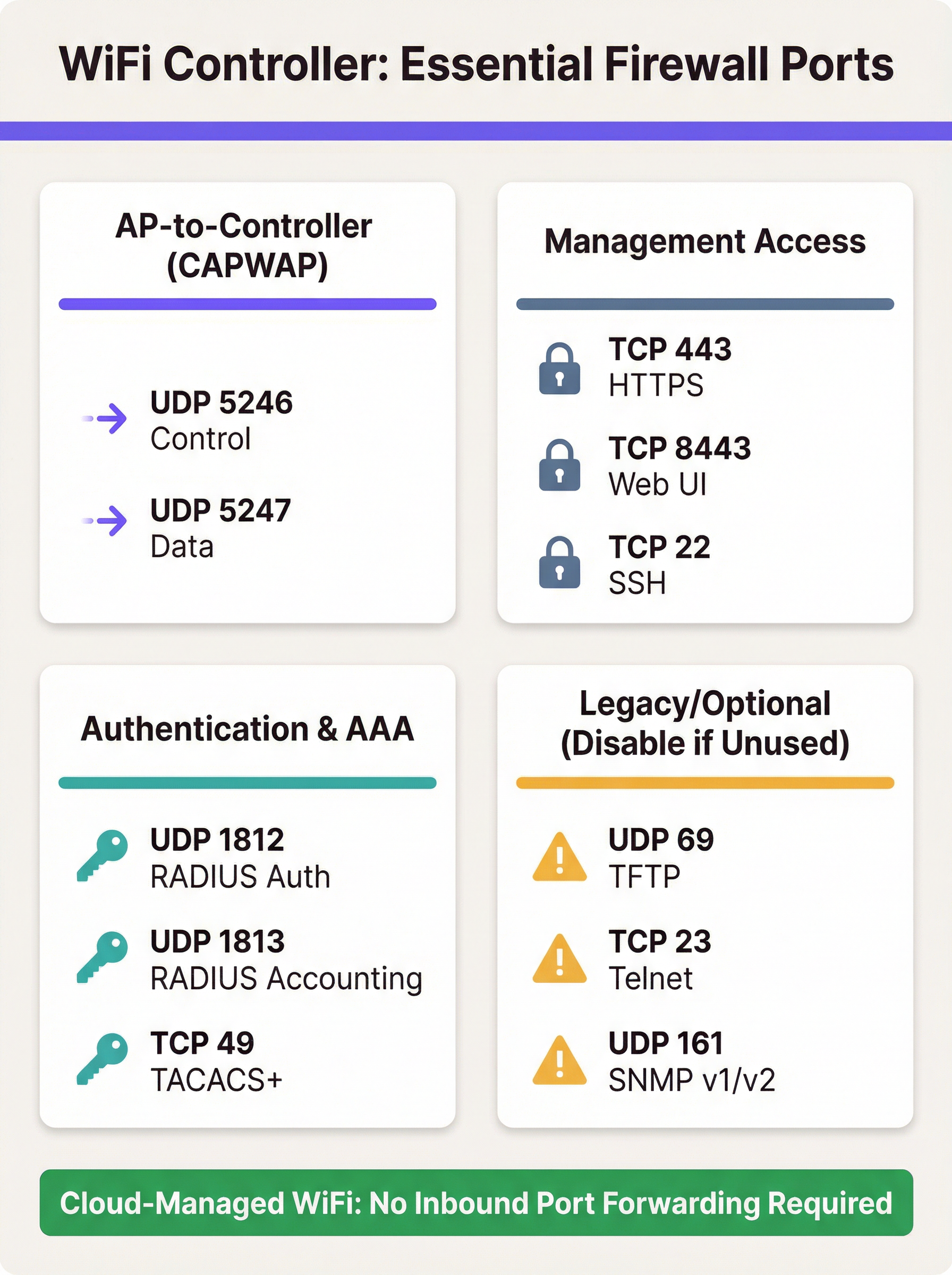
- प्रबंधन एक्सेस (Management Access): प्रशासकों को कंट्रोलर के प्रबंधन इंटरफ़ेस तक पहुंच की आवश्यकता होती है। यह आमतौर पर HTTPS (TCP 443 या, Ruckus और Ubiquiti जैसे कुछ प्लेटफ़ॉर्म पर, TCP 8443) के माध्यम से प्रदान किया जाता है। सिक्योर शेल (TCP 22) CLI एक्सेस प्रदान करता है। इन पोर्ट्स को इंटरनेट पर उजागर करना एक प्राथमिक सुरक्षा चिंता है और पहुंच को अत्यधिक प्रतिबंधित किया जाना चाहिए।
- प्रमाणीकरण (AAA): WPA2/WPA3-Enterprise का उपयोग करके एंटरप्राइज़-ग्रेड सुरक्षा के लिए, WLC को RADIUS सर्वर के साथ संचार करना चाहिए। इसके लिए UDP 1812 (प्रमाणीकरण) और UDP 1813 (अकाउंटिंग) की आवश्यकता होती है। यदि RADIUS सर्वर स्थानीय नेटवर्क के बाहर है, तो इन पोर्ट्स को फॉरवर्ड किया जाना चाहिए।
- गेस्ट और Captive Portals: यदि गेस्ट एक्सेस के लिए Captive Portal का उपयोग किया जाता है, तो WLC को इसके साथ संचार करने में सक्षम होना चाहिए। Purple जैसे बाहरी पोर्टल्स के लिए, इसका मतलब अक्सर प्रमाणीकरण और सत्र की जानकारी को संसाधित करने के लिए पोर्टल के सर्वर से कंट्रोलर तक इनबाउंड HTTPS ट्रैफ़िक की अनुमति देना होता है।
वेंडर-विशिष्ट पोर्ट आवश्यकताएं
हालांकि CAPWAP एक मानक है, वेंडर विशिष्ट सुविधाओं के लिए अतिरिक्त पोर्ट लागू करते हैं। नीचे दी गई तालिका प्रमुख ऑन-प्रिमाइसेस कंट्रोलर प्लेटफ़ॉर्म के लिए सामान्य डिफ़ॉल्ट पोर्ट्स का सारांश देती है। यह विस्तृत नहीं है और आपको अपने वेंडर के नवीनतम दस्तावेज़ों से परामर्श करना चाहिए।
| वेंडर/प्लेटफ़ॉर्म | प्रोटोकॉल | पोर्ट | उद्देश्य |
|---|---|---|---|
| Cisco WLC | UDP | 5246/5247 | CAPWAP कंट्रोल/डेटा |
| TCP | 443 | HTTPS प्रबंधन | |
| EoIP | 97 | मोबिलिटी/एंकर टनल | |
| UDP | 16666 | मोबिलिटी (असुरक्षित) | |
| Ruckus SmartZone | UDP | 12223 | LWAPP डिस्कवरी |
| TCP | 91/443 | AP फ़र्मवेयर अपग्रेड | |
| TCP | 8443 | HTTPS वेब UI | |
| TCP | 22 | SSH प्रबंधन | |
| Ubiquiti UniFi | TCP | 8080 | डिवाइस इन्फॉर्म |
| TCP | 8443 | HTTPS वेब UI/API | |
| UDP | 3478 | STUN (NAT ट्रैवर्सल) | |
| UDP | 10001 | AP डिस्कवरी |
कार्यान्वयन गाइड (Implementation Guide)
WLC के लिए पोर्ट फॉरवर्डिंग लागू करने के लिए सुरक्षा पर केंद्रित एक व्यवस्थित दृष्टिकोण की आवश्यकता होती है। लक्ष्य इंटरनेट पर केवल आवश्यक न्यूनतम चीज़ों को उजागर करते हुए दूरस्थ AP कनेक्टिविटी को सक्षम करना है।
चरण 1: आर्किटेक्चर और नेटवर्क प्लेसमेंट
सबसे महत्वपूर्ण निर्णय यह है कि WLC को कहाँ रखा जाए। इसे कभी भी विश्वसनीय कॉर्पोरेट LAN पर नहीं रखा जाना चाहिए। सर्वोत्तम अभ्यास कंट्रोलर के लिए एक समर्पित नेटवर्क सेगमेंट, या डीमिलिटराइज़्ड ज़ोन (DMZ) बनाना है। यह WLC को अलग करता है और यह सुनिश्चित करता है कि यदि इससे समझौता किया गया हो, तो भी हमलावर की आंतरिक कॉर्पोरेट नेटवर्क तक सीधी पहुंच नहीं होगी। इसके बाद DMZ, इंटरनेट और विश्वसनीय LAN के बीच ट्रैफ़िक को सख्ती से नियंत्रित करने के लिए फ़ायरवॉल नीति को कॉन्फ़िगर किया जाना चाहिए।
चरण 2: फ़ायरवॉल कॉन्फ़िगरेशन
- NAT और पोर्ट फॉरवर्डिंग नियम बनाएं: प्रत्येक आवश्यक पोर्ट के लिए, एक डेस्टिनेशन NAT (DNAT) नियम बनाएं जो फ़ायरवॉल के सार्वजनिक IP पते और बाहरी पोर्ट को DMZ में WLC के निजी IP पते और संबंधित आंतरिक पोर्ट में अनुवादित करता है।
- इनबाउंड एक्सेस नियम बनाएं: यह सबसे महत्वपूर्ण सुरक्षा कदम है। फॉरवर्ड किए गए पोर्ट्स पर ट्रैफ़िक की अनुमति देने के लिए फ़ायरवॉल नियम बनाएं, लेकिन हमेशा स्रोत IP पता निर्दिष्ट करें। CAPWAP पोर्ट्स के लिए, स्रोत आपकी दूरस्थ साइटों के सार्वजनिक IP पते होने चाहिए। प्रबंधन पोर्ट्स (HTTPS/SSH) के लिए, स्रोत को विश्वसनीय IP पतों की श्वेतसूची (whitelist) तक सीमित किया जाना चाहिए, जैसे कि आपका कॉर्पोरेट कार्यालय या एक समर्पित प्रबंधन जंप होस्ट।
सुरक्षा चेतावनी: एक सामान्य और खतरनाक गलती स्रोत पते को 'Any' या '0.0.0.0/0' के रूप में छोड़ना है। यह आपके कंट्रोलर के प्रबंधन इंटरफ़ेस को पूरे इंटरनेट पर उजागर करता है, जिससे ब्रूट-फ़ोर्स हमलों को निमंत्रण मिलता है।
- अनावश्यक प्रोटोकॉल ब्लॉक करें: स्पष्ट रूप से ऐसे नियम बनाएं जो WLC के सार्वजनिक IP पर अन्य सभी ट्रैफ़िक को अस्वीकार करते हों। इसके अतिरिक्त, सुनिश्चित करें कि Telnet (TCP 23) और TFTP (UDP 69) जैसे असुरक्षित प्रोटोकॉल कंट्रोलर पर ही अक्षम हैं और फ़ायरवॉल पर ब्लॉक किए गए हैं।
- स्टेटफुल इंस्पेक्शन सक्षम करें: सुनिश्चित करें कि आपका फ़ायरवॉल स्टेटफुल मोड में काम कर रहा है। इसका मतलब है कि यह कनेक्शन की स्थिति को ट्रैक करता है और स्वचालित रूप से अवांछित इनबाउंड पैकेटों को अस्वीकार कर देगा जो किसी मान्यता प्राप्त सत्र का हिस्सा नहीं हैं。
चरण 3: कंट्रोलर कॉन्फ़िगरेशन
WLC पर, सुनिश्चित करें कि फ़ायरवॉल का सार्वजनिक IP पता कंट्रोलर के प्राथमिक इंटरफ़ेस या NAT'd पते के रूप में कॉन्फ़िगर किया गया है। यह कंट्रोलर को CAPWAP प्रतिक्रियाओं को सही ढंग से बनाने की अनुमति देता है ताकि उन्हें वापस AP पर रूट किया जा सके। सुनिश्चित करें कि CAPWAP के लिए DTLS एन्क्रिप्शन जैसी सुविधाएं सक्षम हैं।
सर्वोत्तम प्रथाएं (Best Practices)
- विकल्पों को प्राथमिकता दें: सबसे सुरक्षित दृष्टिकोण प्रत्यक्ष पोर्ट फॉरवर्डिंग से बचना है। यदि संभव हो, तो दूरस्थ स्थानों और कंट्रोलर के डेटा सेंटर के बीच एक साइट-टू-साइट VPN लागू करें। यह सभी ट्रैफ़िक को एक सुरक्षित टनल में एनकैप्सुलेट करता है, जिससे सार्वजनिक-सामना करने वाले पोर्ट्स की आवश्यकता समाप्त हो जाती है।
- क्लाउड अपनाएं: नए डिप्लॉयमेंट या हार्डवेयर रीफ्रेश के लिए, क्लाउड-प्रबंधित WiFi समाधान (जैसे, Cisco Meraki, Ruckus One, Aruba Central) पर दृढ़ता से विचार करें। इन प्लेटफ़ॉर्म को इस तरह से डिज़ाइन किया गया है कि AP क्लाउड के लिए आउटबाउंड कनेक्शन शुरू करते हैं, जिससे किसी भी इनबाउंड फ़ायरवॉल नियमों की आवश्यकता दूर हो जाती है और प्रबंधन सरल हो जाता है।
- नियमित ऑडिट: PCI DSS आवश्यकता 1.1.6 द्वारा अनिवार्य रूप से, फ़ायरवॉल और राउटर नियम सेट की कम से कम हर छह महीने में समीक्षा की जानी चाहिए। इस प्रक्रिया को प्रत्येक नियम के लिए व्यावसायिक औचित्य को सत्यापित करना चाहिए और यह सुनिश्चित करना चाहिए कि वे यथासंभव प्रतिबंधात्मक हैं।
- मजबूत प्रमाणीकरण का उपयोग करें: जहां संभव हो, मल्टी-फैक्टर ऑथेंटिकेशन (MFA) के साथ प्रबंधन इंटरफेस को सुरक्षित रखें। मजबूत, जटिल पासवर्ड का उपयोग करें और उन्हें नियमित रूप से बदलें।
- लॉगिंग और मॉनिटरिंग: फ़ायरवॉल और WLC लॉग को एक केंद्रीय SIEM (सुरक्षा सूचना और घटना प्रबंधन) सिस्टम पर फॉरवर्ड करें। असामान्य कनेक्शन प्रयासों, बार-बार विफल लॉगिन और अप्रत्याशित ट्रैफ़िक पैटर्न की निगरानी करें।
समस्या निवारण और जोखिम न्यूनीकरण
सामान्य विफलता मोड: AP कंट्रोलर से जुड़ने में विफल
- लक्षण: दूरस्थ साइट पर AP एक डिस्कवरी लूप में फंस गए हैं और कभी भी कंट्रोलर डैशबोर्ड में दिखाई नहीं देते हैं।
- समस्या निवारण:
- दूरस्थ साइट से कंट्रोलर के सार्वजनिक IP (पिंग, ट्रेसरूट) तक बुनियादी नेटवर्क कनेक्टिविटी सत्यापित करें।
- कंट्रोलर साइड पर फ़ायरवॉल लॉग की जाँच करें। क्या आप AP के सार्वजनिक IP से इनबाउंड UDP 5246 पैकेट देख रहे हैं? क्या उन्हें अनुमति दी जा रही है या ड्रॉप किया जा रहा है?
- सत्यापित करें कि WLC के निजी IP के लिए NAT/पोर्ट फॉरवर्डिंग नियम सही ढंग से कॉन्फ़िगर किए गए हैं。
- सुनिश्चित करें कि दूरस्थ साइट पर NAT की दूसरी परत (डबल NAT) नहीं है जो कनेक्शन में हस्तक्षेप कर सकती है।
जोखिम: कंट्रोलर से समझौता
- परिदृश्य: WLC के वेब प्रबंधन इंटरफ़ेस में एक भेद्यता (vulnerability) का पता चला है, और TCP 443 के लिए आपके पोर्ट फॉरवर्डिंग नियम का स्रोत 'Any' है।
- न्यूनीकरण: यह स्रोत IP को प्रतिबंधित करने की गंभीरता को उजागर करता है। यदि स्रोत आपके कार्यालय के IP तक सीमित है, तो भेद्यता का व्यापक इंटरनेट से फायदा नहीं उठाया जा सकता है। यह डिफेंस-इन-डेप्थ का एक उत्कृष्ट उदाहरण है। आगे के न्यूनीकरण में हमलावर की पार्श्व गति (lateral movement) को सीमित करने के लिए WLC को DMZ में रखना और वेंडर से समय पर सुरक्षा पैच लागू करना शामिल है।
जोखिम: अनुपालन उल्लंघन
- परिदृश्य: एक PCI DSS ऑडिट में पाया गया है कि WLC एक रिटेल स्टोर में AP का प्रबंधन कर रहा है जो क्रेडिट कार्ड भुगतान संसाधित करता है, और WLC कार्डधारक डेटा पर्यावरण (CDE) से ठीक से खंडित (segmented) नहीं है।
- न्यूनीकरण: PCI DSS अनुपालन [2] के लिए नेटवर्क सेगमेंटेशन गैर-परक्राम्य (non-negotiable) है। भुगतान टर्मिनलों द्वारा उपयोग किए जाने वाले वायरलेस नेटवर्क को गेस्ट और कॉर्पोरेट WiFi सहित अन्य सभी नेटवर्क से अलग किया जाना चाहिए। यदि WLC CDE की सुरक्षा को प्रभावित कर सकता है, तो ऑडिट के लिए इसे इन-स्कोप माना जाना चाहिए। GDPR के लिए, गेस्ट WiFi डेटा व्यक्तिगत डेटा है, और नेटवर्क डिज़ाइन को इस तक अनधिकृत पहुंच को रोकना चाहिए [3]।
ROI और व्यावसायिक प्रभाव
हालांकि यह एक तकनीकी विषय है, WiFi आर्किटेक्चर के चुनाव का सीधा व्यावसायिक प्रभाव होता है। एक ऑन-प्रिमाइसेस कंट्रोलर मॉडल एक महत्वपूर्ण पूंजीगत व्यय (CapEx) का प्रतिनिधित्व कर सकता है, लेकिन यह विस्तृत नियंत्रण प्रदान करता है और सभी डेटा को संगठन के बुनियादी ढांचे के भीतर रखता है। इस मॉडल की परिचालन लागत में फ़ायरवॉल और कंट्रोलर कॉन्फ़िगरेशन को प्रबंधित, सुरक्षित और ऑडिट करने के लिए आवश्यक कर्मचारियों का समय शामिल है। खराब कॉन्फ़िगर किए गए फ़ायरवॉल के परिणामस्वरूप होने वाले सुरक्षा उल्लंघन से महत्वपूर्ण वित्तीय नुकसान, प्रतिष्ठा को नुकसान और विनियामक जुर्माना हो सकता है।
इसके विपरीत, एक क्लाउड-प्रबंधित समाधान लागत मॉडल को CapEx से OpEx (आवर्ती सदस्यता शुल्क) में स्थानांतरित करता है। ROI को कम IT ओवरहेड के माध्यम से महसूस किया जाता है—बनाए रखने के लिए कोई ऑन-प्रिमाइसेस हार्डवेयर नहीं, कंट्रोलर एक्सेस के लिए प्रबंधित करने के लिए कोई जटिल फ़ायरवॉल नियम नहीं, और नई साइटों की तेज़ तैनाती। रिटेल चेन या हॉस्पिटैलिटी समूहों जैसे कई वितरित उद्यमों के लिए, स्वामित्व की कुल लागत (TCO) और क्लाउड-प्रबंधित प्लेटफ़ॉर्म की बेहतर सुरक्षा स्थिति एक सम्मोहक व्यावसायिक मामला प्रदान करती है, जो एक लीगेसी ऑन-प्रिमाइसेस आर्किटेक्चर से माइग्रेशन को सही ठहराती है।
संदर्भ
[1] IETF, RFC 5415: कंट्रोल एंड प्रोविज़निंग ऑफ़ वायरलेस एक्सेस पॉइंट्स (CAPWAP) प्रोटोकॉल स्पेसिफिकेशन, https://datatracker.ietf.org/doc/html/rfc5415 [2] PCI सिक्योरिटी स्टैंडर्ड्स काउंसिल, PCI DSS v4.0, https://www.pcisecuritystandards.org/document_library/ [3] जनरल डेटा प्रोटेक्शन रेगुलेशन (GDPR), https://gdpr-info.eu/
Key Terms & Definitions
Port Forwarding (Inbound NAT)
A network configuration that directs traffic from a specific port on a public-facing firewall or router to a specific port on a private device within the internal network.
IT teams use this to make an on-premise WiFi controller, which has a private IP address, accessible to access points located across the public internet.
CAPWAP (Control and Provisioning of Wireless Access Points)
An IETF standard protocol (RFC 5415) that enables a central controller to manage a collection of wireless access points. It operates over UDP ports 5246 (Control) and 5247 (Data).
This is the fundamental protocol that facilitates communication between APs and the WLC. Understanding its port requirements is the first step in configuring the firewall.
DMZ (Demilitarized Zone)
A perimeter network segment that is isolated from an organization's trusted internal LAN. It is used to host public-facing services and adds a layer of security.
Placing a WiFi controller in a DMZ is a critical best practice. If the controller is compromised, the attacker is contained within the DMZ and does not have direct access to the corporate network.
Stateful Firewall
A firewall that tracks the state of active network connections and makes decisions based on the context of the traffic, not just on individual packets.
A stateful firewall is essential for secure port forwarding, as it will only allow return traffic from the WLC to an AP if it is part of an established CAPWAP session, preventing unsolicited inbound traffic.
PCI DSS
The Payment Card Industry Data Security Standard, a set of security standards designed to ensure that all companies that accept, process, store or transmit credit card information maintain a secure environment.
For any organization in retail or hospitality, ensuring the WiFi architecture complies with PCI DSS is non-negotiable. This heavily influences decisions around network segmentation and firewall configuration.
RADIUS (Remote Authentication Dial-In User Service)
A client/server protocol that provides centralized Authentication, Authorization, and Accounting (AAA) management for users who connect and use a network service.
In enterprise WiFi, RADIUS is used to enable WPA2/WPA3-Enterprise security (802.1X). The WLC acts as a RADIUS client, and firewall rules must allow it to communicate with the RADIUS server on UDP ports 1812 and 1813.
Cloud-Managed WiFi
A WiFi architecture where access points are managed by a controller platform that is hosted in the cloud by the vendor (e.g., Cisco Meraki, Aruba Central).
This architecture is a direct alternative to on-premise controllers. It simplifies deployment and eliminates the need for port forwarding because APs initiate outbound connections to the cloud, which is a more secure default posture.
Source IP Whitelisting
The practice of configuring a firewall rule to only allow traffic from a specific, pre-approved list of source IP addresses.
This is the single most important security control when port forwarding. Restricting management access (HTTPS/SSH) to a whitelist of office or VPN IPs drastically reduces the risk of unauthorized access.
Case Studies
A 250-room hotel needs to provide guest WiFi and support internal staff devices (housekeeping tablets, PoS systems). They have an on-premise Cisco 3504 WLC in their server room and want to ensure PCI DSS compliance while offering a seamless guest experience with a Purple captive portal.
- Network Segmentation: The WLC is placed in a new DMZ VLAN (e.g., VLAN 100). Three new wireless LANs are created: 'GUEST_WIFI' (VLAN 101), 'STAFF_CORP' (VLAN 102), and 'POS_SECURE' (VLAN 103). Firewall rules are configured to completely isolate these VLANs from each other. The POS_SECURE network is isolated from the internet, except for traffic to the payment processor.
- Firewall & Port Forwarding: No ports are forwarded from the public internet to the WLC. Instead, a rule is created to allow inbound HTTPS (TCP 443) traffic only from the specific IP range provided by Purple for their captive portal service. This allows the portal to communicate with the controller to authorize guest sessions. All other inbound traffic to the WLC is blocked.
- PCI DSS Compliance: The 'POS_SECURE' WLAN is configured with WPA2-Enterprise and 802.1X authentication. The firewall policy ensures this network segment is completely isolated from the guest and corporate staff networks, meeting PCI DSS Requirement 1.2.3. The WLC itself is considered in-scope and hardened according to PCI guidelines.
A retail chain with 50 stores has a central Ruckus SmartZone controller at its headquarters. Each store has 5-10 APs that need to connect back to the HQ controller over the public internet. The IT team needs to manage the controller remotely.
- VPN as Primary Choice: The recommended solution is to deploy a small firewall/VPN gateway at each retail store to create a site-to-site IPsec VPN back to the HQ firewall. All AP traffic is then routed over the secure VPN tunnel. This requires no inbound port forwarding at the HQ, making it the most secure option.
- Port Forwarding as Fallback: If VPN is not feasible due to cost or technical constraints, a port forwarding approach is used. At the HQ firewall, DNAT rules are created to forward UDP 12223 (for discovery) and TCP 91/443 (for firmware) to the SmartZone controller. Crucially, the source for these rules is a list of the static public IP addresses of all 50 stores. A separate rule forwards TCP 8443 for management, with the source restricted to the IT team's office IP.
- AP Configuration: The APs at each store are configured with the public IP address of the HQ firewall as their controller address. They will then initiate the connection, which will be forwarded to the internal SmartZone controller.
Scenario Analysis
Q1. You are deploying a new WiFi network for a conference center. The client wants to use Purple for guest analytics and has an existing on-premise Aruba Mobility Controller. What is the most critical firewall rule you need to configure to allow the Purple captive portal to function?
💡 Hint:Consider the communication flow. The external service needs to talk to the internal controller. What IP addresses are involved?
Show Recommended Approach
The most critical rule is to allow inbound HTTPS (TCP 443) traffic from Purple's specific public IP address range to the Aruba controller's public-facing IP. You must obtain this IP range from Purple's documentation or support. A rule with a source of 'Any' would be a major security risk. You would then create a DNAT rule to forward this traffic to the controller's internal IP address in the DMZ.
Q2. A junior network engineer has configured port forwarding for a new remote office. The APs are online, but he tells you he opened TCP port 23 to the controller from 'Any' source IP to "make troubleshooting easier." What is the immediate risk, and what is your instruction to him?
💡 Hint:TCP port 23 is for Telnet. What are the security characteristics of this protocol?
Show Recommended Approach
The immediate risk is severe. Telnet is an unencrypted protocol, meaning the username and password for the controller are sent in clear text. Exposing this to the entire internet makes the controller highly vulnerable to credential theft and compromise. The instruction is to immediately disable the firewall rule, disable the Telnet service on the controller itself, and use SSH (TCP 22) for all CLI management, with the source IP restricted to a trusted management network.
Q3. Your CFO is questioning the subscription cost for a cloud-managed WiFi solution for 100 new retail stores, arguing that buying on-premise controllers is a cheaper one-time cost. How do you explain the ROI of the cloud solution from a security and operational perspective?
💡 Hint:Think about the Total Cost of Ownership (TCO), not just the initial purchase price. What ongoing work is required for an on-premise, multi-site deployment?
Show Recommended Approach
The ROI of a cloud-managed solution extends beyond the initial hardware cost. Operationally, it eliminates the significant staff overhead required to configure, manage, and audit complex firewall rules and VPNs for 100 separate locations. This accelerates deployment and reduces ongoing labor costs. From a security perspective, the cloud model has a fundamentally lower risk profile. It removes the need for any inbound port forwarding, drastically reducing the network's attack surface and simplifying compliance with standards like PCI DSS. The subscription cost effectively outsources the security and maintenance of the management platform to the vendor, leading to a lower TCO and a more secure, scalable network.
Key Takeaways
- ✓Port forwarding is required for on-premise WiFi controllers when APs are at remote sites across the internet.
- ✓The core protocols are CAPWAP (UDP 5246/5247), but management (TCP 443/8443) and AAA (UDP 1812/1813) ports are also needed.
- ✓Cloud-managed WiFi and site-to-site VPNs are more secure alternatives that eliminate the need for port forwarding.
- ✓If you must use port forwarding, place the controller in a DMZ and strictly whitelist source IP addresses.
- ✓Never expose insecure protocols like Telnet (TCP 23) or TFTP (UDP 69) to the internet.
- ✓Regularly audit firewall rules to ensure they are necessary and as restrictive as possible, as required by PCI DSS.
- ✓Failing to properly segment networks can lead to serious security breaches and compliance violations (PCI DSS, GDPR).




