

Purple Portal API: आप इसके साथ क्या कर सकते हैं
A technical reference for IT managers and network architects on leveraging the Purple Portal API. This guide details available endpoints, authentication, and real-world use cases for integrating guest WiFi data with enterprise systems to enhance business intelligence and operational efficiency. It covers both REST API and Webhook integration patterns, with concrete case studies from hospitality, retail, and events sectors.
🎧 Listen to this Guide
View Transcript

कार्यकारी सारांश
मल्टी-साइट स्थानों — होटल, रिटेल चेन, स्टेडियम और कॉन्फ्रेंस सेंटर — के IT लीडर्स के लिए, गेस्ट WiFi नेटवर्क एक साधारण सुविधा से कहीं अधिक है। यह फर्स्ट-पार्टी डेटा का एक समृद्ध, निरंतर रीप्लेनिश होने वाला स्रोत है जो मार्केटिंग, ऑपरेशंस और कस्टमर एक्सपीरियंस में मापने योग्य व्यावसायिक प्रभाव डाल सकता है। Purple Portal API इस मूल्य को बड़े पैमाने पर अनलॉक करने के लिए आवश्यक प्रोग्रामेटिक इंटरफ़ेस प्रदान करता है। यह तकनीकी टीमों को बिल्ट-इन एनालिटिक्स डैशबोर्ड से आगे बढ़ने और मजबूत, स्वचालित इंटीग्रेशन बनाने की अनुमति देता है जो GDPR-अनुपालक विज़िटर डेटा को सीधे कोर बिज़नेस सिस्टम में फीड करते हैं, जिसमें CRM प्लेटफ़ॉर्म और मार्केटिंग ऑटोमेशन टूल से लेकर लॉयल्टी प्रोग्राम और बिज़नेस इंटेलिजेंस वेयरहाउस शामिल हैं।
यह गाइड सॉल्यूशंस आर्किटेक्ट्स, IT मैनेजर्स और सीनियर डेवलपर्स के लिए एक व्यावहारिक, कार्रवाई योग्य संदर्भ है। यह ऑथेंटिकेशन मॉडल, उपलब्ध एंडपॉइंट्स, इंटीग्रेशन पैटर्न और वास्तविक दुनिया के डिप्लॉयमेंट परिदृश्यों का विवरण देता है जो प्रदर्शित करते हैं कि कैसे Purple WiFi API एक WiFi डिप्लॉयमेंट को कॉस्ट सेंटर से रणनीतिक डेटा एसेट में बदल सकता है। चाहे आप पहली बार API का मूल्यांकन कर रहे हों या प्रोडक्शन-ग्रेड इंटीग्रेशन की योजना बना रहे हों, यह दस्तावेज़ आपको आत्मविश्वास के साथ आगे बढ़ने के लिए आवश्यक तकनीकी आधार और निर्णय फ्रेमवर्क प्रदान करता है।
तकनीकी डीप-डाइव
ऑथेंटिकेशन और API वर्ज़निंग
Purple Portal API API Key ऑथेंटिकेशन का उपयोग करता है, जो सर्वर-टू-सर्वर इंटीग्रेशन के लिए उपयुक्त एक सीधा और सुरक्षित मॉडल है। OAuth 2.0 फ्लो के विपरीत, जिसमें टोकन एक्सचेंज और रिफ्रेश साइकिल की आवश्यकता होती है, API Key ऑथेंटिकेशन में रिक्वेस्ट हेडर में एक स्टैटिक सीक्रेट शामिल करना होता है। यह सरलता सुरक्षा से समझौता किए बिना इंटीग्रेशन ओवरहेड को कम करती है, बशर्ते कि कुंजी को सुरक्षित रूप से संग्रहीत किया गया हो और आपकी मानक क्रेडेंशियल प्रबंधन नीति के हिस्से के रूप में समय-समय पर रोटेट किया जाता हो।
वर्तमान प्रोडक्शन वर्ज़न v1.7 है, जिसने v1.6.2 की तुलना में कई महत्वपूर्ण सुधार पेश किए हैं। सबसे महत्वपूर्ण बात यह है कि यूज़र डेटा ऑब्जेक्ट में unsubscribed प्रॉपर्टी अब उस यूज़र के बीच स्पष्ट रूप से अंतर करती है जिसने पहले सब्सक्राइब होने के बाद सक्रिय रूप से मार्केटिंग से ऑप्ट आउट किया है, और उस यूज़र के बीच जिसने कभी सब्सक्राइब ही नहीं किया। यह अंतर GDPR अनुपालन और सटीक ऑडियंस सेगमेंटेशन के लिए महत्वपूर्ण है। इसके अतिरिक्त, Visitors और Venues एंडपॉइंट अब कोई डेटा न मिलने पर 404 Not Found के बजाय HTTP 200 OK रिस्पॉन्स लौटाते हैं, जिससे पहले मॉनिटरिंग और एरर-हैंडलिंग लॉजिक में भ्रम पैदा होता था।
उपलब्ध एंडपॉइंट्स
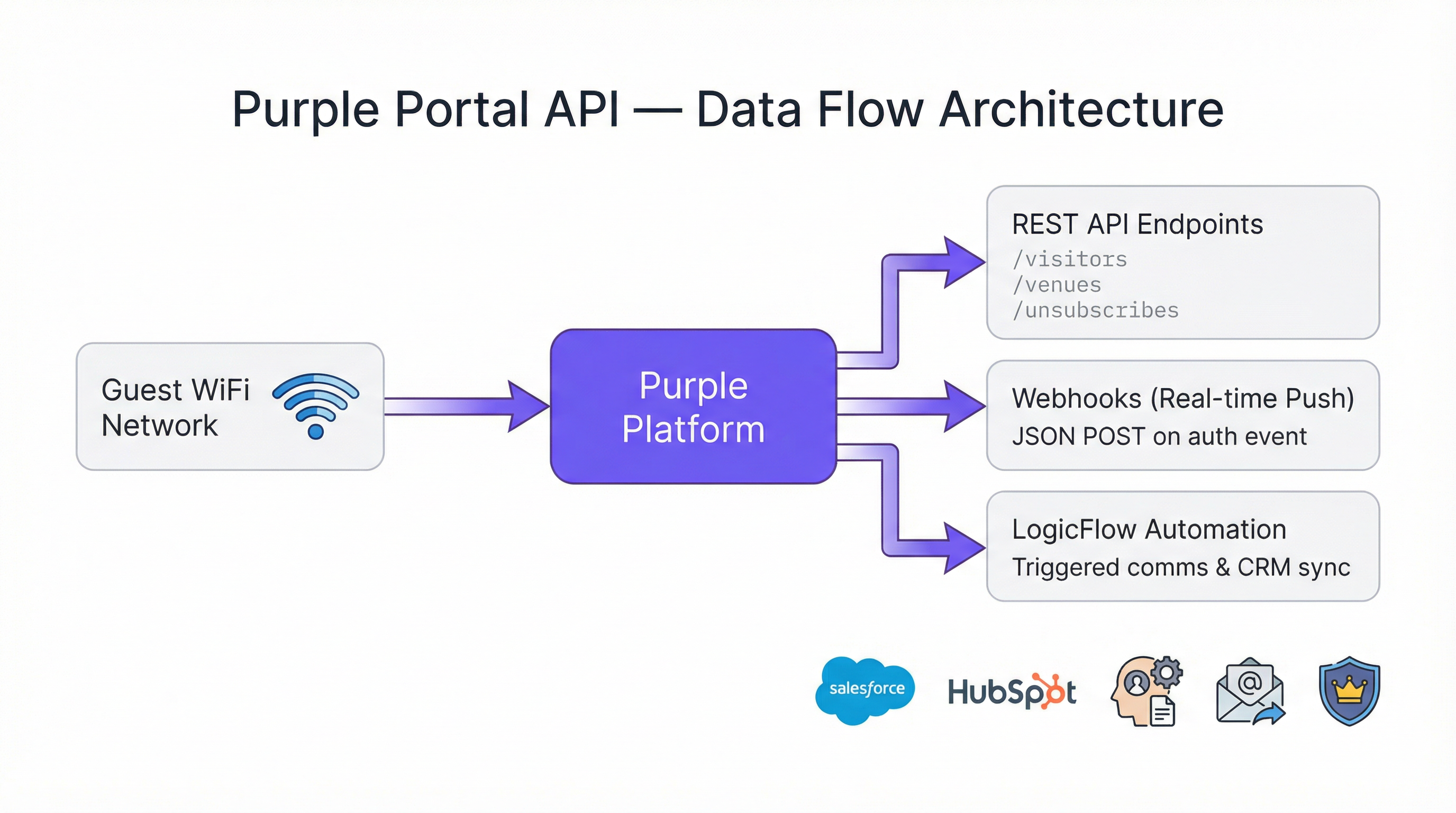
Portal Company API तीन प्राथमिक एंडपॉइंट श्रेणियों को एक्सपोज़ करता है जिनके साथ IT टीमें नियमित रूप से इंटरैक्ट करेंगी।
| एंडपॉइंट | मेथड | उद्देश्य |
|---|---|---|
/visitors |
GET | संपर्क डेटा, डेमोग्राफिक्स और विज़िट हिस्ट्री सहित गेस्ट विज़िटर प्रोफ़ाइल प्राप्त करें |
/venues |
GET | वेन्यू-लेवल डेटा और कॉन्फ़िगरेशन मेटाडेटा प्राप्त करें |
/unsubscribes |
GET | उन यूज़र्स की सूची प्राप्त करें जिन्होंने मार्केटिंग संचार से ऑप्ट आउट किया है |
सभी एंडपॉइंट JSON फॉर्मेट में डेटा लौटाते हैं। visitors एंडपॉइंट का सबसे अधिक उपयोग किया जाता है, क्योंकि यह Captive Portal ऑथेंटिकेशन जर्नी के दौरान एकत्र किए गए गेस्ट प्रोफ़ाइल डेटा की पूरी समृद्धि को एक्सपोज़ करता है। इसमें पहला नाम, अंतिम नाम, ईमेल पता, लिंग, जन्म तिथि, मोबाइल नंबर, पोस्टकोड, ऑथेंटिकेशन प्रोवाइडर (जैसे, रजिस्ट्रेशन फॉर्म, सोशल लॉगिन), प्रति वेन्यू विज़िट काउंट और स्प्लैश पेज पर कॉन्फ़िगर किए गए कोई भी कस्टम फ़ील्ड शामिल हैं।
रेट लिमिट्स
Purple Portal API का एक प्रमुख आर्किटेक्चरल लाभ यह है कि इसमें कोई रेट लिमिट नहीं है। प्लेटफ़ॉर्म को किसी भी मात्रा में रिक्वेस्ट या ट्रांज़ैक्शन का समर्थन करने के लिए डिज़ाइन किया गया है, जो इसे बड़े पैमाने पर डिप्लॉयमेंट के लिए उपयुक्त बनाता है जहाँ स्क्रिप्ट्स को हज़ारों वेन्यू रिकॉर्ड या लाखों विज़िटर प्रोफ़ाइल प्रोसेस करने की आवश्यकता हो सकती है। यह एक सामान्य बाधा को दूर करता है जो अन्य प्लेटफ़ॉर्म के साथ इंटीग्रेशन डिज़ाइन को जटिल बनाती है और आपके क्लाइंट कोड में रिक्वेस्ट थ्रॉटलिंग या बैक-ऑफ़ लॉजिक की आवश्यकता को समाप्त करती है।
इंटीग्रेशन पैटर्न: पुल बनाम पुश
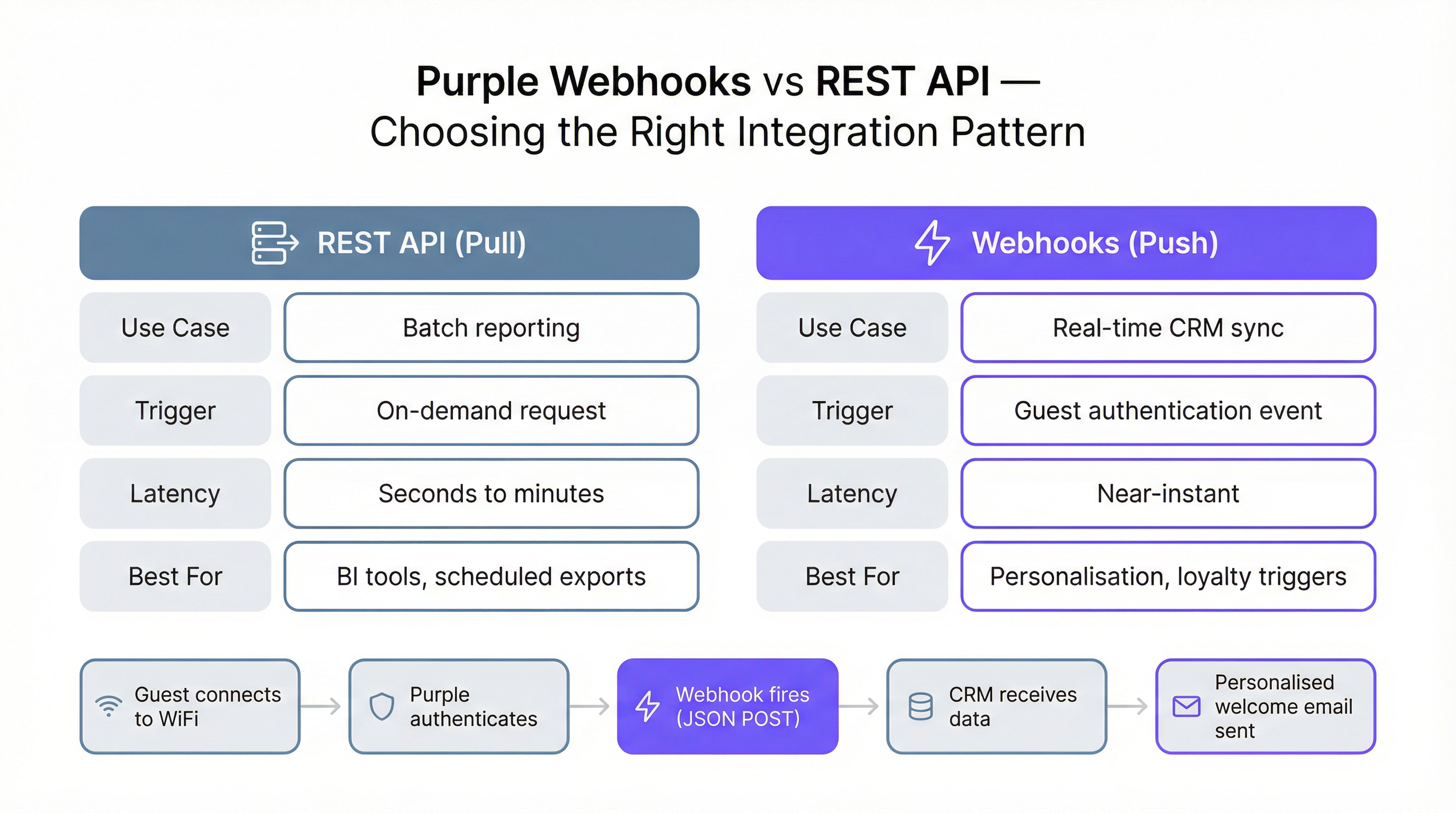
Purple WiFi API दो मौलिक रूप से भिन्न इंटीग्रेशन पैटर्न का समर्थन करता है, जिनमें से प्रत्येक अलग-अलग उपयोग के मामलों के लिए उपयुक्त है। किसी दिए गए परिदृश्य में किस पैटर्न को लागू करना है, यह समझना आपके द्वारा लिया जाने वाला सबसे महत्वपूर्ण आर्किटेक्चरल निर्णय है।
REST API पुल पैटर्न में आपका सिस्टम डेटा प्राप्त करने के लिए API एंडपॉइंट्स पर ऑन-डिमांड या शेड्यूल्ड रिक्वेस्ट करता है। यह बैच प्रोसेसिंग, रिपोर्टिंग और बिज़नेस इंटेलिजेंस के लिए सही दृष्टिकोण है। एक नाइटली ETL स्क्रिप्ट जो पिछले दिन के सभी विज़िटर डेटा को पुल करती है और इसे डेटा वेयरहाउस में लोड करती है, इसका एक प्रामाणिक उदाहरण है। पुल पैटर्न आपको इस बात पर पूरा नियंत्रण देता है कि आप कब और कितना डेटा प्राप्त करते हैं।
वेबहुक पुश पैटर्न में किसी विशिष्ट घटना के घटित होते ही Purple आपके सिस्टम को डेटा भेजता है — विशेष रूप से, जब कोई गेस्ट WiFi नेटवर्क पर ऑथेंटिकेट करता है। आपके सिस्टम को एक सार्वजनिक रूप से सुलभ, SSL-सुरक्षित HTTP एंडपॉइंट (एक 'लिसनर') एक्सपोज़ करना चाहिए जो इन JSON POST पेलोड को प्राप्त और प्रोसेस कर सके। वेबहुक पैटर्न किसी भी ऐसे उपयोग के मामले के लिए सही विकल्प है जिसमें नियर-रियल-टाइम डेटा की आवश्यकता होती है, जैसे कि एक व्यक्तिगत स्वागत संदेश ट्रिगर करना, CRM में ग्राहक की 'लास्ट सीन' स्थिति को अपडेट करना, या हॉस्पिटैलिटी मैनेजर को सूचित करना कि एक VIP गेस्ट आ गया है।
वेबहुक पेलोड स्ट्रक्चर
Purple वेबहुक द्वारा डिलीवर किया गया JSON पेलोड चार मुख्य ऑब्जेक्ट्स में संरचित होता है, जिनमें से प्रत्येक ऑथेंटिकेशन इवेंट के लिए संदर्भ का एक अलग आयाम प्रदान करता है।
| ऑब्जेक्ट | प्रमुख फ़ील्ड्स | विवरण |
|---|---|---|
client |
mac, userAgent |
डिवाइस-लेवल आइडेंटिफ़ायर्स |
company |
id, name, uniqId |
आपकी कंपनी के अकाउंट का विवरण |
venue |
id, name, latitude, longitude |
वह विशिष्ट स्थान जहाँ ऑथेंटिकेशन हुआ |
session |
authenticationTime |
ऑथेंटिकेशन इवेंट का ISO 8601 टाइमस्टैम्प |
user |
email, firstName, lastName, gender, provider, visitCountForVenues, customFields |
पूरा गेस्ट प्रोफ़ाइल डेटा |
user.visitCountForVenues ऑब्जेक्ट मल्टी-साइट ऑपरेटरों के लिए विशेष रूप से मूल्यवान है। यह firstVisit और lastVisit टाइमस्टैम्प के साथ प्रति-वेन्यू विज़िट काउंट प्रदान करता है, जिससे आप ऑथेंटिकेशन के बिंदु पर पहली बार आने वाले विज़िटर्स बनाम वफादार लौटने वाले ग्राहकों की पहचान कर सकते हैं — बिना किसी अतिरिक्त API कॉल के।
इम्प्लीमेंटेशन गाइड
पूर्वापेक्षाएँ और सेटअप
Portal API तक पहुँचने के लिए Engage लाइसेंस की आवश्यकता होती है। लाइसेंस प्राप्त होने के बाद, Purple पोर्टल की सेटिंग्स के भीतर से अपनी API Key जनरेट करें। प्रारंभिक विकास और परीक्षण के लिए, Postman अनुशंसित टूल है; Purple सही एनवायरनमेंट वेरिएबल्स और रिक्वेस्ट हेडर्स को कॉन्फ़िगर करने के लिए एक समर्पित सेटअप गाइड प्रदान करता है। सर्वर-साइड स्क्रिप्टिंग स्टार्टिंग पॉइंट पसंद करने वाली टीमों के लिए एक PHP डेमो फ़ाइल भी उपलब्ध है।
वेबहुक इंटीग्रेशन को कॉन्फ़िगर करना
वेबहुक इंटीग्रेशन को डिप्लॉय करने में पाँच चरण शामिल हैं। पहला, अपने लिसनर एंडपॉइंट को सार्वजनिक रूप से सुलभ, SSL-सुरक्षित URL पर बनाएँ और डिप्लॉय करें। एक सर्वरलेस फ़ंक्शन (AWS Lambda, Azure Functions, या Google Cloud Functions) एक आर्किटेक्चरल रूप से सही विकल्प है: यह स्वचालित रूप से स्केल होता है, कम वॉल्यूम पर न्यूनतम लागत लगाता है, और बिना कॉन्फ़िगरेशन के समवर्ती रिक्वेस्ट्स को संभालता है। दूसरा, Management > Venues > Webhooks पर नेविगेट करके Purple पोर्टल में लिसनर URL को वैलिडेट करें। Purple यह पुष्टि करने के लिए एक टेस्ट रिक्वेस्ट भेजेगा कि एंडपॉइंट पहुँच योग्य है और आवश्यक wifiWebhookListener: 1 हेडर लौटाता है। तीसरा, पोर्टल में एक LogicFlow बनाएँ या संपादित करें और अपना वैलिडेटेड URL चुनते हुए एक Webhook Action Node जोड़ें। चौथा, सुनिश्चित करें कि LogicFlow 'Online' स्थिति पर सेट है। पाँचवाँ, LogicFlow को प्रासंगिक Access Journey से जोड़ें। इस बिंदु से, उस जर्नी पर हर गेस्ट ऑथेंटिकेशन आपके वेबहुक को ट्रिगर करेगा।
रिट्राइज़ और इडेम्पोटेंसी को संभालना
आपके लिसनर को डिस्ट्रिब्यूटेड सिस्टम्स की वास्तविकताओं को संभालने के लिए डिज़ाइन किया जाना चाहिए। यदि आपका लिसनर अनुत्तरदायी है (टाइमआउट 10 सेकंड से अधिक है) या कोई एरर स्टेटस लौटाता है, तो Purple तीन घंटे के बाद विफल वेबहुक डिलीवरी को फिर से प्रयास करेगा। इसका मतलब है कि आपके लिसनर को एक ही इवेंट कई बार प्राप्त हो सकता है। इसके अलावा, एक सिंगल गेस्ट विज़िट कई ऑथेंटिकेशन इवेंट्स को ट्रिगर कर सकती है — उदाहरण के लिए, जब स्क्रीन लॉक होने के बाद कोई डिवाइस फिर से कनेक्ट होता है, या जब कोई यूज़र एक्सेस पॉइंट्स के बीच रोम करता है। इसलिए आपका प्रोसेसिंग लॉजिक इडेम्पोटेंट (idempotent) होना चाहिए: एक ही इवेंट को दो बार लागू करने से वही परिणाम मिलना चाहिए जो इसे एक बार लागू करने से मिलता है। एक सामान्य इम्प्लीमेंटेशन पैटर्न यह जाँचना है कि क्या किसी दिए गए यूज़र ID के लिए एक परिभाषित समय विंडो के भीतर कोई कार्रवाई (जैसे स्वागत ईमेल भेजना) पहले ही की जा चुकी है, इसे निष्पादित करने से पहले।
सर्वोत्तम प्रथाएँ
Purple Portal API के किसी भी प्रोडक्शन डिप्लॉयमेंट का मार्गदर्शन कई सिद्धांतों द्वारा किया जाना चाहिए। हमेशा नवीनतम API वर्ज़न (v1.7) के विरुद्ध डिप्लॉय करें और नए वर्ज़न जारी होने पर अपने URL पाथ्स और रिस्पॉन्स पार्सिंग लॉजिक को अपडेट करें। अपनी API Key को एक संवेदनशील क्रेडेंशियल के रूप में मानें: इसे साझा सिस्टम पर सोर्स कोड या एनवायरनमेंट वेरिएबल्स के बजाय सीक्रेट्स मैनेजर (जैसे AWS Secrets Manager या Azure Key Vault) में स्टोर करें। वेबहुक लिसनर्स के लिए, डिबगिंग और ऑडिट ट्रेल्स को सुविधाजनक बनाने के लिए हर आने वाले पेलोड और रिस्पॉन्स की स्ट्रक्चर्ड लॉगिंग लागू करें। यूज़र ऑब्जेक्ट में unsubscribed और unsubscribedDate फ़ील्ड्स का सम्मान करें; ऑप्ट-आउट किए गए यूज़र्स के खिलाफ मार्केटिंग कार्रवाइयों को प्रोसेस करना GDPR का उल्लंघन है। अंत में, एज केसेस की पूरी श्रृंखला के खिलाफ अपने इंटीग्रेशन का परीक्षण करें: बिना ईमेल पते वाले यूज़र्स, कस्टम फ़ील्ड्स वाले यूज़र्स जो नल (null) हैं, और ऑथेंटिकेशन इवेंट्स जो कालानुक्रमिक क्रम से बाहर आते हैं।
समस्या निवारण और जोखिम न्यूनीकरण
वेबहुक इंटीग्रेशन में सबसे आम विफलता मोड एक धीमा या अनुपलब्ध लिसनर है। यदि एंडपॉइंट लगातार 10 सेकंड के भीतर प्रतिक्रिया देने में विफल रहता है, तो Purple लंबे समय तक अनुत्तरदायी रहने के बाद स्वचालित रूप से वेबहुक को अक्षम कर देगा, जिसके लिए पोर्टल में मैन्युअल री-वेरिफिकेशन की आवश्यकता होगी। इस जोखिम को कम करने के लिए, अपने लिसनर के समान सर्वर पर एक हेल्थ चेक एंडपॉइंट लागू करें और इसे अपनी इंफ्रास्ट्रक्चर मॉनिटरिंग में शामिल करें। सुनिश्चित करें कि आपका लिसनर 200 OK रिस्पॉन्स लौटाने से पहले केवल न्यूनतम सिंक्रोनस प्रोसेसिंग करता है; किसी भी भारी गणना या डाउनस्ट्रीम API कॉल्स को एसिंक्रोनस क्यू (queue) में ऑफ़लोड करें।
REST API इंटीग्रेशन के लिए, प्राथमिक जोखिम डाउनस्ट्रीम सिस्टम में डेटा का पुराना होना है यदि शेड्यूल्ड पुल जॉब चुपचाप विफल हो जाता है। यदि कोई रन विफल हो जाता है या अप्रत्याशित रूप से कोई आउटपुट नहीं देता है, तो ऑपरेशंस टीम को सूचित करने के लिए अपनी ETL स्क्रिप्ट्स पर अलर्टिंग लागू करें। API v1.6.2 से v1.7 में माइग्रेट करते समय, उस सभी कोड का ऑडिट करें जो unsubscribed फ़ील्ड और Unsubscribes एंडपॉइंट को संदर्भित करता है, क्योंकि v1.7 में प्रॉपर्टी का नाम unsubcribers से सुधार कर unsubscribers कर दिया गया था।
ROI और व्यावसायिक प्रभाव
Purple Portal API के साथ इंटीग्रेट करने का व्यावसायिक मामला कई वर्टिकल्स में अच्छी तरह से स्थापित है। हॉस्पिटैलिटी में, वेबहुक-ट्रिगर्ड CRM इंटीग्रेशन का उपयोग करने वाले होटल जेनेरिक ब्रॉडकास्ट अभियानों की तुलना में व्यक्तिगत संचार के लिए ईमेल ओपन रेट्स में महत्वपूर्ण सुधार की रिपोर्ट करते हैं, क्योंकि संदेश अधिकतम प्रासंगिकता के क्षण में दिया जाता है — जब गेस्ट भौतिक रूप से साइट पर होता है। रिटेल में, गेस्ट WiFi डेटा को लॉयल्टी प्रोग्राम से जोड़ने से ऑपरेटरों को उच्च-आवृत्ति वाले विज़िटर्स की पहचान करने और उन्हें पुरस्कृत करने में मदद मिलती है, जिससे औसत खर्च और बार-बार आने की दर में वृद्धि होती है। बड़े सार्वजनिक स्थानों और कॉन्फ्रेंस सेंटर्स के लिए, API-संचालित एनालिटिक्स स्पॉन्सरशिप वैल्यूएशन को सही ठहराने और कंसेशन प्लेसमेंट को अनुकूलित करने के लिए आवश्यक ग्रैन्युलर फुटफॉल डेटा प्रदान करते हैं।
Purple WiFi API पर रेट लिमिट्स की अनुपस्थिति का मतलब है कि इंटीग्रेशन की लागत आपके इंफ्रास्ट्रक्चर के साथ स्केल होती है, न कि आपके द्वारा प्रोसेस किए जाने वाले डेटा की मात्रा के साथ। प्रतिदिन सैकड़ों हज़ारों ऑथेंटिकेशन्स को प्रोसेस करने वाली एक राष्ट्रीय रिटेल चेन के लिए, यह उन प्लेटफ़ॉर्म्स पर एक भौतिक लाभ है जो प्रति API कॉल शुल्क लेते हैं या थ्रूपुट कैप लगाते हैं। इसलिए एक अच्छी तरह से आर्किटेक्ट किए गए Purple API इंटीग्रेशन के लिए स्वामित्व की कुल लागत मुख्य रूप से एकमुश्त विकास लागत और लिसनर की चल रही इंफ्रास्ट्रक्चर लागत है, जो दोनों आमतौर पर अकेले बेहतर मार्केटिंग कन्वर्ज़न रेट्स के माध्यम से पहली तिमाही के भीतर वसूल कर ली जाती हैं।

केस स्टडीज़
केस स्टडी 1: हॉस्पिटैलिटी — Whitbread Group
यूके की सबसे बड़ी होटल और रेस्तरां कंपनी, Whitbread, अपने Premier Inn और रेस्तरां एस्टेट में हज़ारों गेस्ट WiFi एक्सेस पॉइंट्स संचालित करती है। Purple Portal API को अपने CRM प्लेटफ़ॉर्म के साथ इंटीग्रेट करके, समूह एक एकीकृत गेस्ट प्रोफ़ाइल बनाने में सक्षम था जो ऑनलाइन बुकिंग डेटा को WiFi Captive Portal पर कैप्चर किए गए भौतिक विज़िट व्यवहार के साथ जोड़ता था। वेबहुक इंटीग्रेशन हर गेस्ट ऑथेंटिकेशन पर फायर होता है, जो नवीनतम विज़िट टाइमस्टैम्प, वेन्यू लोकेशन और डिवाइस जानकारी के साथ CRM रिकॉर्ड को समृद्ध करता है। यह मार्केटिंग टीम को रीसेंसी, फ्रीक्वेंसी और लोकेशन के आधार पर ऑडियंस को सेगमेंट करने और अत्यधिक व्यक्तिगत री-एंगेजमेंट अभियानों को ट्रिगर करने में सक्षम बनाता है। प्रमुख तकनीकी परिणाम एक गेस्ट के आगमन और एक सक्रिय मार्केटिंग जर्नी में उनके प्रवेश के बीच के समय में 24 घंटे (पिछले बैच-पोलिंग मॉडल के तहत) से 60 सेकंड से कम की कमी थी।
केस स्टडी 2: रिटेल — मल्टी-साइट फैशन रिटेलर
80 से अधिक स्टोर्स वाले एक राष्ट्रीय फैशन रिटेलर ने अपनी ग्राहक डेटा रणनीति में एक महत्वपूर्ण अंतर को दूर करने के लिए Purple Portal API को डिप्लॉय किया: उनके पास मजबूत ई-कॉमर्स डेटा था लेकिन इन-स्टोर विज़िटर व्यवहार के बारे में वस्तुतः कोई जानकारी नहीं थी। एक नाइटली ETL प्रक्रिया के माध्यम से Purple गेस्ट WiFi API को अपने मौजूदा डेटा वेयरहाउस से जोड़कर, उन्होंने पहली बार एक क्रॉस-चैनल ग्राहक दृश्य बनाया। प्रत्येक स्टोर के लिए रात में /visitors एंडपॉइंट को क्वेरी किया गया था, और डेटा को सामान्य कुंजी के रूप में ईमेल पते का उपयोग करके ई-कॉमर्स ट्रांज़ैक्शन रिकॉर्ड के साथ जोड़ा गया था। तीन महीनों के भीतर, एनालिटिक्स टीम ने पहचान लिया था कि इन-स्टोर WiFi से जुड़ने वाले ग्राहकों का उनकी अगली ऑनलाइन खरीदारी पर औसत ऑर्डर मूल्य 34% अधिक था, जो इन-स्टोर डिजिटल अनुभव में आगे के निवेश के लिए एक सम्मोहक व्यावसायिक मामला प्रदान करता है। इंटीग्रेशन के लिए मौजूदा ई-कॉमर्स इंफ्रास्ट्रक्चर में किसी बदलाव की आवश्यकता नहीं थी, जो REST API पुल पैटर्न की कम-घर्षण प्रकृति को प्रदर्शित करता है।
केस स्टडी 3: इवेंट्स — कॉन्फ्रेंस सेंटर
यूके में एक प्रमुख कॉन्फ्रेंस सेंटर ने पहली बार प्रायोजकों को सत्यापित फुटफॉल डेटा प्रदान करने के लिए Purple Portal API का उपयोग किया। पहले, प्रायोजक रिपोर्ट मैन्युअल हेडकाउंट्स और बैज स्कैन पर निर्भर करती थीं, जो श्रम-गहन और गलत थीं। API के माध्यम से प्रति ज़ोन (Purple प्लेटफ़ॉर्म में वेन्यू IDs से मैप किए गए) एकत्रित, अनाम विज़िटर काउंट्स को एक्सपोज़ करके, इवेंट्स टीम प्रायोजकों को प्रायोजित क्षेत्रों में ड्वेल टाइम और विज़िटर वॉल्यूम दिखाने वाले रियल-टाइम डैशबोर्ड प्रदान कर सकती थी। इवेंट्स के दौरान हर 15 मिनट में REST API के माध्यम से डेटा पुल किया गया और कस्टम-निर्मित प्रायोजक पोर्टल पर प्रदर्शित किया गया। इस क्षमता ने पहले वर्ष में स्पॉन्सरशिप रिन्यूअल रेट्स में 22% की वृद्धि में सीधे योगदान दिया, क्योंकि प्रायोजक अब सत्यापित, फर्स्ट-पार्टी डेटा के साथ अपने एक्टिवेशन्स की पहुँच को माप सकते थे।
Key Terms & Definitions
Webhook
An automated mechanism where a server sends a real-time data notification (a push) to another application when a specific event occurs, via an HTTP POST request.
In the Purple context, a Webhook sends a JSON payload with visitor data to your system the moment a guest authenticates on the WiFi network. This is critical for real-time marketing and CRM updates.
REST API
A standardized architectural style for building web services that allows one system to request (or pull) data from another using standard HTTP methods such as GET and POST.
IT teams use the Purple REST API to write scripts that pull bulk visitor and venue data for analysis in business intelligence tools like Power BI or Tableau.
API Key Authentication
A security model where access to an API is granted by providing a unique secret token (the key) with each request, typically in the HTTP Authorization header.
This is simpler than OAuth and ideal for server-to-server integrations. Your scripts must include the valid API Key in the request headers to access Purple's data.
Idempotency
A property of an operation meaning that it can be applied multiple times without changing the result beyond the initial application.
Your Webhook listener should be idempotent. If it receives the same authentication event twice (which can happen due to retries or device reconnections), it should not, for example, send two welcome emails.
JSON (JavaScript Object Notation)
A lightweight, text-based format for data interchange that is easy for humans to read and for machines to parse and generate.
The Purple API and Webhooks deliver all data in JSON format. Your application will need to parse this JSON to extract fields like email, name, and visit count.
LogicFlow
Purple's visual, drag-and-drop tool for creating automated marketing and engagement workflows that can trigger actions based on visitor behaviour and demographics.
You use LogicFlow to define the guest journey. It is where you attach your Webhook, telling the system to fire it when a user reaches the 'Online' state of their access journey.
Captive Portal
The web page that a user sees and must interact with before being granted access to a public WiFi network, typically requiring authentication or data capture.
The Purple platform powers the captive portal, and the data entered by the user on this page (e.g., name, email, custom fields) is what becomes available via the Portal API.
GDPR (General Data Protection Regulation)
A comprehensive data privacy law in the European Union that governs the collection, processing, and storage of personal data of EU residents.
The Purple API provides the tools to build GDPR-compliant integrations, such as respecting the unsubscribed status of a user and enabling data export for subject access requests. The v1.7 API update specifically improved the clarity of the unsubscribed field to support compliance.
ETL (Extract, Transform, Load)
A data integration process that involves extracting data from a source system, transforming it into the required format, and loading it into a destination system such as a data warehouse.
The REST API pull pattern is typically implemented as an ETL process, where data is extracted from Purple's /visitors endpoint, transformed to match the destination schema, and loaded into a CRM or data warehouse.
Case Studies
A 200-room hotel wants to automatically add new guest WiFi users to their Salesforce Marketing Cloud journey and send a welcome email.
- In the Purple Portal, validate a new Webhook URL pointing to a secure endpoint (e.g., a serverless function on AWS Lambda). 2. Create an 'Online' LogicFlow that includes the Webhook node, configured to use the validated URL. 3. Assign this LogicFlow to the hotel's guest WiFi access journey. 4. The serverless function receives the JSON payload on guest authentication, extracts the user's email and name, and makes an API call to Salesforce Marketing Cloud to add the user to the 'New Guest' journey. 5. The function returns a 200 OK response to Purple within the 10-second timeout window.
A retail chain with 50 stores wants to build a central dashboard in Power BI to analyze visitor trends across all locations.
- Create a script (e.g., in Python) that runs on a nightly schedule. 2. The script authenticates to the Purple Portal API using the company's API key. 3. It iterates through each of the 50 venue IDs, making a call to the /visitors endpoint for each to retrieve all visitor data from the previous day. 4. The script transforms and loads this data into a central data warehouse (e.g., Azure SQL or BigQuery). 5. Power BI is connected to the data warehouse to create the cross-venue analytics dashboard.
Scenario Analysis
Q1. A stadium wants to identify VIP season ticket holders when they connect to the WiFi and send a notification to the nearest hospitality manager's dashboard. Which integration pattern should they use and why?
💡 Hint:Consider the required speed of the notification and whether the action is triggered by an event.
Show Recommended Approach
They should use the Webhook (push) pattern. This is a real-time requirement: when the VIP connects, a Webhook fires immediately to a service that looks up the user's email or MAC address against the season ticket holder database. If a match is found, it pushes a notification to the relevant hospitality dashboard. A REST API (pull) pattern would be too slow, as it relies on periodic polling and could introduce delays of minutes or hours.
Q2. You are tasked with creating a daily report of the top 10 most visited venues in your national chain of coffee shops. How would you retrieve the necessary data from Purple?
💡 Hint:Is this a real-time or a batch reporting requirement? What endpoint would you query?
Show Recommended Approach
This is a batch reporting task, so the REST API (pull) pattern is appropriate. A scheduled script would run daily, query the /visitors endpoint for each venue, aggregate the visit counts for the previous day, and then calculate the top 10. There is no need for the near-instant notification provided by Webhooks. The absence of rate limits means all venues can be queried in a single script run without throttling concerns.
Q3. Your Webhook listener endpoint is failing. You check the logs and see a timeout error. What is the most likely cause according to Purple's documentation, and what are the two immediate consequences?
💡 Hint:Think about the performance requirements of a listener and what Purple does when it cannot deliver a payload.
Show Recommended Approach
The most likely cause is that the listener is taking longer than 10 seconds to process the incoming JSON payload and return a 200 OK response. The two immediate consequences are: (1) Purple will stop trying to send the current request and will requeue it for a retry attempt in 3 hours, meaning data delivery is delayed; and (2) if this continues for a prolonged period, Purple will automatically disable the Webhook entirely, requiring manual re-verification in the portal before it can be re-enabled.
Key Takeaways
- ✓The Purple Portal API provides programmatic access to guest WiFi data using simple API Key authentication, with no rate limits.
- ✓It requires an Engage license and currently operates on version v1.7, which improved GDPR compliance through clearer unsubscribed status handling.
- ✓Use the REST API (pull) for batch data exports, ETL processes, and analytics dashboards.
- ✓Use Webhooks (push) for real-time, event-driven actions like CRM syncs, personalised messaging, and loyalty triggers.
- ✓Webhook listeners must be SSL-secured, respond within 10 seconds, and be designed to handle duplicate events idempotently.
- ✓Key use cases span hospitality (real-time CRM enrichment), retail (cross-channel analytics), and events (verified footfall data for sponsors).
- ✓The API enables organizations to transform their WiFi infrastructure from a cost centre into a strategic data asset with a clear, measurable ROI.




