

WPA3-Enterprise: एक व्यापक डिप्लॉयमेंट गाइड
This guide provides enterprise IT teams, network architects, and CTOs with a definitive, vendor-neutral reference for deploying WPA3-Enterprise across hospitality, retail, events, and public-sector environments. It covers the full deployment lifecycle — from hardware and RADIUS infrastructure requirements through phased migration strategy and client device configuration — while addressing the specific security improvements WPA3-Enterprise delivers over WPA2-Enterprise, including mandatory Protected Management Frames, enforced server certificate validation, and forward secrecy. Teams will find actionable configuration guidance, real-world case studies, and a structured troubleshooting framework to de-risk their migration and demonstrate compliance with PCI DSS v4.0 and GDPR Article 32.
🎧 Listen to this Guide
View Transcript
कार्यकारी सारांश

WPA3-Enterprise, 802.1X ऑथेंटिकेशन की शुरुआत के बाद से एंटरप्राइज़ वायरलेस सिक्योरिटी में सबसे महत्वपूर्ण अपग्रेड है। हॉस्पिटैलिटी, रिटेल, इवेंट्स या पब्लिक-सेक्टर के वातावरण में काम करने वाले संगठनों के लिए, WPA2-Enterprise से माइग्रेशन का सवाल यह नहीं है कि इसे किया जाए या नहीं, बल्कि यह है कि कब — और बिना किसी ऑपरेशनल रुकावट के इसे कैसे लागू किया जाए।
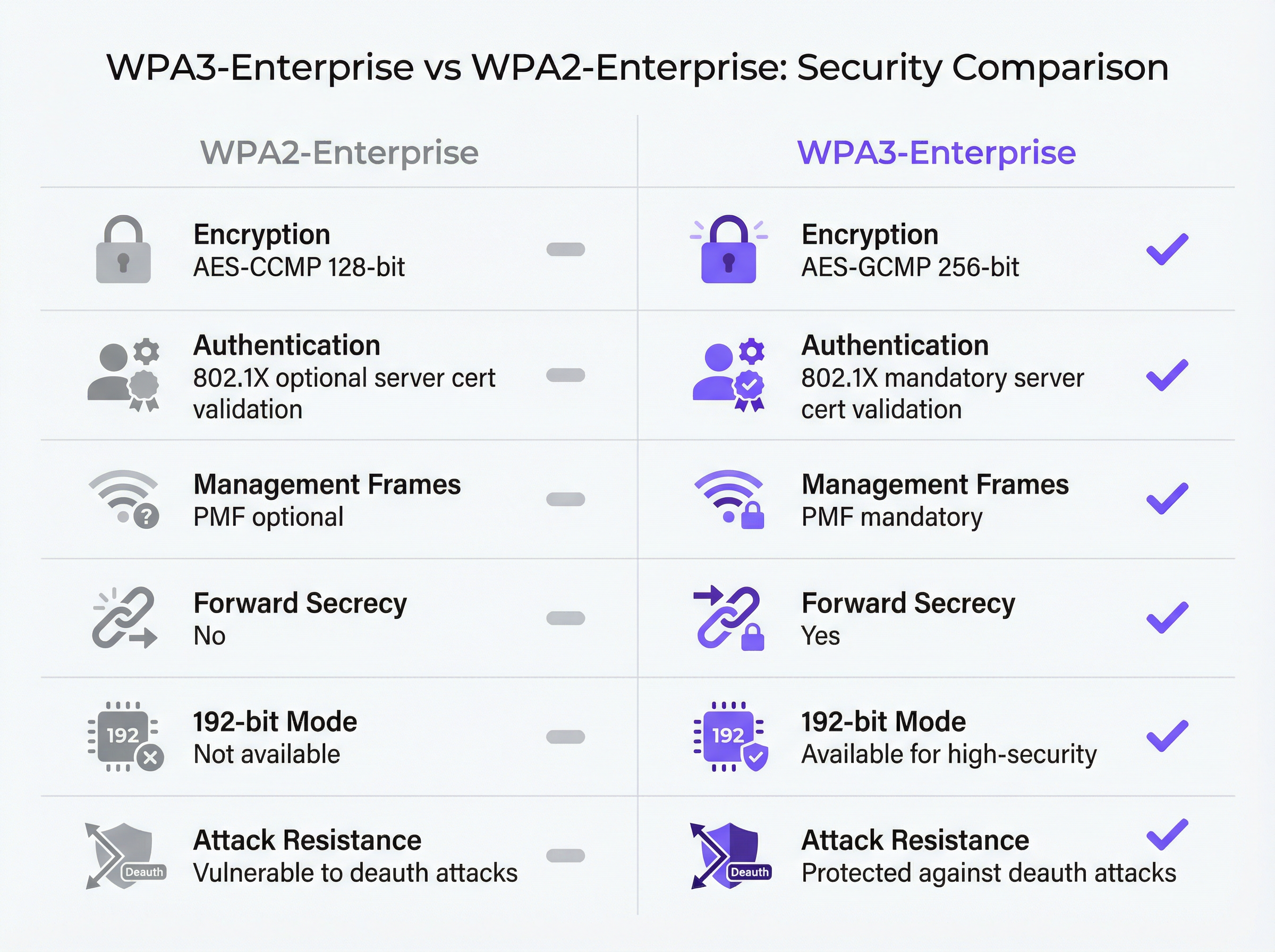
मुख्य सिक्योरिटी सुधार ठोस और मापने योग्य हैं। प्रोटेक्टेड मैनेजमेंट फ्रेम्स (PMF) अनिवार्य हो गए हैं, जिससे डीऑथेंटिकेशन अटैक वेक्टर समाप्त हो जाता है जिसका लंबे समय से हाई-डेंसिटी वाले स्थानों पर फायदा उठाया जाता रहा है। 802.1X हैंडशेक के दौरान सर्वर सर्टिफिकेट वैलिडेशन लागू किया गया है, जो रोग (rogue) एक्सेस पॉइंट क्रेडेंशियल-हार्वेस्टिंग गैप को बंद करता है जिसे WPA2 में वैकल्पिक वैलिडेशन ने खुला छोड़ दिया था। प्रति-सेशन की (key) डेरिवेशन फॉरवर्ड सीक्रेसी पेश करता है, यह सुनिश्चित करते हुए कि ऐतिहासिक ट्रैफ़िक को पूर्वव्यापी रूप से डिक्रिप्ट नहीं किया जा सकता है, भले ही बाद में सेशन कीज़ से समझौता किया गया हो।
अनुपालन-संचालित (compliance-driven) संगठनों के लिए, WPA3-Enterprise ट्रांज़िट में मज़बूत क्रिप्टोग्राफी के लिए PCI DSS v4.0 आवश्यकता 4.2.1 को पूरा करता है और उचित तकनीकी सुरक्षा उपायों के लिए GDPR अनुच्छेद 32 के जनादेश के साथ संरेखित होता है। 192-बिट सिक्योरिटी मोड संवेदनशील सरकारी और वित्तीय वातावरण के लिए NIST SP 800-187 और NSA CNSA सुइट आवश्यकताओं को पूरा करता है।
यह गाइड एक संरचित डिप्लॉयमेंट मार्ग प्रदान करती है: इंफ्रास्ट्रक्चर ऑडिट, RADIUS कॉन्फ़िगरेशन, ट्रांज़िशन मोड का उपयोग करके चरणबद्ध SSID रोलआउट, MDM के माध्यम से क्लाइंट डिवाइस कॉन्फ़िगरेशन, और पांच सबसे आम विफलता मोड के लिए एक स्पष्ट एस्केलेशन पाथ।
तकनीकी डीप-डाइव
WPA3-Enterprise सिक्योरिटी आर्किटेक्चर
WPA3-Enterprise को Wi-Fi एलायंस WPA3 स्पेसिफिकेशन (वर्तमान संस्करण 3.3) द्वारा परिभाषित किया गया है और यह सीधे IEEE 802.11i सिक्योरिटी फ्रेमवर्क पर आधारित है। ऑथेंटिकेशन लेयर IEEE 802.1X ही रहती है — वही पोर्ट-आधारित नेटवर्क एक्सेस कंट्रोल स्टैंडर्ड जो WPA2-Enterprise का आधार है — लेकिन तीन महत्वपूर्ण अनिवार्य संवर्द्धन के साथ जिन्हें WPA2 में वैकल्पिक माना जाता था।
सभी WPA3 कनेक्शनों के लिए प्रोटेक्टेड मैनेजमेंट फ्रेम्स (IEEE 802.11w) आवश्यक हैं। WPA2 में, मैनेजमेंट फ्रेम्स — 802.11 कंट्रोल मैसेज जो एसोसिएशन, डिसएसोसिएशन और डीऑथेंटिकेशन को नियंत्रित करते हैं — स्पष्ट रूप से (in the clear) ट्रांसमिट किए जाते हैं। कमोडिटी वायरलेस एडेप्टर वाला कोई हमलावर डीऑथेंटिकेशन फ्रेम्स को फोर्ज कर सकता है और अपनी मर्जी से क्लाइंट्स को नेटवर्क से बाहर कर सकता है। इस हमले के लिए किसी क्रेडेंशियल और किसी परिष्कृत टूलिंग की आवश्यकता नहीं होती है। कॉन्फ़्रेंस सेंटर, स्टेडियम और होटल लॉबी जैसे हाई-डेंसिटी वाले वातावरण में, यह एक वास्तविक ऑपरेशनल जोखिम का प्रतिनिधित्व करता है। WPA3 का अनिवार्य PMF क्रिप्टोग्राफ़िक रूप से मैनेजमेंट फ्रेम्स को प्रमाणित करता है, जिससे इस प्रकार के हमले अप्रभावी हो जाते हैं।
अनिवार्य सर्वर सर्टिफिकेट वैलिडेशन रोग (rogue) एक्सेस पॉइंट अटैक वेक्टर को बंद कर देता है। WPA2-Enterprise में, क्लाइंट डिवाइस पर 802.1X सप्लिकेंट को ऑथेंटिकेशन क्रेडेंशियल सबमिट करने से पहले RADIUS सर्वर के सर्टिफिकेट को वैलिडेट करने की आवश्यकता नहीं होती है। व्यवहार में, कई एंटरप्राइज़ डिप्लॉयमेंट या तो इस कॉन्फ़िगरेशन को छोड़ देते हैं या इसे गलत तरीके से लागू करते हैं, जिससे उपयोगकर्ता ईविल ट्विन एक्सेस पॉइंट्स के माध्यम से क्रेडेंशियल हार्वेस्टिंग के प्रति संवेदनशील हो जाते हैं। WPA3-Enterprise यह अनिवार्य करता है कि क्लाइंट ऑथेंटिकेशन के साथ आगे बढ़ने से पहले एक विश्वसनीय CA के विरुद्ध RADIUS सर्वर सर्टिफिकेट को वेरिफाई करें। यह एक बदलाव मैन-इन-द-मिडिल हमलों की पूरी श्रेणी को समाप्त कर देता है।
प्रति-सेशन की (key) डेरिवेशन के माध्यम से फॉरवर्ड सीक्रेसी यह सुनिश्चित करती है कि एक सेशन की कीज़ (keys) से समझौता होने पर ऐतिहासिक या भविष्य के सेशन उजागर नहीं होते हैं। WPA2 में, फॉरवर्ड सीक्रेसी की अनुपस्थिति का मतलब है कि एक हमलावर जो एन्क्रिप्टेड ट्रैफ़िक को कैप्चर करता है और बाद में सेशन कीज़ प्राप्त करता है — एक अलग समझौते के माध्यम से — वह पहले से कैप्चर किए गए सभी ट्रैफ़िक को डिक्रिप्ट कर सकता है। पेमेंट कार्ड डेटा, व्यक्तिगत स्वास्थ्य जानकारी, या व्यावसायिक रूप से संवेदनशील संचार को संभालने वाले संगठनों के लिए, यह एक बड़ा जोखिम है।
WPA3-Enterprise ऑपरेटिंग मोड्स
ऑपरेशन के तीन अलग-अलग मोड हैं, और किसी भी डिप्लॉयमेंट में उपयुक्त मोड का चयन करना पहला आर्किटेक्चरल निर्णय है।
| मोड | एन्क्रिप्शन | EAP मेथड्स | PMF | यूज़ केस |
|---|---|---|---|---|
| WPA3-Enterprise (स्टैंडर्ड) | AES-CCMP-128 | PEAP, EAP-TLS, EAP-TTLS | अनिवार्य | सामान्य एंटरप्राइज़, हॉस्पिटैलिटी, रिटेल |
| WPA3-Enterprise 192-बिट | AES-GCMP-256 + HMAC-SHA-384 | केवल EAP-TLS | अनिवार्य | सरकार, वित्त, रक्षा, क्रिटिकल इंफ्रास्ट्रक्चर |
| WPA2/WPA3-Enterprise ट्रांज़िशन | AES-CCMP-128 / GCMP-256 | PEAP, EAP-TLS, EAP-TTLS | वैकल्पिक | माइग्रेशन चरण, मिक्स्ड डिवाइस फ्लीट्स |
अधिकांश एंटरप्राइज़ डिप्लॉयमेंट के लिए स्टैंडर्ड WPA3-Enterprise उपयुक्त विकल्प है। यह तीन मुख्य सिक्योरिटी सुधार प्रदान करता है — अनिवार्य PMF, अनिवार्य सर्वर सर्टिफिकेट वैलिडेशन, और फॉरवर्ड सीक्रेसी — जबकि PEAP-MSCHAPv2 सहित EAP विधियों की पूरी श्रृंखला का समर्थन करता है, जो एक्टिव डायरेक्टरी या LDAP के विरुद्ध यूज़रनेम और पासवर्ड ऑथेंटिकेशन की अनुमति देता है। क्लाइंट डिवाइस कम्पैटिबिलिटी व्यापक है: Windows 10 वर्ज़न 1903 और बाद के वर्ज़न, macOS 10.15 (Catalina) और बाद के वर्ज़न, iOS 13 और बाद के वर्ज़न, और Android 10 और बाद के वर्ज़न सभी स्टैंडर्ड WPA3-Enterprise को सपोर्ट करते हैं।
WPA3-Enterprise 192-बिट सिक्योरिटी मोड को उच्च विनियामक (regulatory) या सुरक्षा आवश्यकताओं वाले वातावरण के लिए डिज़ाइन किया गया है। एन्क्रिप्शन सुइट — डेटा गोपनीयता के लिए AES-GCMP-256, मैसेज इंटीग्रिटी के लिए HMAC-SHA-384, और की (key) एक्सचेंज और ऑथेंटिकेशन के लिए ECDH/ECDSA-384 — NSA के कमर्शियल नेशनल सिक्योरिटी एल्गोरिथम (CNSA) सुइट और NIST SP 800-187 के साथ संरेखित है। महत्वपूर्ण बाधा यह है कि म्यूचुअल सर्टिफिकेट ऑथेंटिकेशन के साथ EAP-TLS ही एकमात्र अनुमत EAP विधि है। यूज़रनेम और पासवर्ड ऑथेंटिकेशन समर्थित नहीं है। इस मोड के लिए एक परिपक्व PKI इंफ्रास्ट्रक्चर की आवश्यकता होती है और यह अनमैनेज्ड या BYOD डिवाइस वाले वातावरण के लिए उपयुक्त नहीं है।
ट्रांज़िशन मोड WPA2 और WPA3 क्लाइंट्स को एक ही SSID से एक साथ कनेक्ट होने की अनुमति देता है। क्लाइंट्स उस उच्चतम सिक्योरिटी वर्ज़न को नेगोशिएट करते हैं जिसका वे समर्थन करते हैं। यह किसी भी माइग्रेशन के लिए अनुशंसित शुरुआती बिंदु है, क्योंकि यह लिगेसी डिवाइस को बाधित करने के जोखिम को समाप्त करता है जबकि पहले दिन से ही सक्षम क्लाइंट्स के लिए WPA3 को सक्षम करता है।
802.1X ऑथेंटिकेशन फ्लो
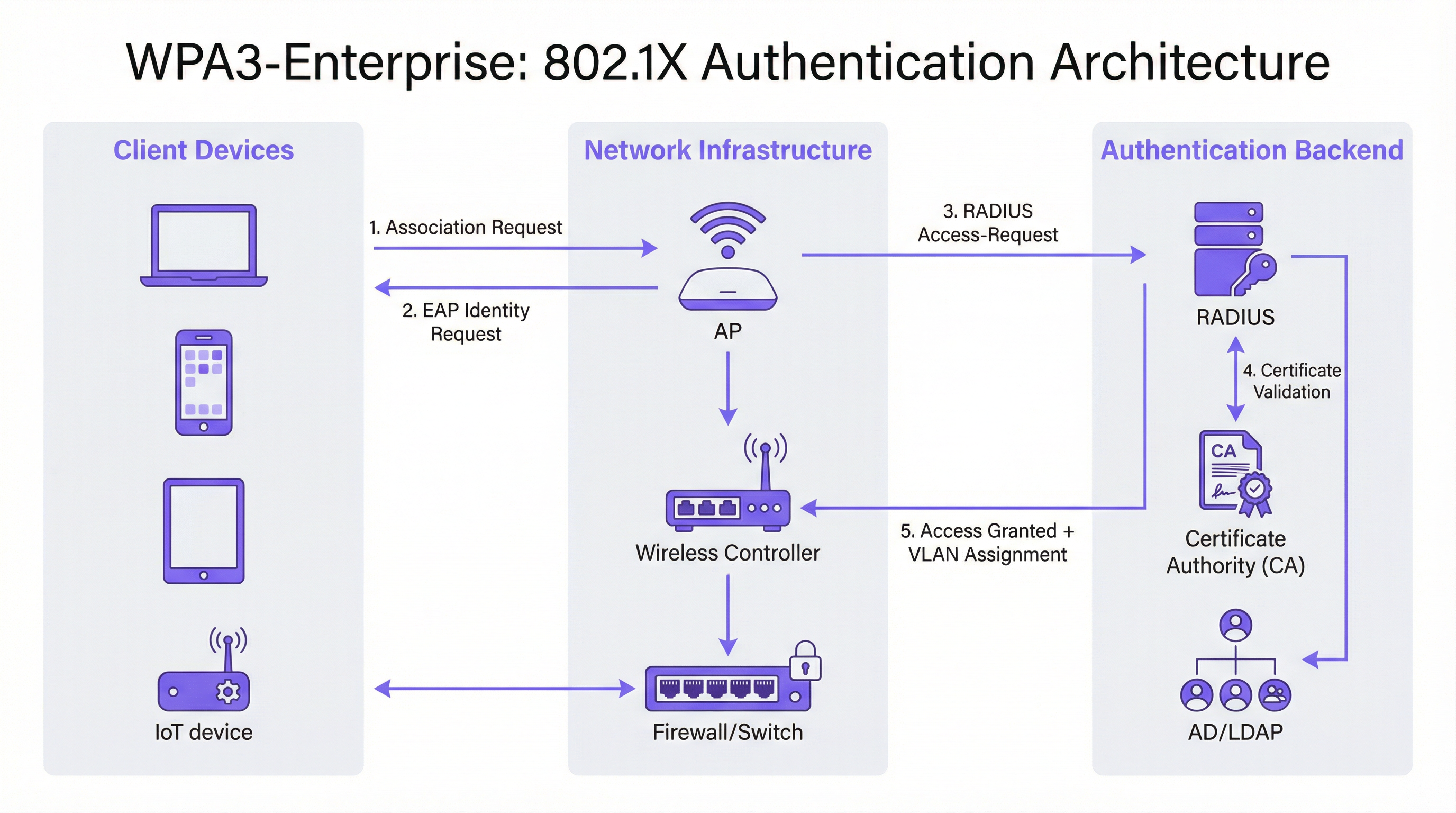
WPA3-Enterprise में 802.1X ऑथेंटिकेशन एक्सचेंज में तीन भूमिकाएँ शामिल हैं: सप्लिकेंट (क्लाइंट डिवाइस), ऑथेंटिकेटर (एक्सेस पॉइंट या वायरलेस कंट्रोलर), और ऑथेंटिकेशन सर्वर (RADIUS सर्वर)। यह फ्लो इस प्रकार आगे बढ़ता है।
क्लाइंट डिवाइस एक्सेस पॉइंट के साथ जुड़ता है और एक EAP एक्सचेंज शुरू करता है। एक्सेस पॉइंट एक पारदर्शी प्रॉक्सी के रूप में कार्य करता है, जो RADIUS एक्सेस-रिक्वेस्ट और एक्सेस-चैलेंज पैकेट के माध्यम से क्लाइंट और RADIUS सर्वर के बीच EAP मैसेज को फॉरवर्ड करता है। RADIUS सर्वर क्लाइंट को अपना सर्टिफिकेट प्रस्तुत करता है, जिसे अब क्लाइंट को अपने विश्वसनीय CA स्टोर के विरुद्ध वैलिडेट करना होगा — यह वह अनिवार्य वैलिडेशन चरण है जिसे WPA3 पेश करता है। एक बार जब क्लाइंट सर्वर की पहचान वेरिफाई कर लेता है, तो यह क्रेडेंशियल सबमिशन (PEAP) या म्यूचुअल सर्टिफिकेट एक्सचेंज (EAP-TLS) के साथ आगे बढ़ता है। सफल ऑथेंटिकेशन पर, RADIUS सर्वर एक एक्सेस-एक्सेप्ट मैसेज देता है, जिसमें वैकल्पिक रूप से VLAN असाइनमेंट एट्रिब्यूट्स (Tunnel-Type, Tunnel-Medium-Type, Tunnel-Private-Group-ID) शामिल होते हैं जिनका उपयोग एक्सेस पॉइंट क्लाइंट को उपयुक्त नेटवर्क सेगमेंट पर रखने के लिए करता है।
इम्प्लीमेंटेशन गाइड
चरण 1: इंफ्रास्ट्रक्चर ऑडिट और रेडीनेस असेसमेंट
किसी भी कॉन्फ़िगरेशन बदलाव से पहले, मौजूदा वातावरण की पूरी इन्वेंट्री आवश्यक है। ऑडिट में चार क्षेत्रों को शामिल किया जाना चाहिए।
एक्सेस पॉइंट और कंट्रोलर फर्मवेयर: वेरिफाई करें कि सभी APs और वायरलेस कंट्रोलर WPA3 को सपोर्ट करते हैं। 2019 के बाद शिप किए गए अधिकांश एंटरप्राइज़-ग्रेड हार्डवेयर फर्मवेयर अपडेट के माध्यम से WPA3 का समर्थन करते हैं, लेकिन आवश्यक विशिष्ट फर्मवेयर वर्ज़न वेंडर के अनुसार अलग-अलग होता है। आगे बढ़ने से पहले वेंडर रिलीज़ नोट्स देखें और सुनिश्चित करें कि सभी APs WPA3-सक्षम फर्मवेयर बिल्ड चला रहे हैं।
क्लाइंट डिवाइस इन्वेंट्री: WPA3 सपोर्ट स्थिति के आधार पर डिवाइस को वर्गीकृत करें। मैनेज्ड एंडपॉइंट्स (MDM में नामांकित कॉर्पोरेट लैपटॉप, टैबलेट, स्मार्टफोन) का आकलन करना सीधा होना चाहिए। अनमैनेज्ड और IoT डिवाइस — प्रिंटर, स्मार्ट लॉक, HVAC कंट्रोलर, POS टर्मिनल — के लिए व्यक्तिगत मूल्यांकन की आवश्यकता होती है। जो डिवाइस WPA3 का समर्थन नहीं कर सकते, उनकी पहचान जल्दी की जानी चाहिए, क्योंकि उन्हें या तो एक अलग WPA2 SSID या ट्रांज़िशन मोड में रखने की आवश्यकता होगी।
RADIUS इंफ्रास्ट्रक्चर: EAP मेथड सपोर्ट, क्षमता और रिडंडेंसी के लिए मौजूदा RADIUS सर्वर का आकलन करें। यदि आप EAP-TLS पर जा रहे हैं, तो निर्धारित करें कि क्या कोई आंतरिक PKI मौजूद है या क्लाउड-होस्टेड सर्टिफिकेट अथॉरिटी की आवश्यकता है। मूल्यांकन करें कि क्या वर्तमान RADIUS इंफ्रास्ट्रक्चर में हाई-अवेलेबिलिटी कॉन्फ़िगरेशन है — बिना किसी फेलओवर के एक सिंगल RADIUS सर्वर प्रोडक्शन डिप्लॉयमेंट में विफलता का एक अस्वीकार्य सिंगल पॉइंट है।
नेटवर्क सेगमेंटेशन: मौजूदा VLAN आर्किटेक्चर की समीक्षा करें। WPA3-Enterprise डिप्लॉयमेंट आमतौर पर RADIUS एट्रिब्यूट्स के माध्यम से डायनामिक VLAN असाइनमेंट से लाभान्वित होते हैं, जो एक ही SSID को उचित नेटवर्क आइसोलेशन के साथ कई यूज़र पॉपुलेशन की सेवा करने की अनुमति देता है। पुष्टि करें कि स्विचिंग इंफ्रास्ट्रक्चर 802.1Q VLAN टैगिंग का समर्थन करता है और RADIUS सर्वर सही VLAN एट्रिब्यूट्स वापस करने के लिए कॉन्फ़िगर किया गया है।
चरण 2: RADIUS सर्वर कॉन्फ़िगरेशन
RADIUS सर्वर किसी भी 802.1X डिप्लॉयमेंट की ऑथेंटिकेशन बैकबोन है। कॉन्फ़िगरेशन आवश्यकताएँ प्लेटफ़ॉर्म के अनुसार अलग-अलग होती हैं, लेकिन निम्नलिखित चरण वेंडर की परवाह किए बिना लागू होते हैं।
नेटवर्क एक्सेस सर्वर (NAS) एंट्रीज़ परिभाषित करें: प्रत्येक एक्सेस पॉइंट या वायरलेस कंट्रोलर के लिए जो RADIUS सर्वर को ऑथेंटिकेशन रिक्वेस्ट भेजेगा, सोर्स IP एड्रेस और एक शेयर्ड सीक्रेट निर्दिष्ट करते हुए एक NAS एंट्री बनाएँ। यह शेयर्ड सीक्रेट जटिल (न्यूनतम 24 वर्ण, मिक्स्ड केस, नंबर और सिंबल) और प्रति NAS एंट्री अद्वितीय होना चाहिए।
EAP मेथड और सर्टिफिकेट कॉन्फ़िगर करें: PEAP-MSCHAPv2 डिप्लॉयमेंट के लिए, RADIUS सर्वर पर एक CA द्वारा जारी किया गया सर्वर सर्टिफिकेट इंस्टॉल करें जिस पर क्लाइंट भरोसा करेंगे। EAP-TLS डिप्लॉयमेंट के लिए, सर्वर-साइड और क्लाइंट-साइड दोनों सर्टिफिकेट वैलिडेशन कॉन्फ़िगर करें। RADIUS सर्वर सर्टिफिकेट का कॉमन नेम या सब्जेक्ट अल्टरनेटिव नेम क्लाइंट प्रोफाइल में कॉन्फ़िगर किए गए मान से मेल खाना चाहिए, अन्यथा सर्टिफिकेट वैलिडेशन विफल हो जाएगा।
यूज़र डायरेक्टरी के साथ इंटीग्रेट करें: क्रेडेंशियल वैलिडेशन के लिए RADIUS सर्वर को एक्टिव डायरेक्टरी, LDAP, या क्लाउड आइडेंटिटी प्रोवाइडर से कनेक्ट करें। EAP-TLS डिप्लॉयमेंट के लिए, उपयुक्त सर्टिफिकेट टेम्प्लेट और रिवोकेशन चेकिंग (OCSP या CRL) के साथ सर्टिफिकेट-आधारित ऑथेंटिकेशन कॉन्फ़िगर करें।
RADIUS अकाउंटिंग कॉन्फ़िगर करें: RADIUS सर्वर पर अकाउंटिंग सक्षम करें और अकाउंटिंग स्टार्ट, इंटरिम और स्टॉप रिकॉर्ड भेजने के लिए वायरलेस कंट्रोलर को कॉन्फ़िगर करें। यह PCI DSS आवश्यकता 8 (व्यक्तिगत उपयोगकर्ता जवाबदेही) के लिए आवश्यक ऑडिट ट्रेल प्रदान करता है और घटना की जांच का समर्थन करता है।
डायनामिक VLAN असाइनमेंट कॉन्फ़िगर करें: प्रत्येक यूज़र ग्रुप या सर्टिफिकेट प्रोफाइल के लिए RADIUS एट्रिब्यूट्स को परिभाषित करें: Tunnel-Type (वैल्यू 13, VLAN), Tunnel-Medium-Type (वैल्यू 6, 802), और Tunnel-Private-Group-ID (स्ट्रिंग के रूप में VLAN ID)। यह RADIUS सर्वर को प्रमाणित क्लाइंट्स को उनकी पहचान या सर्टिफिकेट के आधार पर उपयुक्त नेटवर्क सेगमेंट पर रखने की अनुमति देता है।
चरण 3: SSID कॉन्फ़िगरेशन
निम्नलिखित मापदंडों के साथ वायरलेस कंट्रोलर पर WPA3-Enterprise SSID कॉन्फ़िगर करें।
- सिक्योरिटी मोड: प्रारंभिक डिप्लॉयमेंट के लिए WPA2/WPA3-Enterprise (ट्रांज़िशन मोड)
- PMF: वैकल्पिक (ट्रांज़िशन मोड) या आवश्यक (केवल-WPA3 मोड)
- EAP मेथड: आवश्यकतानुसार PEAP या EAP-TLS
- RADIUS सर्वर: प्राइमरी और सेकेंडरी RADIUS सर्वर IP एड्रेस, पोर्ट (ऑथेंटिकेशन के लिए 1812, अकाउंटिंग के लिए 1813), और शेयर्ड सीक्रेट्स
- RADIUS अकाउंटिंग: सक्षम, अकाउंटिंग सर्वर कॉन्फ़िगर होने के साथ
- डायनामिक VLAN: यदि RADIUS-आधारित VLAN असाइनमेंट का उपयोग कर रहे हैं तो सक्षम
चरण 4: क्लाइंट डिवाइस कॉन्फ़िगरेशन
क्लाइंट कॉन्फ़िगरेशन डिप्लॉयमेंट का सबसे अधिक ऑपरेशनल रूप से गहन चरण है। मैनेज्ड डिवाइस के लिए, निम्नलिखित कॉन्फ़िगरेशन तत्वों को पुश करने के लिए MDM या ग्रुप पॉलिसी का उपयोग करें।
RADIUS CA सर्टिफिकेट: RADIUS सर्वर का ऑथेंटिकेशन सर्टिफिकेट जारी करने वाले CA सर्टिफिकेट को क्लाइंट के विश्वसनीय रूट सर्टिफिकेट स्टोर में डिप्लॉय किया जाना चाहिए। इसके बिना, सर्टिफिकेट वैलिडेशन विफल हो जाएगा या — यदि क्लाइंट्स को वैलिडेशन छोड़ने के लिए गलत तरीके से कॉन्फ़िगर किया गया है — तो WPA3-Enterprise का सिक्योरिटी लाभ समाप्त हो जाता है।
SSID प्रोफाइल: SSID नाम, सिक्योरिटी प्रकार (WPA3-Enterprise या WPA2/WPA3-Enterprise), EAP मेथड, और अपेक्षित सर्वर नाम या सर्टिफिकेट सब्जेक्ट सहित सर्वर सर्टिफिकेट वैलिडेशन मापदंडों को कॉन्फ़िगर करें।
EAP-TLS डिप्लॉयमेंट के लिए: SCEP (सिंपल सर्टिफिकेट एनरोलमेंट प्रोटोकॉल) या मैनुअल इंस्टॉलेशन के माध्यम से प्रत्येक डिवाइस पर क्लाइंट सर्टिफिकेट डिप्लॉय करें। सर्टिफिकेट की समाप्ति पर ऑथेंटिकेशन विफलताओं को रोकने के लिए सर्टिफिकेट रिन्यूअल को स्वचालित करें।
चरण 5: मॉनिटरिंग और माइग्रेशन पूर्णता
एक बार ट्रांज़िशन मोड लाइव हो जाने पर, WPA3 एडॉप्शन मेट्रिक्स के लिए वायरलेस कंट्रोलर या क्लाउड मैनेजमेंट प्लेटफ़ॉर्म की निगरानी करें। WPA2 के मुकाबले WPA3 का उपयोग करने वाले क्लाइंट एसोसिएशन के प्रतिशत को ट्रैक करें। जब WPA3 एडॉप्शन 95% से अधिक हो जाता है और सभी शेष WPA2 क्लाइंट्स की पहचान कर ली जाती है और उन्हें या तो माइग्रेट कर दिया जाता है या एक समर्पित लिगेसी SSID में सेगमेंट कर दिया जाता है, तो प्राइमरी SSID को केवल-WPA3 मोड में ट्रांज़िशन करें।
सर्वोत्तम प्रथाएँ
पहले दिन से ही रिडंडेंट RADIUS सर्वर डिप्लॉय करें। एक सिंगल RADIUS सर्वर की विफलता पूरे प्रमाणित नेटवर्क को डाउन कर देती है। स्वचालित फेलओवर के साथ, प्रत्येक AP और कंट्रोलर पर प्राइमरी और सेकेंडरी RADIUS सर्वर कॉन्फ़िगर करें। मल्टी-साइट डिप्लॉयमेंट के लिए, बिल्ट-इन जियोग्राफिक रिडंडेंसी के साथ क्लाउड-होस्टेड RADIUS सेवा पर विचार करें।
प्रत्येक क्लाइंट पर सर्वर सर्टिफिकेट वैलिडेशन लागू करें। यह WPA3-Enterprise डिप्लॉयमेंट में सबसे महत्वपूर्ण कॉन्फ़िगरेशन आइटम है। क्लाइंट्स पर अनिवार्य सर्वर सर्टिफिकेट वैलिडेशन के बिना WPA3-Enterprise को डिप्लॉय करने से रोग (rogue) एक्सेस पॉइंट हमलों के खिलाफ कोई सुरक्षा नहीं मिलती है। परीक्षण के दौरान इस कॉन्फ़िगरेशन को स्पष्ट रूप से वैलिडेट करें — यह न मानें कि MDM प्रोफाइल सही ढंग से लागू किए गए हैं।
नेटवर्क सेगमेंटेशन के लिए डायनामिक VLAN असाइनमेंट का उपयोग करें। विभिन्न यूज़र पॉपुलेशन के लिए कई SSIDs डिप्लॉय करने के बजाय, उपयोगकर्ताओं को उनकी पहचान के आधार पर उपयुक्त नेटवर्क सेगमेंट पर रखने के लिए RADIUS-आधारित डायनामिक VLAN असाइनमेंट का उपयोग करें। यह RF कंजेशन (कम SSIDs) को कम करता है, वायरलेस आर्किटेक्चर को सरल बनाता है, और प्रति-उपयोगकर्ता नेटवर्क आइसोलेशन बनाए रखता है।
अनमैनेज्ड IoT डिवाइस के लिए एक समर्पित लिगेसी SSID बनाए रखें। जो डिवाइस WPA3 का समर्थन नहीं कर सकते — लिगेसी POS टर्मिनल, पुराने प्रिंटर, IoT सेंसर — उन्हें सख्त VLAN आइसोलेशन और फ़ायरवॉल नियमों के साथ एक अलग WPA2-Enterprise SSID पर रखा जाना चाहिए। इन डिवाइस को प्राइमरी स्टाफ नेटवर्क के WPA3 में माइग्रेशन को ब्लॉक करने की अनुमति न दें।
अपने डिप्लॉयमेंट दस्तावेज़ों के लिए आधिकारिक मानकों के रूप में IEEE 802.1X और Wi-Fi एलायंस WPA3 स्पेसिफिकेशन v3.3 का संदर्भ लें। अनुपालन उद्देश्यों के लिए, इन मानकों का स्पष्ट रूप से संदर्भ देते हुए, अपनी नेटवर्क सुरक्षा नीति में विशिष्ट साइफर सुइट्स, EAP मेथड्स और PMF कॉन्फ़िगरेशन का दस्तावेजीकरण करें।
यह दस्तावेजीकरण करके PCI DSS v4.0 आवश्यकता 4.2.1 के साथ संरेखित करें कि AES-GCMP एन्क्रिप्शन के साथ WPA3-Enterprise ट्रांज़िट में डेटा के लिए मज़बूत क्रिप्टोग्राफी आवश्यकता को पूरा करता है। अपने अनुपालन ढांचे द्वारा आवश्यक अवधि (आमतौर पर 12 महीने ऑनलाइन, 12 महीने संग्रहीत) के लिए RADIUS अकाउंटिंग लॉग बनाए रखें।
ट्रबलशूटिंग और जोखिम न्यूनीकरण

निम्नलिखित तालिका WPA3-Enterprise डिप्लॉयमेंट में पांच सबसे आम विफलता मोड, उनके मूल कारणों और अनुशंसित समाधानों का सारांश देती है।
| विफलता मोड | मूल कारण | समाधान |
|---|---|---|
| क्लाइंट कनेक्ट होने में विफल, PMF त्रुटि | बग्गी PMF इम्प्लीमेंटेशन वाला लिगेसी डिवाइस | ट्रांज़िशन मोड (PMF वैकल्पिक) पर स्विच करें या डिवाइस को WPA2 SSID पर ले जाएँ |
| ऑथेंटिकेशन विफल, सर्टिफिकेट त्रुटि | RADIUS CA सर्ट क्लाइंट ट्रस्ट स्टोर में नहीं है | SSID प्रोफाइल रोल आउट करने से पहले MDM के माध्यम से CA सर्ट डिप्लॉय करें |
| रुक-रुक कर ऑथेंटिकेशन विफलताएँ | RADIUS सर्वर क्षमता या EAP टाइमआउट | RADIUS इंफ्रास्ट्रक्चर को स्केल करें; क्लाउड RADIUS के लिए EAP टाइमआउट को 30s+ तक बढ़ाएँ |
| VLAN असाइनमेंट लागू नहीं हुआ | गलत RADIUS एट्रिब्यूट्स | Tunnel-Type (13), Tunnel-Medium-Type (6), Tunnel-Private-Group-ID (स्ट्रिंग के रूप में VLAN ID) वेरिफाई करें |
| Windows 10 डिवाइस कनेक्ट होने में विफल | पुराना ड्राइवर या OS बिल्ड | सुनिश्चित करें कि Windows अपडेट वर्तमान है; वायरलेस एडेप्टर ड्राइवर अपडेट करें; Windows 11 के साथ परीक्षण करें |
PMF कम्पैटिबिलिटी समस्याएँ: WPA3-Enterprise में प्रोटेक्टेड मैनेजमेंट फ्रेम्स अनिवार्य हैं, लेकिन कुछ लिगेसी डिवाइस — विशेष रूप से पुराने Android हैंडसेट, लिगेसी प्रिंटर और कुछ IoT डिवाइस — में गैर-अनुपालन (non-compliant) PMF इम्प्लीमेंटेशन होते हैं जो कनेक्शन विफलताओं का कारण बनते हैं। तत्काल समाधान ट्रांज़िशन मोड को सक्षम करना है, जो PMF को आवश्यक के बजाय वैकल्पिक पर सेट करता है। दीर्घावधि में, इन डिवाइस को उचित VLAN आइसोलेशन के साथ एक समर्पित WPA2 SSID में माइग्रेट किया जाना चाहिए।
सर्टिफिकेट ट्रस्ट चेन विफलताएँ: नए WPA3-Enterprise डिप्लॉयमेंट में EAP ऑथेंटिकेशन विफलताओं का सबसे लगातार कारण क्लाइंट के विश्वसनीय रूट स्टोर में RADIUS सर्वर के CA सर्टिफिकेट की अनुपस्थिति है। यह क्लाइंट के इवेंट लॉग में सर्टिफिकेट वैलिडेशन त्रुटि के साथ ऑथेंटिकेशन विफलता के रूप में प्रकट होता है। समाधान सीधा है — MDM के माध्यम से CA सर्टिफिकेट डिप्लॉय करें — लेकिन यह SSID प्रोफाइल को क्लाइंट्स पर पुश करने से पहले किया जाना चाहिए। व्यापक रोलआउट से पहले डिवाइस के एक पायलट समूह पर सर्टिफिकेट डिप्लॉयमेंट का परीक्षण करने की दृढ़ता से अनुशंसा की जाती है।
RADIUS सर्वर क्षमता: बड़े डिप्लॉयमेंट में, विशेष रूप से सुबह के लॉगिन पीक के दौरान, RADIUS सर्वर एक बाधा बन सकता है। पीक अवधि के दौरान RADIUS सर्वर CPU और मेमोरी उपयोग की निगरानी करें। 500 से अधिक समवर्ती (concurrent) उपयोगकर्ताओं वाले डिप्लॉयमेंट के लिए, लोड बैलेंसर के पीछे कई RADIUS सर्वर डिप्लॉय करने, या ऑटो-स्केलिंग के साथ क्लाउड-होस्टेड RADIUS सेवा का उपयोग करने पर विचार करें।
Android डिवाइस फ्रैगमेंटेशन: Android का WPA3-Enterprise इम्प्लीमेंटेशन निर्माताओं और Android वर्ज़न के बीच काफी भिन्न होता है। Android 10 ने WPA3 सपोर्ट पेश किया, लेकिन इम्प्लीमेंटेशन की गुणवत्ता अलग-अलग है। व्यापक रोलआउट से पहले Android डिवाइस फ्लीट के एक प्रतिनिधि नमूने — जिसमें विशिष्ट निर्माता मॉडल शामिल हैं — के साथ परीक्षण करें। कुछ डिवाइस को विशिष्ट EAP कॉन्फ़िगरेशन मापदंडों की आवश्यकता होती है जो स्टैंडर्ड प्रोफाइल से भिन्न होते हैं।
ROI और व्यावसायिक प्रभाव
WPA3-Enterprise माइग्रेशन के लिए व्यावसायिक मामला तीन स्तंभों पर टिका है: जोखिम में कमी, अनुपालन दक्षता, और ऑपरेशनल लचीलापन।
जोखिम में कमी: डीऑथेंटिकेशन हमलों का उन्मूलन राजस्व-महत्वपूर्ण वातावरण में विशेष रूप से मूल्यवान है। किसी बड़े इवेंट के दौरान वायरलेस डिनायल-ऑफ़-सर्विस हमले का सामना करने वाले कॉन्फ़्रेंस सेंटर या होटल को सीधे राजस्व हानि और प्रतिष्ठा को नुकसान का सामना करना पड़ता है। अनिवार्य PMF इस अटैक वेक्टर को पूरी तरह से हटा देता है। रोग (rogue) एक्सेस पॉइंट क्रेडेंशियल-हार्वेस्टिंग गैप के बंद होने से क्रेडेंशियल चोरी का जोखिम कम हो जाता है जिससे व्यापक नेटवर्क समझौता हो सकता है — एक ऐसी घटना जिस पर, GDPR के तहत, वैश्विक वार्षिक टर्नओवर के 4% तक के संभावित जुर्माने का प्रावधान है।
अनुपालन दक्षता: PCI DSS v4.0 के अधीन संगठन एक स्वच्छ अनुपालन स्थिति से लाभान्वित होते हैं। AES-GCMP एन्क्रिप्शन के साथ WPA3-Enterprise मज़बूत क्रिप्टोग्राफी के लिए आवश्यकता 4.2.1 को पूरा करता है, और RADIUS अकाउंटिंग लॉग व्यक्तिगत उपयोगकर्ता जवाबदेही के लिए आवश्यकता 8 को पूरा करते हैं। WPA3-Enterprise डिप्लॉयमेंट का दस्तावेजीकरण करना वर्तमान PCI DSS आवश्यकताओं के विरुद्ध WPA2 डिप्लॉयमेंट को सही ठहराने की तुलना में भौतिक रूप से सरल है, जो लिगेसी प्रोटोकॉल उपयोग की तेजी से जांच करते हैं।
ऑपरेशनल लचीलापन: चरणबद्ध माइग्रेशन दृष्टिकोण — ट्रांज़िशन मोड से शुरू करना और WPA3 एडॉप्शन की निगरानी करना — संगठनों को बिना किसी विघटनकारी कटओवर के अपनी सुरक्षा स्थिति में सुधार करने की अनुमति देता है। RADIUS इंफ्रास्ट्रक्चर रिडंडेंसी, सर्टिफिकेट मैनेजमेंट ऑटोमेशन, और MDM-आधारित क्लाइंट कॉन्फ़िगरेशन में निवेश WPA3 से परे लाभांश देता है: ये क्षमताएँ भविष्य की किसी भी नेटवर्क एक्सेस कंट्रोल पहल को रेखांकित करती हैं।
मापने योग्य परिणाम: जिन संगठनों ने WPA3-Enterprise डिप्लॉयमेंट पूरा कर लिया है, वे डीऑथेंटिकेशन-आधारित घटनाओं के उन्मूलन, क्रेडेंशियल-संबंधित सुरक्षा घटनाओं में कमी और सुव्यवस्थित PCI DSS ऑडिट प्रक्रियाओं की रिपोर्ट करते हैं। पेमेंट कार्ड डेटा प्रोसेस करने वाले 400 कमरों के होटल समूह के लिए, केवल अनुपालन दक्षता लाभ — कम ऑडिट दायरा, क्लीनर साक्ष्य पैकेज — आमतौर पर पहले अनुपालन चक्र के भीतर डिप्लॉयमेंट निवेश को सही ठहराते हैं।
Key Terms & Definitions
WPA3-Enterprise
The enterprise mode of Wi-Fi Protected Access 3, defined by the Wi-Fi Alliance WPA3 Specification. It uses IEEE 802.1X for authentication, mandatory Protected Management Frames (IEEE 802.11w), mandatory server certificate validation, and AES-GCMP encryption. It is available in standard (128-bit) and 192-bit security modes.
IT teams encounter this when planning a wireless security upgrade from WPA2-Enterprise. It is the current best-practice standard for enterprise wireless security and is referenced in PCI DSS v4.0, NIST SP 800-187, and GDPR Article 32 compliance discussions.
IEEE 802.1X
An IEEE standard for port-based network access control. It defines an authentication framework involving three roles: the supplicant (client device), the authenticator (access point or switch), and the authentication server (RADIUS). 802.1X is the authentication backbone of both WPA2-Enterprise and WPA3-Enterprise.
Network architects encounter 802.1X when designing enterprise wireless or wired network access control. Understanding the three-party authentication model is essential for troubleshooting authentication failures and configuring RADIUS servers correctly.
RADIUS (Remote Authentication Dial-In User Service)
A networking protocol (RFC 2865) that provides centralised authentication, authorisation, and accounting (AAA) for network access. In WPA3-Enterprise deployments, the RADIUS server validates client credentials or certificates and returns access decisions, optionally including VLAN assignment attributes.
IT teams encounter RADIUS as the authentication server in any 802.1X deployment. Common implementations include Microsoft NPS (Windows Server), FreeRADIUS (open source), Cisco ISE, and Aruba ClearPass. Cloud-hosted RADIUS services are increasingly common for distributed enterprise estates.
Protected Management Frames (PMF / IEEE 802.11w)
A Wi-Fi security mechanism that cryptographically authenticates 802.11 management frames — the control messages governing device association, disassociation, and deauthentication. PMF prevents attackers from forging deauthentication frames to force clients off the network. Mandatory in WPA3; optional in WPA2.
Network architects encounter PMF when configuring WPA3-Enterprise SSIDs and when troubleshooting legacy device connectivity issues. Devices with non-compliant PMF implementations will fail to connect when PMF is set to 'required', necessitating transition mode or a separate WPA2 SSID.
EAP-TLS (Extensible Authentication Protocol - Transport Layer Security)
An EAP method that uses X.509 digital certificates for mutual authentication between the client and the RADIUS server. Both the client and the server present certificates, providing the strongest authentication assurance of any EAP method. Required for WPA3-Enterprise 192-bit mode.
IT teams encounter EAP-TLS when deploying certificate-based wireless authentication. It requires a PKI infrastructure (internal CA or cloud-hosted) and MDM-based certificate deployment to client devices. It eliminates the credential theft risk entirely, as there are no passwords to steal.
PEAP-MSCHAPv2 (Protected EAP with Microsoft Challenge Handshake Authentication Protocol v2)
An EAP method that tunnels MSCHAPv2 username and password authentication inside a TLS session established with the RADIUS server's certificate. It is the most widely deployed EAP method in enterprise wireless networks, supporting authentication against Active Directory and LDAP directories.
IT teams encounter PEAP-MSCHAPv2 as the default EAP method for WPA2-Enterprise and standard WPA3-Enterprise deployments. It is appropriate for environments with managed devices and an existing Active Directory infrastructure. Server certificate validation must be configured on clients to prevent credential interception.
Dynamic VLAN Assignment
A RADIUS feature that allows the authentication server to assign a client to a specific VLAN at authentication time, based on the user's identity, group membership, or certificate attributes. The RADIUS server returns three attributes in the Access-Accept message: Tunnel-Type (13/VLAN), Tunnel-Medium-Type (6/802), and Tunnel-Private-Group-ID (VLAN ID).
Network architects use dynamic VLAN assignment to implement per-user or per-role network segmentation without deploying multiple SSIDs. It is particularly valuable in hospitality and retail environments where different user populations (staff, management, contractors) require different network access levels.
Forward Secrecy
A cryptographic property that ensures that the compromise of a session key does not expose past or future session traffic. WPA3-Enterprise achieves forward secrecy through per-session key derivation, meaning each authentication session generates a unique key that is discarded after the session ends.
CTOs and security architects encounter forward secrecy in discussions about data protection risk. In WPA2, the absence of forward secrecy means that an attacker who captures encrypted wireless traffic today and later obtains session keys through a separate compromise can decrypt all historical traffic. Forward secrecy eliminates this retroactive decryption risk.
Transition Mode (WPA2/WPA3-Enterprise Mixed Mode)
A WPA3 operating mode that allows both WPA2-Enterprise and WPA3-Enterprise clients to connect to the same SSID simultaneously. Clients negotiate the highest security version they support. PMF is set to optional rather than required in this mode, ensuring compatibility with legacy devices.
IT teams use transition mode as the standard starting point for WPA3-Enterprise migrations. It eliminates the risk of disrupting legacy devices while enabling WPA3 for capable clients immediately. Most organisations maintain transition mode for 12-24 months before switching to WPA3-only.
WPA3-Enterprise 192-bit Security Mode
An optional high-security mode of WPA3-Enterprise using AES-GCMP-256 encryption, HMAC-SHA-384 for message integrity, and ECDH/ECDSA-384 for key exchange. Only EAP-TLS is permitted. Aligns with NIST SP 800-187 and the NSA's Commercial National Security Algorithm (CNSA) suite.
Network architects in government, financial services, and defence sectors encounter this mode when deploying wireless networks for sensitive or classified environments. It requires a mature PKI infrastructure and is not appropriate for environments with unmanaged or BYOD devices.
Case Studies
A 400-room hotel group with 12 UK properties needs to migrate their staff wireless network from WPA2-Enterprise to WPA3-Enterprise. The estate includes managed Windows laptops, iOS devices enrolled in MDM, legacy CCTV cameras running embedded firmware, and smart door lock controllers that are WPA2-only. They process payment card data through a cloud-based PMS and must maintain PCI DSS v4.0 compliance throughout the migration.
The deployment follows a five-phase approach. Phase 1 (Weeks 1-2): Conduct a full device inventory across all 12 properties. Categorise devices into three groups: WPA3-capable managed endpoints (Windows 10 1903+, iOS 13+), WPA3-incapable IoT devices (CCTV, door locks), and unknown/unmanaged devices. Audit AP firmware versions across the estate — most enterprise APs from 2019 onwards support WPA3 via firmware update. Phase 2 (Weeks 3-4): Configure the cloud-hosted RADIUS server (or Windows Server NPS at each property) with PEAP-MSCHAPv2 against Active Directory. Install a valid server certificate from a trusted CA. Configure NAS entries for each AP/controller. Enable RADIUS accounting. Phase 3 (Week 5): Deploy the RADIUS CA certificate to all managed devices via Intune MDM. Push a WPA2/WPA3-Enterprise transition mode SSID profile to managed devices, including the server certificate validation configuration pointing to the deployed CA cert. Phase 4 (Weeks 6-8): Enable the transition mode SSID on all APs. Monitor WPA3 vs WPA2 association statistics on the wireless controller. Simultaneously, create a dedicated WPA2-Enterprise SSID on a separate VLAN for CCTV cameras and door lock controllers, with strict firewall rules permitting only the specific traffic these devices require. Phase 5 (Month 3+): When WPA3 adoption on the staff SSID exceeds 95%, schedule a maintenance window to switch the staff SSID from transition mode to WPA3-only. Retain the WPA2 IoT SSID indefinitely for legacy devices. Document the configuration for PCI DSS evidence: cipher suites (AES-CCMP-128 minimum), PMF status (required), RADIUS accounting enabled, per-device authentication logs retained for 12 months.
A European retail chain with 250 stores needs to secure their staff mobile device network (tablets used for inventory management and customer service) with WPA3-Enterprise, while maintaining PCI DSS compliance for their existing WPA2-Enterprise POS terminal network. The IT team has limited on-site technical resource and needs a solution that can be managed centrally.
The architecture separates the POS and staff mobile networks at the SSID level. The POS network remains on WPA2-Enterprise with 802.1X, isolated on a dedicated VLAN with ACLs permitting only traffic to the payment processor's IP range and the PMS. This network is not migrated to WPA3 until POS terminal firmware supports it. The staff mobile network is deployed as a new WPA3-Enterprise SSID using EAP-TLS with client certificates. A cloud-hosted RADIUS service (such as Cisco ISE, Aruba ClearPass, or a cloud-native option) is selected to eliminate the need for on-site RADIUS infrastructure at each store. Certificates are deployed to staff tablets via MDM (Microsoft Intune or Jamf) using SCEP, with automatic renewal 30 days before expiry. The RADIUS server is configured for dynamic VLAN assignment: store manager tablets receive a management VLAN with broader access; standard staff tablets receive a restricted VLAN permitting only inventory system and customer service application traffic. RADIUS accounting logs are centralised and retained for 12 months to satisfy PCI DSS Requirement 8. The cloud RADIUS service provides geographic redundancy across two AWS regions, eliminating the single-point-of-failure risk. Rollout proceeds store-by-store over an 8-week period, with the IT team using the cloud management console to monitor authentication success rates and WPA3 adoption per store.
Scenario Analysis
Q1. Your organisation operates a 50,000-seat stadium with a mixed device fleet: 800 managed Windows staff laptops, 200 Android tablets used by event staff (enrolled in MDM), 150 legacy POS terminals running Windows Embedded (WPA2-only), and approximately 400 IoT devices including turnstile controllers and digital signage. You have been asked to deploy WPA3-Enterprise for the staff network within 90 days while maintaining PCI DSS compliance for the POS network. Outline your deployment architecture and phased rollout plan.
💡 Hint:Consider the POS terminals and IoT devices separately from the managed staff endpoints. The 90-day timeline requires a phased approach — identify which network segments can be migrated first and which require longer-term planning. Think about RADIUS redundancy given the high-density, event-driven nature of the environment.
Show Recommended Approach
The deployment requires a three-SSID architecture. First, a WPA3-Enterprise SSID in transition mode for managed staff devices (Windows laptops and Android tablets), using PEAP-MSCHAPv2 against Active Directory, with dynamic VLAN assignment separating operational staff from management. Second, a WPA2-Enterprise SSID for POS terminals, isolated on a dedicated VLAN with ACLs permitting only payment processor traffic — this network is not migrated to WPA3 until POS firmware supports it. Third, a WPA2 SSID for IoT devices (turnstile controllers, digital signage) on a separate VLAN with strict firewall rules. The RADIUS infrastructure must be sized for event-day peaks — a stadium environment may see 1,000+ simultaneous authentications during staff check-in. Deploy primary and secondary RADIUS servers (or a cloud-hosted service with redundancy) and test failover before the first major event. The 90-day timeline is achievable: weeks 1-2 for infrastructure audit and RADIUS configuration, weeks 3-4 for CA certificate deployment via MDM and pilot SSID testing, weeks 5-8 for phased rollout across the venue, weeks 9-12 for monitoring and documentation. The POS and IoT networks remain on WPA2 indefinitely until those device populations can be refreshed.
Q2. A government department is deploying a new wireless network for a sensitive operational environment. The security team has specified WPA3-Enterprise 192-bit security mode. The device fleet consists entirely of managed Windows 11 laptops and iOS 16 iPads, all enrolled in MDM. The IT team has no existing PKI infrastructure. What are the key prerequisites for this deployment, and what is the recommended approach to certificate management?
💡 Hint:WPA3-Enterprise 192-bit mode has specific EAP method restrictions. Consider what certificate infrastructure is required and whether an internal PKI or cloud-hosted CA is more appropriate for a government environment. Also consider the certificate lifecycle management requirements.
Show Recommended Approach
WPA3-Enterprise 192-bit mode requires EAP-TLS with mutual certificate authentication — there is no alternative EAP method. The prerequisites are: (1) a Certificate Authority infrastructure capable of issuing certificates meeting the 192-bit mode requirements (ECDSA-384 or RSA-3072 minimum); (2) a RADIUS server that supports EAP-TLS with the required cipher suites (AES-GCMP-256, HMAC-SHA-384); (3) MDM infrastructure capable of deploying client certificates via SCEP. For a government environment without existing PKI, the recommended approach is to deploy an internal CA using Windows Server Certificate Services (ADCS) with an offline root CA and an online issuing CA — this provides the audit control and air-gap security appropriate for a sensitive environment. The RADIUS server certificate should be issued by the issuing CA. Client certificates should be deployed to devices via SCEP through the MDM platform, with automatic renewal triggered 30 days before expiry. The CA root certificate must be deployed to all client devices' trusted root stores before the SSID profile is pushed. Certificate revocation should be implemented via OCSP for real-time revocation checking, with CRL as a fallback. The RADIUS server must be configured to check revocation status on every authentication. Document the PKI architecture, certificate policies, and revocation procedures for the security accreditation package.
Q3. Six weeks after deploying WPA3-Enterprise in transition mode at a 300-room hotel, your wireless controller dashboard shows that only 60% of client associations are using WPA3, with 40% still using WPA2. The IT team wants to understand why adoption is lower than expected and whether it is safe to switch to WPA3-only mode. What diagnostic steps would you take, and what criteria must be met before switching to WPA3-only?
💡 Hint:The 40% WPA2 figure could represent legacy devices that cannot support WPA3, managed devices with misconfigured profiles, or devices where the MDM profile has not yet been applied. Distinguish between devices that cannot support WPA3 and devices that have not yet been configured for it. The criteria for WPA3-only should address both categories.
Show Recommended Approach
The diagnostic process starts with identifying the WPA2 clients by MAC address and device type using the wireless controller's client association logs. Export the list of WPA2-connected clients and cross-reference against the device inventory. This will typically reveal three categories: (1) devices that are WPA3-capable but have not received the updated MDM profile (configuration issue); (2) devices that are WPA3-capable but have a driver or OS version issue preventing WPA3 association (remediation required); (3) devices that are genuinely WPA2-only — legacy IoT, older guest devices, or unmanaged personal devices (architecture decision required). For category 1, verify MDM profile deployment status and force a profile sync on affected devices. For category 2, check Windows Update and wireless adapter driver versions — many WPA3 compatibility issues are resolved by driver updates. For category 3, these devices must be accommodated: either maintain transition mode permanently, or move them to a dedicated WPA2 SSID before switching the main SSID to WPA3-only. The criteria for switching to WPA3-only are: (a) all remaining WPA2 clients have been identified by device type and owner; (b) WPA3-capable devices with configuration issues have been remediated; (c) WPA2-only devices have been moved to a dedicated SSID or the decision has been made to maintain transition mode; (d) the WPA3 adoption rate among the target device population (managed staff devices) is 100%, even if overall adoption including guest devices is lower. Do not switch to WPA3-only based solely on the overall percentage — ensure the managed device fleet is fully migrated first.
Key Takeaways
- ✓WPA3-Enterprise delivers three concrete security improvements over WPA2-Enterprise: mandatory Protected Management Frames (eliminating deauthentication attacks), mandatory server certificate validation (closing the rogue access point credential-harvesting gap), and forward secrecy through per-session key derivation.
- ✓Always begin migration in WPA2/WPA3 transition mode — never switch directly to WPA3-only. Transition mode allows both protocol versions on the same SSID and gives you a safe migration runway while you identify and accommodate legacy devices.
- ✓The RADIUS server's CA certificate must be deployed to all client devices via MDM before the SSID profile is pushed. This single sequencing rule prevents the most common cause of first-day deployment failures.
- ✓WPA3-Enterprise 192-bit security mode is for genuinely high-security environments (government, finance, defence) and requires EAP-TLS with mutual certificate authentication. For most enterprise deployments, standard WPA3-Enterprise with PEAP-MSCHAPv2 is the correct choice.
- ✓RADIUS redundancy is a hard requirement, not an optional enhancement. A single RADIUS server failure takes down the entire authenticated network. Deploy primary and secondary RADIUS servers with tested failover before go-live.
- ✓Legacy IoT devices, POS terminals, and older embedded-OS equipment are the long tail of every WPA3 migration. Identify them early, segment them on a dedicated WPA2 SSID with VLAN isolation, and do not allow them to block the migration of the primary staff network.
- ✓WPA3-Enterprise satisfies PCI DSS v4.0 Requirement 4.2.1 for strong cryptography in transit and supports GDPR Article 32 compliance. RADIUS accounting logs provide the per-device authentication audit trail required for PCI DSS Requirement 8.




