

Autenticazione 802.1X: proteggere l'accesso di rete sui dispositivi moderni
This guide provides a comprehensive, actionable overview of IEEE 802.1X authentication for senior IT professionals and network architects. It details the critical steps for securing network access across diverse enterprise environments, focusing on practical, vendor-neutral deployment guidance to mitigate risk, ensure compliance, and deliver a seamless, secure user experience.
🎧 Listen to this Guide
View Transcript
Riepilogo esecutivo
Questa guida fornisce una panoramica completa e pratica dell'autenticazione IEEE 802.1X per professionisti IT senior e architetti di rete. Illustra in dettaglio i passaggi fondamentali per proteggere l'accesso di rete in diversi ambienti aziendali, dall'hospitality e il retail fino alle grandi strutture pubbliche. Andiamo oltre la teoria accademica per offrire una guida all'implementazione pratica e indipendente dal fornitore, incentrata sulla mitigazione dei rischi, sulla garanzia di conformità a standard come PCI DSS e GDPR e sull'offerta di un'esperienza utente fluida e sicura sui dispositivi moderni, inclusi iOS e Android. Sfruttando lo standard 802.1X, le organizzazioni possono sostituire le vulnerabili chiavi precondivise con un solido controllo degli accessi basato sull'identità, garantendo che solo i dispositivi autorizzati e attendibili possano connettersi alle risorse di rete aziendali. Questo documento funge da riferimento strategico per la pianificazione e l'esecuzione di un'implementazione 802.1X di successo, coprendo l'architettura, la selezione del metodo EAP, la gestione dei certificati e l'analisi del ROI per aiutarti a prendere decisioni informate che migliorino la tua postura di sicurezza e supportino gli obiettivi aziendali.
Approfondimento tecnico
Lo standard IEEE 802.1X definisce un meccanismo di controllo dell'accesso di rete basato sulle porte (PNAC) per fornire un accesso di rete autenticato per reti Ethernet e wireless 802.11. Rappresenta un cambiamento fondamentale rispetto ai protocolli di sicurezza legacy, che spesso si basavano su un'unica password condivisa (Pre-Shared Key o PSK) per tutti gli utenti. Un framework 802.1X autentica l'utente o il dispositivo prima che venga loro assegnato un indirizzo IP e concesso l'accesso alla rete, creando un potente confine di sicurezza nel punto di ingresso.
L'architettura è composta da tre componenti principali:
- Supplicant: Il dispositivo client che cerca di connettersi alla rete (ad es. un laptop, uno smartphone o un dispositivo IoT). Il supplicant è il software sul dispositivo client che fornisce le credenziali all'authenticator.
- Authenticator: Il dispositivo di rete che controlla l'accesso alla rete, in genere un access point (AP) wireless o uno switch. L'authenticator funge da intermediario, trasmettendo i messaggi di autenticazione tra il supplicant e il server di autenticazione.
- Server di autenticazione (AS): Il server centralizzato che convalida le credenziali del supplicant e prende la decisione finale se concedere o negare l'accesso. In quasi tutte le implementazioni aziendali, questo ruolo è svolto da un server RADIUS (Remote Authentication Dial-In User Service).
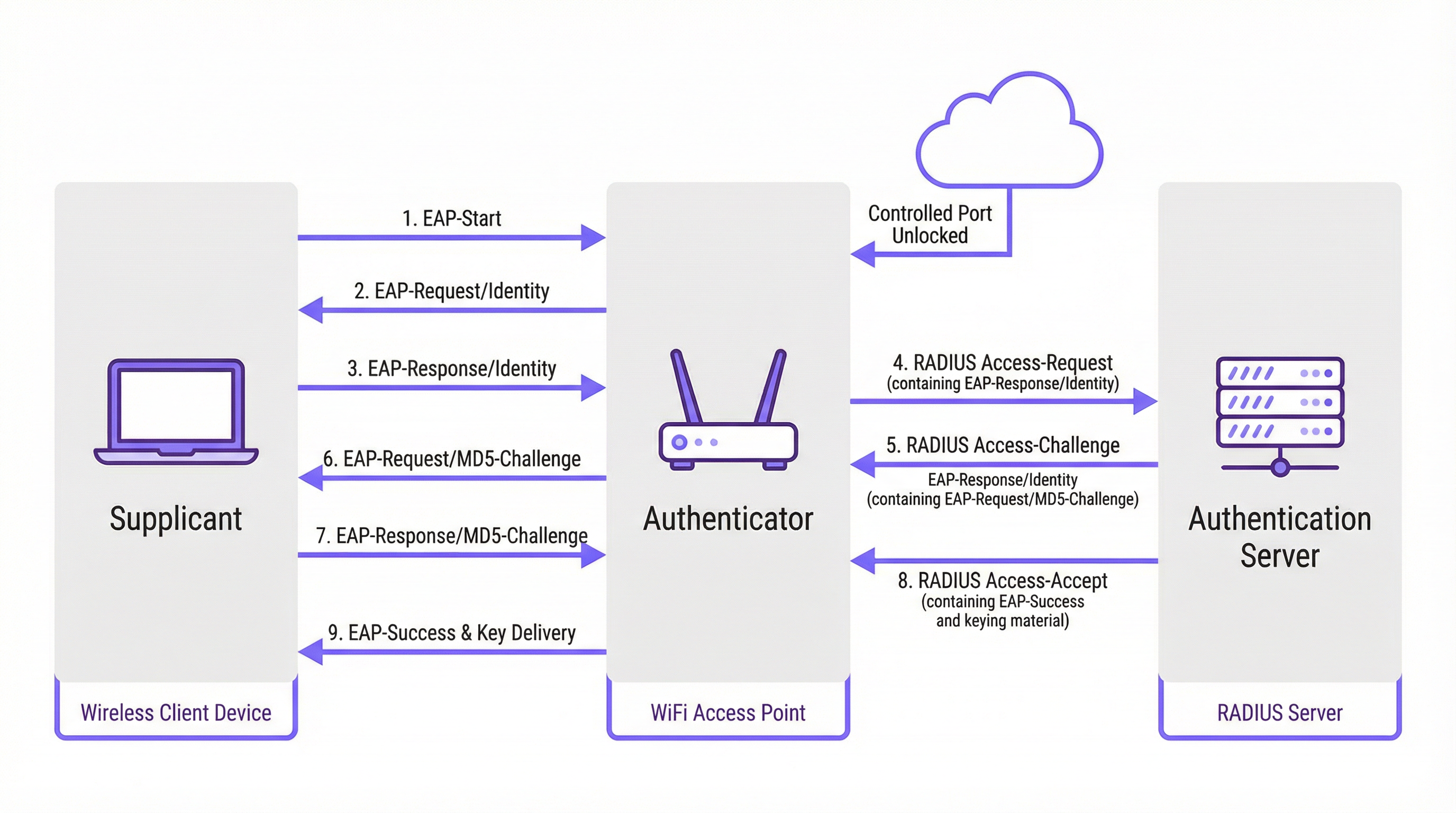
Il processo di autenticazione segue uno scambio strutturato di messaggi orchestrato dall'Extensible Authentication Protocol (EAP). L'EAP è un framework flessibile che supporta vari metodi di autenticazione (tipi EAP), consentendo alle organizzazioni di scegliere quello che meglio si adatta ai propri requisiti di sicurezza e all'infrastruttura esistente.
Confronto tra i metodi EAP
La scelta del metodo EAP corretto è una decisione critica per l'implementazione. I metodi principali utilizzati nelle moderne reti aziendali sono EAP-TLS, PEAP ed EAP-TTLS.
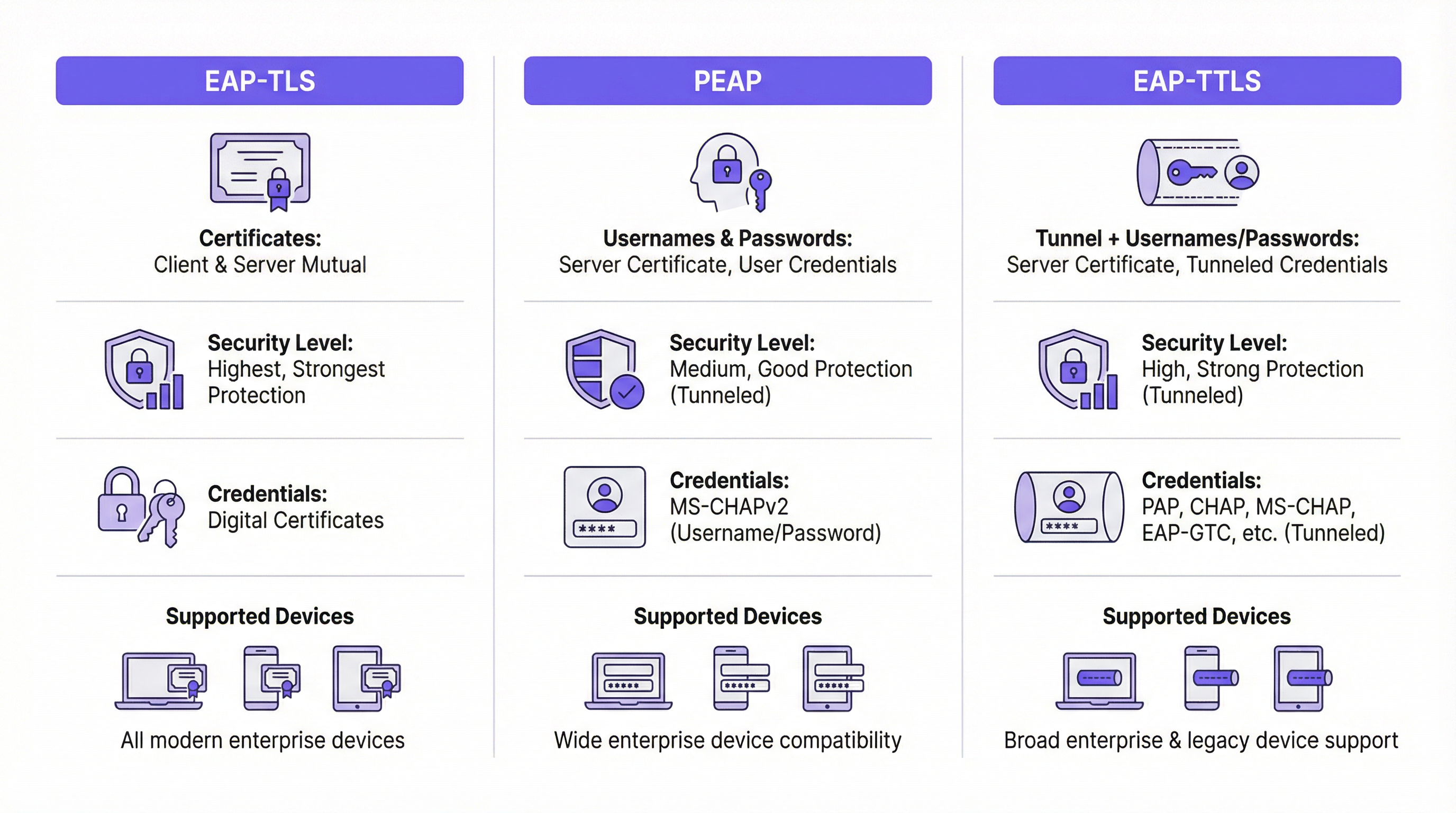
| Funzionalità | EAP-TLS (Transport Layer Security) | PEAP (Protected EAP) | EAP-TTLS (Tunneled TLS) |
|---|---|---|---|
| Livello di sicurezza | Massimo. Fornisce un'autenticazione reciproca basata su certificati. | Alto. Crittografa lo scambio di credenziali all'interno di un tunnel TLS. | Alto. Simile a PEAP, crittografa lo scambio di credenziali. |
| Credenziali | Certificati digitali client e server | Certificato server, credenziali utente (ad es. nome utente/password) | Certificato server, credenziali utente (opzioni più flessibili) |
| Complessità | Alta. Richiede un'infrastruttura a chiave pubblica (PKI) per gestire i certificati per tutti i dispositivi. | Media. Sfrutta le credenziali di directory esistenti (ad es. Active Directory). | Media. Simile a PEAP ma offre maggiore flessibilità per i protocolli di autenticazione. |
| Caso d'uso | Dispositivi di proprietà dell'azienda in cui la distribuzione dei certificati può essere automatizzata tramite MDM. Ambienti ad alta sicurezza. | BYOD e ambienti aziendali in cui si preferisce l'autenticazione tramite nome utente/password. | Ambienti eterogenei con un mix di sistemi operativi client (ad es. macOS, Linux). |
EAP-TLS è ampiamente considerato il gold standard per la sicurezza 802.1X. Richiede che sia il client che il server dispongano di un certificato digitale, consentendo l'autenticazione reciproca. Ciò elimina il rischio di attacchi basati su password, ma introduce l'onere di distribuire e gestire un certificato su ogni singolo dispositivo client.
PEAP è il tipo EAP più comune negli ambienti aziendali. Semplifica l'implementazione richiedendo un certificato solo sul server di autenticazione. Il client verifica l'identità del server e quindi crea un tunnel TLS crittografato. All'interno di questo tunnel, il client si autentica utilizzando metodi meno complessi, in genere MS-CHAPv2 (nome utente e password). Sebbene sia sicuro, è ancora vulnerabile agli attacchi di phishing se gli utenti vengono indotti a connettersi a un AP non autorizzato con un certificato server apparentemente valido.
EAP-TTLS è funzionalmente simile a PEAP ma offre maggiore flessibilità. Crea anch'esso un tunnel TLS ma consente una gamma più ampia di protocolli di autenticazione interni, come PAP, CHAP o EAP-MD5, rendendolo una scelta versatile per ambienti con sistemi legacy o tipi di client eterogenei.
Guida all'implementazione
Un'implementazione 802.1X di successo richiede un'attenta pianificazione e un'esecuzione in fasi. I seguenti passaggi forniscono una roadmap indipendente dal fornitore.
Fase 1: Infrastruttura e pianificazione
- Seleziona il tuo server RADIUS: Scegli un server RADIUS in linea con la tua infrastruttura esistente. Il Network Policy Server (NPS) di Microsoft è una scelta comune per gli ambienti incentrati su Windows, mentre le opzioni open source come FreeRADIUS sono altamente flessibili. Anche i servizi RADIUS basati su cloud stanno diventando sempre più popolari per la loro scalabilità e il ridotto carico di gestione.
- Scegli il tuo metodo EAP: In base al confronto precedente, seleziona il metodo EAP che bilancia al meglio i tuoi requisiti di sicurezza, la base utenti e le capacità amministrative. Per la maggior parte degli ambienti aziendali, PEAP offre un solido equilibrio. Per le implementazioni ad alta sicurezza, EAP-TLS è il percorso consigliato.
- Pianifica la tua strategia per i certificati: Questo è il passaggio più critico. Per PEAP o EAP-TTLS, avrai bisogno di un certificato server per il tuo server RADIUS. Questo certificato DEVE essere emesso da un'Autorità di Certificazione (CA) pubblica attendibile. L'utilizzo di un certificato autofirmato genererà avvisi di sicurezza su tutti i dispositivi client, compromettendo la fiducia degli utenti e la sicurezza.
Fase 2: Configurazione
- Configura il server RADIUS: Installa e configura il server RADIUS scelto. Ciò comporta:
- L'installazione del certificato server.
- La definizione dei client RADIUS (i tuoi access point e switch).
- La creazione di criteri di richiesta di connessione per elaborare le richieste in arrivo.
- La creazione di criteri di rete che definiscono le condizioni, i vincoli e le impostazioni per l'autenticazione. Ad esempio, un criterio potrebbe stabilire che solo i membri di uno specifico gruppo di Active Directory sono autorizzati a connettersi.
- Configura l'Authenticator (AP wireless/Switch):
- Configura il tuo controller LAN wireless o i singoli access point con l'indirizzo IP del tuo server RADIUS e il segreto condiviso.
- Crea una nuova WLAN/SSID dedicata a 802.1X. Non tentare di eseguire 802.1X su una PSK esistente o su una rete aperta.
- Assicurati che l'SSID sia configurato per WPA2-Enterprise o WPA3-Enterprise.
Fase 3: Onboarding e distribuzione dei client
- Dispositivi aziendali: Utilizza una soluzione di Mobile Device Management (MDM) o Group Policy (GPO) per configurare automaticamente i dispositivi di proprietà dell'azienda. L'MDM/GPO può inviare al dispositivo il profilo di rete wireless, inclusi l'SSID, il tipo EAP e gli eventuali certificati CA necessari. Ciò offre un'esperienza zero-touch per l'utente finale.
- BYOD (Bring Your Own Device): L'onboarding dei dispositivi personali è più complesso. La best practice consiste nell'utilizzare una soluzione di onboarding dedicata. Queste soluzioni forniscono un SSID di "onboarding" temporaneo e aperto. Quando un utente si connette, viene reindirizzato a un Captive Portal dove può autenticarsi e scaricare un'utilità di configurazione o un profilo che imposta automaticamente il suo dispositivo per la rete 802.1X sicura.
Best practice
- Segmenta la tua rete: Utilizza l'assegnazione dinamica delle VLAN basata sugli attributi RADIUS. Ciò consente di inserire diversi gruppi di utenti (ad es. dipendenti, appaltatori, ospiti) in VLAN diverse con policy di accesso distinte, anche quando si connettono allo stesso SSID.
- Utilizza sempre un certificato pubblicamente attendibile: L'importanza di utilizzare un certificato pubblico sul tuo server RADIUS non può essere sopravvalutata. È la pietra angolare della fiducia del client e previene gli attacchi man-in-the-middle.
- Monitora e registra: Monitora attivamente i log di autenticazione RADIUS. Questo è inestimabile per la risoluzione dei problemi di connessione e per l'auditing di sicurezza. I tentativi di autenticazione falliti possono essere un indicatore precoce di un potenziale attacco.
- Preferisci WPA3-Enterprise: Ove supportato dal tuo hardware e dai client, WPA3-Enterprise offre miglioramenti significativi in termini di sicurezza rispetto a WPA2-Enterprise, inclusi i Protected Management Frames (PMF) per prevenire gli attacchi di deautenticazione.
Risoluzione dei problemi e mitigazione dei rischi
| Problema comune | Causa | Strategia di mitigazione |
|---|---|---|
| La connessione fallisce | Mancata corrispondenza nei tipi EAP tra client e server. Segreto condiviso RADIUS errato. Firewall che blocca le porte RADIUS (UDP 1812/1813). | Verifica le impostazioni EAP sia sul client che sul server. Ricontrolla il segreto condiviso sull'AP e sul server RADIUS. Assicurati che i firewall consentano il traffico RADIUS. |
| Avvisi sui certificati | Il server RADIUS utilizza un certificato autofirmato o non attendibile. | Sostituisci il certificato autofirmato con uno proveniente da una CA pubblica attendibile (ad es. DigiCert, Sectigo). |
| Connessioni lente | Il server RADIUS è sottodimensionato o presenta un'elevata latenza verso il servizio di directory. | Monitora le prestazioni del server RADIUS. Assicurati che vi sia una connettività a bassa latenza tra il server RADIUS e i controller di dominio. |
| Phishing/AP non autorizzati | Gli utenti vengono indotti a connettersi a un AP dannoso che trasmette lo stesso SSID. | Utilizza EAP-TLS per eliminare le password. Per PEAP/EAP-TTLS, assicurati che i client siano configurati per convalidare il certificato e il nome del server. |
ROI e impatto aziendale
Sebbene l'implementazione di 802.1X richieda un investimento iniziale in termini di tempo e risorse, il ritorno sull'investimento (ROI) è significativo, in particolare per le strutture su larga scala.
- Postura di sicurezza migliorata: Passando da un'unica password condivisa a credenziali univoche per utente o per dispositivo, si riduce drasticamente il rischio di accessi non autorizzati. Questo è un passaggio fondamentale per mitigare le violazioni dei dati.
- Conformità: Per le organizzazioni soggette a PCI DSS, GDPR o HIPAA, 802.1X è un controllo chiave per dimostrare di aver implementato solide misure di controllo degli accessi. Il costo di un audit fallito o di una sanzione per non conformità supera di gran lunga il costo dell'implementazione.
- Efficienza operativa: L'automazione dell'onboarding e l'utilizzo di VLAN dinamiche riducono il carico amministrativo sui team IT. Ai nuovi dipendenti può essere concesso l'accesso automaticamente in base al loro gruppo di directory e l'accesso viene revocato istantaneamente quando vengono rimossi.
- Esperienza utente migliorata: Se implementato correttamente con l'onboarding automatizzato, 802.1X offre un'esperienza di connessione fluida e sicura. Gli utenti devono semplicemente accendere il proprio dispositivo e questo si connette senza richiedere di reinserire una password. Si tratta di un miglioramento significativo rispetto ai Captive Portal o alle complesse PSK.
Key Terms & Definitions
RADIUS
Remote Authentication Dial-In User Service. A networking protocol that provides centralized Authentication, Authorization, and Accounting (AAA) management for users and devices that attempt to access a network service.
In an 802.1X context, the RADIUS server is the 'brain' of the operation. It's the server that checks the user's or device's credentials and tells the access point whether to grant or deny access. IT teams will spend most of their time configuring policies on the RADIUS server.
EAP
Extensible Authentication Protocol. An authentication framework, not a specific authentication mechanism. It provides a standardized way for clients and servers to negotiate an authentication method.
EAP is the language spoken between the client device, the access point, and the RADIUS server. Understanding that EAP is a framework helps explain why there are so many different 'types' of 802.1X (EAP-TLS, PEAP, etc.). The choice of EAP type is the most important decision in an 802.1X deployment.
Supplicant
The software on a client device (like a laptop or smartphone) that is responsible for responding to the authenticator's requests for credentials.
The supplicant is built into modern operating systems like Windows, macOS, iOS, and Android. IT teams rarely interact with the supplicant directly, but they configure it via network profiles, telling it which EAP type to use and which server to trust.
Authenticator
The network device that acts as a gatekeeper, blocking or allowing traffic from the supplicant. In a wireless network, this is the access point (AP).
The authenticator doesn't make the authentication decision itself. It's a middleman that simply passes EAP messages between the supplicant and the authentication server. Its primary job is to enforce the decision made by the RADIUS server.
PKI
Public Key Infrastructure. A set of roles, policies, hardware, software, and procedures needed to create, manage, distribute, use, store, and revoke digital certificates.
A PKI is essential for deploying EAP-TLS, the most secure form of 802.1X. While the term sounds intimidating, a basic PKI can be set up using Microsoft Active Directory Certificate Services or a cloud-based service. It's the foundation for a certificate-based security model.
MDM
Mobile Device Management. Software that allows IT administrators to control, secure, and enforce policies on smartphones, tablets, and other endpoints.
MDM is the key to a scalable and seamless 802.1X deployment for corporate-owned devices. IT teams use the MDM to automatically push the WiFi profile and client certificate to devices, meaning users can connect securely with zero manual configuration.
Dynamic VLAN Assignment
A feature that allows the RADIUS server to assign a user or device to a specific VLAN based on their identity or group membership.
This is a powerful tool for network segmentation. Instead of having multiple SSIDs for different user groups, you can have one secure SSID. The RADIUS server then places employees in the corporate VLAN, guests in the guest VLAN, and IoT devices in their own isolated VLAN, all based on the credentials they present.
WPA3-Enterprise
The latest generation of Wi-Fi security for enterprise networks, building on WPA2-Enterprise by adding stronger encryption and protection against de-authentication attacks.
When procuring new network hardware, IT managers should ensure it supports WPA3-Enterprise. It provides a significant security uplift over its predecessor and is a key component of a modern, secure wireless infrastructure. It's the 'Enterprise' version that integrates with 802.1X.
Case Studies
A 500-room luxury hotel needs to provide secure WiFi for staff (on corporate-issued tablets) and a separate, seamless experience for guests. The hotel must comply with PCI DSS due to its payment systems.
Staff Network: Implement an 802.1X EAP-TLS network. Deploy a RADIUS server and an internal Certificate Authority (or use a cloud PKI service). Use an MDM to automatically provision the corporate tablets with client certificates and the WPA2/WPA3-Enterprise network profile. This provides the highest level of security for devices handling sensitive operational data. Guest Network: Implement a separate SSID using a captive portal with a straightforward, time-limited voucher or social login. This network should be completely isolated from the staff and PCI networks using VLANs and firewall rules. This approach balances high security for corporate assets with ease of use for transient guests.
A large retail chain with 200 stores needs to secure its in-store network, which is used by Point-of-Sale (POS) terminals, employee-used handheld inventory scanners, and a guest WiFi network.
POS & Inventory Scanners: Deploy a single, hidden SSID using 802.1X EAP-TLS. Since these are corporate-controlled devices, certificates can be pre-loaded before deployment. Use MAC Authentication Bypass (MAB) as a fallback for legacy devices that may not support 802.1X, but this should be an exception. Assign this network to a secure, firewalled VLAN that only allows traffic to the payment processor and inventory management servers. Guest WiFi: Deploy a separate, public-facing SSID with a branded captive portal that requires acceptance of terms and conditions. This network must be completely isolated from the secure store network.
Scenario Analysis
Q1. Your CFO is concerned about the cost of a commercial certificate for the RADIUS server and suggests using a self-signed certificate from your internal Windows CA. How do you respond?
💡 Hint:Consider the user experience and the security implications of a client not being able to automatically trust the server.
Show Recommended Approach
A self-signed certificate will cause a security warning on every single device that connects to the network for the first time. This trains users to ignore security warnings, which is a significant security risk. A publicly trusted certificate is automatically recognized by all modern devices, providing a seamless connection experience and ensuring that clients can verify they are connecting to the legitimate server, which is crucial for preventing man-in-the-middle attacks. The annual cost of a public certificate is a small price to pay for the enhanced security and improved user experience.
Q2. A conference centre wants to use 802.1X for event attendees. They have thousands of new users each week. Is EAP-TLS a viable option? Why or why not?
💡 Hint:Think about the lifecycle of a guest user and the administrative overhead of certificate management.
Show Recommended Approach
EAP-TLS is likely not a viable option for this scenario. The primary challenge is the administrative overhead of provisioning a unique digital certificate for thousands of transient users each week. The process of generating, distributing, and then revoking these certificates would be operationally complex and costly. A better approach would be to use a simpler authentication method for guests, such as a captive portal with voucher codes or social login, while reserving 802.1X for staff and permanent infrastructure.
Q3. You are deploying a PEAP-MS-CHAPv2 network. A user reports that they can connect from their Windows laptop but not from their personal Android phone. What is the most likely cause of this issue?
💡 Hint:Consider how different operating systems handle certificate validation and network profiles.
Show Recommended Approach
The most likely cause is that the Android phone has not been configured to properly trust the RADIUS server's certificate. While a Windows laptop joined to a domain might automatically trust the certificate (if the root CA is pushed via Group Policy), a personal Android device needs to be manually configured. The user likely needs to install the root CA certificate on their phone and/or explicitly configure the network profile to validate the server certificate and specify the correct domain name. This highlights the importance of a clear and simple onboarding process for BYOD users.
Key Takeaways
- ✓802.1X provides port-based network access control, authenticating users or devices before granting network access.
- ✓The core components are the Supplicant (client), Authenticator (AP/switch), and Authentication Server (RADIUS).
- ✓EAP-TLS is the most secure method, using mutual certificate authentication, but has higher administrative overhead.
- ✓PEAP and EAP-TTLS are widely used, balancing strong security with easier deployment by using server-side certificates and user credentials.
- ✓Always use a publicly trusted certificate for your RADIUS server to avoid security warnings and prevent man-in-the-middle attacks.
- ✓Automate client configuration using MDM for corporate devices and a dedicated onboarding portal for BYOD.
- ✓Use dynamic VLAN assignment to segment users and devices into different network zones based on their identity and permissions.




