

Best practice per la gestione del firmware degli access point
This guide provides an authoritative reference on Access Point (AP) firmware management for enterprise environments. It details why a strategic approach to firmware is critical for security, performance, and compliance, offering actionable best practices for IT leaders to implement robust, scalable update processes in venues like hotels, retail chains, and stadiums.
🎧 Listen to this Guide
View Transcript

Riepilogo esecutivo
Per l'azienda moderna, il WiFi non è più un semplice servizio aggiuntivo; è il sistema nervoso centrale per il coinvolgimento dei clienti, l'efficienza operativa e l'analisi dei dati. Il firmware in esecuzione sugli access point (AP) che alimentano questo ecosistema è un livello fondamentale che ne determina il livello di sicurezza, le capacità di prestazione e l'affidabilità complessiva. Trascurare la gestione del firmware degli access point è una fonte significativa di rischio aziendale, poiché introduce vulnerabilità che possono essere sfruttate per violazioni dei dati, causa instabilità di rete che interrompe le operazioni e impedisce l'adozione di nuovi standard wireless in grado di aumentare l'efficienza. Un approccio proattivo e strategico alla gestione del firmware non è quindi un semplice compito di manutenzione IT, ma una funzione cruciale per la continuità aziendale. Questa guida fornisce un framework indipendente dal fornitore per responsabili IT, architetti di rete e direttori tecnologici, al fine di progettare e implementare una strategia di gestione del firmware scalabile. Copre gli imperativi tecnici, i processi di implementazione passo-passo e il business case per investire in un ciclo di vita degli aggiornamenti strutturato, passando da un modello reattivo e ad-hoc a una metodologia prevedibile, automatizzata e consapevole dei rischi che protegge la rete e ne massimizza il ritorno sull'investimento (ROI).
Approfondimento tecnico
Il firmware degli access point è il software integrato che governa il funzionamento dell'hardware, dalla modulazione della radiofrequenza (RF) alla gestione dell'autenticazione di sicurezza. La sua gestione è una disciplina sfaccettata che ha un impatto su tre pilastri fondamentali della salute della rete: sicurezza, prestazioni e conformità.
Livello di sicurezza: il firmware è un bersaglio primario per i criminali informatici che cercano di compromettere le reti. Le vulnerabilità, catalogate come Common Vulnerabilities and Exposures (CVE), vengono scoperte regolarmente nel firmware degli AP. La mancata applicazione tempestiva delle patch lascia la rete esposta a exploit che vanno dagli attacchi denial-of-service (DoS) all'acquisizione completa della rete. Un'efficace strategia di aggiornamento del firmware degli AP è la prima linea di difesa, in quanto garantisce che le patch di sicurezza vengano testate e distribuite in modo tempestivo. Inoltre, i moderni standard di sicurezza come il WPA3 vengono introdotti tramite aggiornamenti del firmware, fornendo una maggiore protezione contro i tentativi di decifrazione delle password e rafforzando la privacy degli utenti con la crittografia dei dati personalizzata. Senza aggiornamenti regolari, le reti rimangono bloccate su protocolli obsoleti, non riuscendo a soddisfare le moderne aspettative di sicurezza.
Prestazioni e affidabilità: la tecnologia WiFi è in costante evoluzione, con nuovi standard IEEE come 802.11ax (Wi-Fi 6) e 802.11be (Wi-Fi 7) che offrono notevoli miglioramenti in termini di throughput, capacità dei client ed efficienza spettrale. Questi vantaggi vengono sbloccati direttamente tramite gli aggiornamenti del firmware. I fornitori perfezionano continuamente il proprio codice per ottimizzare la gestione delle risorse radio, migliorare il comportamento di roaming dei client e correggere i bug che causano cali di connettività intermittenti o degrado delle prestazioni. Una rete che esegue un firmware obsoleto non opera al massimo del suo potenziale, portando a una scarsa esperienza utente, a una ridotta efficienza operativa e a un minor ritorno sull'investimento hardware.
Conformità e abilitazione delle funzionalità: per molte organizzazioni, la conformità normativa non è negoziabile. Standard come il Payment Card Industry Data Security Standard (PCI DSS) impongono configurazioni di rete sicure e l'applicazione tempestiva di patch per le vulnerabilità di sicurezza. Allo stesso modo, il Regolamento generale sulla protezione dei dati (GDPR) richiede solide misure di sicurezza per proteggere i dati personali. Un processo di gestione del firmware documentato e coerente è essenziale per dimostrare la conformità ed evitare sanzioni finanziarie significative. Oltre alla conformità, gli aggiornamenti del firmware spesso abilitano nuove funzionalità all'interno di una piattaforma di gestione della rete, come analisi avanzate, servizi di localizzazione o integrazione IoT, che possono essere sfruttate per creare nuovo valore aziendale.
Guida all'implementazione
Il passaggio a una strategia strutturata di gestione del firmware comporta un processo chiaro e ripetibile. I seguenti passaggi forniscono un modello indipendente dal fornitore per la distribuzione di aggiornamenti su larga scala, riducendo al minimo i rischi e le interruzioni del servizio.
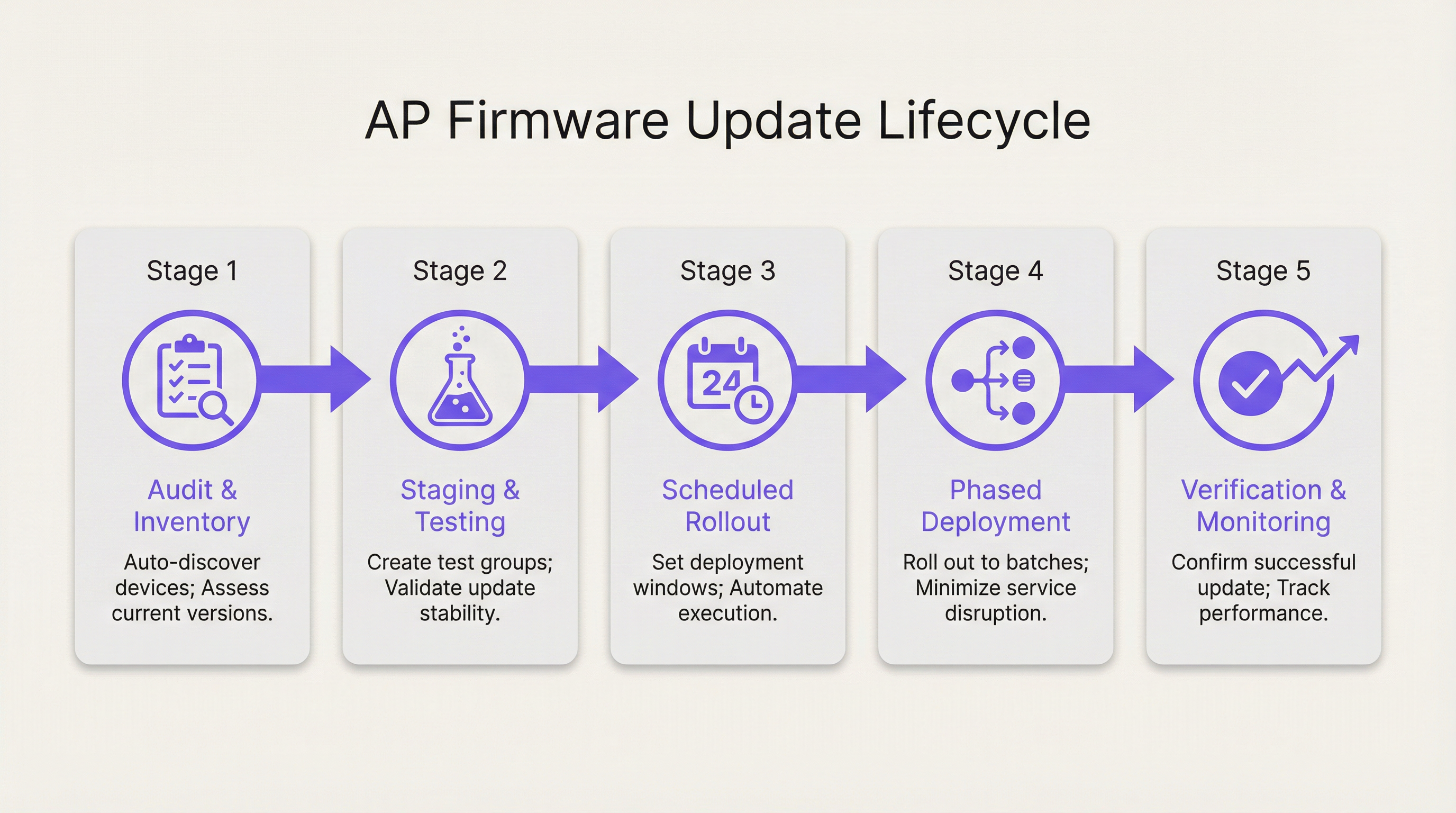
Fase 1: Rilevamento, inventario e raggruppamento Prima di poter eseguire qualsiasi aggiornamento, è necessario un inventario completo e accurato di tutti gli access point presenti sulla rete. Questo dovrebbe includere il modello hardware, la versione corrente del firmware e la posizione fisica o l'area della sede assegnata. Le moderne piattaforme di gestione della rete possono automatizzare questo processo di rilevamento. Una volta inventariati, gli AP dovrebbero essere organizzati in gruppi logici in base al profilo di rischio, all'area fisica e al modello hardware. Ad esempio, un hotel potrebbe avere gruppi per 'Camere degli ospiti - Piano 1', 'Lobby e aree pubbliche', 'Centro congressi' e 'Back of House'. Questo raggruppamento è fondamentale per consentire implementazioni graduali.
Fase 2: Staging e Canary Testing Il passaggio più critico per mitigare i rischi è testare il nuovo firmware in un ambiente controllato, non di produzione o a basso impatto. Crea un gruppo 'Canary' composto da un piccolo numero di AP rappresentativi. Questo gruppo dovrebbe idealmente includere almeno uno di ogni modello di AP della tua flotta e trovarsi in un'area in cui è possibile monitorarne da vicino il comportamento e richiedere feedback a un piccolo gruppo di utenti. Distribuisci il nuovo firmware esclusivamente a questo gruppo canary e monitorane la stabilità, le prestazioni e la compatibilità con i client per un periodo predefinito (es. 48-72 ore). Un test canary riuscito fornisce la sicurezza necessaria per procedere con una distribuzione più ampia.
Fase 3: Pianificazione e implementazioni graduali Non aggiornare mai un'intera rete contemporaneamente. Sfrutta i gruppi definiti nella Fase 1 per creare un programma di implementazione graduale. Inizia con i gruppi a minor rischio, come le aree di back-office o amministrative. Pianifica gli aggiornamenti durante i periodi di minima attività di rete (es. dalle 2:00 alle 4:00 del mattino) per ridurre al minimo i disagi per gli utenti. Un tipico programma di implementazione graduale potrebbe avere questo aspetto:
- Fase 1: Back of House, Dipartimento IT (10% degli AP)
- Fase 2: Camere degli ospiti - Piani a bassa occupazione (30% degli AP)
- Fase 3: Camere degli ospiti - Piani ad alta occupazione (30% degli AP)
- Fase 4: Aree pubbliche, Lobby, Ristoranti (20% degli AP)
- Fase 5: Centro congressi, Sale da ballo (10% degli AP)
Prevedi un periodo di monitoraggio tra ogni fase per verificare il successo e assicurarti che non siano stati introdotti nuovi problemi.
Fase 4: Verifica, monitoraggio e rollback Dopo ogni fase di distribuzione, monitora attivamente gli indicatori chiave di prestazione (KPI) per gli AP aggiornati. Ciò include il conteggio delle connessioni dei client, il throughput, la latenza e i tassi di errore. Confronta queste metriche con la baseline precedente all'aggiornamento. Fondamentalmente, assicurati di avere un piano di rollback semplice e automatizzato. Se viene rilevato un problema significativo, devi essere in grado di ripristinare il gruppo di AP interessato alla versione firmware stabile precedente con una singola azione. Questa è una rete di sicurezza fondamentale che impedisce ai problemi localizzati di trasformarsi in gravi interruzioni a livello di rete.
Best practice
L'adesione alle best practice per il firmware WiFi eleva la gestione da un compito reattivo a un vantaggio strategico.
- Stabilire una policy per il firmware: documenta una policy formale che definisca il processo per testare, pianificare e distribuire gli aggiornamenti del firmware. Questa dovrebbe includere ruoli e responsabilità, criteri di valutazione del rischio e protocolli di comunicazione.
- Utilizzare una piattaforma di gestione centralizzata: gestire il firmware su centinaia o migliaia di AP non è fattibile senza una piattaforma centralizzata che fornisca funzionalità di inventario, pianificazione, automazione e monitoraggio.
- Dare priorità alle patch di sicurezza: non tutti gli aggiornamenti sono uguali. Le vulnerabilità di sicurezza critiche dovrebbero innescare un processo di distribuzione accelerato. La tua policy dovrebbe definire un Service Level Agreement (SLA) per la distribuzione di patch critiche (es. entro 72 ore da un test canary riuscito).
- Leggere le note di rilascio: esamina sempre le note di rilascio del firmware fornite dal fornitore prima della distribuzione. Contengono informazioni critiche su correzioni di bug, nuove funzionalità, problemi noti e potenziali problemi di compatibilità.
- Mantenere un piano di rollback: come sottolineato nella guida all'implementazione, una capacità di rollback testata e automatizzata non è negoziabile. È lo strumento più importante in assoluto per la mitigazione del rischio.
Risoluzione dei problemi e mitigazione dei rischi
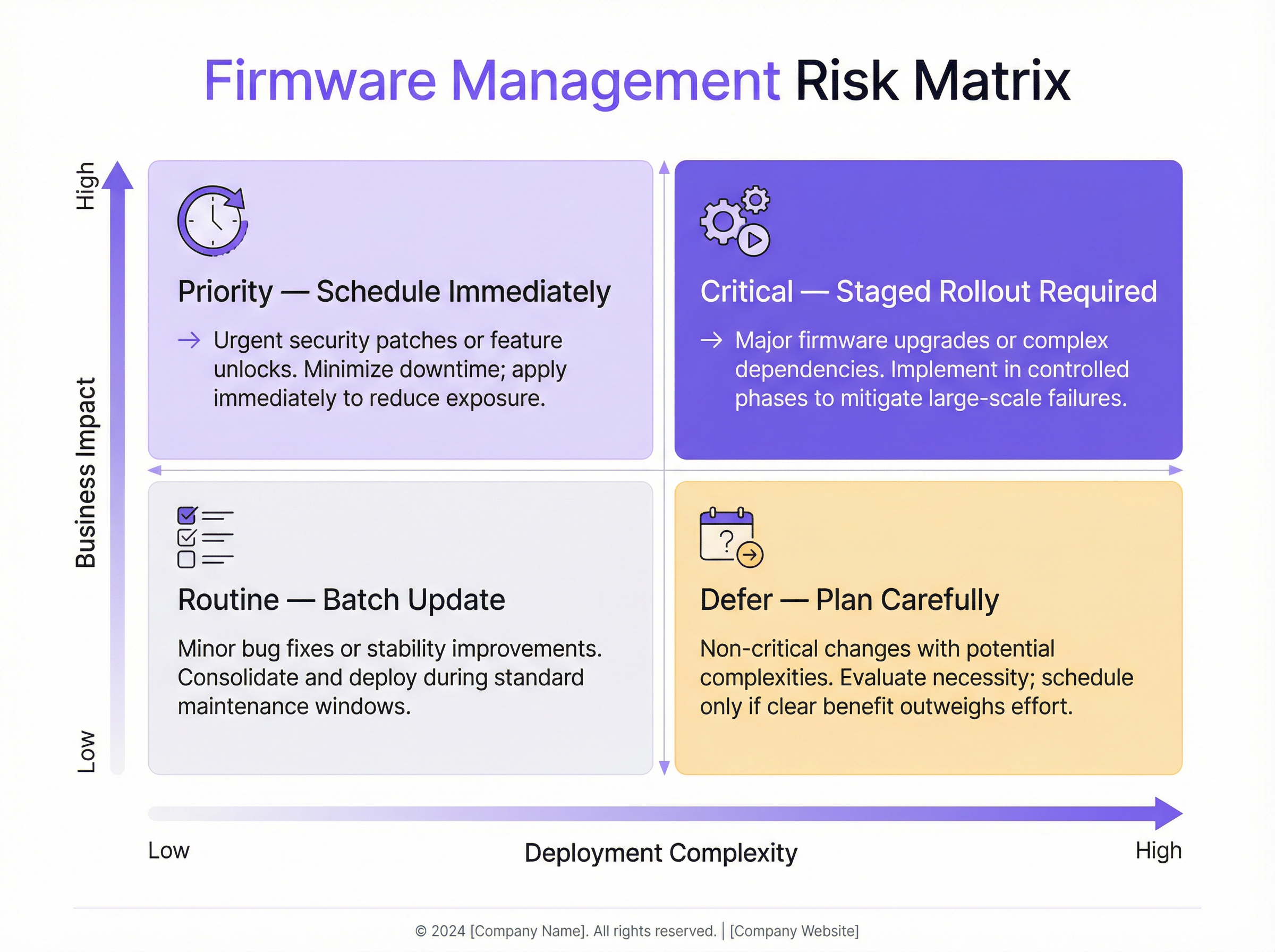
Le modalità di guasto comuni nella gestione del firmware derivano spesso da una mancanza di processo. Il rischio principale è la distribuzione di una versione firmware difettosa che causa un'interruzione diffusa del servizio. Ciò può manifestarsi con l'impossibilità dei client di connettersi, scarse prestazioni o persino con gli AP che vanno completamente offline. La strategia di mitigazione è un solido processo di test e di implementazione graduale, come descritto in precedenza. Un altro problema comune è l'incompatibilità del firmware tra diversi modelli di AP o con sistemi di backend come i server RADIUS. Test approfonditi con il gruppo canary aiutano a identificare questi problemi prima che abbiano un impatto sulla rete di produzione. La matrice dei rischi di seguito aiuta a dare priorità agli sforzi di aggiornamento in base all'impatto aziendale e alla complessità della distribuzione.
ROI e impatto aziendale
L'investimento in un processo strutturato di gestione del firmware produce un rendimento significativo. Il ROI principale è la riduzione del rischio. Il costo di una singola violazione dei dati o di una grave interruzione della rete (in termini di sanzioni finanziarie, danni alla reputazione e perdita di entrate) supera di gran lunga il costo operativo di una gestione proattiva. In secondo luogo, c'è un chiaro ROI nelle prestazioni. Mantenendo aggiornato il firmware, la rete opera al massimo delle sue capacità, migliorando l'esperienza del cliente e la produttività dei dipendenti. Una rete WiFi stabile e ad alte prestazioni è un elemento di differenziazione chiave per gli hotel, un motore di vendita nella vendita al dettaglio e un servizio essenziale nelle strutture moderne. Infine, l'automazione guida l'efficienza operativa. Automatizzando il processo di rilevamento, pianificazione e distribuzione, i team IT possono liberare tempo prezioso per concentrarsi su iniziative strategiche piuttosto che su attività di manutenzione manuali e ripetitive.
Key Terms & Definitions
Firmware
The permanent software programmed into a hardware device's read-only memory that provides low-level control for the device's specific hardware.
For an access point, the firmware is its operating system. IT teams interact with it during updates that patch security holes, improve performance, or add new features.
Staged Rollout
A method of deploying an update in phases to subsets of devices, rather than all at once, to minimize the potential impact of any unforeseen issues.
Instead of pushing a firmware update to all 1,000 APs in a stadium at once, an IT manager would deploy it to one section, then another, monitoring stability at each stage.
Canary Testing
A testing strategy where a new firmware version is deployed to a small, representative group of devices (the 'canaries') in the production environment to gauge its performance and stability before a wider rollout.
Before a national retail chain updates thousands of APs, the IT team first deploys the firmware to five test stores to ensure it doesn't interfere with critical systems like payment terminals.
Rollback Plan
A documented and preferably automated procedure to revert devices to their previous, stable firmware version in the event that a new update causes critical problems.
If a firmware update causes WiFi outages in a hotel's conference center during an event, the network architect uses the one-click rollback feature to immediately restore the previous stable version and get services back online.
WPA3 (Wi-Fi Protected Access 3)
The latest generation of WiFi security protocol, offering enhanced security against password-guessing attempts and providing more robust encryption for public networks.
To comply with new corporate security policies, a CTO mandates that all company APs must be updated to a firmware version that supports WPA3 to protect sensitive data.
PCI DSS (Payment Card Industry Data Security Standard)
A set of security standards designed to ensure that all companies that accept, process, store or transmit credit card information maintain a secure environment.
A retail venue operator must demonstrate to auditors that all network devices, including WiFi access points, have the latest security patches applied as part of their PCI DSS compliance.
Scheduled Firmware Updates
The practice of planning and automating firmware deployments to occur during specific, low-traffic maintenance windows to minimize disruption to users and business operations.
An IT manager for a 24/7 hospital schedules non-critical AP firmware updates to occur on a rolling basis between 2:00 AM and 4:00 AM, ensuring patient care systems are not impacted.
Zero-Day Vulnerability
A security flaw in software or hardware that is unknown to the vendor and for which no official patch or update has been released.
When a zero-day vulnerability for a popular AP model is announced, a network architect with a mature firmware management process can quickly test and deploy an emergency patch from the vendor within hours, while others may take weeks, leaving their networks exposed.
Case Studies
A 500-room luxury hotel with three restaurants and a large conference center needs to deploy a critical security patch for their 400 access points (a mix of Cisco and Meraki hardware) with minimal disruption to high-paying guests.
- Immediate Action: Use the network management platform to identify all vulnerable APs. 2. Grouping: Create a 'Canary' group with two APs in the IT office and two in a back-of-house area. Create phased deployment groups: 'Back of House' (50 APs), 'Guest Floors 1-5' (150 APs), 'Guest Floors 6-10' (150 APs), and 'Public Areas & Conference' (50 APs). 3. Testing: Deploy the patch to the Canary group immediately. Monitor for 24 hours, checking for any anomalous behavior in client connectivity or performance. 4. Scheduling: Once the canary test is passed, schedule the phased rollout to occur between 1:00 AM and 5:00 AM over two nights. Night 1: Deploy to 'Back of House' and 'Guest Floors 1-5'. Night 2: Deploy to 'Guest Floors 6-10' and 'Public Areas & Conference'. 5. Communication: Notify the hotel operations manager and front desk staff of the planned maintenance window, providing them with a script for any guest inquiries. 6. Verification: After each phase, verify successful patching and monitor network health dashboards. Keep the one-click rollback plan ready.
A retail chain with 150 stores across the country wants to update their AP firmware to enable a new location analytics feature. Each store has 5-10 APs (Aruba). The goal is to complete the rollout within two weeks.
- Pilot Group: Select 5 stores in a single geographic region to act as the pilot group. These stores should represent a mix of high and low traffic locations. 2. Staging: Deploy the new firmware to the pilot group and enable the location analytics feature. Work closely with the regional manager and store managers to validate that Point-of-Sale (POS) systems, staff devices, and guest WiFi are all functioning correctly. Monitor for one week. 3. National Rollout: After a successful pilot, schedule the national rollout. Divide the remaining 145 stores into two waves. Wave 1 (70 stores) and Wave 2 (75 stores). 4. Automated Scheduling: Use the central management platform to schedule the updates for all stores in Wave 1 to occur on a Tuesday night (typically low retail traffic) outside of business hours. 5. Verification & Go/No-Go: On Wednesday morning, verify the success of Wave 1. If KPIs are normal, schedule Wave 2 for the following Tuesday night. If issues are found, halt the rollout, resolve the issue, and restart the process with the affected stores. 6. Rollback: The rollback plan should be configured to revert an entire store's APs to the previous version with a single command from the central dashboard.
Scenario Analysis
Q1. A zero-day vulnerability has been announced for your primary AP vendor. The vendor has released an emergency patch. Your network consists of 2,000 APs across a multi-building university campus. What are your immediate first three steps?
💡 Hint:Think about speed, safety, and scale. How do you balance the urgency to patch with the risk of disrupting a large, active network?
Show Recommended Approach
- Deploy to Canary Group: Immediately deploy the patch to a pre-defined canary group of APs located in non-critical areas like the IT department and a library storage room. 2. Accelerated Testing: Begin an accelerated 4-6 hour monitoring period on the canary group, specifically looking for any signs of instability, client disconnections, or authentication issues. 3. Prepare Phased Rollout: While the test is running, prepare an emergency phased rollout plan that prioritizes high-density, high-risk areas like lecture halls and student dormitories, to be executed the moment the canary test is successfully passed.
Q2. You have just completed a firmware update on a group of 50 APs in a hotel lobby. Post-deployment monitoring shows that while overall throughput is up, about 5% of clients (all older Android models) are experiencing intermittent connection drops. What is your decision?
💡 Hint:Consider the impact versus the benefit. Is the issue contained? What is the safest course of action for the guest experience?
Show Recommended Approach
The correct decision is to immediately execute the rollback plan for that specific group of 50 APs, reverting them to the previous stable firmware. While the performance gain is positive, the negative impact of connection drops for even a small percentage of guests is a more significant issue in a hospitality environment. After rolling back, the issue should be documented and reported to the vendor with the specific client device details. The wider rollout should be halted until a fix is provided.
Q3. Your Director of Operations wants to know the ROI of purchasing a new network management platform that automates firmware updates. How would you frame the business case, focusing on metrics beyond just IT time savings?
💡 Hint:Translate technical benefits into business value. Think about risk, guest satisfaction, and future growth.
Show Recommended Approach
The ROI case should be built on three pillars: 1. Risk Mitigation: Quantify the potential financial impact of a security breach (fines, legal fees) or a major network outage (lost revenue, service credits). The platform is an insurance policy against these catastrophic costs. 2. Enhanced Customer Experience: A stable, high-performing network directly impacts guest satisfaction scores and reviews. By ensuring APs are always running optimal firmware, we are improving a key part of the customer journey, which has a direct link to loyalty and revenue. 3. Future-Proofing and Agility: The platform allows us to quickly adopt new technologies (like WPA3 or Wi-Fi 6) that improve our service offering. It also enables us to respond to security threats in hours, not weeks, making the business more resilient. This agility is a competitive advantage.
Key Takeaways
- ✓Neglecting firmware management is a major source of security, performance, and compliance risk.
- ✓Implement a phased rollout strategy using logical AP groups to minimize the blast radius of any issue.
- ✓Always use a 'canary' test group to validate new firmware in your live environment before a wide deployment.
- ✓An automated, one-click rollback plan is a non-negotiable safety net for risk mitigation.
- ✓Schedule all updates during low-impact maintenance windows to avoid disrupting users and business operations.
- ✓Read vendor release notes carefully and maintain a full inventory of all network access points.
- ✓A centralized management platform is essential for executing a scalable and efficient firmware strategy.




