

Band Steering e Load Balancing per WiFi ad Alta Densità
This authoritative technical reference equips IT managers, network architects, and venue operations directors with the knowledge to design, configure, and optimise high-density WiFi networks using band steering and load balancing. It covers the architectural principles behind 2.4 GHz vs. 5 GHz band selection, AP load distribution strategies, and vendor-neutral configuration best practices for demanding environments such as stadiums, hotels, and conference centres. By applying these strategies, organisations can measurably improve wireless throughput, reduce user complaints, and transform their network infrastructure into a strategic business asset.
🎧 Listen to this Guide
View Transcript

Executive Summary
Per le organizzazioni che gestiscono ambienti wireless ad alta densità, mantenere prestazioni WiFi ottimali è una sfida operativa fondamentale. Con l'aumento del numero di dispositivi connessi per metro quadrato in luoghi come aeroporti, centri congressi e poli commerciali, le configurazioni di rete convenzionali vacillano, causando una scarsa esperienza utente, cadute di connessione e una riduzione del throughput dei dati. Questa guida affronta direttamente tali sfide fornendo un approfondimento tecnico su due strategie di ottimizzazione fondamentali: il band steering e il load balancing. Esploriamo i principi architettonici che differenziano le bande di frequenza a 2.4 GHz e 5 GHz e illustriamo in dettaglio come indirizzare in modo intelligente i client dual-band verso lo spettro a 5 GHz, meno congestionato e con maggiore capacità. Inoltre, analizziamo le tecniche di bilanciamento del carico degli access point (AP) che distribuiscono uniformemente le connessioni dei client tra le risorse di rete disponibili, impedendo che i singoli AP diventino colli di bottiglia per le prestazioni. Implementando le best practice indipendenti dal fornitore e le linee guida di configurazione qui descritte, i responsabili IT e gli architetti di rete possono offrire un'esperienza wireless superiore e più affidabile, con un impatto diretto sulla soddisfazione dei clienti, sull'efficienza operativa e sul ROI aziendale. Questo riferimento è concepito per un'applicazione pratica, offrendo scenari di implementazione concreti e risultati misurabili per orientare la strategia dell'infrastruttura di rete in questo trimestre.
Approfondimento Tecnico
Comprendere le Bande di Frequenza: 2.4 GHz vs. 5 GHz
Le fondamenta di una gestione efficace del WiFi in ambienti ad alta densità risiedono nella comprensione delle differenze fondamentali tra le bande di frequenza a 2.4 GHz e 5 GHz. Non si tratta semplicemente di due percorsi per i dati; sono ambienti RF distinti con caratteristiche di propagazione uniche che ne determinano l'idoneità per diversi casi d'uso e scenari di implementazione.
| Caratteristica | Banda 2.4 GHz | Banda 5 GHz |
|---|---|---|
| Portata | Lunghezza d'onda maggiore, migliore penetrazione dei muri | Lunghezza d'onda minore, più facilmente ostruibile |
| Interferenza | Alta (Microonde, Bluetooth, telefoni cordless) | Bassa (Meno affollata, più canali) |
| Canali | 11-14 canali, solo 3 non sovrapposti | Oltre 23 canali non sovrapposti |
| Larghezza di banda | Velocità dati potenziali inferiori | Velocità dati potenziali superiori (es. con 802.11ac/ax) |
| Idoneità | Connettività di base, IoT, dispositivi legacy | Applicazioni ad alta larghezza di banda (video, voce), aree dense |
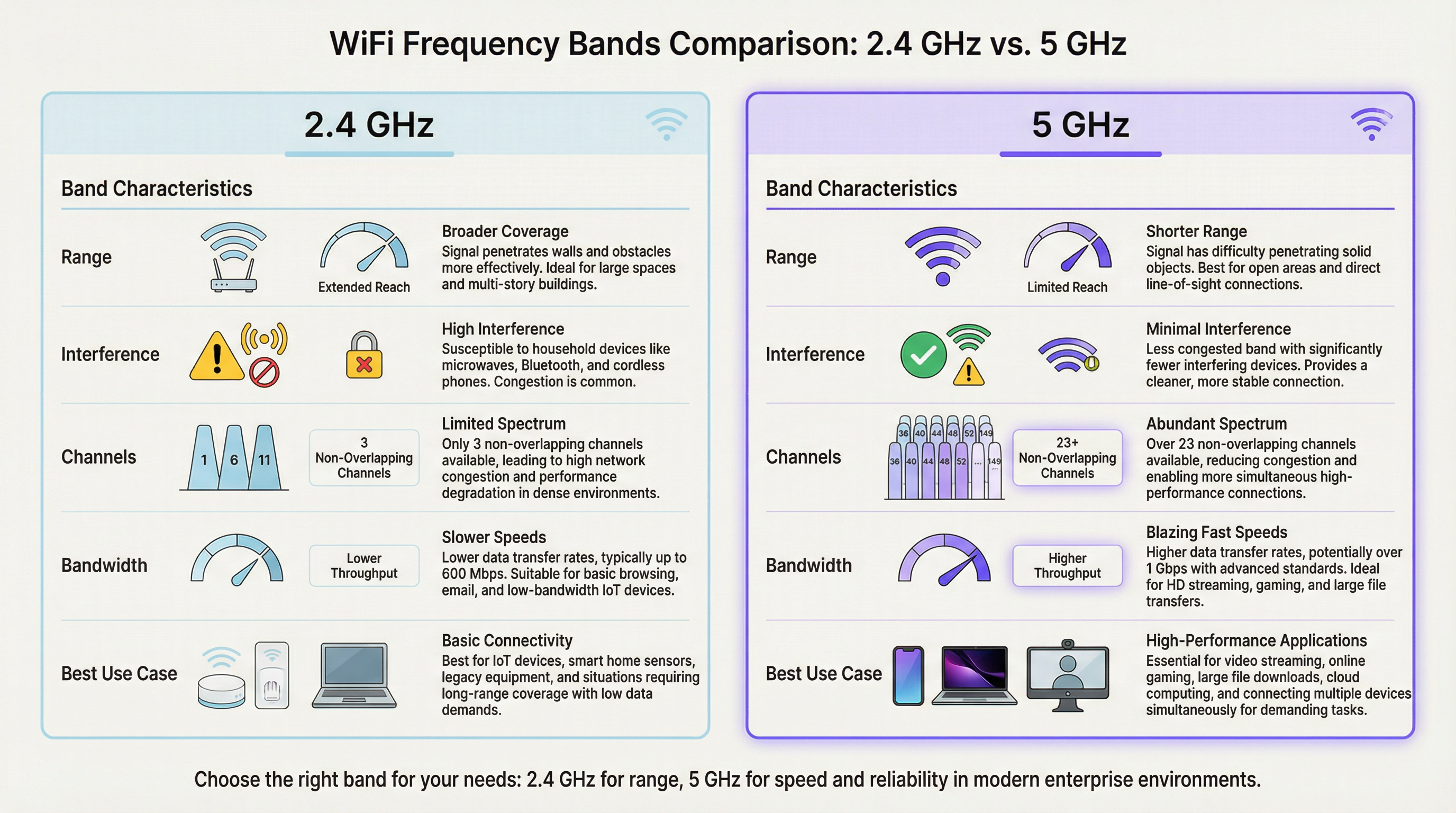
In un ambiente ad alta densità come uno stadio o un'aula magna, la banda a 2.4 GHz si satura rapidamente. Con soli tre canali non sovrapposti (1, 6 e 11 in Nord America), l'interferenza co-canale è un inibitore di prestazioni significativo e persistente. Ogni AP aggiuntivo che opera sullo stesso canale nella stessa area degrada le prestazioni di tutti gli altri. La banda a 5 GHz, al contrario, offre uno spettro molto più ampio con numerosi canali non sovrapposti, rendendola la scelta preferita per le applicazioni critiche in termini di prestazioni. L'obiettivo primario delle implementazioni di band steering WiFi è spostare in modo proattivo i dispositivi client compatibili dalla banda congestionata a 2.4 GHz a quella più pulita e veloce a 5 GHz, riservando lo spettro a 2.4 GHz per sensori IoT, dispositivi legacy e client ai margini della copertura.
Come Funziona il Band Steering
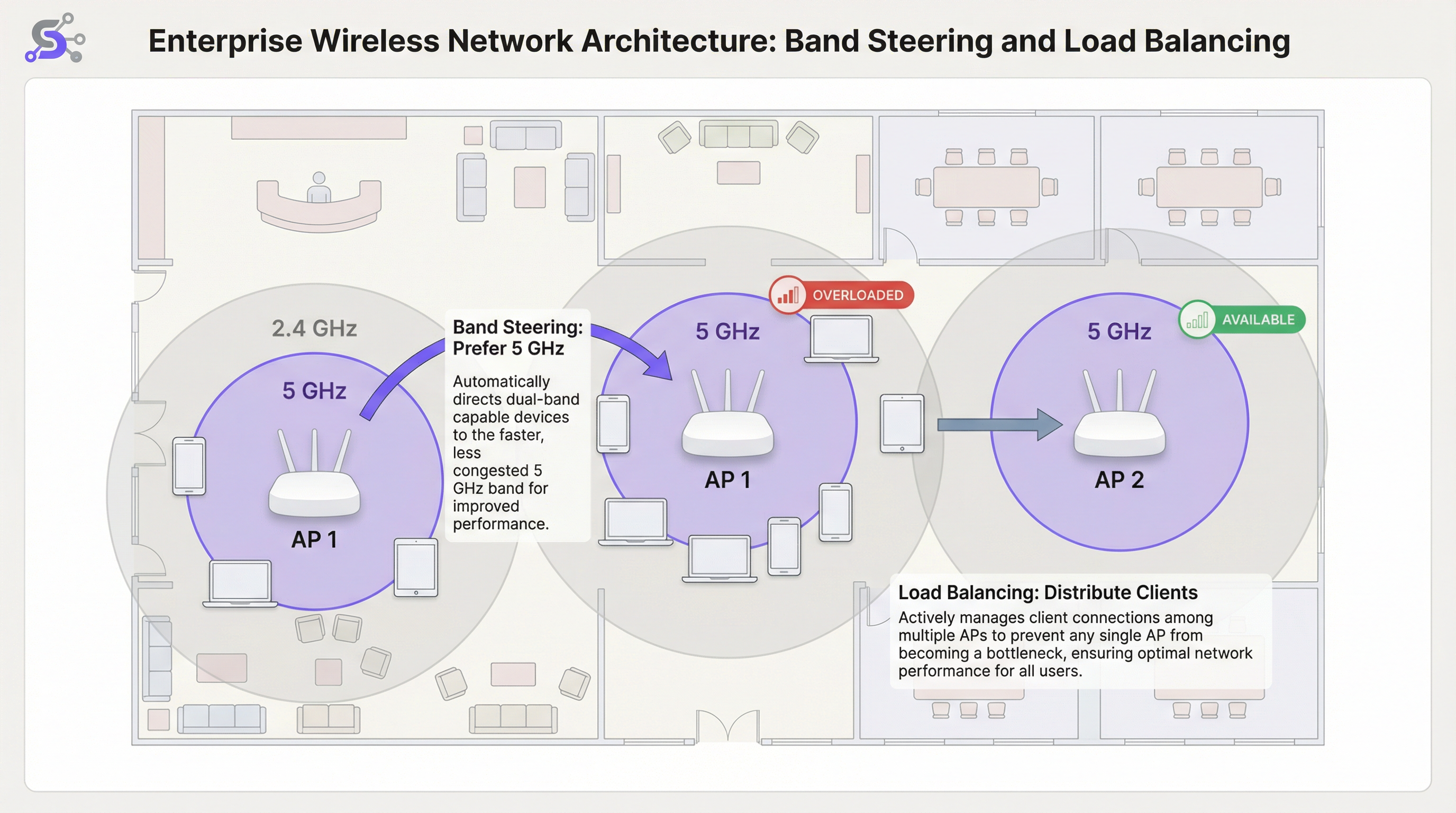
Il band steering non è uno standard IEEE formale, ma una tecnica proprietaria implementata dai fornitori di WiFi enterprise. Sebbene gli algoritmi specifici varino tra i produttori, il meccanismo generale prevede che l'Access Point incoraggi o costringa attivamente un client dual-band a connettersi alla radio a 5 GHz. Ciò si ottiene in genere attraverso diversi metodi che operano a livello di frame di gestione 802.11.
Il primo è il Delayed Probe Responses (Risposte Probe Ritardate): quando un client dual-band invia una richiesta probe su entrambe le bande contemporaneamente, l'AP può ritardare intenzionalmente la sua risposta sulla frequenza a 2.4 GHz di diverse centinaia di millisecondi. Il client, vedendo una risposta più rapida sui 5 GHz, preferisce naturalmente e si connette alla banda superiore. Il secondo è la Probe Response Suppression (Soppressione della Risposta Probe): l'AP può ignorare le richieste probe a 2.4 GHz provenienti da client che ha identificato come compatibili con i 5 GHz, rendendo di fatto la rete a 2.4 GHz invisibile a questi ultimi durante la fase di discovery iniziale. Il terzo approccio, nonché il più moderno, è l'IEEE 802.11v BSS Transition Management: questo frame standard consente all'AP di richiedere esplicitamente a un client di passare a un BSS (Basic Service Set) diverso, in questo caso, la radio a 5 GHz sullo stesso AP. Si tratta di un metodo cooperativo che si basa sul supporto lato client per lo standard 802.11v ed è l'approccio consigliato per le implementazioni enterprise, in quanto evita le tecniche di soppressione aggressive che possono causare problemi di connettività con i client non conformi.
Load Balancing degli AP
Mentre il band steering ottimizza la selezione della banda di frequenza per singolo AP, il load balancing WiFi affronta la sfida più ampia di distribuire uniformemente i client su più AP in una determinata area. In un terminal aeroportuale affollato o nella hall di un hotel, è comune che gli utenti si riuniscano vicino a un singolo AP situato in posizione centrale, sovraccaricandolo mentre gli AP adiacenti rimangono sottoutilizzati. Ciò crea una significativa disparità di prestazioni: gli utenti vicini all'AP sovraccarico subiscono un servizio degradato, mentre gli utenti vicini agli AP inattivi non ottengono il massimo vantaggio dall'infrastruttura disponibile. Gli algoritmi di load balancing prevengono questo problema impostando soglie per il numero di client o per l'utilizzo della radio su ciascun AP.
Quando un AP raggiunge la soglia di carico configurata, può rifiutare nuove richieste di associazione. Questo incoraggia il nuovo dispositivo client a eseguire nuovamente la scansione e a scoprire un AP vicino meno congestionato. I sistemi più sofisticati sfruttano l'802.11v per suggerire in modo proattivo al client uno specifico AP alternativo, rendendo la transizione fluida e trasparente per l'utente finale. Le implementazioni più avanzate utilizzano algoritmi predittivi che anticipano gli aumenti di carico in base a modelli storici e iniziano a ridistribuire i client prima che si formi un collo di bottiglia.
Il Ruolo del Wireless LAN Controller
Nelle implementazioni enterprise, il band steering e il load balancing non sono gestiti a livello di singolo AP, ma sono orchestrati da un Wireless LAN Controller (WLC) centralizzato o da una piattaforma di gestione basata su cloud. Il WLC mantiene una visione globale di tutti i client associati, della potenza del loro segnale, del carico attuale su ciascun AP e dell'ambiente RF in tutto il sito. Questa intelligenza centralizzata è ciò che rende possibile un load balancing sofisticato: il controller può prendere decisioni informate su dove reindirizzare un nuovo client in base ai dati in tempo reale dell'intera rete, non solo alla limitata visione locale di un singolo AP.
Le piattaforme gestite in cloud, come quelle offerte da Cisco Meraki, Aruba Central e Juniper Mist, estendono ulteriormente questo concetto incorporando la gestione delle risorse radio (RRM) guidata dall'IA. Questi sistemi analizzano continuamente i dati RF, il comportamento dei client e le prestazioni delle applicazioni per regolare dinamicamente le assegnazioni dei canali, la potenza di trasmissione e le soglie di steering senza intervento manuale. Per gli operatori di grandi strutture che gestiscono decine o centinaia di AP su più piani o edifici, questo livello di automazione non è un lusso, ma una necessità operativa pratica.
WiFi 6 e Band Steering nell'Era dei 6 GHz
L'introduzione del WiFi 6E (IEEE 802.11ax) e l'apertura normativa della banda di spettro a 6 GHz rappresentano un'evoluzione significativa per l'architettura WiFi ad alta densità. La banda a 6 GHz offre fino a 1.200 MHz di spettro pulito aggiuntivo, con 59 canali non sovrapposti da 20 MHz disponibili in mercati come Stati Uniti e Regno Unito. Per le strutture che implementano AP compatibili con WiFi 6E, la strategia di band steering deve evolversi verso un modello a tre bande: indirizzare i dispositivi legacy sui 2.4 GHz, i dispositivi compatibili sui 5 GHz e i più recenti client WiFi 6E sulla banda incontaminata a 6 GHz. Questo approccio a livelli massimizza l'utilizzo di tutto lo spettro disponibile e garantisce che i dispositivi più recenti e ad alte prestazioni beneficino dell'ambiente RF più pulito possibile, libero dalle interferenze legacy che si accumulano nelle bande più vecchie.
Guida all'Implementazione
Fase 1: Site Survey Pre-Implementazione
Un site survey predittivo utilizzando strumenti professionali come Ekahau Site Survey o iBwave Design non è negoziabile per qualsiasi implementazione ad alta densità. Non si tratta semplicemente di verificare la copertura, ma di pianificare la capacità. L'obiettivo è identificare le zone ad alta densità di dispositivi, modellare le caratteristiche di propagazione RF dello spazio fisico e pianificare il posizionamento degli AP e l'allocazione dei canali per ridurre al minimo l'interferenza co-canale. Il survey dovrebbe anche tenere conto della densità di client prevista durante i periodi di picco di utilizzo, che per un centro congressi potrebbe essere una sessione keynote e per uno stadio è la finestra di 30 minuti prima del calcio d'inizio, quando decine di migliaia di tifosi cercano di connettersi contemporaneamente.
Fase 2: Configurazione del Band Steering
Nel wireless LAN controller (WLC) o nella dashboard di gestione cloud, troverai un'impostazione per il Band Steering o Band Select. I parametri chiave per la configurazione del band steering includono i seguenti. Modalità: la maggior parte dei fornitori enterprise offre opzioni come Prefer 5 GHz, Force 5 GHz o Balance Bands. Per le strutture ad alta densità, Prefer 5 GHz è il punto di partenza consigliato. Force può essere troppo aggressivo e potrebbe negare il servizio ai client legacy solo a 2.4 GHz, generando ticket di supporto non necessari. Soglia di Steering (RSSI): imposta una potenza del segnale minima affinché un client venga indirizzato sui 5 GHz. Un valore di partenza tipico è -65 dBm. Se il segnale a 5 GHz del client è più debole di questa soglia, potrebbe in realtà avere un'esperienza migliore sui 2.4 GHz nonostante l'interferenza, in particolare in ambienti con muri spessi o materiali da costruzione significativi che attenuano la frequenza più alta.
Fase 3: Configurazione del Load Balancing
Soglia del Numero di Client: imposta un numero massimo di client per radio AP. Per un'area ad alta densità, questo valore potrebbe essere di soli 25-30 client per garantire la qualità del servizio, anche se l'hardware dell'AP supporta tecnicamente più associazioni simultanee. Soglia di Utilizzo: un approccio più dinamico e consigliato consiste nel bilanciare in base all'utilizzo della radio, espresso come percentuale di tempo in cui il mezzo radio è occupato a trasmettere o ricevere. Una soglia compresa tra il 60 e il 70 percento è una best practice ampiamente accettata, in quanto lascia un margine sufficiente per il traffico burst senza consentire a nessun singolo AP di diventare un collo di bottiglia prolungato.
Fase 4: Convalida e Monitoraggio
Dopo l'implementazione, il monitoraggio continuo è essenziale. Utilizza il tuo WLC o la piattaforma di gestione cloud per tracciare il rapporto dei client sui 5 GHz rispetto ai 2.4 GHz, la distribuzione dei client tra gli AP in ciascuna zona e le velocità medie dei dati dei client nel tempo. Stabilisci una baseline durante un normale periodo operativo e utilizzala per identificare le anomalie. Un improvviso aumento delle associazioni a 2.4 GHz o una distribuzione irregolare dei client indicano spesso una deriva della configurazione, una nuova fonte di interferenza o un guasto hardware su uno degli AP.
Best Practice
Strategia a Singolo SSID: utilizza un singolo SSID per entrambe le bande a 2.4 GHz e 5 GHz. Questo è un prerequisito non negoziabile per un band steering efficace, in quanto consente al client e alla rete di negoziare la banda migliore in modo trasparente in background. SSID separati per ciascuna banda richiedono agli utenti di effettuare una scelta manuale, il che vanifica lo scopo dello steering automatizzato e crea un onere di supporto quando gli utenti scelgono costantemente la banda sbagliata.
Disabilitare le Basse Velocità Dati: per evitare che i client lenti consumino un tempo di trasmissione eccessivo, disabilita le velocità dati legacy inferiori a 12 Mbps su entrambe le bande. Ciò migliora le prestazioni complessive della cella attraverso una pratica nota come airtime fairness. In ambienti molto densi come stadi o grandi sale conferenze, è consigliabile aumentare la velocità minima a 24 Mbps, poiché riduce significativamente l'overhead dei frame di gestione e garantisce che il tempo di trasmissione disponibile venga utilizzato in modo efficiente.
Larghezza del Canale: nelle aree ad alta densità, preferisci canali più stretti da 20 MHz per i 5 GHz. Sebbene i canali da 40 MHz o 80 MHz offrano velocità di picco più elevate per i singoli client, riducono il numero totale di canali non sovrapposti disponibili, aumentando il rischio di interferenza co-canale in un ambiente multi-AP. La capacità aggregata della rete, misurata come il throughput totale disponibile su tutti gli AP, è molto più importante della velocità di picco di qualsiasi singola connessione client.
Controllo della Potenza di Trasmissione (TPC): non far funzionare gli AP alla massima potenza di trasmissione. Questo è controintuitivo, ma è una delle best practice di maggiore impatto nella progettazione di WiFi ad alta densità. L'alta potenza aumenta l'interferenza co-canale, crea ampie celle sovrapposte che rendono più difficile il roaming per i client e può effettivamente ridurre la capacità totale della rete. Utilizza algoritmi TPC automatizzati o imposta manualmente la potenza per creare celle più piccole e dense che aumentano la capacità complessiva della rete e migliorano il rapporto segnale/interferenza più rumore (SINR) per tutti i client.
Risoluzione dei Problemi e Mitigazione dei Rischi
Client Sticky: il problema operativo più comune nel WiFi enterprise è il client sticky (appiccicoso) che rimane associato a un AP distante nonostante sia disponibile un'opzione migliore. Si tratta di un problema di logica di roaming lato client che non può essere completamente risolto dalla sola rete. Un load balancing aggressivo e impostazioni ottimizzate della potenza dell'AP possono aiutare a mitigare questo problema riducendo la sovrapposizione della copertura e incoraggiando i client a effettuare il roaming più frequentemente. L'abilitazione di 802.11k (report dei vicini) e 802.11r (transizione BSS rapida) insieme a 802.11v crea la triade del roaming che fornisce ai client sia le informazioni che l'incentivo per prendere decisioni di roaming migliori.
Client Incompatibili: alcuni dispositivi client più vecchi o a basso costo non implementano correttamente i meccanismi di risposta al band steering. Monitora la tua rete per individuare i client che non riescono ripetutamente ad associarsi o che generano eventi di deautenticazione e valuta la possibilità di creare un SSID dedicato per i dispositivi legacy se sono critici per il business. Ciò isola il loro impatto sulla rete primaria ad alte prestazioni e impedisce che il loro scarso comportamento di roaming degradi l'esperienza per gli altri utenti.
Configurazione Troppo Aggressiva: una policy Force 5 GHz combinata con una soglia di load balancing molto rigorosa può comportare l'impossibilità totale per i client di connettersi, in particolare in ambienti in cui il segnale a 5 GHz è attenuato dai materiali da costruzione. Testa sempre le modifiche alla configurazione in un ambiente controllato o durante le ore non di punta e monitora attentamente i tassi di fallimento delle associazioni e i problemi di connettività segnalati dai client dopo qualsiasi modifica.
ROI e Impatto sul Business
L'investimento in una rete WiFi ad alta densità adeguatamente architettata produce rendimenti significativi e misurabili in tutti i tipi di strutture. Per un hotel, un WiFi affidabile e ad alte prestazioni è costantemente citato come uno dei fattori principali nei punteggi di soddisfazione degli ospiti e nelle recensioni online, influenzando direttamente i tassi di prenotazione e i ricavi per camera disponibile. Per una catena di vendita al dettaglio, consente il funzionamento affidabile dei sistemi POS, degli scanner per la gestione dell'inventario e delle piattaforme di analisi del WiFi per gli ospiti come Purple, che dipendono da una connettività costante per acquisire il tempo di permanenza, i modelli di affluenza e i dati sul comportamento dei clienti che informano le decisioni di merchandising e di personale.
In una struttura per conferenze ed eventi, la qualità della rete è un fattore primario per attrarre e trattenere eventi aziendali su larga scala. Un singolo guasto di connettività di alto profilo durante una presentazione keynote può comportare la perdita di prenotazioni future per un valore significativamente superiore al costo dell'aggiornamento di rete che lo avrebbe evitato. Gli indicatori chiave di prestazione per misurare il successo includono: una riduzione dei ticket di segnalazione guasti da parte degli utenti; un aumento delle velocità medie dei dati dei client; un rapporto più elevato di client sui 5 GHz rispetto ai 2.4 GHz, con un obiettivo del 70-80 percento di client compatibili dual-band sui 5 GHz; e una distribuzione uniforme dei client tra gli AP in una determinata zona, senza che nessun singolo AP sopporti costantemente un carico superiore al 20 percento rispetto alla media. Concentrandosi su queste ottimizzazioni tecniche, le organizzazioni possono trasformare il proprio WiFi da un'utilità di base a un asset strategico che migliora l'esperienza del cliente, abilita operazioni basate sui dati e guida risultati di business misurabili.
Key Terms & Definitions
Band Steering
A technique used by WiFi access points to encourage dual-band client devices to connect to the less congested 5 GHz frequency band instead of the 2.4 GHz band, typically by manipulating probe responses or using IEEE 802.11v BSS Transition Management frames.
IT teams implement band steering WiFi configurations to improve overall network performance in areas with many connected devices. It is a foundational feature of any high-density WiFi deployment and is configured at the wireless LAN controller or cloud management layer.
WiFi Load Balancing
A process that distributes client connections evenly across multiple access points in a network to prevent any single AP from becoming overloaded, typically enforced by setting client count or radio utilisation thresholds on the wireless LAN controller.
In a busy area like a conference hall or retail floor, network architects use load balancing to ensure a stable experience for all users. It works in conjunction with band steering: steering handles the frequency band, while load balancing handles the AP selection.
RSSI (Received Signal Strength Indicator)
A measurement of the power level that a client device is receiving from an access point, expressed in decibels-milliwatts (dBm) as a negative value. A value closer to zero (e.g., -40 dBm) indicates a stronger signal than a value further from zero (e.g., -80 dBm).
A network engineer uses RSSI values to determine connection quality and to set thresholds for roaming and band steering decisions. A typical steering threshold is -65 dBm, meaning a client will only be pushed to 5 GHz if its signal on that band is at least this strong.
Co-Channel Interference (CCI)
Performance degradation that occurs when two or more access points in close proximity are operating on the same wireless channel, causing their transmissions to collide and forcing devices to wait before transmitting, which reduces overall throughput.
Proper channel planning is the primary mitigation for CCI. This is a major reason why the 5 GHz band, with its many non-overlapping channels, is preferred for high-density deployments. Poor channel planning is one of the most common causes of underperforming WiFi networks.
Airtime Fairness
A feature that allocates wireless airtime equitably across all connected clients, preventing a slow or distant device from consuming a disproportionate share of the available transmission time and degrading performance for all other users on that AP.
Venue operators enable airtime fairness to guarantee a more consistent level of performance, especially when a mix of old and new devices are connecting to the same network. It is often implemented alongside the disabling of low data rates.
IEEE 802.11v (BSS Transition Management)
An IEEE standard that allows a wireless network to send a request to a client device to transition to a different access point or frequency band, providing a cooperative and more seamless handoff than forceful deauthentication.
Modern enterprise networks leverage 802.11v to make band steering and load balancing more efficient. It is part of the 802.11k/v/r trifecta that underpins intelligent client roaming in enterprise WiFi deployments.
Single SSID
The practice of broadcasting the same network name (SSID) for both the 2.4 GHz and 5 GHz bands on a dual-band access point, presenting one unified network identity to users while the infrastructure manages band selection in the background.
Using a single SSID is a non-negotiable prerequisite for effective band steering. If separate SSIDs exist for each band, the user must manually choose, and the network loses its ability to optimise band allocation automatically.
Sticky Client
A client device that remains associated with a distant access point with a weak signal, even when a closer AP with a stronger signal is available, due to the client's conservative roaming algorithm prioritising connection stability over performance.
IT support teams frequently troubleshoot sticky client issues in enterprise environments. The primary mitigations are optimising AP transmit power to create smaller cells, and enabling 802.11k/v/r to give clients the information and incentive to roam more aggressively.
Microcell Architecture
A high-density WiFi deployment strategy that uses a large number of low-power access points, each covering a small area, rather than a small number of high-power APs covering large areas. This maximises total network capacity by increasing the number of simultaneous, non-interfering transmissions.
Microcell architecture is the standard approach for ultra-high-density venues like stadiums and arenas. It is the WiFi equivalent of the small-cell strategy used in modern cellular networks and is the key to supporting tens of thousands of simultaneous connections.
Case Studies
A 50,000-seat sports stadium is upgrading its WiFi network to support fan engagement apps, mobile ticketing, and cashless payments. The primary challenge is extreme device density during the 3-hour peak of a game. How should they configure band steering and load balancing?
Step 1 - AP Placement: Deploy a high number of low-power APs, with directional antennas focused on specific seating sections (under-seat or handrail mounting). This creates small, manageable microcells, each serving a limited number of seats.
Step 2 - Band Steering: Implement an aggressive Prefer 5 GHz policy. Given the modern smartphones expected at a live event, the vast majority of devices will be dual-band capable. Set a steering RSSI threshold of -67 dBm to strongly encourage 5 GHz connections.
Step 3 - Load Balancing: Configure a strict client count limit of 25 clients per radio. This seems low, but in such a dense RF environment, it is critical to maintain airtime fairness and prevent any single AP from degrading the experience for an entire seating section. Enable 802.11v to assist with steering and load balancing transitions.
Step 4 - Data Rates and Channels: Disable all data rates below 24 Mbps. Use only 20 MHz channel widths on the 5 GHz band to maximise the number of unique channels and minimise interference. Manually plan the channel reuse pattern across the stadium bowl to avoid co-channel interference between adjacent sections.
A historic 200-room hotel with thick masonry walls struggles with WiFi performance. Guests complain about slow speeds and dropped connections. They have modern dual-band APs, but performance is still poor. What is the likely issue and solution?
Step 1 - Problem Analysis: The thick walls cause significant attenuation of the 5 GHz signal. An aggressive band steering policy might be forcing clients onto a weak 5 GHz connection when the more resilient 2.4 GHz signal would actually provide a better experience. This is a classic case where the physical environment overrides standard best practices.
Step 2 - Site Survey: Conduct a physical walkthrough survey to measure signal strength for both bands in representative guest rooms. Pay close attention to the RSSI difference between the 5 GHz and 2.4 GHz signals from the same AP. If 5 GHz is consistently below -70 dBm in rooms, the steering policy needs adjustment.
Step 3 - Configuration Adjustment: Relax the band steering policy. Instead of Prefer 5 GHz, use a Balance Bands setting. Adjust the steering RSSI threshold to be more conservative, for example -60 dBm. This means a client will only be steered to 5 GHz if the signal is genuinely strong enough to deliver a good experience.
Step 4 - AP Power: Ensure Transmit Power Control is enabled and correctly calibrated. The APs in the corridors should be running at a power level that provides adequate coverage inside the rooms without being excessively high and causing interference with adjacent rooms on the same channel.
Scenario Analysis
Q1. You are deploying WiFi in a new multi-floor conference centre. The main keynote hall on the ground floor holds 2,000 attendees, while the upper floors have 20 smaller breakout rooms of 50 people each. How would your channel plan and band steering configuration differ between the two areas?
💡 Hint:Consider the density of APs, the potential for co-channel interference, and the physical separation between areas in each zone.
Show Recommended Approach
In the large, open keynote hall, I would deploy a high number of APs using a meticulous manual channel plan with only 20 MHz channel widths. The goal is to maximise the number of non-overlapping channels (e.g., 36, 40, 44, 48, 149, 153, 157, 161) and create a non-repeating reuse pattern to avoid CCI. Band steering would be set to Prefer 5 GHz with an aggressive RSSI threshold of -65 dBm, and load balancing would be set to a strict 25 clients per radio. On the upper floors, the walls between breakout rooms provide natural RF separation, reducing CCI risk. Here, I could use an automated RRM system and potentially allow 40 MHz channels in some rooms if density is lower. Band steering configuration would remain the same, but load balancing thresholds could be slightly more relaxed, perhaps 35 clients per radio, given the lower absolute density per room.
Q2. A retail chain uses your WiFi network for both guest access and wireless payment terminals (which must be PCI DSS compliant). The payment terminals are 2.4 GHz only. How would you configure the network to ensure the reliability of payments while still offering good performance for guests?
💡 Hint:Consider network segmentation, PCI DSS requirements for network isolation, and how to protect the 2.4 GHz spectrum for critical devices.
Show Recommended Approach
The correct approach is network segmentation with dual SSIDs. First, I would create a hidden SSID with WPA3-Enterprise security using 802.1X authentication, operating exclusively on the 2.4 GHz band and mapped to a dedicated VLAN that is PCI DSS scoped. This isolates payment terminal traffic from all other network traffic, satisfying PCI DSS segmentation requirements. Second, I would create a guest SSID broadcast on both bands with an aggressive Prefer 5 GHz band steering policy. This actively moves guest devices off the 2.4 GHz band, leaving that spectrum as clean as possible for the critical payment terminals. Load balancing would be active on the guest network. The payment terminal SSID would not use load balancing, ensuring terminals always connect to their nearest AP without being redirected.
Q3. A user reports that their laptop keeps disconnecting from the WiFi in the office. You check the controller logs and see the device has a good signal strength (-55 dBm) but is repeatedly being deauthenticated by the AP. What is the most likely cause related to band steering, and what is the remediation?
💡 Hint:Consider what happens when a band steering policy is too aggressive for a specific client device that does not correctly implement 802.11v.
Show Recommended Approach
This is a classic symptom of a client that is not correctly handling the band steering mechanism. The AP is likely sending an 802.11v BSS Transition Management request to move the client to the 5 GHz band. The client, either due to a driver bug or a non-compliant 802.11v implementation, is not responding correctly. The AP, after a timeout, may be sending a deauthentication frame to forcibly disconnect the client, expecting it to re-associate on the 5 GHz band. The remediation has two steps: first, update the client's wireless adapter driver to the latest version. Second, if the problem persists, create a client-specific policy on the WLC to disable band steering for that device's MAC address, or use a vendor feature to add it to a band steering exclusion list. If the problem is widespread across a device model, consider relaxing the overall steering policy from Prefer to Balance for that network zone.
Key Takeaways
- ✓High-density WiFi requires a fundamental shift in mindset from coverage to capacity: the goal is to maximise available airtime, not just signal strength.
- ✓Band steering intelligently pushes dual-band clients to the cleaner, faster 5 GHz band, reducing congestion on the overloaded 2.4 GHz spectrum.
- ✓Load balancing prevents any single Access Point from becoming a performance bottleneck by distributing clients evenly across available infrastructure.
- ✓A single SSID for both bands is a non-negotiable prerequisite for effective band steering: never separate them into distinct network names.
- ✓Disable low data rates (below 12 Mbps) and use narrow 20 MHz channels in dense environments to maximise airtime efficiency and channel reuse.
- ✓Run APs at optimised, not maximum, transmit power to reduce co-channel interference and create smaller, more efficient microcells.
- ✓Measure success by tracking the ratio of 5 GHz clients (target: 70-80%), evenness of client distribution across APs, and reduction in user-reported connectivity issues.




