

Crea la tua app Captive Portal: una guida per sviluppatori (con esempi di codice)
This technical guide provides developers and IT leaders with a comprehensive framework for building custom captive portal applications. It covers architectural design, platform selection (iOS, Android, Web), security best practices (802.1X, GDPR), and API integration strategies to transform guest WiFi into a powerful tool for customer engagement and data analytics.
🎧 Listen to this Guide
View Transcript
Sintesi esecutiva
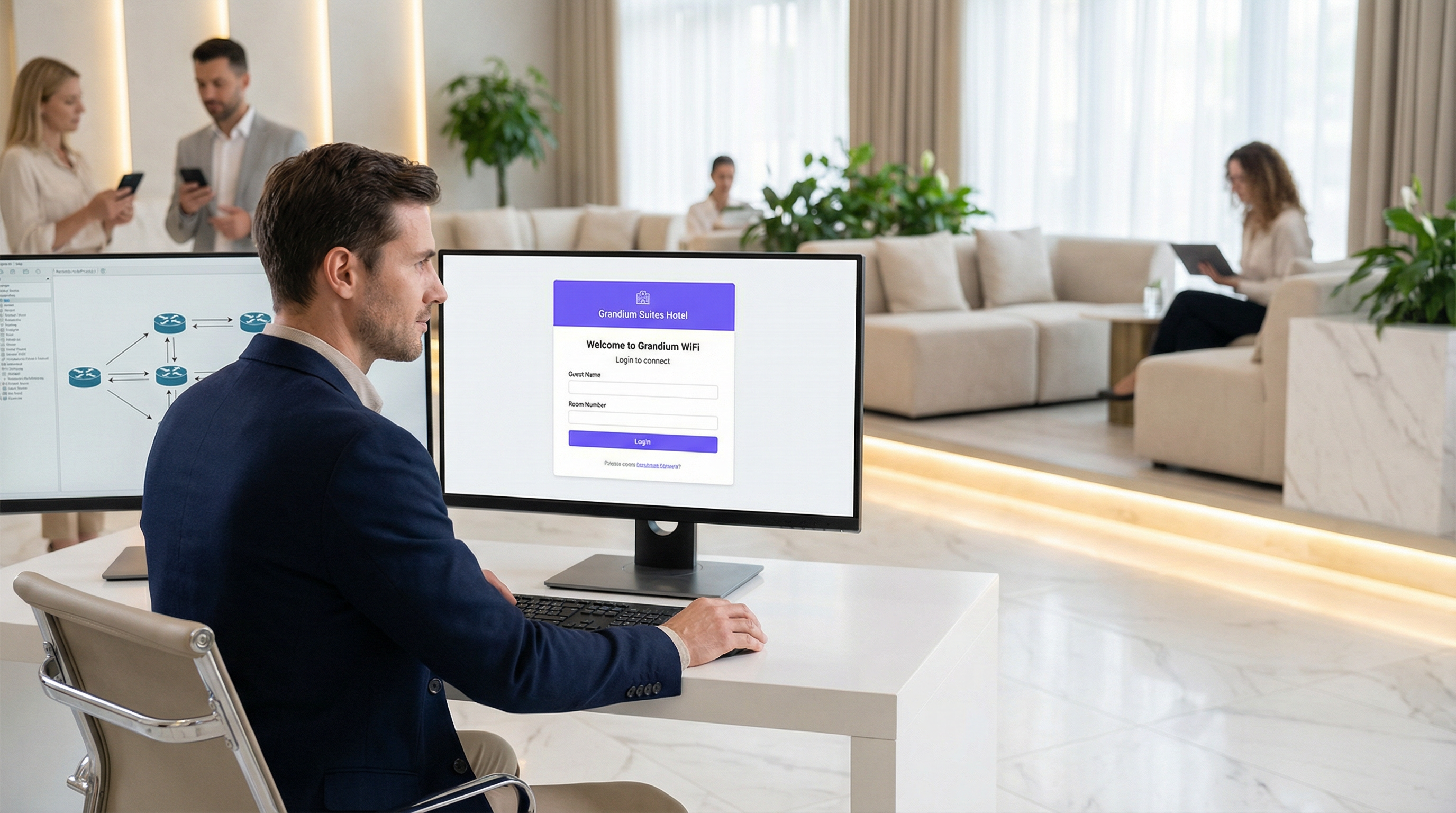
Questa guida fornisce un riferimento tecnico completo per responsabili IT, architetti di rete e sviluppatori sulla creazione di applicazioni Captive Portal personalizzate. Affronta l'esigenza critica delle strutture di controllare l'accesso alla rete, creando al contempo preziose opportunità per il coinvolgimento degli ospiti e l'analisi dei dati. Approfondiamo le decisioni architetturali, le scelte di piattaforma (iOS, Android, Web) e i protocolli di sicurezza essenziali per un'implementazione di successo. Per i CTO, questa guida offre una panoramica strategica sul ROI, sui rischi di conformità e sull'impatto aziendale di una strategia Captive Portal ben eseguita, andando oltre un semplice gateway di connettività per diventare un potente strumento per migliorare l'esperienza del cliente e generare ricavi.
Approfondimento tecnico
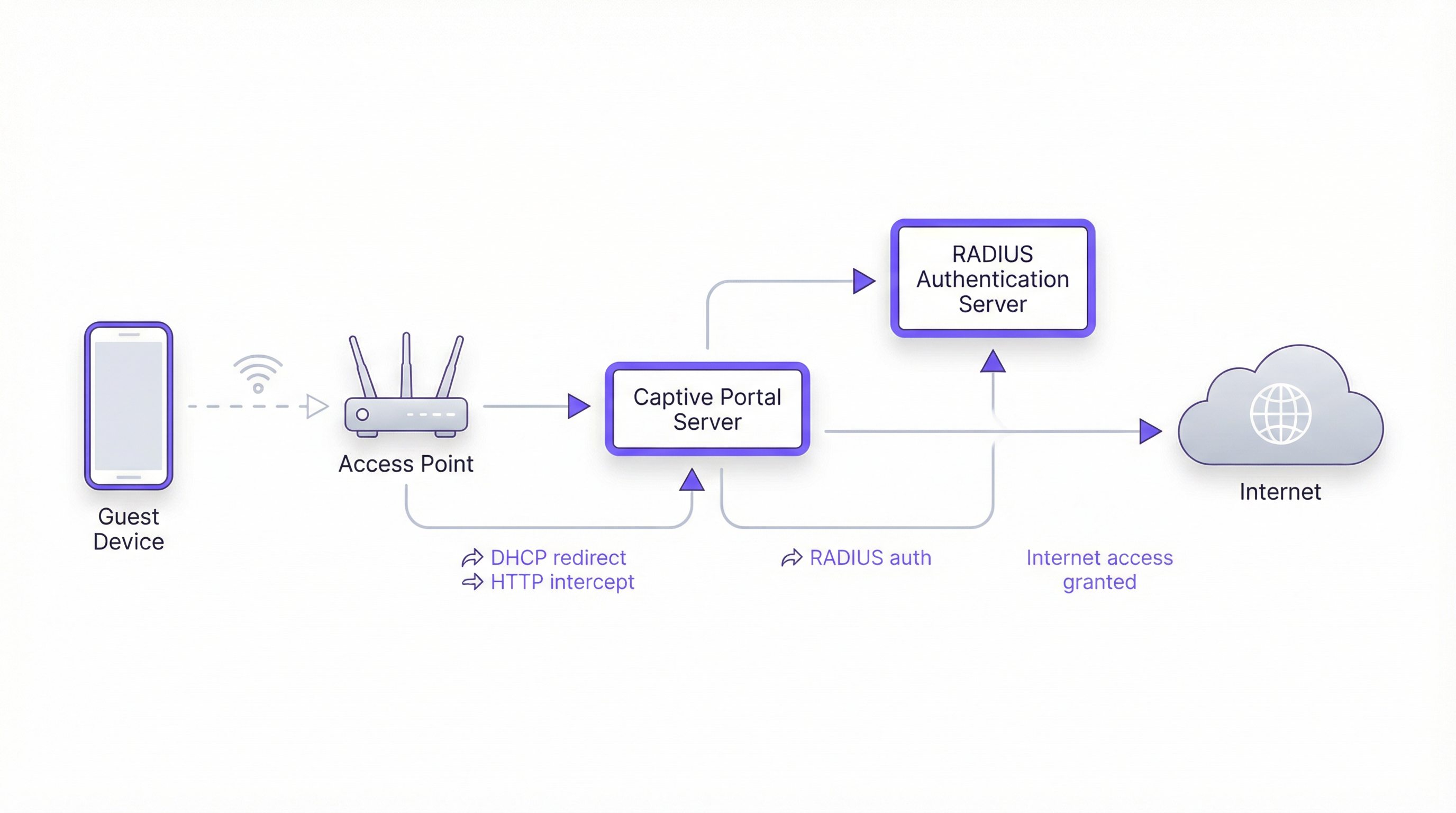
La creazione di un Captive Portal implica una sofisticata interazione tra protocolli di rete, tecnologie web e sistemi di autenticazione backend. L'obiettivo fondamentale è intercettare il traffico web di un utente e reindirizzarlo a un portale dedicato per l'autenticazione prima di concedere un accesso più ampio alla rete. Questo processo si basa su alcuni componenti fondamentali.
Architettura principale
- Access Point (AP): L'hardware wireless che trasmette il segnale WiFi. I moderni AP di livello enterprise dispongono di funzionalità integrate per supportare i Captive Portal.
- Server DHCP: Assegna un indirizzo IP al dispositivo che si connette. In una configurazione Captive Portal, il server DHCP può anche fornire l'URL all'endpoint API del Captive Portal (tramite l'Opzione DHCP 114), un metodo standardizzato nella RFC7710bis che migliora l'affidabilità del rilevamento su client moderni come Android 11+.
- Intercettazione/Reindirizzamento DNS: Quando il dispositivo dell'utente tenta di risolvere un nome di dominio (es.
google.com), il server DNS della rete restituisce inizialmente l'indirizzo IP del server del Captive Portal. Questo è il classico approccio "walled garden". - Server Captive Portal: Un server web che ospita la pagina di login/splash. Questa è l'applicazione con cui interagisce l'utente finale. È responsabile della presentazione del modulo di accesso, della convalida delle credenziali e della comunicazione con il backend di autenticazione.
- Server di autenticazione (RADIUS): Il Remote Authentication Dial-In User Service (RADIUS) è il backend standard del settore per l'autenticazione di rete. Quando un utente invia le proprie credenziali sul portale, il server del portale le inoltra al server RADIUS, che le verifica rispetto a un database di utenti autorizzati. È fondamentale per l'applicazione delle policy basate sugli standard IEEE 802.1X.
Scelte di piattaforme e framework
Gli sviluppatori hanno tre strade principali per creare l'applicazione Captive Portal rivolta all'utente. La scelta ha implicazioni significative per l'implementazione, l'esperienza utente e i costi di manutenzione.
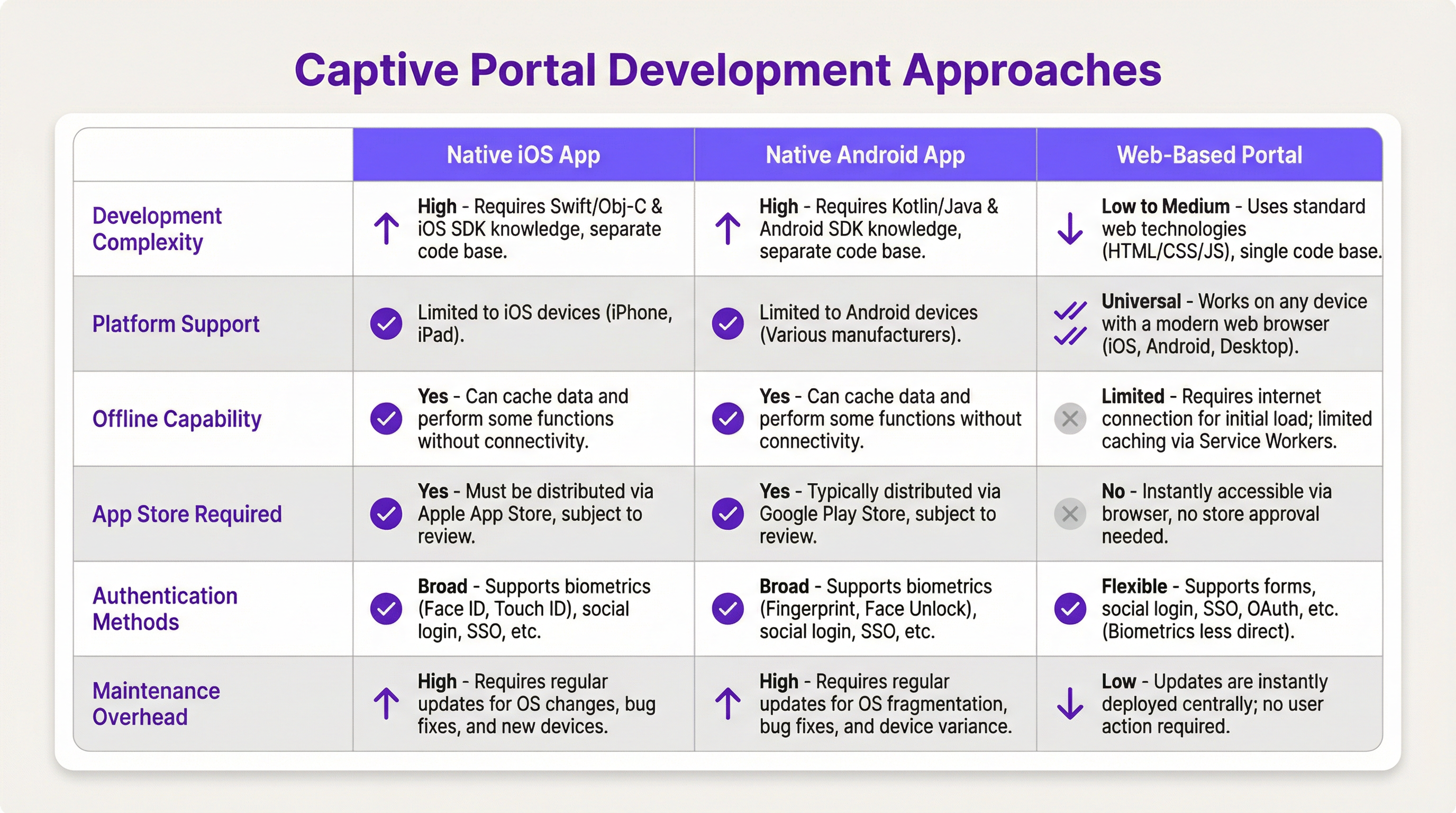
- App nativa iOS/Android: Offre l'esperienza utente più ricca, inclusa un'integrazione perfetta con le funzionalità del dispositivo come la biometria (Face ID, impronta digitale) e le funzionalità offline. Tuttavia, questo percorso richiede codebase separate (Swift/Objective-C per iOS, Kotlin/Java per Android), processi di revisione dell'App Store e costringe gli utenti a scaricare un'applicazione, il che può rappresentare una barriera all'ingresso significativa.
- Portale basato sul web: L'approccio più comune e flessibile. Un'applicazione web responsiva (HTML, CSS, JavaScript) viene fornita al browser dell'utente. È indipendente dalla piattaforma, non richiede installazione e gli aggiornamenti vengono distribuiti istantaneamente. Le moderne tecnologie web come i Service Worker possono fornire alcune funzionalità offline, ma in genere sono più limitate rispetto alle app native.
Guida all'implementazione
Questa sezione fornisce una panoramica di alto livello e indipendente dal fornitore per l'implementazione di un Captive Portal basato sul web.
Passaggio 1: Configurazione di rete e hardware
- Selezionare AP di livello enterprise: Scegliere access point di fornitori come Cisco Meraki, Ruckus o Aruba che supportano esplicitamente i Captive Portal esterni e l'autenticazione RADIUS.
- Configurare le VLAN: Isolare il traffico degli ospiti dalla rete aziendale interna utilizzando una VLAN dedicata. Questa è una misura di sicurezza fondamentale.
- Configurare DHCP e DNS: Configurare il server DHCP per assegnare gli IP sulla VLAN degli ospiti e il server DNS per eseguire il reindirizzamento iniziale al server del portale.
Passaggio 2: Sviluppo dell'applicazione del portale web
- Frontend: Utilizzare un framework JavaScript moderno come React, Vue o Svelte per un'esperienza utente dinamica. Assicurarsi che il design sia responsivo e mobile-first.
- Backend: È necessario un backend leggero (es. Node.js con Express, Python con Flask) per servire il frontend e gestire la comunicazione con il server RADIUS.
- Logica di autenticazione: Il flusso di lavoro principale è il seguente:
- L'utente si connette al WiFi.
- Il dispositivo viene reindirizzato all'URL del portale.
- L'utente invia le credenziali (es. numero di camera e cognome, email, social login).
- Il backend del portale invia una
Access-Requestal server RADIUS con le credenziali dell'utente. - Il server RADIUS convalida le credenziali e, in caso di esito positivo, restituisce un messaggio di
Access-Accept. - Il backend del portale segnala al controller di rete/gateway di aprire l'accesso per l'indirizzo MAC del dispositivo dell'utente.
Passaggio 3: Integrazioni API
- Property Management System (PMS): Per gli hotel, l'integrazione con il PMS (es. Oracle Opera) consente l'autenticazione in base alle prenotazioni degli ospiti (numero di camera + cognome).
- CRM: La sincronizzazione dei dati raccolti (es. indirizzi email) con un CRM come Salesforce abilita una potente automazione del marketing.
- Social Login: Utilizzare OAuth2 per consentire agli utenti di accedere con i propri account di social media (Facebook, Google, LinkedIn). Ciò fornisce dati demografici più ricchi, ma richiede un'attenta gestione della privacy e del consenso ai sensi del GDPR.
Best practice
- La sicurezza prima di tutto: Utilizzare sempre HTTPS per il proprio Captive Portal per crittografare le credenziali dell'utente in transito. Implementare il rate limiting per prevenire attacchi brute-force. Rispettare lo standard PCI DSS se si elaborano pagamenti.
- Conformità: Essere trasparenti sulla raccolta dei dati. La splash page del portale deve includere un link chiaro all'informativa sulla privacy e ottenere il consenso esplicito come richiesto dal GDPR e da altre normative sulla protezione dei dati.
- Esperienza utente: Mantenere il processo di accesso il più fluido possibile. Per le strutture multi-sito, implementare un roaming continuo in cui un utente autenticato in una sede viene automaticamente connesso in un'altra.
- Gestione della larghezza di banda: Implementare policy di Quality of Service (QoS) per garantire un'equa allocazione della larghezza di banda e impedire che pochi utenti peggiorino l'esperienza di tutti.
Risoluzione dei problemi e mitigazione dei rischi
- Problemi di rilevamento dei dispositivi: Non tutti i dispositivi interagiscono bene con i Captive Portal. Il passaggio verso indirizzi MAC randomizzati in iOS e Android può complicare il tracciamento dei dispositivi. L'API del Captive Portal (RFC7710bis) è il metodo di rilevamento più affidabile.
- Errori di accesso: Implementare un logging robusto sul portale e sul server RADIUS per diagnosticare i problemi di autenticazione. I problemi comuni includono credenziali errate, account scaduti o problemi di connettività di rete tra il portale e il server RADIUS.
- Rischi per la sicurezza: Un Captive Portal non adeguatamente protetto può essere un vettore per attacchi man-in-the-middle. Assicurarsi che tutte le comunicazioni siano crittografate e che il server del portale sia protetto contro le comuni vulnerabilità web.
ROI e impatto aziendale
Un Captive Portal non è solo una spesa IT; è un asset strategico. Il ROI si misura attraverso:
- Maggiore coinvolgimento dei clienti: Utilizzare il portale per promuovere servizi in loco, mostrare i programmi degli eventi o offrire sconti esclusivi.
- Analisi dei dati avanzata: Analizzando i dati di accesso, le strutture possono comprendere i modelli di traffico pedonale, i tempi di permanenza e i dati demografici dei clienti, portando a decisioni operative migliori.
- Nuovi flussi di entrate: Per centri congressi o aeroporti, l'accesso a livelli (es. WiFi di base gratuito, WiFi premium a pagamento) può generare entrate dirette. Il portale può essere utilizzato anche per pubblicità di terze parti.
- Migliore percezione del brand: Un'esperienza WiFi fluida e affidabile è ormai un'aspettativa di base. Un Captive Portal professionale migliora la percezione del brand come moderno e orientato al cliente.
Key Terms & Definitions
Captive Portal
A web page that the user of a public-access network is obliged to view and interact with before access is granted. It intercepts traffic until the user completes a required action, such as authentication or accepting terms of service.
This is the core component IT teams build to manage guest WiFi. It's the gateway that controls access and provides a branding and data collection opportunity.
RADIUS (Remote Authentication Dial-In User Service)
A client/server protocol (IETF standard) that provides centralized Authentication, Authorization, and Accounting (AAA) management for users who connect and use a network service.
For developers, this is the definitive backend protocol for network authentication. Your captive portal app will act as a RADIUS client to validate users against a central directory.
IEEE 802.1X
An IEEE standard for port-based Network Access Control (PNAC). It provides an authentication mechanism to devices wishing to attach to a LAN or WLAN.
This is the enterprise-grade security standard that underpins secure WiFi. While a captive portal is a web-layer solution, 802.1X provides a deeper, more secure authentication framework that can work in conjunction with it.
VLAN (Virtual Local Area Network)
A logical grouping of devices in the same broadcast domain. A VLAN partitions a single physical network into multiple, isolated logical networks.
This is a critical security tool for network architects. Guest WiFi traffic must always be segregated onto its own VLAN to prevent any possibility of access to the internal corporate network.
DHCP (Dynamic Host Configuration Protocol)
A network management protocol used on IP networks for automatically assigning IP addresses and other communication parameters to devices.
In a captive portal context, DHCP is not just for IP assignment. Using DHCP Option 114, it can also inform client devices of the captive portal API location, improving detection reliability.
GDPR (General Data Protection Regulation)
A regulation in EU law on data protection and privacy for all individuals within the European Union and the European Economic Area. It also addresses the transfer of personal data outside the EU and EEA areas.
If your venue serves European citizens (regardless of where the venue is located), your captive portal's data collection and handling practices must be GDPR compliant. This has major implications for consent and data transparency.
PCI DSS (Payment Card Industry Data Security Standard)
An information security standard for organizations that handle branded credit cards from the major card schemes.
If your captive portal involves any form of payment (e.g., for premium access), the entire application and infrastructure falls within the scope of PCI DSS, requiring stringent security controls and regular audits.
OAuth 2.0
An open standard for access delegation, commonly used as a way for Internet users to grant websites or applications access to their information on other websites but without giving them the passwords.
This is the framework developers use to implement 'Login with Google/Facebook' functionality. It provides a secure way to authenticate users and retrieve profile data without handling their actual social media passwords.
Case Studies
A 500-room luxury hotel wants to replace its generic WiFi login with a branded captive portal. The goal is to authenticate guests using their room number and last name, offer tiered bandwidth options (free standard, paid premium), and promote spa services. The existing network uses Cisco Meraki hardware.
- Architecture: Deploy a web-based captive portal hosted on a cloud server (AWS/Azure). 2. Network Configuration: Configure the Meraki dashboard to use an external captive portal, pointing to the URL of your new web app. Create two SSIDs on a guest VLAN: 'HotelGuest_Free' and 'HotelGuest_Premium'. 3. Application Development: Build a responsive web app. The landing page will have fields for 'Room Number' and 'Last Name'. 4. API Integration: Use the hotel's PMS API (e.g., Oracle Hospitality) to validate the guest credentials in real-time. On successful validation, the app makes a RADIUS request. 5. RADIUS Configuration: Set up a RADIUS server (e.g., FreeRADIUS) with policies. If the user is on the 'Premium' SSID, the RADIUS server returns attributes to the Meraki controller to unlock higher bandwidth for that user's MAC address. 6. Post-Login Experience: After authentication, redirect the user to a page featuring a prominent advertisement for the hotel spa with a 'Book Now' button.
A national retail chain with 200 stores wants to offer free guest WiFi to gather customer email addresses for its loyalty program. The solution must be centrally managed, GDPR compliant, and provide basic analytics on visitor counts and dwell times.
- Architecture: A centralized, cloud-hosted, multi-tenant web portal is the only viable option for this scale. 2. Authentication: The portal will feature a simple form asking for an email address. A checkbox for 'I agree to the terms and consent to receive marketing communications' is mandatory and must not be pre-checked. 3. Backend: The portal backend validates the email format and sends it via API to the central CRM/loyalty database. It then sends a RADIUS Access-Request. 4. RADIUS & Analytics: The RADIUS server logs the authentication event (with a timestamp and the store ID, passed as a RADIUS attribute from the local AP). This data is used for analytics. The RADIUS accounting records (Start and Stop messages) provide the data needed to calculate session duration (dwell time). 5. Deployment: The same portal URL is configured across all 200 stores. The local network at each store is configured to pass a unique 'NAS-Identifier' attribute to the RADIUS server so that analytics can be segmented by location.
Scenario Analysis
Q1. A stadium with a capacity of 50,000 needs to provide guest WiFi. The primary goal is to manage congestion and ensure fair bandwidth usage. A secondary goal is to display advertisements for upcoming events. What is the most critical technical feature to implement?
💡 Hint:Think about network performance at scale, not just authentication.
Show Recommended Approach
The most critical feature is Quality of Service (QoS) and bandwidth throttling. With 50,000 potential users, the network would be unusable without strict policies to limit each user's bandwidth and prevent a small number of users from consuming all available throughput. While authentication and advertising are important, ensuring the core service is stable is the top priority.
Q2. A hospital wants to provide WiFi for patients and visitors. They need to comply with HIPAA regulations regarding data privacy. They also want to allow users to access the hospital's patient portal. How should they design their captive portal authentication?
💡 Hint:Consider the sensitivity of healthcare data and the need for secure, but simple, access.
Show Recommended Approach
The solution requires a two-tiered approach. 1. A simple, click-through captive portal for general internet access that collects no personal data, thus minimizing HIPAA scope. This portal should clearly state the terms of use. 2. For access to the patient portal, the user should be redirected to the portal's separate, secure login page, which uses multi-factor authentication. The captive portal itself should not handle patient portal credentials. The guest network must be strictly isolated from the hospital's internal clinical network via VLANs and firewalls.
Q3. You are deploying a captive portal for a coffee shop chain. The marketing team wants to allow login via Facebook to gather customer demographic data. What are the key technical and compliance steps you must take?
💡 Hint:Focus on the intersection of OAuth, data collection, and privacy regulations like GDPR.
Show Recommended Approach
- Technical: Implement the OAuth 2.0 protocol to securely connect with Facebook's API. Ensure you only request the minimum necessary data permissions (e.g., public profile and email). 2. Compliance (GDPR): On the login page, before the user clicks 'Login with Facebook', you must display a clear statement explaining what data will be collected and for what purpose. You must include a link to your privacy policy. The user must actively consent (e.g., by clicking the login button after reading the notice); you cannot assume consent. 3. Backend: Your backend must securely store the access tokens and handle the collected data in accordance with your privacy policy.
Key Takeaways
- ✓A captive portal is a strategic asset for controlling network access and driving guest engagement.
- ✓The industry-standard architecture uses a web-based portal with a RADIUS server for authentication.
- ✓Always segregate guest traffic onto a dedicated VLAN and enforce HTTPS for security.
- ✓Compliance with GDPR and other privacy laws requires explicit, informed user consent before data collection.
- ✓Leverage API integrations with PMS and CRM systems to automate authentication and marketing.
- ✓Focus on a frictionless user experience to enhance brand perception and guest satisfaction.
- ✓Measure ROI through increased engagement, data analytics, and new revenue opportunities.




