

Campus Area Network (CAN): una guida completa alla progettazione, implementazione e gestione
This comprehensive technical reference guide covers the full lifecycle of Campus Area Networks (CANs) — from architectural design and technology selection to implementation, security hardening, and ongoing management. It is written for IT managers, network architects, and CTOs at hotels, retail chains, stadiums, and corporate campuses who need to build or modernise a high-performance, resilient connectivity backbone. By combining vendor-neutral best practices, real-world case studies, and actionable frameworks, this guide equips senior technical professionals to make informed decisions that deliver measurable ROI and support long-term strategic objectives.
🎧 Listen to this Guide
View Transcript
Riepilogo esecutivo
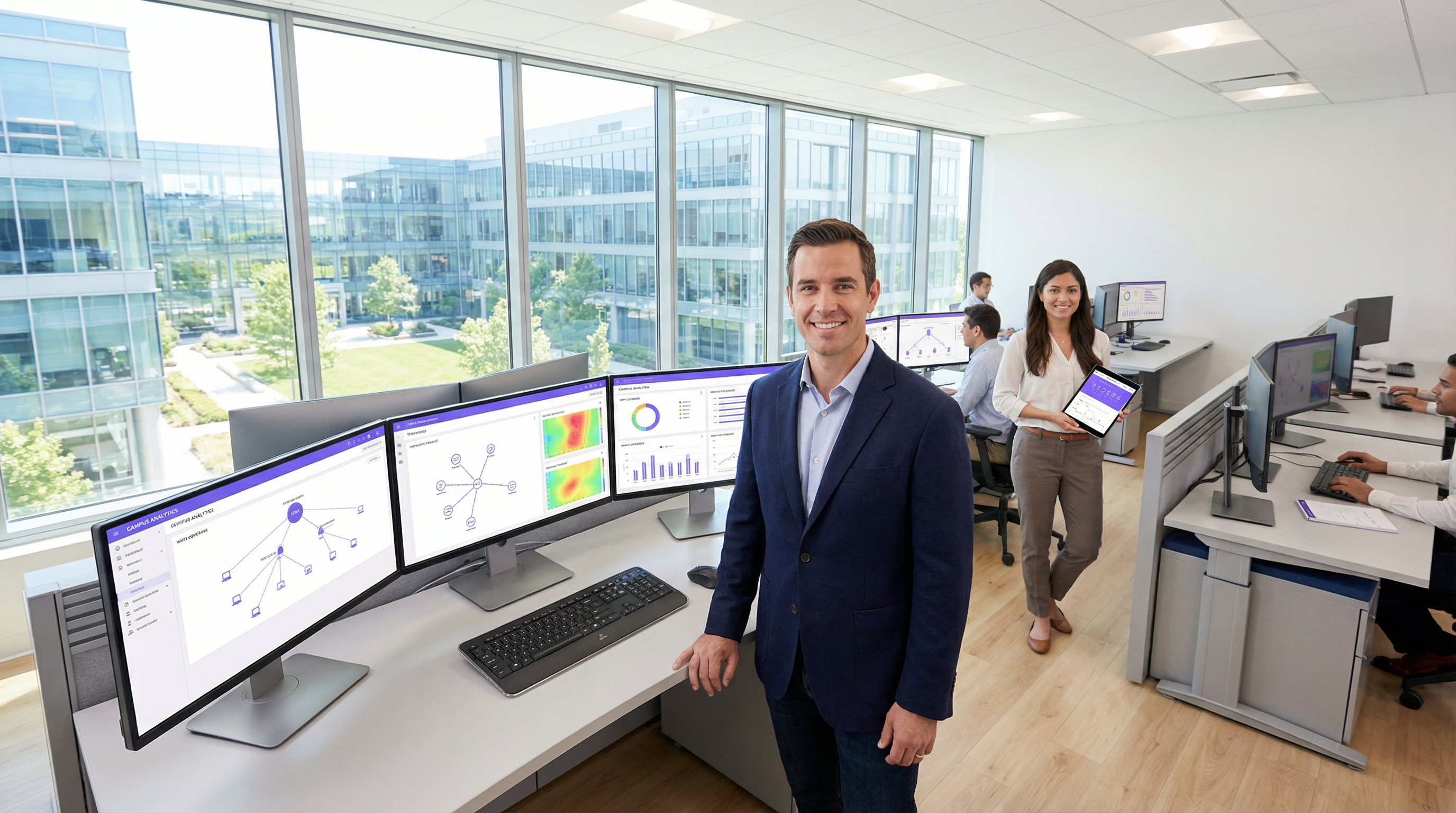
Una Campus Area Network (CAN) è un componente infrastrutturale critico per qualsiasi struttura di grandi dimensioni, dai campus aziendali e universitari ai resort alberghieri, parchi commerciali e stadi. Fornisce la dorsale di connettività ad alta velocità, affidabile e sicura necessaria per supportare le moderne operazioni digitali, i servizi per gli ospiti e le implementazioni IoT. Per i responsabili IT, gli architetti di rete e i CTO, una CAN ben progettata non è semplicemente un centro di costo, ma un asset strategico che ottimizza l'efficienza operativa, migliora l'esperienza utente e sblocca nuove opportunità di guadagno.
Questa guida fornisce un framework pratico e indipendente dal fornitore per la progettazione, l'implementazione e la gestione di una CAN ad alte prestazioni. Copre l'architettura gerarchica essenziale a tre livelli, le principali scelte tecnologiche, tra cui la fibra ottica e i moderni standard Wi-Fi, e le best practice per garantire sicurezza, scalabilità e ridondanza. Seguendo i principi qui delineati, le organizzazioni possono creare una rete a prova di futuro che offra un ROI misurabile e supporti i loro obiettivi strategici negli anni a venire.
Approfondimento tecnico
Il modello gerarchico a tre livelli
L'architettura più adottata e collaudata per una Campus Area Network scalabile e resiliente è il modello gerarchico a tre livelli. Questo design segmenta la rete in tre livelli distinti: Core, Distribuzione e Accesso. Questa modularità semplifica la progettazione, migliora l'isolamento dei guasti e consente una scalabilità prevedibile.
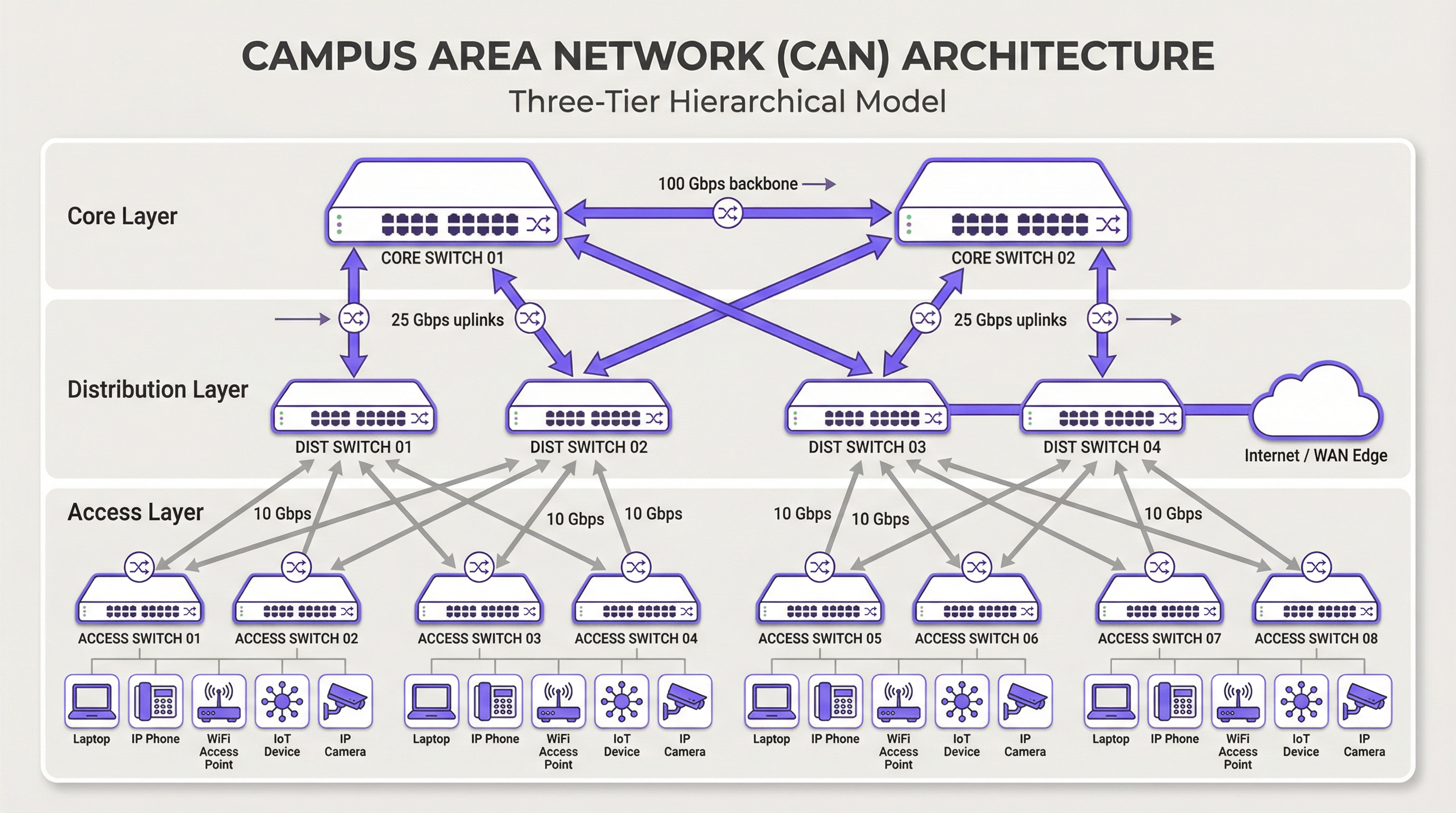
Livello Core: il core è la dorsale ad alta velocità della rete. Il suo unico scopo è commutare il traffico il più velocemente possibile tra i dispositivi del livello di distribuzione. Il core dovrebbe essere mantenuto snello e semplice, evitando complesse implementazioni di policy o manipolazioni dei pacchetti. Le caratteristiche chiave includono un'elevata ridondanza (in genere con switch e collegamenti ridondanti), un throughput elevato (spesso 100 Gbps o superiore) e una rapida convergenza in caso di guasto. Il livello core garantisce che il traffico tra le diverse parti del campus non crei colli di bottiglia.
Livello di Distribuzione: questo livello funge da hub di comunicazione tra i livelli di accesso e core. È un punto critico per l'implementazione delle policy di rete, tra cui routing, liste di controllo degli accessi (ACL), Quality of Service (QoS) e filtri di sicurezza. Il livello di distribuzione aggrega il traffico proveniente da più switch del livello di accesso prima di inoltrarlo al core. Definisce i domini di broadcast e fornisce connessioni ridondanti sia al livello di accesso che a quello core, spesso utilizzando tecnologie come EtherChannel per l'aggregazione dei collegamenti e la ridondanza.
Livello di Accesso: è qui che i dispositivi degli utenti finali si connettono alla rete: workstation, laptop, telefoni IP, stampanti, dispositivi IoT e, soprattutto, Wireless Access Point (AP). Il livello di accesso fornisce sicurezza a livello di porta, Power over Ethernet (PoE) per dispositivi come AP e telecamere e segmentazione VLAN per isolare diversi tipi di traffico (es. aziendale, ospiti, IoT). Gli switch a questo livello devono fornire un'elevata densità di porte e il supporto per standard moderni come il multi-gigabit Ethernet (IEEE 802.3bz) per gestire i requisiti di larghezza di banda del Wi-Fi 6/6E e successivi.
Tecnologie principali
Cablaggio in fibra ottica: è lo standard per la connettività dorsale all'interno di una CAN, poiché collega gli edifici e unisce i livelli core e di distribuzione. L'elevata larghezza di banda, la bassa latenza e l'immunità alle interferenze elettromagnetiche lo rendono ideale per collegamenti ad alta velocità sulle distanze tipiche di un campus. La fibra monomodale viene in genere utilizzata per i tratti più lunghi tra gli edifici, mentre la fibra multimodale può essere impiegata per collegamenti più brevi e ad alta larghezza di banda all'interno del data center di un edificio.
Wireless LAN (WLAN): non è più solo un overlay, ma parte integrante del livello di accesso. Le CAN moderne devono essere progettate con una mentalità "Wi-Fi first". Ciò richiede un'attenta pianificazione del posizionamento degli AP tramite site survey RF, allocazione dei canali e pianificazione della capacità. L'ultimo standard, il Wi-Fi 6E (802.11ax), che opera nella banda a 6 GHz, offre una capacità significativamente maggiore e minori interferenze, rendendolo una tecnologia fondamentale per ambienti ad alta densità come centri congressi e stadi.
Power over Ethernet (PoE): è essenziale per semplificare l'implementazione dei dispositivi del livello di accesso. Standard come IEEE 802.3bt (PoE++) possono fornire fino a 90 W di potenza, supportando non solo gli AP Wi-Fi, ma anche telecamere di sicurezza ad alta definizione, digital signage e persino alcuni piccoli switch. Ciò elimina la necessità di prese di alimentazione separate per ciascun dispositivo, riducendo i costi e la complessità di installazione.
Guida all'implementazione
Un approccio strutturato e graduale all'implementazione della CAN è essenziale per gestire i rischi e garantire risultati di qualità.
Fase 1 — Raccolta dei requisiti e Site Survey: inizia definendo i requisiti aziendali. Quali applicazioni verranno eseguite sulla rete? Quali sono le aspettative in termini di densità di utenti e tipologia di dispositivi? Conduci un site survey fisico approfondito per identificare la disposizione degli edifici, le potenziali fonti di interferenza RF e le posizioni degli armadi di cablaggio (IDF) e del data center principale (MDF). Questa fase dovrebbe includere anche una revisione dell'infrastruttura esistente per identificare cosa può essere mantenuto o aggiornato.
Fase 2 — Progettazione architettonica: in base ai requisiti, progetta l'architettura a tre livelli. Determina il numero di switch di accesso necessari per piano ed edificio, la capacità richiesta al livello di distribuzione e il throughput necessario per la dorsale core. Pianifica la tua strategia di segmentazione VLAN per separare logicamente i tipi di traffico. Documenta accuratamente il progetto: questo diventerà la tua specifica di costruzione e la baseline per la gestione delle modifiche.
Fase 3 — Selezione della tecnologia e del fornitore: seleziona l'hardware che soddisfa le specifiche di progettazione. Considera fattori come il supporto per gli standard aperti, le opzioni dell'interfaccia di gestione (CLI rispetto alla gestione cloud), il budget PoE e i termini di garanzia. Per una CAN su larga scala, una piattaforma di gestione centralizzata è fondamentale per operazioni efficienti e dovrebbe essere selezionata insieme all'hardware.
Fase 4 — Installazione fisica: stendi il cablaggio in fibra ottica tra gli edifici e verso ciascun IDF. Installa gli switch nei rack, garantendo alimentazione e raffreddamento adeguati. Monta i wireless access point in base al piano del site survey RF. Una gestione e un'etichettatura meticolosa dei cavi in questa fase faranno risparmiare molto tempo durante la risoluzione dei problemi e i futuri aggiornamenti.
Fase 5 — Configurazione e messa in servizio: configura gli switch partendo dal core e scendendo fino al livello di accesso. Implementa VLAN, protocolli di routing (es. OSPF), policy di sicurezza (802.1X) e QoS. Porta la rete online con un approccio graduale, testando la connettività in ogni fase. Convalida la copertura e le prestazioni wireless rispetto agli obiettivi di progettazione iniziali prima di dichiarare la rete pronta per la produzione.
Best practice
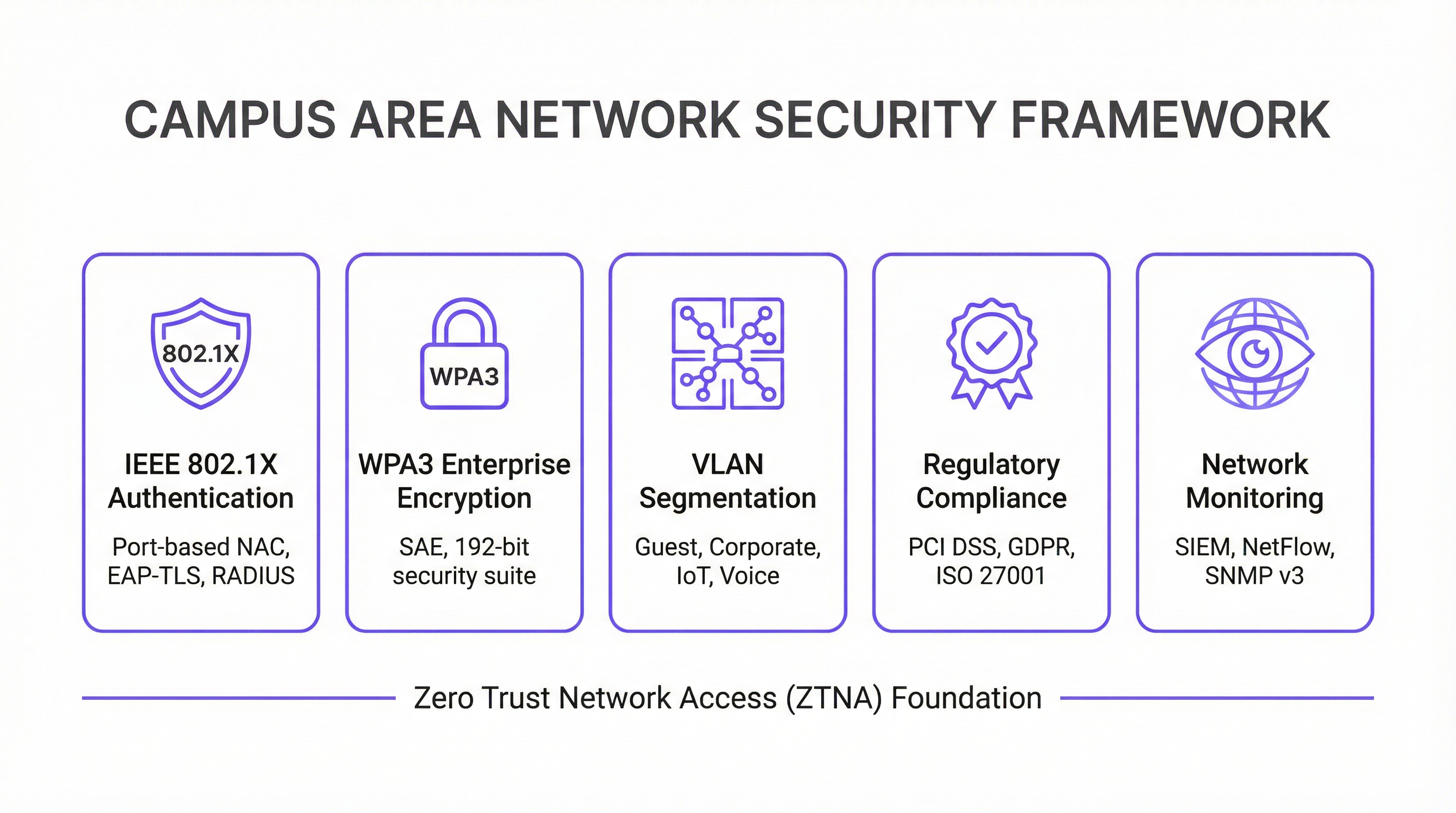
La sicurezza prima di tutto — Architettura Zero Trust: implementa un modello di sicurezza Zero Trust fin dal primo giorno. Utilizza IEEE 802.1X per il Network Access Control (NAC) basato su porta per autenticare ogni dispositivo che si connette alla rete cablata o wireless. Applica una crittografia avanzata con WPA3-Enterprise sulla tua WLAN. Segmenta la rete con le VLAN per contenere le minacce e limitare i movimenti laterali. Tutto il traffico di gestione della rete dovrebbe utilizzare protocolli sicuri come SSH e SNMPv3. Per le organizzazioni che gestiscono i dati delle carte di pagamento, la conformità PCI DSS richiede una rigorosa segmentazione della rete e un controllo degli accessi, che una CAN ben progettata rende semplici da implementare e verificare.
Progettazione per la ridondanza: elimina i singoli punti di guasto a ogni livello. Utilizza switch ridondanti nei livelli core e di distribuzione. Impiega l'aggregazione dei collegamenti (EtherChannel/LACP) per fornire sia una maggiore larghezza di banda che la ridondanza dei collegamenti. Garantisci alimentatori ridondanti negli switch critici e percorsi in fibra diversificati tra gli edifici, ove possibile. Per gli ambienti mission-critical, prendi in considerazione i gruppi di continuità (UPS) per tutte le apparecchiature di rete.
Pianificazione per la scalabilità: progetta pensando ai prossimi cinque anni, non solo a oggi. Assicurati che i livelli core e di distribuzione abbiano una capacità sufficiente per gestire la crescita futura del traffico e dei dispositivi connessi. Utilizza uno chassis modulare a livello di distribuzione o core per consentire una facile espansione. Scegli una fibra con un numero di filamenti superiore a quello immediatamente necessario per soddisfare i requisiti futuri senza costosi ricablaggi.
Gestione e monitoraggio centralizzati: una CAN di grandi dimensioni è troppo complessa per essere gestita dispositivo per dispositivo. Utilizza un sistema di gestione di rete (NMS) centralizzato per automatizzare la configurazione, monitorare le prestazioni e ricevere avvisi. Piattaforme come la soluzione di intelligence WiFi di Purple forniscono approfondimenti sul comportamento degli utenti e sull'integrità della rete, consentendo una gestione e un'ottimizzazione proattive. La conformità al GDPR richiede inoltre visibilità sui flussi di dati e sugli accessi degli utenti, cosa che una piattaforma di gestione centralizzata facilita.
Risoluzione dei problemi e mitigazione dei rischi
Problemi a livello fisico: sono la causa più comune dei problemi di rete. Cavi difettosi, ricetrasmettitori guasti e connessioni allentate sono responsabili di una percentuale significativa delle interruzioni di rete. Una metodologia strutturata per la risoluzione dei problemi che segue il modello OSI, partendo dal Livello 1 (Fisico) e procedendo verso l'alto, è l'approccio più efficiente. Investi in apparecchiature di test dei cavi di qualità e mantieni un inventario di parti di ricambio per i componenti critici.
Interferenza RF: in un ambiente wireless denso può degradare gravemente le prestazioni. Le interferenze co-canale e del canale adiacente sono le principali colpevoli. Utilizza uno strumento di monitoraggio RF per identificare le fonti di interferenza, che possono includere reti vicine, forni a microonde e dispositivi Bluetooth. Gli algoritmi di assegnazione dinamica dei canali (DCA) nei moderni controller wireless possono essere d'aiuto, ma in ambienti difficili a volte è necessaria l'ottimizzazione manuale.
Deriva della configurazione: si verifica quando le modifiche manuali ai singoli dispositivi creano incongruenze nella rete nel corso del tempo. Ciò porta a comportamenti imprevisti e complica la risoluzione dei problemi. Utilizza uno strumento di gestione della configurazione per tenere traccia delle modifiche, applicare modelli standard e annullare le modifiche errate. Tutte le modifiche dovrebbero essere apportate tramite un processo formale di gestione delle modifiche.
Vulnerabilità di sicurezza: il firmware senza patch è un rischio persistente. Stabilisci un programma di patching regolare per tutti i dispositivi di rete. Monitora i modelli di traffico anomali utilizzando un sistema SIEM (Security Information and Event Management). Conduci penetration test periodici per identificare i punti deboli prima che lo facciano gli aggressori.
ROI e impatto aziendale
Una Campus Area Network ben eseguita offre un valore aziendale significativo e misurabile in molteplici dimensioni.
| Risultato aziendale | Metrica chiave | Miglioramento tipico |
|---|---|---|
| Soddisfazione degli ospiti | NPS / Punteggi delle recensioni | +25-40% per i punteggi relativi alla connettività |
| Efficienza operativa IT | Ticket di supporto | Riduzione del 40-60% dei ticket relativi alla rete |
| Tempi di audit di conformità | Giorni per completare l'audit PCI DSS | Riduzione del 50-70% |
| Uptime della rete | % di disponibilità | 99,9%+ con design ridondante |
| Ricavi da nuovi servizi | Servizi IoT / Analytics abilitati | Sblocca l'analisi della posizione e il tracciamento degli asset |
Maggiore produttività: una connettività affidabile e ad alta velocità consente a dipendenti e ospiti di lavorare in modo efficiente senza interruzioni. Nel contesto dell'ospitalità, questo si traduce direttamente in punteggi di soddisfazione degli ospiti e prenotazioni ripetute.
Migliore esperienza per ospiti e clienti: nei settori dell'ospitalità e del retail, un Wi-Fi veloce e senza interruzioni è un fattore chiave per la soddisfazione e la fidelizzazione dei clienti. Le analisi derivate dalla rete Wi-Fi, come il tempo di permanenza, i modelli di affluenza e il conteggio dei dispositivi, possono essere utilizzate per personalizzare le esperienze degli ospiti e ottimizzare le operazioni della struttura.
Efficienza operativa: una CAN gestita centralmente riduce i costi operativi per il team IT. Il PoE semplifica l'implementazione di nuovi dispositivi e un'architettura resiliente riduce al minimo i costosi tempi di inattività. La capacità di gestire l'intera infrastruttura da un'unica console è particolarmente preziosa per le organizzazioni multi-sito.
Abilitazione di nuovi servizi: la CAN è la base per una serie di servizi per strutture intelligenti, tra cui l'automazione degli edifici basata su IoT, i servizi basati sulla posizione, il tracciamento degli asset e i sistemi di sicurezza avanzati. Questi servizi rappresentano nuovi flussi di entrate e fattori di differenziazione competitiva che semplicemente non sono possibili senza una solida rete sottostante.
Misurando metriche come l'uptime della rete, il throughput medio, il numero di ticket di supporto e i punteggi di soddisfazione degli ospiti, le organizzazioni possono quantificare il ROI positivo del loro investimento in una moderna Campus Area Network. Per la maggior parte delle implementazioni aziendali, una CAN ben progettata raggiunge il punto di pareggio entro 18-36 mesi attraverso una combinazione di costi operativi ridotti e ricavi da nuovi servizi.
Key Terms & Definitions
Campus Area Network (CAN)
A computer network that interconnects multiple local area networks (LANs) within a geographically bounded area, such as a corporate campus, hotel resort, university, or large retail estate. A CAN is typically owned and operated by a single organisation and provides high-speed, low-latency connectivity between buildings.
IT teams encounter this term when planning network infrastructure for any multi-building facility. It is the correct technical term for what is often colloquially called 'the campus network' or 'the site network'. Understanding the distinction between a CAN, a LAN, and a WAN is essential for scoping infrastructure projects and vendor conversations.
Three-Tier Hierarchical Model
The industry-standard architectural framework for enterprise campus networks, comprising three distinct layers: the Access Layer (where end devices connect), the Distribution Layer (where policy is enforced and traffic is aggregated), and the Core Layer (the high-speed backbone). Each layer has a specific, well-defined role.
This model is the starting point for virtually every enterprise CAN design. IT teams use it to structure their design conversations, allocate budget, and plan for scalability. Deviating from this model (e.g., using a flat, single-tier design) is a common cause of scalability and performance problems in growing organisations.
IEEE 802.1X
An IEEE standard for port-based Network Access Control (NAC) that provides an authentication mechanism for devices wishing to connect to a LAN or WLAN. It uses the Extensible Authentication Protocol (EAP) and requires a RADIUS server to authenticate users and devices before granting network access.
IT teams implement 802.1X to ensure that only authorised devices can connect to the network. It is a foundational security control for PCI DSS compliance (Requirement 1.3) and is a key component of a Zero Trust network architecture. Without 802.1X, any device that can physically connect to a network port or associate with a Wi-Fi SSID can gain network access.
WPA3-Enterprise
The latest generation of Wi-Fi security protocol for enterprise environments, ratified by the Wi-Fi Alliance. WPA3-Enterprise mandates the use of 192-bit minimum-strength security protocols and uses Simultaneous Authentication of Equals (SAE) to replace the older Pre-Shared Key (PSK) mechanism, providing stronger protection against offline dictionary attacks.
IT teams should be migrating to WPA3-Enterprise as the standard for all corporate and sensitive Wi-Fi SSIDs. WPA2 remains acceptable for guest networks in many contexts, but WPA3 is the requirement for networks handling sensitive data. It is increasingly referenced in security frameworks and is expected to become mandatory in future PCI DSS and ISO 27001 guidance.
VLAN (Virtual Local Area Network)
A logical subdivision of a physical network that groups devices into separate broadcast domains, regardless of their physical location. VLANs are defined by IEEE 802.1Q and are implemented on managed switches. Traffic between VLANs requires routing (a Layer 3 function), which provides a natural security boundary.
VLAN segmentation is the primary tool for isolating different types of traffic on a shared physical network. IT teams use VLANs to separate guest traffic from corporate traffic, isolate IoT devices, and create a dedicated PCI DSS cardholder data environment. Incorrect VLAN configuration is a common cause of both security incidents and network performance problems.
Power over Ethernet (PoE)
A technology that allows network cables to carry electrical power, enabling devices like Wi-Fi access points, IP cameras, and VoIP phones to receive power through the same Ethernet cable used for data. Key standards include IEEE 802.3af (15.4W), IEEE 802.3at (30W), and IEEE 802.3bt (90W, also known as PoE++).
PoE is a critical consideration when specifying access layer switches for a CAN. IT teams must calculate the total PoE budget required for all connected devices and ensure the switch's power supply can meet that demand. Underestimating PoE requirements is a common and costly mistake, as it can require switch replacements or additional power injectors.
Wi-Fi 6E (IEEE 802.11ax)
The latest generation of the Wi-Fi standard, extending Wi-Fi 6 into the 6 GHz frequency band. Wi-Fi 6E provides access to up to 1,200 MHz of additional spectrum, significantly increasing capacity and reducing congestion compared to the 2.4 GHz and 5 GHz bands. It supports theoretical throughput of up to 9.6 Gbps.
IT teams planning new CAN deployments should specify Wi-Fi 6E-capable access points as the standard. The 6 GHz band is particularly valuable in high-density environments (conference centres, stadiums, hotel lobbies) where the 2.4 GHz and 5 GHz bands are congested. Note that client devices must also support Wi-Fi 6E to benefit from the 6 GHz band.
EtherChannel / LACP
EtherChannel is a port link aggregation technology that bundles multiple physical Ethernet links into a single logical link, providing both increased bandwidth and link redundancy. LACP (Link Aggregation Control Protocol), defined in IEEE 802.3ad, is the open-standard protocol used to negotiate and manage EtherChannel bundles.
IT teams use EtherChannel/LACP on uplinks between the access, distribution, and core layers to eliminate single points of failure and increase available bandwidth. It is a standard component of any redundant CAN design. When a single link in the bundle fails, traffic is automatically redistributed across the remaining links without interruption.
Zero Trust Network Access (ZTNA)
A security framework based on the principle of 'never trust, always verify'. In a ZTNA model, no user or device is trusted by default, regardless of whether they are inside or outside the network perimeter. Access is granted on a least-privilege basis, based on continuous verification of identity, device health, and context.
ZTNA is increasingly the recommended security architecture for enterprise CANs, replacing the older 'castle and moat' perimeter security model. IT teams implement ZTNA through a combination of 802.1X, micro-segmentation, multi-factor authentication, and continuous monitoring. It is particularly relevant for organisations with IoT devices, guest access, and remote workers connecting to campus resources.
Case Studies
A 450-room international hotel group is experiencing persistent guest complaints about Wi-Fi quality. Their current network is a flat, single-VLAN design with consumer-grade access points installed five years ago. The hotel has a main building, a conference centre, and a spa/leisure wing. The IT Director has a budget for a full network refresh and needs to deliver a measurable improvement in guest satisfaction within six months. How should the network be redesigned?
The solution requires a full three-tier CAN deployment across the property. Step 1: Conduct a detailed RF site survey across all three buildings to determine optimal AP placement, identify sources of interference, and plan for high-density areas (conference rooms, restaurant, lobby). Step 2: Design a redundant core in the main data centre, with dual core switches connected via 100 Gbps links. Step 3: Deploy distribution switches on each floor of each building, connected to the core via dual 25 Gbps fiber uplinks. Step 4: Install Wi-Fi 6E access points — one per room corridor (covering 4-6 rooms each), plus dedicated high-density APs in the conference centre and lobby. Step 5: Implement strict VLAN segmentation: VLAN 10 for guest Wi-Fi (internet access only, isolated from corporate network), VLAN 20 for staff devices (access to PMS and operational systems), VLAN 30 for building management systems (HVAC, door locks, CCTV), VLAN 40 for voice (IP phones). Step 6: Deploy IEEE 802.1X for staff devices and WPA3-Personal with a captive portal for guest access. Step 7: Integrate with Purple's WiFi intelligence platform for real-time monitoring, guest analytics, and automated alerting.
A regional retail chain operates 12 stores across a large shopping centre campus. Each store currently has its own isolated network, managed independently. The IT team is struggling with PCI DSS compliance audits (which take two weeks each time), inconsistent security policies, and an inability to deploy new services like in-store analytics and digital signage centrally. The CTO wants a unified campus network that addresses all three problems. What architecture should be recommended?
The solution is a campus-wide CAN with a shared core infrastructure and per-store logical isolation via VLANs. Step 1: Deploy a redundant core in the shopping centre's main data centre (or a dedicated co-location space), with dual core switches and diverse fiber paths to each store. Step 2: Each store gets a distribution switch connected to the core via dedicated fiber, with a separate VLAN per store for corporate traffic and a shared VLAN for guest Wi-Fi. Step 3: Implement IEEE 802.1X for all point-of-sale (POS) devices, with a dedicated PCI DSS-compliant VLAN that is strictly isolated from all other traffic. Step 4: Deploy WPA3-Enterprise for staff devices and a captive portal for customer Wi-Fi. Step 5: Centralise all management through a single NMS, giving the IT team a unified view of all 12 locations. Step 6: Integrate Purple's analytics platform to capture footfall data, dwell time, and customer device counts across the estate. Step 7: Use the centralised management platform to push consistent security policies, firmware updates, and new service configurations to all stores simultaneously.
Scenario Analysis
Q1. You are the IT Director of a 600-room conference hotel. Your network currently has 98% uptime but guests in the conference centre consistently report poor Wi-Fi during large events (500+ attendees). Your access points are Wi-Fi 5 (802.11ac) and were installed four years ago. You have budget for either (a) replacing all APs with Wi-Fi 6E models, or (b) a full network refresh including new distribution switches, fiber uplinks, and Wi-Fi 6E APs. Which option do you choose, and why?
💡 Hint:Consider where the bottleneck actually is. Is the problem at the wireless layer, the wired layer, or both? What happens to the traffic once it leaves the access point?
Show Recommended Approach
Option (b) — the full network refresh — is the correct choice, though it requires justification. The symptoms (poor performance in high-density areas during peak load) could be caused by wireless congestion (too many clients per AP, insufficient spectrum), wired bottlenecks (insufficient uplink capacity from APs to distribution switches), or both. Simply replacing the APs with Wi-Fi 6E models (Option a) addresses the wireless layer but leaves the wired infrastructure unchanged. If the distribution switches or uplinks are already at capacity, the new APs will still be bottlenecked. Furthermore, Wi-Fi 6E APs with 2.5 Gbps or 5 Gbps ports require multi-gigabit Ethernet (IEEE 802.3bz) uplinks to realise their full throughput — which older distribution switches may not support. The full refresh ensures the entire path from client to core is capable of handling the load. The additional cost of the wired infrastructure upgrade is typically 30-40% of the total project cost but eliminates the risk of a second, more disruptive upgrade within 12-18 months. Present this to the CTO as a five-year investment, not a one-time fix.
Q2. Your organisation is a retail chain preparing for its annual PCI DSS audit. The auditor has flagged that your point-of-sale (POS) terminals share a VLAN with your staff Wi-Fi network, creating an overly broad cardholder data environment (CDE) scope. You have 30 days before the audit. What immediate and medium-term actions do you take?
💡 Hint:PCI DSS Requirement 1.3 mandates that the CDE is isolated from all other networks. Focus on network segmentation as the primary control. Consider what is achievable in 30 days versus what requires a longer project.
Show Recommended Approach
Immediate actions (within 30 days): Create a dedicated VLAN (e.g., VLAN 50) for all POS terminals and configure ACLs on the distribution switches to restrict traffic from this VLAN to only the payment gateway and necessary management systems. Remove all POS terminals from the shared staff VLAN. Implement IEEE 802.1X on POS switch ports to ensure only authorised POS devices can connect to VLAN 50. Document the new network topology and VLAN map for the auditor. This reduces the CDE scope to only the POS VLAN and its connections, significantly simplifying the audit. Medium-term actions (within 90 days): Conduct a full network segmentation review to ensure all VLANs are correctly configured and that no unintended paths exist between the CDE and other network segments. Deploy a SIEM to monitor traffic to and from the CDE VLAN. Consider a penetration test specifically targeting the CDE segmentation to validate the controls. The key principle is that network segmentation is the most effective way to reduce PCI DSS audit scope and cost. Every device that is not in the CDE is outside the scope of the audit.
Q3. You are designing a CAN for a 15,000-seat stadium that hosts 80 events per year, ranging from football matches to concerts. The venue has 12 buildings (including the main bowl, corporate hospitality suites, media centre, and operations centre) connected by an existing but aging fiber ring. Peak concurrent users are estimated at 18,000 (including staff). What are the three most critical design decisions you need to make, and what is your recommendation for each?
💡 Hint:Think about the unique characteristics of a stadium environment: extreme density, highly variable load (near-zero between events, maximum during events), diverse user types (fans, corporate guests, media, staff, operations), and the need for the network to support both public-facing and operational systems.
Show Recommended Approach
Decision 1 — Wireless Density and AP Placement: In a stadium, the density challenge is extreme. The recommendation is to deploy under-seat APs in the bowl (one AP per 4-6 rows of seats), supplemented by overhead APs for concourse areas. Wi-Fi 6E is mandatory — the 6 GHz band provides the additional spectrum needed to handle 18,000 concurrent users. Each AP should be configured with a narrow beam pattern directed at the seating rows, not broadcasting broadly. Decision 2 — Network Segmentation: Implement strict VLAN segmentation for at least five zones: Fan Wi-Fi (internet access only), Corporate Hospitality (higher bandwidth, access to streaming services), Media (dedicated high-bandwidth VLAN for broadcast and press), Operations (CCTV, access control, building management), and Staff (operational systems). Each zone has different performance and security requirements. Decision 3 — Scalability of the Core and Fiber Infrastructure: The existing fiber ring must be assessed. If it is a single ring with no redundancy, it is a critical risk. The recommendation is to upgrade to a dual-ring or mesh fiber topology between buildings, with the core switches in a geographically separate location from the main distribution point. The core must be sized for 100 Gbps+ throughput to handle peak event load. Critically, the network must be designed for peak load (event day), not average load — this is the opposite of most enterprise network designs.
Key Takeaways
- ✓The three-tier hierarchical model (Core, Distribution, Access) is the proven architectural foundation for any enterprise Campus Area Network — it provides modularity, scalability, and fault isolation that flat or two-tier designs cannot match.
- ✓Security must be designed in from the start, not bolted on afterwards. IEEE 802.1X for port-based authentication, WPA3-Enterprise for wireless encryption, and strict VLAN segmentation are the non-negotiable baseline controls for any professional CAN.
- ✓Design for redundancy at every layer: dual core switches, dual distribution uplinks, redundant power supplies, and diverse fiber paths between buildings. The cost of redundancy is always less than the cost of an unplanned outage.
- ✓Wi-Fi 6E (802.11ax) in the 6 GHz band is the current standard for new deployments in high-density environments. Specifying Wi-Fi 5 or earlier for a new build is a false economy that will require premature replacement.
- ✓Centralised management is not optional for a multi-building CAN. A Network Management System (NMS) and a WiFi intelligence platform like Purple are essential for maintaining consistent security policies, monitoring performance, and demonstrating compliance during audits.
- ✓The Fiber Surplus Principle: always install at least twice as many fiber strands as you need today. Re-cabling a campus is far more expensive and disruptive than the marginal cost of additional strands during initial installation.
- ✓A well-executed CAN delivers measurable ROI through improved guest satisfaction, reduced IT support overhead, faster compliance audits, and the ability to deploy new revenue-generating services like location analytics and IoT-based building automation.




