

Architettura del Captive Portal: un'analisi tecnica approfondita
This technical reference guide provides a comprehensive architectural breakdown of captive portal systems for enterprise guest WiFi deployments. It examines how network-level redirection, RADIUS authentication, access node policy enforcement, and walled garden configuration interact to create a secure and scalable access control framework. Designed for IT managers, network architects, and venue operations directors, this guide delivers actionable implementation guidance, real-world case studies, and compliance-aligned best practices that directly support deployment decisions in hospitality, retail, events, and public-sector environments.
🎧 Listen to this Guide
View Transcript
Riepilogo esecutivo
Questa guida fornisce un'analisi tecnica approfondita dell'architettura del Captive Portal, pensata per responsabili IT, architetti di rete e direttori operativi. Analizza i componenti principali, dal nodo di accesso al server RADIUS, spiegando come i meccanismi di reindirizzamento a livello di rete, autenticazione e controllo degli accessi funzionino all'unisono. Esplorando standard come l'802.1X, il ruolo del walled garden e scenari di implementazione reali, questo documento fornisce ai professionisti tecnologici senior le informazioni pratiche necessarie per progettare, implementare e gestire una rete WiFi per gli ospiti sicura, scalabile e ad alte prestazioni, in grado di offrire un'esperienza utente fluida e un solido ritorno sull'investimento.
Analisi tecnica approfondita
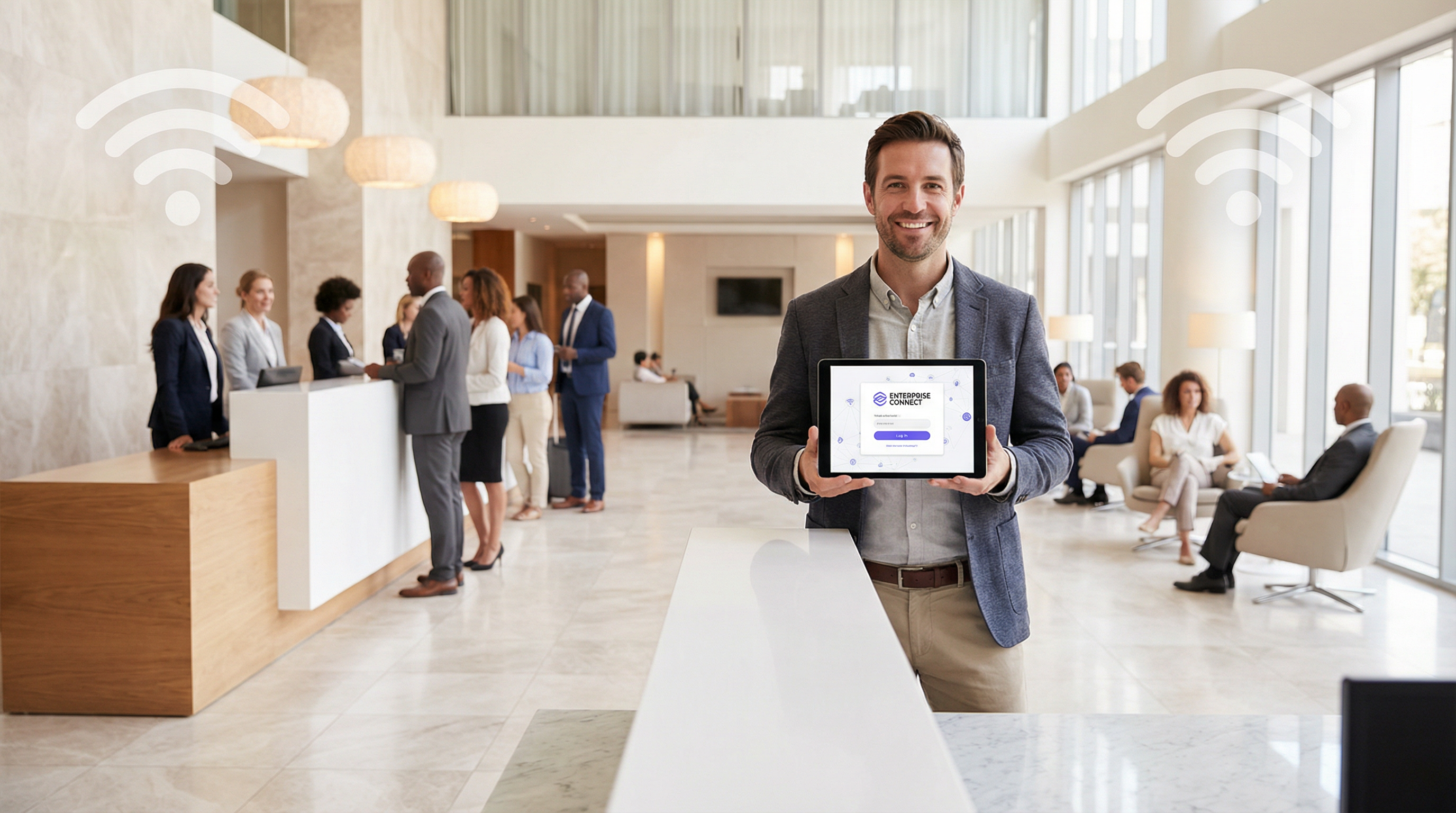
Un Captive Portal è il gateway per il WiFi degli ospiti, ma la sua apparente semplicità nasconde un'architettura sofisticata. Comprendere questa architettura è fondamentale per implementare una soluzione sicura, scalabile e conforme. Questa analisi approfondita esamina il percorso di un utente dalla connessione all'autenticazione, descrivendo in dettaglio il ruolo di ciascun componente a livello di rete.
Connessione iniziale e reindirizzamento
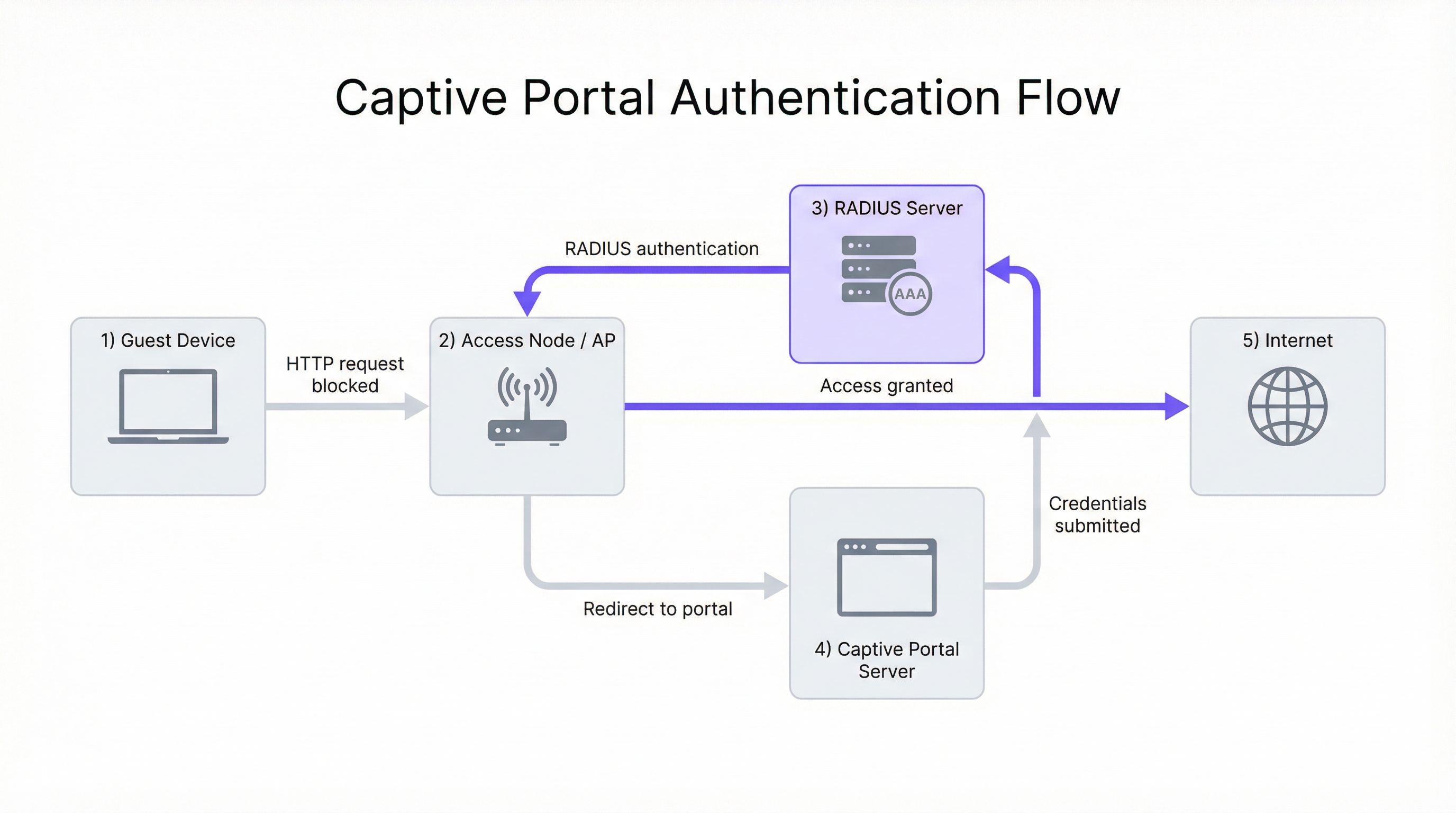
Il processo inizia quando il dispositivo di un utente (il supplicant) si associa a un Access Node (AN) wireless, in genere un Access Point (AP) WiFi. In questa fase, il dispositivo dispone di una connessione di Livello 2 ma non di un accesso più ampio alla rete. L'AN, operando in combinazione con un gateway di rete o un firewall, è configurato per intercettare tutto il traffico web in uscita dagli utenti non autenticati.
La sfida principale consiste nel forzare il browser web dell'utente verso la pagina di login del Captive Portal. Vengono utilizzati due metodi principali:
Reindirizzamento HTTP: quando l'utente tenta di accedere a un sito web HTTP, il gateway di rete intercetta il pacchetto TCP SYN. Invece di inoltrarlo, il gateway completa l'handshake TCP con il client e, alla ricezione della richiesta HTTP GET, restituisce una risposta HTTP/1.1 302 Found o 307 Temporary Redirect. Questa risposta contiene un'intestazione Location che punta all'URL del Captive Portal. Il browser del client, conforme alla RFC 2616, naviga automaticamente verso la pagina del portale.
Reindirizzamento DNS: in questo modello, il server DNS della rete è configurato per risolvere tutti gli hostname esterni richiesti da utenti non autenticati verso il singolo indirizzo IP del server del Captive Portal. Quando il browser dell'utente tenta di risolvere un dominio come purple.ai, riceve l'indirizzo IP del portale. Il browser avvia quindi una connessione al portale, che fornisce la pagina di login. Questo metodo può risultare problematico con i client moderni che utilizzano DNS over HTTPS (DoH) o che dispongono di voci DNS memorizzate nella cache.
Il ruolo del server RADIUS
Una volta che l'utente invia le proprie credenziali (ad es. e-mail, social login, codice voucher) sul portale, il Server del Captive Portal orchestra il processo di autenticazione. In genere, non memorizza direttamente le credenziali dell'utente. Agisce invece come client verso un server centralizzato di Authentication, Authorization, and Accounting (AAA), utilizzando quasi universalmente il protocollo Remote Authentication Dial-In User Service (RADIUS), come definito nella RFC 2865.
Il flusso è il seguente. Primo, Autenticazione: il server del portale pacchettizza le credenziali dell'utente e le informazioni identificative (incluso l'indirizzo MAC del client) in un pacchetto RADIUS Access-Request inviato al server RADIUS. Secondo, Autorizzazione: il server RADIUS convalida le credenziali rispetto al proprio database interno o funge da proxy per la richiesta verso una fonte di identità esterna: un Property Management System (PMS) di un hotel, Microsoft Active Directory o un provider di identità social tramite OAuth. Se l'autenticazione ha esito positivo, il server RADIUS restituisce un messaggio Access-Accept contenente attributi RADIUS cruciali che definiscono la policy di sessione dell'utente, tra cui Session-Timeout, Idle-Timeout e gli attributi di larghezza di banda WISPr. Terzo, Accounting: alla ricezione del messaggio Access-Accept, il server del portale segnala all'Access Node o al gateway di consentire il traffico dell'utente e invia contemporaneamente un pacchetto RADIUS Accounting-Request (Start) per avviare la registrazione della sessione, consentendo un tracciamento dettagliato dell'utilizzo per scopi di conformità e analisi.
Il Walled Garden: accesso pre-autenticazione
Un componente critico dell'architettura è il walled garden. Si riferisce a un set specifico di indirizzi IP, nomi di dominio o protocolli a cui un utente non autenticato è autorizzato ad accedere. Viene implementato tramite regole firewall o liste di controllo degli accessi (ACL) sul gateway di rete.
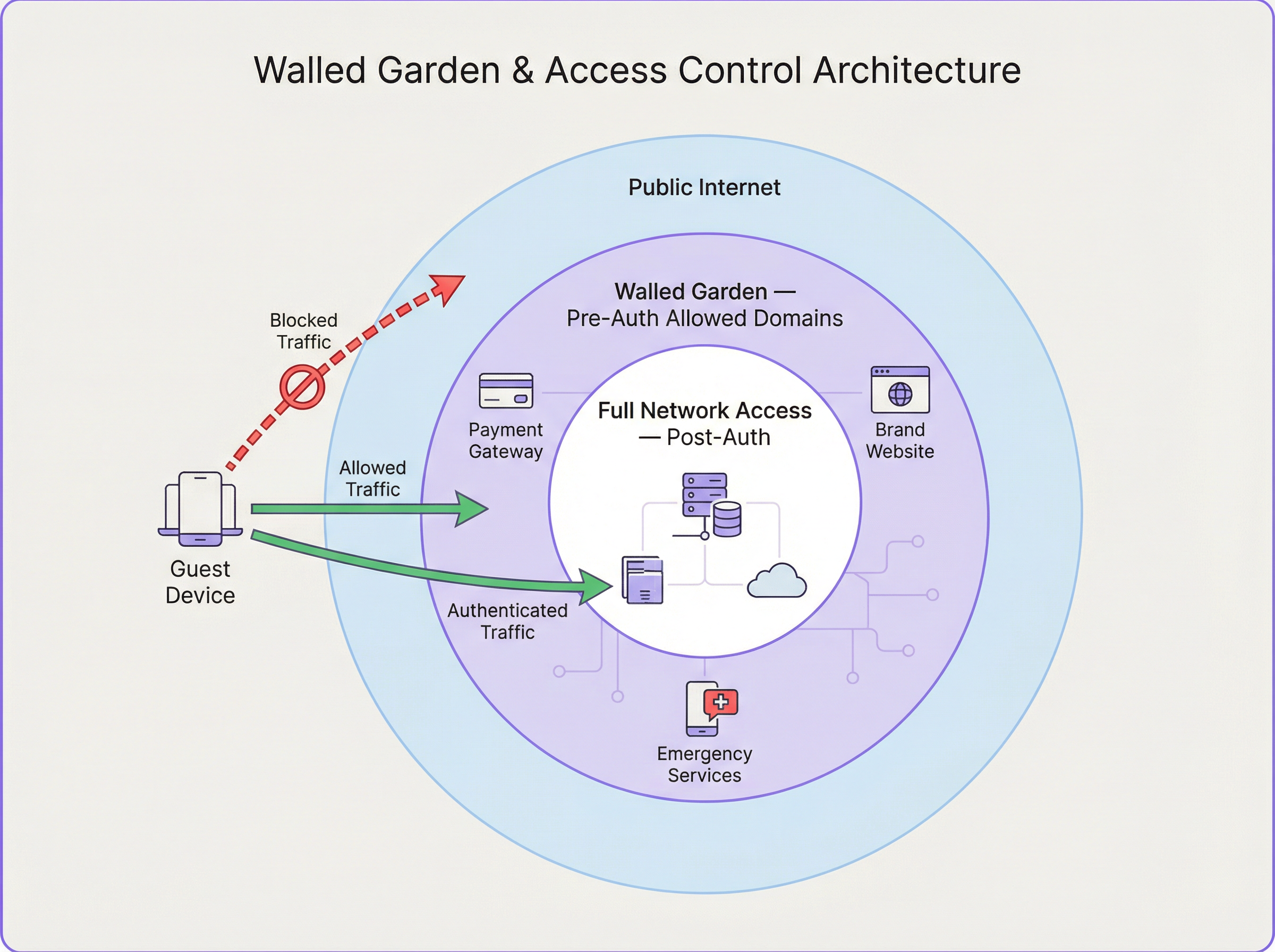
I casi d'uso comuni del walled garden includono provider di identità per il social login (Google, Facebook, LinkedIn), gateway di pagamento (Stripe, PayPal), proprietà web del brand e risorse per i servizi di emergenza. La corretta configurazione del walled garden è un frequente punto di errore nelle implementazioni. Un elenco incompleto può interrompere i flussi di lavoro di autenticazione, mentre un elenco eccessivamente permissivo può creare vulnerabilità di sicurezza.
Guida all'implementazione
L'implementazione di una solida architettura per il Captive Portal richiede un'attenta pianificazione in diversi ambiti.
Fase 1 — Progettazione della rete e selezione dei componenti: seleziona AP di livello enterprise che supportino WPA3 e offrano solide capacità di integrazione con i server RADIUS per le richieste di Change of Authorization (CoA) (RFC 5176), le quali consentono aggiornamenti dinamici delle policy a metà sessione. Assicurati che il tuo gateway di rete abbia la flessibilità necessaria per implementare regole sofisticate di reindirizzamento e walled garden. Per implementazioni multi-sito, come una catena di negozi al dettaglio, un server RADIUS centralizzato ospitato in cloud garantisce coerenza e semplifica la gestione.
Fase 2 — Configurazione del flusso di autenticazione: configura l'SSID per gli ospiti sui tuoi AP. Sebbene le reti aperte siano comuni, l'utilizzo di WPA3-Enhanced Open (OWE) fornisce una crittografia dei dati personalizzata tra ciascun client e l'AP, prevenendo le intercettazioni passive. Sul tuo gateway, crea le regole di intercettazione per i client non autenticati. Documenta e implementa meticolosamente le regole firewall per il tuo walled garden, rivedendo regolarmente questo elenco poiché i servizi di terze parti modificano le loro strutture di dominio.
Fase 3 — Esperienza utente e onboarding: la pagina del portale deve essere reattiva, a caricamento rapido e chiaramente personalizzata con il brand, ottimizzata per i dispositivi mobili. Offri molteplici metodi di autenticazione (social login, acquisizione di e-mail e codici voucher) in linea con gli obiettivi aziendali della struttura. Il portale è un punto critico per ottenere il consenso dell'utente ai sensi del GDPR; assicurati che la tua informativa sulla privacy sia chiaramente collegata e che venga ottenuto il consenso esplicito per qualsiasi trattamento dei dati.
Best practice
Utilizza HTTPS per la pagina del Captive Portal e crittografa tutte le comunicazioni tra il portale e il server RADIUS utilizzando RADIUS over TLS o IPsec. Negli ambienti multi-sito, centralizza il Captive Portal e l'infrastruttura RADIUS per garantire policy, branding e raccolta dati uniformi. Implementa sistemi di logging e analisi robusti per tracciare i tassi di successo/fallimento dell'autenticazione, le durate delle sessioni e l'utilizzo della larghezza di banda. Progetta per i guasti: definisci una policy chiara per stabilire se il sistema debba essere fail-open o fail-closed quando il server RADIUS è irraggiungibile, con messaggi di errore chiari per l'utente.
Risoluzione dei problemi e mitigazione dei rischi
| Problema comune | Causa/e principale/i | Strategia di mitigazione |
|---|---|---|
| L'utente non viene reindirizzato al portale | Problemi DNS (caching lato client, DoH); configurazione errata della regola di reindirizzamento; client che utilizza IP statico. | Implementa sia il reindirizzamento HTTP che DNS come fallback. Applica il DHCP. Utilizza l'isolamento del client a livello di AP. |
| I pulsanti di social login non funzionano | Walled garden incompleto; i domini del provider di identità vengono bloccati. | Utilizza gli strumenti per sviluppatori del browser per identificare i domini bloccati e aggiungerli alle ACL del walled garden. |
| Tempi di login lenti | Server RADIUS o del portale sottodimensionato; elevata latenza verso il provider di identità esterno. | Esegui test di carico sull'infrastruttura di autenticazione. Utilizza servizi cloud distribuiti geograficamente. |
| L'utente viene disconnesso frequentemente | Timeout di sessione o di inattività aggressivi sul server RADIUS; segnale WiFi debole che causa la riassociazione. | Rivedi gli attributi di sessione RADIUS. Conduci un'indagine del sito wireless per garantire una copertura adeguata. |
ROI e impatto sul business
Un Captive Portal ben architettato è più di un'utilità di rete; è un asset aziendale. Il ROI viene misurato attraverso diversi vettori. Marketing basato sui dati: l'acquisizione dei dati degli utenti (con il consenso) consente campagne di marketing mirate e favorisce la fidelizzazione. Per una catena di negozi al dettaglio, collegare l'utilizzo del WiFi alle visite in negozio fornisce potenti modelli di attribuzione. Esperienza cliente migliorata: un processo di login fluido, veloce e sicuro migliora la soddisfazione degli ospiti, con un impatto diretto sulle recensioni e sulla fedeltà nel settore dell'ospitalità. Efficienza operativa: la gestione centralizzata riduce i costi amministrativi per i team IT, mentre le analisi sull'affluenza e sul tempo di permanenza possono orientare i livelli di personale e il layout dei negozi. Conformità e mitigazione dei rischi: un'architettura solida garantisce la conformità al GDPR e al PCI DSS, mitigando il rischio di sanzioni pecuniarie significative.
Considerando il Captive Portal non come un centro di costo ma come una piattaforma di engagement, le organizzazioni possono sbloccare un notevole valore di business dalla loro infrastruttura WiFi per gli ospiti.
Key Terms & Definitions
Captive Portal
A web-based authentication mechanism that intercepts a user's HTTP or HTTPS traffic and redirects them to a login page before granting access to the broader network. It operates at the application layer (Layer 7) of the OSI model.
IT teams encounter this as the primary mechanism for controlling guest access to WiFi networks in hotels, retail spaces, stadiums, and public venues. It is the enforcement point for both security policies and business data-capture objectives.
Access Node (AN)
A network device—typically a Wireless Access Point (AP) or a network switch—that provides the physical or wireless connection point for end-user devices. In a captive portal architecture, the AN is responsible for enforcing the access policy dictated by the RADIUS server, either permitting or blocking a user's traffic based on their authentication state.
The AN is the 'gatekeeper' at the edge of the network. Its ability to support features like CoA (Change of Authorization) is critical for dynamic policy updates, such as upgrading a user from a free to a paid tier without requiring them to re-authenticate.
RADIUS (Remote Authentication Dial-In User Service)
A client-server networking protocol defined in RFC 2865 that provides centralized Authentication, Authorization, and Accounting (AAA) management for users connecting to a network service. It uses UDP for transport (ports 1812 for authentication, 1813 for accounting) and a shared secret for message integrity.
RADIUS is the backbone of enterprise network access control. In a captive portal deployment, it is the authoritative source for user identity validation and session policy. IT teams must ensure RADIUS server redundancy and secure communication channels.
Walled Garden
A controlled network environment in which an unauthenticated user's internet access is restricted to a pre-defined set of whitelisted IP addresses, domain names, or services. It is implemented via firewall rules or ACLs on the network gateway.
The walled garden is essential for enabling the authentication process itself (e.g., allowing access to social login providers) and for providing a degree of service before authentication (e.g., access to the venue's own website). Misconfiguration is a leading cause of captive portal authentication failures.
RADIUS Redirect
A mechanism by which the RADIUS server, within an Access-Accept response, includes a vendor-specific attribute (VSA) that instructs the Access Node or gateway to redirect the user's browser to a specific URL—typically the captive portal login page. This is an alternative to gateway-level HTTP interception.
RADIUS redirect is commonly used in architectures where the AP itself handles the redirection logic, rather than a separate gateway. It is supported by most enterprise-grade AP vendors and is particularly useful in distributed deployments where a centralised gateway is not present.
Change of Authorization (CoA)
An extension to the RADIUS protocol defined in RFC 5176 that allows the RADIUS server to dynamically modify an active user session. This enables the server to push new policy attributes (e.g., increased bandwidth) or terminate a session entirely, without requiring the user to re-authenticate.
CoA is the mechanism that enables tiered access models in real time. For example, when a hotel guest upgrades from a free to a paid WiFi tier, the payment system triggers a CoA request to the RADIUS server, which then pushes the new bandwidth policy to the Access Node instantly.
WPA3-Enhanced Open (OWE)
A WiFi security mode defined in IEEE 802.11 that provides opportunistic wireless encryption on open (no-password) networks. Each client device negotiates an individual encryption key with the AP, preventing passive eavesdropping by other users on the same network, without requiring a password.
OWE is the recommended security mode for guest WiFi networks that use a captive portal for authentication. It provides a significant security improvement over traditional open networks (which transmit all data in plaintext) while maintaining the seamless connection experience users expect from public WiFi.
AAA (Authentication, Authorization, and Accounting)
A security framework for controlling access to network resources. Authentication verifies identity, Authorization determines what the authenticated user is permitted to do, and Accounting records what the user did and for how long. RADIUS is the most common protocol implementing this framework.
The AAA framework is the conceptual foundation of all enterprise network access control. For venue operators, the Accounting component is particularly valuable, as it provides the audit trail required for regulatory compliance and the usage data needed for network capacity planning.
IEEE 802.1X
An IEEE standard for port-based Network Access Control (PNAC). It provides an authentication mechanism for devices wishing to attach to a LAN or WLAN, operating at Layer 2 before an IP address is assigned. It requires a supplicant (client software), an authenticator (the AP or switch), and an authentication server (typically RADIUS).
802.1X is the standard for corporate device authentication (e.g., employee laptops) and is distinct from captive portal authentication. IT teams should understand the difference: 802.1X is more secure but requires client-side configuration, making it unsuitable for guest devices. A well-designed network uses both — 802.1X for corporate devices and a captive portal for guests.
Case Studies
A 350-room international hotel brand is deploying a new guest WiFi system across its flagship London property. The CTO requires social login (Google and Facebook), email capture for the loyalty programme, PCI DSS compliance for a premium paid-access tier, and GDPR-compliant consent management. The existing network uses a mix of Cisco and Aruba access points. How should the captive portal architecture be designed?
The recommended architecture is a cloud-hosted captive portal platform (such as Purple) integrated with a centralized cloud RADIUS server. The deployment proceeds as follows:
- SSID Configuration: Create two SSIDs — a guest SSID (WPA3-OWE) for the captive portal flow, and a management SSID (WPA3-Enterprise, 802.1X) for staff devices. Segment these into separate VLANs.
- Redirection: Configure the gateway firewall with HTTP 302 redirect rules for the guest VLAN, targeting the cloud portal URL. Implement DNS redirection as a secondary fallback.
- Walled Garden: Whitelist the following domain groups:
accounts.google.com,*.googleapis.com(Google Login);*.facebook.com,*.fbcdn.net(Facebook Login); the hotel's own domain; the payment gateway's domains (e.g.,*.stripe.com). This is critical for the social login flow to function. - RADIUS Integration: Configure the cloud portal to send RADIUS
Access-Requestpackets to the centralized RADIUS server. Define two user groups: 'Free' (bandwidth-limited via WISPr attributes: 5 Mbps down, 2 Mbps up; 1-hour session timeout) and 'Premium' (unlimited bandwidth; 24-hour session timeout). The premium tier is unlocked after a payment transaction, with the RADIUS server dynamically updating the user's policy via a Change of Authorization (CoA) request per RFC 5176. - GDPR Consent: The portal landing page presents a clear, unbundled consent form. Users must actively tick a checkbox to consent to marketing communications — pre-ticked boxes are non-compliant under GDPR. The consent timestamp and method are logged and stored.
- PCI DSS: The payment page is hosted on the payment gateway's domain (within the walled garden), ensuring that card data never transits the hotel's network infrastructure, significantly reducing the PCI DSS scope.
A national retail chain with 280 stores wants to deploy a unified guest WiFi platform. Each store has between 2 and 8 access points. The business objective is to capture customer email addresses and link WiFi sessions to in-store purchase data from the EPOS system. The IT team is small and cannot manage per-store configurations. How should the architecture be structured for scale?
A centralised, cloud-managed architecture is the only viable approach at this scale. The deployment model is as follows:
- Centralised Management: Deploy a cloud-managed WiFi platform where all 280 stores are managed from a single dashboard. Access nodes at each store are zero-touch provisioned — they connect to the cloud controller on first boot and receive their full configuration automatically. No per-store manual configuration is required.
- Standardised SSID and Portal Template: Define a single SSID template and a single branded portal template that is pushed to all stores. Any changes to the portal design or authentication policy are made once and propagated to all 280 locations simultaneously.
- Centralised RADIUS: All authentication requests from all stores are directed to a pair of redundant, cloud-hosted RADIUS servers. This provides a single point of policy management and a unified data store for all user sessions.
- EPOS Integration: The WiFi platform's API is integrated with the EPOS system. The customer's email address (captured at WiFi login) is used as the matching key. When a customer makes a purchase, the EPOS system queries the WiFi platform's API to check if a WiFi session was active for that email address within the store's geographic boundary, creating an attribution record.
- Walled Garden: A single, centrally-managed walled garden policy is applied to all stores, covering the email validation service and any social login providers used.
Scenario Analysis
Q1. A stadium with a capacity of 60,000 is deploying guest WiFi for a major sporting event. The network team expects 40,000 concurrent device connections, with a peak authentication burst of approximately 8,000 logins per minute at kick-off. The venue's IT director wants to use a social login (Google/Facebook) captive portal. What are the three most critical architectural decisions the network architect must address to ensure the authentication system does not become a bottleneck?
💡 Hint:Consider the load on each component in the authentication chain: the portal server, the RADIUS server, and the external identity provider. Also consider the network-level implications of 40,000 concurrent DHCP leases and ARP tables.
Show Recommended Approach
The three most critical architectural decisions are: (1) RADIUS Server Scalability: A single RADIUS server instance will be unable to handle 8,000 authentication requests per minute. The architect must deploy a horizontally scaled cluster of RADIUS servers behind a load balancer, with session state shared via a distributed cache (e.g., Redis). The RADIUS server's database connection pool must also be sized appropriately. (2) Captive Portal Server Scalability: Similarly, the portal server must be horizontally scaled. A cloud-hosted portal platform with auto-scaling capabilities is strongly recommended over on-premise servers, which cannot be rapidly provisioned. (3) Walled Garden and External Identity Provider Latency: Social logins introduce a dependency on external services (Google/Facebook). Under high load, the round-trip time to these providers can increase significantly. The architect should consider offering a faster, lower-friction alternative (e.g., a simple click-through or SMS OTP) as the primary authentication method for the mass audience, reserving social login for users who specifically prefer it. Additionally, the DHCP server must be configured with a large enough pool for 40,000+ leases, and the network gateway must be capable of maintaining state for 40,000 concurrent sessions without exhausting its connection table.
Q2. A large NHS hospital trust is evaluating a guest WiFi deployment for patient and visitor use. The information governance team has raised concerns about GDPR compliance, specifically around data retention, the right to erasure, and the lawful basis for processing patient data. The proposed portal design captures email addresses and allows social logins. What changes to the architecture and portal design are required to achieve compliance?
💡 Hint:Consider the distinction between patients (a potentially special category of data subject under GDPR Article 9) and general visitors. Also consider the lawful basis for processing — is consent the appropriate basis, or could legitimate interest apply? What are the implications of each?
Show Recommended Approach
Several architectural and design changes are required. First, Lawful Basis: For a public-sector body, consent is typically the most appropriate lawful basis for processing guest WiFi data. However, the trust's Data Protection Officer (DPO) must confirm this. The portal must present a clear, unbundled consent request — separate checkboxes for 'access to WiFi' and 'marketing communications', with the former not conditional on the latter. Second, Data Minimisation: The portal should only capture the minimum data necessary. For a hospital environment, capturing email addresses may be justifiable for service notifications, but social logins (which can expose additional profile data) should be evaluated carefully. Consider whether a simple click-through with IP logging (for network security purposes) is sufficient. Third, Right to Erasure: The backend system must support a data erasure workflow. When a user submits a right-to-erasure request, all associated data (email, session logs, usage data) must be deleted within 30 days. This requires a clear data map of where user data is stored across the portal, RADIUS, and analytics systems. Fourth, Data Retention Policy: Define and enforce a clear retention period for session logs. Retaining data for longer than necessary is a GDPR violation. A 90-day rolling retention window for session logs is a common and defensible policy. Fifth, Special Category Data: The trust must ensure that the WiFi system does not inadvertently capture or infer health-related data. The portal must not ask questions about the user's reason for visiting the hospital.
Q3. A network engineer is troubleshooting a captive portal deployment at a conference centre. Attendees report that they are successfully connecting to the WiFi and reaching the portal login page, but when they attempt to log in using their LinkedIn credentials, the social login button appears to load briefly and then fails silently. Email/password login works correctly. What is the most likely cause, and what is the diagnostic process?
💡 Hint:The fact that the portal page loads correctly and email login works rules out issues with the portal server itself and the RADIUS integration. The problem is specific to the LinkedIn OAuth flow. Consider what network resources the LinkedIn login process requires that the email login does not.
Show Recommended Approach
The most likely cause is an incomplete walled garden configuration. The LinkedIn OAuth flow requires the user's browser to make requests to multiple LinkedIn domains and CDN resources. If these domains are not whitelisted in the pre-authentication firewall rules, the browser will silently fail to load the necessary JavaScript or complete the OAuth redirect. The diagnostic process is as follows: (1) Open the browser's developer tools (F12) on a device connected to the guest WiFi but not yet authenticated. (2) Navigate to the portal page and attempt the LinkedIn login. (3) In the 'Network' tab of developer tools, filter for failed requests (status 0, ERR_CONNECTION_REFUSED, or similar). (4) Identify the specific domains that are being blocked. Common LinkedIn domains that must be whitelisted include www.linkedin.com, platform.linkedin.com, static.licdn.com, and media.licdn.com. (5) Add the identified domains to the walled garden ACLs on the network gateway. (6) Re-test. If the issue persists, repeat the diagnostic process to identify any remaining blocked domains. This is a methodical process — use the browser's network inspector as your primary diagnostic tool for walled garden issues.
Key Takeaways
- ✓Captive portal architecture is a five-component system: Guest Device, Access Node, Gateway/Firewall, Captive Portal Server, and RADIUS Server — each with a distinct and interdependent role in the authentication flow.
- ✓Network-level redirection is achieved via HTTP 302 redirects (gateway intercepts TCP and returns a redirect response) or DNS redirection (all hostnames resolve to the portal IP). Modern deployments should implement both as fallbacks.
- ✓The walled garden is a pre-authentication whitelist of IP addresses and domains that must be meticulously configured to include all social login provider domains, payment gateways, and brand assets — incomplete walled gardens are the most common cause of authentication failures.
- ✓RADIUS is the authoritative AAA engine: it validates credentials, returns session policy attributes (bandwidth, timeout), and supports dynamic policy updates via Change of Authorization (CoA, RFC 5176), enabling real-time tier upgrades without re-authentication.
- ✓For deployments exceeding 10 sites, a cloud-hosted, centrally managed architecture is the only operationally viable approach — zero-touch provisioning and centralised policy management are non-negotiable for small IT teams managing large estates.
- ✓GDPR and PCI DSS compliance must be designed into the architecture from the outset, not retrofitted: the portal is the primary consent-capture point, and the payment flow must be scoped to the payment gateway's domain to minimise PCI DSS obligations.
- ✓A well-architected captive portal delivers measurable ROI through customer data capture, marketing attribution, and enhanced guest experience — it should be positioned as a business intelligence platform, not merely a network access utility.




