

Login del Captive Portal: Risoluzione dei problemi comuni e ottimizzazione dell'esperienza utente
This authoritative technical reference guide equips IT managers, network architects, and CTOs with a comprehensive framework for diagnosing and resolving captive portal login failures, selecting the optimal authentication strategy for their venue type, and measuring portal performance against business KPIs. Drawing on real-world deployment scenarios across hospitality, retail, and public-sector environments, it covers the full lifecycle from architecture and compliance to step-by-step troubleshooting for platforms including Purple AI, UniFi, Meraki, and MikroTik. For any organisation operating guest or public WiFi, a poorly performing captive portal is a direct revenue and reputation risk — this guide provides the decision frameworks and operational playbooks to eliminate that risk.
🎧 Listen to this Guide
View Transcript

Sintesi esecutiva
Il login del Captive Portal rimane il principale meccanismo di controllo degli accessi per il WiFi pubblico e degli ospiti nelle implementazioni dei settori alberghiero, retail, degli eventi e pubblico. Tuttavia, è anche uno dei componenti configurati in modo più errato negli stack di rete aziendali, responsabile di connessioni abbandonate, rischi di conformità e perdita di dati di prima parte. Questa guida affronta le quattro categorie di cause principali che rappresentano la maggior parte degli incidenti del Captive Portal: configurazione errata di DNS e firewall, errori di autorizzazione RADIUS, problemi di compatibilità del Captive Network Assistant (CNA) e interruzioni della persistenza della sessione. Fornisce passaggi di risoluzione specifici per piattaforma per Purple AI, Cisco Meraki, Ubiquiti UniFi e MikroTik RouterOS, insieme a un framework strutturato per la selezione del metodo di autenticazione in base al tipo di sede e agli obiettivi dei dati. Le considerazioni sulla conformità ai sensi del GDPR, del GDPR del Regno Unito e del PCI DSS v4.0 sono integrate in tutto il documento. I team di rete che implementano le raccomandazioni contenute in questa guida possono aspettarsi tassi di successo dell'autenticazione superiori al 92%, una riduzione misurabile delle escalation all'helpdesk e una posizione di conformità difendibile per i dati personali raccolti al momento del login al WiFi.
Approfondimento tecnico
Come funziona il login del Captive Portal: L'architettura
Il login di un Captive Portal opera attraverso un'intercettazione deliberata del probe di connettività iniziale di un dispositivo. Quando un qualsiasi sistema operativo moderno si connette a una nuova rete WiFi, invia immediatamente una richiesta HTTP a un endpoint noto per verificare la raggiungibilità di Internet. I dispositivi Apple interrogano captive.apple.com; i dispositivi Android interrogano connectivitycheck.gstatic.com; Windows interroga www.msftconnecttest.com; Firefox interroga detectportal.firefox.com. Il gateway del Captive Portal, tipicamente implementato a livello di access controller, intercetta questo probe e restituisce un reindirizzamento HTTP 302 all'URL della splash page anziché la risposta attesa.
Il sistema operativo rileva questo reindirizzamento, riconosce la rete come "captive" e avvia un mini-browser in sandbox (il Captive Network Assistant (CNA) di Apple, il Provisioning Wizard di Android o il browser Network Sign-In di Windows) per visualizzare l'interfaccia di autenticazione. Una volta che l'utente completa l'azione richiesta (invio del modulo, social login, click-through), il server del portale comunica con il controller di rete tramite una callback API o un'autorizzazione RADIUS per rimuovere l'indirizzo MAC del dispositivo dall'elenco dei bloccati, garantendo l'accesso completo alla rete.
Questa architettura presenta tre dipendenze critiche che, se una di esse fallisce, producono un'esperienza di login interrotta: il livello DNS/firewall deve reindirizzare correttamente il traffico del probe; la splash page deve essere renderizzata correttamente all'interno della sandbox del CNA; e la callback di autorizzazione deve raggiungere con successo il controller di rete.
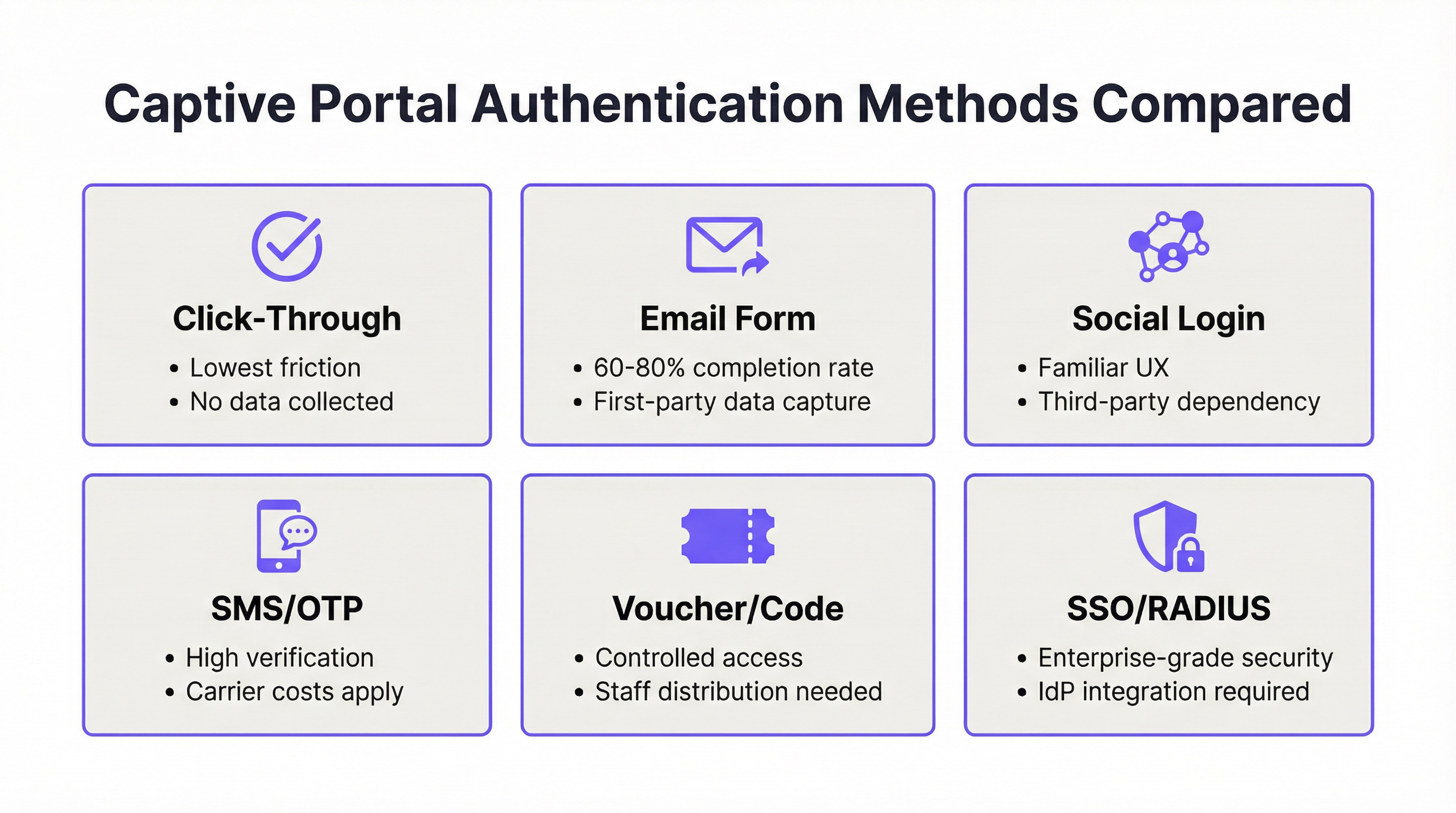
Metodi di autenticazione: Confronto tecnico
La scelta del metodo di autenticazione è una decisione sia tecnica che strategica. La seguente tabella fornisce un confronto strutturato attraverso le dimensioni più rilevanti per le decisioni di implementazione aziendale.
| Metodo | Tasso di completamento | Resa dei dati | Complessità GDPR | Dipendenza infrastrutturale | Miglior tipo di sede |
|---|---|---|---|---|---|
| Click-Through | 95%+ | Nessuna | Minima (solo ToS) | Nessuna | Retail a servizio rapido, trasporti |
| Modulo e-mail | 60–80% | Alta (prima parte) | Moderata | Nessuna | Settore alberghiero, retail, eventi |
| Social Login | 55–70% | Moderata (terza parte) | Alta | API di terze parti | Settore alberghiero, intrattenimento |
| SMS OTP | 50–65% | Alta (verificata) | Moderata | Gateway SMS | WiFi pubblico, snodi di trasporto |
| Voucher/Codice | 85%+ (distribuito) | Bassa | Bassa | Sistema di distribuzione | Hotel, centri congressi |
| SSO/RADIUS | 90%+ (utenti registrati) | Identità completa | Bassa (interna) | IdP / Server RADIUS | Aziendale, istruzione |
Considerazioni sul Social Login: L'implementazione del social login di Facebook o Google richiede un Accordo sul trattamento dei dati (DPA) con la rispettiva piattaforma ai sensi dell'Articolo 28 del GDPR. La piattaforma agisce come responsabile del trattamento dei dati e la tua organizzazione rimane il titolare del trattamento. Qualsiasi modifica ai termini dell'API della piattaforma social (come Facebook ha fatto ripetutamente dal 2018) può interrompere il flusso di autenticazione senza preavviso. Per le implementazioni aziendali, il social login dovrebbe essere considerato un'opzione supplementare, non un percorso di autenticazione primario.
RADIUS e IEEE 802.1X: Per gli ambienti aziendali e dell'istruzione, l'autenticazione basata su RADIUS allineata a IEEE 802.1X fornisce la postura di sicurezza più solida. Il framework 802.1X abilita chiavi di crittografia per utente e per sessione e si integra con l'autenticazione basata su certificati (EAP-TLS), eliminando del tutto le chiavi precondivise. WPA3-Enterprise, che impone l'802.1X, rafforza ulteriormente questo aspetto con una forza crittografica minima di 192 bit per gli ambienti sensibili. La piattaforma di Purple supporta l'integrazione RADIUS in modo nativo, consentendo un'esperienza del portale unificata anche in ambienti protetti da 802.1X.
Architettura di sicurezza e conformità
Un Captive Portal che raccoglie dati personali è, per definizione, un sistema di elaborazione dati soggetto alle normative sulla privacy applicabili. Per le implementazioni nel Regno Unito e nell'UE, ciò significa che la conformità al GDPR e al GDPR del Regno Unito è obbligatoria dal momento in cui si raccoglie un nome, un indirizzo e-mail o un numero di telefono. I requisiti minimi di conformità sono: una base giuridica ai sensi dell'Articolo 6 (legittimo interesse o consenso, a seconda di come vengono utilizzati i dati); un'informativa sulla privacy visualizzata al momento della raccolta; una politica di conservazione dei dati documentata; e un meccanismo per le richieste di accesso da parte degli interessati.
Per le implementazioni in ambienti in cui i dati delle carte di pagamento transitano sulla rete (hall di hotel, ambienti retail, centri congressi), il Requisito 1.3 del PCI DSS v4.0 impone la segmentazione della rete tra l'ambiente dei dati dei titolari di carta e la rete WiFi degli ospiti. Un'architettura segregata tramite VLAN, con il Captive Portal che opera su una VLAN ospiti dedicata senza accesso di routing ai sistemi POS, è l'implementazione standard.
Guida all'implementazione
Fase 1: Revisione dell'architettura pre-implementazione
Prima di configurare qualsiasi piattaforma di Captive Portal, convalida i seguenti prerequisiti di rete. Il gateway o l'access controller deve supportare il reindirizzamento a un portale esterno (verificalo nella documentazione del fornitore hardware). L'infrastruttura DNS deve essere in grado di intercettare le query pre-autenticazione e risolvere solo il dominio della splash page fino al completamento dell'autenticazione. Il firewall deve consentire il traffico HTTPS in uscita dal controller verso i server del provider del portale e l'HTTPS in entrata dal provider del portale all'interfaccia di gestione del controller sulla porta appropriata (in genere 8443 per UniFi, 443 per le piattaforme gestite in cloud).
Fase 2: Configurazione del Walled Garden
Il walled garden definisce l'insieme di domini e intervalli IP accessibili ai dispositivi non autenticati. Un walled garden incompleto è la causa più comune di errori intermittenti del portale. Il walled garden minimo per un'implementazione in produzione deve includere le seguenti voci.
| Categoria | Domini / Intervalli | Scopo |
|---|---|---|
| Endpoint Probe OS | captive.apple.com, connectivitycheck.gstatic.com, www.msftconnecttest.com, detectportal.firefox.com |
Abilita il rilevamento del Captive Portal da parte del sistema operativo |
| Provider del portale | Il dominio del tuo portale e gli intervalli CDN | Carica la splash page |
| Social Login (se utilizzato) | *.facebook.com, *.google.com, *.linkedin.com |
Abilita i flussi OAuth |
| Pagamento (se utilizzato) | *.stripe.com, js.stripe.com |
Carica i moduli di pagamento |
| Analytics (se utilizzato) | I domini del tuo provider di analytics | Abilita gli script di tracciamento |
Fase 3: Ottimizzazione della Splash Page
La splash page deve essere progettata per l'ambiente CNA, non per un browser completo. Ciò significa: peso totale della pagina inferiore a 500 KB; nessuna dipendenza da CDN JavaScript esterne a meno che non siano in whitelist; HTTPS valido con un certificato emesso da una CA attendibile; design responsivo testato da una larghezza di 320px (iPhone SE) fino a 1024px; e un modulo con non più di tre campi (nome, e-mail e casella di controllo del consenso) per massimizzare i tassi di completamento.
Fase 4: Configurazione di sessione e policy
Configura i parametri di sessione in modo che corrispondano al modello di utilizzo della tua sede. I seguenti valori di riferimento si basano sui dati di implementazione di Purple in migliaia di sedi.
| Tipo di sede | Durata della sessione | Timeout di inattività | Policy di larghezza di banda |
|---|---|---|---|
| Hotel | 24 ore | 60 minuti | 10 Mbps per dispositivo |
| Caffetteria / Bar | 4–8 ore | 30 minuti | 5 Mbps per dispositivo |
| Centro congressi | Durata dell'evento | 120 minuti | 20 Mbps per dispositivo |
| Stadio / Arena | Durata dell'evento | 45 minuti | 5 Mbps per dispositivo |
| Retail | 2–4 ore | 20 minuti | 3 Mbps per dispositivo |
| Settore pubblico / Biblioteca | 2 ore | 30 minuti | 5 Mbps per dispositivo |
Fase 5: Configurazione specifica per piattaforma — Purple AI
Il Captive Portal di Purple AI è configurato tramite la dashboard di Purple. Vai su WiFi > Splash Pages per creare o modificare il tuo portale. Seleziona il metodo di autenticazione in Opzioni di login (Purple supporta click-through, modulo e-mail, social login tramite Facebook, Google, LinkedIn, X, SMS OTP, voucher e SSO tramite Microsoft Entra ID, Google Workspace e Okta). In Conformità, abilita l'acquisizione del consenso conforme al GDPR e configura l'URL della tua informativa sulla privacy. In Impostazioni di sessione, applica i valori della tabella precedente. Pubblica la splash page e associala al tuo SSID nella sezione Reti. La piattaforma di Purple gestisce automaticamente la configurazione del walled garden per i propri domini; dovrai aggiungere manualmente eventuali domini di terze parti a cui fa riferimento la tua splash page.
Fase 6: Protocollo di test
Dopo l'implementazione, esegui la seguente matrice di test prima del go-live. Connetti un dispositivo di test all'SSID degli ospiti e verifica che: il portale appaia entro 3 secondi; la splash page venga renderizzata correttamente e sia completamente funzionale; l'autenticazione venga completata con successo; l'accesso a Internet venga concesso immediatamente dopo l'autenticazione; e il dispositivo non richieda una nuova autenticazione entro la durata della sessione configurata. Ripeti questo test su iOS (ultima versione), iOS (versione principale precedente), Android (ultima versione), Android (versione principale precedente), Windows 11 e macOS. Documenta i risultati e risolvi eventuali errori prima di aprire la rete agli ospiti.
Best Practice
Monitoraggio delle prestazioni: Considera il tasso di successo dell'autenticazione come un KPI di rete primario, puntando al 92% o superiore. La dashboard di analytics di Purple mostra questa metrica in tempo reale. Un calo al di sotto dell'85% richiede un'indagine immediata (le cause comuni includono la scadenza del certificato, aggiornamenti del sistema operativo che alterano il comportamento del probe e modifiche alle regole del firewall).
Gestione dei certificati: I certificati SSL per i domini delle splash page devono essere rinnovati prima della scadenza. Implementa il rinnovo automatico tramite Let's Encrypt o la tua piattaforma di gestione dei certificati e imposta avvisi sul calendario 30 giorni prima della scadenza. Un certificato scaduto farà sì che iOS e Android visualizzino avvisi di sicurezza che impediscono di fatto agli utenti di connettersi.
Registri dei consensi GDPR: Ogni consenso acquisito sul Captive Portal deve essere registrato con un timestamp, la versione dell'informativa sulla privacy visualizzata e i consensi specifici concessi. La piattaforma di Purple mantiene automaticamente questo audit trail. Per le implementazioni manuali, assicurati che lo schema del tuo database acquisisca questi dati e che i record vengano conservati per la durata richiesta dalla tua politica di conservazione dei dati.
Segmentazione della rete: Il WiFi degli ospiti deve trovarsi su una VLAN separata senza accesso di routing di livello 3 alle reti interne o ai sistemi POS. Questo è un requisito PCI DSS e un controllo di sicurezza fondamentale. Verifica la segmentazione con un penetration test almeno una volta all'anno.
Aggiornamenti del firmware e della piattaforma: Mantieni aggiornati il firmware dell'access controller e la piattaforma del portale. Molti problemi di compatibilità del CNA vengono risolti negli aggiornamenti del firmware (Cisco Meraki, Ubiquiti e Aruba rilasciano tutti aggiornamenti regolari che affrontano le modifiche al rilevamento del portale specifiche del sistema operativo). Iscriviti agli avvisi di sicurezza dei fornitori e applica gli aggiornamenti all'interno della tua finestra di gestione delle modifiche.
Risoluzione dei problemi e mitigazione dei rischi
Framework diagnostico: Il controllo a quattro livelli
Quando viene segnalato un errore di login al Captive Portal, segui la seguente sequenza diagnostica a quattro livelli prima di procedere con un'escalation o apportare modifiche alla configurazione.
Livello 1 — DNS e reindirizzamento: Verifica che il gateway stia intercettando il traffico del probe e restituendo il reindirizzamento corretto. Utilizza un dispositivo di test e uno strumento di acquisizione pacchetti per confermare che venga emesso il reindirizzamento 302. Se non viene visualizzato alcun reindirizzamento, il problema risiede a livello di configurazione del gateway.
Livello 2 — Consegna della Splash Page: Verifica che la splash page venga caricata correttamente nel CNA. Se la pagina si carica in un browser completo ma non nel CNA, il problema è probabilmente una dipendenza JavaScript o una voce mancante nel walled garden. Utilizza gli strumenti per sviluppatori del browser per identificare le risorse bloccate.
Livello 3 — Elaborazione dell'autenticazione: Verifica che la richiesta di autenticazione raggiunga il server del portale e restituisca una risposta di successo. Controlla i log del provider del portale per individuare eventuali tentativi di autenticazione falliti. Se l'autenticazione fallisce in modo silenzioso, il problema è in genere un errore di convalida del modulo o un campo obbligatorio mancante.
Livello 4 — Callback di autorizzazione: Verifica che il server del portale possa raggiungere il controller di rete per autorizzare l'indirizzo MAC del dispositivo. Controlla i log del firewall per individuare connessioni bloccate tra gli intervalli IP del server del portale e l'interfaccia di gestione del controller. Se la callback fallisce, inserisci in whitelist gli intervalli IP del provider del portale e verifica l'accessibilità del controller.
Modalità di guasto comuni e risoluzione
| Sintomo | Causa più probabile | Risoluzione |
|---|---|---|
| Il portale non appare alla connessione | Domini probe del sistema operativo mancanti nel walled garden; AP non riavviato dopo la modifica della configurazione | Aggiungi i domini probe al walled garden; riavvia gli AP |
| Il portale appare ma la pagina non si carica | Dipendenza JavaScript bloccata; CDN non presente nel walled garden | Verifica le dipendenze della pagina; aggiungi i domini CDN al walled garden |
| Autenticazione riuscita, nessuna connessione Internet | Callback RADIUS bloccata; controller irraggiungibile | Inserisci in whitelist gli IP del provider del portale; verifica l'accessibilità del controller |
| Il portale funziona su iOS, fallisce su Android | Dominio probe di Android bloccato; problema con il certificato HTTPS | Aggiungi connectivitycheck.gstatic.com al walled garden; verifica il certificato |
| Gli ospiti devono effettuare ripetutamente il login | Durata della sessione troppo breve; persistenza MAC non configurata | Aumenta la durata della sessione; verifica il tracciamento MAC nel controller |
| Caricamento lento del portale (>5 secondi) | Pagina troppo pesante; risoluzione DNS lenta; uplink congestionato | Ottimizza il peso della pagina; utilizza un DNS affidabile (8.8.8.8); controlla la capacità dell'uplink |
| Il social login fallisce | Dominio OAuth non presente nel walled garden; modifica dell'API di terze parti | Aggiungi i domini della piattaforma social al walled garden; controlla lo stato dell'API |
| Il modulo di pagamento non si carica | Domini Stripe non presenti nel walled garden | Aggiungi *.stripe.com e js.stripe.com al walled garden |
Domande frequenti
D: Perché il mio portale funziona perfettamente nei test ma fallisce in modo intermittente in produzione? I guasti intermittenti in produzione sono quasi sempre causati da una di queste tre condizioni: un elevato carico di connessioni simultanee che sovraccarica la capacità di reindirizzamento del gateway; timeout di risoluzione DNS sotto carico; o una race condition tra la cache di configurazione dell'AP e una modifica recente. Aumenta le dimensioni della tabella di tracciamento delle connessioni del gateway, utilizza un resolver DNS dedicato (non quello predefinito dell'ISP) e riavvia sempre gli AP dopo le modifiche alla configurazione.
D: Posso utilizzare un dominio personalizzato per la mia splash page di Purple? Sì. Purple supporta domini personalizzati per le splash page. Configura un record CNAME che punti il sottodominio scelto all'infrastruttura del portale di Purple e assicurati che il tuo certificato SSL copra il dominio personalizzato. Un dominio brandizzato migliora significativamente la fiducia degli utenti e riduce gli abbandoni.
D: Come gestisco la transizione da HTTP a HTTPS per la mia splash page? Tutte le splash page in produzione dovrebbero essere servite tramite HTTPS. Se stai migrando da un portale HTTP, aggiorna la configurazione di reindirizzamento del gateway in modo che punti all'URL HTTPS, ottieni un certificato valido da una CA attendibile e testa su tutte le principali combinazioni di sistemi operativi e browser prima di effettuare il passaggio.
D: Qual è l'impatto di iOS 17 e versioni successive sul comportamento del Captive Portal? Apple ha inasprito le restrizioni del CNA in iOS 17, bloccando i cookie di terze parti e limitando l'esecuzione di JavaScript da determinate origini. Se riscontri errori specifici sui dispositivi iOS 17+, verifica la tua splash page per individuare dipendenze da cookie di terze parti e JavaScript da origini non in whitelist. Semplifica la tua splash page riducendola alle funzionalità minime richieste.
D: Purple AI supporta la gestione multi-sito per le catene retail? Sì. La piattaforma enterprise di Purple supporta la gestione centralizzata delle configurazioni del Captive Portal in un numero illimitato di sedi, con personalizzazione per sito di splash page, metodi di autenticazione e policy di sessione. Le modifiche possono essere inviate a tutti i siti contemporaneamente o scaglionate per regione.
D: Come garantisco la conformità al GDPR quando utilizzo il social login? Quando utilizzi il social login, devi: dichiarare nella tua informativa sulla privacy che i dati sono ottenuti dalla piattaforma social; stabilire un DPA con il fornitore della piattaforma social; assicurarti di avere una base giuridica per il trattamento dei dati ricevuti; e fornire un meccanismo affinché gli utenti possano richiedere la cancellazione dei propri dati. Gli strumenti di conformità di Purple assistono nell'acquisizione del consenso e negli audit trail, ma il quadro legale deve essere stabilito dal responsabile della protezione dei dati della tua organizzazione.
D: Quale monitoraggio dovrei implementare per un Captive Portal in produzione? Come minimo: avvisi in tempo reale sul tasso di successo dell'autenticazione (soglia: inferiore all'85%); monitoraggio della scadenza dei certificati (avviso a 30 giorni); monitoraggio dell'uptime del portale (intervalli di controllo di 5 minuti); e una revisione settimanale dei log degli errori di autenticazione. La dashboard di analytics di Purple fornisce tutte queste metriche in modo nativo.
ROI e impatto sul business
Il business case per un Captive Portal ben configurato si estende ben oltre il controllo degli accessi alla rete. Per gli operatori del settore alberghiero, ogni login autenticato al WiFi degli ospiti rappresenta un data point di prima parte (nome, e-mail, timestamp della visita, tipo di dispositivo) che alimenta direttamente i sistemi CRM, i programmi fedeltà e la marketing automation. I dati di implementazione di Purple sulla sua base clienti dimostrano un ROI medio dell'842% dai programmi WiFi per gli ospiti quando il Captive Portal è integrato con piattaforme CRM e di marketing.
Per gli operatori retail, l'intelligence sull'affluenza derivata dalle analytics del WiFi (tempo di permanenza, frequenza delle visite ripetute, occupazione delle zone) fornisce la stessa categoria di insight di un sistema fisico di conteggio delle persone, a una frazione del costo, con l'ulteriore vantaggio del collegamento dei dati a livello individuale quando gli ospiti sono autenticati. Una catena retail di 200 negozi con una media di 500 login WiFi giornalieri per negozio genera 100.000 data point di prima parte al giorno: un set di dati che, se adeguatamente attivato, può guidare miglioramenti misurabili nel targeting promozionale, nella gestione del personale e nel layout del negozio.
Per gli operatori di sedi (stadi, centri congressi, aeroporti), il Captive Portal è un canale di guadagno diretto attraverso la sponsorizzazione della splash page, la pubblicità mirata agli utenti autenticati e l'upselling di livelli WiFi premium. L'aeroporto di Bruxelles-Charleroi Sud, cliente di Purple, ha raggiunto 9,2 milioni di visite di clienti tracciate tramite il WiFi degli ospiti durante i primi 24 mesi di implementazione, consentendo decisioni basate sui dati sul posizionamento dei punti vendita e sulla gestione del flusso dei passeggeri.
Il costo di un Captive Portal con scarse prestazioni è altrettanto quantificabile. Se il 22% degli utenti abbandona il processo di login (la media del settore per i portali mal progettati) e la tua sede elabora 1.000 tentativi di connessione WiFi al giorno, perdi 220 data point al giorno, ovvero circa 80.000 all'anno. A un valore CRM prudenziale di 2 £ per indirizzo e-mail verificato, ciò rappresenta 160.000 £ di valore patrimoniale dei dati perso ogni anno, prima ancora di contabilizzare i ricavi di marketing che quei contatti avrebbero generato.
L'investimento necessario per colmare tale divario (design ottimizzato della splash page, corretta configurazione del walled garden, impostazioni di sessione appropriate e un framework di monitoraggio) si misura in ore di lavoro ingegneristico, non in spese in conto capitale. Il caso del ROI è inequivocabile.
Key Terms & Definitions
Captive Portal
A network access control mechanism that intercepts all HTTP/HTTPS traffic from unauthenticated devices and redirects it to a designated authentication page (the splash page). The device remains in a 'captive' state — with access restricted to the splash page and any whitelisted domains — until authentication is completed and the network controller authorises the device's MAC address.
IT teams encounter captive portals as the primary guest WiFi access control mechanism in hospitality, retail, events, and public-sector environments. The term is often used interchangeably with 'splash page' or 'guest portal', though strictly the captive portal refers to the entire system (gateway + splash page + authentication backend), not just the login page.
Captive Network Assistant (CNA)
A sandboxed mini-browser built into iOS, macOS, and other Apple operating systems that automatically opens when the OS detects a captive portal redirect. The CNA has significantly more restrictive behaviour than a full browser: it blocks third-party cookies, restricts JavaScript execution from certain origins, and does not persist sessions across launches. Android has an equivalent mechanism called the Provisioning Wizard.
The CNA is the source of the majority of device-specific captive portal failures. Engineers who test only in a full browser will miss CNA-specific issues. All splash page testing must include CNA testing on the latest and previous major iOS and Android versions.
Walled Garden
The set of domains, IP ranges, and URLs that unauthenticated devices are permitted to access before completing the captive portal login. The walled garden is configured at the network gateway or access controller and must include, at minimum, the OS probe endpoints, the portal provider's domains, and any third-party services referenced by the splash page.
An incomplete walled garden is the most common cause of intermittent captive portal failures. IT teams should audit the walled garden whenever a new third-party service is added to the splash page, and after any OS update that may have changed probe endpoint behaviour.
RADIUS (Remote Authentication Dial-In User Service)
A networking protocol that provides centralised authentication, authorisation, and accounting (AAA) for network access. In captive portal deployments, RADIUS is used to verify user credentials against a central directory (Active Directory, LDAP, or a cloud IdP) and to communicate authorisation decisions back to the network access server. RADIUS operates on UDP ports 1812 (authentication) and 1813 (accounting).
RADIUS is the standard authentication backend for enterprise and education WiFi deployments. IT teams encounter RADIUS configuration issues most frequently when the shared secret between the portal server and the RADIUS client does not match, or when the RADIUS server's IP is not reachable from the access controller. Purple supports RADIUS integration natively.
IEEE 802.1X
An IEEE standard for port-based network access control that provides an authentication framework for devices attempting to connect to a LAN or WLAN. 802.1X uses the Extensible Authentication Protocol (EAP) to exchange authentication credentials between the supplicant (device), the authenticator (access point), and the authentication server (RADIUS). It is the foundation of WPA2-Enterprise and WPA3-Enterprise security.
802.1X is relevant to captive portal deployments in enterprise environments where the guest WiFi must coexist with a corporate 802.1X-secured network. IT teams must ensure that the guest SSID is not inadvertently configured to require 802.1X, which would prevent the captive portal from functioning correctly.
MAC Address Authorisation
The mechanism by which a captive portal grants network access after successful authentication. When a user completes the login process, the portal server sends the device's MAC address to the network controller, which removes it from the blocked list and allows full internet access. Session persistence is maintained by tracking the MAC address — the controller does not redirect a previously authorised MAC address until the session expires.
MAC address authorisation is the reason captive portals can be bypassed by MAC spoofing. For environments requiring strong identity assurance, MAC-based authorisation should be supplemented with certificate-based authentication (802.1X/EAP-TLS) or SMS OTP verification.
Splash Page
The web page displayed to unauthenticated users when they connect to a captive portal network. The splash page hosts the authentication interface — login form, social login buttons, click-through agreement, or voucher entry — and is the primary touchpoint for brand presentation and data collection. The splash page is served from the portal provider's infrastructure (or a self-hosted server) and is the only page accessible to unauthenticated devices before the walled garden is opened.
IT teams are responsible for ensuring the splash page renders correctly in the CNA environment, loads within acceptable time limits, and complies with GDPR requirements for data collection. Marketing teams are responsible for the brand design and messaging. The two teams must collaborate on splash page design to avoid compliance gaps and technical failures.
GDPR Article 6 Lawful Basis
Under the General Data Protection Regulation (GDPR) and UK GDPR, any processing of personal data must have a documented lawful basis. For captive portal deployments, the two most commonly applicable bases are: Article 6(1)(a) — consent, where the user explicitly agrees to data processing; and Article 6(1)(f) — legitimate interests, where the organisation has a legitimate business reason for processing that is not overridden by the individual's rights. The chosen basis determines the design of the consent capture mechanism and the data subject rights obligations.
IT teams deploying captive portals that collect personal data must ensure the lawful basis is documented before deployment. Failure to establish a lawful basis is a GDPR violation that can result in regulatory fines of up to €20 million or 4% of global annual turnover. Purple's compliance tooling supports both consent and legitimate interest frameworks.
PCI DSS Network Segmentation
A requirement under PCI DSS v4.0 (Requirement 1.3) that the cardholder data environment (CDE) must be isolated from other network segments, including guest WiFi. In practice, this means the guest WiFi network must be on a separate VLAN with no layer-3 routing access to POS systems, payment terminals, or any system that stores, processes, or transmits cardholder data. The segmentation must be verified through penetration testing at least annually.
IT teams in retail, hospitality, and events environments must ensure that the captive portal guest network is correctly segmented from the payment infrastructure. A misconfigured VLAN that allows guest devices to reach POS systems is a critical PCI DSS violation and a significant security risk.
SSO (Single Sign-On)
An authentication mechanism that allows users to authenticate once with a central identity provider (IdP) and gain access to multiple services without re-entering credentials. In captive portal deployments, SSO enables employees or students to log in to the guest WiFi using their existing corporate or institutional credentials (e.g., Microsoft Entra ID, Okta, Google Workspace), eliminating the need for separate WiFi passwords or vouchers.
SSO integration is the preferred authentication method for corporate campus and education deployments. Purple supports SSO via SAML 2.0 and OAuth 2.0, enabling integration with all major enterprise IdPs. IT teams should verify that the IdP's OAuth endpoints are included in the walled garden to prevent SSO flow failures.
Case Studies
A 350-room luxury hotel group is deploying Purple AI across 12 properties. Guests are reporting that the captive portal login works on their laptops but fails on iOS devices. The IT team has confirmed the portal renders correctly in Safari on a desktop Mac. What is the most likely cause, and how should the team diagnose and resolve it?
The symptom — portal works in a full browser but fails on iOS devices — is a classic Captive Network Assistant (CNA) compatibility issue. The CNA on iOS is a sandboxed mini-browser with significantly more restrictive behaviour than Safari. The diagnostic process should proceed as follows.
Step 1: Connect an iOS test device to the guest SSID and observe the CNA behaviour. Note whether the page fails to load entirely, loads partially, or loads but fails during authentication.
Step 2: If the page loads partially, open Safari on the iOS device and navigate to the splash page URL directly. Use Safari's developer tools (enabled via Settings > Safari > Advanced > Web Inspector) to identify any blocked resources or JavaScript errors.
Step 3: Check the walled garden configuration in Purple's dashboard. Verify that all domains referenced by the splash page — including any CDN domains for fonts, scripts, or images — are included. A common culprit is Google Fonts (fonts.googleapis.com, fonts.gstatic.com) or a social login SDK.
Step 4: If the splash page uses social login (Facebook, Google), verify that the OAuth domains are in the walled garden: accounts.google.com, graph.facebook.com, and their associated CDN domains.
Step 5: Audit the splash page for third-party cookie dependencies. iOS 17+ blocks third-party cookies in the CNA. If the authentication flow relies on a third-party session cookie, it will fail silently on iOS 17+.
Resolution: Add all missing domains to the walled garden in Purple's dashboard. Simplify the splash page to remove any third-party cookie dependencies. Test on iOS 17 (latest), iOS 16 (previous major), and iOS 15 (two versions back) before deploying to production. For the hotel group's 12 properties, push the updated walled garden configuration centrally through Purple's multi-site management interface, then restart APs at each property during a low-traffic window.
A national retail chain with 85 stores is experiencing a compliance audit finding: their captive portal collects customer email addresses but has no documented lawful basis for processing, no privacy notice at the point of collection, and no data retention policy. The CTO has been given 30 days to remediate. What is the remediation plan?
This is a GDPR compliance remediation scenario with a hard deadline. The remediation plan must address three distinct requirements: lawful basis documentation, privacy notice implementation, and data retention policy.
Week 1 — Legal and Policy Framework: Engage the organisation's Data Protection Officer (DPO) or external legal counsel to determine the appropriate lawful basis under GDPR Article 6. For marketing use of guest WiFi data, legitimate interest (Article 6(1)(f)) is typically the strongest basis, supported by a Legitimate Interest Assessment (LIA). If the data will be used for direct marketing, explicit consent (Article 6(1)(a)) may be required. Document the chosen basis and the LIA.
Week 2 — Splash Page Remediation: Update the captive portal splash page in Purple's dashboard to include: a link to the organisation's privacy notice (which must be updated to describe WiFi data collection); a clear statement of how the data will be used; and, if consent is the chosen basis, an explicit opt-in checkbox that is unchecked by default. Purple's compliance tooling supports GDPR-compliant consent capture natively — enable the consent capture module and configure the privacy policy URL.
Week 3 — Data Retention and Subject Rights: Define a data retention period (typically 12–24 months for marketing data) and configure Purple's data retention settings accordingly. Implement a data subject access request (DSAR) process — Purple provides a self-service data deletion mechanism accessible via the guest portal. Document the process in the organisation's data protection register.
Week 4 — Audit and Evidence: Conduct a full audit of the updated configuration across all 85 stores using Purple's multi-site management console. Export consent records to demonstrate that post-remediation logins are capturing compliant consent. Prepare a remediation report for the auditor, including the LIA, updated privacy notice, configuration screenshots, and sample consent records.
Scenario Analysis
Q1. Your organisation operates a 600-seat conference centre that hosts 3–5 events per week, ranging from half-day seminars to 3-day international conferences. The current captive portal uses a single click-through authentication method and a 4-hour session duration. The events team has requested that the WiFi system begin capturing delegate contact details for post-event marketing. The IT team has 6 weeks to implement the change. What authentication method should you deploy, what session configuration changes are required, and what compliance steps must be completed before go-live?
💡 Hint:Consider the operational model of a conference centre: delegates arrive at registration, receive credentials, and expect seamless connectivity throughout a multi-day event. The authentication method must balance data collection objectives with the operational reality of managing hundreds of simultaneous connections at event start.
Show Recommended Approach
The recommended authentication method is a voucher or code system combined with an email form capture at the point of voucher redemption. This approach allows the events team to distribute unique codes at registration (printed on delegate badges or sent via email confirmation), ensuring controlled access while capturing verified contact details. The session duration should be set to the maximum event duration — 72 hours for a 3-day conference — with an idle timeout of 120 minutes to accommodate breaks and overnight periods without requiring re-authentication. For compliance, the following steps must be completed before go-live: (1) determine the lawful basis for processing delegate contact data (consent is recommended for conference environments, as delegates have a clear expectation of data use); (2) update the splash page to include a GDPR-compliant privacy notice and an explicit consent checkbox; (3) configure Purple's consent capture module to log consent records with timestamps; (4) establish a data retention policy (12 months is standard for event marketing data); and (5) brief the events team on the data subject rights process. The 6-week timeline is achievable: weeks 1–2 for legal and policy framework; weeks 3–4 for platform configuration and testing; weeks 5–6 for staff training and a pilot event.
Q2. A 50-store fashion retail chain is reporting that their captive portal authentication success rate has dropped from 94% to 71% over the past two weeks, with failures concentrated on Android devices. No configuration changes have been made to the portal or network infrastructure during this period. What is your diagnostic approach, and what are the three most likely causes?
💡 Hint:A sudden drop in success rate on a specific OS platform, with no configuration changes, points to an external change — either an OS update that altered probe behaviour, or a change to a third-party service the splash page depends on.
Show Recommended Approach
The diagnostic approach follows the Four-Layer framework, but given the OS-specific nature of the failure, begin at Layer 2 (splash page delivery in the CNA). The three most likely causes are: (1) A recent Android OS update has altered the probe endpoint or the Provisioning Wizard's behaviour — check the Android security bulletin for the relevant period and verify that connectivitycheck.gstatic.com is accessible in the walled garden; (2) A third-party service used by the splash page — most likely a social login SDK or analytics script — has changed its domain or CDN configuration, and the new domain is not in the walled garden; (3) The SSL certificate for the splash page domain has expired or is being served from a different certificate chain that Android's trust store does not recognise. To diagnose: connect an Android test device to the guest SSID and capture the CNA behaviour; use Android's developer options to inspect network traffic; check the portal provider's error logs for the period in question. For Purple deployments, the analytics dashboard will show the authentication failure rate by device type and OS version, which will confirm whether the failure is concentrated on a specific Android version — pointing to an OS update as the cause.
Q3. A regional airport authority is planning to deploy guest WiFi across its terminal, with a requirement to collect passenger contact details for emergency communications and optional marketing. The deployment must comply with UK GDPR, and the IT security team has mandated that the guest network must be fully segregated from the airport's operational technology (OT) network, which includes baggage handling systems and gate management. The airport processes approximately 8,000 passenger WiFi connections per day. What architecture and authentication strategy would you recommend, and what are the key compliance and security controls required?
💡 Hint:Airport environments have dual compliance requirements: data protection (UK GDPR for passenger data) and operational security (OT network segregation). The authentication method must handle high concurrent connection volumes at peak times (flight arrivals) without degrading performance.
Show Recommended Approach
The recommended architecture uses a two-SSID model: a guest SSID for passenger WiFi, and a staff SSID secured with WPA3-Enterprise and 802.1X for airport employees. The guest SSID operates on a dedicated VLAN with no layer-3 routing to the OT network or any internal airport systems. Firewall rules must explicitly deny all traffic from the guest VLAN to OT network ranges, with the segmentation verified through quarterly penetration testing. For authentication, deploy an email form with a two-purpose consent model: mandatory consent for emergency communications (lawful basis: vital interests under GDPR Article 6(1)(d), or legitimate interests); and optional consent for marketing communications (lawful basis: consent under Article 6(1)(a)). The form should present these as two separate checkboxes, with the emergency communications checkbox pre-checked and non-removable (with clear explanation), and the marketing checkbox unchecked by default. Session duration should be set to 8 hours (covering a typical airport dwell time) with a 60-minute idle timeout. For peak load management — 8,000 daily connections with significant concurrency during flight arrivals — the gateway must be sized for at least 500 simultaneous authentication requests. Purple's platform is horizontally scalable and handles this load natively. Key compliance controls: UK GDPR privacy notice at point of collection; consent audit trail in Purple's compliance module; data retention policy (12 months for emergency contact data, 24 months for marketing data); and a DSAR process accessible via the splash page.
Key Takeaways
- ✓The four root causes of captive portal login failures are DNS and firewall misconfiguration, RADIUS authorisation callback failures, Captive Network Assistant (CNA) compatibility issues, and session persistence misconfiguration — diagnose in this sequence before making any changes.
- ✓An incomplete walled garden is the single most common cause of intermittent portal failures: always include OS probe endpoints (Apple, Google, Microsoft, Firefox), portal provider domains, and all third-party service domains referenced by the splash page.
- ✓Keep splash pages under 500KB and test specifically in the CNA environment on iOS and Android — a page that renders perfectly in a desktop browser may fail entirely in the CNA due to JavaScript restrictions and third-party cookie blocking.
- ✓Authentication method selection is a strategic decision: use the Data-Friction Matrix to identify the method that maximises data value while minimising user friction — for most hospitality and retail environments, a well-designed email form (name + email only) sits in the optimal quadrant.
- ✓GDPR compliance is non-negotiable for any captive portal that collects personal data: document your lawful basis under Article 6, display a privacy notice at the point of collection, capture and log consent records, and establish a data retention policy before deployment — not after.
- ✓Monitor authentication success rate as a primary KPI with an alert threshold at 85%: a drop below this level indicates a change in the environment — certificate expiry, OS update, or firewall modification — that requires immediate investigation.
- ✓Purple AI's enterprise platform delivers measurable ROI: 842% average return on investment when guest WiFi data is integrated with CRM and marketing automation, with built-in GDPR compliance tooling, multi-site management, and support for all major authentication methods including SSO via Microsoft Entra ID, Google Workspace, and Okta.




