

Captive Portal: una guida completa all'implementazione, alla personalizzazione e alla sicurezza
This guide provides IT managers, network architects, and CTOs with a definitive technical reference for deploying, customising, and securing captive wifi portals across enterprise venues including hotels, retail chains, stadiums, and public-sector facilities. It covers authentication architectures, GDPR and PCI DSS compliance obligations, threat mitigation strategies, and the advanced analytics capabilities available through Purple's enterprise WiFi intelligence platform. Organisations that implement captive portals correctly transform a basic connectivity utility into a measurable business intelligence and revenue-generation asset.
🎧 Listen to this Guide
View Transcript
Executive Summary
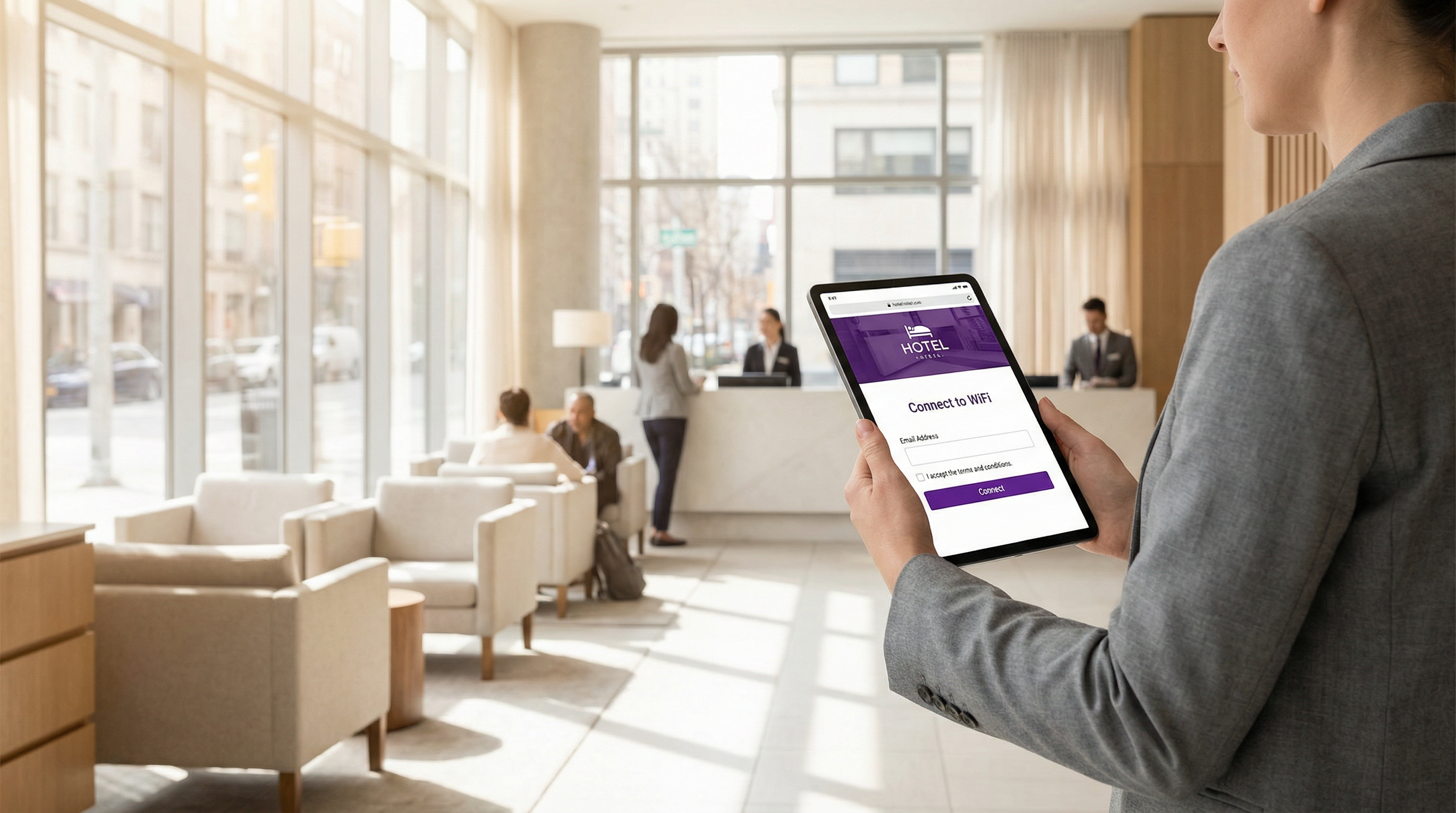
Un Captive Portal Wi-Fi è il gateway controllato attraverso il quale ogni dispositivo ospite deve passare prima di accedere alla rete. Per il CTO che valuta questo investimento, il business case è chiaro: un Captive Portal ben implementato soddisfa simultaneamente gli obblighi legali previsti dal GDPR e dalle normative di settore, elimina l'accesso anonimo alla rete e converte ogni accesso Wi-Fi in un evento strutturato di dati di prima parte che alimenta il CRM, la marketing automation e lo stack di analisi operativa.
Il mercato dei Captive Portal nel Regno Unito è cresciuto da 0,88 a 1,01 miliardi di sterline tra il 2023 e il 2024, riflettendo un tasso di crescita annuo composto del 15,3% trainato dall'adozione nei settori dell'ospitalità e del retail. L'aeroporto di Bruxelles-Sud Charleroi ha registrato un ritorno sull'investimento dell'842% in seguito all'implementazione della piattaforma di Purple, mentre i clienti enterprise segnalano costantemente una riduzione del 90% delle visite in loco da parte dei tecnici IT grazie alla gestione centralizzata in cloud.
Questa guida illustra l'architettura tecnica dei Captive Portal, i tre principali modelli di autenticazione e i relativi compromessi, il rafforzamento della sicurezza contro i vettori di attacco più comuni, i requisiti di conformità GDPR e PCI DSS, nonché le funzionalità avanzate di personalizzazione e analisi che distinguono un'implementazione di livello enterprise da una semplice pagina di login.
Approfondimento tecnico
Come funziona un Captive Portal Wi-Fi
Fondamentalmente, un Captive Portal è un meccanismo di controllo degli accessi di rete che intercetta il traffico non autenticato e lo reindirizza a una pagina di autenticazione web. Il meccanismo funziona nel modo seguente. Quando un dispositivo si associa a un SSID ospite, l'access point assegna un indirizzo IP tramite DHCP e pone il dispositivo in uno stato di firewall limitato. La risoluzione DNS funziona normalmente (è una scelta progettuale, poiché il reindirizzamento del portale dipende da essa), ma tutto il traffico HTTP e HTTPS in uscita viene intercettato dal gateway e riceve un reindirizzamento HTTP 302 all'URL del portale.
I moderni sistemi operativi includono il rilevamento integrato Captive Network Assistant (CNA). iOS interroga captive.apple.com, Android interroga connectivitycheck.gstatic.com e Windows utilizza la Network Location Awareness per interrogare www.msftconnecttest.com. Quando questi probe restituiscono risposte impreviste, il sistema operativo avvia automaticamente una finestra del browser leggera che presenta il portale. Questo è il motivo per cui gli utenti visualizzano un pop-up quasi immediato anziché un timeout del browser.
Il flusso di autenticazione in quattro fasi è il seguente:
- Associazione e DHCP: il dispositivo si connette all'SSID e riceve un indirizzo IP. Il gateway contrassegna la sessione come non autenticata.
- Intercettazione e reindirizzamento: il gateway intercetta la prima richiesta HTTP ed emette un reindirizzamento 302 all'URL del portale. Per le richieste HTTPS, il gateway deve presentare un certificato TLS valido per il dominio intercettato (il che attiva gli avvisi del browser) oppure affidarsi al meccanismo CNA per evitare del tutto l'intercettazione HTTPS.
- Azione di autenticazione: l'utente completa l'azione richiesta sulla pagina del portale, accettando un'AUP, inviando le credenziali o inserendo un codice voucher.
- Autorizzazione della sessione: il controller del portale notifica al gateway che l'indirizzo MAC del dispositivo (o il token di sessione) è ora autorizzato. La regola del firewall viene aggiornata e viene concesso l'accesso completo a Internet per la durata della sessione configurata.
Modelli di autenticazione: un confronto tecnico
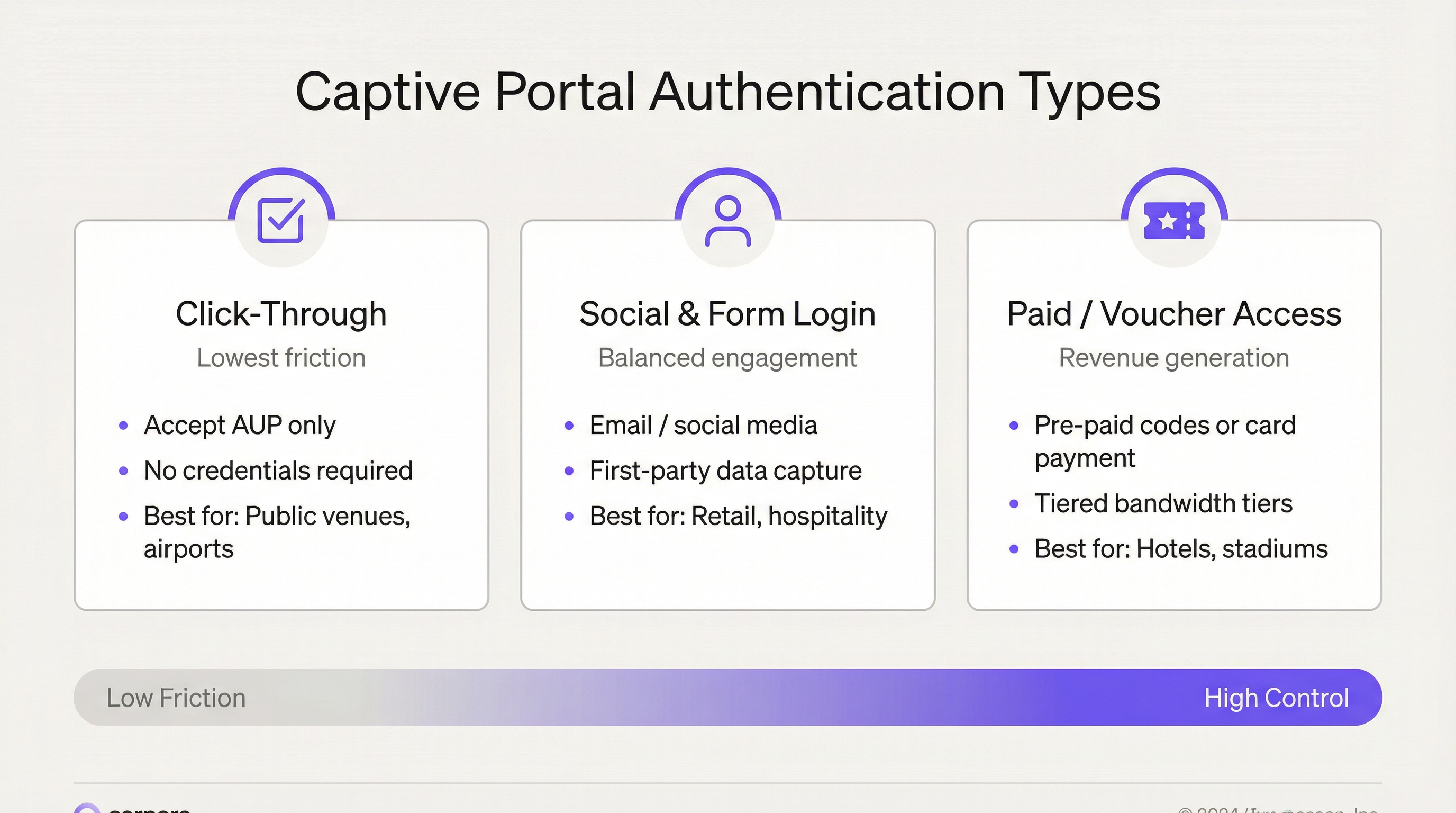
La scelta del modello di autenticazione è la decisione più importante nell'implementazione di un Captive Portal. Determina la qualità dei dati, il livello di conformità e le metriche dell'esperienza utente.
| Modello di autenticazione | Meccanismo tecnico | Dati acquisiti | Complessità di conformità | Ideale per |
|---|---|---|---|---|
| Click-Through (solo AUP) | Singola casella di controllo; autorizzazione della sessione basata su MAC | MAC del dispositivo, timestamp, durata della sessione | Bassa: nessun dato personale raccolto | Settore pubblico, snodi di trasporto, biblioteche |
| Registrazione via email / modulo | Invio del modulo; convalida lato server; emissione del token di sessione | Email, nome, dati demografici, stato di opt-in | Media: richiesto flusso di consenso GDPR | Ospitalità, retail, campus aziendali |
| Social Login (OAuth 2.0) | Flusso di autorizzazione OAuth 2.0 tramite Facebook, Google, LinkedIn | Dati del profilo social (soggetti alle restrizioni della piattaforma) | Medio-Alta: accordi per il trattamento dei dati di terze parti | Ospitalità, eventi, retail |
| Voucher / Accesso a pagamento | Codici pregenerati o integrazione con gateway di pagamento | Email (per la ricevuta), riferimento di pagamento | Media: ambito PCI DSS se il pagamento con carta avviene sulla rete | Hotel, stadi, centri congressi |
| Autenticazione PMS / Numero di camera | Integrazione con l'API del Property Management System | Identità dell'ospite dal record PMS | Bassa: dati già in possesso tramite la prenotazione dell'hotel | Hotel, resort |
Il modello di Social Login merita un'attenzione particolare. I flussi OAuth 2.0 tramite Facebook e Google offrono un'esperienza utente fluida e dati demografici più ricchi, ma le modifiche alle API delle piattaforme hanno progressivamente limitato i campi dati accessibili alle applicazioni di terze parti. Gli architetti di rete non dovrebbero progettare pipeline di dati che dipendono da campi del profilo social che potrebbero essere deprecati. L'acquisizione di email con consenso esplicito rimane la strategia di dati di prima parte più duratura.
Architettura di rete e segmentazione
Una corretta segmentazione della rete è il controllo di sicurezza più importante nell'implementazione di un Captive Portal. La rete ospite deve essere isolata a livello architetturale dalla LAN aziendale, da qualsiasi ambiente di dati dei titolari di carta in ambito PCI e da qualsiasi rete di tecnologia operativa. L'architettura consigliata è la seguente:
- SSID ospite dedicato mappato su una VLAN dedicata (es. VLAN 100) senza adiacenza di Livello 2 alle VLAN aziendali.
- Isolamento inter-client applicato a livello di access point, per impedire ai dispositivi ospiti di comunicare tra loro.
- Routing DMZ per tutto il traffico ospite, con ispezione stateful del firewall prima dell'uscita su Internet.
- Controller del Captive Portal (hardware, virtuale o gestito in cloud) situato nella DMZ, che gestisce la logica di reindirizzamento, la gestione delle sessioni e l'applicazione delle policy.
- Resolver DNS separati per la VLAN ospite, con convalida DNSSEC abilitata.
Per le implementazioni enterprise multi-sito, le piattaforme gestite in cloud come Purple centralizzano questa architettura su centinaia di sedi. Una modifica alle policy (l'aggiornamento del testo dell'AUP, l'aggiunta di un nuovo provider di Social Login o la modifica dei livelli di larghezza di banda) viene inviata una sola volta e si propaga a livello globale in pochi minuti, eliminando l'onere di configurazione per singola sede che rende le implementazioni basate su controller operativamente costose su larga scala.
Guida all'implementazione
Fase 1: Definizione dei requisiti e della conformità
Prima di iniziare qualsiasi configurazione tecnica, è necessario definire gli obblighi di conformità. Per le operazioni nell'UE e nel Regno Unito, l'Articolo 6 del GDPR richiede una base giuridica per il trattamento dei dati personali. Per le implementazioni di Captive Portal, si tratta in genere del consenso (Articolo 6(1)(a)) o del legittimo interesse (Articolo 6(1)(f)). Il consenso è la base più chiara per i dati di marketing; il legittimo interesse può applicarsi alla registrazione di sicurezza. Documenta la base giuridica per ciascuna categoria di dati nel Registro delle attività di trattamento (ROPA) ai sensi dell'Articolo 30.
Se la sede elabora pagamenti con carta su una rete che condivide l'infrastruttura con il Wi-Fi ospite (anche tramite switch di uplink condivisi), è necessario valutare l'ambito PCI DSS. L'approccio più sicuro è il completo isolamento della rete: Wi-Fi ospite su una rete separata fisicamente o logicamente isolata, senza alcun percorso verso l'ambiente dei dati dei titolari di carta.
Fase 2: Progettazione della rete e infrastruttura
Implementa l'SSID ospite su una VLAN dedicata. Esegui il trunking di questa VLAN verso gli switch di uplink e verifica la configurazione del trunk prima di procedere: un trunk configurato in modo errato è la causa più comune della comparsa accidentale di ospiti sulla rete aziendale. Configura il DHCP per la VLAN ospite con un tempo di lease breve (1-4 ore) per recuperare in modo efficiente gli indirizzi IP in ambienti ad alto turnover.
Seleziona il modello di implementazione del Captive Portal: basato su controller (hardware on-premise o virtual appliance) o gestito in cloud (piattaforma SaaS). Per le organizzazioni con più di cinque sedi, la gestione in cloud è fortemente consigliata per l'efficienza operativa. La piattaforma di Purple supporta oltre 400 integrazioni hardware, tra cui Cisco Meraki, Aruba, Ruckus e Ubiquiti, consentendo l'implementazione senza sostituire l'infrastruttura di access point esistente.
Fase 3: Configurazione del portale e branding
Con la piattaforma di Purple, la personalizzazione della splash page si ottiene tramite un editor drag-and-drop che supporta l'override completo di HTML/CSS per le organizzazioni che richiedono un allineamento del brand pixel-perfect. Gli elementi chiave della configurazione includono:
- Asset del brand: logo, palette di colori, immagini di sfondo e selezione dei font.
- Localizzazione linguistica: Purple supporta il rilevamento automatico della lingua del dispositivo in oltre 25 lingue, presentando il portale nella lingua del dispositivo dell'utente senza selezione manuale.
- Flusso di autenticazione: configura i metodi di autenticazione scelti. È possibile offrire più metodi contemporaneamente (ad esempio, registrazione via email e click-through), con l'opzione click-through disponibile come ripiego per gli utenti che non desiderano registrarsi.
- Gestione del consenso: configura caselle di controllo separate e indipendentemente opzionali per l'accettazione dell'AUP (richiesta per l'accesso) e l'opt-in per il marketing (opzionale). Assicurati che la casella di controllo per il marketing sia deselezionata per impostazione predefinita. Inserisci un link alla tua privacy policy dalla pagina del portale.
- Reindirizzamento post-autenticazione: configura un URL di reindirizzamento significativo: il tuo programma fedeltà, una landing page promozionale o la pagina di download dell'app della tua sede.
- Parametri di sessione: imposta una durata della sessione appropriata al tipo di sede. Gli hotel utilizzano in genere sessioni di 24 ore; il retail ad alto turnover può utilizzare 4-8 ore; gli eventi possono utilizzare sessioni della durata dell'evento.
Fase 4: Rafforzamento della sicurezza
Applica i seguenti controlli di sicurezza prima del go-live:
- Implementa il portale esclusivamente su HTTPS con un certificato TLS valido emesso da una CA attendibile. Rinnova i certificati automaticamente utilizzando Let's Encrypt o il supporto del protocollo ACME della tua CA. Imposta un promemoria sul calendario 30 giorni prima della scadenza come misura di sicurezza manuale.
- Abilita la Management Frame Protection 802.11w sull'SSID ospite. Questo è obbligatorio con WPA3 e mitiga gli attacchi di deautenticazione utilizzati negli scenari evil twin.
- Configura il rilevamento delle intrusioni wireless per avvisare in caso di SSID rogue che corrispondono al nome del tuo SSID ospite.
- Abilita il rate limiting per utente a livello di access point per prevenire la monopolizzazione della larghezza di banda e mitigare i denial-of-service da parte di singoli dispositivi.
- Configura le policy di timeout della sessione e di idle timeout. Un idle timeout di 30-60 minuti recupera le sessioni del gateway dai dispositivi che hanno lasciato la sede.
Fase 5: Test e Go-Live
Testa il flusso di autenticazione completo sulle seguenti combinazioni di dispositivi/sistemi operativi prima del go-live: iOS Safari (ultima versione), Android Chrome (ultima versione), Windows 11 Edge, macOS Safari e Android Firefox. Verifica che il pop-up CNA si attivi correttamente su iOS e Android. Testa la validità del certificato: naviga direttamente all'URL del portale in un browser e conferma l'assenza di avvisi relativi al certificato. Testa il reindirizzamento post-autenticazione. Testa l'applicazione dei livelli di larghezza di banda, se applicabile. Documenta i risultati dei test.
Best practice
Best practice di sicurezza
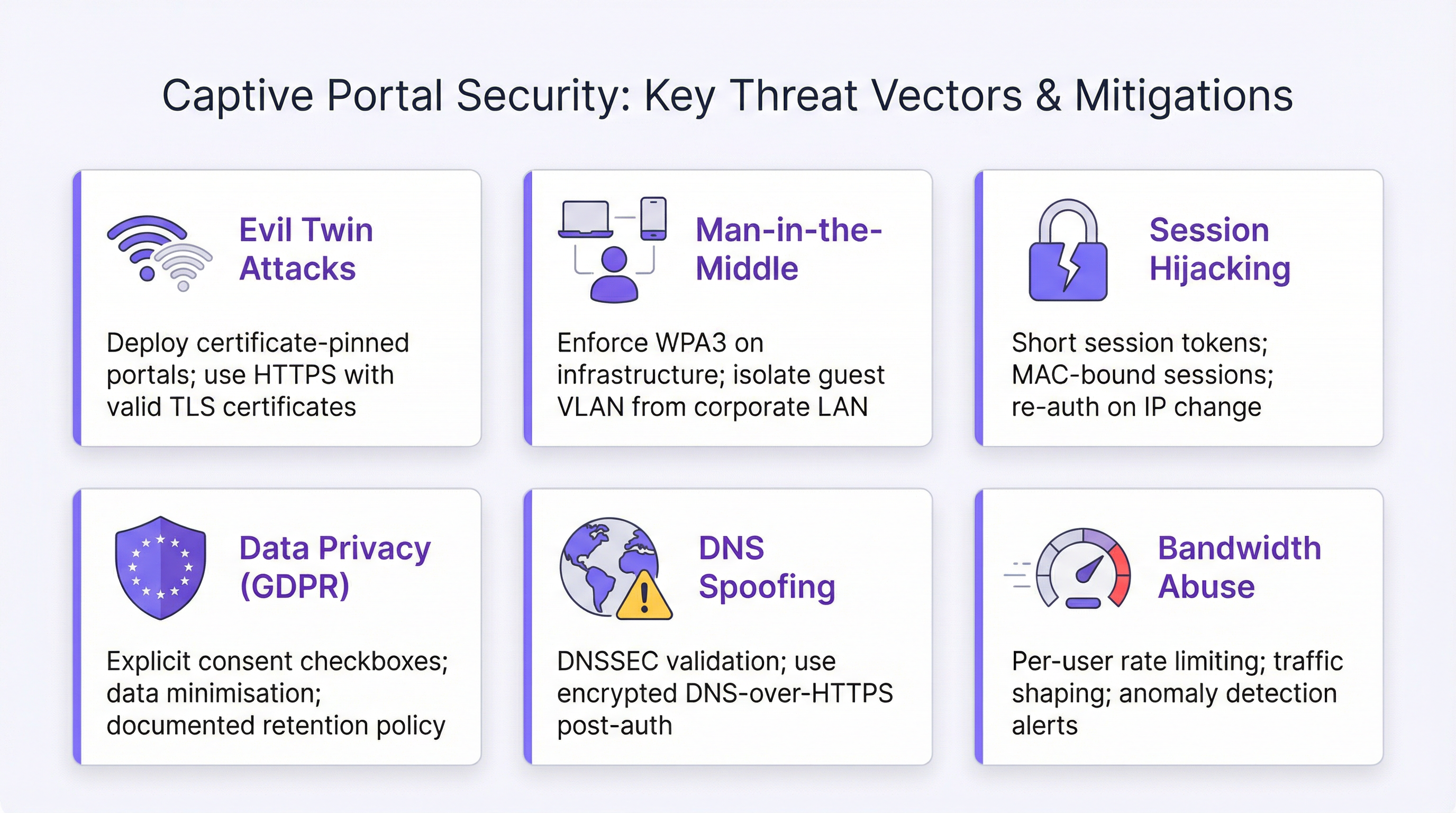
I rischi per la sicurezza più significativi associati ai Captive Portal Wi-Fi sono gli attacchi evil twin, l'intercettazione man-in-the-middle, il session hijacking e il DNS spoofing. Ognuno di essi ha una strategia di mitigazione definita.
Gli attacchi evil twin vengono mitigati tramite l'applicazione di HTTPS con certificati TLS validi, la Management Frame Protection 802.11w e il monitoraggio IDS wireless. Un utente che si connette a un AP rogue riceverà un avviso relativo al certificato se l'aggressore non è in grado di ottenere un certificato valido per il dominio del portale (cosa impossibile, supponendo che il dominio sia adeguatamente controllato).
L'intercettazione man-in-the-middle viene affrontata attraverso una rigorosa segmentazione delle VLAN, l'isolamento inter-client e l'instradamento di tutto il traffico ospite attraverso un firewall stateful. Dopo l'autenticazione, incoraggia gli utenti a connettersi ai siti tramite HTTPS: è sufficiente una nota sulla landing page post-autenticazione.
Il session hijacking viene mitigato utilizzando token di sessione anziché indirizzi MAC come unico identificatore di autorizzazione, impostando durate di sessione appropriate e implementando trigger di riautenticazione in caso di modifiche dell'indirizzo IP. Tieni presente che la randomizzazione dell'indirizzo MAC (abilitata per impostazione predefinita su iOS 14+, Android 10+ e Windows 10+) rende inaffidabile la persistenza della sessione basata su MAC. I token di sessione legati all'identità autenticata rappresentano l'approccio corretto.
Il DNS spoofing viene affrontato tramite la convalida DNSSEC sui resolver DNS ospiti e, dopo l'autenticazione, incoraggiando o imponendo il DNS-over-HTTPS per il traffico ospite.
Checklist di conformità GDPR
I seguenti controlli sono necessari per il funzionamento di un Captive Portal conforme al GDPR nelle giurisdizioni del Regno Unito e dell'UE:
- Caselle di controllo del consenso deselezionate per impostazione predefinita.
- Caselle di controllo separate e indipendentemente opzionali per l'accettazione dell'AUP e l'opt-in per il marketing.
- Descrizione chiara e in linguaggio semplice di quali dati vengono raccolti e perché.
- Link alla privacy policy sulla pagina del portale.
- Policy documentata di conservazione e cancellazione dei dati.
- Accordi per il trattamento dei dati con tutti i responsabili del trattamento di terze parti (piattaforme CRM, strumenti di analisi).
- Voce nel Registro delle attività di trattamento (ROPA) che copre la raccolta dei dati del Captive Portal.
- Processo per rispondere alle richieste di accesso degli interessati entro 30 giorni.
- Processo per la cancellazione dei dati su richiesta.
Best practice operative
Il fallimento operativo più comune nelle implementazioni enterprise di Captive Portal è il modello "imposta e dimentica": il portale viene implementato, funziona e non riceve ulteriori attenzioni finché qualcosa non si rompe. Implementa una revisione operativa trimestrale che copra: date di scadenza dei certificati TLS, validità delle chiavi API di Social Login, integrità dei link alla privacy policy, attualità del testo dell'AUP (in particolare a seguito di modifiche normative) e test del flusso di autenticazione su tutte le combinazioni di sistemi operativi/browser supportate.
Risoluzione dei problemi e mitigazione dei rischi
Modalità di guasto comuni
| Modalità di guasto | Sintomi | Causa principale | Risoluzione |
|---|---|---|---|
| Il portale non appare su iOS | Il dispositivo si connette ma nessun pop-up CNA | Probe Apple bloccato dal firewall | Consenti HTTP in uscita verso captive.apple.com; assicurati che il DNS si risolva correttamente |
| Avviso certificato sul portale | Il browser mostra l'avviso "Non sicuro" | Certificato TLS scaduto o autofirmato | Rinnova il certificato; configura il rinnovo automatico |
| Loop di reindirizzamento | Utente bloccato in un reindirizzamento infinito | URL di reindirizzamento post-autenticazione configurato in modo errato o regola del firewall non aggiornata | Verifica l'autorizzazione della sessione del firewall; controlla la configurazione dell'URL di reindirizzamento |
| Errore di Social Login | Il flusso OAuth restituisce un errore | Chiave API scaduta o modifica delle autorizzazioni della piattaforma | Rigenera le chiavi API; esamina la console per sviluppatori della piattaforma per le modifiche alle autorizzazioni |
| Ospiti sulla rete aziendale | Dispositivi ospiti che appaiono nella VLAN aziendale | Errata configurazione del trunk VLAN | Verifica il trunk VLAN sullo switch di uplink; conferma la mappatura SSID-VLAN |
| La randomizzazione MAC interrompe le sessioni | Agli utenti viene richiesto nuovamente il login alla riconnessione | La persistenza della sessione basata su MAC fallisce con MAC randomizzati | Passa alla gestione delle sessioni basata su token; aumenta la durata della sessione |
| Livello di larghezza di banda non applicato | Gli utenti Premium ricevono lo stesso throughput degli utenti gratuiti | Policy QoS non applicata a livello di AP | Configura il rate limiting per utente sull'access point, non solo sul gateway |
Registro dei rischi
Ai fini della gestione dei rischi aziendali, i principali rischi associati alle implementazioni di Captive Portal e le relative mitigazioni sono i seguenti. La non conformità al GDPR (probabilità: media, impatto: alto) viene mitigata attraverso flussi di consenso documentati, voci ROPA e revisioni trimestrali della conformità. La scadenza del certificato TLS (probabilità: media, impatto: alto — il portale diventa inaccessibile) viene mitigata attraverso il rinnovo automatico del certificato e il monitoraggio basato su calendario. L'attacco evil twin (probabilità: bassa, impatto: alto) viene mitigato tramite 802.11w, monitoraggio WIDS e applicazione di HTTPS. La violazione dei dati tramite rete ospite (probabilità: bassa, impatto: molto alto) viene mitigata attraverso una rigorosa segmentazione delle VLAN e policy del firewall.
ROI e impatto sul business

Misurazione del ritorno sull'investimento
Il ROI dell'implementazione di un Captive Portal Wi-Fi si misura su tre dimensioni: generazione diretta di ricavi, riduzione dei costi operativi e valore del marketing e dei dati.
La generazione diretta di ricavi si applica principalmente alle sedi che offrono accesso a livelli: hotel, stadi e centri congressi che vendono pacchetti di larghezza di banda premium. Un hotel di 200 camere che addebita 5 £ al giorno per il Wi-Fi premium al 30% degli ospiti genera circa 110.000 £ di ricavi incrementali annui da un'implementazione che costa una frazione di tale cifra.
La riduzione dei costi operativi è guidata dalla gestione centralizzata. I clienti enterprise di Purple segnalano una riduzione del 90% delle visite in loco da parte dei tecnici IT in seguito alla migrazione da implementazioni basate su controller a quelle gestite in cloud. Per una catena di retail con 200 sedi, l'eliminazione di sole due visite di tecnici per sede all'anno a 150 £ a visita rappresenta un risparmio annuo di 60.000 £.
Il valore del marketing e dei dati è la dimensione strategicamente più significativa. Un Captive Portal che acquisisce indirizzi email con il consenso al marketing costruisce un asset di dati di prima parte che diventa sempre più prezioso man mano che la deprecazione dei cookie di terze parti rimuove fonti di dati alternative. La piattaforma di Purple si integra con oltre 400 connettori CRM e di marketing automation, consentendo ai dati acquisiti di fluire direttamente in Salesforce, HubSpot, Mailchimp e piattaforme equivalenti. Il livello di analisi (mappe di calore dell'affluenza, analisi del tempo di permanenza, identificazione dei visitatori abituali e reportistica sulle ore di punta) fornisce un'intelligence operativa che orienta le decisioni relative al personale, al layout del negozio e alle tempistiche promozionali.
Key Performance Indicator
| KPI | Definizione | Benchmark target |
|---|---|---|
| Tasso di adozione del portale | % di dispositivi connessi che completano l'autenticazione | >60% per l'ospitalità; >40% per il retail |
| Tasso di acquisizione dati | % di sessioni autenticate che forniscono l'indirizzo email | >50% per i portali basati su moduli |
| Tasso di opt-in marketing | % di sessioni autenticate che acconsentono al marketing | 20-35% è tipico per l'ospitalità |
| Durata della sessione | Tempo medio in cui un dispositivo rimane connesso dopo l'autenticazione | Dipende dalla sede; monitorare le tendenze nel tempo |
| Tasso di visitatori abituali | % di sessioni autenticate da identità già viste in precedenza | Indica la fedeltà; target >30% per il retail |
| Uptime del portale | % di tempo in cui il portale è disponibile e funzionante | Target SLA >99,9% |
| Giorni rimanenti certificato TLS | Giorni fino alla scadenza del certificato | Soglia di avviso: <30 giorni |
Case Study: Aeroporto di Bruxelles-Sud Charleroi
L'aeroporto di Bruxelles-Sud Charleroi ha implementato la piattaforma Captive Portal di Purple per gestire il Wi-Fi ospite in tutto il terminal. L'implementazione ha raggiunto un tasso di connessione dei fan del 25% per evento, ha registrato 9,2 milioni di visite di clienti durante i primi 24 mesi e ha generato un ritorno sull'investimento dell'842%. L'integrazione dei sondaggi nel portale ha consentito la raccolta di dati sulla soddisfazione dei passeggeri in tempo reale, sostituendo i costosi processi di sondaggio manuali e fornendo un'intelligence operativa fruibile al management della sede.
Case Study: Importante catena di retail nel Regno Unito
Un'importante catena di retail del Regno Unito, operativa in oltre 150 sedi, ha implementato la piattaforma di Purple per unificare la gestione e l'analisi del Wi-Fi ospite. Prima dell'implementazione, la catena non aveva alcuna visibilità sul tempo di permanenza in negozio, sui modelli di affluenza o sulla relazione tra l'utilizzo del Wi-Fi e il comportamento di acquisto. In seguito all'implementazione, il livello di analisi ha identificato che i negozi con tempi di permanenza superiori alla media nell'area bar registravano valori medi di transazione più alti del 23%. Questa intuizione ha guidato un programma di riprogettazione del layout dei negozi che ha prodotto un aumento misurabile dei ricavi entro due trimestri. La capacità di gestione centralizzata ha ridotto le spese operative IT eliminando la gestione della configurazione per singola sede, con una riduzione del 90% delle visite dei tecnici che si è tradotta in significativi risparmi annui sui costi in tutta la rete.
Key Terms & Definitions
Captive WiFi Portal
A network access control mechanism that intercepts unauthenticated HTTP/HTTPS traffic from newly connected devices and redirects it to a web-based landing page. The user must complete a defined action — accepting terms, submitting credentials, or making a payment — before the network gateway grants full internet access. The portal creates a 'walled garden' that controls the initial network access event.
IT teams encounter this term when specifying guest Wi-Fi requirements, evaluating network access control solutions, or auditing existing deployments. It is the foundational concept for all guest connectivity management in hospitality, retail, events, and public-sector environments.
Captive Network Assistant (CNA)
A built-in OS mechanism that detects the presence of a captive portal and automatically launches a lightweight browser window to display the portal page. iOS probes captive.apple.com, Android probes connectivitycheck.gstatic.com, and Windows uses Network Location Awareness. When these probes return unexpected responses, the CNA triggers automatically.
Network architects must ensure their firewall and DNS configuration does not inadvertently block CNA probes, as this prevents the portal from appearing automatically on user devices — the most common cause of 'portal not showing' support tickets.
VLAN (Virtual Local Area Network)
A logical network segmentation technique that isolates traffic at Layer 2 of the OSI model. In captive portal deployments, the guest SSID is mapped to a dedicated VLAN that is architecturally isolated from corporate VLANs, preventing guest traffic from reaching internal systems.
VLAN configuration is the foundational security control in any captive portal deployment. Misconfigured VLAN trunking — where the guest VLAN is not properly isolated from corporate VLANs — is the most common and most serious security failure mode in enterprise guest Wi-Fi deployments.
OAuth 2.0
An open authorisation framework (RFC 6749) that enables third-party applications to obtain limited access to user accounts on platforms such as Facebook, Google, and LinkedIn. In captive portal deployments, OAuth 2.0 is used to implement social login — the user authorises the portal to access their social profile, providing identity verification without requiring a separate account.
IT teams evaluating social login authentication must understand that OAuth 2.0 introduces a dependency on third-party API availability and is subject to platform policy changes that may restrict the data fields accessible to the portal application. Social platform API changes have historically reduced the demographic data available via social login without advance notice.
IEEE 802.11w (Management Frame Protection)
An IEEE 802.11 amendment that provides cryptographic protection for management frames — the control messages that govern Wi-Fi association, disassociation, and authentication. Without 802.11w, management frames can be spoofed by attackers to force device disconnection (deauthentication attacks), a technique used in evil twin attacks. 802.11w is mandatory under WPA3.
Network architects deploying captive portals in high-risk environments (airports, financial institutions, healthcare) should enable 802.11w on guest SSIDs where supported by the access point hardware. It significantly raises the bar for evil twin attacks by preventing the deauthentication frames that force devices to reconnect to a rogue AP.
GDPR Article 30 (Record of Processing Activities)
A GDPR requirement for organisations processing personal data to maintain a documented record of all data processing activities, including the categories of data processed, the purposes of processing, data retention periods, and details of any third-party processors. Captive portal deployments that collect personal data (email addresses, social profile data) must have a corresponding ROPA entry.
IT managers are frequently responsible for ensuring that new data collection systems — including captive portals — are documented in the organisation's ROPA before go-live. Failure to maintain an accurate ROPA is a GDPR compliance gap that can result in ICO enforcement action, particularly following a data breach.
PCI DSS (Payment Card Industry Data Security Standard)
A set of security standards established by the PCI Security Standards Council to protect cardholder data. For captive portal deployments in retail environments, PCI DSS requires complete network isolation between the guest Wi-Fi network and any system that stores, processes, or transmits cardholder data (the Cardholder Data Environment, or CDE).
Retail IT teams must assess PCI DSS scope when deploying guest Wi-Fi. If the guest Wi-Fi network shares any infrastructure — switches, uplinks, or firewalls — with the PCI-scoped network, the guest network may be brought into PCI scope, significantly increasing compliance obligations and audit costs.
MAC Address Randomisation
A privacy feature enabled by default on iOS 14+, Android 10+, and Windows 10+ that generates a random MAC address for each Wi-Fi network a device connects to, rather than using the device's hardware MAC address. This prevents cross-network tracking of devices by their MAC address.
MAC address randomisation directly impacts captive portal session management and analytics. Any system that uses MAC addresses as stable device identifiers for repeat visitor detection, session persistence, or security policy enforcement will produce incorrect results on modern devices. The correct approach is to use authenticated identity (email, social profile ID) as the stable identifier.
Walled Garden
A network configuration in which unauthenticated devices have access only to a restricted set of IP addresses and URLs — typically the captive portal itself and any resources required for the portal to function (CDN assets, OAuth endpoints) — while all other internet traffic is blocked until authentication is complete.
IT teams configuring captive portals must carefully define the walled garden whitelist. Common omissions include: the portal's CDN asset URLs (causing the portal page to render without styling), Apple's CNA probe URL (causing the portal not to appear on iOS), and OAuth provider endpoints (causing social login to fail). A well-documented walled garden configuration is essential for reliable portal operation.
DSCP (Differentiated Services Code Point)
A field in the IP packet header used to classify and manage network traffic for Quality of Service (QoS) purposes. In captive portal deployments with tiered bandwidth, DSCP marking is used to classify traffic from premium-tier users so that QoS policies at the access point and gateway can enforce differentiated throughput limits.
IT teams implementing paid bandwidth tiers must configure DSCP marking and corresponding QoS policies at the access point level, not only at the gateway. Gateway-only QoS policies may not differentiate traffic correctly when multiple users share the same access point, resulting in premium users receiving the same throughput as free-tier users.
Case Studies
A 350-room international hotel needs to deploy a captive wifi portal that authenticates guests using their room number and surname, captures email addresses for the loyalty programme, complies with GDPR, and provides tiered bandwidth (free standard / paid premium at £8/day). The hotel uses Opera PMS and Cisco Meraki access points. What is the recommended deployment architecture and configuration?
The recommended deployment uses Purple's enterprise platform integrated with Cisco Meraki via the Meraki API. Step 1: Configure a dedicated guest SSID on Meraki mapped to VLAN 200, with client isolation enabled and a separate DHCP scope (e.g., 10.200.0.0/22 providing up to 1,022 addresses for a 350-room hotel with multiple devices per guest). Step 2: Configure Purple as the captive portal controller, pointing the Meraki splash page URL to Purple's hosted portal endpoint. Step 3: Enable the Opera PMS integration in Purple's connector library. Configure the authentication flow to present a room number and surname form as the primary authentication method, with email address capture as a mandatory second step post-PMS validation. Step 4: Configure the GDPR consent flow: AUP acceptance checkbox (required, unchecked by default) and marketing opt-in checkbox (optional, unchecked by default) with a link to the hotel's privacy policy. Step 5: Configure two bandwidth tiers in Purple — Standard (5 Mbps down / 2 Mbps up) and Premium (25 Mbps down / 10 Mbps up). Integrate with a payment gateway (Stripe is supported) for the Premium tier purchase flow. Configure Meraki QoS policies using DSCP marking to enforce tier differentiation at the AP level. Step 6: Set session duration to 24 hours with a 60-minute idle timeout. Step 7: Configure post-authentication redirect to the hotel's loyalty programme enrolment page. Step 8: Enable Purple's analytics dashboard and configure a CRM connector to push captured email addresses and opt-in status to the hotel's CRM platform. Test on iOS Safari, Android Chrome, and Windows Edge before go-live.
A national retail chain with 180 stores wants to deploy a unified captive wifi portal programme. Requirements: email capture with marketing consent, footfall analytics by store, GDPR compliance, integration with Salesforce Marketing Cloud, and no replacement of existing Aruba access points. The IT team has three engineers for the entire estate. How should this be structured?
This is a cloud-managed deployment scenario where on-premises infrastructure is non-negotiable. Step 1: Audit existing Aruba infrastructure for firmware versions and confirm compatibility with Purple's Aruba integration (Purple supports Aruba Instant and Aruba Central deployments). Step 2: Configure a standardised guest SSID template in Purple — one configuration that will be pushed to all 180 stores. Define VLAN assignment, DHCP parameters, and firewall policy in the template. Step 3: Design the portal template: brand assets, email registration form with separate AUP and marketing opt-in checkboxes, and a post-auth redirect to the chain's loyalty app download page. Configure the portal in 25+ languages to support stores in international markets if applicable. Step 4: Configure the Salesforce Marketing Cloud connector in Purple. Map captured fields (email, first name, opt-in status, store ID, visit timestamp) to the corresponding Salesforce objects. Ensure a Data Processing Agreement is in place with Salesforce. Step 5: Enable Purple's footfall analytics. Configure store-level dashboards showing daily unique visitors, peak hours, dwell time, and repeat visitor rate. Set up automated weekly reports delivered to store managers and a consolidated estate-level report for the IT and marketing leadership teams. Step 6: Roll out in waves — pilot with 10 stores, validate data flows and Salesforce integration, then deploy remaining 170 stores. With cloud management, each store deployment requires only VLAN configuration on the local switch and SSID assignment on existing APs — typically 30–45 minutes per site for a trained engineer. Step 7: Document all data flows in the ROPA. Establish a quarterly operational review process.
A 60,000-capacity stadium is deploying captive wifi for matchday use. Expected peak concurrent users: 18,000. Requirements: fast authentication (under 10 seconds), event-duration sessions, sponsor branding on the portal, data capture for the club's CRM, and integration with the club's ticketing system for fan verification. What are the key technical considerations and recommended architecture?
High-density stadium deployments require specific architectural decisions that differ from hospitality or retail scenarios. Step 1: Capacity planning. With 18,000 concurrent users, the DHCP scope must accommodate at least 25,000 addresses (allowing for churn). Use a /17 or /16 subnet for the guest VLAN. Configure DHCP lease times of 4 hours (event duration) rather than the default 24 hours to prevent address exhaustion across multiple events. Step 2: Authentication performance. Click-through with email capture is the recommended model for stadium deployments — social login OAuth flows introduce latency and depend on external API availability, which is a risk in high-concurrency scenarios. Configure the portal to be served from a CDN-backed endpoint to minimise latency under load. Step 3: Ticketing system integration. Configure a custom authentication field for ticket barcode or booking reference, validated against the ticketing system API. This provides fan identity verification and links Wi-Fi sessions to ticketing records, enabling post-event CRM segmentation by stand, ticket tier, and attendance frequency. Step 4: Sponsor branding. Purple's platform supports interstitial video and branded splash pages. Configure a sponsor-branded portal with the club's primary and secondary sponsors' assets. Rotate sponsor branding by event type if required. Step 5: Session management. Set session duration to match event duration (typically 3–4 hours) with no idle timeout — fans moving around the stadium should not be re-prompted. Step 6: Analytics. Configure Purple's real-time dashboard for the venue operations team, showing live concurrent connections by zone, authentication rate, and bandwidth utilisation.
Scenario Analysis
Q1. A conference centre hosts 50 events per year, ranging from 200-person seminars to 3,000-person trade shows. The venue's IT team has proposed a single captive portal configuration for all events, using click-through authentication with a generic venue-branded splash page. The sales team wants event-specific sponsor branding and delegate data capture for each event organiser. How would you resolve this conflict, and what is the recommended architecture?
💡 Hint:Consider whether a single portal configuration can serve both the IT team's operational simplicity requirement and the sales team's per-event customisation requirement. Evaluate whether Purple's platform supports per-event portal configurations managed from a central account.
Show Recommended Approach
The conflict is resolvable without choosing between operational simplicity and commercial flexibility. The recommended architecture uses Purple's multi-portal capability, where a single platform account manages multiple portal configurations — one per event or event type — all deployed to the same physical access point infrastructure. The IT team maintains a single platform to manage, while the sales team (or event organisers, via delegated access) can configure event-specific branding, authentication flows, and data capture fields for each event. The recommended authentication model for conference events is email registration with marketing opt-in, not click-through — event organisers have a legitimate commercial interest in capturing delegate contact data, and click-through provides no value for post-event follow-up. Configure a base portal template with the venue's brand framework, then allow per-event customisation of sponsor logos, colour accents, and post-auth redirect URLs. Set session duration to event duration (typically 8-10 hours for a full-day event). Configure data export per event so each organiser receives only their delegates' data, not a combined dataset from all events — this is both a GDPR requirement (data minimisation) and a commercial necessity. The GDPR consent flow must be configured so that the marketing opt-in clearly identifies the event organiser as the data controller, not the venue — or alternatively, the venue acts as data processor under a Data Processing Agreement with each event organiser.
Q2. Your organisation's security audit has flagged that the existing captive portal deployment uses a self-signed TLS certificate, has no inter-client isolation configured, and the guest VLAN is on the same /16 subnet as the corporate network (different VLANs, but same IP range with no firewall between them). Prioritise the remediation actions and explain your reasoning.
💡 Hint:Assess each finding by its potential impact and exploitability. Consider which finding represents an active risk to corporate data versus which represents a user experience or compliance issue.
Show Recommended Approach
Prioritise remediation in the following order. Priority 1 (Immediate): The absence of a firewall between the guest VLAN and the corporate network is a critical vulnerability. Even with VLAN separation, if there is no stateful firewall enforcing policy between the VLANs, a guest device that obtains or guesses a corporate IP address can potentially reach corporate systems. This is an active data breach risk. Remediation: implement a stateful firewall rule set that explicitly denies all traffic from the guest VLAN to the corporate VLAN, with logging enabled. This must be done before any other remediation. Priority 2 (Within 48 hours): Enable inter-client isolation on the guest SSID. Without it, guest devices can communicate directly with each other at Layer 2, enabling ARP poisoning, traffic interception between guests, and lateral movement within the guest network. Priority 3 (Within one week): Replace the self-signed TLS certificate with a certificate from a trusted CA. A self-signed certificate triggers browser warnings that train users to ignore certificate errors — a conditioning that makes them vulnerable to future MITM attacks. Use Let's Encrypt for automated, free certificate issuance and renewal. The self-signed certificate is a compliance and user experience issue rather than an active data breach risk, which is why it is Priority 3 rather than Priority 1 — but it must be remediated within the same change window if possible.
Q3. A 500-store UK retail chain is preparing for a GDPR audit. The DPO has identified that the captive portal has been collecting email addresses and marketing opt-ins for three years, but the consent flow has a pre-checked marketing opt-in checkbox. The DPO estimates that approximately 2.3 million email records in the CRM may have been collected under invalid consent. What are the immediate actions required, and how should the organisation remediate the historical data issue?
💡 Hint:Consider both the forward-looking remediation (fixing the consent flow) and the backward-looking remediation (handling the 2.3 million potentially invalid consent records). Reference GDPR Article 7 on conditions for consent and the ICO's guidance on consent.
Show Recommended Approach
Immediate actions: First, fix the portal consent flow today. Remove the pre-checked marketing opt-in checkbox and replace it with an unchecked checkbox. This stops the ongoing collection of invalid consent and is the highest-priority action. Second, document the change with a timestamp and retain evidence for the audit. Third, notify the DPO and legal counsel — this is a reportable compliance gap that should be disclosed proactively to the ICO rather than discovered during audit. For the historical 2.3 million records: GDPR Article 7(1) requires that the controller be able to demonstrate that consent was given. A pre-checked checkbox does not constitute valid consent under GDPR Recital 32, which explicitly states that silence, pre-ticked boxes or inactivity should not constitute consent. The organisation has three options for the historical records. Option 1 (Recommended): Send a re-consent campaign to the 2.3 million contacts, clearly explaining that their marketing consent is being re-confirmed, providing an easy opt-out, and stating that contacts who do not actively re-confirm will be removed from marketing lists within 30 days. This is the cleanest remediation and demonstrates good faith to the ICO. Option 2: Suppress all 2.3 million records from marketing use immediately, retaining them only for the purposes for which valid consent exists. Option 3: Delete all records collected under invalid consent. The re-consent campaign (Option 1) is recommended as it preserves commercial value while demonstrating active remediation. Document the entire remediation process for the audit.
Key Takeaways
- ✓A captive wifi portal is simultaneously a network access control mechanism, a GDPR compliance instrument, a first-party data collection tool, and — when deployed on a platform like Purple — a business intelligence gateway that delivers measurable ROI through footfall analytics, CRM integration, and operational insights.
- ✓Network segmentation is the foundational security control: the guest VLAN must be completely isolated from the corporate LAN and any PCI-scoped environment, with a stateful firewall enforcing the boundary. This must be verified before any portal configuration begins.
- ✓Authentication model selection drives everything downstream — click-through for public-sector access provision, form/social login for hospitality and retail data capture, paid/voucher for revenue generation. Changing the model post-deployment requires reconfiguring consent flows and data pipelines.
- ✓GDPR compliance requires separate, independently optional, unchecked-by-default checkboxes for AUP acceptance and marketing opt-in. Bundling these or pre-checking the marketing box is a violation that has attracted ICO enforcement action.
- ✓MAC address randomisation — enabled by default on iOS 14+, Android 10+, and Windows 10+ — makes MAC-based session management and repeat visitor analytics unreliable. Use authenticated identity (email, social profile ID) as the stable identifier for cross-session analytics.
- ✓The 'set and forget' portal is the most common enterprise failure mode. Implement a quarterly operational review covering TLS certificate expiry, social login API key validity, privacy policy link integrity, and end-to-end authentication flow testing on iOS and Android.
- ✓Cloud-managed platforms become operationally mandatory above five sites. For estates of 20+ venues, the per-site configuration overhead of controller-based deployments typically exceeds the annual platform subscription cost of cloud-managed alternatives within the first year.




