

Fondamenti di DHCP e DNS per gli amministratori di reti WiFi
An authoritative technical reference for IT leaders and network administrators on the critical roles of DHCP and DNS in enterprise WiFi deployments. This guide provides practical, vendor-neutral guidance for designing, implementing, and troubleshooting robust network services in hospitality, retail, and large-venue environments.
🎧 Listen to this Guide
View Transcript
Sintesi esecutiva
Per l'azienda moderna, il WiFi per ospiti e personale non è più una comodità; è un'infrastruttura fondamentale che sostiene le operazioni, il coinvolgimento dei clienti e la business intelligence. Tuttavia, la stabilità e la sicurezza di queste reti dipendono interamente da servizi di base spesso dati per scontati: il Dynamic Host Configuration Protocol (DHCP) e il Domain Name System (DNS). Per CTO, responsabili IT e direttori di sede, una comprensione approfondita di questi protocolli non è un mero esercizio tecnico, ma una questione di mitigazione dei rischi, ottimizzazione delle risorse e garanzia di un'esperienza utente superiore. Errori di configurazione possono portare a interruzioni critiche del servizio, vulnerabilità di sicurezza e un'esperienza degradata che incide direttamente sulla soddisfazione dei clienti e sui ricavi. Questa guida fornisce un framework pratico e attuabile per l'architettura dei servizi DHCP e DNS per reti WiFi su larga scala. Va oltre la teoria accademica per affrontare le sfide del mondo reale, dalla gestione degli indirizzi IP in luoghi ad alta densità alle complesse meccaniche DNS che regolano le funzionalità del Captive Portal. Adottando le best practice delineate, le organizzazioni possono garantire che la propria infrastruttura WiFi non sia solo affidabile e sicura, ma anche una potente risorsa per la raccolta dati e la crescita aziendale.
Approfondimento tecnico
Il ruolo del DHCP nelle reti WiFi
Il DHCP è il motore dell'automazione degli indirizzi IP. In un contesto WiFi, dove centinaia o migliaia di dispositivi possono connettersi e disconnettersi in modo fluido, l'assegnazione manuale degli IP è un'impossibilità operativa. Il DHCP automatizza questo processo attraverso le quattro fasi DORA (Discover, Offer, Request, Acknowledge), garantendo che ogni client riceva un indirizzo IP univoco e la configurazione necessaria per comunicare sulla rete.
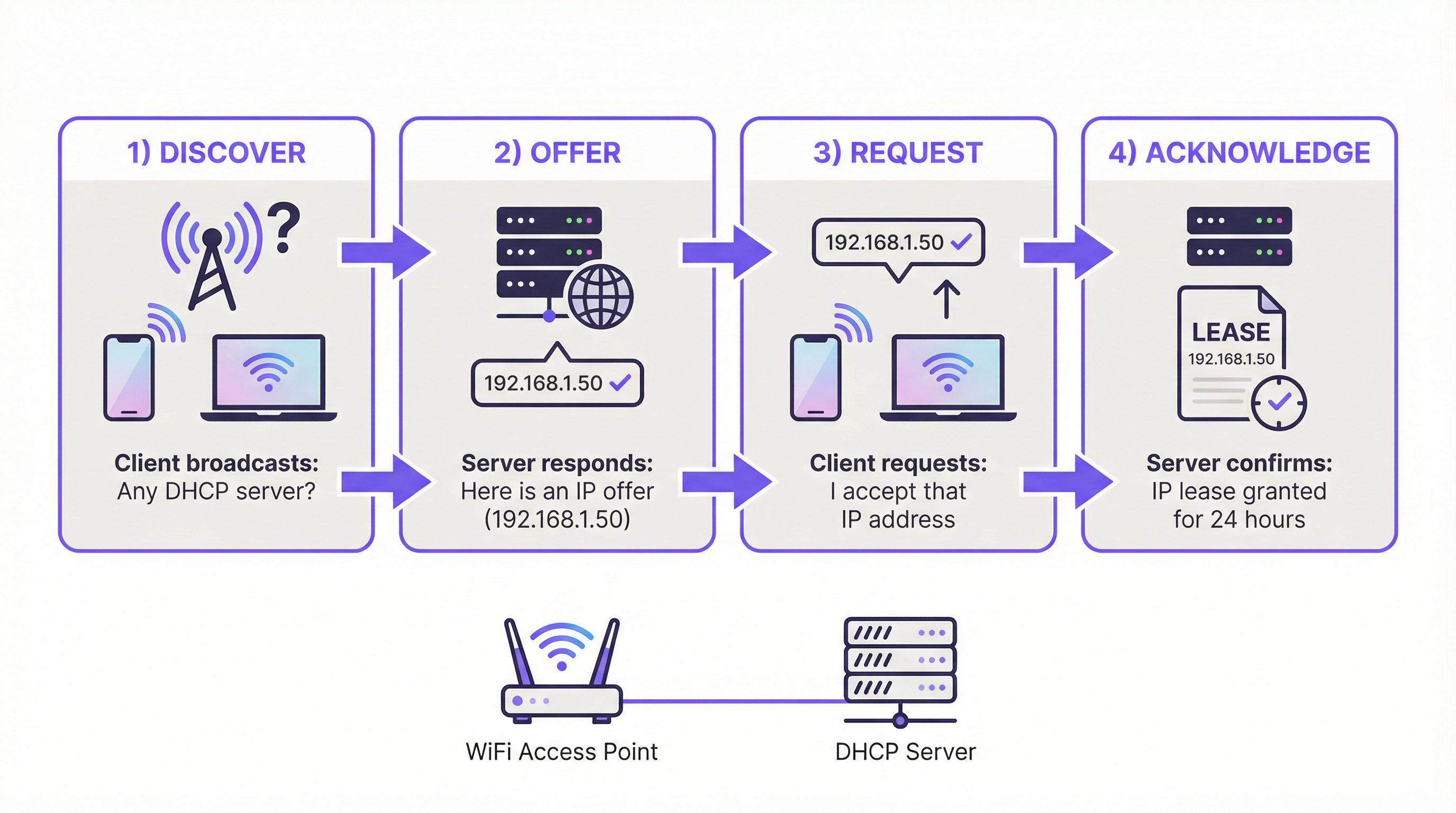
Parametri DHCP chiave per il WiFi:
- Tempo di lease (Lease Time): Determina per quanto tempo un dispositivo può mantenere un indirizzo IP. In ambienti ad alto turnover come una caffetteria o una conferenza, tempi di lease brevi (es. 1-4 ore) sono fondamentali per riciclare gli IP in modo efficiente. In un hotel o in un ufficio aziendale, lease più lunghi (es. 24 ore) sono più adatti per i dispositivi residenti.
- Dimensione dell'ambito (Scope Size): Un punto di errore comune è il sottodimensionamento del pool di indirizzi IP. Una sottorete /24 (254 IP utilizzabili) è spesso insufficiente per le reti guest aziendali. Una regola empirica è prevedere almeno 2-3 dispositivi per utente o stanza. Per un hotel di 200 camere, ciò significa pianificare per 400-600 dispositivi simultanei, rendendo necessaria una sottorete più ampia (es. una /22) per prevenire l'esaurimento degli indirizzi IP durante i picchi di utilizzo.
- Opzioni DHCP: Oltre all'indirizzo IP, il DHCP fornisce ai client informazioni critiche, in particolare il Default Gateway (l'IP del router) e l'indirizzo del server DNS. L'Opzione 43 può anche essere utilizzata per fornire informazioni specifiche del vendor agli access point per il rilevamento del controller.
Il DNS e il suo impatto sull'esperienza utente WiFi
Il DNS traduce i nomi di dominio leggibili dall'uomo (es. purple.ai) in indirizzi IP leggibili dalle macchine. Nel contesto del WiFi guest, il suo ruolo è fondamentale, in particolare per i Captive Portal.
L'intercettazione del Captive Portal:
Quando un nuovo dispositivo ospite si connette, viene bloccato dal firewall rispetto a Internet pubblico. Quando l'utente apre un browser e tenta di navigare verso qualsiasi sito web, il server DNS della rete intercetta questa richiesta. Invece di risolvere il dominio richiesto nel suo IP pubblico, il server DNS risponde con l'indirizzo IP del server del Captive Portal stesso. Ciò forza il browser dell'utente a caricare la pagina di autenticazione. Si tratta di una forma di dirottamento DNS controllato ed è fondamentale per il flusso di lavoro del Captive Portal.
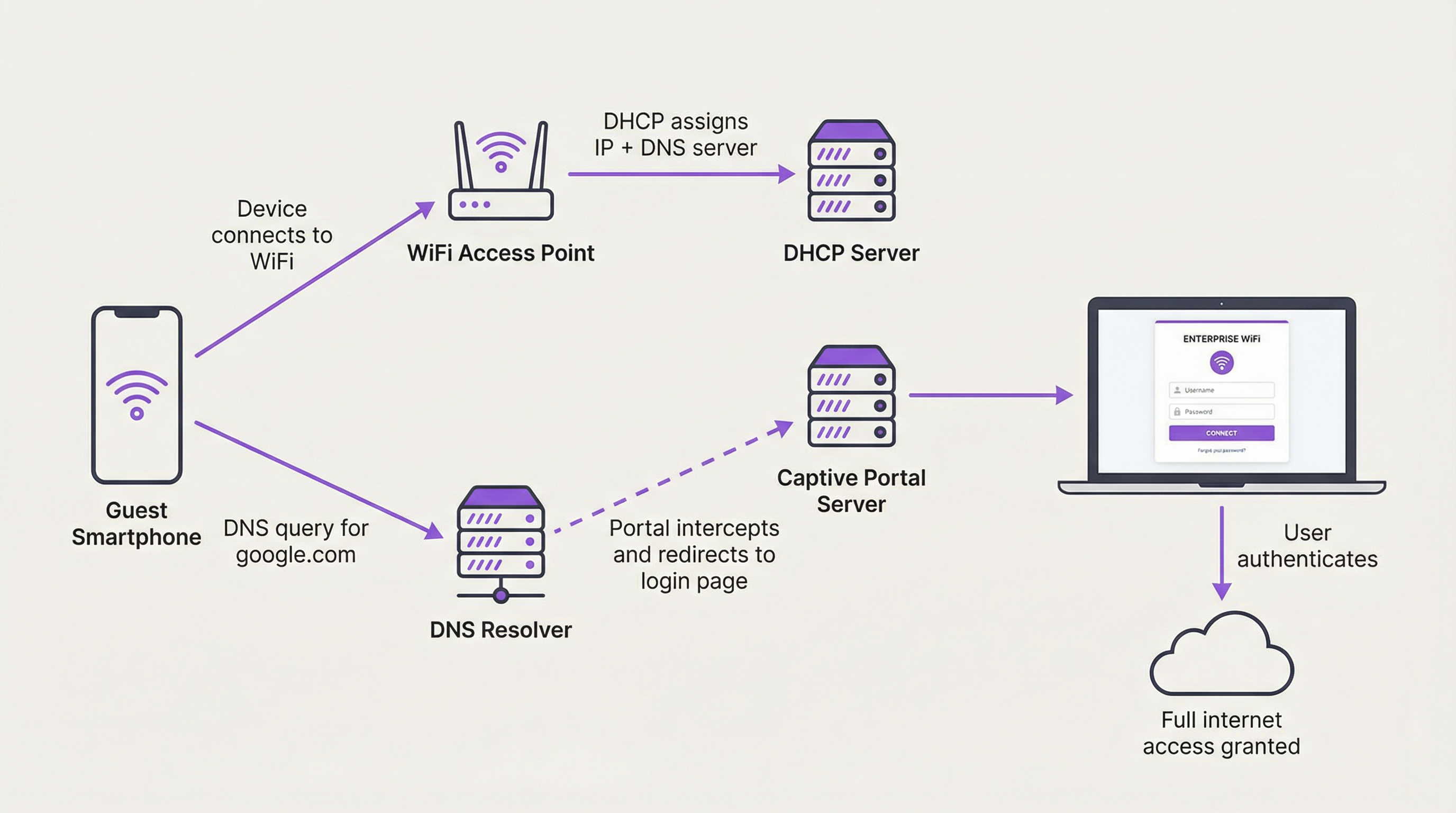
Errori comuni di configurazione DNS:
- Consentire DNS esterni: Se le regole del firewall permettono ai client guest di inviare query DNS a resolver esterni (come 8.8.8.8 di Google o 1.1.1.1 di Cloudflare) prima dell'autenticazione, il Captive Portal può essere aggirato. Tutto il traffico DNS proveniente da client non autenticati deve essere forzato verso il resolver interno.
- DNS Split-Horizon: In ambienti con reti sia guest che interne, un'architettura DNS split-horizon (o split-brain) è essenziale. Ciò significa che il server DNS fornisce risposte diverse a seconda di chi effettua la richiesta. Un dipendente sul WiFi del personale che interroga il nome di un server interno dovrebbe ottenere un indirizzo IP privato, mentre un ospite non dovrebbe essere in grado di risolvere affatto quel nome. Questo è un confine di sicurezza critico.
Guida all'implementazione
L'architettura di DHCP e DNS per il WiFi aziendale richiede un approccio strutturato. Di seguito viene fornito un modello di implementazione indipendente dal vendor.
Fase 1: Segmentazione della rete
Questa è la base assoluta. Il traffico degli ospiti e quello del personale/aziendale devono essere separati logicamente utilizzando le VLAN. Questo è un requisito fondamentale per gli standard di sicurezza come PCI DSS e GDPR.
- VLAN Guest: Accesso illimitato a Internet (post-autenticazione), ma completamente isolato tramite firewall da tutte le risorse aziendali interne.
- VLAN Staff: Accesso a Internet e accesso specifico basato sui ruoli alle risorse interne (file server, database, ecc.).
- VLAN di gestione: Per i dispositivi dell'infrastruttura di rete come access point, switch e controller.
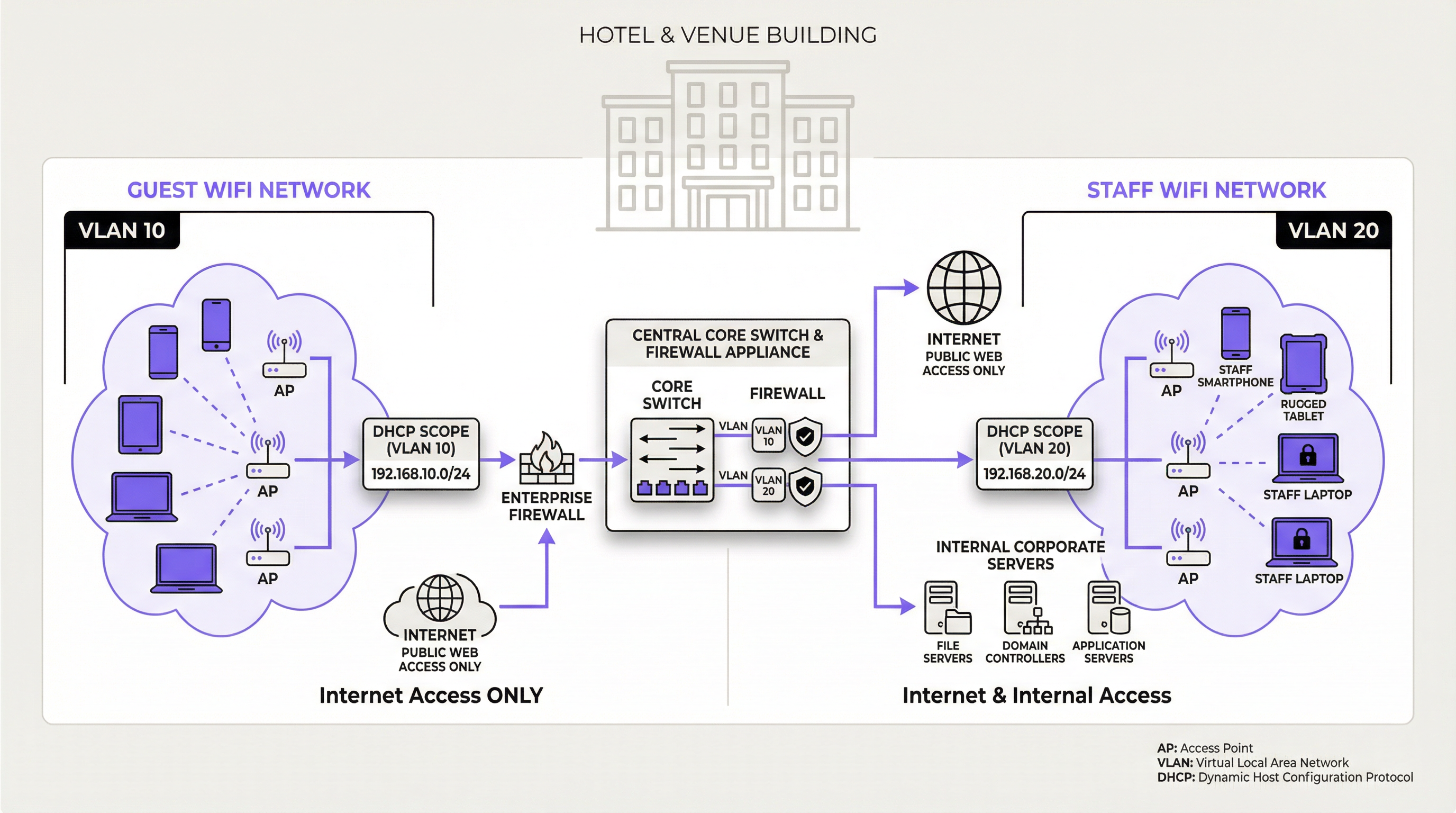
Fase 2: Architettura dei server DHCP e DNS
- Modello centralizzato: Per le organizzazioni multi-sito (es. catene di negozi), un server DHCP/DNS centralizzato presso la sede centrale o il data center offre una gestione coerente. Ogni sito remoto utilizza DHCP Relay Agent (IP helper) sul proprio router/switch locale per inoltrare le richieste DHCP al server centrale. Rischio: Elevata dipendenza dal collegamento WAN.
- Modello decentralizzato/distribuito: Per grandi sedi a sito singolo (stadi, aeroporti) o dove l'autonomia del sito è critica, l'implementazione locale di server DHCP/DNS ridondanti è la best practice. Ciò garantisce la massima resilienza e prestazioni, poiché un guasto della WAN non avrà alcun impatto sui servizi di rete locali.
- Modello basato su cloud: Alcune soluzioni di rete gestite in cloud offrono servizi DHCP e DNS integrati. Questo semplifica la gestione ma richiede un'attenta valutazione della sicurezza e del set di funzionalità.
Fase 3: Configurazione dell'ambito e del lease DHCP
Per ogni VLAN, creare un ambito DHCP dedicato.
| Rete | ID VLAN | Esempio di sottorete | Tempo di lease consigliato | Considerazioni chiave |
|---|---|---|---|---|
| WiFi Guest | 10 | 10.10.0.0/21 |
1-8 ore | Dimensionare per la capacità di picco (3x utenti). Lease breve. |
| WiFi Staff | 20 | 192.168.20.0/24 |
24 ore | Lease più lungo per dispositivi persistenti. |
| IoT / Scanner | 30 | 192.168.30.0/24 |
7 giorni / Statico | Utilizzare prenotazioni statiche per l'infrastruttura critica. |
Best Practice
- Abilitare il DHCP Snooping: Si tratta di una funzionalità di sicurezza di Livello 2 sugli switch che convalida i messaggi DHCP. Impedisce l'introduzione di server DHCP rogue (non autorizzati) nella rete, che rappresenta un vettore di attacco comune.
- Monitorare l'utilizzo dell'ambito DHCP: Monitorare attivamente il numero di IP disponibili nei pool DHCP. Impostare avvisi per ricevere notifiche quando l'utilizzo supera una determinata soglia (es. 85%) per prevenire in modo proattivo l'esaurimento degli indirizzi.
- Utilizzare server ridondanti: Per qualsiasi implementazione di livello enterprise, i servizi DHCP e DNS dovrebbero essere distribuiti in una coppia ridondante (es. un cluster di failover) per eliminare i singoli punti di guasto.
- Documentare le prenotazioni DHCP: Per i dispositivi dell'infrastruttura critica che richiedono un indirizzo IP coerente (es. stampanti, server, access point), utilizzare le prenotazioni DHCP legate all'indirizzo MAC del dispositivo. Questo centralizza la gestione degli IP anziché utilizzare IP statici configurati sui dispositivi stessi.
Risoluzione dei problemi e mitigazione dei rischi
| Sintomo | Causa potenziale | Mitigazione / Soluzione |
|---|---|---|
| Gli utenti non riescono a ottenere un indirizzo IP. | Esaurimento dell'ambito DHCP: Il pool di indirizzi IP disponibili è vuoto. | Aumentare le dimensioni della sottorete. Ridurre il tempo di lease DHCP per riciclare gli indirizzi più velocemente. |
| Gli utenti ottengono un IP "auto-assegnato". | Nessun server DHCP raggiungibile: Il pacchetto DHCP Discover del client non raggiunge un server. | Verificare la presenza di errori di configurazione VLAN. Assicurarsi che gli indirizzi DHCP Relay/IP Helper siano configurati correttamente sui router/switch L3. |
| Gli utenti vengono indirizzati a siti web errati. | Server DHCP rogue o dirottamento DNS: Un dispositivo non autorizzato sta emettendo impostazioni di rete dannose. | Abilitare il DHCP Snooping su tutti gli switch di accesso. Utilizzare le estensioni di sicurezza DNS (DNSSEC) se supportate. |
| La pagina del Captive Portal non si carica. | Bypass DNS: Il client sta utilizzando un server DNS esterno. Problema del firewall: Il traffico verso il server del portale è bloccato. | Creare regole del firewall per bloccare tutto il DNS in uscita (Porta 53) dai client non autenticati, ad eccezione del resolver interno. |
ROI e impatto aziendale
Un'infrastruttura DHCP e DNS ben progettata offre un valore aziendale tangibile che va oltre la semplice fornitura di accesso a Internet. Il ROI principale deriva dalla riduzione del rischio e dall'efficienza operativa. Una rete stabile riduce al minimo i costosi tempi di inattività e diminuisce il numero di ticket di supporto relativi a problemi di connettività. Per un grande hotel, evitare una singola ora di interruzione del WiFi per gli ospiti durante un'importante conferenza può prevenire danni significativi alla reputazione e richieste di rimborsi. Inoltre, il funzionamento affidabile del Captive Portal, che dipende dal DNS, è la porta d'accesso per la raccolta di preziosi dati sui clienti per marketing e analisi, come facilitato da piattaforme come Purple. Questi dati consentono un coinvolgimento personalizzato, promuovono la fidelizzazione e forniscono analisi dell'affluenza che possono ottimizzare il layout e le operazioni della sede, offrendo un impatto diretto e misurabile sui ricavi.
Key Terms & Definitions
DHCP Lease Time
The duration for which a DHCP server grants a client the right to use an assigned IP address.
IT teams must balance lease time against device turnover. Short leases in high-traffic venues prevent IP exhaustion, while long leases in corporate environments reduce unnecessary network chatter.
DHCP Scope
A defined range of IP addresses that a DHCP server is authorized to distribute to clients on a specific subnet.
This is the pool of available addresses. If the scope is too small for the number of connecting devices, new users will be denied access, leading to service outages.
DHCP Relay Agent (IP Helper)
A router or switch configuration that forwards DHCP broadcast packets from one subnet to a DHCP server on another subnet.
This is essential for centralized DHCP management. It allows a single DHCP server in a data center to serve multiple VLANs and remote sites without needing a server in every location.
DHCP Snooping
A Layer 2 security feature that filters DHCP messages, blocking responses from untrusted ports to prevent rogue DHCP servers.
This is a critical security control to prevent man-in-the-middle attacks where an attacker's device could start issuing malicious IP configurations to clients.
Captive Portal
A web page that a user of a public-access network is obliged to view and interact with before access is granted.
For venue operators, this is the primary mechanism for user authentication, presenting terms of service, and capturing marketing data. Its functionality is entirely dependent on correct DNS and firewall configuration.
Split-Horizon DNS (Split-Brain DNS)
A DNS configuration where the server provides different responses (different IP addresses) for the same domain name depending on the source of the query.
This is used to securely separate internal and external users. It ensures an employee can resolve `intranet.company.com` to a private IP while a guest on the public WiFi cannot resolve it at all.
VLAN (Virtual Local Area Network)
A method of creating logically separate networks on the same physical network infrastructure.
This is the fundamental tool for network segmentation. IT teams must use VLANs to isolate guest traffic from secure corporate and payment-card (PCI) traffic as a baseline security measure.
IP Address Exhaustion
A state where all available IP addresses in a DHCP scope have been leased, preventing new devices from connecting to the network.
This is the most common failure mode for poorly planned guest WiFi networks. It is a direct result of underestimating device density and setting lease times that are too long for the environment.
Case Studies
A 500-room luxury hotel is experiencing frequent complaints about WiFi connectivity, especially during large conferences. Guests report being unable to connect, and the IT team is constantly "rebooting the router". They are using a single /24 subnet for their guest network, provided by their ISP's basic firewall.
The core issue is DHCP scope exhaustion and a lack of enterprise-grade architecture.
- Immediate Triage: Lower the DHCP lease time on the existing firewall from the default (often 24 hours) to 1 hour. This will more rapidly recycle the limited IP addresses as conference attendees come and go.
- Strategic Redesign: Procure and deploy two dedicated servers to run as a DHCP failover cluster. This provides redundancy.
- Implement VLANs: Create a new, dedicated Guest WiFi VLAN (e.g., VLAN 100).
- Expand IP Scope: Assign a significantly larger subnet to the new guest VLAN, such as a /21 (which provides 2046 usable IPs). This accommodates the 500 rooms plus multiple devices per guest and conference attendees (500 rooms * 3 devices/room = 1500 IPs needed at a minimum).
- Configure DHCP Relay: On the hotel's core switch/router, configure an IP Helper address on the Guest VLAN interface, pointing to the new DHCP servers. This directs all guest DHCP requests to the dedicated servers.
- Monitoring: Implement monitoring on the new DHCP servers to track scope utilization in real-time.
A retail chain with 100 stores wants to implement a branded guest WiFi captive portal to gather marketing data. They notice that some tech-savvy customers are able to get online without ever seeing the login page. Their current setup has a simple guest network at each store using the local ISP router.
The problem is DNS leakage, allowing clients to bypass the captive portal redirect.
- Firewall Policy Implementation: At each store, the firewall controlling the guest network must be configured with a new outbound rule. This rule should DENY all traffic from the Guest WiFi subnet with a destination port of 53 (DNS), for all destination IPs EXCEPT for the IP address of the store's own internal DNS resolver (which may be the router itself or a designated server).
- DNS Interception: Ensure the internal DNS resolver is configured to intercept all DNS queries from unauthenticated clients and redirect them to the captive portal's IP address.
- Centralized Management (Optional but Recommended): For better consistency, deploy a standardized firewall configuration to all 100 stores using a central management platform (e.g., Meraki, FortiManager). This ensures the anti-bypass rule is applied uniformly and cannot be accidentally misconfigured by local staff.
Scenario Analysis
Q1. You are designing the network for a new 10,000-seat sports stadium. The client wants seamless WiFi for all attendees. What DHCP lease time would you recommend for the public guest network and why?
💡 Hint:Consider the duration of an average event and the sheer volume of unique devices over a short period.
Show Recommended Approach
A very short lease time, such as 30-60 minutes, is recommended. During a 3-4 hour event, thousands of devices will connect and disconnect. A short lease ensures that IP addresses from departed fans are rapidly recycled and made available to new or reconnecting devices, preventing IP address exhaustion in such a high-density, high-turnover environment.
Q2. A hospital wants to provide guest WiFi but is concerned about security and compliance with health data regulations (e.g., HIPAA). What is the single most important architectural principle you must enforce regarding their guest and internal networks?
💡 Hint:How do you ensure guest devices can never, under any circumstances, communicate with internal clinical systems?
Show Recommended Approach
The single most important principle is strict network segmentation using VLANs and restrictive firewall rules. The guest WiFi network must be on its own isolated VLAN and all traffic from this VLAN must be explicitly denied from reaching any internal network segment, especially those containing clinical systems or patient data. There should be zero trust and zero connectivity between the two environments.
Q3. Your company's CFO is questioning the expense of dedicated DHCP/DNS servers, arguing that the firewall provided by the ISP should be sufficient. How do you justify the investment in terms of business risk?
💡 Hint:Translate technical benefits (redundancy, scalability) into business outcomes (risk mitigation, uptime, user experience).
Show Recommended Approach
The justification is a risk-mitigation and business continuity argument. While the ISP firewall provides basic functionality, it represents a single point of failure with limited scalability and management features. For an enterprise, a DHCP or DNS failure is not an IT issue; it's a business outage. For a hotel, it means unhappy guests and refunds. For a retail store, it means point-of-sale systems or customer analytics could fail. Investing in redundant, dedicated servers is like buying insurance; it protects against costly downtime and ensures the network can scale with business demand, directly protecting revenue and customer satisfaction.
Key Takeaways
- ✓DHCP and DNS are foundational services that determine the stability and security of any enterprise WiFi network.
- ✓Always right-size your DHCP scope for peak device density (The 3:1 Rule) and use short lease times in high-turnover venues.
- ✓Strict network segmentation using VLANs to separate guest and staff traffic is a non-negotiable security requirement.
- ✓Captive portal functionality relies on intercepting and redirecting DNS queries; block external DNS for unauthenticated users to prevent bypass.
- ✓Use DHCP Snooping to prevent rogue DHCP servers and other man-in-the-middle attacks.
- ✓For enterprise scale, use redundant, dedicated DHCP/DNS servers to eliminate single points of failure and ensure business continuity.
- ✓Monitor DHCP scope utilization proactively to prevent IP address exhaustion before it impacts users.




