

dotdigital (ex Dotmailer): Guida all'integrazione, best practice e risoluzione dei problemi per gli utenti di Purple AI
This guide provides Purple AI users — particularly IT managers, network architects, and CTOs at hotels, retail chains, stadiums, and conference centres — with a definitive technical reference for deploying and optimising the dotdigital (formerly Dotmailer) connector. It covers the end-to-end integration architecture, step-by-step configuration, GDPR-compliant data handling, automation programme design, and a structured troubleshooting framework. Organisations that implement this integration correctly convert guest WiFi logins into a high-value, consent-gated marketing database that drives measurable revenue outcomes.
🎧 Listen to this Guide
View Transcript

Executive Summary
La piattaforma Purple AI acquisisce i dati di prima parte degli ospiti al momento dell'autenticazione WiFi in hotel, complessi commerciali, stadi e strutture del settore pubblico. Il connettore dotdigital (precedentemente noto come Dotmailer) trasforma l'acquisizione di questi dati grezzi in una pipeline di marketing automation di livello enterprise. Quando un ospite si connette al WiFi e acconsente alle comunicazioni di marketing, Purple invia il suo profilo a una rubrica dotdigital designata in tempo reale. Da quel momento, il motore di automazione di dotdigital può attivare percorsi di benvenuto, inviti a programmi fedeltà, campagne di re-engagement e comunicazioni omnicanale tramite e-mail, SMS e notifiche push.
Il vantaggio commerciale è ben documentato. Harrods ha creato un database di 3,6 milioni di contatti tramite l'acquisizione dati basata su WiFi e ha ottenuto un ritorno sull'investimento in Purple pari a 54 volte in un solo anno. AGS Airports ha generato un ROI dell'842%. L'aeroporto di Bruxelles-Sud Charleroi ha registrato un ROI del 10.630% utilizzando i MicroSurveys di Purple in combinazione con la marketing automation a valle. Questi risultati non sono un'eccezione: rappresentano l'esito previsto di un'integrazione ben configurata e implementata con una progettazione mirata del programma.
Questa guida fornisce l'approfondimento tecnico necessario per implementare, ottimizzare e risolvere i problemi dell'integrazione Purple-dotdigital su scala enterprise. È strutturata per i professionisti IT che devono implementare una soluzione in questo trimestre, non valutarne una l'anno prossimo.
Approfondimento tecnico
Architettura di integrazione
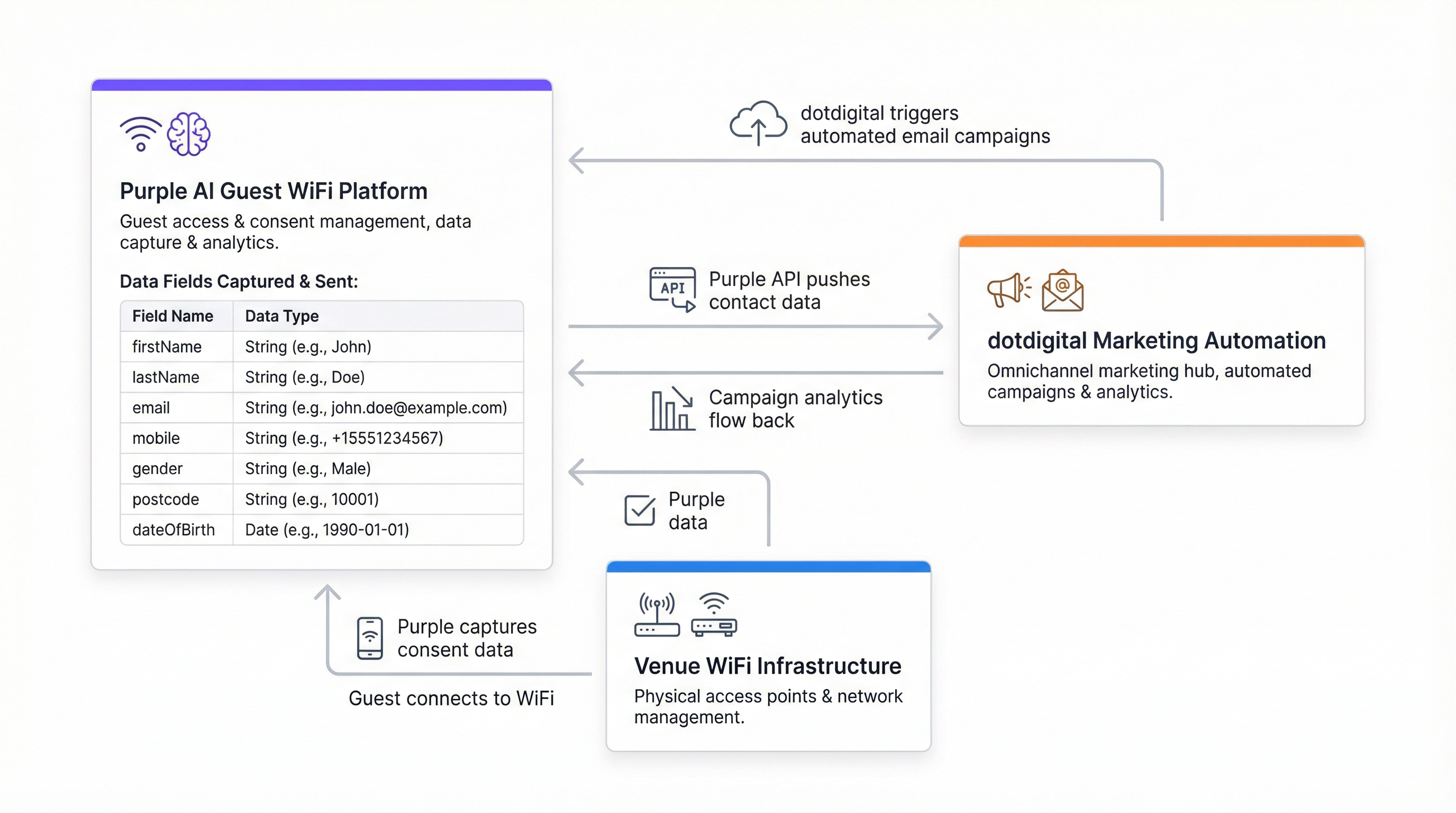
Il connettore Purple-dotdigital opera come un'integrazione REST API server-to-server. Purple funge da produttore di dati e dotdigital da consumatore. La connessione viene autenticata utilizzando il meccanismo Basic Auth di dotdigital: un account utente API dedicato (indirizzo e-mail e password) creato all'interno della piattaforma dotdigital, combinato con un URL endpoint API specifico per la regione.
L'architettura è unidirezionale per impostazione predefinita: Purple invia i record dei contatti a dotdigital al momento dell'autenticazione WiFi. Per le organizzazioni che richiedono una sincronizzazione bidirezionale (ad esempio, per riflettere le disiscrizioni o gli aggiornamenti delle liste di soppressione in Purple), è necessaria una configurazione aggiuntiva tramite il framework webhook di dotdigital.
| Componente | Ruolo | Note |
|---|---|---|
| Purple Captive Portal | Autenticazione degli ospiti e acquisizione del consenso | Splash page presentata al login WiFi |
| Motore del connettore Purple | Trasformazione dei dati e invio API | Configurato in Management > Connectors |
| REST API dotdigital | Acquisizione dei contatti e gestione della rubrica | Richiesto endpoint specifico per la regione |
| Rubrica dotdigital | Archiviazione dei contatti e livello di segmentazione | Una o più rubriche per sede/struttura |
| Program Builder dotdigital | Esecuzione del programma di automazione | Attivato all'aggiunta del contatto in rubrica |
Payload dei dati e mappatura dei campi
Purple trasmette otto campi dati a dotdigital per ogni ospite che ha prestato il consenso. Questi campi si mappano direttamente sul modello dati standard dei contatti di dotdigital e non richiedono la configurazione di campi personalizzati per le implementazioni di base.
| Nome campo | Tipo di dato | Descrizione |
|---|---|---|
firstName |
Stringa | Nome dell'ospite |
lastName |
Stringa | Cognome dell'ospite |
userID |
Intero | Identificatore utente interno di Purple |
email |
Stringa | Indirizzo di contatto principale; utilizzato come chiave di deduplicazione |
mobile |
Stringa | Numero di telefono cellulare (consigliato formato E.164) |
gender |
Stringa | Genere autodichiarato dalla splash page |
postcode |
Stringa | Codice postale; consente la segmentazione geografica |
dateOfBirth |
Stringa | Formato: AAAA-MM-GG; consente la segmentazione per fasce d'età e gli attivatori per i compleanni |
La trasmissione dei dati è vincolata al consenso a livello di piattaforma. Purple non invierà un record di contatto a dotdigital a meno che l'ospite non abbia esplicitamente acconsentito alle comunicazioni di marketing tramite l'apposita casella di controllo sulla splash page. Si tratta di un'applicazione rigorosa, non di un'opzione configurabile, e rappresenta il meccanismo principale con cui l'integrazione mantiene la conformità con il GDPR del Regno Unito, il Regolamento generale sulla protezione dei dati (GDPR) dell'UE e il CCPA.
Autenticazione e configurazione dell'endpoint
dotdigital utilizza l'autenticazione HTTP Basic per la sua REST API. Le credenziali sono costituite da un indirizzo e-mail e una password per l'utente API, che devono essere creati come utente dedicato all'interno dell'account dotdigital (non il login dell'account principale). L'URL dell'endpoint API è specifico per l'account e dipende dalla regione. Viene recuperato da Account Settings > Access all'interno della piattaforma dotdigital. Un endpoint tipico assume la forma https://r1-api.dotdigital.com per gli account della regione uno.
Questa specificità dell'endpoint è la causa più comune di errore nella verifica del connettore. I team che tentano di utilizzare un URL generico o di esempio tratto dalla documentazione riscontreranno errori di autenticazione. Recuperare sempre il valore dell'endpoint direttamente dall'account dotdigital in uso.
Livelli di implementazione del connettore
Purple supporta due livelli di implementazione per il connettore dotdigital:
Il livello Cliente (Customer level) applica la configurazione del connettore all'intero account Purple, indirizzando tutti gli ospiti consenzienti di tutte le sedi in un'unica rubrica dotdigital. Questa soluzione è adatta per gli operatori con una singola sede o per le organizzazioni con un patrimonio immobiliare omogeneo.
Il livello Sede (Venue level) consente di mappare ogni singola sede su una rubrica dotdigital distinta. Questa è la configurazione consigliata per gli operatori multi-struttura (gruppi alberghieri, catene di negozi, gestori di stadi) in cui è richiesta una segmentazione a livello di sede per marketing mirato, offerte localizzate o identità di marca separate.
Guida all'implementazione
Passaggio 1: Preparare l'account dotdigital
Prima di configurare il connettore Purple, completare le seguenti operazioni nell'account dotdigital. Passare ad Account Settings e creare un nuovo utente API con un indirizzo e-mail dedicato e una password sicura. Annotare l'URL dell'endpoint API visualizzato nella parte superiore della pagina Access. Creare la rubrica o le rubriche che riceveranno i contatti Purple (si consiglia una per sede per le implementazioni multi-struttura). Facoltativamente, creare campi dati personalizzati in dotdigital se si intende acquisire attributi aggiuntivi oltre agli otto campi standard di Purple.
Passaggio 2: Configurare il connettore Purple
All'interno della piattaforma Purple, passare a Management > Connectors. Individuare il connettore dotdigital e selezionare Add. Compilare i quattro campi obbligatori: il nome del connettore (un'etichetta descrittiva di riferimento), l'e-mail dell'API dotdigital, la password dell'API dotdigital e l'URL dell'endpoint dell'API dotdigital. Selezionare Verify. In caso di verifica riuscita, apparirà un menu a tendina con l'elenco delle rubriche disponibili nell'account dotdigital. Selezionare la rubrica di destinazione e salvare la configurazione.
Per le implementazioni multi-sede, ripetere questo processo a livello di sede per ogni struttura, assegnando ciascuna alla rubrica designata.
Passaggio 3: Configurare il meccanismo di consenso sulla splash page
La casella di controllo per il consenso al marketing sulla splash page di Purple è la porta d'accesso all'intera integrazione. Passare alla configurazione della splash page e assicurarsi che la casella di opt-in per il marketing sia abilitata e chiaramente etichettata. Il testo del consenso deve essere esplicito, specifico e inequivocabile ai sensi dell'Articolo 7 del GDPR del Regno Unito. Un esempio conforme: "Accetto di ricevere comunicazioni di marketing da [Nome Organizzazione] in merito a offerte, eventi e novità. È possibile annullare l'iscrizione in qualsiasi momento." Non preselezionare questa casella.
Se il programma di marketing include gli SMS, assicurarsi che il testo del consenso copra esplicitamente le comunicazioni via SMS. È consentita una singola casella di controllo che copra sia le e-mail che gli SMS, a condizione che il linguaggio sia chiaro.
Passaggio 4: Creare i programmi di automazione dotdigital
Implementare i programmi di automazione in dotdigital prima che il connettore diventi operativo. Come minimo, configurare un programma di benvenuto attivato dall'aggiunta del contatto alla rubrica. Un percorso di benvenuto consigliato in tre fasi:
- Immediato (0 minuti): E-mail di benvenuto che conferma l'accesso al WiFi, con un'introduzione brandizzata alla sede o ai servizi.
- Giorno 2 (48 ore): E-mail di follow-up con un'offerta pertinente, una guida alla sede o contenuti personalizzati in base al contesto dell'ospite.
- Giorno 30 (re-engagement): E-mail automatica di re-engagement per i contatti che non sono tornati, con un incentivo a visitare nuovamente la struttura.
Per l'integrazione del programma fedeltà, utilizzare il Program Builder di dotdigital per iscrivere i contatti che soddisfano criteri specifici (ad esempio, i contatti che hanno risposto affermativamente a una domanda personalizzata sulla splash page in merito all'interesse per il programma fedeltà).
Passaggio 5: Configurare la sincronizzazione bidirezionale delle soppressioni
Configurare un webhook dotdigital per notificare a Purple quando un contatto annulla l'iscrizione. Ciò garantisce che un contatto soppresso non venga aggiunto nuovamente a dotdigital al successivo login WiFi. Senza questo passaggio, l'integrazione è tecnicamente incompleta dal punto di vista della conformità al GDPR.
Passaggio 6: Convalida e Go Live
Condurre un test end-to-end autenticando un dispositivo di prova sul WiFi, completando la splash page con un indirizzo e-mail di prova e il consenso al marketing, e verificando che il contatto appaia nella rubrica dotdigital corretta entro due o tre minuti. Confermare che il programma di automazione di benvenuto si attivi correttamente. Documentare i risultati del test e procedere all'implementazione in produzione.
Best practice
Architettura del consenso
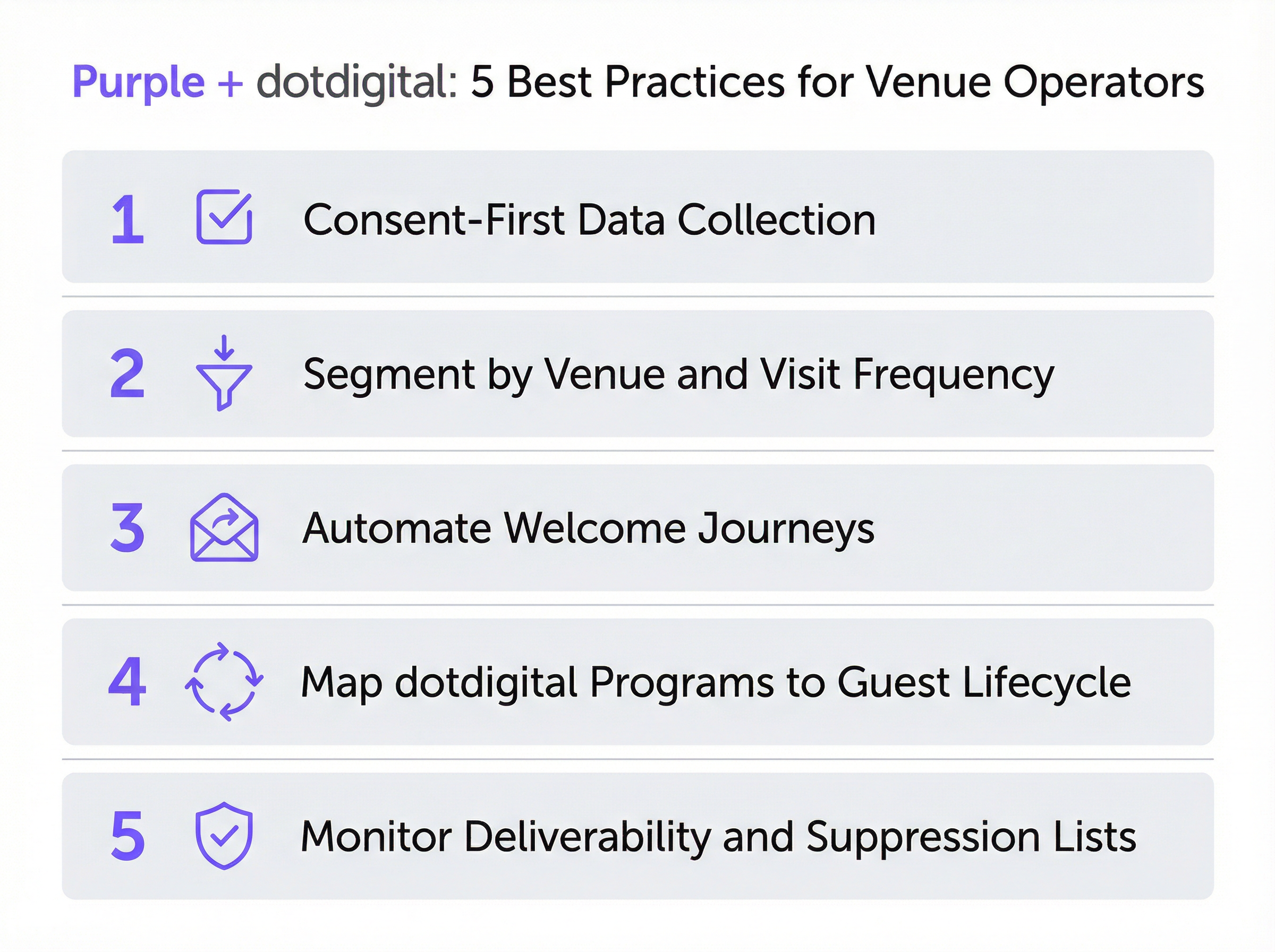
La qualità del database di utenti iscritti (opt-in) è una funzione diretta dell'architettura del consenso. Le organizzazioni che investono in un linguaggio di consenso chiaro e onesto, anche se riduce marginalmente i tassi di opt-in, costruiscono liste di contatti più coinvolte e di maggior valore. Un tasso di opt-in del 30% derivante da un meccanismo di consenso trasparente supererà costantemente un tasso di opt-in del 60% derivante da un meccanismo ambiguo o fuorviante, poiché il primo gruppo desidera sinceramente ricevere comunicazioni. Harrods ha ottenuto un tasso di opt-in del 38% su 581.000 utenti WiFi: un tasso coerente con un linguaggio di consenso trasparente e basato sullo scambio di valore.
Tassonomia della rubrica
Progettare la struttura della rubrica dotdigital prima di connettere Purple. Per un gruppo alberghiero che gestisce 20 strutture, ciò potrebbe significare 20 rubriche specifiche per sede, più una rubrica consolidata principale per le campagne trasversali. Per una catena di negozi, potrebbe significare rubriche segmentate per regione o formato di punto vendita. Il principio chiave è che la struttura della rubrica determina la capacità di segmentazione a valle: modificarla a posteriori, dopo aver raccolto i dati, è costoso e problematico.
Profondità del programma di automazione
Le implementazioni Purple-dotdigital più efficaci utilizzano l'intera capacità dei programmi di dotdigital: percorsi di benvenuto, campagne di compleanno attivate dal campo dateOfBirth, sequenze di re-engagement per i contatti inattivi e sondaggi post-visita. Il campo postcode consente il targeting geografico per offerte localizzate. Il campo gender consente la personalizzazione demografica. Il campo dateOfBirth consente la segmentazione per fasce d'età e gli attivatori per i compleanni. Utilizzare tutti e otto i campi: rappresentano una ricca base di segmentazione che la maggior parte delle organizzazioni sottoutilizza.
Gestione della deliverability
Monitorare settimanalmente la dashboard di deliverability di dotdigital durante i primi 90 giorni di implementazione. Benchmark chiave: tasso di apertura (open rate) superiore al 20%, percentuale di clic (click-through rate) superiore al 2%, frequenza di rimbalzo (bounce rate) inferiore al 2%, tasso di annullamento dell'iscrizione (unsubscribe rate) inferiore allo 0,5%. Se i tassi di rimbalzo sono elevati, implementare il flusso di lavoro di double opt-in di dotdigital per verificare gli indirizzi e-mail prima che entrino nel database attivo. Ciò è particolarmente rilevante per le sedi con un'elevata affluenza transitoria (aeroporti, stazioni ferroviarie, centri congressi) in cui gli ospiti potrebbero inserire indirizzi e-mail temporanei o errati.
Conformità al GDPR e alla PECR
L'integrazione è progettata per essere conforme per impostazione predefinita, ma la conformità è una responsabilità condivisa. Purple applica il consenso a livello di acquisizione dei dati; dotdigital lo applica a livello di comunicazioni. L'organizzazione è responsabile del testo del consenso sulla splash page, del contenuto delle comunicazioni di marketing e del mantenimento delle liste di soppressione. Condurre una Valutazione d'impatto sulla protezione dei dati (DPIA) prima di implementare l'integrazione nelle giurisdizioni coperte dal GDPR del Regno Unito o dal GDPR dell'UE, in particolare per le organizzazioni del settore pubblico soggette a obblighi aggiuntivi ai sensi del Data Protection Act 2018.
Risoluzione dei problemi e mitigazione dei rischi
Errori di verifica del connettore
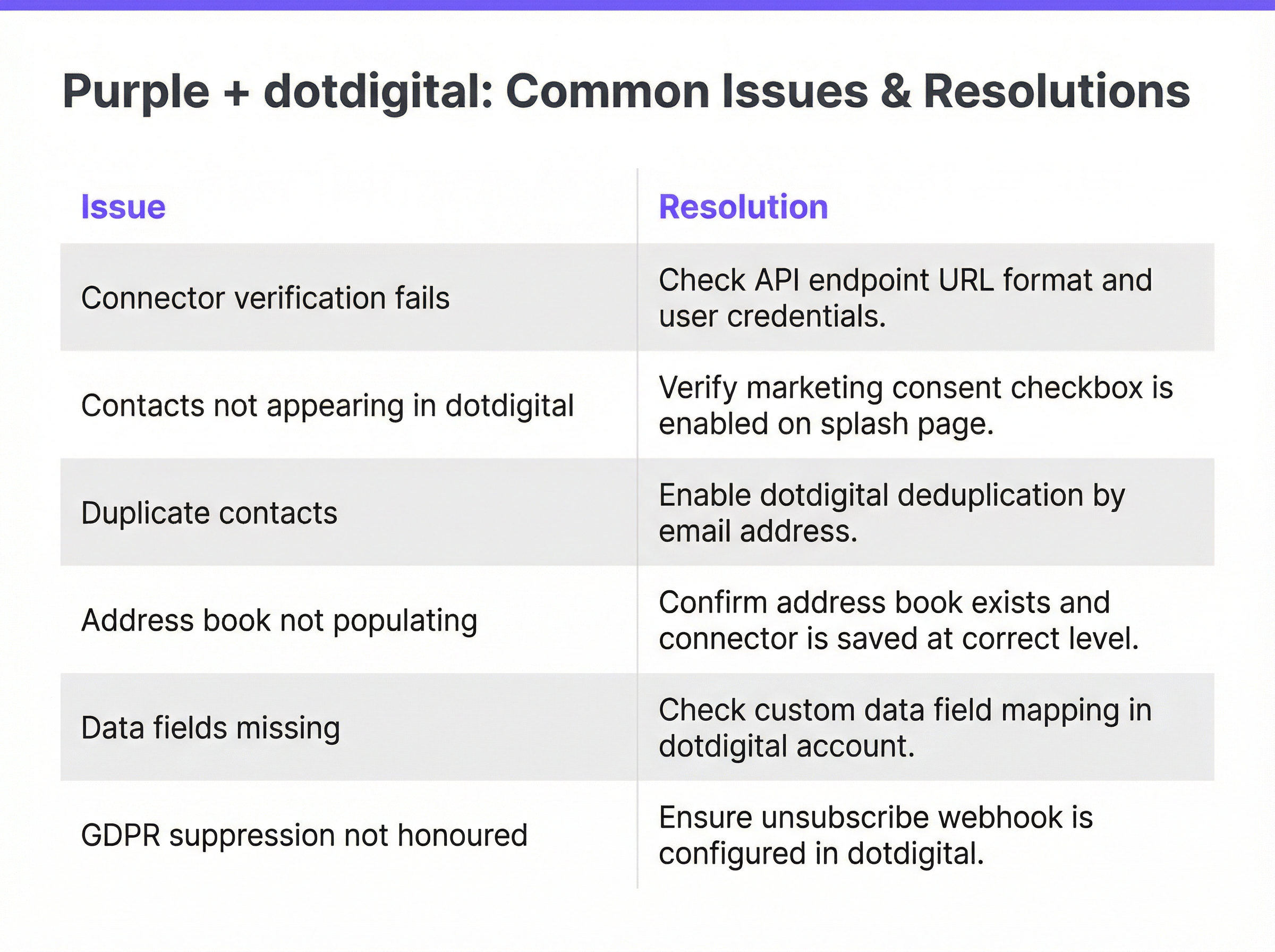
Il problema di implementazione più frequente. Causato nella maggior parte dei casi da un URL dell'endpoint API errato. Risoluzione: accedere a dotdigital, passare ad Account Settings > Access e copiare l'URL dell'endpoint esattamente come visualizzato. Assicurarsi che non siano inclusi slash finali o spazi bianchi. Verificare che le credenziali dell'utente API appartengano a un account utente API dedicato e non al login dell'account principale. Se la verifica fallisce ancora, confermare che l'account dotdigital abbia l'accesso API abilitato (questa è una funzionalità che potrebbe dover essere attivata dal supporto dotdigital per alcuni livelli di account).
Contatti non visualizzati in dotdigital
Se il connettore viene verificato con successo ma i contatti non appaiono nella rubrica di destinazione, la causa principale è la mancata abilitazione della casella di controllo del consenso al marketing sulla splash page. Purple non trasmetterà i dati senza un consenso esplicito. Cause secondarie includono la configurazione del connettore al livello errato (cliente vs. sede) o la modifica dell'ID della rubrica dopo il salvataggio del connettore. Risoluzione: verificare la configurazione del consenso sulla splash page, confermare il livello del connettore e verificare nuovamente il connettore per aggiornare la selezione della rubrica.
Record di contatti duplicati
Si verifica quando lo stesso indirizzo e-mail viene inviato in più sessioni WiFi, in genere in sedi ad alta affluenza. Risoluzione: assicurarsi che la rubrica di dotdigital sia configurata per aggiornare i contatti esistenti in caso di corrispondenza dell'indirizzo e-mail, anziché creare nuovi record. Questo aspetto è controllato all'interno delle impostazioni di importazione dei contatti di dotdigital. Inoltre, verificare se il connettore Purple è configurato sia a livello di cliente che di sede per la stessa struttura: una doppia configurazione comporterà invii duplicati.
Campi dati mancanti
Se i contatti appaiono in dotdigital ma alcuni campi sono vuoti, la causa più probabile è che gli ospiti non abbiano compilato tali campi sulla splash page. Purple trasmette solo i campi forniti durante l'autenticazione. Per i campi facoltativi, come il numero di cellulare o la data di nascita, alcuni ospiti si rifiuteranno di fornirli. Se la completezza di campi specifici è fondamentale per la strategia di segmentazione, valutare la possibilità di rendere tali campi obbligatori sulla splash page, tenendo presente, tuttavia, che ogni campo obbligatorio aggiuntivo ridurrà il tasso di conversione opt-in complessivo.
Soppressione GDPR non rispettata
Se i contatti disiscritti vengono aggiunti nuovamente a dotdigital ai successivi login WiFi, significa che il webhook di soppressione bidirezionale non è stato configurato. Questo rappresenta un rischio per la conformità. Risoluzione: configurare un webhook dotdigital che si attivi in caso di eventi di annullamento dell'iscrizione e aggiorni il record di contatto corrispondente in Purple. Consultare la documentazione per sviluppatori di dotdigital per indicazioni sulla configurazione dei webhook.
Framework di mitigazione dei rischi
| Rischio | Probabilità | Impatto | Mitigazione |
|---|---|---|---|
| Endpoint API errato | Alta | Medio | Recuperare l'endpoint direttamente dall'account dotdigital |
| Casella di controllo del consenso disabilitata | Media | Alto | Includere nella checklist pre-lancio; testare con un dispositivo reale |
| Contatti duplicati | Media | Basso | Configurare la deduplicazione basata su e-mail in dotdigital |
| Soppressione non sincronizzata | Bassa | Alto | Implementare il webhook di annullamento dell'iscrizione prima del go-live |
| Completezza dei campi dati | Alta | Basso | Impostare i requisiti dei campi in base alle esigenze di segmentazione |
| Esposizione delle credenziali API | Bassa | Alto | Utilizzare un utente API dedicato; ruotare le credenziali trimestralmente |
ROI e impatto sul business
Misurare il successo
L'integrazione Purple-dotdigital offre valore in due dimensioni distinte: crescita del database e attribuzione dei ricavi. La crescita del database si misura in base al numero di nuovi contatti iscritti (opt-in) aggiunti al mese, al tasso di opt-in come percentuale delle autenticazioni WiFi totali e al tasso di completezza dei dati di contatto (percentuale di contatti con tutti e otto i campi popolati). L'attribuzione dei ricavi si misura monitorando gli acquisti, le iscrizioni ai programmi fedeltà o altri eventi di conversione che possono essere collegati ai contatti entrati nel database tramite login WiFi.
La suite di reportistica di dotdigital fornisce analisi a livello di campagna (tassi di apertura, percentuali di clic, tassi di conversione) che possono essere utilizzate per calcolare il contributo ai ricavi di ciascun programma di automazione. La dashboard di analisi di Purple fornisce i dati sull'affluenza e sull'autenticazione necessari per calcolare il costo per contatto acquisito.
Benchmark e risultati attesi
In base alle implementazioni documentate nell'ecosistema Purple:
| Tipo di sede | Tasso di opt-in tipico | Tempistica ROI prevista | Driver di ricavo chiave |
|---|---|---|---|
| Retail di lusso | 35–45% | 6–12 mesi | Conversione del programma fedeltà |
| Hotel (fascia media) | 25–35% | 12–18 mesi | Re-engagement per prenotazioni dirette |
| Aeroporto / Hub di trasporto | 15–25% | 18–24 mesi | Upsell retail e F&B |
| Stadio / Sede di eventi | 20–30% | 12–18 mesi | Upsell di merchandising e biglietti |
| Centro congressi | 30–40% | 6–12 mesi | Riprenotazione di eventi e sponsorizzazioni |
Considerazioni su costi e benefici
Il costo marginale del connettore dotdigital all'interno di Purple è basso rispetto al potenziale di ricavo. L'investimento principale riguarda la progettazione del programma e la creazione dei contenuti: i percorsi di automazione, i modelli di e-mail e la logica di segmentazione che determinano l'efficacia con cui viene monetizzato il database dei contatti. Le organizzazioni che considerano l'integrazione come un canale dati da impostare e dimenticare (set-and-forget) otterranno rendimenti modesti. Quelle che investono nell'ottimizzazione continua del programma (test A/B degli oggetti, perfezionamento della segmentazione, estensione della profondità dell'automazione) otterranno rendimenti coerenti con i benchmark di Harrods e AGS Airports documentati in precedenza.
Una regola pratica generale: per ogni 10.000 contatti iscritti (opt-in) acquisiti tramite WiFi, un programma dotdigital ben configurato dovrebbe generare ricavi incrementali misurabili entro 90 giorni dall'implementazione, ipotizzando un tasso di apertura minimo del 20% e una percentuale di clic del 2% sulla serie di benvenuto.
Key Terms & Definitions
Captive Portal
A web page presented to a guest before they are granted access to a WiFi network. Purple's captive portal — also called a splash page — is the interface through which guests authenticate, provide profile data, and give marketing consent. It is the entry point for all data flowing into the dotdigital integration.
IT teams encounter this during network configuration and splash page design. The captive portal's consent checkbox is the legal and technical gateway to the entire marketing automation pipeline.
Address Book (dotdigital)
A named list of contacts within dotdigital, analogous to a mailing list or CRM segment. Address books are the primary organisational unit in dotdigital and serve as the target destination for Purple's data push. Automation programmes are triggered by contact addition to a specific address book.
The address book taxonomy — how many books, how named, at what level — is the most consequential architectural decision in a multi-venue deployment. It determines segmentation capability for all downstream marketing activity.
Automation Programme (dotdigital)
A configured sequence of automated actions in dotdigital, triggered by a defined event such as a contact being added to an address book. Programmes can include email sends, SMS messages, wait periods, conditional branches, and contact scoring updates. They are the mechanism through which Purple's data capture is converted into marketing communications.
IT teams are responsible for ensuring the connector triggers programme enrolment correctly. Marketing teams design the programme content. The 'Include contacts added via API' setting is a common configuration oversight that prevents programme triggering.
API Endpoint (dotdigital)
The base URL for dotdigital's REST API, specific to the regional data centre assigned to each account. It takes the form `https://r{n}-api.dotdigital.com` where `{n}` is the region number. It is retrieved from Account Settings > Access within the dotdigital platform.
This is the single most common source of connector verification failures. It must be retrieved directly from the dotdigital account — it cannot be guessed or copied from generic documentation.
Consent-Gated Data Push
A data transmission mechanism that only activates when explicit user consent has been recorded. In the Purple-dotdigital integration, Purple will only push a contact record to dotdigital if the guest has ticked the marketing consent checkbox on the splash page. This is a platform-level enforcement, not a configurable option.
This mechanism is the primary GDPR compliance control in the integration. It ensures that only genuinely opted-in contacts enter the marketing database, protecting the organisation from regulatory risk and protecting deliverability from low-engagement contacts.
Double Opt-In
A two-stage consent verification process in which a contact, after initially opting in, receives a confirmation email and must click a link to verify their email address and confirm their subscription. dotdigital supports double opt-in natively. It converts contacts from 'Pending' to 'Subscribed' status and provides an additional layer of consent documentation.
Recommended for venues with high transient footfall — airports, conference centres, train stations — where guests may enter incorrect or temporary email addresses. Double opt-in reduces bounce rates and improves deliverability, at the cost of a lower initial conversion rate.
Suppression List
A list of email addresses or contacts that must not receive marketing communications, typically because they have unsubscribed, complained, or been identified as invalid. dotdigital maintains suppression lists automatically. The Purple-dotdigital integration requires a webhook to sync suppressions back to Purple, preventing re-addition of suppressed contacts on subsequent WiFi logins.
Failure to implement bidirectional suppression sync is a GDPR compliance risk and a deliverability risk. It is a mandatory configuration step in any production deployment.
Venue-Level Connector
A Purple connector configuration scoped to a single venue, as opposed to a customer-level configuration that applies across the entire Purple account. Venue-level connectors allow different venues to be routed to different dotdigital address books, enabling venue-specific segmentation and personalisation.
Essential for multi-property operators. Hotel groups, retail chains, and stadium operators should always use venue-level configuration to maintain clean data segmentation across their estate.
First-Party Data
Data collected directly from individuals by the organisation that will use it for marketing, with the individual's knowledge and consent. WiFi login data captured through Purple's captive portal is first-party data. It is distinct from third-party data (purchased lists) and second-party data (data shared by partners). First-party data is the most valuable and most compliant form of marketing data in the post-cookie, post-GDPR landscape.
The strategic value of the Purple-dotdigital integration is that it generates high-quality first-party data at scale, from physical venue visits. This data is not available through any digital marketing channel and represents a genuine competitive advantage for venue operators.
PECR (Privacy and Electronic Communications Regulations)
UK regulations that govern direct marketing by electronic means, including email and SMS. PECR requires prior consent for marketing emails to individuals (as opposed to businesses). It works in conjunction with UK GDPR to define the legal basis for marketing communications triggered by the Purple-dotdigital integration.
IT and marketing teams must ensure that the splash page consent language covers all channels used for marketing — email, SMS, and push — and that the consent is specific to each channel where required.
Case Studies
A 450-room city-centre hotel group with 12 properties across the UK wants to use Purple's dotdigital connector to build a direct booking re-engagement programme. Each property has its own Purple venue configuration. The marketing team wants to send property-specific offers to guests who have stayed at a particular hotel, while also being able to run group-wide campaigns. How should the integration be architected?
The correct architecture uses venue-level connector configuration in Purple, with each of the 12 properties mapped to a dedicated dotdigital address book. This gives the marketing team clean, venue-specific contact lists for property-level targeting. In parallel, a dotdigital segment is created that aggregates contacts across all 12 address books — this segment is used for group-wide campaigns without duplicating contact records.
Step 1: In dotdigital, create 12 address books named by property (e.g., 'Purple - Manchester City Centre', 'Purple - Edinburgh Royal Mile'). Create a master segment using the 'Contact is in any of these address books' condition covering all 12 books.
Step 2: In Purple, navigate to each venue's settings under Management > Venues. For each venue, add a dotdigital connector at venue level, using the same API credentials but selecting the property-specific address book.
Step 3: Build a welcome automation programme in dotdigital triggered by contact addition to any of the 12 address books. Use dynamic content blocks in the email template to personalise the message based on the address book (property) the contact was added to — for example, featuring the specific hotel's amenities and a direct booking link.
Step 4: Build a re-engagement programme that fires 30 days after the last WiFi login, with a property-specific offer. Use dotdigital's contact scoring to identify high-value guests (multiple visits, high data completeness) for premium re-engagement campaigns.
Step 5: For group-wide campaigns — seasonal promotions, loyalty programme launches — use the master segment to reach the full opted-in database without duplicating sends to contacts who appear in multiple property address books.
A national retail chain with 85 stores has deployed Purple WiFi across its estate. After six months, the marketing team reports that contacts are appearing in dotdigital but the welcome automation programme is not triggering for approximately 15% of new contacts. The IT team has confirmed the connector is verified and contacts are being added to the correct address book. What is the most likely cause and how should it be resolved?
The most likely cause is a race condition between contact creation and programme enrolment in dotdigital, combined with contacts being added via the API rather than through dotdigital's native import. When contacts are added to an address book via the API — as Purple does — dotdigital's programme trigger logic may not fire if the programme is configured to trigger on 'contact added to address book via import' rather than 'contact added via API'.
Resolution Step 1: In dotdigital's Program Builder, open the welcome programme and inspect the enrolment trigger. Verify that the trigger condition is set to 'Contact added to address book' and that the 'Include contacts added via API' option is enabled. This option is not enabled by default in all dotdigital account configurations.
Resolution Step 2: If the trigger condition is correct, check whether the affected contacts have an opt-in status of 'Unknown' rather than 'Subscribed' in dotdigital. Contacts with 'Unknown' status may be excluded from programme enrolment depending on programme settings. Resolution: configure the programme to include contacts with 'Unknown' opt-in status, or implement dotdigital's double opt-in workflow to convert contacts to 'Subscribed' status on confirmation.
Resolution Step 3: Review the programme's enrolment frequency setting. If set to 'Enrol once only', contacts who have previously been enrolled — for example, from a prior WiFi session at a different store — will not be re-enrolled. For a retail chain where guests may visit multiple stores, consider whether re-enrolment on each new store visit is appropriate, and configure accordingly.
Resolution Step 4: Check for programme enrolment limits. Some dotdigital account configurations impose a maximum daily enrolment rate. If the retail chain's WiFi generates a high volume of new contacts on peak trading days, this limit may be causing the 15% gap.
Scenario Analysis
Q1. A conference centre operator runs a single Purple account covering three venues: a main auditorium, a breakout suite, and an exhibition hall. They want to use dotdigital to send post-event follow-up emails to attendees, with content specific to which space they visited. Their current connector is configured at customer level, routing all three venues into a single dotdigital address book. What change should they make, and what are the implications?
💡 Hint:Consider how venue-level configuration changes the address book structure, and what additional steps are required in dotdigital to support venue-specific content.
Show Recommended Approach
The operator should reconfigure the connector at venue level, creating three separate dotdigital address books — one per venue. This allows dotdigital to identify which venue a contact was added from, enabling venue-specific content in automation programmes. The implications are: (1) existing contacts in the single customer-level address book will need to be migrated or re-segmented; (2) three separate automation programmes will need to be created or a single programme with dynamic content blocks will need to be configured; (3) for group-wide communications, a dotdigital segment aggregating all three address books should be created. The migration of existing contacts is the most operationally complex step — it requires identifying which venue each existing contact was associated with, which may require cross-referencing Purple's analytics data with the dotdigital contact records.
Q2. A hotel group's IT team has deployed the Purple-dotdigital connector across 8 properties. Three months after go-live, the marketing team reports that the welcome email open rate is 12% — significantly below the 25% benchmark for hospitality welcome emails. Bounce rates are at 4.2%. What are the most likely causes and what remediation steps should the IT team recommend?
💡 Hint:A 4.2% bounce rate is a strong signal about data quality at the point of collection. Consider what happens to email deliverability when bounce rates are elevated, and how the consent mechanism may be contributing.
Show Recommended Approach
The 4.2% bounce rate is the primary issue and is almost certainly causing the low open rate. When bounce rates exceed 2%, inbox providers begin to treat the sending domain as a source of low-quality email, reducing inbox placement rates across the entire database — including valid, engaged contacts. The root cause of the high bounce rate is likely guests entering incorrect or temporary email addresses at the splash page, which is common in transient hospitality environments. Remediation: implement dotdigital's double opt-in workflow to verify email addresses before they enter the active database. This will reduce the volume of new contacts but will significantly improve data quality. Additionally, review whether the splash page requires email address confirmation (entering the address twice) — this simple UX change reduces typo-based bounces. For the open rate, review the welcome email send timing — if the email is sent hours after check-in rather than within minutes of WiFi connection, the contextual relevance is reduced. Also review the subject line and sender name for relevance and trust signals.
Q3. A large retail chain's data protection officer has raised a concern that the Purple-dotdigital integration may be re-adding previously unsubscribed contacts to the marketing database when they visit a store and connect to WiFi. The IT team needs to confirm whether this is happening and, if so, implement a fix. What steps should they take?
💡 Hint:This is a GDPR compliance issue, not just a technical one. Consider the data flow in both directions and what configuration is required to prevent re-addition of suppressed contacts.
Show Recommended Approach
This is a genuine GDPR risk. The scenario occurs when: (1) a contact unsubscribes from dotdigital marketing; (2) the unsubscribe is not synced back to Purple; (3) the contact subsequently visits a store and connects to WiFi; (4) Purple, unaware of the suppression, pushes the contact record to dotdigital again; (5) dotdigital re-adds the contact to the address book. To confirm whether this is happening, cross-reference dotdigital's suppression list with recent address book additions — any email address appearing in both lists indicates the problem is occurring. The fix requires two steps: (1) configure a dotdigital webhook that fires on unsubscribe events and updates the corresponding contact record in Purple to mark them as suppressed; (2) implement a pre-push check in the connector configuration to verify that the contact's email address is not on the dotdigital suppression list before transmitting. The DPO should also be advised that a Data Protection Impact Assessment should be conducted if one has not already been completed for this integration, given the cross-system personal data processing involved.
Q4. A stadium operator wants to use the Purple-dotdigital integration to send personalised post-match emails to fans who connected to the stadium WiFi during an event. They want to include the match result, a link to match highlights, and a personalised merchandise offer based on the fan's team affiliation. The current integration only captures the eight standard Purple data fields. What additional configuration is required to support this use case?
💡 Hint:Consider how event-specific data (match date, teams, result) can be associated with contacts in dotdigital, and how team affiliation can be captured at the splash page level.
Show Recommended Approach
This use case requires two enhancements beyond the standard integration. First, team affiliation must be captured at the splash page level using Purple's custom question feature on the splash page. A dropdown or radio button question — 'Which team are you supporting today?' — captures the affiliation at authentication time. This data can be passed to dotdigital as a custom contact data field, which must be created in dotdigital's account settings before the connector is configured. Second, event-specific data (match date, opponent, result) needs to be associated with the contact's session. This can be achieved by creating a separate dotdigital address book for each event, named with the match details, and configuring the Purple connector to route that event's WiFi logins to the event-specific address book. The post-match automation programme is then triggered by addition to that address book, with the match details embedded in the email template. For the merchandise offer, dotdigital's dynamic content feature can serve different product recommendations based on the team affiliation custom data field. This is a more complex deployment that benefits from Purple's Professional Services team involvement during the initial configuration.
Key Takeaways
- ✓The Purple-dotdigital connector is a real-time, consent-gated API integration that pushes eight guest profile fields to dotdigital at the point of WiFi authentication — but only when the guest has explicitly opted in to marketing communications.
- ✓Connector configuration requires four inputs: a connector name, a dotdigital API user email, the corresponding password, and the account-specific API endpoint URL retrieved from dotdigital's Account Settings > Access page. Incorrect endpoint URL is the leading cause of verification failures.
- ✓Deploy the connector at venue level for multi-property organisations to maintain clean address book segmentation per property; use customer level only for single-venue operators.
- ✓Build and test dotdigital automation programmes before activating the connector — the welcome email sent within minutes of WiFi login is the highest-engagement communication in the guest lifecycle and should not be missed.
- ✓Implement the dotdigital unsubscribe webhook to sync suppressions back to Purple; without this, the integration is non-compliant with UK GDPR and PECR and will generate deliverability problems over time.
- ✓Documented ROI benchmarks from the Purple estate include 54x return at Harrods, 842% at AGS Airports, and 10,630% at Brussels South Charleroi Airport — outcomes driven by deliberate programme design, not just a connected API.
- ✓Monitor deliverability metrics weekly during the first 90 days: target open rate above 20%, bounce rate below 2%, unsubscribe rate below 0.5%. Elevated bounce rates are the primary signal of data quality issues at the consent capture layer.




