

Regole Firewall per Reti WiFi Guest
This guide provides IT managers and network architects with an authoritative reference for configuring firewall rules for guest WiFi networks, specifically in support of a Purple deployment. It offers actionable, vendor-neutral guidance on network segmentation, port configuration, and security best practices to ensure both seamless guest access and robust protection of corporate assets.
🎧 Listen to this Guide
View Transcript
Sintesi Esecutiva
Per le aziende moderne, offrire il WiFi guest non è più un lusso: è un servizio mission-critical che stimola il coinvolgimento dei clienti, fornisce preziose analisi e migliora l'esperienza in loco. Tuttavia, una rete guest non adeguatamente protetta rappresenta uno dei vettori di attacco più significativi verso l'ambiente aziendale. Questa guida tecnica di riferimento fornisce un framework pratico per i leader IT e gli architetti di rete per implementare configurazioni firewall robuste, sicure e ad alte prestazioni per le reti WiFi guest. Si concentra sui principi fondamentali dell'isolamento della rete, dell'accesso con privilegi minimi e del monitoraggio proattivo. Aderendo a queste best practice indipendenti dal fornitore, le organizzazioni possono mitigare i rischi per la sicurezza, garantire la conformità normativa (come PCI DSS e GDPR) e massimizzare il ROI della propria infrastruttura WiFi. Questo documento va oltre la teoria accademica per offrire una guida pragmatica passo dopo passo ed esempi reali su misura per i professionisti tecnici impegnati nella distribuzione e gestione di reti aziendali nel settore alberghiero, nel retail e nei grandi spazi pubblici.
Approfondimento Tecnico
Il principio fondamentale di un'architettura WiFi guest sicura è la rigorosa segmentazione della rete. La rete guest deve essere trattata come un ambiente esterno non attendibile, separato logicamente dalla LAN aziendale attendibile in cui risiedono i sistemi aziendali critici, i server e i dati dei dipendenti. Ciò si ottiene in modo più efficace utilizzando le Virtual LAN (VLAN), con un firewall che funge da punto di applicazione tra di esse.
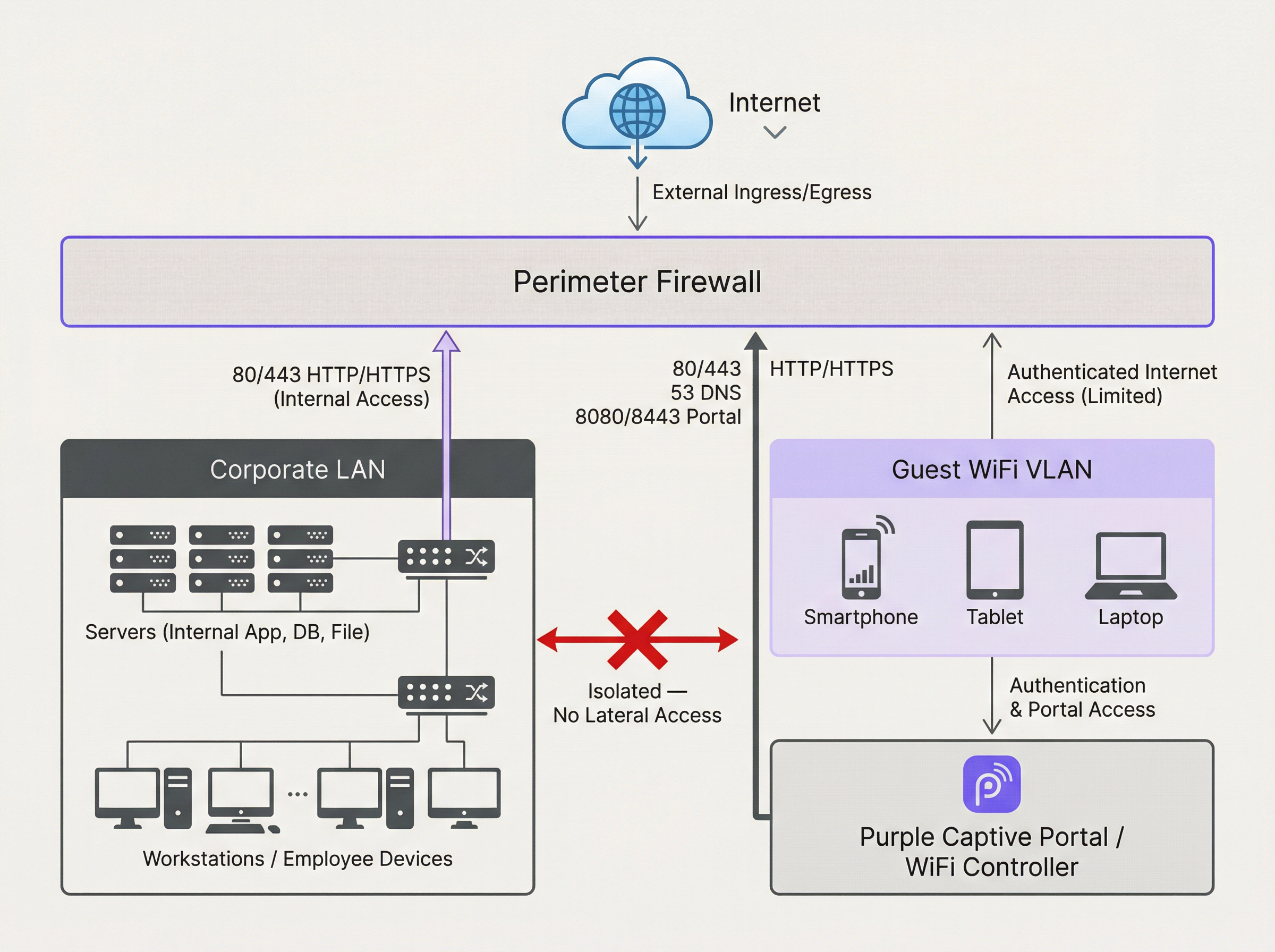
Il diagramma precedente illustra l'architettura ideale. Tutto il traffico proveniente dalla VLAN del WiFi guest viene filtrato dal firewall e ispezionato prima che possa raggiungere Internet o qualsiasi altro segmento di rete. Fondamentalmente, deve essere in atto una regola del firewall per negare esplicitamente qualsiasi traffico avviato dalla VLAN guest verso la LAN aziendale. Ciò impedisce che un dispositivo guest compromesso venga utilizzato come punto di snodo per attaccare le risorse interne.
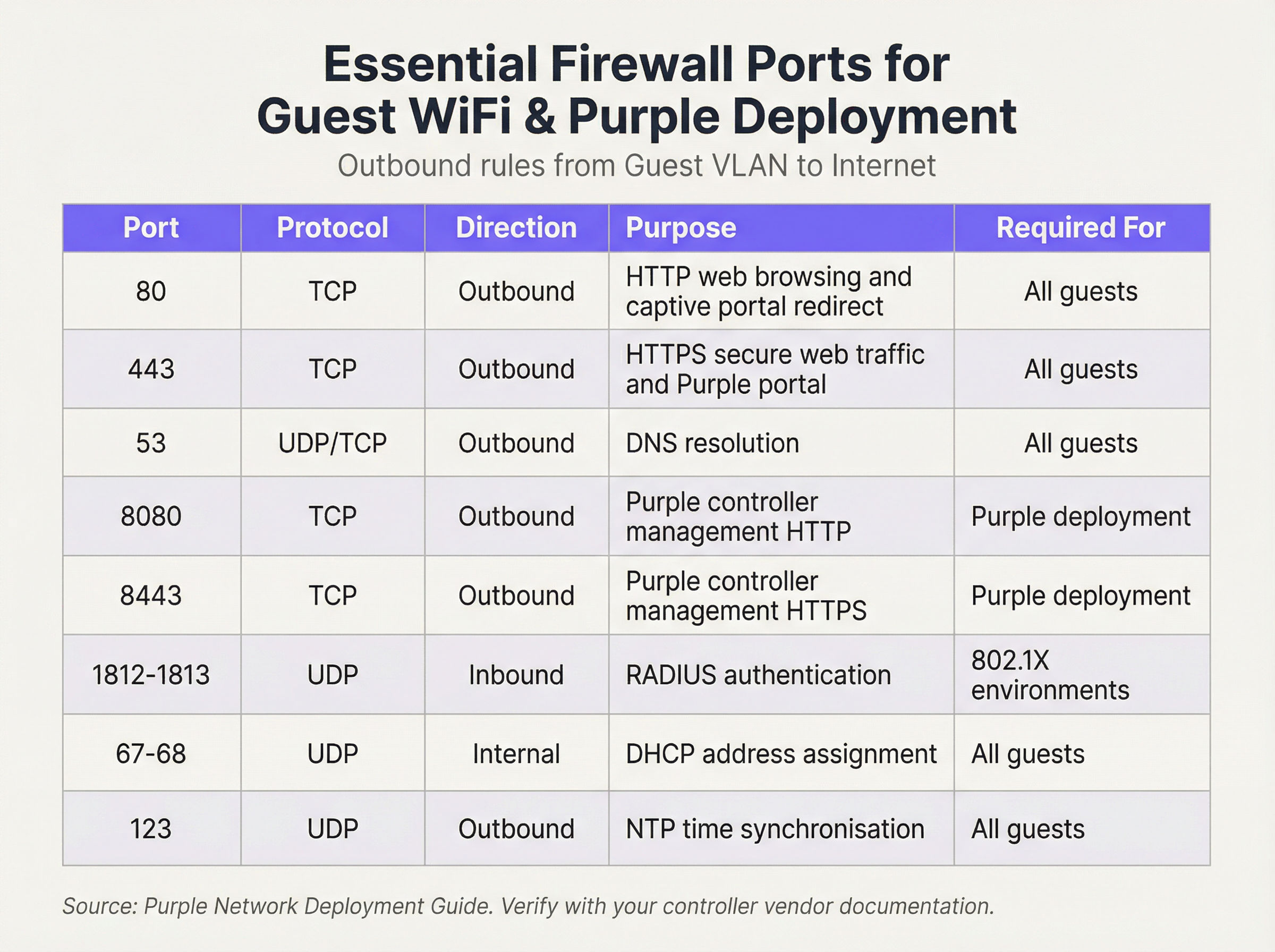
Operiamo con un approccio di sicurezza "Default Deny" (Nega per impostazione predefinita). Ciò significa che il firewall bloccherà tutto il traffico a meno che una regola non lo consenta esplicitamente. Le seguenti regole in uscita costituiscono la base per una rete guest funzionale e sicura:
Regole in Entrata e Port Forwarding:
Per la VLAN guest, la policy in entrata è semplice: negare tutto il traffico avviato da Internet. Non vi è alcun motivo aziendale valido per cui un'entità esterna debba avviare una connessione al dispositivo di un guest. L'unica eccezione riguarda l'hardware on-premise. Se ospiti il tuo controller WiFi o il server del Captive Portal all'interno della tua rete (anziché utilizzare una soluzione ospitata nel cloud), dovrai creare una regola specifica di Port Forwarding (o Destination NAT). Questa regola mappa una porta specifica sul tuo indirizzo IP pubblico all'indirizzo IP interno e alla porta del controller, ad esempio inoltrando il traffico in entrata sulla porta TCP 443 a 192.168.100.10:8443. Questa regola deve essere il più restrittiva possibile, specificando l'origine esatta (se nota), la destinazione e la porta.
Guida all'Implementazione
- Creazione della VLAN: Negli switch di rete, crea una nuova VLAN dedicata per il traffico guest (es. VLAN 100). Assegna questo ID VLAN all'SSID che trasmette la tua rete guest.
- Configurazione dell'Interfaccia Firewall: Configura una nuova interfaccia o sottointerfaccia sul tuo firewall e assegnala alla VLAN guest. Questa interfaccia fungerà da gateway predefinito per tutti i dispositivi guest.
- Servizio DHCP: Configura un server DHCP per la VLAN guest per assegnare automaticamente gli indirizzi IP. Assicurati che l'ambito DHCP fornisca solo l'indirizzo IP, la subnet mask e l'interfaccia guest del firewall come gateway predefinito. I server DNS forniti dovrebbero essere resolver pubblici (es. 1.1.1.1, 8.8.8.8).
- Regole Firewall in Uscita: Crea le regole firewall in uscita essenziali come descritto nella tabella di riferimento delle porte. Inizia con le regole più specifiche e termina con una regola "Deny All". L'ordine è fondamentale. Il firewall valuta le regole dall'alto verso il basso e la prima corrispondenza determina l'azione.
- Isolamento dei Client: Sui tuoi access point wireless, abilita la funzione "Client Isolation" (a volte chiamata "AP Isolation" o "Guest Mode"). Si tratta di un controllo critico che impedisce ai dispositivi guest sulla stessa rete WiFi di comunicare tra loro, mitigando il rischio di attacchi peer-to-peer.
- Registrazione e Monitoraggio: Abilita la registrazione dettagliata per tutte le regole del firewall, in particolare per il traffico negato. Inoltra questi log a un sistema SIEM (Security Information and Event Management) centrale per la correlazione e l'avviso di attività anomale.
Best Practice
- Utilizzare uno Stateful Firewall: Un firewall stateful tiene traccia dello stato delle connessioni attive e consente automaticamente il traffico di ritorno per le sessioni stabilite. Ciò semplifica la creazione delle regole, poiché è sufficiente definire regole in uscita per il traffico avviato dai guest.
- Controlli Regolari: Pianifica revisioni trimestrali del tuo set di regole del firewall. Rimuovi eventuali regole temporanee, inutilizzate o eccessivamente permissive. La sicurezza è un processo, non una configurazione una tantum.
- Gestione di IPv6: Assicurati che le regole del firewall si applichino sia al traffico IPv4 che IPv6. Molti dispositivi moderni utilizzano IPv6 per impostazione predefinita e ignorarlo può lasciare una significativa lacuna di sicurezza.
- Riferimento agli Standard di Settore: Allinea la tua configurazione con i framework di sicurezza consolidati. Per il retail, il Requisito PCI DSS 1.2.1 richiede esplicitamente di limitare il traffico tra reti attendibili e non attendibili. Per la gestione dei dati personali, il GDPR impone "misure tecniche e organizzative" per proteggere i dati, per le quali la segmentazione della rete è un controllo fondamentale.
Risoluzione dei Problemi e Mitigazione dei Rischi
- Problema: il Captive Portal non si carica: Si tratta quasi sempre di un problema di DNS o di regole del firewall. Assicurati che il guest possa risolvere l'hostname del portale (controlla la Porta 53) e che il traffico verso l'indirizzo IP e la porta del portale (di solito 80/443) sia consentito prima dell'autenticazione.
- Problema: WiFi guest lento: Regole del firewall eccessivamente permissive possono consentire a broadcast storm o traffico dannoso di consumare larghezza di banda. Implementa il principio del privilegio minimo per limitare il traffico solo a ciò che è necessario.
- Rischio: Worm Zero-Day: Un guest si connette con un dispositivo infetto da un worm zero-day che si diffonde automaticamente. Mitigazione: La Client Isolation è la tua difesa principale, in quanto impedisce al worm di diffondersi ad altri guest sulla stessa rete WiFi. Un rigoroso filtraggio in uscita può anche bloccare il traffico di comando e controllo di cui il malware ha bisogno per operare.
ROI e Impatto Aziendale
Una rete WiFi guest sicura e ben gestita contribuisce direttamente al successo aziendale. Negli ambienti retail, consente l'accesso alle analisi di Purple, fornendo informazioni su affluenza, tempi di permanenza e comportamento dei clienti che orientano direttamente le decisioni operative e di marketing. Nel settore alberghiero, una rete guest ad alte prestazioni è un fattore chiave per la soddisfazione degli ospiti e le recensioni positive. Investendo in un'adeguata architettura firewall, non stai solo mitigando i rischi; stai garantendo l'affidabilità e le prestazioni di una piattaforma critica per la business intelligence e il coinvolgimento dei clienti. Un'implementazione sicura crea fiducia e protegge il brand, offrendo un chiaro ritorno sull'investimento prevenendo costose violazioni dei dati e mancate conformità.

Briefing Podcast
Per un riepilogo audio di questi punti chiave, ascolta il nostro briefing tecnico di 10 minuti.
Key Terms & Definitions
VLAN (Virtual LAN)
A method of creating logically separate networks on the same physical network infrastructure. Devices on different VLANs cannot communicate without passing through a router or firewall.
IT teams use VLANs as the primary tool to enforce segmentation between the guest network and the corporate network, which is a foundational requirement for security and compliance.
Firewall Egress Filtering
The practice of filtering traffic as it leaves a network, as opposed to when it enters. It controls what outbound connections internal devices are permitted to make.
For a guest network, egress filtering is critical. By only allowing outbound traffic on specific ports (like 80 and 443), you can block malware, prevent users from running unauthorised services, and reduce your attack surface.
Client/AP Isolation
A security feature on wireless access points that prevents devices connected to the same WiFi network from communicating directly with each other.
This is a critical defence against peer-to-peer attacks on the guest network. If one guest's device is compromised, Client Isolation prevents it from attacking other guests' laptops or phones in the same venue.
Stateful Firewall
A firewall that tracks the state of network connections (e.g., TCP streams). It automatically allows return traffic for connections that were initiated from inside the network.
Using a stateful firewall simplifies administration. An IT manager only needs to write a rule allowing a guest to connect to a website on port 443; the firewall automatically handles the return traffic without needing a complex inbound rule.
Default Deny
A security posture where any traffic that is not explicitly permitted by a firewall rule is blocked.
This is a best-practice principle for all firewall configuration. It ensures that any new or un-categorised traffic is blocked by default, providing a much higher level of security than a 'default allow' policy.
PCI DSS
The Payment Card Industry Data Security Standard, a set of security standards designed to ensure that all companies that accept, process, store or transmit credit card information maintain a secure environment.
For any retail or hospitality business, proving that the guest WiFi network is robustly isolated from the network that handles payments (the Cardholder Data Environment) is a fundamental requirement for passing a PCI DSS audit.
Captive Portal
A web page that the user of a public-access network is obliged to view and interact with before access is granted. It is used for authentication, payment, or accepting terms of service.
The firewall must be configured to allow unauthenticated users to access the captive portal (and its supporting services like DNS) before they have full internet access. This pre-authentication access is often managed via a walled-garden configuration.
Port Forwarding (Destination NAT)
A technique used to redirect a communication request from one address and port number combination to another while the packets are traversing a network gateway, such as a router or firewall.
If a venue hosts its own on-premise WiFi controller, IT teams must configure port forwarding to allow guest devices on the internet to reach the captive portal on the internal network. This is a critical step for enabling the guest journey.
Case Studies
A 200-room hotel is experiencing frequent guest complaints about slow WiFi and connection drops. An initial check reveals a flat network architecture where guest and hotel operational traffic (CCTV, staff PCs) share the same subnet. The firewall has a permissive 'allow any-to-any' rule for all internal traffic.
- Immediate Action: Create a new Guest VLAN (e.g., VLAN 200) and a corresponding guest SSID. 2. Segmentation: Migrate all guest-facing access points to the new VLAN. 3. Firewall Policy: Create a new zone and interface for the Guest VLAN on the firewall. Implement a strict outbound policy allowing only ports 53, 80, 443, and 123. Add a rule to explicitly deny any traffic from the Guest VLAN to the corporate VLAN. 4. Enable Client Isolation: Activate AP/Client Isolation on the wireless controller for the guest SSID. 5. Remove Permissive Rule: Once guest traffic is successfully segmented, remove the legacy 'allow any-to-any' rule and replace it with specific rules for required corporate traffic.
A retail chain is opening a new flagship store and needs to provide guest WiFi that is compliant with PCI DSS 4.0. The store will have point-of-sale (POS) terminals, inventory scanners, and corporate PCs on the same physical network infrastructure.
- Define CDE: The first step is to define the Cardholder Data Environment (CDE). Create a dedicated VLAN for all POS terminals. 2. Isolate Guest Network: Create a separate VLAN for guest WiFi. 3. Isolate Corporate Services: Create a third VLAN for other corporate services like inventory scanners and staff PCs. 4. Firewall Enforcement: The firewall must enforce strict segmentation. There must be an explicit 'deny all' rule for any traffic originating from the Guest VLAN or the Corporate Services VLAN to the CDE VLAN. 5. Restrict CDE Egress: The CDE VLAN should only be allowed outbound access to the specific IP addresses of the payment processor, and nothing else. 6. Prove Isolation: Use tools like
nmapor a vulnerability scanner to run tests from the guest network to prove that no CDE hosts or ports are reachable.
Scenario Analysis
Q1. A stadium is hosting a major sporting event and expects 50,000 concurrent users on its guest WiFi. What is the most critical firewall consideration to ensure network stability and security?
💡 Hint:Consider the impact of broadcast and multicast traffic in such a high-density environment.
Show Recommended Approach
The most critical consideration is the aggressive filtering of all unnecessary traffic, particularly broadcast and multicast traffic (like mDNS), at the firewall and access point level. In a high-density environment, this traffic can quickly lead to a broadcast storm, consuming all available bandwidth and bringing the network to a halt. Strict egress rules allowing only essential web and DNS traffic, combined with Client Isolation, are paramount.
Q2. You discover that a previous administrator has configured the guest network to use the internal corporate DNS servers. What are the risks, and what is the immediate remediation?
💡 Hint:What information can be gleaned from internal DNS records?
Show Recommended Approach
The risks are significant. It exposes the names and IP addresses of all internal corporate servers (e.g., payroll.internal.corp, dc01.internal.corp) to anyone on the guest network, providing a detailed map for an attacker. It also creates a potential vector for DNS cache poisoning attacks against the corporate network. The immediate remediation is to change the DHCP configuration for the guest VLAN to assign public DNS servers only (e.g., 1.1.1.1, 8.8.8.8) and ensure the firewall blocks the guest VLAN from sending any traffic to the internal DNS servers.
Q3. A user reports they cannot access their corporate VPN over the guest WiFi. Your firewall logs show denied UDP traffic on port 500 and 4500 from the user's IP. What is the issue and how would you decide whether to resolve it?
💡 Hint:What protocol uses UDP ports 500 and 4500?
Show Recommended Approach
The issue is that the firewall is blocking the IKE and IPsec NAT-T protocols, which are commonly used to establish IPsec VPN tunnels. The decision to resolve this is a policy-level one. For a venue catering to business travellers (like a hotel or conference centre), allowing VPN access is often a business requirement. The resolution would be to create a specific outbound firewall rule to allow UDP traffic on ports 500 and 4500. For a public library or school, the policy might be to block VPNs to ensure traffic can be filtered. The decision must balance user needs against the organisation's security policy and risk tolerance.
Key Takeaways
- ✓Always isolate guest WiFi traffic on its own dedicated VLAN.
- ✓Operate on a 'Default Deny' firewall policy; only allow what is essential.
- ✓Enable Client Isolation on access points to prevent peer-to-peer attacks.
- ✓Use public DNS servers for guests; never expose internal DNS.
- ✓Strictly limit inbound traffic and only use port forwarding for specific, on-premise services.
- ✓Regularly audit firewall rules and monitor logs for anomalies.
- ✓A secure guest network is a prerequisite for compliance (PCI DSS, GDPR) and leveraging WiFi analytics.




