

Guest WiFi Marketing: La guida definitiva per acquisire lead, incrementare le vendite e migliorare l'esperienza cliente
This guide provides a technical deep-dive into leveraging guest WiFi for marketing, lead capture, and customer analytics. It offers actionable strategies for IT managers and venue operators to transform their WiFi from a cost centre into a powerful, ROI-driven marketing platform, covering architecture, implementation, and compliance.
🎧 Listen to this Guide
View Transcript
Executive Summary
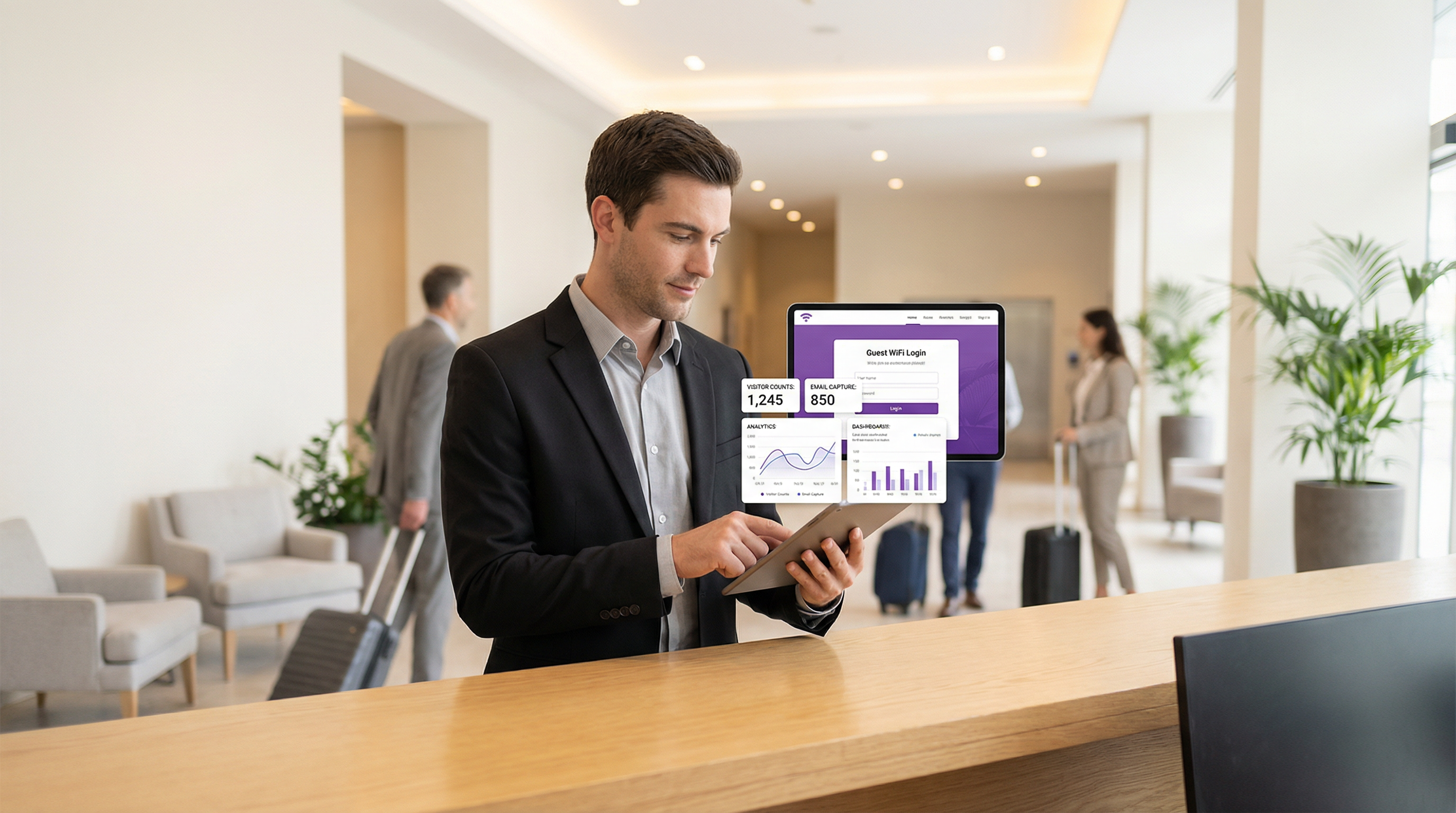
Il Guest WiFi non è più un semplice servizio aggiuntivo; è un asset strategico in grado di generare un notevole valore di business. Per CTO, responsabili IT e direttori di sede, l'imperativo è trasformare la percezione del Guest WiFi da spesa operativa necessaria a motore proattivo di marketing e analytics. Questa guida fornisce un framework tecnico e strategico per realizzare tale trasformazione. Implementando una soluzione Guest WiFi orientata al marketing, le organizzazioni possono acquisire preziosi dati proprietari (first-party data) sui clienti, comprendere il comportamento dei visitatori negli spazi fisici e lanciare campagne di marketing mirate in grado di produrre un ritorno sull'investimento (ROI) misurabile. I componenti principali includono una solida infrastruttura di rete, un sofisticato Captive Portal per l'acquisizione dei dati e un'integrazione fluida con le piattaforme CRM e di marketing automation. Fondamentalmente, ciò deve avvenire all'interno di un framework sicuro e conforme, rispettando standard come WPA3 per la sicurezza di rete e il GDPR per la privacy dei dati. Il risultato è uno strumento potente che colma il divario tra il customer journey digitale e quello fisico, abilitando esperienze personalizzate e incrementando i ricavi.
Approfondimento Tecnico
L'architettura di una soluzione di Guest WiFi marketing si compone di tre livelli principali: l'Infrastruttura di Rete, il Captive Portal e Piattaforma di Marketing, e il Livello di Integrazione e Analytics.
Infrastruttura di Rete: La base è l'hardware WiFi esistente: access point (AP), controller e gateway. Per un'efficace location analytics, la densità degli AP deve essere sufficiente a triangolare con precisione le posizioni dei dispositivi. La segmentazione della rete è fondamentale; il traffico guest deve essere isolato dalla rete aziendale tramite VLAN (Virtual LAN) e rigide regole di firewall. Ciò mitiga il rischio di violazioni della sicurezza provenienti dalla rete pubblica. La conformità allo standard IEEE 802.1X per il controllo degli accessi di rete basato su porta e al WPA3 per una crittografia robusta è un requisito di base per una sicurezza di livello enterprise.
Captive Portal e Piattaforma di Marketing: È il livello software che si sovrappone all'hardware di rete. Quando un utente si connette all'SSID guest, viene reindirizzato a un Captive Portal. A differenza di una semplice pagina di inserimento password, un portale di marketing offre molteplici metodi di autenticazione:
- Email/Compilazione Modulo: Il metodo più diretto per l'acquisizione di lead.
- Social Login: (es. Google, LinkedIn, Facebook) Fornisce dati demografici più ricchi e validati, previo consenso dell'utente.
- Voucher/Codice di Accesso: Consente accessi a livelli e sessioni a tempo limitato, molto comuni nel settore dell'ospitalità.
La piattaforma acquisisce questi dati, li collega all'indirizzo MAC del dispositivo e li archivia in un database centralizzato. È qui che viene garantita la conformità al GDPR e ad altre normative sulla privacy dei dati, attraverso caselle di controllo per il consenso esplicito e link chiari alle informative sulla privacy.
- Livello di Integrazione e Analytics: Il vero valore dei dati acquisiti si sblocca attraverso l'integrazione. Utilizzando API REST e Webhook, la piattaforma di WiFi marketing dovrebbe trasmettere i dati in tempo reale a sistemi esterni:
- Sistemi CRM (Salesforce, HubSpot): Per arricchire i profili dei clienti con i comportamenti all'interno della sede.
- Marketing Automation (Mailchimp, Klaviyo): Per attivare campagne email/SMS automatizzate (es. un'offerta di "bentornato" per un visitatore di ritorno).
- Strumenti di Business Intelligence (BI): Per correlare le WiFi analytics con i dati di vendita.
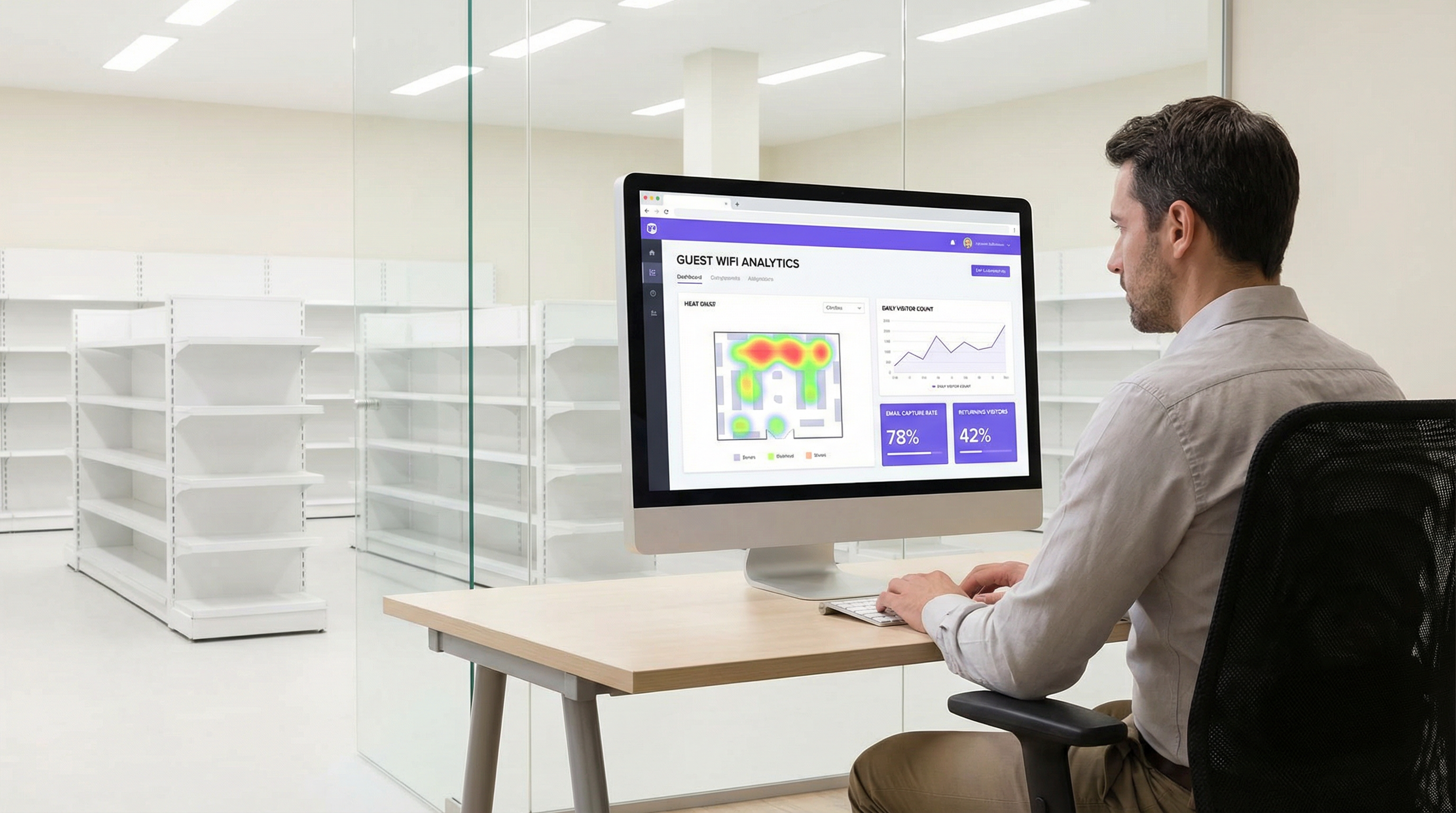
Questo livello fornisce anche la dashboard di analytics, offrendo insight su affluenza, tempi di permanenza, fedeltà dei visitatori e mappe di calore delle posizioni.
Guida all'Implementazione
L'implementazione di una soluzione di Guest WiFi marketing richiede un approccio graduale:
Definire gli Obiettivi di Business: Quali sono gli scopi principali? Aumentare le dimensioni della mailing list del 25%? Generare un incremento del 10% nei clienti di ritorno? Collegare il 5% delle vendite in negozio a una promozione basata sul WiFi? È essenziale avere KPI chiari.
Audit dell'Infrastruttura: Valuta la tua rete attuale. La copertura degli AP è adeguata per la location analytics? Il tuo gateway supporta l'integrazione con piattaforme Captive Portal di terze parti? Spesso è necessario un site survey approfondito.
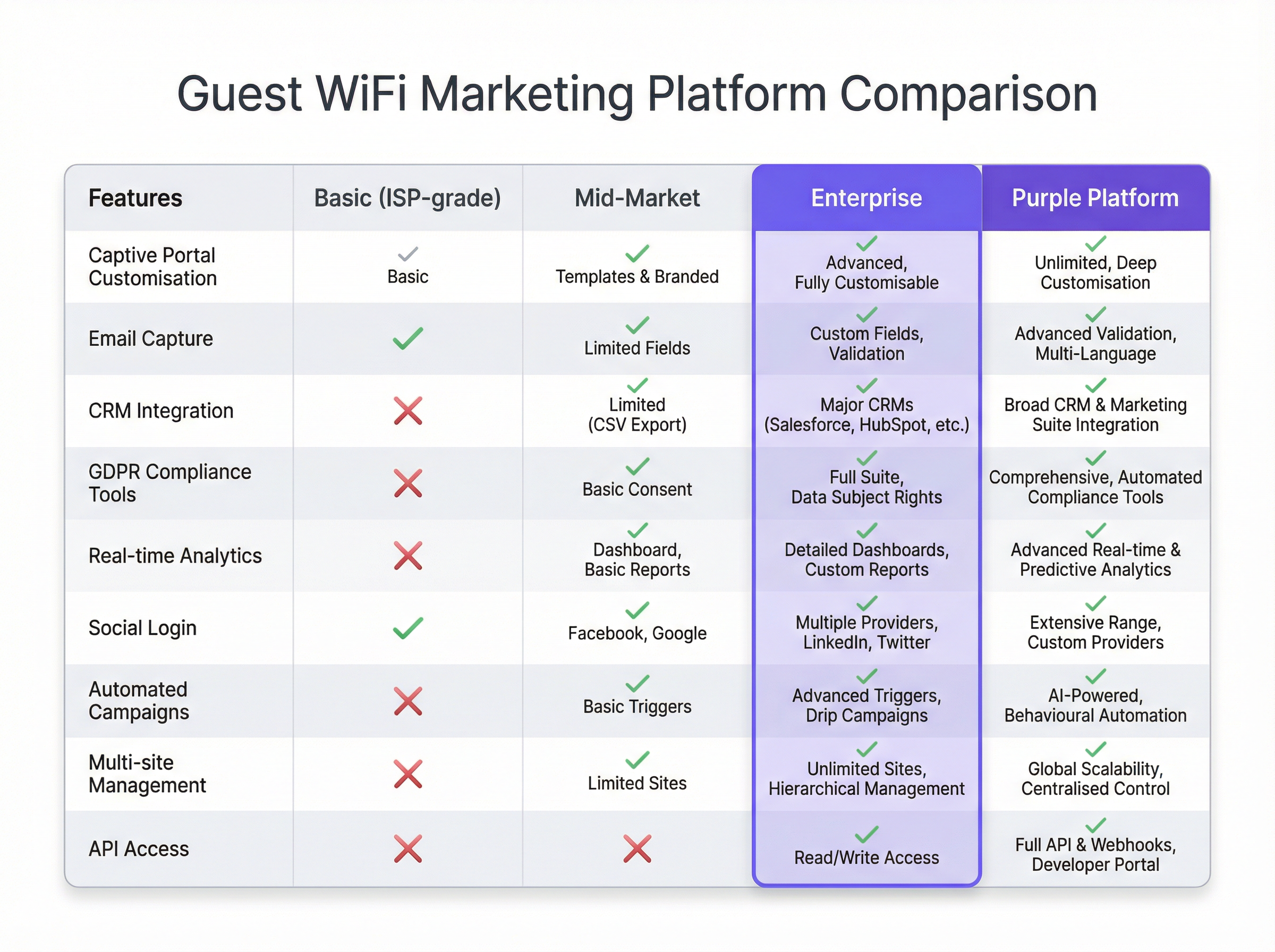
Selezione della Piattaforma: Scegli una piattaforma che soddisfi i tuoi obiettivi. Le considerazioni chiave includono l'ampiezza delle integrazioni CRM, la sofisticazione delle analytics e la solidità degli strumenti di compliance. Consulta la tabella comparativa sottostante per una panoramica neutrale rispetto ai vendor.
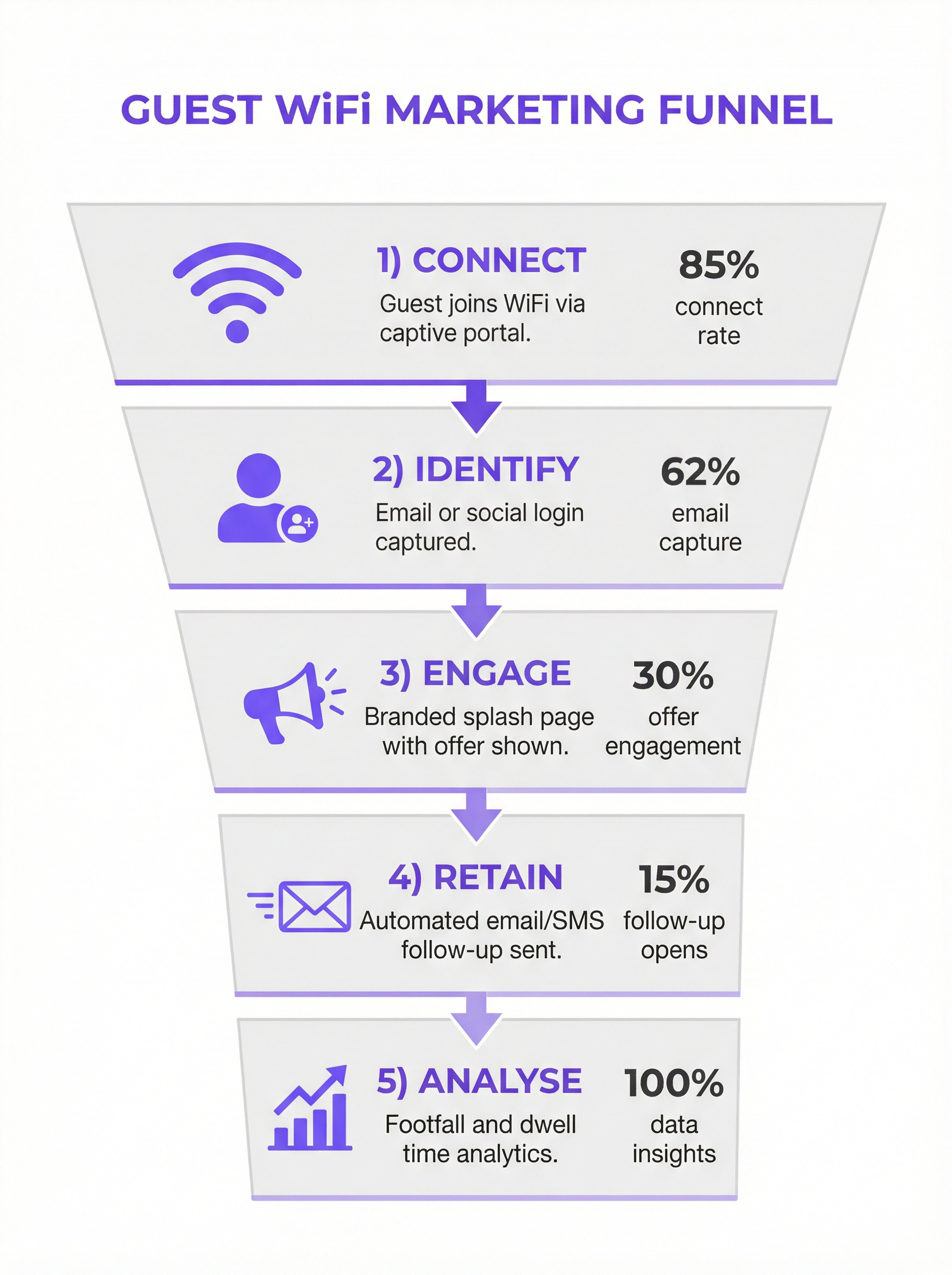
Progettare il Customer Journey: Mappa l'esperienza utente dalla connessione alla comunicazione post-visita. Progetta un Captive Portal pulito e mobile-first con un chiaro scambio di valore (es. "WiFi gratuito in cambio della tua email e di un voucher sconto del 15%").
Configurazione e Integrazione: Configura il Captive Portal, imposta i trigger di marketing automation e stabilisci i collegamenti API al tuo CRM. Si tratta di un'attività tecnica che richiede la collaborazione tra i team di rete e di marketing.
Progetto Pilota e Iterazione: Lancia la soluzione in un numero limitato di sedi. Monitora i tassi di connessione, la qualità dell'acquisizione dati e le performance delle campagne. Utilizza gli insight per perfezionare l'approccio prima di un rilascio completo.
Best Practice
- Dare Priorità all'Esperienza Utente: Un processo di login lento, complesso o inaffidabile azzererà l'adozione. Mantieni i moduli brevi e il processo di connessione fluido.
- Offrire un Chiaro Scambio di Valore: Gli utenti sono più propensi a condividere i dati se ricevono in cambio un valore tangibile. Potrebbe trattarsi di velocità premium, uno sconto o contenuti esclusivi.
- Integrare la Compliance nel Design: La privacy dei dati non è un aspetto secondario. Assicurati che ogni fase, dal consenso sul Captive Portal alla gestione dei dati nel CRM, sia conforme al GDPR/CCPA.
- Segmentare e Personalizzare: Non inviare lo stesso messaggio a tutti gli utenti. Utilizza i dati per segmentare la tua audience (es. visitatori alla prima visita vs. visitatori di ritorno) e personalizzare la comunicazione.
- Mettere in Sicurezza la Rete: Verifica regolarmente la segmentazione della rete e le regole del firewall. Le reti guest sono un vettore di attacco comune.
Risoluzione dei Problemi e Mitigazione dei Rischi
- Bassi Tassi di Connessione: Spesso causati da una scarsa esperienza utente. Semplifica il processo di login, migliora le performance di rete o aumenta la visibilità del servizio WiFi.
- Scarsa Qualità dei Dati: Implementa la convalida delle email in tempo reale sul tuo Captive Portal per ridurre gli inserimenti falsi o errati. Prediligi i social login per dati verificati e di qualità superiore.
- Violazioni della Compliance: Il rischio maggiore. Collabora con i team legali per garantire che l'intero flusso di dati sia conforme. Utilizza una piattaforma con strumenti di compliance integrati e automatizzati per gestire il consenso e le richieste degli interessati.
- ROI Negativo: Si verifica quando i dati vengono raccolti ma non utilizzati. Assicurati che il livello di integrazione funzioni e che i team di marketing utilizzino attivamente i dati per lanciare campagne mirate.
ROI e Impatto sul Business
Il ROI del Guest WiFi marketing si misura su diversi assi:
- Crescita del Database di Marketing: Traccia i nuovi contatti netti acquisiti tramite la piattaforma WiFi. Assegna un valore a ciascun lead basandoti sui benchmark di settore.
- Aumento delle Vendite: Attribuisci i ricavi alle promozioni veicolate tramite WiFi. Ad esempio, traccia il tasso di conversione dei codici sconto offerti sul Captive Portal.
- Miglioramento della Fedeltà dei Clienti: Misura l'incremento delle visite di ritorno da parte di clienti noti dopo l'implementazione del sistema.
- Efficienza Operativa: Utilizza i dati sull'affluenza e sui tempi di permanenza per ottimizzare i livelli di personale, il layout dei negozi e gli orari di apertura.
Collegando il comportamento offline ai profili digitali, il Guest WiFi marketing fornisce l'anello mancante nel customer journey omnicanale, offrendo un impatto chiaro e misurabile sui profitti.
Key Terms & Definitions
Captive Portal
A web page that the user of a public-access network is obliged to view and interact with before access is granted. In a marketing context, it's the primary tool for data capture.
IT teams deploy captive portals as the gateway to the guest network. It's the bridge between the network infrastructure and the marketing platform.
MAC Address (Media Access Control)
A unique identifier assigned to a network interface controller (NIC) for use as a network address in communications within a network segment.
The WiFi marketing platform links a user's captured data (e.g., email) to their device's MAC address to track their presence and behaviour (dwell time, repeat visits) anonymously.
VLAN (Virtual Local Area Network)
A logical grouping of devices in the same broadcast domain. VLANs are usually configured on switches by placing some interfaces into one broadcast domain and some into another.
This is the fundamental mechanism IT teams use to segregate the guest WiFi network from the secure internal corporate network, preventing lateral movement by attackers.
GDPR (General Data Protection Regulation)
A regulation in EU law on data protection and privacy in the European Union and the European Economic Area.
For any organisation collecting data from EU citizens, GDPR compliance is mandatory. IT and marketing teams must ensure the WiFi platform provides tools for explicit consent, data access requests, and the right to be forgotten.
Webhook
An automated message sent from an app when something happens. It has a message—or payload—and is sent to a unique URL—a webhook URL.
This is how a WiFi platform can instantly notify a CRM when a new guest connects. For example, a webhook can trigger an action in Salesforce to create a new lead record the moment a guest logs into the WiFi.
Presence Analytics
The analysis of data from WiFi signals to understand how many people are in a physical space, without identifying them personally.
Venue operators use this data to understand footfall patterns, peak hours, and popular areas, allowing them to optimise staffing, layout, and operations.
Location Analytics
A more granular form of analytics that uses the signal strength from multiple access points to triangulate a device's position within a venue.
This provides heatmaps and path analysis, showing where visitors spend the most time and the routes they take. It requires a higher density of APs than simple presence analytics.
WPA3 (Wi-Fi Protected Access 3)
The latest generation of security for wireless networks. It provides more robust authentication and increased cryptographic strength.
Network architects should specify WPA3-compatible hardware for all new deployments to provide the highest level of security for guest and corporate wireless networks.
Case Studies
A 200-room luxury hotel wants to increase direct bookings and build a guest database for marketing, moving away from reliance on Online Travel Agencies (OTAs). They have a modern Cisco Meraki network infrastructure.
The hotel integrates Purple with their Meraki dashboard. They configure a captive portal offering two tiers of WiFi: a free, standard-speed service requiring email and consent for marketing, and a paid, high-speed premium service. The captured email is sent via webhook to their HubSpot CRM and added to a 'New Guest' workflow. This workflow sends a welcome email with a 10% discount code for their next direct booking. The hotel also uses the presence analytics to understand guest flow in the lobby, bar, and spa, helping them optimise staffing.
A retail chain with 50 stores wants to understand in-store customer behaviour and drive footfall through targeted promotions. They use a mix of Aruba and Ruckus hardware.
The chain deploys a hardware-agnostic platform like Purple across all 50 stores. They use a social login (Facebook/Google) on their captive portal to gather rich demographic data. This data is fed into their central BI tool. They identify that their highest-value customers (those with high repeat visits and long dwell times) are predominantly in the 25-34 age bracket. They then run a targeted Facebook ad campaign aimed at this demographic in the geographic areas around their underperforming stores, promoting a new product line. The WiFi analytics are then used to measure the uplift in footfall from this specific demographic post-campaign.
Scenario Analysis
Q1. A large conference centre is hosting a 3-day tech event with 5,000 attendees. They want to provide WiFi while also giving event sponsors opportunities for lead generation. How would you architect the WiFi solution?
💡 Hint:Consider tiered access and how to provide value to both attendees and sponsors.
Show Recommended Approach
Implement a two-tiered WiFi system. Tier 1 is a free, baseline-speed service for all attendees, with a captive portal that requires only email registration. This builds the centre's own marketing list. Tier 2 is a sponsored, high-speed premium service. Attendees can access it by opting-in to share their details (name, email, company) with a specific sponsor. Each major sponsor gets their own 'branded' access portal. This provides high-quality leads for sponsors and a clear value exchange for attendees (premium speed for data). The network must be robust with high AP density in breakout rooms and the main hall to handle the load.
Q2. A public library wants to offer free WiFi but is concerned about GDPR compliance and data security. They have a limited budget and minimal IT staff. What is the most critical first step in their deployment?
💡 Hint:What is the single most important security measure for any guest network?
Show Recommended Approach
The most critical first step is to ensure complete network segmentation. Using a VLAN, the guest WiFi network must be entirely isolated from the library's internal administrative network. This prevents any possibility of a user on the public network accessing sensitive internal systems, like the library management system or staff computers. Before even considering data capture, this fundamental security measure must be implemented and verified. A simple, reliable firewall rule blocking all traffic between the guest VLAN and the internal VLAN is essential.
Q3. A restaurant chain notices a high connection rate on their guest WiFi but a very low open rate on their marketing emails. What is the likely cause and how would you troubleshoot it?
💡 Hint:Think about the quality of the data being captured at the source.
Show Recommended Approach
The most likely cause is poor data quality, specifically fake or mistyped email addresses being entered on the captive portal. To troubleshoot, first analyse the captured data for obvious fake domains (e.g., test@test.com). The best long-term solution is to implement real-time email validation via an API on the captive portal. This checks if an email address is valid before the user is granted access. An alternative or complementary solution is to incentivise social logins, which provide verified email addresses and richer data, leading to higher engagement.
Key Takeaways
- ✓Guest WiFi can be transformed from a cost centre into a powerful marketing and analytics tool.
- ✓A captive portal is the gateway for capturing valuable first-party customer data with their consent.
- ✓Seamless integration with CRM and marketing platforms is crucial for acting on captured data and proving ROI.
- ✓Network segmentation (using VLANs) is the most critical security measure to protect your corporate network.
- ✓Compliance with data privacy regulations like GDPR is non-negotiable and must be built into the system design.
- ✓A clear value exchange (e.g., a discount for an email) is essential to maximise user adoption and data capture rates.
- ✓WiFi analytics provide unprecedented insight into customer behaviour in physical spaces, bridging the online-offline gap.




