

Guest WiFi: la guida definitiva per le aziende per migliorare l'esperienza dei clienti e raccogliere dati preziosi
This guide is the definitive technical reference for IT leaders and venue operators on deploying enterprise-grade guest WiFi. It provides actionable guidance on network architecture, security, and data analytics to transform guest WiFi from a cost centre into a powerful tool for enhancing customer experience and driving business intelligence.
🎧 Listen to this Guide
View Transcript

Executive Summary
Per i professionisti IT senior e i direttori operativi, il Guest WiFi si è evoluto ben oltre un semplice servizio aggiuntivo. Un tempo considerato un servizio necessario ma periferico, oggi rappresenta un asset strategico in grado di generare un ROI significativo. Una rete Guest WiFi progettata in modo professionale non serve più solo a fornire accesso a Internet; è un veicolo primario per migliorare l'esperienza dei clienti, raccogliere dati senza precedenti sul comportamento all'interno delle strutture e creare nuove opportunità di marketing. Questa guida funge da riferimento tecnico e pratico per la progettazione, l'implementazione e la gestione di una soluzione Guest WiFi sicura e ad alte prestazioni. Andremo oltre la teoria accademica per fornire insight azionabili basati su implementazioni reali nei settori dell'ospitalità, del retail e dei grandi spazi pubblici. Il focus è su un approccio tripartito: 1) Sicurezza e architettura: implementare una solida segmentazione di rete e controlli di accesso per mitigare i rischi. 2) Dati e analisi: sfruttare un Captive Portal e una piattaforma di WiFi intelligence per capire chi sono i clienti e come si comportano nel tuo spazio. 3) Impatto sul business: tradurre questi dati in risultati misurabili, dal miglioramento dell'efficienza operativa all'aumento della fedeltà dei clienti e dei ricavi. Per il CTO, questa guida fornisce il framework per giustificare l'investimento in una moderna piattaforma di WiFi intelligence come Purple AI, spostando la conversazione dal costo al valore strategico.
Approfondimento tecnico
Il successo dell'implementazione di un Guest WiFi si basa su una solida architettura tecnica. L'obiettivo principale è fornire agli ospiti un accesso a Internet fluido e ad alte prestazioni senza compromettere la sicurezza o le prestazioni della rete aziendale interna. Ciò richiede un approccio multilivello che affronti hardware, progettazione di rete e protocolli di sicurezza.
Architettura di base: la segmentazione non è negoziabile
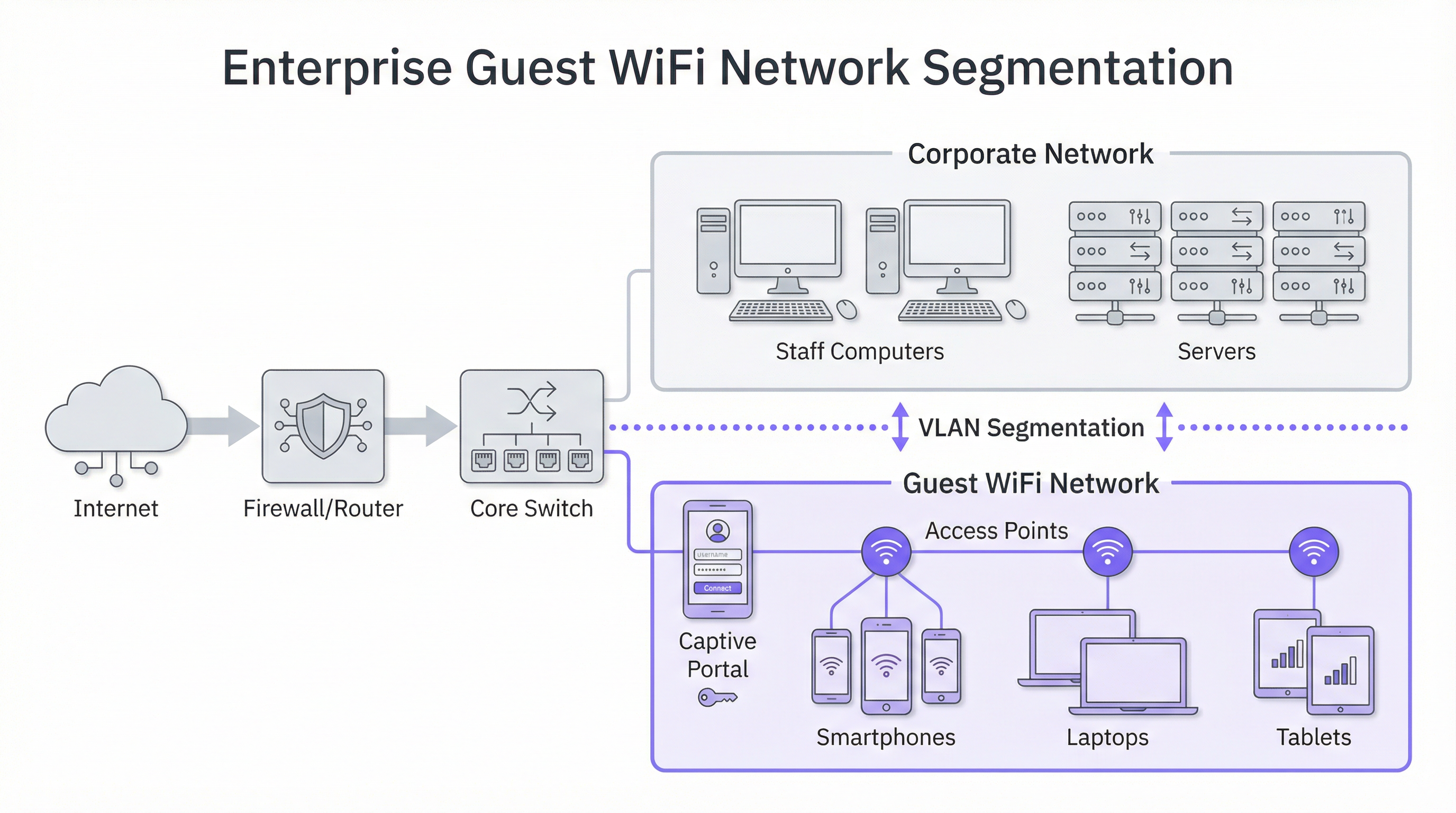
Il principio più critico in assoluto per la sicurezza del Guest WiFi è la segmentazione di rete. Una rete "piatta", in cui i dispositivi degli ospiti e i sistemi aziendali interni (es. terminali POS, computer del personale, file server) condividono la stessa rete logica, rappresenta un rischio per la sicurezza inaccettabile. Una violazione su un singolo dispositivo ospite potrebbe potenzialmente esporre l'intera infrastruttura aziendale. La soluzione standard del settore è l'implementazione di VLAN (Virtual Local Area Network). Una VLAN divide logicamente una singola rete fisica in più domini di broadcast isolati. In questo modello, tutto il traffico degli ospiti è confinato nella propria VLAN dedicata, che viene instradata direttamente verso Internet e protetta da firewall rispetto a qualsiasi VLAN aziendale interna. Ciò garantisce che, anche se un dispositivo ospite viene compromesso, la superficie di attacco sia limitata rigorosamente alla sola rete ospiti.
Considerazioni sull'hardware: Access Point e Controller
La qualità dell'esperienza utente è direttamente legata alla qualità e al posizionamento dei Wireless Access Point (AP). La scelta dell'hardware dovrebbe essere guidata dalle esigenze specifiche del tuo ambiente:
- Strutture ad alta densità (stadi, centri congressi): richiedono AP 4x4 MU-MIMO (Multi-User, Multiple Input, Multiple Output) ad alta capacità, che spesso supportano i più recenti standard WiFi 6 (802.11ax) o WiFi 6E. Questi sono progettati per gestire un gran numero di connessioni simultanee in un'area concentrata, mitigando le interferenze e garantendo un'equa allocazione del tempo di trasmissione (airtime).
- Ospitalità e Retail (hotel, negozi): copertura ed estetica sono spesso fondamentali. Gli AP da camera o da parete possono fornire una copertura eccellente e mirata nelle camere d'albergo, mentre gli AP a soffitto dal design discreto sono adatti per le aree di vendita e gli spazi pubblici. Un site survey RF (Radiofrequenza) professionale è essenziale prima dell'implementazione per identificare le posizioni ottimali degli AP, ridurre al minimo le interferenze di canale ed eliminare le lacune di copertura.
Protocolli di sicurezza e controllo degli accessi
Oltre alla segmentazione, devono essere implementati diversi livelli di sicurezza:
- Crittografia WPA3: l'attuale standard di sicurezza per le reti WiFi. WPA3-Enterprise offre il massimo livello di sicurezza fornendo a ciascun utente una chiave di crittografia individuale, ma per le reti pubbliche per gli ospiti, WPA3-Personal è più comune. La chiave è abbandonare i protocolli legacy come WEP e WPA/WPA2 ovunque sia possibile.
- Isolamento dei client: si tratta di una funzionalità cruciale sul controller wireless o sugli AP che impedisce ai dispositivi degli ospiti sulla stessa rete WiFi di comunicare tra loro. In pratica, colloca ogni ospite nella propria bolla digitale, prevenendo attacchi peer-to-peer e la diffusione di malware all'interno della rete ospiti.
- Captive Portal: il Captive Portal è la pagina web a cui un utente viene reindirizzato prima di ottenere l'accesso completo alla rete. Da una prospettiva tecnica, funge da gateway di autenticazione e autorizzazione. Intercetta la richiesta HTTP iniziale dell'utente e la reindirizza a un server di login. Una volta che l'utente soddisfa i criteri definiti (es. accetta i termini, inserisce un'e-mail, effettua il login tramite social media), il portale autorizza l'indirizzo MAC del suo dispositivo presso il controller di rete, che consente quindi al traffico di passare verso Internet.
Guida all'implementazione
L'implementazione di una rete Guest WiFi può essere suddivisa in un progetto a fasi, passando dalla pianificazione e progettazione alla configurazione e al collaudo.
Fase 1: Discovery e pianificazione
- Definire gli obiettivi di business: qual è l'obiettivo principale? È la raccolta di dati per il marketing, il miglioramento dell'esperienza in loco o semplicemente fornire un accesso di base? La risposta determina le funzionalità richieste e il budget.
- Valutare l'infrastruttura esistente: l'hardware di switching e routing attuale supporta le VLAN? Il backhaul Internet è sufficiente per il numero previsto di utenti simultanei? Una regola empirica comune è prevedere 5-10 Mbps per ogni utente simultaneo previsto per garantire una buona esperienza.
- Condurre un Site Survey: incaricare un ingegnere di rete di eseguire un site survey fisico e RF. Questo determinerà il numero e il posizionamento degli AP necessari per fornire copertura e capacità adeguate.
Fase 2: Progettazione e configurazione
- Schema VLAN e IP: progettare la topologia di rete. Definire una VLAN e una sottorete IP separate per la rete ospiti (es. VLAN 100, 10.100.0.0/16). Configurare il core switch per il trunking di questa VLAN verso il controller wireless e il firewall.
- Policy del firewall: creare una policy del firewall rigorosa per la VLAN ospiti. Questa policy dovrebbe bloccare TUTTO il traffico destinato alle sottoreti aziendali interne e consentire solo il traffico in uscita sulle porte web standard (80, 443) e altri servizi necessari (es. DNS, DHCP).
- Configurazione del Wireless Controller/AP:
- Creare una nuova WLAN/SSID (es. "BrandName Free WiFi").
- Assegnare questo SSID alla VLAN ospiti.
- Abilitare l'isolamento dei client.
- Configurare le impostazioni di sicurezza (WPA2/WPA3 con una chiave precondivisa).
- Configurare le impostazioni del Captive Portal, puntando alla tua piattaforma di WiFi intelligence (come Purple).
Fase 3: Integrazione e collaudo
- Integrazione del Captive Portal: configurare la piattaforma di WiFi analytics. Ciò comporta l'aggiunta della sede, la definizione del percorso di login (es. social login, compilazione di moduli) e la personalizzazione del branding delle pagine del portale.
- Collaudo: testare a fondo l'intero percorso dell'utente da più tipi di dispositivi (iOS, Android, laptop). Verificare che la segmentazione VLAN funzioni correttamente tentando di accedere alle risorse interne dalla rete ospiti (questi tentativi dovrebbero fallire).
- Go-Live: una volta completato il collaudo, trasmettere l'SSID e monitorare le connessioni iniziali tramite la dashboard di analytics.
Best Practice
- Dare priorità all'esperienza utente: il processo di login dovrebbe essere il più fluido possibile. Un processo complesso e in più fasi porterà a tassi di abbandono elevati. Offrire più opzioni di login, come gli account dei social media, per velocizzare il processo.
- Essere trasparenti sulla raccolta dei dati: i termini e le condizioni del tuo Captive Portal devono indicare chiaramente quali dati stai raccogliendo e come intendi utilizzarli, in conformità con normative come il GDPR. Fornire un link all'informativa sulla privacy completa.
- Centralizzare la gestione: per le organizzazioni multi-sede, una piattaforma di gestione basata su cloud è essenziale. Consente a un piccolo team IT di monitorare, gestire e aggiornare migliaia di AP in centinaia di sedi da un'unica dashboard.
- Integrazione con altri sistemi: il valore dei dati del Guest WiFi viene amplificato se integrato con altri sistemi aziendali. Ad esempio, l'integrazione con un CRM può arricchire i profili dei clienti, mentre l'integrazione con una piattaforma di marketing automation può attivare campagne e-mail mirate in base al comportamento dei visitatori.
Risoluzione dei problemi e mitigazione dei rischi
Modalità di guasto comuni:
- Scarse prestazioni: spesso causate da larghezza di banda Internet insufficiente, posizionamento errato degli AP (lacune di copertura) o interferenze di canale in ambienti densi. Il monitoraggio regolare dello stato e dell'utilizzo della rete è fondamentale.
- Problemi con il Captive Portal: gli utenti potrebbero non essere reindirizzati alla pagina di login. Ciò può essere causato da problemi DNS o da impostazioni specifiche del dispositivo (es. private relay). Assicurarsi che l'ambito DHCP fornisca un server DNS pubblico affidabile.
- Errori di autenticazione: una configurazione errata di RADIUS (per WPA-Enterprise) o delle integrazioni API con il Captive Portal può impedire agli utenti di connettersi. Controllare i log sia sul controller di rete che sulla piattaforma del portale.
Strategie di mitigazione dei rischi:
- Audit di sicurezza regolari: eseguire periodicamente penetration test sulla rete ospiti per identificare e risolvere le vulnerabilità.
- Filtraggio dei contenuti: implementare un servizio di filtraggio dei contenuti basato su DNS sulla rete ospiti per bloccare l'accesso a siti web dannosi o inappropriati.
- Timeout di sessione: applicare limiti di durata della sessione (es. 8 ore) per disconnettere automaticamente i dispositivi inattivi e liberare risorse di rete.
ROI e impatto sul business
L'investimento in una piattaforma Guest WiFi di livello enterprise genera rendimenti in molteplici ambiti:
- Aumento della fedeltà dei clienti: un'esperienza WiFi affidabile e ad alte prestazioni è ormai un'aspettativa. Soddisfare questa aspettativa migliora la soddisfazione dei clienti e incoraggia visite ripetute.
- Operazioni basate sui dati: le analisi dell'affluenza (footfall) e del tempo di permanenza (dwell time) forniscono dati concreti per ottimizzare il layout dei negozi, la pianificazione del personale e persino le negoziazioni degli affitti negli immobili commerciali. Ad esempio, un negozio al dettaglio può utilizzare i dati delle mappe di calore (heatmap) per posizionare i prodotti ad alto margine nelle zone più trafficate.
- Funzionalità di marketing avanzate: convertendo i visitatori anonimi in clienti noti tramite il Captive Portal, si costruisce un prezioso database di marketing. Ciò consente comunicazioni post-visita personalizzate, promozioni mirate e l'iscrizione a programmi fedeltà.
- Generazione diretta di ricavi: in alcune strutture come aeroporti o centri congressi, un modello di larghezza di banda a livelli (es. accesso di base gratuito, accesso premium a pagamento) può creare un flusso di entrate diretto.
In definitiva, l'impatto sul business è la trasformazione di uno spazio fisico in una smart venue. I dati raccolti dalla rete WiFi forniscono lo stesso livello di insight sui clienti di cui i siti di e-commerce godono da anni, colmando finalmente il divario tra il customer journey fisico e quello digitale.

Riferimenti
[1]: Standard IEEE 802.1X "Port-Based Network Access Control" [2]: PCI Security Standards Council "Payment Card Industry Data Security Standard" [3]: Informazioni ufficiali sul GDPR "General Data Protection Regulation (GDPR)"
Key Terms & Definitions
Captive Portal
The web page a user is required to view and interact with before being granted access to a public network. It 'captures' them to force an action, such as accepting terms, providing an email, or completing a social login.
This is the primary tool for IT teams to enforce acceptable use policies and for marketing teams to convert anonymous visitors into known customers. It is the gateway between providing a utility and gathering intelligence.
VLAN (Virtual LAN)
A technology that allows network administrators to logically segment a single physical network into multiple, isolated networks. Devices in one VLAN cannot communicate with devices in another unless explicitly allowed by a router or firewall.
For IT architects, this is the most fundamental tool for securing a guest WiFi network. It ensures that any security event on the guest network is contained and cannot impact the sensitive corporate network.
Client Isolation
A security feature on a wireless access point or controller that prevents devices connected to the same WiFi network from communicating with each other. It creates a private virtual network for each user.
In a public venue, you have no control over the security posture of guest devices. Client Isolation is a critical risk mitigation tool that prevents malware from spreading between laptops in a hotel lobby or conference hall.
SSID (Service Set Identifier)
The public name of a Wireless Local Area Network (WLAN). It is the name you see and select from the list of available WiFi networks on your device.
While a simple concept, the SSID is part of the brand experience. It should be clear, professional, and consistent across all locations (e.g., 'BrandName_Free_WiFi').
802.1X
An IEEE standard for Port-Based Network Access Control (PNAC). It provides an authentication mechanism to devices wishing to attach to a LAN or WLAN. It is often used in corporate environments to grant access based on user or machine credentials.
While typically used for corporate networks, network architects may encounter 802.1X in more advanced guest scenarios, such as providing secure, seamless access for conference attendees who are part of an educational roaming federation (eduroam).
GDPR (General Data Protection Regulation)
A regulation in EU law on data protection and privacy for all individuals within the European Union and the European Economic Area. It governs how personal data is collected, processed, and stored.
For any business with a European presence, GDPR compliance is mandatory. A guest WiFi platform must provide tools for obtaining explicit consent for data collection via the captive portal and for managing user data access requests.
Heatmap
A graphical representation of data where values are depicted by colour. In the context of WiFi analytics, it shows the physical areas of a venue with the highest and lowest concentrations of visitor devices.
For venue operations directors, heatmaps provide immediate, visual insight into how their space is being used. It helps answer questions like 'What are the most popular paths through my store?' or 'Which seating area in my lobby is underutilised?'
Dwell Time
A metric that measures the amount of time a visitor spends in a specific area or in the venue as a whole. It is calculated by tracking the duration a device is associated with the WiFi network.
This is a critical KPI for retail and hospitality. It helps managers understand engagement. Longer dwell times in a retail store often correlate with higher sales, while tracking dwell time in a restaurant can help optimise table turnover.
Case Studies
A 250-room luxury hotel wants to replace its outdated and slow guest WiFi. The goals are to provide seamless, high-performance coverage in all rooms and public areas, eliminate negative reviews about connectivity, and gather data to better understand guest behaviour in the lobby, bar, and restaurant.
- Infrastructure Upgrade: Deploy a new network core with a 10Gbps-capable firewall and core switch. 2. Site Survey & APs: Conduct a full RF site survey. Deploy one WiFi 6 wall-plate AP in each guest room for perfect coverage. Deploy ceiling-mounted WiFi 6E APs in public areas like the lobby, bar, and conference rooms to handle high device density. 3. Network Design: Create three separate VLANs: Corporate (for hotel staff and systems), Guest (for hotel visitors), and IoT (for smart room devices like thermostats and TVs). Implement strict firewall rules to prevent inter-VLAN routing. 4. Platform Integration: Integrate the network controller with the Purple AI platform. Configure the captive portal with a simple, branded login page offering two options: 'Connect with Room Number & Last Name' (integrating with the hotel's Property Management System) or a quick social media login. 5. Data Analytics: Use the Purple dashboard to create reports on dwell time in the bar, footfall patterns in the lobby throughout the day, and the percentage of guests who are repeat visitors.
A retail chain with 50 stores across the country wants to understand in-store customer behaviour. They currently offer no guest WiFi. The primary goal is to measure footfall, identify popular zones within stores, and build a marketing list, all while minimising the management burden on a small central IT team.
- Hardware Selection: Choose a template of 3-5 cost-effective, cloud-managed WiFi 6 APs per store, depending on the average store size. 2. Centralised Management: Select a cloud-native network vendor and the Purple AI platform. This allows the central IT team to configure, monitor, and manage all 50 stores from a single web-based dashboard without needing to travel to each site. 3. Deployment: Use a third-party contractor for the physical installation of APs at each store, following the template design. The central IT team can then remotely provision the devices once they are online. 4. Captive Portal: Design a simple, mobile-first captive portal that offers a 10% discount voucher in exchange for an email address. This provides a clear value exchange for the customer. 5. ROI Measurement: Use the Purple analytics dashboard to track the growth of the marketing database, view aggregated footfall across all stores, and compare dwell-time heatmaps between high-performing and low-performing locations to identify layout optimisation opportunities.
Scenario Analysis
Q1. A large conference centre is hosting a 3-day tech event with 5,000 attendees, each carrying at least two devices (laptop and smartphone). The event organiser wants to provide free, high-performance WiFi. What are the three most critical technical considerations for the network architect to ensure a successful deployment?
💡 Hint:Think about capacity, interference, and traffic management in a high-density environment.
Show Recommended Approach
- Capacity & Density Planning: The primary concern is the sheer number of concurrent connections. The architect must use high-density WiFi 6 or 6E APs and perform a detailed RF site survey to ensure sufficient APs are deployed in session halls and common areas. 2. Backhaul & Throughput: The internet connection must be able to handle the aggregated load. A 10Gbps (or higher) redundant internet connection is likely required. QoS (Quality of Service) policies should be implemented to prioritise interactive traffic (like web browsing) over bulk traffic. 3. Efficient Onboarding: With thousands of users connecting at once, the authentication process must be extremely efficient. An open network (no encryption) with a simple, click-through captive portal is the most practical approach to avoid configuration issues for non-technical users and minimise support requests.
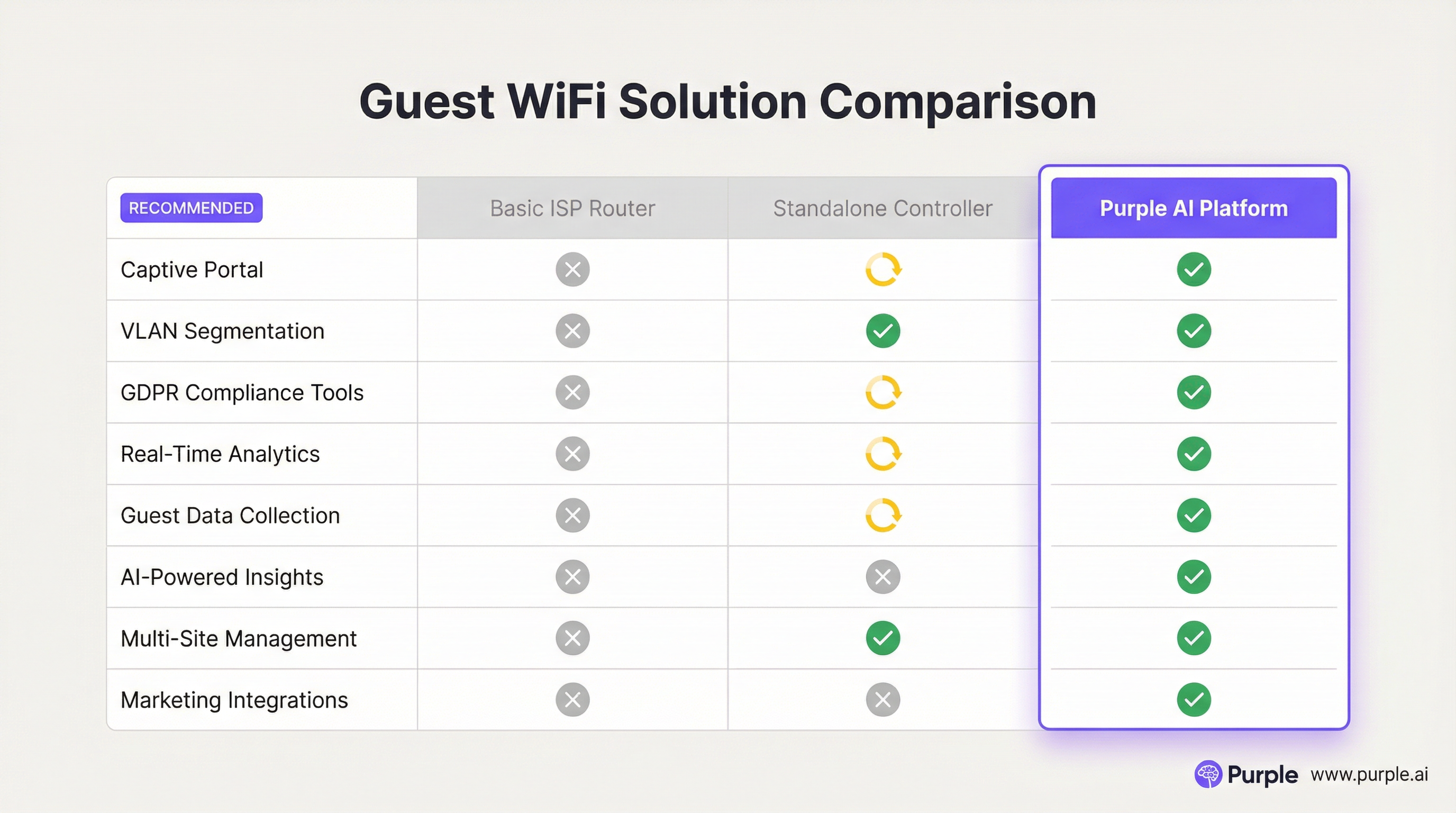
Q2. A restaurant chain is using a basic guest WiFi solution from their ISP. They have noticed that the WiFi performance is slow during peak hours, and they have no visibility into who is using the network. What is the most compelling argument for the IT manager to make to the CTO to justify an upgrade to a platform like Purple AI?
💡 Hint:Focus on the transition from a cost/utility to a business intelligence tool.
Show Recommended Approach
The most compelling argument is the shift from viewing WiFi as a cost centre to an ROI-generating asset. The IT manager should frame the investment not as an IT upgrade, but as a business intelligence project. The key points would be: 1) Problem/Opportunity: We are currently blind to our customer behaviour. We don't know our ratio of new vs. repeat diners, our busiest times by actual customer count (not just sales), or how long customers stay. 2) Solution: A platform like Purple AI will not only solve the performance issues with better hardware management but will give us a dashboard to visualise this critical data. 3. ROI: By collecting emails via a captive portal, we can build a marketing database to drive repeat business. By analysing dwell times, we can optimise seating and staffing for peak periods, improving table turnover and revenue. The cost of the platform is offset by the value of this new data and the marketing capabilities it unlocks.
Q3. A hospital wants to provide guest WiFi to patients and visitors. The hospital's CIO is extremely concerned about the security of patient data and compliance with healthcare regulations (like HIPAA). How would you design the guest network to address these specific concerns?
💡 Hint:Security and isolation are paramount. How do you create a 'hermetically sealed' guest network?
Show Recommended Approach
The design must prioritise security above all else. 1. Extreme Segmentation: Implement a guest VLAN that is completely firewalled from all other hospital networks, especially those containing Electronic Health Records (EHR). The firewall rules should be 'deny-all' by default, with an explicit rule to only allow guest VLAN traffic out to the internet. There should be absolutely no route from the guest network to any internal network. 2. Physical & Logical Separation: Where possible, use a physically separate internet line for guest traffic. If not feasible, use a high-end firewall capable of deep packet inspection and intrusion prevention on the guest traffic. 3. Strict Access Control: Enable Client Isolation on all APs to prevent any patient or visitor devices from communicating with each other. Implement a captive portal that requires acceptance of a stringent acceptable use policy and displays clear warnings against attempting to access clinical systems. 4. No Data Collection: For maximum privacy and minimum risk, the captive portal should be a simple 'click-to-accept' with no personal data collection (no email, no social login). The focus is purely on providing access, not marketing.
Key Takeaways
- ✓Guest WiFi is no longer a simple amenity; it is a strategic tool for data collection and customer engagement.
- ✓Network segmentation (using VLANs) is the most critical security measure to protect your corporate network.
- ✓A captive portal is the gateway to converting anonymous visitors into known customers and enforcing legal terms.
- ✓High-quality Access Points and a professional RF site survey are essential for a positive user experience.
- ✓WiFi analytics platforms like Purple AI provide actionable insights into footfall, dwell time, and visitor behaviour.
- ✓Compliance with data privacy regulations like GDPR is mandatory and must be designed into your solution.
- ✓The ROI of a professional guest WiFi solution is realised through improved operations, enhanced marketing, and increased customer loyalty.




