

Integrazione di Juniper Mist con Purple WiFi
This guide provides a comprehensive technical reference for integrating Juniper Mist's AI-driven wireless platform with Purple's enterprise guest WiFi and analytics solution. It covers the full integration architecture — from the Mist external captive portal and REST API authorisation flow through to PurpleConnex Passpoint and RadSec configuration for seamless repeat-visitor connectivity. Venue operators and IT teams will find actionable deployment guidance, real-world implementation scenarios, and a clear framework for measuring the business impact of a Mist-Purple deployment.
🎧 Listen to this Guide
View Transcript

Sintesi esecutiva
L'integrazione del WiFi di Juniper Mist con Purple rappresenta una delle combinazioni più potenti oggi a disposizione degli operatori di strutture enterprise. La piattaforma wireless cloud-native e basata sull'intelligenza artificiale di Mist offre l'affidabilità dell'infrastruttura e l'intelligence operativa richieste dagli architetti di rete, mentre il livello di Captive Portal, analytics e marketing automation di Purple trasforma tale infrastruttura in un asset aziendale misurabile. L'integrazione opera tramite il meccanismo di reindirizzamento al portale esterno di Mist, protetto da un API Secret per WLAN, ed è integrata da una soluzione WiFi sicura basata su Passpoint — PurpleConnex — per una connettività senza attriti per i visitatori abituali utilizzando WPA2/WPA3-Enterprise e RadSec. Per i leader IT che valutano questa implementazione, i punti decisionali chiave sono: se implementare solo l'integrazione di base del Captive Portal o distribuire anche PurpleConnex per gli ospiti abituali; come strutturare il walled garden; e come sfruttare gli analytics di Purple per generare un ROI misurabile. Questa guida affronta tutti e tre gli aspetti in modo approfondito, con specifiche di configurazione, esempi pratici tratti dai settori dell'ospitalità e del retail e un chiaro framework per la risoluzione dei problemi.
Approfondimento tecnico
L'integrazione tra Juniper Mist e Purple si basa su una netta separazione delle responsabilità. Mist gestisce l'ambiente a radiofrequenza, la gestione degli access point e il livello di applicazione delle policy. Purple gestisce l'esperienza degli ospiti, l'acquisizione dei dati e il livello di analytics ed engagement. Le due piattaforme comunicano attraverso un contratto API ben definito, sicuro e semplice da configurare.
Architettura di integrazione
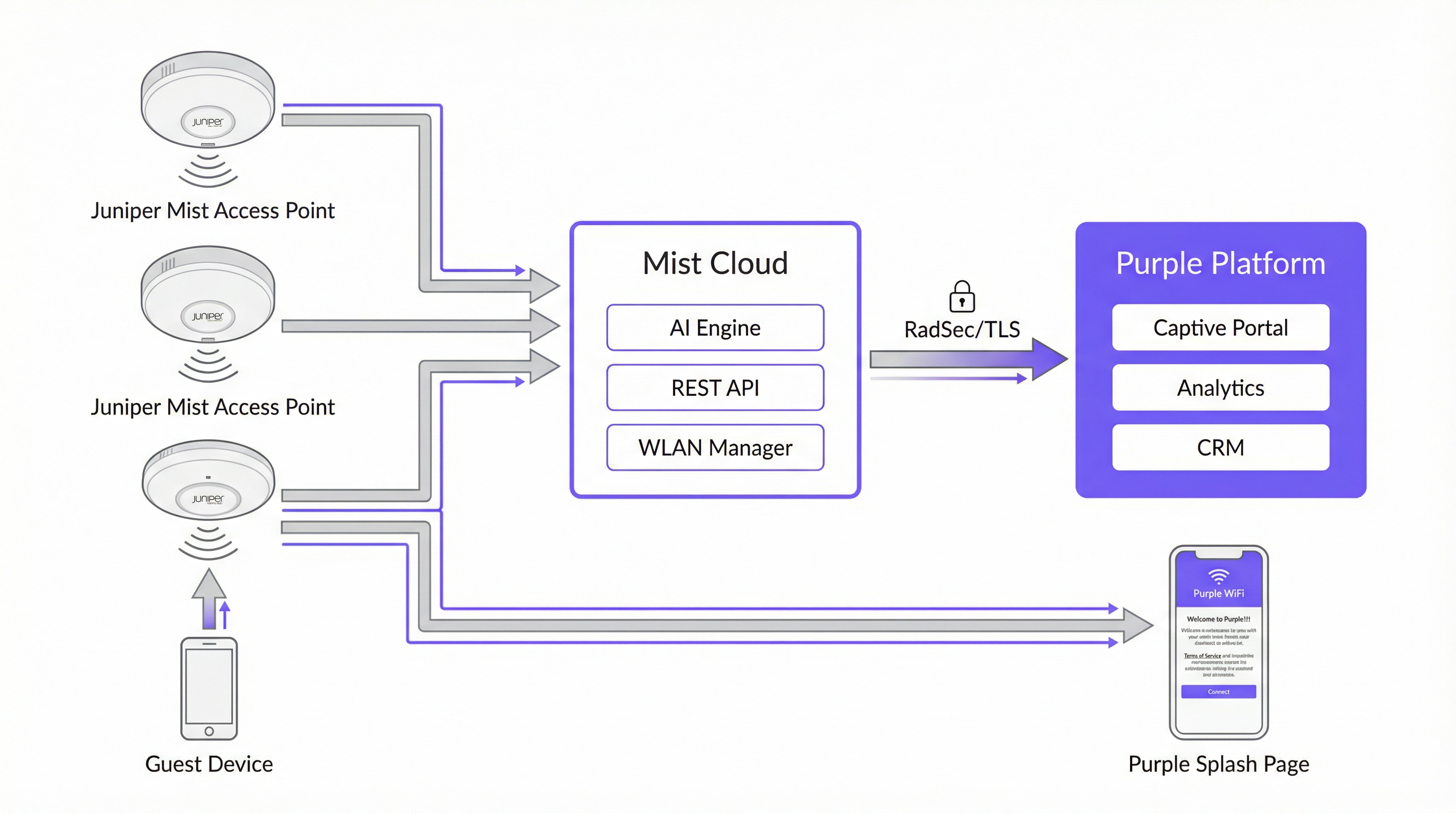
La tabella seguente riassume il ruolo di ciascun componente nell'integrazione.
| Componente | Ruolo |
|---|---|
| Access Point Juniper Mist | Forniscono copertura wireless; applicano le policy WLAN; reindirizzano gli ospiti non autenticati al Captive Portal di Purple tramite HTTP 302. |
| Juniper Mist Cloud | Piattaforma di gestione cloud centralizzata. Ospita la configurazione WLAN, l'RRM basato su intelligenza artificiale, gli SLE di Wi-Fi Assurance e le API REST utilizzate per l'autorizzazione dei dispositivi degli ospiti. |
| Piattaforma Purple | Ospita il Captive Portal esterno; acquisisce e archivia i dati degli ospiti in modo conforme; fornisce dashboard di analytics, integrazione CRM e marketing automation. |
| Mist API Secret | Una chiave crittografica per WLAN (HMAC-SHA1) che protegge l'handshake di autorizzazione tra Purple e Mist Cloud. |
| PurpleConnex (Passpoint) | Una seconda WLAN che utilizza WPA2/WPA3-Enterprise e Passpoint per fornire connettività automatica e sicura agli ospiti abituali senza richiedere una nuova autenticazione al portale. |
| RadSec (RFC 6614) | RADIUS over TLS. Protegge il traffico di autenticazione tra Mist Cloud e i server RADIUS di Purple per la WLAN PurpleConnex. |
Il flusso di autenticazione del Captive Portal
Quando il dispositivo di un ospite si associa all'SSID guest, Mist verifica se l'indirizzo MAC del dispositivo è stato precedentemente autorizzato. In caso contrario, Mist intercetta la prima richiesta HTTP dell'ospite ed emette un reindirizzamento 302 all'URL del portale Purple. Questo reindirizzamento aggiunge diversi parametri richiesti da Purple per completare il ciclo di autorizzazione:
| Parametro | Descrizione | Obbligatorio? |
|---|---|---|
wlan_id |
UUID dell'oggetto WLAN in Mist | Sì |
ap_mac |
Indirizzo MAC dell'access point di servizio | Sì |
client_mac |
Indirizzo MAC del dispositivo dell'ospite | Sì |
url |
L'URL originale richiesto dall'ospite | No |
ap_name |
Nome leggibile dall'utente dell'AP | No |
site_name |
Nome leggibile dall'utente del sito | No |
Una volta che l'ospite ha completato il modulo di login sul portale Purple, Purple crea una richiesta di autorizzazione firmata al backend di Mist all'indirizzo portal.mist.com/authorize. Questa richiesta include una firma HMAC-SHA1 calcolata utilizzando l'API Secret della WLAN, un token codificato in base64 contenente wlan_id, ap_mac, client_mac e la durata della sessione, oltre a un timestamp di scadenza. Mist convalida la firma e, se valida, autorizza il dispositivo dell'ospite all'accesso a Internet.
Nota architetturale chiave: Juniper Mist non supporta l'autenticazione o l'accounting RADIUS per il flusso del Captive Portal. Ciò significa che i report sul conteggio degli utenti in tempo reale e alcune metriche di sessione di rete all'interno della dashboard di Mist non rifletteranno le sessioni del Captive Portal. La piattaforma di analytics di Purple fornisce report completi sulle sessioni e dovrebbe essere utilizzata come fonte primaria di intelligence per il WiFi degli ospiti.
PurpleConnex: Passpoint e RadSec
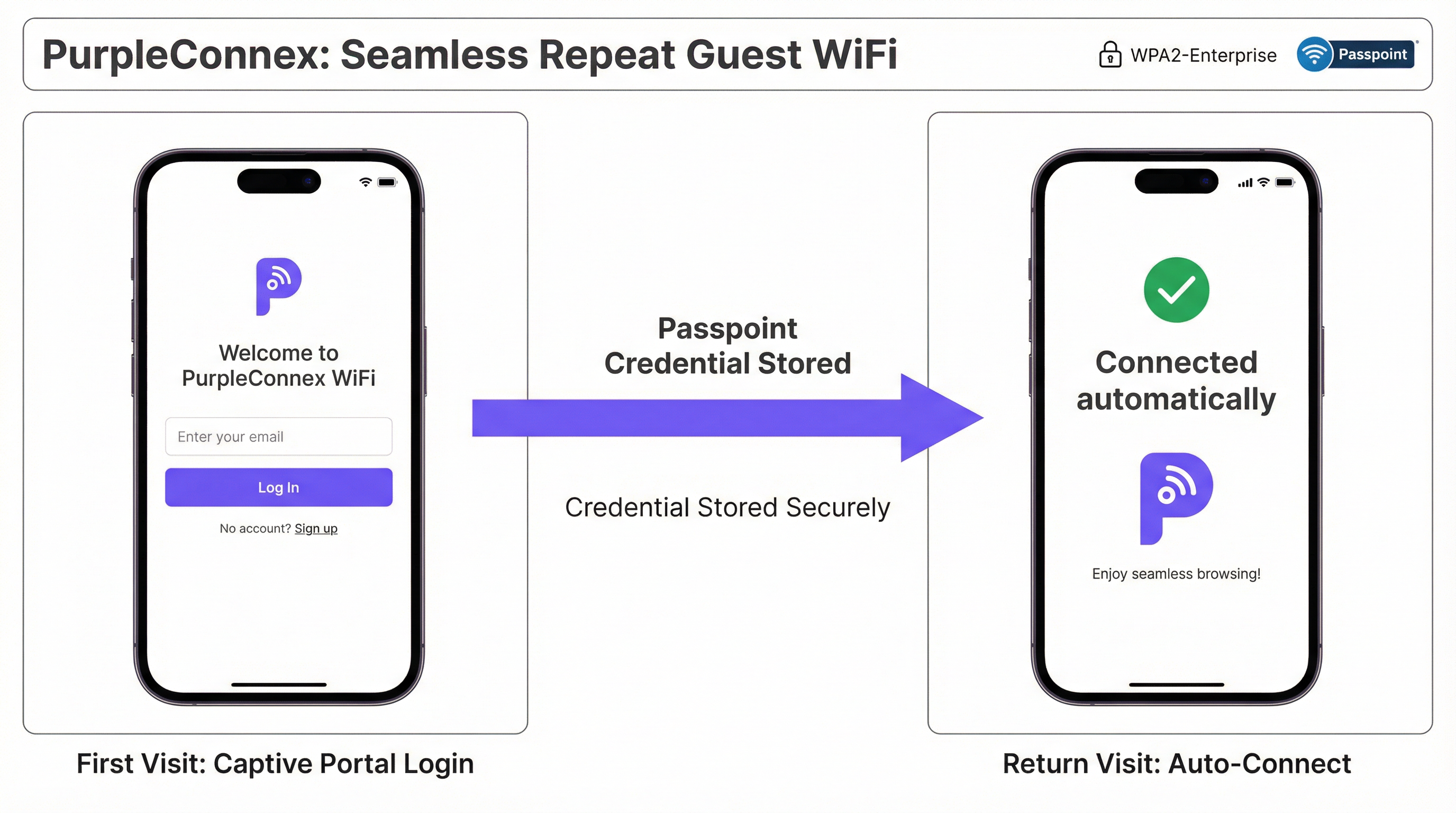
Per le strutture con una percentuale significativa di visitatori abituali — hotel, campus aziendali, catene di negozi — la soluzione PurpleConnex elimina la necessità di ripetute autenticazioni al portale. Dopo il primo login di un ospite tramite il Captive Portal, Purple fornisce un profilo Passpoint (Hotspot 2.0) al dispositivo dell'ospite. In tutte le visite successive, il dispositivo seleziona automaticamente l'SSID PurpleConnex e si autentica in modo invisibile utilizzando WPA2-Enterprise (o WPA3-Enterprise su AP compatibili con 6 GHz) tramite EAP-TTLS sui server RadSec di Purple.
La configurazione RadSec in Mist richiede due voci server — rad1-secure.purple.ai e rad2-secure.purple.ai, entrambe sulla porta 2083 — e l'installazione del certificato RadSec di Purple nelle Impostazioni dell'organizzazione (Organisation Settings) di Mist. Il NAS Identifier deve essere impostato su MIST-{{DEVICE_MAC}} per garantire che Purple possa identificare correttamente l'access point in fase di autenticazione.
Guida all'implementazione
I seguenti passaggi presuppongono l'accesso amministrativo sia alla dashboard di Juniper Mist Cloud (manage.mist.com) sia al portale Purple. Per le implementazioni multi-sito, i passaggi da 1 a 3 devono essere eseguiti all'interno di un Organisation Template di Mist anziché a livello di singolo sito.
Fase 1: Configurazione della WLAN Guest (Mist)
Passaggio 1. Accedi a manage.mist.com e vai su Network > WLANs. Fai clic su Add WLAN.
Passaggio 2. Configura la WLAN con i seguenti parametri:
| Impostazione | Valore |
|---|---|
| SSID | Guest WiFi (o il nome preferito) |
| WLAN Status | Enabled |
| Security Type | Open Access |
| Guest Portal | Forward to an external portal |
| Portal URL | Fornito da Purple (l'URL di accesso della tua struttura) |
| Allowed Hostnames | Tutti i domini Purple — fai riferimento alla Walled Garden Domain Whitelist di Purple |
| Bypass portal on exception | Lasciare deselezionato (consigliato) |
Passaggio 3. Fai clic su Save. Riapri la WLAN e individua l'API Secret. Copia questo valore.
Fase 2: Configurazione della struttura in Purple
Passaggio 4. Accedi al portale Purple e vai alle impostazioni della tua struttura.
Passaggio 5. Incolla il Mist API Secret nel campo Mist API secret.
Passaggio 6. Conferma che il Portal URL nella WLAN di Mist corrisponda all'URL di accesso mostrato nelle impostazioni della struttura in Purple.
Fase 3: Configurazione della WLAN PurpleConnex (Passpoint) (Opzionale ma consigliata)
Passaggio 7. Nella dashboard di Mist, crea una seconda WLAN con le seguenti impostazioni:
| Impostazione | Valore |
|---|---|
| SSID | PurpleConnex |
| Security Type | WPA2 Enterprise (802.1X) |
| Passpoint | Abilitato |
| Operators | OpenRoaming-Settlement-Free |
| Venue Name | Il nome della tua struttura |
| Domain Name | securewifi.purple.ai |
| Roaming Consortium ID | 5A03BA0000, 004096 |
| NAI Realm Name | securewifi.purple.ai |
| NAI Realm EAP Type | TTLS |
| Auth Server Type | RadSec |
| Auth Server 1 | rad1-secure.purple.ai, Porta 2083 |
| Auth Server 2 | rad2-secure.purple.ai, Porta 2083 |
| NAS Identifier | MIST-{{DEVICE_MAC}} |
| Guest Portal | Nessun portale (accesso diretto a Internet) |
Passaggio 8. Vai su Organisation Settings e carica il certificato RadSec di Purple in RadSec Certificates.
Best Practice
Utilizzare gli Organisation Template per le implementazioni multi-sito. Per qualsiasi implementazione che coinvolga più di un sito, configurare entrambe le WLAN all'interno di un Organisation Template di Mist. Ciò garantisce la coerenza della configurazione in tutto l'ambiente e consente di distribuire le modifiche a tutti i siti contemporaneamente. Una catena di negozi che gestisce cinquanta punti vendita, ad esempio, può aggiornare l'URL del portale guest o le voci del walled garden una sola volta e far propagare la modifica a ogni sito in pochi minuti.
Mantenere un Walled Garden completo e aggiornato. Il walled garden è la causa più comune di errori di integrazione. Un walled garden incompleto impedisce agli ospiti non autenticati di raggiungere il Captive Portal, compromettendo l'esperienza WiFi. Mantenere un elenco aggiornato di tutti i domini Purple richiesti, dei domini dei provider di social login e di qualsiasi altra risorsa da cui dipende il portale. Rivedere questo elenco ogni volta che si aggiungono nuovi metodi di autenticazione al portale.
Pianificare due SSID fin dal primo giorno. Implementare sia l'SSID Guest WiFi aperto sia l'SSID Passpoint PurpleConnex fin dall'inizio, anche se l'adozione di Passpoint è inizialmente bassa. Man mano che cresce la base installata di dispositivi compatibili con Passpoint — e sta crescendo rapidamente, con la maggior parte dei moderni dispositivi iOS e Android che supportano lo standard — l'esperienza fluida per i visitatori abituali diventerà sempre più preziosa.
Allinearsi alle roadmap IEEE 802.1X e WPA3. Per qualsiasi nuova implementazione Mist, in particolare quelle che incorporano bande radio a 6 GHz, pianificare l'uso di WPA3-Enterprise sull'SSID PurpleConnex. WPA3 è obbligatorio sulle reti a 6 GHz e fornisce una crittografia significativamente più forte attraverso la sua modalità di sicurezza a 192 bit. Questo posiziona inoltre l'implementazione per una conformità a lungo termine con gli standard di sicurezza in evoluzione.
Integrare Purple con il proprio CRM. I dati degli ospiti acquisiti tramite il Captive Portal hanno un valore significativo che va oltre la gestione del WiFi. Il collegamento di Purple al proprio CRM — che si tratti di Salesforce, HubSpot o di un PMS specifico per l'ospitalità — crea un profilo cliente unificato in grado di guidare il marketing personalizzato, l'integrazione dei programmi fedeltà e un servizio ospiti migliorato.
Risoluzione dei problemi e mitigazione dei rischi
| Sintomo | Causa probabile | Risoluzione |
|---|---|---|
| L'ospite non viene reindirizzato al Captive Portal | Portal URL errato nella WLAN di Mist, o la WLAN non è impostata su "Forward to external portal" | Verificare il Portal URL e l'impostazione Guest Portal nella configurazione della WLAN di Mist. |
| La pagina del Captive Portal non si carica | Walled garden incompleto — i domini Purple sono bloccati per gli utenti non autenticati | Aggiungere tutti i domini Purple richiesti e i domini dei provider di social login all'elenco Allowed Hostnames della WLAN di Mist. |
| L'ospite completa il login ma non riceve l'accesso a Internet | API Secret errato nelle impostazioni della struttura in Purple, o firewall che blocca il traffico verso portal.mist.com |
Verificare l'API Secret e controllare le regole del firewall. Assicurarsi che portal.mist.com (o l'equivalente regionale) sia raggiungibile dal Mist Cloud. |
| L'SSID PurpleConnex non appare sui dispositivi degli ospiti | Passpoint non abilitato sulla WLAN, o il dispositivo non ha un profilo Passpoint fornito | Confermare che Passpoint sia abilitato nelle impostazioni della WLAN di Mist. Verificare che l'ospite si sia precedentemente autenticato tramite il Captive Portal e che il profilo Passpoint sia stato fornito. |
| Errori di autenticazione RadSec per PurpleConnex | Certificato RadSec mancante o errato, oppure indirizzi server/porta errati | Ricaricare il certificato RadSec dalla documentazione di supporto di Purple. Verificare gli indirizzi dei server e la porta 2083. |
| Report sul conteggio degli utenti in tempo reale non disponibili in Mist | Comportamento previsto — Mist non supporta l'accounting RADIUS per le sessioni del Captive Portal | Utilizzare la dashboard di analytics di Purple per i report sulle sessioni degli ospiti. Questa è la fonte di dati corretta e prevista per questa integrazione. |
ROI e impatto sul business

Il business case per un'implementazione Juniper Mist e Purple va ben oltre la connettività. L'integrazione crea un'infrastruttura di raccolta dati ed engagement che offre ritorni misurabili su più dimensioni.
Guest Engagement e Marketing Automation. Ogni ospite che si autentica tramite il Captive Portal di Purple diventa un contatto noto. Gli strumenti di marketing automation di Purple consentono agli operatori delle strutture di inviare comunicazioni mirate e basate sul consenso — sondaggi post-visita, offerte promozionali, notifiche di eventi — che incentivano le visite ripetute e aumentano la spesa media. Per una catena alberghiera, questo si traduce direttamente in un miglioramento dei tassi di prenotazione diretta e in una minore dipendenza dalle commissioni delle OTA.
Intelligence operativa. Gli analytics sul traffico pedonale di Purple forniscono ai team operativi delle strutture dati granulari sul comportamento dei visitatori: quali aree di una struttura attraggono il maggior tempo di permanenza, come cambiano i modelli di traffico in base all'ora del giorno e al giorno della settimana e qual è l'andamento dei tassi di visitatori abituali nel tempo. Questa intelligence guida le decisioni sul personale, l'ottimizzazione del layout dei negozi e la pianificazione degli eventi.
Generazione di ricavi. Per strutture come aeroporti, centri congressi e stadi, le funzionalità di larghezza di banda a livelli di Purple consentono la monetizzazione dell'accesso WiFi premium. Un operatore aeroportuale ha registrato un ROI dell'842% dopo aver implementato il modello di accesso a livelli di Purple, dimostrando il significativo potenziale di guadagno di un'implementazione WiFi per gli ospiti ben configurata.
Mitigazione del rischio di conformità. Una violazione del GDPR o del CCPA comporta un rischio finanziario e reputazionale sostanziale. La gestione integrata del consenso di Purple, gli strumenti per i diritti degli interessati e l'architettura di elaborazione dei dati conforme riducono significativamente questo rischio, fornendo una posizione di conformità difendibile che soddisfa sia i team legali sia i responsabili della protezione dei dati.
Questa guida è gestita dal team Technical Content di Purple. Per i dettagli di configurazione più recenti, fare riferimento al Portale di supporto Purple e alla Documentazione Juniper Mist.
Key Terms & Definitions
Captive Portal
A web page presented to newly connected WiFi users before they are granted broader network access. It is the primary mechanism for guest authentication, data capture, and terms-of-service acceptance in a guest WiFi deployment.
In the Mist-Purple integration, the captive portal is hosted by Purple and is triggered by a Mist HTTP 302 redirect. IT teams configure the Portal URL in the Mist WLAN settings and the API Secret in Purple to link the two platforms.
Walled Garden
A restricted set of hostnames and IP ranges that unauthenticated users on a captive portal network are permitted to access before completing the login process. The walled garden must include the portal itself and all resources it depends on.
Network engineers must configure the Allowed Hostnames list in the Mist WLAN settings to include all Purple domains and any social login provider domains. An incomplete walled garden is the most common cause of captive portal failures.
API Secret (Mist)
A per-WLAN cryptographic key automatically generated by Mist when a Guest WLAN with an external portal is created. It is used as the HMAC-SHA1 signing key for the authorisation requests that Purple sends to the Mist backend to grant guest devices internet access.
The API Secret must be copied from the Mist WLAN configuration and pasted into the Purple venue settings. It is the trust anchor for the entire integration and should be treated as a sensitive credential.
Passpoint (Hotspot 2.0)
An IEEE 802.11u-based standard that enables mobile devices to automatically discover, select, and connect to WiFi networks using pre-provisioned credentials, without requiring user interaction or portal authentication.
PurpleConnex uses Passpoint to provide a seamless, automatic connection experience for repeat guests. After an initial captive portal login, a Passpoint profile is provisioned to the guest's device, enabling silent authentication on all future visits.
RadSec (RADIUS over TLS)
A protocol defined in RFC 6614 that secures RADIUS authentication and accounting traffic by tunnelling it over a TLS connection. It replaces the traditional UDP-based RADIUS transport, which is vulnerable to interception and replay attacks.
The PurpleConnex WLAN uses RadSec to secure authentication traffic between the Mist Cloud and Purple's RADIUS servers. Network engineers must configure the RadSec server addresses, port (2083), and certificate in the Mist WLAN and Organisation Settings.
IEEE 802.1X
An IEEE standard for port-based Network Access Control that provides an authentication framework for devices connecting to a LAN or WLAN. It requires each user or device to authenticate with unique credentials before gaining network access.
The PurpleConnex WLAN uses WPA2/WPA3-Enterprise with 802.1X to provide strong, per-user authentication for repeat guests. This is the same authentication framework used in corporate enterprise networks and is significantly more secure than pre-shared key (PSK) authentication.
Mist AI (Wi-Fi Assurance)
Juniper Mist's cloud-based machine learning engine that continuously analyses wireless network telemetry to optimise radio resource management, predict and resolve connectivity issues, and provide service level experience (SLE) metrics for each user session.
While Mist AI operates independently of the Purple integration, it is a key reason why Mist is selected as the infrastructure platform for enterprise guest WiFi deployments. Its proactive fault detection and automated RRM reduce the operational burden on IT teams and improve the reliability of the guest WiFi experience.
GDPR (General Data Protection Regulation)
EU Regulation 2016/679, which governs the collection, processing, and storage of personal data of individuals in the European Union and European Economic Area. It requires explicit, informed consent for data collection and grants individuals rights over their personal data.
Any guest WiFi deployment that collects personal data — including email addresses, names, or device identifiers — from EU residents must comply with GDPR. Purple's platform provides built-in consent management tools, data subject rights workflows, and compliant data processing agreements to support GDPR compliance.
OpenRoaming
A Wireless Broadband Alliance (WBA) initiative that enables seamless, automatic WiFi roaming across participating networks globally, using Passpoint technology and a federated identity framework. The Settlement-Free tier allows users to roam without per-session charges.
The PurpleConnex WLAN is configured with the OpenRoaming-Settlement-Free operator profile, which enables devices with OpenRoaming credentials from other providers to connect automatically to the PurpleConnex SSID. This extends the seamless connectivity benefit beyond Purple's own user base.
NAS Identifier
A RADIUS attribute (Attribute 32) that identifies the Network Access Server — in this context, the Mist access point — to the RADIUS server. It is used by the RADIUS server to apply per-AP policies and to log authentication events with AP-level granularity.
In the PurpleConnex WLAN configuration, the NAS Identifier is set to MIST-{{DEVICE_MAC}}, where {{DEVICE_MAC}} is a Mist variable that is replaced with the MAC address of the authenticating AP at runtime. This allows Purple's RADIUS servers to identify the specific AP handling each authentication request.
Case Studies
A 200-room four-star hotel wants to provide a seamless WiFi experience for guests. The general manager requires that first-time guests see a branded captive portal, that repeat guests connect automatically without a login prompt, and that the marketing team can send post-stay email campaigns to guests who have consented. How would you configure the Juniper Mist and Purple integration to meet these requirements?
The solution requires a dual-SSID architecture. First, create a 'Guest WiFi' WLAN in the Mist dashboard with Open Access security and the Guest Portal set to 'Forward to an external portal', using the Purple portal URL. Configure the walled garden with all required Purple domains. Retrieve the Mist API Secret and enter it into the Purple venue settings. In Purple, configure the captive portal with the hotel's branding, a simple email-and-name form, and explicit marketing consent checkboxes that comply with GDPR Article 7. Second, create a 'PurpleConnex' WLAN with WPA2-Enterprise, Passpoint enabled, and the RadSec server details from Purple. Upload Purple's RadSec certificate to the Mist Organisation Settings. After a guest's first login through the captive portal, Purple automatically provisions a Passpoint profile to their device. On all subsequent visits, the device silently connects to PurpleConnex. The marketing team can then use Purple's CRM integration to push consented guest email addresses into the hotel's email marketing platform for post-stay campaigns.
A retail chain with 75 stores across the UK and Ireland wants to deploy guest WiFi to understand foot traffic patterns, measure the impact of store layout changes on dwell time, and send targeted promotions to opted-in customers. The IT team has a small central team and cannot manage per-site configurations individually. How should the Mist and Purple deployment be structured?
The deployment should be built around Mist's Organisation Templates for centralised management. Create a single WLAN template containing both the 'Guest WiFi' (open, captive portal) and 'PurpleConnex' (WPA2-Enterprise, Passpoint) WLANs, and apply this template to all 75 sites. This ensures that any configuration change — such as updating the walled garden or rotating the API Secret — propagates to all sites simultaneously without manual intervention. In Purple, create a location hierarchy that mirrors the retail estate: group stores by region or country to enable segmented analytics. Configure Purple's foot traffic analytics to track dwell time by zone within each store, using the AP placement data from Mist to map signal coverage to physical store areas. Integrate Purple with the retailer's existing marketing platform via Purple's API or native CRM connectors. Use Purple's campaign tools to send geo-targeted promotions — for example, a discount notification to customers who have been in the store for more than 15 minutes without making a purchase.
Scenario Analysis
Q1. A 500-seat conference centre is deploying a Mist and Purple guest WiFi solution. The events team wants to offer a free basic tier (2 Mbps per device) and a paid premium tier (20 Mbps per device) for delegates who need reliable video conferencing. The IT team has two network engineers and cannot manage per-event configurations manually. How would you structure the deployment to meet these requirements?
💡 Hint:Consider how Purple's tiered bandwidth feature works alongside Mist's WLAN configuration, and how Mist Organisation Templates reduce operational overhead.
Show Recommended Approach
Deploy a single 'Guest WiFi' SSID configured in a Mist Organisation Template with the Purple captive portal redirect. In Purple, configure two access tiers: a free tier with a 2 Mbps per-device bandwidth cap and a paid premium tier at 20 Mbps, with a payment gateway integrated into the portal for premium access purchases. The captive portal should clearly present both options to connecting guests. Use Purple's event management features to create event-specific portal pages that can be activated by the events team without IT involvement, reducing the operational burden on the two-engineer team. For the PurpleConnex Passpoint SSID, configure it to automatically grant premium-tier bandwidth to returning guests who have previously purchased a premium pass, using Purple's CRM data to identify them.
Q2. A hotel group's IT security team has raised a concern that the Open Access guest SSID creates a risk of guest-to-guest traffic interception. The network architect needs to address this concern without removing the captive portal functionality. What Mist configuration options are available, and how do they interact with the Purple integration?
💡 Hint:Consider Mist's client isolation features and how they apply to an Open Access WLAN. Also consider the role of WPA3 OWE (Opportunistic Wireless Encryption).
Show Recommended Approach
There are two primary mitigations. First, enable client isolation on the Guest WiFi WLAN in Mist. This prevents guest devices from communicating directly with each other at the Layer 2 level, eliminating the risk of ARP spoofing and direct traffic interception between guests on the same SSID. This setting does not affect the captive portal redirect or the Purple authorisation flow. Second, for deployments on APs that support it, consider enabling WPA3 OWE (Opportunistic Wireless Encryption) on the guest SSID. OWE provides per-session encryption for open networks without requiring a password, protecting guest traffic from passive eavesdropping. OWE is transparent to the captive portal flow — Mist still redirects unauthenticated devices to Purple regardless of the encryption mode. Note that OWE requires client device support, which is now widespread on modern iOS and Android devices but may not be universal across all guest devices.
Q3. After deploying the Mist-Purple integration at a 30-store retail chain, the IT team reports that approximately 15% of guests are completing the captive portal login but not receiving internet access. The remaining 85% are connecting successfully. What is the most likely cause, and what is the diagnostic approach?
💡 Hint:Think about what could cause the Mist authorisation API call from Purple to fail for a subset of users. Consider timing, firewall rules, and the API Secret.
Show Recommended Approach
The most likely cause is a race condition or timeout in the Purple-to-Mist authorisation API call, potentially caused by firewall rules at specific stores blocking outbound HTTPS traffic to portal.mist.com, or by network latency causing the authorisation request to expire before Mist processes it. The diagnostic approach is: (1) Check Purple's server-side logs for authorisation API call failures — Purple's support team can provide these. Look for HTTP error codes (401 Unauthorized suggests an API Secret mismatch; 504 Gateway Timeout suggests a connectivity issue). (2) Identify whether the failures are concentrated at specific stores, which would point to a per-site firewall or routing issue rather than a platform-wide problem. (3) Verify that the API Secret in Purple matches the API Secret in the Mist WLAN for the affected stores — if Organisation Templates were not used consistently, there may be mismatches. (4) Check that the correct regional Mist portal endpoint is being used — Mist API endpoints vary by region (US, EU, APAC), and using the wrong endpoint will cause authorisation failures.
Q4. A public-sector organisation — a local council — wants to deploy free guest WiFi across 12 libraries using Mist and Purple. Their data protection officer has specified that no personal data may be collected without explicit, granular consent, and that the organisation must be able to demonstrate compliance with a subject access request within 30 days. How should the Purple captive portal be configured to meet these requirements?
💡 Hint:Focus on GDPR Articles 7 (consent), 15 (right of access), and 17 (right to erasure). Consider how Purple's compliance features map to these requirements.
Show Recommended Approach
Configure the Purple captive portal with the following GDPR-compliant settings: (1) Use a simple, unbundled consent mechanism — present separate, opt-in checkboxes for each data processing purpose (e.g., 'I consent to my email being used for service notifications' and 'I consent to my usage data being used for analytics'). Pre-ticked boxes are not valid consent under GDPR Article 7. (2) Link to a clear, plain-English privacy notice that identifies the council as the data controller, lists the categories of data collected, and explains the legal basis for processing. (3) Configure Purple to capture only the minimum data necessary — for a public-sector library, this may be as simple as a device identifier and session timestamp, with no personal data required for basic access. (4) Enable Purple's data subject rights tools, which allow the DPO to respond to subject access requests by exporting all data associated with a specific email address or device, and to process erasure requests within the statutory 30-day window. (5) Ensure that a Data Processing Agreement (DPA) is in place between the council and Purple, as Purple processes personal data on behalf of the council as a data processor under GDPR Article 28.
Key Takeaways
- ✓The Juniper Mist and Purple integration uses Mist's external captive portal redirect and a per-WLAN API Secret to securely authenticate guest devices and capture visitor data through Purple's hosted portal.
- ✓A dual-SSID architecture — an open Guest WiFi SSID for first-time visitors and a WPA2/WPA3-Enterprise PurpleConnex SSID for repeat guests — is the industry best practice for balancing accessibility, security, and user experience.
- ✓The walled garden configuration in Mist is the most common source of integration failures; always ensure all Purple domains and social login provider domains are included in the Allowed Hostnames list before going live.
- ✓For multi-site deployments, Mist Organisation Templates are essential — they enable consistent configuration across the entire estate and allow changes to propagate to all sites simultaneously, dramatically reducing operational overhead.
- ✓Juniper Mist does not support RADIUS accounting for captive portal sessions; use Purple's analytics platform as the primary source of guest session reporting and business intelligence.
- ✓Purple's GDPR and CCPA compliance tools — including granular consent management, data subject rights workflows, and Data Processing Agreements — are critical for any deployment that collects personal data from EU or California residents.
- ✓The ROI of a Mist-Purple deployment extends beyond connectivity: guest data analytics, marketing automation, CRM integration, and tiered bandwidth monetisation can deliver measurable returns that far exceed the cost of the infrastructure.




