

LogicFlow: Automazione degli eventi e dei trigger WiFi
This authoritative technical reference guide covers Purple's LogicFlow, an enterprise-grade WiFi event automation engine that enables IT managers and network architects to build intelligent, trigger-based workflows across hospitality, retail, stadium, and public-sector venues. It details the platform's Event-Decision-Action architecture, explores the full range of available triggers, and provides concrete implementation guidance with real-world case studies from hotel and retail deployments. For venue operators and IT teams, this guide demonstrates how to transform passive WiFi infrastructure into a proactive, revenue-generating, and operationally efficient platform.
🎧 Listen to this Guide
View Transcript
Executive Summary
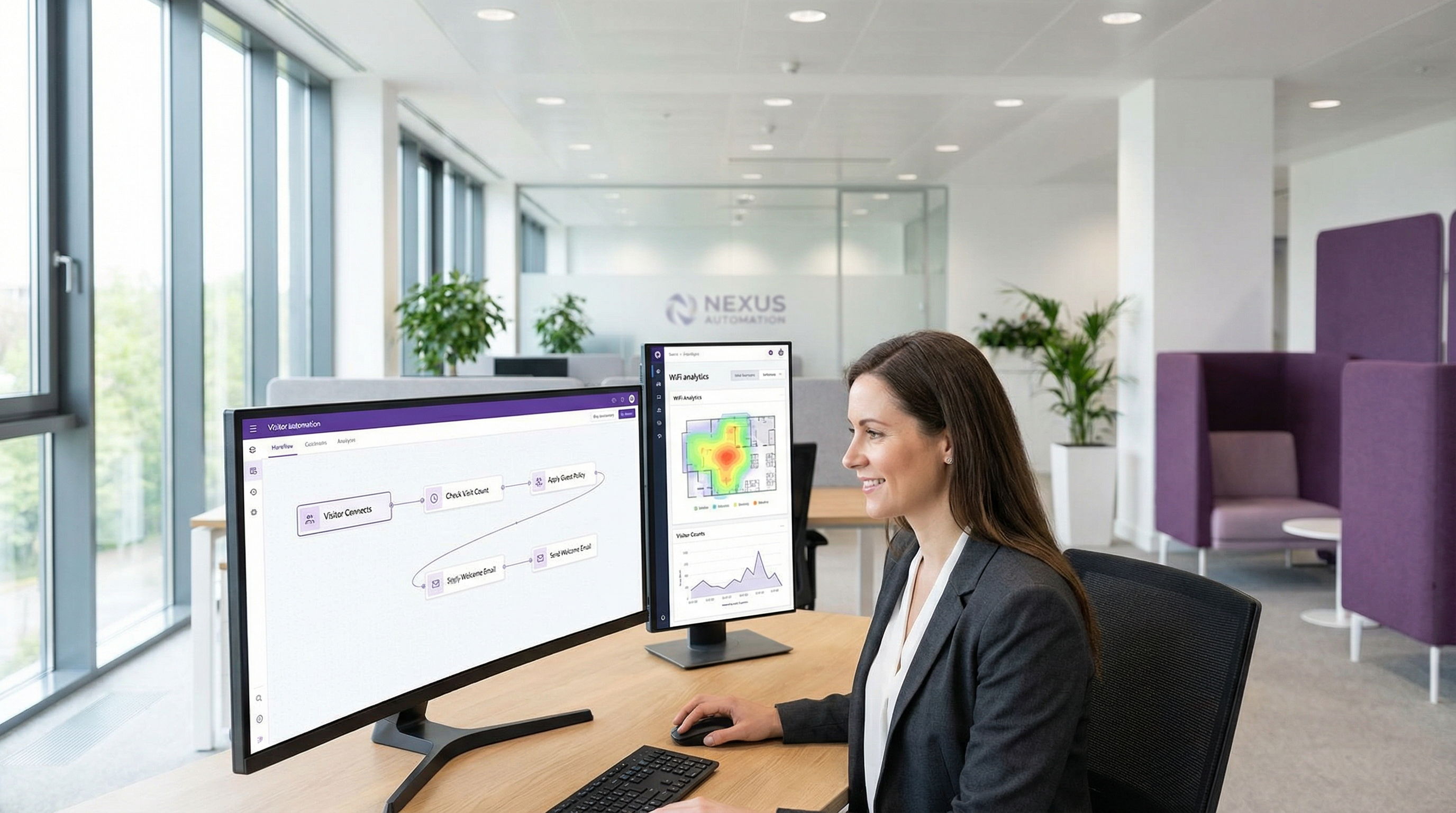
Nel panorama competitivo del networking aziendale, la capacità di automatizzare le risposte agli eventi in tempo reale non è più un lusso, ma un requisito operativo fondamentale. Per i responsabili IT, gli architetti di rete e gli operatori delle strutture, la sfida consiste nel tradurre i dati di rete grezzi in azioni immediate e orientate al valore. LogicFlow di Purple è un motore di automazione di livello enterprise progettato per affrontare direttamente questa sfida. Fornisce un'interfaccia visiva drag-and-drop per la creazione di flussi di lavoro sofisticati, attivati da un'ampia gamma di eventi legati al WiFi e ai visitatori. Questa guida funge da approfondimento tecnico su LogicFlow, andando oltre i concetti astratti di marketing per fornire indicazioni pratiche sull'implementazione. Analizzeremo l'architettura della piattaforma, esploreremo scenari di distribuzione comuni in settori come l'ospitalità e la vendita al dettaglio e quantificheremo il ROI in termini di efficienza operativa, maggiore coinvolgimento degli ospiti e mitigazione dei rischi. Per il CTO, questo documento delinea una strategia per sfruttare l'infrastruttura WiFi esistente come un sistema proattivo e intelligente in grado di generare risultati di business. Per il responsabile IT e lo sviluppatore, è un manuale pratico per l'implementazione di flussi di lavoro solidi e automatizzati, in linea con i principali standard di conformità come il GDPR e il PCI DSS, garantendo al contempo sicurezza e un'esperienza utente fluida.
Approfondimento tecnico
LogicFlow opera come il sistema nervoso centrale della piattaforma Purple, elaborando un flusso continuo di data point per attivare azioni predefinite. La sua architettura si basa su tre concetti fondamentali: Eventi, Decisioni e Azioni. Questo modello consente la creazione di flussi di lavoro complessi e stateful, in grado di adattarsi alle mutevoli condizioni in tempo reale.
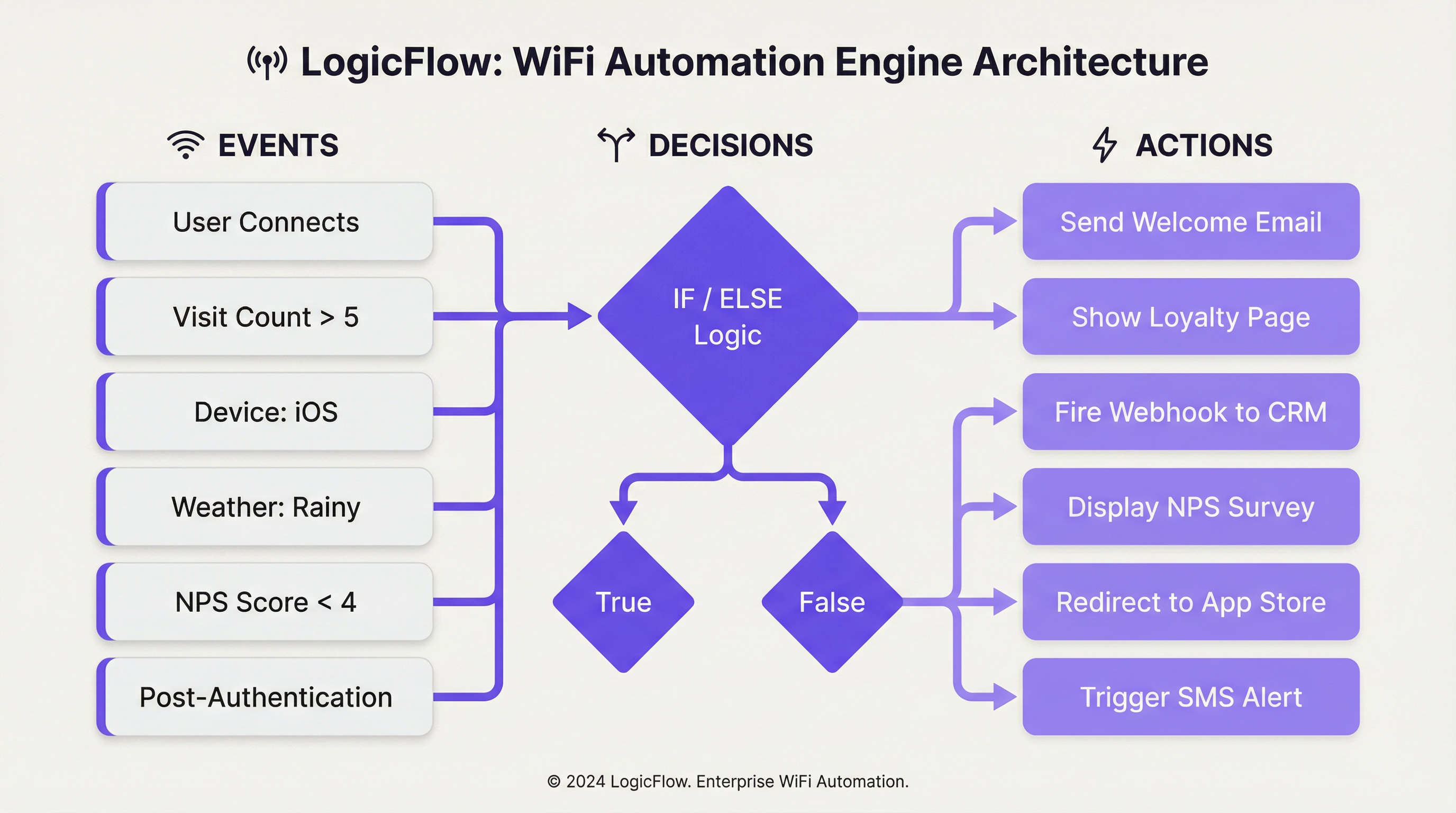
Trigger di eventi: Il processo inizia quando viene rilevato un evento. LogicFlow supporta un set completo di trigger, che possono essere ampiamente classificati:
| Categoria | Trigger specifici | Contesto tecnico |
|---|---|---|
| Eventi di onboarding | Pre-autenticazione, Post-autenticazione, Online | Corrispondono alle diverse fasi del percorso di connessione WiFi dell'ospite. Le azioni pre-autenticazione sono limitate poiché l'utente non è ancora online, mentre i trigger post-autenticazione e online possono sfruttare un set di dati più ricco. |
| Dati demografici dei visitatori | Età, Genere, Lingua, Indirizzo email, Numero di visite | Ricavati dal modulo di accesso del Captive Portal o dal social sign-on, questi dati consentono percorsi utente altamente personalizzati. La conformità alle normative sulla privacy dei dati come il GDPR è fondamentale quando si utilizzano questi dati. |
| Dispositivo e rete | Sistema operativo, Browser, SSID, MAC/Nome Access Point, Produttore | Essenziali per l'ottimizzazione specifica del dispositivo (ad es. proporre il download di un'app agli utenti iOS) o per azioni specifiche in base alla posizione, a seconda dell'AP a cui è connesso un utente. |
| Dati ambientali | Posizione della struttura (Paese, Tag), Meteo (Condizioni, Temperatura), Ora/Giorno/Data | Consentono un'automazione sensibile al contesto, come la visualizzazione di un'offerta per "giornata di pioggia" sulla splash page di un negozio al dettaglio o la modifica dei contenuti in base alle festività nazionali. |
| Comportamento dell'utente | Risposta NPS, Risposte a micro-sondaggi, Metodo di accesso, Piano WiFi a pagamento | Trigger basati sul feedback diretto o sulle scelte dell'utente, che consentono un recupero immediato del servizio o opportunità di upselling. |
Nodi decisionali: Una volta attivato un evento, questo viene passato a un Nodo decisionale. È qui che risiede la "logica" di LogicFlow. Utilizzando istruzioni "Vero/Falso" o "Se/Altrimenti", gli amministratori possono creare percorsi ramificati in base alle condizioni soddisfatte dai dati dell'evento. Ad esempio, un nodo "Se/Altrimenti" potrebbe verificare il visit_count di un visitatore. Se è maggiore di 5 (un cliente fedele), segue il percorso "Vero"; in caso contrario, segue il percorso "Falso" per i nuovi visitatori. È possibile raggruppare più condizioni utilizzando la logica "E"/"O", consentendo un targeting altamente granulare.
Nodi di azione: Il passaggio finale è il Nodo di azione, che esegue un'attività specifica. Le azioni dipendono dal contesto in base al tipo di evento.
- Pre-autenticazione: Principalmente l'azione
Splash Page, che consente un branding dinamico in base alla posizione o all'ora del giorno. - Post-autenticazione: È disponibile una gamma più ampia di azioni, tra cui la presentazione di
NPS/Micro-survey, l'attivazione diWebhookverso un sistema di terze parti, la visualizzazione diMedia(ad es. un annuncio video) o l'assegnazione a un livello diPaid WiFi. - Online: Azioni che si verificano una volta che l'utente ha pieno accesso alla rete, come il
Redirecta un URL specifico, l'invio di unaEmail/SMS Campaigno la visualizzazione di unaSplash Pagediversa alla visita successiva.
Questo approccio strutturato garantisce che i flussi di lavoro siano potenti e manutenibili, aderendo alle best practice standard per l'automazione e l'architettura event-driven.
Guida all'implementazione
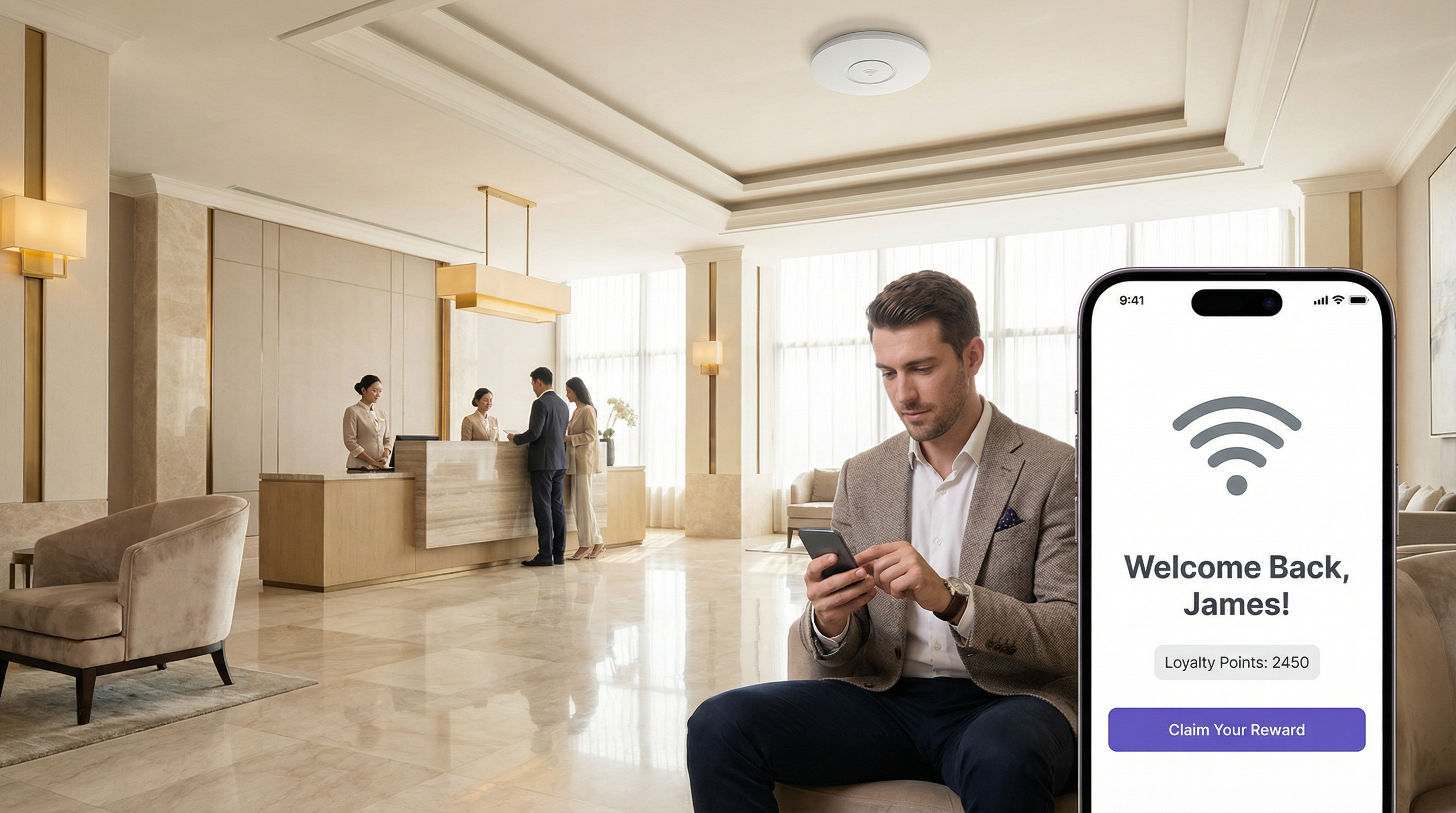
L'implementazione efficace di LogicFlow richiede un approccio strutturato, passando dagli obiettivi strategici alla configurazione tattica. I seguenti passaggi forniscono un framework indipendente dal fornitore per l'implementazione.
Fase 1 — Definire gli obiettivi di business: Prima di creare qualsiasi flusso di lavoro, definire chiaramente il risultato desiderato. L'obiettivo è aumentare i download dell'app fedeltà, migliorare i punteggi di soddisfazione degli ospiti o incrementare l'affluenza in un'area specifica? Un obiettivo chiaro stabilisce i trigger e le azioni necessari.
Fase 2 — Mappare il Customer Journey: Identificare i touchpoint chiave nell'esperienza del visitatore in cui l'automazione può aggiungere valore. Questo in genere si allinea con le fasi di Pre-autenticazione, Post-autenticazione e Online del percorso di accesso WiFi.
Fase 3 — Creare il flusso di lavoro: Iniziare con un singolo flusso di lavoro semplice. Ad esempio, un messaggio di "Bentornato" per i visitatori di ritorno. All'interno di LogicFlow v2, selezionare "Aggiungi flusso logico" e scegliere il tipo di evento appropriato. Trascinare un nodo decisionale "Visitatore" nell'area di lavoro e configurarlo con una condizione "Vero/Falso": visit_count è maggiore di 1. Per il percorso "Vero", aggiungere un nodo di azione Email Campaign e selezionare un modello di email "Bentornato" preconfigurato. Per il percorso "Falso" (nuovi visitatori), aggiungere un'azione diversa, come un'email "Sconto prima visita". Collegare tutti i nodi, assicurandosi che ogni percorso termini con un nodo "Fine".
Fase 4 — Convalidare e pubblicare: Utilizzare lo strumento "Convalida" integrato per verificare la presenza di errori nella logica. Una volta convalidato, "Pubblicare" il flusso di lavoro.
Fase 5 — Assegnare all'Access Journey: Collegare il LogicFlow pubblicato a uno specifico Access Journey (l'esperienza del Captive Portal per una determinata struttura o SSID). Questo attiva il flusso di lavoro.
Fase 6 — Monitorare e iterare: Utilizzare le analisi della piattaforma per misurare l'impatto del flusso di lavoro. Monitorare i tassi di apertura delle email, i tassi di conversione e la frequenza delle visite. Utilizzare questi dati per perfezionare la logica e migliorare le prestazioni nel tempo.
Best Practice
Iniziare in modo semplice, scalare in modo intelligente: Evitare di creare fin dall'inizio flussi di lavoro monolitici e troppo complessi. Iniziare con flussi monouso e combinarli man mano che si acquisisce sicurezza e si raccolgono dati. Un singolo flusso di lavoro ben ottimizzato che fornisce risultati misurabili vale più di dieci flussi con un targeting inadeguato.
Rispettare gli standard di conformità: Quando si utilizzano dati demografici, assicurarsi che la logica rispetti il consenso dell'utente e sia in linea con normative come il GDPR. Creare un nodo decisionale che verifichi il flag emailable prima di attivare qualsiasi azione di marketing. Per le strutture che gestiscono dati di pagamento, assicurarsi che i flussi di lavoro che coinvolgono transazioni finanziarie siano esaminati in base ai requisiti PCI DSS.
Sfruttare i Webhook per l'integrazione: I webhook sono uno strumento potente per estendere le funzionalità di LogicFlow. Utilizzarli per inviare dati a sistemi CRM esterni, attivare avvisi nelle dashboard operative (come Slack o Microsoft Teams) o integrarli con i sistemi di gestione degli edifici. Ciò promuove una strategia di integrazione API-first indipendente dal fornitore che protegge l'investimento tecnologico.
Utilizzare convenzioni di denominazione: Man mano che il numero di flussi di lavoro cresce, una convenzione di denominazione coerente — ad esempio, [Struttura]-[Obiettivo]-[Trigger] — diventa essenziale per la manutenibilità e la collaborazione in team.
Controllare e sfoltire regolarmente: Rivedere periodicamente tutti i flussi di lavoro attivi per assicurarsi che rimangano allineati con gli attuali obiettivi di business. Disattivare o archiviare i flussi obsoleti per ridurre la complessità e mitigare il rischio di conseguenze indesiderate.
Risoluzione dei problemi e mitigazione dei rischi
Problema — Il flusso di lavoro non si attiva: Il problema più comune è un'errata configurazione nell'assegnazione. Verificare che il LogicFlow sia pubblicato correttamente e assegnato all'Access Journey attivo per la struttura di destinazione o l'SSID. Controllare anche la logica all'interno dei nodi decisionali; una condizione troppo restrittiva potrebbe impedire l'attivazione del trigger.
Problema — Esperienza utente imprevista: Un flusso di lavoro complesso con molte ramificazioni può portare a risultati inaspettati. Utilizzare lo strumento "Convalida" e testare a fondo con un SSID non di produzione prima del rilascio in un ambiente live. Considerare l'ordine delle operazioni, specialmente nei flussi di Post-autenticazione in cui più azioni (ad es. un sondaggio e un reindirizzamento) potrebbero entrare in conflitto.
Rischio — Affaticamento da avvisi: L'automazione degli avvisi tramite email o webhook è potente, ma può portare a un "affaticamento da avvisi" se non gestita con attenzione. Implementare una logica decisionale che attivi gli avvisi solo per eventi ad alta priorità — ad esempio, un punteggio NPS da 1 a 3, che indica un disservizio significativo — piuttosto che per ogni singolo evento di connessione.
Rischio — Violazione della privacy dei dati: L'uso di dati personali (età, genere, email) è una funzionalità chiave ma anche una responsabilità significativa. La mitigazione comporta la stretta osservanza del principio di minimizzazione dei dati. Raccogliere solo i dati necessari per uno scopo specifico e definito e assicurarsi che tutti i flussi di lavoro che utilizzano questi dati verifichino il consenso dell'utente. Rivedere regolarmente i flussi in base agli obblighi del GDPR e mantenere un registro aggiornato del trattamento dei dati.
ROI e impatto sul business
Efficienza operativa: L'automazione di attività come gli avvisi di recupero del servizio o le iscrizioni ai programmi fedeltà riduce il carico di lavoro manuale del personale. Un hotel può attivare automaticamente un ticket di manutenzione e avvisare il responsabile della reception se un ospite lascia un punteggio NPS basso dopo essersi connesso al WiFi, consentendo un intervento immediato. Ciò si traduce direttamente in una riduzione dei costi operativi e in una risoluzione più rapida dei problemi, misurabile in ore di lavoro risparmiate e punteggi di soddisfazione degli ospiti.
Aumento del Customer Lifetime Value (CLV): Personalizzando l'esperienza degli ospiti, le strutture possono aumentare la fedeltà e il ritorno dei clienti. Una catena di vendita al dettaglio che utilizza LogicFlow per inviare un buono sconto mirato ai visitatori che non si vedono da 90 giorni sta lavorando attivamente per prevenire l'abbandono dei clienti. Il successo di questa operazione può essere misurato monitorando il tasso di conversione di queste offerte e la successiva frequenza di visita della coorte target.
Maggiore Venue Intelligence: I dati generati da LogicFlow forniscono informazioni approfondite sul comportamento dei visitatori. Uno stadio può analizzare quali aree di ristoro sono più popolari in periodi specifici monitorando la densità dei dispositivi vicino a determinati AP e utilizzare questi dati per ottimizzare il personale e l'inventario per gli eventi futuri. Questo approccio basato sui dati alla gestione delle strutture porta a una maggiore produttività e a un aumento delle entrate per visitatore.
Conformità e mitigazione dei rischi: L'automazione dei controlli di conformità — come garantire che a ogni utente vengano presentati i Termini e Condizioni più recenti alla sua prima visita dell'anno — riduce i rischi legali e finanziari. Il costo della mancata conformità a normative come il GDPR può essere notevole, rendendo l'applicazione automatizzata una componente critica di qualsiasi calcolo del ROI.
Key Terms & Definitions
LogicFlow
A visual, drag-and-drop workflow automation engine within the Purple platform that enables the triggering of specific actions based on a wide range of WiFi events, visitor demographics, device data, and environmental context.
IT teams use LogicFlow to move beyond providing simple connectivity, transforming their WiFi network into an intelligent, responsive system that can drive marketing, operational, and security objectives without manual intervention.
Event-Driven Architecture (EDA)
A software architecture paradigm that promotes the production, detection, consumption of, and reaction to events. LogicFlow is a practical, no-code application of EDA principles for enterprise WiFi networks.
For a network architect, understanding that LogicFlow is based on EDA principles clarifies its asynchronous, non-blocking nature. It is not about polling for status; it is about reacting instantly when a specific event, such as a new user connection or a negative survey response, occurs.
Webhook
An automated HTTP callback sent from one application to another when a specific event occurs. In LogicFlow, a webhook is an action node that can push data to an external system in real-time upon a trigger condition being met.
A developer can use a webhook action in LogicFlow to send guest data to a corporate CRM, trigger an alert in a Slack channel, or instruct a building management system to take an action, providing limitless integration possibilities with any platform that exposes a REST API.
Access Journey
The complete sequence of steps and pages a visitor interacts with from the moment they connect to a WiFi SSID to the point they are granted online access. A published LogicFlow must be assigned to an Access Journey to become active.
Venue operations directors are concerned with the Access Journey as a whole. LogicFlow gives them the power to make this journey dynamic, ensuring the branding, messaging, and any required steps are appropriate for the specific venue, event, or user type.
Captive Portal
A web page that is displayed to newly connected users of a WiFi network before they are granted broader access to network resources. It is the primary source of demographic and consent data for many LogicFlow triggers.
While IT managers deploy captive portals for authentication and security, LogicFlow allows them to transform the portal from a simple gatekeeper into a strategic tool for data collection and personalised engagement, without requiring changes to the underlying network infrastructure.
Decision Node
A component in the LogicFlow canvas that evaluates incoming event data against a set of predefined conditions and directs the workflow down a specific path based on the outcome, using True/False or If/Else logic.
For an IT professional configuring a workflow, the Decision Node is the core component for creating targeted logic. It is where the 'if-then' intelligence of the automation is defined, ensuring actions are only performed on the intended segment of users.
SSID (Service Set Identifier)
The public name of a wireless local area network (WLAN). A single venue may broadcast multiple SSIDs — for example, 'Hotel-Guest', 'Hotel-Conference', and 'Hotel-Staff' — each of which can be assigned a different Access Journey and LogicFlow.
Network architects can use the SSID as a trigger in LogicFlow to apply completely different automation rules depending on which network a user connects to, ensuring that a conference delegate and a hotel guest in the same building have entirely different and contextually appropriate online experiences.
GDPR (General Data Protection Regulation)
A regulation in EU law on data protection and privacy for all individuals within the European Union and the European Economic Area, governing how personal data is collected, processed, and stored.
When a CTO or IT Manager designs a LogicFlow that uses personal data such as email address or age, they must build in checks to ensure compliance with GDPR. This means using LogicFlow's capabilities to verify consent before triggering any marketing actions, mitigating significant legal and financial risk.
NPS (Net Promoter Score)
A widely used customer experience metric that measures customer loyalty by asking respondents to rate, on a scale of 0 to 10, how likely they are to recommend a product or service. Scores of 9–10 are Promoters, 7–8 are Passives, and 0–6 are Detractors.
In LogicFlow, an NPS survey can be presented as a Post-Authentication or Online action, and the resulting score can be used as a decision trigger. This enables real-time service recovery for Detractors and automated review solicitation for Promoters, directly impacting online reputation management.
Case Studies
A 500-room luxury hotel wants to improve its guest satisfaction scores and encourage positive online reviews. They have identified two key visitor segments: first-time guests and returning VIP members. How can they use LogicFlow to create a tailored experience for each segment?
The IT Director implements a multi-path LogicFlow triggered on the 'Post-Authentication' event.
Workflow Configuration:
- Start Node: Triggers after a guest successfully authenticates on the hotel WiFi.
- Decision Node 1 (If/Else): Checks the visitor's profile for a 'VIP Member' tag, synced from the hotel's Property Management System via the Purple API.
- IF True (VIP Member): Route to Path A.
- ELSE (First-Time or Regular Guest): Route to Path B.
- Path A — VIP Member:
- Action Node 1:
Redirectthe guest to a personalised welcome page (https://hotel.com/vip-welcome) with exclusive offers and an upgrade prompt. - Action Node 2:
Email Campaigntriggered with a 1-hour delay, sending a 'Welcome Back' email with a direct link to book spa treatments.
- Action Node 1:
- Path B — First-Time Guest:
- Action Node 1:
NPS Surveypresented immediately to capture initial sentiment. - Decision Node 2 (If/Else): Evaluates the NPS Survey response.
- IF
NPS Scoreis between 9 and 10 (Promoter): Trigger anEmail Campaignwith a 24-hour delay, thanking the guest and providing a direct link to leave a review on TripAdvisor. - ELSE (Score 0–8): Trigger a
Webhookaction that sends an immediate alert to the Front Desk Manager's Slack channel with the guest's name and room number, enabling proactive service recovery.
- IF
- Action Node 1:
- End Node: All paths terminate here.
A large retail shopping centre with over 200 stores wants to increase downloads of its new loyalty and wayfinding app. How can they leverage their existing guest WiFi infrastructure to drive app adoption without disrupting the experience for loyal customers?
The Head of Digital Marketing deploys a LogicFlow that specifically targets users based on device type and visit frequency.
Workflow Configuration:
- Start Node: Triggers on the 'Online' event, once the visitor has full network access.
- Decision Node 1 (True/False): Checks if
visit_countisless than3. This targets newer visitors who are less likely to have downloaded the app. - Decision Node 2 (True/False): Nested under the 'True' path of Node 1. Checks if
Operating SystemisiOSORAndroid. This filters out laptops and other non-mobile devices where an app download is not relevant. - Action Node (True path of Node 2):
Redirectthe user to a custom, mobile-friendly landing page. This page explains the benefits of the app — interactive maps, exclusive offers, loyalty points — and has prominent, one-click buttons to the Apple App Store and Google Play Store. - Alternative Paths: The 'False' path from either decision node (a visitor with more than 3 visits, or a laptop user) proceeds without any redirect, ensuring a standard browsing experience for loyal customers or those on non-mobile devices.
- End Node: All paths terminate here.
Scenario Analysis
Q1. A multi-national coffee chain wants to ensure a consistent global brand experience while also promoting location-specific specials. How would you configure LogicFlow to show a global branding page to all visitors, but also surface a location-specific offer for visitors in specific cities?
💡 Hint:Consider using a combination of Pre-Authentication and Online event triggers. How can venue tags or venue names be used as decision criteria?
Show Recommended Approach
You would implement two LogicFlows. The first is a Pre-Authentication flow assigned globally to all venues. It contains a single Action node to display the main corporate-branded Splash Page, ensuring brand consistency across all locations. The second is an Online flow. It uses a Decision node based on 'Venue Name' or 'Venue Tags'. For each specific venue (e.g., tagged 'London-Covent-Garden'), you create a path that redirects the user to a page for the local special offer. Venues without a specific tag follow a default path with no redirect. This layered approach meets both requirements without requiring separate infrastructure configurations per venue.
Q2. A stadium is hosting a major sporting event and wants to manage network congestion. How could LogicFlow be used to mitigate performance issues for general attendees while preserving bandwidth for press and VIP guests?
💡 Hint:Think about how different SSIDs can be used in conjunction with LogicFlow. What actions can influence user behaviour to reduce bandwidth consumption during peak periods?
Show Recommended Approach
The network architect should configure multiple SSIDs: 'Stadium-Public', 'Stadium-VIP', and 'Stadium-Press'. The VIP and Press SSIDs receive higher QoS priority at the network infrastructure level (IEEE 802.11e/WMM). A LogicFlow is then applied to the 'Stadium-Public' Access Journey with a 'Day/Time' decision node. During peak periods such as halftime, the flow triggers a 'Redirect' action that sends public users to a cached, lightweight page with game statistics and social media feeds rather than allowing unrestricted internet access. This contains traffic and reduces load on the main internet uplink. The VIP and Press SSIDs have no such restriction, preserving their performance for critical use cases.
Q3. A conference centre wants to gather feedback on individual speaker sessions. How can they use LogicFlow to send a targeted micro-survey to attendees shortly after a specific session ends, without surveying attendees who were in a different room?
💡 Hint:This requires integrating location data from the network infrastructure. How can AP naming conventions and time-based triggers be combined to achieve room-level targeting?
Show Recommended Approach
This use case requires precise AP naming. Each conference room's access points are named with a room identifier (e.g., 'Room-101-AP1'). An Online LogicFlow uses a Decision node checking the 'Access Point Name' field. If a user was associated with an AP containing 'Room-101' between the session start and end times (using the 'Time' decision node), they are added to a tagged segment. A second LogicFlow, triggered 15 minutes after the session end time, sends an Email Campaign or Micro Survey to all visitors in that segment, asking specifically about the session in Room 101. This requires disciplined AP naming conventions and careful time-based logic, but delivers highly relevant, timely feedback that is directly attributable to a specific session.
Key Takeaways
- ✓LogicFlow is Purple's visual, event-driven automation engine that transforms passive WiFi infrastructure into an intelligent, responsive business platform.
- ✓Every workflow follows the Event-Decision-Action architecture: a trigger event feeds into If/Else logic, which executes a targeted action.
- ✓Key trigger categories include visitor demographics, device and network data, environmental context (including real-time weather), and user behaviour such as NPS responses.
- ✓Common high-value use cases include real-time service recovery, personalised loyalty engagement, targeted app download campaigns, and dynamic venue branding.
- ✓Webhooks are the primary integration mechanism, enabling LogicFlow to communicate with external CRMs, operational dashboards, and building management systems via REST APIs.
- ✓GDPR compliance must be built into every marketing workflow by checking user consent flags before triggering any communications.
- ✓Implementation best practice is to start with single-purpose, clearly-scoped workflows, validate thoroughly on a non-production SSID, and iterate based on measurable outcomes.




