

Port Forwarding per i Controller WiFi: Guida alla Configurazione
This guide provides a technical reference for network architects and IT managers on configuring port forwarding for on-premise WiFi controllers. It covers when port forwarding is necessary, which ports are required for major vendors, and how to mitigate the associated security risks to ensure a secure and scalable deployment.
🎧 Listen to this Guide
View Transcript
Sintesi Esecutiva
Per le organizzazioni enterprise che gestiscono il WiFi su più sedi con un Wireless LAN Controller (WLC) on-premise, una connettività sicura e affidabile è una priorità operativa fondamentale. Quando gli access point (AP) si trovano in filiali remote, separati dal controller centrale tramite internet, è necessario un metodo per consentire la loro comunicazione. Questa guida affronta l'uso del port forwarding (NAT in entrata) come tale metodo. Esploreremo il quadro decisionale critico per stabilire quando utilizzare il port forwarding rispetto ad alternative più sicure come le VPN o le architetture gestite in cloud. Il documento fornisce una panoramica indipendente dal fornitore delle porte essenziali richieste per i tunnel CAPWAP, l'accesso di gestione e i servizi di autenticazione, includendo elenchi di porte specifici per i controller Cisco, Ruckus e Ubiquiti. Fondamentalmente, descriviamo in dettaglio i significativi rischi per la sicurezza — dall'ampliamento delle superfici di attacco alle violazioni di conformità ai sensi del PCI DSS e del GDPR — e forniamo best practice attuabili per la mitigazione del rischio. Ciò include la configurazione delle regole del firewall, la segmentazione della rete in una DMZ e il principio del privilegio minimo. L'obiettivo è fornire agli architetti di rete e ai direttori IT le conoscenze necessarie per implementare un'architettura WiFi multi-sede robusta, sicura e ad alte prestazioni, che supporti gli obiettivi aziendali senza compromettere l'integrità della rete.
Approfondimento Tecnico
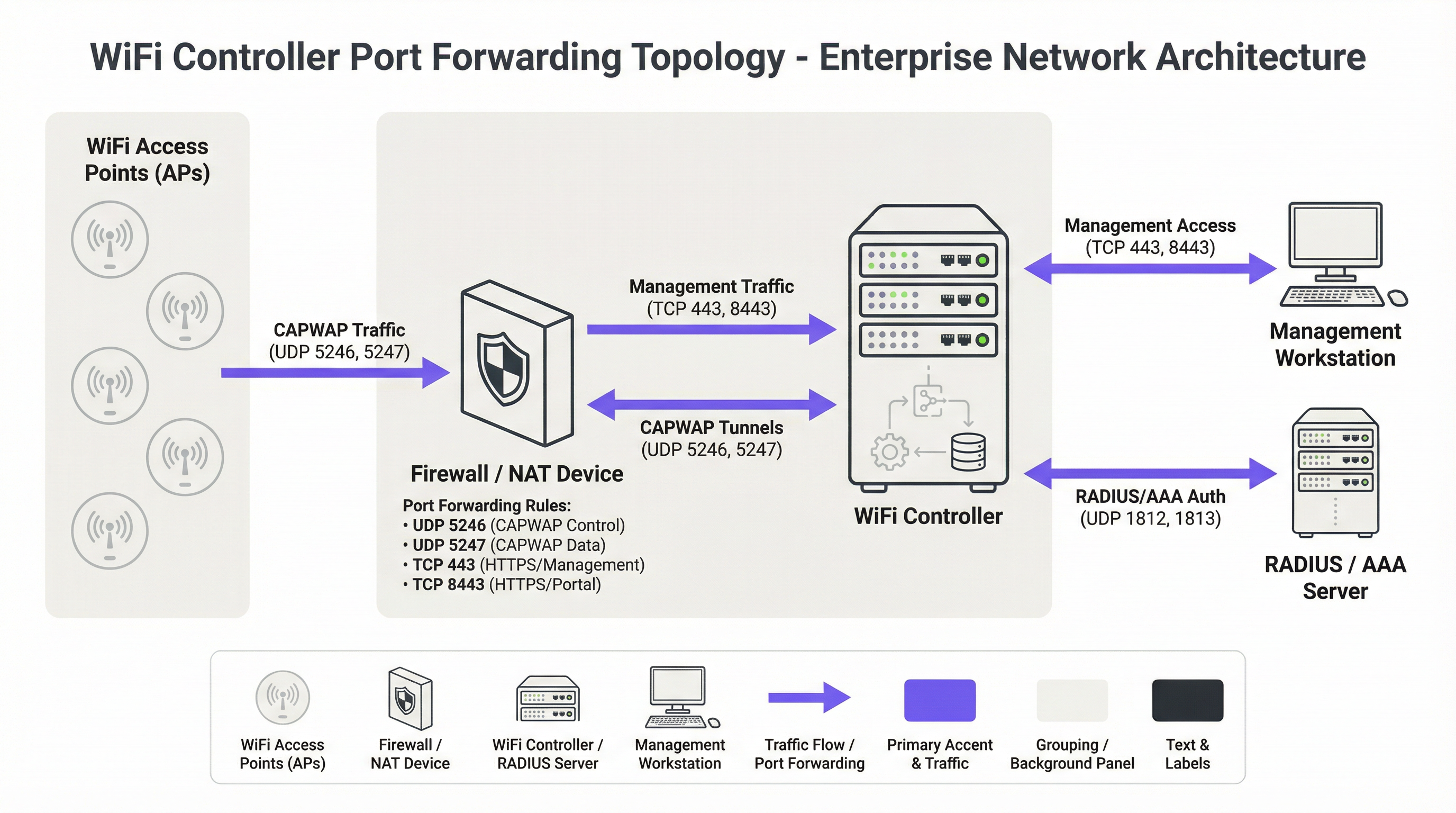
Il protocollo fondamentale per le moderne architetture WiFi centralizzate è il protocollo Control and Provisioning of Wireless Access Points (CAPWAP), standardizzato nella RFC 5415 [1]. CAPWAP consente a un WLC di gestire e controllare un parco di AP, creando un fabric di rete unificato. Il protocollo è progettato per attraversare router e firewall, rendendolo adatto per implementazioni multi-sede. La comunicazione avviene su due canali UDP principali:
- CAPWAP Control (UDP 5246): Questo canale è utilizzato per tutte le funzioni di gestione e controllo tra l'AP e il WLC. Ciò include i push di configurazione, gli aggiornamenti firmware e il monitoraggio dello stato. Secondo lo standard, questo canale di controllo è obbligatoriamente protetto tramite crittografia Datagram Transport Layer Security (DTLS), fornendo un tunnel sicuro per i comandi di gestione.
- CAPWAP Data (UDP 5247): Nelle implementazioni in cui il traffico client viene reindirizzato al controller tramite tunnel (anziché essere collegato in bridge localmente sull'AP), questo canale trasporta i dati utente incapsulati. Sebbene la crittografia per questo canale sia opzionale nello standard, le best practice impongono che anch'esso debba essere protetto con DTLS per salvaguardare i dati dei client in transito.
Quando un AP si trova dietro un dispositivo NAT, rileva l'indirizzo IP pubblico del WLC (spesso tramite DNS o un'opzione DHCP) e avvia una connessione CAPWAP. Il firewall a monte del WLC deve essere configurato con regole di port forwarding per indirizzare questi pacchetti UDP in entrata verso l'indirizzo IP privato del controller.
Oltre al protocollo CAPWAP di base, sono necessarie diverse altre porte per un'implementazione completamente funzionale:
- Accesso di Gestione: Gli amministratori richiedono l'accesso all'interfaccia di gestione del controller. Questo viene tipicamente fornito tramite HTTPS (TCP 443 o, su alcune piattaforme come Ruckus e Ubiquiti, TCP 8443). Secure Shell (TCP 22) fornisce l'accesso CLI. L'esposizione di queste porte a internet è un problema primario di sicurezza e l'accesso dovrebbe essere fortemente limitato.
- Autenticazione (AAA): Per una sicurezza di livello enterprise che utilizza WPA2/WPA3-Enterprise, il WLC deve comunicare con un server RADIUS. Ciò richiede UDP 1812 (Authentication) e UDP 1813 (Accounting). Se il server RADIUS è esterno alla rete locale, queste porte devono essere inoltrate.
- Guest & Captive Portal: Se viene utilizzato un Captive Portal per l'accesso guest, il WLC deve essere in grado di comunicare con esso. Per portali esterni come Purple, questo spesso significa consentire il traffico HTTPS in entrata dai server del portale al controller per elaborare l'autenticazione e le informazioni di sessione.
Requisiti delle Porte Specifici per Fornitore
Sebbene CAPWAP sia uno standard, i fornitori implementano porte aggiuntive per funzionalità specifiche. La tabella seguente riassume le porte predefinite comuni per le principali piattaforme di controller on-premise. Non è esaustiva ed è necessario consultare la documentazione più recente del proprio fornitore.
| Fornitore/Piattaforma | Protocollo | Porta | Scopo |
|---|---|---|---|
| Cisco WLC | UDP | 5246/5247 | CAPWAP Control/Data |
| TCP | 443 | Gestione HTTPS | |
| EoIP | 97 | Tunnel Mobility/Anchor | |
| UDP | 16666 | Mobility (Non protetto) | |
| Ruckus SmartZone | UDP | 12223 | Discovery LWAPP |
| TCP | 91/443 | Aggiornamento Firmware AP | |
| TCP | 8443 | Web UI HTTPS | |
| TCP | 22 | Gestione SSH | |
| Ubiquiti UniFi | TCP | 8080 | Device Inform |
| TCP | 8443 | Web UI/API HTTPS | |
| UDP | 3478 | STUN (NAT Traversal) | |
| UDP | 10001 | Discovery AP |
Guida all'Implementazione
L'implementazione del port forwarding per un WLC richiede un approccio metodico incentrato sulla sicurezza. L'obiettivo è consentire la connettività remota degli AP esponendo a internet il minimo indispensabile.
Fase 1: Architettura e Posizionamento di Rete
La decisione più critica è dove posizionare il WLC. Non dovrebbe mai essere posizionato sulla LAN aziendale attendibile. La best practice consiste nel creare un segmento di rete dedicato, o Demilitarized Zone (DMZ), per il controller. Questo isola il WLC e garantisce che, anche se venisse compromesso, l'aggressore non avrebbe accesso diretto alla rete aziendale interna. La policy del firewall dovrebbe quindi essere configurata per controllare rigorosamente il traffico tra la DMZ, internet e la LAN attendibile.
Fase 2: Configurazione del Firewall
- Creare Regole NAT e di Port Forwarding: Per ogni porta richiesta, creare una regola Destination NAT (DNAT) che traduca l'indirizzo IP pubblico del firewall e la porta esterna nell'indirizzo IP privato del WLC nella DMZ e nella porta interna corrispondente.
- Creare Regole di Accesso in Entrata: Questo è il passaggio di sicurezza più importante. Creare regole del firewall per consentire il traffico verso le porte inoltrate, ma specificare sempre l'indirizzo IP di origine. Per le porte CAPWAP, l'origine dovrebbe essere costituita dagli indirizzi IP pubblici delle sedi remote. Per le porte di gestione (HTTPS/SSH), l'origine deve essere limitata a una whitelist di indirizzi IP attendibili, come la sede aziendale o un jump host di gestione dedicato.
Avviso di Sicurezza: Un errore comune e pericoloso è lasciare l'indirizzo di origine come 'Any' o '0.0.0.0/0'. Questo espone l'interfaccia di gestione del controller all'intera rete internet, favorendo attacchi di forza bruta.
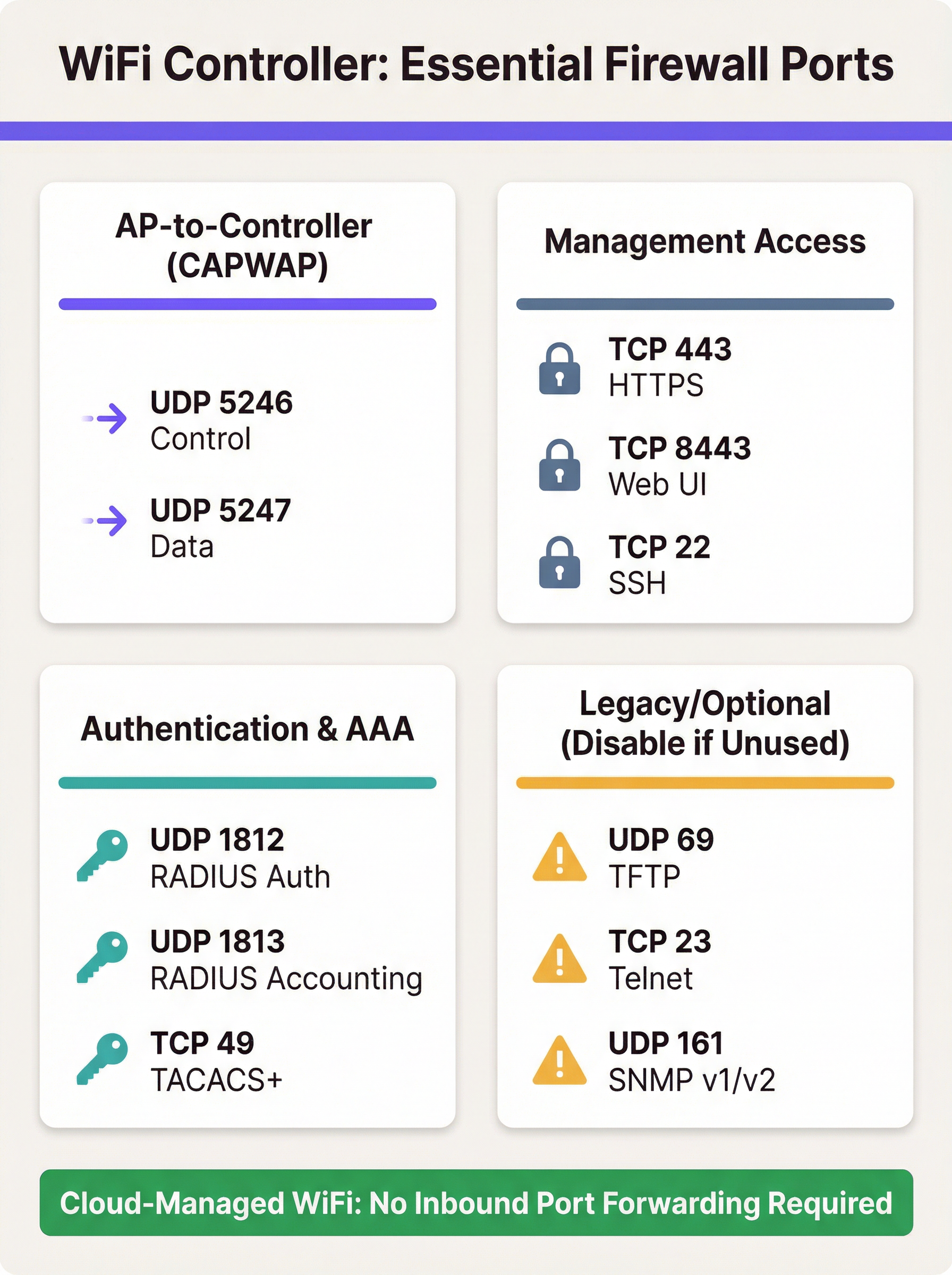
- Bloccare i Protocolli Non Necessari: Creare esplicitamente regole che neghino tutto l'altro traffico verso l'IP pubblico del WLC. Inoltre, assicurarsi che protocolli non sicuri come Telnet (TCP 23) e TFTP (UDP 69) siano disabilitati sul controller stesso e bloccati sul firewall.
- Abilitare la Stateful Inspection: Assicurarsi che il firewall operi in modalità stateful. Ciò significa che tiene traccia dello stato delle connessioni e negherà automaticamente i pacchetti in entrata non richiesti che non fanno parte di una sessione riconosciuta.
Fase 3: Configurazione del Controller
Sul WLC, assicurarsi che l'indirizzo IP pubblico del firewall sia configurato come interfaccia primaria del controller o come indirizzo NAT. Questo consente al controller di generare correttamente le risposte CAPWAP in modo che possano essere instradate nuovamente verso gli AP. Assicurarsi che funzionalità come la crittografia DTLS per CAPWAP siano abilitate.
Best Practice
- Preferire le Alternative: L'approccio più sicuro è evitare il port forwarding diretto. Se fattibile, implementare una VPN site-to-site tra le sedi remote e il data center del controller. Questo incapsula tutto il traffico in un tunnel sicuro, eliminando la necessità di porte esposte al pubblico.
- Adottare il Cloud: Per nuove implementazioni o aggiornamenti hardware, prendere seriamente in considerazione una soluzione WiFi gestita in cloud (es. Cisco Meraki, Ruckus One, Aruba Central). Queste piattaforme sono progettate in modo che gli AP avviino connessioni in uscita verso il cloud, eliminando la necessità di regole firewall in entrata e semplificando la gestione.
- Audit Regolari: Come richiesto dal Requisito 1.1.6 del PCI DSS, i set di regole di firewall e router dovrebbero essere revisionati almeno ogni sei mesi. Questo processo dovrebbe verificare la giustificazione aziendale per ogni regola e garantire che siano il più restrittive possibile.
- Utilizzare un'Autenticazione Forte: Proteggere le interfacce di gestione con l'autenticazione a più fattori (MFA) ove possibile. Utilizzare password complesse e sicure e modificarle regolarmente.
- Logging e Monitoraggio: Inoltrare i log del firewall e del WLC a un sistema SIEM (Security Information and Event Management) centrale. Monitorare eventuali tentativi di connessione anomali, accessi falliti ripetuti e pattern di traffico imprevisti.
Risoluzione dei Problemi e Mitigazione dei Rischi
Modalità di Errore Comune: Gli AP Non Riescono a Unirsi al Controller
- Sintomo: Gli AP in una sede remota sono bloccati in un loop di discovery e non compaiono mai nella dashboard del controller.
- Risoluzione dei Problemi:
- Verificare la connettività di rete di base dalla sede remota all'IP pubblico del controller (ping, traceroute).
- Controllare i log del firewall lato controller. Sono visibili i pacchetti UDP 5246 in entrata dall'IP pubblico dell'AP? Vengono consentiti o scartati?
- Verificare che le regole NAT/port forwarding siano configurate correttamente per l'IP privato del WLC.
- Assicurarsi che non vi sia un secondo livello di NAT nella sede remota (doppio NAT) che potrebbe interferire con la connessione.
Rischio: Compromissione del Controller
- Scenario: Viene scoperta una vulnerabilità nell'interfaccia di gestione web del WLC e la regola di port forwarding per la TCP 443 ha un'origine impostata su 'Any'.
- Mitigazione: Questo evidenzia la criticità di limitare gli IP di origine. Se l'origine è limitata agli IP del proprio ufficio, la vulnerabilità non è sfruttabile dall'intera rete internet. Questo è un classico esempio di difesa in profondità. Ulteriori mitigazioni includono il posizionamento del WLC in una DMZ per limitare i movimenti laterali dell'aggressore e l'applicazione tempestiva delle patch di sicurezza del fornitore.
Rischio: Violazioni di Conformità
- Scenario: Un audit PCI DSS rileva che il WLC gestisce gli AP in un punto vendita al dettaglio che elabora pagamenti con carta di credito e il WLC non è adeguatamente segmentato dal Cardholder Data Environment (CDE).
- Mitigazione: La segmentazione della rete non è negoziabile per la conformità al PCI DSS [2]. La rete wireless utilizzata dai terminali di pagamento deve essere isolata da tutte le altre reti, inclusi il WiFi guest e aziendale. Il WLC stesso deve essere considerato in ambito per l'audit se può influire sulla sicurezza del CDE. Per il GDPR, i dati del WiFi guest sono dati personali e la progettazione della rete deve impedirne l'accesso non autorizzato [3].
ROI e Impatto Aziendale
Sebbene sia un argomento tecnico, la scelta dell'architettura WiFi ha implicazioni aziendali dirette. Un modello di controller on-premise può rappresentare una spesa in conto capitale significativa, ma offre un controllo granulare e mantiene tutti i dati all'interno dell'infrastruttura dell'organizzazione. Il costo operativo di questo modello include il tempo del personale necessario per gestire, proteggere e verificare la configurazione del firewall e del controller. Una violazione della sicurezza derivante da un firewall configurato in modo errato può portare a perdite finanziarie significative, danni alla reputazione e sanzioni normative.
Al contrario, una soluzione gestita in cloud sposta il modello di costo da CapEx a OpEx (canoni di abbonamento ricorrenti). Il ROI si realizza attraverso la riduzione dei costi generali IT: nessun hardware on-premise da mantenere, nessuna regola firewall complessa da gestire per l'accesso al controller e un'implementazione più rapida di nuove sedi. Per molte aziende distribuite, come catene di vendita al dettaglio o gruppi alberghieri, il costo totale di proprietà (TCO) e la migliore postura di sicurezza di una piattaforma gestita in cloud forniscono un business case convincente, giustificando la migrazione da un'architettura on-premise legacy.
Riferimenti
[1] IETF, RFC 5415: Control And Provisioning of Wireless Access Points (CAPWAP) Protocol Specification, https://datatracker.ietf.org/doc/html/rfc5415 [2] PCI Security Standards Council, PCI DSS v4.0, https://www.pcisecuritystandards.org/document_library/ [3] General Data Protection Regulation (GDPR), https://gdpr-info.eu/
Key Terms & Definitions
Port Forwarding (Inbound NAT)
A network configuration that directs traffic from a specific port on a public-facing firewall or router to a specific port on a private device within the internal network.
IT teams use this to make an on-premise WiFi controller, which has a private IP address, accessible to access points located across the public internet.
CAPWAP (Control and Provisioning of Wireless Access Points)
An IETF standard protocol (RFC 5415) that enables a central controller to manage a collection of wireless access points. It operates over UDP ports 5246 (Control) and 5247 (Data).
This is the fundamental protocol that facilitates communication between APs and the WLC. Understanding its port requirements is the first step in configuring the firewall.
DMZ (Demilitarized Zone)
A perimeter network segment that is isolated from an organization's trusted internal LAN. It is used to host public-facing services and adds a layer of security.
Placing a WiFi controller in a DMZ is a critical best practice. If the controller is compromised, the attacker is contained within the DMZ and does not have direct access to the corporate network.
Stateful Firewall
A firewall that tracks the state of active network connections and makes decisions based on the context of the traffic, not just on individual packets.
A stateful firewall is essential for secure port forwarding, as it will only allow return traffic from the WLC to an AP if it is part of an established CAPWAP session, preventing unsolicited inbound traffic.
PCI DSS
The Payment Card Industry Data Security Standard, a set of security standards designed to ensure that all companies that accept, process, store or transmit credit card information maintain a secure environment.
For any organization in retail or hospitality, ensuring the WiFi architecture complies with PCI DSS is non-negotiable. This heavily influences decisions around network segmentation and firewall configuration.
RADIUS (Remote Authentication Dial-In User Service)
A client/server protocol that provides centralized Authentication, Authorization, and Accounting (AAA) management for users who connect and use a network service.
In enterprise WiFi, RADIUS is used to enable WPA2/WPA3-Enterprise security (802.1X). The WLC acts as a RADIUS client, and firewall rules must allow it to communicate with the RADIUS server on UDP ports 1812 and 1813.
Cloud-Managed WiFi
A WiFi architecture where access points are managed by a controller platform that is hosted in the cloud by the vendor (e.g., Cisco Meraki, Aruba Central).
This architecture is a direct alternative to on-premise controllers. It simplifies deployment and eliminates the need for port forwarding because APs initiate outbound connections to the cloud, which is a more secure default posture.
Source IP Whitelisting
The practice of configuring a firewall rule to only allow traffic from a specific, pre-approved list of source IP addresses.
This is the single most important security control when port forwarding. Restricting management access (HTTPS/SSH) to a whitelist of office or VPN IPs drastically reduces the risk of unauthorized access.
Case Studies
A 250-room hotel needs to provide guest WiFi and support internal staff devices (housekeeping tablets, PoS systems). They have an on-premise Cisco 3504 WLC in their server room and want to ensure PCI DSS compliance while offering a seamless guest experience with a Purple captive portal.
- Network Segmentation: The WLC is placed in a new DMZ VLAN (e.g., VLAN 100). Three new wireless LANs are created: 'GUEST_WIFI' (VLAN 101), 'STAFF_CORP' (VLAN 102), and 'POS_SECURE' (VLAN 103). Firewall rules are configured to completely isolate these VLANs from each other. The POS_SECURE network is isolated from the internet, except for traffic to the payment processor.
- Firewall & Port Forwarding: No ports are forwarded from the public internet to the WLC. Instead, a rule is created to allow inbound HTTPS (TCP 443) traffic only from the specific IP range provided by Purple for their captive portal service. This allows the portal to communicate with the controller to authorize guest sessions. All other inbound traffic to the WLC is blocked.
- PCI DSS Compliance: The 'POS_SECURE' WLAN is configured with WPA2-Enterprise and 802.1X authentication. The firewall policy ensures this network segment is completely isolated from the guest and corporate staff networks, meeting PCI DSS Requirement 1.2.3. The WLC itself is considered in-scope and hardened according to PCI guidelines.
A retail chain with 50 stores has a central Ruckus SmartZone controller at its headquarters. Each store has 5-10 APs that need to connect back to the HQ controller over the public internet. The IT team needs to manage the controller remotely.
- VPN as Primary Choice: The recommended solution is to deploy a small firewall/VPN gateway at each retail store to create a site-to-site IPsec VPN back to the HQ firewall. All AP traffic is then routed over the secure VPN tunnel. This requires no inbound port forwarding at the HQ, making it the most secure option.
- Port Forwarding as Fallback: If VPN is not feasible due to cost or technical constraints, a port forwarding approach is used. At the HQ firewall, DNAT rules are created to forward UDP 12223 (for discovery) and TCP 91/443 (for firmware) to the SmartZone controller. Crucially, the source for these rules is a list of the static public IP addresses of all 50 stores. A separate rule forwards TCP 8443 for management, with the source restricted to the IT team's office IP.
- AP Configuration: The APs at each store are configured with the public IP address of the HQ firewall as their controller address. They will then initiate the connection, which will be forwarded to the internal SmartZone controller.
Scenario Analysis
Q1. You are deploying a new WiFi network for a conference center. The client wants to use Purple for guest analytics and has an existing on-premise Aruba Mobility Controller. What is the most critical firewall rule you need to configure to allow the Purple captive portal to function?
💡 Hint:Consider the communication flow. The external service needs to talk to the internal controller. What IP addresses are involved?
Show Recommended Approach
The most critical rule is to allow inbound HTTPS (TCP 443) traffic from Purple's specific public IP address range to the Aruba controller's public-facing IP. You must obtain this IP range from Purple's documentation or support. A rule with a source of 'Any' would be a major security risk. You would then create a DNAT rule to forward this traffic to the controller's internal IP address in the DMZ.
Q2. A junior network engineer has configured port forwarding for a new remote office. The APs are online, but he tells you he opened TCP port 23 to the controller from 'Any' source IP to "make troubleshooting easier." What is the immediate risk, and what is your instruction to him?
💡 Hint:TCP port 23 is for Telnet. What are the security characteristics of this protocol?
Show Recommended Approach
The immediate risk is severe. Telnet is an unencrypted protocol, meaning the username and password for the controller are sent in clear text. Exposing this to the entire internet makes the controller highly vulnerable to credential theft and compromise. The instruction is to immediately disable the firewall rule, disable the Telnet service on the controller itself, and use SSH (TCP 22) for all CLI management, with the source IP restricted to a trusted management network.
Q3. Your CFO is questioning the subscription cost for a cloud-managed WiFi solution for 100 new retail stores, arguing that buying on-premise controllers is a cheaper one-time cost. How do you explain the ROI of the cloud solution from a security and operational perspective?
💡 Hint:Think about the Total Cost of Ownership (TCO), not just the initial purchase price. What ongoing work is required for an on-premise, multi-site deployment?
Show Recommended Approach
The ROI of a cloud-managed solution extends beyond the initial hardware cost. Operationally, it eliminates the significant staff overhead required to configure, manage, and audit complex firewall rules and VPNs for 100 separate locations. This accelerates deployment and reduces ongoing labor costs. From a security perspective, the cloud model has a fundamentally lower risk profile. It removes the need for any inbound port forwarding, drastically reducing the network's attack surface and simplifying compliance with standards like PCI DSS. The subscription cost effectively outsources the security and maintenance of the management platform to the vendor, leading to a lower TCO and a more secure, scalable network.
Key Takeaways
- ✓Port forwarding is required for on-premise WiFi controllers when APs are at remote sites across the internet.
- ✓The core protocols are CAPWAP (UDP 5246/5247), but management (TCP 443/8443) and AAA (UDP 1812/1813) ports are also needed.
- ✓Cloud-managed WiFi and site-to-site VPNs are more secure alternatives that eliminate the need for port forwarding.
- ✓If you must use port forwarding, place the controller in a DMZ and strictly whitelist source IP addresses.
- ✓Never expose insecure protocols like Telnet (TCP 23) or TFTP (UDP 69) to the internet.
- ✓Regularly audit firewall rules to ensure they are necessary and as restrictive as possible, as required by PCI DSS.
- ✓Failing to properly segment networks can lead to serious security breaches and compliance violations (PCI DSS, GDPR).




