

Purple Portal API: cosa è possibile fare
A technical reference for IT managers and network architects on leveraging the Purple Portal API. This guide details available endpoints, authentication, and real-world use cases for integrating guest WiFi data with enterprise systems to enhance business intelligence and operational efficiency. It covers both REST API and Webhook integration patterns, with concrete case studies from hospitality, retail, and events sectors.
🎧 Listen to this Guide
View Transcript

Executive Summary
Per i responsabili IT di strutture multi-sito — hotel, catene di vendita al dettaglio, stadi e centri congressi — la rete WiFi per gli ospiti è molto più di un semplice servizio. È una fonte ricca e in continuo aggiornamento di dati di prima parte in grado di generare un impatto aziendale misurabile su marketing, operations e customer experience. La Purple Portal API fornisce l'interfaccia programmatica necessaria per sbloccare questo valore su larga scala. Consente ai team tecnici di andare oltre le dashboard di analisi integrate e di creare integrazioni solide e automatizzate che alimentano i dati dei visitatori, conformi al GDPR, direttamente nei sistemi aziendali principali, dalle piattaforme CRM e dagli strumenti di marketing automation fino ai programmi fedeltà e ai data warehouse di business intelligence.
Questa guida è un riferimento pratico e operativo per solution architect, responsabili IT e sviluppatori senior. Descrive in dettaglio il modello di autenticazione, gli endpoint disponibili, i pattern di integrazione e gli scenari di implementazione reali che dimostrano come la Purple WiFi API possa trasformare un'infrastruttura WiFi da centro di costo a risorsa strategica di dati. Che si stia valutando l'API per la prima volta o pianificando un'integrazione in ambiente di produzione, questo documento fornisce le basi tecniche e i framework decisionali necessari per procedere con sicurezza.
Approfondimento tecnico
Autenticazione e versioning dell'API
La Purple Portal API utilizza l'autenticazione tramite API Key, un modello semplice e sicuro, ideale per le integrazioni server-to-server. A differenza dei flussi OAuth 2.0, che richiedono lo scambio di token e cicli di aggiornamento, l'autenticazione tramite API Key prevede l'inclusione di un segreto statico negli header della richiesta. Questa semplicità riduce i costi di integrazione senza compromettere la sicurezza, a condizione che la chiave sia archiviata in modo sicuro e ruotata periodicamente come parte della policy standard di gestione delle credenziali.
L'attuale versione di produzione è la v1.7, che ha introdotto diversi importanti miglioramenti rispetto alla v1.6.2. In particolare, la proprietà unsubscribed nell'oggetto dei dati utente ora distingue chiaramente tra un utente che ha attivamente annullato l'iscrizione al marketing dopo essersi precedentemente iscritto, e un utente che non si è mai iscritto. Questa distinzione è fondamentale per la conformità al GDPR e per un'accurata segmentazione del pubblico. Inoltre, gli endpoint Visitors e Venues ora restituiscono una risposta HTTP 200 OK quando non vengono trovati dati, anziché un 404 Not Found, che in precedenza causava confusione nelle logiche di monitoraggio e di gestione degli errori.
Endpoint disponibili
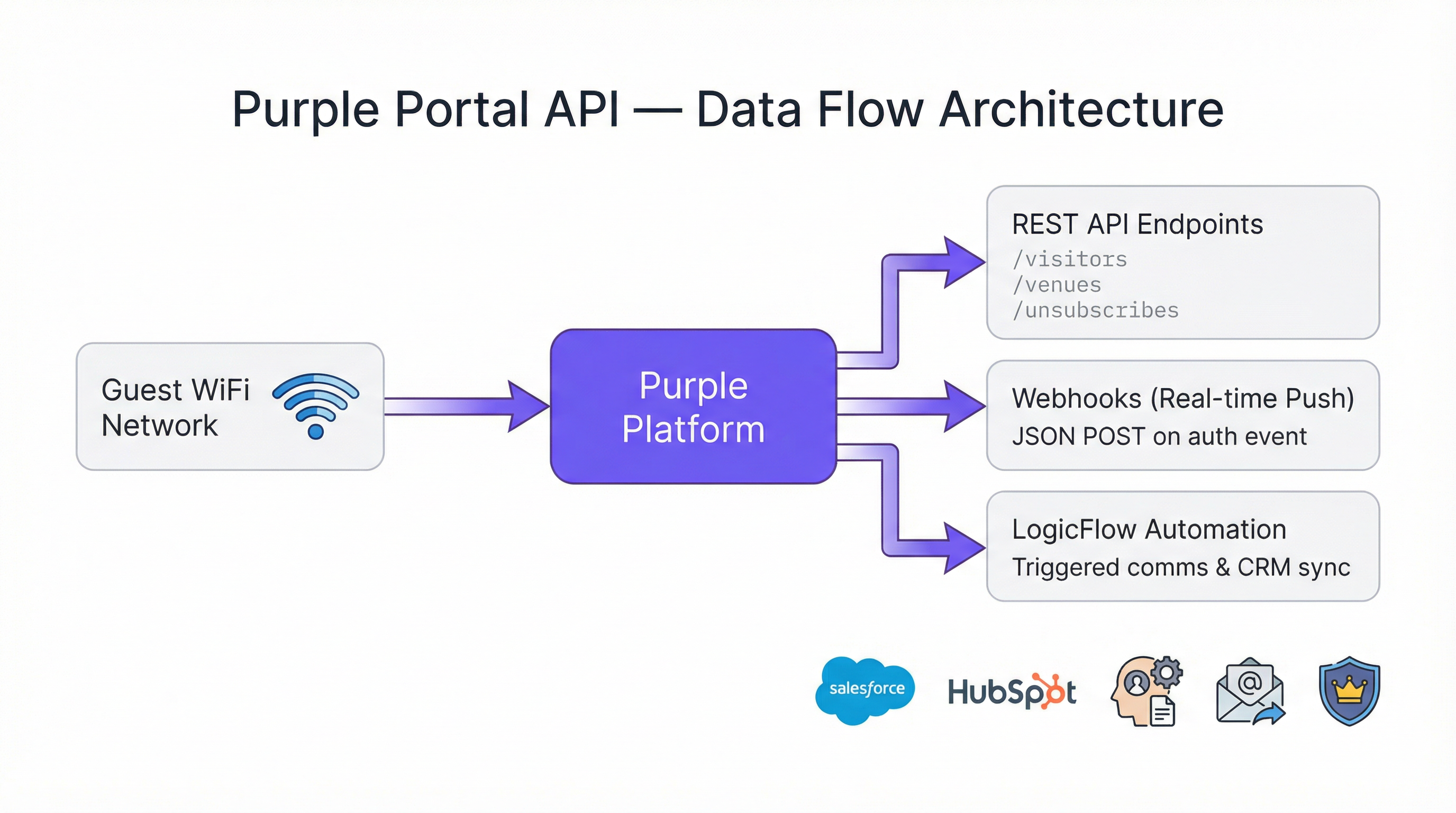
La Portal Company API espone tre categorie principali di endpoint con cui i team IT interagiranno regolarmente.
| Endpoint | Metodo | Scopo |
|---|---|---|
/visitors |
GET | Recuperare i profili dei visitatori ospiti, inclusi dati di contatto, dati demografici e cronologia delle visite |
/venues |
GET | Recuperare i dati a livello di sede e i metadati di configurazione |
/unsubscribes |
GET | Recuperare un elenco di utenti che hanno annullato l'iscrizione alle comunicazioni di marketing |
Tutti gli endpoint restituiscono i dati in formato JSON. L'endpoint visitors è il più utilizzato, in quanto espone l'intera ricchezza dei dati del profilo ospite raccolti durante il percorso di autenticazione del Captive Portal. Questi includono nome, cognome, indirizzo email, sesso, data di nascita, numero di cellulare, codice postale, provider di autenticazione (es. modulo di registrazione, social login), conteggio delle visite per sede e qualsiasi campo personalizzato configurato sulla splash page.
Limiti di frequenza
Un vantaggio architetturale chiave della Purple Portal API è che non ci sono limiti di frequenza. La piattaforma è progettata per supportare qualsiasi volume di richieste o transazioni, rendendola adatta a implementazioni su larga scala in cui gli script potrebbero dover elaborare migliaia di record di sedi o milioni di profili di visitatori. Ciò rimuove un vincolo comune che complica la progettazione dell'integrazione con altre piattaforme ed elimina la necessità di logiche di limitazione delle richieste (throttling) o di back-off nel codice client.
Pattern di integrazione: Pull vs. Push
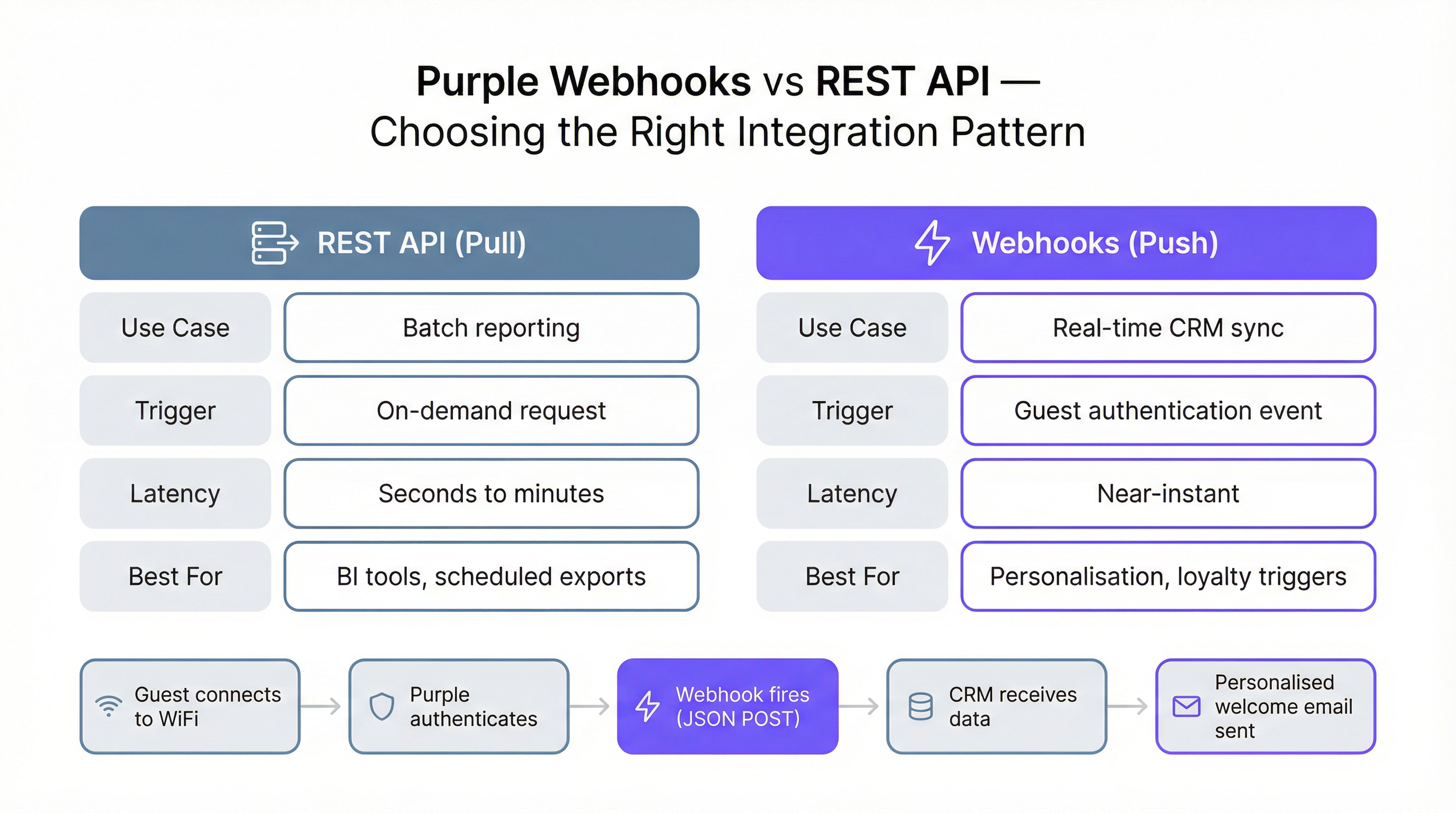
La Purple WiFi API supporta due pattern di integrazione fondamentalmente diversi, ciascuno adatto a casi d'uso differenti. Comprendere quale pattern applicare in un determinato scenario è la decisione architetturale più importante da prendere.
Il pattern pull della REST API prevede che il sistema effettui richieste su richiesta o programmate agli endpoint dell'API per recuperare i dati. Questo è l'approccio corretto per l'elaborazione batch, la reportistica e la business intelligence. Uno script ETL notturno che estrae tutti i dati dei visitatori del giorno precedente e li carica in un data warehouse ne è un classico esempio. Il pattern pull offre il pieno controllo su quando e quanti dati recuperare.
Il pattern push tramite Webhook prevede che Purple invii i dati al sistema nel momento in cui si verifica un evento specifico, in particolare quando un ospite si autentica sulla rete WiFi. Il sistema deve esporre un endpoint HTTP accessibile pubblicamente e protetto da SSL (un 'listener') in grado di ricevere ed elaborare questi payload POST in formato JSON. Il pattern Webhook è la scelta corretta per qualsiasi caso d'uso che richieda dati quasi in tempo reale, come l'attivazione di un messaggio di benvenuto personalizzato, l'aggiornamento dello stato 'ultimo accesso' di un cliente in un CRM o la notifica a un responsabile dell'accoglienza dell'arrivo di un ospite VIP.
Struttura del payload del Webhook
Il payload JSON fornito da un Webhook di Purple è strutturato in quattro oggetti principali, ciascuno dei quali fornisce una diversa dimensione di contesto per l'evento di autenticazione.
| Oggetto | Campi chiave | Descrizione |
|---|---|---|
client |
mac, userAgent |
Identificatori a livello di dispositivo |
company |
id, name, uniqId |
Dettagli dell'account aziendale |
venue |
id, name, latitude, longitude |
La posizione specifica in cui è avvenuta l'autenticazione |
session |
authenticationTime |
Timestamp ISO 8601 dell'evento di autenticazione |
user |
email, firstName, lastName, gender, provider, visitCountForVenues, customFields |
Dati completi del profilo ospite |
L'oggetto user.visitCountForVenues è particolarmente prezioso per gli operatori multi-sito. Fornisce un conteggio delle visite per sede insieme ai timestamp firstVisit e lastVisit, consentendo di identificare i visitatori alla prima visita rispetto ai clienti abituali al momento dell'autenticazione, senza alcuna chiamata API aggiuntiva.
Guida all'implementazione
Prerequisiti e configurazione
L'accesso alla Portal API richiede una licenza Engage. Una volta ottenuta la licenza, è possibile generare l'API Key dalle impostazioni del portale Purple. Per lo sviluppo e i test iniziali, Postman è lo strumento consigliato; Purple fornisce una guida di configurazione dedicata per impostare le variabili d'ambiente e gli header di richiesta corretti. È inoltre disponibile un file demo in PHP per i team che preferiscono un punto di partenza basato su scripting lato server.
Configurazione di un'integrazione Webhook
L'implementazione di un'integrazione Webhook prevede cinque passaggi. Primo, creare e distribuire l'endpoint listener su un URL accessibile pubblicamente e protetto da SSL. Una funzione serverless (AWS Lambda, Azure Functions o Google Cloud Functions) è una scelta architetturale solida: scala automaticamente, comporta costi minimi a bassi volumi e gestisce richieste simultanee senza configurazione. Secondo, convalidare l'URL del listener nel portale Purple navigando su Management > Venues > Webhooks. Purple invierà una richiesta di test per confermare che l'endpoint sia raggiungibile e restituisca l'header wifiWebhookListener: 1 richiesto. Terzo, creare o modificare un LogicFlow nel portale e aggiungere un Webhook Action Node, selezionando l'URL convalidato. Quarto, assicurarsi che il LogicFlow sia impostato sullo stato 'Online'. Quinto, collegare il LogicFlow all'Access Journey pertinente. Da questo momento, ogni autenticazione ospite in quel percorso attiverà il Webhook.
Gestione dei tentativi e dell'idempotenza
Il listener deve essere progettato per gestire le realtà dei sistemi distribuiti. Purple riproverà a inviare un Webhook non riuscito dopo tre ore se il listener non risponde (il timeout supera i 10 secondi) o restituisce uno stato di errore. Ciò significa che il listener potrebbe ricevere lo stesso evento più volte. Inoltre, una singola visita di un ospite può attivare più eventi di autenticazione, ad esempio quando un dispositivo si riconnette dopo il blocco dello schermo o quando un utente si sposta tra i punti di accesso. La logica di elaborazione deve quindi essere idempotente: applicare lo stesso evento due volte dovrebbe produrre lo stesso risultato dell'applicarlo una volta sola. Un pattern di implementazione comune consiste nel verificare se un'azione (come l'invio di un'email di benvenuto) è già stata eseguita per un determinato ID utente entro una finestra temporale definita prima di eseguirla.
Best Practice
Diversi principi dovrebbero guidare qualsiasi implementazione in produzione della Purple Portal API. Implementare sempre l'ultima versione dell'API (v1.7) e aggiornare i percorsi URL e la logica di analisi delle risposte quando vengono rilasciate nuove versioni. Trattare l'API Key come una credenziale sensibile: archiviarla in un gestore di segreti (come AWS Secrets Manager o Azure Key Vault) anziché nel codice sorgente o nelle variabili d'ambiente su sistemi condivisi. Per i listener Webhook, implementare la registrazione strutturata di ogni payload in entrata e risposta per facilitare il debug e gli audit trail. Rispettare i campi unsubscribed e unsubscribedDate nell'oggetto utente; l'elaborazione di azioni di marketing verso utenti che hanno annullato l'iscrizione costituisce una violazione del GDPR. Infine, testare l'integrazione con l'intera gamma di casi limite: utenti senza indirizzo email, utenti con campi personalizzati nulli ed eventi di autenticazione che arrivano in ordine non cronologico.
Risoluzione dei problemi e mitigazione dei rischi
La causa di errore più comune in un'integrazione Webhook è un listener lento o non disponibile. Se l'endpoint non risponde costantemente entro 10 secondi, Purple disabiliterà automaticamente il Webhook dopo un periodo prolungato di mancata risposta, richiedendo una nuova verifica manuale nel portale. Per mitigare questo rischio, implementare un endpoint di health check sullo stesso server del listener e includerlo nel monitoraggio dell'infrastruttura. Assicurarsi che il listener esegua solo un'elaborazione sincrona minima prima di restituire una risposta 200 OK; scaricare qualsiasi calcolo pesante o chiamata API a valle su una coda asincrona.
Per le integrazioni REST API, il rischio principale è l'obsolescenza dei dati nei sistemi a valle se il job di pull programmato fallisce in modo invisibile. Implementare avvisi sugli script ETL per notificare al team operativo se un'esecuzione fallisce o non produce output in modo imprevisto. Durante la migrazione dall'API v1.6.2 alla v1.7, controllare tutto il codice che fa riferimento al campo unsubscribed e all'endpoint Unsubscribes, poiché il nome della proprietà è stato corretto da unsubcribers a unsubscribers nella v1.7.
ROI e impatto aziendale
Il business case per l'integrazione con la Purple Portal API è ben consolidato in molteplici settori verticali. Nel settore dell'ospitalità, gli hotel che utilizzano integrazioni CRM attivate da Webhook segnalano miglioramenti significativi nei tassi di apertura delle email per comunicazioni personalizzate rispetto alle campagne broadcast generiche, poiché il messaggio viene consegnato nel momento di massima rilevanza: quando l'ospite è fisicamente in loco. Nel retail, collegare i dati del WiFi per gli ospiti a un programma fedeltà consente agli operatori di identificare e premiare i visitatori ad alta frequenza, aumentando la spesa media e i tassi di visite ripetute. Per i grandi spazi pubblici e i centri congressi, le analisi basate su API forniscono i dati granulari sull'affluenza necessari per giustificare le valutazioni delle sponsorizzazioni e ottimizzare il posizionamento delle concessioni.
L'assenza di limiti di frequenza sulla Purple WiFi API significa che il costo dell'integrazione scala con l'infrastruttura, non con il volume di dati elaborati. Per una catena di vendita al dettaglio nazionale che elabora centinaia di migliaia di autenticazioni giornaliere, questo è un vantaggio sostanziale rispetto alle piattaforme che addebitano per chiamata API o impongono limiti di throughput. Il costo totale di proprietà per un'integrazione ben architettata della Purple API è quindi principalmente il costo di sviluppo una tantum e il costo infrastrutturale continuo del listener, entrambi tipicamente recuperati entro il primo trimestre solo grazie al miglioramento dei tassi di conversione del marketing.

Casi di studio
Caso di studio 1: Ospitalità — Whitbread Group
Whitbread, la più grande azienda di hotel e ristoranti del Regno Unito, gestisce migliaia di punti di accesso WiFi per gli ospiti in tutta la sua rete di Premier Inn e ristoranti. Integrando la Purple Portal API con la propria piattaforma CRM, il gruppo è riuscito a creare un profilo ospite unificato che combina i dati di prenotazione online con il comportamento delle visite fisiche acquisito tramite il Captive Portal del WiFi. L'integrazione Webhook si attiva a ogni autenticazione dell'ospite, arricchendo il record CRM con l'ultimo timestamp della visita, la posizione della sede e le informazioni sul dispositivo. Ciò consente al team di marketing di segmentare il pubblico per recency, frequenza e posizione, e di attivare campagne di re-engagement altamente personalizzate. Il risultato tecnico chiave è stato una riduzione del tempo tra l'arrivo di un ospite e il suo ingresso in un percorso di marketing attivo da 24 ore (con il precedente modello di batch-polling) a meno di 60 secondi.
Caso di studio 2: Retail — Rivenditore di moda multi-sito
Un rivenditore di moda nazionale con oltre 80 negozi ha implementato la Purple Portal API per colmare una lacuna critica nella propria strategia sui dati dei clienti: disponeva di solidi dati e-commerce ma praticamente di nessuna informazione sul comportamento dei visitatori in negozio. Collegando l'API del WiFi per gli ospiti di Purple al proprio data warehouse esistente tramite un processo ETL notturno, ha creato per la prima volta una visione del cliente cross-channel. L'endpoint /visitors veniva interrogato per ogni negozio ogni notte e i dati venivano uniti ai record delle transazioni e-commerce utilizzando l'indirizzo email come chiave comune. Entro tre mesi, il team di analisi aveva identificato che i clienti che si connettevano al WiFi in negozio avevano un valore medio dell'ordine superiore del 34% sul loro successivo acquisto online, fornendo un business case convincente per ulteriori investimenti nell'esperienza digitale in negozio. L'integrazione non ha richiesto modifiche all'infrastruttura e-commerce esistente, dimostrando la natura a basso attrito del pattern pull della REST API.
Caso di studio 3: Eventi — Centro congressi
Un importante centro congressi nel Regno Unito ha utilizzato la Purple Portal API per fornire agli sponsor dati verificati sull'affluenza per la prima volta. In precedenza, i report per gli sponsor si basavano su conteggi manuali e scansioni dei badge, che richiedevano molto lavoro ed erano imprecisi. Esponendo tramite l'API i conteggi aggregati e anonimizzati dei visitatori per zona (mappati agli ID delle sedi nella piattaforma Purple), il team eventi ha potuto fornire agli sponsor dashboard in tempo reale che mostravano il tempo di permanenza e il volume dei visitatori nelle aree sponsorizzate. I dati venivano estratti tramite la REST API ogni 15 minuti durante gli eventi e visualizzati su un portale sponsor personalizzato. Questa capacità ha contribuito direttamente a un aumento del 22% dei tassi di rinnovo delle sponsorizzazioni nel primo anno, poiché gli sponsor potevano ora quantificare la portata delle loro attivazioni con dati di prima parte verificati.
Key Terms & Definitions
Webhook
An automated mechanism where a server sends a real-time data notification (a push) to another application when a specific event occurs, via an HTTP POST request.
In the Purple context, a Webhook sends a JSON payload with visitor data to your system the moment a guest authenticates on the WiFi network. This is critical for real-time marketing and CRM updates.
REST API
A standardized architectural style for building web services that allows one system to request (or pull) data from another using standard HTTP methods such as GET and POST.
IT teams use the Purple REST API to write scripts that pull bulk visitor and venue data for analysis in business intelligence tools like Power BI or Tableau.
API Key Authentication
A security model where access to an API is granted by providing a unique secret token (the key) with each request, typically in the HTTP Authorization header.
This is simpler than OAuth and ideal for server-to-server integrations. Your scripts must include the valid API Key in the request headers to access Purple's data.
Idempotency
A property of an operation meaning that it can be applied multiple times without changing the result beyond the initial application.
Your Webhook listener should be idempotent. If it receives the same authentication event twice (which can happen due to retries or device reconnections), it should not, for example, send two welcome emails.
JSON (JavaScript Object Notation)
A lightweight, text-based format for data interchange that is easy for humans to read and for machines to parse and generate.
The Purple API and Webhooks deliver all data in JSON format. Your application will need to parse this JSON to extract fields like email, name, and visit count.
LogicFlow
Purple's visual, drag-and-drop tool for creating automated marketing and engagement workflows that can trigger actions based on visitor behaviour and demographics.
You use LogicFlow to define the guest journey. It is where you attach your Webhook, telling the system to fire it when a user reaches the 'Online' state of their access journey.
Captive Portal
The web page that a user sees and must interact with before being granted access to a public WiFi network, typically requiring authentication or data capture.
The Purple platform powers the captive portal, and the data entered by the user on this page (e.g., name, email, custom fields) is what becomes available via the Portal API.
GDPR (General Data Protection Regulation)
A comprehensive data privacy law in the European Union that governs the collection, processing, and storage of personal data of EU residents.
The Purple API provides the tools to build GDPR-compliant integrations, such as respecting the unsubscribed status of a user and enabling data export for subject access requests. The v1.7 API update specifically improved the clarity of the unsubscribed field to support compliance.
ETL (Extract, Transform, Load)
A data integration process that involves extracting data from a source system, transforming it into the required format, and loading it into a destination system such as a data warehouse.
The REST API pull pattern is typically implemented as an ETL process, where data is extracted from Purple's /visitors endpoint, transformed to match the destination schema, and loaded into a CRM or data warehouse.
Case Studies
A 200-room hotel wants to automatically add new guest WiFi users to their Salesforce Marketing Cloud journey and send a welcome email.
- In the Purple Portal, validate a new Webhook URL pointing to a secure endpoint (e.g., a serverless function on AWS Lambda). 2. Create an 'Online' LogicFlow that includes the Webhook node, configured to use the validated URL. 3. Assign this LogicFlow to the hotel's guest WiFi access journey. 4. The serverless function receives the JSON payload on guest authentication, extracts the user's email and name, and makes an API call to Salesforce Marketing Cloud to add the user to the 'New Guest' journey. 5. The function returns a 200 OK response to Purple within the 10-second timeout window.
A retail chain with 50 stores wants to build a central dashboard in Power BI to analyze visitor trends across all locations.
- Create a script (e.g., in Python) that runs on a nightly schedule. 2. The script authenticates to the Purple Portal API using the company's API key. 3. It iterates through each of the 50 venue IDs, making a call to the /visitors endpoint for each to retrieve all visitor data from the previous day. 4. The script transforms and loads this data into a central data warehouse (e.g., Azure SQL or BigQuery). 5. Power BI is connected to the data warehouse to create the cross-venue analytics dashboard.
Scenario Analysis
Q1. A stadium wants to identify VIP season ticket holders when they connect to the WiFi and send a notification to the nearest hospitality manager's dashboard. Which integration pattern should they use and why?
💡 Hint:Consider the required speed of the notification and whether the action is triggered by an event.
Show Recommended Approach
They should use the Webhook (push) pattern. This is a real-time requirement: when the VIP connects, a Webhook fires immediately to a service that looks up the user's email or MAC address against the season ticket holder database. If a match is found, it pushes a notification to the relevant hospitality dashboard. A REST API (pull) pattern would be too slow, as it relies on periodic polling and could introduce delays of minutes or hours.
Q2. You are tasked with creating a daily report of the top 10 most visited venues in your national chain of coffee shops. How would you retrieve the necessary data from Purple?
💡 Hint:Is this a real-time or a batch reporting requirement? What endpoint would you query?
Show Recommended Approach
This is a batch reporting task, so the REST API (pull) pattern is appropriate. A scheduled script would run daily, query the /visitors endpoint for each venue, aggregate the visit counts for the previous day, and then calculate the top 10. There is no need for the near-instant notification provided by Webhooks. The absence of rate limits means all venues can be queried in a single script run without throttling concerns.
Q3. Your Webhook listener endpoint is failing. You check the logs and see a timeout error. What is the most likely cause according to Purple's documentation, and what are the two immediate consequences?
💡 Hint:Think about the performance requirements of a listener and what Purple does when it cannot deliver a payload.
Show Recommended Approach
The most likely cause is that the listener is taking longer than 10 seconds to process the incoming JSON payload and return a 200 OK response. The two immediate consequences are: (1) Purple will stop trying to send the current request and will requeue it for a retry attempt in 3 hours, meaning data delivery is delayed; and (2) if this continues for a prolonged period, Purple will automatically disable the Webhook entirely, requiring manual re-verification in the portal before it can be re-enabled.
Key Takeaways
- ✓The Purple Portal API provides programmatic access to guest WiFi data using simple API Key authentication, with no rate limits.
- ✓It requires an Engage license and currently operates on version v1.7, which improved GDPR compliance through clearer unsubscribed status handling.
- ✓Use the REST API (pull) for batch data exports, ETL processes, and analytics dashboards.
- ✓Use Webhooks (push) for real-time, event-driven actions like CRM syncs, personalised messaging, and loyalty triggers.
- ✓Webhook listeners must be SSL-secured, respond within 10 seconds, and be designed to handle duplicate events idempotently.
- ✓Key use cases span hospitality (real-time CRM enrichment), retail (cross-channel analytics), and events (verified footfall data for sponsors).
- ✓The API enables organizations to transform their WiFi infrastructure from a cost centre into a strategic data asset with a clear, measurable ROI.




