

Proteggere le reti con il Wi-Fi 7: un'analisi tecnica approfondita
This guide provides a comprehensive technical reference on Wi-Fi 7 security features for enterprise IT teams, covering the mandatory enforcement of WPA3 encryption, the security implications of Multi-Link Operation (MLO), and the practical challenges of supporting legacy devices during migration. It equips network architects, IT managers, and CTOs at hotels, retail chains, stadiums, and public-sector organisations with actionable deployment strategies, compliance guidance aligned to PCI DSS and GDPR, and real-world case studies with measurable outcomes. Understanding these changes is critical for any organisation planning a wireless infrastructure upgrade this year, as Wi-Fi 7 represents a fundamental shift in the security baseline for enterprise wireless networks.
🎧 Listen to this Guide
View Transcript

Sintesi esecutiva
Il Wi-Fi 7 (IEEE 802.11be) non è un normale aggiornamento hardware. Rappresenta il più significativo aggiornamento di sicurezza nel networking wireless aziendale da quando il WPA2 ha sostituito il WEP e comporta implicazioni di conformità obbligatorie che ogni CTO e direttore IT deve comprendere prima di approvare un piano di spesa in conto capitale.
Il cambiamento principale è inequivocabile: la crittografia WPA3 è obbligatoria per tutti i dispositivi Wi-Fi 7 che utilizzano la Multi-Link Operation (MLO) e le velocità di trasmissione dati 802.11be complete. Questo obbligo si estende contemporaneamente a tutte le bande radio, chiudendo i vettori di attacco di tipo downgrade che persistono da anni nel wireless aziendale. Insieme al WPA3, il Wi-Fi 7 introduce la crittografia GCMP-256 (che sostituisce AES-128 CCMP), i Protected Management Frames obbligatori (802.11w) e l'Opportunistic Wireless Encryption (OWE) per le reti aperte con Captive Portal.
Per i gestori di strutture — hotel, catene di vendita al dettaglio, stadi, centri congressi e organizzazioni del settore pubblico — le implicazioni pratiche sono tre. In primo luogo, il parco dispositivi IoT legacy (terminali POS, controller di sala, sistemi IPTV) richiederà una segmentazione della rete, non una sostituzione immediata. In secondo luogo, la posizione di conformità ai sensi del PCI DSS v4.0 e del GDPR migliora concretamente con un'architettura Wi-Fi 7 implementata correttamente. In terzo luogo, i vantaggi in termini di prestazioni derivanti dalla MLO — funzionamento multi-banda simultaneo che offre un throughput teorico fino a 46 Gbps — sono accessibili solo ai dispositivi che soddisfano il requisito di sicurezza WPA3.
Le organizzazioni che considerano questo passaggio come un aggiornamento strategico della sicurezza, piuttosto che come una semplice sostituzione hardware, otterranno una posizione di rischio nettamente più solida e un'infrastruttura di rete pronta per il prossimo decennio.
Analisi tecnica approfondita
L'obbligo del WPA3 e cosa cambia realmente
Lo standard IEEE 802.11be rende obbligatorio il supporto WPA3 per tutti i dispositivi che intendono utilizzare le funzionalità del Wi-Fi 7. Si tratta di un netto distacco rispetto alle generazioni precedenti: gli access point Wi-Fi 6 e Wi-Fi 6E potevano eseguire il WPA2 senza restrizioni. Con il Wi-Fi 7, il WPA3 è un prerequisito per la Multi-Link Operation e per le velocità di trasmissione dati EHT (Extremely High Throughput) complete. Il programma di certificazione della Wi-Fi Alliance impone questo requisito, il che significa che qualsiasi dispositivo con il badge di certificazione Wi-Fi 7 deve supportare il WPA3.
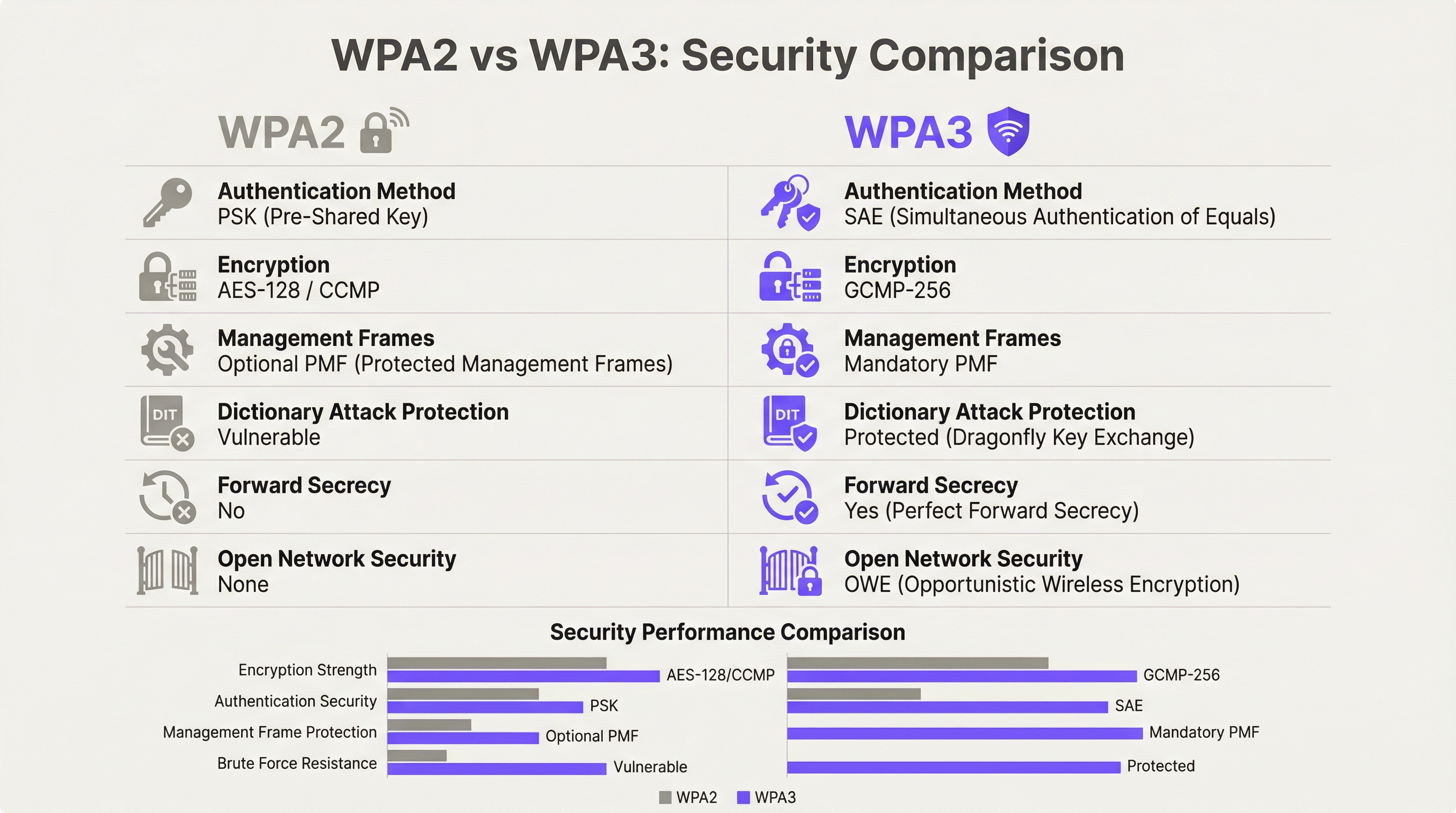
Il WPA3 offre quattro miglioramenti sostanziali in termini di sicurezza rispetto al suo predecessore.
Autenticazione: SAE sostituisce PSK. Il WPA3-Personal sostituisce il modello Pre-Shared Key (PSK) con la Simultaneous Authentication of Equals (SAE), che utilizza il protocollo di scambio delle chiavi Dragonfly. La SAE è resistente agli attacchi a dizionario offline, una vulnerabilità critica del WPA2-PSK in cui un four-way handshake intercettato poteva essere sottoposto a tentativi illimitati di forza bruta offline. Il meccanismo zero-knowledge proof della SAE garantisce che anche un handshake intercettato non produca informazioni sfruttabili senza l'accesso alla passphrase originale.
Crittografia: GCMP-256 sostituisce AES-128 CCMP. Il Wi-Fi 7 introduce il Galois/Counter Mode Protocol con chiavi a 256 bit (GCMP-256) come suite di crittografia principale. Il GCMP-256 crittografa il campo Frame Body di ogni MPDU, fornendo contemporaneamente riservatezza dei dati, autenticazione, integrità e protezione contro gli attacchi replay. Gli access point Wi-Fi 7 annunciano sia il GCMP-256 che il precedente AES-128 CCMP nei loro RSN Information Elements, consentendo ai client più vecchi di connettersi con una crittografia ridotta, mentre i client più recenti negoziano il protocollo più forte.
Protezione dei Management Frame: 802.11w obbligatorio. Con il WPA2, i management frame — i segnali di controllo 802.11 che gestiscono associazione, disassociazione e roaming — venivano trasmessi in chiaro. Ciò consentiva attacchi di deautenticazione e l'impersonificazione tramite access point evil twin. Il WPA3 rende obbligatorio lo standard 802.11w (Protected Management Frames, o PMF), che autentica e crittografa i management frame unicast e broadcast. Questo è obbligatorio sia per le operazioni single-link che multi-link nel Wi-Fi 7.
Sicurezza delle reti aperte: OWE. L'Opportunistic Wireless Encryption fornisce una crittografia per sessione sulle reti aperte senza richiedere una password. Ogni dispositivo che si connette negozia una sessione crittografata personalizzata utilizzando lo scambio di chiavi Diffie-Hellman, il che significa che il traffico su una rete aperta condivisa è crittografato e non può essere intercettato da altri utenti sullo stesso SSID. Per gli operatori del settore alberghiero e pubblico che gestiscono il WiFi per gli ospiti tramite Captive Portal, l'OWE è il meccanismo che porta la protezione dei dati in linea con il GDPR all'accesso wireless aperto.
Multi-Link Operation: architettura delle prestazioni e della sicurezza
La MLO è la caratteristica prestazionale distintiva del Wi-Fi 7, che consente a un singolo dispositivo di mantenere simultaneamente connessioni attive sulle bande a 2.4 GHz, 5 GHz e 6 GHz. L'architettura di sicurezza della MLO è più esigente rispetto a quella single-link e comprenderla è essenziale per la pianificazione delle implementazioni aziendali.
Lo standard IEEE 802.11be introduce due nuove suite di Authentication and Key Management (AKM) specifiche per la MLO: AKM 24 (00-0F-AC:24) e AKM 25 (00-0F-AC:25). Queste forniscono un'autenticazione per MLD (Multi-Link Device), stabilendo una singola Pairwise Master Key (PMK) sincronizzata su tutti i link attivi. Questo design garantisce che la gerarchia delle chiavi sia coerente tra le bande, prevenendo uno scenario in cui un link compromesso a sicurezza inferiore possa essere utilizzato per attaccare la sessione su una banda a sicurezza superiore.
Fondamentalmente, lo standard vieta esplicitamente la modalità di transizione WPA3 su qualsiasi connessione compatibile con la MLO. La modalità di transizione — la configurazione mista WPA2/WPA3 che consente entrambe le versioni del protocollo su un singolo SSID — è vietata per la MLO. Si tratta di una misura anti-downgrade deliberata. In un ambiente in modalità di transizione, un avversario può forzare un client a negoziare il WPA2 anche quando il WPA3 è disponibile; l'architettura di sicurezza della MLO elimina completamente questo vettore di attacco richiedendo il WPA3 su ogni link.
Per gli architetti aziendali, questo ha un'implicazione diretta: qualsiasi dispositivo che non supporta il WPA3 non può partecipare alla MLO. Tali dispositivi ripiegheranno sul funzionamento single-band e single-link su qualsiasi banda supportino, al livello di sicurezza che supportano. Questo non è un guasto della rete; è il comportamento corretto di un'implementazione Wi-Fi 7 configurata adeguatamente.
Modalità WPA3-Enterprise a 192 bit
Per le organizzazioni che operano in settori regolamentati — governo, difesa, sanità e servizi finanziari — la modalità WPA3-Enterprise a 192 bit (Suite B) fornisce il profilo di sicurezza wireless più elevato disponibile. Questa modalità utilizza GCMP-256 per la crittografia dei dati, SHA-384 per l'hashing ed ECDH/ECDSA con curve ellittiche a 384 bit per lo scambio di chiavi e l'autenticazione. È in linea con i requisiti della CNSA (Commercial National Security Algorithm) Suite ed è appropriata per le reti che gestiscono dati classificati o altamente sensibili.
Guida all'implementazione
Fase 1: Audit dei dispositivi e progettazione della segmentazione
Prima di installare un singolo access point, è necessario condurre un audit completo dei dispositivi. Ogni dispositivo sulla rete deve essere categorizzato in base al protocollo di sicurezza massimo supportato: WPA3-Enterprise, WPA3-Personal, WPA2-Enterprise, WPA2-Personal o legacy (WPA/TKIP). Questo audit guida ogni successiva decisione architettonica.
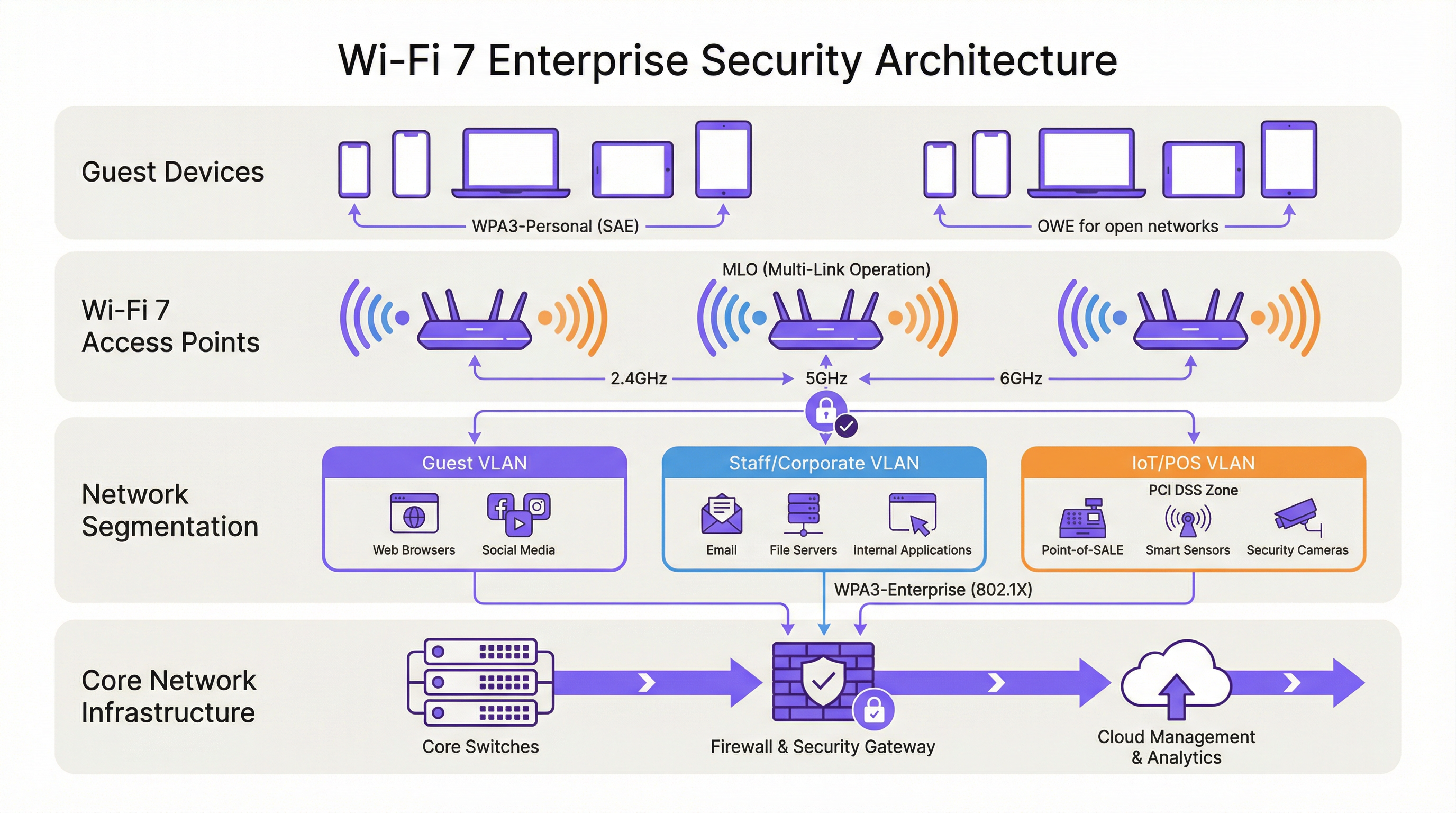
Il risultato di questo audit dovrebbe definire tre livelli di rete:
| Livello | Banda | Protocollo di sicurezza | Dispositivi target |
|---|---|---|---|
| Livello 1 — Corporate/Staff | 6 GHz | WPA3-Enterprise (802.1X) | Laptop del personale, dispositivi mobili aziendali, endpoint Wi-Fi 7 |
| Livello 2 — Ospiti/BYOD | 5 GHz | WPA3-Personal (SAE) o WPA3-Enterprise | Dispositivi degli ospiti, BYOD, smartphone moderni |
| Livello 3 — Legacy/IoT | 2.4 GHz | WPA2-Personal (VLAN isolata) | Terminali POS, controller di sala, IPTV, scanner legacy |
Ogni livello deve essere isolato tramite VLAN con policy firewall inter-VLAN che neghino esplicitamente i movimenti laterali. I dispositivi di Livello 3 non dovrebbero avere accesso ai segmenti di rete di Livello 1 o Livello 2 e l'accesso a Internet dovrebbe essere limitato alle destinazioni specifiche richieste per il funzionamento del dispositivo.
Fase 2: Preparazione dell'infrastruttura RADIUS e PKI
Le implementazioni WPA3-Enterprise richiedono un server RADIUS (in genere FreeRADIUS, Cisco ISE o Aruba ClearPass) configurato per supportare EAP-TLS con suite di crittografia moderne. Verificare che l'implementazione RADIUS supporti TLS 1.2 o 1.3 e che l'infrastruttura dell'autorità di certificazione sia in grado di emettere certificati client su scala adeguata. Per la modalità WPA3-Enterprise a 192 bit, confermare che il server RADIUS supporti EAP-TLS con le suite di crittografia Suite B.
Se l'infrastruttura RADIUS esistente è stata implementata più di cinque anni fa, è consigliabile una valutazione di idoneità prima di impegnarsi in una tempistica di lancio del Wi-Fi 7.
Fase 3: Architettura SSID ed evitamento della modalità di transizione
Configurare gli SSID in base al modello a tre livelli descritto sopra. Resistere alla tentazione di implementare la modalità di transizione WPA3 come configurazione permanente. La modalità di transizione è una misura a breve termine appropriata durante una migrazione controllata, ma non dovrebbe essere lo stato finale. La modalità di transizione annuncia contemporaneamente sia il WPA2 che il WPA3 sullo stesso SSID; qualsiasi dispositivo che negozia il WPA2 su quell'SSID riduce la sicurezza effettiva dell'intero segmento di rete ai livelli del WPA2.
L'architettura corretta a lungo termine prevede un WPA3 rigoroso sugli SSID di Livello 1 e Livello 2, con i dispositivi legacy assegnati esplicitamente all'SSID di Livello 3 isolato. Questo approccio fornisce la posizione di sicurezza più forte per i dispositivi moderni, mantenendo al contempo la continuità operativa per l'hardware legacy.
Fase 4: Implementazione OWE per le reti ospiti
Per le reti ospiti con Captive Portal, implementare l'OWE come meccanismo di sicurezza. L'OWE opera in modo trasparente per gli utenti finali: non è richiesta alcuna password e il flusso di autenticazione del Captive Portal rimane invariato. La differenza è che il traffico di ogni dispositivo viene crittografato con una chiave di sessione personalizzata, fornendo una protezione dei dati in linea con il GDPR senza aggiungere attriti all'esperienza di onboarding degli ospiti.
Si noti che la modalità di transizione OWE (analoga alla modalità di transizione WPA3) consente ai dispositivi non OWE di connettersi allo stesso SSID. Come per la modalità di transizione WPA3, questa dovrebbe essere considerata una misura temporanea durante la migrazione, non una configurazione permanente.
Fase 5: Monitoraggio, policy e governance continua
Implementare un Wireless Intrusion Prevention System (WIPS) per monitorare la presenza di access point rogue, attacchi di deautenticazione e dispositivi non autorizzati. Sebbene il PMF obbligatorio del WPA3 riduca significativamente l'efficacia degli attacchi di deautenticazione, un WIPS fornisce il livello di visibilità necessario per la risposta agli incidenti e il reporting di conformità.
Aggiornare la policy di sicurezza delle informazioni per rendere obbligatorio il supporto WPA3 come requisito minimo per l'acquisto di tutti i nuovi dispositivi wireless. Questa modifica alla policy è la singola misura a lungo termine più efficace per ridurre l'accumulo di dispositivi legacy.
Best practice
Le seguenti best practice indipendenti dal fornitore riflettono gli attuali standard del settore e sono applicabili a tutte le principali piattaforme wireless aziendali.
La segmentazione della rete non è negoziabile. Il controllo degli accessi di rete basato su IEEE 802.1X, combinato con la segmentazione VLAN, è il fondamento di un'architettura wireless aziendale difendibile. Nessuna categoria di dispositivi — ospiti, personale, IoT o POS — dovrebbe condividere un segmento di rete con dispositivi di un livello di attendibilità diverso.
Evitare la modalità di transizione WPA3 come configurazione permanente. Come documentato dai ricercatori di sicurezza, la modalità di transizione è sfruttabile per attacchi di downgrade. Utilizzarla solo come ausilio alla migrazione limitato nel tempo, con una data di scadenza definita per il supporto WPA2 su ogni SSID.
Imporre l'autenticazione basata su certificati per le reti del personale. Il WPA3-Enterprise con EAP-TLS e certificati client fornisce la posizione di autenticazione più forte per gli endpoint aziendali. I metodi EAP basati su password (PEAP-MSCHAPv2) rimangono vulnerabili al furto di credenziali; l'autenticazione basata su certificati elimina questo rischio.
Considerare la banda a 6 GHz esclusivamente per il WPA3 by design. La banda a 6 GHz è un'esclusiva del WPA3 fin dal Wi-Fi 6E. Utilizzare questa banda esclusivamente per il livello a massima sicurezza e massime prestazioni. Non tentare di estendere il supporto dei dispositivi legacy ai 6 GHz.
Implementare il Network Access Control (NAC) per la profilazione dei dispositivi. Una soluzione NAC che profila i dispositivi in connessione e applica policy di sicurezza in base al tipo di dispositivo e allo stato di conformità è essenziale in ambienti con dispositivi misti. I dispositivi che non soddisfano la policy di sicurezza minima dovrebbero essere messi in quarantena o reindirizzati a una VLAN di remediation.
Allineare la policy di approvvigionamento ai requisiti di sicurezza del Wi-Fi 7. Qualsiasi nuovo dispositivo acquistato per l'utilizzo sulla rete dovrebbe supportare come minimo il WPA3. Questa policy, applicata in modo coerente, ridurrà naturalmente il parco dispositivi legacy nel corso di un ciclo di aggiornamento hardware da tre a cinque anni.
Risoluzione dei problemi e mitigazione dei rischi
Errori di connettività dei dispositivi legacy. Il problema di implementazione più comune è l'impossibilità per i dispositivi legacy di connettersi dopo il lancio del Wi-Fi 7. La causa principale è quasi sempre che il dispositivo non supporta il WPA3 e l'SSID è stato configurato in modalità WPA3 rigorosa. Risoluzione: confermare il protocollo di sicurezza massimo supportato dal dispositivo, assegnarlo all'SSID di Livello 3 appropriato e assicurarsi che l'SSID trasmetta su una banda supportata dal dispositivo (2.4 GHz per la maggior parte dell'IoT legacy).
Attacchi di downgrade in modalità di transizione WPA3. Se si esegue la modalità di transizione durante la migrazione, monitorare il WIPS per individuare i client che si connettono tramite WPA2 su SSID compatibili con WPA3. Ciò potrebbe indicare un attacco di downgrade in corso o un client configurato in modo errato. Indagare e rimediare tempestivamente.
Errori di autenticazione RADIUS con WPA3-Enterprise. Se i client non superano l'autenticazione 802.1X dopo una migrazione a WPA3-Enterprise, verificare che il certificato TLS del server RADIUS sia considerato attendibile dai dispositivi client, che il metodo EAP sia configurato correttamente sia sul server RADIUS che sul supplicant del client e che il server RADIUS supporti le suite di crittografia richieste dal WPA3-Enterprise.
Problemi di connettività MLO. I dispositivi che supportano il Wi-Fi 7 ma non riescono a stabilire connessioni MLO riscontrano in genere un errore di negoziazione WPA3 su una o più bande. Verificare che tutte le bande sull'access point siano configurate per il WPA3 e che il driver Wi-Fi 7 del client sia aggiornato. Gli aggiornamenti dei driver per il supporto MLO del Wi-Fi 7 sono stati rilasciati attivamente nel corso del 2024 e del 2025.
Rilevamento di access point rogue. Il PMF obbligatorio nel WPA3 riduce significativamente l'efficacia degli attacchi evil twin, ma non elimina il rischio di access point rogue sulla rete. Mantenere un WIPS con scansione attiva e avvisi su qualsiasi access point che trasmetta i propri SSID e che non sia presente nell'inventario degli AP autorizzati.
ROI e impatto sul business

Riduzione del rischio di conformità
Il ROI più quantificabile derivante da un'implementazione di sicurezza Wi-Fi 7 è la riduzione del rischio di conformità. Ai sensi del PCI DSS v4.0, il Requisito 4 impone una crittografia forte per i dati dei titolari di carta in transito. La crittografia GCMP-256 del WPA3 soddisfa questo requisito; l'AES-128 CCMP del WPA2 è sempre più esaminato dai QSA come insufficiente per le nuove implementazioni. Un'architettura Wi-Fi 7 adeguatamente segmentata con WPA3-Enterprise sui segmenti di rete POS riduce l'ambito di audit PCI DSS e i relativi costi di remediation.
Ai sensi del GDPR, l'Articolo 25 (Protezione dei dati fin dalla progettazione e per impostazione predefinita) e l'Articolo 32 (Sicurezza del trattamento) richiedono misure tecniche adeguate per proteggere i dati personali. L'OWE sulle reti ospiti, combinato con il WPA3 sulle reti autenticate, fornisce un controllo tecnico dimostrabile che supporta la documentazione di conformità al GDPR.
Guadagni in termini di efficienza operativa
La funzionalità MLO del Wi-Fi 7 offre miglioramenti misurabili del throughput in ambienti ad alta densità. Nelle implementazioni in stadi e centri congressi, dove centinaia o migliaia di utenti simultanei competono per la larghezza di banda, la capacità della MLO di aggregare la capacità su più bande contemporaneamente riduce la congestione e migliora l'esperienza utente. Per gli operatori alberghieri, questo si traduce direttamente in punteggi di soddisfazione degli ospiti e in una riduzione delle chiamate di assistenza relative alle prestazioni del WiFi.
Prevenzione dei costi degli incidenti di sicurezza
Il costo medio di una violazione dei dati nel Regno Unito supera i 3,4 milioni di sterline, secondo i benchmark del settore. La compromissione della rete wireless — attraverso il furto di credenziali reso possibile dalle vulnerabilità del WPA2-PSK, attacchi di deautenticazione o intercettazione tramite access point rogue — è un vettore di attacco documentato negli ambienti dell'ospitalità e della vendita al dettaglio. L'autenticazione SAE del WPA3, il PMF obbligatorio e la crittografia OWE per sessione eliminano collettivamente i vettori di attacco wireless più comuni, riducendo la probabilità di una violazione originata dal livello wireless.
Pianificazione delle spese in conto capitale
Un'implementazione graduale del Wi-Fi 7 — iniziando dalle aree ad alto traffico e di alto valore per poi estendere progressivamente la copertura — consente alle organizzazioni di dilazionare le spese in conto capitale, offrendo al contempo vantaggi immediati in termini di sicurezza nelle aree a maggior rischio. La banda a 6 GHz, disponibile solo per i dispositivi Wi-Fi 7 e Wi-Fi 6E, fornisce un ambiente WPA3-only pulito che può essere implementato immediatamente senza problemi di compatibilità legacy, mentre le bande a 2.4 e 5 GHz continuano a servire il parco dispositivi esistente durante il periodo di transizione.
Key Terms & Definitions
WPA3 (Wi-Fi Protected Access 3)
The third generation of the Wi-Fi Protected Access security certification, introduced by the Wi-Fi Alliance in 2018 and mandated for all Wi-Fi 7 devices. WPA3 replaces PSK authentication with SAE, upgrades encryption to GCMP-256, mandates Protected Management Frames (802.11w), and introduces OWE for open networks. WPA3 comes in two variants: WPA3-Personal (using SAE) and WPA3-Enterprise (using 802.1X/EAP authentication).
IT teams encounter WPA3 as the mandatory security baseline for Wi-Fi 7 deployments. Understanding the distinction between WPA3-Personal and WPA3-Enterprise is essential for designing the correct authentication architecture for each network segment.
SAE (Simultaneous Authentication of Equals)
The authentication protocol used in WPA3-Personal, replacing the Pre-Shared Key (PSK) model of WPA2. SAE uses the Dragonfly key exchange mechanism, a zero-knowledge proof protocol that is resistant to offline dictionary attacks. Even if an attacker captures the SAE handshake, they cannot perform offline brute-force attacks against the passphrase.
SAE is the reason WPA3-Personal is materially more secure than WPA2-PSK for environments where a shared passphrase is used, such as hotel guest WiFi with a posted password or retail customer WiFi.
MLO (Multi-Link Operation)
Wi-Fi 7's headline performance feature, enabling a single device (a Multi-Link Device, or MLD) to simultaneously maintain active connections across multiple radio bands — 2.4 GHz, 5 GHz, and 6 GHz — at the same time. MLO aggregates bandwidth across bands, reduces latency through load balancing, and improves resilience by maintaining connectivity if one band becomes congested. WPA3 is mandatory on all links in an MLO connection.
Network architects need to understand MLO's WPA3 requirement when planning device compatibility. Devices that cannot support WPA3 will not benefit from MLO and will connect as single-link clients.
OWE (Opportunistic Wireless Encryption)
A Wi-Fi security mechanism that provides per-session encryption on open networks without requiring a password. OWE uses Diffie-Hellman key exchange to establish an individualised encrypted session for each connecting device, preventing other users on the same open network from intercepting traffic. OWE is transparent to end users.
OWE is the recommended security mechanism for captive portal guest networks in hospitality, retail, and public-sector environments. It provides GDPR-aligned data protection without adding friction to the guest onboarding experience.
PMF (Protected Management Frames) / 802.11w
An IEEE 802.11 amendment that authenticates and encrypts wireless management frames, including deauthentication and disassociation frames. Without PMF, these frames are transmitted in plaintext and can be spoofed by an attacker to forcibly disconnect devices from the network. PMF is mandatory in WPA3 and is a prerequisite for all Wi-Fi 7 connections.
PMF is the technical control that prevents deauthentication attacks and significantly reduces the effectiveness of evil twin access point attacks. IT security teams should verify that PMF is enabled on all WPA3-capable SSIDs.
GCMP-256 (Galois/Counter Mode Protocol, 256-bit)
The primary cipher suite for Wi-Fi 7, replacing AES-128 CCMP used in WPA2. GCMP-256 uses 256-bit keys and provides authenticated encryption with associated data (AEAD), simultaneously providing confidentiality, integrity, and authentication for each transmitted frame. GCMP-256 is computationally more efficient than CCMP at high data rates.
GCMP-256 is the encryption standard that satisfies PCI DSS v4.0 Requirement 4's mandate for strong cryptography in cardholder data environments. IT teams should verify that their wireless infrastructure supports GCMP-256 and that it is correctly negotiated by WPA3-capable clients.
WPA3-Enterprise 192-Bit Mode (Suite B)
The highest-security WPA3 profile, using GCMP-256 for data encryption, SHA-384 for hashing, and ECDH/ECDSA with 384-bit elliptic curves for key exchange and authentication. Suite B aligns with the US NSA's Commercial National Security Algorithm (CNSA) Suite and is designed for government, defence, healthcare, and financial services environments.
Public-sector and regulated-industry organisations should evaluate WPA3-Enterprise 192-bit mode for their highest-security network segments. Deployment requires a RADIUS server and PKI infrastructure capable of supporting Suite B cipher suites.
802.1X (Port-Based Network Access Control)
An IEEE standard for port-based network access control, providing an authentication framework for devices attempting to connect to a network. In wireless deployments, 802.1X is used with WPA3-Enterprise to authenticate users or devices against a RADIUS server using EAP methods such as EAP-TLS (certificate-based) or PEAP-MSCHAPv2 (password-based).
802.1X is the authentication backbone of WPA3-Enterprise deployments. IT teams planning a Wi-Fi 7 rollout must ensure their RADIUS infrastructure is correctly configured and that client supplicants are configured to use the correct EAP method.
MLD (Multi-Link Device)
A Wi-Fi 7 device capable of Multi-Link Operation, maintaining simultaneous connections across multiple radio bands. An MLD has a single MAC address at the logical layer (the MLD MAC address) but may have multiple physical radio interfaces. Authentication in Wi-Fi 7 is performed at the MLD level, with a single Pairwise Master Key shared across all links.
Network architects should be aware that MLDs present differently in network management tools than single-link devices. DHCP leases, RADIUS accounting records, and network monitoring data will reference the MLD MAC address, not the individual link MAC addresses.
WPA3 Transition Mode
A configuration mode in which a single SSID advertises support for both WPA2 and WPA3 simultaneously, allowing devices that support only WPA2 to connect alongside WPA3-capable devices. Transition mode is intended as a temporary migration aid. It is explicitly prohibited for Multi-Link Operation in Wi-Fi 7 and is vulnerable to downgrade attacks.
IT teams should use WPA3 transition mode only as a time-limited migration measure, with a defined sunset date. Transition mode should never be the permanent configuration for any SSID that carries sensitive data or is within PCI DSS scope.
Case Studies
A 350-room hotel is upgrading from Wi-Fi 5 to Wi-Fi 7. The property runs a captive portal guest WiFi network, a staff network used by front-of-house and back-office employees, and a building management network serving IPTV systems, door lock controllers, and HVAC sensors. The IPTV system vendor has confirmed that their devices only support WPA2-Personal. The hotel's IT director wants to achieve WPA3 across the entire property and meet PCI DSS requirements for the payment terminals at the front desk. How should the network be architected?
The deployment should be structured across four distinct network segments, each mapped to a dedicated SSID and VLAN. Segment 1 (Staff/Corporate): WPA3-Enterprise with 802.1X authentication on the 6 GHz band. All staff laptops, tablets, and corporate mobile devices connect here. The RADIUS server authenticates users against Active Directory using EAP-TLS with client certificates. This segment has full access to the hotel's PMS, back-office applications, and internet. Segment 2 (PCI DSS Zone): A separate WPA3-Enterprise SSID, also 802.1X authenticated, dedicated exclusively to payment terminals at the front desk and any other card-present transaction points. This segment is isolated by firewall from all other VLANs, with outbound traffic restricted to the payment processor's IP ranges. This satisfies PCI DSS v4.0 Requirement 4 and reduces the audit scope to this segment alone. Segment 3 (Guest WiFi): An OWE-enabled SSID on the 5 GHz band, fronted by the captive portal. OWE provides per-session encryption without requiring a password, satisfying GDPR Article 32's requirement for appropriate technical measures. The captive portal collects only the minimum data required for network access. This segment has internet access only, with no access to hotel internal resources. Segment 4 (Legacy IoT/Building Management): A WPA2-Personal SSID on the 2.4 GHz band, isolated in its own VLAN. The IPTV systems, door lock controllers, and HVAC sensors connect here. Strict firewall rules permit only the specific traffic flows required for device operation. No internet access. No access to any other VLAN. A Network Access Control policy enforces a device allowlist, preventing unauthorised devices from joining this segment. The migration timeline should prioritise Segments 1 and 2 (staff and PCI) in the first phase, followed by guest WiFi (Segment 3), with the legacy IoT segment (Segment 4) maintained on the existing Wi-Fi 5 infrastructure until a planned replacement cycle for the IPTV system.
A national retail chain with 120 stores is planning a Wi-Fi 7 rollout. Each store has a mix of devices: modern Android and iOS point-of-sale tablets (WPA3 capable), legacy barcode scanners running embedded Linux firmware that only supports WPA2-Personal, customer-facing WiFi for in-store browsing, and a back-office network for inventory management systems. The IT security team has flagged that the current WPA2-PSK network for barcode scanners uses a single shared passphrase that has not been rotated in three years. How should the security architecture be designed, and what is the recommended approach for the legacy scanner estate?
The retail architecture should deploy four SSIDs per store, managed centrally via a cloud-based wireless management platform. SSID 1 (POS Tablets — WPA3-Enterprise): The modern POS tablets connect to a WPA3-Enterprise SSID using 802.1X with certificate-based EAP-TLS. Certificates are issued and managed via the chain's PKI, with automatic renewal. This SSID operates on the 5 GHz and 6 GHz bands. The POS VLAN is isolated and has outbound access only to the payment processor and the chain's retail management platform. SSID 2 (Customer WiFi — OWE + Captive Portal): An OWE-enabled SSID on the 5 GHz band provides encrypted guest access. The captive portal is configured to collect only the data required for GDPR-compliant marketing consent. Customer traffic is internet-only with no access to store internal systems. SSID 3 (Back Office — WPA3-Personal or WPA3-Enterprise): Inventory management systems and back-office PCs connect to a WPA3 SSID. If device management allows, WPA3-Enterprise with 802.1X is preferred. SSID 4 (Legacy Scanners — WPA2-Personal, Isolated VLAN): The legacy barcode scanners are assigned to a dedicated WPA2-Personal SSID on the 2.4 GHz band. The immediate priority is passphrase rotation — the three-year-old shared passphrase represents a critical risk. The central management platform should enforce a passphrase rotation policy (minimum 90-day rotation) and generate unique passphrases per store to limit blast radius in the event of a compromise. The VLAN for this segment should have access only to the inventory management system's specific API endpoints, with all other traffic blocked. A device allowlist should be implemented to prevent unauthorised devices joining this segment. The medium-term roadmap should include a business case for replacing the legacy scanners with WPA3-capable hardware at the next refresh cycle, targeting complete elimination of WPA2 from the estate within 24 months.
Scenario Analysis
Q1. A conference centre hosts 50 events per year, ranging from small boardroom meetings to 5,000-delegate conferences. The venue's IT team is planning a Wi-Fi 7 upgrade. During a site survey, they discover that the venue's digital signage system — 120 screens throughout the building — uses embedded WiFi adapters that only support WPA2-Personal with a shared passphrase. The signage vendor has stated that a firmware update to support WPA3 is 'on the roadmap' but has no committed delivery date. The IT director wants to deploy WPA3-only across the entire venue. What is the recommended approach, and what risks must be documented?
💡 Hint:Consider the operational impact of the signage system going offline, the security risk of maintaining WPA2 for the signage VLAN, and the contractual leverage available with the signage vendor.
Show Recommended Approach
The recommended approach is to deploy a dedicated WPA2-Personal SSID on the 2.4 GHz band exclusively for the digital signage system, isolated in its own VLAN with firewall rules permitting only the specific traffic required for signage operation. All other SSIDs should be configured for WPA3. The risks to document are: (1) the signage VLAN represents a persistent WPA2 segment — implement MAC address allowlisting and monitor for unauthorised associations; (2) the shared passphrase for the signage system should be rotated immediately and managed centrally with a rotation schedule; (3) the vendor's firmware roadmap commitment should be formalised in writing with a contractual deadline for WPA3 support delivery; (4) if the signage system handles any data within GDPR or PCI DSS scope, this must be assessed and documented. The IT director's goal of WPA3-only is achievable for all other network segments; the signage system represents a time-limited exception that should be governed by a formal risk acceptance process and a documented remediation timeline.
Q2. A regional hospital trust is deploying Wi-Fi 7 across three hospital sites. The trust's CISO has mandated WPA3-Enterprise 192-bit mode for all clinical networks carrying patient data. The network architect has identified that the trust's existing RADIUS infrastructure (FreeRADIUS 3.0, deployed six years ago) may not support Suite B cipher suites. The project timeline requires the first site to go live in eight weeks. How should the architect proceed?
💡 Hint:Consider the RADIUS infrastructure upgrade path, the risk of delaying the go-live, and whether a phased approach to 192-bit mode is feasible.
Show Recommended Approach
The architect should immediately conduct a RADIUS capability assessment to confirm whether the existing FreeRADIUS 3.0 deployment supports EAP-TLS with Suite B cipher suites. FreeRADIUS 3.0 has limited Suite B support; FreeRADIUS 3.2 and later versions provide full Suite B capability. If the existing deployment cannot support 192-bit mode, the architect has two options: (1) upgrade FreeRADIUS to version 3.2 or later before the go-live date — this is the preferred path if the eight-week timeline permits; (2) deploy WPA3-Enterprise standard mode (128-bit) for the initial go-live, with a documented plan to migrate to 192-bit mode following the RADIUS upgrade. Option 2 is acceptable as an interim measure because WPA3-Enterprise standard mode still provides materially stronger security than WPA2-Enterprise. The risk acceptance for Option 2 must be documented and approved by the CISO, with a committed timeline for the 192-bit mode migration. The PKI infrastructure must also be assessed: 192-bit mode requires ECDSA certificates with P-384 curves, which may require new certificate templates and CA configuration.
Q3. A large retail bank is conducting a PCI DSS v4.0 compliance assessment. The QSA has flagged that the bank's branch WiFi networks — used by customer-facing staff for tablet-based banking applications — are running WPA3 transition mode, with WPA2 clients still connecting. The QSA has indicated that the transition mode configuration may not satisfy Requirement 4.2.1's mandate for strong cryptography. The bank's IT team argues that WPA3 is available on the SSID and that the WPA2 clients are legacy devices being phased out. How should the bank respond to the QSA's finding, and what remediation steps are required?
💡 Hint:Focus on the QSA's specific concern about Requirement 4.2.1, the definition of 'strong cryptography' in PCI DSS v4.0, and the practical steps to demonstrate compliance.
Show Recommended Approach
The QSA's finding is technically valid. WPA3 transition mode allows WPA2 clients to connect to the same SSID, and any WPA2 connection on that SSID is subject to WPA2's AES-128 CCMP encryption, not WPA3's GCMP-256. PCI DSS v4.0 Requirement 4.2.1 requires that strong cryptography is used to safeguard PAN during transmission over open, public networks. The bank's response should acknowledge the finding and present a remediation plan with three components: (1) Immediate: identify all WPA2 clients connecting to the branch WiFi SSIDs within PCI DSS scope. Provide the QSA with a documented inventory and a committed timeline for their replacement or removal. (2) Short-term (within 90 days): migrate all WPA2 clients to WPA3-capable hardware or remove them from PCI DSS scope by assigning them to a separate, isolated SSID that does not carry cardholder data. (3) Medium-term: convert all PCI DSS scope SSIDs to strict WPA3-Enterprise mode, eliminating transition mode. The bank should also present evidence that the WPA2 clients are not handling cardholder data directly — if the tablet-based banking applications are the primary PCI DSS scope devices and they are all WPA3-capable, the QSA may accept a compensating control while the legacy device remediation is completed.
Key Takeaways
- ✓Wi-Fi 7 (IEEE 802.11be) mandates WPA3 encryption for all devices using Multi-Link Operation and full 802.11be data rates — this is not optional, and it is the most significant security baseline change in enterprise wireless since WPA2.
- ✓WPA3 delivers four critical improvements over WPA2: SAE authentication (resistant to offline dictionary attacks), GCMP-256 encryption (256-bit vs AES-128), mandatory Protected Management Frames (802.11w), and OWE for encrypted open networks.
- ✓MLO requires WPA3 on every simultaneous band connection — WPA3 transition mode is explicitly prohibited for MLO connections, eliminating the downgrade attack vector that has persisted in enterprise wireless.
- ✓Legacy device compatibility requires a three-tier SSID architecture: WPA3-Enterprise on 6 GHz for modern corporate devices, WPA3-Personal/OWE on 5 GHz for guests and BYOD, and WPA2-Personal on 2.4 GHz in an isolated VLAN for legacy IoT — never mix security tiers on the same SSID.
- ✓WPA3 transition mode is a migration tool, not a destination — every SSID running transition mode must have a documented sunset date, as it is vulnerable to downgrade attacks and does not provide WPA3-level security for WPA2 clients.
- ✓PCI DSS v4.0 Requirement 4 and GDPR Article 32 are both materially satisfied by a properly deployed Wi-Fi 7 architecture: GCMP-256 for cardholder data networks, OWE for guest networks, and 802.1X for staff authentication.
- ✓Conduct a device audit before designing your architecture — the audit output determines your SSID design, VLAN structure, migration timeline, and hardware replacement roadmap, and skipping it is the primary cause of deployment failures.




