

Social Login per il Guest WiFi: Facebook, Google, Apple e LinkedIn
This guide provides a comprehensive technical reference for IT managers, network architects, and venue operators deploying social login on guest WiFi networks. It covers the OAuth 2.0 Authorization Code Flow underpinning Facebook, Google, Apple, and LinkedIn authentication, the specific data each platform provides, and the critical iOS compatibility constraints affecting Google OAuth in captive portal environments. Compliance obligations under UK GDPR, platform selection frameworks, and real-world deployment case studies from hospitality and retail are included to support implementation decisions this quarter.
🎧 Listen to this Guide
View Transcript
Sintesi Esecutiva
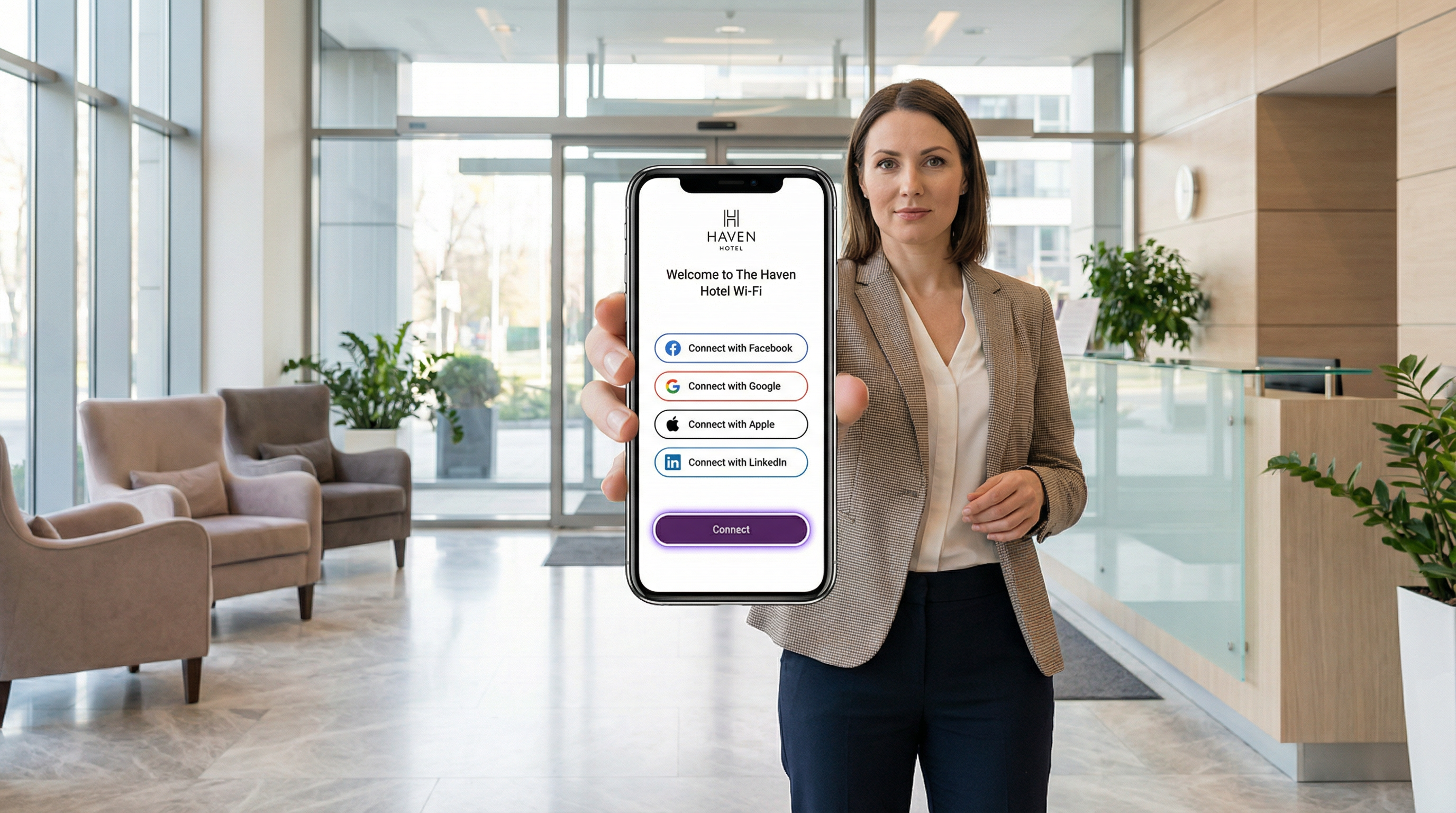
Il social login per il WiFi consente agli operatori delle strutture di sostituire l'accesso anonimo tramite click-through con un'autenticazione verificata, convertendo ogni connessione al Guest WiFi in un asset di dati di prima parte. Integrando OAuth 2.0 con Facebook, Google, Apple ID o LinkedIn, le organizzazioni nei settori dell'ospitalità, del retail, degli eventi e nel settore pubblico possono acquisire profili ospite verificati — nome, email, attributi demografici e, nel caso di LinkedIn, contesto professionale — nel momento stesso dell'accesso alla rete.
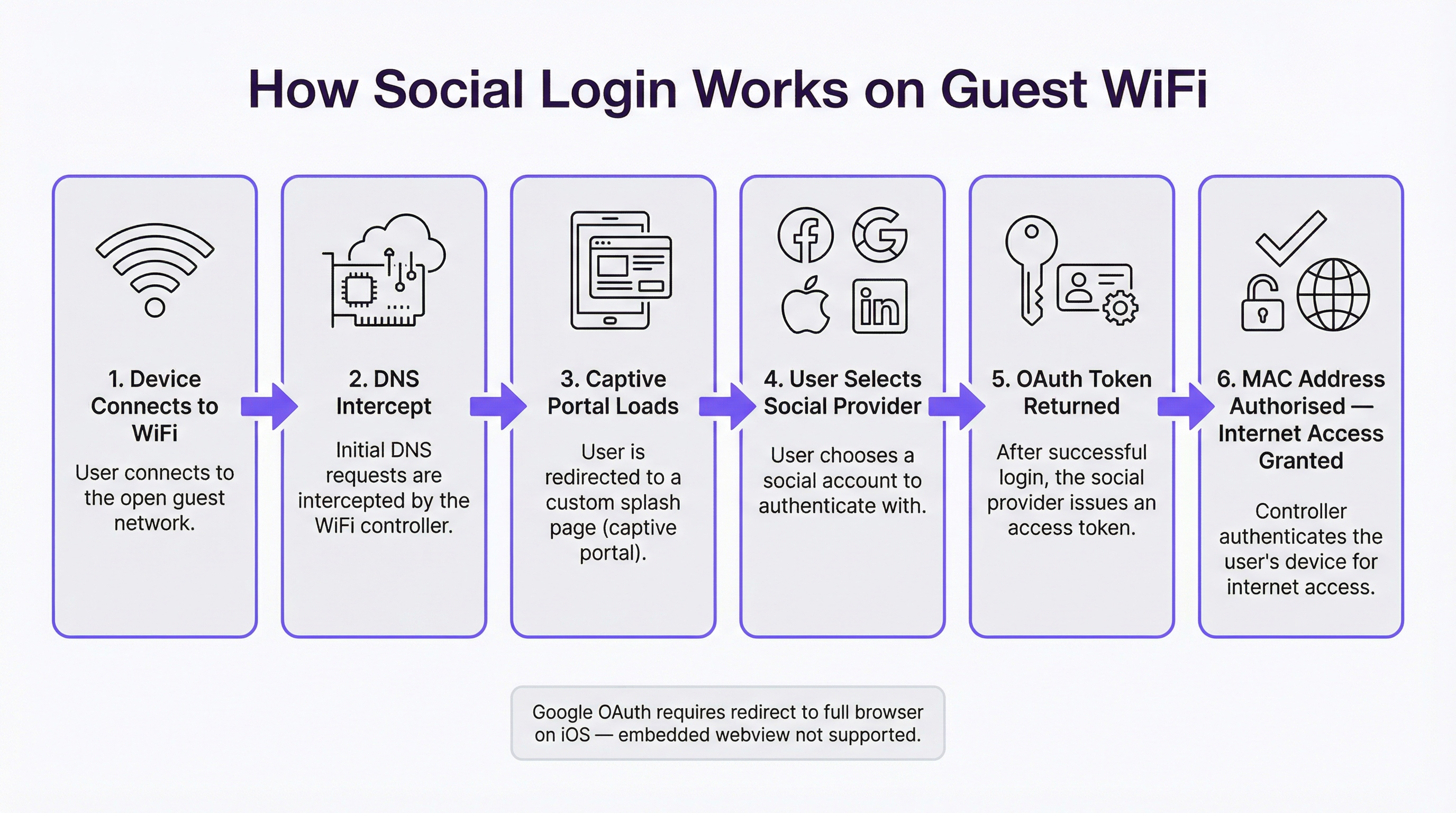
L'architettura tecnica è lineare: un Captive Portal intercetta la richiesta DNS iniziale dell'ospite, presenta una splash page personalizzata e avvia un Authorization Code Flow OAuth con l'identity provider selezionato. L'access token risultante viene utilizzato per recuperare i dati del profilo, che vengono memorizzati associandoli all'indirizzo MAC dell'ospite prima di concedere l'accesso alla rete. L'intero flusso si completa in tre-otto secondi in condizioni normali.
Tuttavia, i vincoli specifici delle piattaforme — in particolare il divieto di Google sull'uso di OAuth nelle webview integrate, che influisce direttamente sul comportamento del Captive Portal su iOS — richiedono decisioni ingegneristiche ponderate prima del go-live. La conformità al GDPR, gli obblighi di minimizzazione dei dati e l'applicazione delle policy di conservazione non sono negoziabili per qualsiasi implementazione nel Regno Unito o nell'UE. Questa guida fornisce al tuo team gli strumenti per scegliere la piattaforma giusta, implementarla correttamente e operare entro i limiti normativi.
Approfondimento Tecnico
L'Authorization Code Flow di OAuth 2.0 nel contesto di un Captive Portal
OAuth 2.0 è un framework di autorizzazione aperto definito nella RFC 6749 che consente a un'applicazione di terze parti — in questo caso, il tuo Captive Portal — di ottenere un accesso limitato all'account di un utente su una piattaforma social, senza richiedere la condivisione della password. Per le implementazioni di Guest WiFi, il flusso rilevante è l'Authorization Code Flow (a volte chiamato flusso OAuth a tre vie), che rappresenta la variante più sicura e quella richiesta da tutte e quattro le piattaforme principali.
Il flusso procede come segue. Quando un ospite si connette all'SSID del WiFi, il sistema operativo del suo dispositivo invia una richiesta di probe — in genere una HTTP GET a un URL noto come captive.apple.com o connectivitycheck.gstatic.com — per determinare se è disponibile l'accesso a Internet. Il controller di rete intercetta questa richiesta tramite DNS hijacking o reindirizzamento HTTP e restituisce invece la splash page del Captive Portal. Il dispositivo dell'ospite visualizza questa pagina, in un mini-browser dedicato Captive Network Assistant (CNA) su iOS e macOS, oppure nel browser di sistema su Android.
Quando l'ospite seleziona un provider di social login, il portale genera una richiesta di autorizzazione contenente il client_id dell'applicazione, gli scopes richiesti (permessi sui dati), un redirect_uri che punta all'endpoint di callback del portale e un parametro state per la protezione CSRF. L'ospite viene reindirizzato all'endpoint di autorizzazione dell'identity provider — ad esempio, accounts.google.com/o/oauth2/v2/auth. Il provider autentica l'utente (utilizzando il cookie di sessione esistente se ha già effettuato l'accesso, o richiedendo le credenziali in caso contrario), presenta una schermata di consenso che elenca i permessi richiesti e, previa approvazione, reindirizza l'utente all'URI di callback del portale con un authorisation code di breve durata.
Il componente lato server del portale effettua quindi una richiesta POST back-channel all'endpoint del token del provider, scambiando il codice di autorizzazione con un access token e un ID token (quest'ultimo è un JSON Web Token contenente i claim del profilo dell'utente). Il portale chiama l'endpoint API userinfo del provider utilizzando l'access token per recuperare i dati del profilo dell'ospite, crea o aggiorna un record ospite nel proprio database e infine istruisce il controller di rete ad aggiungere l'indirizzo MAC dell'ospite all'elenco dei client autorizzati. L'accesso a Internet viene concesso.
Analisi dei Dati Piattaforma per Piattaforma
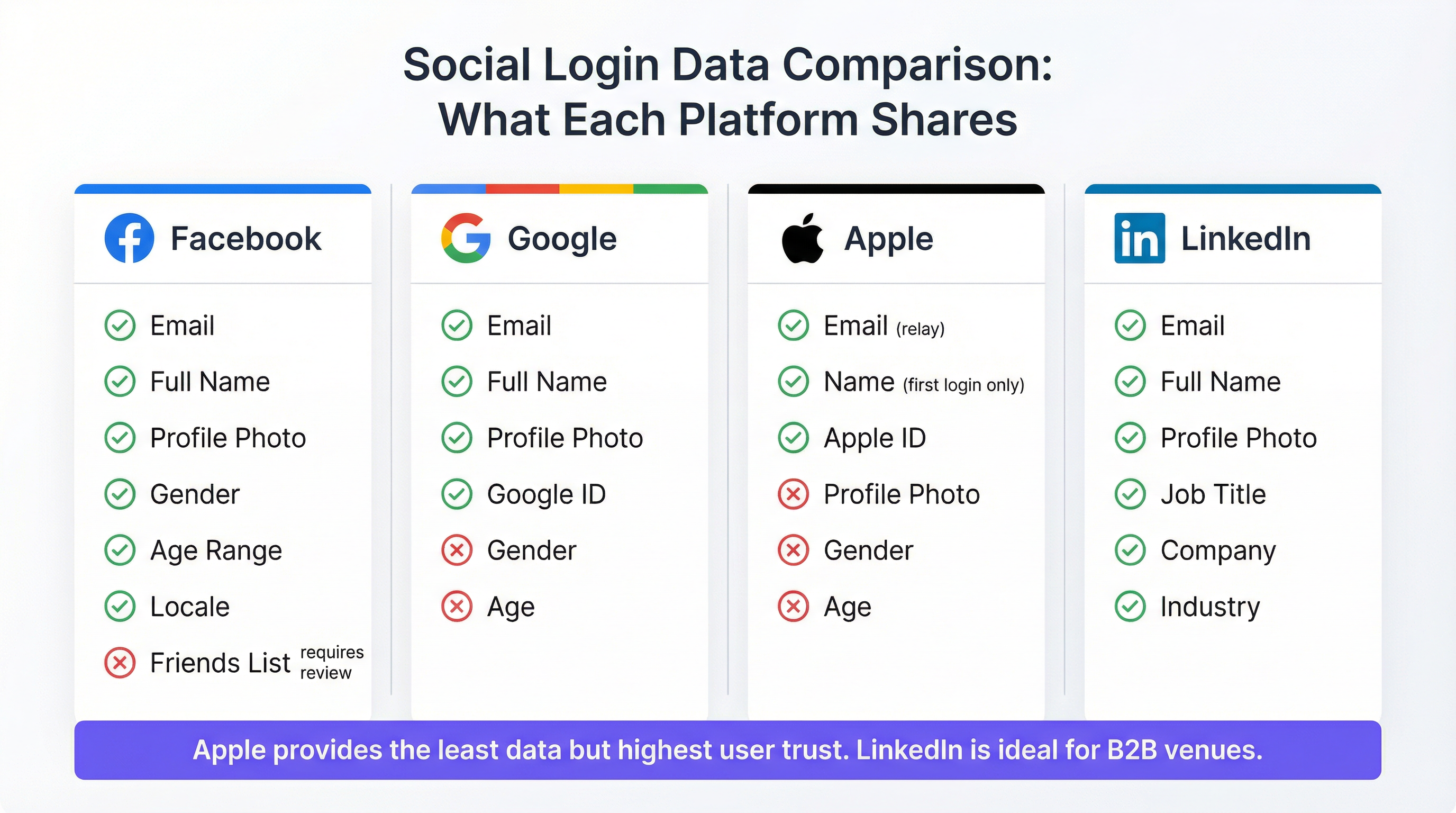
I dati disponibili attraverso l'implementazione OAuth di ciascuna piattaforma variano notevolmente e queste differenze hanno implicazioni dirette per la strategia di marketing e le capacità di analisi.
Facebook rimane l'opzione più ricca di dati per le implementazioni in strutture consumer. Gli scope standard public_profile ed email forniscono nome, indirizzo email, foto del profilo, ID utente Facebook, sesso, fascia d'età e lingua senza richiedere un'ulteriore revisione dell'app. I permessi estesi — come la lista degli amici o i dati dettagliati sulla posizione — richiedono il processo formale di revisione dell'app di Facebook e vengono concessi raramente per i casi d'uso WiFi. È importante notare che Facebook ha deprecato il suo prodotto dedicato "Facebook WiFi" nel 2023; le integrazioni attuali utilizzano il flusso OAuth standard della Graph API. I permessi dell'API di Facebook sono stati progressivamente limitati dal 2018 in risposta all'incidente di Cambridge Analytica, e gli operatori dovrebbero consultare la guida ai permessi aggiornata su developers.facebook.com prima di definire l'ambito della propria integrazione.
Google fornisce email, nome completo, foto del profilo e un ID Google univoco tramite gli scope standard openid, email e profile. Sesso, età e posizione non sono disponibili tramite gli scope standard. Il vincolo principale di Google per le implementazioni di Captive Portal è la sua policy sulle webview integrate, in vigore da settembre 2021: Google non elabora le richieste OAuth provenienti da componenti browser integrati come WKWebView su iOS o Android WebView. Poiché il Captive Network Assistant di Apple utilizza una webview integrata per visualizzare il Captive Portal, l'autenticazione Google fallirà su iOS a meno che il portale non reindirizzi esplicitamente l'utente ad aprire Safari. Questo aspetto è discusso in dettaglio nella sezione Risoluzione dei Problemi.
Apple ID (Accedi con Apple) è l'opzione che tutela maggiormente la privacy. Fornisce il nome e l'indirizzo email dell'utente, con due avvertenze fondamentali. Il nome dell'utente viene trasmesso solo alla prima autenticazione; i login successivi non ricondividono i dati del nome, richiedendo al portale di conservare il nome dal login iniziale. Apple offre inoltre agli utenti l'opzione di nascondere il proprio indirizzo email reale, sostituendolo con un indirizzo di inoltro univoco nel formato [stringa-casuale]@privaterelay.appleid.com. Le email inviate a questo indirizzo di inoltro vengono recapitate nella casella di posta reale dell'utente, rendendolo funzionale per le comunicazioni di marketing, ma impedisce l'incrocio con altre fonti di dati. Apple non fornisce foto del profilo, sesso, età o dati sulla posizione. Apple impone che qualsiasi applicazione che offra il social login di terze parti debba offrire anche Accedi con Apple, rendendolo un requisito di conformità per qualsiasi portale che includa altre opzioni social.
LinkedIn è l'opzione strategicamente più differenziata per i contesti di strutture professionali. L'implementazione OpenID Connect di LinkedIn fornisce email, nome completo, foto del profilo, qualifica professionale, nome dell'azienda e settore industriale. Questi dati sul contesto professionale non sono disponibili da nessun altro provider di social login e sono particolarmente preziosi per centri congressi, spazi di co-working, business lounge aeroportuali e strutture per meeting ed eventi negli hotel. L'API v2 di LinkedIn limita l'accesso ai campi estesi del profilo senza un accordo di partnership formale, ma i campi disponibili tramite gli scope standard openid, profile ed email sono sufficienti per la maggior parte dei casi d'uso di analisi delle strutture.
| Piattaforma | Nome | Foto | Sesso | Fascia d'Età | Dati Professionali | Compatibile con CNA iOS | |
|---|---|---|---|---|---|---|---|
| Sì | Sì | Sì | Sì | Sì | No | Sì | |
| Sì | Sì | Sì | No | No | No | No — richiede reindirizzamento a Safari | |
| Apple ID | Sì (inoltro) | Solo primo login | No | No | No | No | Sì |
| Sì | Sì | Sì | No | No | Qualifica, azienda, settore | Sì |
Considerazioni sull'Architettura di Rete
Il social login per il WiFi opera a livello applicativo (Layer 7) ed è architettonicamente indipendente dal livello di sicurezza wireless. Gli SSID guest che implementano il social login utilizzano in genere WPA3-SAE (Simultaneous Authentication of Equals) o WPA2-PSK per la crittografia over-the-air, con il Captive Portal che gestisce la verifica dell'identità a livello applicativo. Questo si distingue dal controllo degli accessi di rete basato su porta IEEE 802.1X, che è il framework appropriato per le reti aziendali e del personale e opera al Layer 2.
L'architettura di rete consigliata separa il traffico guest e aziendale a livello di SSID, con l'SSID guest instradato attraverso una VLAN dedicata verso un punto di breakout Internet. Il controller del Captive Portal — che sia ospitato in cloud (come con la piattaforma Purple) o on-premises — si posiziona in linea o in un percorso di reindirizzamento, intercettando il traffico non autenticato e rilasciandolo una volta completato il flusso OAuth. L'autorizzazione dell'indirizzo MAC è il meccanismo standard per concedere l'accesso post-autenticazione; le policy sulla durata della sessione e sulla larghezza di banda vengono applicate a livello di controller.
Per le strutture con più access point distribuiti su un'ampia proprietà — un hotel con 200 camere, una catena di retail con 50 filiali o uno stadio con copertura distribuita — un'architettura gestita in cloud è fortemente preferibile ai controller on-premises, sia per la scalabilità operativa che per l'aggregazione centralizzata dei dati degli ospiti.
Guida all'Implementazione
Checklist Pre-Implementazione
Prima di configurare il social login sul tuo Guest WiFi, devono essere soddisfatti i seguenti prerequisiti. Ogni piattaforma social richiede un'applicazione sviluppatore registrata: un'App Facebook (tramite developers.facebook.com), un progetto Google Cloud con credenziali OAuth 2.0 (tramite console.cloud.google.com), un account Apple Developer con la funzionalità Accedi con Apple abilitata e un'applicazione LinkedIn Developer (tramite developer.linkedin.com). Ogni registrazione dell'applicazione richiede un URI di reindirizzamento verificato che corrisponda all'endpoint di callback del tuo Captive Portal — questo URI deve utilizzare HTTPS.
La tua piattaforma Captive Portal deve supportare i flussi lato server OAuth 2.0. I flussi lato client (impliciti) sono deprecati da tutti i principali provider e non devono essere utilizzati. Conferma che la tua piattaforma memorizzi il parametro state di OAuth e lo convalidi al momento del callback per prevenire attacchi CSRF.
Una Valutazione d'Impatto sulla Protezione dei Dati (DPIA) dovrebbe essere completata prima del go-live per qualsiasi implementazione che raccolga dati personali di residenti nell'UE o nel Regno Unito, in particolare laddove i dati verranno utilizzati per la profilazione di marketing. La tua informativa sulla privacy deve essere aggiornata per riflettere la raccolta dei dati tramite social login, gli identity provider coinvolti e le finalità per cui i dati verranno utilizzati.
Implementazione Passo-Passo
Il processo di implementazione segue uno schema coerente indipendentemente dai provider social che stai abilitando. Inizia registrando la tua applicazione nella console per sviluppatori di ciascun provider e ottenendo il client ID e il client secret. Configura queste credenziali nella tua piattaforma Captive Portal — nel caso di Purple, questo viene fatto attraverso l'interfaccia di configurazione del portale, che gestisce il flusso OAuth lato server.
Successivamente, configura la splash page del tuo portale per presentare le opzioni di social login appropriate per il tuo tipo di struttura. Per l'ospitalità consumer, Facebook e Google sono le opzioni con il tasso di conversione più alto; aggiungi Apple ID per massimizzare la copertura degli utenti iOS; aggiungi LinkedIn per le strutture professionali. Assicurati che sia sempre disponibile un metodo di autenticazione di riserva — registrazione via email o accettazione dei termini tramite click-through.
Per l'autenticazione Google in particolare, implementa il rilevamento del CNA di iOS. Il Captive Network Assistant su iOS invia una stringa user agent distintiva. Quando questo user agent viene rilevato, il portale dovrebbe presentare un prompt "Tocca qui per aprire in Safari" piuttosto che tentare di renderizzare il flusso OAuth di Google in linea. Questo singolo passaggio di implementazione previene la modalità di errore più comune nelle implementazioni di social WiFi.
Configura l'acquisizione del consenso GDPR. La schermata di consenso deve presentare l'informativa sulla privacy, identificare ciascun provider social come fonte di dati e ottenere un opt-in esplicito per qualsiasi uso dei dati a fini di marketing. L'accesso al WiFi stesso non deve essere condizionato al consenso per il marketing — i due elementi devono essere separabili. Implementa un registro di audit dei consensi per registrare il timestamp, l'indirizzo IP e le scelte di consenso per ogni ospite.
Infine, definisci e configura la tua policy di conservazione dei dati. Imposta l'eliminazione automatizzata o l'anonimizzazione dei record degli ospiti in base all'orizzonte di conservazione definito — in genere 12 mesi per gli ospiti di passaggio nelle strutture ricettive, fino a 24 mesi per i membri dei programmi fedeltà.
Best Practice
Le seguenti raccomandazioni riflettono le pratiche standard del settore per le implementazioni enterprise di Guest WiFi e si basano sui requisiti del GDPR del Regno Unito, sui principi della segmentazione di rete IEEE 802.1X e sulle realtà operative delle proprietà multi-sito.
Offri sempre più provider di social login. Un portale con un singolo provider crea attriti inutili ed esclude gli ospiti che hanno disattivato o non utilizzano quella piattaforma. Le ricerche dimostrano costantemente che offrire da tre a quattro opzioni massimizza la conversione dei login senza sovraccaricare gli utenti. La combinazione di Facebook, Google, Apple ID e un modulo email di riserva copre la stragrande maggioranza dei profili dei dispositivi degli ospiti.
Isola il traffico guest e aziendale a livello di SSID. Il Guest WiFi — indipendentemente dal metodo di autenticazione — deve trovarsi su un SSID e una VLAN separati dall'infrastruttura aziendale. Il social login non fornisce le garanzie di sicurezza dell'autenticazione basata su certificati 802.1X; è un meccanismo di identità e acquisizione dati, non un controllo di sicurezza della rete.
Implementa HTTPS in tutto il flusso del Captive Portal. Tutte le pagine del portale, i reindirizzamenti OAuth e gli endpoint di callback devono utilizzare TLS. I Captive Portal HTTP sono deprecati e attiveranno avvisi di sicurezza del browser sui dispositivi moderni. Ottieni un certificato valido da una CA attendibile per il dominio del tuo portale.
Applica rigorosamente la minimizzazione dei dati. Richiedi solo gli scope OAuth per i quali hai uno scopo specifico e documentato. Se la tua piattaforma di analisi non utilizza i dati sul sesso, non richiedere lo scope gender a Facebook. La raccolta di dati non necessari aumenta il rischio di conformità senza aggiungere valore aziendale.
Effettua test su dispositivi iOS fisici utilizzando il Captive Network Assistant. I test basati su browser non replicano l'ambiente CNA. Prima del go-live, connetti un iPhone fisico alla rete di test e verifica che ogni opzione di social login venga completata con successo tramite il popup del CNA, non tramite Safari aperto manualmente.
Monitora i tassi di conversione dei login per provider. Un'implementazione ben strumentata traccia quale provider social utilizza ciascun ospite, il tasso di completamento per il flusso OAuth di ciascun provider e i punti di abbandono. Questi dati identificano problemi specifici della piattaforma (come il problema di Google su iOS) e informano le decisioni su quali provider dare priorità nell'interfaccia utente del portale.
Risoluzione dei Problemi e Mitigazione dei Rischi
Errore OAuth di Google su iOS
Questo è il problema riscontrato più di frequente nelle implementazioni di social WiFi. Sintomi: gli ospiti su iPhone selezionano "Connetti con Google" e ricevono un messaggio di errore, una schermata vuota o vengono riportati al portale senza completare l'autenticazione. Causa principale: la policy sulle webview integrate di Google, in vigore da settembre 2021, blocca le richieste OAuth dal componente WKWebView utilizzato dal Captive Network Assistant di Apple.
Risoluzione: Implementa il rilevamento dello user agent sul Captive Portal. Quando viene rilevato lo user agent del CNA (identificabile dalla stringa CaptiveNetworkSupport o dall'assenza degli identificatori standard di Safari), sostituisci il pulsante OAuth di Google in linea con un prompt che indirizza l'utente ad aprire il portale in Safari. L'URL da aprire dovrebbe essere l'URL completo del portale, che Safari caricherà come una pagina web standard in cui l'OAuth di Google funziona normalmente. Alcune piattaforme di portali gestiscono questo aspetto automaticamente; verifica con il tuo fornitore.
L'Inoltro Email di Apple Causa Errori di Corrispondenza nel CRM
Sintomi: I record degli ospiti creati tramite il login con Apple ID non possono essere abbinati ai record CRM esistenti o ai database dei programmi fedeltà. Causa principale: l'inoltro email di Apple genera un indirizzo univoco per applicazione, che non corrisponde all'indirizzo email reale dell'ospite memorizzato in altri sistemi.
Risoluzione: Accetta l'indirizzo di inoltro come identificatore canonico per gli utenti Apple ID. Non tentare di risolvere l'indirizzo di inoltro nell'email reale — Apple non fornisce un meccanismo per farlo e tentare di aggirarlo viola i termini di servizio di Apple. Per l'integrazione con il programma fedeltà, invita gli utenti Apple ID a collegare manualmente il proprio account fedeltà dopo essersi connessi al WiFi.
Invalidazione del Consenso GDPR
Sintomi: Una richiesta di accesso da parte dell'interessato o un audit normativo rivela che il consenso al marketing è stato raggruppato con il consenso all'accesso al WiFi, o che l'informativa sulla privacy non è stata presentata prima della raccolta dei dati. Rischio: Azione esecutiva ai sensi dell'Articolo 83 del GDPR del Regno Unito, con sanzioni fino a 17,5 milioni di sterline o il 4% del fatturato annuo globale.
Risoluzione: Verifica il tuo flusso di acquisizione del consenso. L'accesso al WiFi e l'opt-in per il marketing devono essere presentati come scelte separate e selezionabili in modo indipendente. L'informativa sulla privacy deve apparire prima che l'ospite invii il proprio social login — non dopo. Implementa una piattaforma di gestione del consenso o assicurati che gli strumenti di consenso integrati del tuo fornitore di Captive Portal soddisfino questi requisiti.
Randomizzazione dell'Indirizzo MAC
Sintomi: Gli ospiti di ritorno non vengono riconosciuti come visitatori di ritorno; i dati della sessione appaiono frammentati. Causa principale: iOS 14 e versioni successive, Android 10 e versioni successive e Windows 10 implementano tutti la randomizzazione dell'indirizzo MAC per impostazione predefinita, generando un nuovo indirizzo MAC pseudo-casuale per ogni associazione alla rete WiFi.
Risoluzione: Utilizza l'identificatore utente derivato da OAuth (Facebook ID, Google ID, Apple ID o LinkedIn ID) come identificatore principale dell'ospite anziché l'indirizzo MAC. L'indirizzo MAC dovrebbe essere utilizzato solo per l'autorizzazione di rete della sessione corrente, non come identificatore persistente. Assicurati che la tua piattaforma Captive Portal utilizzi il social ID come chiave primaria per i record degli ospiti.
ROI e Impatto Aziendale
Misurare il Successo
Il business case per il social login nel WiFi si basa su tre driver di valore: acquisizione di dati di prima parte, qualità dell'esperienza dell'ospite ed efficienza operativa. Ognuno può essere misurato con KPI specifici.
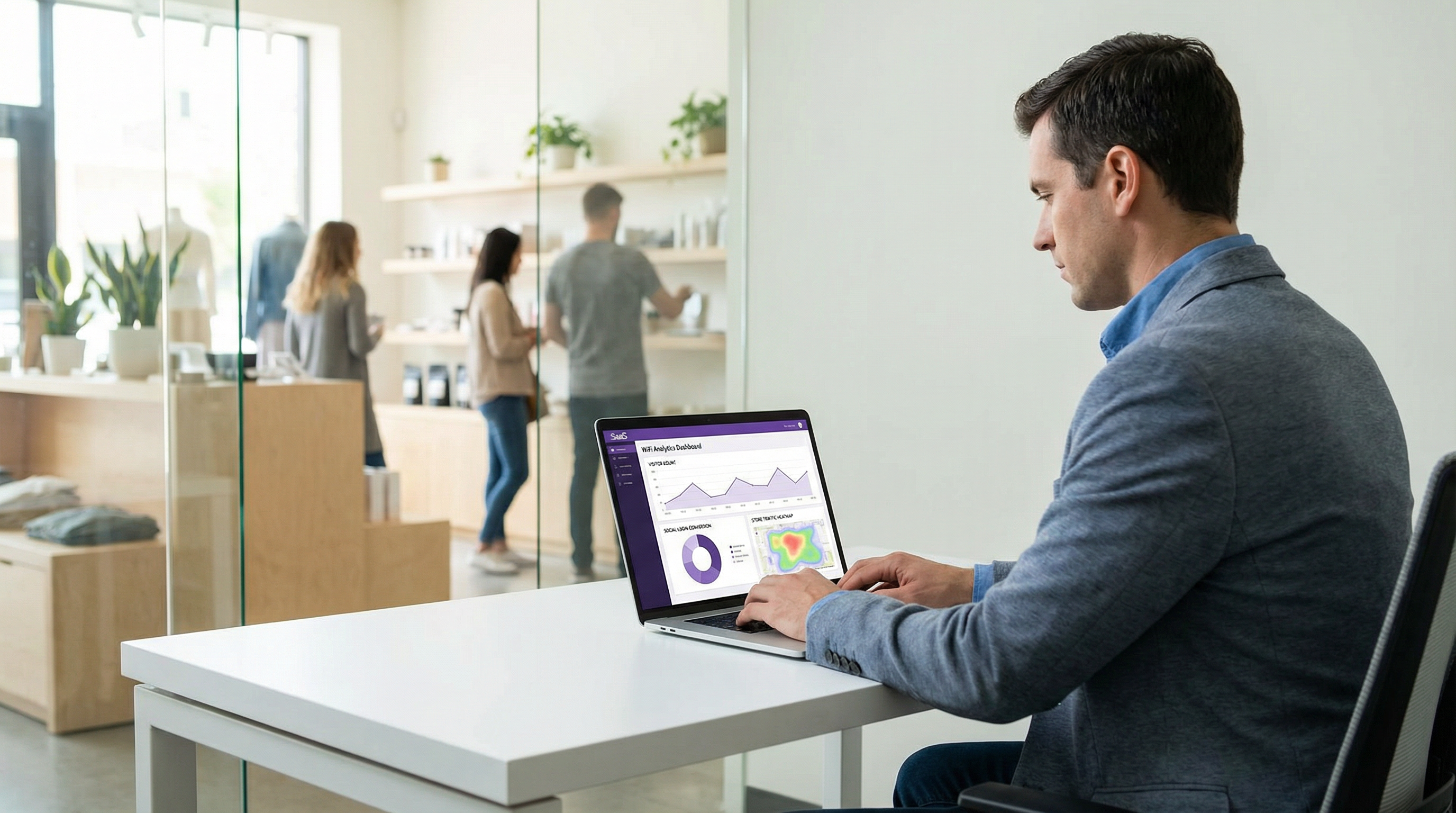
L'acquisizione di dati di prima parte è misurata dal tasso di contatti verificati — la percentuale di sessioni WiFi che si traducono in un indirizzo email verificato e in un record di profilo. Il social login supera costantemente la registrazione tramite compilazione di moduli (che soffre di alti tassi di indirizzi email falsi o digitati in modo errato) e supera significativamente l'accesso tramite click-through (che non acquisisce alcun dato). Un'implementazione ben eseguita di social WiFi in un ambiente di ospitalità raggiunge in genere un tasso di contatti verificati compreso tra il 55 e il 70 percento delle sessioni WiFi totali.
La qualità dell'esperienza dell'ospite è misurata dal tempo di completamento del login (obiettivo: meno di 10 secondi per gli utenti di ritorno con una sessione social attiva) e dal tasso di abbandono (obiettivo: inferiore al 15 percento). Un abbandono superiore al 20 percento indica in genere un problema di UX — troppi passaggi, un provider malfunzionante o un flusso di consenso eccessivamente complesso.
I guadagni in termini di efficienza operativa includono l'eliminazione dei costi di gestione dei codici voucher, la riduzione delle richieste di supporto WiFi alla reception e l'automazione dell'acquisizione dei dati degli ospiti che altrimenti richiederebbe la raccolta manuale di moduli.
Caso Studio 1: Business Hotel da 200 Camere, Centro di Londra
Un business hotel da 200 camere nel centro di Londra ha sostituito un sistema Guest WiFi con codice voucher con il social login (Facebook, Google, Apple ID) integrato con la piattaforma Purple. Prima dell'implementazione, l'hotel acquisiva i dati di contatto degli ospiti da circa il 12 percento delle sessioni WiFi — ospiti che fornivano volontariamente la propria email al momento del check-in. Dopo l'implementazione, il tasso di contatti verificati ha raggiunto il 61 percento delle sessioni WiFi entro il primo trimestre. Il team di marketing dell'hotel ha utilizzato i dati di prima parte risultanti per creare campagne email segmentate, ottenendo un tasso di apertura del 34 percento sulle comunicazioni post-soggiorno — significativamente al di sopra della media del settore dell'ospitalità del 21 percento. L'opzione LinkedIn è stata successivamente aggiunta per le strutture per meeting ed eventi dell'hotel, fornendo dati demografici professionali sui delegati delle conferenze che hanno informato una negoziazione di successo per una tariffa corporate con un'importante società di servizi finanziari.
Caso Studio 2: Catena Retail da 45 Negozi, Regno Unito
Una catena retail mid-market del Regno Unito con 45 negozi ha implementato il social WiFi in tutta la sua proprietà, offrendo il login tramite Facebook e Google con un'opzione email di riserva. L'obiettivo principale era costruire un asset di dati dei clienti di prima parte come copertura contro la deprecazione dei cookie di terze parti. Entro sei mesi, la catena aveva acquisito 280.000 profili ospite verificati, di cui il 67 percento aveva optato per le comunicazioni di marketing. I dati del social login — in particolare la fascia d'età e la lingua da Facebook — hanno permesso al team di marketing di identificare che una percentuale significativa di utenti WiFi in-store nel nord dell'Inghilterra rientrava nella fascia d'età 45-54 anni, un target demografico sottorappresentato nel programma fedeltà esistente della catena. Questa intuizione ha informato direttamente una campagna di acquisizione mirata. Il team IT della catena ha notato che il problema di Google su iOS interessava circa l'8 percento dei tentativi di login con Google prima dell'implementazione del reindirizzamento a Safari — una cifra scesa a meno dell'1 percento dopo la correzione.
Risultati Attesi per Tipo di Struttura
| Tipo di Struttura | Provider Consigliati | Tasso di Contatti Verificati Atteso | Valore Primario dei Dati |
|---|---|---|---|
| Hotel (leisure) | Facebook, Google, Apple ID | 55–65% | Email, fascia d'età, lingua |
| Hotel (business) | Google, LinkedIn, Apple ID | 45–55% | Profilo professionale, azienda |
| Retail | Facebook, Google | 50–60% | Fascia d'età, sesso, lingua |
| Centro congressi | LinkedIn, Google | 40–50% | Qualifica, azienda, settore |
| Stadio / eventi | Facebook, Google, Apple ID | 60–70% | Fascia d'età, sesso |
| Settore pubblico | Email di riserva come primaria | 30–40% | Solo email (conservativo per GDPR) |
Questa guida è prodotta da Purple, la piattaforma di WiFi intelligence enterprise. Per supporto all'implementazione, documentazione della piattaforma e strumenti di conformità al GDPR, visita purple.ai.
Key Terms & Definitions
OAuth 2.0
An open authorisation framework (RFC 6749) that allows a third-party application to obtain limited access to a user's account on a social platform without requiring the user to share their password. In guest WiFi contexts, OAuth 2.0 is the protocol that enables the captive portal to retrieve a guest's profile data from Facebook, Google, Apple, or LinkedIn.
IT teams encounter OAuth 2.0 when configuring social login integrations. Understanding the Authorization Code Flow — specifically the distinction between the authorisation code, access token, and ID token — is essential for debugging authentication failures and for scoping the correct API permissions.
Captive Portal
A web page presented to a newly connected network user before they are granted full internet access. The captive portal intercepts the user's initial HTTP or DNS request and redirects it to a branded splash page where authentication or terms acceptance occurs. In social WiFi deployments, the captive portal hosts the OAuth login flow.
Captive portals are the user-facing component of guest WiFi systems. IT teams are responsible for configuring the portal's authentication methods, branding, consent capture, and integration with the network controller for MAC address authorisation.
Captive Network Assistant (CNA)
The system component on iOS and macOS that automatically detects captive WiFi networks and presents the captive portal in a mini-browser popup. The CNA uses an embedded WKWebView component rather than the full Safari browser, which has significant implications for social login compatibility — specifically, Google OAuth will not function in the CNA due to Google's embedded webview policy.
The CNA is the source of the most common social WiFi compatibility issue: Google authentication failing on iPhones. IT teams must implement a Safari redirect mechanism to route Google OAuth flows out of the CNA and into the full Safari browser.
Authorization Code Flow
The OAuth 2.0 flow in which the identity provider returns a short-lived authorisation code to the client application, which the application then exchanges for an access token via a back-channel server-to-server request. This is the most secure OAuth flow and is required by all major social login providers for web-based applications.
IT teams should verify that their captive portal platform uses the Authorization Code Flow (not the deprecated Implicit Flow) for all social login integrations. The back-channel token exchange is a security requirement — it prevents access tokens from being exposed in browser history or server logs.
Access Token
A credential issued by an identity provider after a successful OAuth authorisation that allows the client application to access the user's data on the provider's API. Access tokens are short-lived (typically one hour) and scoped to specific permissions. In guest WiFi contexts, the access token is used to call the provider's userinfo endpoint to retrieve the guest's profile data.
IT teams encounter access tokens when debugging social login integrations. A common failure mode is attempting to use an expired access token — the portal should handle token expiry gracefully by re-initiating the OAuth flow rather than presenting an error to the guest.
OAuth Scope
A parameter in an OAuth authorisation request that specifies which user data or API capabilities the application is requesting access to. For social login, scopes determine which profile fields are available. Examples include 'email' (email address), 'profile' (name and photo), and LinkedIn's 'r_liteprofile' (basic professional profile).
Scope selection is a GDPR data minimisation decision as well as a technical configuration choice. IT teams and data protection officers should jointly review the scopes requested for each social login integration and remove any scope for which there is no documented, specific business purpose.
MAC Address Authorisation
The mechanism by which a network controller grants internet access to a specific device after the captive portal authentication flow completes. The controller adds the device's MAC address to an authorised client list, allowing its traffic to pass through to the internet. Session duration and bandwidth policies are enforced at the MAC address level.
MAC address authorisation is the bridge between the application-layer OAuth flow and the network-layer access control. IT teams must understand that MAC address randomisation (default on iOS 14+, Android 10+, Windows 10+) means MAC addresses cannot be used as persistent guest identifiers — the OAuth-derived social ID must be used instead.
Apple Private Email Relay
A privacy feature of Sign in with Apple that allows users to hide their real email address from third-party applications. When enabled, Apple generates a unique relay address (in the format [random-string]@privaterelay.appleid.com) that forwards emails to the user's real inbox. The venue operator receives the relay address, not the user's real email.
IT teams and marketing managers must understand the email relay when planning CRM integration for Apple ID logins. The relay address is functional for email marketing but cannot be matched against existing customer records. Loyalty programme integration for Apple ID users requires a manual linking step.
IEEE 802.1X
An IEEE standard for port-based network access control that provides an authentication framework for devices wishing to attach to a LAN or WLAN. 802.1X uses the Extensible Authentication Protocol (EAP) and typically integrates with a RADIUS server for credential verification. It is the appropriate authentication standard for corporate and staff networks.
IT teams must clearly distinguish between 802.1X (for corporate/staff networks) and social login via captive portal (for guest networks). These are complementary, not competing, technologies. A correctly architected venue network uses 802.1X on the corporate SSID and social login on a separate, isolated guest SSID.
GDPR Data Minimisation
The principle under UK GDPR Article 5(1)(c) that personal data collected must be adequate, relevant, and limited to what is necessary for the specified purpose. In the context of social WiFi, this means requesting only the OAuth scopes for which there is a documented, specific business purpose — not requesting all available data by default.
Data minimisation is both a legal obligation and a risk management principle. IT teams and DPOs should conduct a joint review of social login scopes at deployment and annually thereafter, removing any scope that cannot be justified against a specific, documented data use case.
Case Studies
A 200-room business hotel in London wants to deploy social WiFi login to capture guest data for its CRM and post-stay marketing campaigns. The hotel's guest mix is approximately 60% corporate travellers and 40% leisure guests. The IT manager is concerned about iOS compatibility and GDPR compliance. Which social login providers should be configured, and what are the key implementation steps?
Given the mixed corporate and leisure guest profile, the recommended provider configuration is Google (primary for corporate guests), Facebook (primary for leisure guests), Apple ID (mandatory for iOS conversion), and LinkedIn (for meeting and events facilities). The implementation proceeds as follows.
Step 1 — Developer Application Registration. Register a Google Cloud project at console.cloud.google.com with OAuth 2.0 credentials, a Facebook App at developers.facebook.com with the public_profile and email permissions, an Apple Developer account with Sign in with Apple enabled, and a LinkedIn Developer application at developer.linkedin.com. All redirect URIs must use HTTPS and match the captive portal callback endpoint exactly.
Step 2 — Portal Configuration. Configure the captive portal (Purple or equivalent) with the client ID and client secret for each provider. Set the portal to present all four social options plus an email fallback. Configure the portal's splash page with the hotel's branding.
Step 3 — Google iOS Fix. Implement CNA user agent detection. When the portal detects the iOS Captive Network Assistant, replace the inline Google OAuth button with a 'Tap to open in Safari' prompt. Verify this works on a physical iPhone before go-live.
Step 4 — GDPR Consent Flow. Configure the consent screen to present: (a) a link to the privacy notice, (b) acceptance of terms of use as a condition of WiFi access, and (c) a separate, optional checkbox for marketing communications. Ensure these are not bundled. Implement a consent audit log.
Step 5 — Data Retention. Set automated deletion of guest records after 12 months for transient guests. For guests who opt into the loyalty programme, extend to 24 months with a re-consent prompt at 12 months.
Step 6 — Testing. Test each provider on iOS (via CNA), Android, Windows, and macOS. Verify that the Google Safari redirect works. Verify that Apple ID relay emails are stored correctly. Verify that LinkedIn job title and company fields are populated.
A national retail chain with 80 stores is planning to deploy social WiFi across its estate. The marketing director wants to use the data to build audience segments for targeted advertising and to measure footfall attribution. The legal team has flagged GDPR concerns. The IT team is worried about the operational overhead of managing social login credentials across 80 sites. How should this deployment be architected?
Architecture Decision — Cloud-Managed Platform. For an 80-site estate, a cloud-managed captive portal platform is essential. On-premises controllers at each site create an unmanageable operational overhead and prevent centralised data aggregation. The social login credentials (client IDs and secrets) are configured once at the platform level and applied across all sites — the IT team does not manage per-site OAuth configuration.
Provider Selection. For a consumer retail environment, Facebook and Google are the primary providers, with an email fallback. Apple ID should be included to maximise iOS conversion. LinkedIn is not recommended for a general retail context.
Data Architecture. The platform must use the OAuth-derived social ID (not MAC address) as the primary guest identifier to handle MAC address randomisation. Guest records should include: social ID, email, name, age range (Facebook), gender (Facebook), locale, first visit date, visit frequency, and store location. This data structure supports the footfall attribution and audience segmentation use cases.
GDPR Compliance. The legal team's concerns are valid. Key mitigations: (1) Consent must be granular — WiFi access separate from marketing opt-in. (2) A Data Protection Impact Assessment must be completed before go-live, given the scale of data collection and the profiling use case. (3) The privacy notice must explicitly describe the use of data for advertising audience creation. (4) If data is shared with advertising platforms (Meta Custom Audiences, Google Customer Match), this must be disclosed and a Data Processing Agreement must be in place with each platform. (5) A 12-month retention period with automated deletion should be enforced.
Operational Model. Designate a central IT owner for the social login developer applications. Rotate client secrets annually. Monitor login conversion rates centrally via the platform dashboard. Implement alerting for provider-level failures (e.g., a Facebook API outage affecting all 80 sites simultaneously).
A major conference centre hosts 150 events per year, with attendees ranging from technology professionals to government officials. The venue director wants to use guest WiFi data to demonstrate audience demographics to potential event sponsors. The IT manager is evaluating whether LinkedIn login is worth the additional implementation complexity. What is the recommendation?
Recommendation: Yes, implement LinkedIn login as the primary option for this venue.
The conference centre use case is precisely the scenario for which LinkedIn login provides unique value unavailable from any other social provider. The ability to capture job title, company name, and industry sector transforms the WiFi analytics from a basic visitor count into a professional audience profile — the kind of data that event sponsors pay significant premiums to access.
Implementation Approach. Register a LinkedIn Developer application and enable the Sign In with LinkedIn using OpenID Connect product. Request the openid, profile, and email scopes. Configure the captive portal to present LinkedIn as the featured option (top of the list) for conference events, with Google and email fallback as secondary options. Consider event-specific portal configurations — for a technology conference, LinkedIn is the obvious primary; for a consumer trade show, Facebook may be more appropriate.
Data Use for Sponsorship. Aggregate the LinkedIn-derived data (job titles, companies, industries) into anonymised audience reports. A report showing that 68% of WiFi users at a financial services conference were C-suite or VP-level professionals from FTSE 350 companies is a compelling sponsorship proposition. Ensure that these reports use aggregated, anonymised data — individual profiles must not be shared with sponsors without explicit consent from each guest.
GDPR Note. The purpose of collecting professional data for sponsorship reporting must be disclosed in the privacy notice. This is a legitimate interest use case, but it requires a Legitimate Interests Assessment (LIA) or explicit consent, depending on how the data is used. Consult your DPO before implementing sponsorship reporting.
Scenario Analysis
Q1. Your venue is a 500-seat conference centre that hosts 120 events per year. The commercial director wants to offer event sponsors an audience demographics report based on WiFi login data. The IT manager has configured Facebook and Google social login. The data protection officer has raised concerns. What changes, if any, should be made to the social login configuration and the data use policy?
💡 Hint:Consider both the provider selection (is LinkedIn missing?) and the GDPR implications of using guest data for commercial sponsorship reporting. What lawful basis applies, and what must be disclosed to guests?
Show Recommended Approach
Three changes are required. First, add LinkedIn as a social login option — it is the only provider that supplies professional demographic data (job title, company, industry), which is the data of highest value for sponsorship audience reports. Facebook and Google do not provide this. Second, update the privacy notice on the captive portal to explicitly disclose that anonymised, aggregated audience data may be used for commercial reporting purposes. This is a new processing purpose that was not covered by the original privacy notice and must be disclosed before data collection. Third, conduct a Legitimate Interests Assessment (LIA) for the sponsorship reporting use case, or obtain explicit consent from guests for this purpose. Using guest data for commercial benefit beyond the direct provision of WiFi service requires a clearly documented lawful basis under UK GDPR Article 6. The DPO's concerns are valid and must be resolved before the sponsorship reporting programme launches. Ensure that all sponsorship reports use aggregated, anonymised data — individual guest profiles must never be shared with sponsors.
Q2. A hotel's IT team reports that approximately 15% of guests who attempt to log in with Google on their iPhones are failing to complete authentication and abandoning the WiFi login entirely. The portal is otherwise functioning correctly. What is the most likely root cause, and what is the remediation?
💡 Hint:Consider the interaction between Google's OAuth policy (enforced since September 2021) and Apple's Captive Network Assistant. What browser environment does the CNA use, and why does this cause Google OAuth to fail?
Show Recommended Approach
The root cause is Google's embedded webview policy. Apple's Captive Network Assistant (CNA) — the system that automatically displays the captive portal popup when an iPhone joins a new WiFi network — uses a WKWebView embedded browser component, not the full Safari browser. Since September 2021, Google has blocked OAuth 2.0 authorisation requests originating from embedded webviews, returning a 'disallowed_useragent' error. The remediation is to implement iOS CNA detection on the captive portal. When the portal detects the CNA user agent string, it should replace the inline Google OAuth button with a prompt directing the user to open the portal URL in Safari (e.g., 'Tap here to sign in with Google in Safari'). Once the user opens the portal in Safari, the Google OAuth flow completes normally. This fix should be tested on a physical iPhone using the CNA — not by opening the portal URL in Safari directly — before deployment. After implementing the fix, the 15% abandonment rate for Google on iOS should drop to below 2%.
Q3. A retail chain's marketing team wants to use social WiFi data to create Custom Audience segments on Meta's advertising platform (Facebook Ads). The IT manager needs to assess the technical and compliance requirements. What are the key considerations?
💡 Hint:Consider the data flow: guest data is collected at the captive portal, then shared with Meta for audience creation. What GDPR obligations apply to this data sharing? What technical mechanism is used to create Custom Audiences from email data?
Show Recommended Approach
There are three key considerations. First, the lawful basis for data sharing with Meta must be established. Collecting an email address for WiFi access does not automatically authorise sharing that email with Meta for advertising purposes. The privacy notice must explicitly disclose that email addresses may be shared with Meta for Custom Audience creation, and either explicit consent or a documented Legitimate Interests Assessment is required. Second, a Data Processing Agreement must be in place with Meta, as Meta is acting as a data processor when creating Custom Audiences from the retailer's first-party data. Third, the technical mechanism for Custom Audience creation is hashed email matching — the retailer uploads a hashed (SHA-256) list of guest email addresses to Meta's Ads Manager, and Meta matches these against its user database to create the audience segment. The hashing provides a degree of privacy protection but does not remove the GDPR obligation to disclose the data sharing. Apple ID relay email addresses will not match against Meta's database (since the relay address is not the user's Facebook-registered email), so Apple ID users will be excluded from Custom Audience matching — this is an expected limitation, not a technical error.
Q4. A venue operator is planning a new guest WiFi deployment and is deciding between offering only Facebook login (simplest to implement) versus a multi-provider setup (Facebook, Google, Apple ID, email fallback). The IT manager argues that Facebook alone is sufficient since it has the highest adoption. What is the counter-argument, and what is the recommended approach?
💡 Hint:Consider the trends in Facebook account ownership, the iOS user base in UK hospitality, and the GDPR implications of a single-provider approach that excludes guests who do not have Facebook accounts.
Show Recommended Approach
The counter-argument rests on three points. First, Facebook account ownership has declined significantly among younger demographics and among privacy-conscious users — a meaningful proportion of guests, particularly in business travel contexts, will not have an active Facebook account or will be unwilling to use it for WiFi authentication. A single-provider portal that offers only Facebook will generate a higher abandonment rate than a multi-provider portal. Second, iPhone users represent a significant proportion of guests in UK hospitality — typically 50 to 60 percent of devices. Apple's App Store guidelines require that any application offering third-party social login must also offer Sign in with Apple. While this rule applies to native apps rather than web-based portals, offering Apple ID alongside other providers maximises conversion among iOS users who prefer the native Apple authentication experience. Third, from a GDPR perspective, a portal that offers only Facebook as a social login option and no fallback creates a situation where guests who do not have Facebook accounts cannot access the WiFi without providing personal data — this may be challenged as coercive data collection. The recommended approach is a multi-provider portal with at minimum Facebook, Google, Apple ID, and an email/click-through fallback. The marginal implementation cost of adding Google and Apple ID to an existing Facebook integration is low, and the conversion rate improvement justifies it.
Key Takeaways
- ✓Social login WiFi uses the OAuth 2.0 Authorization Code Flow to authenticate guests via Facebook, Google, Apple ID, or LinkedIn, capturing verified profile data and authorising network access via MAC address — the full flow completes in three to eight seconds.
- ✓Google OAuth is incompatible with Apple's Captive Network Assistant (iOS embedded webview) due to Google's embedded webview policy enforced since September 2021 — a Safari redirect must be implemented for Google login to function on iPhones.
- ✓Each platform provides a distinct data profile: Facebook offers the richest demographic data (age range, gender, locale); Google provides clean identity data; Apple ID maximises user trust but provides minimal data and may relay email addresses; LinkedIn uniquely provides professional context (job title, company, industry) and is the preferred option for B2B venues.
- ✓Under UK GDPR, WiFi access and marketing consent must be presented as separate, independently selectable choices — bundling them invalidates the consent and exposes the operator to enforcement risk under Article 83.
- ✓MAC address randomisation (default on iOS 14+, Android 10+, Windows 10+) makes MAC addresses unsuitable as persistent guest identifiers — the OAuth-derived social ID must be used as the primary key in the guest data model.
- ✓Always offer multiple social login providers plus a non-social fallback (email registration or click-through) — a single-provider portal creates unnecessary friction and may exclude a significant proportion of guests.
- ✓The business case for social WiFi rests on first-party data acquisition: a well-deployed implementation in hospitality achieves a verified contact rate of 55 to 70 percent of WiFi sessions, significantly outperforming voucher codes or click-through access.




